remote start FORD F150 2014 12.G User Guide
[x] Cancel search | Manufacturer: FORD, Model Year: 2014, Model line: F150, Model: FORD F150 2014 12.GPages: 472, PDF Size: 4.62 MB
Page 94 of 472
CREATE MYKEY, MYKEY SETUP or
CLEAR MYKEY
For more information, See Creating a
MyKey (page 53).
RESET FOR REMOTE START (if
equipped)
LANGUAGE = ENGLISH, SPANISH or
FRENCH
Allows you to choose which language the
message center will display in.
Waiting four seconds or pressing the
RESET button cycles the message center
through each of the language choices.
Press the RESET button to set the
language choice.
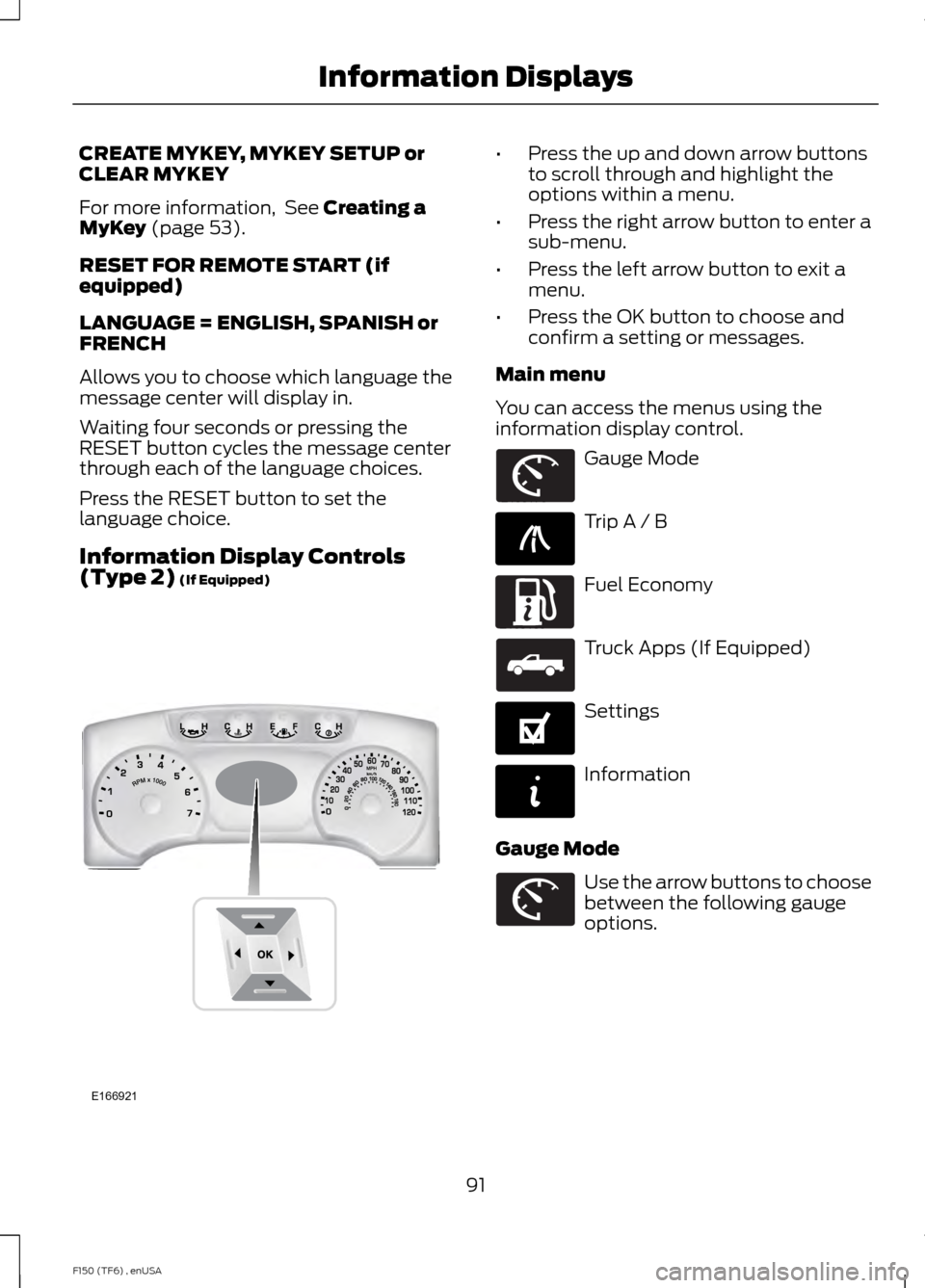
Information Display Controls
(Type 2)
(If Equipped) •
Press the up and down arrow buttons
to scroll through and highlight the
options within a menu.
• Press the right arrow button to enter a
sub-menu.
• Press the left arrow button to exit a
menu.
• Press the OK button to choose and
confirm a setting or messages.
Main menu
You can access the menus using the
information display control. Gauge Mode
Trip A / B
Fuel Economy
Truck Apps (If Equipped)
Settings
Information
Gauge Mode Use the arrow buttons to choose
between the following gauge
options.
91
F150 (TF6) , enUSA Information DisplaysE166921 E163179 E138660 E163180 E163181 E144641 E144642 E163179
Page 99 of 472
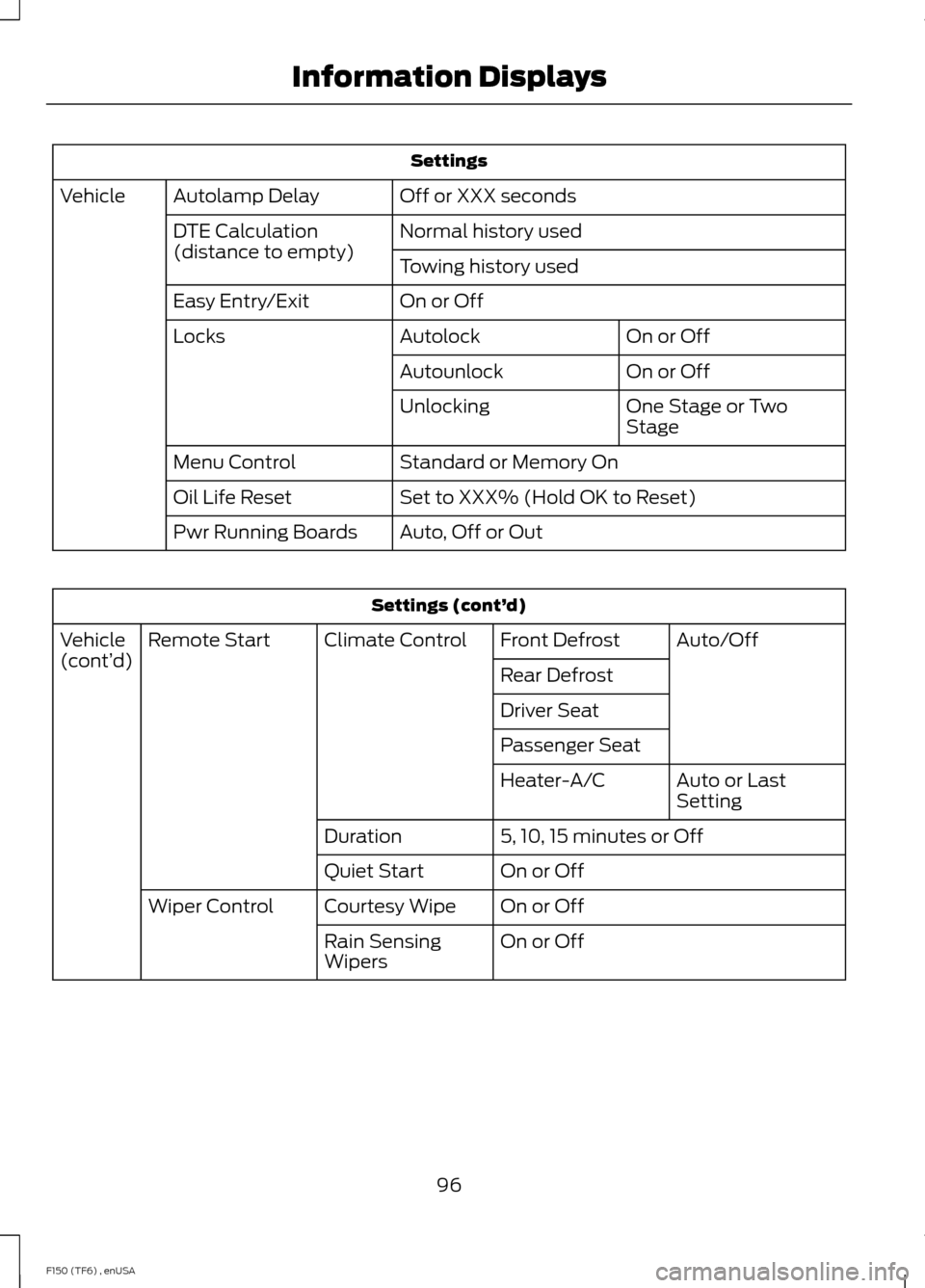
Settings
Off or XXX seconds
Autolamp Delay
Vehicle
Normal history used
DTE Calculation
(distance to empty)
Towing history used
On or Off
Easy Entry/Exit
On or Off
Autolock
Locks
On or Off
Autounlock
One Stage or Two
Stage
Unlocking
Standard or Memory On
Menu Control
Set to XXX% (Hold OK to Reset)
Oil Life Reset
Auto, Off or Out
Pwr Running Boards Settings (cont’
d)
Auto/Off
Front Defrost
Climate Control
Remote Start
Vehicle
(cont’ d)
Rear Defrost
Driver Seat
Passenger Seat
Auto or Last
Setting
Heater-A/C
5, 10, 15 minutes or Off
Duration
On or Off
Quiet Start
On or Off
Courtesy Wipe
Wiper Control
On or Off
Rain Sensing
Wipers
96
F150 (TF6) , enUSA Information Displays
Page 104 of 472
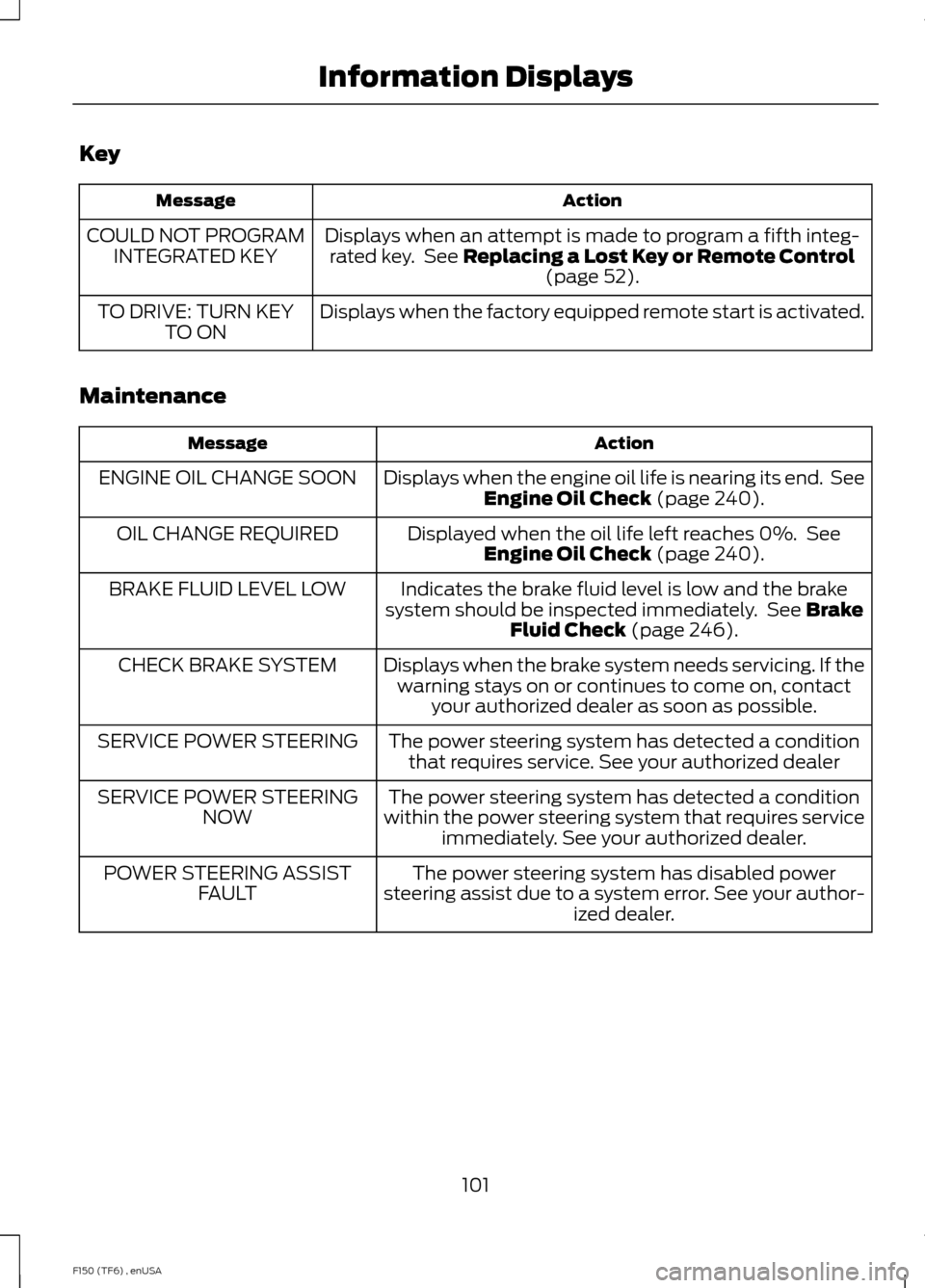
Key
Action
Message
Displays when an attempt is made to program a fifth integ-rated key. See Replacing a Lost Key or Remote Control (page 52).
COULD NOT PROGRAM
INTEGRATED KEY
Displays when the factory equipped remote start is activated.
TO DRIVE: TURN KEY
TO ON
Maintenance Action
Message
Displays when the engine oil life is nearing its end. SeeEngine Oil Check
(page 240).
ENGINE OIL CHANGE SOON
Displayed when the oil life left reaches 0%. SeeEngine Oil Check
(page 240).
OIL CHANGE REQUIRED
Indicates the brake fluid level is low and the brake
system should be inspected immediately. See
Brake
Fluid Check (page 246).
BRAKE FLUID LEVEL LOW
Displays when the brake system needs servicing. If thewarning stays on or continues to come on, contact your authorized dealer as soon as possible.
CHECK BRAKE SYSTEM
The power steering system has detected a conditionthat requires service. See your authorized dealer
SERVICE POWER STEERING
The power steering system has detected a condition
within the power steering system that requires service immediately. See your authorized dealer.
SERVICE POWER STEERING
NOW
The power steering system has disabled power
steering assist due to a system error. See your author- ized dealer.
POWER STEERING ASSIST
FAULT
101
F150 (TF6) , enUSA Information Displays
Page 116 of 472
Do not use razor blades or other sharp
objects to clean the inside of the rear
window or to remove decals from the
inside of the rear window. This may
cause damage to the heated grid lines.
Your warranty does not cover this
damage.
Heated Exterior Mirror (If Equipped)
Note: Do not remove ice from the mirrors
with a scraper or attempt to readjust the
mirror glass that has frozen in place. These
actions could cause damage to the glass
and mirrors.
Note: Do not clean the housing or glass of
any mirror with harsh abrasives, fuel or other
petroleum-based cleaning products.
The heated mirrors remove ice, mist and
fog when you switch on the heated rear
window.
REMOTE START
(IF EQUIPPED)
The remote start feature allows you to
pre-condition the interior of your vehicle.
The climate control system works to
achieve comfort according to your previous
settings.
Note: You cannot adjust the system during
remote start operation.
Turn the ignition on to return the system
to its previous settings. You can now make
adjustments normally, but you need to turn
certain vehicle-dependent features back
on, such as:
• Heated seats.
• Cooled seats.
• Heated steering wheel.
• Heated mirrors.
• Heated rear window. You can adjust the default remote start
settings using the information display
controls. See
Information Displays
(page 87).
Automatic Settings
In hot weather, the system is set to 72°F
(22°C). The cooled seats are set to high
(if available, and selected to AUTO in the
information display).
In moderate weather, the system either
heats or cools (based on previous
settings). The rear defroster, heated
mirrors and heated seats do not
automatically switch on.
In cold weather, the system is set to 72°F
(22°C). The heated seats are set to high
(if available, and selected to AUTO in the
information display). The rear defroster
and heated mirrors automatically switch
on.
113
F150 (TF6) , enUSA Climate Control
Page 221 of 472
Jump Starting
1.
Start the engine of the booster vehicle
and rev the engine moderately, or press
the accelerator gently to keep your
engine speed between 2000 and 3000
rpms, as shown in your tachometer.
2. Start the engine of the disabled vehicle.
3. Once the disabled vehicle has been started, run both vehicle engines for an
additional three minutes before
disconnecting the jumper cables.
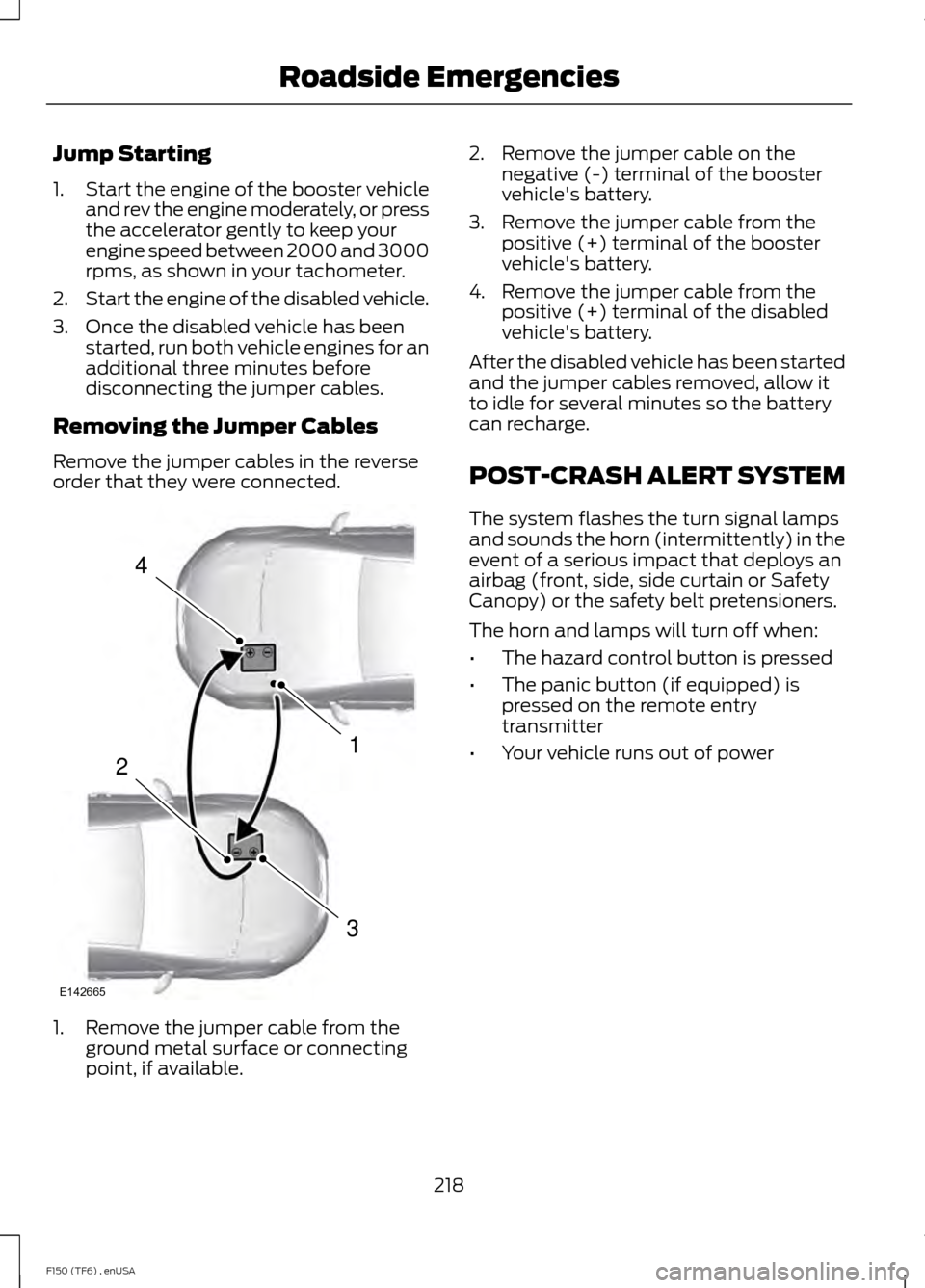
Removing the Jumper Cables
Remove the jumper cables in the reverse
order that they were connected. 1. Remove the jumper cable from the
ground metal surface or connecting
point, if available. 2. Remove the jumper cable on the
negative (-) terminal of the booster
vehicle's battery.
3. Remove the jumper cable from the positive (+) terminal of the booster
vehicle's battery.
4. Remove the jumper cable from the positive (+) terminal of the disabled
vehicle's battery.
After the disabled vehicle has been started
and the jumper cables removed, allow it
to idle for several minutes so the battery
can recharge.
POST-CRASH ALERT SYSTEM
The system flashes the turn signal lamps
and sounds the horn (intermittently) in the
event of a serious impact that deploys an
airbag (front, side, side curtain or Safety
Canopy) or the safety belt pretensioners.
The horn and lamps will turn off when:
• The hazard control button is pressed
• The panic button (if equipped) is
pressed on the remote entry
transmitter
• Your vehicle runs out of power
218
F150 (TF6) , enUSA Roadside Emergencies4
1
3
2
E142665
Page 422 of 472
For a complete listing of the accessories
that are available for your vehicle, please
contact an authorized dealer or visit our
online store at
www.Accessories.Ford.com (United
States only).
Ford Motor Company will repair or replace
any properly authorized dealer-installed
Ford Custom Accessories found to be
defective in factory-supplied materials or
workmanship during the warranty period,
as well as any component damaged by the
defective accessories.
Ford Motor Company will warrant your
vehicle through the warranty that provides
the greatest benefit:
• 24 months, unlimited mileage.
• The remainder of your new vehicle
limited warranty.
Contact an authorized dealer for details
and a copy of the warranty.
Exterior style
• Hood deflector.
• Chrome exhaust tips.
• Side window deflectors.
• Front grilles.
• Running boards.
• Step bars.
• Splash guards.
• Lamps
• Custom graphics*.
Interior style
• Ambient lighting.
• Floor mats.
• Electrochromatic
compass/temperature interior mirrors.
• Sliding rear windows.
• Leather-trimmed interior seating*. Lifestyle
•
Smoker's package.
• Bedliners and bedmats.
• Bed side step.
• Towing mirrors.
• Bed extender.
• Tonneau covers*.
• Interior cargo organization and
management.
• Racks and carriers*.
• Truck bed camping tent*.
• Sportliner cargo liner*.
• Rear-seat entertainment*.
• Trailer brake controller.
• Hitch balls and towbars.
• Truck bed cargo organization and
management.
• Trailer hitches, wiring harnesses and
accessories.
Peace of mind
• Keyless entry keypad.
• Vehicle security systems.
• Protective seat covers*.
• Cable lock*.
• Locking gas plug for capless fuel
system.
• Bumper- and hitch-mounted parking
sensors*.
• Remote start.
• Wheel locks.
• Wheel well liners.
• Bed hooks*.
• Back-up alarm*.
• Tool or cargo boxes*.
• Speed/Cruise control.
• Vehicle cover.
419
F150 (TF6) , enUSA Accessories
Page 466 of 472
Information....................................................399
911 Assist.............................................................. 405
Alerts...................................................................... 405
Calendar............................................................... 405
Sirius Travel Link................................................ 402
SYNC Services (If Equipped, United States Only)................................................................. 400
Vehicle Health Report...................................... 407
Information Messages.................................98
4WD........................................................................\
105
AdvanceTrac® and Traction Control............98
Airbag....................................................................... 98
Alarm and Security............................................. 99
Battery and Charging System......................... 99
Doors and Locks................................................... 99
Drivetrain............................................................... 100
Engine..................................................................... 100
Fuel........................................................................\
.. 100
Key........................................................................\
..... 101
Maintenance......................................................... 101
MyKey®.................................................................. 102
Off Road................................................................ 103
Park Aid.................................................................. 102
Park Brake............................................................. 103
Tire Pressure Monitoring System.................104
Trailer...................................................................... 104
Installing Child Seats.....................................15 Child Seats............................................................... 15
Combining Safety Belt and LATCH Lower Anchors for Attaching Child Safety
Seats..................................................................... 22
Front Seat Tether Strap Attachment (Regular Cab)................................................... 23
Rear Seat Tether Strap Attachment (SuperCab and SuperCrew)....................... 23
Use of Inboard Lower Anchors from the Outboard Seating Positions (Center
Seating Use) ...................................................... 21
Using Lap and Shoulder Belts.......................... 16
Using Lap and Shoulder Belts (Front Center Seating Position).............................................. 18
Using Lower Anchors and Tethers for CHildren (LATCH)........................................... 20
Using Tether Straps............................................. 22
Instrument Cluster
.........................................81
Instrument Lighting Dimmer......................72 Interior Lamps
..................................................73
Front Row Map Lamps (if equipped)...........73
Rear Courtesy, Reading, Cargo Lamps (If
Equipped)........................................................... 74
Rear Dome, Courtesy Lamps (If Equipped)........................................................... 74
Rear Dome Lamp (If Equipped)..................... 73
Interior Mirror
....................................................78
Auto-Dimming Mirror.......................................... 79
Introduction.........................................................7
J
Jump Starting the Vehicle.........................216 Connecting the Jumper Cables...................... 217
Jump Starting....................................................... 218
Preparing Your Vehicle...................................... 217
Removing the Jumper Cables........................ 218
K
Keyless Entry
...................................................58
SECURICODE™ KEYLESS ENTRY
KEYPAD.............................................................. 58
Keys and Remote Controls.........................49
L
Lighting Control................................................71 Headlamp Flasher................................................. 71
High Beams.............................................................. 71
Lighting................................................................71
Limited Slip Differential
..............................161
Load Carrying.................................................179
Load Limit........................................................179
Special Loading Instructions for Owners of
Pick-up Trucks and Utility-type
Vehicles............................................................. 186
Vehicle Loading - with and without a Trailer.................................................................. 179
Locking and Unlocking
.................................57
Autolock and Autounlock.................................. 57
Battery Saver......................................................... 58
Illuminated Entry.................................................. 58
Power Door Locks................................................. 57
Remote Control..................................................... 57
Smart Unlocks....................................................... 57
Locks...................................................................57
463
F150 (TF6) , enUSA Index
Page 468 of 472
Power Windows..............................................75
Accessory Delay.................................................... 76
Bounce-Back.......................................................... 75
One-Touch Up or Down..................................... 75
Power Sliding Back Window............................ 76
Window Lock.......................................................... 76
R
Rear Axle...........................................................161
Rear Seat Armrest........................................123
Rear Seats
........................................................119
Folding up the Rear Seat Cushion (Super
Crew)................................................................... 119
Returning the Seat to the Seating Position............................................................... 119
Rear View Camera........................................173 Using the Rear View Camera System..........173
Rear View Camera See: Rear View Camera.................................... 173
Recommended Towing Weights............192 Calculating the Maximum Loaded Trailer
Weight for Your Vehicle.............................. 200
Refueling..........................................................142 Easy Fuel ™ Capless Fuel System................142
Remote Control
..............................................49
Car Finder................................................................ 50
Integrated Keyhead Transmitters .................49
Memory Feature................................................... 50
Remote Start ......................................................... 51
Replacing the Battery......................................... 49
Sounding a Panic Alarm..................................... 51
Remote Start
...................................................113
Automatic Settings............................................. 113
Removing a Headlamp
...............................251
Replacing Halogen Headlamp Bulbs (If
Equipped)......................................................... 251
Replacing HID Headlamp Bulbs (If Equipped)........................................................ 252
Repairing Minor Paint Damage
..............263
Replacement Parts Recommendation.........................................11
Collision Repairs..................................................... 11
Scheduled Maintenance and Mechanical Repairs................................................................... 11
Warranty on Replacement Parts..................... 12
Replacing a Lost Key or Remote Control.............................................................52 Reporting Safety Defects (Canada
Only)..............................................................224
Reporting Safety Defects (U.S. Only)
..............................................................223
Roadside Assistance...................................215 Vehicles Sold In Canada : Getting Roadside
Assistance........................................................ 215
Vehicles Sold In Canada : Using Roadside Assistance........................................................ 215
Vehicles Sold In The U.S.: Getting Roadside Assistance........................................................ 215
Vehicles Sold In The U.S. : Using Roadside Assistance........................................................ 215
Roadside Emergencies
...............................215
Running-In See: Breaking-In.................................................. 210
Running Out of Fuel
......................................141
Refilling With a Portable Fuel
Container........................................................... 141
S
Safety Belt Height Adjustment
.................34
Safety Belt Minder.........................................35
Belt-Minder™........................................................ 35
Safety Belts......................................................30 Principle of Operation........................................ 30
Safety Belt Warning Lamp and Indicator Chime..............................................................34
Conditions of operation..................................... 35
Safety Canopy ™
............................................46
Safety Precautions.......................................139
Satellite Radio
...............................................318
Satellite Radio Electronic Serial Number
(ESN)................................................................ 320
Satellite Radio Reception Factors...............319
SIRIUS® Satellite Radio Service................... 319
Troubleshooting................................................. 320
Scheduled Maintenance Record............451
Scheduled Maintenance..........................438
Seats
...................................................................114
Security...............................................................61
Settings...........................................................366 Clock....................................................................... 367
Display.................................................................... 367
Settings................................................................. 369
Sound.................................................................... 368
Vehicle................................................................... 368
465
F150 (TF6) , enUSA Index
Page 470 of 472
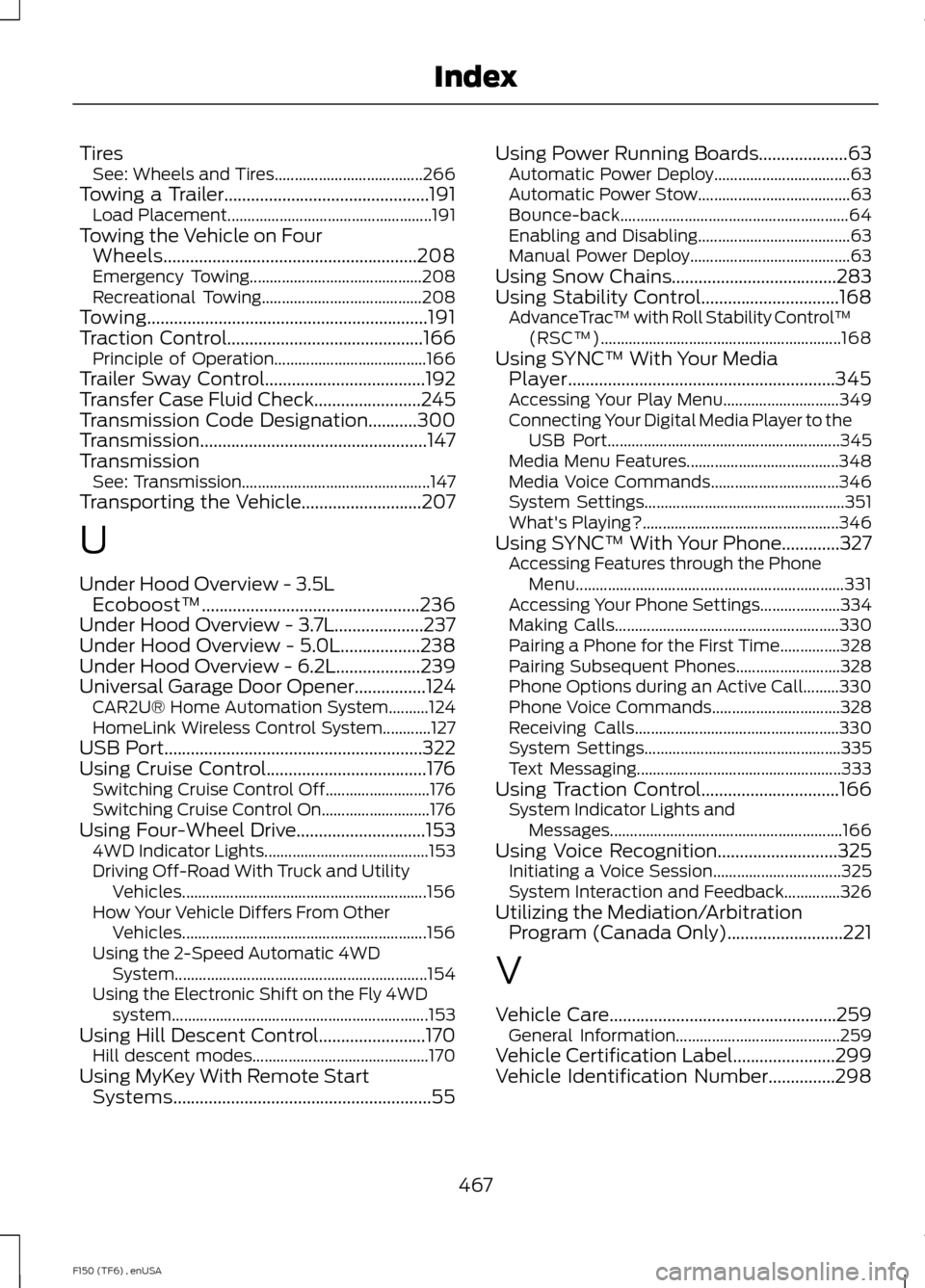
Tires
See: Wheels and Tires..................................... 266
Towing a Trailer..............................................191 Load Placement................................................... 191
Towing the Vehicle on Four Wheels.........................................................208
Emergency Towing........................................... 208
Recreational Towing........................................ 208
Towing...............................................................191
Traction Control............................................166
Principle of Operation...................................... 166
Trailer Sway Control....................................192
Transfer Case Fluid Check........................245
Transmission Code Designation...........300
Transmission ...................................................
147
Transmission See: Transmission............................................... 147
Transporting the Vehicle...........................207
U
Under Hood Overview - 3.5L Ecoboost™.................................................236
Under Hood Overview - 3.7L....................237
Under Hood Overview - 5.0L..................238
Under Hood Overview - 6.2L...................239
Universal Garage Door Opener................124 CAR2U® Home Automation System..........124
HomeLink Wireless Control System............127
USB Port
..........................................................322
Using Cruise Control....................................176 Switching Cruise Control Off.......................... 176
Switching Cruise Control On........................... 176
Using Four-Wheel Drive
.............................153
4WD Indicator Lights......................................... 153
Driving Off-Road With Truck and Utility Vehicles............................................................. 156
How Your Vehicle Differs From Other Vehicles............................................................. 156
Using the 2-Speed Automatic 4WD System............................................................... 154
Using the Electronic Shift on the Fly 4WD system................................................................ 153
Using Hill Descent Control........................170 Hill descent modes............................................ 170
Using MyKey With Remote Start Systems..........................................................55 Using Power Running Boards....................63
Automatic Power Deploy.................................. 63
Automatic Power Stow...................................... 63
Bounce-back......................................................... 64
Enabling and Disabling...................................... 63
Manual Power Deploy........................................ 63
Using Snow Chains
.....................................283
Using Stability Control...............................168 AdvanceTrac ™ with Roll Stability Control ™
(RSC™)............................................................ 168
Using SYNC™ With Your Media Player............................................................345
Accessing Your Play Menu............................. 349
Connecting Your Digital Media Player to the USB Port.......................................................... 345
Media Menu Features...................................... 348
Media Voice Commands................................ 346
System Settings.................................................. 351
What's Playing?................................................. 346
Using SYNC™ With Your Phone.............327 Accessing Features through the Phone
Menu................................................................... 331
Accessing Your Phone Settings.................... 334
Making Calls........................................................ 330
Pairing a Phone for the First Time...............328
Pairing Subsequent Phones.......................... 328
Phone Options during an Active Call.........330
Phone Voice Commands................................ 328
Receiving Calls................................................... 330
System Settings................................................. 335
Text Messaging................................................... 333
Using Traction Control...............................166 System Indicator Lights and
Messages.......................................................... 166
Using Voice Recognition...........................325 Initiating a Voice Session................................ 325
System Interaction and Feedback..............326
Utilizing the Mediation/Arbitration Program (Canada Only)..........................221
V
Vehicle Care...................................................259 General Information......................................... 259
Vehicle Certification Label.......................299
Vehicle Identification Number...............298
467
F150 (TF6) , enUSA Index