display FORD F150 2015 13.G Owner's Manual
[x] Cancel search | Manufacturer: FORD, Model Year: 2015, Model line: F150, Model: FORD F150 2015 13.GPages: 549, PDF Size: 5.97 MB
Page 103 of 549
Transmission Fluid Temperature
Gauge
Indicates transmission fluid temperature.
At normal operating temperature, the level
indicator will be in the normal range. If the
transmission fluid temperature exceeds
the normal range, stop the vehicle as soon
as safely possible and verify the airflow is
not restricted such as snow or debris
blocking airflow through the grill. Also,
higher than normal operating temperature
can be caused by special operation
conditions (i.e. snowplowing, towing or
off-road use). Refer to Special operating
conditions in the scheduled maintenance
information for instructions. Operating the
transmission for extended periods with the
gauge in the higher than normal area may
cause internal transmission damage. You
need to alter the severity of your driving
conditions to lower the transmission
temperature into the normal range. If the
gauge continues to show high
temperatures, see an authorized dealer.
Information Display
Odometer
Located in the bottom of the information
display. Registers the accumulated
distance your vehicle has traveled.
Compass
Displays the vehicle
’s heading direction.
Trip Computer
See General Information (page 105).
Vehicle Settings and Personalization
See
General Information (page 105). WARNING LAMPS AND
INDICATORS
The following warning lamps and
indicators will alert you to a vehicle
condition that may become serious. Some
lamps will illuminate when you start your
vehicle to make sure they work. If any
lamps remain on after starting your vehicle,
refer to the respective system warning
lamp for further information.
Note:
Some warning indicators appear in
the information display and function the
same as a warning lamp but do not display
when you start your vehicle.
Adaptive Cruise Control
(If Equipped) The speed control system
indicator light changes color to
indicate what mode the system
is in: See Using Adaptive Cruise Control
(page
214).
Anti-Lock Braking System If it illuminates when you are
driving, this indicates a
malfunction. You will continue
to have normal braking (without Anti-lock
braking system) unless the brake system
warning lamp is also illuminated. Have the
system checked by an authorized dealer.
Automatic High Beam
(If Equipped) Illuminates when this feature is
on. See Automatic High Beam
Control
(page 85).
Auto Start-stop
(If Equipped) It will illuminate to inform you
when the engine shuts down or
in conjunction with a message.
100
F-150 (), enUSA, First Printing Instrument ClusterE144524
Page 104 of 549
Battery
If it illuminates while driving, it
indicates a malfunction. Switch
off all unnecessary electrical
equipment and have the system checked
by an authorized dealer immediately.
Blind Spot Monitor (If Equipped) It will illuminate when you switch
this feature off or in conjunction
with a message. See Blind Spot
Information System
(page 225).
Brake System It will illuminate when you
engage the parking brake with
the ignition on.
If it illuminates when you are driving, check
that you do not have the parking brake
engaged. If you do not have the parking
brake engaged, this indicates low brake
fluid level or a brake system malfunction.
Have the system checked immediately by
an authorized dealer. WARNING
Driving your vehicle with the warning
lamp on is dangerous. A significant
decrease in braking performance
may occur. It will take you longer to stop
your vehicle. Have your vehicle checked by
your authorized dealer immediately. Driving
extended distances with the parking brake
engaged can cause brake failure and the
risk of personal injury. Check 4X4
(If Equipped)
Illuminates with the message
CHECK 4X4 when a four-wheel
drive fault is present. See Using
Four-Wheel Drive
(page 182). Cruise Control
(If Equipped) Illuminates gray or green when
you switch this feature on. See
Using Cruise Control
(page
213).
Direction Indicator Illuminates when the left or right
turn signal or the hazard warning
flasher is turned on. If the
indicators stay on or flash faster, check for
a burned out bulb.
Door Ajar Displays when the ignition is on
and any door is not completely
closed.
Electronic Locking Differential Illuminates when using the
electronic locking differential.
Electric Park Brake It will illuminate or flash when
the electric parking brake has a
malfunction. See
Electric
Parking Brake (page 193).
Engine Coolant Temperature Illuminates when the engine
coolant temperature is high.
Stop the vehicle as soon as
possible, switch off the engine and let cool.
See
Engine Coolant Check (page 303).
101
F-150 (), enUSA, First Printing Instrument Cluster E151262 E144522 E71340 E163170 E146190
Page 108 of 549
GENERAL INFORMATION
WARNING
Driving while distracted can result in
loss of vehicle control, crash and
injury. We strongly recommend that
you use extreme caution when using any
device that may take your focus off the
road. Your primary responsibility is the safe
operation of your vehicle. We recommend
against the use of any handheld device
while driving and encourage the use of
voice-operated systems when possible.
Make sure you are aware of all applicable
local laws that may affect the use of
electronic devices while driving. Various systems on your vehicle can be
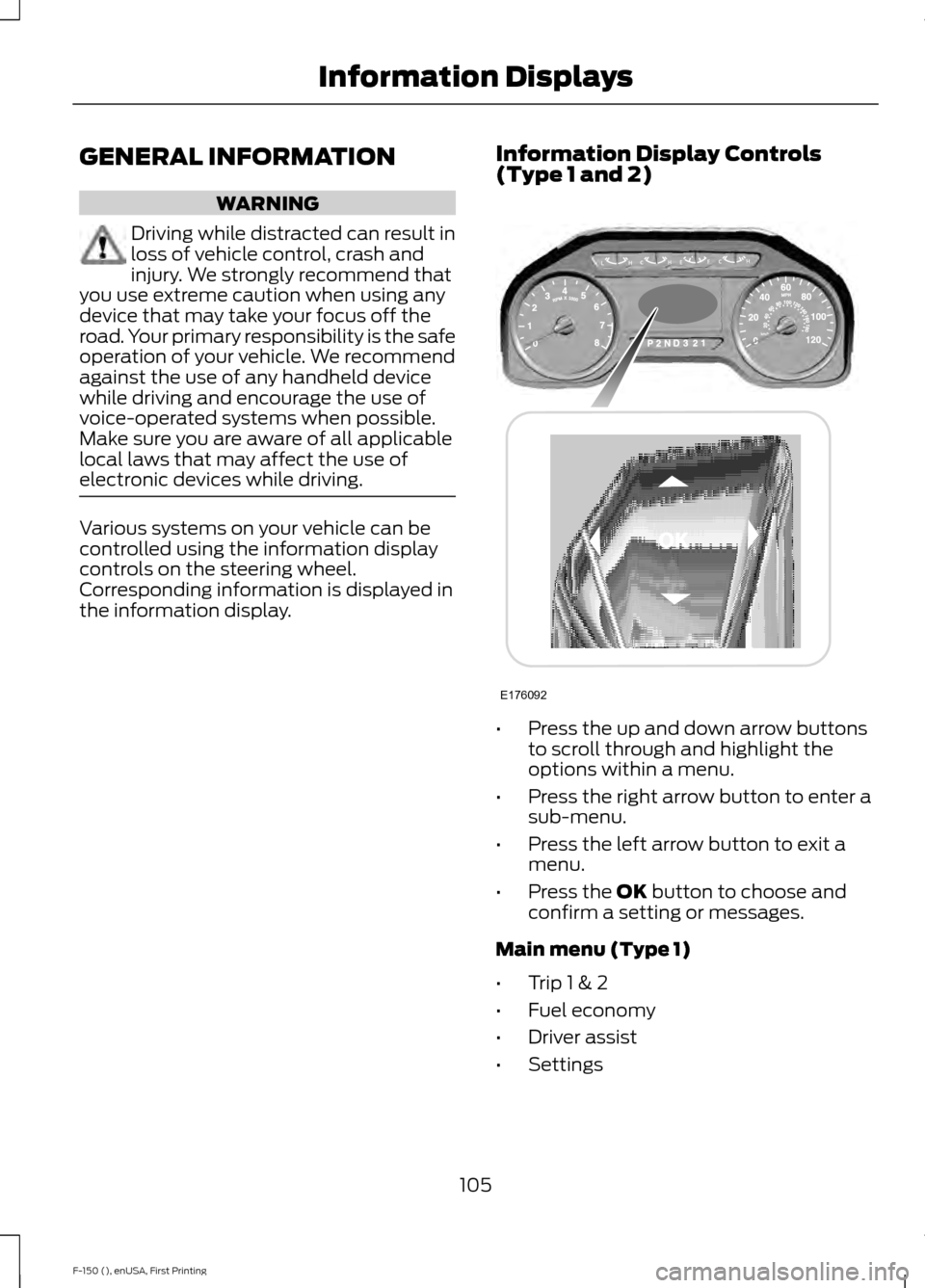
controlled using the information display
controls on the steering wheel.
Corresponding information is displayed in
the information display.
Information Display Controls
(Type 1 and 2) •
Press the up and down arrow buttons
to scroll through and highlight the
options within a menu.
• Press the right arrow button to enter a
sub-menu.
• Press the left arrow button to exit a
menu.
• Press the OK button to choose and
confirm a setting or messages.
Main menu (Type 1)
• Trip 1 & 2
• Fuel economy
• Driver assist
• Settings
105
F-150 (), enUSA, First Printing Information DisplaysE176092
Page 109 of 549
Note:
Some options may appear slightly
different or not at all if the items are
optional.
Trip 1 & 2
Note: Use the arrow buttons to choose between the following trip options. Trip 1 & 2
Digital Speed - Press OK for km/h
Trip Odometer
Trip Timer
Fuel Used
Average Fuel
• Digital Speed - Shows a digital display of your vehicle speed.
• Trip Odometer - Registers the mileage of individual journeys.
• Trip Timer - Registers the time of individual journeys.
• Fuel Used - Shows the amount of fuel used for a given trip.
• Average Fuel - Shows the average fuel economy for a given trip.
Note: Press and hold OK to reset the currently displayed trip information.
Fuel Economy
Note: Use the arrow buttons to choose the desired fuel economy display. Fuel economy
Distance to E
Instant Fuel Economy
Average Fuel Economy
Auto StartStop status
• Distance to E - Shows the approximate distance your vehicle can travel before running
out of fuel.
• Instant Fuel Economy - Shows your instantaneous fuel usage.
• Average Fuel Economy - Shows the average fuel usage based on time. Press and hold
OK to reset this value.
• Auto StartStop status - Shows the current status of the auto startstop system.
Note: You can reset your average fuel economy by pressing and holding the
OK button on
the left hand steering wheel controls.
106
F-150 (), enUSA, First Printing Information Displays
Page 110 of 549
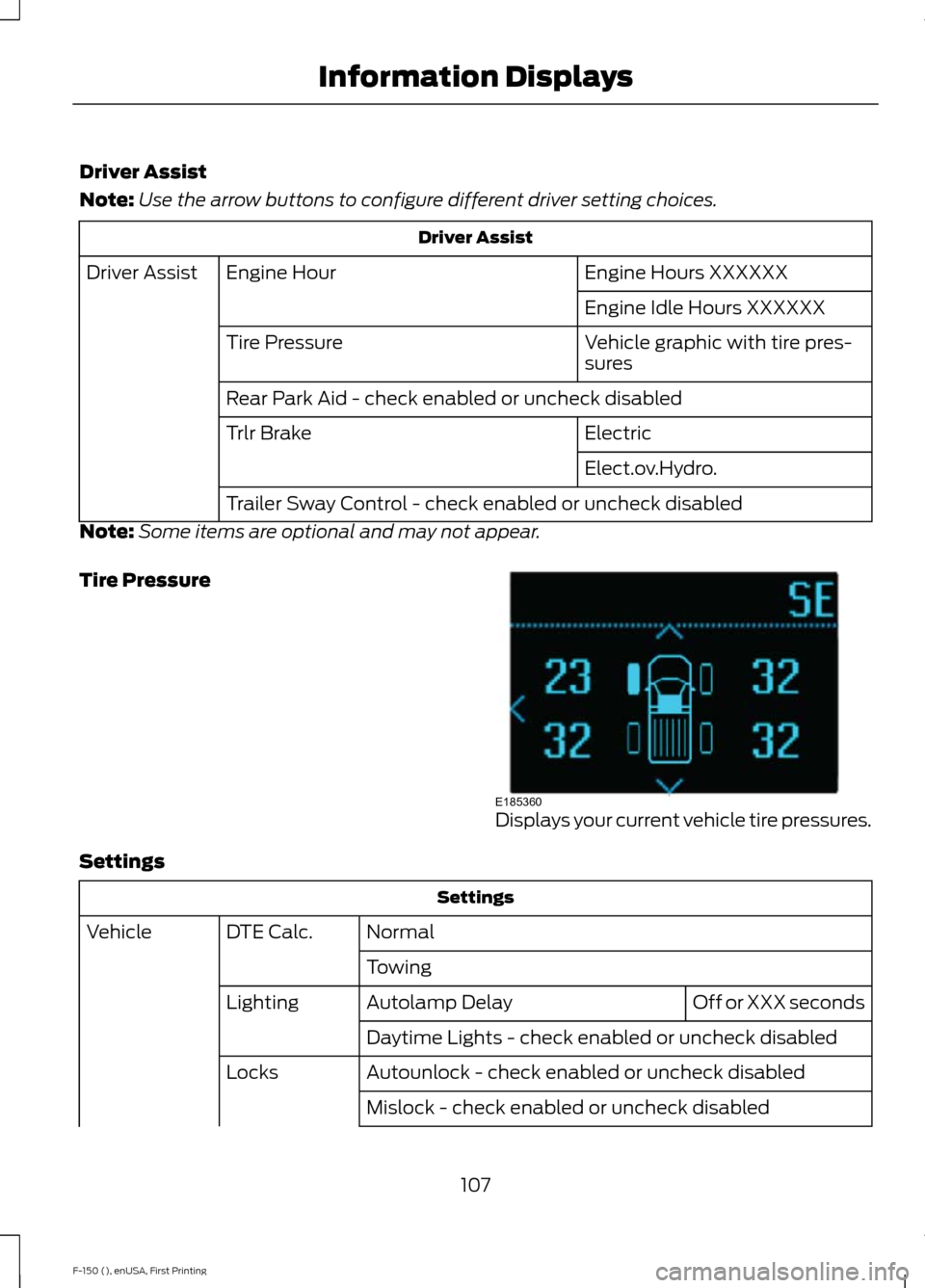
Driver Assist
Note:
Use the arrow buttons to configure different driver setting choices. Driver Assist
Engine Hours XXXXXX
Engine Hour
Driver Assist
Engine Idle Hours XXXXXX
Vehicle graphic with tire pres-
sures
Tire Pressure
Rear Park Aid - check enabled or uncheck disabled
Electric
Trlr Brake
Elect.ov.Hydro.
Trailer Sway Control - check enabled or uncheck disabled
Note: Some items are optional and may not appear.
Tire Pressure Displays your current vehicle tire pressures.
Settings Settings
Normal
DTE Calc.
Vehicle
Towing Off or XXX seconds
Autolamp Delay
Lighting
Daytime Lights - check enabled or uncheck disabled
Autounlock - check enabled or uncheck disabled
Locks
Mislock - check enabled or uncheck disabled
107
F-150 (), enUSA, First Printing Information DisplaysE185360
Page 111 of 549
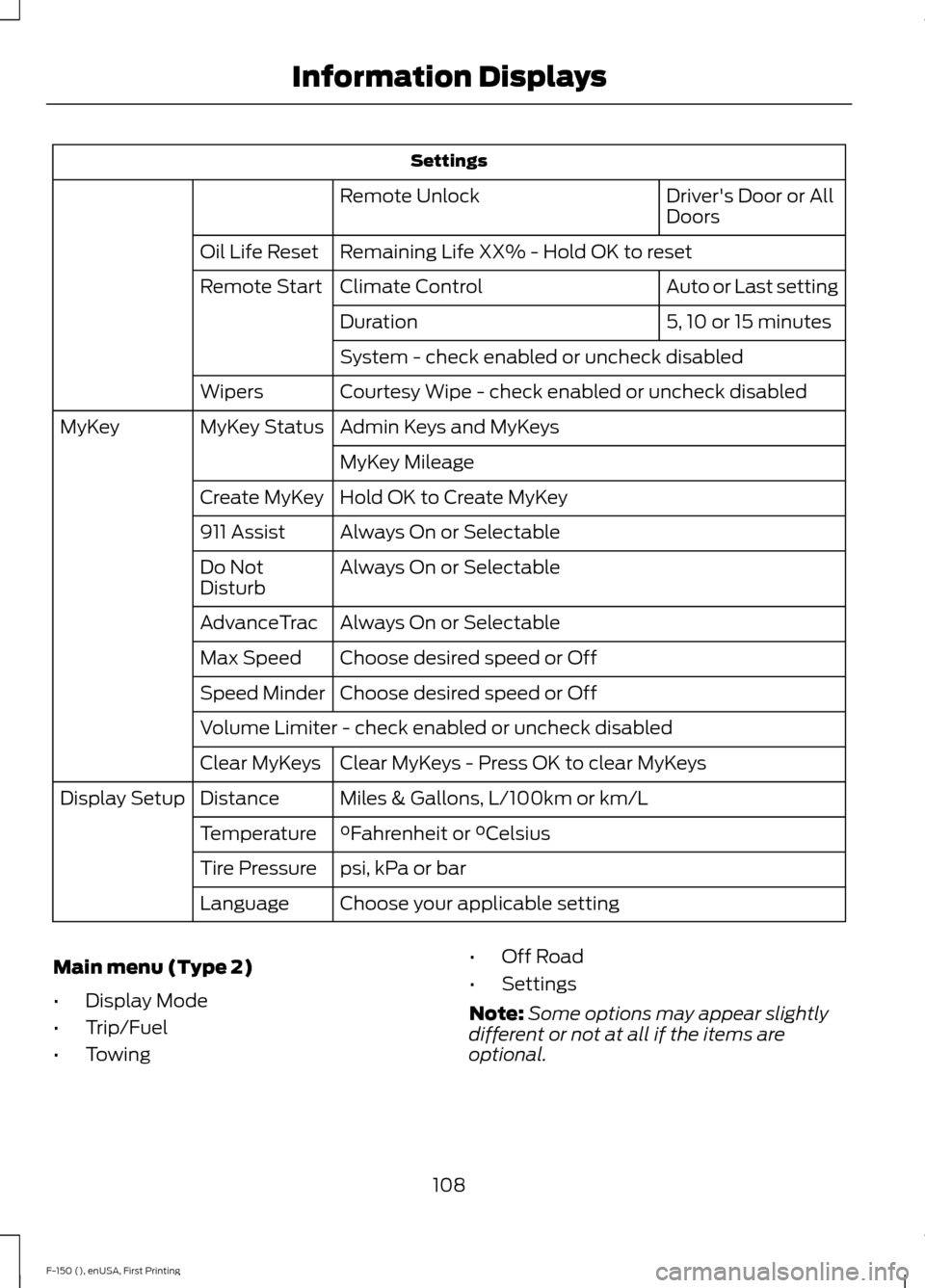
Settings
Driver's Door or All
Doors
Remote Unlock
Remaining Life XX% - Hold OK to reset
Oil Life Reset
Auto or Last setting
Climate Control
Remote Start
5, 10 or 15 minutes
Duration
System - check enabled or uncheck disabled
Courtesy Wipe - check enabled or uncheck disabled
Wipers
Admin Keys and MyKeys
MyKey Status
MyKey
MyKey Mileage
Hold OK to Create MyKey
Create MyKey
Always On or Selectable
911 Assist
Always On or Selectable
Do Not
Disturb
Always On or Selectable
AdvanceTrac
Choose desired speed or Off
Max Speed
Choose desired speed or Off
Speed Minder
Volume Limiter - check enabled or uncheck disabled
Clear MyKeys - Press OK to clear MyKeys
Clear MyKeys
Miles & Gallons, L/100km or km/L
Distance
Display Setup
°Fahrenheit or °Celsius
Temperature
psi, kPa or bar
Tire Pressure
Choose your applicable setting
Language
Main menu (Type 2)
• Display Mode
• Trip/Fuel
• Towing •
Off Road
• Settings
Note: Some options may appear slightly
different or not at all if the items are
optional.
108
F-150 (), enUSA, First Printing Information Displays
Page 112 of 549
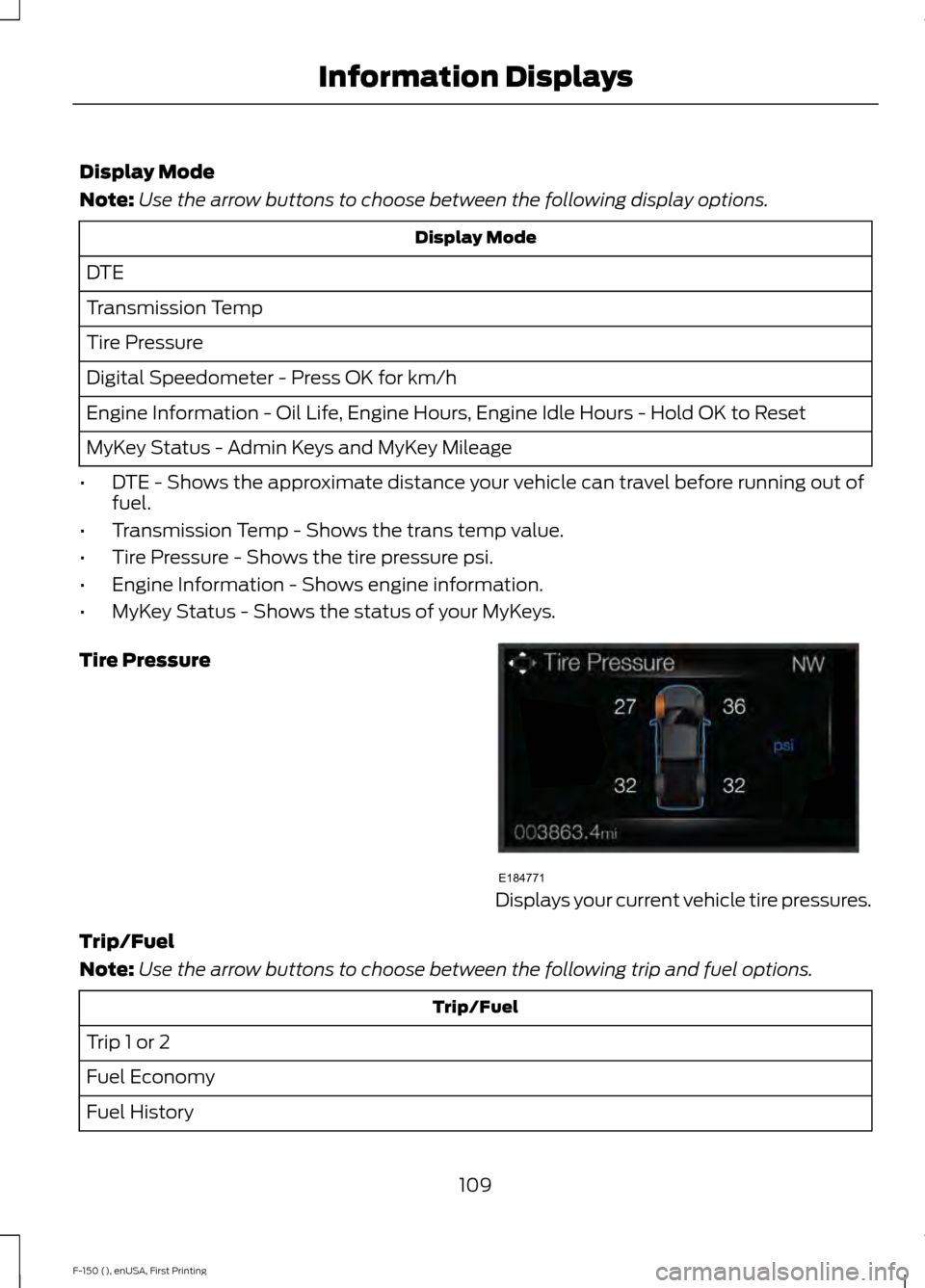
Display Mode
Note:
Use the arrow buttons to choose between the following display options. Display Mode
DTE
Transmission Temp
Tire Pressure
Digital Speedometer - Press OK for km/h
Engine Information - Oil Life, Engine Hours, Engine Idle Hours - Hold OK to Reset
MyKey Status - Admin Keys and MyKey Mileage
• DTE - Shows the approximate distance your vehicle can travel before running out of
fuel.
• Transmission Temp - Shows the trans temp value.
• Tire Pressure - Shows the tire pressure psi.
• Engine Information - Shows engine information.
• MyKey Status - Shows the status of your MyKeys.
Tire Pressure Displays your current vehicle tire pressures.
Trip/Fuel
Note: Use the arrow buttons to choose between the following trip and fuel options. Trip/Fuel
Trip 1 or 2
Fuel Economy
Fuel History
109
F-150 (), enUSA, First Printing Information DisplaysE184771
Page 113 of 549
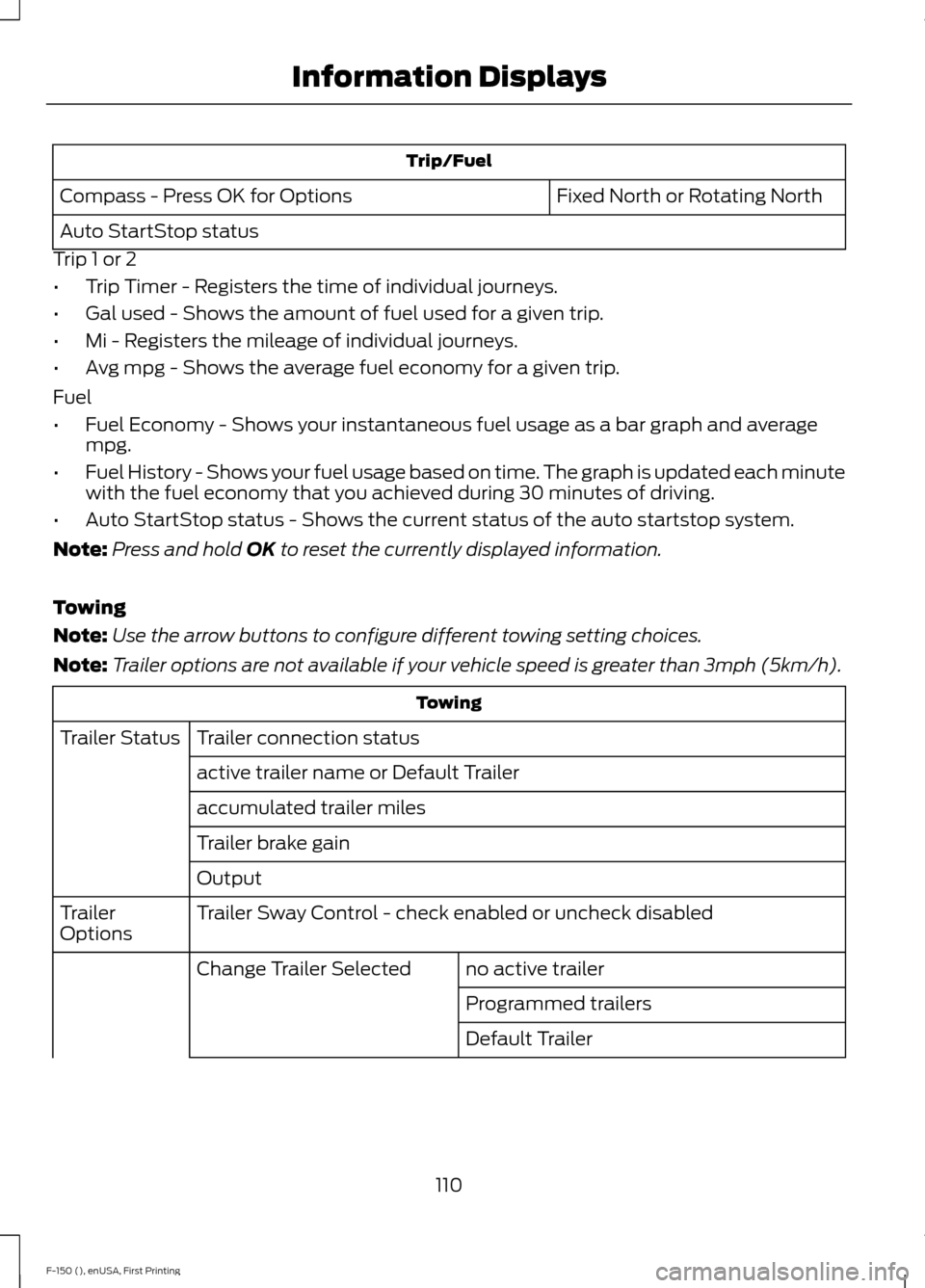
Trip/Fuel
Fixed North or Rotating North
Compass - Press OK for Options
Auto StartStop status
Trip 1 or 2
• Trip Timer - Registers the time of individual journeys.
• Gal used - Shows the amount of fuel used for a given trip.
• Mi - Registers the mileage of individual journeys.
• Avg mpg - Shows the average fuel economy for a given trip.
Fuel
• Fuel Economy - Shows your instantaneous fuel usage as a bar graph and average
mpg.
• Fuel History - Shows your fuel usage based on time. The graph is updated each minute
with the fuel economy that you achieved during 30 minutes of driving.
• Auto StartStop status - Shows the current status of the auto startstop system.
Note: Press and hold OK to reset the currently displayed information.
Towing
Note: Use the arrow buttons to configure different towing setting choices.
Note: Trailer options are not available if your vehicle speed is greater than 3mph (5km/h). Towing
Trailer connection status
Trailer Status
active trailer name or Default Trailer
accumulated trailer miles
Trailer brake gain
Output
Trailer Sway Control - check enabled or uncheck disabled
Trailer
Options
no active trailer
Change Trailer Selected
Programmed trailers
Default Trailer
110
F-150 (), enUSA, First Printing Information Displays
Page 114 of 549
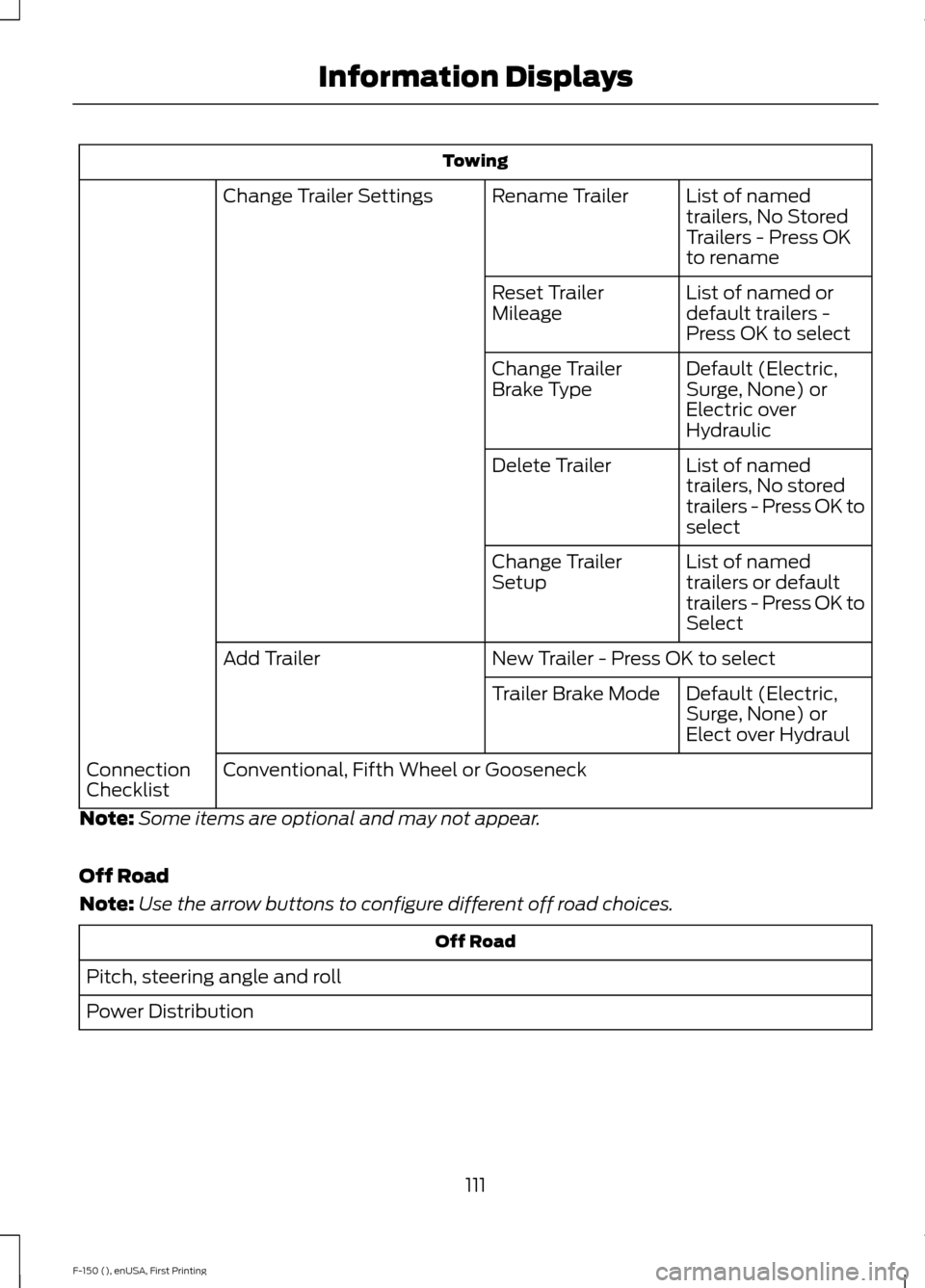
Towing
List of named
trailers, No Stored
Trailers - Press OK
to rename
Rename Trailer
Change Trailer Settings
List of named or
default trailers -
Press OK to select
Reset Trailer
Mileage
Default (Electric,
Surge, None) or
Electric over
Hydraulic
Change Trailer
Brake Type
List of named
trailers, No stored
trailers - Press OK to
select
Delete Trailer
List of named
trailers or default
trailers - Press OK to
Select
Change Trailer
Setup
New Trailer - Press OK to select
Add Trailer
Default (Electric,
Surge, None) or
Elect over Hydraul
Trailer Brake Mode
Conventional, Fifth Wheel or Gooseneck
Connection
Checklist
Note: Some items are optional and may not appear.
Off Road
Note: Use the arrow buttons to configure different off road choices. Off Road
Pitch, steering angle and roll
Power Distribution
111
F-150 (), enUSA, First Printing Information Displays
Page 115 of 549
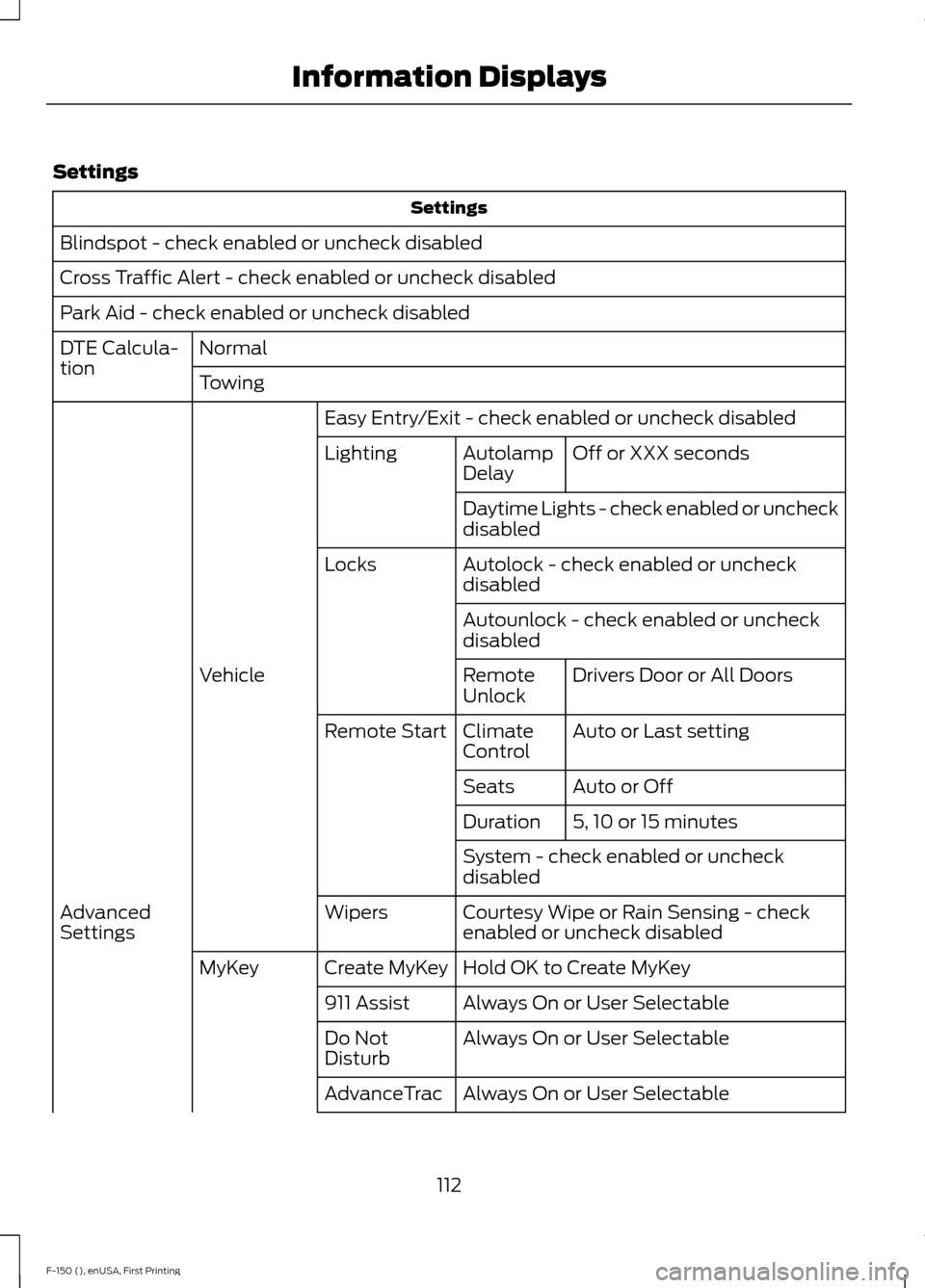
Settings
Settings
Blindspot - check enabled or uncheck disabled
Cross Traffic Alert - check enabled or uncheck disabled
Park Aid - check enabled or uncheck disabled Normal
DTE Calcula-
tion
Towing
Easy Entry/Exit - check enabled or uncheck disabled Off or XXX seconds
Autolamp
Delay
Lighting
Daytime Lights - check enabled or uncheck
disabled
Autolock - check enabled or uncheck
disabled
Locks
Autounlock - check enabled or uncheck
disabledDrivers Door or All Doors
Remote
Unlock
Vehicle
Auto or Last setting
Climate
Control
Remote Start
Auto or Off
Seats
5, 10 or 15 minutes
Duration
System - check enabled or uncheck
disabled
Courtesy Wipe or Rain Sensing - check
enabled or uncheck disabled
Wipers
Advanced
Settings
Hold OK to Create MyKey
Create MyKey
MyKey
Always On or User Selectable
911 Assist
Always On or User Selectable
Do Not
Disturb
Always On or User Selectable
AdvanceTrac
112
F-150 (), enUSA, First Printing Information Displays