trailer FORD F150 2015 13.G Owners Manual
[x] Cancel search | Manufacturer: FORD, Model Year: 2015, Model line: F150, Model: FORD F150 2015 13.GPages: 549, PDF Size: 5.97 MB
Page 6 of 549
Unique Driving Character-
istics
Auto-Start-Stop...........................................166
Fuel and Refueling
Safety Precautions......................................168
Fuel Quality
....................................................169
Running Out of Fuel.....................................170
Refueling...........................................................171
Fuel Consumption
........................................172
Emission Control System...........................173
Transmission
Automatic Transmission............................176
Four-Wheel Drive
Using Four-Wheel Drive.............................182
Rear Axle
Electronic Locking Differential................190
Brakes
General Information....................................192
Hints on Driving With Anti-Lock Brakes...........................................................192
Parking Brake
.................................................192
Electric Parking Brake
.................................193
Hill Start Assist..............................................195
Traction Control
Principle of Operation.................................197
Using Traction Control................................197
Stability Control
Principle of Operation................................198
Using Stability Control
...............................199
Terrain Response
Principle of Operation...............................200 Using Hill Descent Control......................200
Parking Aids
Parking Aid
.....................................................202
Active Park Assist
........................................203
Rear View Camera.......................................207
360 Degree Parking Aid Camera............210
Cruise Control
Principle of Operation.................................213
Using Cruise Control....................................213
Using Adaptive Cruise Control.................214
Driving Aids
Driver Alert
.......................................................221
Lane Keeping System..................................221
Blind Spot Information System
..............225
Steering...........................................................229
Collision Warning System........................229
Load Carrying
Load Limit
.......................................................233
Tailgate............................................................240
Towing
Towing a Trailer............................................250
Trailer Sway Control
.....................................251
Recommended Towing Weights.............251
Essential Towing Checks..........................262
Transporting the Vehicle
..........................268
Towing the Vehicle on Four Wheels......269
Driving Hints
Breaking-In.....................................................272
Economical Driving
......................................272
Driving Through Water
...............................273
Floor Mats
.......................................................273
Snowplowing.................................................274
3
F-150 (), enUSA, First Printing Table of Contents
Page 18 of 549
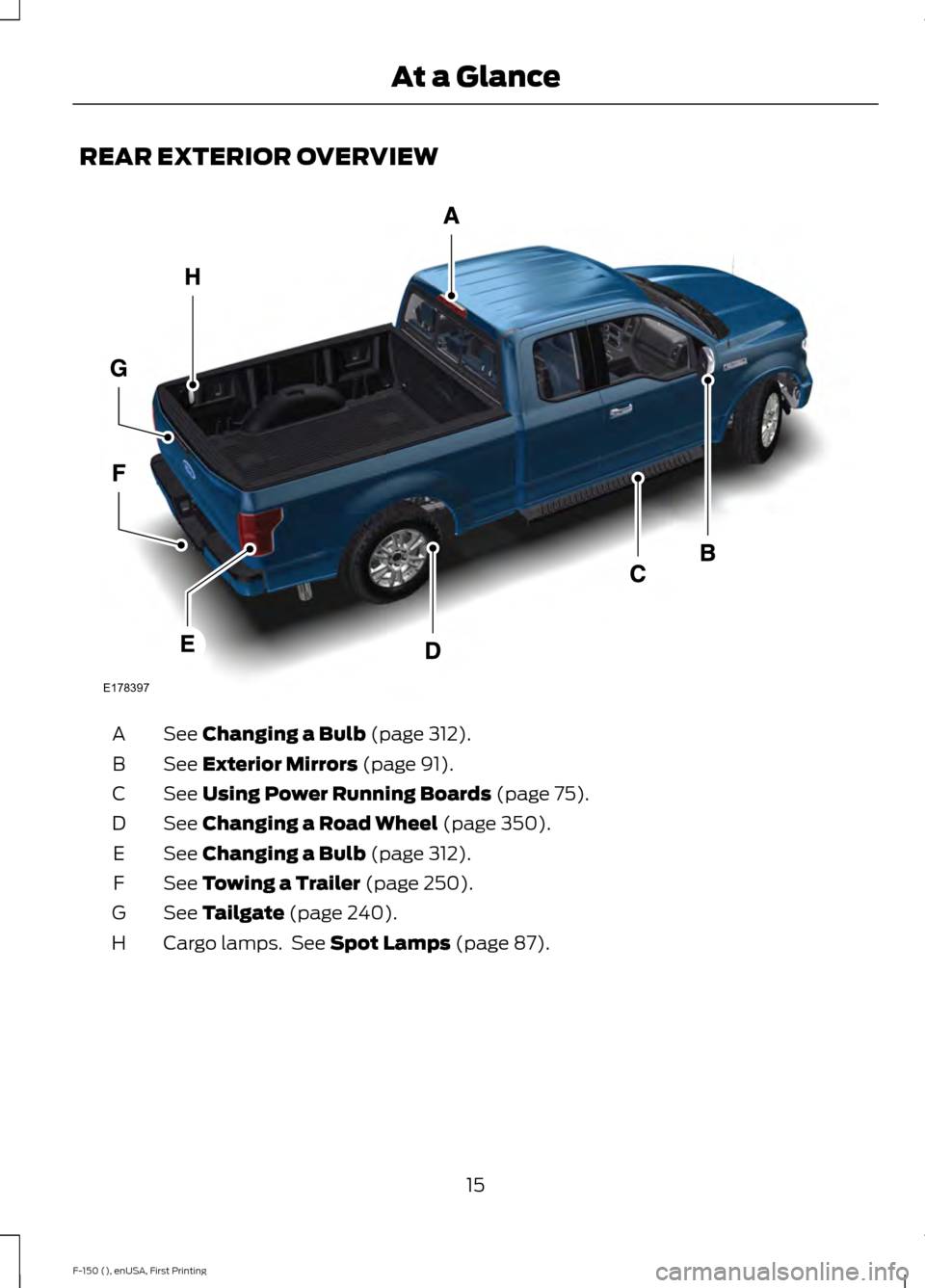
REAR EXTERIOR OVERVIEW
See Changing a Bulb (page 312).
A
See
Exterior Mirrors (page 91).
B
See
Using Power Running Boards (page 75).
C
See
Changing a Road Wheel (page 350).
D
See
Changing a Bulb (page 312).
E
See
Towing a Trailer (page 250).
F
See
Tailgate (page 240).
G
Cargo lamps. See
Spot Lamps (page 87).
H
15
F-150 (), enUSA, First Printing At a GlanceE178397
Page 20 of 549
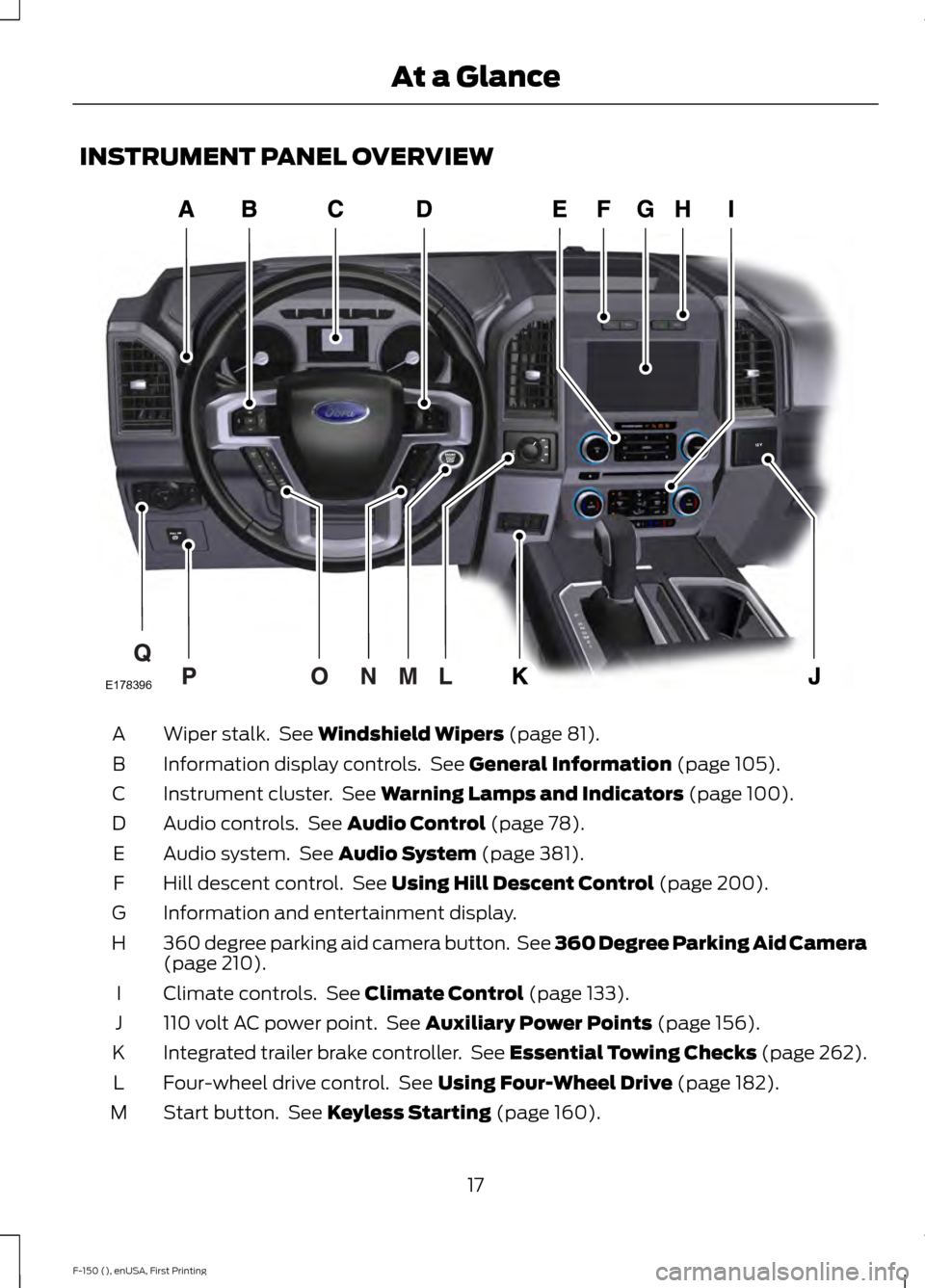
INSTRUMENT PANEL OVERVIEW
Wiper stalk. See Windshield Wipers (page 81).
A
Information display controls. See
General Information (page 105).
B
Instrument cluster. See
Warning Lamps and Indicators (page 100).
C
Audio controls. See
Audio Control (page 78).
D
Audio system. See
Audio System (page 381).
E
Hill descent control. See
Using Hill Descent Control (page 200).
F
Information and entertainment display.
G
360 degree parking aid camera button. See 360 Degree Parking Aid Camera
(page
210).
H
Climate controls. See
Climate Control (page 133).
I
110 volt AC power point. See
Auxiliary Power Points (page 156).
J
Integrated trailer brake controller. See Essential Towing Checks (page 262).
K
Four-wheel drive control. See
Using Four-Wheel Drive (page 182).
L
Start button. See
Keyless Starting (page 160).
M
17
F-150 (), enUSA, First Printing At a GlanceE178396
Page 90 of 549
Press the control to switch the fog lamps
on or off.
You can switch the fog lamps on when the
lighting control is in any position except
Off and the high beams are not on.
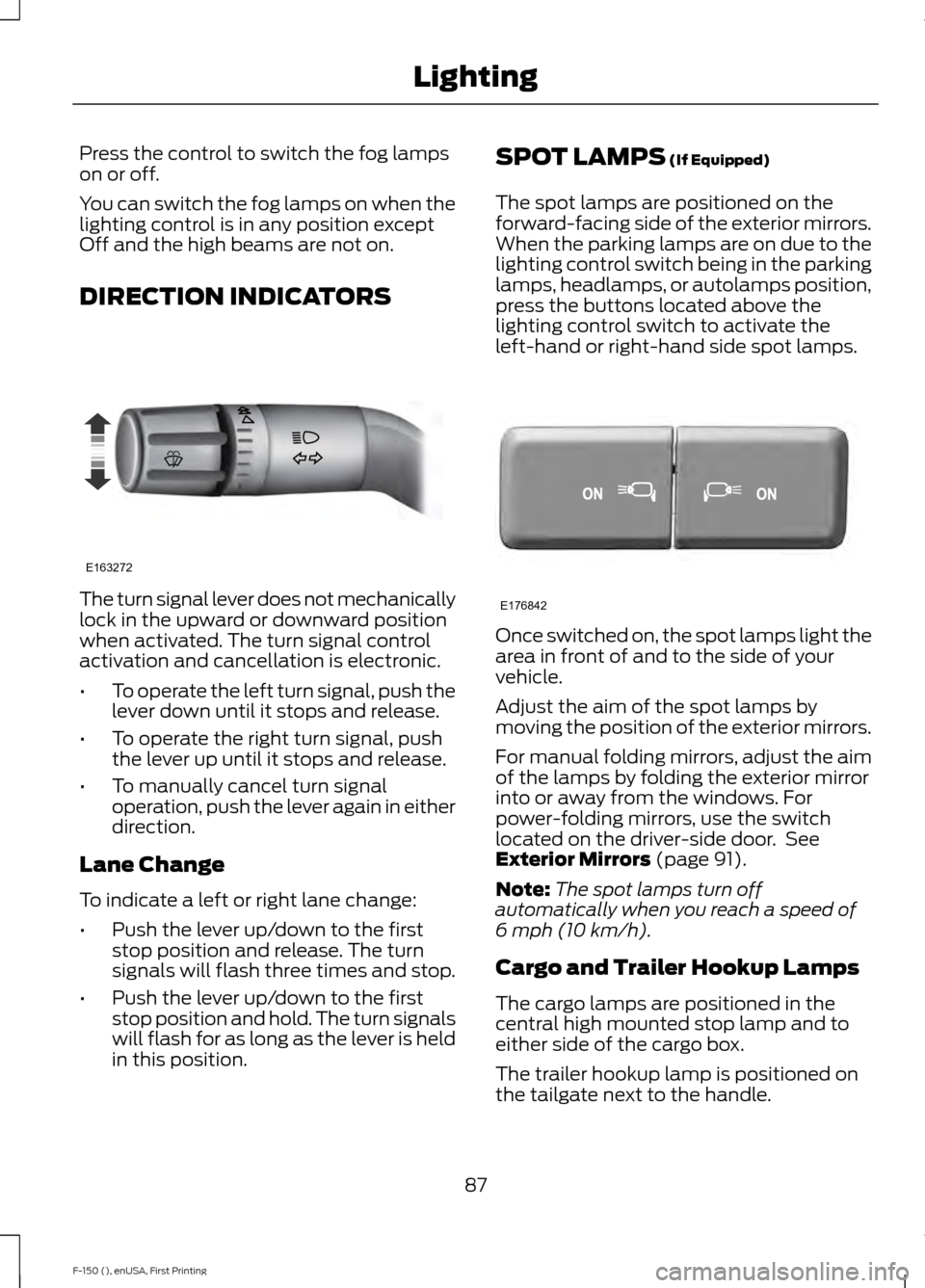
DIRECTION INDICATORS
The turn signal lever does not mechanically
lock in the upward or downward position
when activated. The turn signal control
activation and cancellation is electronic.
•
To operate the left turn signal, push the
lever down until it stops and release.
• To operate the right turn signal, push
the lever up until it stops and release.
• To manually cancel turn signal
operation, push the lever again in either
direction.
Lane Change
To indicate a left or right lane change:
• Push the lever up/down to the first
stop position and release. The turn
signals will flash three times and stop.
• Push the lever up/down to the first
stop position and hold. The turn signals
will flash for as long as the lever is held
in this position. SPOT LAMPS (If Equipped)
The spot lamps are positioned on the
forward-facing side of the exterior mirrors.
When the parking lamps are on due to the
lighting control switch being in the parking
lamps, headlamps, or autolamps position,
press the buttons located above the
lighting control switch to activate the
left-hand or right-hand side spot lamps. Once switched on, the spot lamps light the
area in front of and to the side of your
vehicle.
Adjust the aim of the spot lamps by
moving the position of the exterior mirrors.
For manual folding mirrors, adjust the aim
of the lamps by folding the exterior mirror
into or away from the windows. For
power-folding mirrors, use the switch
located on the driver-side door. See
Exterior Mirrors
(page 91).
Note: The spot lamps turn off
automatically when you reach a speed of
6 mph (10 km/h)
.
Cargo and Trailer Hookup Lamps
The cargo lamps are positioned in the
central high mounted stop lamp and to
either side of the cargo box.
The trailer hookup lamp is positioned on
the tailgate next to the handle.
87
F-150 (), enUSA, First Printing LightingE163272 E176842
Page 91 of 549
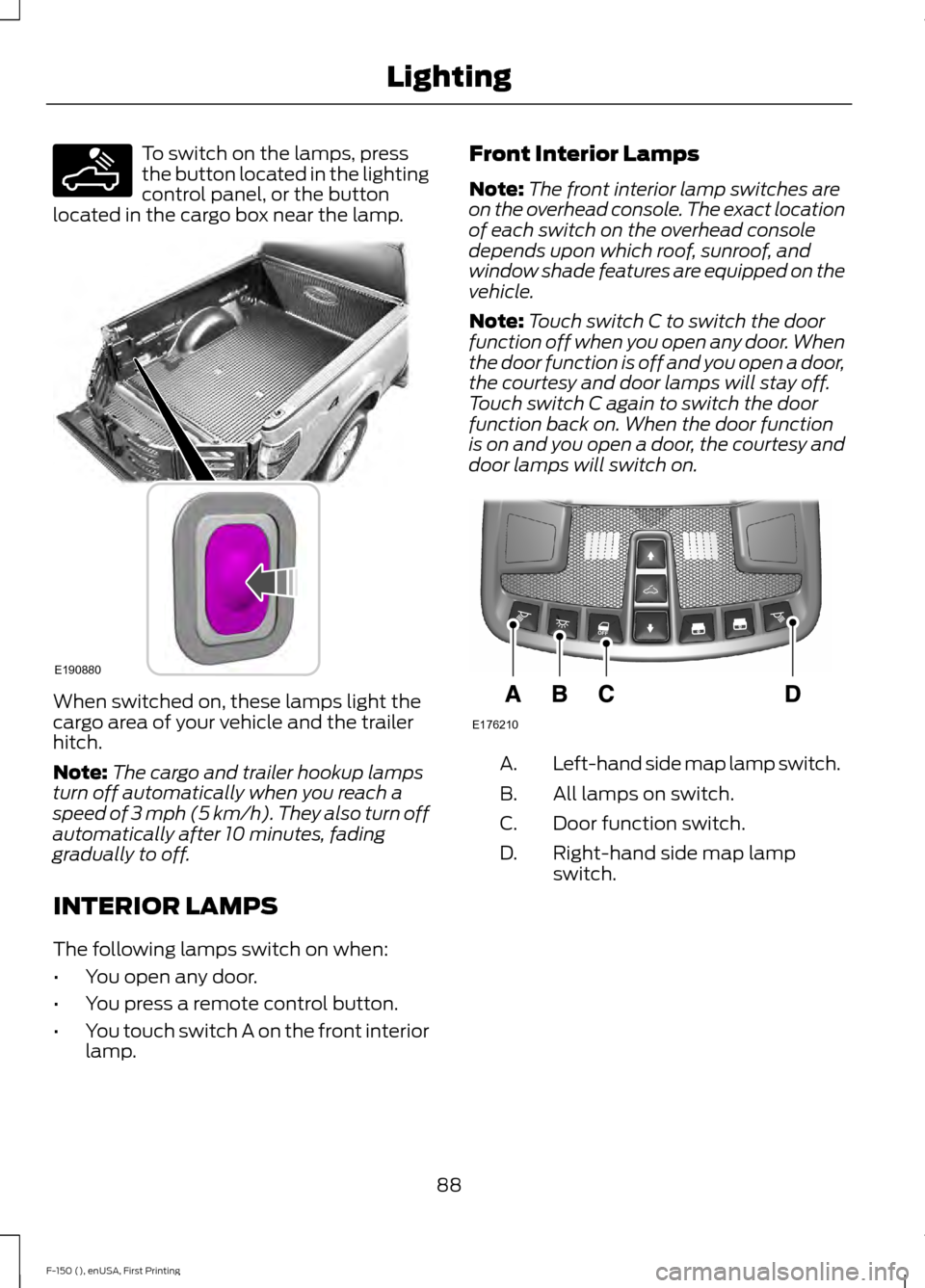
To switch on the lamps, press
the button located in the lighting
control panel, or the button
located in the cargo box near the lamp. When switched on, these lamps light the
cargo area of your vehicle and the trailer
hitch.
Note:
The cargo and trailer hookup lamps
turn off automatically when you reach a
speed of 3 mph (5 km/h). They also turn off
automatically after 10 minutes, fading
gradually to off.
INTERIOR LAMPS
The following lamps switch on when:
• You open any door.
• You press a remote control button.
• You touch switch A on the front interior
lamp. Front Interior Lamps
Note:
The front interior lamp switches are
on the overhead console. The exact location
of each switch on the overhead console
depends upon which roof, sunroof, and
window shade features are equipped on the
vehicle.
Note: Touch switch C to switch the door
function off when you open any door. When
the door function is off and you open a door,
the courtesy and door lamps will stay off.
Touch switch C again to switch the door
function back on. When the door function
is on and you open a door, the courtesy and
door lamps will switch on. Left-hand side map lamp switch.
A.
All lamps on switch.
B.
Door function switch.
C.
Right-hand side map lamp
switch.
D.
88
F-150 (), enUSA, First Printing LightingE189587 E190880 E176210
Page 95 of 549
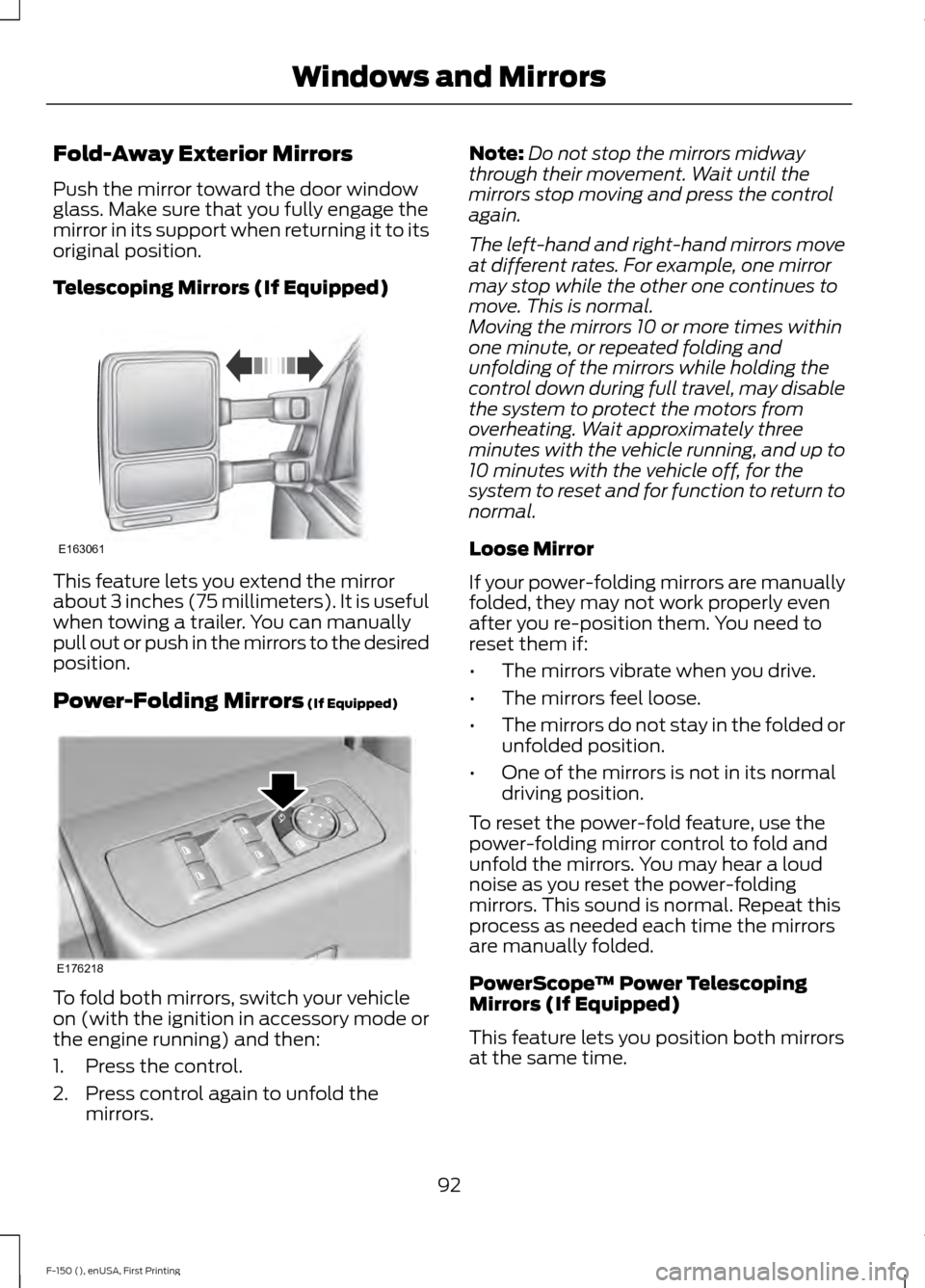
Fold-Away Exterior Mirrors
Push the mirror toward the door window
glass. Make sure that you fully engage the
mirror in its support when returning it to its
original position.
Telescoping Mirrors (If Equipped)
This feature lets you extend the mirror
about 3 inches (75 millimeters). It is useful
when towing a trailer. You can manually
pull out or push in the mirrors to the desired
position.
Power-Folding Mirrors (If Equipped)
To fold both mirrors, switch your vehicle
on (with the ignition in accessory mode or
the engine running) and then:
1. Press the control.
2. Press control again to unfold the
mirrors. Note:
Do not stop the mirrors midway
through their movement. Wait until the
mirrors stop moving and press the control
again.
The left-hand and right-hand mirrors move
at different rates. For example, one mirror
may stop while the other one continues to
move. This is normal.
Moving the mirrors 10 or more times within
one minute, or repeated folding and
unfolding of the mirrors while holding the
control down during full travel, may disable
the system to protect the motors from
overheating. Wait approximately three
minutes with the vehicle running, and up to
10 minutes with the vehicle off, for the
system to reset and for function to return to
normal.
Loose Mirror
If your power-folding mirrors are manually
folded, they may not work properly even
after you re-position them. You need to
reset them if:
• The mirrors vibrate when you drive.
• The mirrors feel loose.
• The mirrors do not stay in the folded or
unfolded position.
• One of the mirrors is not in its normal
driving position.
To reset the power-fold feature, use the
power-folding mirror control to fold and
unfold the mirrors. You may hear a loud
noise as you reset the power-folding
mirrors. This sound is normal. Repeat this
process as needed each time the mirrors
are manually folded.
PowerScope ™ Power Telescoping
Mirrors (If Equipped)
This feature lets you position both mirrors
at the same time.
92
F-150 (), enUSA, First Printing Windows and MirrorsE163061 E176218
Page 102 of 549
Engine Oil Pressure Gauge
Indicates engine oil pressure. The needle
should stay in the normal operating range
(between L and H). If the needle falls
below the normal range, stop your vehicle,
turn off the engine and check the engine
oil level. Add oil if needed. If the oil level is
correct, have your vehicle checked by an
authorized dealer.
Engine Coolant Temperature
Gauge
WARNING
Never remove the coolant reservoir
cap while the engine is running or hot.
Indicates engine coolant temperature. At
normal operating temperature, the level
indicator will be in the normal range. If the
engine coolant temperature exceeds the
normal range, stop your vehicle as soon as
safely possible, switch off the engine and
let the engine cool.
Fuel Gauge
Note:
The fuel gauge may vary slightly
when your vehicle is moving or on a gradient. Switch the ignition on. The fuel gauge will
indicate approximately how much fuel is
left in the fuel tank. The arrow adjacent to
the fuel pump symbol indicates on which
side of your vehicle the fuel filler door is
located.
The needle should move toward F when
you refuel your vehicle. If the needle points
to E after adding fuel, this indicates your
vehicle needs service soon.
After refueling some variability in needle
position is normal:
•
It may take a short time for the needle
to reach F after leaving the gas station.
This is normal and depends upon the
slope of pavement at the gas station.
• The fuel amount dispensed into the
tank is a little less or more than the
gauge indicated. This is normal and
depends upon the slope of pavement
at the gas station.
• If the gas station nozzle shuts off
before the tank is full, try a different
gas pump nozzle.
Low Fuel Reminder
A low fuel reminder triggers when the fuel
gauge needle is at 1/16th or about 35 miles
(56km) to empty, whichever occurs first.
Variations:
Note: The low fuel warning and distance-to-empty warning can appear at different fuel
gauge positions depending on fuel economy conditions. This variation is normal. Distance-to-empty
Fuel gauge position
Driving type (fuel economy
conditions)
35 miles to 80 miles (56 kmto 129 km)
1/16th
Highway driving
10 miles to 35 miles (16 kmto 56 km)
1/16th-1/4
Severe duty driving (trailer
towing, extended idle)
99
F-150 (), enUSA, First Printing Instrument Cluster
Page 110 of 549
Driver Assist
Note:
Use the arrow buttons to configure different driver setting choices. Driver Assist
Engine Hours XXXXXX
Engine Hour
Driver Assist
Engine Idle Hours XXXXXX
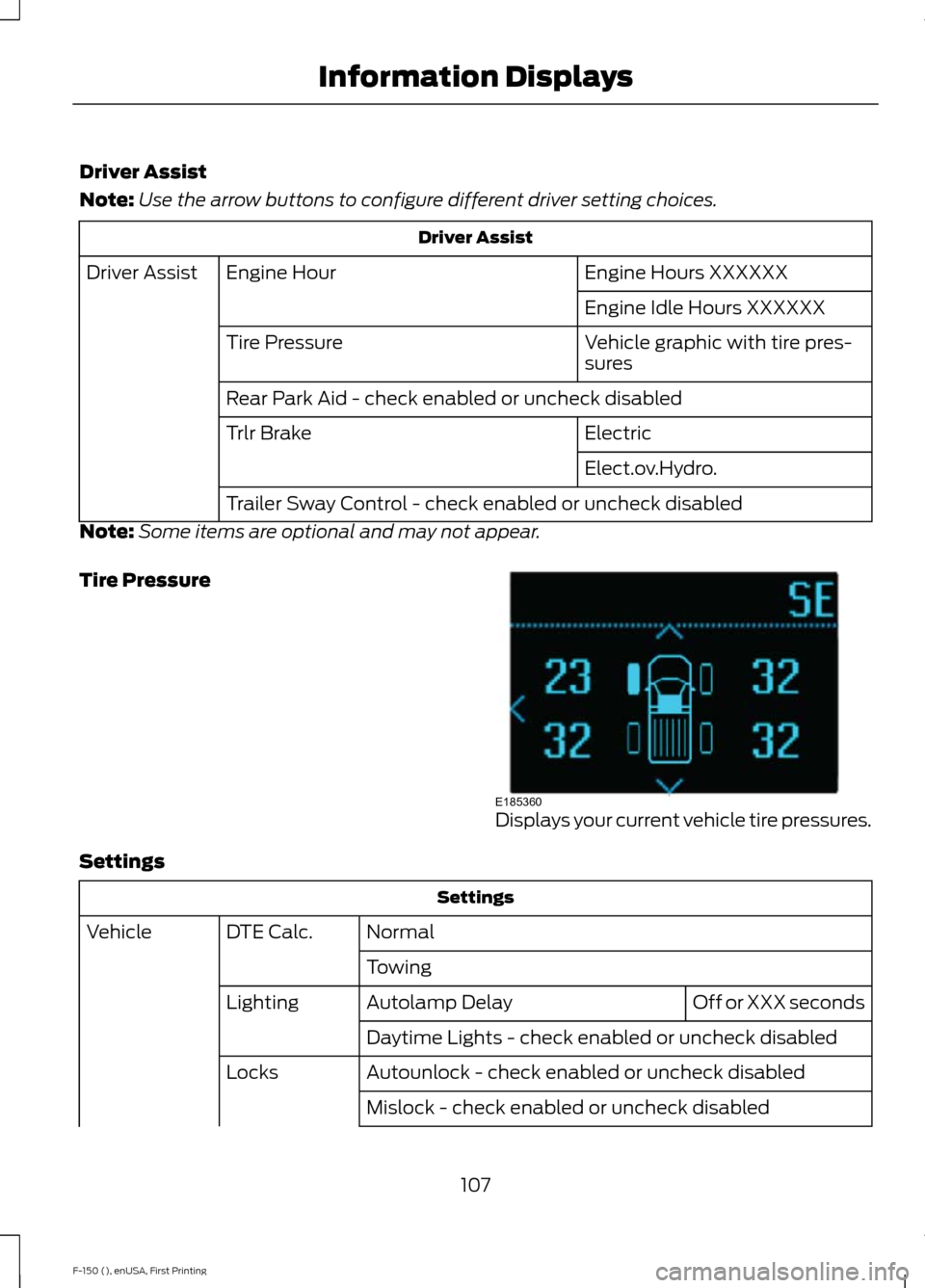
Vehicle graphic with tire pres-
sures
Tire Pressure
Rear Park Aid - check enabled or uncheck disabled
Electric
Trlr Brake
Elect.ov.Hydro.
Trailer Sway Control - check enabled or uncheck disabled
Note: Some items are optional and may not appear.
Tire Pressure Displays your current vehicle tire pressures.
Settings Settings
Normal
DTE Calc.
Vehicle
Towing Off or XXX seconds
Autolamp Delay
Lighting
Daytime Lights - check enabled or uncheck disabled
Autounlock - check enabled or uncheck disabled
Locks
Mislock - check enabled or uncheck disabled
107
F-150 (), enUSA, First Printing Information DisplaysE185360
Page 113 of 549
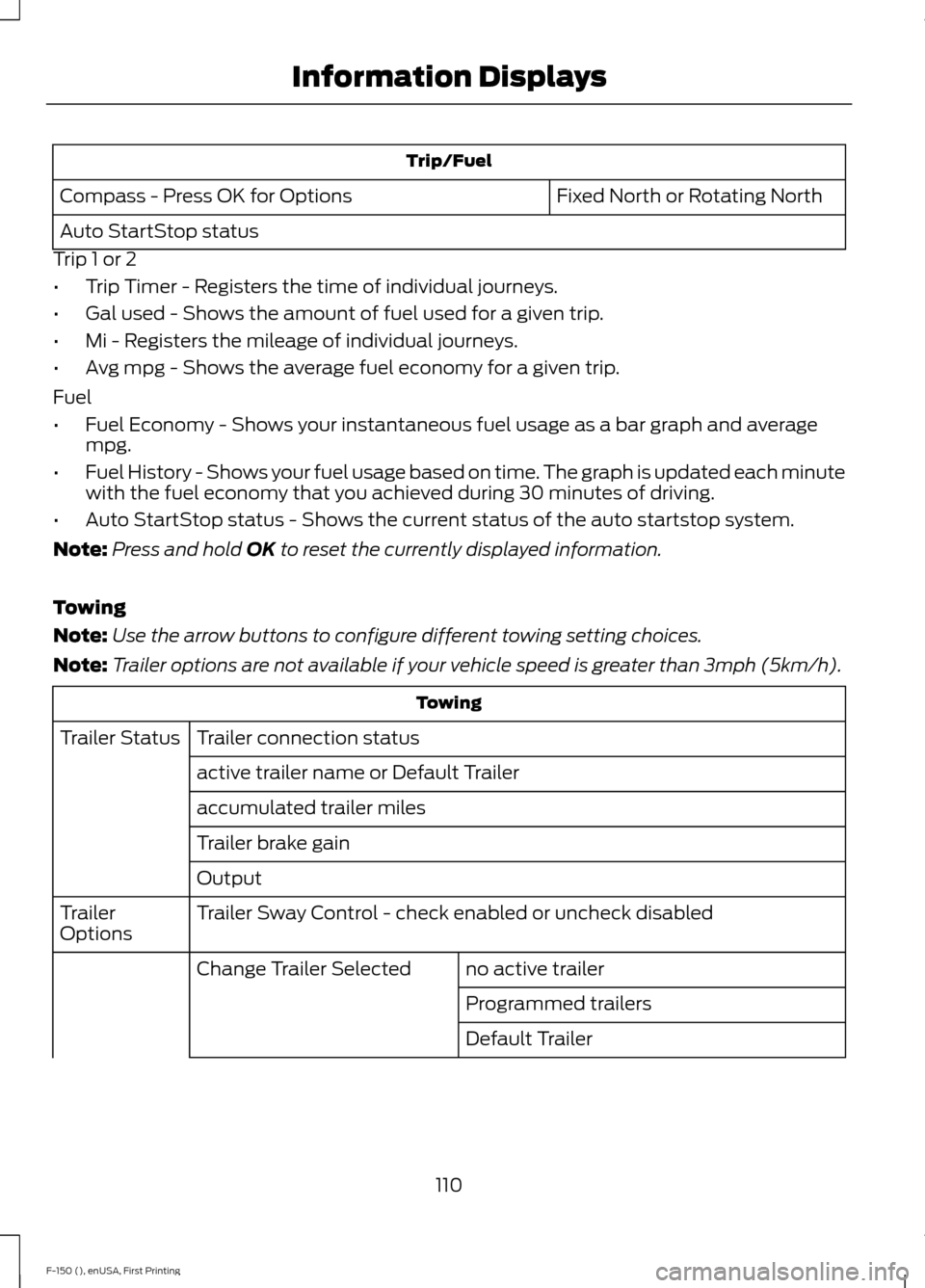
Trip/Fuel
Fixed North or Rotating North
Compass - Press OK for Options
Auto StartStop status
Trip 1 or 2
• Trip Timer - Registers the time of individual journeys.
• Gal used - Shows the amount of fuel used for a given trip.
• Mi - Registers the mileage of individual journeys.
• Avg mpg - Shows the average fuel economy for a given trip.
Fuel
• Fuel Economy - Shows your instantaneous fuel usage as a bar graph and average
mpg.
• Fuel History - Shows your fuel usage based on time. The graph is updated each minute
with the fuel economy that you achieved during 30 minutes of driving.
• Auto StartStop status - Shows the current status of the auto startstop system.
Note: Press and hold OK to reset the currently displayed information.
Towing
Note: Use the arrow buttons to configure different towing setting choices.
Note: Trailer options are not available if your vehicle speed is greater than 3mph (5km/h). Towing
Trailer connection status
Trailer Status
active trailer name or Default Trailer
accumulated trailer miles
Trailer brake gain
Output
Trailer Sway Control - check enabled or uncheck disabled
Trailer
Options
no active trailer
Change Trailer Selected
Programmed trailers
Default Trailer
110
F-150 (), enUSA, First Printing Information Displays
Page 114 of 549
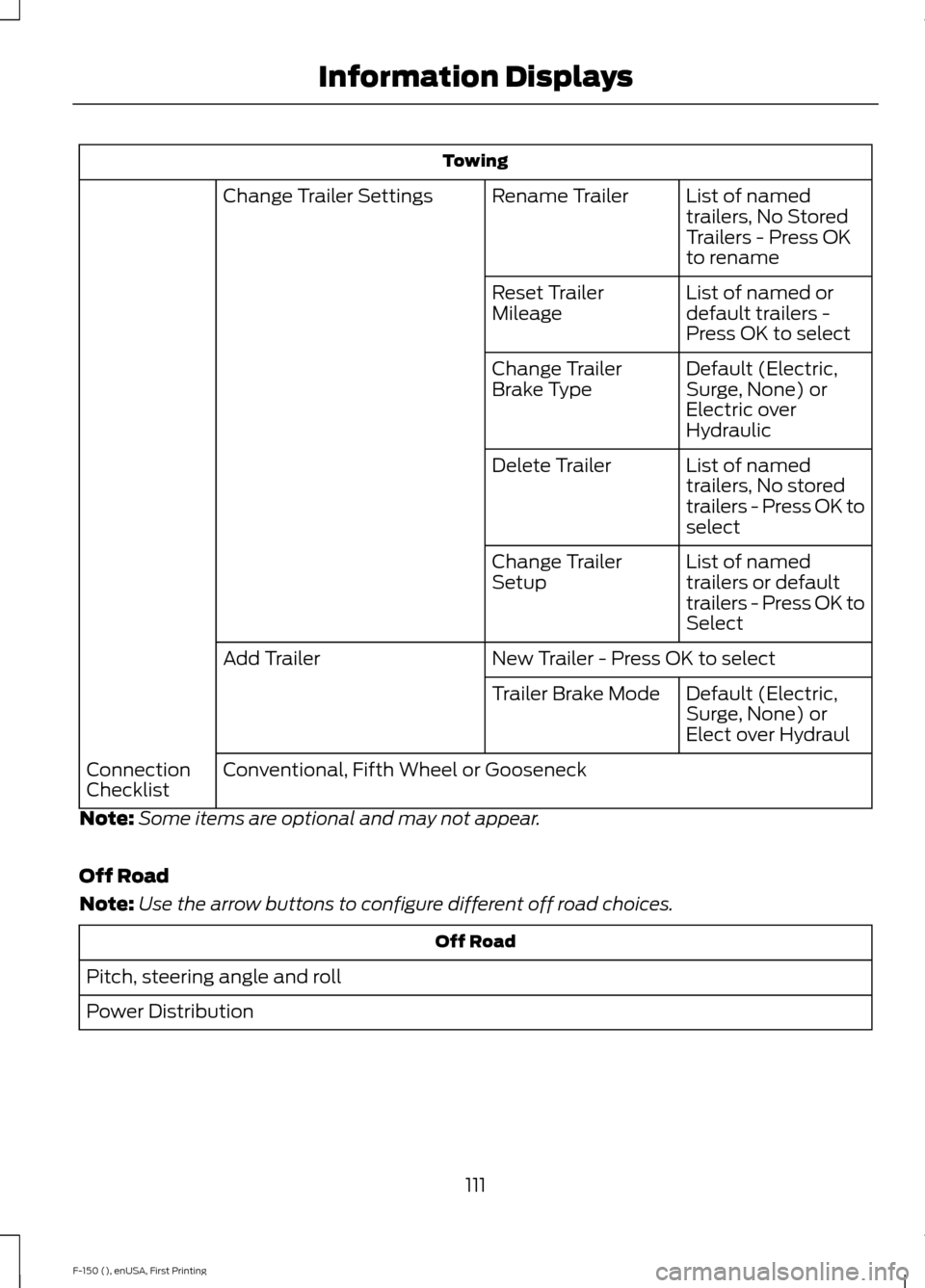
Towing
List of named
trailers, No Stored
Trailers - Press OK
to rename
Rename Trailer
Change Trailer Settings
List of named or
default trailers -
Press OK to select
Reset Trailer
Mileage
Default (Electric,
Surge, None) or
Electric over
Hydraulic
Change Trailer
Brake Type
List of named
trailers, No stored
trailers - Press OK to
select
Delete Trailer
List of named
trailers or default
trailers - Press OK to
Select
Change Trailer
Setup
New Trailer - Press OK to select
Add Trailer
Default (Electric,
Surge, None) or
Elect over Hydraul
Trailer Brake Mode
Conventional, Fifth Wheel or Gooseneck
Connection
Checklist
Note: Some items are optional and may not appear.
Off Road
Note: Use the arrow buttons to configure different off road choices. Off Road
Pitch, steering angle and roll
Power Distribution
111
F-150 (), enUSA, First Printing Information Displays