alarm FORD F150 2023 User Guide
[x] Cancel search | Manufacturer: FORD, Model Year: 2023, Model line: F150, Model: FORD F150 2023Pages: 786, PDF Size: 23.15 MB
Page 156 of 786

On and off button.A
Settings menu.B
Exterior lamp indicators.C
Individual zones on and off.D
All zones on and off.E
You can use zone lighting when yourvehicle is on or off. When it is off, thelighting turns off after a certain period oftime.
You can also use individual zone controlsto switch on each zone.
Note:Make sure to remove exterior lightingcovers when using zone lighting.
Note:When your vehicle is off and the timerhas one minute remaining, the directionindicators flash six times.
Note:Indicators on the touchscreenilluminate when the lights outside of thezone lighting control are on.
Note:You can remotely control the zonelighting using the FordPass app.
Note:Vehicles without spot lamps onlyhave two zones.
EXTERIOR ZONE LIGHTINGSETTINGS
1.Press Features on the touchscreen.
2.Press Zone Lighting.
3.Press the settings menu in the upperright-hand corner.
4.Press a setting.
Enable Autolamp Override
This setting allows your vehicle to overridethe autolamps when using zone lighting.
When you access zone lighting for the firsttime, you can choose this setting. You canchange this setting at any time.
Include Reverse Lamps
This setting turns the reverse lamps onwhen you switch the rear lighting zone on.
Switch this setting off if you have a backupalarm installed to prevent the reverselamps from turning on and sounding thealarm when using zone lighting.
AUTOMATIC HIGH BEAM
CONTROL
HOW DOES AUTOMATIC HIGHBEAM CONTROL WORK
Automatic high beam control turns thehigh beams on if it is dark enough and noother traffic is present. If it detects anapproaching vehicle’s headlamps or taillamps, or street lighting ahead, the systemturns the high beams off.
A camera sensor, centrally mountedbehind the windshield of your vehicle,continuously monitors conditions to turnthe high beams on and off.
152
2023 F-150 (TFD) Canada/United States of America, enUSA, Edition date: 202206, DOMExterior LightingE339129
Page 185 of 786
WHAT IS REMOTE START
The system allows you to remotely startyour vehicle and to adjust the interiortemperature according to the settings thatyou chose.
REMOTE START
PRECAUTIONS
WARNING: Do not start the enginein a closed garage or in other enclosedareas. Exhaust fumes are toxic. Alwaysopen the garage door before you startthe engine. Failure to follow thisinstruction could result in personal injuryor death.
WARNING: Do not keep electricaldevices plugged in the power pointwhenever the device is not in use. Powerpoints power up during remote start.
WARNING: Do not keep electricaldevices plugged into the power outletwhenever the device is not in use. Theoutlet provides power when the vehicleis on. Failure to follow this instructioncould result in personal injury.
REMOTE START LIMITATIONS
Remote start does not work under thefollowing conditions:
•The alarm horn is sounding.
•The hood is open.
•The transmission is not in park (P).
•The ignition is on.
•The battery voltage is below theminimum operating voltage.
•Remote start is not enabled.
Note:Do not use remote start if the fuellevel is low.
ENABLING REMOTE START
1.Press Settings on the touchscreen.
2.Press Vehicle.
3.Press Remote Start Setup.
4.Switch Remote Start on or off.
Note:To remote start with FordPass, makesure that the modem is enabled. SeeConnecting FordPass to the Modem(page 621).
REMOTELY STARTING AND
STOPPING THE VEHICLE
Remotely Starting the Vehicle
Press the button on the remotecontrol.
Within three seconds, press thebutton on the remote control.
Within three seconds, press thebutton again.
Note:You can also use FordPass to startthe vehicle.
Note:The vehicle doors lock when yousuccessfully remote start your vehicle.
Note:The turn signal lamps flash twice.
Note:The parking lamps turn on when thevehicle is running.
Note:The horn sounds if the system failsto start.
Note:All other vehicle systems remain offwhen you have remotely started the vehicle.
Note:The vehicle remains secured whenyou have remotely started the vehicle. Avalid key must be inside your vehicle toswitch the ignition on and drive your vehicle.
181
2023 F-150 (TFD) Canada/United States of America, enUSA, Edition date: 202206, DOMRemote Start (If Equipped)E138623 E138625
Page 419 of 786
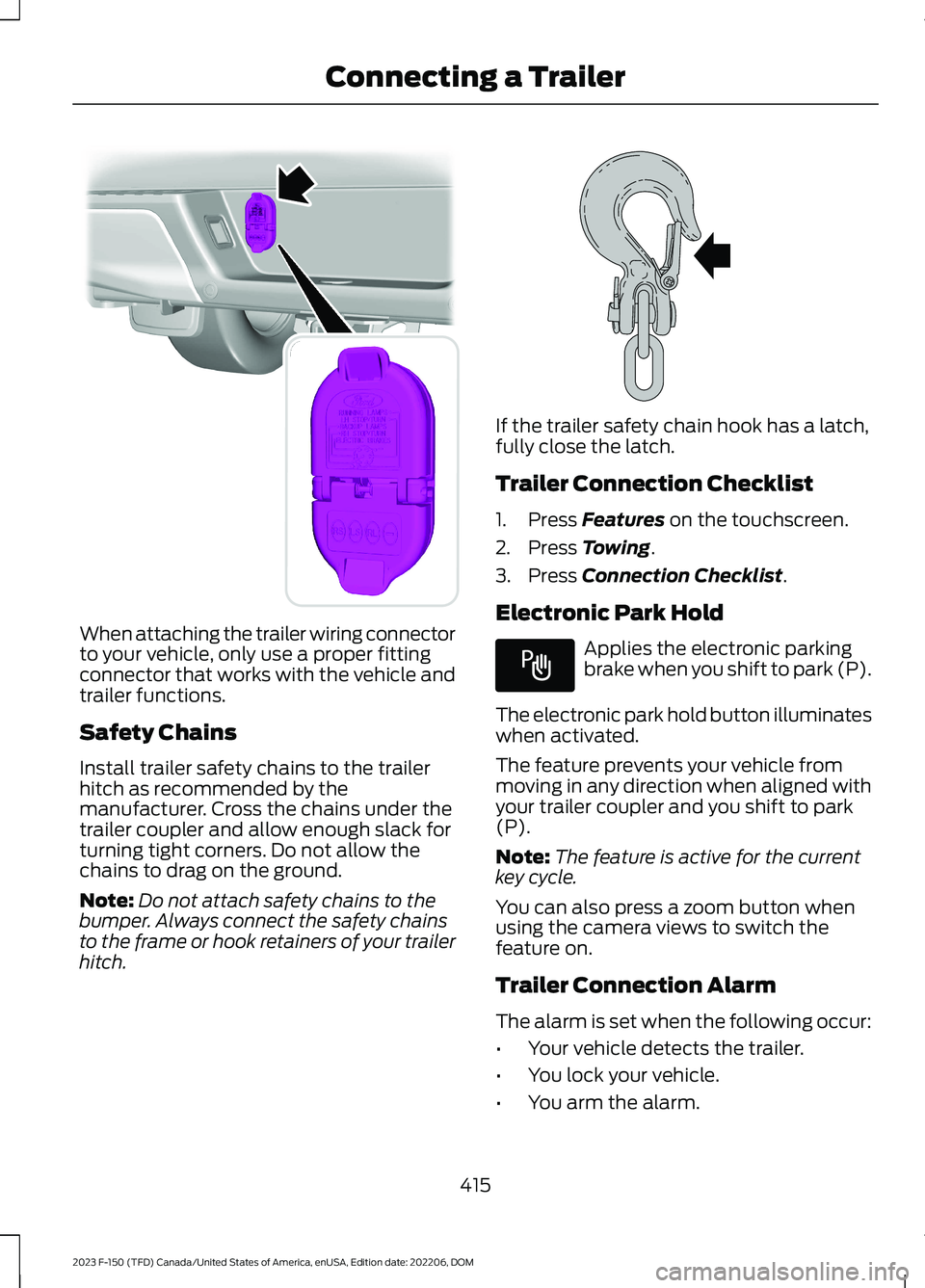
When attaching the trailer wiring connectorto your vehicle, only use a proper fittingconnector that works with the vehicle andtrailer functions.
Safety Chains
Install trailer safety chains to the trailerhitch as recommended by themanufacturer. Cross the chains under thetrailer coupler and allow enough slack forturning tight corners. Do not allow thechains to drag on the ground.
Note:Do not attach safety chains to thebumper. Always connect the safety chainsto the frame or hook retainers of your trailerhitch.
If the trailer safety chain hook has a latch,fully close the latch.
Trailer Connection Checklist
1.Press Features on the touchscreen.
2.Press Towing.
3.Press Connection Checklist.
Electronic Park Hold
Applies the electronic parkingbrake when you shift to park (P).
The electronic park hold button illuminateswhen activated.
The feature prevents your vehicle frommoving in any direction when aligned withyour trailer coupler and you shift to park(P).
Note:The feature is active for the currentkey cycle.
You can also press a zoom button whenusing the camera views to switch thefeature on.
Trailer Connection Alarm
The alarm is set when the following occur:
•Your vehicle detects the trailer.
•You lock your vehicle.
•You arm the alarm.
415
2023 F-150 (TFD) Canada/United States of America, enUSA, Edition date: 202206, DOMConnecting a TrailerE193232 E265060 E337016
Page 420 of 786
When the trailer disconnects in this state,the vehicle alarm sounds and the systemsends an alert to your FordPass app.
Note:For reliable trailer detection, thetrailer’s lamps must be SAE certified foreach intended purpose.
Note:If the trailer is not compatible withthe feature, the turn signals flash twice.
Switching the Trailer ConnectionAlarm On and Off
1.Press Features on the touchscreen.
2.Press Towing.
3.Press Manage trailers.
4.Press the currently active trailer'sname.
5.Switch Trailer Connection Alarm onor off.
Note:The alarm disables by default. If thesystem detects a trailer, it can beconfigurable.
Note:Settings are applicable only for theselected trailer profile.
Trailer Connector Battery Lead
The trailer receives power from the vehicletrailer connector battery lead when thefollowing occurs:
•Your vehicle is in accessory mode orswitched on.
•The trailer wiring connector is free ofcorrosion or other damage.
•The vehicle battery is not low.
•When the trailer has a battery:
•The trailer battery voltage is within5 volts of the vehicle batteryvoltage.
•When you have the trailer batteryproperly connected.
TRAILER LIGHTING CHECK
WARNING: Never connect anytrailer lamp wiring to the vehicle's taillamp wiring; this may damage theelectrical system resulting in fire. Contactyour authorized dealer as soon aspossible for assistance in proper trailertow wiring installation. Additionalelectrical equipment may be required.
Perform a trailer light illuminationsequence to confirm that all lights arefunctioning by using the FordPass app orthe vehicle's touchscreen.
Performing the Trailer LightingCheck Using the Touchscreen
1.Press Features on the touchscreen.
2.Press Towing.
3.Press Trailer Light Check.
4.Press Start.
416
2023 F-150 (TFD) Canada/United States of America, enUSA, Edition date: 202206, DOMConnecting a Trailer
Page 489 of 786
TOWING YOUR VEHICLE
PRECAUTIONS
Use the following guidelines when towingyour vehicle. Failure to follow thisinstruction could result in vehicle damagenot covered by the vehicle warranty.
Note:Make sure you properly secure yourvehicle to the tow vehicle.
Note:If you are unsure of the vehicle’sconfiguration, contact an authorized dealer.
RECREATIONALLY TOWING
YOUR VEHICLE - 4X4
WARNING: Do not disconnect thebattery when recreationally towing yourvehicle. This prevents the transfer casefrom shifting properly and could causethe vehicle to roll, even if thetransmission is in park (P).
WARNING: Placing the transfercase in its neutral position could causeyour vehicle to freely roll. Make sure youpress and hold the brake pedal and thevehicle is in a secure, safe position whenyou place the transfer case in its neutralposition.
Follow these guidelines if you have a needfor recreational towing. An example ofrecreational towing would be towing yourvehicle behind a motorhome. Theseguidelines are to make sure that you donot damage the transmission.
You can only tow your vehicle with allwheels on the ground by placing thetransfer case in its neutral position andengaging the recreational tow feature.Perform the following steps afterpositioning your vehicle behind the towvehicle and properly securing themtogether.
Note:Put your climate control system inrecirculated air mode to prevent exhaustfumes from entering your vehicle.
Note:Failure to put the transfer case in itsneutral position can damage vehiclecomponents.
Note: You can check the towing status atany time by opening the driver door orturning the ignition to the accessory or onposition.Neutral Tow Enabled LeaveTransmission in Neutral appears in theinstrument cluster display to confirm youcan recreationally tow your vehicle.
Note:If your vehicle has an anti-theftalarm, make sure you switch perimetersensing on when towing. See Setting theAlarm Security Level (page 135).
Switching Neutral Tow On
1.Start your vehicle.
2.Press the 2H button on the four-wheeldrive mode control.
3.Place your vehicle in temporary neutralmode. See Entering TemporaryNeutral Mode (page 269).
4.Switch your vehicle off by pressing thepush button ignition switch once orturning the key as far toward the offposition as possible. A messageappears in the instrument clusterdisplay.
5.Switch your vehicle to accessory modeby pressing the push button ignitionswitch once without pressing the brakepedal or by turning the key to the onposition.
485
2023 F-150 (TFD) Canada/United States of America, enUSA, Edition date: 202206, DOMTowing Your Vehicle
Page 661 of 786
This introduces new features and providesupdates to the vehicle's software systems.Make sure to switch Automatic Updateson, set a recurring update schedule andconnect your vehicle to Wi-Fi. Updatescould take longer when not connected toWi-Fi or could not download at all. SeeConnecting the Vehicle to a Wi-FiNetwork (page 621). See Connecting theVehicle to a Wi-Fi Network (page 621).
Your vehicle may be able to receivedrivable software updates, non-drivablesoftware updates or both. Drivablesoftware updates happen during normalvehicle usage and require limited inputfrom you. You are notified on yourtouchscreen and connected device priorto a non-drivable update.
Most updates complete in less than 30minutes, although some updates couldtake up to a few hours. Check yourtouchscreen or connected device for themost accurate estimated update time.
You are notified of the status of the vehiclesoftware update in the touchscreen andon your connected device. See SoftwareUpdate Indicators (page 658).
Vehicle Software UpdateRequirements
Non-drivable software updates do notinstall if any of the following occur:
•Your vehicle is running.
•Your vehicle is switched on.
•Your vehicle is not parked.
•The 12 V battery charge is too low.
•The hazard indicators are switched on.
•The alarm is sounding.
•The doors are open.
•The parking lamps are switched on.
•You are pressing the brake pedal.
•An emergency call is in process.
•Your vehicle is in limp home mode.
Vehicle Software UpdateLimitations
Once you begin a non-drivable softwareupdate, you cannot:
•Cancel the update.
•Lock, unlock or enter your vehicleunless you have a key blade.
•You can open the doors using themechanical latch if child locks arenot on.
•Drive your vehicle.
•Start your vehicle.
•Use the remote control to lock, unlockor start your vehicle.
•Use the alarm, central locks or doortones.
•Use the electronic door locks.
•Charge your vehicle.
•Charging resumes once the updatecompletes.
SOFTWARE UPDATE
SETTINGS
To access the Software Updates menu:
1.Press Settings on the touchscreen.
2.Press Software Updates.
You can do the following in the SoftwareUpdates menu:
•Switch Automatic Updates on and off.
•Schedule and install software updates.
•View software update details.
Press the button next to a menuoption for more information.
657
2023 F-150 (TFD) Canada/United States of America, enUSA, Edition date: 202206, DOMVehicle Software UpdatesE366956
Page 664 of 786
For a complete listing of the accessoriesthat are available for your vehicle, pleasecontact your authorized dealer or visit theonline store web site:
Web Address (United States)
www.Accessories.Ford.com
Web Address (Canada)
www.Accessories.Ford.ca
We will repair or replace any properlyauthorized dealer-installed Ford OriginalAccessory found to be defective infactory-supplied materials or workmanshipduring the warranty period, as well as anycomponent damaged by the defectiveaccessories.
We will warrant your Ford OriginalAccessory through the warranty thatprovides the greatest benefit:
•24 months, unlimited mileage.
•The remainder of your new vehiclelimited warranty.
Contact an authorized dealer for detailsand a copy of the warranty.
Ford Licensed Accessories are theaccessory manufacturer's designs. Themanufacturer develops and thereforewarrants Ford Licensed Accessories, anddoes not design or test these accessoriesto Ford Motor Company engineeringrequirements. Contact an authorized Forddealer for the manufacturer’s limitedwarranty details, and request a copy of theFord Licensed Accessories product limitedwarranty from the accessory manufacturer.
For maximum vehicle performance, keepthe following information in mind whenadding accessories or equipment to yourvehicle:
•When adding accessories, equipment,passengers and luggage to yourvehicle, do not exceed the total weightcapacity of the vehicle or of the frontor rear axle (GVWR or GAWR asindicated on the Safety ComplianceCertification label). Ask an authorizeddealer for specific weight information.
•The Federal CommunicationsCommission (FCC) and CanadianRadio TelecommunicationsCommission (CRTC) regulate the useof mobile communications systemsthat are equipped with radiotransmitters, for example two-wayradios, telephones and theft alarms.Any such equipment installed in yourvehicle should comply with FederalCommunications Commission (FCC)and Canadian RadioTelecommunications Commission(CRTC) regulations and should beinstalled only by an authorized dealer.
•An authorized dealer needs to installmobile communications systems.Improper installation may harm theoperation of your vehicle, particularlyif the manufacturer did not design themobile communication systemspecifically for automotive use.
•If you or an authorized Ford dealer addany non-Ford electrical or electronicaccessories or components to yourvehicle, you may adversely affectbattery performance and durability. Inaddition, you may also adversely affectthe performance of other electricalsystems in the vehicle.
660
2023 F-150 (TFD) Canada/United States of America, enUSA, Edition date: 202206, DOMAccessories
Page 760 of 786
Adjusting the Sound Settings.................627Adjusting the Steering Wheel - VehiclesWith: Manual Adjustable SteeringColumn..........................................................140Adjusting the Steering Wheel - VehiclesWith: Power Adjustable SteeringColumn..........................................................140Adjusting the Volume.................................627Aid Mode..........................................................377How Does Aid Mode Work..............................377What Is Aid Mode...............................................377Airbag Precautions.........................................75Airbags................................................................73Front Passenger Sensing System...................77Air ConditioningSee: Climate Control - Vehicles With:Automatic Temperature Control.............184See: Climate Control - Vehicles With: ManualTemperature Control...................................189Air Conditioning System Capacity andSpecification - 2.7L EcoBoost™..........610Air Conditioning System Capacity andSpecification - 3.3L....................................611Air Conditioning System Capacity andSpecification - 3.5L, Hybrid ElectricVehicle (HEV).............................................613Air Conditioning System Capacity andSpecification - 3.5L Ecoboost™..........612Air Conditioning System Capacity andSpecification - 5.0L..................................614Air Conditioning System Capacity andSpecification - 5.2L.................................609Alert and Aid Mode......................................377How Does Alert and Aid Mode Work..........378What Is Alert and Aid Mode............................377Alert Mode......................................................376Adjusting the Steering Wheel VibrationIntensity.............................................................377How Does Alert Mode Work...........................377What Is Alert Mode............................................376Alexa Built-In.................................................642Alexa Built-In Requirements...................642Alexa Built-In Settings...............................642AM/FM Radio................................................628AM/FM Radio Limitations..............................628Selecting a Radio Station...............................628Ambient Lighting..........................................160Adjusting Ambient Lighting............................160
Switching Ambient Lighting On andOff.......................................................................160Anti-Lock Braking System.........................291Anti-Lock Braking SystemLimitations.......................................................291Anti-Theft Alarm System..........................134Arming the Anti-Theft Alarm System.........135Disarming the Anti-Theft AlarmSystem...............................................................135How Does the Anti-Theft Alarm SystemWork....................................................................134What Are the Inclination Sensors.................135What Are the Interior Sensors.......................134What Is the Anti-Theft AlarmSystem...............................................................134What Is the Perimeter Alarm..........................134Anti-Theft Alarm System Settings........135Setting the Alarm Security Level..................135Switching Ask on Exit On and Off................135What are the Alarm Security Levels............135What Is Ask on Exit.............................................135Appendices.....................................................751Applying the Electric ParkingBrake.............................................................294Applying the Electric Parking Brake in anEmergency..................................................294App Precautions..........................................650App Requirements.....................................650Apps.................................................................650At a Glance.......................................................33Audio System................................................626AM/FM Radio......................................................628Audio System – Troubleshooting................633Digital Radio........................................................629Satellite Radio....................................................630Audio System Precautions......................626Audio System – Troubleshooting..........633Audio System – InformationMessages.........................................................633Auto-Dimming Exterior Mirror.................165What Is the Auto-Dimming ExteriorMirror..................................................................165Auto-Dimming Interior Mirror...................163Auto-Dimming Interior MirrorLimitations.......................................................163What Is the Auto-Dimming InteriorMirror..................................................................163Auto Hold.......................................................305
756
2023 F-150 (TFD) Canada/United States of America, enUSA, Edition date: 202206, DOMIndex
Page 777 of 786
Selecting a Channel..........................................631What Is Satellite Radio...................................630Saving a Preset Position...........................207Scheduled Maintenance...........................667Seatbelt Extensions........................................71Seatbelt Precautions....................................64Seatbelt Reminder........................................68How Does the Seatbelt ReminderWork.....................................................................68Seatbelt Reminder Audible Warnings..........70Seatbelt Reminder Indicators..........................70Switching the Seatbelt Reminder On andOff.........................................................................70Seatbelts...........................................................64Automatic Locking Mode..................................66Seatbelt Reminder..............................................68Sensitive Locking Mode.....................................66Security.............................................................134Anti-Theft Alarm System................................134Anti-Theft Alarm System Settings..............135Passive Anti-Theft System.............................134Security – Troubleshooting............................136Security – Troubleshooting......................136Security – Frequently AskedQuestions..........................................................137Security – Information Messages................136Selecting a Drive Mode - King Ranch/Lariat/Limited/Platinum/XL/XLT.................................................................363Selecting a Drive Mode - Raptor...........364Selecting a Four-Wheel Drive Mode -Excluding: Raptor......................................276Selecting a Four-Wheel Drive Mode -Raptor............................................................277Selecting a Personal Profile....................653Selecting the Audio Source.....................626Sending and Receiving a TextMessage.......................................................647Sensitive Locking Mode..............................66How Does Sensitive Locking ModeWork.....................................................................66What is Sensitive Locking Mode....................66Service Data.....................................................30Setting a Destination.................................654Setting a Destination Using a Point ofInterest.............................................................655Setting a Destination Using a PredictiveDestination......................................................655
Setting a Destination Using a RecentDestination......................................................655Setting a Destination Using a SavedDestination......................................................655Setting a Destination Using the MapScreen...............................................................655Setting a Destination Using the Text EntryScreen...............................................................654Setting a Memory Preset..........................627Settings Data....................................................31Setting the Adaptive Cruise ControlGap................................................................346Setting the Adaptive Cruise ControlSpeed............................................................345Setting the Blower Motor Speed............185Setting the Clock and Date.....................628Setting the Cruise Control Speed.........340Setting the Hill Descent Speed...............318Setting the Speed Sign RecognitionSpeed Tolerance.......................................402Setting the Speed Sign RecognitionSpeed Warning..........................................402Setting the Temperature...........................185Setting the Trail Control Speed...............312Setting Up the Trailer Backup Assistancefor a Conventional Trailer......................439Applying the Trailer Reversing AidSticker................................................................441Calibrating the System....................................442Configuring the Trailer.....................................439Trailer Sensor Installation...............................441Setting Up Trailer Reverse Guidance fora Conventional Trailer.............................454Applying the Trailer Reverse AidSticker...............................................................456Calibrating the System....................................457Configuring the Trailer.....................................454Trailer Sensor Installation..............................456Shifting Your Vehicle Into Gear - PoliceResponder...................................................266Shifting Your Vehicle Into Gear -Raptor...........................................................265Shifting Your Vehicle Into Gear..............265Side Parking Aid...........................................326Locating the Side Parking AidSensors.............................................................326Side Parking Aid Audible Warnings.............327Side Parking Aid Limitations.........................326
773
2023 F-150 (TFD) Canada/United States of America, enUSA, Edition date: 202206, DOMIndex
Page 778 of 786
What is the Side Parking Aid.........................326Signing Into Your Account........................642Sitting in the Correct Position..................193Smart Hitch Limitations............................435Smart Hitch...................................................435Snow Plowing Precautions......................475Snow Plowing...............................................475Snowplow Mode.................................................477Snowplow Mode..........................................477Switching Snowplow Mode On andOff.......................................................................477What Is Snowplow Mode................................477Software Update Indicators...................658Software Update Settings.......................657Software UpdateSee: Software Update Settings....................657See: Vehicle Software Updates....................657Sounding the Panic Alarm..........................92Special Operating Conditions ScheduledMaintenance - Raptor.............................676Special Operating Conditions ScheduledMaintenance...............................................673Speed ControlSee: Cruise Control...........................................340Speedometer.................................................170Speed Sign RecognitionIndicators.....................................................402Speed Sign RecognitionLimitations...................................................401Speed Sign RecognitionPrecautions.................................................401Speed Sign Recognition............................401Speed Sign Recognition –Troubleshooting............................................402Speed Sign Recognition –Troubleshooting........................................402Speed Sign Recognition – Frequently AskedQuestions........................................................403Speed Sign Recognition – InformationMessages.........................................................402Stability Control Indicator..........................311Stability Control..........................................309Starter SwitchSee: Ignition Switch...........................................233Starting and Stopping the Engine –Precautions.................................................233
Starting and Stopping the Engine.........233Automatic Engine Stop - Vehicles With:Keyless Entry and Push ButtonStart...................................................................239Engine Block Heater.........................................236Police Engine Idle - Vehicles With: PolicePack...................................................................238Starting and Stopping the Engine –Troubleshooting............................................240Starting the Engine...........................................234Stopping the Engine..........................................237Starting and Stopping the Engine –Troubleshooting........................................240Starting and Stopping the Engine –Frequently Asked Questions.....................242Starting and Stopping the Engine –Information Messages.................................241Starting and Stopping the Engine –Warning Lamps.............................................240Starting the Engine.....................................234Restarting the Engine After Stoppingit...........................................................................236Starting a Gasoline Engine.............................234Starting a Hybrid Electric VehicleSystem..............................................................235Status Bar.......................................................637Steering...........................................................320Electric Power Steering...................................320Steering – Troubleshooting............................321Steering – Troubleshooting......................321Steering – Information Messages................322Steering – Warning Indicators........................321Steering Wheel - Excluding: Raptor/Police Responder........................................35Steering Wheel - Police Responder.........37Steering Wheel - Raptor..............................36Steering Wheel.............................................140Stopping the Engine...................................248Stopping the Engine When Your Vehicle isMoving...............................................................237Stopping the Engine When Your Vehicle isStationary.........................................................237Storage............................................................229Cup Holders.........................................................229Glasses Holder....................................................232Glove Compartment.........................................229Under Seat Storage..........................................230Storing Your Vehicle....................................535
774
2023 F-150 (TFD) Canada/United States of America, enUSA, Edition date: 202206, DOMIndex