automatic transmission FORD F150 2023 User Guide
[x] Cancel search | Manufacturer: FORD, Model Year: 2023, Model line: F150, Model: FORD F150 2023Pages: 786, PDF Size: 23.15 MB
Page 273 of 786
TEMPORARY NEUTRAL MODELIMITATIONS
Your vehicle could shift to park (P) after30 minutes, or when the vehicle batterycharge level is low. Prolonged use of thismode can cause the 12 V battery to run outof charge.
Do not tow your vehicle in this mode.Failure to follow these instructions couldresult in vehicle damage not covered bythe vehicle warranty.
ENTERING TEMPORARYNEUTRAL MODE
1.Bring your vehicle to a complete stop.
2.Press and hold the brake pedal.
3.Power your vehicle on.
4.Shift into neutral (N).
Note:An instructional message appears.
5.Press the manual (M) button.
Note:A confirmation message appearswhen your vehicle enters the mode.
6.Release the brake pedal.
Note:Your vehicle is free to roll.
7.Switch your vehicle off.
Note:Do not tow your vehicle in this mode.
Note:The neutral (N) indicator on thetransmission selector may flash in thismode.
EXITING TEMPORARY NEUTRALMODE
1.Press the brake pedal.
2.Shift into park (P), or power yourvehicle on and shift into drive (D) orreverse (R).
USING PROGRESSIVE RANGE
SELECTION
Progressive range selection gives you theability to lock out gears from the automaticshifting range. This could provide you withan improved driving experience by reducingtransmission shifts, for example, in slipperyconditions or steep slopes.
With the transmission in drive (D), pressthe - button to begin to switch the featureon.
Press the - button again to continue lockingout higher gears. Beginning with the highestgear, the instrument cluster will indicatethe current gear and highest gear available.For example, press the - button twice tolock out 10th and 9th gears.
Note:The instrument cluster will indicatethe current gear and highest gear available.
Press the + button to unlock gears to allowthe transmission to shift to higher gears.
Note: The transmission automaticallyshifts within the gear range you select.
AUTOMATIC RETURN TO
PARK (P)
WHAT IS AUTOMATIC RETURN TOPARK (P)
Your vehicle shifts into park (P) if youattempt to exit your vehicle without thetransmission in park (P).
269
2023 F-150 (TFD) Canada/United States of America, enUSA, Edition date: 202206, DOMAutomatic Transmission
Page 274 of 786
HOW DOES AUTOMATIC RETURNTO PARK (P) WORK
Your vehicle shifts into park (P) when yourvehicle is stationary and any of thefollowing occur:
•You switch the vehicle off.
•You open the driver door with yourseatbelt unlatched.
•You unlatch the driver seatbelt whenthe driver door is open.
Note:Do not use automatic return to park(P) when your vehicle is moving, except inan emergency. See Starting and Stoppingthe Engine (page 233).
AUTOMATIC RETURN TO PARK(P) LIMITATIONS
Automatic return to park (P) may not workif the door ajar sensor or seatbelt sensorare malfunctioning.
See an authorized dealer if any of thefollowing occur:
•Seatbelt indicator illuminates or tonesounds with the seatbelt fastened.
•Door ajar indicator does not illuminatewith the driver door open.
•Door ajar indicator illuminates with thedriver door closed.
•Transmission not in park messageappears with the driver door closed,after you shift out of park (P).
STOWING THE SELECTOR
LEVER - EXCLUDING: RAPTOR
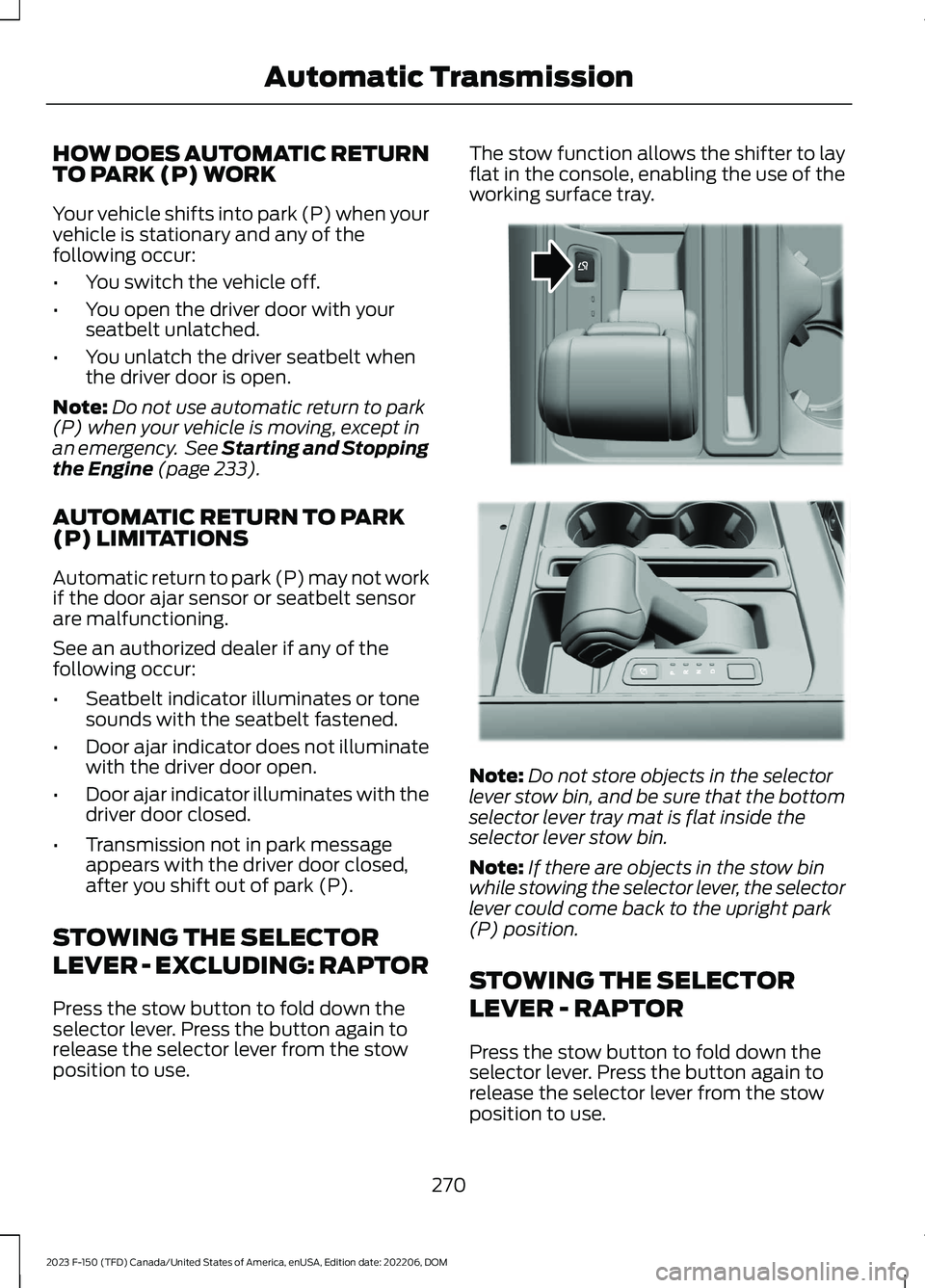
Press the stow button to fold down theselector lever. Press the button again torelease the selector lever from the stowposition to use.
The stow function allows the shifter to layflat in the console, enabling the use of theworking surface tray.
Note:Do not store objects in the selectorlever stow bin, and be sure that the bottomselector lever tray mat is flat inside theselector lever stow bin.
Note:If there are objects in the stow binwhile stowing the selector lever, the selectorlever could come back to the upright park(P) position.
STOWING THE SELECTOR
LEVER - RAPTOR
Press the stow button to fold down theselector lever. Press the button again torelease the selector lever from the stowposition to use.
270
2023 F-150 (TFD) Canada/United States of America, enUSA, Edition date: 202206, DOMAutomatic TransmissionE311505 E311503
Page 275 of 786
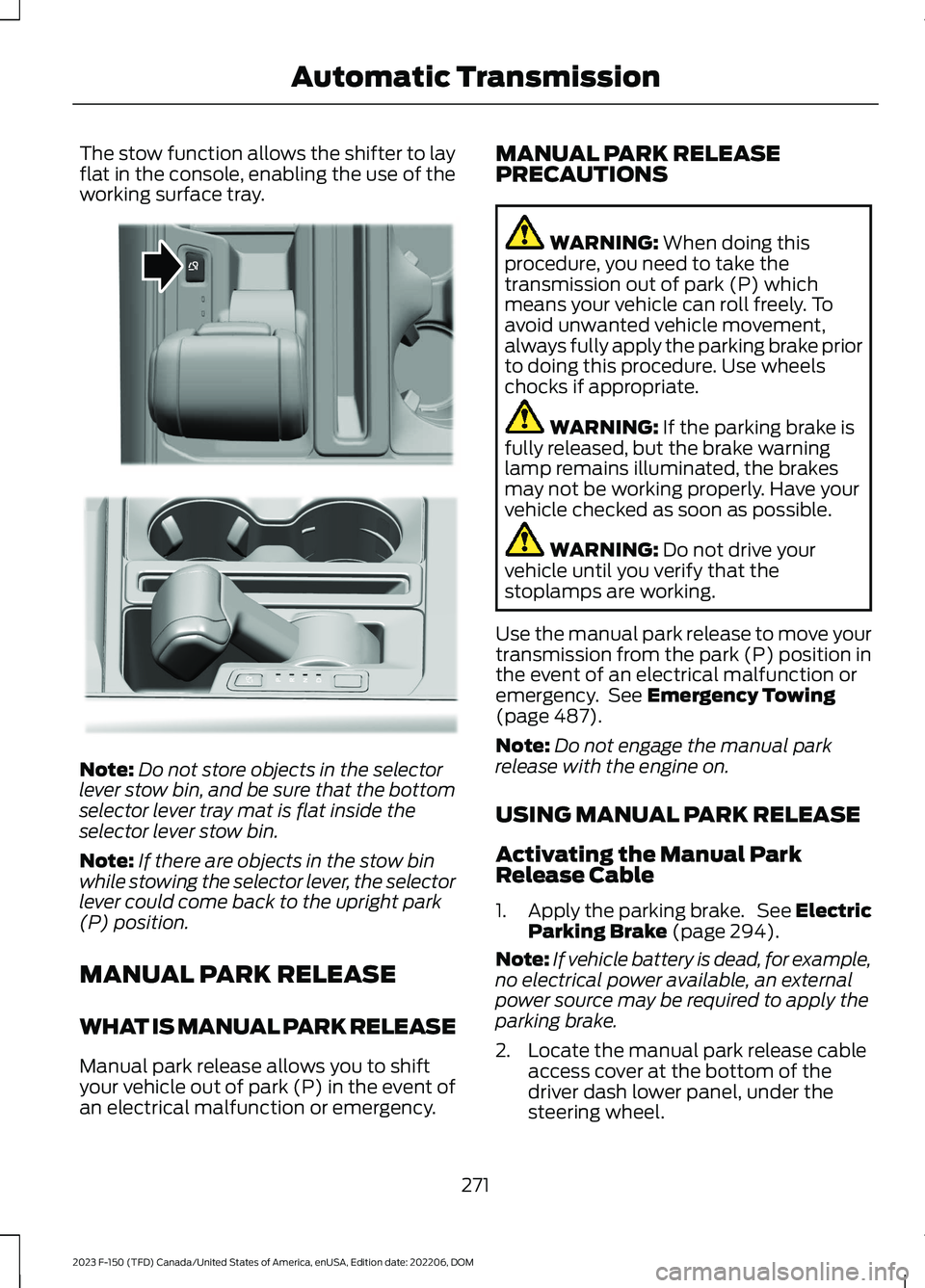
The stow function allows the shifter to layflat in the console, enabling the use of theworking surface tray.
Note:Do not store objects in the selectorlever stow bin, and be sure that the bottomselector lever tray mat is flat inside theselector lever stow bin.
Note:If there are objects in the stow binwhile stowing the selector lever, the selectorlever could come back to the upright park(P) position.
MANUAL PARK RELEASE
WHAT IS MANUAL PARK RELEASE
Manual park release allows you to shiftyour vehicle out of park (P) in the event ofan electrical malfunction or emergency.
MANUAL PARK RELEASEPRECAUTIONS
WARNING: When doing thisprocedure, you need to take thetransmission out of park (P) whichmeans your vehicle can roll freely. Toavoid unwanted vehicle movement,always fully apply the parking brake priorto doing this procedure. Use wheelschocks if appropriate.
WARNING: If the parking brake isfully released, but the brake warninglamp remains illuminated, the brakesmay not be working properly. Have yourvehicle checked as soon as possible.
WARNING: Do not drive yourvehicle until you verify that thestoplamps are working.
Use the manual park release to move yourtransmission from the park (P) position inthe event of an electrical malfunction oremergency. See Emergency Towing(page 487).
Note:Do not engage the manual parkrelease with the engine on.
USING MANUAL PARK RELEASE
Activating the Manual ParkRelease Cable
1.Apply the parking brake. See ElectricParking Brake (page 294).
Note:If vehicle battery is dead, for example,no electrical power available, an externalpower source may be required to apply theparking brake.
2.Locate the manual park release cableaccess cover at the bottom of thedriver dash lower panel, under thesteering wheel.
271
2023 F-150 (TFD) Canada/United States of America, enUSA, Edition date: 202206, DOMAutomatic TransmissionE311505 E347229
Page 276 of 786
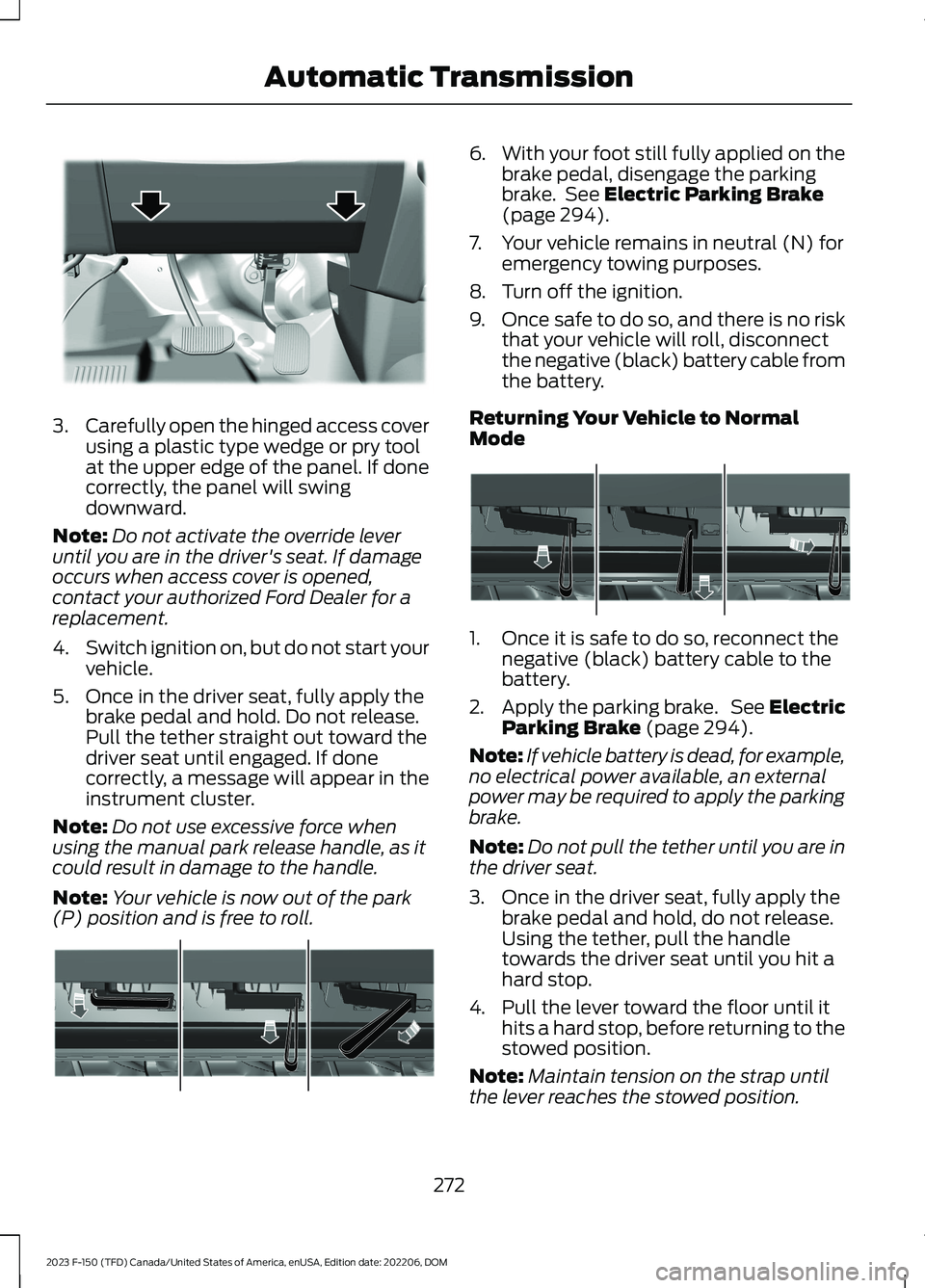
3.Carefully open the hinged access coverusing a plastic type wedge or pry toolat the upper edge of the panel. If donecorrectly, the panel will swingdownward.
Note:Do not activate the override leveruntil you are in the driver's seat. If damageoccurs when access cover is opened,contact your authorized Ford Dealer for areplacement.
4.Switch ignition on, but do not start yourvehicle.
5.Once in the driver seat, fully apply thebrake pedal and hold. Do not release.Pull the tether straight out toward thedriver seat until engaged. If donecorrectly, a message will appear in theinstrument cluster.
Note:Do not use excessive force whenusing the manual park release handle, as itcould result in damage to the handle.
Note:Your vehicle is now out of the park(P) position and is free to roll.
6.With your foot still fully applied on thebrake pedal, disengage the parkingbrake. See Electric Parking Brake(page 294).
7.Your vehicle remains in neutral (N) foremergency towing purposes.
8.Turn off the ignition.
9.Once safe to do so, and there is no riskthat your vehicle will roll, disconnectthe negative (black) battery cable fromthe battery.
Returning Your Vehicle to NormalMode
1.Once it is safe to do so, reconnect thenegative (black) battery cable to thebattery.
2.Apply the parking brake. See ElectricParking Brake (page 294).
Note:If vehicle battery is dead, for example,no electrical power available, an externalpower may be required to apply the parkingbrake.
Note:Do not pull the tether until you are inthe driver seat.
3.Once in the driver seat, fully apply thebrake pedal and hold, do not release.Using the tether, pull the handletowards the driver seat until you hit ahard stop.
4.Pull the lever toward the floor until ithits a hard stop, before returning to thestowed position.
Note:Maintain tension on the strap untilthe lever reaches the stowed position.
272
2023 F-150 (TFD) Canada/United States of America, enUSA, Edition date: 202206, DOMAutomatic TransmissionE336473 E315156 E315157
Page 277 of 786
5.Return the manual park release cablelever to the stowed position and installthe access cover.
6.With your foot fully applied on thebrake pedal, start your vehicle. Confirmthat your vehicle is in the park (P)position and that the instrumentcluster indicates park (P).
Note:If the instrument cluster is notdisplaying the park (P) position or theinstrument cluster displays an errormessage, apply the parking brake beforeexiting your vehicle.
7.Close the access cover.
AUTOMATIC TRANSMISSION
AUDIBLE WARNINGS
Transmission Not In Park (P)Audible Warning
Sounds if you open the driver door beforeshifting into park (P).
273
2023 F-150 (TFD) Canada/United States of America, enUSA, Edition date: 202206, DOMAutomatic Transmission
Page 285 of 786
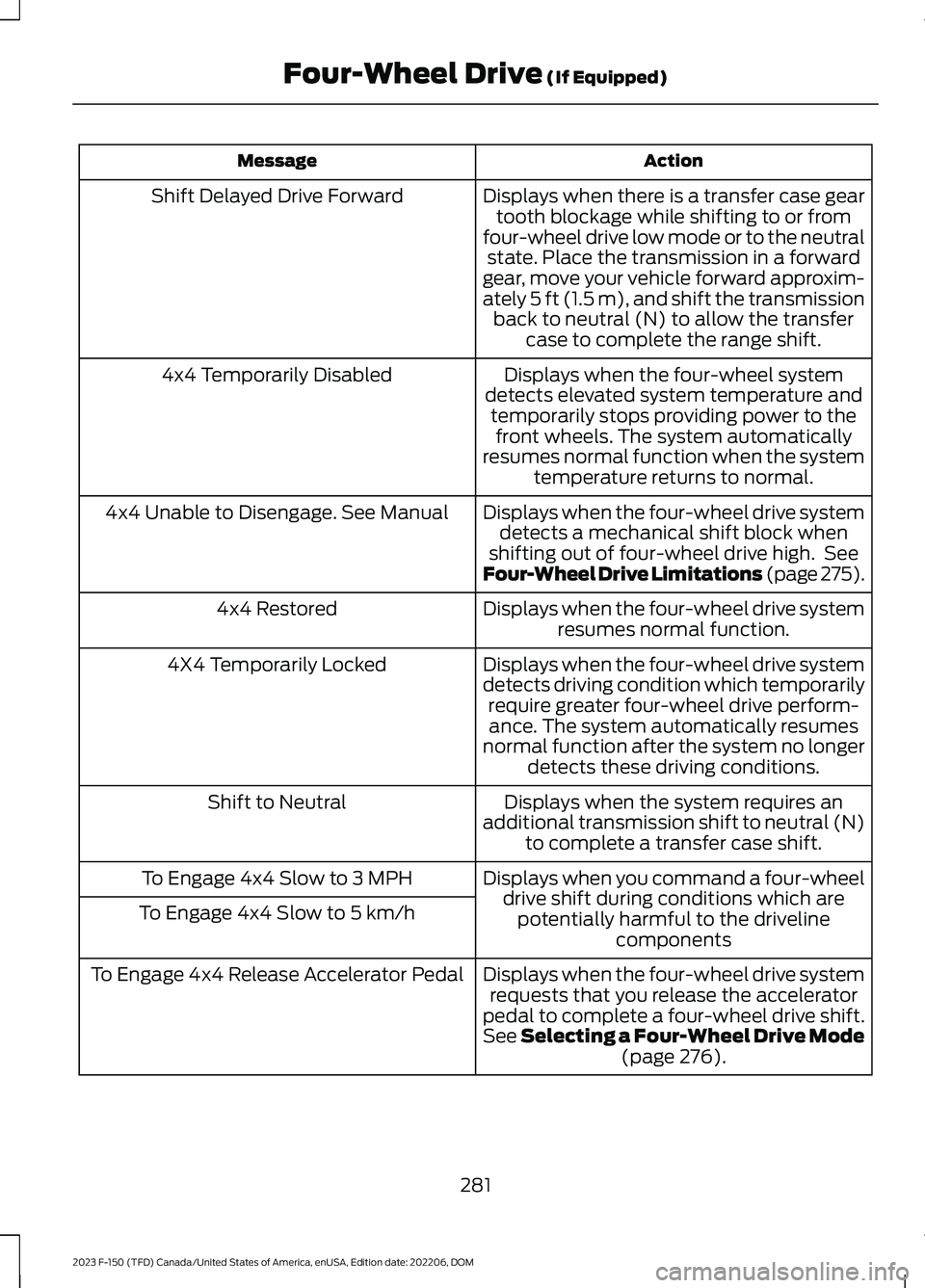
ActionMessage
Displays when there is a transfer case geartooth blockage while shifting to or fromfour-wheel drive low mode or to the neutralstate. Place the transmission in a forwardgear, move your vehicle forward approxim-ately 5 ft (1.5 m), and shift the transmissionback to neutral (N) to allow the transfercase to complete the range shift.
Shift Delayed Drive Forward
Displays when the four-wheel systemdetects elevated system temperature andtemporarily stops providing power to thefront wheels. The system automaticallyresumes normal function when the systemtemperature returns to normal.
4x4 Temporarily Disabled
Displays when the four-wheel drive systemdetects a mechanical shift block whenshifting out of four-wheel drive high. SeeFour-Wheel Drive Limitations (page 275).
4x4 Unable to Disengage. See Manual
Displays when the four-wheel drive systemresumes normal function.4x4 Restored
Displays when the four-wheel drive systemdetects driving condition which temporarilyrequire greater four-wheel drive perform-ance. The system automatically resumesnormal function after the system no longerdetects these driving conditions.
4X4 Temporarily Locked
Displays when the system requires anadditional transmission shift to neutral (N)to complete a transfer case shift.
Shift to Neutral
Displays when you command a four-wheeldrive shift during conditions which arepotentially harmful to the drivelinecomponents
To Engage 4x4 Slow to 3 MPH
To Engage 4x4 Slow to 5 km/h
Displays when the four-wheel drive systemrequests that you release the acceleratorpedal to complete a four-wheel drive shift.See Selecting a Four-Wheel Drive Mode(page 276).
To Engage 4x4 Release Accelerator Pedal
281
2023 F-150 (TFD) Canada/United States of America, enUSA, Edition date: 202206, DOMFour-Wheel Drive (If Equipped)
Page 287 of 786
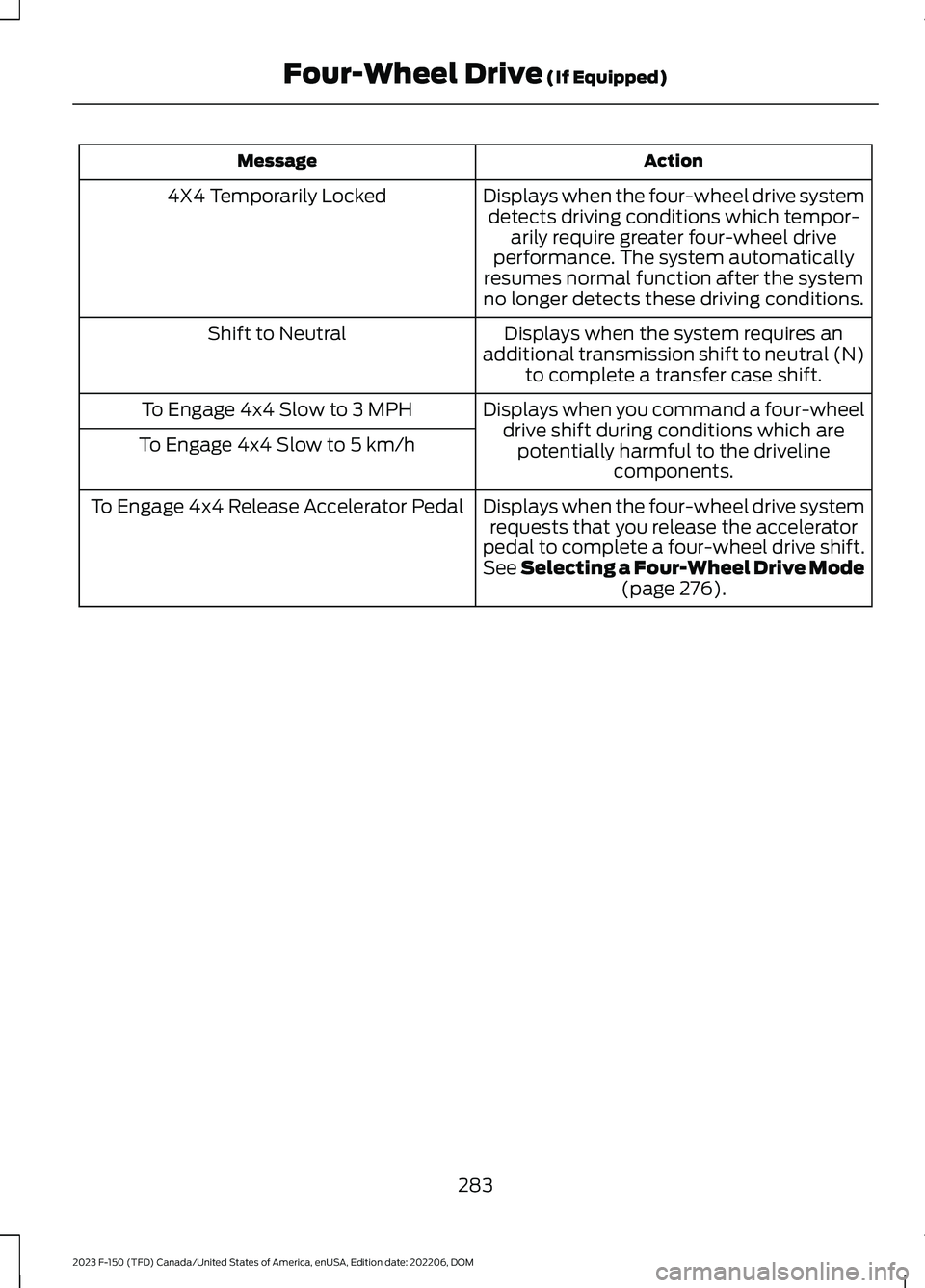
ActionMessage
Displays when the four-wheel drive systemdetects driving conditions which tempor-arily require greater four-wheel driveperformance. The system automaticallyresumes normal function after the systemno longer detects these driving conditions.
4X4 Temporarily Locked
Displays when the system requires anadditional transmission shift to neutral (N)to complete a transfer case shift.
Shift to Neutral
Displays when you command a four-wheeldrive shift during conditions which arepotentially harmful to the drivelinecomponents.
To Engage 4x4 Slow to 3 MPH
To Engage 4x4 Slow to 5 km/h
Displays when the four-wheel drive systemrequests that you release the acceleratorpedal to complete a four-wheel drive shift.See Selecting a Four-Wheel Drive Mode(page 276).
To Engage 4x4 Release Accelerator Pedal
283
2023 F-150 (TFD) Canada/United States of America, enUSA, Edition date: 202206, DOMFour-Wheel Drive (If Equipped)
Page 317 of 786
TRAIL CONTROL INDICATORS
TRAIL ONE PEDAL DRIVE
WHAT IS TRAIL ONE PEDAL DRIVE
Trail one pedal drive allows you toaccelerate and brake using only theaccelerator pedal. The system assistswhen driving through difficult off-roadterrain. Pressing the accelerator pedaldown accelerates your vehicle andreleasing pressure on the acceleratorpedal, with your foot still on the pedal,slows your vehicle down. Releasing theaccelerator pedal may allow your vehicleto come to a complete stop, somesituations may require you to press thebrake pedal to come to a complete stop.
TRAIL ONE PEDAL DRIVEPRECAUTIONS
WARNING: This system is an extradriving aid. It does not replace yourattention and judgment, or the need toapply the brakes. This system does NOTautomatically brake your vehicle. If youfail to press the brake pedal whennecessary, you may collide with anothervehicle.
Shifting into drive (D) or reverse (R) doesnot cause the vehicle to move.
You can press the brake pedal to increasebraking. This does not turn the system off.
Trail one pedal drive could apply theparking brake when your vehicle is notmoving and not in park (P).
Note:Always check the transmissionselection before accelerating.
Note:Only use trail one pedal drive onslippery or loose surfaces. Using trail onepedal drive on dry, hard surfaces couldproduce some vibration, driveline bind upand potential excessive tire and vehiclewear.
TRAIL ONE PEDAL DRIVELIMITATIONS
Trail one pedal drive is unavailable whenany of the following occur:
•Your vehicle is not in four-wheel drivehigh (4H) or four-wheel drive low (4L)modes.
•Using cruise control.
•Using trail control.
•You exceed 30 mph (48 km/h).
Releasing the accelerator pedal may allowyour vehicle to come to a complete stop,some situations may require you to pressthe brake pedal to come to a completestop.
SWITCHING TRAIL ONE PEDALDRIVE ON AND OFF
Switching Trail One Pedal Drive On
Press the trail features buttonwhen in four-wheel drive high orfour-wheel drive low to activatetrail one pedal drive.
Switching Trail One Pedal DriveOff
Press the trail features button again toswitch trail one pedal drive off.
Selecting a driveline mode other thanfour-wheel drive high or four-wheel drivelow switches trail one pedal drive off.
313
2023 F-150 (TFD) Canada/United States of America, enUSA, Edition date: 202206, DOMTrail Control - Raptor/Tremor (If Equipped)E272858 E332910
Page 322 of 786
WHAT IS HILL DESCENT
CONTROL
Hill descent control allows the driver to setand maintain vehicle speed whiledescending steep slopes in various surfaceconditions.
HOW DOES HILL DESCENT
CONTROL WORK
Hill descent control can maintain vehiclespeeds on downhill slopes between2–20 mph (3–32 km/h). Above 20 mph(32 km/h), the system remains on but thedescent speed cannot be set ormaintained.
Note:The system does not function below2 mph (3 km/h).
The system requires a cool down intervalafter a period of sustained use. Hill descentcontrol provides a warning in the messagecenter and a tone sounds when the systemis about to disengage for cooling. At thistime, manually apply the brakes as neededto maintain descent speed.
Note:The amount of time that the systemcan remain active before cooling varies withconditions.
HILL DESCENT CONTROL
PRECAUTIONS
WARNING: The system does notcontrol speed in low traction conditionsor extremely steep slopes. The systemis designed to be an aid and does notrelieve you of your responsibility to drivewith due care and attention. Failure tofollow this instruction could result inpersonal injury.
WARNING: Hill descent controlcannot control descent in all surfaceconditions and circumstances, such asice or extremely steep grades. Hilldescent control is a driver assist systemand cannot substitute for good judgmentby the driver. Failure to do so may resultin loss of vehicle control, crash or seriousinjury.
WARNING: The system does notreplace the parking brake. When youleave your vehicle, always apply theparking brake and shift the transmissioninto park (P) for automatic transmissionor first gear for manual transmission.
SWITCHING HILL DESCENT
CONTROL ON AND OFF
Press the button on theinstrument panel. A lightilluminates and a tone soundswhen the system is active.
SETTING THE HILL DESCENT
SPEED
To increase or decrease the descent speed,press the accelerator or brake pedal, or usethe SET + and SET - buttons on thesteering wheel. Once you reach thepreferred speed remove your feet from thepedals.
HILL DESCENT CONTROL
INDICATOR
Illuminates when you switch hilldescent control on.
318
2023 F-150 (TFD) Canada/United States of America, enUSA, Edition date: 202206, DOMHill Descent Control (If Equipped)E163171 E163171
Page 366 of 786
WHAT IS DRIVE MODE
CONTROL
Your vehicle has various drive modes thatyou can select for different drivingconditions. Depending on the drive modethat you select, the system adjusts variousvehicle settings.
HOW DOES DRIVE MODE
CONTROL WORK
Selectable drive modes change variouselectronic and mechanical settings withinyour vehicle to tailor its performance anddriving characteristics to on-road oroff-road driving conditions. Steering feeland effort, traction control, stabilitycontrol, chassis controls, powertrainresponse, transmissions shift points,four-wheel driveline setting, exhaust noiselevel and suspension dampening areautomatically altered to a pre-determinedsetting depending upon the drive modethat is selected.
Note:Your vehicle has diagnostic checksthat continuously monitor all systems forproper operation. If a drive mode isunavailable due to a system fault, yourvehicle defaults to normal mode and thedriveline remains in the four-wheel drivesetting that was last selected prior to thesystem fault.
Note:Your vehicle reverts to normal modeeach time it is started. If you shut yourvehicle off in a drive mode other thannormal mode, at startup the instrumentcluster screen displays a pop-up asking ifyou would like to return to your last useddrive mode. If you select yes to the pop-up,your vehicle returns to the last selected drivemode and the default four-wheel drivelinesetting associated with that drive mode. Ifyou select no, your vehicle remains in normalmode and the default four-wheel drivelinesetting associated with that drive mode. Ifyou do not select yes or no the pop upmessage times out, your vehicle remains innormal mode, and the four-wheel drivelinesetting remains in its last used setting.
HOW DOES DRIVE MODE
CONTROL WORK - RAPTOR
Selectable drive modes change variouselectronic and mechanical settings withinyour vehicle to tailor its performance anddriving characteristics to on-road oroff-road driving conditions. Steering feeland effort, traction control, stabilitycontrol, chassis controls, powertrainresponse, transmission shift points,four-wheel driveline settings, exhaust noiselevel and suspension dampening areautomatically altered to a pre-determinedsetting depending upon the drive modethat you select.
Note:Your vehicle has diagnostic checksthat continuously monitor all systems forproper operation. If a drive mode isunavailable due to a system fault, yourvehicle defaults to normal mode and thedriveline remains in the four-wheel drivesetting that you last selected prior to thesystem fault.
362
2023 F-150 (TFD) Canada/United States of America, enUSA, Edition date: 202206, DOMDrive Mode Control