change wheel FORD F150 2023 Owner's Manual
[x] Cancel search | Manufacturer: FORD, Model Year: 2023, Model line: F150, Model: FORD F150 2023Pages: 786, PDF Size: 23.15 MB
Page 380 of 786
The lane keeping system may not correctlyoperate in any of the following conditions:
•The lane keeping system does notdetect at least one lane marking.
•You switch the turn signal on.
•You apply direct steering, acceleratefast or brake hard.
•The vehicle speed is less than 40 mph(64 km/h).
•The anti-lock brake, stability control ortraction control system activates.
•The lane is too narrow.
•Something is obscuring the camera orit is unable to detect the lane markingsdue to environment, traffic or vehicleconditions.
•Entering or exiting a tight curve whendriving at high speeds.
The lane keeping system may not correctlane positioning in any of the followingconditions:
•High winds.
•Uneven road surfaces.
•Heavy or uneven loads.
•Incorrect tire pressure.
SWITCHING THE LANE
KEEPING SYSTEM ON AND
OFF
To activate the lane keepingsystem, press the button on thesteering wheel.
To deactivate the lane keeping system,press the button again.
Note:When switching the system on or offa message appears in the information andentertainment display to show the status.
Note:The system stores the on or offsetting until manually changed, unless itdetects a MyKey™. If the system detects aMyKey™, it defaults to the last setting forthat MyKey™.
Note: If the system detects a MyKey™,pressing the button does not affect the onor off status of the system. You can onlychange the mode and intensity settings.
SWITCHING THE LANE
KEEPING SYSTEM MODE
The lane keeping system has differentsettings that you can view or adjust usingthe information display.
The system stores the last known selectionfor each of these settings. You do not needto readjust your settings each time youswitch on the system.
To change the lane keeping system mode,use the touchscreen:
1.Press Features on the touchscreen.
2.Press Driver Assistance.
3.Press Lane-Keeping System.
4.Press Lane-Keeping Mode.
5.Select a mode.
Note:The system remembers the lastsetting when you start your vehicle. If thesystem detects a MyKey™, it defaults to thelast setting for that MyKey™.
ALERT MODE
WHAT IS ALERT MODE
Alert mode vibrates the steering wheelwhen it detects an unintended lanedeparture.
376
2023 F-150 (TFD) Canada/United States of America, enUSA, Edition date: 202206, DOMLane Keeping System (If Equipped)E334922
Page 381 of 786
HOW DOES ALERT MODE WORK
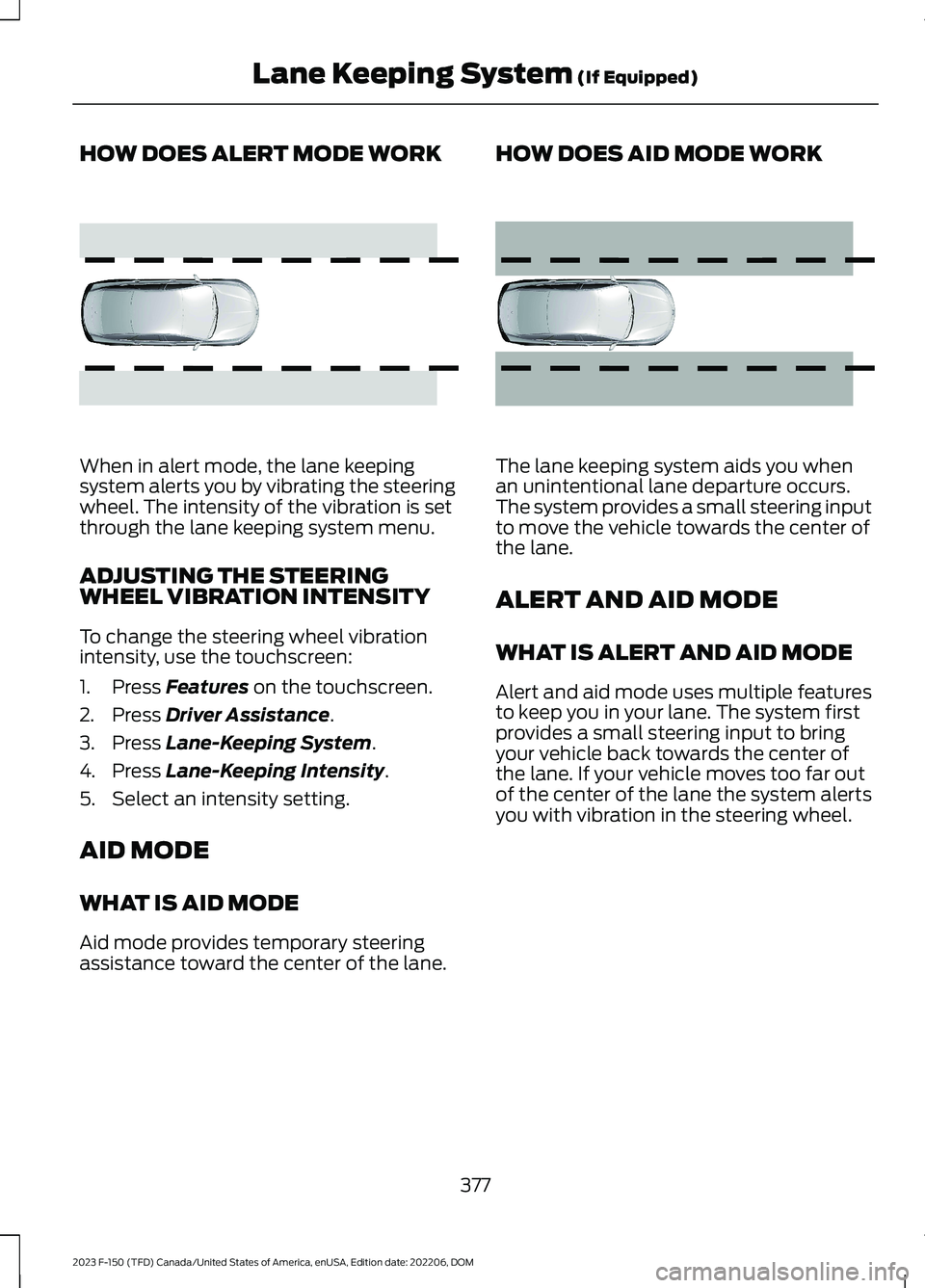
When in alert mode, the lane keepingsystem alerts you by vibrating the steeringwheel. The intensity of the vibration is setthrough the lane keeping system menu.
ADJUSTING THE STEERINGWHEEL VIBRATION INTENSITY
To change the steering wheel vibrationintensity, use the touchscreen:
1.Press Features on the touchscreen.
2.Press Driver Assistance.
3.Press Lane-Keeping System.
4.Press Lane-Keeping Intensity.
5.Select an intensity setting.
AID MODE
WHAT IS AID MODE
Aid mode provides temporary steeringassistance toward the center of the lane.
HOW DOES AID MODE WORK
The lane keeping system aids you whenan unintentional lane departure occurs.The system provides a small steering inputto move the vehicle towards the center ofthe lane.
ALERT AND AID MODE
WHAT IS ALERT AND AID MODE
Alert and aid mode uses multiple featuresto keep you in your lane. The system firstprovides a small steering input to bringyour vehicle back towards the center ofthe lane. If your vehicle moves too far outof the center of the lane the system alertsyou with vibration in the steering wheel.
377
2023 F-150 (TFD) Canada/United States of America, enUSA, Edition date: 202206, DOMLane Keeping System (If Equipped)E165515 E165516
Page 388 of 786
BLIND SPOT INFORMATIONSYSTEM WITH TRAILERCOVERAGE LIMITATIONS
Trailer coverage only supportsconventional trailers. The system turns offif you select a fifth wheel trailer type.
Make sure the trailer width is less than orequal to 8.5 ft (2.6 m) and the length isless than 33 ft (10.1 m). If you input valueshigher, the system turns off.
Some trailers could cause a slight changein system performance:
•Large box trailers could cause falsealerts to occur when driving next toinfrastructures or near parked cars. Afalse alert could also occur whilemaking a 90-degree turn.
•Trailers that have a width greater than8.5 ft (2.6 m) at the front and have atotal length greater than 20 ft (6 m)could cause delayed alerts when avehicle is passing at high speeds.
•Box trailers that have a width greaterthan 8.5 ft (2.6 m) at the front couldcause early alerts when you pass avehicle.
•Clam shell or v-nose box trailers witha width greater than 8.5 ft (2.6 m) atthe front could cause delayed alertswhen a vehicle traveling the samespeed as your vehicle merges lanes.
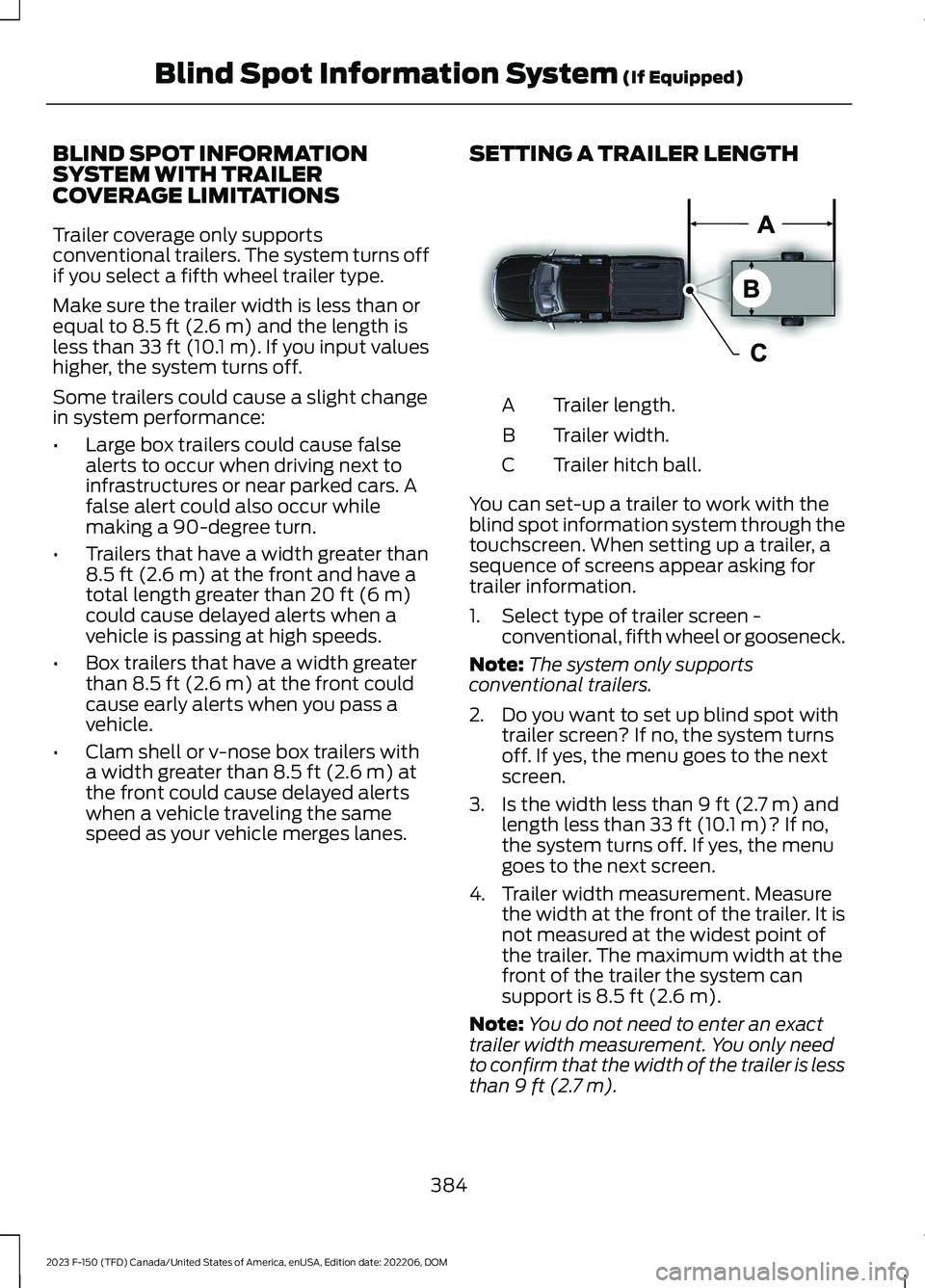
SETTING A TRAILER LENGTH
Trailer length.A
Trailer width.B
Trailer hitch ball.C
You can set-up a trailer to work with theblind spot information system through thetouchscreen. When setting up a trailer, asequence of screens appear asking fortrailer information.
1.Select type of trailer screen -conventional, fifth wheel or gooseneck.
Note:The system only supportsconventional trailers.
2.Do you want to set up blind spot withtrailer screen? If no, the system turnsoff. If yes, the menu goes to the nextscreen.
3.Is the width less than 9 ft (2.7 m) andlength less than 33 ft (10.1 m)? If no,the system turns off. If yes, the menugoes to the next screen.
4.Trailer width measurement. Measurethe width at the front of the trailer. It isnot measured at the widest point ofthe trailer. The maximum width at thefront of the trailer the system cansupport is 8.5 ft (2.6 m).
Note:You do not need to enter an exacttrailer width measurement. You only needto confirm that the width of the trailer is lessthan 9 ft (2.7 m).
384
2023 F-150 (TFD) Canada/United States of America, enUSA, Edition date: 202206, DOMBlind Spot Information System (If Equipped)E225008
Page 429 of 786
WHAT IS THE INTEGRATED
TRAILER BRAKE CONTROLLER
The trailer brake controller assists insmooth and effective trailer braking basedon the towing vehicle’s brake pressure.
INTEGRATED TRAILER BRAKE
CONTROLLER PRECAUTIONS
WARNING: Use the integratedtrailer brake controller to properly adjustthe trailer brakes and check allconnections before towing a trailer.Failure to follow this instruction couldresult in the loss of control of yourvehicle, personal injury or death.
•Only use the manual control lever forproper adjustment of the gain duringtrailer setup. Misuse, such asapplication during trailer sway, couldcause instability of trailer or towvehicle.
•Avoid towing in adverse weatherconditions. The trailer brake controllerdoes not provide anti-lock control ofthe trailer wheels. Trailer wheels canlock up on slippery surfaces, resultingin reduced stability of trailer and towvehicle.
•The trailer brake controller is only afactory-installed or dealer-installeditem. Ford is not responsible forwarranty or performance of thecontroller due to misuse or customerinstallation.
Note:Do not attempt removal of the trailerbrake controller without consulting theWorkshop Manual. Damage to the unit mayresult.
Note:Make sure to set the integrated trailerbrake controller gain to 0 if you are using anaftermarket trailer brake controller.
USING THE INTEGRATED
TRAILER BRAKE CONTROLLER
1.Make sure the trailer brakes are in goodworking condition, functioning normallyand properly adjusted. See your trailerdealer if necessary.
Note:An authorized dealer can diagnosethe trailer brake controller to determineexactly which trailer fault has occurred. Yourvehicle warranty does not cover issues withyour trailer.
2.Hook up the trailer and make theelectrical connections according to thetrailer manufacturer's instructions.
Note:Select default mode if the trailer hassurge brakes, or no brakes at all. The systemhas no effect on the braking performanceof the trailer in either of these cases.
Note:If a trailer is connected by a four-pinconnector, the trailer braking function willnot be supported.
3.When you plug in a trailer with electricor electric-over-hydraulic brakes, amessage confirming connectionappears in the information display.
4.Use the gain adjustment to find thedesired starting point. A gain setting of6.0 is a good starting point for heavierloads.
Note:Use the following steps to adjust thegain setting whenever road, weather andtrailer, or vehicle loading conditions, changefrom when you initially set the gain.
5.In a traffic-free environment, tow thetrailer on a dry, level surface andsqueeze the manual control levercompletely.
425
2023 F-150 (TFD) Canada/United States of America, enUSA, Edition date: 202206, DOMIntegrated Trailer Brake Controller (If Equipped)
Page 446 of 786
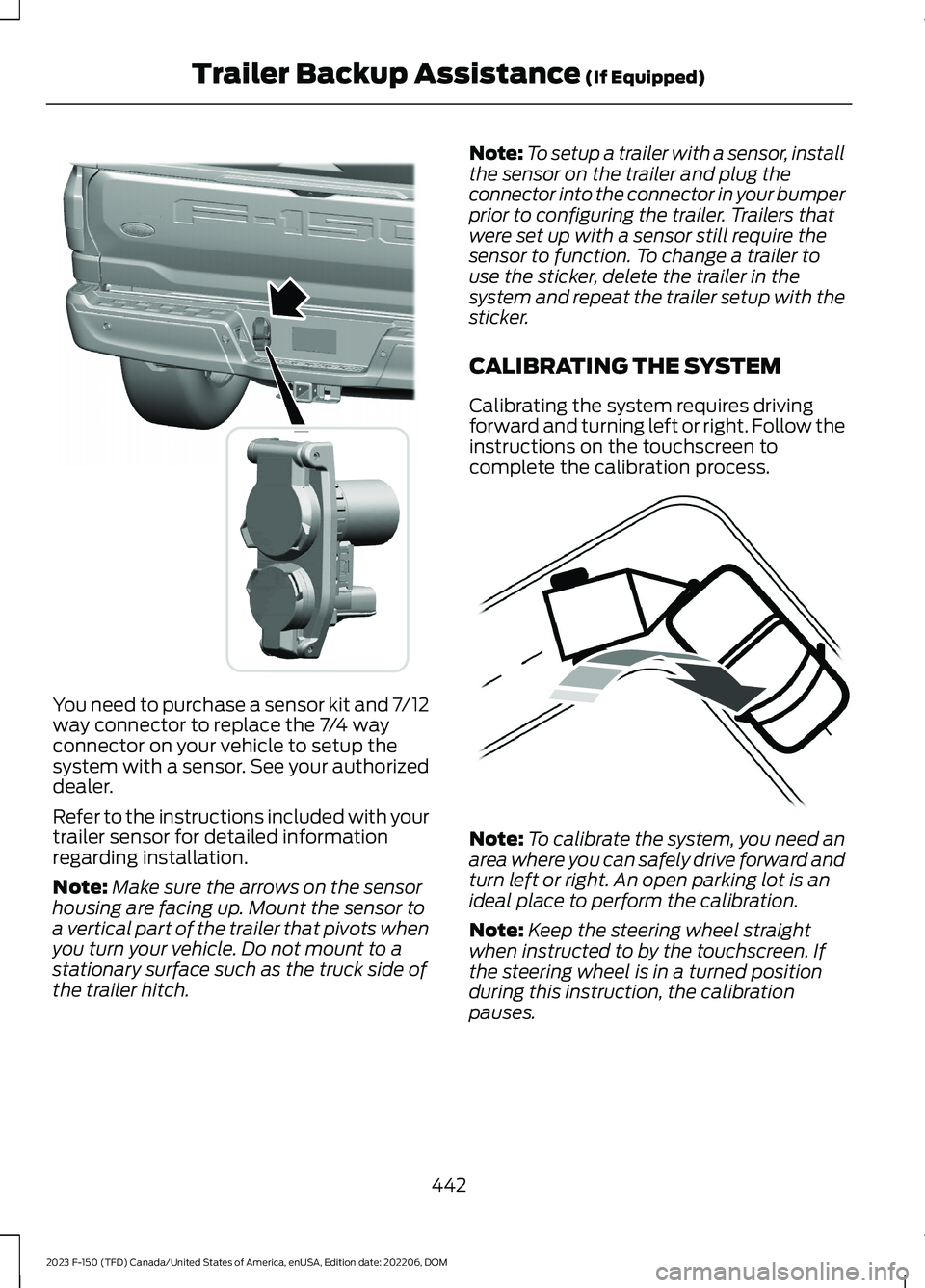
You need to purchase a sensor kit and 7/12way connector to replace the 7/4 wayconnector on your vehicle to setup thesystem with a sensor. See your authorizeddealer.
Refer to the instructions included with yourtrailer sensor for detailed informationregarding installation.
Note:Make sure the arrows on the sensorhousing are facing up. Mount the sensor toa vertical part of the trailer that pivots whenyou turn your vehicle. Do not mount to astationary surface such as the truck side ofthe trailer hitch.
Note:To setup a trailer with a sensor, installthe sensor on the trailer and plug theconnector into the connector in your bumperprior to configuring the trailer. Trailers thatwere set up with a sensor still require thesensor to function. To change a trailer touse the sticker, delete the trailer in thesystem and repeat the trailer setup with thesticker.
CALIBRATING THE SYSTEM
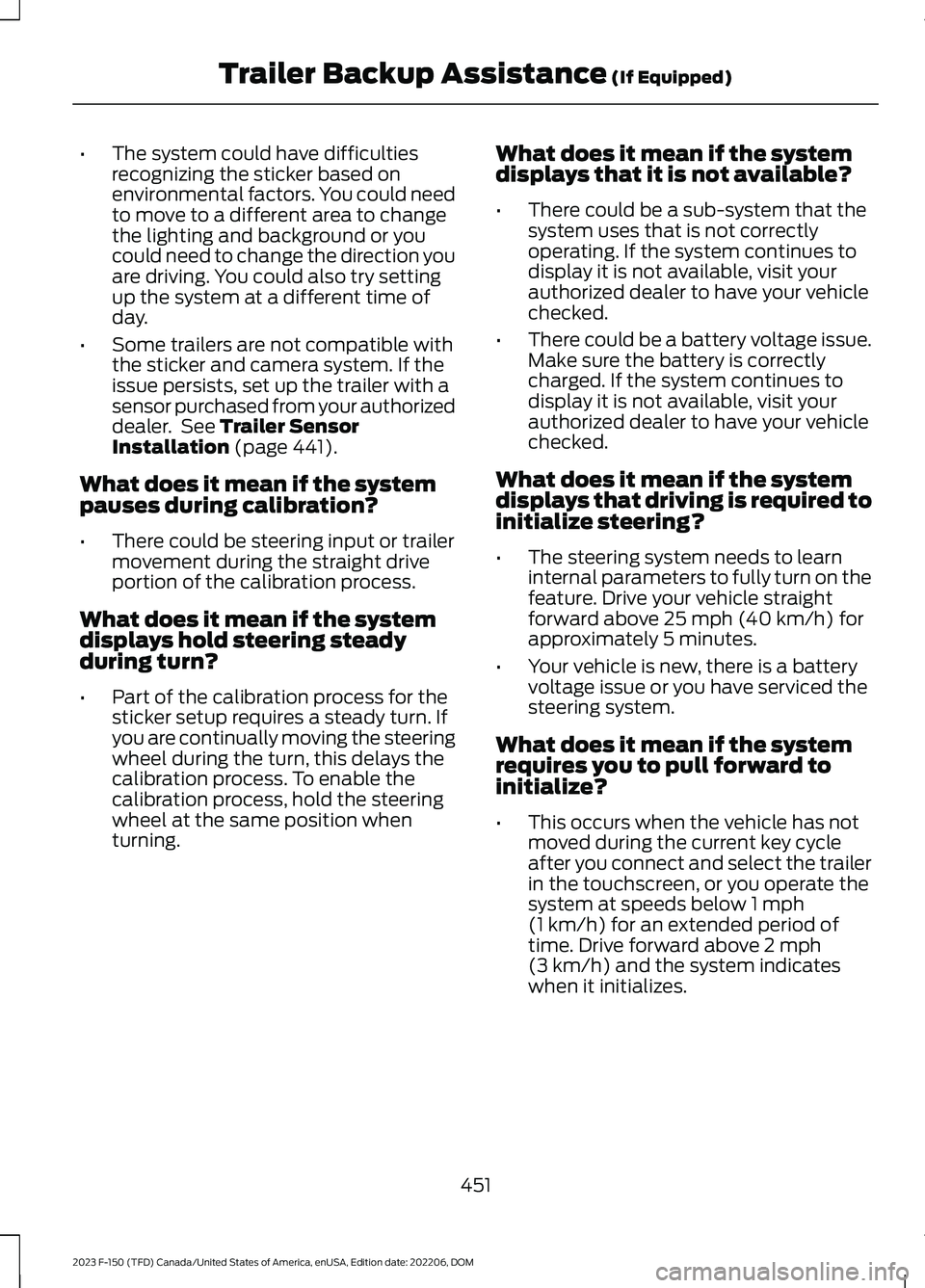
Calibrating the system requires drivingforward and turning left or right. Follow theinstructions on the touchscreen tocomplete the calibration process.
Note:To calibrate the system, you need anarea where you can safely drive forward andturn left or right. An open parking lot is anideal place to perform the calibration.
Note:Keep the steering wheel straightwhen instructed to by the touchscreen. Ifthe steering wheel is in a turned positionduring this instruction, the calibrationpauses.
442
2023 F-150 (TFD) Canada/United States of America, enUSA, Edition date: 202206, DOMTrailer Backup Assistance (If Equipped)E359954 E352329
Page 455 of 786
•The system could have difficultiesrecognizing the sticker based onenvironmental factors. You could needto move to a different area to changethe lighting and background or youcould need to change the direction youare driving. You could also try settingup the system at a different time ofday.
•Some trailers are not compatible withthe sticker and camera system. If theissue persists, set up the trailer with asensor purchased from your authorizeddealer. See Trailer SensorInstallation (page 441).
What does it mean if the systempauses during calibration?
•There could be steering input or trailermovement during the straight driveportion of the calibration process.
What does it mean if the systemdisplays hold steering steadyduring turn?
•Part of the calibration process for thesticker setup requires a steady turn. Ifyou are continually moving the steeringwheel during the turn, this delays thecalibration process. To enable thecalibration process, hold the steeringwheel at the same position whenturning.
What does it mean if the systemdisplays that it is not available?
•There could be a sub-system that thesystem uses that is not correctlyoperating. If the system continues todisplay it is not available, visit yourauthorized dealer to have your vehiclechecked.
•There could be a battery voltage issue.Make sure the battery is correctlycharged. If the system continues todisplay it is not available, visit yourauthorized dealer to have your vehiclechecked.
What does it mean if the systemdisplays that driving is required toinitialize steering?
•The steering system needs to learninternal parameters to fully turn on thefeature. Drive your vehicle straightforward above 25 mph (40 km/h) forapproximately 5 minutes.
•Your vehicle is new, there is a batteryvoltage issue or you have serviced thesteering system.
What does it mean if the systemrequires you to pull forward toinitialize?
•This occurs when the vehicle has notmoved during the current key cycleafter you connect and select the trailerin the touchscreen, or you operate thesystem at speeds below 1 mph(1 km/h) for an extended period oftime. Drive forward above 2 mph(3 km/h) and the system indicateswhen it initializes.
451
2023 F-150 (TFD) Canada/United States of America, enUSA, Edition date: 202206, DOMTrailer Backup Assistance (If Equipped)
Page 461 of 786
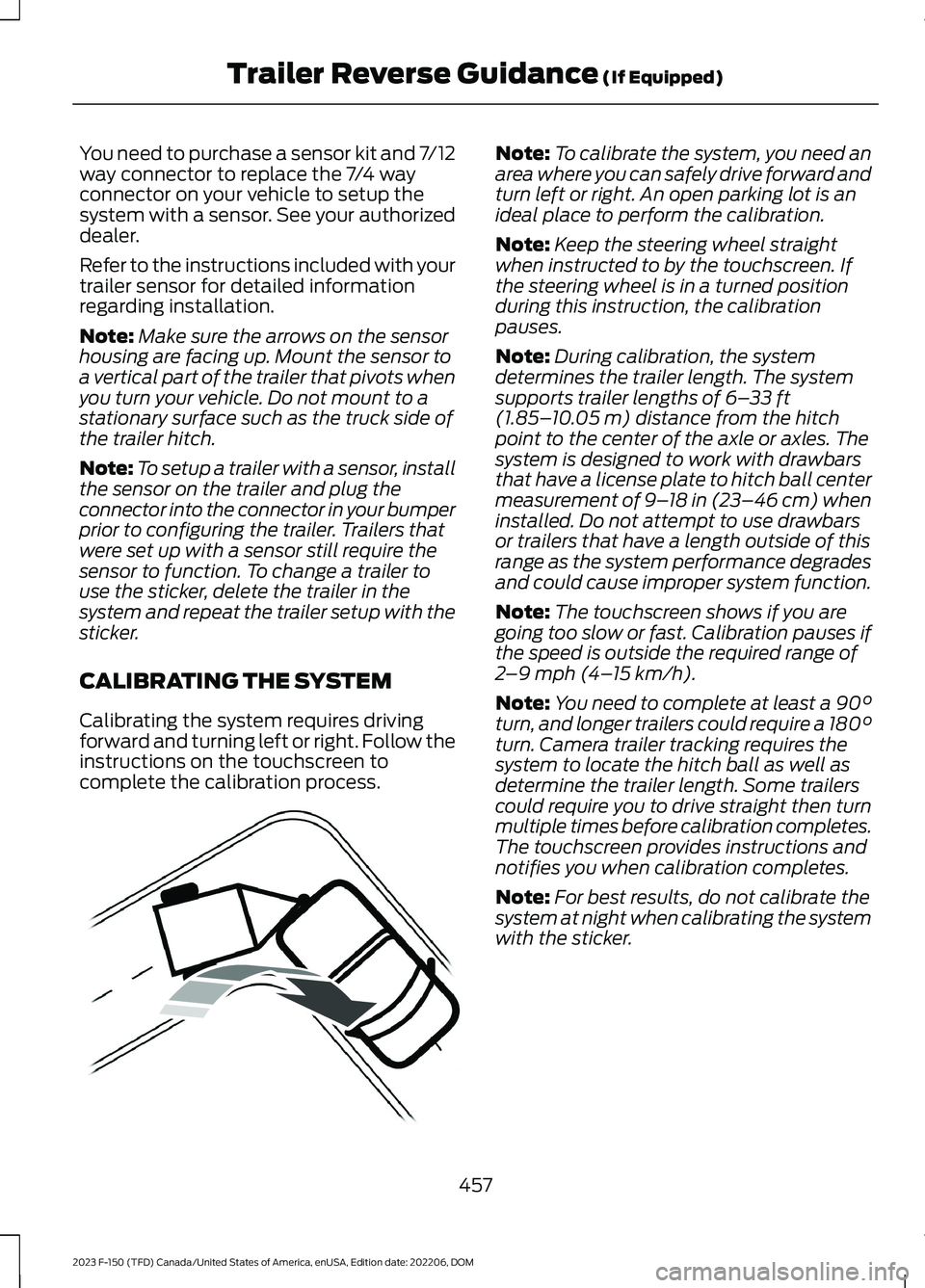
You need to purchase a sensor kit and 7/12way connector to replace the 7/4 wayconnector on your vehicle to setup thesystem with a sensor. See your authorizeddealer.
Refer to the instructions included with yourtrailer sensor for detailed informationregarding installation.
Note:Make sure the arrows on the sensorhousing are facing up. Mount the sensor toa vertical part of the trailer that pivots whenyou turn your vehicle. Do not mount to astationary surface such as the truck side ofthe trailer hitch.
Note:To setup a trailer with a sensor, installthe sensor on the trailer and plug theconnector into the connector in your bumperprior to configuring the trailer. Trailers thatwere set up with a sensor still require thesensor to function. To change a trailer touse the sticker, delete the trailer in thesystem and repeat the trailer setup with thesticker.
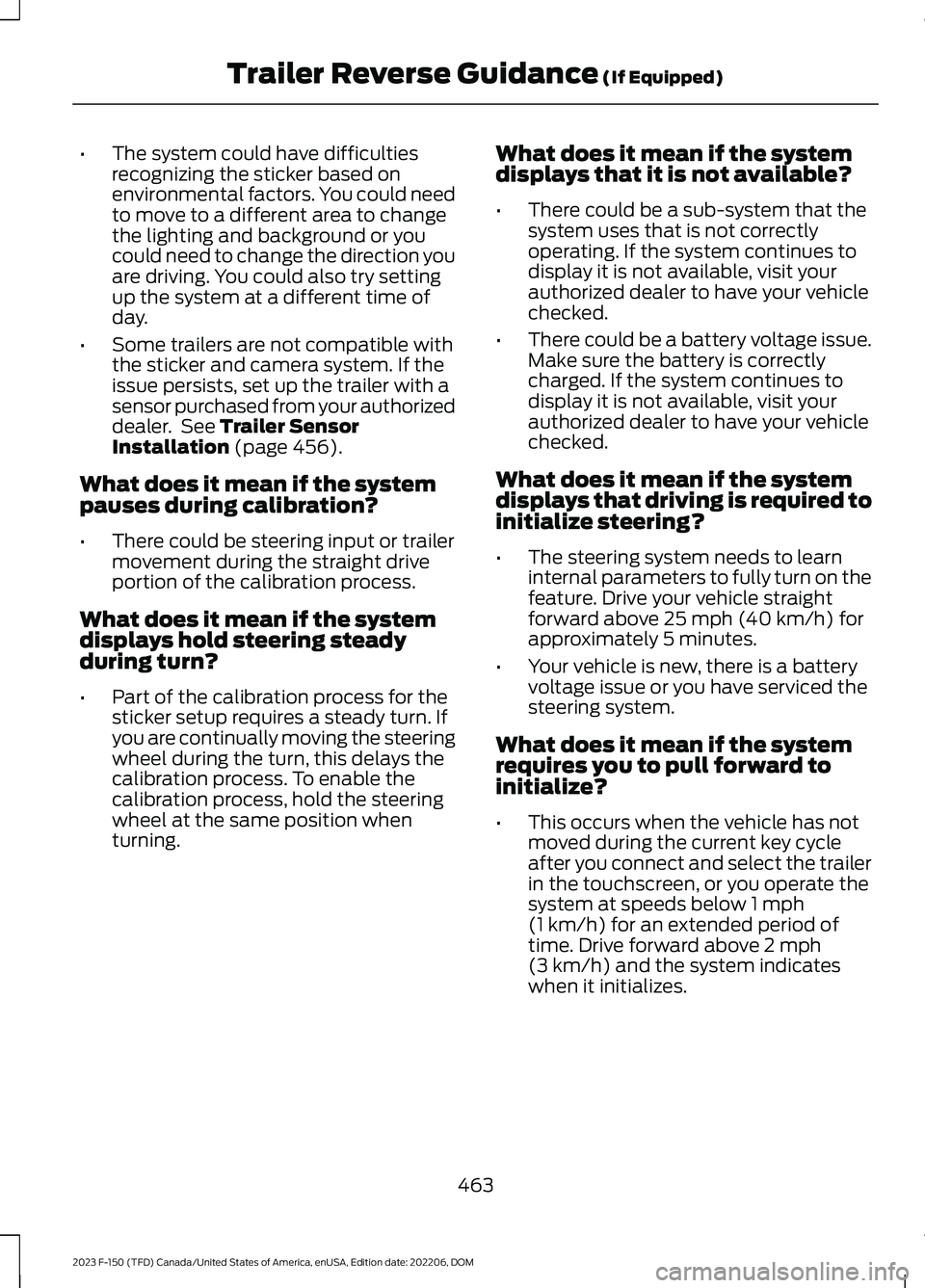
CALIBRATING THE SYSTEM
Calibrating the system requires drivingforward and turning left or right. Follow theinstructions on the touchscreen tocomplete the calibration process.
Note:To calibrate the system, you need anarea where you can safely drive forward andturn left or right. An open parking lot is anideal place to perform the calibration.
Note:Keep the steering wheel straightwhen instructed to by the touchscreen. Ifthe steering wheel is in a turned positionduring this instruction, the calibrationpauses.
Note:During calibration, the systemdetermines the trailer length. The systemsupports trailer lengths of 6–33 ft(1.85–10.05 m) distance from the hitchpoint to the center of the axle or axles. Thesystem is designed to work with drawbarsthat have a license plate to hitch ball centermeasurement of 9–18 in (23–46 cm) wheninstalled. Do not attempt to use drawbarsor trailers that have a length outside of thisrange as the system performance degradesand could cause improper system function.
Note:The touchscreen shows if you aregoing too slow or fast. Calibration pauses ifthe speed is outside the required range of2–9 mph (4–15 km/h).
Note:You need to complete at least a 90°turn, and longer trailers could require a 180°turn. Camera trailer tracking requires thesystem to locate the hitch ball as well asdetermine the trailer length. Some trailerscould require you to drive straight then turnmultiple times before calibration completes.The touchscreen provides instructions andnotifies you when calibration completes.
Note:For best results, do not calibrate thesystem at night when calibrating the systemwith the sticker.
457
2023 F-150 (TFD) Canada/United States of America, enUSA, Edition date: 202206, DOMTrailer Reverse Guidance (If Equipped)E352329
Page 467 of 786
•The system could have difficultiesrecognizing the sticker based onenvironmental factors. You could needto move to a different area to changethe lighting and background or youcould need to change the direction youare driving. You could also try settingup the system at a different time ofday.
•Some trailers are not compatible withthe sticker and camera system. If theissue persists, set up the trailer with asensor purchased from your authorizeddealer. See Trailer SensorInstallation (page 456).
What does it mean if the systempauses during calibration?
•There could be steering input or trailermovement during the straight driveportion of the calibration process.
What does it mean if the systemdisplays hold steering steadyduring turn?
•Part of the calibration process for thesticker setup requires a steady turn. Ifyou are continually moving the steeringwheel during the turn, this delays thecalibration process. To enable thecalibration process, hold the steeringwheel at the same position whenturning.
What does it mean if the systemdisplays that it is not available?
•There could be a sub-system that thesystem uses that is not correctlyoperating. If the system continues todisplay it is not available, visit yourauthorized dealer to have your vehiclechecked.
•There could be a battery voltage issue.Make sure the battery is correctlycharged. If the system continues todisplay it is not available, visit yourauthorized dealer to have your vehiclechecked.
What does it mean if the systemdisplays that driving is required toinitialize steering?
•The steering system needs to learninternal parameters to fully turn on thefeature. Drive your vehicle straightforward above 25 mph (40 km/h) forapproximately 5 minutes.
•Your vehicle is new, there is a batteryvoltage issue or you have serviced thesteering system.
What does it mean if the systemrequires you to pull forward toinitialize?
•This occurs when the vehicle has notmoved during the current key cycleafter you connect and select the trailerin the touchscreen, or you operate thesystem at speeds below 1 mph(1 km/h) for an extended period oftime. Drive forward above 2 mph(3 km/h) and the system indicateswhen it initializes.
463
2023 F-150 (TFD) Canada/United States of America, enUSA, Edition date: 202206, DOMTrailer Reverse Guidance (If Equipped)
Page 470 of 786
OFF-ROAD DRIVING
WHAT IS OFF-ROAD DRIVING
Off-road driving is driving your vehicle onunsurfaced roads or trails, made from dirt,rocks, sand and mud.
OFF-ROAD DRIVINGPRECAUTIONS - RAPTOR
WARNING: If you continue to driveyour vehicle when the engine isoverheating, the engine could stopwithout warning. Failure to follow thisinstruction could result in the loss ofcontrol of your vehicle.
Before going off-road driving, consult withall the appropriate government entities todetermine where you are legally allowedto operate your vehicle and what permitsor registrations are required to do so.
Inspect your vehicle before and after anyoff-road driving.
Familiarize yourself with the dimensionsof your vehicle including approach angles,breakover angles, and ground clearance.
Also familiarize yourself with the featuresof your vehicle. Some of these featuressuch as drive modes and cameras canimprove your off-road driving experience.
Secure loose objects inside your vehicleand in the cargo area.
BASIC OFF-ROAD DRIVINGTECHNIQUES - EXCLUDING:RAPTOR
Off-road Driving Hints
Before taking your vehicle off-roading, abasic vehicle inspection should be done tomake sure that the vehicle is in top workingcondition. It is always recommended thatat least two vehicles are used whileoff-roading. The buddy system helps makesure that help is close at hand should avehicle become stuck or damaged. It is alsowise to take supplies such as a first aid kit,supply of water, tow strap, cell or satellitephone with you any time an off-roadexcursion is planned.
1.Grip the steering wheel with thumbson the outside of the rim. This willreduce the risk of injury due to abruptsteering wheel motions that occurwhen negotiating rough terrain.
2.Throttle, brake and steering inputsshould be made in a smooth andcontrolled manner. Sudden inputs tothe controls can cause loss of tractionor upset the vehicle, especially whileon loose terrain or while crossingobstacles such as rocks or logs.
3.Look ahead on your route notingupcoming obstacles, or any otherfactors which may indicate a changein available traction, and adjust thevehicle speed and route accordingly.
4.When driving off-road, if the front orrear suspension is bottoming outand/or excessive contact with theskid-plates is encountered, reducevehicle speed to avoid potentialdamage to the vehicle.
5.When with other vehicles, it isrecommended that communication isused, and the lead vehicle notify othervehicles of obstacles that could causepotential vehicle damage.
466
2023 F-150 (TFD) Canada/United States of America, enUSA, Edition date: 202206, DOMDriving Hints
Page 472 of 786
Driving In Sand
When driving over sand, try to keep all fourwheels on the most solid area of the trail.
Driving In Mud
Be cautious of sudden changes in vehiclespeed or direction when you are driving inmud.
After driving through mud, clean yourvehicle. Excess mud stuck on the wheelsand tires and rotating components cancause an imbalance and result in damage.
Note:The vehicle brakes are less effectivewhen wet or muddy.
Driving Over Rocks and Gravel
Never attempt to straddle a rock that islarge enough to strike your axles orundercarriage.
Leave a generous gap between yourvehicle and other vehicles to minimize therisk of damage. Avoid dust clouds as theyreduce visibility.
Climbing A Hill
WARNING: Extreme care shouldbe used when steering the vehicle inreverse down a slope so as not to causethe vehicle to swerve out of control.
Do not drive over the crest of a hill withoutseeing what conditions are on the otherside. Do not drive in reverse over a hillwithout the aid of an observer.
Note:Avoid turning on steep slopes or hills.A danger lies in losing traction, slippingsideways and possible vehicle roll over.
Note:Too much acceleration can causethe tires to slip, spin or lose traction,resulting in loss of vehicle control.
Driving Through Water
WARNING: Do not attempt tocross a deep, fast flowing body of water.Failure to follow this instruction couldresult in the loss of control of yourvehicle, personal injury or death.
The key to a safe crossing is the waterdepth, current and bottom of the water'scondition. On soft bottoms, the vehiclesinks in, effectively increasing the waterlevel on the vehicle. Make sure to considerthis when determining the depth of water.
Determine the depth and speed of thecurrent before attempting a water crossing.
Be aware that obstacles and debris couldbe beneath the water’s surface.
Note:Cross flowing water at an angleheading slightly upstream.
Note:Tread lightly and avoid damage tothe environment.
Water can cause permanent damage thatmay not be covered by your vehiclewarranty. See Driving Through WaterLimitations (page 470).
Note:Failure to follow the recommendedspeeds can result in vehicle damage.
Muddy waters can reduce the coolingsystem effectiveness by depositing debrisinto the radiator.
High currents even in shallow water canwash the dirt out from around your tires orpush your vehicle across slippery rocks orsurfaces.
Do not cross any body of water that is fastflowing and rising.
468
2023 F-150 (TFD) Canada/United States of America, enUSA, Edition date: 202206, DOMDriving Hints