trailer FORD F150 2023 Repair Manual
[x] Cancel search | Manufacturer: FORD, Model Year: 2023, Model line: F150, Model: FORD F150 2023Pages: 786, PDF Size: 23.15 MB
Page 428 of 786
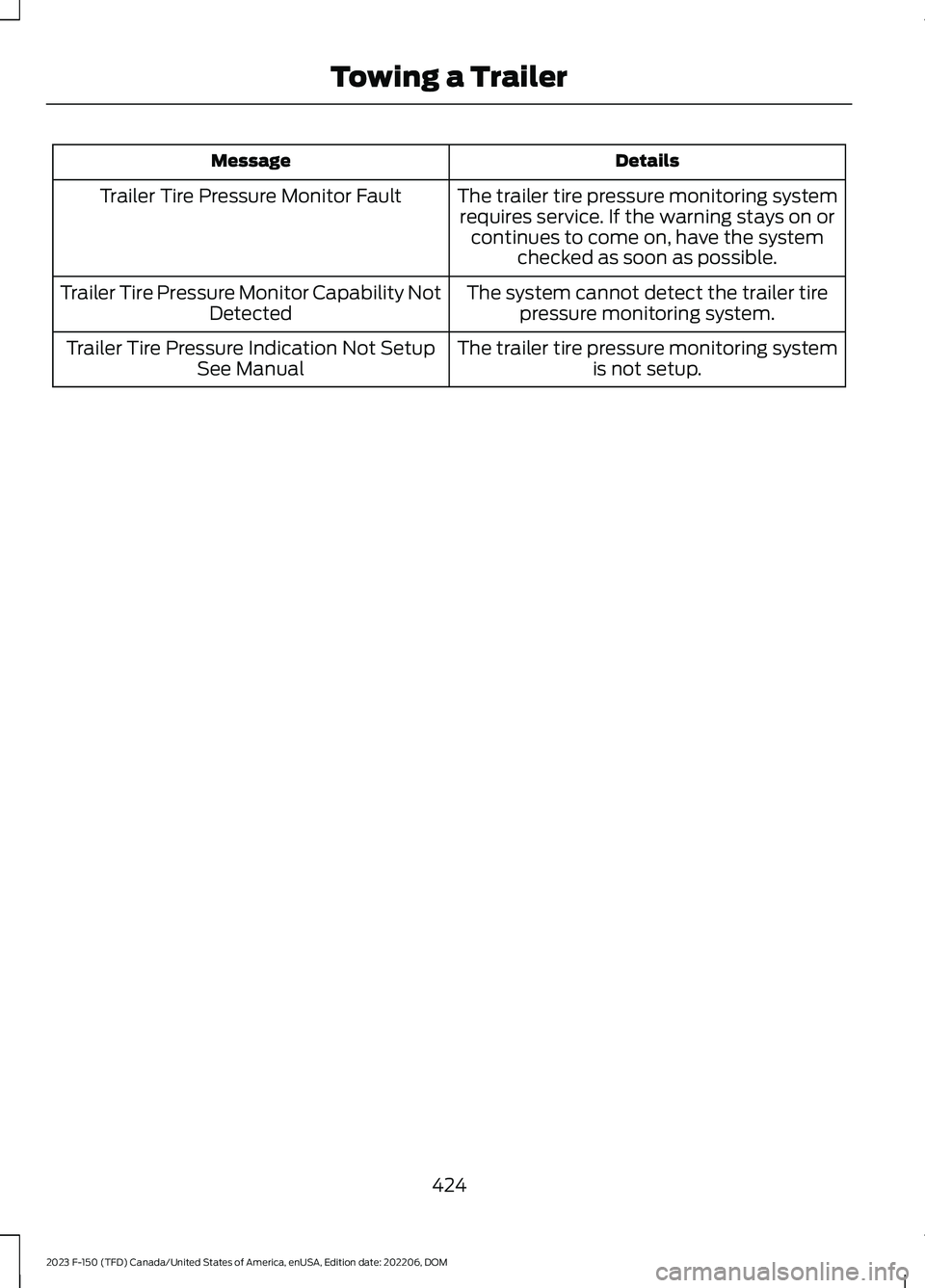
DetailsMessage
The trailer tire pressure monitoring systemrequires service. If the warning stays on orcontinues to come on, have the systemchecked as soon as possible.
Trailer Tire Pressure Monitor Fault
The system cannot detect the trailer tirepressure monitoring system.Trailer Tire Pressure Monitor Capability NotDetected
The trailer tire pressure monitoring systemis not setup.Trailer Tire Pressure Indication Not SetupSee Manual
424
2023 F-150 (TFD) Canada/United States of America, enUSA, Edition date: 202206, DOMTowing a Trailer
Page 429 of 786
WHAT IS THE INTEGRATED
TRAILER BRAKE CONTROLLER
The trailer brake controller assists insmooth and effective trailer braking basedon the towing vehicle’s brake pressure.
INTEGRATED TRAILER BRAKE
CONTROLLER PRECAUTIONS
WARNING: Use the integratedtrailer brake controller to properly adjustthe trailer brakes and check allconnections before towing a trailer.Failure to follow this instruction couldresult in the loss of control of yourvehicle, personal injury or death.
•Only use the manual control lever forproper adjustment of the gain duringtrailer setup. Misuse, such asapplication during trailer sway, couldcause instability of trailer or towvehicle.
•Avoid towing in adverse weatherconditions. The trailer brake controllerdoes not provide anti-lock control ofthe trailer wheels. Trailer wheels canlock up on slippery surfaces, resultingin reduced stability of trailer and towvehicle.
•The trailer brake controller is only afactory-installed or dealer-installeditem. Ford is not responsible forwarranty or performance of thecontroller due to misuse or customerinstallation.
Note:Do not attempt removal of the trailerbrake controller without consulting theWorkshop Manual. Damage to the unit mayresult.
Note:Make sure to set the integrated trailerbrake controller gain to 0 if you are using anaftermarket trailer brake controller.
USING THE INTEGRATED
TRAILER BRAKE CONTROLLER
1.Make sure the trailer brakes are in goodworking condition, functioning normallyand properly adjusted. See your trailerdealer if necessary.
Note:An authorized dealer can diagnosethe trailer brake controller to determineexactly which trailer fault has occurred. Yourvehicle warranty does not cover issues withyour trailer.
2.Hook up the trailer and make theelectrical connections according to thetrailer manufacturer's instructions.
Note:Select default mode if the trailer hassurge brakes, or no brakes at all. The systemhas no effect on the braking performanceof the trailer in either of these cases.
Note:If a trailer is connected by a four-pinconnector, the trailer braking function willnot be supported.
3.When you plug in a trailer with electricor electric-over-hydraulic brakes, amessage confirming connectionappears in the information display.
4.Use the gain adjustment to find thedesired starting point. A gain setting of6.0 is a good starting point for heavierloads.
Note:Use the following steps to adjust thegain setting whenever road, weather andtrailer, or vehicle loading conditions, changefrom when you initially set the gain.
5.In a traffic-free environment, tow thetrailer on a dry, level surface andsqueeze the manual control levercompletely.
425
2023 F-150 (TFD) Canada/United States of America, enUSA, Edition date: 202206, DOMIntegrated Trailer Brake Controller (If Equipped)
Page 430 of 786
6.If the trailer wheels lock up, indicatedby squealing tires, reduce the gainsetting. If the trailer wheels turn freely,increase the gain setting. Repeat Steps5 and 6 until the gain setting is at apoint just below trailer wheel lock-up.If towing a heavier trailer, trailer wheellock-up may not be attainable evenwith the maximum gain setting of 10.
Note:Only perform this procedure atspeeds of approximately 20–25 mph(30–40 km/h).
Note:The trailer brake controller reducesoutput at vehicle speeds below 11 mph(18 km/h) so that trailer and vehicle brakingis not jerky or harsh. This feature is onlyavailable when applying the brakes usingyour vehicle's brake pedal, not thecontroller.
Note:Your vehicle's brake system and thetrailer brake system work independently ofeach other. Changing the gain setting on thecontroller does not affect the operation ofyour vehicle's brakes whether you attach atrailer or not.
Note:With the proper electrical connection,pressing your vehicle brake pedal or usingthe manual control lever illuminates bothtrailer and vehicle brake lamps.
Note:When you switch the engine off, thecontroller output is disabled and the displayand module shut down. The controllermodule and display turn on when you switchthe ignition on.
Note:Trailer braking is suspended duringstop/start events to minimize battery draw.
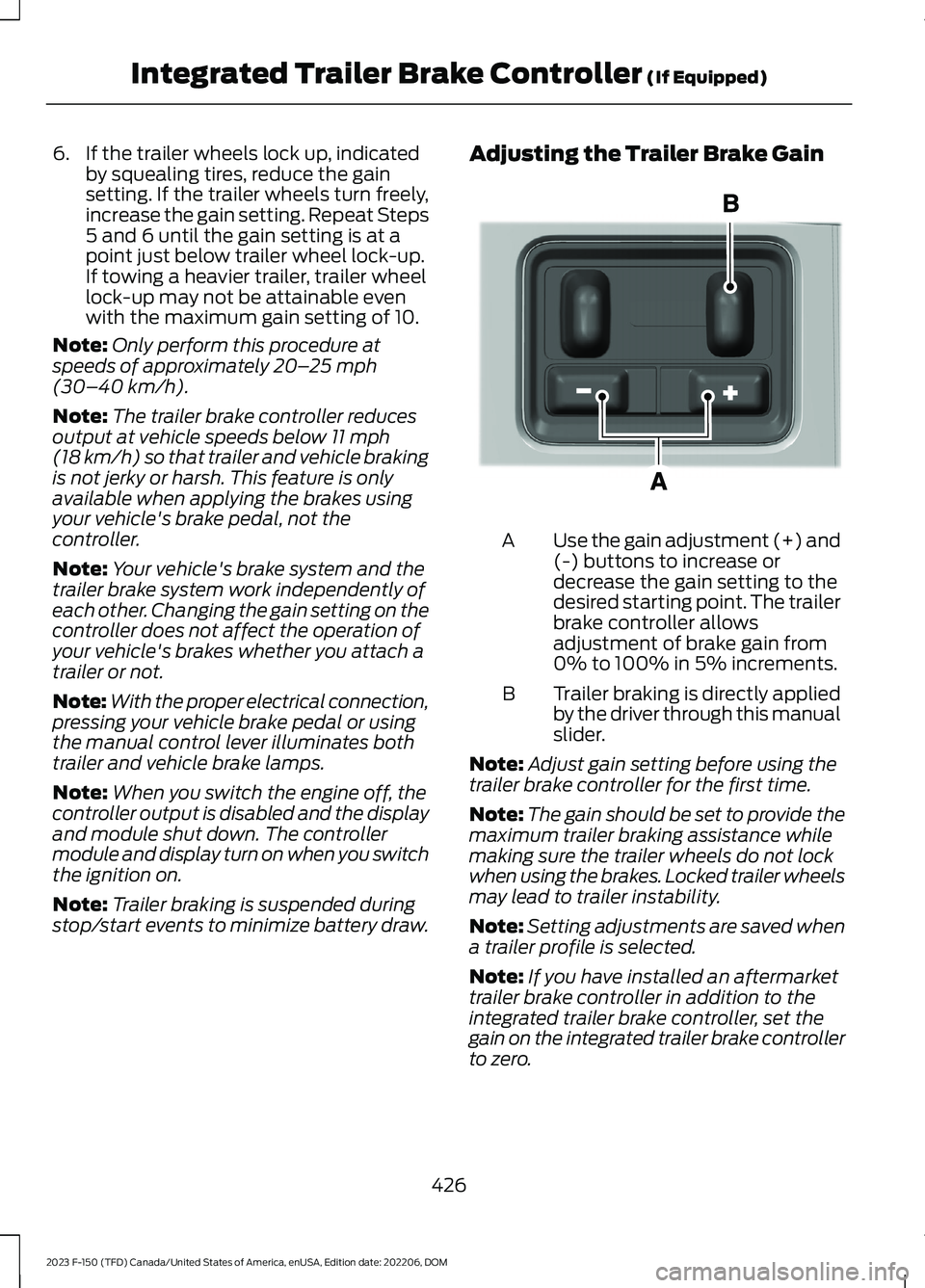
Adjusting the Trailer Brake Gain
Use the gain adjustment (+) and(-) buttons to increase ordecrease the gain setting to thedesired starting point. The trailerbrake controller allowsadjustment of brake gain from0% to 100% in 5% increments.
A
Trailer braking is directly appliedby the driver through this manualslider.
B
Note:Adjust gain setting before using thetrailer brake controller for the first time.
Note:The gain should be set to provide themaximum trailer braking assistance whilemaking sure the trailer wheels do not lockwhen using the brakes. Locked trailer wheelsmay lead to trailer instability.
Note:Setting adjustments are saved whena trailer profile is selected.
Note:If you have installed an aftermarkettrailer brake controller in addition to theintegrated trailer brake controller, set thegain on the integrated trailer brake controllerto zero.
426
2023 F-150 (TFD) Canada/United States of America, enUSA, Edition date: 202206, DOMIntegrated Trailer Brake Controller (If Equipped)E333154
Page 431 of 786
ADJUSTING THE INTEGRATED
TRAILER BRAKE CONTROLLER
MODE
Select the correct integrated trailer brakecontroller mode option using thetouchscreen.
Note:Trailer brake gain settings are savedto the active trailer profile.
Selecting the Trailer Brake Type
1.Press Default for trailers withelectromagnetic drum brake systemsor press Electric over Hydraulic fortrailers with electrically actuatedhydraulic brake systems.
2.Press Save.
Selecting the Trailer Brake Effort
1.Select a setting for your trailer.
Note:The default value is Low and is therecommended setting for most trailers.Select a different setting if your trailer'sbrakes require more initial voltage, or youprefer more aggressive trailer braking.
2.Press Save.
427
2023 F-150 (TFD) Canada/United States of America, enUSA, Edition date: 202206, DOMIntegrated Trailer Brake Controller (If Equipped)
Page 432 of 786
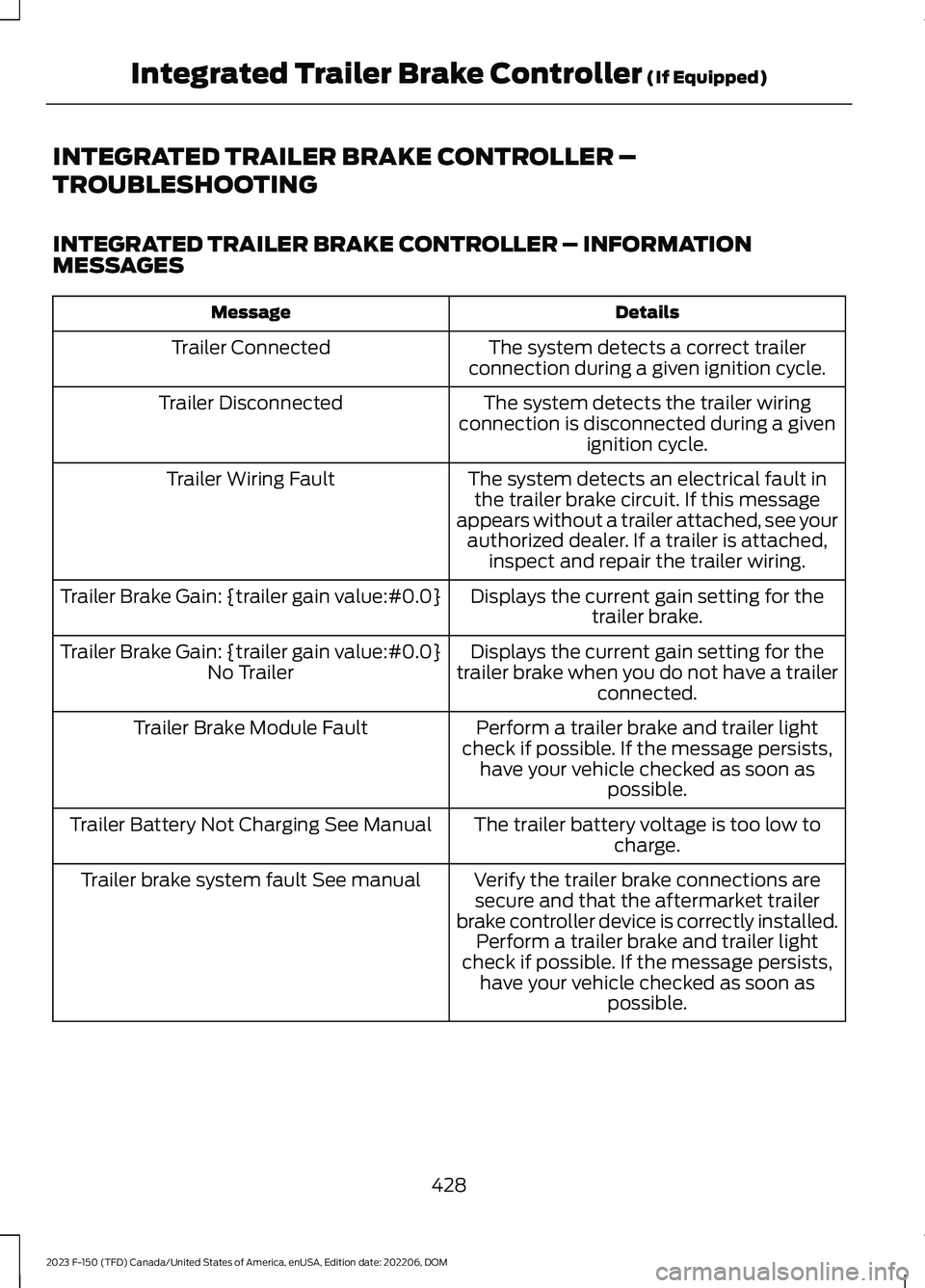
INTEGRATED TRAILER BRAKE CONTROLLER –
TROUBLESHOOTING
INTEGRATED TRAILER BRAKE CONTROLLER – INFORMATIONMESSAGES
DetailsMessage
The system detects a correct trailerconnection during a given ignition cycle.Trailer Connected
The system detects the trailer wiringconnection is disconnected during a givenignition cycle.
Trailer Disconnected
The system detects an electrical fault inthe trailer brake circuit. If this messageappears without a trailer attached, see yourauthorized dealer. If a trailer is attached,inspect and repair the trailer wiring.
Trailer Wiring Fault
Displays the current gain setting for thetrailer brake.Trailer Brake Gain: {trailer gain value:#0.0}
Displays the current gain setting for thetrailer brake when you do not have a trailerconnected.
Trailer Brake Gain: {trailer gain value:#0.0}No Trailer
Perform a trailer brake and trailer lightcheck if possible. If the message persists,have your vehicle checked as soon aspossible.
Trailer Brake Module Fault
The trailer battery voltage is too low tocharge.Trailer Battery Not Charging See Manual
Verify the trailer brake connections aresecure and that the aftermarket trailerbrake controller device is correctly installed.Perform a trailer brake and trailer lightcheck if possible. If the message persists,have your vehicle checked as soon aspossible.
Trailer brake system fault See manual
428
2023 F-150 (TFD) Canada/United States of America, enUSA, Edition date: 202206, DOMIntegrated Trailer Brake Controller (If Equipped)
Page 433 of 786
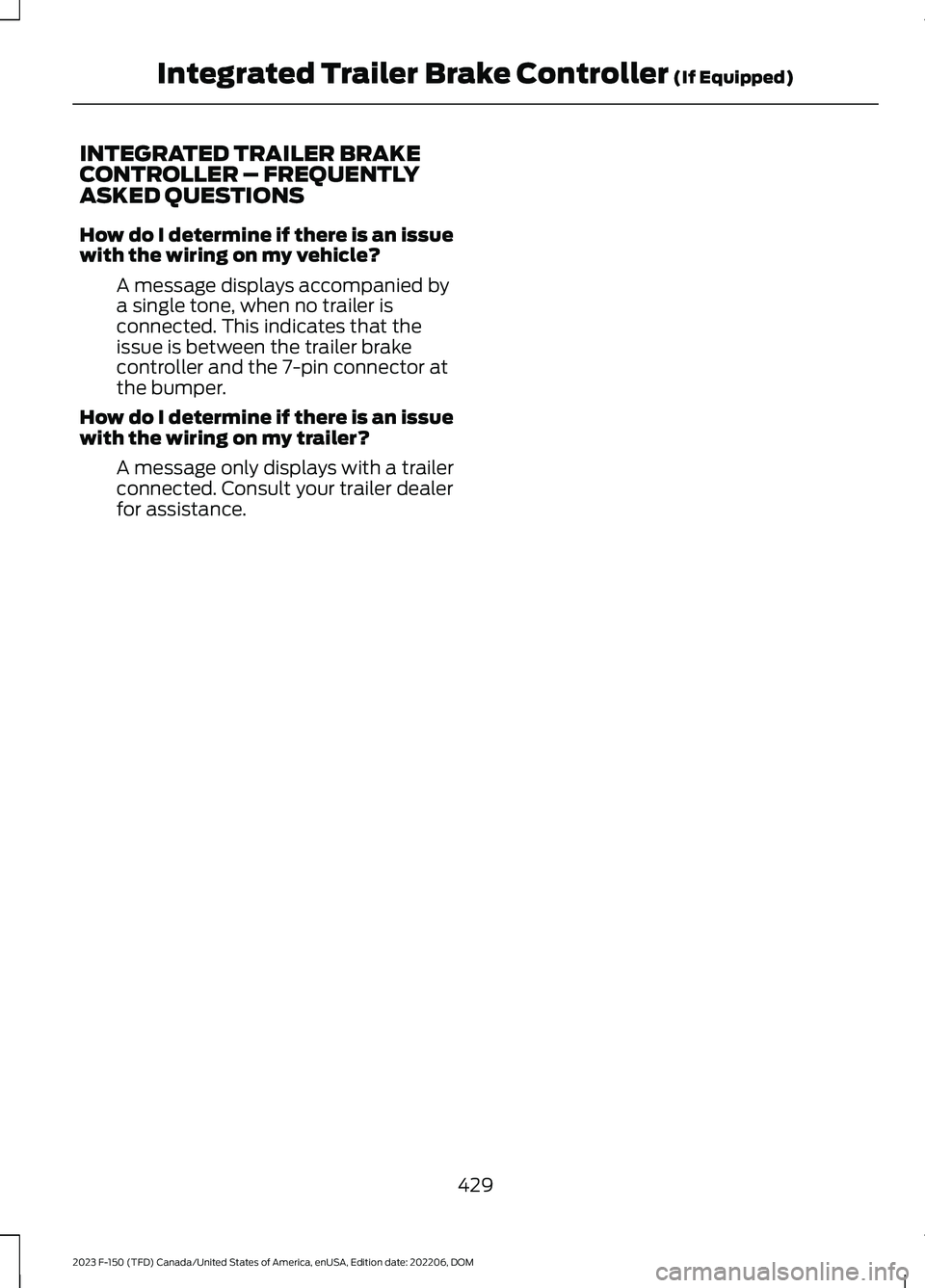
INTEGRATED TRAILER BRAKECONTROLLER – FREQUENTLYASKED QUESTIONS
How do I determine if there is an issuewith the wiring on my vehicle?
A message displays accompanied bya single tone, when no trailer isconnected. This indicates that theissue is between the trailer brakecontroller and the 7-pin connector atthe bumper.
How do I determine if there is an issuewith the wiring on my trailer?
A message only displays with a trailerconnected. Consult your trailer dealerfor assistance.
429
2023 F-150 (TFD) Canada/United States of America, enUSA, Edition date: 202206, DOMIntegrated Trailer Brake Controller (If Equipped)
Page 434 of 786
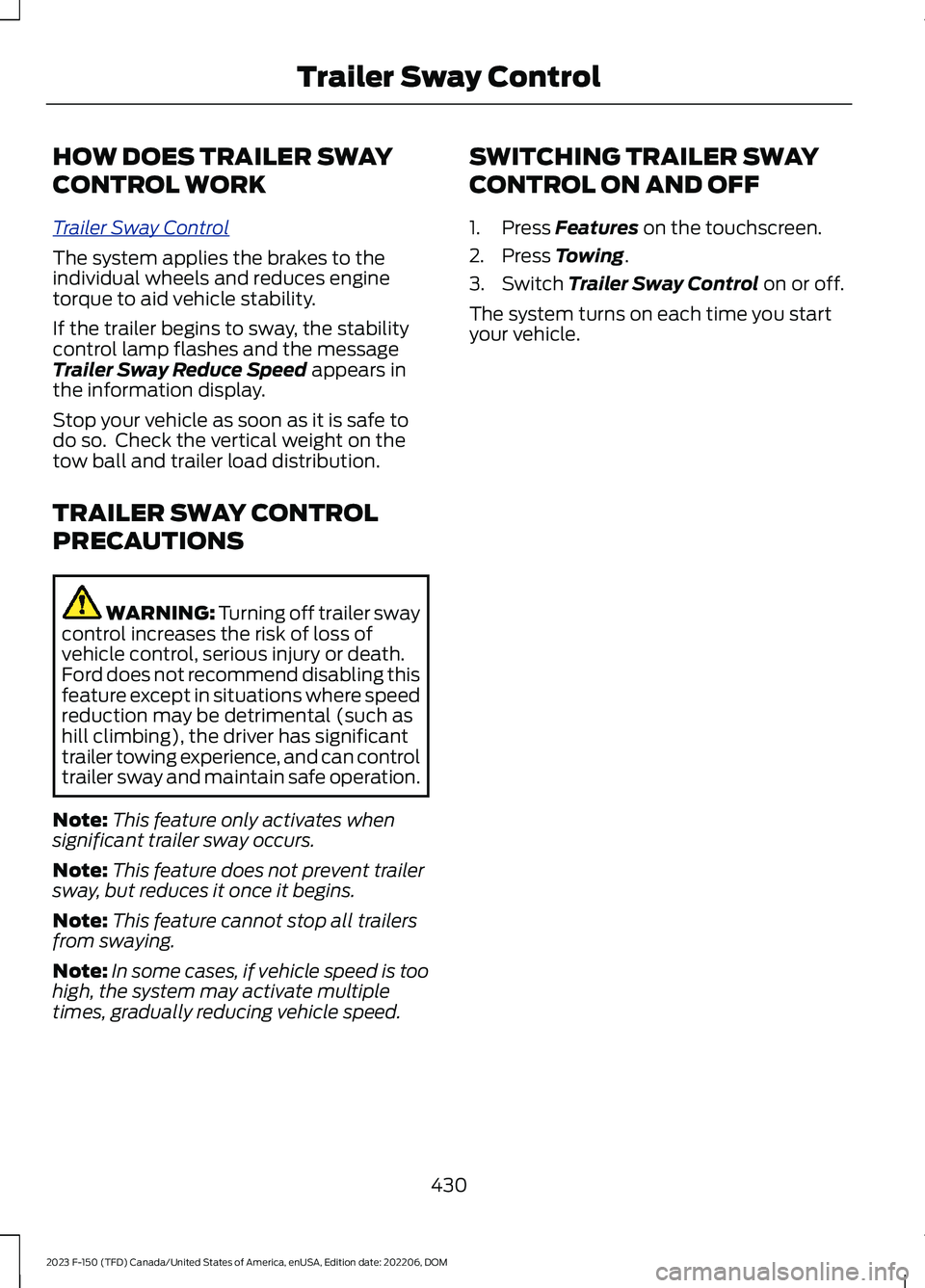
HOW DOES TRAILER SWAY
CONTROL WORK
Trailer Sway Control
The system applies the brakes to theindividual wheels and reduces enginetorque to aid vehicle stability.
If the trailer begins to sway, the stabilitycontrol lamp flashes and the messageTrailer Sway Reduce Speed appears inthe information display.
Stop your vehicle as soon as it is safe todo so. Check the vertical weight on thetow ball and trailer load distribution.
TRAILER SWAY CONTROL
PRECAUTIONS
WARNING: Turning off trailer swaycontrol increases the risk of loss ofvehicle control, serious injury or death.Ford does not recommend disabling thisfeature except in situations where speedreduction may be detrimental (such ashill climbing), the driver has significanttrailer towing experience, and can controltrailer sway and maintain safe operation.
Note:This feature only activates whensignificant trailer sway occurs.
Note:This feature does not prevent trailersway, but reduces it once it begins.
Note:This feature cannot stop all trailersfrom swaying.
Note:In some cases, if vehicle speed is toohigh, the system may activate multipletimes, gradually reducing vehicle speed.
SWITCHING TRAILER SWAY
CONTROL ON AND OFF
1.Press Features on the touchscreen.
2.Press Towing.
3.Switch Trailer Sway Control on or off.
The system turns on each time you startyour vehicle.
430
2023 F-150 (TFD) Canada/United States of America, enUSA, Edition date: 202206, DOMTrailer Sway Control
Page 435 of 786
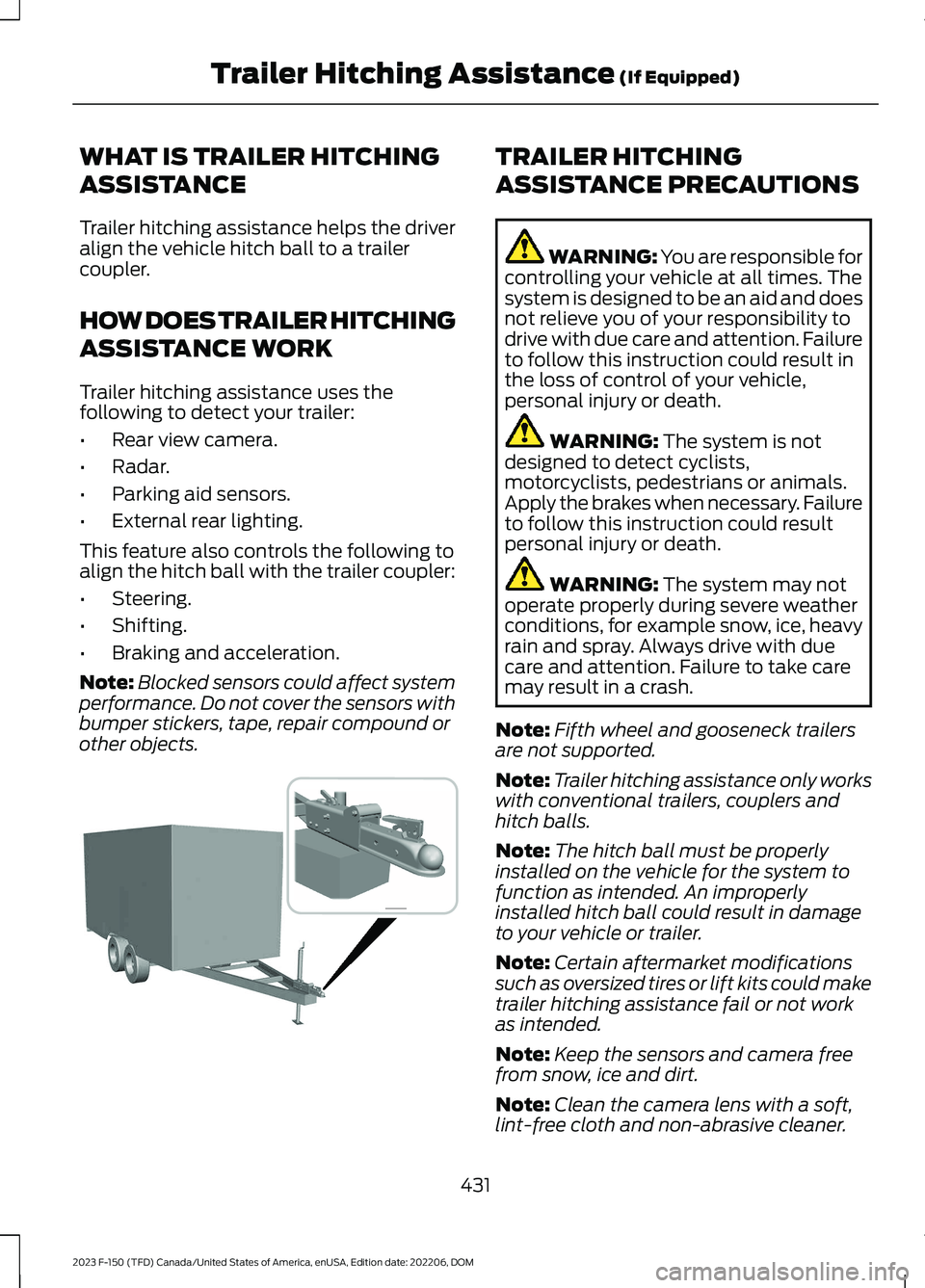
WHAT IS TRAILER HITCHING
ASSISTANCE
Trailer hitching assistance helps the driveralign the vehicle hitch ball to a trailercoupler.
HOW DOES TRAILER HITCHING
ASSISTANCE WORK
Trailer hitching assistance uses thefollowing to detect your trailer:
•Rear view camera.
•Radar.
•Parking aid sensors.
•External rear lighting.
This feature also controls the following toalign the hitch ball with the trailer coupler:
•Steering.
•Shifting.
•Braking and acceleration.
Note:Blocked sensors could affect systemperformance. Do not cover the sensors withbumper stickers, tape, repair compound orother objects.
TRAILER HITCHING
ASSISTANCE PRECAUTIONS
WARNING: You are responsible forcontrolling your vehicle at all times. Thesystem is designed to be an aid and doesnot relieve you of your responsibility todrive with due care and attention. Failureto follow this instruction could result inthe loss of control of your vehicle,personal injury or death.
WARNING: The system is notdesigned to detect cyclists,motorcyclists, pedestrians or animals.Apply the brakes when necessary. Failureto follow this instruction could resultpersonal injury or death.
WARNING: The system may notoperate properly during severe weatherconditions, for example snow, ice, heavyrain and spray. Always drive with duecare and attention. Failure to take caremay result in a crash.
Note:Fifth wheel and gooseneck trailersare not supported.
Note:Trailer hitching assistance only workswith conventional trailers, couplers andhitch balls.
Note:The hitch ball must be properlyinstalled on the vehicle for the system tofunction as intended. An improperlyinstalled hitch ball could result in damageto your vehicle or trailer.
Note:Certain aftermarket modificationssuch as oversized tires or lift kits could maketrailer hitching assistance fail or not workas intended.
Note:Keep the sensors and camera freefrom snow, ice and dirt.
Note:Clean the camera lens with a soft,lint-free cloth and non-abrasive cleaner.
431
2023 F-150 (TFD) Canada/United States of America, enUSA, Edition date: 202206, DOMTrailer Hitching Assistance (If Equipped) E383821
Page 436 of 786
TRAILER HITCHING
ASSISTANCE LIMITATIONS
The system could not function or couldfunction with reduced performance duringthe following:
•When using trailer hitching assistancein tall grass and weeds.
•When safety chains, cables or wiringare dangling near the coupler.
•When using trailer hitching assistanceon slippery surfaces.
•When using hitches that raise the hitchball more than 4 in (10 cm), lower thehitch ball by more than 6 in (16 cm) orextend the hitch ball away from thevehicle more than 12 in (30 cm).
•When using hitches that are lower than10 in (25 cm) off the ground.
•When using objects taller than 8 in(20 cm), such as large blocks, underthe jack stand.
•When you park the trailer on surfacesthat are similar in color to the trailercoupler and hitch ball.
•A black coupler or hitch ball over adark asphalt surface.
•A light color coupler or hitch ballover a light concrete surface.
•When there are low or no light sources,such as at night.
For additional information, please refer tothe Ford Support Website.
SWITCHING TRAILER
HITCHING ASSISTANCE ON
AND OFF
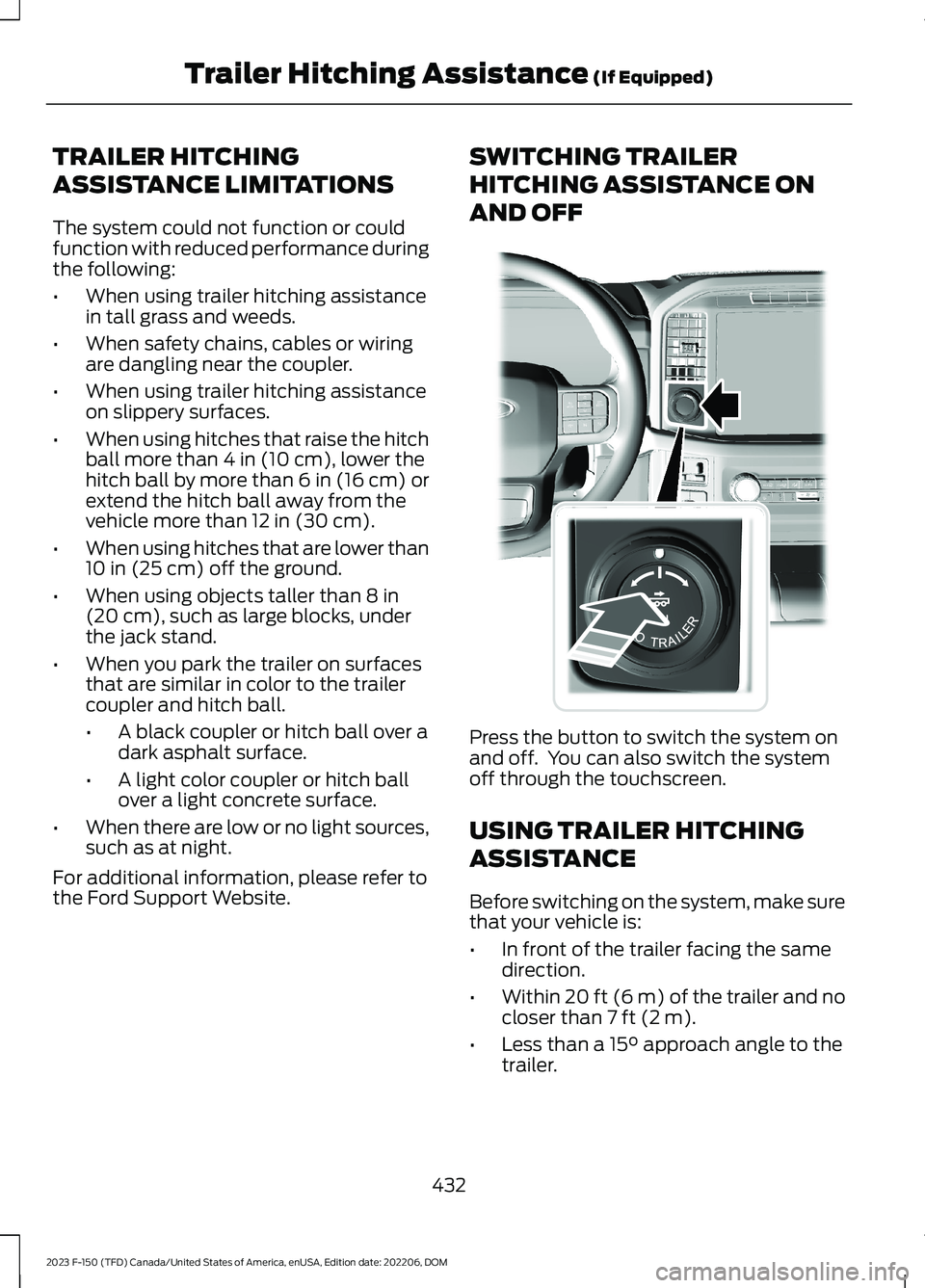
Press the button to switch the system onand off. You can also switch the systemoff through the touchscreen.
USING TRAILER HITCHING
ASSISTANCE
Before switching on the system, make surethat your vehicle is:
•In front of the trailer facing the samedirection.
•Within 20 ft (6 m) of the trailer and nocloser than 7 ft (2 m).
•Less than a 15° approach angle to thetrailer.
432
2023 F-150 (TFD) Canada/United States of America, enUSA, Edition date: 202206, DOMTrailer Hitching Assistance (If Equipped)E310335
Page 437 of 786
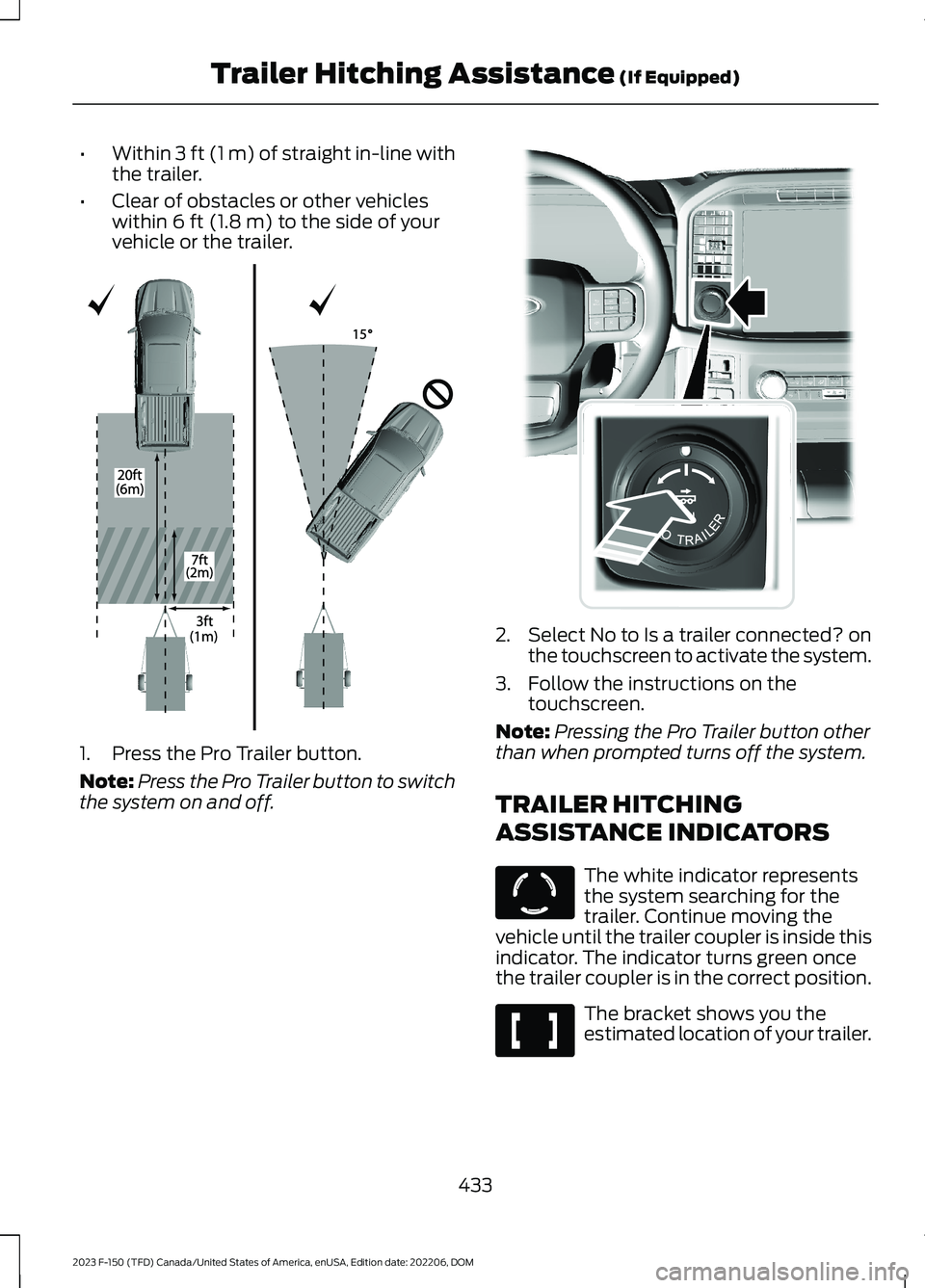
•Within 3 ft (1 m) of straight in-line withthe trailer.
•Clear of obstacles or other vehicleswithin 6 ft (1.8 m) to the side of yourvehicle or the trailer.
1.Press the Pro Trailer button.
Note:Press the Pro Trailer button to switchthe system on and off.
2.Select No to Is a trailer connected? onthe touchscreen to activate the system.
3.Follow the instructions on thetouchscreen.
Note:Pressing the Pro Trailer button otherthan when prompted turns off the system.
TRAILER HITCHING
ASSISTANCE INDICATORS
The white indicator representsthe system searching for thetrailer. Continue moving thevehicle until the trailer coupler is inside thisindicator. The indicator turns green oncethe trailer coupler is in the correct position.
The bracket shows you theestimated location of your trailer.
433
2023 F-150 (TFD) Canada/United States of America, enUSA, Edition date: 202206, DOMTrailer Hitching Assistance (If Equipped)E348940 E310335 E317892 E317891