radio controls FORD F150 2023 Owners Manual
[x] Cancel search | Manufacturer: FORD, Model Year: 2023, Model line: F150, Model: FORD F150 2023Pages: 786, PDF Size: 23.15 MB
Page 39 of 786
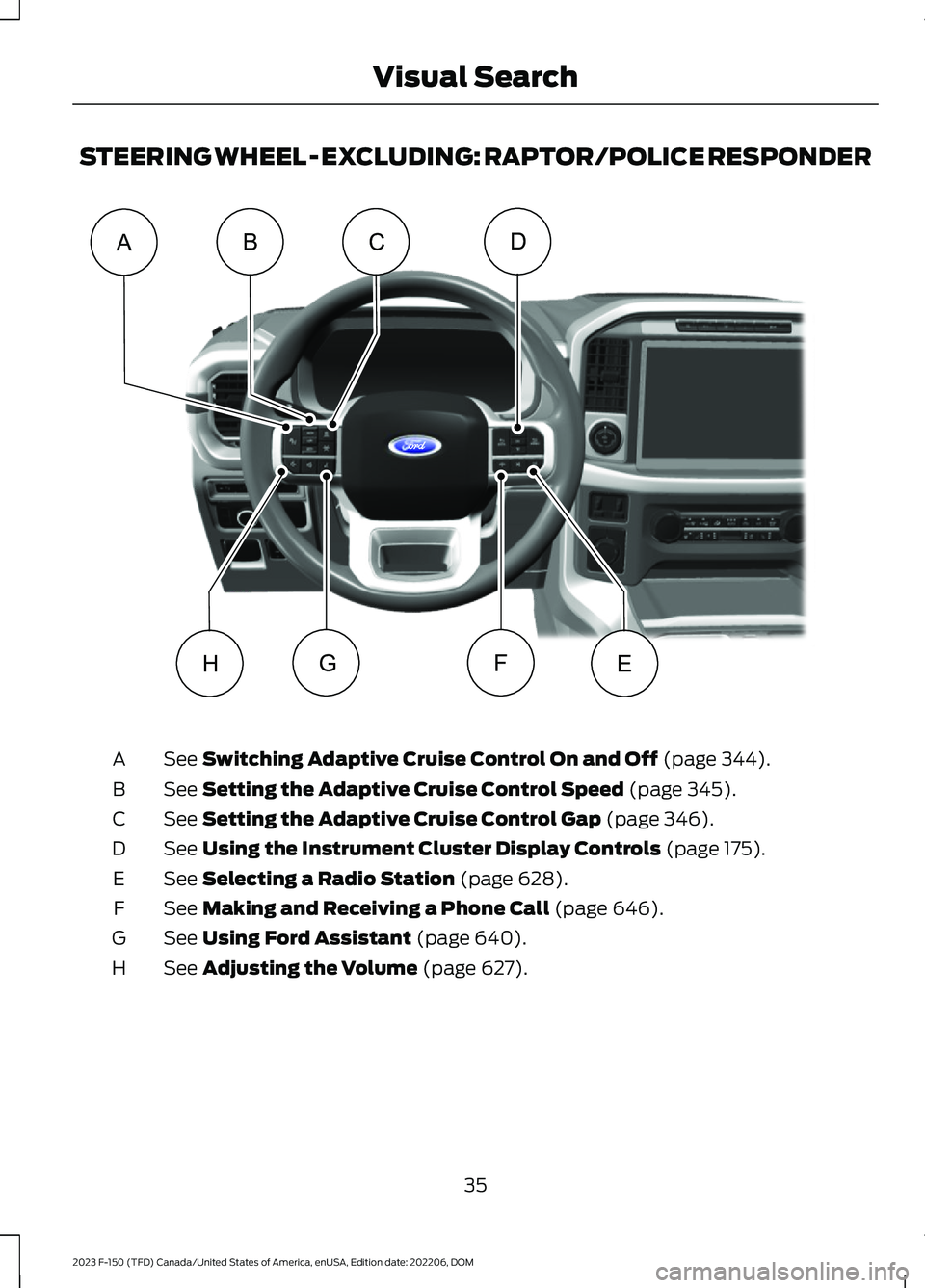
STEERING WHEEL - EXCLUDING: RAPTOR/POLICE RESPONDER
See Switching Adaptive Cruise Control On and Off (page 344).A
See Setting the Adaptive Cruise Control Speed (page 345).B
See Setting the Adaptive Cruise Control Gap (page 346).C
See Using the Instrument Cluster Display Controls (page 175).D
See Selecting a Radio Station (page 628).E
See Making and Receiving a Phone Call (page 646).F
See Using Ford Assistant (page 640).G
See Adjusting the Volume (page 627).H
35
2023 F-150 (TFD) Canada/United States of America, enUSA, Edition date: 202206, DOMVisual SearchDEHFGACBE356893
Page 40 of 786
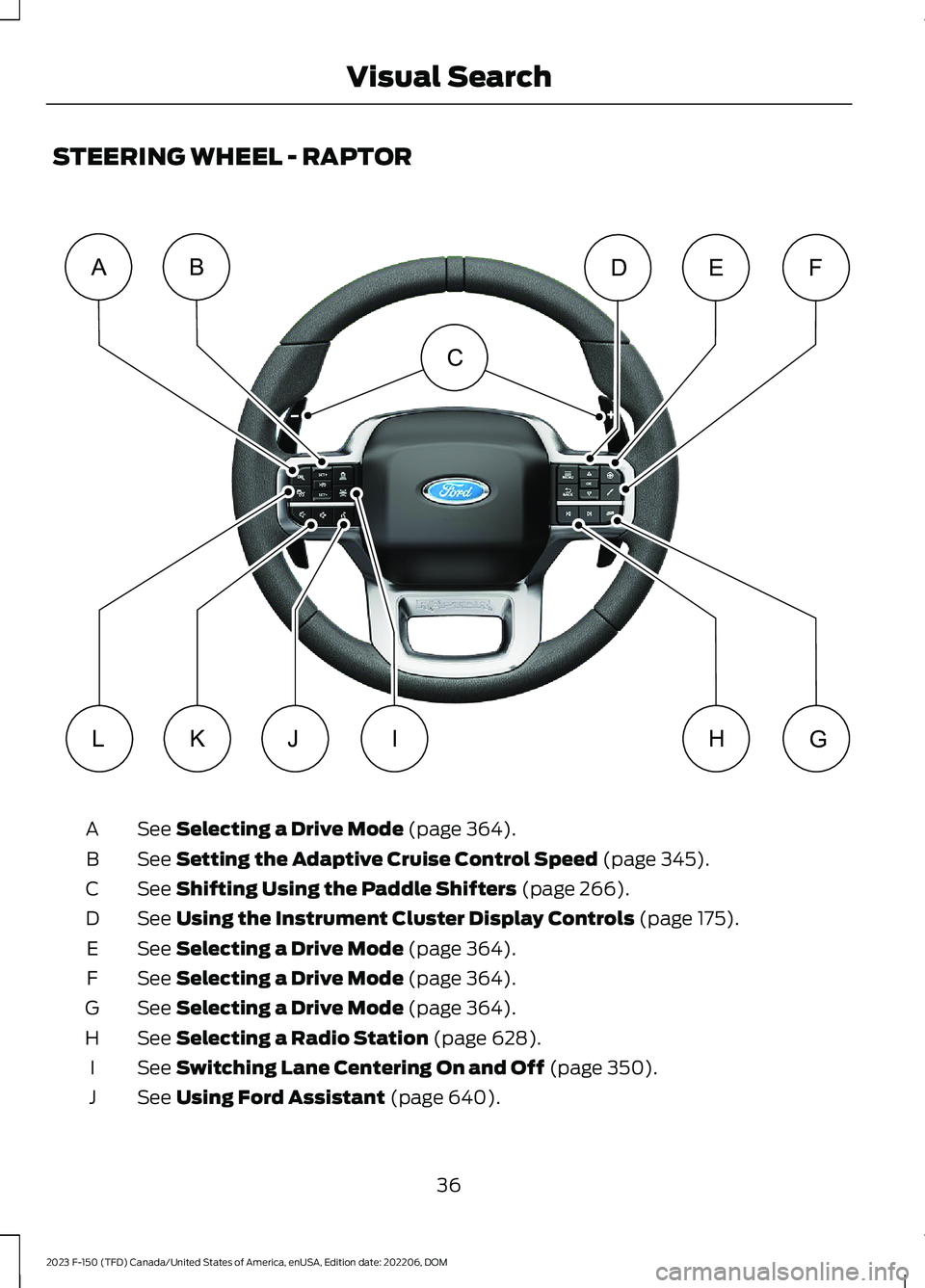
STEERING WHEEL - RAPTOR
See Selecting a Drive Mode (page 364).A
See Setting the Adaptive Cruise Control Speed (page 345).B
See Shifting Using the Paddle Shifters (page 266).C
See Using the Instrument Cluster Display Controls (page 175).D
See Selecting a Drive Mode (page 364).E
See Selecting a Drive Mode (page 364).F
See Selecting a Drive Mode (page 364).G
See Selecting a Radio Station (page 628).H
See Switching Lane Centering On and Off (page 350).I
See Using Ford Assistant (page 640).J
36
2023 F-150 (TFD) Canada/United States of America, enUSA, Edition date: 202206, DOMVisual SearchABFEDLKJGHIC E348681
Page 41 of 786
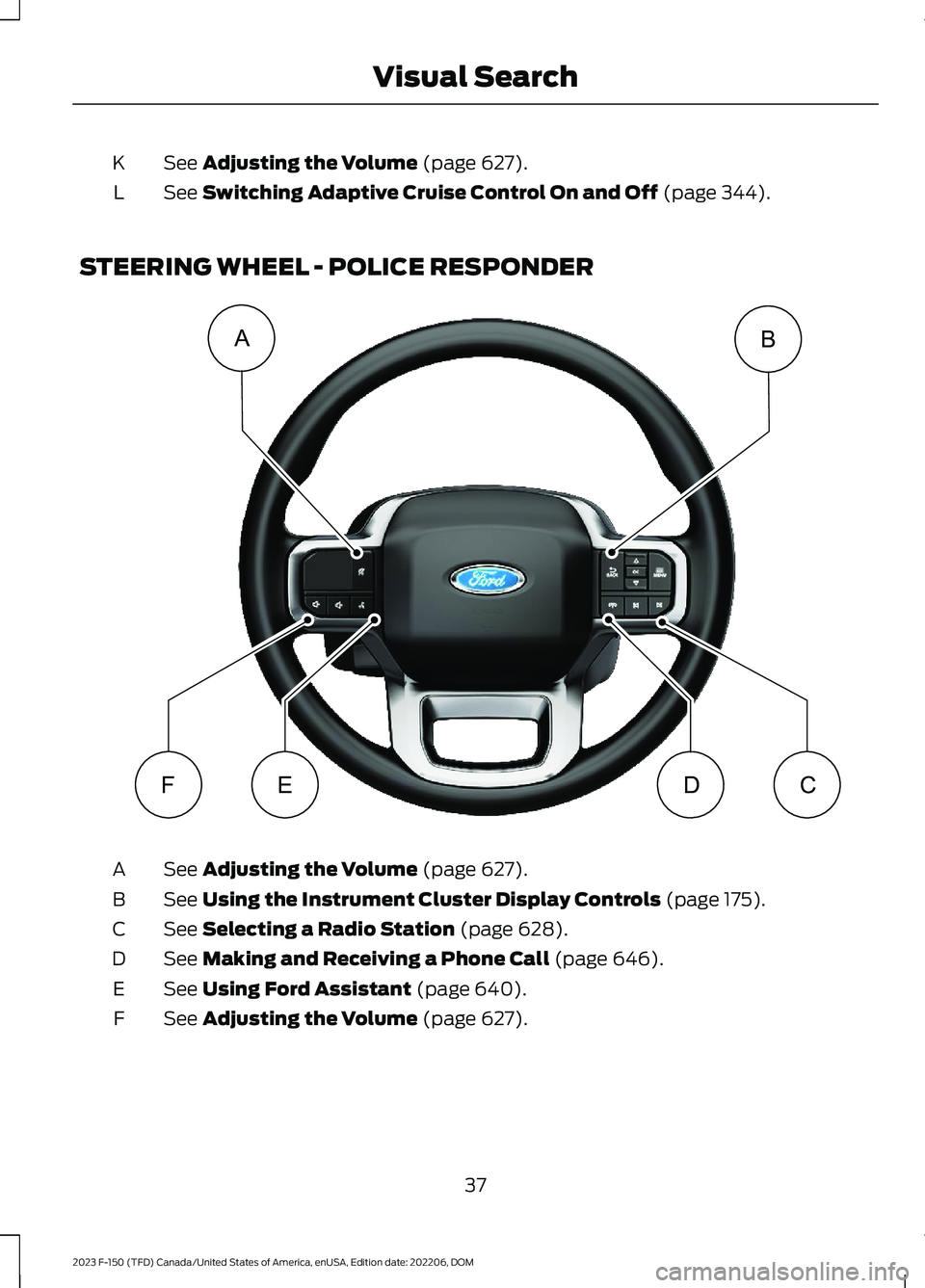
See Adjusting the Volume (page 627).K
See Switching Adaptive Cruise Control On and Off (page 344).L
STEERING WHEEL - POLICE RESPONDER
See Adjusting the Volume (page 627).A
See Using the Instrument Cluster Display Controls (page 175).B
See Selecting a Radio Station (page 628).C
See Making and Receiving a Phone Call (page 646).D
See Using Ford Assistant (page 640).E
See Adjusting the Volume (page 627).F
37
2023 F-150 (TFD) Canada/United States of America, enUSA, Edition date: 202206, DOMVisual SearchABFEDCE343530
Page 94 of 786
REMOTE CONTROL
LIMITATIONS
WARNING: Changes ormodifications not expressively approvedby the party responsible for compliancecould void the user's authority to operatethe equipment. The term "IC:" before theradio certification number only signifiesthat Industry Canada technicalspecifications were met.
This device complies with Part 15 of theFCC Rules and with Industry Canadalicense-exempt RSS standard(s).Operation is subject to the following twoconditions: (1) This device may not causeharmful interference, and (2) This devicemust accept any interference received,including interference that may causeundesired operation.
Make sure a valid remote control is within3 ft (1 m) from the front door handles andrear of vehicle.
The system may not function if:
•The remote control remains stationaryfor about a minute.
•The vehicle battery has no charge.
•The remote control battery has nocharge.
•There is interference causing issueswith the remote control frequencies.
•The remote control is too close tometal objects or electronic devices, forexample keys or a cell phone.
USING THE REMOTE CONTROL
- POLICE RESPONDER
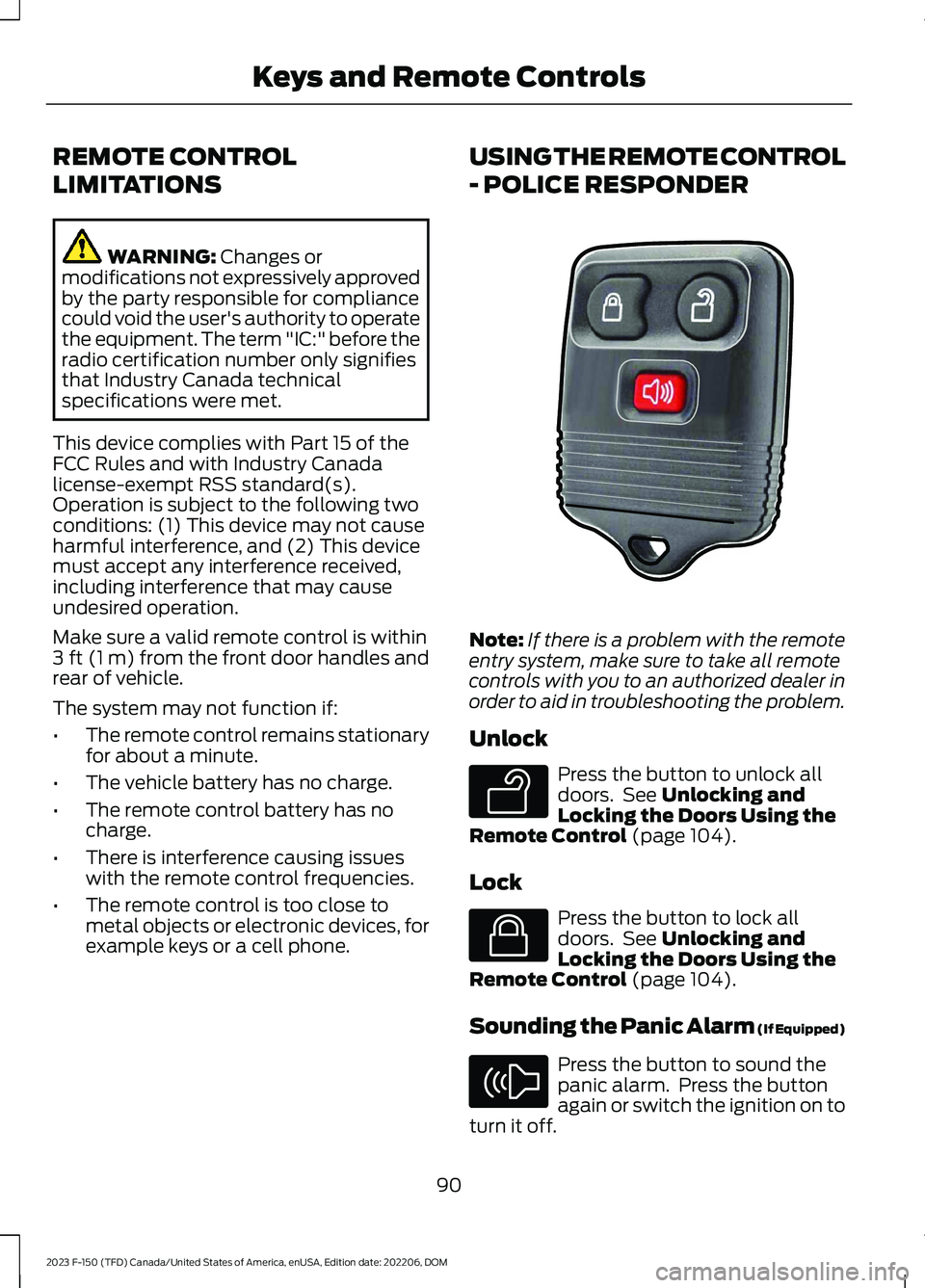
Note:If there is a problem with the remoteentry system, make sure to take all remotecontrols with you to an authorized dealer inorder to aid in troubleshooting the problem.
Unlock
Press the button to unlock alldoors. See Unlocking andLocking the Doors Using theRemote Control (page 104).
Lock
Press the button to lock alldoors. See Unlocking andLocking the Doors Using theRemote Control (page 104).
Sounding the Panic Alarm (If Equipped)
Press the button to sound thepanic alarm. Press the buttonagain or switch the ignition on toturn it off.
90
2023 F-150 (TFD) Canada/United States of America, enUSA, Edition date: 202206, DOMKeys and Remote ControlsE203600 E138629 E138623 E138624
Page 212 of 786
GARAGE DOOR OPENER
INTRODUCTION
HomeLink Wireless ControlSystem
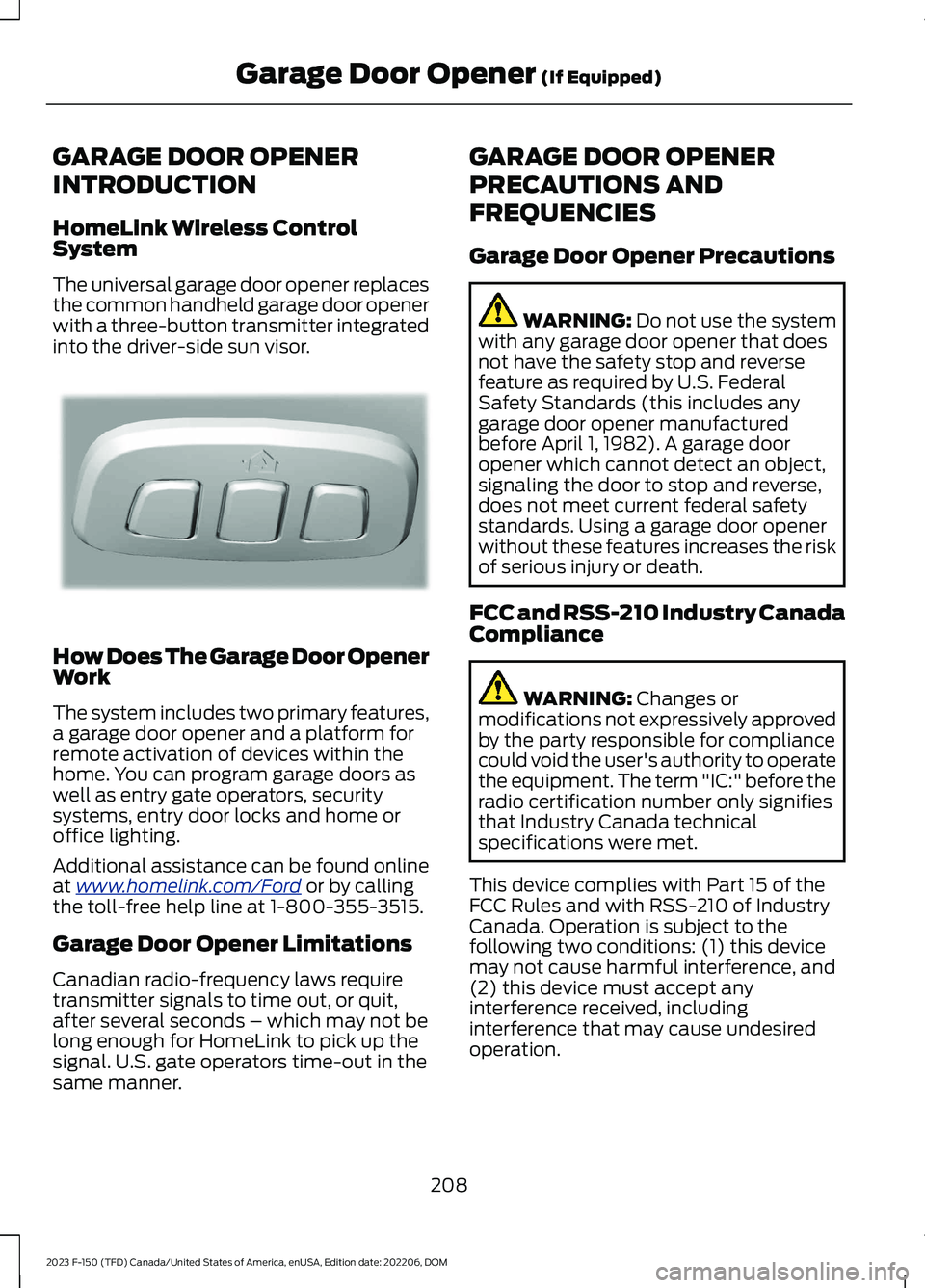
The universal garage door opener replacesthe common handheld garage door openerwith a three-button transmitter integratedinto the driver-side sun visor.
How Does The Garage Door OpenerWork
The system includes two primary features,a garage door opener and a platform forremote activation of devices within thehome. You can program garage doors aswell as entry gate operators, securitysystems, entry door locks and home oroffice lighting.
Additional assistance can be found onlineat www.homelink.com/Ford or by callingthe toll-free help line at 1-800-355-3515.
Garage Door Opener Limitations
Canadian radio-frequency laws requiretransmitter signals to time out, or quit,after several seconds – which may not belong enough for HomeLink to pick up thesignal. U.S. gate operators time-out in thesame manner.
GARAGE DOOR OPENER
PRECAUTIONS AND
FREQUENCIES
Garage Door Opener Precautions
WARNING: Do not use the systemwith any garage door opener that doesnot have the safety stop and reversefeature as required by U.S. FederalSafety Standards (this includes anygarage door opener manufacturedbefore April 1, 1982). A garage dooropener which cannot detect an object,signaling the door to stop and reverse,does not meet current federal safetystandards. Using a garage door openerwithout these features increases the riskof serious injury or death.
FCC and RSS-210 Industry CanadaCompliance
WARNING: Changes ormodifications not expressively approvedby the party responsible for compliancecould void the user's authority to operatethe equipment. The term "IC:" before theradio certification number only signifiesthat Industry Canada technicalspecifications were met.
This device complies with Part 15 of theFCC Rules and with RSS-210 of IndustryCanada. Operation is subject to thefollowing two conditions: (1) this devicemay not cause harmful interference, and(2) this device must accept anyinterference received, includinginterference that may cause undesiredoperation.
208
2023 F-150 (TFD) Canada/United States of America, enUSA, Edition date: 202206, DOMGarage Door Opener (If Equipped)E188211
Page 232 of 786
WHAT IS THE WIRELESS
ACCESSORY CHARGER
The wireless accessory charger allows youto charge one compatible Qi wirelesscharging device on the charging area.
WIRELESS ACCESSORY
CHARGER PRECAUTIONS
WARNING: Wireless chargingdevices can affect the operation ofimplanted medical devices, includingcardiac pacemakers. If you have anyimplanted medical devices, werecommend that you consult with yourphysician.
Keep the charging area clean and removeforeign objects prior to charging a device.
Do not place items with a magnetic stripor radio-frequency identification chip, forexample passports, parking tickets,transportation passes or credit cards, nearthe charging area when charging a device.Damage could occur to the magnetic stripor radio-frequency identification chip.
Do not place metal objects, for exampleremote controls, coins and candywrappers, on or near the charging areawhen charging a device. Metal objects mayheat up and degrade the chargingperformance, in addition to causinginterruptions in charging.
Charging could be interrupted, degraded,or could stop if any of the following occur:
•The system detects a foreign object.
•The device is misaligned on thecharging area.
•The device moves on the activecharging area when the vehicle is inmotion.
•The vehicle ambient temperature is toohigh.
•You attempt to charge a non-Qicompatible device on the wirelesscharger.
Note:During charging, the device and thecharger could heat up, this is normal. If thebattery gets hotter than usual, the devicemay stop charging.
LOCATING THE WIRELESS
ACCESSORY CHARGER
The charging area is on thecenter console or in the mediabin below the instrument panel.
CHARGING A WIRELESS
DEVICE
Place the device on the center of thecharging surface with the charging sidedown. The charging stops after your devicereaches a full charge.
You can use the charger when the vehicleis in accessory mode, when the vehicle isrunning, or when SYNC is on.
Displays on the status bar whenwireless charging is in progress.
Note:The charging performance may beaffected if your device is in a case. It may benecessary to remove the case to wirelesslycharge your device.
Note:Software and firmware updates mayaffect device compatibility, including theuse of unofficial software or firmware. Youshould verify charging functionality with yourspecific devices in-vehicle.
228
2023 F-150 (TFD) Canada/United States of America, enUSA, Edition date: 202206, DOMWireless Accessory Charger (If Equipped)E297549 E263583
Page 640 of 786
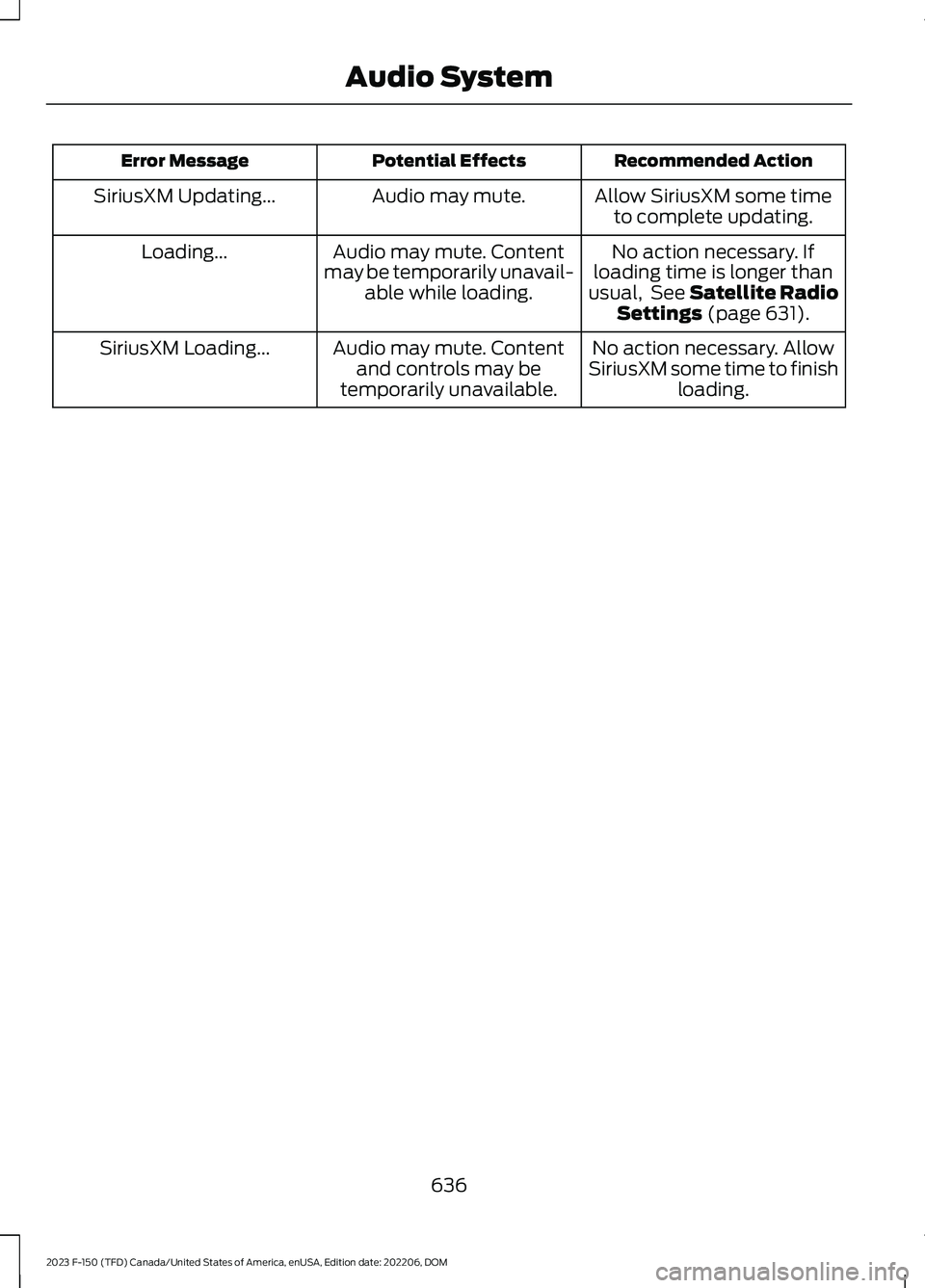
Recommended ActionPotential EffectsError Message
Allow SiriusXM some timeto complete updating.Audio may mute.SiriusXM Updating...
No action necessary. Ifloading time is longer thanusual, See Satellite RadioSettings (page 631).
Audio may mute. Contentmay be temporarily unavail-able while loading.
Loading...
No action necessary. AllowSiriusXM some time to finishloading.
Audio may mute. Contentand controls may betemporarily unavailable.
SiriusXM Loading...
636
2023 F-150 (TFD) Canada/United States of America, enUSA, Edition date: 202206, DOMAudio System
Page 698 of 786
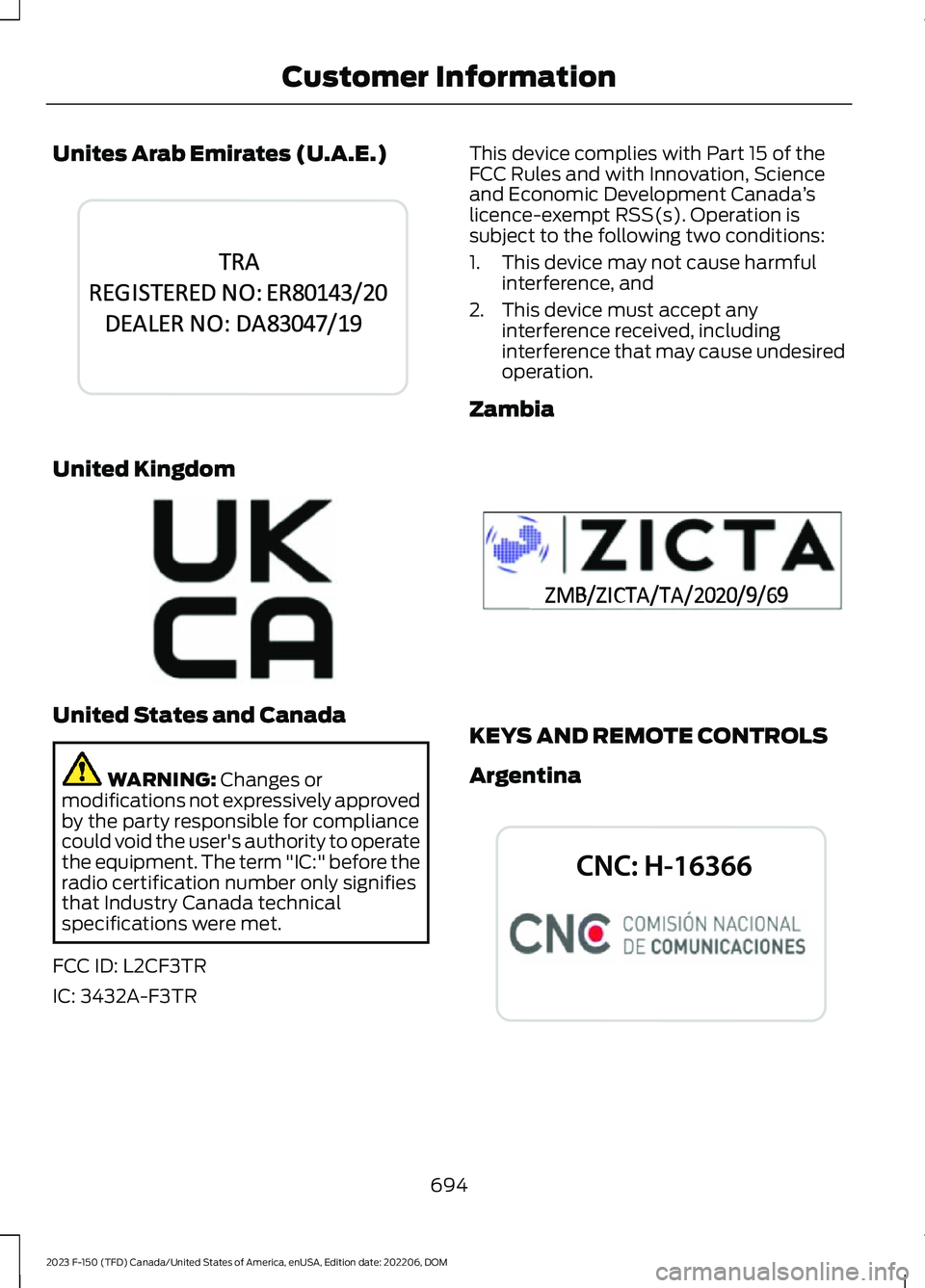
Unites Arab Emirates (U.A.E.)
United Kingdom
United States and Canada
WARNING: Changes ormodifications not expressively approvedby the party responsible for compliancecould void the user's authority to operatethe equipment. The term "IC:" before theradio certification number only signifiesthat Industry Canada technicalspecifications were met.
FCC ID: L2CF3TR
IC: 3432A-F3TR
This device complies with Part 15 of theFCC Rules and with Innovation, Scienceand Economic Development Canada’slicence-exempt RSS(s). Operation issubject to the following two conditions:
1.This device may not cause harmfulinterference, and
2.This device must accept anyinterference received, includinginterference that may cause undesiredoperation.
Zambia
KEYS AND REMOTE CONTROLS
Argentina
694
2023 F-150 (TFD) Canada/United States of America, enUSA, Edition date: 202206, DOMCustomer InformationE344042 E362840 E356902 E339844
Page 775 of 786
Removing the Head Restraint........................197Pre-Collision Assist Limitations..............391Pre-Collision Assist Precautions...........390Pre-Collision Assist....................................390Automatic Emergency Braking....................396Distance Alert.....................................................395Distance Indication...........................................393Evasive Steering Assist...................................396Pre-Collision Assist –Troubleshooting............................................397Pre-Collision Assist –Troubleshooting........................................397Pre-Collision Assist – Frequently AskedQuestions........................................................398Pre-Collision Assist – InformationMessages.........................................................397Pre-Collision Assist – WarningLamps................................................................397Predictive Speed Assist..............................351Adjusting the Set Speed Tolerance............353How Does Predictive Speed AssistWork....................................................................351Predictive Speed Assist Alerts......................353Predictive Speed Assist Indicators..............353Predictive Speed Assist Limitations...........352Predictive Speed Assist Precautions..........351Switching Predictive Speed Assist ModeOn and Off.......................................................352Predictive Speed Assist –Troubleshooting........................................353Predictive Speed Assist – InformationMessages.........................................................353Preparing Your Vehicle forStorage.........................................................535Programming a MyKey................................101Programming the Garage DoorOpener.........................................................209Programming the Remote Control -Vehicles With: Flip Key..............................97Programming the Remote Control -Vehicles With: Push Button Start.........96Properly Adjusting the Driver and FrontPassenger Seats..........................................76PunctureSee: Changing a Flat Tire - Excluding:Raptor................................................................561See: Changing a Flat Tire - Raptor.............568Push Button Ignition Switch....................234
R
Radio Frequency CertificationLabels...........................................................684Blind Spot Information SystemSensors............................................................684Body Control Module.......................................687Cruise Control Module....................................690Keys and Remote Controls............................694Passive Anti-Theft System............................697Radio Transceiver Module...............................701SYNC......................................................................704Tire Pressure Monitoring SystemSensors.............................................................709Wireless Accessory Charging Module.........715Rear Axle Fluid Capacity andSpecification - Police Responder........619Rear Axle Fluid Capacity andSpecification - Raptor.............................618Rear Axle Fluid Capacity andSpecification...............................................618Rear Exterior - Excluding: Raptor/PoliceResponder......................................................47Rear Exterior - Police Responder.............49Rear Exterior - Raptor...................................48Rear Occupant Alert System AudibleWarnings.....................................................206Rear Occupant Alert SystemIndicators.....................................................206Rear Occupant Alert SystemLimitations..................................................205Rear Occupant Alert SystemPrecautions.................................................205Rear Occupant Alert System..................205Rear Parking Aid...........................................324Locating the Rear Parking AidSensors.............................................................324Rear Parking Aid Audible Warnings............325Rear Parking Aid Limitations.........................324What is the Rear Parking Aid.........................324Rear Seats......................................................202Heated Seats......................................................203Manual Seats......................................................202Rear View Camera Guide Lines..............330Rear View Camera Precautions.............329Rear View Camera.......................................329Rear View Camera Settings..........................330
771
2023 F-150 (TFD) Canada/United States of America, enUSA, Edition date: 202206, DOMIndex
Page 777 of 786
Selecting a Channel..........................................631What Is Satellite Radio...................................630Saving a Preset Position...........................207Scheduled Maintenance...........................667Seatbelt Extensions........................................71Seatbelt Precautions....................................64Seatbelt Reminder........................................68How Does the Seatbelt ReminderWork.....................................................................68Seatbelt Reminder Audible Warnings..........70Seatbelt Reminder Indicators..........................70Switching the Seatbelt Reminder On andOff.........................................................................70Seatbelts...........................................................64Automatic Locking Mode..................................66Seatbelt Reminder..............................................68Sensitive Locking Mode.....................................66Security.............................................................134Anti-Theft Alarm System................................134Anti-Theft Alarm System Settings..............135Passive Anti-Theft System.............................134Security – Troubleshooting............................136Security – Troubleshooting......................136Security – Frequently AskedQuestions..........................................................137Security – Information Messages................136Selecting a Drive Mode - King Ranch/Lariat/Limited/Platinum/XL/XLT.................................................................363Selecting a Drive Mode - Raptor...........364Selecting a Four-Wheel Drive Mode -Excluding: Raptor......................................276Selecting a Four-Wheel Drive Mode -Raptor............................................................277Selecting a Personal Profile....................653Selecting the Audio Source.....................626Sending and Receiving a TextMessage.......................................................647Sensitive Locking Mode..............................66How Does Sensitive Locking ModeWork.....................................................................66What is Sensitive Locking Mode....................66Service Data.....................................................30Setting a Destination.................................654Setting a Destination Using a Point ofInterest.............................................................655Setting a Destination Using a PredictiveDestination......................................................655
Setting a Destination Using a RecentDestination......................................................655Setting a Destination Using a SavedDestination......................................................655Setting a Destination Using the MapScreen...............................................................655Setting a Destination Using the Text EntryScreen...............................................................654Setting a Memory Preset..........................627Settings Data....................................................31Setting the Adaptive Cruise ControlGap................................................................346Setting the Adaptive Cruise ControlSpeed............................................................345Setting the Blower Motor Speed............185Setting the Clock and Date.....................628Setting the Cruise Control Speed.........340Setting the Hill Descent Speed...............318Setting the Speed Sign RecognitionSpeed Tolerance.......................................402Setting the Speed Sign RecognitionSpeed Warning..........................................402Setting the Temperature...........................185Setting the Trail Control Speed...............312Setting Up the Trailer Backup Assistancefor a Conventional Trailer......................439Applying the Trailer Reversing AidSticker................................................................441Calibrating the System....................................442Configuring the Trailer.....................................439Trailer Sensor Installation...............................441Setting Up Trailer Reverse Guidance fora Conventional Trailer.............................454Applying the Trailer Reverse AidSticker...............................................................456Calibrating the System....................................457Configuring the Trailer.....................................454Trailer Sensor Installation..............................456Shifting Your Vehicle Into Gear - PoliceResponder...................................................266Shifting Your Vehicle Into Gear -Raptor...........................................................265Shifting Your Vehicle Into Gear..............265Side Parking Aid...........................................326Locating the Side Parking AidSensors.............................................................326Side Parking Aid Audible Warnings.............327Side Parking Aid Limitations.........................326
773
2023 F-150 (TFD) Canada/United States of America, enUSA, Edition date: 202206, DOMIndex