ESP FORD F250 2013 User Guide
[x] Cancel search | Manufacturer: FORD, Model Year: 2013, Model line: F250, Model: FORD F250 2013Pages: 577, PDF Size: 7.74 MB
Page 119 of 577
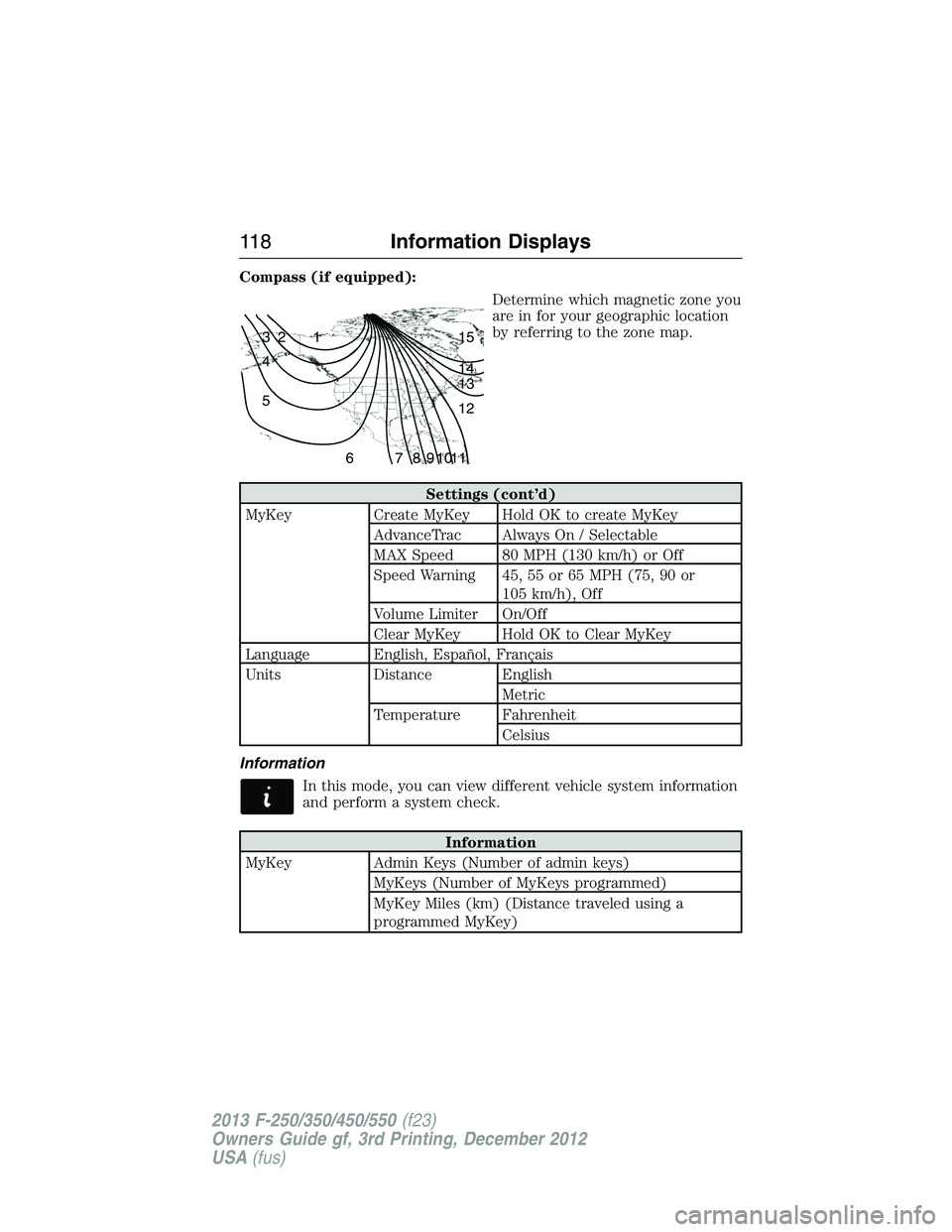
Compass (if equipped):
Determine which magnetic zone you
are in for your geographic location
by referring to the zone map.
Settings (cont’d)
MyKey Create MyKey Hold OK to create MyKey
AdvanceTrac Always On / Selectable
MAX Speed 80 MPH (130 km/h) or Off
Speed Warning 45, 55 or 65 MPH (75, 90 or
105 km/h), Off
Volume Limiter On/Off
Clear MyKey Hold OK to Clear MyKey
Language English, Español, Français
Units Distance English
Metric
Temperature Fahrenheit
Celsius
Information
In this mode, you can view different vehicle system information
and perform a system check.
Information
MyKey Admin Keys (Number of admin keys)
MyKeys (Number of MyKeys programmed)
MyKey Miles (km) (Distance traveled using a
programmed MyKey)
1 2 3
4
5
6 7 8 9 101112 13 14 15
11 8Information Displays
2013 F-250/350/450/550(f23)
Owners Guide gf, 3rd Printing, December 2012
USA(fus)
Page 124 of 577
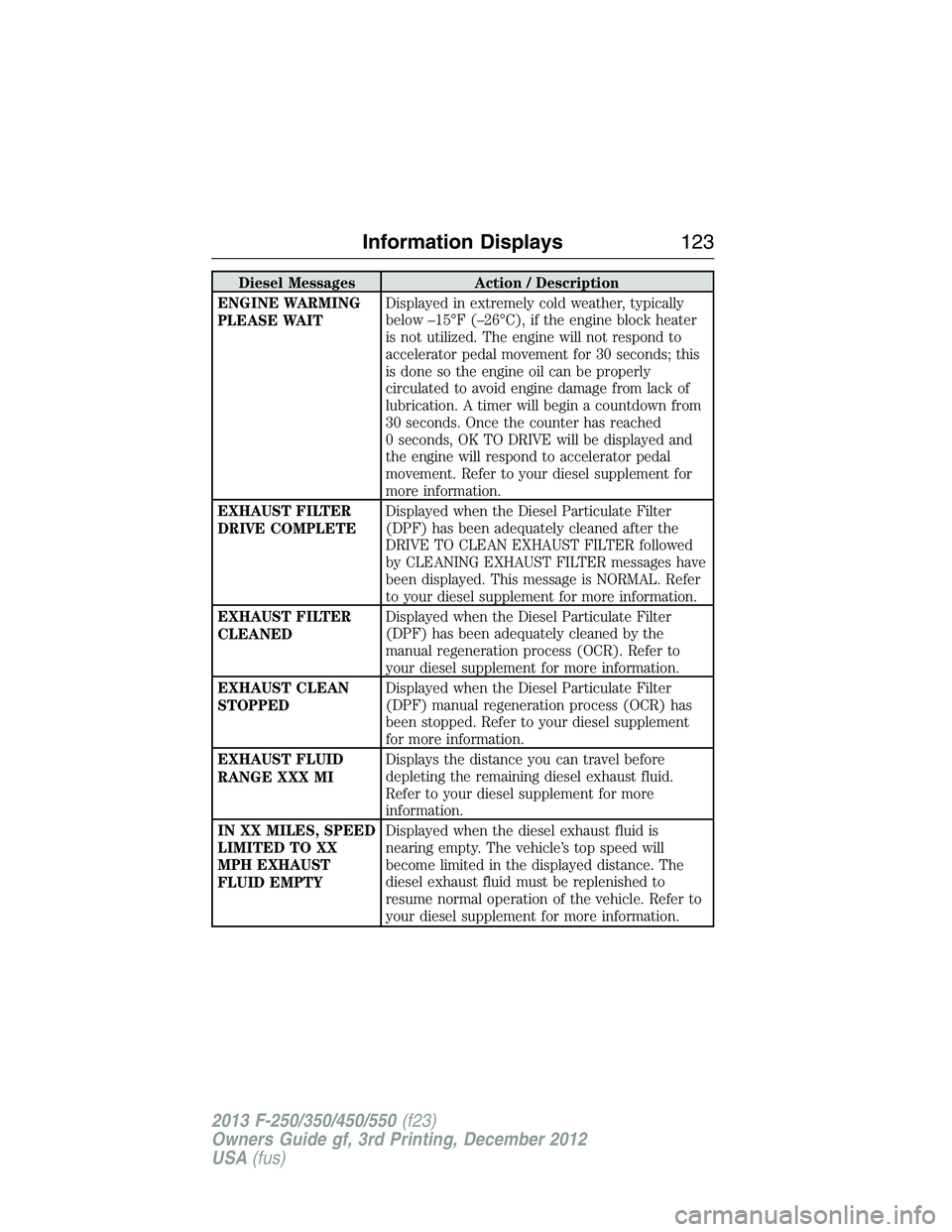
Diesel Messages Action / Description
ENGINE WARMING
PLEASE WAITDisplayed in extremely cold weather, typically
below –15°F (–26°C), if the engine block heater
is not utilized. The engine will not respond to
accelerator pedal movement for 30 seconds; this
is done so the engine oil can be properly
circulated to avoid engine damage from lack of
lubrication. A timer will begin a countdown from
30 seconds. Once the counter has reached
0 seconds, OK TO DRIVE will be displayed and
the engine will respond to accelerator pedal
movement. Refer to your diesel supplement for
more information.
EXHAUST FILTER
DRIVE COMPLETEDisplayed when the Diesel Particulate Filter
(DPF) has been adequately cleaned after the
DRIVE TO CLEAN EXHAUST FILTER followed
by CLEANING EXHAUST FILTER messages have
been displayed. This message is NORMAL. Refer
to your diesel supplement for more information.
EXHAUST FILTER
CLEANEDDisplayed when the Diesel Particulate Filter
(DPF) has been adequately cleaned by the
manual regeneration process (OCR). Refer to
your diesel supplement for more information.
EXHAUST CLEAN
STOPPEDDisplayed when the Diesel Particulate Filter
(DPF) manual regeneration process (OCR) has
been stopped. Refer to your diesel supplement
for more information.
EXHAUST FLUID
RANGE XXX MIDisplays the distance you can travel before
depleting the remaining diesel exhaust fluid.
Refer to your diesel supplement for more
information.
IN XX MILES, SPEED
LIMITED TO XX
MPH EXHAUST
FLUID EMPTYDisplayed when the diesel exhaust fluid is
nearing empty. The vehicle’s top speed will
become limited in the displayed distance. The
diesel exhaust fluid must be replenished to
resume normal operation of the vehicle. Refer to
your diesel supplement for more information.
Information Displays123
2013 F-250/350/450/550(f23)
Owners Guide gf, 3rd Printing, December 2012
USA(fus)
Page 128 of 577
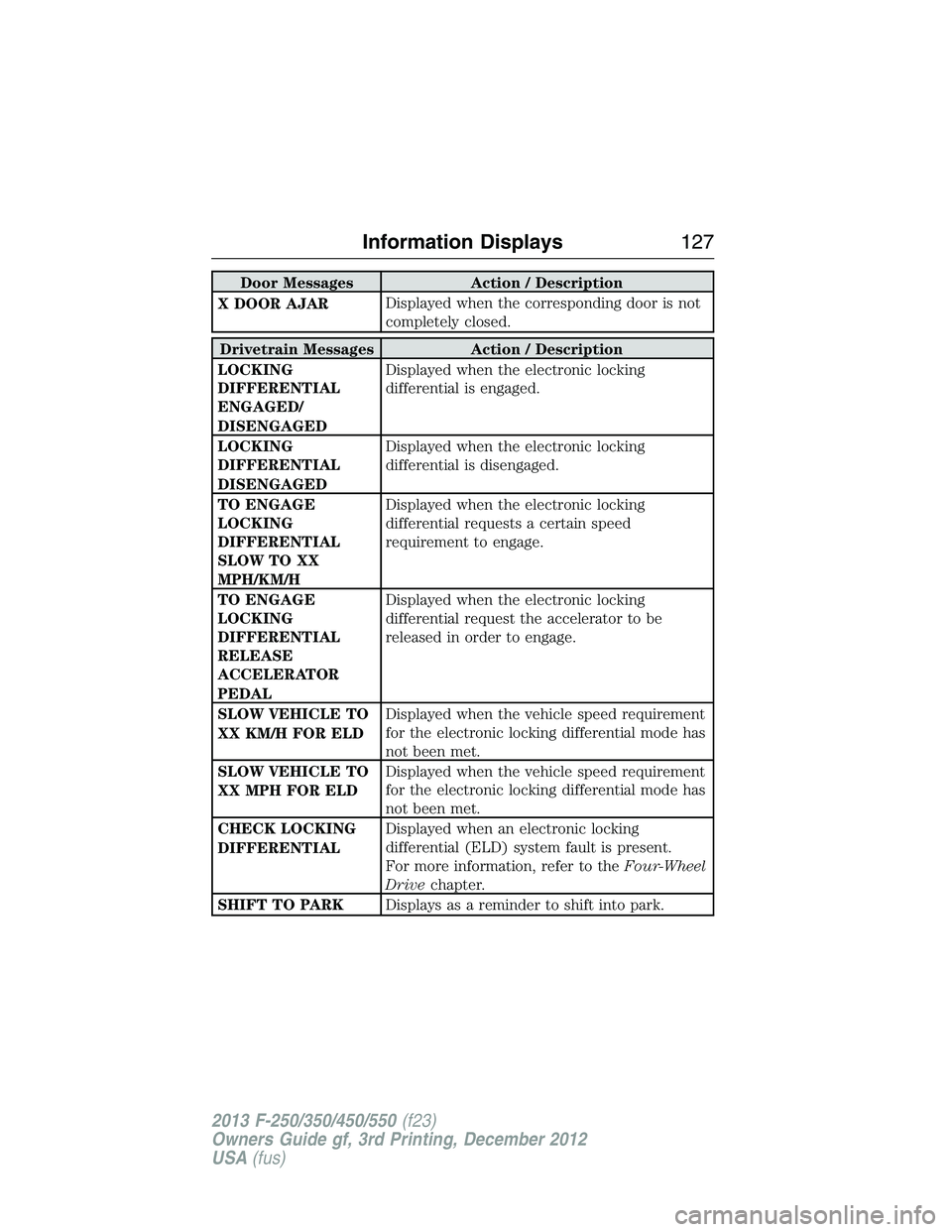
Door Messages Action / Description
X DOOR AJARDisplayed when the corresponding door is not
completely closed.
Drivetrain Messages Action / Description
LOCKING
DIFFERENTIAL
ENGAGED/
DISENGAGEDDisplayed when the electronic locking
differential is engaged.
LOCKING
DIFFERENTIAL
DISENGAGEDDisplayed when the electronic locking
differential is disengaged.
TO ENGAGE
LOCKING
DIFFERENTIAL
SLOW TO XX
MPH/KM/HDisplayed when the electronic locking
differential requests a certain speed
requirement to engage.
TO ENGAGE
LOCKING
DIFFERENTIAL
RELEASE
ACCELERATOR
PEDALDisplayed when the electronic locking
differential request the accelerator to be
released in order to engage.
SLOW VEHICLE TO
XX KM/H FOR ELDDisplayed when the vehicle speed requirement
for the electronic locking differential mode has
not been met.
SLOW VEHICLE TO
XX MPH FOR ELDDisplayed when the vehicle speed requirement
for the electronic locking differential mode has
not been met.
CHECK LOCKING
DIFFERENTIALDisplayed when an electronic locking
differential (ELD) system fault is present.
For more information, refer to theFour-Wheel
Drivechapter.
SHIFT TO PARKDisplays as a reminder to shift into park.
Information Displays127
2013 F-250/350/450/550(f23)
Owners Guide gf, 3rd Printing, December 2012
USA(fus)
Page 133 of 577
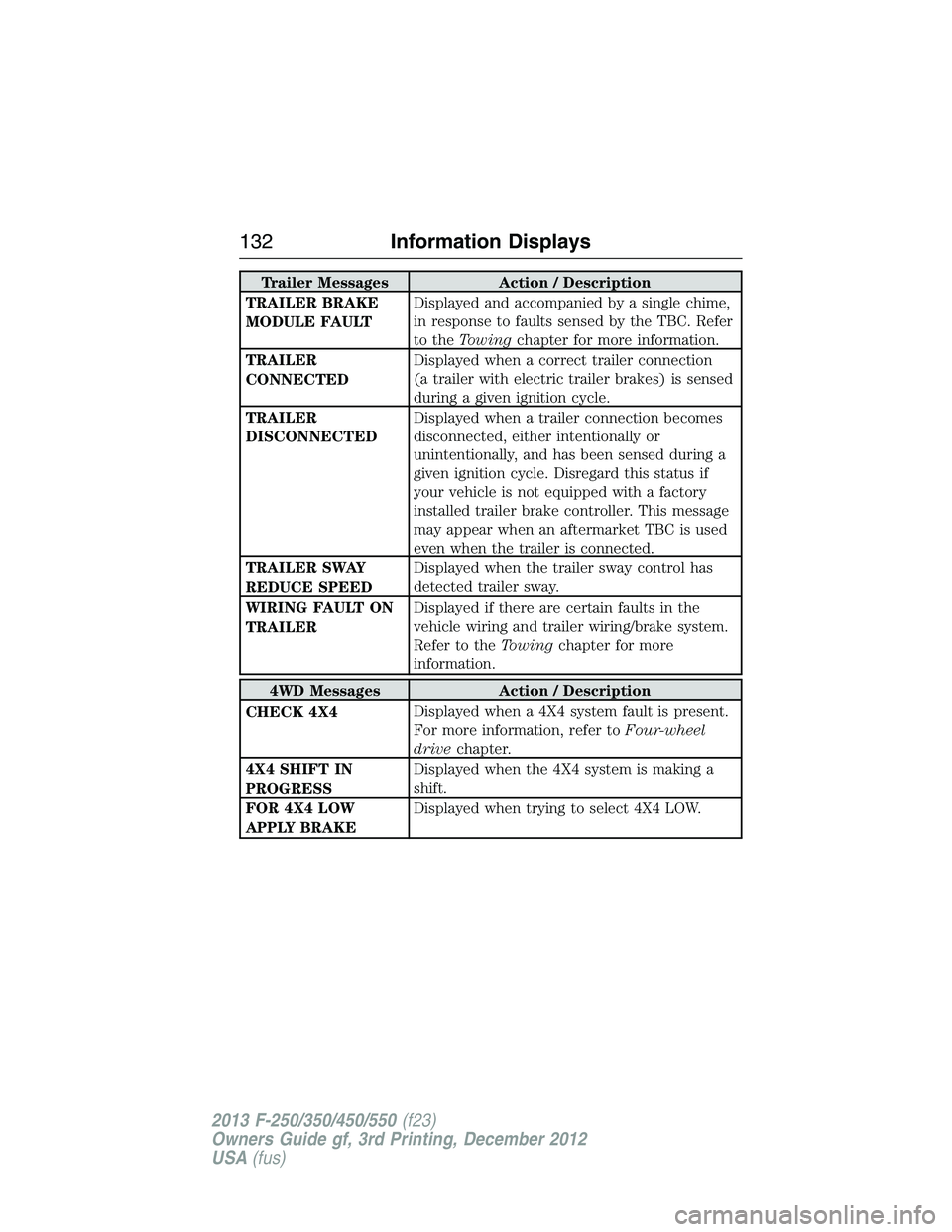
Trailer Messages Action / Description
TRAILER BRAKE
MODULE FAULTDisplayed and accompanied by a single chime,
in response to faults sensed by the TBC. Refer
to theTowingchapter for more information.
TRAILER
CONNECTEDDisplayed when a correct trailer connection
(a trailer with electric trailer brakes) is sensed
during a given ignition cycle.
TRAILER
DISCONNECTEDDisplayed when a trailer connection becomes
disconnected, either intentionally or
unintentionally, and has been sensed during a
given ignition cycle. Disregard this status if
your vehicle is not equipped with a factory
installed trailer brake controller. This message
may appear when an aftermarket TBC is used
even when the trailer is connected.
TRAILER SWAY
REDUCE SPEEDDisplayed when the trailer sway control has
detected trailer sway.
WIRING FAULT ON
TRAILERDisplayed if there are certain faults in the
vehicle wiring and trailer wiring/brake system.
Refer to theTowingchapter for more
information.
4WD Messages Action / Description
CHECK 4X4Displayed when a 4X4 system fault is present.
For more information, refer toFour-wheel
drivechapter.
4X4 SHIFT IN
PROGRESSDisplayed when the 4X4 system is making a
shift.
FOR 4X4 LOW
APPLY BRAKEDisplayed when trying to select 4X4 LOW.
132Information Displays
2013 F-250/350/450/550(f23)
Owners Guide gf, 3rd Printing, December 2012
USA(fus)
Page 137 of 577
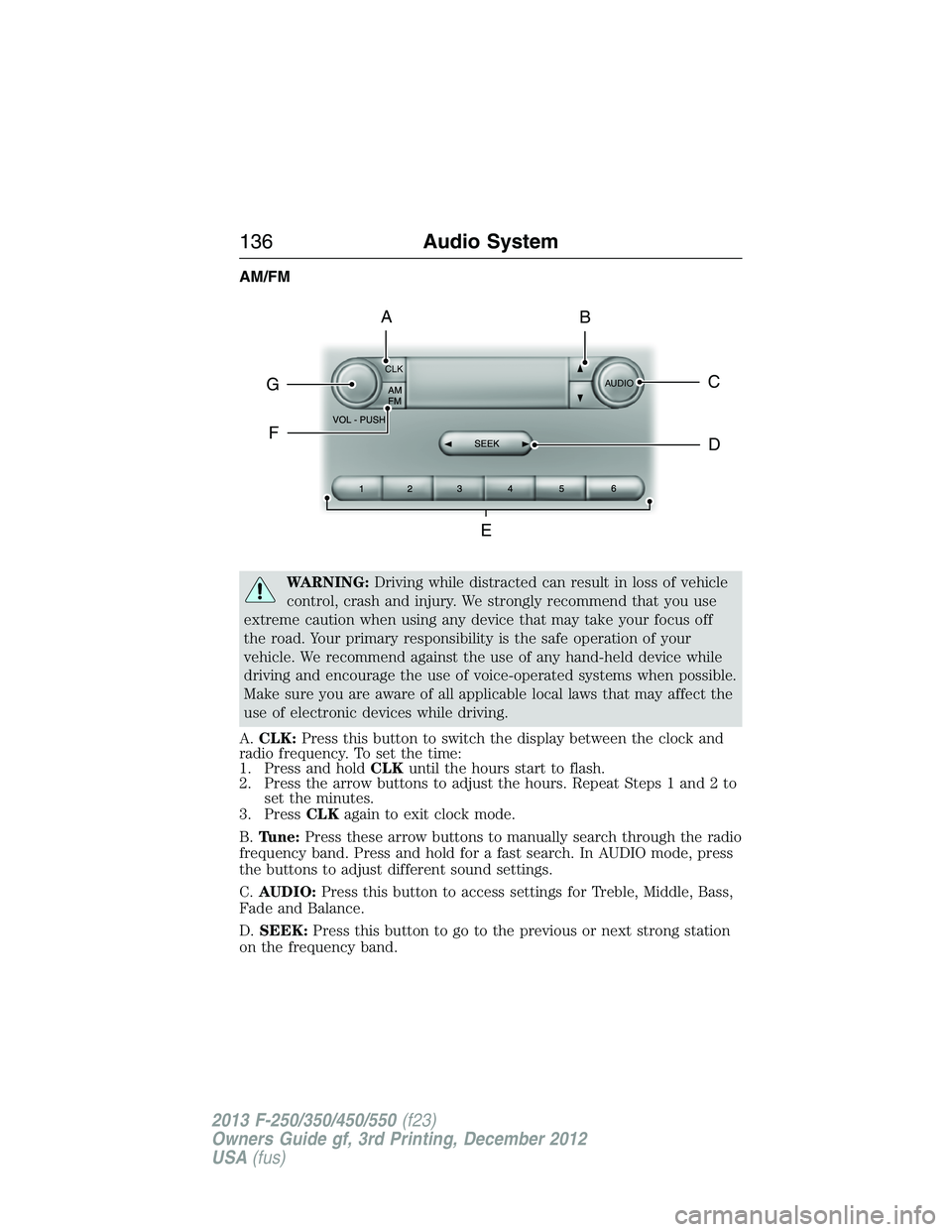
AM/FM
WARNING:Driving while distracted can result in loss of vehicle
control, crash and injury. We strongly recommend that you use
extreme caution when using any device that may take your focus off
the road. Your primary responsibility is the safe operation of your
vehicle. We recommend against the use of any hand-held device while
driving and encourage the use of voice-operated systems when possible.
Make sure you are aware of all applicable local laws that may affect the
use of electronic devices while driving.
A.CLK:Press this button to switch the display between the clock and
radio frequency. To set the time:
1. Press and holdCLKuntil the hours start to flash.
2. Press the arrow buttons to adjust the hours. Repeat Steps 1 and 2 to
set the minutes.
3. PressCLKagain to exit clock mode.
B.Tune:Press these arrow buttons to manually search through the radio
frequency band. Press and hold for a fast search. In AUDIO mode, press
the buttons to adjust different sound settings.
C.AUDIO:Press this button to access settings for Treble, Middle, Bass,
Fade and Balance.
D.SEEK:Press this button to go to the previous or next strong station
on the frequency band.
CLK
AUDIOC
EG
F
BA
D
136Audio System
2013 F-250/350/450/550(f23)
Owners Guide gf, 3rd Printing, December 2012
USA(fus)
Page 138 of 577
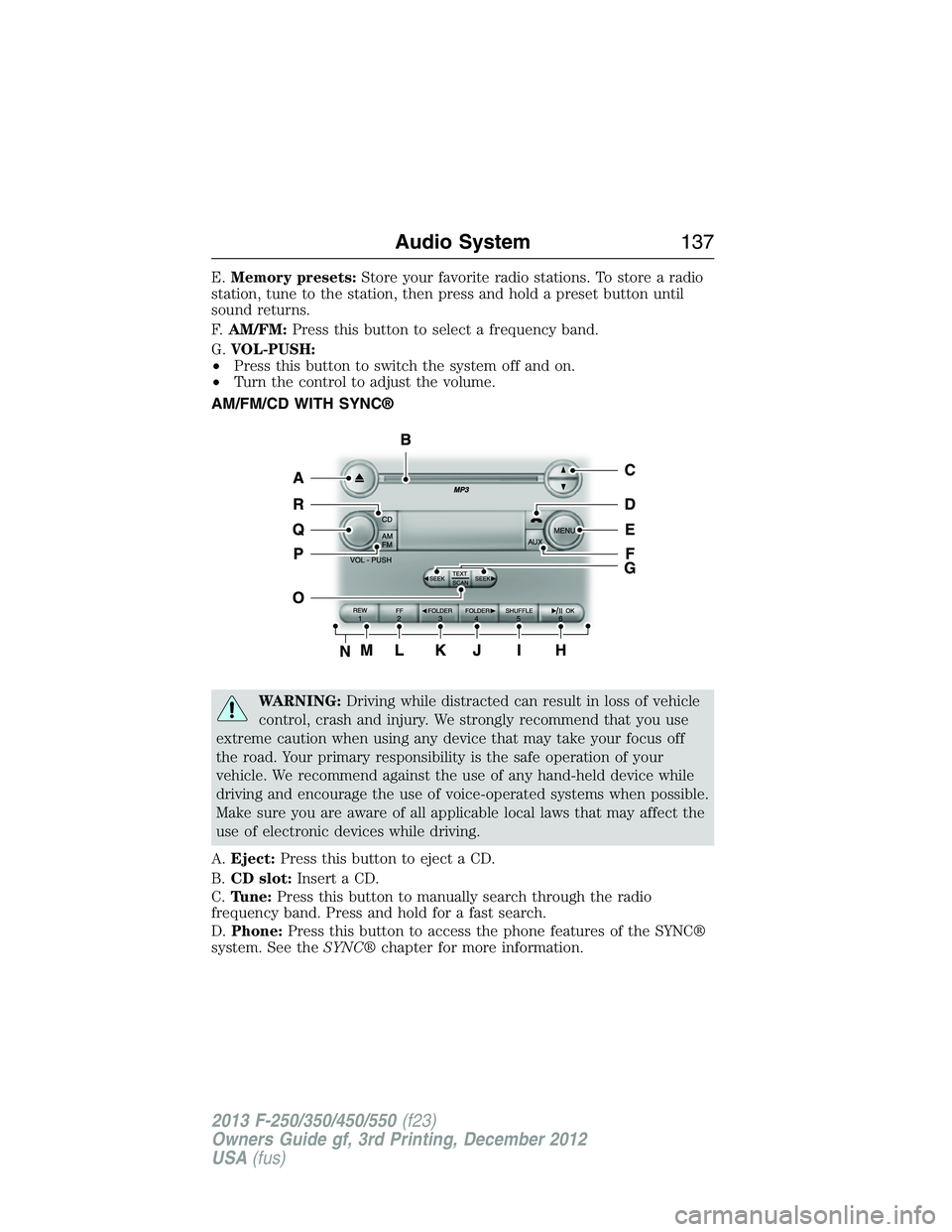
E.Memory presets:Store your favorite radio stations. To store a radio
station, tune to the station, then press and hold a preset button until
sound returns.
F.AM/FM:Press this button to select a frequency band.
G.VOL-PUSH:
•Press this button to switch the system off and on.
•Turn the control to adjust the volume.
AM/FM/CD WITH SYNC®
WARNING:Driving while distracted can result in loss of vehicle
control, crash and injury. We strongly recommend that you use
extreme caution when using any device that may take your focus off
the road. Your primary responsibility is the safe operation of your
vehicle. We recommend against the use of any hand-held device while
driving and encourage the use of voice-operated systems when possible.
Make sure you are aware of all applicable local laws that may affect the
use of electronic devices while driving.
A.Eject:Press this button to eject a CD.
B.CD slot:Insert a CD.
C.Tune:Press this button to manually search through the radio
frequency band. Press and hold for a fast search.
D.Phone:Press this button to access the phone features of the SYNC®
system. See theSYNC®chapter for more information.
Audio System137
2013 F-250/350/450/550(f23)
Owners Guide gf, 3rd Printing, December 2012
USA(fus)
Page 141 of 577
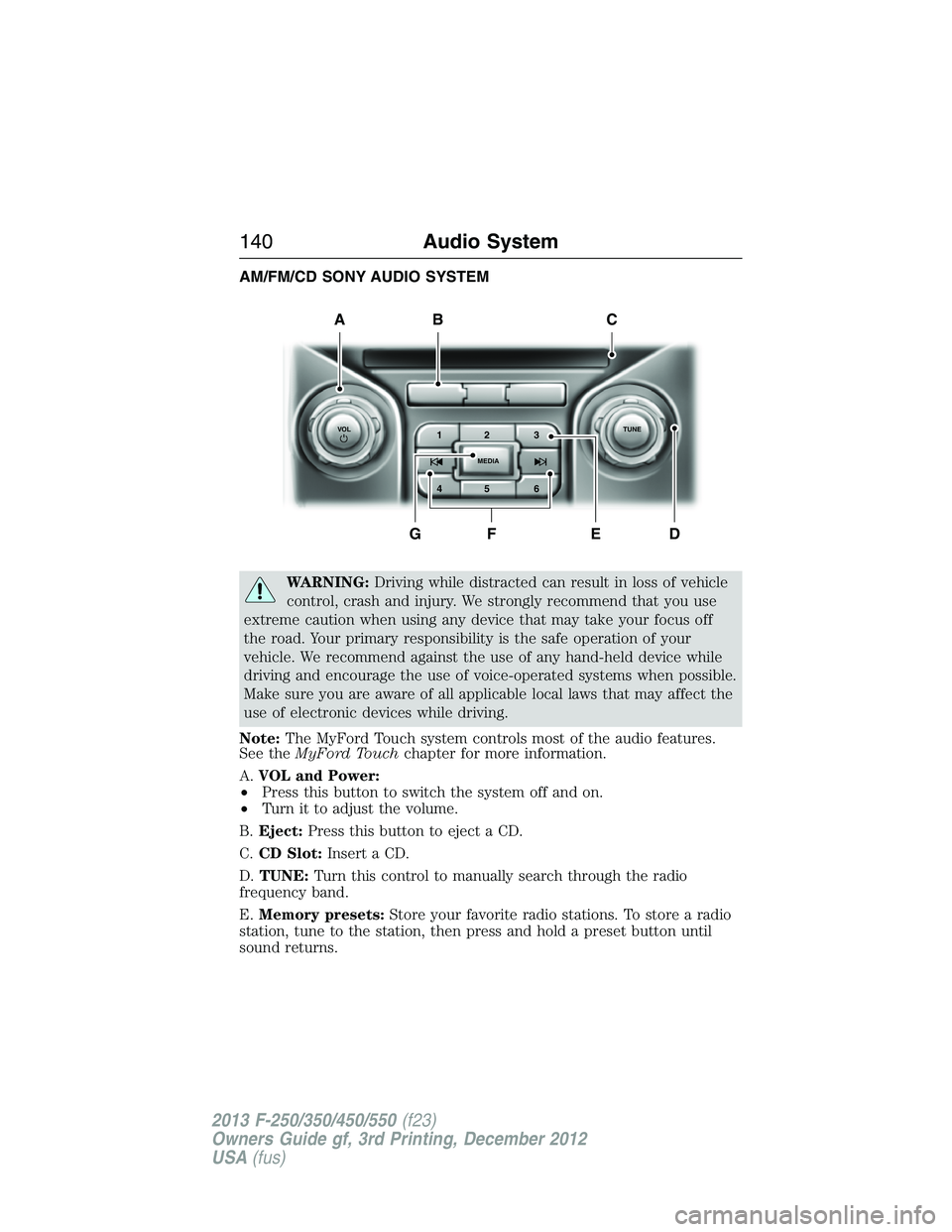
AM/FM/CD SONY AUDIO SYSTEM
WARNING:Driving while distracted can result in loss of vehicle
control, crash and injury. We strongly recommend that you use
extreme caution when using any device that may take your focus off
the road. Your primary responsibility is the safe operation of your
vehicle. We recommend against the use of any hand-held device while
driving and encourage the use of voice-operated systems when possible.
Make sure you are aware of all applicable local laws that may affect the
use of electronic devices while driving.
Note:The MyFord Touch system controls most of the audio features.
See theMyFord Touchchapter for more information.
A.VOL and Power:
•Press this button to switch the system off and on.
•Turn it to adjust the volume.
B.Eject:Press this button to eject a CD.
C.CD Slot:Insert a CD.
D.TUNE:Turn this control to manually search through the radio
frequency band.
E.Memory presets:Store your favorite radio stations. To store a radio
station, tune to the station, then press and hold a preset button until
sound returns.
A
DFEG
BC
1VOLTUNE
MEDIA23
45 6
140Audio System
2013 F-250/350/450/550(f23)
Owners Guide gf, 3rd Printing, December 2012
USA(fus)
Page 142 of 577
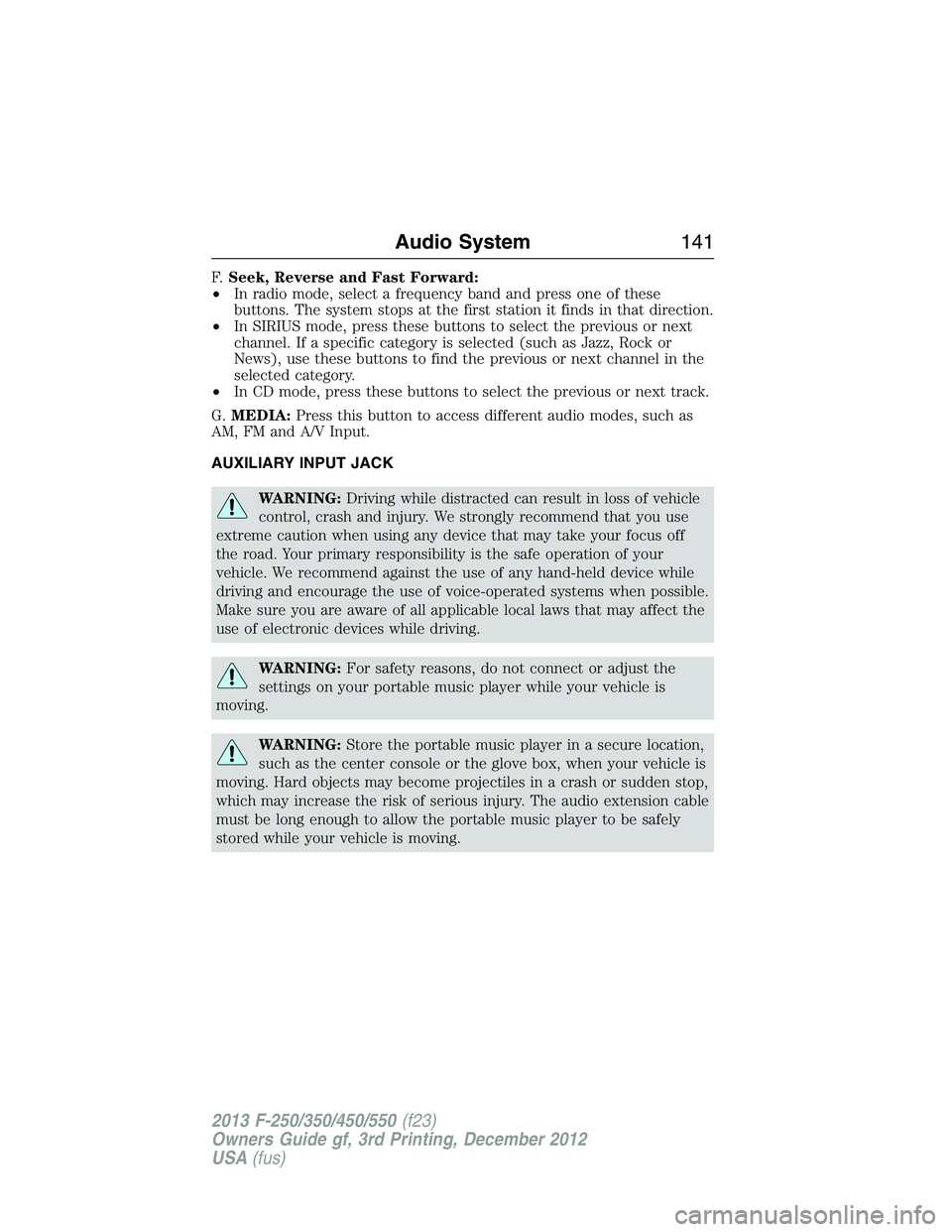
F.Seek, Reverse and Fast Forward:
•In radio mode, select a frequency band and press one of these
buttons. The system stops at the first station it finds in that direction.
•In SIRIUS mode, press these buttons to select the previous or next
channel. If a specific category is selected (such as Jazz, Rock or
News), use these buttons to find the previous or next channel in the
selected category.
•In CD mode, press these buttons to select the previous or next track.
G.MEDIA:Press this button to access different audio modes, such as
AM, FM and A/V Input.
AUXILIARY INPUT JACK
WARNING:Driving while distracted can result in loss of vehicle
control, crash and injury. We strongly recommend that you use
extreme caution when using any device that may take your focus off
the road. Your primary responsibility is the safe operation of your
vehicle. We recommend against the use of any hand-held device while
driving and encourage the use of voice-operated systems when possible.
Make sure you are aware of all applicable local laws that may affect the
use of electronic devices while driving.
WARNING:For safety reasons, do not connect or adjust the
settings on your portable music player while your vehicle is
moving.
WARNING:Store the portable music player in a secure location,
such as the center console or the glove box, when your vehicle is
moving. Hard objects may become projectiles in a crash or sudden stop,
which may increase the risk of serious injury. The audio extension cable
must be long enough to allow the portable music player to be safely
stored while your vehicle is moving.
Audio System141
2013 F-250/350/450/550(f23)
Owners Guide gf, 3rd Printing, December 2012
USA(fus)
Page 143 of 577
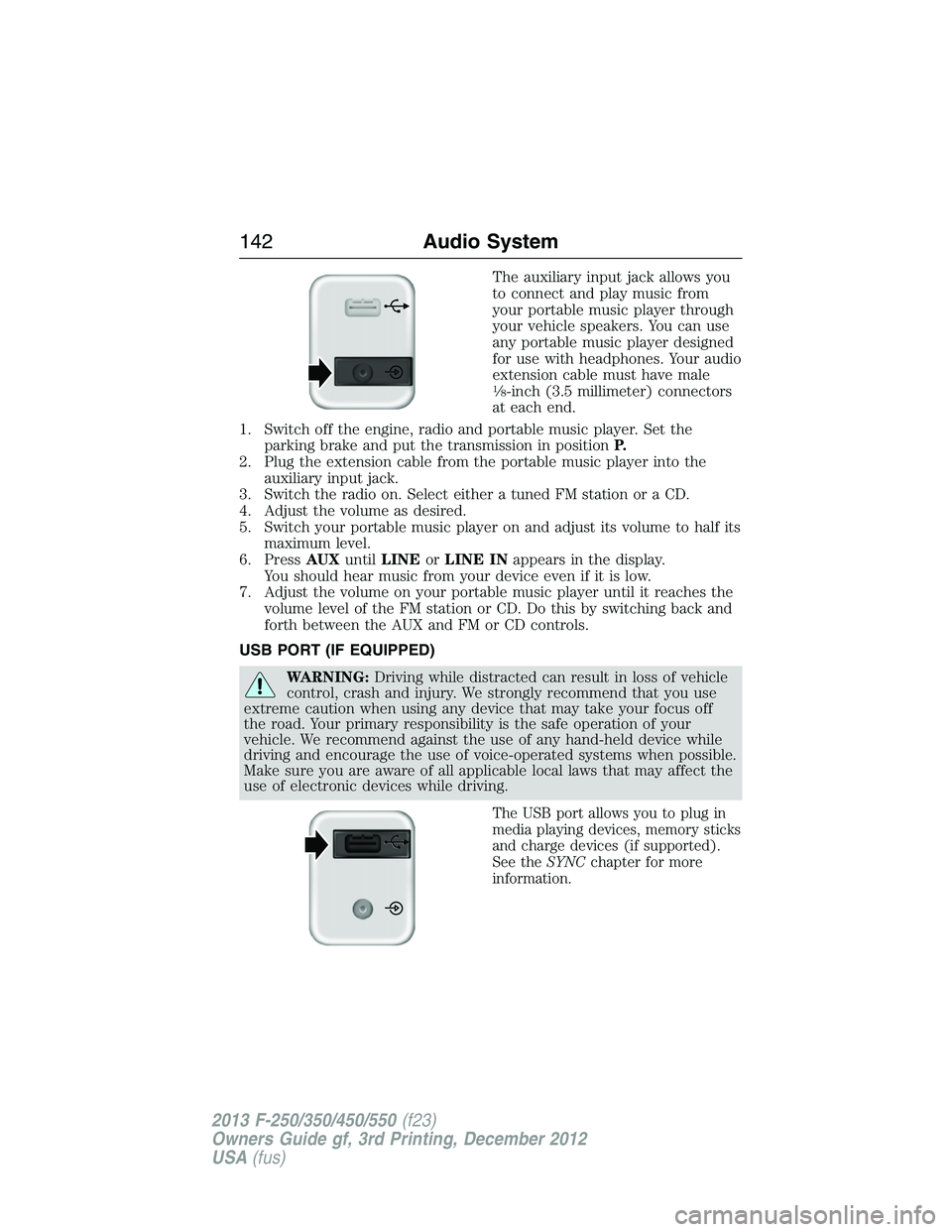
The auxiliary input jack allows you
to connect and play music from
your portable music player through
your vehicle speakers. You can use
any portable music player designed
for use with headphones. Your audio
extension cable must have male
18-inch (3.5 millimeter) connectors
at each end.
1. Switch off the engine, radio and portable music player. Set the
parking brake and put the transmission in positionP.
2. Plug the extension cable from the portable music player into the
auxiliary input jack.
3. Switch the radio on. Select either a tuned FM station or a CD.
4. Adjust the volume as desired.
5. Switch your portable music player on and adjust its volume to half its
maximum level.
6. PressAUXuntilLINEorLINE INappears in the display.
You should hear music from your device even if it is low.
7. Adjust the volume on your portable music player until it reaches the
volume level of the FM station or CD. Do this by switching back and
forth between the AUX and FM or CD controls.
USB PORT (IF EQUIPPED)
WARNING:Driving while distracted can result in loss of vehicle
control, crash and injury. We strongly recommend that you use
extreme caution when using any device that may take your focus off
the road. Your primary responsibility is the safe operation of your
vehicle. We recommend against the use of any hand-held device while
driving and encourage the use of voice-operated systems when possible.
Make sure you are aware of all applicable local laws that may affect the
use of electronic devices while driving.
The USB port allows you to plug in
media playing devices, memory sticks
and charge devices (if supported).
See theSYNCchapter for more
information.
142Audio System
2013 F-250/350/450/550(f23)
Owners Guide gf, 3rd Printing, December 2012
USA(fus)
Page 145 of 577
Potential satellite radio reception issues
Station overloadWhen you pass a ground-based
broadcast-repeating tower, a stronger signal
may overtake a weaker one and the audio
system may mute.
Satellite radio signal
interferenceYour display may show ACQUIRING...to
indicate the interference and the audio
system may mute.
SIRIUS Satellite Radio Service
Note:SIRIUS reserves the unrestricted right to change, rearrange, add
or delete programming including canceling, moving or adding particular
channels, and its prices, at any time, with or without notice to you.
Ford Motor Company shall not be responsible for any such programming
changes.
SIRIUS satellite radio is a
subscription-based satellite radio
service that broadcasts a variety of
music, sports, news, weather, traffic
and entertainment programming.
Your factory-installed SIRIUS
satellite radio system includes
hardware and a limited subscription term which begins on the date of
sale or lease of your vehicle. See an authorized dealer for availability.
For more information on extended subscription terms (a service fee is
required), the online media player and a complete list of SIRIUS satellite
radio channels, and other features, please visit www.siriusxm.com in the
United States, www.sirius.ca in Canada, or call SIRIUS at 1–888–539–7474.
Satellite Radio Electronic Serial Number (ESN)
You need your ESN to activate, modify or track your satellite radio
account. When in satellite radio mode, you can view this number by
pressingSIRIUSand memory preset 1 at the same time. To access your
ESN, press the bottom left corner of the touchscreen, thenSIRIUS>
Options.
144Audio System
2013 F-250/350/450/550(f23)
Owners Guide gf, 3rd Printing, December 2012
USA(fus)