ECO mode FORD F250 2014 User Guide
[x] Cancel search | Manufacturer: FORD, Model Year: 2014, Model line: F250, Model: FORD F250 2014Pages: 460, PDF Size: 5.33 MB
Page 85 of 460
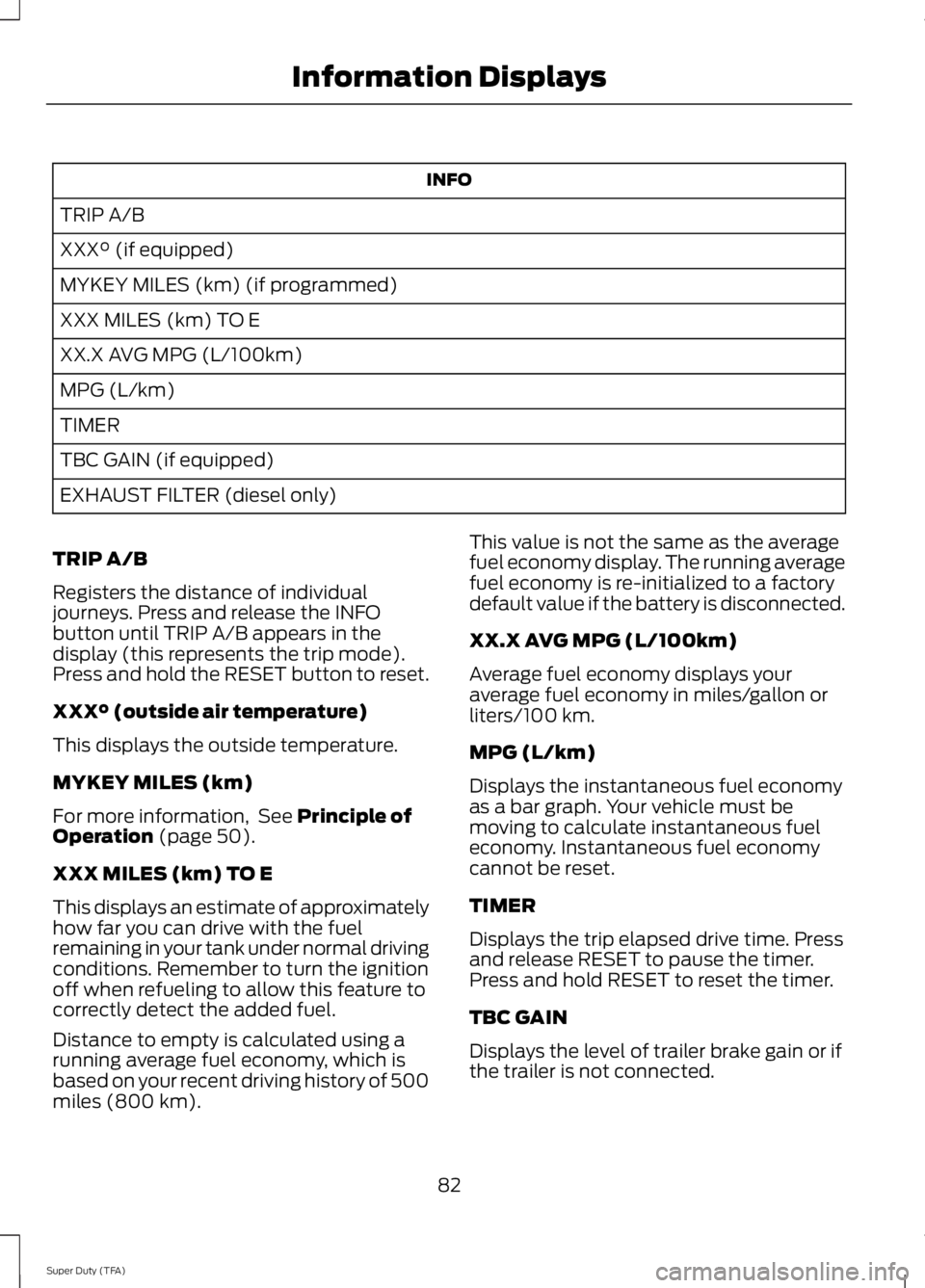
INFO
TRIP A/B
XXX° (if equipped)
MYKEY MILES (km) (if programmed)
XXX MILES (km) TO E
XX.X AVG MPG (L/100km)
MPG (L/km)
TIMER
TBC GAIN (if equipped)
EXHAUST FILTER (diesel only)
TRIP A/B
Registers the distance of individual
journeys. Press and release the INFO
button until TRIP A/B appears in the
display (this represents the trip mode).
Press and hold the RESET button to reset.
XXX° (outside air temperature)
This displays the outside temperature.
MYKEY MILES (km)
For more information, See Principle of
Operation (page 50).
XXX MILES (km) TO E
This displays an estimate of approximately
how far you can drive with the fuel
remaining in your tank under normal driving
conditions. Remember to turn the ignition
off when refueling to allow this feature to
correctly detect the added fuel.
Distance to empty is calculated using a
running average fuel economy, which is
based on your recent driving history of 500
miles (800 km). This value is not the same as the average
fuel economy display. The running average
fuel economy is re-initialized to a factory
default value if the battery is disconnected.
XX.X AVG MPG (L/100km)
Average fuel economy displays your
average fuel economy in miles/gallon or
liters/100 km.
MPG (L/km)
Displays the instantaneous fuel economy
as a bar graph. Your vehicle must be
moving to calculate instantaneous fuel
economy. Instantaneous fuel economy
cannot be reset.
TIMER
Displays the trip elapsed drive time. Press
and release RESET to pause the timer.
Press and hold RESET to reset the timer.
TBC GAIN
Displays the level of trailer brake gain or if
the trailer is not connected.
82
Super Duty (TFA) Information Displays
Page 87 of 460
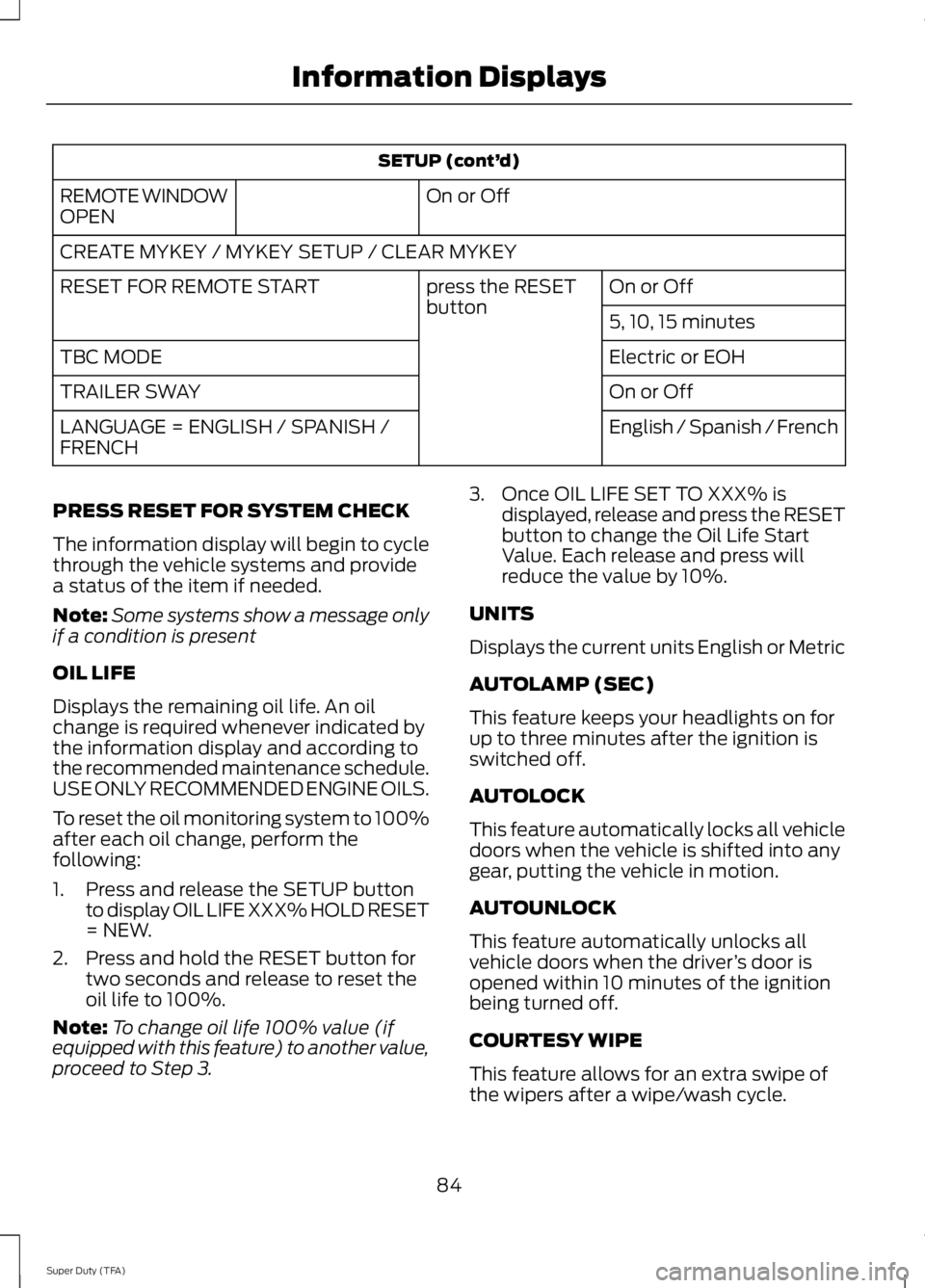
SETUP (cont’
d)
On or Off
REMOTE WINDOW
OPEN
CREATE MYKEY / MYKEY SETUP / CLEAR MYKEY
On or Off
press the RESET
button
RESET FOR REMOTE START
5, 10, 15 minutes
Electric or EOH
TBC MODE
On or Off
TRAILER SWAY
English / Spanish / French
LANGUAGE = ENGLISH / SPANISH /
FRENCH
PRESS RESET FOR SYSTEM CHECK
The information display will begin to cycle
through the vehicle systems and provide
a status of the item if needed.
Note: Some systems show a message only
if a condition is present
OIL LIFE
Displays the remaining oil life. An oil
change is required whenever indicated by
the information display and according to
the recommended maintenance schedule.
USE ONLY RECOMMENDED ENGINE OILS.
To reset the oil monitoring system to 100%
after each oil change, perform the
following:
1. Press and release the SETUP button to display OIL LIFE XXX% HOLD RESET
= NEW.
2. Press and hold the RESET button for two seconds and release to reset the
oil life to 100%.
Note: To change oil life 100% value (if
equipped with this feature) to another value,
proceed to Step 3. 3. Once OIL LIFE SET TO XXX% is
displayed, release and press the RESET
button to change the Oil Life Start
Value. Each release and press will
reduce the value by 10%.
UNITS
Displays the current units English or Metric
AUTOLAMP (SEC)
This feature keeps your headlights on for
up to three minutes after the ignition is
switched off.
AUTOLOCK
This feature automatically locks all vehicle
doors when the vehicle is shifted into any
gear, putting the vehicle in motion.
AUTOUNLOCK
This feature automatically unlocks all
vehicle doors when the driver ’s door is
opened within 10 minutes of the ignition
being turned off.
COURTESY WIPE
This feature allows for an extra swipe of
the wipers after a wipe/wash cycle.
84
Super Duty (TFA) Information Displays
Page 88 of 460
CREATE MYKEY / MYKEY SETUP /
CLEAR MYKEY
For more information, See Creating a
MyKey (page 50).
RESET FOR REMOTE START (if
equipped)
REAR PARK AID
This feature sounds a warning tone to warn
the driver of obstacles near the rear
bumper, and functions only when R
(Reverse) gear is selected.
TBC MODE (if equipped)
Allows you to choose the trailer brake
mode.
TRAILER SWAY (if equipped)
This feature uses the electronic stability
control to mitigate trailer sway.
LANGUAGE = ENGLISH / SPANISH /
FRENCH
Allows you to choose which language the
message center will display in.
Waiting four seconds or pressing the
RESET button cycles the message center
through each of the language choices.
Press the RESET button to set the
language choice. Information Display Controls
(Type 2)
(If Equipped)
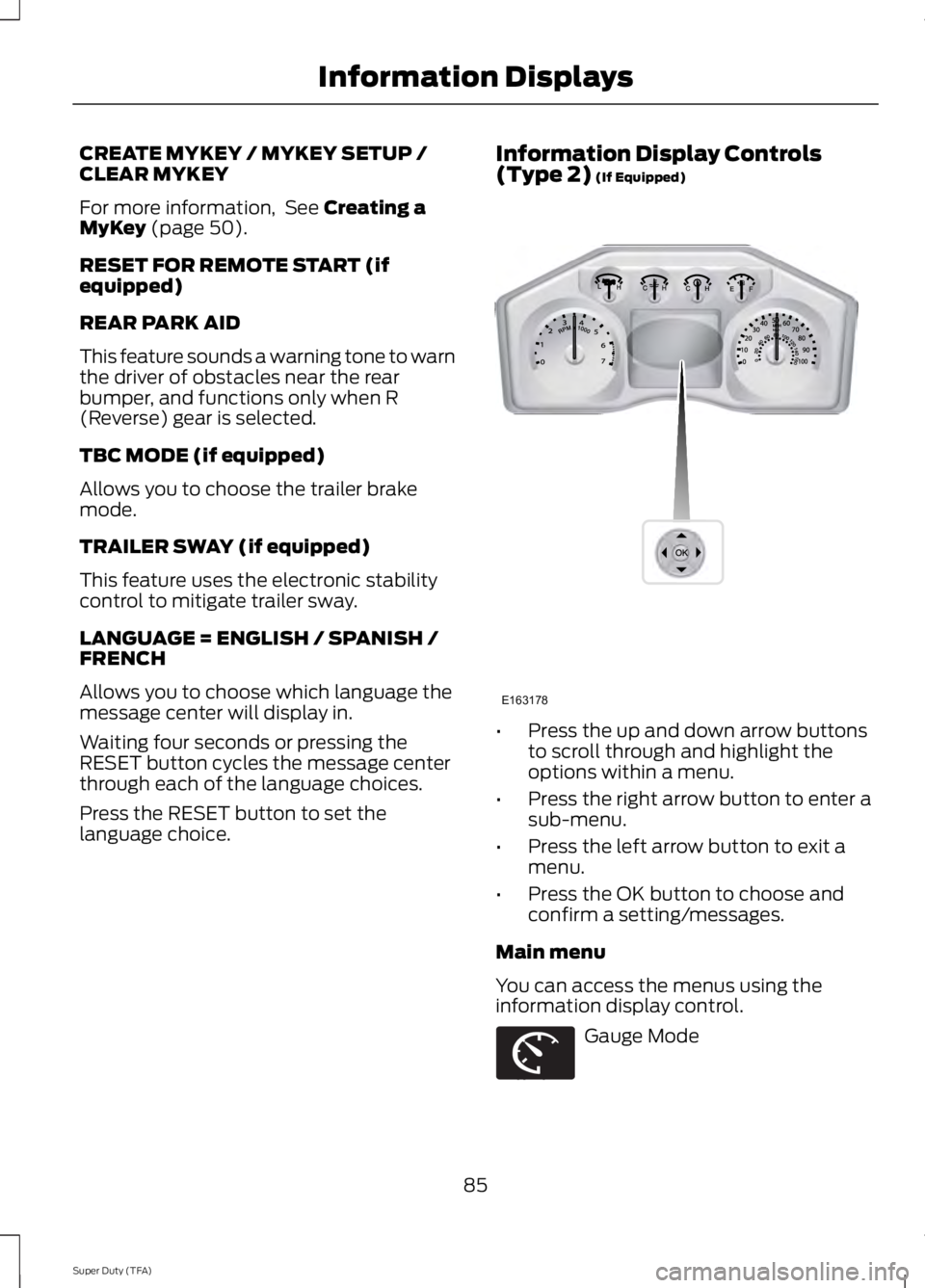
•
Press the up and down arrow buttons
to scroll through and highlight the
options within a menu.
• Press the right arrow button to enter a
sub-menu.
• Press the left arrow button to exit a
menu.
• Press the OK button to choose and
confirm a setting/messages.
Main menu
You can access the menus using the
information display control. Gauge Mode
85
Super Duty (TFA) Information DisplaysE163178 E163179
Page 89 of 460
Trip A / B
Fuel Economy
Truck Apps (If Equipped) Settings
Information
Display Mode Use the arrow buttons to choose
between the following gauge
options.
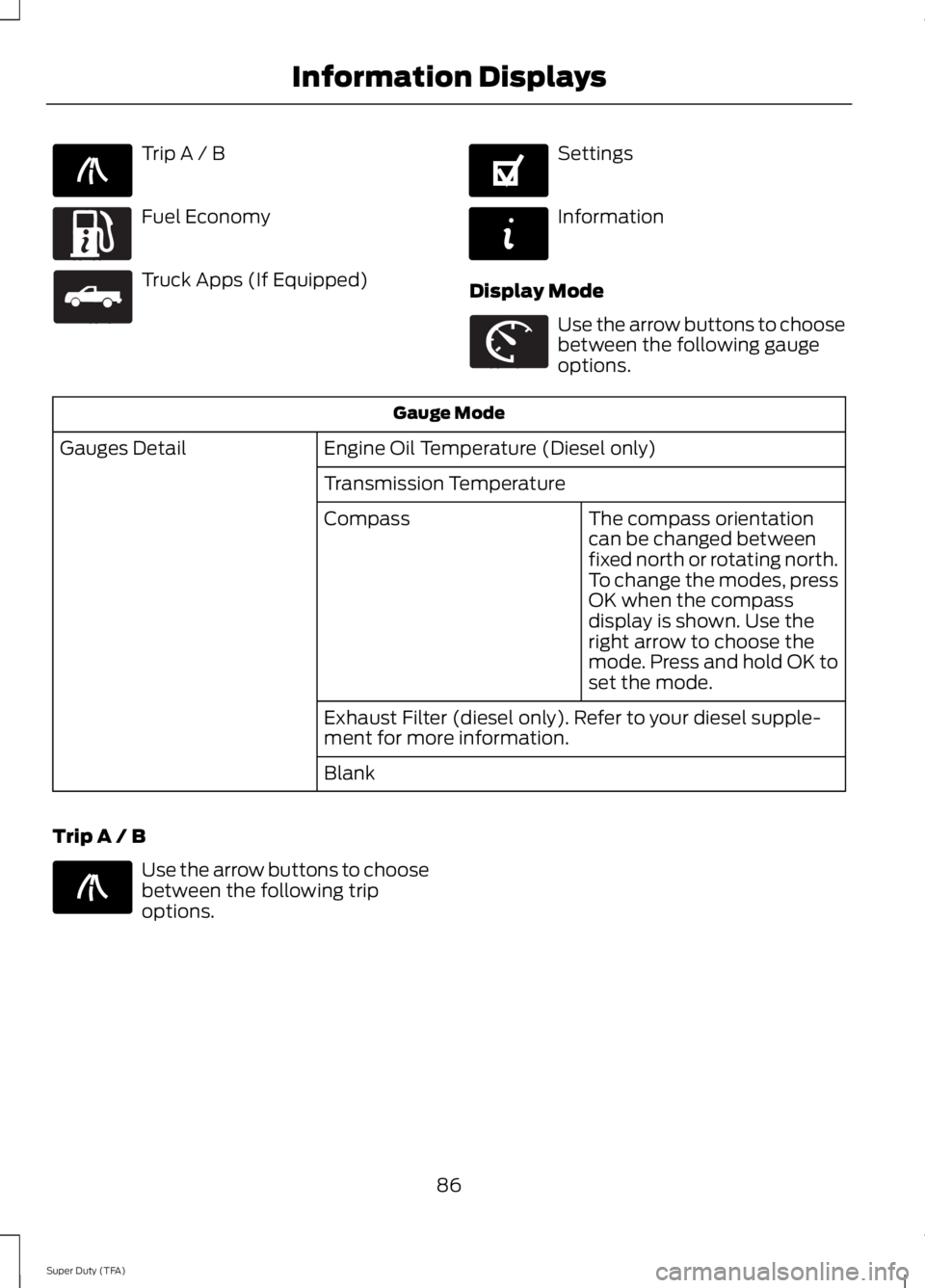
Gauge Mode
Engine Oil Temperature (Diesel only)
Gauges Detail
Transmission TemperatureThe compass orientation
can be changed between
fixed north or rotating north.
To change the modes, press
OK when the compass
display is shown. Use the
right arrow to choose the
mode. Press and hold OK to
set the mode.
Compass
Exhaust Filter (diesel only). Refer to your diesel supple-
ment for more information.
Blank
Trip A / B Use the arrow buttons to choose
between the following trip
options.
86
Super Duty (TFA) Information DisplaysE138660 E163180 E163181 E144641 E144642 E163179 E138660
Page 91 of 460
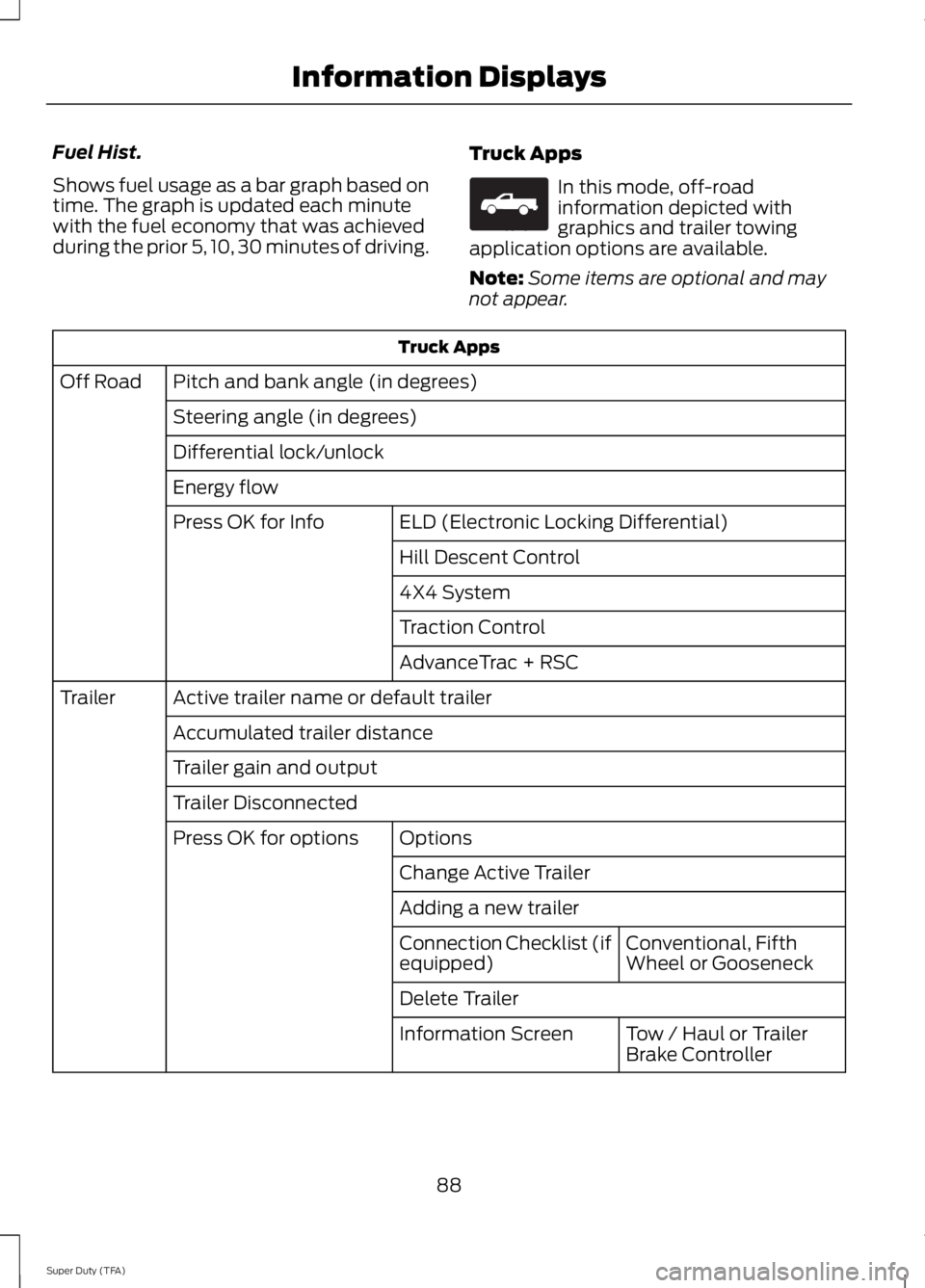
Fuel Hist.
Shows fuel usage as a bar graph based on
time. The graph is updated each minute
with the fuel economy that was achieved
during the prior 5, 10, 30 minutes of driving.
Truck Apps In this mode, off-road
information depicted with
graphics and trailer towing
application options are available.
Note: Some items are optional and may
not appear. Truck Apps
Pitch and bank angle (in degrees)
Off Road
Steering angle (in degrees)
Differential lock/unlock
Energy flow ELD (Electronic Locking Differential)
Press OK for Info
Hill Descent Control
4X4 System
Traction Control
AdvanceTrac + RSC
Active trailer name or default trailer
Trailer
Accumulated trailer distance
Trailer gain and output
Trailer Disconnected Options
Press OK for options
Change Active Trailer
Adding a new trailerConventional, Fifth
Wheel or Gooseneck
Connection Checklist (if
equipped)
Delete Trailer
Tow / Haul or Trailer
Brake Controller
Information Screen
88
Super Duty (TFA) Information DisplaysE163181
Page 93 of 460
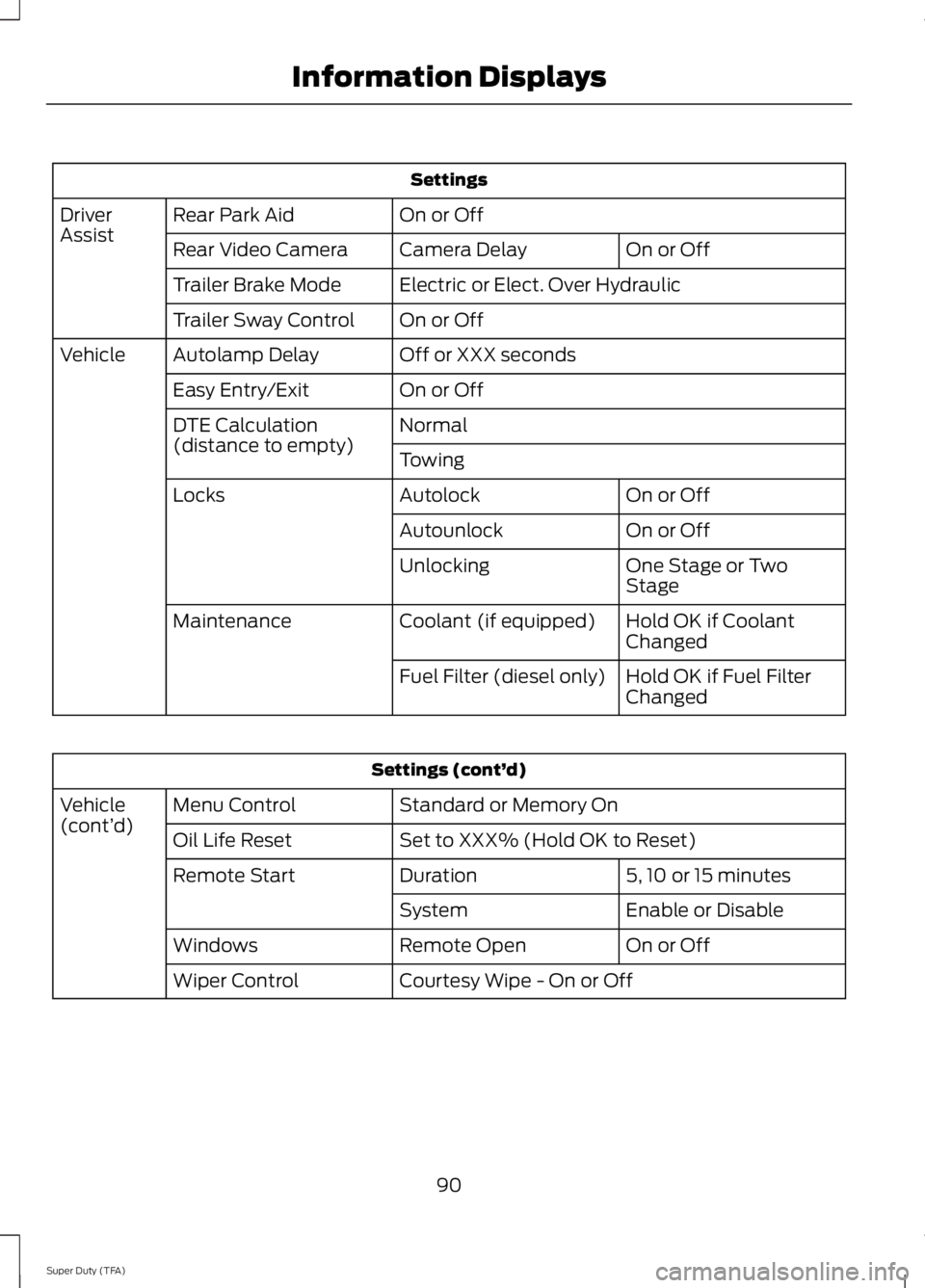
Settings
On or Off
Rear Park Aid
Driver
Assist
On or Off
Camera Delay
Rear Video Camera
Electric or Elect. Over Hydraulic
Trailer Brake Mode
On or Off
Trailer Sway Control
Off or XXX seconds
Autolamp Delay
Vehicle
On or Off
Easy Entry/Exit
Normal
DTE Calculation
(distance to empty)
Towing
On or Off
Autolock
Locks
On or Off
Autounlock
One Stage or Two
Stage
Unlocking
Hold OK if Coolant
Changed
Coolant (if equipped)
Maintenance
Hold OK if Fuel Filter
Changed
Fuel Filter (diesel only) Settings (cont’
d)
Standard or Memory On
Menu Control
Vehicle
(cont’ d)
Set to XXX% (Hold OK to Reset)
Oil Life Reset
5, 10 or 15 minutes
Duration
Remote Start
Enable or Disable
System
On or Off
Remote Open
Windows
Courtesy Wipe - On or Off
Wiper Control
90
Super Duty (TFA) Information Displays
Page 96 of 460
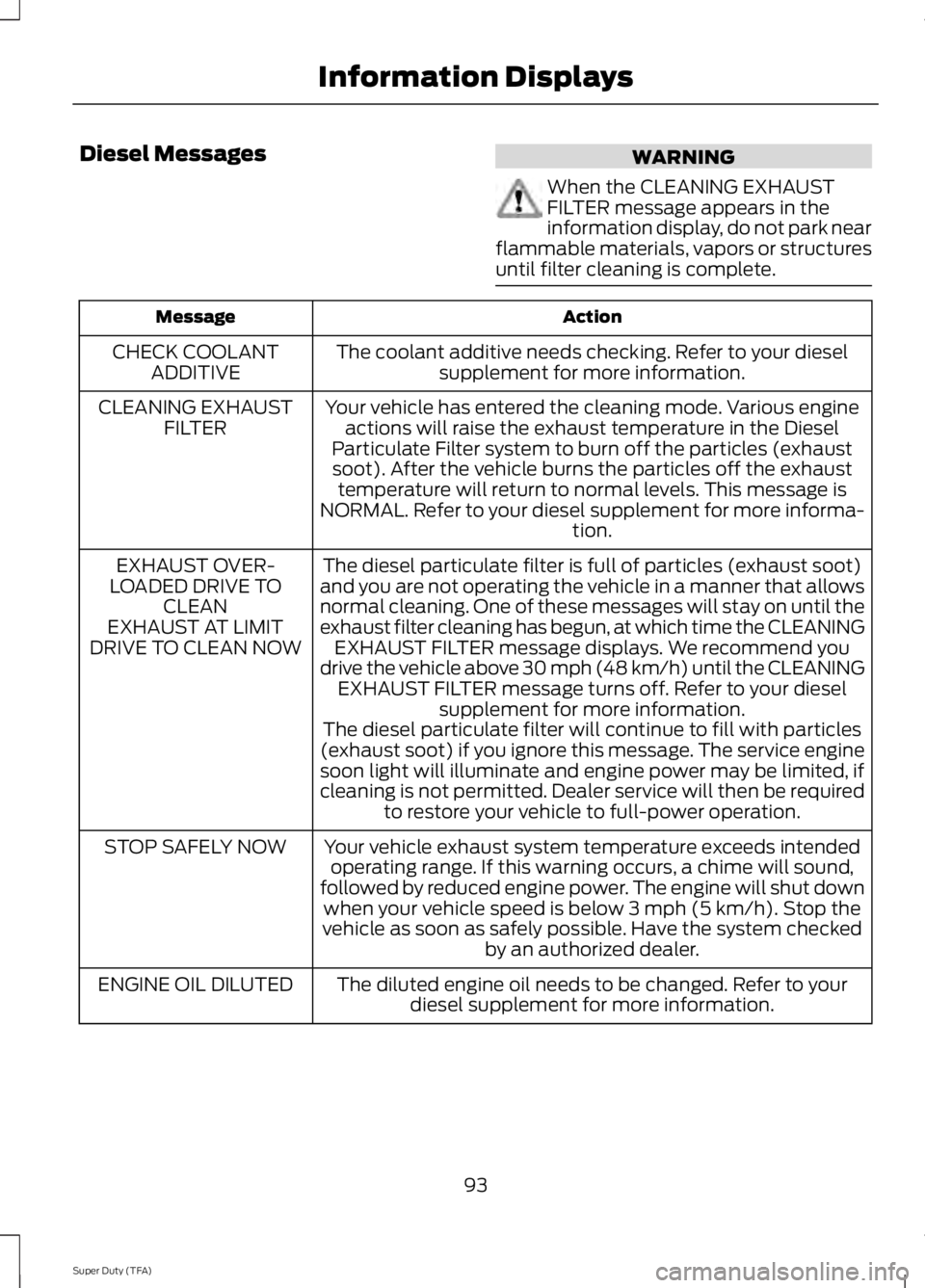
Diesel Messages
WARNING
When the CLEANING EXHAUST
FILTER message appears in the
information display, do not park near
flammable materials, vapors or structures
until filter cleaning is complete. Action
Message
The coolant additive needs checking. Refer to your dieselsupplement for more information.
CHECK COOLANT
ADDITIVE
Your vehicle has entered the cleaning mode. Various engineactions will raise the exhaust temperature in the Diesel
Particulate Filter system to burn off the particles (exhaust soot). After the vehicle burns the particles off the exhaust temperature will return to normal levels. This message is
NORMAL. Refer to your diesel supplement for more informa- tion.
CLEANING EXHAUST
FILTER
The diesel particulate filter is full of particles (exhaust soot)
and you are not operating the vehicle in a manner that allows
normal cleaning. One of these messages will stay on until the
exhaust filter cleaning has begun, at which time the CLEANING EXHAUST FILTER message displays. We recommend you
drive the vehicle above 30 mph (48 km/h) until the CLEANING EXHAUST FILTER message turns off. Refer to your diesel supplement for more information.
EXHAUST OVER-
LOADED DRIVE TO CLEAN
EXHAUST AT LIMIT
DRIVE TO CLEAN NOW
The diesel particulate filter will continue to fill with particles
(exhaust soot) if you ignore this message. The service engine soon light will illuminate and engine power may be limited, if
cleaning is not permitted. Dealer service will then be required to restore your vehicle to full-power operation.
Your vehicle exhaust system temperature exceeds intended operating range. If this warning occurs, a chime will sound,
followed by reduced engine power. The engine will shut down when your vehicle speed is below 3 mph (5 km/h). Stop the
vehicle as soon as safely possible. Have the system checked by an authorized dealer.
STOP SAFELY NOW
The diluted engine oil needs to be changed. Refer to yourdiesel supplement for more information.
ENGINE OIL DILUTED
93
Super Duty (TFA) Information Displays
Page 98 of 460
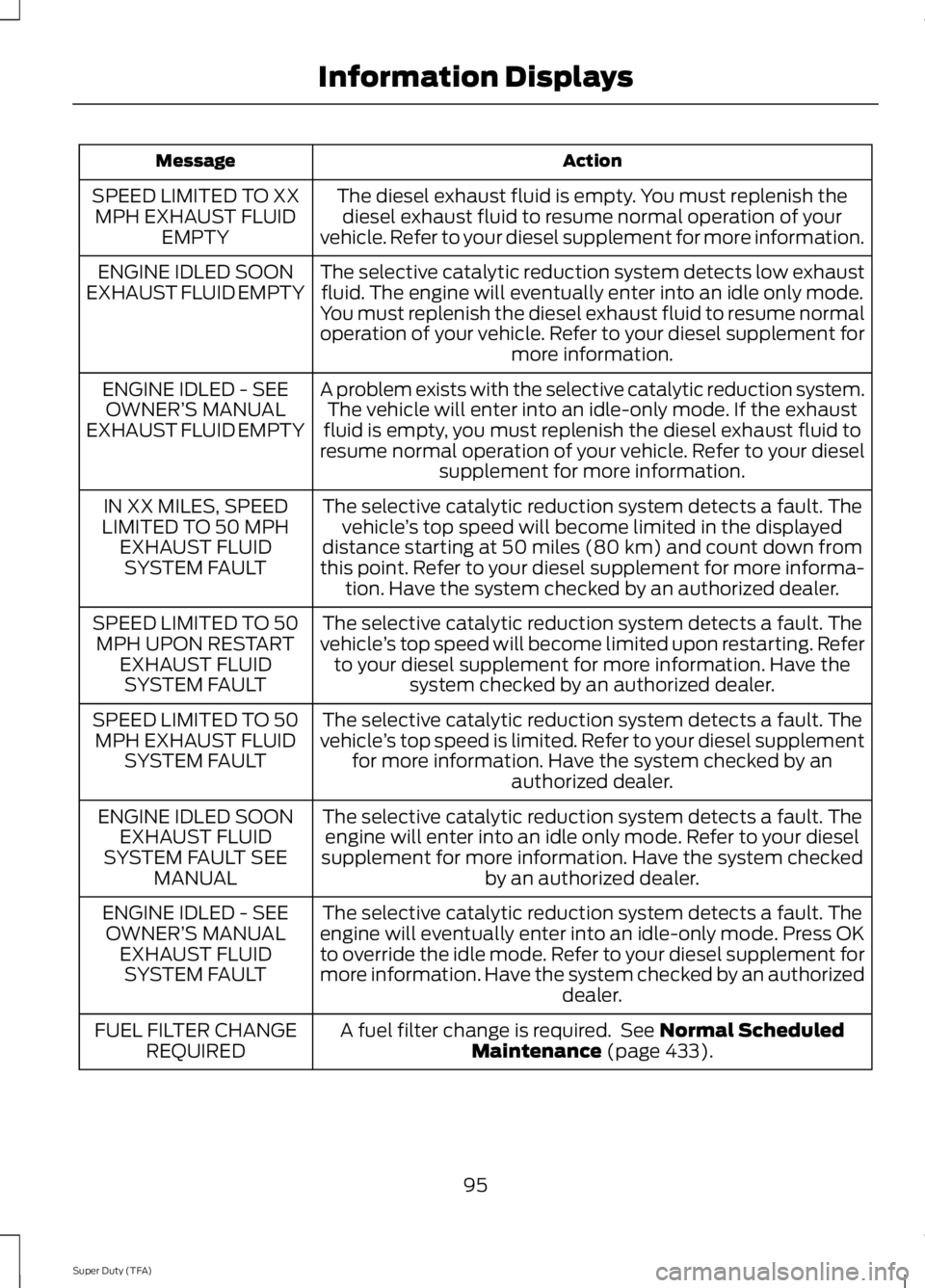
Action
Message
The diesel exhaust fluid is empty. You must replenish thediesel exhaust fluid to resume normal operation of your
vehicle. Refer to your diesel supplement for more information.
SPEED LIMITED TO XX
MPH EXHAUST FLUID EMPTY
The selective catalytic reduction system detects low exhaustfluid. The engine will eventually enter into an idle only mode.
You must replenish the diesel exhaust fluid to resume normal
operation of your vehicle. Refer to your diesel supplement for more information.
ENGINE IDLED SOON
EXHAUST FLUID EMPTY
A problem exists with the selective catalytic reduction system.The vehicle will enter into an idle-only mode. If the exhaust
fluid is empty, you must replenish the diesel exhaust fluid to
resume normal operation of your vehicle. Refer to your diesel supplement for more information.
ENGINE IDLED - SEE
OWNER’ S MANUAL
EXHAUST FLUID EMPTY
The selective catalytic reduction system detects a fault. Thevehicle ’s top speed will become limited in the displayed
distance starting at 50 miles (80 km) and count down from
this point. Refer to your diesel supplement for more informa- tion. Have the system checked by an authorized dealer.
IN XX MILES, SPEED
LIMITED TO 50 MPH EXHAUST FLUIDSYSTEM FAULT
The selective catalytic reduction system detects a fault. The
vehicle ’s top speed will become limited upon restarting. Refer
to your diesel supplement for more information. Have the system checked by an authorized dealer.
SPEED LIMITED TO 50
MPH UPON RESTART EXHAUST FLUIDSYSTEM FAULT
The selective catalytic reduction system detects a fault. The
vehicle ’s top speed is limited. Refer to your diesel supplement
for more information. Have the system checked by an authorized dealer.
SPEED LIMITED TO 50
MPH EXHAUST FLUID SYSTEM FAULT
The selective catalytic reduction system detects a fault. Theengine will enter into an idle only mode. Refer to your diesel
supplement for more information. Have the system checked by an authorized dealer.
ENGINE IDLED SOON
EXHAUST FLUID
SYSTEM FAULT SEE MANUAL
The selective catalytic reduction system detects a fault. The
engine will eventually enter into an idle-only mode. Press OK
to override the idle mode. Refer to your diesel supplement for
more information. Have the system checked by an authorized dealer.
ENGINE IDLED - SEE
OWNER’ S MANUAL
EXHAUST FLUID SYSTEM FAULT
A fuel filter change is required. See Normal Scheduled
Maintenance (page 433).
FUEL FILTER CHANGE
REQUIRED
95
Super Duty (TFA) Information Displays
Page 108 of 460
A/C: Press to turn air conditioning off and on. Air conditioning cools the vehicle
using outside air. To improve air conditioning when starting your vehicle, drive
with the windows slightly open for two to three minutes. Use air conditioning
with recirculated air to improve cooling performance and efficiency. Note:
Air
conditioning turns on automatically in MAX A/C, defrost and floor and defrost
modes.
E
MAX A/C:
Distributes recirculated air through the instrument panel vents to
cool the vehicle. This position is more economical and efficient than normal air
conditioning. When in MAX A/C mode, pressing
MAX A/C returns you to your
previous settings.
F
Recirculated air:
Press to switch between outside air and recirculated air.
When the air currently in the passenger compartment is recirculating, the LED
on the button illuminates. Using recirculated air can reduce the time needed to
cool the interior and reduce unwanted odors from entering your vehicle. Even
when you do not select this button, air may still recirculate in some instances
in order to reduce vehicle warm-up time in cold conditions or to cool down time
G
in hot conditions. Note: Recirculated air engages automatically when you select
MAX A/C
, or turn on manually in any airflow mode except defrost. Note: You
may notice changes in sound between recirculated mode and other airflow
modes. Note:
For better cooling in hot conditions, recirculated air automatically
engages when the air distribution control is in panel or panel and floor modes
and the air conditioning is on. You can switch to fresh air by pressing the
recirculated air button again.
PASS TEMP:
Press to switch between single and dual zone. Turn to increase
or decrease the air temperature on the passenger side of the vehicle.
H
Fan speed control +:
Press to increase the volume of air circulated in your
vehicle.
I
AUTO:
Press to turn on fully automatic operation. Select the desired
temperature using the temperature control. The system automatically
determines fan speed, air distribution, A/C operation, and outside or recirculated
air, to heat or cool the vehicle to maintain the selected temperature.
J
Fan speed control -:
Press to decrease the volume of air circulated in your
vehicle.
K
HINTS ON CONTROLLING THE
INTERIOR CLIMATE
Note: To reduce fogging of the windshield
during humid weather, adjust the air
distribution control to the windshield air
vents position. Increase the temperature
and fan speed to improve clearing, if
required. Note:
To reduce humidity build-up inside
your vehicle, do not drive with the system
switched off or with recirculated air always
switched on.
Note: Do not place objects under the front
seats as this may interfere with the airflow
to the rear seats.
Note: Remove any snow, ice or leaves from
the air intake area at the base of the
windshield.
105
Super Duty (TFA) Climate Control
Page 109 of 460
Note:
You may feel a small amount of air
from the floor air vents regardless of the air
distribution setting.
During extreme high ambient temperatures
when idling stationary for extended periods
in gear, it is recommended to run the A/C
in the MAX A/C mode, adjust the blower
fan speed to the lowest setting and put
the vehicle ’s transmission into position P
to continue to receive cool air from your
A/C system.
For maximum cooling performance in
AUTO (automatic climate system) or
panel mode, press
MAX A/C.
For maximum cooling performance in
panel and floor mode:
1. Adjust the temperature control to the coolest setting.
2. Select
A/C and recirculated air to
provide colder airflow.
3. Set the fan to the highest speed initially, and then adjust to maintain
comfort.
To aid in side window defogging and
demisting in cold or humid weather:
1. Select the floor and panel mode.
2. Press
A/C.
3. Adjust the temperature control to maintain comfort.
4. Set the fan speed to the highest setting.
5. Direct the outer instrument panel vents
toward the side windows.
6. To increase airflow to the outer instrument panel vents, close the vents
located in the middle of the instrument
panel. HEATED WINDOWS AND
MIRRORS
Heated Rear Window
(If Equipped)
Note: The engine must be running to use
this feature.
Note: If your vehicle is equipped with a
sliding rear window, the feature still
operates when you open the window.
Press the button to clear the rear window
of thin ice and fog. Press the button again
within 10 minutes to switch it off. It
switches off automatically after 10
minutes, or when you switch the ignition
off.
Do not use razor blades or other sharp
objects to clean the inside of the rear
window or to remove decals from the
inside of the rear window. This may
cause damage to the heated grid lines.
Your warranty does not cover this
damage.
Heated Exterior Mirror
(If Equipped)
Note: Do not remove ice from the mirrors
with a scraper or attempt to readjust the
mirror glass that has frozen in place. These
actions could cause damage to the glass
and mirrors.
Note: Do not clean the housing or glass of
any mirror with harsh abrasives, fuel or other
petroleum-based cleaning products.
The heated mirrors remove ice, mist and
fog when you switch on the heated rear
window.
REMOTE START
(IF EQUIPPED)
The climate control system adjusts the
cabin temperature during remote start.
106
Super Duty (TFA) Climate Control