sensor FORD F250 2014 Owner's Manual
[x] Cancel search | Manufacturer: FORD, Model Year: 2014, Model line: F250, Model: FORD F250 2014Pages: 460, PDF Size: 5.33 MB
Page 281 of 460
•
To reduce the chances of interference
from another vehicle, perform the
system reset procedure at least three
feet (one meter) away from another
Ford Motor Company vehicle
undergoing the system reset procedure
at the same time.
• Do not wait more than two minutes
between resetting each tire sensor or
the system will time-out and the entire
procedure will have to be repeated on
all four wheels.
• A double horn will sound indicating the
need to repeat the procedure.
Performing the System Reset Procedure
Read the entire procedure before
attempting.
1. Drive the vehicle above 20 mph (32 km/h) for at least two minutes, then
park in a safe location where you can
easily get to all four tires and have
access to an air pump.
2. Place the ignition in the off position and
keep the key in the ignition.
3. Cycle the ignition to the on position with the engine off.
4. Turn the hazard flashers on then off three times. You must accomplish this
within 10 seconds. If the reset mode
has been entered successfully, the horn
will sound once, the system indicator
will flash and a message is shown in
the information display. If this does not
occur, please try again starting at Step
2. If after repeated attempts to enter
the reset mode, the horn does not
sound, the system indicator does not
flash and no message is shown in the
information display, seek service from
your authorized dealer. 5. Train the tire pressure monitoring
system sensors in the tires using the
following system reset sequence
starting with the left front tire in the
following clockwise order: Left front
(driver's side front tire), Right front
(passenger's side front tire), Right rear
(passenger's side rear tire), Left rear
(driver's side rear tire)
6. Remove the valve cap from the valve stem on the left front tire. Decrease the
air pressure until the horn sounds.
Note: The single horn chirp confirms
that the sensor identification code has
been learned by the module for this
position. If a double horn is heard, the
reset procedure was unsuccessful, and
you must repeat it.
7. Remove the valve cap from the valve stem on the right front tire. Decrease
the air pressure until the horn sounds.
8. Remove the valve cap from the valve stem on the right rear tire. Decrease the
air pressure until the horn sounds.
9. Remove the valve cap from the valve stem on the left rear tire. Decrease the
air pressure until the horn sounds.
Training is complete after the horn
sounds for the last tire trained (driver's
side rear tire), the system indicator
stops flashing, and a message is shown
in the information display.
10. Turn the ignition off. If two short horn
beeps are heard, the reset procedure
was unsuccessful and you must
repeat it. If after repeating the
procedure and two short beeps are
heard when the ignition is turned to
off, seek assistance from your
authorized dealer.
278
Super Duty (TFA) Wheels and Tires
Page 282 of 460
11.
Set all four tires to the recommended
air pressure as indicated on the
Safety Compliance Certification
Label (affixed to either the door hinge
pillar, door-latch post, or the door
edge that meets the door-latch post,
next to the driver's seating position)
or Tire Label located on the B-Pillar
or the edge of the driver's door.
CHANGING A ROAD WHEEL WARNINGS
The use of tire sealants may damage
your tire pressure monitoring system
and should not be used. However, if
you must use a sealant, the tire pressure
monitoring system sensor and valve stem
on the wheel must be replaced by an
authorized dealer. If the tire pressure monitor sensor
becomes damaged, it will no longer
function. See Tire Pressure
Monitoring System (page 273). Note:
If your vehicle is equipped with the
tire pressure monitoring system, the
indicator light will illuminate when the spare
tire is in use. To restore the full function of
the monitoring system, all road wheels
equipped with tire pressure monitoring
sensors must be mounted on the vehicle.
If you get a flat tire while driving, do not
apply the brake heavily. Instead, gradually
decrease your speed. Hold the steering
wheel firmly and slowly move to a safe
place on the side of the road. If your vehicle is equipped with the tire
pressure monitoring system, have a flat
serviced by an authorized dealer in order
to prevent damage to the system sensors.
See
Tire Pressure Monitoring System
(page 273). Replace the spare tire with a
road tire as soon as possible. During
repairing or replacing of the flat tire, have
the authorized dealer inspect the system
sensor for damage.
Dissimilar Spare Wheel and Tire
Assembly Information WARNING
Failure to follow these guidelines
could result in an increased risk of
loss of vehicle control, injury or death.
If you have a dissimilar spare wheel and
tire, then it is intended for temporary use
only. This means that if you need to use it,
you should replace it as soon as possible
with a road wheel and tire assembly that
is the same size and type as the road tires
and wheels that were originally provided
by Ford. If the dissimilar spare tire or wheel
is damaged, it should be replaced rather
than repaired.
A dissimilar spare wheel and tire assembly
is defined as a spare wheel and tire
assembly that is different in brand, size or
appearance from the road tires and wheels
and can be one of three types:
1.
T-type mini-spare:
This spare tire
begins with the letter T for tire size and
may have Temporary Use Only molded in
the sidewall.
2. Full-size dissimilar spare with label
on wheel:
This spare tire has a label on
the wheel that states: THIS WHEEL AND
TIRE ASSEMBLY FOR TEMPORARY USE
ONLY
When driving with one of the dissimilar
spare tires listed above, do not:
279
Super Duty (TFA) Wheels and Tires
Page 335 of 460
Note:
SYNC Services requires activation
before use. Visit www.SYNCMyRide.com to
register and check your eligibility for
complimentary services. Standard phone
and message rates may apply. Subscription
may be required. You must also have the
active SYNC Services Bluetooth-enabled
cellular phone paired and connected to the
system in order to connect to, and use,
SYNC Services. See Using SYNC™ With
Your Phone (page 317).
Note: This feature does not function
properly if you have enabled caller ID
blocking on your cellular phone. Make sure
your cellular phone is not blocking caller ID
before using SYNC Services.
Note: The driver is ultimately responsible
for the safe operation of the vehicle, and
therefore, must evaluate whether it is safe
to follow the suggested directions. Any
navigation features provided are only an aid.
Make your driving decisions based on your
observations of local conditions and existing
traffic regulations. Do not follow the route
suggestions if doing so would result in an
unsafe or illegal maneuver, place you in an
unsafe situation, or if you would be directed
into an area that you consider unsafe. Maps
used by this system may be inaccurate
because of errors, changes in roads, traffic
conditions or driving conditions. Note:
When you connect, the service uses
GPS technology and advanced vehicle
sensors to collect your vehicle's current
location, travel direction and speed to help
provide you with the directions, traffic
reports, or business searches you request.
Further, to provide the services you request,
for continuous improvement, the service
may collect and record call details and voice
communications. For more information, see
SYNC Services Terms and Conditions at
www.SYNCMyRide.com. If you do not want
Ford or its service providers to collect your
vehicle travel information or other
information identified in the Terms and
Conditions, do not subscribe or use the
service.
SYNC Services uses advanced vehicle
sensors, integrated GPS technology and
comprehensive map and traffic data, to
give you personalized traffic reports,
precise turn-by-turn directions, business
search, news, sports, weather and more.
For a complete list of services, or to learn
more, please visit www.SYNCMyRide.com.
Connecting to SYNC Services Using
Voice Commands
1. Press the voice button.
2. When prompted, say "Services". This initiates an outgoing call to SYNC
Services using your paired and
connected Bluetooth-enabled cellular
phone.
3. Once you connect to the service, follow
the voice prompts to request the
desired service, such as Traffic or
Directions. You can also say, "What are
my choices?" to receive a list of
available services from which to
choose.
4. Say, "Services" to return to the Services
main menu or for help, say, "Help".
332
Super Duty (TFA) SYNC™
(If Equipped)
Page 393 of 460
Under the Information menu, you can
access features such as:
•
SYNC Services
• Sirius Travel Link
• Alerts
• Calendar
• SYNC Applications If your vehicle is equipped with
Navigation, press the
Information button to access
these features. If your vehicle is not
equipped with Navigation, press the corner
of the touchscreen with the green tab.
SYNC Services (If Equipped,
United States Only)
Note: SYNC Services varies by trim level
and model year and may require a
subscription. Traffic alerts and turn-by-turn
directions available in select markets.
Message and data rates may apply. Ford
Motor Company reserves the right to change
or discontinue this product service at any
time without prior notification or incurring
any future obligation.
Note: SYNC Services requires activation
before use. Visit www.SYNCMyRide.com to
register and check your eligibility for
complimentary services. Standard phone
and message rates may apply. Subscription
may be required. You must also have the
active SYNC Services Bluetooth-enabled
cellular phone paired and connected to the
system in order to connect to, and use,
SYNC Services. See
Phone (page 383).
Note: This feature does not function
properly if you have enabled caller ID
blocking on your cellular phone. Make sure
your cellular phone is not blocking caller ID
before using SYNC Services. Note:
The driver is ultimately responsible
for the safe operation of the vehicle, and
therefore, must evaluate whether it is safe
to follow the suggested directions. Any
navigation features provided are only an aid.
Make your driving decisions based on your
observations of local conditions and existing
traffic regulations. Do not follow the route
suggestions if doing so would result in an
unsafe or illegal maneuver, if you would be
placed in an unsafe situation, or if you would
be directed into an area that you consider
unsafe. Maps used by this system may be
inaccurate because of errors, changes in
roads, traffic conditions or driving
conditions.
Note: When you connect, the service uses
GPS technology and advanced vehicle
sensors to collect your vehicle's current
location, travel direction and speed to help
provide you with the directions, traffic
reports, or business searches you request.
Further, to provide the services you request,
for continuous improvement, the service
may collect and record call details and voice
communications. For more information, see
SYNC Services Terms and Conditions at
www.SYNCMyRide.com. If you do not want
Ford or its service providers to collect your
vehicle travel information or other
information identified in the Terms and
Conditions, do not subscribe or use the
service.
SYNC Services uses advanced vehicle
sensors, integrated GPS technology and
comprehensive map and traffic data, to
give you personalized traffic reports,
precise turn-by-turn directions, business
search, news, sports, weather and more.
For a complete list of services, or to learn
more, please visit www.SYNCMyRide.com.
Connecting to SYNC Services Using
Voice Commands 390
Super Duty (TFA) MyFord Touch
™
(If Equipped)E142608 E142599
Page 412 of 460
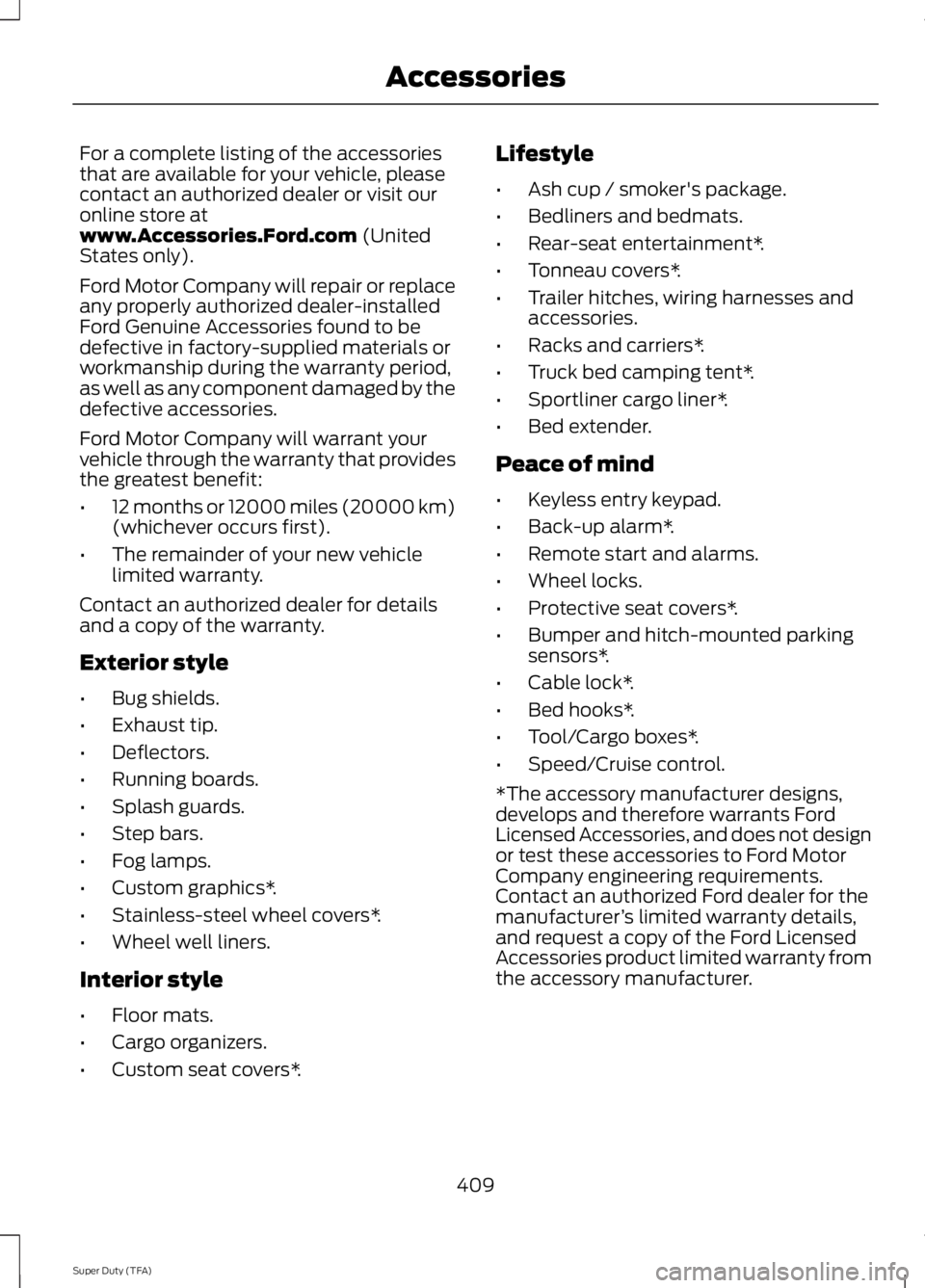
For a complete listing of the accessories
that are available for your vehicle, please
contact an authorized dealer or visit our
online store at
www.Accessories.Ford.com (United
States only).
Ford Motor Company will repair or replace
any properly authorized dealer-installed
Ford Genuine Accessories found to be
defective in factory-supplied materials or
workmanship during the warranty period,
as well as any component damaged by the
defective accessories.
Ford Motor Company will warrant your
vehicle through the warranty that provides
the greatest benefit:
• 12 months or 12000 miles (20000 km)
(whichever occurs first).
• The remainder of your new vehicle
limited warranty.
Contact an authorized dealer for details
and a copy of the warranty.
Exterior style
• Bug shields.
• Exhaust tip.
• Deflectors.
• Running boards.
• Splash guards.
• Step bars.
• Fog lamps.
• Custom graphics*.
• Stainless-steel wheel covers*.
• Wheel well liners.
Interior style
• Floor mats.
• Cargo organizers.
• Custom seat covers*. Lifestyle
•
Ash cup / smoker's package.
• Bedliners and bedmats.
• Rear-seat entertainment*.
• Tonneau covers*.
• Trailer hitches, wiring harnesses and
accessories.
• Racks and carriers*.
• Truck bed camping tent*.
• Sportliner cargo liner*.
• Bed extender.
Peace of mind
• Keyless entry keypad.
• Back-up alarm*.
• Remote start and alarms.
• Wheel locks.
• Protective seat covers*.
• Bumper and hitch-mounted parking
sensors*.
• Cable lock*.
• Bed hooks*.
• Tool/Cargo boxes*.
• Speed/Cruise control.
*The accessory manufacturer designs,
develops and therefore warrants Ford
Licensed Accessories, and does not design
or test these accessories to Ford Motor
Company engineering requirements.
Contact an authorized Ford dealer for the
manufacturer ’s limited warranty details,
and request a copy of the Ford Licensed
Accessories product limited warranty from
the accessory manufacturer.
409
Super Duty (TFA) Accessories
Page 451 of 460
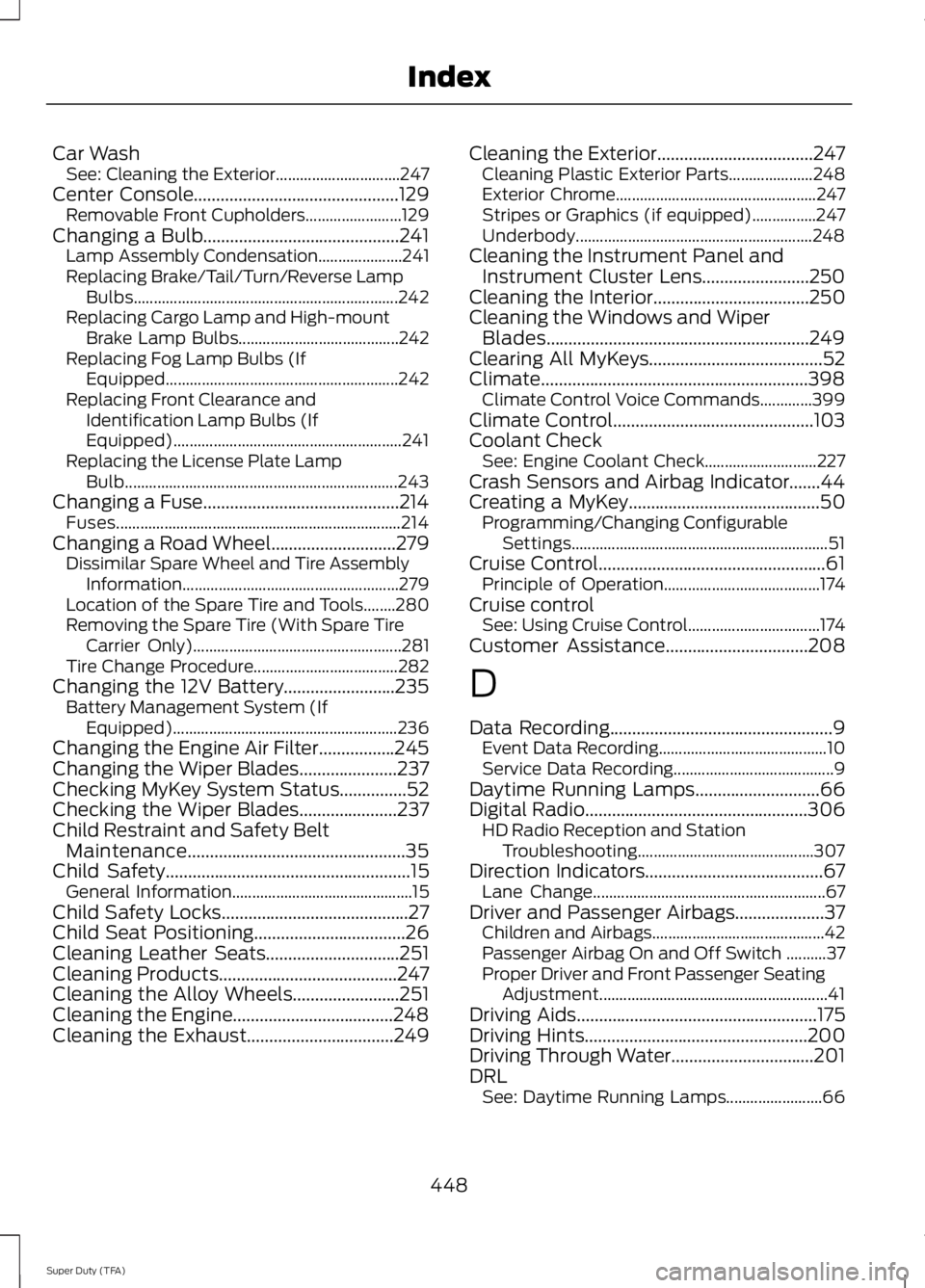
Car Wash
See: Cleaning the Exterior............................... 247
Center Console..............................................129
Removable Front Cupholders........................ 129
Changing a Bulb............................................241 Lamp Assembly Condensation..................... 241
Replacing Brake/Tail/Turn/Reverse Lamp Bulbs.................................................................. 242
Replacing Cargo Lamp and High-mount Brake Lamp Bulbs........................................ 242
Replacing Fog Lamp Bulbs (If Equipped.......................................................... 242
Replacing Front Clearance and Identification Lamp Bulbs (If
Equipped)......................................................... 241
Replacing the License Plate Lamp Bulb.................................................................... 243
Changing a Fuse............................................214 Fuses....................................................................... 214
Changing a Road Wheel
............................279
Dissimilar Spare Wheel and Tire Assembly
Information...................................................... 279
Location of the Spare Tire and Tools........280
Removing the Spare Tire (With Spare Tire Carrier Only).................................................... 281
Tire Change Procedure.................................... 282
Changing the 12V Battery.........................235 Battery Management System (If
Equipped)........................................................ 236
Changing the Engine Air Filter.................245
Changing the Wiper Blades......................237
Checking MyKey System Status...............52
Checking the Wiper Blades
......................237
Child Restraint and Safety Belt Maintenance.................................................35
Child Safety
.......................................................15
General Information............................................. 15
Child Safety Locks..........................................27
Child Seat Positioning..................................26
Cleaning Leather Seats
..............................251
Cleaning Products........................................247
Cleaning the Alloy Wheels........................251
Cleaning the Engine....................................248
Cleaning the Exhaust
.................................249 Cleaning the Exterior
...................................247
Cleaning Plastic Exterior Parts..................... 248
Exterior Chrome.................................................. 247
Stripes or Graphics (if equipped)................247
Underbody........................................................... 248
Cleaning the Instrument Panel and Instrument Cluster Lens........................250
Cleaning the Interior
...................................250
Cleaning the Windows and Wiper Blades...........................................................249
Clearing All MyKeys.......................................52
Climate............................................................398 Climate Control Voice Commands.............399
Climate Control
.............................................103
Coolant Check See: Engine Coolant Check............................ 227
Crash Sensors and Airbag Indicator.......44
Creating a MyKey
...........................................50
Programming/Changing Configurable
Settings................................................................ 51
Cruise Control...................................................61 Principle of Operation....................................... 174
Cruise control See: Using Cruise Control................................. 174
Customer Assistance
................................208
D
Data Recording
..................................................9
Event Data Recording.......................................... 10
Service Data Recording........................................ 9
Daytime Running Lamps
............................66
Digital Radio..................................................306
HD Radio Reception and Station
Troubleshooting............................................ 307
Direction Indicators
........................................67
Lane Change.......................................................... 67
Driver and Passenger Airbags....................37 Children and Airbags........................................... 42
Passenger Airbag On and Off Switch ..........37
Proper Driver and Front Passenger Seating Adjustment......................................................... 41
Driving Aids
......................................................175
Driving Hints..................................................200
Driving Through Water................................201
DRL See: Daytime Running Lamps........................ 66
448
Super Duty (TFA) Index