brake light FORD F250 2014 Owner's Guide
[x] Cancel search | Manufacturer: FORD, Model Year: 2014, Model line: F250, Model: FORD F250 2014Pages: 460, PDF Size: 5.33 MB
Page 282 of 460
11.
Set all four tires to the recommended
air pressure as indicated on the
Safety Compliance Certification
Label (affixed to either the door hinge
pillar, door-latch post, or the door
edge that meets the door-latch post,
next to the driver's seating position)
or Tire Label located on the B-Pillar
or the edge of the driver's door.
CHANGING A ROAD WHEEL WARNINGS
The use of tire sealants may damage
your tire pressure monitoring system
and should not be used. However, if
you must use a sealant, the tire pressure
monitoring system sensor and valve stem
on the wheel must be replaced by an
authorized dealer. If the tire pressure monitor sensor
becomes damaged, it will no longer
function. See Tire Pressure
Monitoring System (page 273). Note:
If your vehicle is equipped with the
tire pressure monitoring system, the
indicator light will illuminate when the spare
tire is in use. To restore the full function of
the monitoring system, all road wheels
equipped with tire pressure monitoring
sensors must be mounted on the vehicle.
If you get a flat tire while driving, do not
apply the brake heavily. Instead, gradually
decrease your speed. Hold the steering
wheel firmly and slowly move to a safe
place on the side of the road. If your vehicle is equipped with the tire
pressure monitoring system, have a flat
serviced by an authorized dealer in order
to prevent damage to the system sensors.
See
Tire Pressure Monitoring System
(page 273). Replace the spare tire with a
road tire as soon as possible. During
repairing or replacing of the flat tire, have
the authorized dealer inspect the system
sensor for damage.
Dissimilar Spare Wheel and Tire
Assembly Information WARNING
Failure to follow these guidelines
could result in an increased risk of
loss of vehicle control, injury or death.
If you have a dissimilar spare wheel and
tire, then it is intended for temporary use
only. This means that if you need to use it,
you should replace it as soon as possible
with a road wheel and tire assembly that
is the same size and type as the road tires
and wheels that were originally provided
by Ford. If the dissimilar spare tire or wheel
is damaged, it should be replaced rather
than repaired.
A dissimilar spare wheel and tire assembly
is defined as a spare wheel and tire
assembly that is different in brand, size or
appearance from the road tires and wheels
and can be one of three types:
1.
T-type mini-spare:
This spare tire
begins with the letter T for tire size and
may have Temporary Use Only molded in
the sidewall.
2. Full-size dissimilar spare with label
on wheel:
This spare tire has a label on
the wheel that states: THIS WHEEL AND
TIRE ASSEMBLY FOR TEMPORARY USE
ONLY
When driving with one of the dissimilar
spare tires listed above, do not:
279
Super Duty (TFA) Wheels and Tires
Page 285 of 460
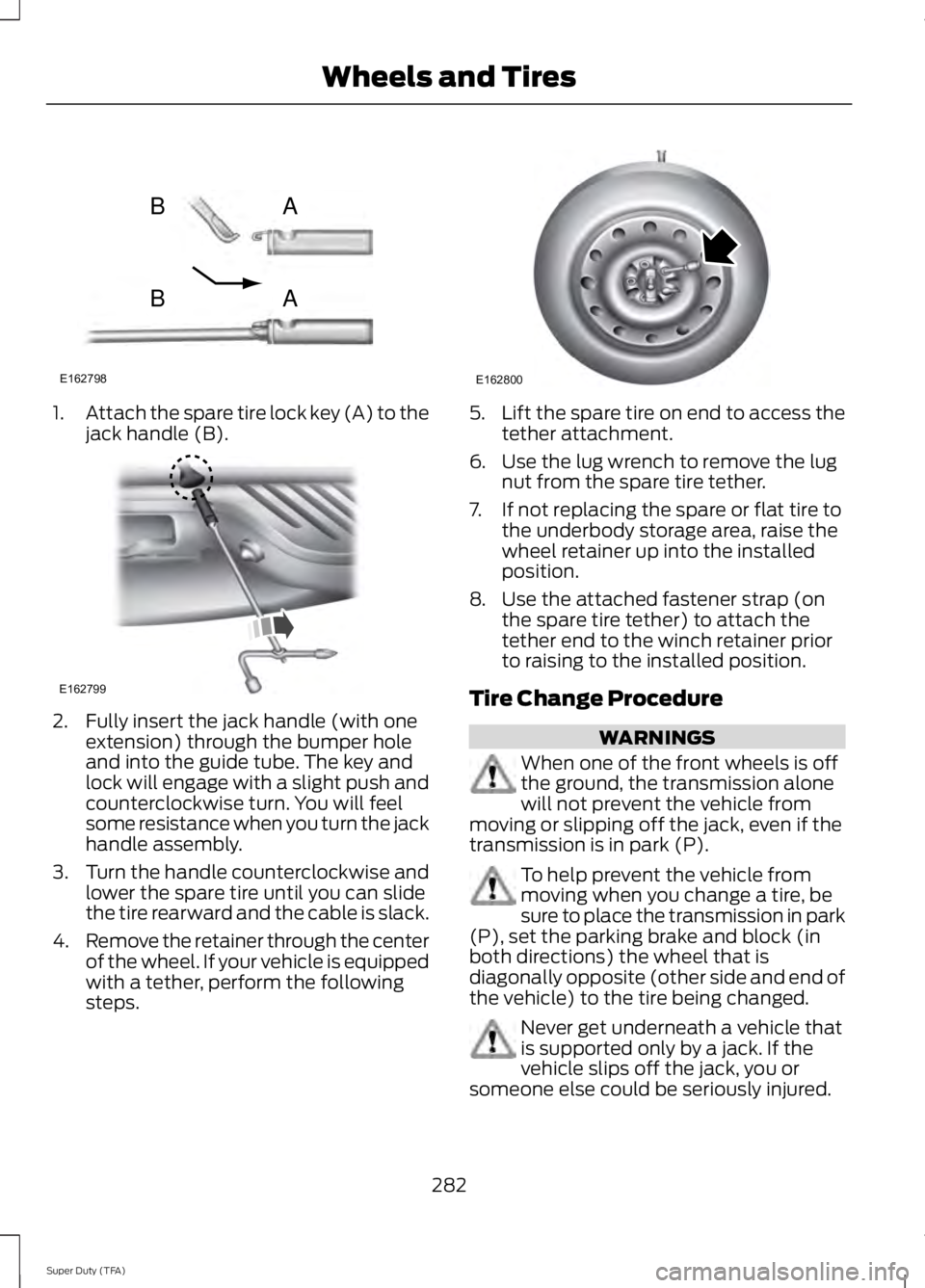
1.
Attach the spare tire lock key (A) to the
jack handle (B). 2. Fully insert the jack handle (with one
extension) through the bumper hole
and into the guide tube. The key and
lock will engage with a slight push and
counterclockwise turn. You will feel
some resistance when you turn the jack
handle assembly.
3. Turn the handle counterclockwise and
lower the spare tire until you can slide
the tire rearward and the cable is slack.
4. Remove the retainer through the center
of the wheel. If your vehicle is equipped
with a tether, perform the following
steps. 5.
Lift the spare tire on end to access the
tether attachment.
6. Use the lug wrench to remove the lug nut from the spare tire tether.
7. If not replacing the spare or flat tire to the underbody storage area, raise the
wheel retainer up into the installed
position.
8. Use the attached fastener strap (on the spare tire tether) to attach the
tether end to the winch retainer prior
to raising to the installed position.
Tire Change Procedure WARNINGS
When one of the front wheels is off
the ground, the transmission alone
will not prevent the vehicle from
moving or slipping off the jack, even if the
transmission is in park (P). To help prevent the vehicle from
moving when you change a tire, be
sure to place the transmission in park
(P), set the parking brake and block (in
both directions) the wheel that is
diagonally opposite (other side and end of
the vehicle) to the tire being changed. Never get underneath a vehicle that
is supported only by a jack. If the
vehicle slips off the jack, you or
someone else could be seriously injured.
282
Super Duty (TFA) Wheels and TiresE162798
AB
AB E162799 E162800
Page 454 of 460

Information Messages..................................92
4WD........................................................................\
. 101
AdvanceTrac ™...................................................... 92
Alarm........................................................................\
92
Diesel Messages................................................... 93
Doors and Locks................................................... 96
Drivetrain................................................................. 96
Engine....................................................................... 97
Fuel........................................................................\
.... 97
Key........................................................................\
..... 98
Maintenance.......................................................... 98
MyKey®................................................................... 98
Off Road................................................................ 100
Park Aid................................................................... 99
Park Brake............................................................... 99
Power Steering..................................................... 99
Tire Pressure Monitoring System.................100
Trailer....................................................................... 101
Installing Child Seats.....................................16 Child Seats............................................................... 16
Tether Strap Attachment.................................. 22
Tether Strap Attachment (Rear SuperCab Only)..................................................................... 23
Using Cinch Tongue Lap and Shoulder Belts (All Front Center, Super Cab and Crew
Cab Rear Center Positions).......................... 19
Using Lap and Shoulder Belts.......................... 17
Using Lower Anchors and Tethers for CHildren (LATCH)............................................. 21
Using Tether Straps.............................................. 21
Instrument Cluster.........................................75
Instrument Lighting Dimmer
.....................66
Interior Lamps..................................................67 Front Map Lamps (If equipped).................... 68
Rear Dome and Map Lamps............................ 68
Interior Mirror....................................................72 Auto-Dimming Mirror.......................................... 72
Introduction.........................................................7
J
Jump-Starting the Vehicle.......................205 Connecting the Jumper Cables.................... 206
Jump Starting..................................................... 206
Preparing Your Vehicle.................................... 205
Removing the Jumper Cables...................... 206K
Keyless Entry....................................................55
SECURICODE™ KEYLESS ENTRY
KEYPAD
............................................................... 55
Keys and Remote Controls........................46
L
Lighting Control..............................................65 Headlamp Flasher............................................... 65
High Beams............................................................ 65
Lighting..............................................................65
Limited Slip Differential
.............................158
Load Carrying.................................................176
Load Limit........................................................176 Special Loading Instructions for Owners of
Pick-up Trucks and Utility-type
Vehicles............................................................. 183
Vehicle Loading - with and without a Trailer.................................................................. 176
Locking and Unlocking
.................................54
Autolock and Autounlock................................. 54
Battery Saver......................................................... 55
Illuminated Entry.................................................. 55
Power Door Locks................................................ 54
Remote Control.................................................... 54
Smart Unlocks...................................................... 54
Locks...................................................................54
Lug Nuts See: Changing a Road Wheel........................ 279
M
Maintenance..................................................223 General Information.......................................... 223
Manual Climate Control
............................103
Manual Seats..................................................110
Manual Lumbar .................................................... 111
Moving the Seat Backward and Forward.............................................................. 110
Recline Adjustment............................................ 110
Media Hub
.......................................................312
Memory Function............................................111
Easy Entry and Exit Feature............................. 112
Message Center See: Information Displays.................................. 81
451
Super Duty (TFA) Index
Page 458 of 460
Using Cruise Control....................................174
Switching Cruise Control Off.......................... 174
Switching Cruise Control On........................... 174
Using Four-Wheel Drive.............................149 4WD Indicator Lights........................................ 150
Driving Off-Road With Truck and Utility Vehicles............................................................. 153
Electronic Shift-On-the-Fly (ESOF) 4WD system............................................................... 149
How Your Vehicle Differs From Other Vehicles............................................................. 153
Manual Shift On Stop (MSOS) 4WD system............................................................... 149
Using a Manual Shift On Stop (MSOS) 4wd system............................................................... 150
Using the Electronic Shift on the Fly 4WD system................................................................ 152
Using Hill Descent Control........................168 Hill descent modes............................................ 168
Using MyKey With Remote Start Systems..........................................................52
Using Snow Chains......................................273
Using Stability Control...............................165
AdvanceTrac® with Roll Stability Control ™
(RSC®).............................................................. 165
Using SYNC™ With Your Media Player.............................................................335
Accessing Your Play Menu............................. 339
Connecting Your Digital Media Player to the USB Port........................................................... 335
Media Menu Features...................................... 338
Media Voice Commands................................ 336
System Settings.................................................. 341
What's Playing?................................................. 336
Using SYNC™ With Your Phone..............317 Accessing Features through the Phone
Menu................................................................... 321
Accessing Your Phone Settings.................... 324
Making Calls........................................................ 320
Pairing a Phone for the First Time................318
Pairing Subsequent Phones........................... 318
Phone Options during an Active Call.........320
Phone Voice Commands................................. 318
Receiving Calls................................................... 320
System Settings................................................. 325
Text Messaging................................................... 323Using Traction Control
................................163
System Indicator Lights and
Messages.......................................................... 164
Using Voice Recognition
............................315
Initiating a Voice Session................................. 315
System Interaction and Feedback...............316
Utilizing the Mediation/Arbitration Program (Canada Only).........................210
V
Vehicle Care
...................................................247
General Information.......................................... 247
Vehicle Certification Label
.......................294
Vehicle Identification Number................294
Vehicle Storage.............................................252 Battery.................................................................... 253
Body........................................................................\
252
Brakes..................................................................... 253
Cooling system................................................... 253
Engine..................................................................... 252
Fuel system.......................................................... 253
General.................................................................. 252
Miscellaneous..................................................... 253
Removing Vehicle From Storage.................. 253
Tires........................................................................\
. 253
Ventilated Seats
............................................116
Heated and Ventilated Seats Air Filter
Replacement ................................................... 116
Ventilation See: Climate Control......................................... 103
VIN See: Vehicle Identification Number............294
Voice Control....................................................61
455
Super Duty (TFA) Index
Page 459 of 460

W
Warning Lamps and Indicators..................77
4X2........................................................................\
.... 80
4X4 HIGH................................................................ 80
4X4 LOW................................................................ 80
Anti-Lock Braking System................................. 77
Battery....................................................................... 77
Brake System.......................................................... 77
Check Fuel Cap..................................................... 78
Cruise Control........................................................ 78
Diesel Warning Lights........................................ 80
Direction Indicator................................................ 78
Door Ajar.................................................................. 78
Electronic Locking Differential........................ 78
Engine Coolant Temperature........................... 78
Engine Oil................................................................ 78
Fasten Safety Belt................................................ 78
Front Airbag............................................................ 78
High Beam............................................................... 78
Hill Descent............................................................ 78
Low Fuel Level....................................................... 79
Low Tire Pressure Warning............................... 79
Powertrain Malfunction/Reduced Power/Electronic Throttle Control............79
Service Engine Soon............................................ 79
Stability Control.................................................... 79
Stability Control Off............................................ 79
Transmission Tow/Haul.................................... 80
Washer Fluid Check....................................235
Washers See: Cleaning the Exterior............................... 247
See: Wipers and Washers................................. 64
Waxing.............................................................248
Wheel Nuts See: Changing a Road Wheel........................ 279
Wheels and Tires.........................................254 General Information......................................... 254
Technical Specifications................................ 290
Windows and Mirrors...................................69
Windshield Washers.....................................64
Windshield Wipers........................................64
Speed dependent wipers................................. 64
Wipers and Washers.....................................64
456
Super Duty (TFA) Index