lock FORD F250 SUPER DUTY 2017 Service Manual
[x] Cancel search | Manufacturer: FORD, Model Year: 2017, Model line: F250 SUPER DUTY, Model: FORD F250 SUPER DUTY 2017Pages: 642, PDF Size: 12.35 MB
Page 109 of 642
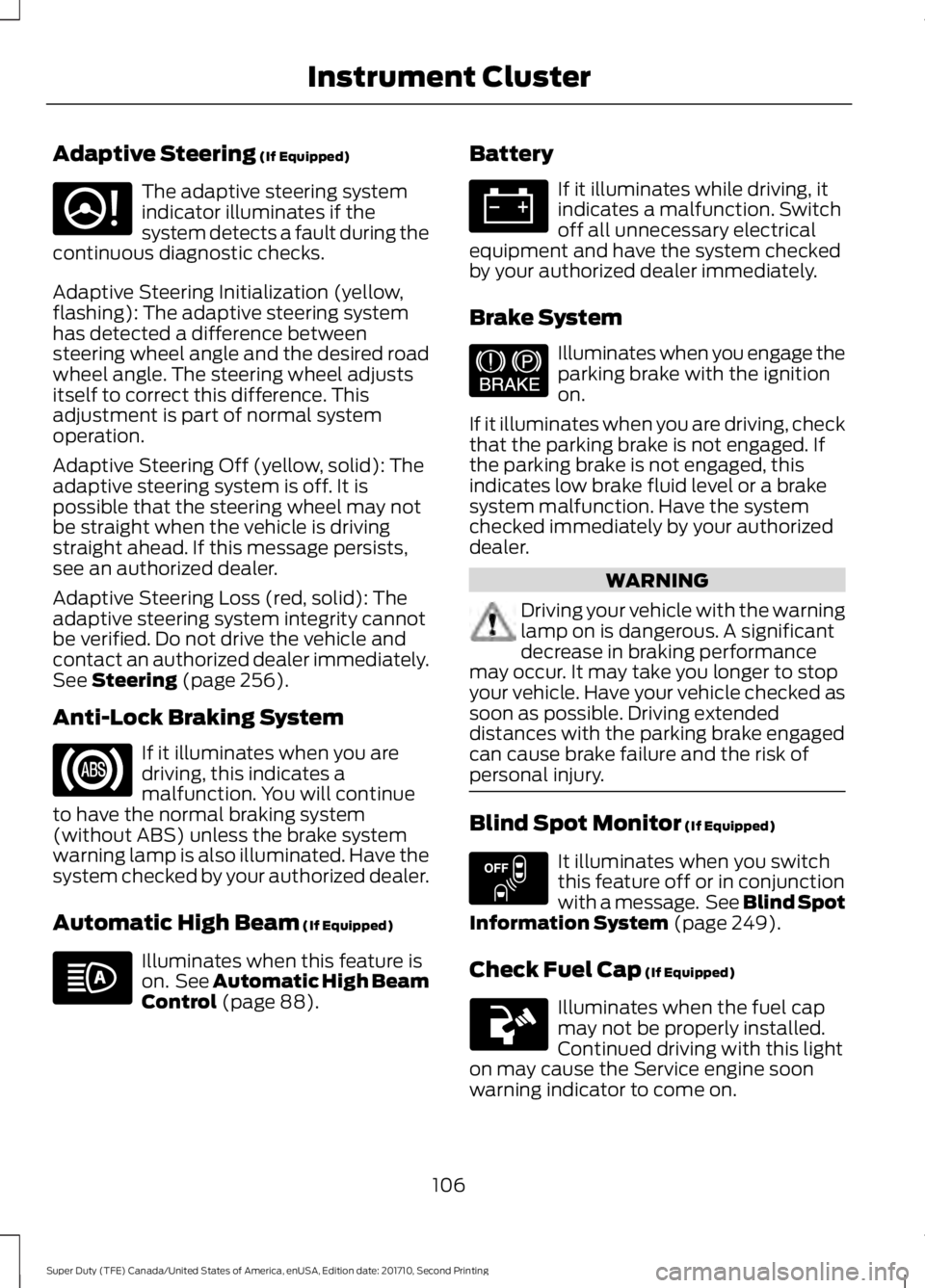
Adaptive Steering (If Equipped)
The adaptive steering systemindicator illuminates if thesystem detects a fault during thecontinuous diagnostic checks.
Adaptive Steering Initialization (yellow,flashing): The adaptive steering systemhas detected a difference betweensteering wheel angle and the desired roadwheel angle. The steering wheel adjustsitself to correct this difference. Thisadjustment is part of normal systemoperation.
Adaptive Steering Off (yellow, solid): Theadaptive steering system is off. It ispossible that the steering wheel may notbe straight when the vehicle is drivingstraight ahead. If this message persists,see an authorized dealer.
Adaptive Steering Loss (red, solid): Theadaptive steering system integrity cannotbe verified. Do not drive the vehicle andcontact an authorized dealer immediately.See Steering (page 256).
Anti-Lock Braking System
If it illuminates when you aredriving, this indicates amalfunction. You will continueto have the normal braking system(without ABS) unless the brake systemwarning lamp is also illuminated. Have thesystem checked by your authorized dealer.
Automatic High Beam (If Equipped)
Illuminates when this feature ison. See Automatic High BeamControl (page 88).
Battery
If it illuminates while driving, itindicates a malfunction. Switchoff all unnecessary electricalequipment and have the system checkedby your authorized dealer immediately.
Brake System
Illuminates when you engage theparking brake with the ignitionon.
If it illuminates when you are driving, checkthat the parking brake is not engaged. Ifthe parking brake is not engaged, thisindicates low brake fluid level or a brakesystem malfunction. Have the systemchecked immediately by your authorizeddealer.
WARNING
Driving your vehicle with the warninglamp on is dangerous. A significantdecrease in braking performancemay occur. It may take you longer to stopyour vehicle. Have your vehicle checked assoon as possible. Driving extendeddistances with the parking brake engagedcan cause brake failure and the risk ofpersonal injury.
Blind Spot Monitor (If Equipped)
It illuminates when you switchthis feature off or in conjunctionwith a message. See Blind SpotInformation System (page 249).
Check Fuel Cap (If Equipped)
Illuminates when the fuel capmay not be properly installed.Continued driving with this lighton may cause the Service engine soonwarning indicator to come on.
106
Super Duty (TFE) Canada/United States of America, enUSA, Edition date: 201710, Second Printing
Instrument ClusterE223375 E144522 E151262
Page 110 of 642
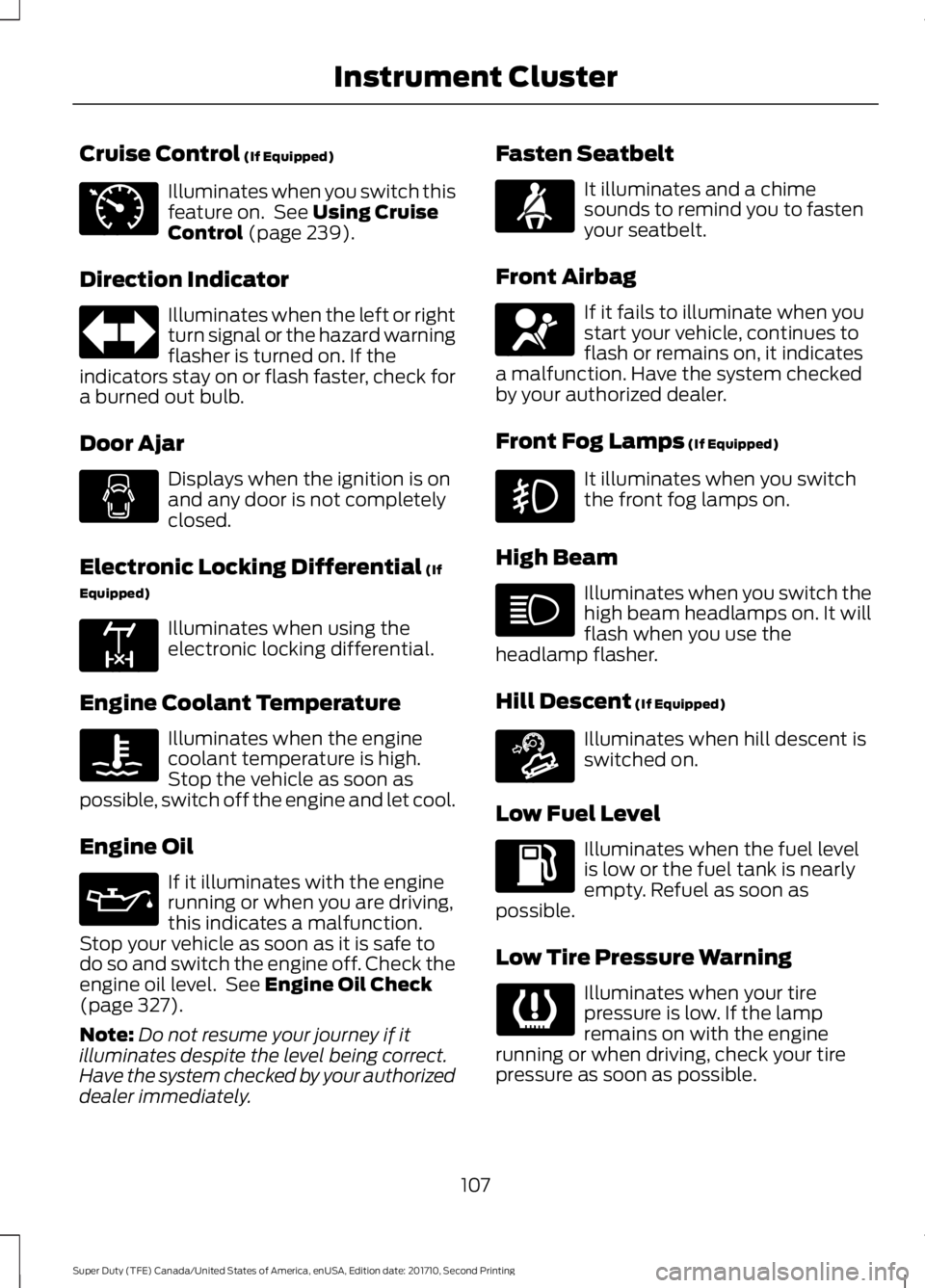
Cruise Control (If Equipped)
Illuminates when you switch thisfeature on. See Using CruiseControl (page 239).
Direction Indicator
Illuminates when the left or rightturn signal or the hazard warningflasher is turned on. If theindicators stay on or flash faster, check fora burned out bulb.
Door Ajar
Displays when the ignition is onand any door is not completelyclosed.
Electronic Locking Differential (If
Equipped)
Illuminates when using theelectronic locking differential.
Engine Coolant Temperature
Illuminates when the enginecoolant temperature is high.Stop the vehicle as soon aspossible, switch off the engine and let cool.
Engine Oil
If it illuminates with the enginerunning or when you are driving,this indicates a malfunction.Stop your vehicle as soon as it is safe todo so and switch the engine off. Check theengine oil level. See Engine Oil Check(page 327).
Note:Do not resume your journey if itilluminates despite the level being correct.Have the system checked by your authorizeddealer immediately.
Fasten Seatbelt
It illuminates and a chimesounds to remind you to fastenyour seatbelt.
Front Airbag
If it fails to illuminate when youstart your vehicle, continues toflash or remains on, it indicatesa malfunction. Have the system checkedby your authorized dealer.
Front Fog Lamps (If Equipped)
It illuminates when you switchthe front fog lamps on.
High Beam
Illuminates when you switch thehigh beam headlamps on. It willflash when you use theheadlamp flasher.
Hill Descent (If Equipped)
Illuminates when hill descent isswitched on.
Low Fuel Level
Illuminates when the fuel levelis low or the fuel tank is nearlyempty. Refuel as soon aspossible.
Low Tire Pressure Warning
Illuminates when your tirepressure is low. If the lampremains on with the enginerunning or when driving, check your tirepressure as soon as possible.
107
Super Duty (TFE) Canada/United States of America, enUSA, Edition date: 201710, Second Printing
Instrument ClusterE71340 E163170 E71880 E67017 E163171
Page 117 of 642
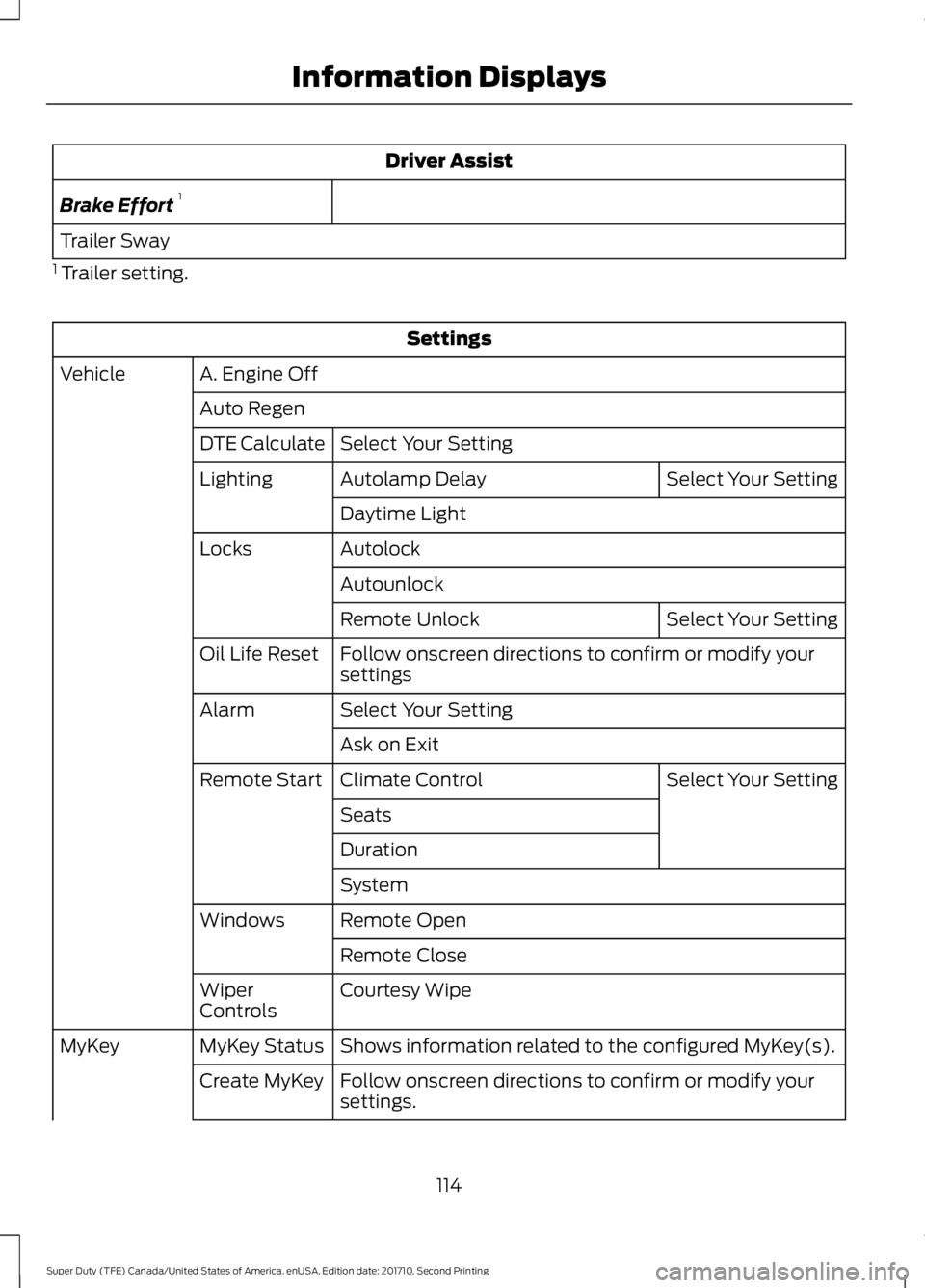
Driver Assist
Brake Effort1
Trailer Sway
1 Trailer setting.
Settings
A. Engine OffVehicle
Auto Regen
Select Your SettingDTE Calculate
Select Your SettingAutolamp DelayLighting
Daytime Light
AutolockLocks
Autounlock
Select Your SettingRemote Unlock
Follow onscreen directions to confirm or modify yoursettingsOil Life Reset
Select Your SettingAlarm
Ask on Exit
Select Your SettingClimate ControlRemote Start
Seats
Duration
System
Remote OpenWindows
Remote Close
Courtesy WipeWiperControls
Shows information related to the configured MyKey(s).MyKey StatusMyKey
Follow onscreen directions to confirm or modify yoursettings.Create MyKey
114
Super Duty (TFE) Canada/United States of America, enUSA, Edition date: 201710, Second Printing
Information Displays
Page 122 of 642
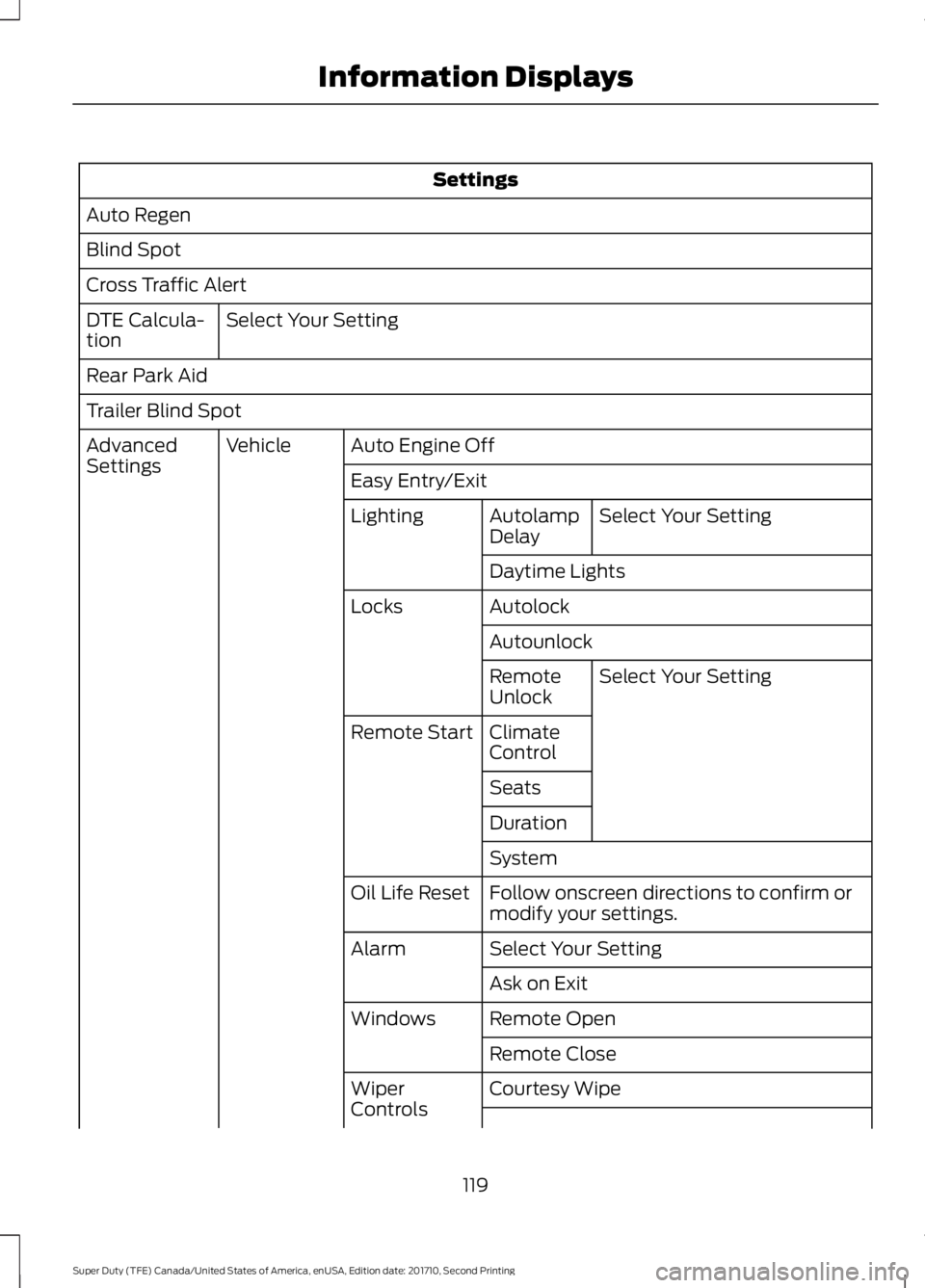
Settings
Auto Regen
Blind Spot
Cross Traffic Alert
Select Your SettingDTE Calcula-tion
Rear Park Aid
Trailer Blind Spot
Auto Engine OffVehicleAdvancedSettingsEasy Entry/Exit
Select Your SettingAutolampDelayLighting
Daytime Lights
AutolockLocks
Autounlock
Select Your SettingRemoteUnlock
ClimateControlRemote Start
Seats
Duration
System
Follow onscreen directions to confirm ormodify your settings.Oil Life Reset
Select Your SettingAlarm
Ask on Exit
Remote OpenWindows
Remote Close
Courtesy WipeWiperControls
119
Super Duty (TFE) Canada/United States of America, enUSA, Edition date: 201710, Second Printing
Information Displays
Page 129 of 642
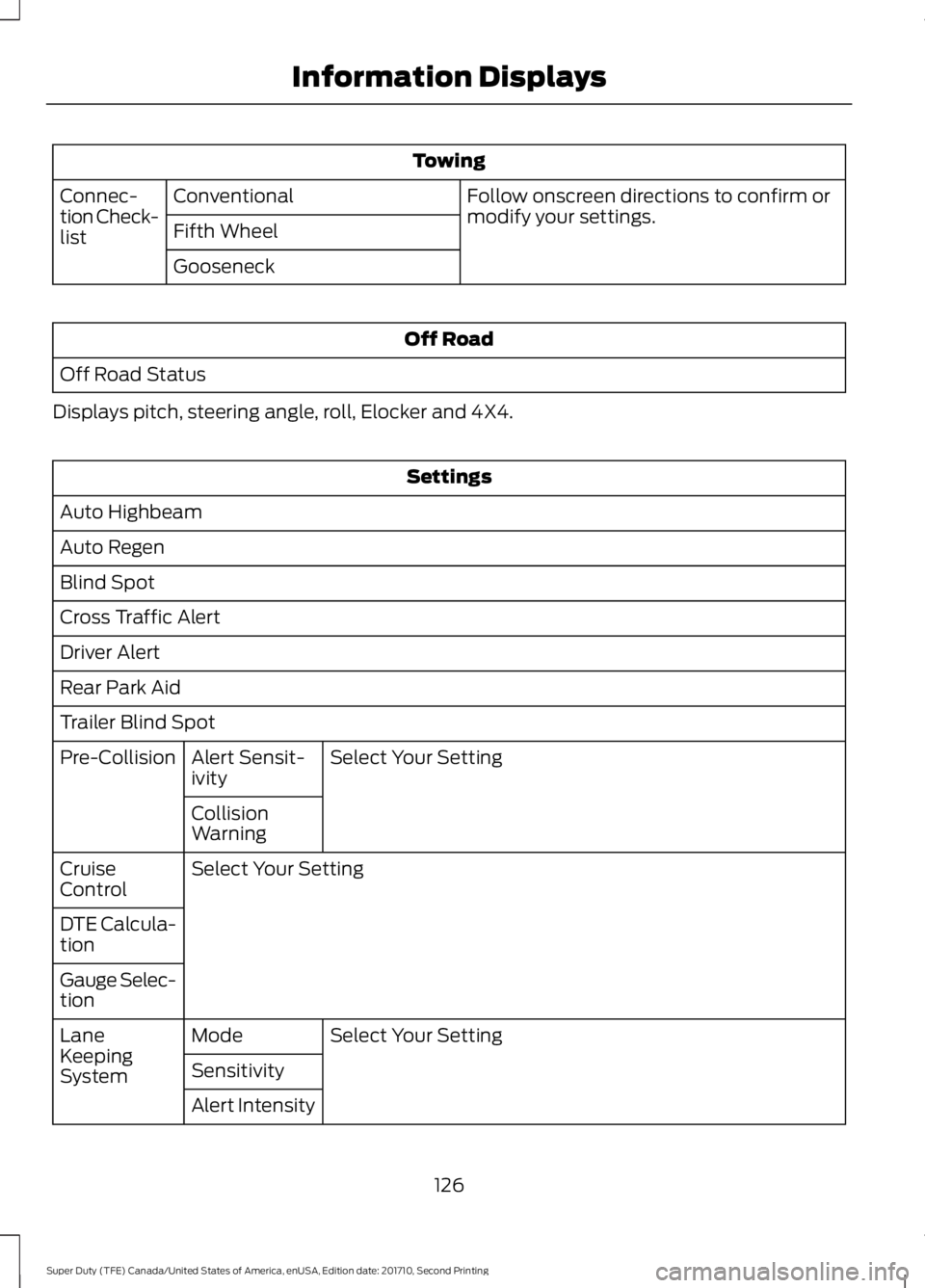
Towing
Follow onscreen directions to confirm ormodify your settings.ConventionalConnec-tion Check-listFifth Wheel
Gooseneck
Off Road
Off Road Status
Displays pitch, steering angle, roll, Elocker and 4X4.
Settings
Auto Highbeam
Auto Regen
Blind Spot
Cross Traffic Alert
Driver Alert
Rear Park Aid
Trailer Blind Spot
Select Your SettingAlert Sensit-ivityPre-Collision
CollisionWarning
Select Your SettingCruiseControl
DTE Calcula-tion
Gauge Selec-tion
Select Your SettingModeLaneKeepingSystemSensitivity
Alert Intensity
126
Super Duty (TFE) Canada/United States of America, enUSA, Edition date: 201710, Second Printing
Information Displays
Page 130 of 642
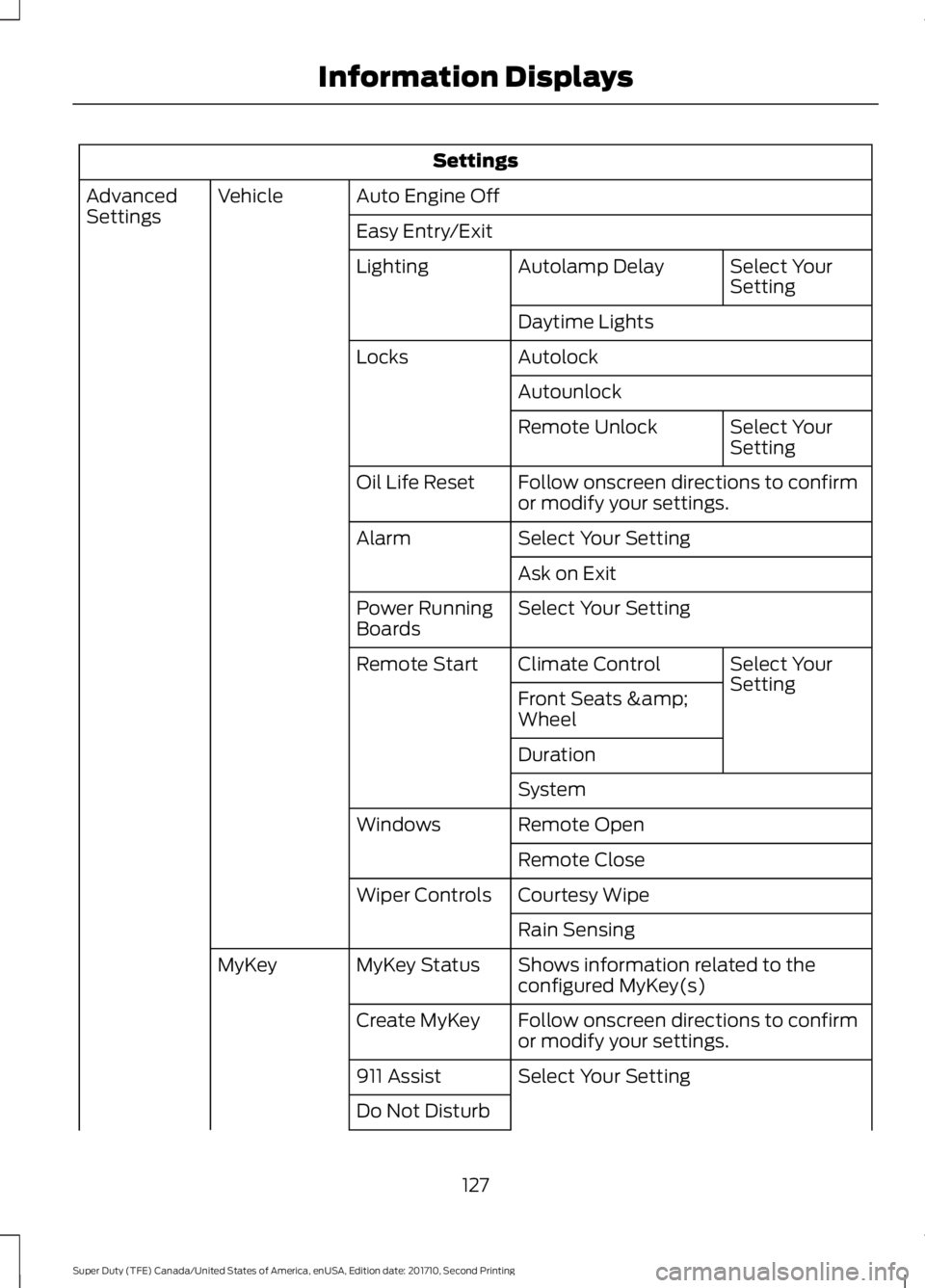
Settings
Auto Engine OffVehicleAdvancedSettingsEasy Entry/Exit
Select YourSettingAutolamp DelayLighting
Daytime Lights
AutolockLocks
Autounlock
Select YourSettingRemote Unlock
Follow onscreen directions to confirmor modify your settings.Oil Life Reset
Select Your SettingAlarm
Ask on Exit
Select Your SettingPower RunningBoards
Select YourSettingClimate ControlRemote Start
Front Seats &Wheel
Duration
System
Remote OpenWindows
Remote Close
Courtesy WipeWiper Controls
Rain Sensing
Shows information related to theconfigured MyKey(s)MyKey StatusMyKey
Follow onscreen directions to confirmor modify your settings.Create MyKey
Select Your Setting911 Assist
Do Not Disturb
127
Super Duty (TFE) Canada/United States of America, enUSA, Edition date: 201710, Second Printing
Information Displays
Page 132 of 642

Adaptive Cruise Control
ActionMessage
A radar malfunction is preventing the adaptive cruise controlfrom engaging. See Using Cruise Control (page 239).Adaptive CruiseMalfunction
A condition exists such that the adaptive cruise cannot func-tion properly. See Using Cruise Control (page 239).Adaptive Cruise NotAvailable
You have a blocked sensor due to bad weather, ice, mud orwater in front of the radar sensor. You can typically clean thesensor to resolve. See Using Cruise Control (page 239).
Adaptive Cruise NotAvailable SensorBlocked See Manual
The system has disabled the automatic braking.Normal Cruise ActiveAutomatic BrakingTurned Off
A radar malfunction is preventing the adaptive cruise controlfrom engaging.Front Sensor Not Aligned
The adaptive cruise has reinstated controls to the driver.Adaptive Cruise - DriverResume Control
Your vehicle speed is too slow to activate the adaptive cruise.Adaptive Cruise SpeedToo Low to Activate
The adaptive cruise is automatically adjusting the gapdistance and you need to shift the transmission into a lowergear.
Adaptive Cruise ShiftDown
Adaptive Steering
ActionMessage
The adaptive steering system has detected a differencebetween steering wheel angle and the desired road wheelangle. The steering wheel adjusts itself to correct this differ-ence. This adjustment is part of normal system operation.
Adaptive Steering Initial-ization
The adaptive steering system is off. It is possible that thesteering wheel may not be straight when the vehicle is drivingstraight ahead. If this message persists, see an authorizeddealer.
Adaptive Steering FaultService Required
The adaptive steering system integrity cannot be verified. Donot drive the vehicle and contact an authorized dealerimmediately.
Adaptive Steering LossDo Not Drive
129
Super Duty (TFE) Canada/United States of America, enUSA, Edition date: 201710, Second Printing
Information Displays
Page 133 of 642
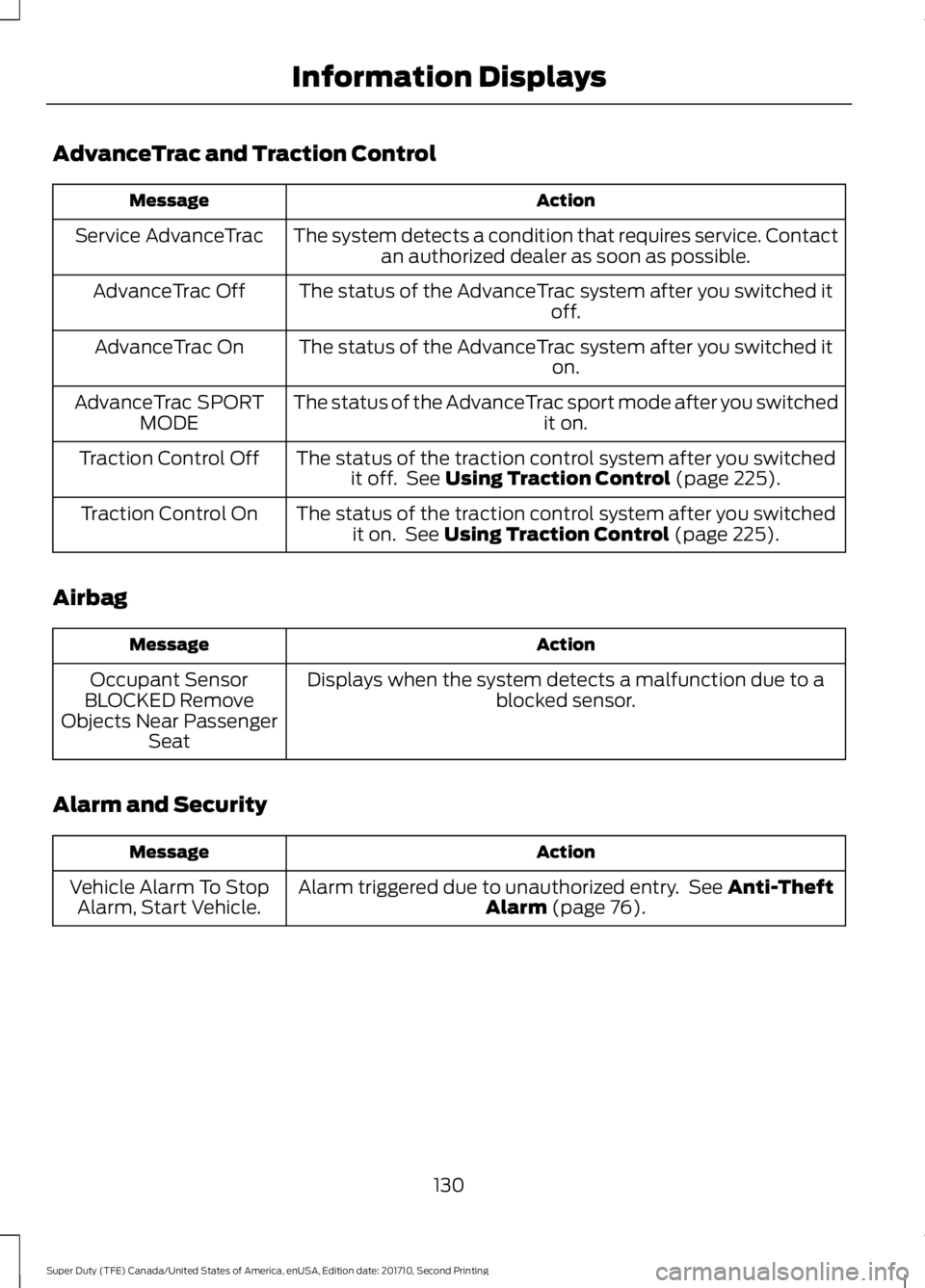
AdvanceTrac and Traction Control
ActionMessage
The system detects a condition that requires service. Contactan authorized dealer as soon as possible.Service AdvanceTrac
The status of the AdvanceTrac system after you switched itoff.AdvanceTrac Off
The status of the AdvanceTrac system after you switched iton.AdvanceTrac On
The status of the AdvanceTrac sport mode after you switchedit on.AdvanceTrac SPORTMODE
The status of the traction control system after you switchedit off. See Using Traction Control (page 225).Traction Control Off
The status of the traction control system after you switchedit on. See Using Traction Control (page 225).Traction Control On
Airbag
ActionMessage
Displays when the system detects a malfunction due to ablocked sensor.Occupant SensorBLOCKED RemoveObjects Near PassengerSeat
Alarm and Security
ActionMessage
Alarm triggered due to unauthorized entry. See Anti-TheftAlarm (page 76).Vehicle Alarm To StopAlarm, Start Vehicle.
130
Super Duty (TFE) Canada/United States of America, enUSA, Edition date: 201710, Second Printing
Information Displays
Page 135 of 642
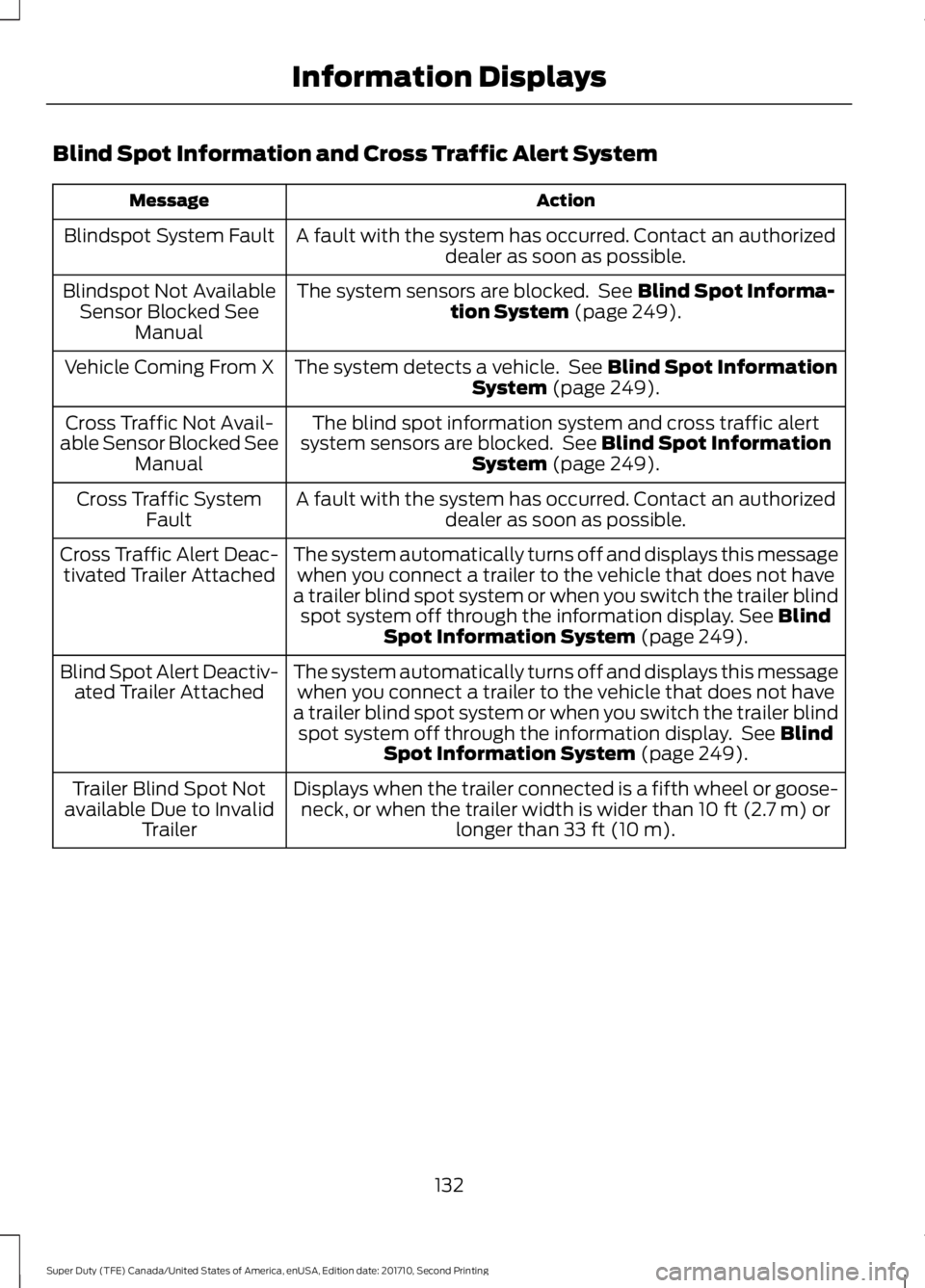
Blind Spot Information and Cross Traffic Alert System
ActionMessage
A fault with the system has occurred. Contact an authorizeddealer as soon as possible.Blindspot System Fault
The system sensors are blocked. See Blind Spot Informa-tion System (page 249).Blindspot Not AvailableSensor Blocked SeeManual
The system detects a vehicle. See Blind Spot InformationSystem (page 249).Vehicle Coming From X
The blind spot information system and cross traffic alertsystem sensors are blocked. See Blind Spot InformationSystem (page 249).
Cross Traffic Not Avail-able Sensor Blocked SeeManual
A fault with the system has occurred. Contact an authorizeddealer as soon as possible.Cross Traffic SystemFault
The system automatically turns off and displays this messagewhen you connect a trailer to the vehicle that does not havea trailer blind spot system or when you switch the trailer blindspot system off through the information display. See BlindSpot Information System (page 249).
Cross Traffic Alert Deac-tivated Trailer Attached
The system automatically turns off and displays this messagewhen you connect a trailer to the vehicle that does not havea trailer blind spot system or when you switch the trailer blindspot system off through the information display. See BlindSpot Information System (page 249).
Blind Spot Alert Deactiv-ated Trailer Attached
Displays when the trailer connected is a fifth wheel or goose-neck, or when the trailer width is wider than 10 ft (2.7 m) orlonger than 33 ft (10 m).
Trailer Blind Spot Notavailable Due to InvalidTrailer
132
Super Duty (TFE) Canada/United States of America, enUSA, Edition date: 201710, Second Printing
Information Displays
Page 136 of 642
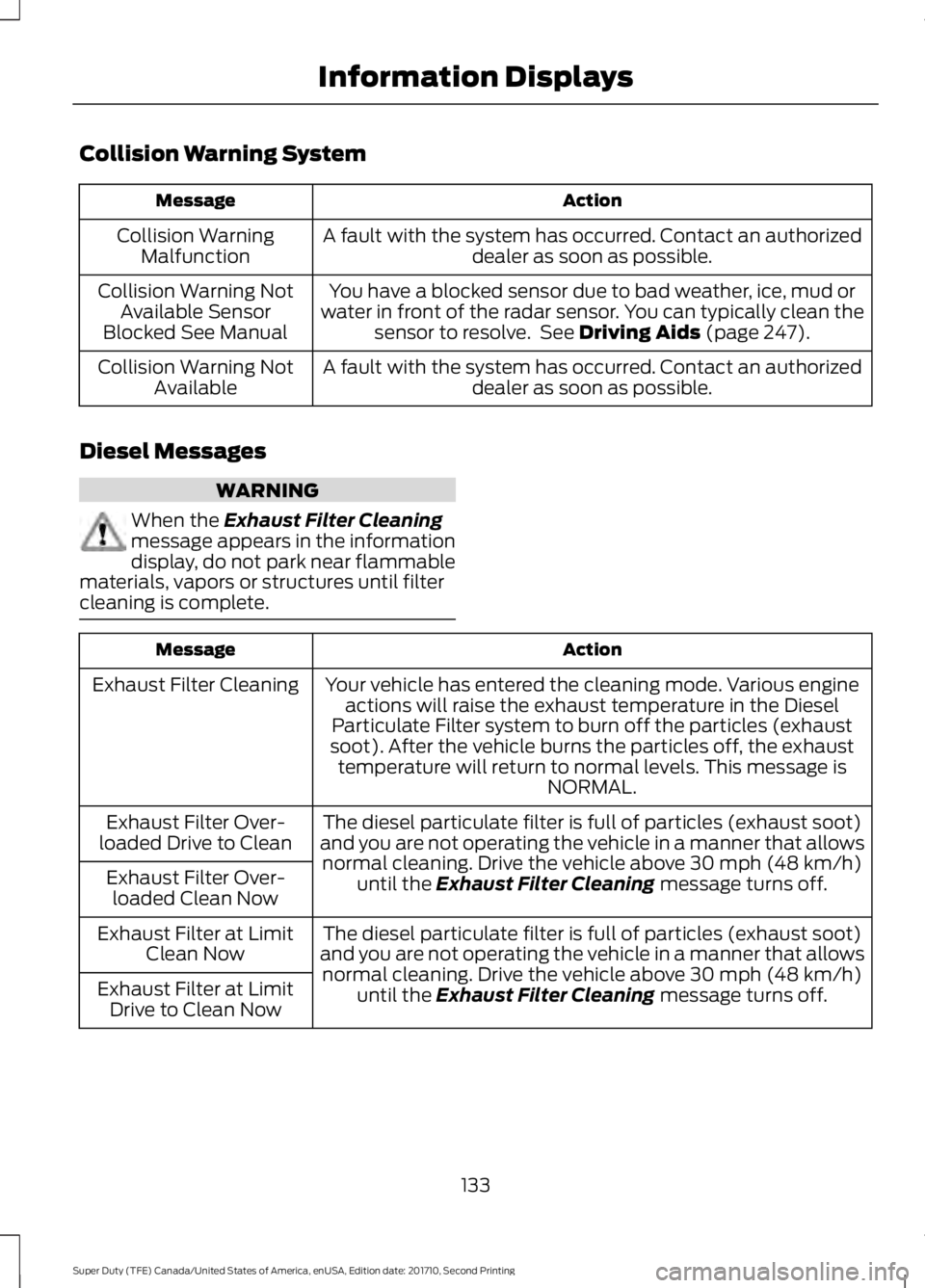
Collision Warning System
ActionMessage
A fault with the system has occurred. Contact an authorizeddealer as soon as possible.Collision WarningMalfunction
You have a blocked sensor due to bad weather, ice, mud orwater in front of the radar sensor. You can typically clean thesensor to resolve. See Driving Aids (page 247).
Collision Warning NotAvailable SensorBlocked See Manual
A fault with the system has occurred. Contact an authorizeddealer as soon as possible.Collision Warning NotAvailable
Diesel Messages
WARNING
When the Exhaust Filter Cleaningmessage appears in the informationdisplay, do not park near flammablematerials, vapors or structures until filtercleaning is complete.
ActionMessage
Your vehicle has entered the cleaning mode. Various engineactions will raise the exhaust temperature in the DieselParticulate Filter system to burn off the particles (exhaustsoot). After the vehicle burns the particles off, the exhausttemperature will return to normal levels. This message isNORMAL.
Exhaust Filter Cleaning
The diesel particulate filter is full of particles (exhaust soot)and you are not operating the vehicle in a manner that allowsnormal cleaning. Drive the vehicle above 30 mph (48 km/h)until the Exhaust Filter Cleaning message turns off.
Exhaust Filter Over-loaded Drive to Clean
Exhaust Filter Over-loaded Clean Now
The diesel particulate filter is full of particles (exhaust soot)and you are not operating the vehicle in a manner that allowsnormal cleaning. Drive the vehicle above 30 mph (48 km/h)until the Exhaust Filter Cleaning message turns off.
Exhaust Filter at LimitClean Now
Exhaust Filter at LimitDrive to Clean Now
133
Super Duty (TFE) Canada/United States of America, enUSA, Edition date: 201710, Second Printing
Information Displays