lock FORD F450 SUPER DUTY 2017 Owners Manual
[x] Cancel search | Manufacturer: FORD, Model Year: 2017, Model line: F450 SUPER DUTY, Model: FORD F450 SUPER DUTY 2017Pages: 642, PDF Size: 12.35 MB
Page 279 of 642
Sticker lost:
•Check for the following if you receivethe lost sticker message while usingthe system.
•Stop your vehicle as soon as themessage displays.
•Make sure the sticker is visible inthe rear view camera image.
•Clean the sticker and camera tomake sure they are unobstructed.
•Remove any items that may beblocking the view of the sticker.Depending on your trailerconfiguration and any equipmentmounted to your trailer it is possiblefor the sticker to be blocked fromview of the camera as it rotates onthe hitch ball but not be blockedduring setup. Remove theobstruction if possible. It will be
necessary to remove the stickerfrom it’s current location if theobstruction cannot be cleared andplace a new sticker that will bevisible to the camera in all positionsof the trailer behind your vehicle.
•You can change your stickerlocation by going into the trailermenu, selecting trailer options,selecting change trailer settingsand then selecting the changesticker option. The previous stickermust be removed.ONLY ONESTICKER SHOULD BE PLACEDON THE TRAILER FOR CORRECTSYSTEM FUNCTION.
•The camera system uses theentered measurements to helplocate the sticker. Inaccuratemeasurements will reduce thesystem’s ability to locate thesticker. Check the measurementsentered into the system are correct.Refer to the step 4 of TrailerReverse Guidance setup forinstructions on measurements.
•You can change your measurementby going into the trailer menu,selecting trailer options, selectingchange trailer setting and thenselecting the change sticker option.Disregard the prompt to removethis sticker and continue to the nextstep if you only plan to update themeasurements for the currentsticker location.
System will not backup straight:
•Factors such as the drawbarconnection to the hitch receiver, roadcamber, road grade and compliance inthe trailer suspension can influencehow straight the system is able to backyour trailer when the wheel is notturned. You can compensate for thetrailer drifting to the right or left by
276
Super Duty (TFE) Canada/United States of America, enUSA, Edition date: 201710, Second Printing
Towing
Page 283 of 642
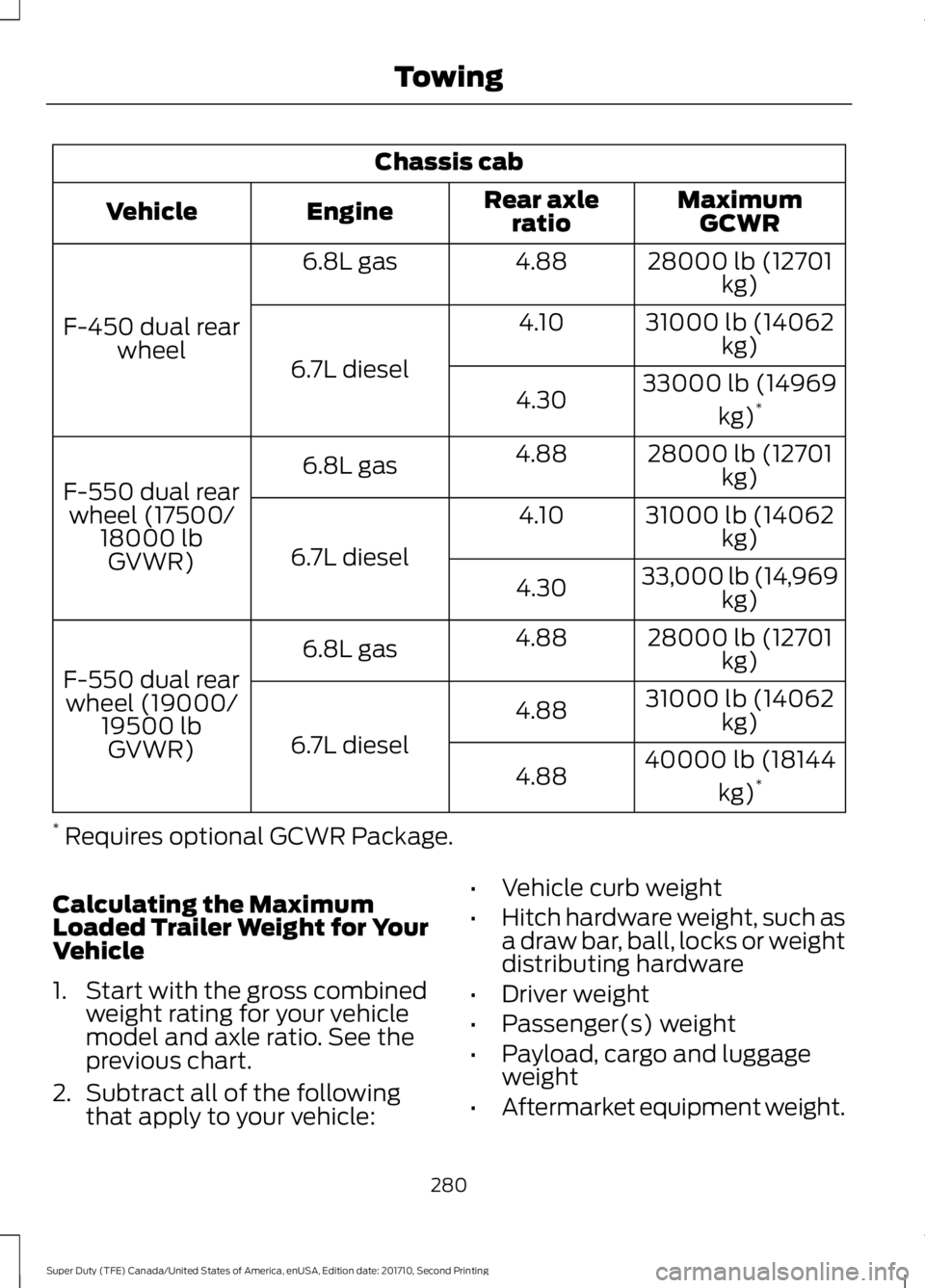
Chassis cab
MaximumGCWRRear axleratioEngineVehicle
28000 lb (12701kg)4.886.8L gas
F-450 dual rearwheel
31000 lb (14062kg)4.10
6.7L diesel33000 lb (14969
kg)*4.30
28000 lb (12701kg)4.886.8L gas
F-550 dual rearwheel (17500/18000 lbGVWR)
31000 lb (14062kg)4.10
6.7L diesel33,000 lb (14,969kg)4.30
28000 lb (12701kg)4.886.8L gas
F-550 dual rearwheel (19000/19500 lbGVWR)
31000 lb (14062kg)4.88
6.7L diesel40000 lb (18144
kg)*4.88
* Requires optional GCWR Package.
Calculating the MaximumLoaded Trailer Weight for YourVehicle
1. Start with the gross combinedweight rating for your vehiclemodel and axle ratio. See theprevious chart.
2.Subtract all of the followingthat apply to your vehicle:
•Vehicle curb weight
•Hitch hardware weight, such asa draw bar, ball, locks or weightdistributing hardware
•Driver weight
•Passenger(s) weight
•Payload, cargo and luggageweight
•Aftermarket equipment weight.
280
Super Duty (TFE) Canada/United States of America, enUSA, Edition date: 201710, Second Printing
Towing
Page 287 of 642
Once the trailer is level or slightly nosedown toward the vehicle:
•Lock the bar tension adjuster in place.
•Check that the trailer tongue securelyattaches and locks onto the hitch.
•Install safety chains, lighting, and trailerbrake controls as required by law or thetrailer manufacturer.
Fifth-wheel Trailer Hitch (If Equipped)
Note:The mounting pads in the bed arespecifically designed for certain fifth-wheeltrailer hitches and gooseneck ball hitches.Do not use these mounting pads for otherpurposes.
Note:Contact an authorized dealer topurchase gooseneck and fifth-wheel hitchesthat are compatible with your vehicle.
Your vehicle may be equipped with afifth-wheel prep package. This packageenables your vehicle to accept certainfifth-wheel trailer hitches and gooseneckball hitches. The fifth-wheel trailer hitchattaches to the four mounting pads in thepick-up bed. An optional 7-pin trailer wiringconnector may be in the bed as well. Thegooseneck ball hitch is a separatemounting pad from the fifth-wheel hitch,located in the center of the bed.
Shorter pick-up boxes, such as the 6½-footbox on the F-250 and F-350, provide lessclearance between the cab and thefifth-wheel and gooseneck trailercompared to longer box pick-ups, such asan 8-foot box on the F-250 or F-350. Whenselecting a trailer and tow vehicle, it iscritical to check that this combinationprovides clearance between the front ofthe trailer and tow vehicle for turns up to90 degrees. Failure to follow this
recommendation could result in the trailercontacting the cab of the tow vehicleduring tight turns that are typical duringlow-speed parking and turning maneuvers.This contact could result in damage to thetrailer and tow vehicle.
Safety Chains
Note:Do not attach safety chains to thebumper.
Always connect the safety chains to theframe or hook retainers of your vehiclehitch.
To connect the safety chains, cross thechains under the trailer tongue and allowenough slack for turning tight corners. Donot allow the chains to drag on the ground.
Trailer Brakes
WARNING
Do not connect a trailer's hydraulicbrake system directly to yourvehicle's brake system. Your vehiclemay not have enough braking power andyour chances of having a collision greatlyincrease.
Electric brakes and manual, automatic orsurge-type trailer brakes are safe if youinstall them properly and adjust them tothe manufacturer's specifications. Thetrailer brakes must meet local and federalregulations.
The rating for the tow vehicle's brakingsystem operation is at the gross vehicleweight rating, not the gross combinedweight rating.
Separate functioning brake systemsare required for safe control of towedvehicles and trailers weighing morethan 1500 pounds (680 kilograms)when loaded.
284
Super Duty (TFE) Canada/United States of America, enUSA, Edition date: 201710, Second Printing
Towing
Page 288 of 642
Integrated Trailer Brake Controller
(If Equipped)
WARNINGS
The anti-lock brake system does notcontrol the trailer brakes.
Use the integrated trailer brakecontroller to properly adjust thetrailer brakes and check allconnections before towing a trailer. Failureto follow this instruction could result in theloss of control of your vehicle, personalinjury or death.
Note:The integrated Ford brake controlleris compatible with trailers equipped withelectric-actuated drum brakes andelectric-over hydraulic brake systems.
Note:The integrated Ford brake controllerdoes not control hydraulic surge-stylebrakes.
When used properly, the trailer brakecontroller assists in smooth and effectivetrailer braking by powering the trailer’selectric or electric-over-hydraulic brakeswith a proportional output based on thetowing vehicle’s brake pressure.
You can adjust the amount of initial trailerbrake output by selecting one of threesettings through the message center.
Ford has tested the trailer brake controllerto be compatible with several majorbrands of electric-over-hydraulic trailerbrakes. Contact an authorized dealer forinformation on which brands you can use.
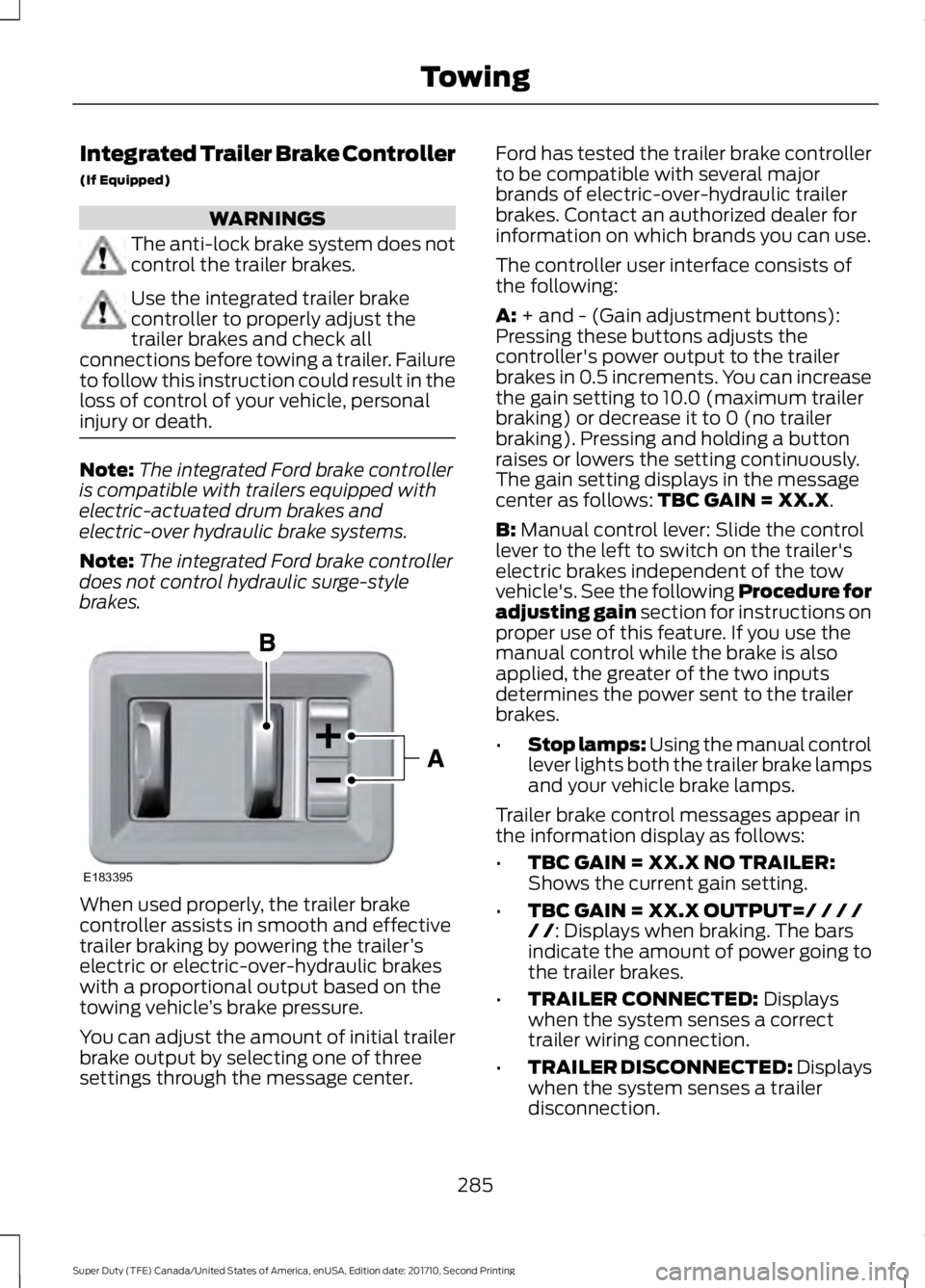
The controller user interface consists ofthe following:
A: + and - (Gain adjustment buttons):Pressing these buttons adjusts thecontroller's power output to the trailerbrakes in 0.5 increments. You can increasethe gain setting to 10.0 (maximum trailerbraking) or decrease it to 0 (no trailerbraking). Pressing and holding a buttonraises or lowers the setting continuously.The gain setting displays in the messagecenter as follows: TBC GAIN = XX.X.
B: Manual control lever: Slide the controllever to the left to switch on the trailer'selectric brakes independent of the towvehicle's. See the following Procedure foradjusting gain section for instructions onproper use of this feature. If you use themanual control while the brake is alsoapplied, the greater of the two inputsdetermines the power sent to the trailerbrakes.
•Stop lamps: Using the manual controllever lights both the trailer brake lampsand your vehicle brake lamps.
Trailer brake control messages appear inthe information display as follows:
•TBC GAIN = XX.X NO TRAILER:Shows the current gain setting.
•TBC GAIN = XX.X OUTPUT=/ / / // /: Displays when braking. The barsindicate the amount of power going tothe trailer brakes.
•TRAILER CONNECTED: Displayswhen the system senses a correcttrailer wiring connection.
•TRAILER DISCONNECTED: Displayswhen the system senses a trailerdisconnection.
285
Super Duty (TFE) Canada/United States of America, enUSA, Edition date: 201710, Second Printing
TowingE183395
Page 289 of 642
Procedure for Setting Trailer BrakeController Effort
Choose either the electric option for trailerswith electromagnetic drum brakes, or theelectric over hydraulic option for trailerswith these brake systems.
Trailer Brake Effort Setting
The trailer brake controller allows the userto customize how aggressively the trailerbrakes engage. The default value is the lowsetting and is the recommended settingfor most trailers. If your trailer's brakesrequire more initial voltage, or if you prefermore aggressive trailer braking, then selecteither the medium or the high setting.
Procedure for Setting Trailer BrakeController Mode
Choose the low, medium or high settingfor the required initial trailer brake output.
Procedure for Adjusting Gain
Note:Only perform this procedure in atraffic-free environment at speeds ofapproximately 20-25 mph (30-40 km/h).
The gain setting adjusts the trailer brakecontroller for the specific towing condition.You should change the setting as towingconditions change. Changes to towingconditions include trailer load, vehicle load,road conditions and weather.
The gain should be set to provide themaximum trailer braking assistance whilemaking sure the trailer wheels do not lockwhen using the brakes. Locked trailerwheels may lead to trailer instability.
1.Make sure the trailer brakes are in goodworking condition, functioning normallyand properly adjusted. See your trailerdealer if necessary.
2. Hook up the trailer and make theelectrical connections according to thetrailer manufacturer's instructions.
3. When you plug in a trailer with electricor electric-over-hydraulic brakes, aconfirmation message appears in theinformation display.
4. Use the gain adjustment (+ and -)buttons to increase or decrease thegain setting to the desired startingpoint. A gain setting of 6.0 is a goodstarting point for heavier loads.
5. In a traffic-free environment, tow thetrailer on a dry, level surface at a speedof 20-25 mph (30-40 km/h) andsqueeze the manual control levercompletely.
6. If the trailer wheels lock up, indicatedby squealing tires, reduce the gainsetting. If the trailer wheels turn freely,increase the gain setting. Repeat Steps5 and 6 until the gain setting is at apoint just below trailer wheel lock-up.If towing a heavier trailer, trailer wheellock-up may not be attainable evenwith the maximum gain setting of 10.
Information Display Warning Messages
Note:An authorized dealer can diagnosethe trailer brake controller to determineexactly which trailer fault has occurred.However, your Ford warranty does not coverthis diagnosis if the fault is with the trailer.
TRAILER BRAKE MODULE FAULT
Displays in response to faults sensed bythe trailer brake controller, accompaniedby a single tone. If this message appears,contact an authorized dealer as soon aspossible for diagnosis and repair. Thecontroller may still function, but withdegraded performance.
WIRING FAULT ON TRAILER
Displays when there is a short circuit onthe electric brake output wire.
286
Super Duty (TFE) Canada/United States of America, enUSA, Edition date: 201710, Second Printing
Towing
Page 290 of 642
If this message displays, with no trailerconnected, the problem is with your vehiclewiring or trailer brake controller. Contactan authorized dealer.
If the message only displays with a trailerconnected, the problem is with the trailerwiring. Consult your trailer dealer forassistance. This can be a short to ground(such as a chaffed wire), short to voltage(such as a pulled pin on trailer emergencybreakaway battery) or the trailer brakesmay be drawing too much current.
Points to Remember
Note:Do not attempt removal of the trailerbrake controller without consulting theWorkshop Manual. Damage to the unit mayresult.
•Adjust gain setting before using thetrailer brake controller.
•Adjust gain setting, using the procedureabove, whenever road, weather, traileror vehicle loading conditions changefrom when the gain was initially set.
•Only use the manual control lever forproper adjustment of the gain duringtrailer setup. Misuse, such asapplication during trailer sway, couldcause instability of trailer or towvehicle.
•Avoid towing in adverse weatherconditions. The trailer brake controllerdoes not provide anti-lock control ofthe trailer wheels. Trailer wheels canlock up on slippery surfaces, resultingin reduced stability of trailer and towvehicle.
•The trailer brake controller is equippedwith a feature that reduces output atvehicle speeds below 11 mph (18 km/h)so trailer and vehicle braking is not jerkyor harsh. This feature is only activewhen applying the brakes using yourvehicle's brake pedal, not thecontroller.
•The controller interacts with the brakecontrol system and powertrain controlsystem of your vehicle to provide thebest performance on different roadconditions.
•Your vehicle's brake system and thetrailer brake system workindependently of each other. Changingthe gain setting on the controller doesnot affect the operation of yourvehicle's brakes.
•When you switch the engine off, thecontroller output is disabled and thedisplay and module shut down.
Trailer Lamps
WARNING
Never connect any trailer lamp wiringto the vehicle's tail lamp wiring; thismay damage the electrical systemresulting in fire. Contact your authorizeddealer as soon as possible for assistancein proper trailer tow wiring installation.Additional electrical equipment may berequired.
Trailer lamps are required on most towedvehicles. Make sure all running lights, brakelights, turn signals and hazard lights areworking.
Before Towing a Trailer
Practice turning, stopping and backing upto get the feel of your vehicle-trailercombination before starting on a trip.When turning, make wider turns so thetrailer wheels clear curbs and otherobstacles.
287
Super Duty (TFE) Canada/United States of America, enUSA, Edition date: 201710, Second Printing
Towing
Page 292 of 642
When backing down a ramp during boatlaunching or retrieval:
•Do not allow the static water level torise above the bottom edge of the rearbumper.
•Do not allow waves to break higherthan 6 in (15 cm) above the bottomedge of the rear bumper.
Exceeding these limits may allow water toenter vehicle components:
•Causing internal damage to thecomponents.
•Affecting driveability, emissions, andreliability.
Replace the rear axle lubricant anytimethe rear axle has been submerged in water.Water may have contaminated the rearaxle lubricant, which is not normallychecked or changed unless a leak issuspected or other axle repair is required.
TOWING THE VEHICLE ON
FOUR WHEELS
WARNING
If your vehicle has a steering wheellock make sure the ignition is in theaccessory or on position when beingtowed.
Emergency Towing
If your vehicle becomes inoperable(without access to wheel dollies,car-hauling trailer, or flatbed transportvehicle), it can be flat-towed (all wheelson the ground, regardless of the powertrainand transmission configuration) under thefollowing conditions:
•Your vehicle is facing forward fortowing in a forward direction.
•Place the transmission in neutral (N).If you cannot move the transmissioninto neutral (N), you may need tooverride it. See Transmission (page205).
•Maximum speed is 35 mph (56 km/h).
•Maximum distance is 50 mi (80 km).
WARNING
If your vehicle has a steering wheellock make sure the ignition is in theaccessory or on position when beingtowed.
Recreational Towing
Note:Put your climate control system inrecirculated air mode to prevent exhaustfumes from entering your vehicle. SeeClimate Control (page 145).
Follow these guidelines if you have a needfor recreational towing, such as towingyour vehicle behind a motorhome. We havedesigned these guidelines to preventdamage to your transmission.
Two-wheel Drive Vehicles
Do not tow your vehicle with any wheelson the ground, as vehicle or transmissiondamage may occur. It is recommended totow your vehicle with all four (4) wheelsoff the ground, such as when using acar-hauling trailer. Otherwise, you cannottow your vehicle.
289
Super Duty (TFE) Canada/United States of America, enUSA, Edition date: 201710, Second Printing
Towing
Page 293 of 642
Four-wheel Drive Vehicles Equippedwith a Manual-shift Transfer Case
1. Put the transmission in neutral (N).
2. Put the transfer case in neutral (N).
3.Put the hub locks in the FREE position.Always make sure that both hub locksare set to the same position.
Four-wheel Drive Vehicles Equippedwith an Electronic-shift Transfer Case
Only tow a four-wheel drive vehicle thathas an electronic-shift transfer case withall wheels on the ground. To do this, placethe transfer case in its neutral position andengage the four-wheel-down towingfeature.
Perform the steps in the following sectionafter positioning your vehicle behind thetow vehicle and properly securing themtogether.
Note:Make sure you properly secure yourvehicle to the tow vehicle.
Four-wheel-down Towing
1. Put the ignition in the on position, butdo not start the engine. If your vehiclehas an ignition key, turn the key to on.If your vehicle has intelligent access,press the engine START/STOP buttononce without pressing the brake pedal.
2. Press and hold the brake pedal.
3. Rotate the four-wheel drive switch to2H.
4. Shift the transmission to neutral (N).
5. Rotate the four-wheel drive switchfrom 2H to 4L and back to 2H fivetimes within seven seconds.
Note:If completed successfully, theinformation display shows a messageindicating that your vehicle is safe to towwith all wheels on the ground.
Note:If you do not see the message in thedisplay, you must perform the procedureagain from the beginning.
Note:You may hear an audible noise as thetransfer case shifts into its neutral position.This is normal.
6. Leave the transmission in neutral (N)and turn the ignition as far as it will gotoward the off position (it will not turnfully off when the transmission is inneutral). If your vehicle has an ignitionkey, you must leave the key in theignition while towing. To lock andunlock your vehicle, use the keylessentry keypad or extra set of keys. If yourvehicle has intelligent access, press theengine START/STOP button oncewithout pressing the brake pedal. Youdo not need to leave your keys in thevehicle. You can lock and unlock yourvehicle as you normally do.
7. Release the brake pedal.
WARNINGS
Do not disconnect the battery duringrecreational towing. It prevents thetransfer case from shifting properlyand may cause the vehicle to roll, even ifthe transmission is in park (P).
Shifting the transfer case to itsneutral position for recreationaltowing may cause the vehicle to roll,even if the transmission is in park (P). Itmay injure the driver and others. Make sureyou press the foot brake and the vehicle isin a secure, safe position when you shift toneutral (N).
Note:Failing to put the transfer case in itsneutral position while towing with all fourwheels on the ground will damage vehiclecomponents.
290
Super Duty (TFE) Canada/United States of America, enUSA, Edition date: 201710, Second Printing
Towing
Page 294 of 642
Note:You can check four-wheel-downtowing status at any time by opening thedriver's door or turning the ignition to theaccessory or on position and verifying amessage displays in the cluster.
To exit four-wheel-down towing and returnthe transfer case to its 2H position:
1.With your vehicle still properly securedto the tow vehicle, put the ignition inthe on position, but do not start theengine. If your vehicle has an ignitionkey, switch the key to on. If your vehiclehas intelligent access, press the engineSTART/STOP button once withoutpressing the brake pedal.
2. Press and hold the brake pedal.
3. Shift the transmission out of neutral(N) and into any other gear.
4. Release the brake pedal.
Note:If completed successfully, the 2Hindicator light illuminates and aconfirmation message displays in theinstrument cluster.
Note:If the indicator light and message donot display, you must perform the procedureagain from the beginning.
Note:You may hear an audible noise as thetransfer case shifts out of its neutralposition. This is normal.
Note:If a message displays in theinstrument cluster stating there is a shiftdelay, transfer case gear tooth blockagemay be present. See Resolving the ShiftDelay Issue after this section.
5.Apply the parking brake and disconnectthe vehicle from the tow vehicle.
6. Release the parking brake, start theengine and shift the transmission todrive (D) to make sure the transfercase is out of neutral (N).
7. If the transfer case does notsuccessfully shift out of neutral (N),set the parking brake until you can haveyour vehicle serviced.
Resolving the Shift Delay Issue
If the instrument cluster displays a shiftdelay message, See InformationMessages (page 128). You need toperform the following steps:
1. Press and hold the brake pedal.
2. Put the transmission into neutral (N),and then start the engine.
3. With the engine running, shift thetransmission to drive (D) and let thevehicle roll forward, up to 3 ft (1 m).You may hear an audible noise as thetransfer case shifts out of its neutralposition. This is normal.
4. When the issue is resolved, theinstrument cluster displays a messagestating neutral tow is disabled.
291
Super Duty (TFE) Canada/United States of America, enUSA, Edition date: 201710, Second Printing
Towing
Page 297 of 642
WARNINGS
Never place floor mats or any othercovering on top of already installedfloor mats. Floor mats should alwaysrest on top of vehicle carpeting surface andnot another floor mat or other covering.Additional floor mats or any other coveringwill reduce the pedal clearance andpotentially interfere with pedal operation.
Check attachment of floor mats ona regular basis. Always properlyreinstall and secure floor mats thathave been removed for cleaning orreplacement.
Always make sure that objectscannot fall into the driver foot wellwhile the vehicle is moving. Objectsthat are loose can become trapped underthe pedals causing a loss of vehicle control.
Failure to properly follow floor matinstallation or attachmentinstructions can potentially causeinterference with pedal operation causinga loss of vehicle control.
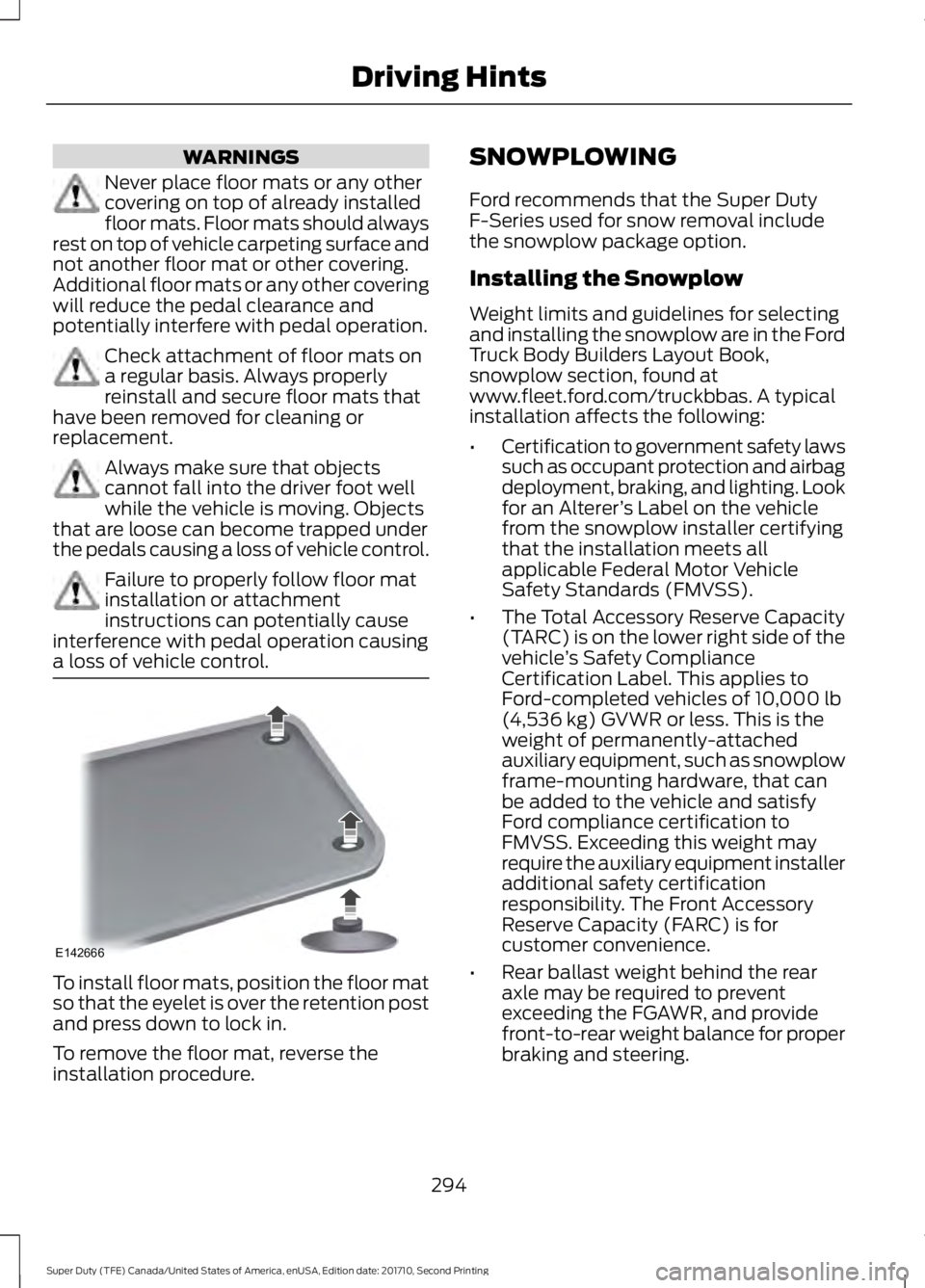
To install floor mats, position the floor matso that the eyelet is over the retention postand press down to lock in.
To remove the floor mat, reverse theinstallation procedure.
SNOWPLOWING
Ford recommends that the Super DutyF-Series used for snow removal includethe snowplow package option.
Installing the Snowplow
Weight limits and guidelines for selectingand installing the snowplow are in the FordTruck Body Builders Layout Book,snowplow section, found atwww.fleet.ford.com/truckbbas. A typicalinstallation affects the following:
•Certification to government safety lawssuch as occupant protection and airbagdeployment, braking, and lighting. Lookfor an Alterer’s Label on the vehiclefrom the snowplow installer certifyingthat the installation meets allapplicable Federal Motor VehicleSafety Standards (FMVSS).
•The Total Accessory Reserve Capacity(TARC) is on the lower right side of thevehicle’s Safety ComplianceCertification Label. This applies toFord-completed vehicles of 10,000 lb(4,536 kg) GVWR or less. This is theweight of permanently-attachedauxiliary equipment, such as snowplowframe-mounting hardware, that canbe added to the vehicle and satisfyFord compliance certification toFMVSS. Exceeding this weight mayrequire the auxiliary equipment installeradditional safety certificationresponsibility. The Front AccessoryReserve Capacity (FARC) is forcustomer convenience.
•Rear ballast weight behind the rearaxle may be required to preventexceeding the FGAWR, and providefront-to-rear weight balance for properbraking and steering.
294
Super Duty (TFE) Canada/United States of America, enUSA, Edition date: 201710, Second Printing
Driving HintsE142666