steering FORD F450 SUPER DUTY 2017 User Guide
[x] Cancel search | Manufacturer: FORD, Model Year: 2017, Model line: F450 SUPER DUTY, Model: FORD F450 SUPER DUTY 2017Pages: 642, PDF Size: 12.35 MB
Page 86 of 642
ADJUSTING THE PEDALS
Note:Never use the controls when your feetare on the accelerator or brake pedals,especially when the vehicle is moving.
Note:Adjust the pedals only when yourvehicle is in park (P).
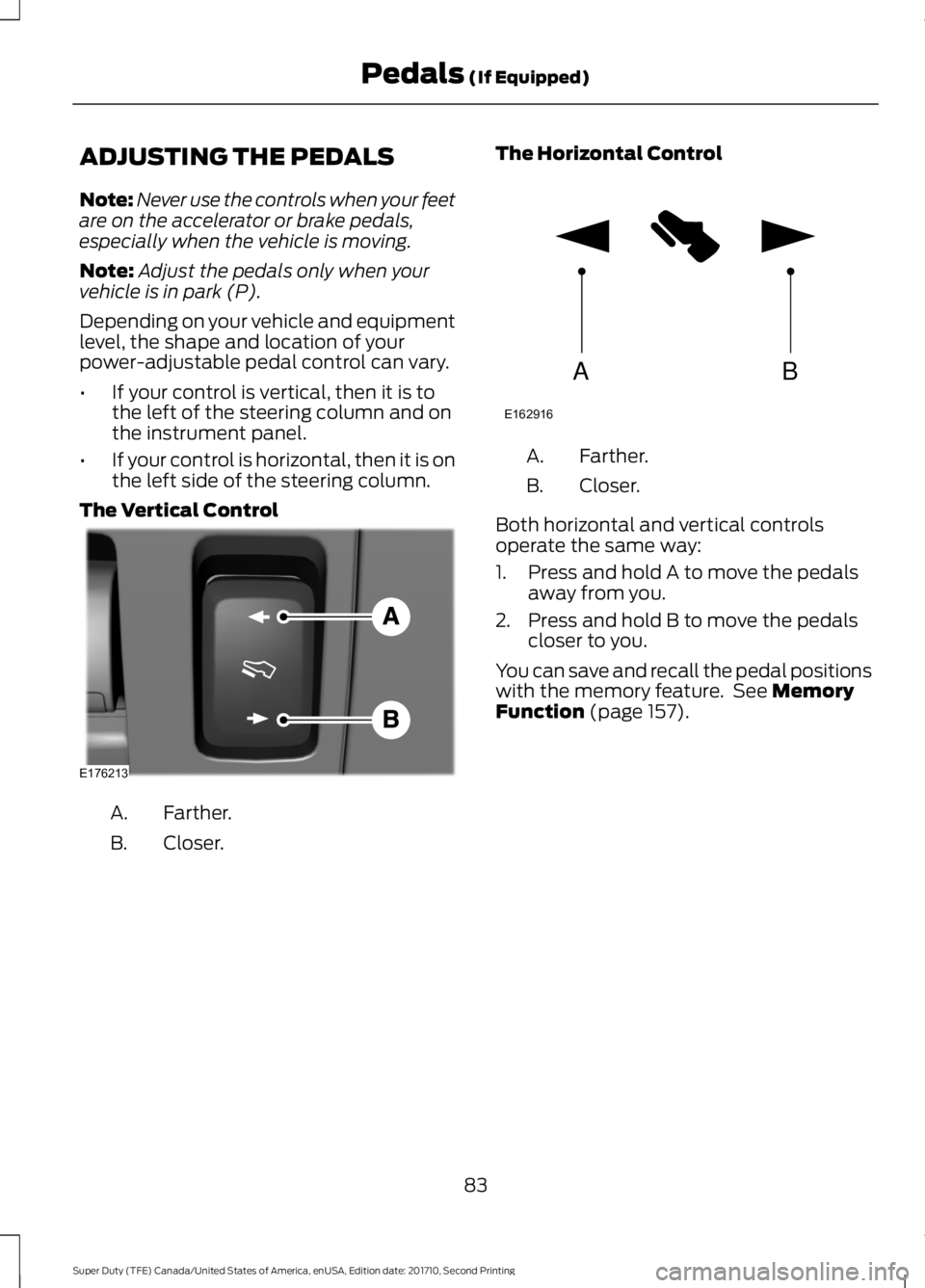
Depending on your vehicle and equipmentlevel, the shape and location of yourpower-adjustable pedal control can vary.
•If your control is vertical, then it is tothe left of the steering column and onthe instrument panel.
•If your control is horizontal, then it is onthe left side of the steering column.
The Vertical Control
Farther.A.
Closer.B.
The Horizontal Control
Farther.A.
Closer.B.
Both horizontal and vertical controlsoperate the same way:
1. Press and hold A to move the pedalsaway from you.
2. Press and hold B to move the pedalscloser to you.
You can save and recall the pedal positionswith the memory feature. See MemoryFunction (page 157).
83
Super Duty (TFE) Canada/United States of America, enUSA, Edition date: 201710, Second Printing
Pedals (If Equipped)E176213 AB
E162916
Page 109 of 642
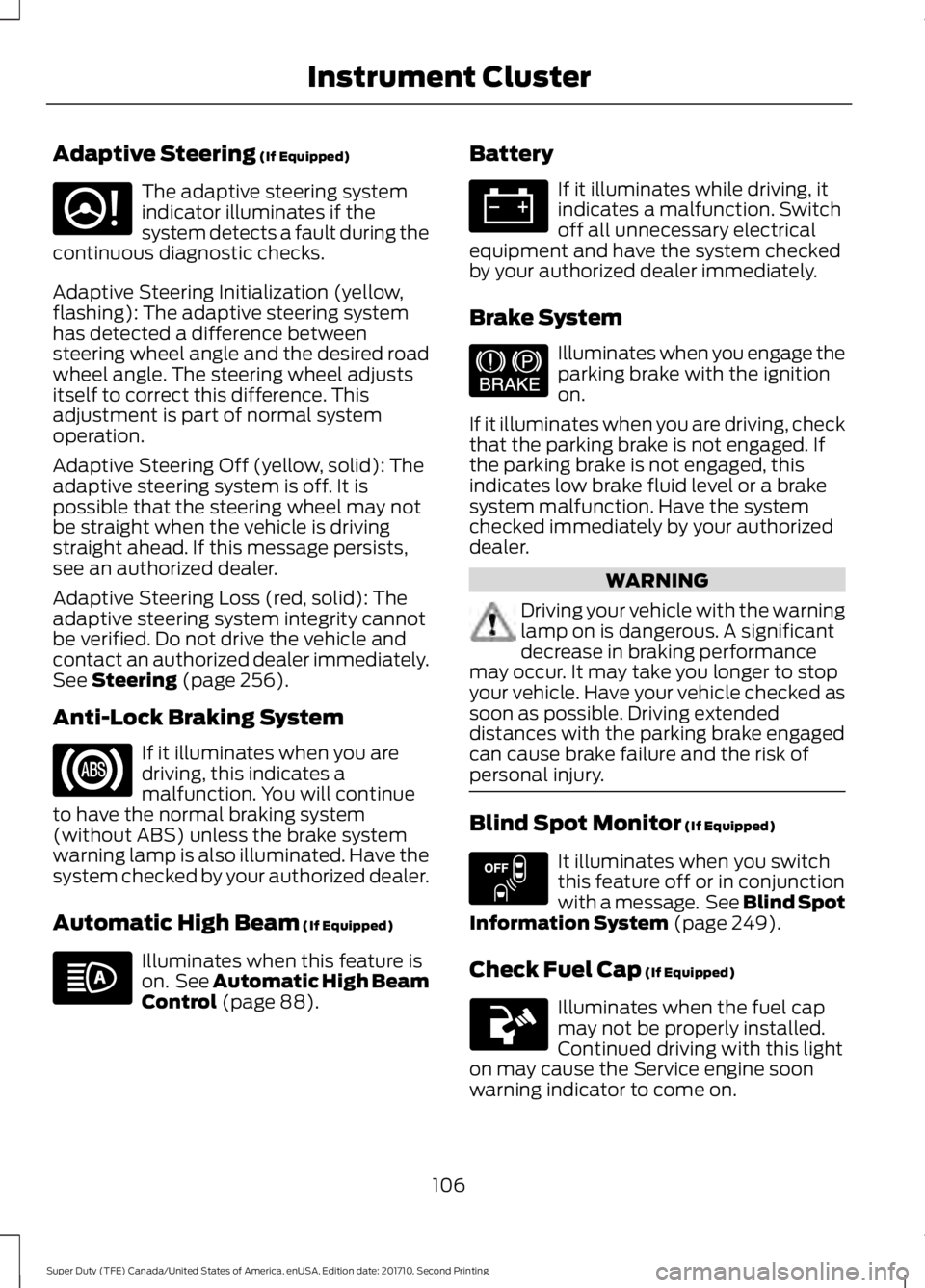
Adaptive Steering (If Equipped)
The adaptive steering systemindicator illuminates if thesystem detects a fault during thecontinuous diagnostic checks.
Adaptive Steering Initialization (yellow,flashing): The adaptive steering systemhas detected a difference betweensteering wheel angle and the desired roadwheel angle. The steering wheel adjustsitself to correct this difference. Thisadjustment is part of normal systemoperation.
Adaptive Steering Off (yellow, solid): Theadaptive steering system is off. It ispossible that the steering wheel may notbe straight when the vehicle is drivingstraight ahead. If this message persists,see an authorized dealer.
Adaptive Steering Loss (red, solid): Theadaptive steering system integrity cannotbe verified. Do not drive the vehicle andcontact an authorized dealer immediately.See Steering (page 256).
Anti-Lock Braking System
If it illuminates when you aredriving, this indicates amalfunction. You will continueto have the normal braking system(without ABS) unless the brake systemwarning lamp is also illuminated. Have thesystem checked by your authorized dealer.
Automatic High Beam (If Equipped)
Illuminates when this feature ison. See Automatic High BeamControl (page 88).
Battery
If it illuminates while driving, itindicates a malfunction. Switchoff all unnecessary electricalequipment and have the system checkedby your authorized dealer immediately.
Brake System
Illuminates when you engage theparking brake with the ignitionon.
If it illuminates when you are driving, checkthat the parking brake is not engaged. Ifthe parking brake is not engaged, thisindicates low brake fluid level or a brakesystem malfunction. Have the systemchecked immediately by your authorizeddealer.
WARNING
Driving your vehicle with the warninglamp on is dangerous. A significantdecrease in braking performancemay occur. It may take you longer to stopyour vehicle. Have your vehicle checked assoon as possible. Driving extendeddistances with the parking brake engagedcan cause brake failure and the risk ofpersonal injury.
Blind Spot Monitor (If Equipped)
It illuminates when you switchthis feature off or in conjunctionwith a message. See Blind SpotInformation System (page 249).
Check Fuel Cap (If Equipped)
Illuminates when the fuel capmay not be properly installed.Continued driving with this lighton may cause the Service engine soonwarning indicator to come on.
106
Super Duty (TFE) Canada/United States of America, enUSA, Edition date: 201710, Second Printing
Instrument ClusterE223375 E144522 E151262
Page 114 of 642
GENERAL INFORMATION
WARNING
Driving while distracted can result inloss of vehicle control, crash andinjury. We strongly recommend thatyou use extreme caution when using anydevice that may take your focus off theroad. Your primary responsibility is the safeoperation of your vehicle. We recommendagainst the use of any hand-held devicewhile driving and encourage the use ofvoice-operated systems when possible.Make sure you are aware of all applicablelocal laws that may affect the use ofelectronic devices while driving.
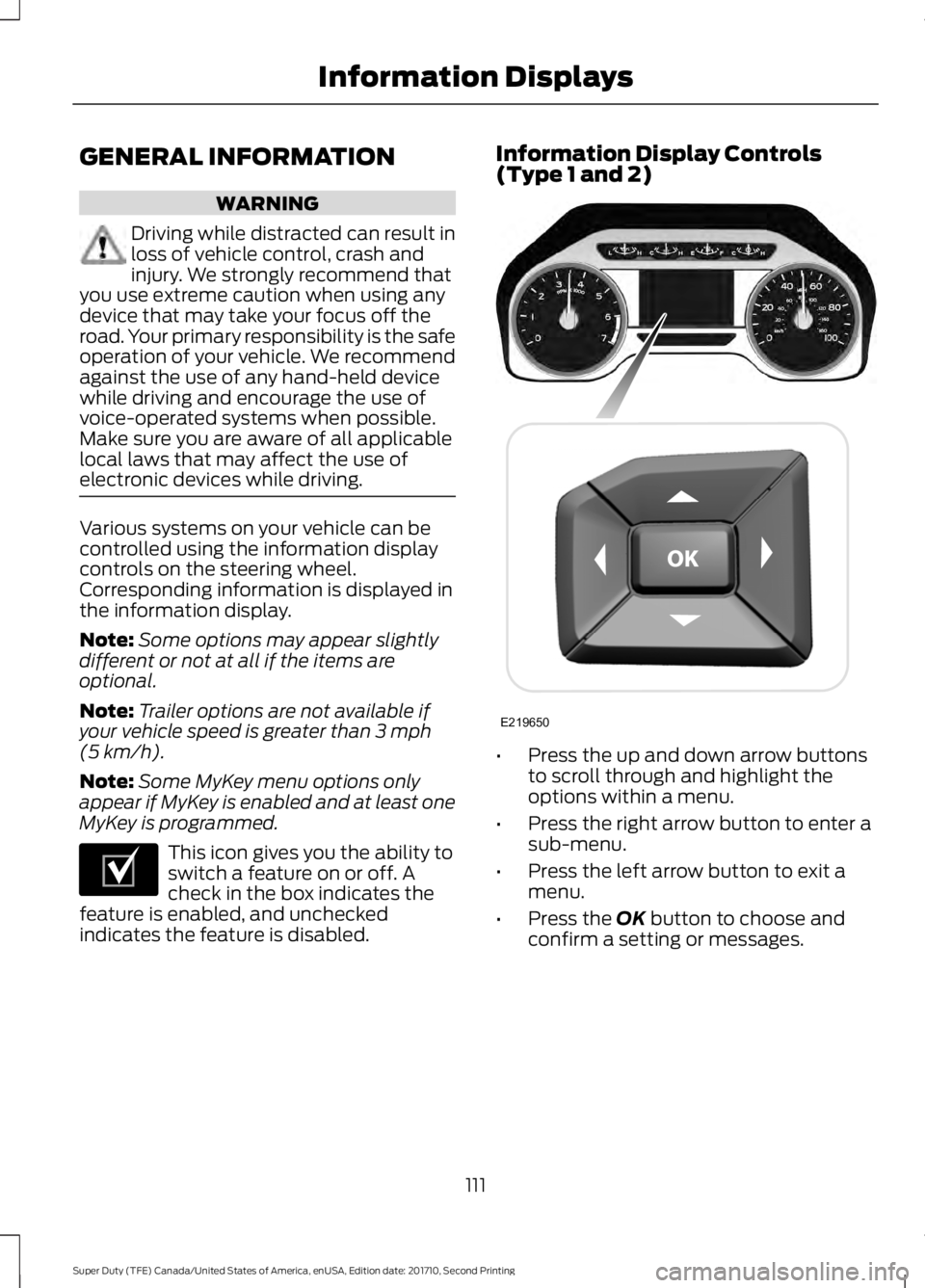
Various systems on your vehicle can becontrolled using the information displaycontrols on the steering wheel.Corresponding information is displayed inthe information display.
Note:Some options may appear slightlydifferent or not at all if the items areoptional.
Note:Trailer options are not available ifyour vehicle speed is greater than 3 mph(5 km/h).
Note:Some MyKey menu options onlyappear if MyKey is enabled and at least oneMyKey is programmed.
This icon gives you the ability toswitch a feature on or off. Acheck in the box indicates thefeature is enabled, and uncheckedindicates the feature is disabled.
Information Display Controls(Type 1 and 2)
•Press the up and down arrow buttonsto scroll through and highlight theoptions within a menu.
•Press the right arrow button to enter asub-menu.
•Press the left arrow button to exit amenu.
•Press the OK button to choose andconfirm a setting or messages.
111
Super Duty (TFE) Canada/United States of America, enUSA, Edition date: 201710, Second Printing
Information DisplaysE204495 E219650
Page 121 of 642
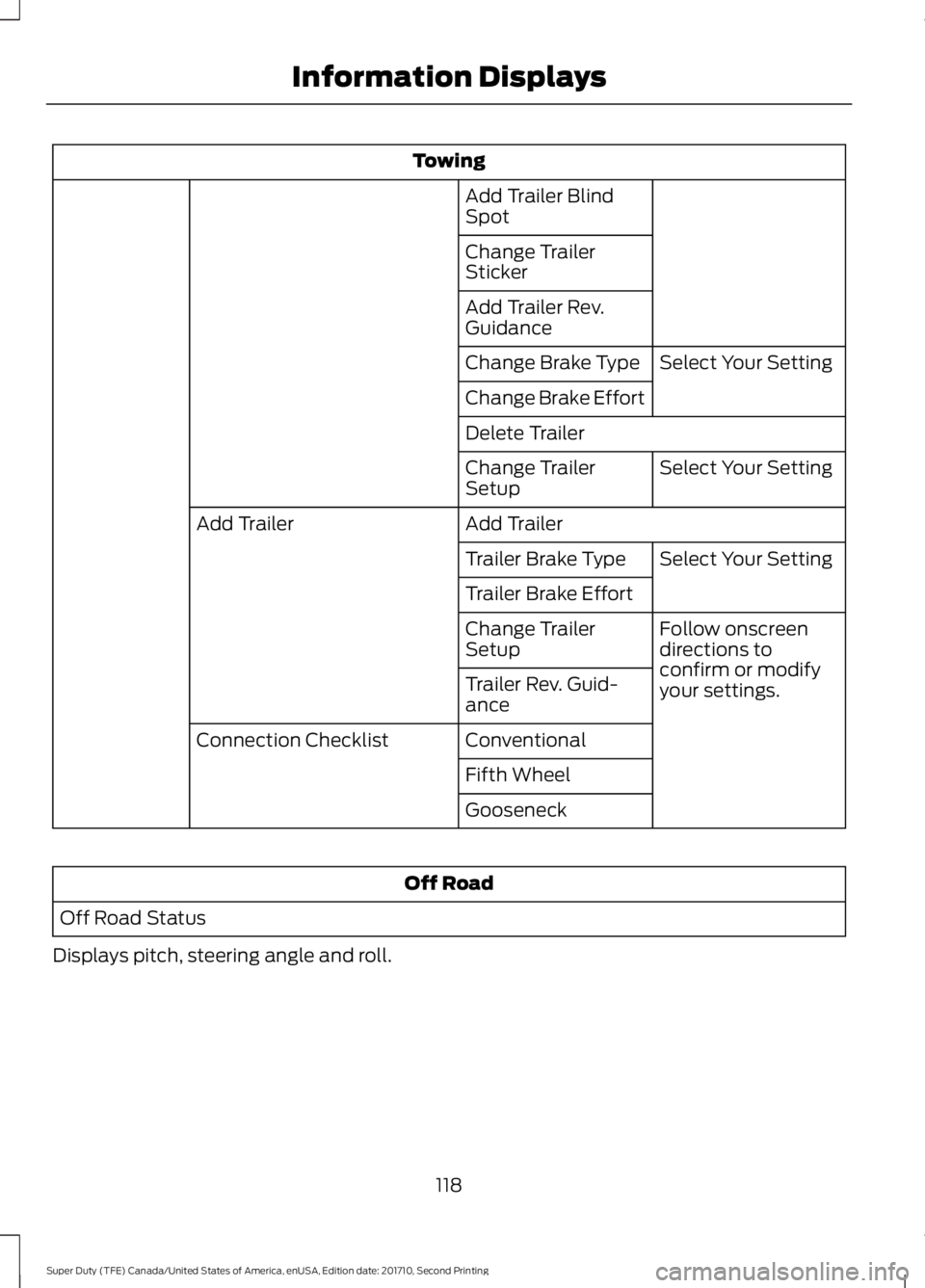
Towing
Add Trailer BlindSpot
Change TrailerSticker
Add Trailer Rev.Guidance
Select Your SettingChange Brake Type
Change Brake Effort
Delete Trailer
Select Your SettingChange TrailerSetup
Add TrailerAdd Trailer
Select Your SettingTrailer Brake Type
Trailer Brake Effort
Follow onscreendirections toconfirm or modifyyour settings.
Change TrailerSetup
Trailer Rev. Guid-ance
ConventionalConnection Checklist
Fifth Wheel
Gooseneck
Off Road
Off Road Status
Displays pitch, steering angle and roll.
118
Super Duty (TFE) Canada/United States of America, enUSA, Edition date: 201710, Second Printing
Information Displays
Page 128 of 642
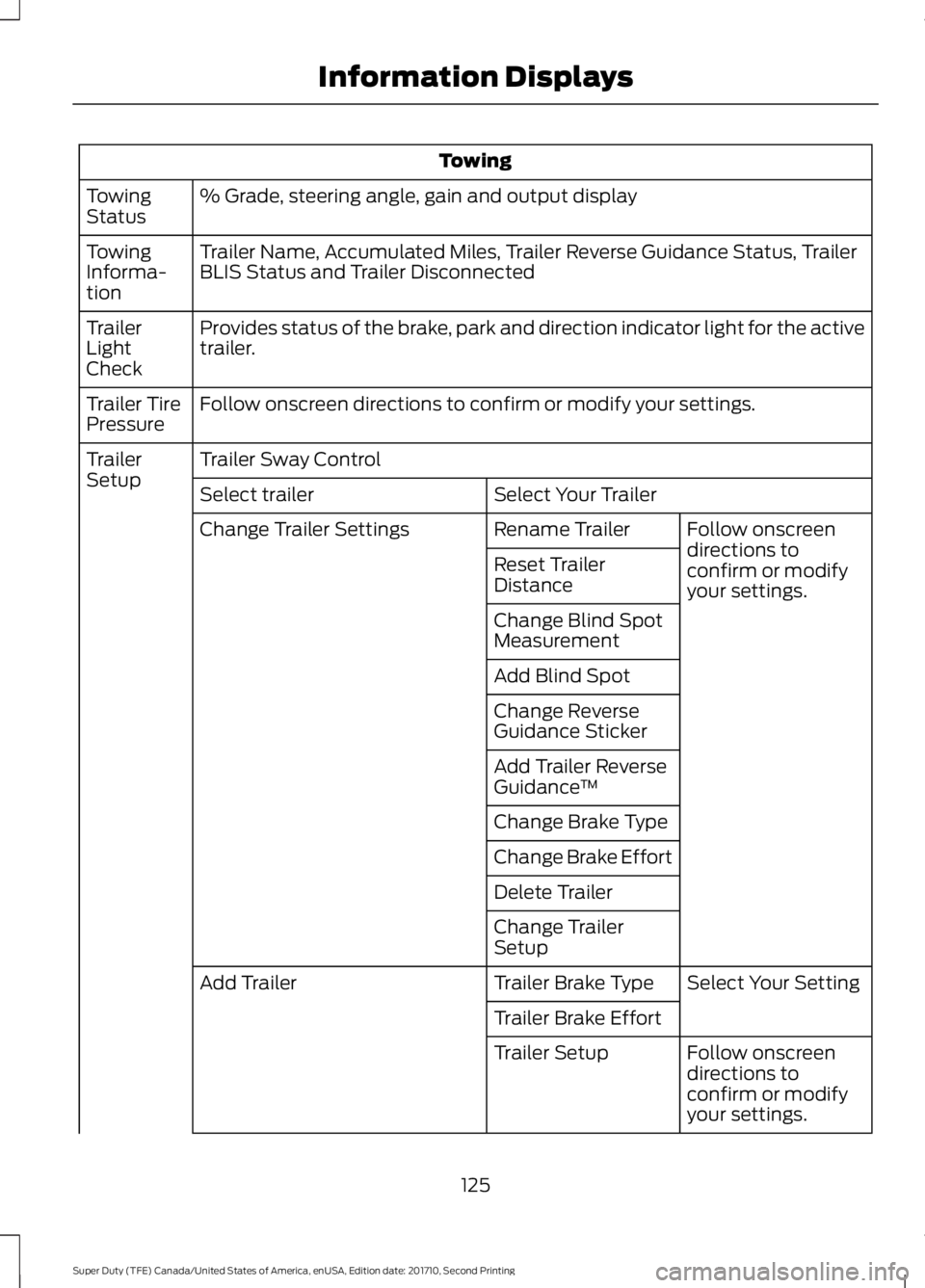
Towing
% Grade, steering angle, gain and output displayTowingStatus
Trailer Name, Accumulated Miles, Trailer Reverse Guidance Status, TrailerBLIS Status and Trailer DisconnectedTowingInforma-tion
Provides status of the brake, park and direction indicator light for the activetrailer.TrailerLightCheck
Follow onscreen directions to confirm or modify your settings.Trailer TirePressure
Trailer Sway ControlTrailerSetupSelect Your TrailerSelect trailer
Follow onscreendirections toconfirm or modifyyour settings.
Rename TrailerChange Trailer Settings
Reset TrailerDistance
Change Blind SpotMeasurement
Add Blind Spot
Change ReverseGuidance Sticker
Add Trailer ReverseGuidance™
Change Brake Type
Change Brake Effort
Delete Trailer
Change TrailerSetup
Select Your SettingTrailer Brake TypeAdd Trailer
Trailer Brake Effort
Follow onscreendirections toconfirm or modifyyour settings.
Trailer Setup
125
Super Duty (TFE) Canada/United States of America, enUSA, Edition date: 201710, Second Printing
Information Displays
Page 129 of 642
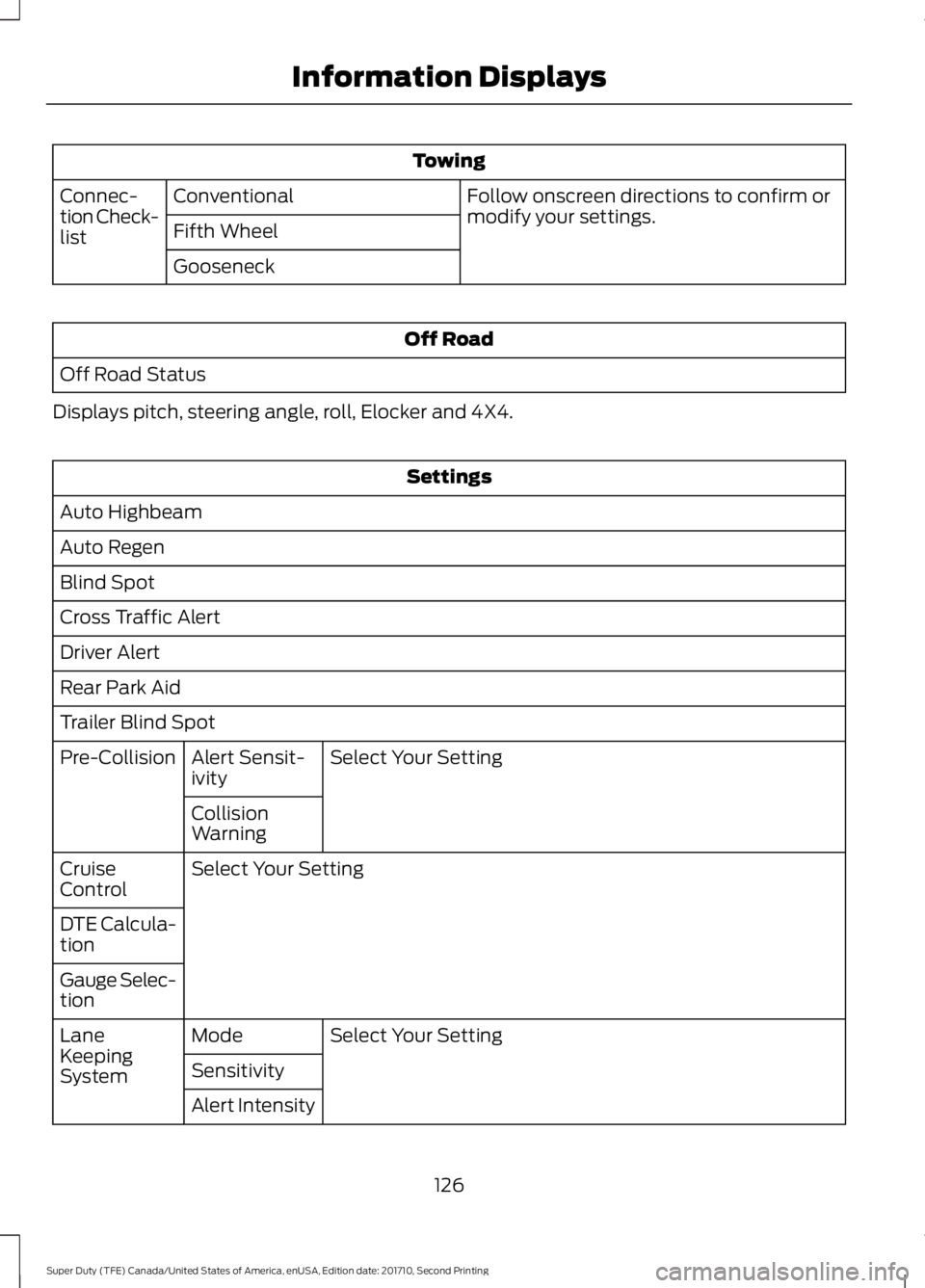
Towing
Follow onscreen directions to confirm ormodify your settings.ConventionalConnec-tion Check-listFifth Wheel
Gooseneck
Off Road
Off Road Status
Displays pitch, steering angle, roll, Elocker and 4X4.
Settings
Auto Highbeam
Auto Regen
Blind Spot
Cross Traffic Alert
Driver Alert
Rear Park Aid
Trailer Blind Spot
Select Your SettingAlert Sensit-ivityPre-Collision
CollisionWarning
Select Your SettingCruiseControl
DTE Calcula-tion
Gauge Selec-tion
Select Your SettingModeLaneKeepingSystemSensitivity
Alert Intensity
126
Super Duty (TFE) Canada/United States of America, enUSA, Edition date: 201710, Second Printing
Information Displays
Page 132 of 642
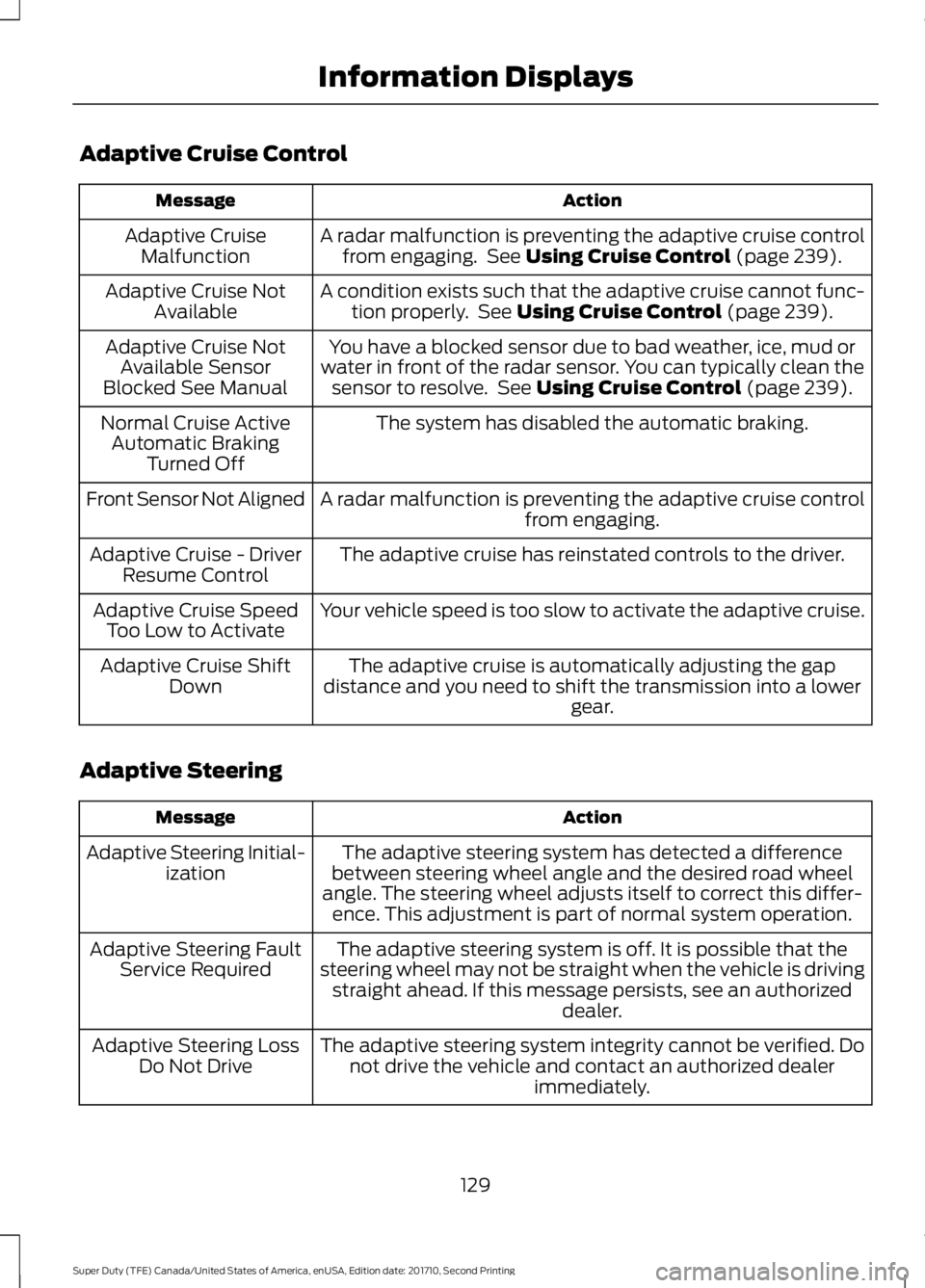
Adaptive Cruise Control
ActionMessage
A radar malfunction is preventing the adaptive cruise controlfrom engaging. See Using Cruise Control (page 239).Adaptive CruiseMalfunction
A condition exists such that the adaptive cruise cannot func-tion properly. See Using Cruise Control (page 239).Adaptive Cruise NotAvailable
You have a blocked sensor due to bad weather, ice, mud orwater in front of the radar sensor. You can typically clean thesensor to resolve. See Using Cruise Control (page 239).
Adaptive Cruise NotAvailable SensorBlocked See Manual
The system has disabled the automatic braking.Normal Cruise ActiveAutomatic BrakingTurned Off
A radar malfunction is preventing the adaptive cruise controlfrom engaging.Front Sensor Not Aligned
The adaptive cruise has reinstated controls to the driver.Adaptive Cruise - DriverResume Control
Your vehicle speed is too slow to activate the adaptive cruise.Adaptive Cruise SpeedToo Low to Activate
The adaptive cruise is automatically adjusting the gapdistance and you need to shift the transmission into a lowergear.
Adaptive Cruise ShiftDown
Adaptive Steering
ActionMessage
The adaptive steering system has detected a differencebetween steering wheel angle and the desired road wheelangle. The steering wheel adjusts itself to correct this differ-ence. This adjustment is part of normal system operation.
Adaptive Steering Initial-ization
The adaptive steering system is off. It is possible that thesteering wheel may not be straight when the vehicle is drivingstraight ahead. If this message persists, see an authorizeddealer.
Adaptive Steering FaultService Required
The adaptive steering system integrity cannot be verified. Donot drive the vehicle and contact an authorized dealerimmediately.
Adaptive Steering LossDo Not Drive
129
Super Duty (TFE) Canada/United States of America, enUSA, Edition date: 201710, Second Printing
Information Displays
Page 134 of 642
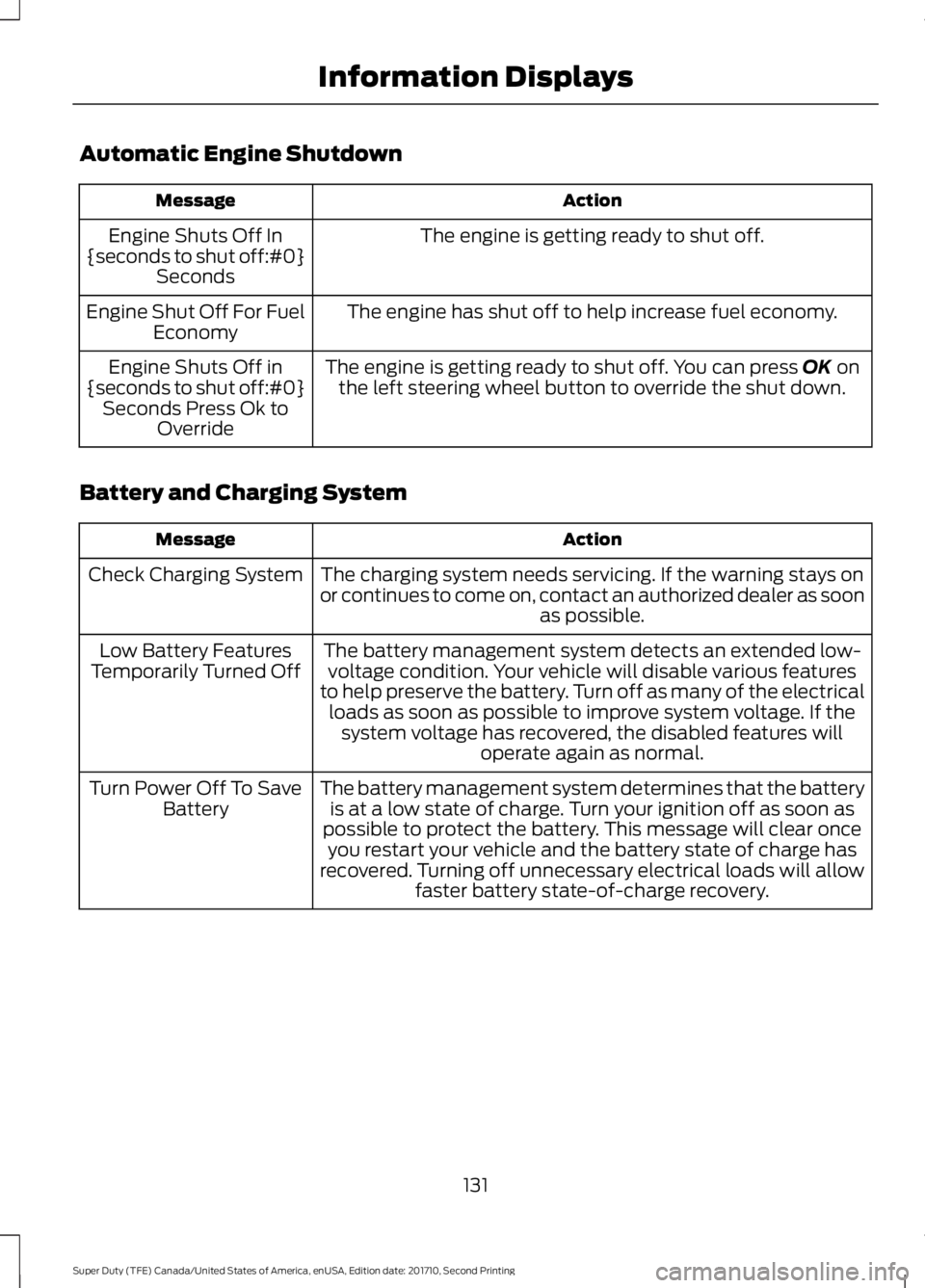
Automatic Engine Shutdown
ActionMessage
The engine is getting ready to shut off.Engine Shuts Off In{seconds to shut off:#0}Seconds
The engine has shut off to help increase fuel economy.Engine Shut Off For FuelEconomy
The engine is getting ready to shut off. You can press OK onthe left steering wheel button to override the shut down.Engine Shuts Off in{seconds to shut off:#0}Seconds Press Ok toOverride
Battery and Charging System
ActionMessage
The charging system needs servicing. If the warning stays onor continues to come on, contact an authorized dealer as soonas possible.
Check Charging System
The battery management system detects an extended low-voltage condition. Your vehicle will disable various featuresto help preserve the battery. Turn off as many of the electricalloads as soon as possible to improve system voltage. If thesystem voltage has recovered, the disabled features willoperate again as normal.
Low Battery FeaturesTemporarily Turned Off
The battery management system determines that the batteryis at a low state of charge. Turn your ignition off as soon aspossible to protect the battery. This message will clear onceyou restart your vehicle and the battery state of charge hasrecovered. Turning off unnecessary electrical loads will allowfaster battery state-of-charge recovery.
Turn Power Off To SaveBattery
131
Super Duty (TFE) Canada/United States of America, enUSA, Edition date: 201710, Second Printing
Information Displays
Page 141 of 642
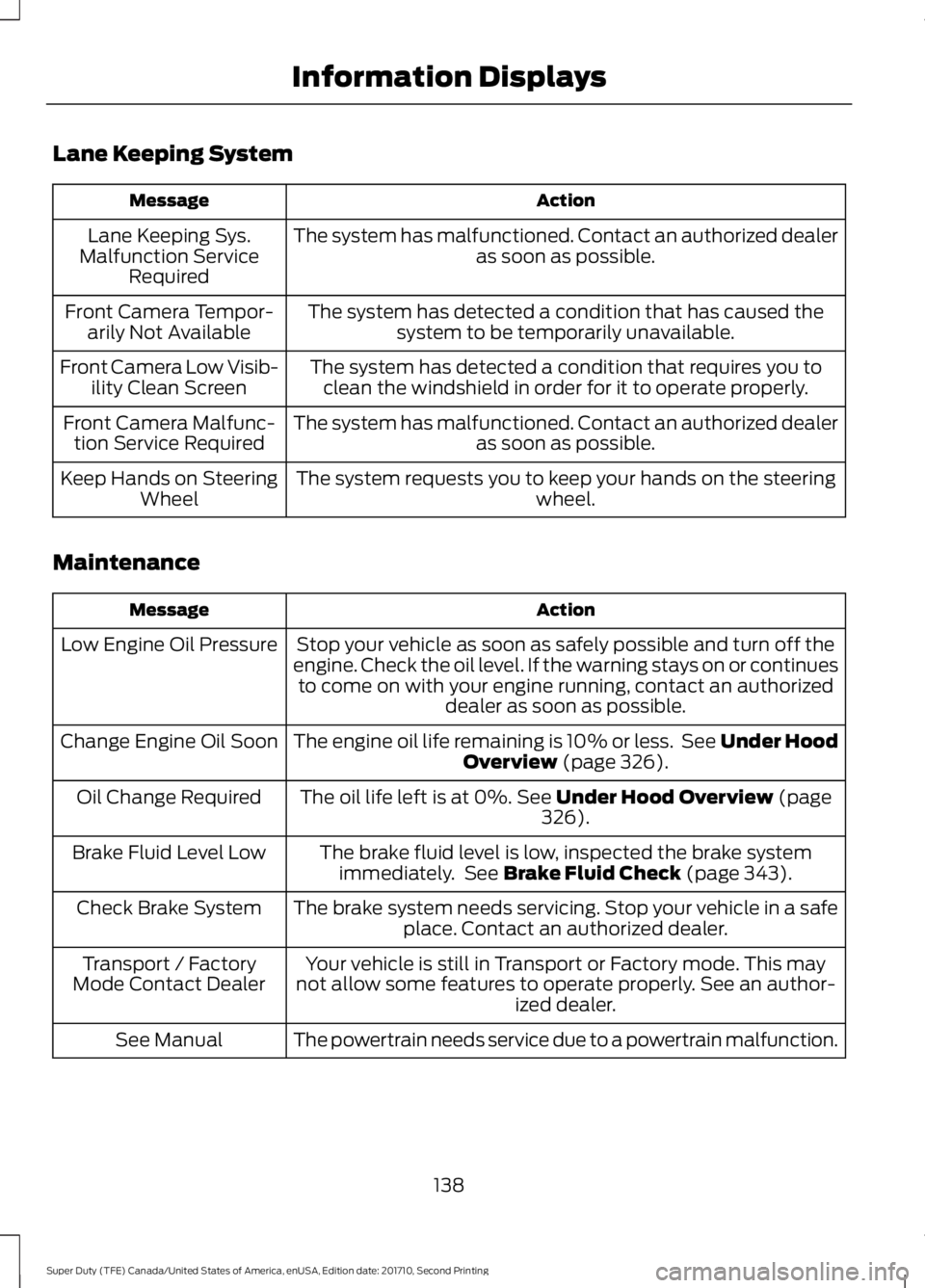
Lane Keeping System
ActionMessage
The system has malfunctioned. Contact an authorized dealeras soon as possible.Lane Keeping Sys.Malfunction ServiceRequired
The system has detected a condition that has caused thesystem to be temporarily unavailable.Front Camera Tempor-arily Not Available
The system has detected a condition that requires you toclean the windshield in order for it to operate properly.Front Camera Low Visib-ility Clean Screen
The system has malfunctioned. Contact an authorized dealeras soon as possible.Front Camera Malfunc-tion Service Required
The system requests you to keep your hands on the steeringwheel.Keep Hands on SteeringWheel
Maintenance
ActionMessage
Stop your vehicle as soon as safely possible and turn off theengine. Check the oil level. If the warning stays on or continuesto come on with your engine running, contact an authorizeddealer as soon as possible.
Low Engine Oil Pressure
The engine oil life remaining is 10% or less. See Under HoodOverview (page 326).Change Engine Oil Soon
The oil life left is at 0%. See Under Hood Overview (page326).Oil Change Required
The brake fluid level is low, inspected the brake systemimmediately. See Brake Fluid Check (page 343).Brake Fluid Level Low
The brake system needs servicing. Stop your vehicle in a safeplace. Contact an authorized dealer.Check Brake System
Your vehicle is still in Transport or Factory mode. This maynot allow some features to operate properly. See an author-ized dealer.
Transport / FactoryMode Contact Dealer
The powertrain needs service due to a powertrain malfunction.See Manual
138
Super Duty (TFE) Canada/United States of America, enUSA, Edition date: 201710, Second Printing
Information Displays
Page 144 of 642
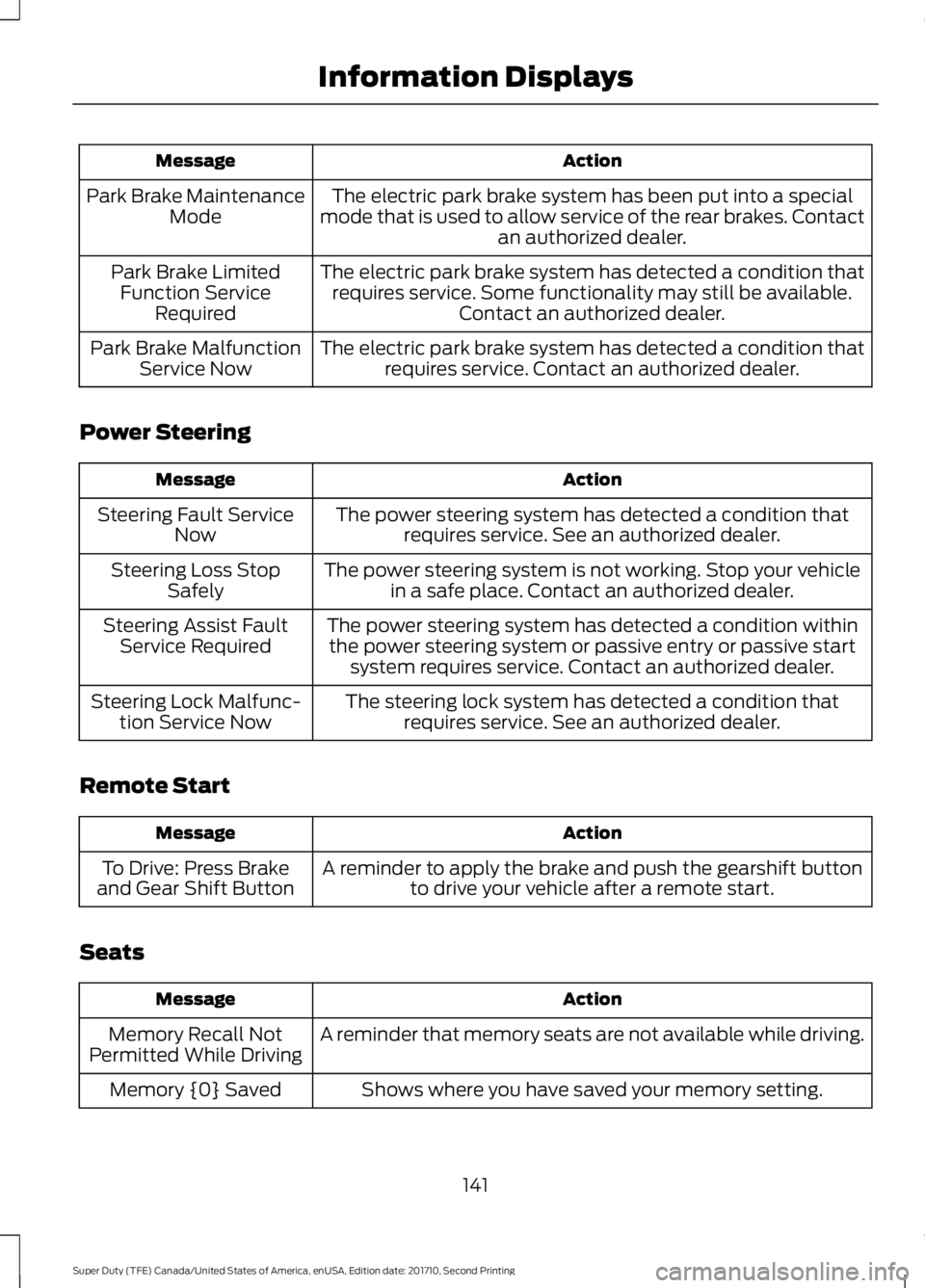
ActionMessage
The electric park brake system has been put into a specialmode that is used to allow service of the rear brakes. Contactan authorized dealer.
Park Brake MaintenanceMode
The electric park brake system has detected a condition thatrequires service. Some functionality may still be available.Contact an authorized dealer.
Park Brake LimitedFunction ServiceRequired
The electric park brake system has detected a condition thatrequires service. Contact an authorized dealer.Park Brake MalfunctionService Now
Power Steering
ActionMessage
The power steering system has detected a condition thatrequires service. See an authorized dealer.Steering Fault ServiceNow
The power steering system is not working. Stop your vehiclein a safe place. Contact an authorized dealer.Steering Loss StopSafely
The power steering system has detected a condition withinthe power steering system or passive entry or passive startsystem requires service. Contact an authorized dealer.
Steering Assist FaultService Required
The steering lock system has detected a condition thatrequires service. See an authorized dealer.Steering Lock Malfunc-tion Service Now
Remote Start
ActionMessage
A reminder to apply the brake and push the gearshift buttonto drive your vehicle after a remote start.To Drive: Press Brakeand Gear Shift Button
Seats
ActionMessage
A reminder that memory seats are not available while driving.Memory Recall NotPermitted While Driving
Shows where you have saved your memory setting.Memory {0} Saved
141
Super Duty (TFE) Canada/United States of America, enUSA, Edition date: 201710, Second Printing
Information Displays