remote start FORD F450 SUPER DUTY 2017 Owner's Manual
[x] Cancel search | Manufacturer: FORD, Model Year: 2017, Model line: F450 SUPER DUTY, Model: FORD F450 SUPER DUTY 2017Pages: 642, PDF Size: 12.35 MB
Page 165 of 642
Press the cooled seat symbol to cyclethrough the various cool settings and off.More indicator lights indicate coolersettings.
Note:The cooled seats may remain on afteryou remote start your vehicle, based on yourremote start settings. The heated seats mayalso turn on when you start your vehicle ifthey were on when you switched yourvehicle off.
Note:After 60 minutes of operation, thecooled seats switch off. Press the cooledseat symbol to switch the cooled seats on.
Climate Controlled Seat Air FilterReplacement
The climate controlled seat systemincludes air filters. You must replace themperiodically.
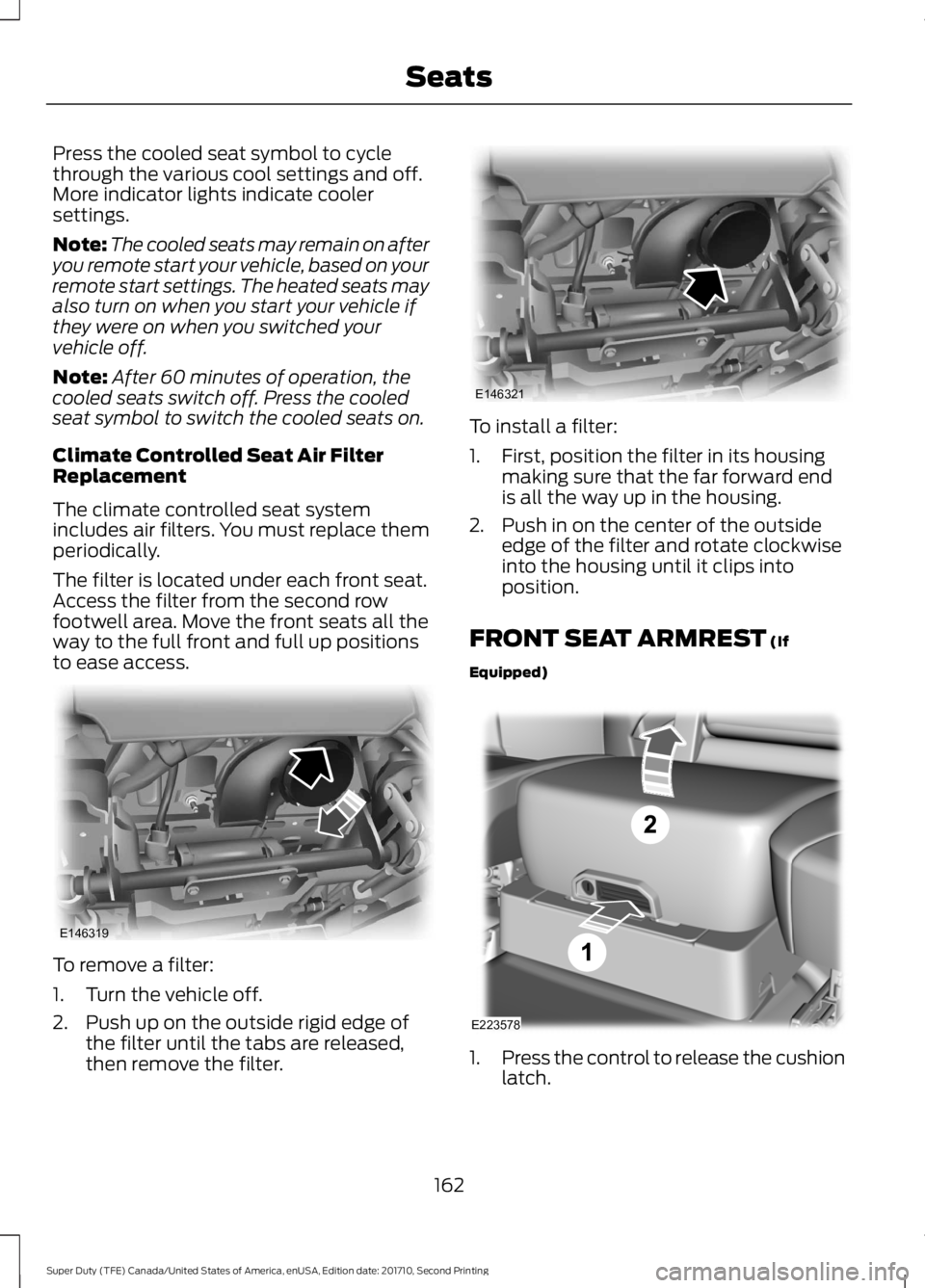
The filter is located under each front seat.Access the filter from the second rowfootwell area. Move the front seats all theway to the full front and full up positionsto ease access.
To remove a filter:
1. Turn the vehicle off.
2. Push up on the outside rigid edge ofthe filter until the tabs are released,then remove the filter.
To install a filter:
1. First, position the filter in its housingmaking sure that the far forward endis all the way up in the housing.
2. Push in on the center of the outsideedge of the filter and rotate clockwiseinto the housing until it clips intoposition.
FRONT SEAT ARMREST (If
Equipped)
1.Press the control to release the cushionlatch.
162
Super Duty (TFE) Canada/United States of America, enUSA, Edition date: 201710, Second Printing
SeatsE146319 E146321 E223578
Page 249 of 642
ActionCause
Clean the grille surface in front of the radaror remove the object causing the obstruc-tion.
The surface of the radar in the grille is dirtyor obstructed in some way.
Wait a short time. It may take severalminutes for the radar to detect that it is freefrom obstruction.
The surface of the radar in the grille is cleanbut the message remains in the display.
Do not use the system in these conditionsbecause it may not detect any vehiclesahead.
Heavy rain or snow is interfering with theradar signals.
Do not use the system in these conditionsbecause it may not detect any vehiclesahead.
Swirling water, or snow or ice on the surfaceof the road may interfere with the radarsignals.
Wait a short time or switch to normal cruisecontrol.You are in a desert or remote area with noother vehicles and no roadside objects.
Due to the nature of radar technology, it ispossible to get a blockage warning and nothave a blockage. This can happen, forexample, when driving in sparse rural ordesert environments. A false blockedcondition either self clears or clears aftera key cycle.
Switching to Normal CruiseControl
WARNING
Normal cruise control will not brakewhen your vehicle is approachingslower vehicles. Always be aware ofwhich mode you have selected and applythe brakes when necessary.
You can manually change from adaptivecruise control to normal cruise controlthrough the information display. SeeInformation Messages (page 128).
The cruise control indicator lightreplaces the adaptive cruisecontrol indicator light if youselect normal cruise control. The gapsetting does not display, the system doesnot automatically respond to lead vehiclesand automatic braking remains active tomaintain set speed. The system recalls itslast setting when you start your vehicle.
246
Super Duty (TFE) Canada/United States of America, enUSA, Edition date: 201710, Second Printing
Cruise Control (If Equipped)E71340
Page 526 of 642
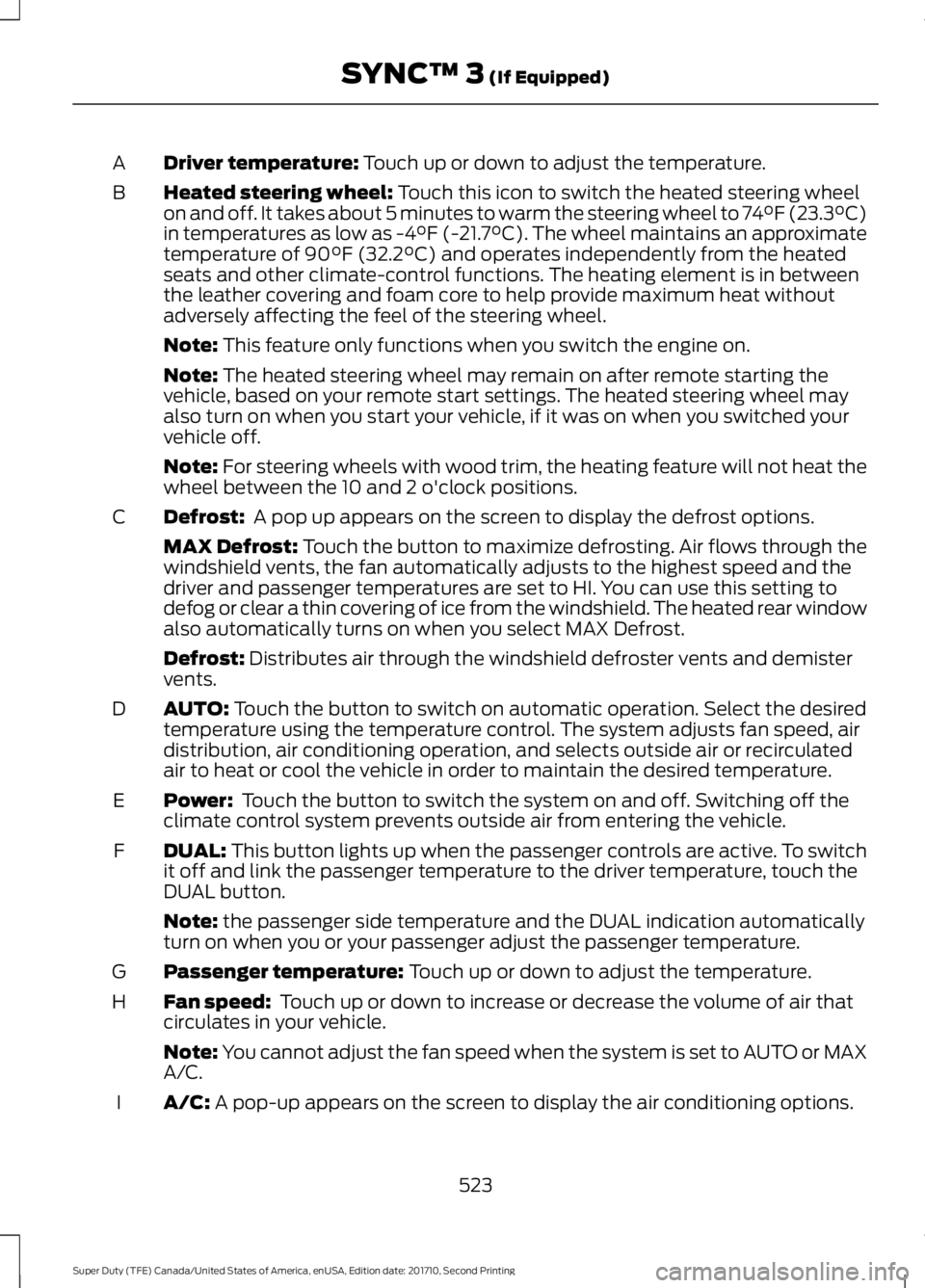
Driver temperature: Touch up or down to adjust the temperature.A
Heated steering wheel: Touch this icon to switch the heated steering wheelon and off. It takes about 5 minutes to warm the steering wheel to 74°F (23.3°C)in temperatures as low as -4°F (-21.7°C). The wheel maintains an approximatetemperature of 90°F (32.2°C) and operates independently from the heatedseats and other climate-control functions. The heating element is in betweenthe leather covering and foam core to help provide maximum heat withoutadversely affecting the feel of the steering wheel.
B
Note: This feature only functions when you switch the engine on.
Note: The heated steering wheel may remain on after remote starting thevehicle, based on your remote start settings. The heated steering wheel mayalso turn on when you start your vehicle, if it was on when you switched yourvehicle off.
Note: For steering wheels with wood trim, the heating feature will not heat thewheel between the 10 and 2 o'clock positions.
Defrost: A pop up appears on the screen to display the defrost options.C
MAX Defrost: Touch the button to maximize defrosting. Air flows through thewindshield vents, the fan automatically adjusts to the highest speed and thedriver and passenger temperatures are set to HI. You can use this setting todefog or clear a thin covering of ice from the windshield. The heated rear windowalso automatically turns on when you select MAX Defrost.
Defrost: Distributes air through the windshield defroster vents and demistervents.
AUTO: Touch the button to switch on automatic operation. Select the desiredtemperature using the temperature control. The system adjusts fan speed, airdistribution, air conditioning operation, and selects outside air or recirculatedair to heat or cool the vehicle in order to maintain the desired temperature.
D
Power: Touch the button to switch the system on and off. Switching off theclimate control system prevents outside air from entering the vehicle.E
DUAL: This button lights up when the passenger controls are active. To switchit off and link the passenger temperature to the driver temperature, touch theDUAL button.
F
Note: the passenger side temperature and the DUAL indication automaticallyturn on when you or your passenger adjust the passenger temperature.
Passenger temperature: Touch up or down to adjust the temperature.G
Fan speed: Touch up or down to increase or decrease the volume of air thatcirculates in your vehicle.H
Note: You cannot adjust the fan speed when the system is set to AUTO or MAXA/C.
A/C: A pop-up appears on the screen to display the air conditioning options.I
523
Super Duty (TFE) Canada/United States of America, enUSA, Edition date: 201710, Second Printing
SYNC™ 3 (If Equipped)
Page 569 of 642
For a complete listing of the accessoriesthat are available for your vehicle, pleasecontact your authorized dealer or visit theonline store web site:
Web Address (United States)
www.Accessories.Ford.com
Web Address (Canada)
www.Accessories.Ford.ca
Ford Custom Accessories are available foryour vehicle through an authorized dealer.Ford Motor Company will repair or replaceany properly authorized dealer-installedFord Original Accessory found to bedefective in factory-supplied materials orworkmanship during the warranty period,as well as any component damaged by thedefective accessories.
Ford Motor Company will warrant yourvehicle through the warranty that providesthe greatest benefit:
•24 months, unlimited mileage.
•The remainder of your new vehiclelimited warranty.
Contact an authorized dealer for detailsand a copy of the warranty.
Exterior style
•Bug shields.
•Commercial graphics*.
•Commercial LED warning strobe lights.
•Deflectors.
•Exhaust tip.
•Running boards.
•Splash guards.
•Stainless-steel wheel covers*.
•Step bars.
•Wheel well liners.
Interior style
•Ambient lighting.
•Cargo organizers.
•Custom seat covers*.
•Floor mats.
Lifestyle
•Ash cup/smoker's package.
•Bed cargo net, tie down plates andcleats.
•Bed extender.
•Bedliners and bedmats.
•Racks and carriers*.
•Sportliner cargo liner*.
•Tonneau covers*.
•Tow hooks.
•Trailer back-up camera.
•Trailer brake control.
•Trailer hitches, wiring harnesses andaccessories.
•Truck bed camping tent*.
Peace of mind
•Back-up alarm*.
•Bed hooks*.
•Bumper and hitch-mounted parkingsensors*.
•Ford Telematics.
•Keyless entry keypad.
•Protective seat covers*.
•Remote start and alarms.
•Cruise control.
•Tool or Cargo boxes*.
•Vehicle security system.
•Wheel locks.
566
Super Duty (TFE) Canada/United States of America, enUSA, Edition date: 201710, Second Printing
Accessories
Page 635 of 642
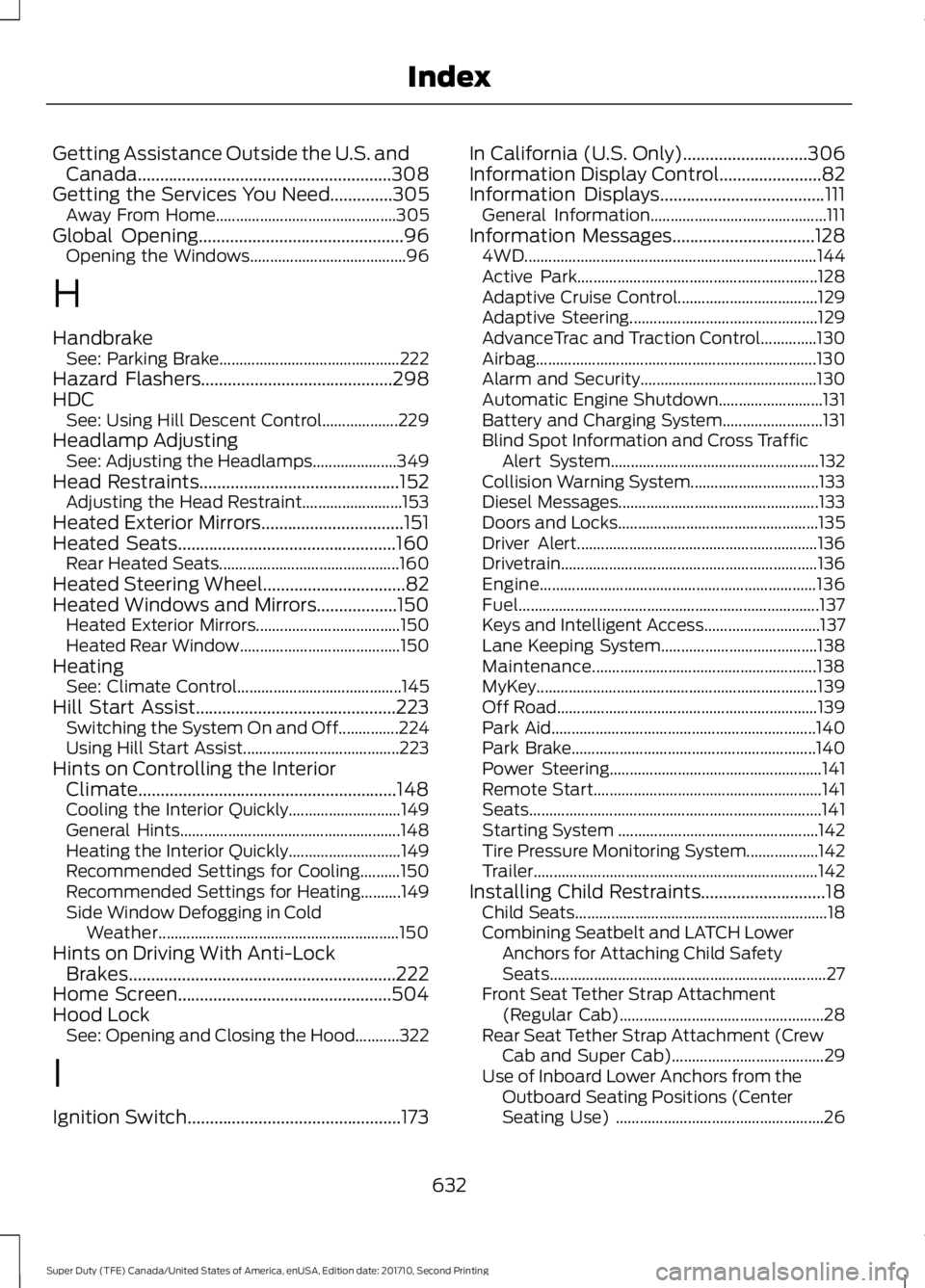
Getting Assistance Outside the U.S. andCanada.........................................................308Getting the Services You Need..............305Away From Home.............................................305Global Opening..............................................96Opening the Windows.......................................96
H
HandbrakeSee: Parking Brake.............................................222Hazard Flashers...........................................298HDCSee: Using Hill Descent Control...................229Headlamp AdjustingSee: Adjusting the Headlamps.....................349Head Restraints.............................................152Adjusting the Head Restraint.........................153Heated Exterior Mirrors................................151Heated Seats.................................................160Rear Heated Seats.............................................160Heated Steering Wheel................................82Heated Windows and Mirrors..................150Heated Exterior Mirrors....................................150Heated Rear Window........................................150HeatingSee: Climate Control.........................................145Hill Start Assist.............................................223Switching the System On and Off...............224Using Hill Start Assist.......................................223Hints on Controlling the InteriorClimate..........................................................148Cooling the Interior Quickly............................149General Hints.......................................................148Heating the Interior Quickly............................149Recommended Settings for Cooling..........150Recommended Settings for Heating..........149Side Window Defogging in ColdWeather............................................................150Hints on Driving With Anti-LockBrakes............................................................222Home Screen................................................504Hood LockSee: Opening and Closing the Hood...........322
I
Ignition Switch................................................173
In California (U.S. Only)............................306Information Display Control.......................82Information Displays.....................................111General Information............................................111Information Messages................................1284WD.........................................................................144Active Park............................................................128Adaptive Cruise Control...................................129Adaptive Steering...............................................129AdvanceTrac and Traction Control..............130Airbag......................................................................130Alarm and Security............................................130Automatic Engine Shutdown..........................131Battery and Charging System.........................131Blind Spot Information and Cross TrafficAlert System....................................................132Collision Warning System................................133Diesel Messages..................................................133Doors and Locks..................................................135Driver Alert............................................................136Drivetrain................................................................136Engine.....................................................................136Fuel...........................................................................137Keys and Intelligent Access.............................137Lane Keeping System.......................................138Maintenance........................................................138MyKey......................................................................139Off Road.................................................................139Park Aid..................................................................140Park Brake.............................................................140Power Steering.....................................................141Remote Start.........................................................141Seats.........................................................................141Starting System ..................................................142Tire Pressure Monitoring System..................142Trailer.......................................................................142Installing Child Restraints............................18Child Seats...............................................................18Combining Seatbelt and LATCH LowerAnchors for Attaching Child SafetySeats.....................................................................27Front Seat Tether Strap Attachment(Regular Cab)...................................................28Rear Seat Tether Strap Attachment (CrewCab and Super Cab)......................................29Use of Inboard Lower Anchors from theOutboard Seating Positions (CenterSeating Use) ....................................................26
632
Super Duty (TFE) Canada/United States of America, enUSA, Edition date: 201710, Second Printing
Index
Page 636 of 642
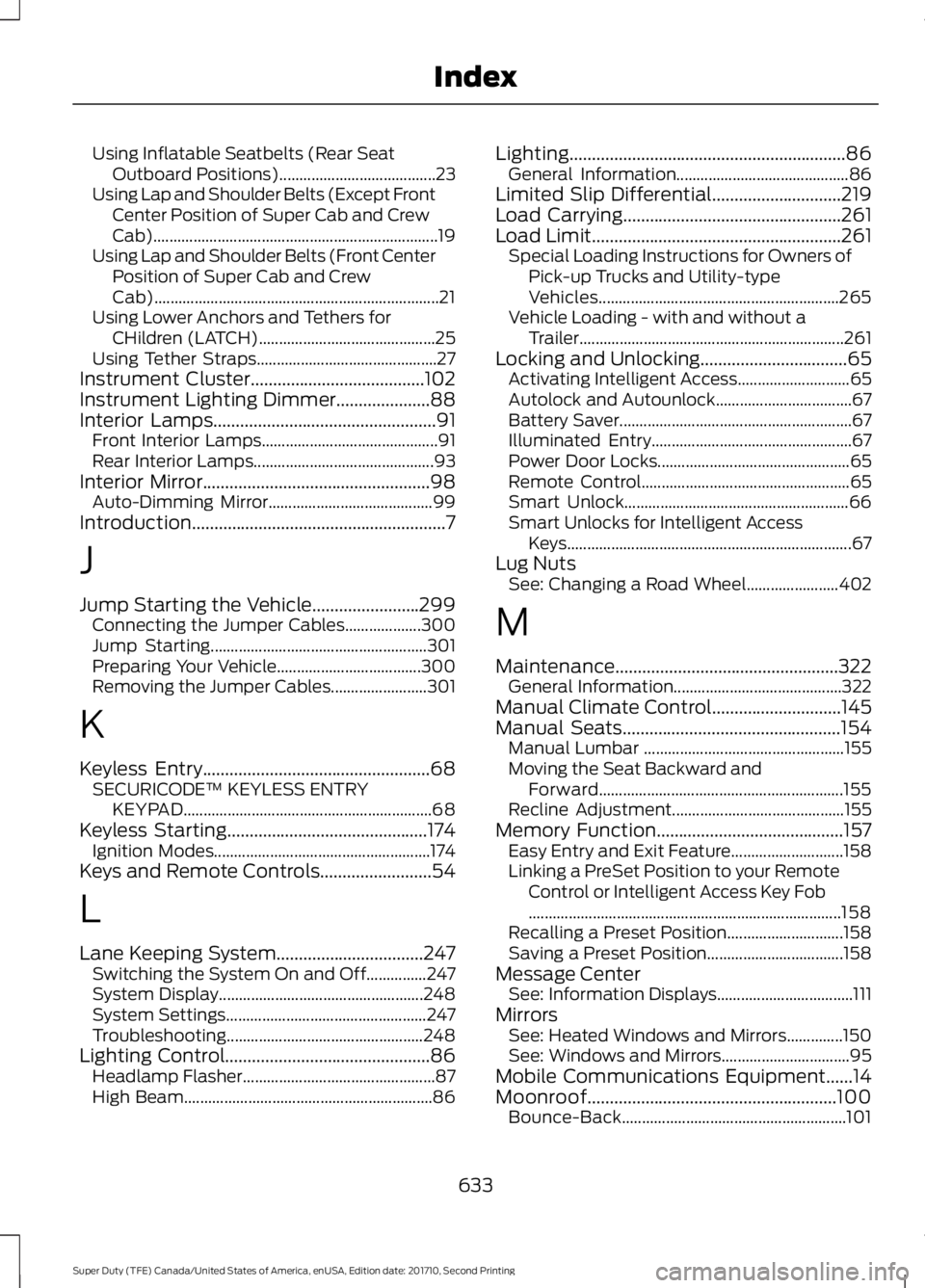
Using Inflatable Seatbelts (Rear SeatOutboard Positions).......................................23Using Lap and Shoulder Belts (Except FrontCenter Position of Super Cab and CrewCab).......................................................................19Using Lap and Shoulder Belts (Front CenterPosition of Super Cab and CrewCab).......................................................................21Using Lower Anchors and Tethers forCHildren (LATCH)............................................25Using Tether Straps.............................................27Instrument Cluster.......................................102Instrument Lighting Dimmer.....................88Interior Lamps..................................................91Front Interior Lamps............................................91Rear Interior Lamps.............................................93Interior Mirror...................................................98Auto-Dimming Mirror.........................................99Introduction.........................................................7
J
Jump Starting the Vehicle........................299Connecting the Jumper Cables...................300Jump Starting......................................................301Preparing Your Vehicle....................................300Removing the Jumper Cables........................301
K
Keyless Entry...................................................68SECURICODE™ KEYLESS ENTRYKEYPAD..............................................................68Keyless Starting.............................................174Ignition Modes......................................................174Keys and Remote Controls.........................54
L
Lane Keeping System.................................247Switching the System On and Off...............247System Display...................................................248System Settings..................................................247Troubleshooting.................................................248Lighting Control..............................................86Headlamp Flasher................................................87High Beam..............................................................86
Lighting..............................................................86General Information...........................................86Limited Slip Differential.............................219Load Carrying.................................................261Load Limit........................................................261Special Loading Instructions for Owners ofPick-up Trucks and Utility-typeVehicles............................................................265Vehicle Loading - with and without aTrailer..................................................................261Locking and Unlocking.................................65Activating Intelligent Access............................65Autolock and Autounlock..................................67Battery Saver..........................................................67Illuminated Entry..................................................67Power Door Locks................................................65Remote Control....................................................65Smart Unlock........................................................66Smart Unlocks for Intelligent AccessKeys.......................................................................67Lug NutsSee: Changing a Road Wheel.......................402
M
Maintenance..................................................322General Information..........................................322Manual Climate Control.............................145Manual Seats.................................................154Manual Lumbar ..................................................155Moving the Seat Backward andForward.............................................................155Recline Adjustment...........................................155Memory Function..........................................157Easy Entry and Exit Feature............................158Linking a PreSet Position to your RemoteControl or Intelligent Access Key Fob..............................................................................158Recalling a Preset Position.............................158Saving a Preset Position..................................158Message CenterSee: Information Displays..................................111MirrorsSee: Heated Windows and Mirrors..............150See: Windows and Mirrors................................95Mobile Communications Equipment......14Moonroof........................................................100Bounce-Back........................................................101
633
Super Duty (TFE) Canada/United States of America, enUSA, Edition date: 201710, Second Printing
Index
Page 638 of 642
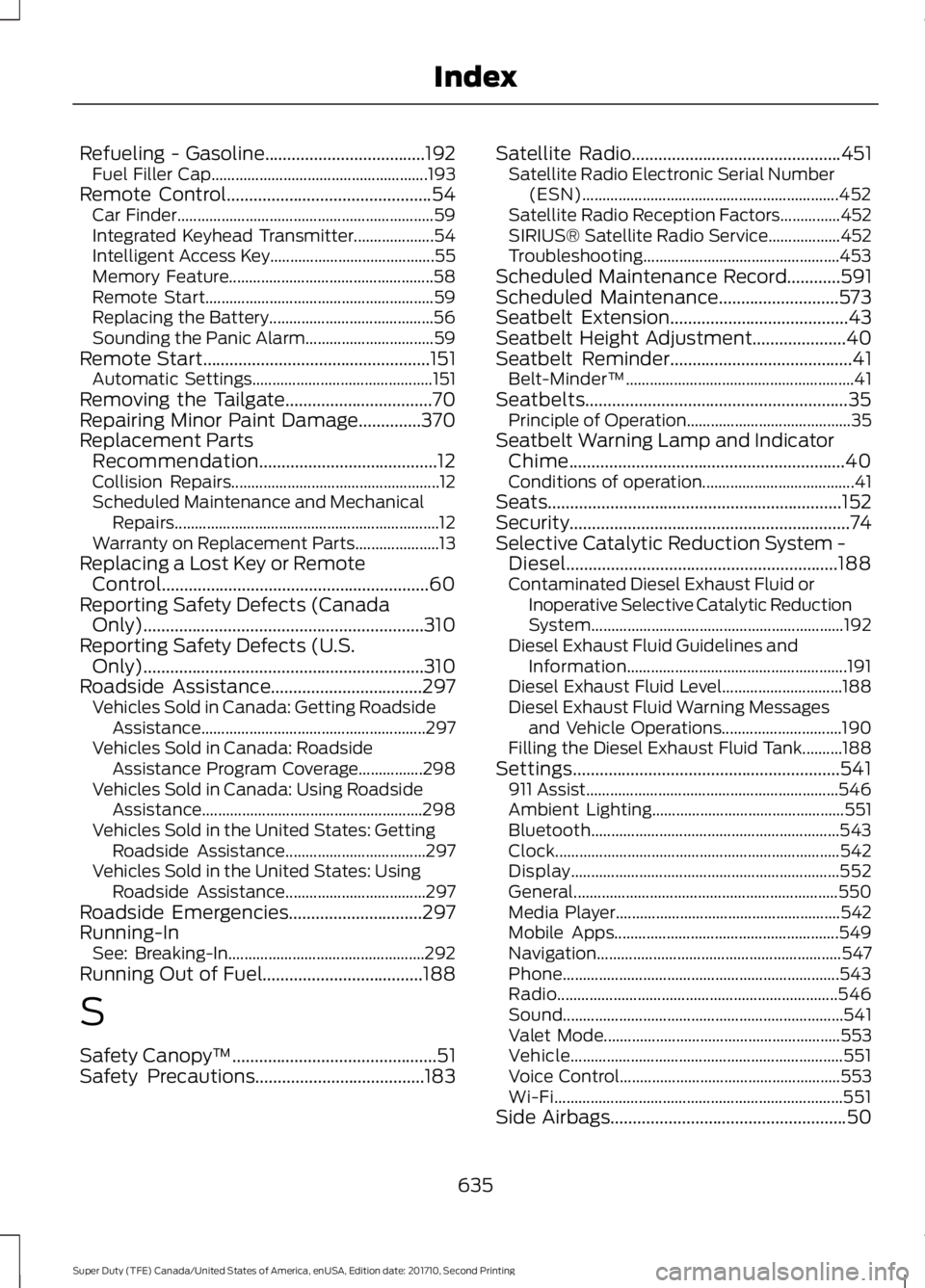
Refueling - Gasoline....................................192Fuel Filler Cap......................................................193Remote Control..............................................54Car Finder................................................................59Integrated Keyhead Transmitter....................54Intelligent Access Key.........................................55Memory Feature...................................................58Remote Start.........................................................59Replacing the Battery.........................................56Sounding the Panic Alarm................................59Remote Start...................................................151Automatic Settings.............................................151Removing the Tailgate.................................70Repairing Minor Paint Damage..............370Replacement PartsRecommendation........................................12Collision Repairs....................................................12Scheduled Maintenance and MechanicalRepairs..................................................................12Warranty on Replacement Parts.....................13Replacing a Lost Key or RemoteControl............................................................60Reporting Safety Defects (CanadaOnly)...............................................................310Reporting Safety Defects (U.S.Only)...............................................................310Roadside Assistance..................................297Vehicles Sold in Canada: Getting RoadsideAssistance........................................................297Vehicles Sold in Canada: RoadsideAssistance Program Coverage................298Vehicles Sold in Canada: Using RoadsideAssistance.......................................................298Vehicles Sold in the United States: GettingRoadside Assistance...................................297Vehicles Sold in the United States: UsingRoadside Assistance...................................297Roadside Emergencies..............................297Running-InSee: Breaking-In.................................................292Running Out of Fuel....................................188
S
Safety Canopy™..............................................51Safety Precautions......................................183
Satellite Radio...............................................451Satellite Radio Electronic Serial Number(ESN)................................................................452Satellite Radio Reception Factors...............452SIRIUS® Satellite Radio Service..................452Troubleshooting.................................................453Scheduled Maintenance Record............591Scheduled Maintenance...........................573Seatbelt Extension........................................43Seatbelt Height Adjustment.....................40Seatbelt Reminder.........................................41Belt-Minder™.........................................................41Seatbelts...........................................................35Principle of Operation.........................................35Seatbelt Warning Lamp and IndicatorChime..............................................................40Conditions of operation......................................41Seats..................................................................152Security...............................................................74Selective Catalytic Reduction System -Diesel.............................................................188Contaminated Diesel Exhaust Fluid orInoperative Selective Catalytic ReductionSystem...............................................................192Diesel Exhaust Fluid Guidelines andInformation.......................................................191Diesel Exhaust Fluid Level..............................188Diesel Exhaust Fluid Warning Messagesand Vehicle Operations..............................190Filling the Diesel Exhaust Fluid Tank..........188Settings............................................................541911 Assist...............................................................546Ambient Lighting................................................551Bluetooth..............................................................543Clock.......................................................................542Display...................................................................552General..................................................................550Media Player........................................................542Mobile Apps........................................................549Navigation.............................................................547Phone.....................................................................543Radio......................................................................546Sound......................................................................541Valet Mode...........................................................553Vehicle....................................................................551Voice Control.......................................................553Wi-Fi........................................................................551Side Airbags.....................................................50
635
Super Duty (TFE) Canada/United States of America, enUSA, Edition date: 201710, Second Printing
Index
Page 640 of 642
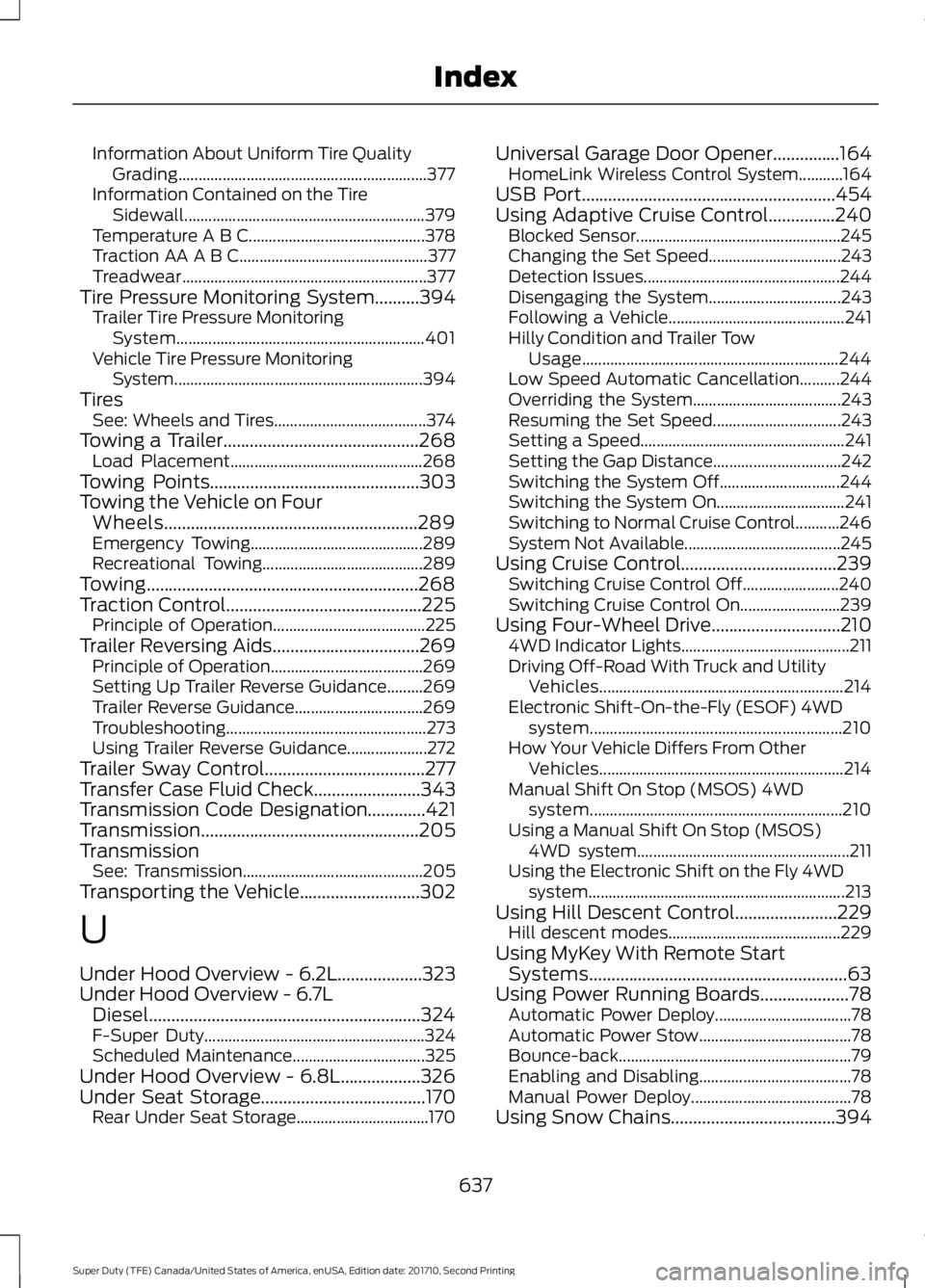
Information About Uniform Tire QualityGrading..............................................................377Information Contained on the TireSidewall............................................................379Temperature A B C............................................378Traction AA A B C...............................................377Treadwear.............................................................377Tire Pressure Monitoring System..........394Trailer Tire Pressure MonitoringSystem..............................................................401Vehicle Tire Pressure MonitoringSystem..............................................................394TiresSee: Wheels and Tires......................................374Towing a Trailer............................................268Load Placement................................................268Towing Points...............................................303Towing the Vehicle on FourWheels.........................................................289Emergency Towing...........................................289Recreational Towing........................................289Towing.............................................................268Traction Control............................................225Principle of Operation......................................225Trailer Reversing Aids.................................269Principle of Operation......................................269Setting Up Trailer Reverse Guidance.........269Trailer Reverse Guidance................................269Troubleshooting..................................................273Using Trailer Reverse Guidance....................272Trailer Sway Control....................................277Transfer Case Fluid Check........................343Transmission Code Designation.............421Transmission.................................................205TransmissionSee: Transmission.............................................205Transporting the Vehicle...........................302
U
Under Hood Overview - 6.2L...................323Under Hood Overview - 6.7LDiesel.............................................................324F-Super Duty.......................................................324Scheduled Maintenance.................................325Under Hood Overview - 6.8L..................326Under Seat Storage.....................................170Rear Under Seat Storage.................................170
Universal Garage Door Opener...............164HomeLink Wireless Control System...........164USB Port.........................................................454Using Adaptive Cruise Control...............240Blocked Sensor...................................................245Changing the Set Speed.................................243Detection Issues.................................................244Disengaging the System.................................243Following a Vehicle............................................241Hilly Condition and Trailer TowUsage................................................................244Low Speed Automatic Cancellation..........244Overriding the System.....................................243Resuming the Set Speed................................243Setting a Speed...................................................241Setting the Gap Distance................................242Switching the System Off..............................244Switching the System On................................241Switching to Normal Cruise Control...........246System Not Available.......................................245Using Cruise Control...................................239Switching Cruise Control Off........................240Switching Cruise Control On.........................239Using Four-Wheel Drive.............................2104WD Indicator Lights..........................................211Driving Off-Road With Truck and UtilityVehicles.............................................................214Electronic Shift-On-the-Fly (ESOF) 4WDsystem...............................................................210How Your Vehicle Differs From OtherVehicles.............................................................214Manual Shift On Stop (MSOS) 4WDsystem...............................................................210Using a Manual Shift On Stop (MSOS)4WD system.....................................................211Using the Electronic Shift on the Fly 4WDsystem................................................................213Using Hill Descent Control.......................229Hill descent modes...........................................229Using MyKey With Remote StartSystems..........................................................63Using Power Running Boards....................78Automatic Power Deploy..................................78Automatic Power Stow......................................78Bounce-back..........................................................79Enabling and Disabling......................................78Manual Power Deploy........................................78Using Snow Chains.....................................394
637
Super Duty (TFE) Canada/United States of America, enUSA, Edition date: 201710, Second Printing
Index