USB FORD F450 SUPER DUTY 2017 Service Manual
[x] Cancel search | Manufacturer: FORD, Model Year: 2017, Model line: F450 SUPER DUTY, Model: FORD F450 SUPER DUTY 2017Pages: 642, PDF Size: 12.35 MB
Page 565 of 642
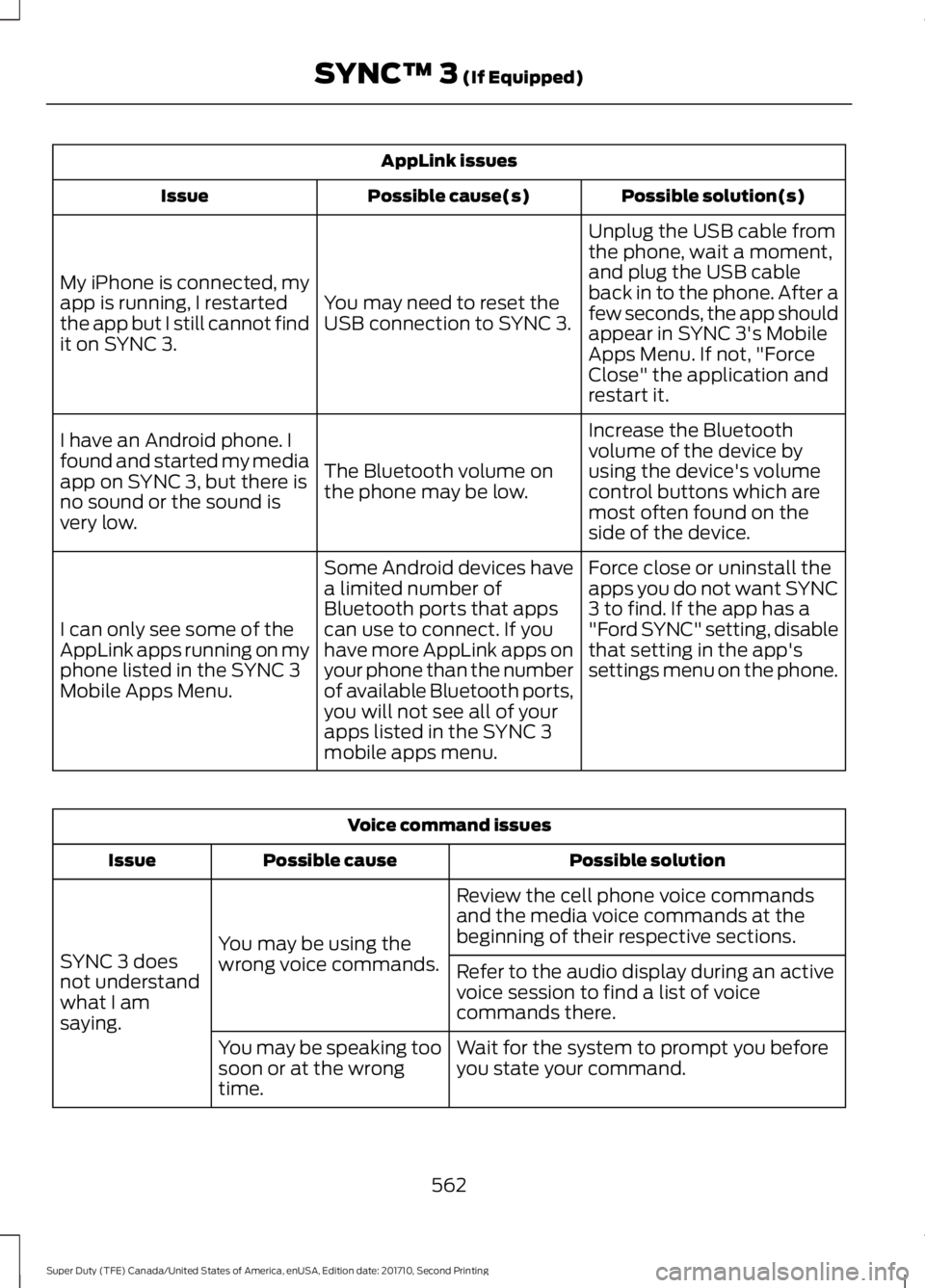
AppLink issues
Possible solution(s)Possible cause(s)Issue
Unplug the USB cable fromthe phone, wait a moment,and plug the USB cableback in to the phone. After afew seconds, the app shouldappear in SYNC 3's MobileApps Menu. If not, "ForceClose" the application andrestart it.
You may need to reset theUSB connection to SYNC 3.
My iPhone is connected, myapp is running, I restartedthe app but I still cannot findit on SYNC 3.
Increase the Bluetoothvolume of the device byusing the device's volumecontrol buttons which aremost often found on theside of the device.
The Bluetooth volume onthe phone may be low.
I have an Android phone. Ifound and started my mediaapp on SYNC 3, but there isno sound or the sound isvery low.
Force close or uninstall theapps you do not want SYNC3 to find. If the app has a"Ford SYNC" setting, disablethat setting in the app'ssettings menu on the phone.
Some Android devices havea limited number ofBluetooth ports that appscan use to connect. If youhave more AppLink apps onyour phone than the numberof available Bluetooth ports,you will not see all of yourapps listed in the SYNC 3mobile apps menu.
I can only see some of theAppLink apps running on myphone listed in the SYNC 3Mobile Apps Menu.
Voice command issues
Possible solutionPossible causeIssue
Review the cell phone voice commandsand the media voice commands at thebeginning of their respective sections.You may be using thewrong voice commands.SYNC 3 doesnot understandwhat I amsaying.
Refer to the audio display during an activevoice session to find a list of voicecommands there.
Wait for the system to prompt you beforeyou state your command.You may be speaking toosoon or at the wrongtime.
562
Super Duty (TFE) Canada/United States of America, enUSA, Edition date: 201710, Second Printing
SYNC™ 3 (If Equipped)
Page 567 of 642
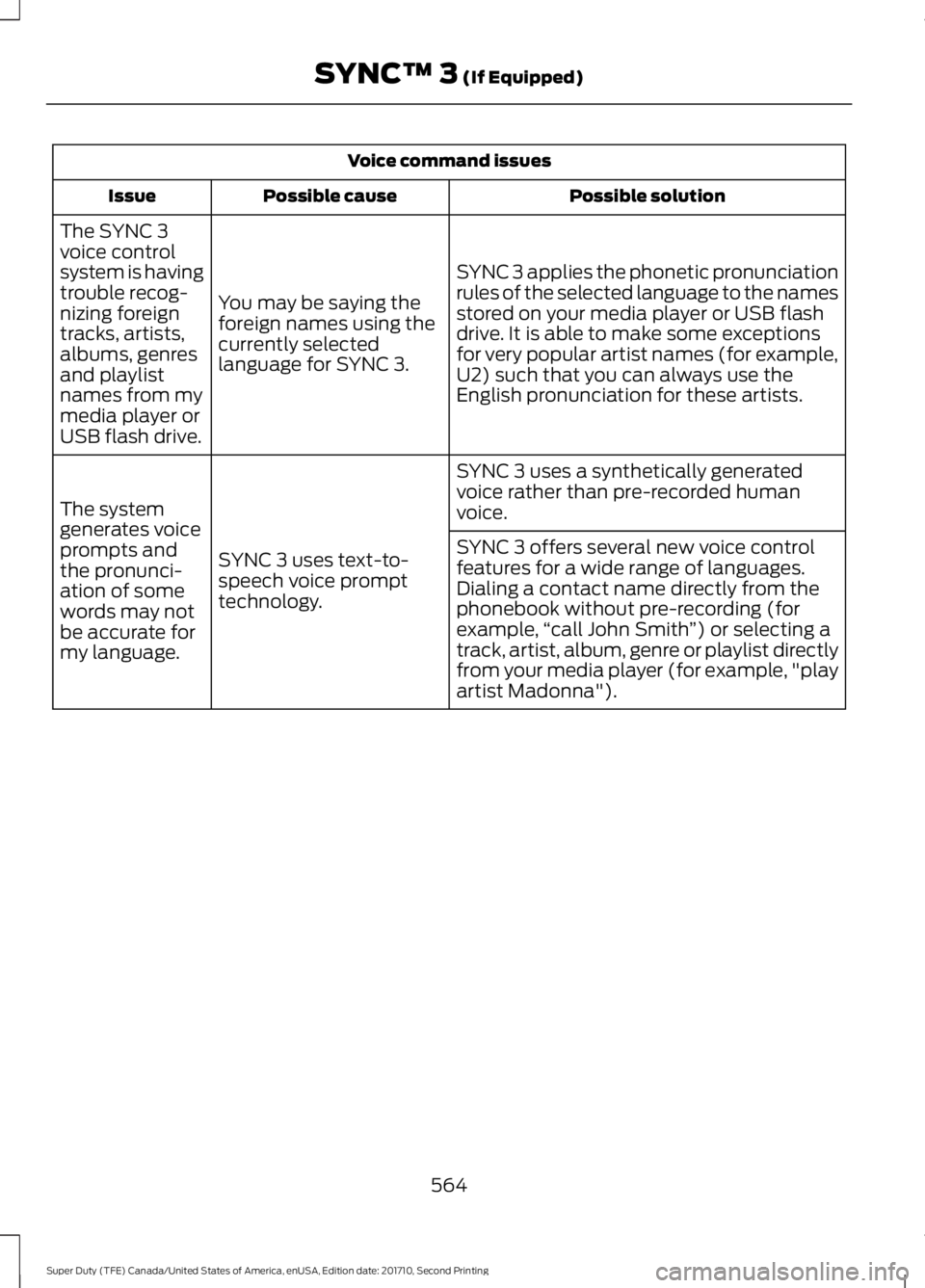
Voice command issues
Possible solutionPossible causeIssue
SYNC 3 applies the phonetic pronunciationrules of the selected language to the namesstored on your media player or USB flashdrive. It is able to make some exceptionsfor very popular artist names (for example,U2) such that you can always use theEnglish pronunciation for these artists.
You may be saying theforeign names using thecurrently selectedlanguage for SYNC 3.
The SYNC 3voice controlsystem is havingtrouble recog-nizing foreigntracks, artists,albums, genresand playlistnames from mymedia player orUSB flash drive.
SYNC 3 uses a synthetically generatedvoice rather than pre-recorded humanvoice.
SYNC 3 uses text-to-speech voice prompttechnology.
The systemgenerates voiceprompts andthe pronunci-ation of somewords may notbe accurate formy language.
SYNC 3 offers several new voice controlfeatures for a wide range of languages.Dialing a contact name directly from thephonebook without pre-recording (forexample,“call John Smith”) or selecting atrack, artist, album, genre or playlist directlyfrom your media player (for example, "playartist Madonna").
564
Super Duty (TFE) Canada/United States of America, enUSA, Edition date: 201710, Second Printing
SYNC™ 3 (If Equipped)
Page 568 of 642
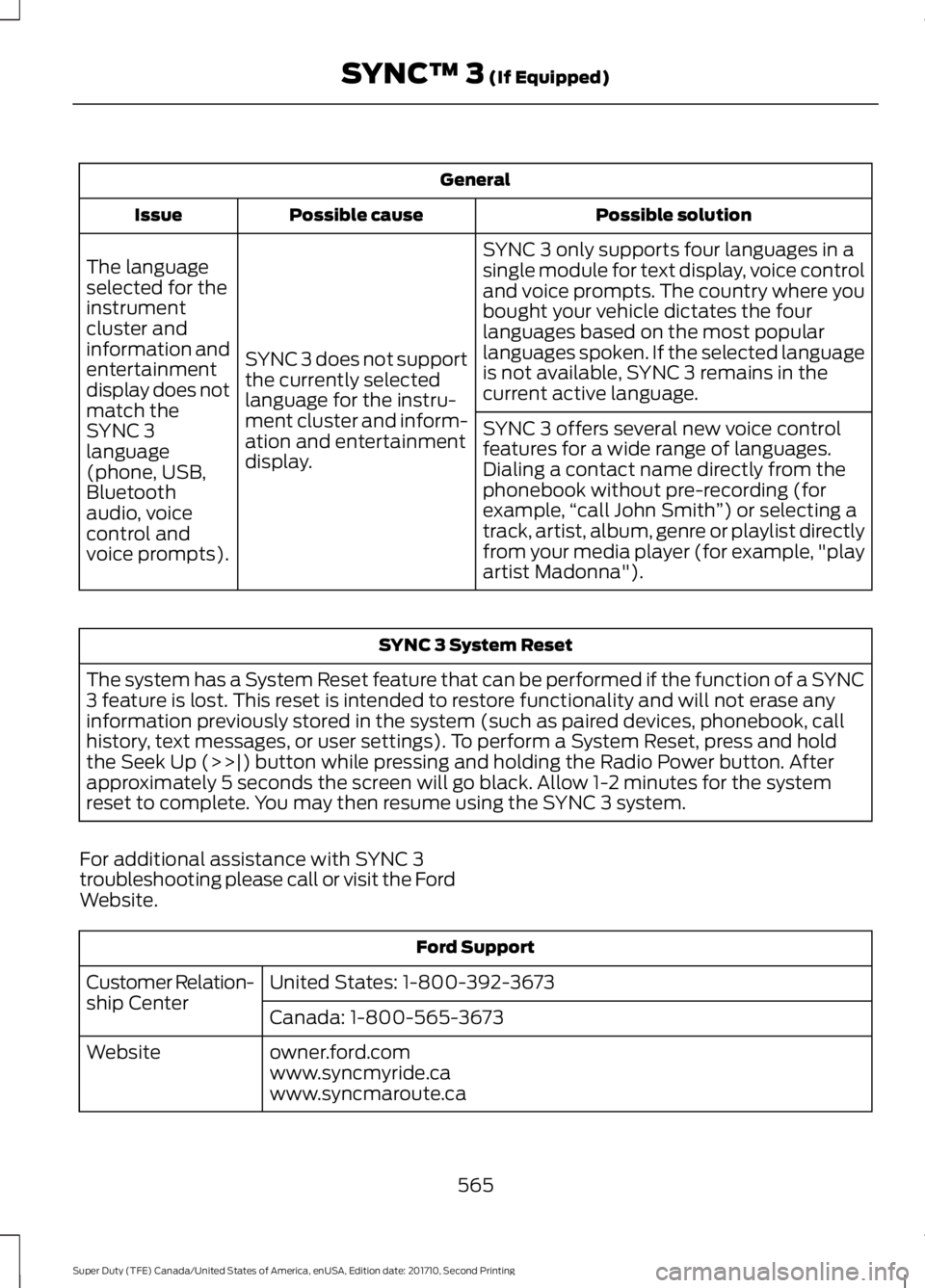
General
Possible solutionPossible causeIssue
SYNC 3 only supports four languages in asingle module for text display, voice controland voice prompts. The country where youbought your vehicle dictates the fourlanguages based on the most popularlanguages spoken. If the selected languageis not available, SYNC 3 remains in thecurrent active language.
SYNC 3 does not supportthe currently selectedlanguage for the instru-ment cluster and inform-ation and entertainmentdisplay.
The languageselected for theinstrumentcluster andinformation andentertainmentdisplay does notmatch theSYNC 3SYNC 3 offers several new voice controlfeatures for a wide range of languages.Dialing a contact name directly from thephonebook without pre-recording (forexample,“call John Smith”) or selecting atrack, artist, album, genre or playlist directlyfrom your media player (for example, "playartist Madonna").
language(phone, USB,Bluetoothaudio, voicecontrol andvoice prompts).
SYNC 3 System Reset
The system has a System Reset feature that can be performed if the function of a SYNC3 feature is lost. This reset is intended to restore functionality and will not erase anyinformation previously stored in the system (such as paired devices, phonebook, callhistory, text messages, or user settings). To perform a System Reset, press and holdthe Seek Up (>>|) button while pressing and holding the Radio Power button. Afterapproximately 5 seconds the screen will go black. Allow 1-2 minutes for the systemreset to complete. You may then resume using the SYNC 3 system.
For additional assistance with SYNC 3troubleshooting please call or visit the FordWebsite.
Ford Support
United States: 1-800-392-3673Customer Relation-ship CenterCanada: 1-800-565-3673
owner.ford.comWebsitewww.syncmyride.cawww.syncmaroute.ca
565
Super Duty (TFE) Canada/United States of America, enUSA, Edition date: 201710, Second Printing
SYNC™ 3 (If Equipped)
Page 633 of 642
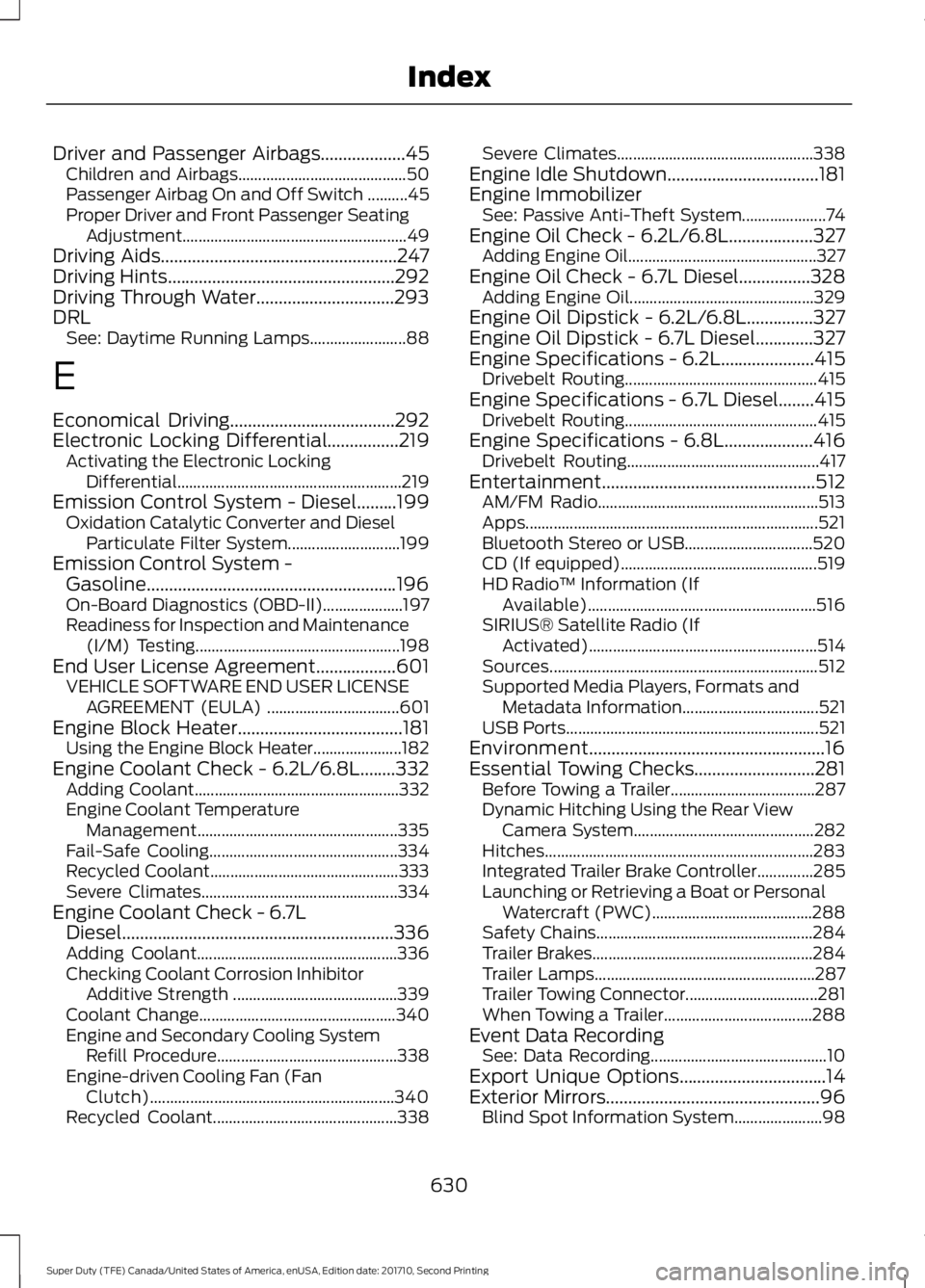
Driver and Passenger Airbags...................45Children and Airbags..........................................50Passenger Airbag On and Off Switch ..........45Proper Driver and Front Passenger SeatingAdjustment........................................................49Driving Aids.....................................................247Driving Hints...................................................292Driving Through Water...............................293DRLSee: Daytime Running Lamps........................88
E
Economical Driving.....................................292Electronic Locking Differential................219Activating the Electronic LockingDifferential........................................................219Emission Control System - Diesel.........199Oxidation Catalytic Converter and DieselParticulate Filter System............................199Emission Control System -Gasoline........................................................196On-Board Diagnostics (OBD-II)....................197Readiness for Inspection and Maintenance(I/M) Testing...................................................198End User License Agreement..................601VEHICLE SOFTWARE END USER LICENSEAGREEMENT (EULA) .................................601Engine Block Heater.....................................181Using the Engine Block Heater......................182Engine Coolant Check - 6.2L/6.8L........332Adding Coolant...................................................332Engine Coolant TemperatureManagement..................................................335Fail-Safe Cooling...............................................334Recycled Coolant...............................................333Severe Climates.................................................334Engine Coolant Check - 6.7LDiesel.............................................................336Adding Coolant..................................................336Checking Coolant Corrosion InhibitorAdditive Strength .........................................339Coolant Change.................................................340Engine and Secondary Cooling SystemRefill Procedure.............................................338Engine-driven Cooling Fan (FanClutch).............................................................340Recycled Coolant..............................................338
Severe Climates.................................................338Engine Idle Shutdown..................................181Engine ImmobilizerSee: Passive Anti-Theft System.....................74Engine Oil Check - 6.2L/6.8L...................327Adding Engine Oil...............................................327Engine Oil Check - 6.7L Diesel................328Adding Engine Oil..............................................329Engine Oil Dipstick - 6.2L/6.8L...............327Engine Oil Dipstick - 6.7L Diesel.............327Engine Specifications - 6.2L.....................415Drivebelt Routing................................................415Engine Specifications - 6.7L Diesel........415Drivebelt Routing................................................415Engine Specifications - 6.8L....................416Drivebelt Routing................................................417Entertainment................................................512AM/FM Radio.......................................................513Apps.........................................................................521Bluetooth Stereo or USB................................520CD (If equipped).................................................519HD Radio™ Information (IfAvailable).........................................................516SIRIUS® Satellite Radio (IfActivated).........................................................514Sources...................................................................512Supported Media Players, Formats andMetadata Information..................................521USB Ports...............................................................521Environment.....................................................16Essential Towing Checks...........................281Before Towing a Trailer....................................287Dynamic Hitching Using the Rear ViewCamera System.............................................282Hitches...................................................................283Integrated Trailer Brake Controller..............285Launching or Retrieving a Boat or PersonalWatercraft (PWC)........................................288Safety Chains......................................................284Trailer Brakes.......................................................284Trailer Lamps.......................................................287Trailer Towing Connector.................................281When Towing a Trailer.....................................288Event Data RecordingSee: Data Recording............................................10Export Unique Options.................................14Exterior Mirrors................................................96Blind Spot Information System......................98
630
Super Duty (TFE) Canada/United States of America, enUSA, Edition date: 201710, Second Printing
Index
Page 640 of 642
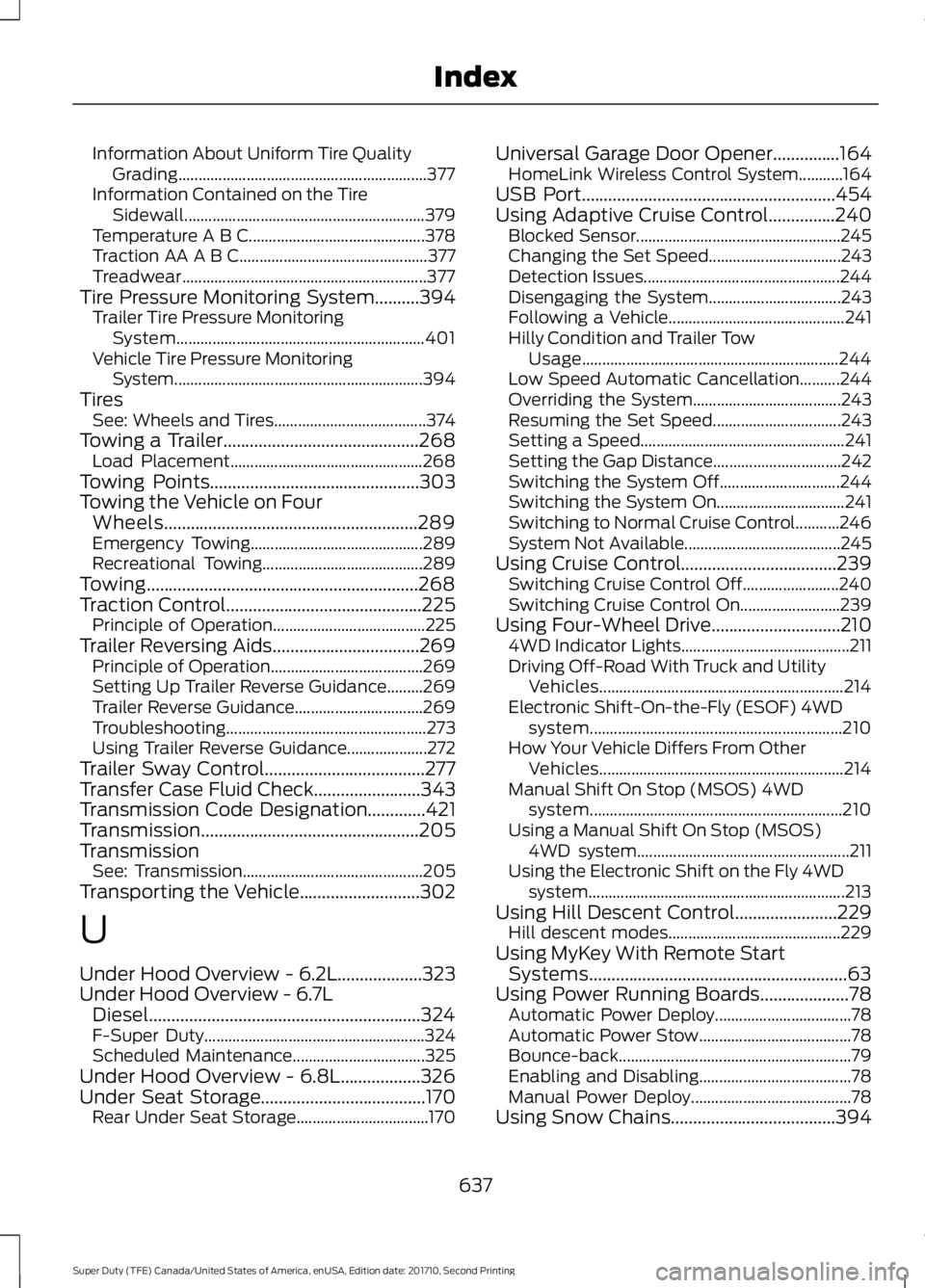
Information About Uniform Tire QualityGrading..............................................................377Information Contained on the TireSidewall............................................................379Temperature A B C............................................378Traction AA A B C...............................................377Treadwear.............................................................377Tire Pressure Monitoring System..........394Trailer Tire Pressure MonitoringSystem..............................................................401Vehicle Tire Pressure MonitoringSystem..............................................................394TiresSee: Wheels and Tires......................................374Towing a Trailer............................................268Load Placement................................................268Towing Points...............................................303Towing the Vehicle on FourWheels.........................................................289Emergency Towing...........................................289Recreational Towing........................................289Towing.............................................................268Traction Control............................................225Principle of Operation......................................225Trailer Reversing Aids.................................269Principle of Operation......................................269Setting Up Trailer Reverse Guidance.........269Trailer Reverse Guidance................................269Troubleshooting..................................................273Using Trailer Reverse Guidance....................272Trailer Sway Control....................................277Transfer Case Fluid Check........................343Transmission Code Designation.............421Transmission.................................................205TransmissionSee: Transmission.............................................205Transporting the Vehicle...........................302
U
Under Hood Overview - 6.2L...................323Under Hood Overview - 6.7LDiesel.............................................................324F-Super Duty.......................................................324Scheduled Maintenance.................................325Under Hood Overview - 6.8L..................326Under Seat Storage.....................................170Rear Under Seat Storage.................................170
Universal Garage Door Opener...............164HomeLink Wireless Control System...........164USB Port.........................................................454Using Adaptive Cruise Control...............240Blocked Sensor...................................................245Changing the Set Speed.................................243Detection Issues.................................................244Disengaging the System.................................243Following a Vehicle............................................241Hilly Condition and Trailer TowUsage................................................................244Low Speed Automatic Cancellation..........244Overriding the System.....................................243Resuming the Set Speed................................243Setting a Speed...................................................241Setting the Gap Distance................................242Switching the System Off..............................244Switching the System On................................241Switching to Normal Cruise Control...........246System Not Available.......................................245Using Cruise Control...................................239Switching Cruise Control Off........................240Switching Cruise Control On.........................239Using Four-Wheel Drive.............................2104WD Indicator Lights..........................................211Driving Off-Road With Truck and UtilityVehicles.............................................................214Electronic Shift-On-the-Fly (ESOF) 4WDsystem...............................................................210How Your Vehicle Differs From OtherVehicles.............................................................214Manual Shift On Stop (MSOS) 4WDsystem...............................................................210Using a Manual Shift On Stop (MSOS)4WD system.....................................................211Using the Electronic Shift on the Fly 4WDsystem................................................................213Using Hill Descent Control.......................229Hill descent modes...........................................229Using MyKey With Remote StartSystems..........................................................63Using Power Running Boards....................78Automatic Power Deploy..................................78Automatic Power Stow......................................78Bounce-back..........................................................79Enabling and Disabling......................................78Manual Power Deploy........................................78Using Snow Chains.....................................394
637
Super Duty (TFE) Canada/United States of America, enUSA, Edition date: 201710, Second Printing
Index
Page 641 of 642
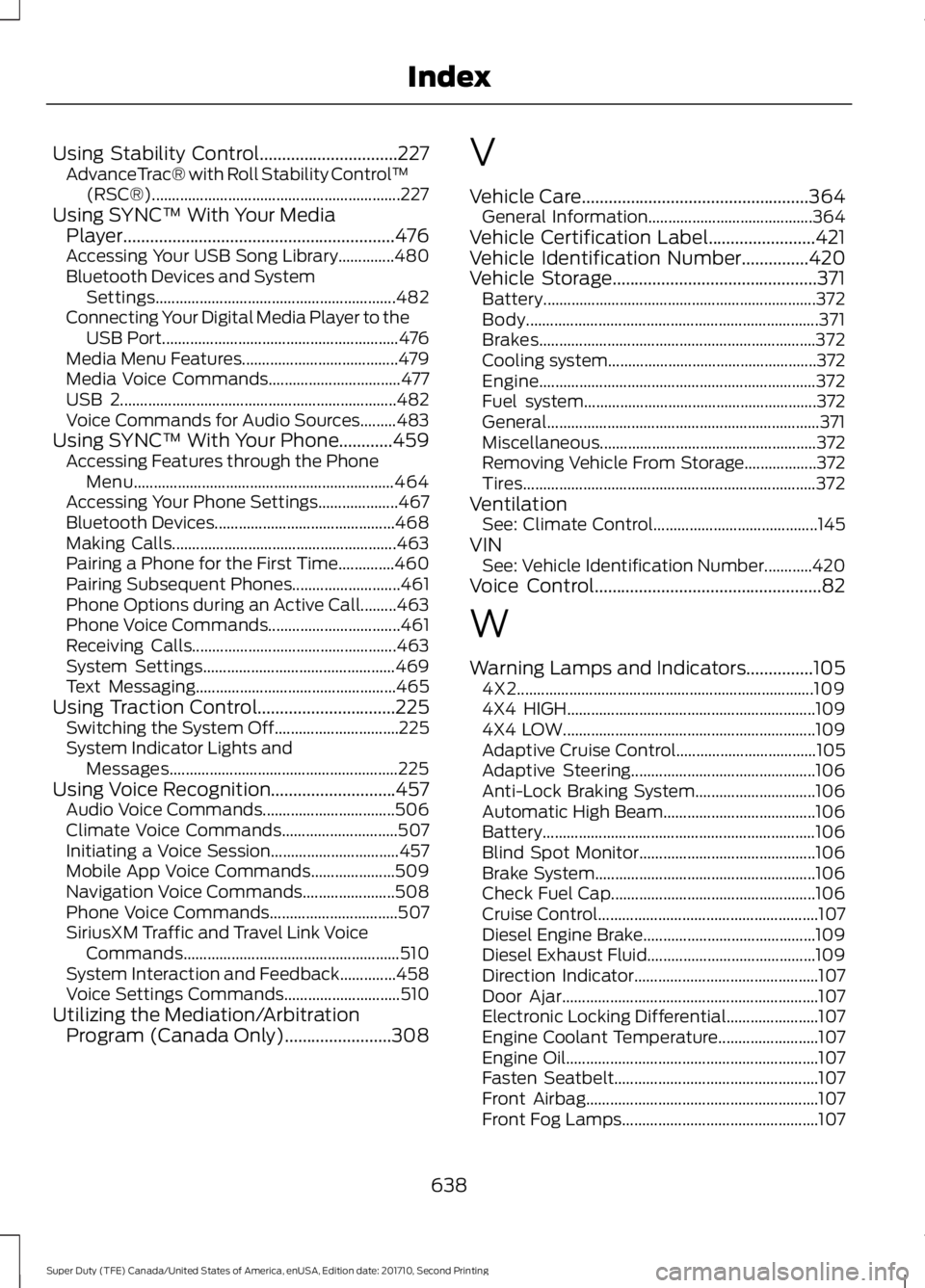
Using Stability Control...............................227AdvanceTrac® with Roll Stability Control™(RSC®)..............................................................227Using SYNC™ With Your MediaPlayer.............................................................476Accessing Your USB Song Library..............480Bluetooth Devices and SystemSettings............................................................482Connecting Your Digital Media Player to theUSB Port...........................................................476Media Menu Features.......................................479Media Voice Commands.................................477USB 2.....................................................................482Voice Commands for Audio Sources.........483Using SYNC™ With Your Phone............459Accessing Features through the PhoneMenu.................................................................464Accessing Your Phone Settings....................467Bluetooth Devices.............................................468Making Calls........................................................463Pairing a Phone for the First Time..............460Pairing Subsequent Phones...........................461Phone Options during an Active Call.........463Phone Voice Commands.................................461Receiving Calls...................................................463System Settings................................................469Text Messaging..................................................465Using Traction Control...............................225Switching the System Off...............................225System Indicator Lights andMessages.........................................................225Using Voice Recognition............................457Audio Voice Commands.................................506Climate Voice Commands.............................507Initiating a Voice Session................................457Mobile App Voice Commands.....................509Navigation Voice Commands.......................508Phone Voice Commands................................507SiriusXM Traffic and Travel Link VoiceCommands......................................................510System Interaction and Feedback..............458Voice Settings Commands.............................510Utilizing the Mediation/ArbitrationProgram (Canada Only)........................308
V
Vehicle Care...................................................364General Information.........................................364Vehicle Certification Label........................421Vehicle Identification Number...............420Vehicle Storage..............................................371Battery....................................................................372Body.........................................................................371Brakes.....................................................................372Cooling system....................................................372Engine.....................................................................372Fuel system..........................................................372General....................................................................371Miscellaneous......................................................372Removing Vehicle From Storage..................372Tires.........................................................................372VentilationSee: Climate Control.........................................145VINSee: Vehicle Identification Number............420Voice Control...................................................82
W
Warning Lamps and Indicators...............1054X2..........................................................................1094X4 HIGH..............................................................1094X4 LOW...............................................................109Adaptive Cruise Control...................................105Adaptive Steering..............................................106Anti-Lock Braking System..............................106Automatic High Beam......................................106Battery....................................................................106Blind Spot Monitor............................................106Brake System.......................................................106Check Fuel Cap...................................................106Cruise Control.......................................................107Diesel Engine Brake...........................................109Diesel Exhaust Fluid..........................................109Direction Indicator..............................................107Door Ajar................................................................107Electronic Locking Differential.......................107Engine Coolant Temperature.........................107Engine Oil...............................................................107Fasten Seatbelt...................................................107Front Airbag..........................................................107Front Fog Lamps.................................................107
638
Super Duty (TFE) Canada/United States of America, enUSA, Edition date: 201710, Second Printing
Index