tailgate FORD F450 SUPER DUTY 2017 Owners Manual
[x] Cancel search | Manufacturer: FORD, Model Year: 2017, Model line: F450 SUPER DUTY, Model: FORD F450 SUPER DUTY 2017Pages: 642, PDF Size: 12.35 MB
Page 4 of 642
Introduction
About This Manual...........................................7
Symbols Glossary.............................................8
Data Recording................................................10
California Proposition 65.............................12
Perchlorate.........................................................12
Ford Credit.........................................................12
Replacement PartsRecommendation.......................................12
Special Notices................................................13
Mobile CommunicationsEquipment.....................................................14
Export Unique Options.................................14
Environment
Protecting the Environment........................16
Child Safety
General Information.......................................17
Installing Child Restraints............................18
Booster Seats..................................................30
Child Restraint Positioning.........................32
Child Safety Locks..........................................33
Seatbelts
Principle of Operation..................................35
Fastening the Seatbelts..............................36
Seatbelt Height Adjustment.....................40
Seatbelt Warning Lamp and IndicatorChime.............................................................40
Seatbelt Reminder.........................................41
Child Restraint and SeatbeltMaintenance................................................42
Seatbelt Extension........................................43
Supplementary RestraintsSystem
Principle of Operation..................................44
Driver and Passenger Airbags...................45
Side Airbags.....................................................50
Safety Canopy™..............................................51
Crash Sensors and Airbag Indicator........52
Airbag Disposal...............................................53
Keys and Remote Controls
General Information on RadioFrequencies..................................................54
Remote Control..............................................54
Replacing a Lost Key or RemoteControl...........................................................60
MyKey™
Principle of Operation...................................61
Creating a MyKey............................................62
Clearing All MyKeys.......................................63
Checking MyKey System Status...............63
Using MyKey With Remote StartSystems.........................................................63
MyKey Troubleshooting...............................64
Doors and Locks
Locking and Unlocking.................................65
Keyless Entry...................................................68
Tailgate
Tailgate Lock....................................................70
Removing the Tailgate.................................70
Tailgate Step.....................................................71
Bed Extender....................................................72
Security
Passive Anti-Theft System.........................74
Anti-Theft Alarm............................................76
Power Running Boards
Using Power Running Boards....................78
Steering Wheel
Adjusting the Steering Wheel...................80
Audio Control...................................................81
1
Super Duty (TFE) Canada/United States of America, enUSA, Edition date: 201710, Second Printing
Table of Contents
Page 57 of 642
GENERAL INFORMATION ON
RADIO FREQUENCIES
This device complies with Part 15 of theFCC Rules and with Industry Canadalicense-exempt RSS standard(s).Operation is subject to the following twoconditions: (1) This device may not causeharmful interference, and (2) This devicemust accept any interference received,including interference that may causeundesired operation.
Note:Changes or modifications notexpressively approved by the partyresponsible for compliance could void theuser's authority to operate the equipment.The term IC before the radio certificationnumber only signifies that Industry Canadatechnical specifications were met.
The typical operating range for yourtransmitter is approximately 33 feet (10meters). Vehicles with the remote startfeature will have a greater range. One ofthe following could cause a decrease inoperating range:
•weather conditions
•nearby radio towers
•structures around the vehicle
•other vehicles parked next to yourvehicle
Other short-distance radio transmitters,such as amateur radios, medicalequipment, wireless headphones, remotecontrols and alarm systems may operateon the same frequency as your remotecontrol. If other transmitters are operatingon those frequencies, you may not be ableto use your remote control. Using yourremote control near some types ofelectronic equipment, such as USB devices,
computers or cell phones can interfere withremote operation. Operating your remotecontrol near metal or metallic-finishedpurses, bags or clothing can interfere withremote operation. You can lock and unlockthe doors with the key.
Note:Make sure to lock your vehicle beforeleaving it unattended.
Note:If you are in range, the remote controlwill operate if you press any buttonunintentionally.
Intelligent Access
The system uses a radio frequency signalto communicate with your vehicle andauthorize your vehicle to unlock when oneof the following conditions are met:
•You touch the inside of the frontexterior door handle within 3 ft (1 m)proximity of an intelligent access key.
•You press the tailgate release button.
•You press a button on the transmitter.
If excessive radio frequency interferenceis present in the area or if the transmitterbattery is low, you may need tomechanically unlock your door. You canuse the mechanical key blade in yourintelligent access key to open the driverdoor in this situation. See RemoteControl (page 54).
REMOTE CONTROL
Integrated Keyhead Transmitter (If
Equipped)
Use the key blade to start your vehicle andunlock or lock the driver door from outsideyour vehicle. The transmitter portionfunctions as the remote control.
54
Super Duty (TFE) Canada/United States of America, enUSA, Edition date: 201710, Second Printing
Keys and Remote Controls
Page 68 of 642
LOCKING AND UNLOCKING
You can use the power door lock controlor the remote control to lock and unlockyour vehicle.
See Tailgate Lock (page 70).
Power Door Locks (If Equipped)
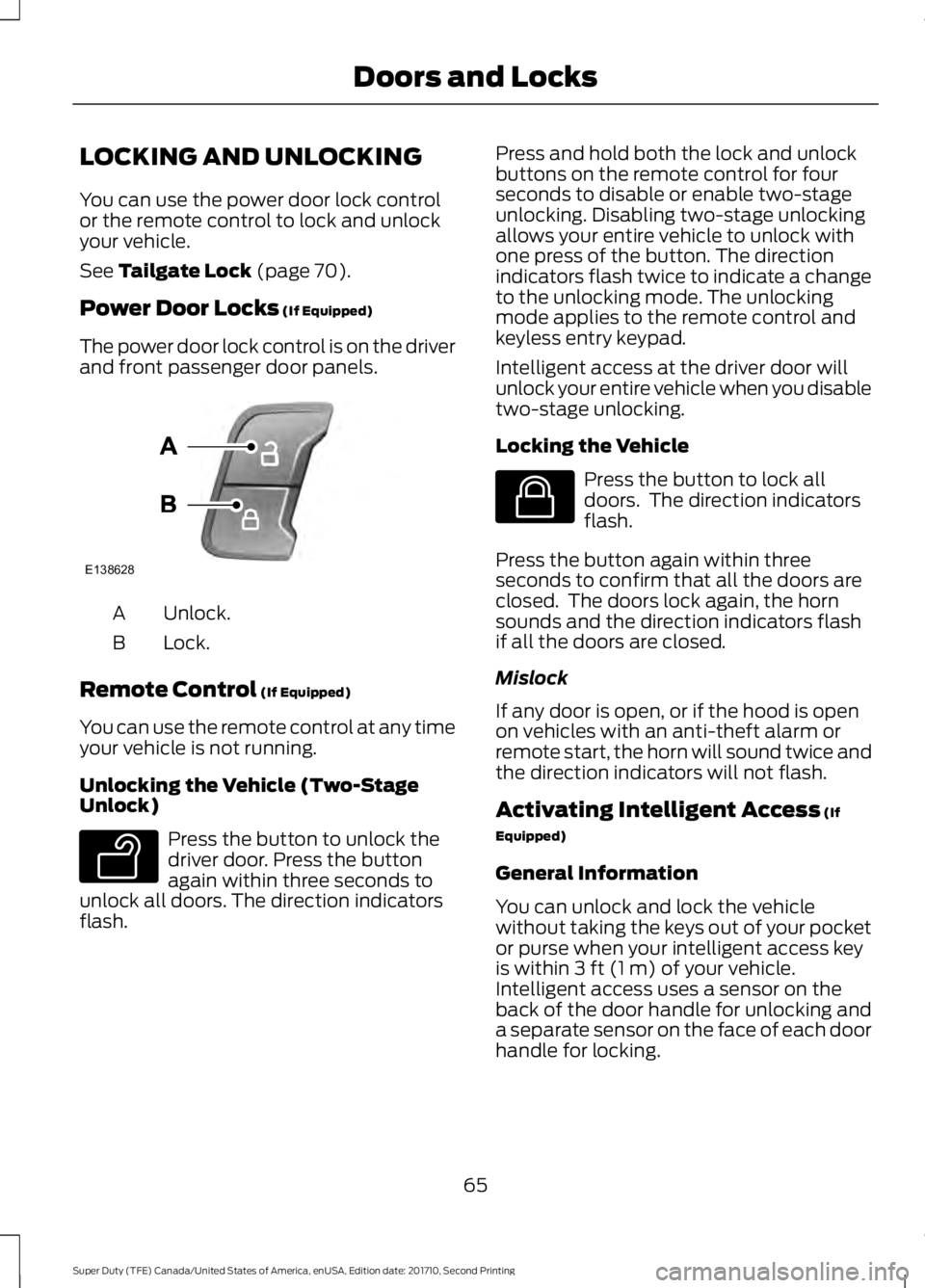
The power door lock control is on the driverand front passenger door panels.
Unlock.A
Lock.B
Remote Control (If Equipped)
You can use the remote control at any timeyour vehicle is not running.
Unlocking the Vehicle (Two-StageUnlock)
Press the button to unlock thedriver door. Press the buttonagain within three seconds tounlock all doors. The direction indicatorsflash.
Press and hold both the lock and unlockbuttons on the remote control for fourseconds to disable or enable two-stageunlocking. Disabling two-stage unlockingallows your entire vehicle to unlock withone press of the button. The directionindicators flash twice to indicate a changeto the unlocking mode. The unlockingmode applies to the remote control andkeyless entry keypad.
Intelligent access at the driver door willunlock your entire vehicle when you disabletwo-stage unlocking.
Locking the Vehicle
Press the button to lock alldoors. The direction indicatorsflash.
Press the button again within threeseconds to confirm that all the doors areclosed. The doors lock again, the hornsounds and the direction indicators flashif all the doors are closed.
Mislock
If any door is open, or if the hood is openon vehicles with an anti-theft alarm orremote start, the horn will sound twice andthe direction indicators will not flash.
Activating Intelligent Access (If
Equipped)
General Information
You can unlock and lock the vehiclewithout taking the keys out of your pocketor purse when your intelligent access keyis within 3 ft (1 m) of your vehicle.Intelligent access uses a sensor on theback of the door handle for unlocking anda separate sensor on the face of each doorhandle for locking.
65
Super Duty (TFE) Canada/United States of America, enUSA, Edition date: 201710, Second Printing
Doors and LocksE138628 E138629 E138623
Page 69 of 642
The system will not function if:
•Your vehicle battery has no charge.
•The key battery has no charge.
•The passive key frequencies arejammed.
Note:The system may not function if thepassive key is close to metal objects orelectronic devices, for example keys or a cellphone.
Note:If the system does not function, usethe key blade to lock and unlock yourvehicle. See Remote Control (page 54).
Unlocking Using Intelligent Access
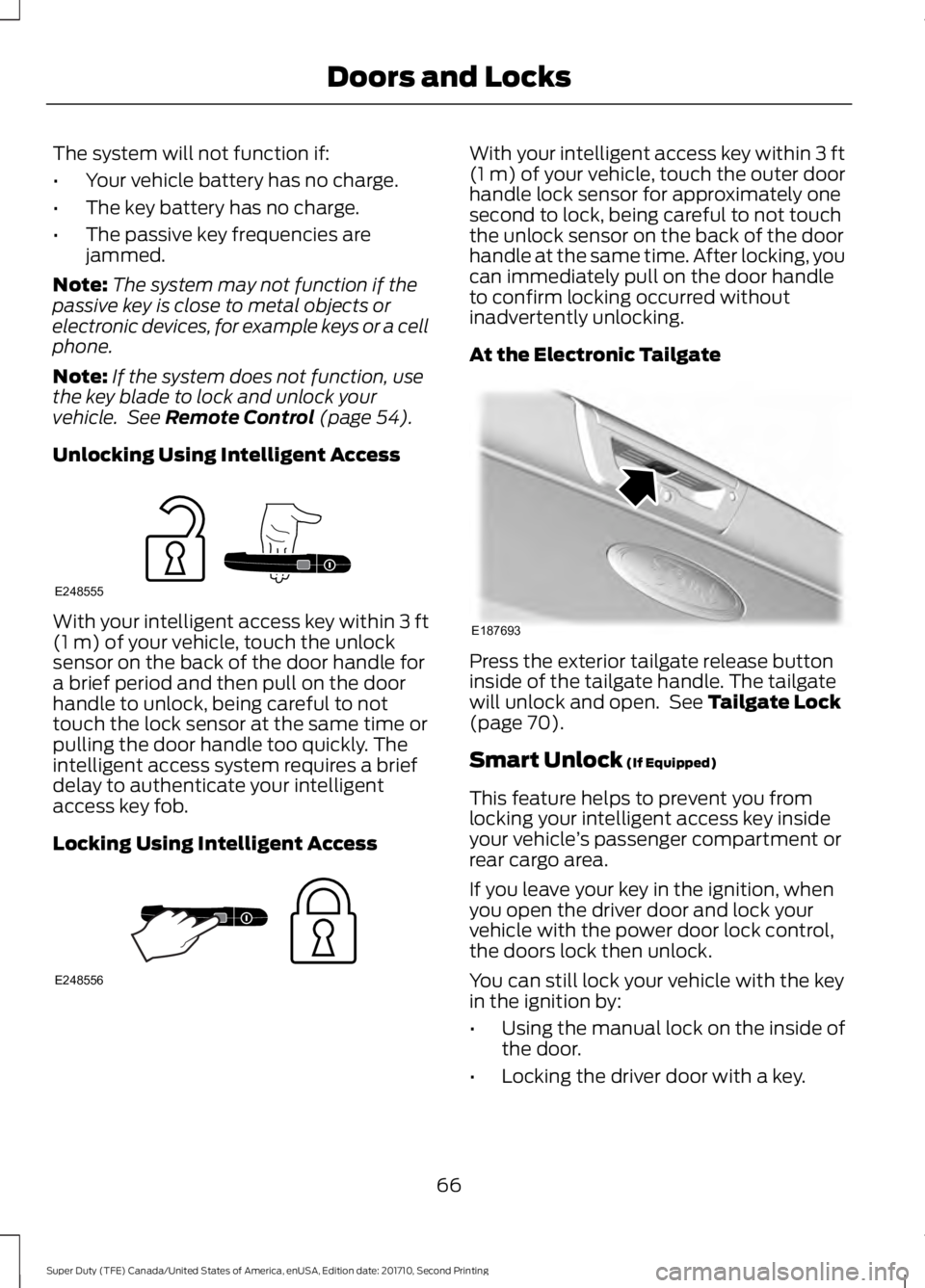
With your intelligent access key within 3 ft(1 m) of your vehicle, touch the unlocksensor on the back of the door handle fora brief period and then pull on the doorhandle to unlock, being careful to nottouch the lock sensor at the same time orpulling the door handle too quickly. Theintelligent access system requires a briefdelay to authenticate your intelligentaccess key fob.
Locking Using Intelligent Access
With your intelligent access key within 3 ft(1 m) of your vehicle, touch the outer doorhandle lock sensor for approximately onesecond to lock, being careful to not touchthe unlock sensor on the back of the doorhandle at the same time. After locking, youcan immediately pull on the door handleto confirm locking occurred withoutinadvertently unlocking.
At the Electronic Tailgate
Press the exterior tailgate release buttoninside of the tailgate handle. The tailgatewill unlock and open. See Tailgate Lock(page 70).
Smart Unlock (If Equipped)
This feature helps to prevent you fromlocking your intelligent access key insideyour vehicle’s passenger compartment orrear cargo area.
If you leave your key in the ignition, whenyou open the driver door and lock yourvehicle with the power door lock control,the doors lock then unlock.
You can still lock your vehicle with the keyin the ignition by:
•Using the manual lock on the inside ofthe door.
•Locking the driver door with a key.
66
Super Duty (TFE) Canada/United States of America, enUSA, Edition date: 201710, Second Printing
Doors and LocksE248555 E248556 E187693
Page 73 of 642
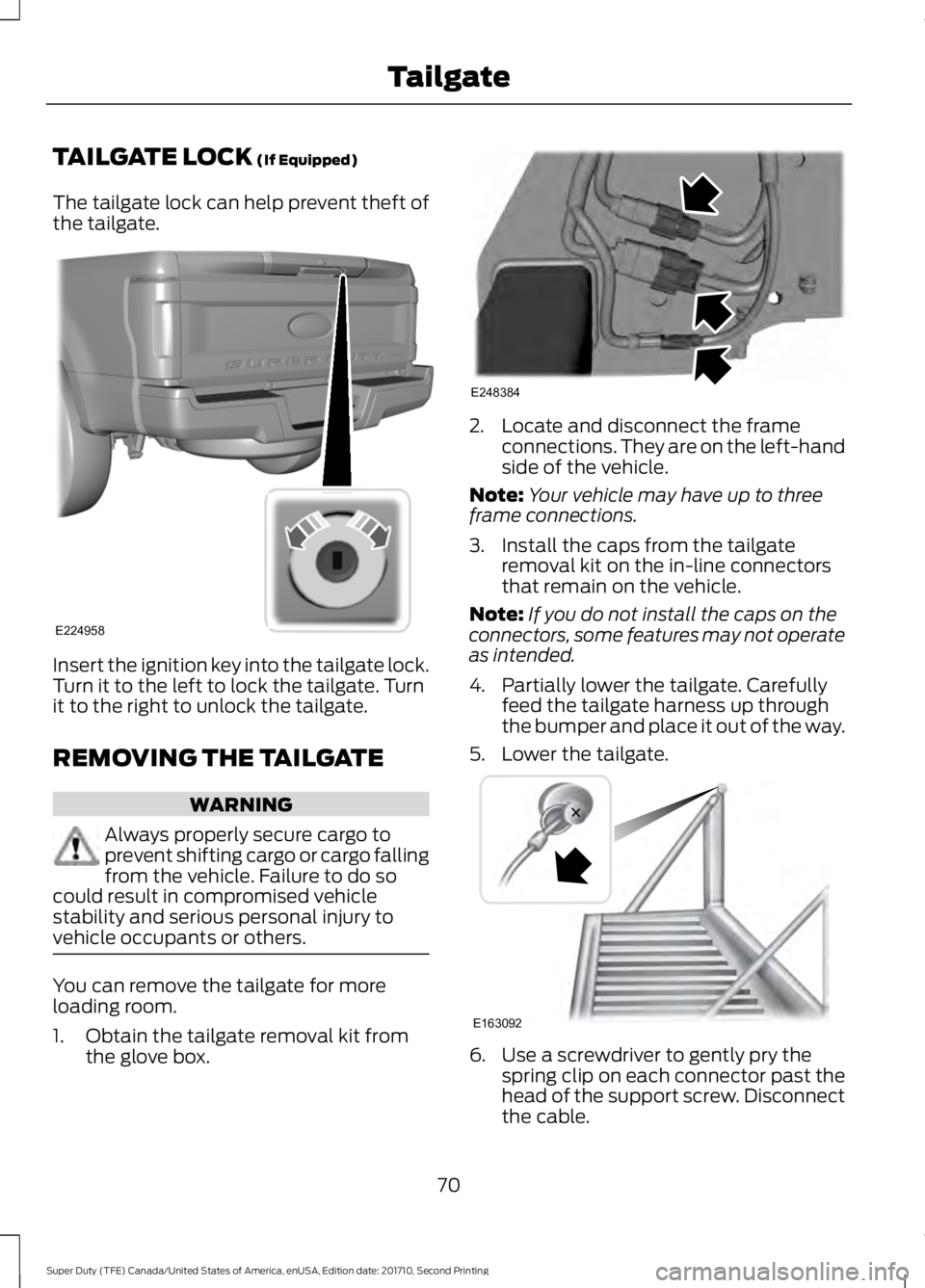
TAILGATE LOCK (If Equipped)
The tailgate lock can help prevent theft ofthe tailgate.
Insert the ignition key into the tailgate lock.Turn it to the left to lock the tailgate. Turnit to the right to unlock the tailgate.
REMOVING THE TAILGATE
WARNING
Always properly secure cargo toprevent shifting cargo or cargo fallingfrom the vehicle. Failure to do socould result in compromised vehiclestability and serious personal injury tovehicle occupants or others.
You can remove the tailgate for moreloading room.
1. Obtain the tailgate removal kit fromthe glove box.
2. Locate and disconnect the frameconnections. They are on the left-handside of the vehicle.
Note:Your vehicle may have up to threeframe connections.
3. Install the caps from the tailgateremoval kit on the in-line connectorsthat remain on the vehicle.
Note:If you do not install the caps on theconnectors, some features may not operateas intended.
4. Partially lower the tailgate. Carefullyfeed the tailgate harness up throughthe bumper and place it out of the way.
5. Lower the tailgate.
6. Use a screwdriver to gently pry thespring clip on each connector past thehead of the support screw. Disconnectthe cable.
70
Super Duty (TFE) Canada/United States of America, enUSA, Edition date: 201710, Second Printing
TailgateE224958 E248384 E163092
Page 74 of 642
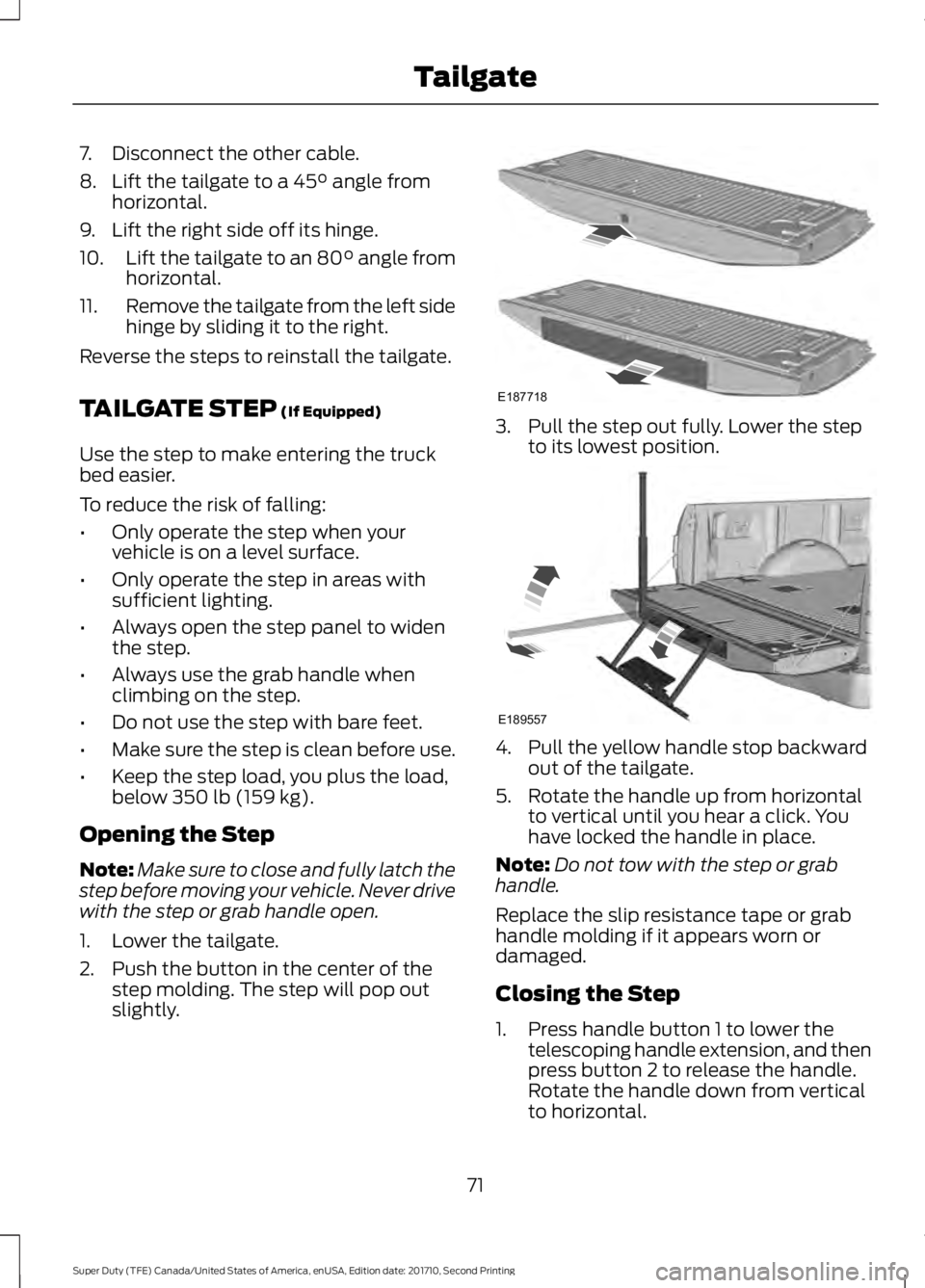
7. Disconnect the other cable.
8. Lift the tailgate to a 45° angle fromhorizontal.
9. Lift the right side off its hinge.
10.Lift the tailgate to an 80° angle fromhorizontal.
11.Remove the tailgate from the left sidehinge by sliding it to the right.
Reverse the steps to reinstall the tailgate.
TAILGATE STEP (If Equipped)
Use the step to make entering the truckbed easier.
To reduce the risk of falling:
•Only operate the step when yourvehicle is on a level surface.
•Only operate the step in areas withsufficient lighting.
•Always open the step panel to widenthe step.
•Always use the grab handle whenclimbing on the step.
•Do not use the step with bare feet.
•Make sure the step is clean before use.
•Keep the step load, you plus the load,below 350 lb (159 kg).
Opening the Step
Note:Make sure to close and fully latch thestep before moving your vehicle. Never drivewith the step or grab handle open.
1. Lower the tailgate.
2. Push the button in the center of thestep molding. The step will pop outslightly.
3. Pull the step out fully. Lower the stepto its lowest position.
4. Pull the yellow handle stop backwardout of the tailgate.
5. Rotate the handle up from horizontalto vertical until you hear a click. Youhave locked the handle in place.
Note:Do not tow with the step or grabhandle.
Replace the slip resistance tape or grabhandle molding if it appears worn ordamaged.
Closing the Step
1. Press handle button 1 to lower thetelescoping handle extension, and thenpress button 2 to release the handle.Rotate the handle down from verticalto horizontal.
71
Super Duty (TFE) Canada/United States of America, enUSA, Edition date: 201710, Second Printing
TailgateE187718 E189557
Page 75 of 642
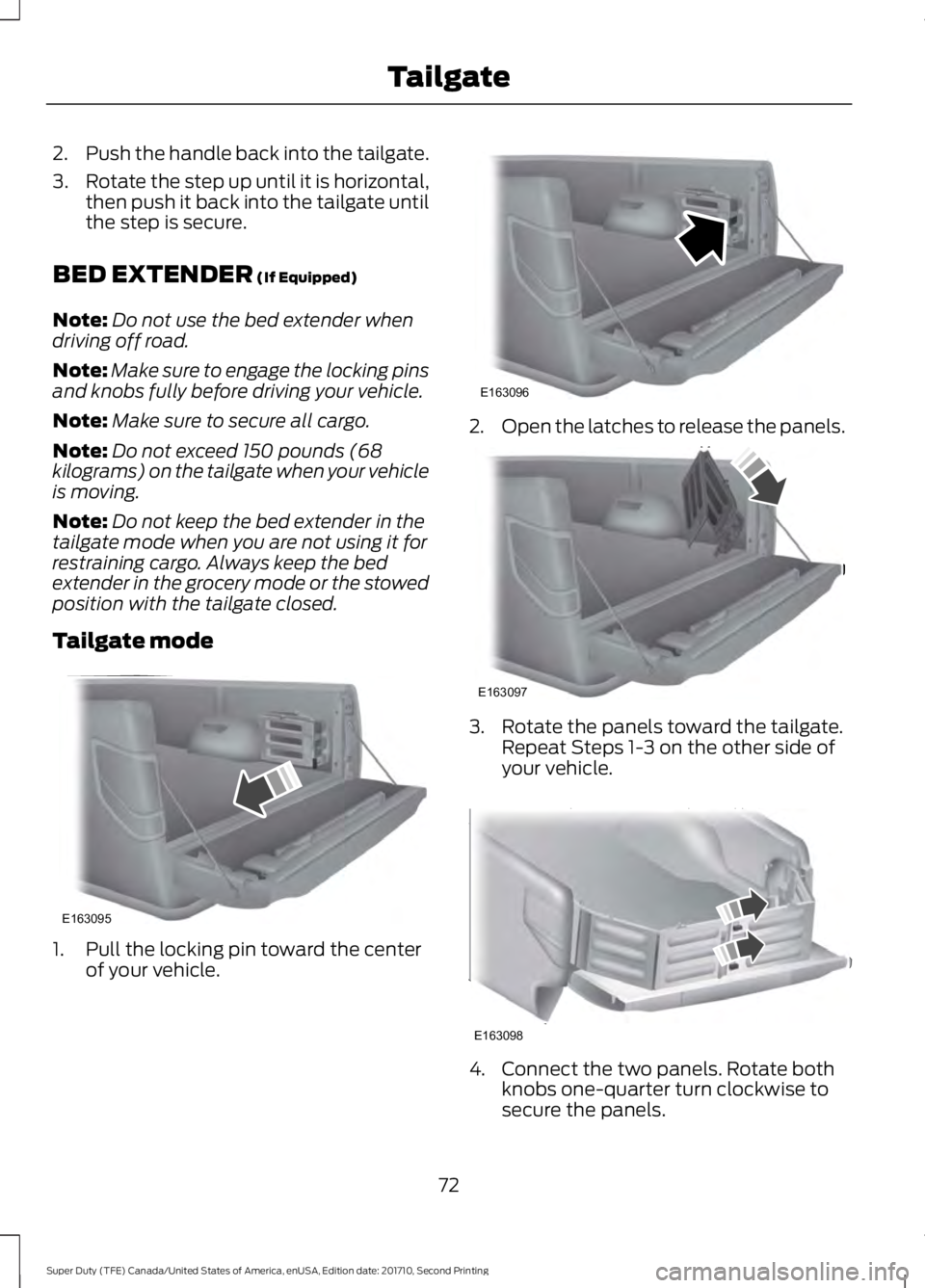
2.Push the handle back into the tailgate.
3.Rotate the step up until it is horizontal,then push it back into the tailgate untilthe step is secure.
BED EXTENDER (If Equipped)
Note:Do not use the bed extender whendriving off road.
Note:Make sure to engage the locking pinsand knobs fully before driving your vehicle.
Note:Make sure to secure all cargo.
Note:Do not exceed 150 pounds (68kilograms) on the tailgate when your vehicleis moving.
Note:Do not keep the bed extender in thetailgate mode when you are not using it forrestraining cargo. Always keep the bedextender in the grocery mode or the stowedposition with the tailgate closed.
Tailgate mode
1. Pull the locking pin toward the centerof your vehicle.
2.Open the latches to release the panels.
3. Rotate the panels toward the tailgate.Repeat Steps 1-3 on the other side ofyour vehicle.
4. Connect the two panels. Rotate bothknobs one-quarter turn clockwise tosecure the panels.
72
Super Duty (TFE) Canada/United States of America, enUSA, Edition date: 201710, Second Printing
TailgateE163095 E163096 E163097 E163098
Page 76 of 642
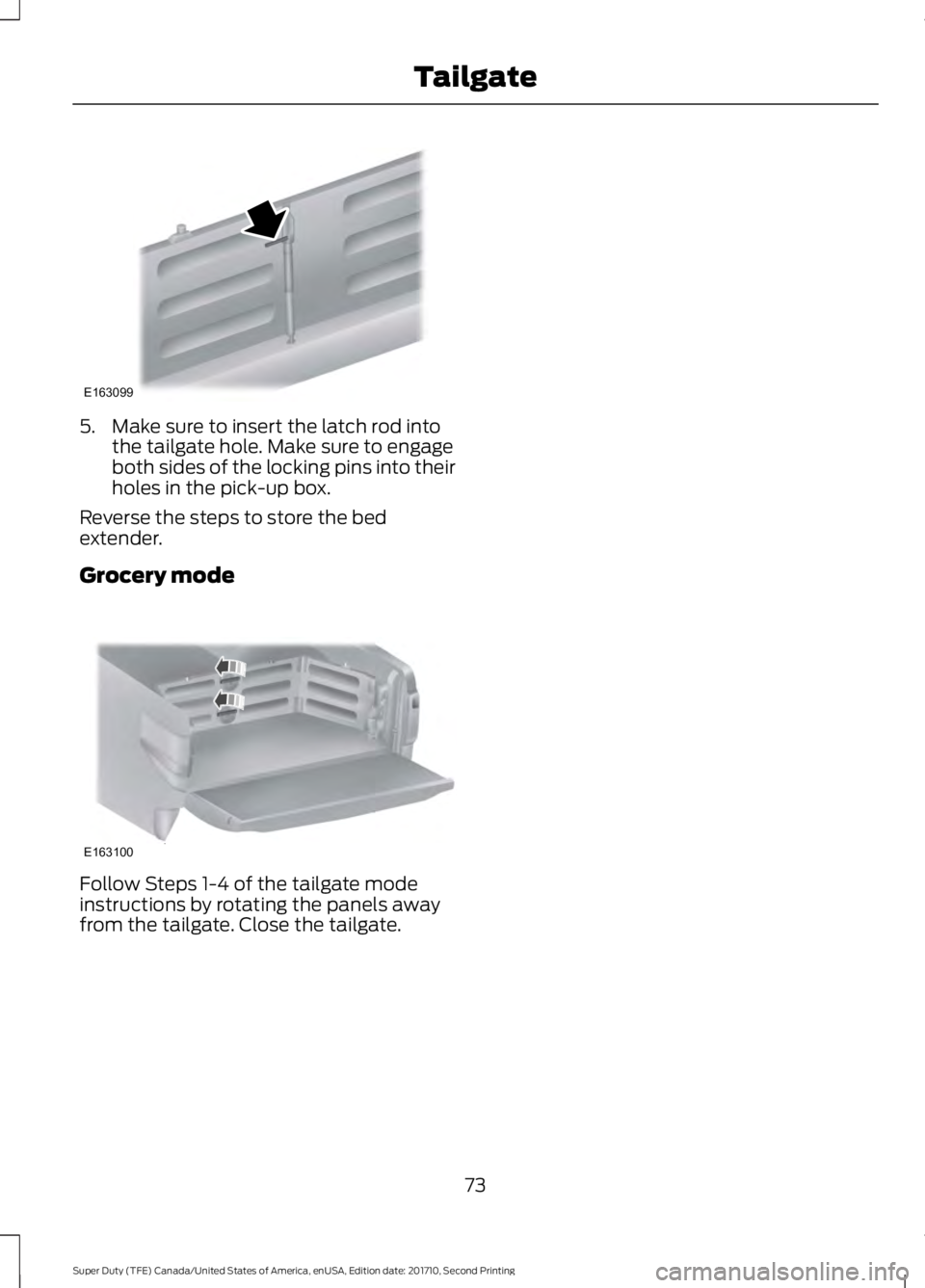
5. Make sure to insert the latch rod intothe tailgate hole. Make sure to engageboth sides of the locking pins into theirholes in the pick-up box.
Reverse the steps to store the bedextender.
Grocery mode
Follow Steps 1-4 of the tailgate modeinstructions by rotating the panels awayfrom the tailgate. Close the tailgate.
73
Super Duty (TFE) Canada/United States of America, enUSA, Edition date: 201710, Second Printing
TailgateE163099 E163100
Page 79 of 642
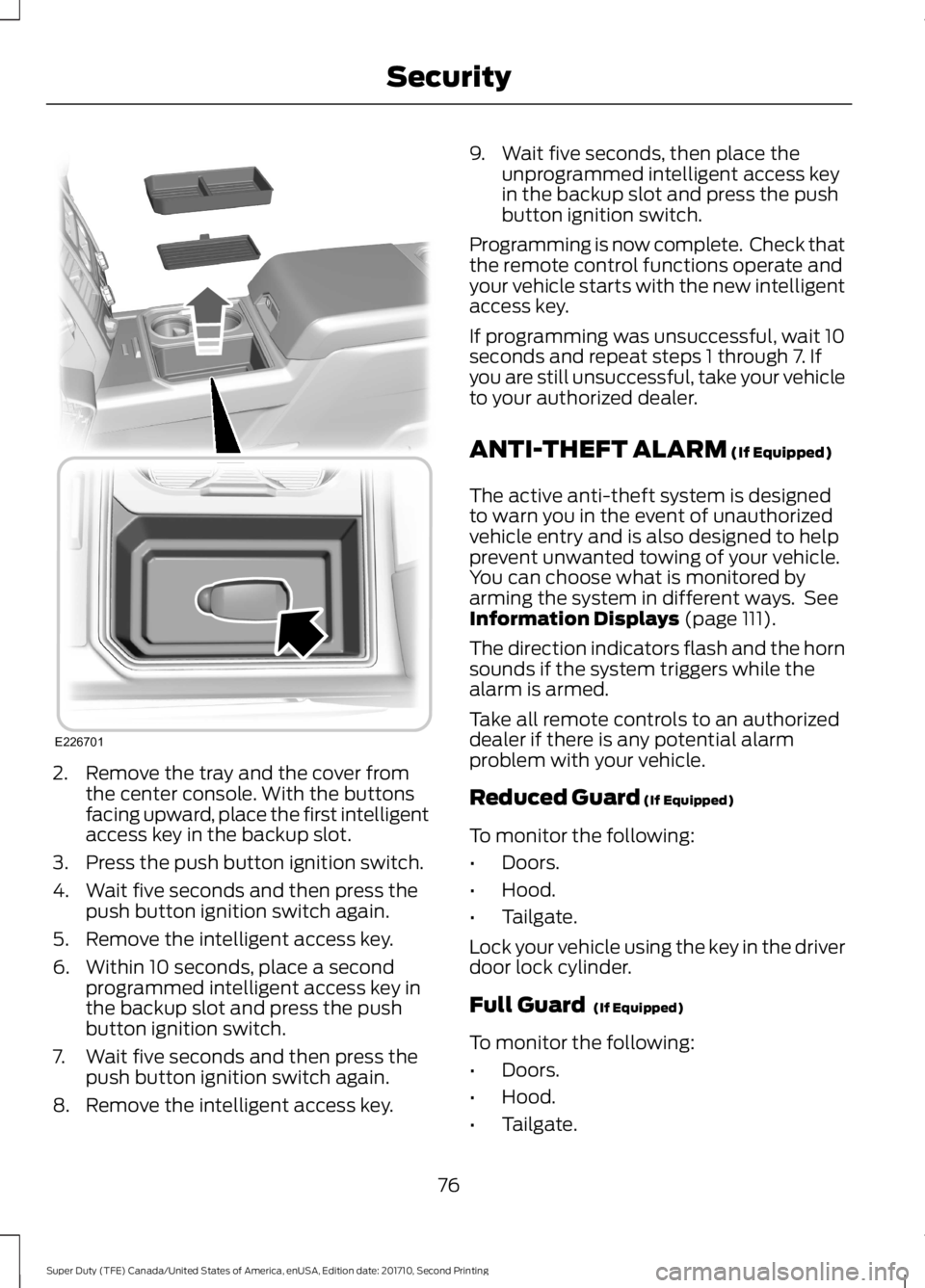
2. Remove the tray and the cover fromthe center console. With the buttonsfacing upward, place the first intelligentaccess key in the backup slot.
3. Press the push button ignition switch.
4. Wait five seconds and then press thepush button ignition switch again.
5. Remove the intelligent access key.
6. Within 10 seconds, place a secondprogrammed intelligent access key inthe backup slot and press the pushbutton ignition switch.
7. Wait five seconds and then press thepush button ignition switch again.
8. Remove the intelligent access key.
9. Wait five seconds, then place theunprogrammed intelligent access keyin the backup slot and press the pushbutton ignition switch.
Programming is now complete. Check thatthe remote control functions operate andyour vehicle starts with the new intelligentaccess key.
If programming was unsuccessful, wait 10seconds and repeat steps 1 through 7. Ifyou are still unsuccessful, take your vehicleto your authorized dealer.
ANTI-THEFT ALARM (If Equipped)
The active anti-theft system is designedto warn you in the event of unauthorizedvehicle entry and is also designed to helpprevent unwanted towing of your vehicle.You can choose what is monitored byarming the system in different ways. SeeInformation Displays (page 111).
The direction indicators flash and the hornsounds if the system triggers while thealarm is armed.
Take all remote controls to an authorizeddealer if there is any potential alarmproblem with your vehicle.
Reduced Guard (If Equipped)
To monitor the following:
•Doors.
•Hood.
•Tailgate.
Lock your vehicle using the key in the driverdoor lock cylinder.
Full Guard (If Equipped)
To monitor the following:
•Doors.
•Hood.
•Tailgate.
76
Super Duty (TFE) Canada/United States of America, enUSA, Edition date: 201710, Second Printing
SecurityE226701
Page 94 of 642
Cargo and Trailer Hookup Lamps
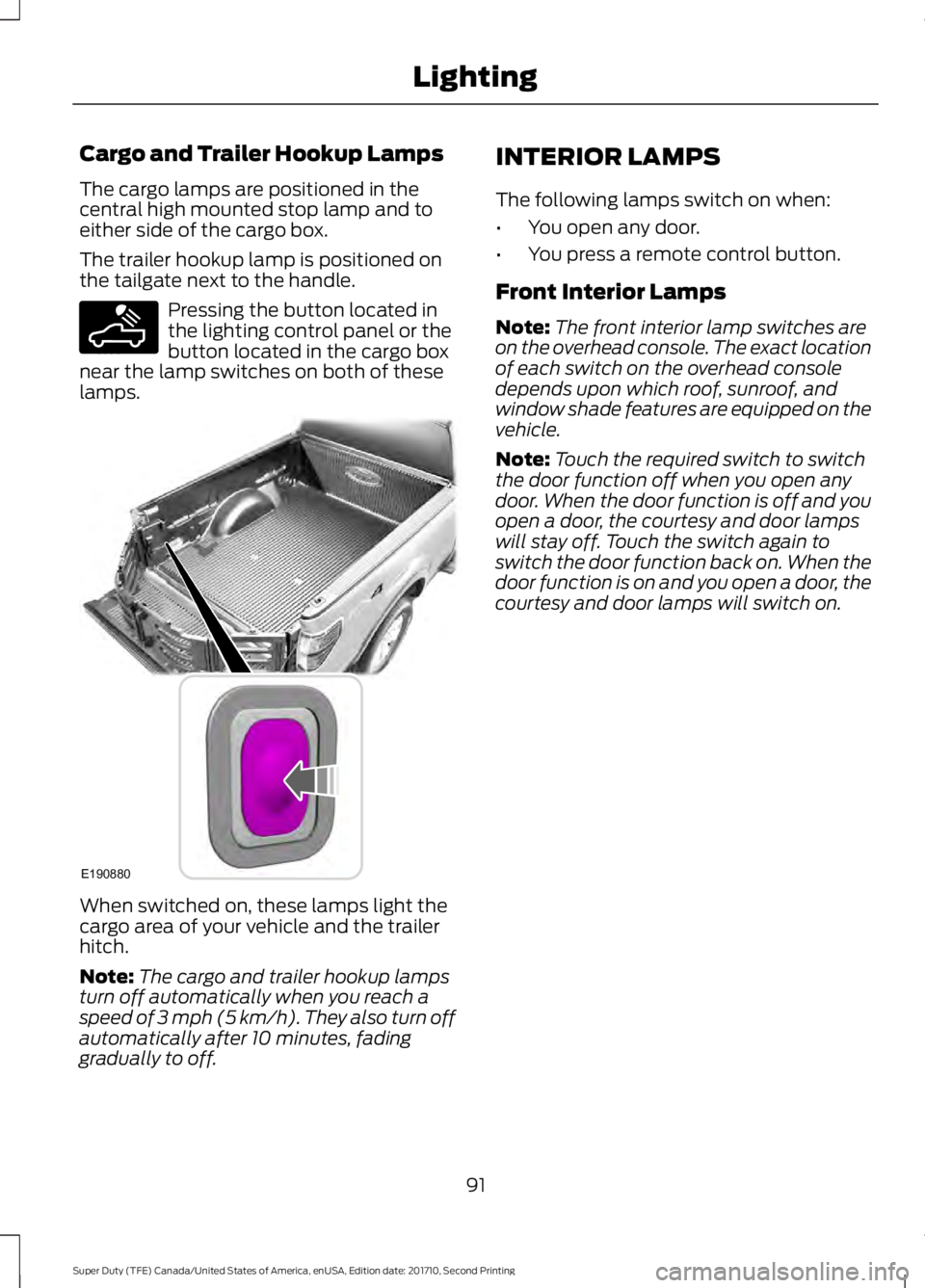
The cargo lamps are positioned in thecentral high mounted stop lamp and toeither side of the cargo box.
The trailer hookup lamp is positioned onthe tailgate next to the handle.
Pressing the button located inthe lighting control panel or thebutton located in the cargo boxnear the lamp switches on both of theselamps.
When switched on, these lamps light thecargo area of your vehicle and the trailerhitch.
Note:The cargo and trailer hookup lampsturn off automatically when you reach aspeed of 3 mph (5 km/h). They also turn offautomatically after 10 minutes, fadinggradually to off.
INTERIOR LAMPS
The following lamps switch on when:
•You open any door.
•You press a remote control button.
Front Interior Lamps
Note:The front interior lamp switches areon the overhead console. The exact locationof each switch on the overhead consoledepends upon which roof, sunroof, andwindow shade features are equipped on thevehicle.
Note:Touch the required switch to switchthe door function off when you open anydoor. When the door function is off and youopen a door, the courtesy and door lampswill stay off. Touch the switch again toswitch the door function back on. When thedoor function is on and you open a door, thecourtesy and door lamps will switch on.
91
Super Duty (TFE) Canada/United States of America, enUSA, Edition date: 201710, Second Printing
LightingE189587 E190880