tailgate FORD F450 SUPER DUTY 2017 User Guide
[x] Cancel search | Manufacturer: FORD, Model Year: 2017, Model line: F450 SUPER DUTY, Model: FORD F450 SUPER DUTY 2017Pages: 642, PDF Size: 12.35 MB
Page 235 of 642
stationary or receding object farther than12 in (30 cm) from the corners of thebumper, the tone sounds for only threeseconds. Once the system detects anobject approaching, the warning soundsagain.
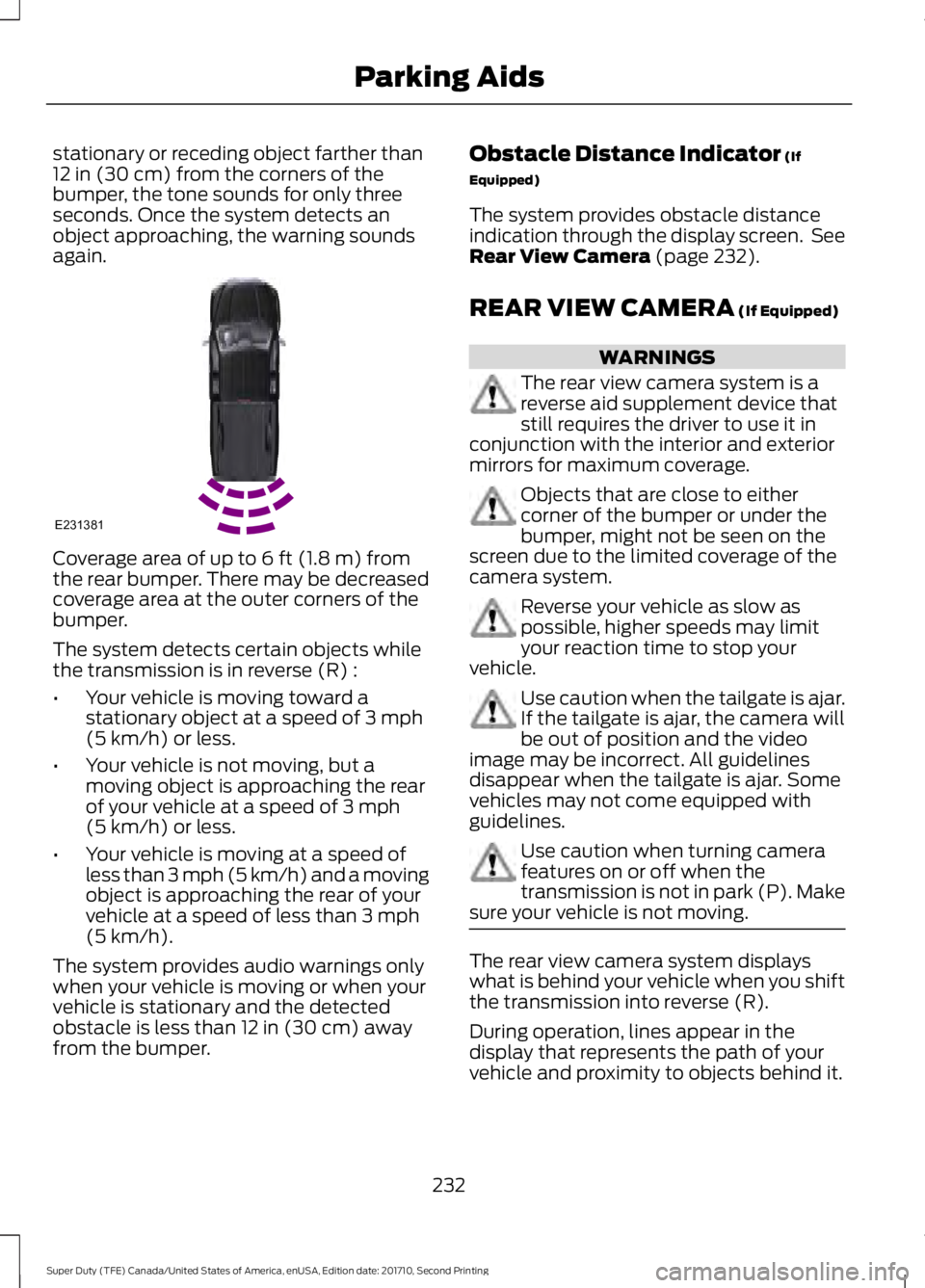
Coverage area of up to 6 ft (1.8 m) fromthe rear bumper. There may be decreasedcoverage area at the outer corners of thebumper.
The system detects certain objects whilethe transmission is in reverse (R) :
•Your vehicle is moving toward astationary object at a speed of 3 mph(5 km/h) or less.
•Your vehicle is not moving, but amoving object is approaching the rearof your vehicle at a speed of 3 mph(5 km/h) or less.
•Your vehicle is moving at a speed ofless than 3 mph (5 km/h) and a movingobject is approaching the rear of yourvehicle at a speed of less than 3 mph(5 km/h).
The system provides audio warnings onlywhen your vehicle is moving or when yourvehicle is stationary and the detectedobstacle is less than 12 in (30 cm) awayfrom the bumper.
Obstacle Distance Indicator (If
Equipped)
The system provides obstacle distanceindication through the display screen. SeeRear View Camera (page 232).
REAR VIEW CAMERA (If Equipped)
WARNINGS
The rear view camera system is areverse aid supplement device thatstill requires the driver to use it inconjunction with the interior and exteriormirrors for maximum coverage.
Objects that are close to eithercorner of the bumper or under thebumper, might not be seen on thescreen due to the limited coverage of thecamera system.
Reverse your vehicle as slow aspossible, higher speeds may limityour reaction time to stop yourvehicle.
Use caution when the tailgate is ajar.If the tailgate is ajar, the camera willbe out of position and the videoimage may be incorrect. All guidelinesdisappear when the tailgate is ajar. Somevehicles may not come equipped withguidelines.
Use caution when turning camerafeatures on or off when thetransmission is not in park (P). Makesure your vehicle is not moving.
The rear view camera system displayswhat is behind your vehicle when you shiftthe transmission into reverse (R).
During operation, lines appear in thedisplay that represents the path of yourvehicle and proximity to objects behind it.
232
Super Duty (TFE) Canada/United States of America, enUSA, Edition date: 201710, Second Printing
Parking AidsE231381
Page 236 of 642
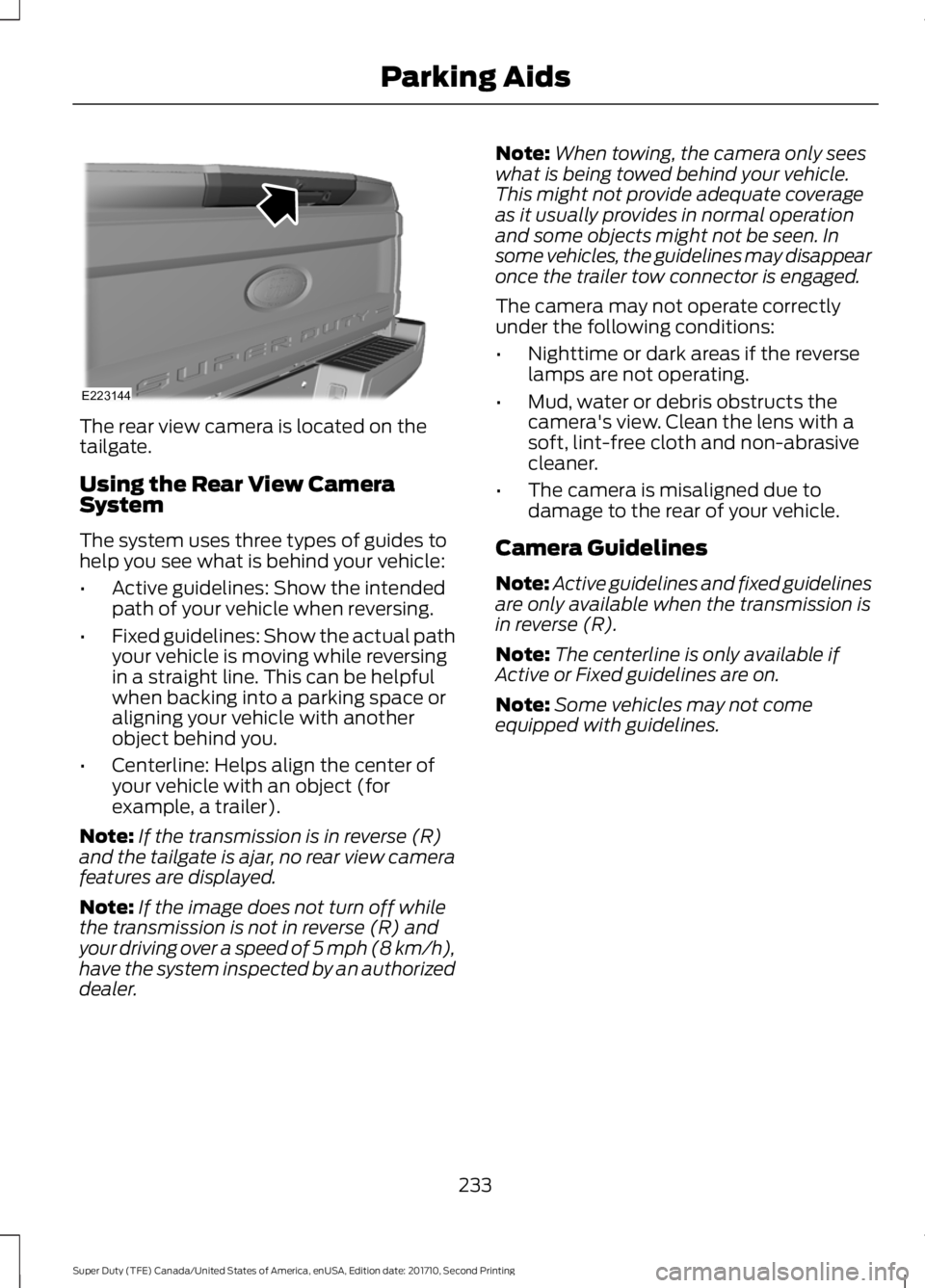
The rear view camera is located on thetailgate.
Using the Rear View CameraSystem
The system uses three types of guides tohelp you see what is behind your vehicle:
•Active guidelines: Show the intendedpath of your vehicle when reversing.
•Fixed guidelines: Show the actual pathyour vehicle is moving while reversingin a straight line. This can be helpfulwhen backing into a parking space oraligning your vehicle with anotherobject behind you.
•Centerline: Helps align the center ofyour vehicle with an object (forexample, a trailer).
Note:If the transmission is in reverse (R)and the tailgate is ajar, no rear view camerafeatures are displayed.
Note:If the image does not turn off whilethe transmission is not in reverse (R) andyour driving over a speed of 5 mph (8 km/h),have the system inspected by an authorizeddealer.
Note:When towing, the camera only seeswhat is being towed behind your vehicle.This might not provide adequate coverageas it usually provides in normal operationand some objects might not be seen. Insome vehicles, the guidelines may disappearonce the trailer tow connector is engaged.
The camera may not operate correctlyunder the following conditions:
•Nighttime or dark areas if the reverselamps are not operating.
•Mud, water or debris obstructs thecamera's view. Clean the lens with asoft, lint-free cloth and non-abrasivecleaner.
•The camera is misaligned due todamage to the rear of your vehicle.
Camera Guidelines
Note:Active guidelines and fixed guidelinesare only available when the transmission isin reverse (R).
Note:The centerline is only available ifActive or Fixed guidelines are on.
Note:Some vehicles may not comeequipped with guidelines.
233
Super Duty (TFE) Canada/United States of America, enUSA, Edition date: 201710, Second Printing
Parking AidsE223144
Page 268 of 642
- 1200 = - 240 pounds. No, you donot have enough cargo capacityto carry that much weight. Inmetric units, the calculation wouldbe: 635 kilograms - (2 x 99kilograms) - (12 x 45 kilograms) =635 - 198 - 540 = -103 kilograms.You will need to reduce the loadweight by at least 240 pounds(104 kilograms). If you removethree 100-pound (45-kilogram)cement bags, then the loadcalculation would be:1400 - (2 x220) - (9 x 100) = 1400 - 440 -900 = 60 pounds. Now you havethe load capacity to transport thecement and your friend home. Inmetric units, the calculation wouldbe: 635 kilograms - (2 x 99kilograms) - (9 x 45 kilograms) =635 - 198 - 405 = 32 kilograms.
The above calculations alsoassume that the loads arepositioned in your vehicle in amanner that does not overloadthe front or the rear gross axleweight rating specified for yourvehicle on the Safety ComplianceCertification label.
Special Loading Instructionsfor Owners of Pick-up Trucksand Utility-type Vehicles
WARNING
Loaded vehicles may handledifferently than unloadedvehicles. Take extra precautions,such as slower speeds andincreased stopping distance, whendriving a heavily loaded vehicle.
BED RAMPS (If Equipped)
WARNINGS
The slide action of the ramp is apinch point. Do not place fingers orhands in the pinch point.
Extend and retract the ramp onlywhen connected to the tailgateplate.
Be sure the ramp is installedcorrectly when loading andunloading equipment on and off theramp.
Do not step or sit on the ramp whenit is in the stowed position.
Install the ramp only within theprescribed ramp angles.
Note:The ramp maximum capacity is800 lb (363 kg).
Note:Verify the ramp is on stable groundbefore usage.
Note:For loading and unloadingequipment, your ramp should be setbetween 10° upward and 26° downward toavoid damage to the ramp claw and tailgateplate.
Using the Bed Ramp
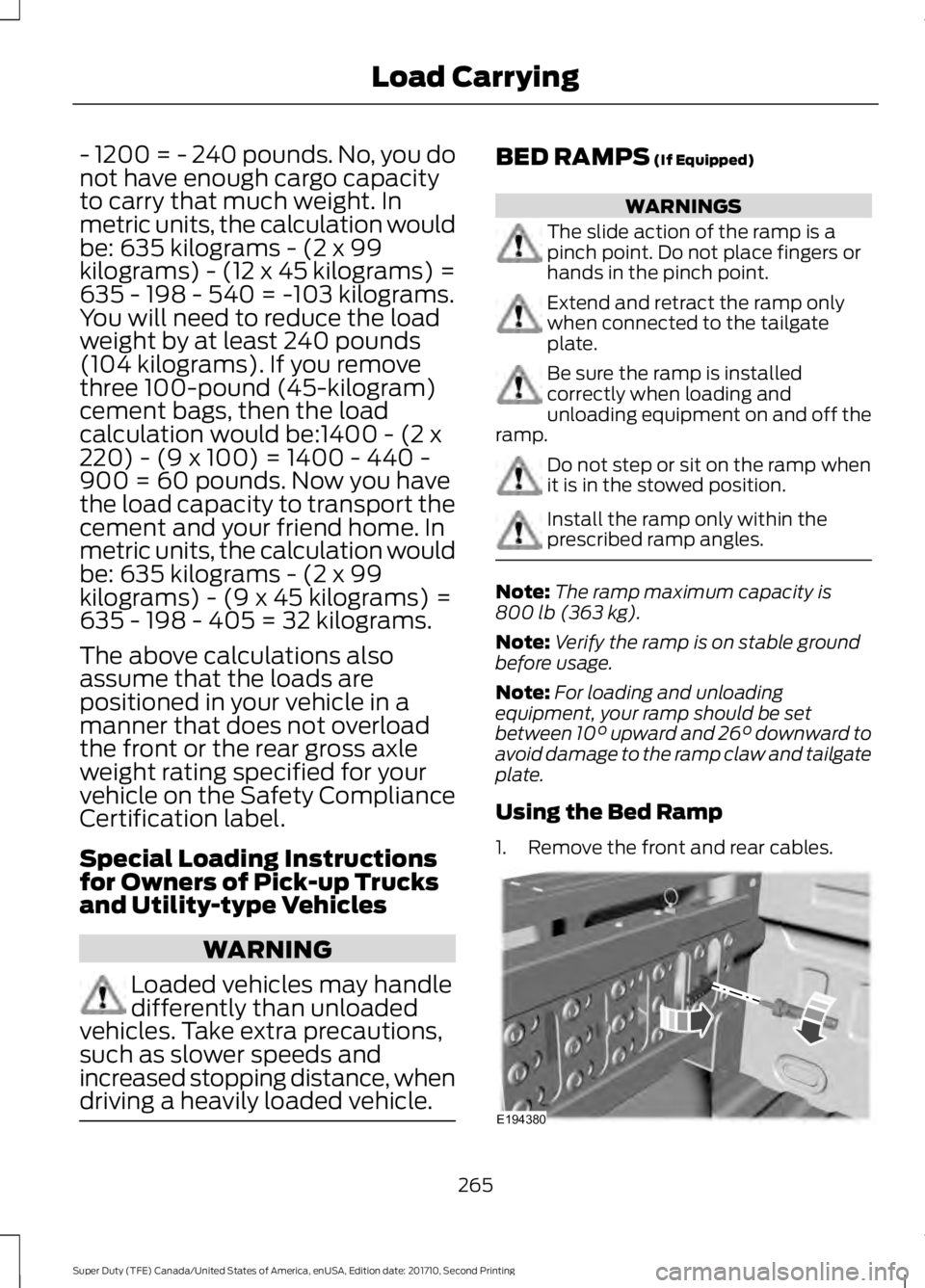
1. Remove the front and rear cables.
265
Super Duty (TFE) Canada/United States of America, enUSA, Edition date: 201710, Second Printing
Load CarryingE194380
Page 269 of 642
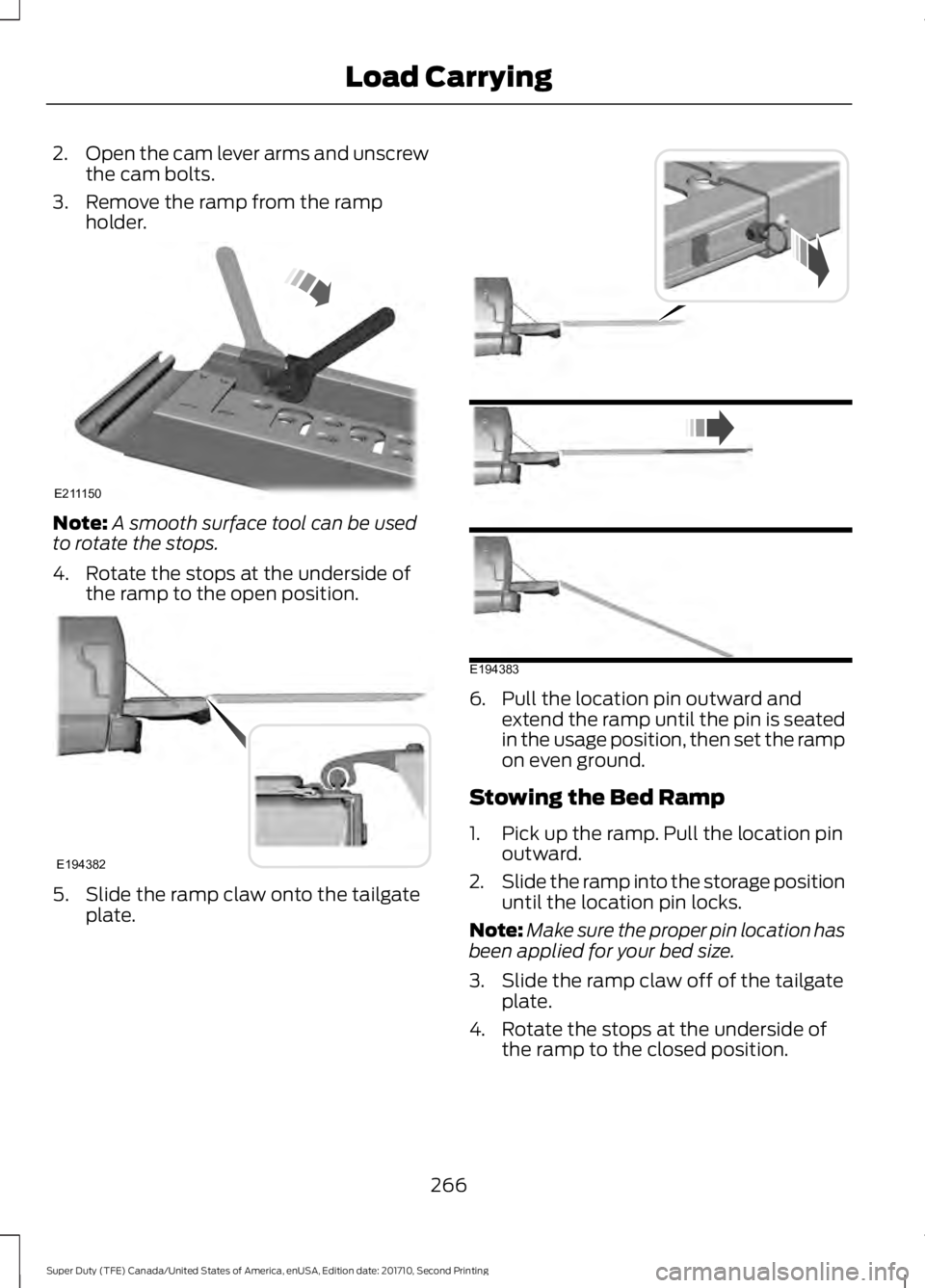
2.Open the cam lever arms and unscrewthe cam bolts.
3. Remove the ramp from the rampholder.
Note:A smooth surface tool can be usedto rotate the stops.
4. Rotate the stops at the underside ofthe ramp to the open position.
5. Slide the ramp claw onto the tailgateplate.
6. Pull the location pin outward andextend the ramp until the pin is seatedin the usage position, then set the rampon even ground.
Stowing the Bed Ramp
1. Pick up the ramp. Pull the location pinoutward.
2.Slide the ramp into the storage positionuntil the location pin locks.
Note:Make sure the proper pin location hasbeen applied for your bed size.
3. Slide the ramp claw off of the tailgateplate.
4. Rotate the stops at the underside ofthe ramp to the closed position.
266
Super Duty (TFE) Canada/United States of America, enUSA, Edition date: 201710, Second Printing
Load CarryingE211150 E194382 E194383
Page 274 of 642
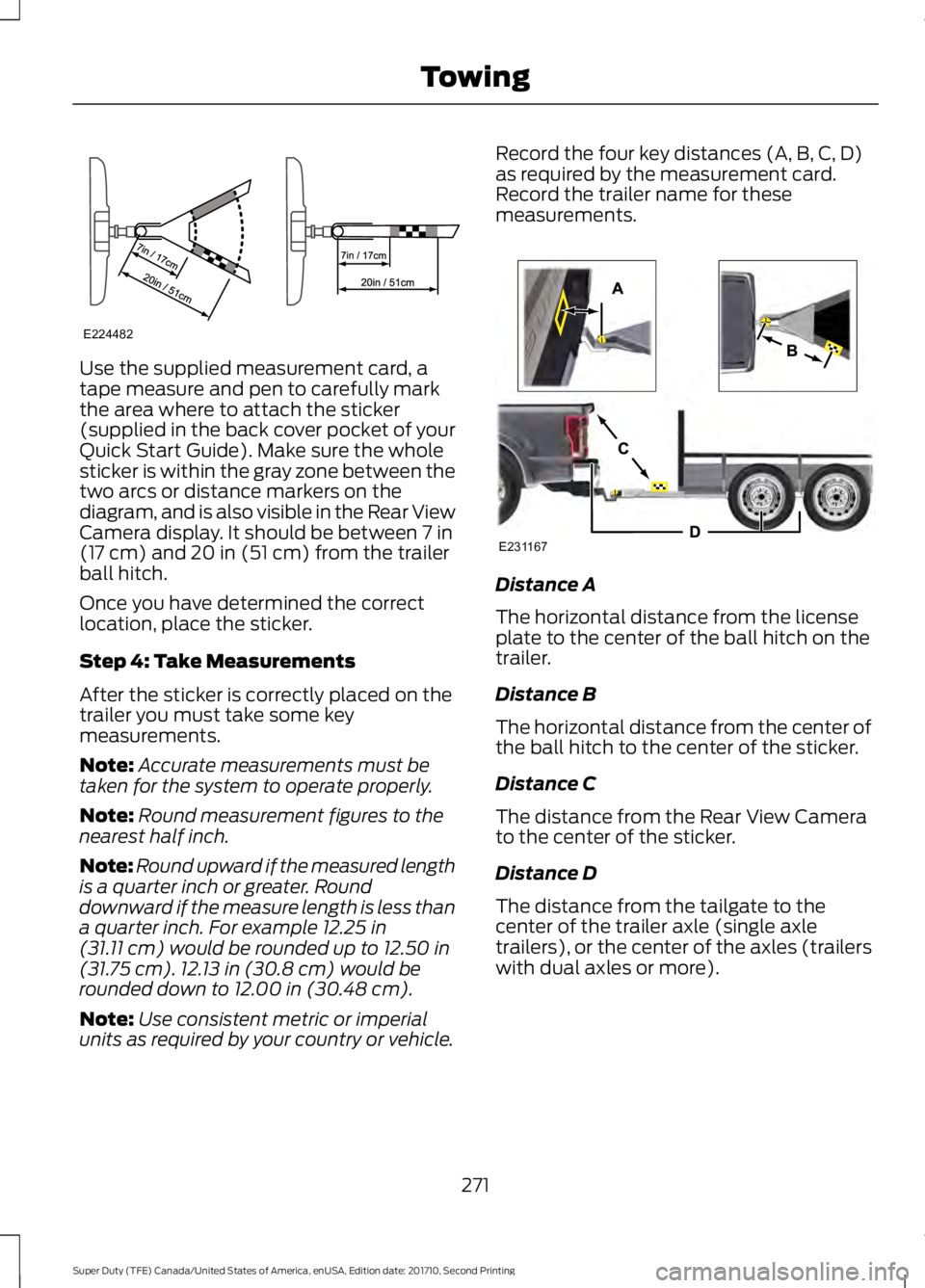
Use the supplied measurement card, atape measure and pen to carefully markthe area where to attach the sticker(supplied in the back cover pocket of yourQuick Start Guide). Make sure the wholesticker is within the gray zone between thetwo arcs or distance markers on thediagram, and is also visible in the Rear ViewCamera display. It should be between 7 in(17 cm) and 20 in (51 cm) from the trailerball hitch.
Once you have determined the correctlocation, place the sticker.
Step 4: Take Measurements
After the sticker is correctly placed on thetrailer you must take some keymeasurements.
Note:Accurate measurements must betaken for the system to operate properly.
Note:Round measurement figures to thenearest half inch.
Note:Round upward if the measured lengthis a quarter inch or greater. Rounddownward if the measure length is less thana quarter inch. For example 12.25 in(31.11 cm) would be rounded up to 12.50 in(31.75 cm). 12.13 in (30.8 cm) would berounded down to 12.00 in (30.48 cm).
Note:Use consistent metric or imperialunits as required by your country or vehicle.
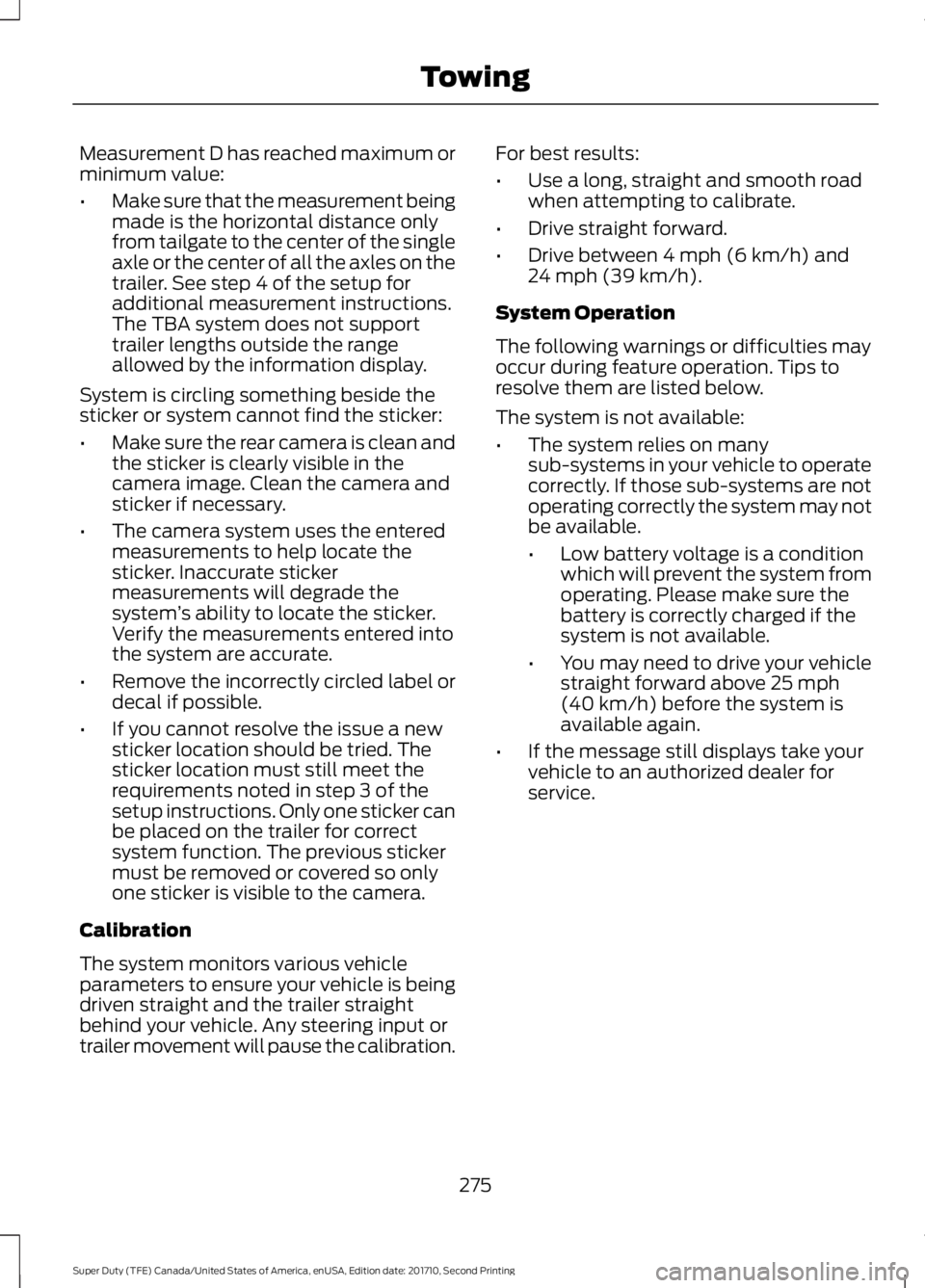
Record the four key distances (A, B, C, D)as required by the measurement card.Record the trailer name for thesemeasurements.
Distance A
The horizontal distance from the licenseplate to the center of the ball hitch on thetrailer.
Distance B
The horizontal distance from the center ofthe ball hitch to the center of the sticker.
Distance C
The distance from the Rear View Camerato the center of the sticker.
Distance D
The distance from the tailgate to thecenter of the trailer axle (single axletrailers), or the center of the axles (trailerswith dual axles or more).
271
Super Duty (TFE) Canada/United States of America, enUSA, Edition date: 201710, Second Printing
TowingE224482 E231167
Page 278 of 642
Measurement D has reached maximum orminimum value:
•Make sure that the measurement beingmade is the horizontal distance onlyfrom tailgate to the center of the singleaxle or the center of all the axles on thetrailer. See step 4 of the setup foradditional measurement instructions.The TBA system does not supporttrailer lengths outside the rangeallowed by the information display.
System is circling something beside thesticker or system cannot find the sticker:
•Make sure the rear camera is clean andthe sticker is clearly visible in thecamera image. Clean the camera andsticker if necessary.
•The camera system uses the enteredmeasurements to help locate thesticker. Inaccurate stickermeasurements will degrade thesystem’s ability to locate the sticker.Verify the measurements entered intothe system are accurate.
•Remove the incorrectly circled label ordecal if possible.
•If you cannot resolve the issue a newsticker location should be tried. Thesticker location must still meet therequirements noted in step 3 of thesetup instructions. Only one sticker canbe placed on the trailer for correctsystem function. The previous stickermust be removed or covered so onlyone sticker is visible to the camera.
Calibration
The system monitors various vehicleparameters to ensure your vehicle is beingdriven straight and the trailer straightbehind your vehicle. Any steering input ortrailer movement will pause the calibration.
For best results:
•Use a long, straight and smooth roadwhen attempting to calibrate.
•Drive straight forward.
•Drive between 4 mph (6 km/h) and24 mph (39 km/h).
System Operation
The following warnings or difficulties mayoccur during feature operation. Tips toresolve them are listed below.
The system is not available:
•The system relies on manysub-systems in your vehicle to operatecorrectly. If those sub-systems are notoperating correctly the system may notbe available.
•Low battery voltage is a conditionwhich will prevent the system fromoperating. Please make sure thebattery is correctly charged if thesystem is not available.
•You may need to drive your vehiclestraight forward above 25 mph(40 km/h) before the system isavailable again.
•If the message still displays take yourvehicle to an authorized dealer forservice.
275
Super Duty (TFE) Canada/United States of America, enUSA, Edition date: 201710, Second Printing
Towing
Page 355 of 642
1.Switch all of the lamps and the ignitionoff.
2. To access the bulb, reach behind thebumper.
3. Disconnect the electrical connector.
4.Turn the bulb holder counterclockwiseand remove it.
Note:You cannot separate the bulb fromthe bulb holder.
Note:Handle a halogen bulb carefully andkeep out of children’s reach. Grasp the bulbonly by its plastic base and do not touch theglass. The oil from your hand could causethe bulb to break the next time the foglamps are operated.
Rear Lamps, Brake Lamps, RearDirection Indicator and ReversingLamp Bulbs
Pickup Models - Vehicles without BlindSpot Information System
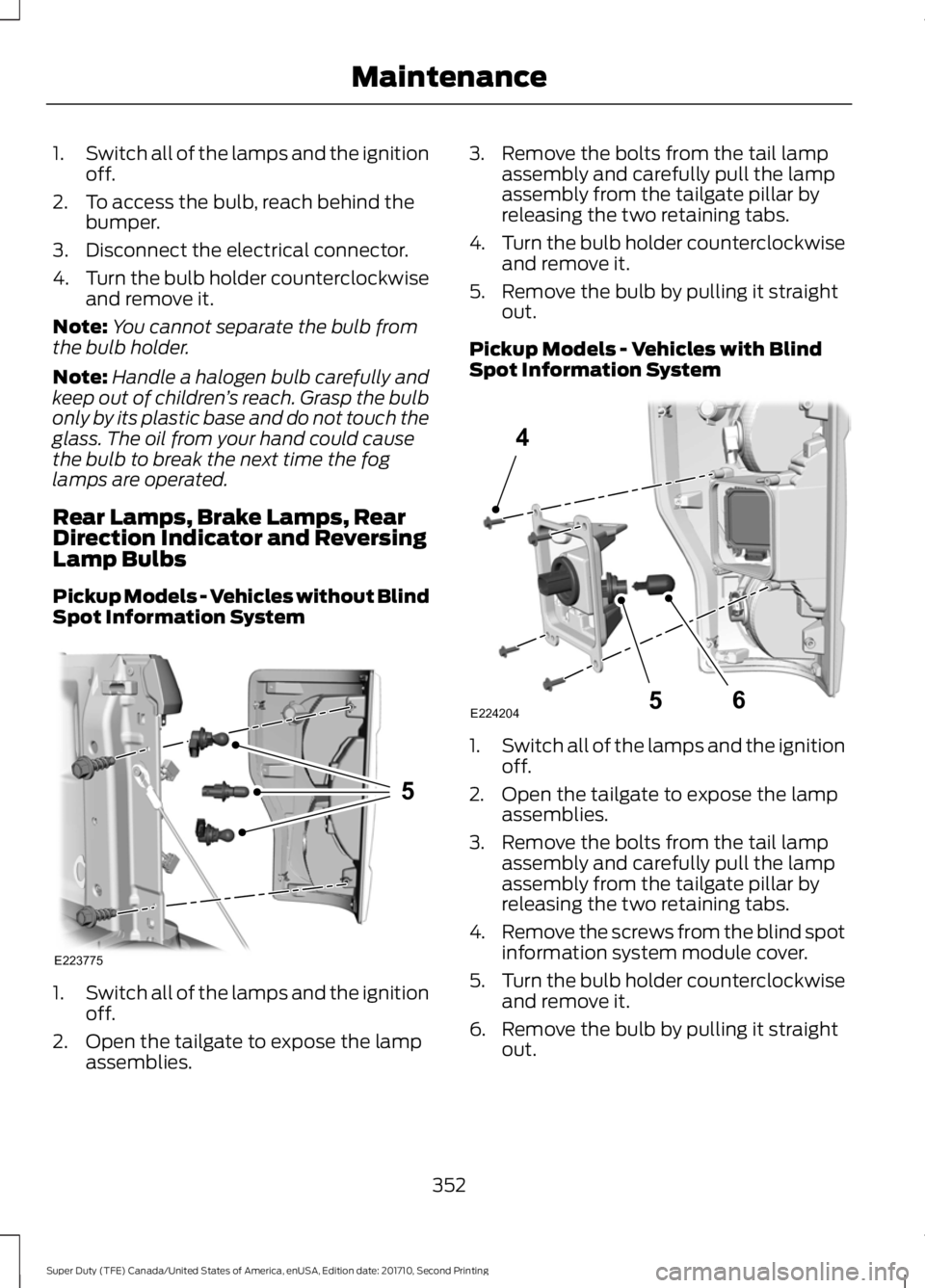
1.Switch all of the lamps and the ignitionoff.
2. Open the tailgate to expose the lampassemblies.
3. Remove the bolts from the tail lampassembly and carefully pull the lampassembly from the tailgate pillar byreleasing the two retaining tabs.
4.Turn the bulb holder counterclockwiseand remove it.
5. Remove the bulb by pulling it straightout.
Pickup Models - Vehicles with BlindSpot Information System
1.Switch all of the lamps and the ignitionoff.
2. Open the tailgate to expose the lampassemblies.
3. Remove the bolts from the tail lampassembly and carefully pull the lampassembly from the tailgate pillar byreleasing the two retaining tabs.
4.Remove the screws from the blind spotinformation system module cover.
5.Turn the bulb holder counterclockwiseand remove it.
6. Remove the bulb by pulling it straightout.
352
Super Duty (TFE) Canada/United States of America, enUSA, Edition date: 201710, Second Printing
MaintenanceE223775
5 E224204
4
65
Page 631 of 642
Automatic Transmission FluidCheck............................................................340Checking Automatic TransmissionFluid...................................................................340Autowipers.......................................................84Auxiliary Power Points...............................168110 Volt - 400 Watt Capacity AC PowerOutlet.................................................................16812 Volt DC Power Point.....................................168Locations...............................................................168Auxiliary Switches.......................................567For more information on the UpfitterInterface Module and the auxiliaryswitches, visit:................................................570Upfitter Interface Module...............................570
B
BatterySee: Changing the 12V Battery.....................346Bed Extender....................................................72Grocery mode........................................................73Tailgate mode........................................................72Bed Ramps....................................................265Installing the Ramp Holder............................267Stowing the Bed Ramp...................................266Using the Bed Ramp........................................265Blind Spot Information System.............249Blind Spot Information System with TrailerTow......................................................................251Switching the System Off and On...............253System Errors......................................................253Using the System..............................................250Bonnet LockSee: Opening and Closing the Hood...........322Booster Seats..................................................30Types of Booster Seats......................................30Brake Fluid Check........................................343Brakes................................................................221General Information...........................................221Breaking-In.....................................................292Bulb Specification Chart...........................353
C
Cabin Air Filter.................................................151California Proposition 65.............................12
Capacities and Specifications -6.2L.................................................................422Alternative Engine Oil for Extremely ColdClimates...........................................................426Specifications.....................................................423Capacities and Specifications - 6.7LDiesel.............................................................427Engine Oil Specifications................................433Specifications.....................................................429Capacities and Specifications -6.8L................................................................434Alternative Engine Oil for Extremely ColdClimates...........................................................439Specifications.....................................................435Capacities and Specifications.................415Car WashSee: Cleaning the Exterior..............................365Center Console..............................................170Changing a Bulb..........................................350Cargo Lamp and Central High MountedBrake Lamp Bulbs........................................353Fog Lamp Bulbs..................................................351Front Park and Direction Indicator LampBulbs.................................................................350Headlamp Bulbs.................................................351License Plate Lamp Bulb................................353Rear Lamps, Brake Lamps, Rear DirectionIndicator and Reversing LampBulbs..................................................................352Changing a Fuse..........................................320Fuses......................................................................320Changing a Road Wheel...........................402Dissimilar Spare Wheel and Tire AssemblyInformation.....................................................402Location of the Spare Tire and Tools........403Removing the Spare Tire (With Spare TireCarrier Only)...................................................404Tire Change Procedure...................................405Changing the 12V Battery.........................346Battery Management System......................348Changing the Coalescer FilterElement........................................................330Changing the Engine Air Filter - 6.2L/6.8L................................................................356Changing the Engine Air Filter - 6.7LDiesel.............................................................357Air Filter Restriction Gauge............................358
628
Super Duty (TFE) Canada/United States of America, enUSA, Edition date: 201710, Second Printing
Index
Page 638 of 642
Refueling - Gasoline....................................192Fuel Filler Cap......................................................193Remote Control..............................................54Car Finder................................................................59Integrated Keyhead Transmitter....................54Intelligent Access Key.........................................55Memory Feature...................................................58Remote Start.........................................................59Replacing the Battery.........................................56Sounding the Panic Alarm................................59Remote Start...................................................151Automatic Settings.............................................151Removing the Tailgate.................................70Repairing Minor Paint Damage..............370Replacement PartsRecommendation........................................12Collision Repairs....................................................12Scheduled Maintenance and MechanicalRepairs..................................................................12Warranty on Replacement Parts.....................13Replacing a Lost Key or RemoteControl............................................................60Reporting Safety Defects (CanadaOnly)...............................................................310Reporting Safety Defects (U.S.Only)...............................................................310Roadside Assistance..................................297Vehicles Sold in Canada: Getting RoadsideAssistance........................................................297Vehicles Sold in Canada: RoadsideAssistance Program Coverage................298Vehicles Sold in Canada: Using RoadsideAssistance.......................................................298Vehicles Sold in the United States: GettingRoadside Assistance...................................297Vehicles Sold in the United States: UsingRoadside Assistance...................................297Roadside Emergencies..............................297Running-InSee: Breaking-In.................................................292Running Out of Fuel....................................188
S
Safety Canopy™..............................................51Safety Precautions......................................183
Satellite Radio...............................................451Satellite Radio Electronic Serial Number(ESN)................................................................452Satellite Radio Reception Factors...............452SIRIUS® Satellite Radio Service..................452Troubleshooting.................................................453Scheduled Maintenance Record............591Scheduled Maintenance...........................573Seatbelt Extension........................................43Seatbelt Height Adjustment.....................40Seatbelt Reminder.........................................41Belt-Minder™.........................................................41Seatbelts...........................................................35Principle of Operation.........................................35Seatbelt Warning Lamp and IndicatorChime..............................................................40Conditions of operation......................................41Seats..................................................................152Security...............................................................74Selective Catalytic Reduction System -Diesel.............................................................188Contaminated Diesel Exhaust Fluid orInoperative Selective Catalytic ReductionSystem...............................................................192Diesel Exhaust Fluid Guidelines andInformation.......................................................191Diesel Exhaust Fluid Level..............................188Diesel Exhaust Fluid Warning Messagesand Vehicle Operations..............................190Filling the Diesel Exhaust Fluid Tank..........188Settings............................................................541911 Assist...............................................................546Ambient Lighting................................................551Bluetooth..............................................................543Clock.......................................................................542Display...................................................................552General..................................................................550Media Player........................................................542Mobile Apps........................................................549Navigation.............................................................547Phone.....................................................................543Radio......................................................................546Sound......................................................................541Valet Mode...........................................................553Vehicle....................................................................551Voice Control.......................................................553Wi-Fi........................................................................551Side Airbags.....................................................50
635
Super Duty (TFE) Canada/United States of America, enUSA, Edition date: 201710, Second Printing
Index
Page 639 of 642
Sitting in the Correct Position..................152Sliding Windows............................................99Power Sliding Back Window...........................99Snow ChainsSee: Using Snow Chains.................................394Snowplowing................................................294Engine temperature while plowing.............295Installing the Snowplow.................................294Operating the Vehicle with the SnowplowAttached..........................................................295Snowplowing with your Airbag EquippedVehicle..............................................................295Transmission operation whileplowing.............................................................296Special Notices................................................13New Vehicle Limited Warranty.........................13On Board Diagnostics Data LinkConnector............................................................13Special Instructions..............................................13Using your Vehicle as an Ambulance.............13Using your Vehicle as a Stationary PowerSource...................................................................14Using your Vehicle With a Snowplow............13Special Operating Conditions ScheduledMaintenance...............................................581Diesel Engine(s).................................................583Exceptions...........................................................589Gasoline Engine(s)............................................581Speed ControlSee: Cruise Control...........................................239Spot Lamps.....................................................90Cargo and Trailer Hookup Lamps...................91Stability Control...........................................226Principle of Operation......................................226Starter SwitchSee: Ignition Switch............................................173Starting a Diesel Engine - 6.7LDiesel..............................................................176....................................................................................176Cold Weather Operation...................................177Cold Weather Starting.......................................177Diesel Engine Fast Start Glow PlugSystem...............................................................176Starting a Gasoline Engine - 6.2L/6.8L..................................................................174Cold Weather Starting (Flexible FuelVehicles Only)..................................................175Failure to Start......................................................175
Guarding Against Exhaust Fumes................176Important Ventilating Information...............176Stopping the Engine When Your Vehicle isMoving................................................................175Stopping the Engine When Your Vehicle isStationary..........................................................175Starting and Stopping the Engine..........173General Information...........................................173Steering...........................................................256Adaptive Steering...............................................257Power Steering...................................................256Steering Wheel...............................................80Storage Compartments.............................170SunroofSee: Moonroof.....................................................100Sun Visors.........................................................99Illuminated Vanity Mirror.................................100Supplementary Restraints System.........44Principle of Operation........................................44Switching Off the Engine - 6.7LDiesel.............................................................180Symbols Glossary.............................................8SYNC™ 3........................................................493General Information.........................................493SYNC™ 3 Troubleshooting......................553SYNC™ Applications and Services........471911 Assist................................................................471SYNC Mobile Apps............................................473SYNC™...........................................................455General Information.........................................455SYNC™ Troubleshooting.........................485
T
Tailgate Lock....................................................70Tailgate Step.....................................................71Closing the Step.....................................................71Opening the Step...................................................71Tailgate...............................................................70Technical SpecificationsSee: Capacities and Specifications.............415Terrain Control..............................................229Principle of Operation......................................229The Better Business Bureau (BBB) AutoLine Program (U.S. Only).......................307Tire Care...........................................................377Glossary of Tire Terminology.........................378
636
Super Duty (TFE) Canada/United States of America, enUSA, Edition date: 201710, Second Printing
Index