brake FORD F650 2008 11.G Workshop Manual
[x] Cancel search | Manufacturer: FORD, Model Year: 2008, Model line: F650, Model: FORD F650 2008 11.GPages: 273, PDF Size: 1.71 MB
Page 116 of 273
AUTOMATIC TRANSMISSION OPERATION (IF EQUIPPED)
Main transmission, auxiliary transmission, transfer case and power
take-off (PTO) control shift patterns can be found on a placard or decal
on the driver’s sun visor, on the instrument panel or on the shift control
itself.
The main transmission control is used to select the various gear ratios or
speeds of the transmission. Selecting D (Direct Drive), does not change
the transmission gear ratio, but is used where the gear ratios in the main
transmission are adequate to handle the vehicle operation.
If the transmission fails to shift properly, check the inline 10A fuse
located in the battery cables above the battery.
Hold the brake pedal down while you move the gearshift lever
between positions. If you don’t hold the brake pedal down, your
vehicle may move unexpectedly and cause property damage, personal
injury or death.
Allison 2200 with park pawl feature
Note:For Allison automatic transmission-equipped vehicles, also refer to
the separate Allison Transmission Operator’s Manual.
A parking pawl effectively grounds the transmission’s output shaft
preventing rotation of the driveline. If the vehicle is stationary, selecting
the P (Park) position places the transmission in neutral and engages the
parking pawl (always use the parking brake, also).
Note:If the P (Park) position is selected when the vehicle is in motion,
the parking pawl mechanism will ratchet andNOThold the truck.
Always set the parking brake fully. Do not use the gearshift in
place of the parking brake.
To avoid sudden, unexpected vehicle movement and
possible personal injury or death:
1. Bring the vehicle to a complete stop.
2. Shift the transmission into P (Park). Slowly lift your foot from the
brake pedal to engage the transmission parking pawl mechanism.
3. Apply the parking brake and make sure it is holding properly. Do not
rely solely on the parking mechanism of the transmission.)
4. Turn the engine off when you leave the vehicle.Never leave the
vehicle unattended when the engine is running.
2008 F-650/750(f67)
Supplement
USA(fus)
Driving
115
Page 117 of 273
Allison 2500
This transmission is available with a column-mounted gearshift lever. The
gear positions are displayed on the RNDL in the instrument cluster.
To avoid sudden, unexpected vehicle movement and
possible personal injury or death:
1. Bring the vehicle to a complete stop.
2. Shift the transmission into N (Neutral).
3. Apply the parking brake and make sure it is holding properly.
4. Turn the engine off when you leave the vehicle.Never leave the
vehicle unattended when the engine is running.
Allison 3000 series
Two modes are available for the Allison 3000 Series: Performance and
Economy. Performance mode will give you the best all-around
transmission operation; Economy provides operation at lower engine
RPM while maintaining adequate performance. The transmission will
automatically default to Performance mode when you start the engine.
Pressing MODE on the shifter will activate the Economy mode; this will
also illuminate the Mode ON lamp.
If the engine speed is above idle when a gear is selected using the
shifter, the vehicle will not move. To move the vehicle, the shifter must
be moved to re-select a gear after the engine speed returns to idle.
Note:For more information regarding the Allison 3000 Series, refer to
the separate Allison 3000 Series Operator’s Manual.
Torque lock
If your vehicle is parked on an incline and P (Park) is not properly
engaged (The parking brake is not applied before the transmission is
shifted into P [Park]), the weight of the vehicle may generate an
excessive amount of torque on the park pawl. In this situation, it may be
difficult to shift the transmission out of P (Park). Hold the brake pedal
down while shifting out of P (Park), then release the parking brake.
2008 F-650/750(f67)
Supplement
USA(fus)
Driving
116
Page 118 of 273
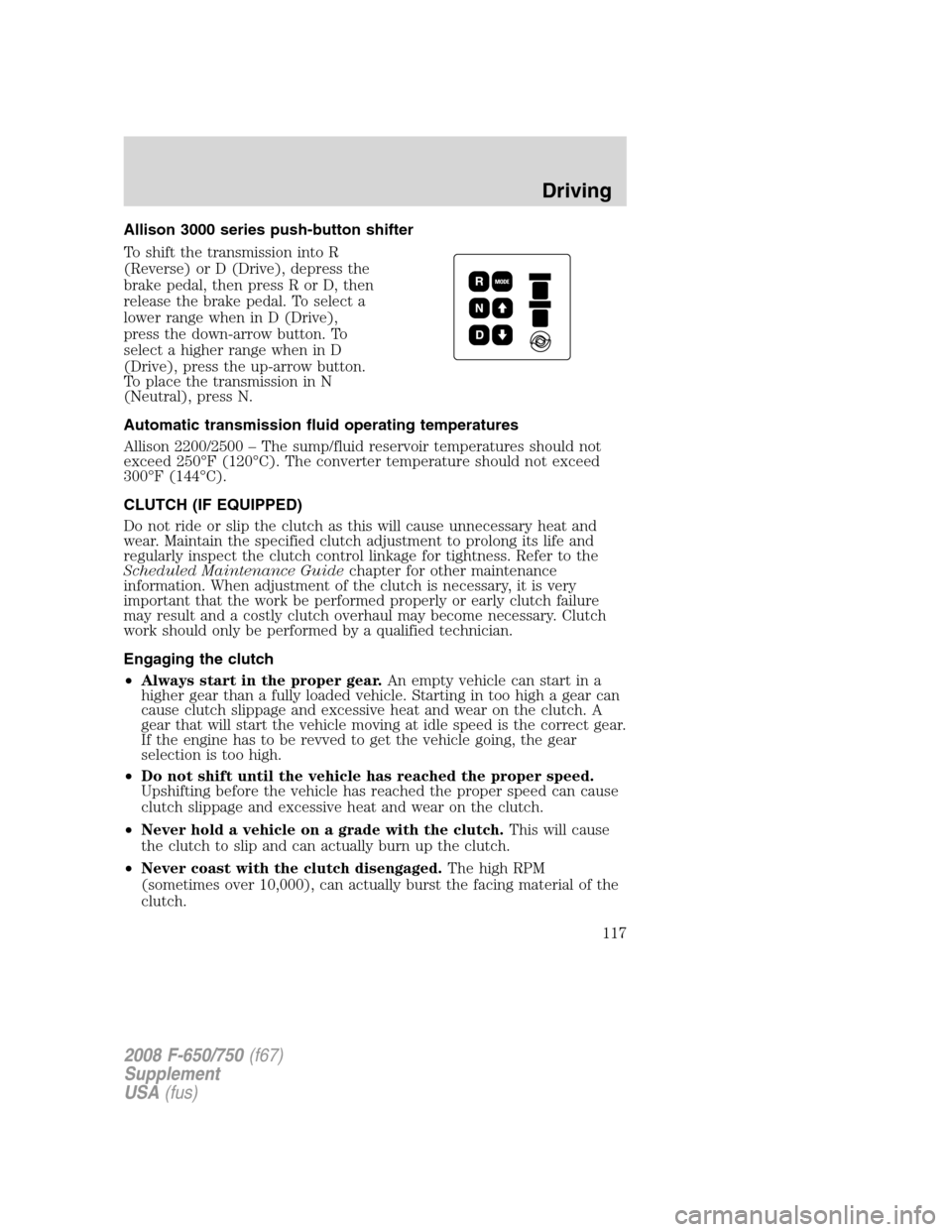
Allison 3000 series push-button shifter
To shift the transmission into R
(Reverse) or D (Drive), depress the
brake pedal, then press R or D, then
release the brake pedal. To select a
lower range when in D (Drive),
press the down-arrow button. To
select a higher range when in D
(Drive), press the up-arrow button.
To place the transmission in N
(Neutral), press N.
Automatic transmission fluid operating temperatures
Allison 2200/2500 – The sump/fluid reservoir temperatures should not
exceed 250°F (120°C). The converter temperature should not exceed
300°F (144°C).
CLUTCH (IF EQUIPPED)
Do not ride or slip the clutch as this will cause unnecessary heat and
wear. Maintain the specified clutch adjustment to prolong its life and
regularly inspect the clutch control linkage for tightness. Refer to the
Scheduled Maintenance Guidechapter for other maintenance
information. When adjustment of the clutch is necessary, it is very
important that the work be performed properly or early clutch failure
may result and a costly clutch overhaul may become necessary. Clutch
work should only be performed by a qualified technician.
Engaging the clutch
•Always start in the proper gear.An empty vehicle can start in a
higher gear than a fully loaded vehicle. Starting in too high a gear can
cause clutch slippage and excessive heat and wear on the clutch. A
gear that will start the vehicle moving at idle speed is the correct gear.
If the engine has to be revved to get the vehicle going, the gear
selection is too high.
•Do not shift until the vehicle has reached the proper speed.
Upshifting before the vehicle has reached the proper speed can cause
clutch slippage and excessive heat and wear on the clutch.
•Never hold a vehicle on a grade with the clutch.This will cause
the clutch to slip and can actually burn up the clutch.
•Never coast with the clutch disengaged.The high RPM
(sometimes over 10,000), can actually burst the facing material of the
clutch.
2008 F-650/750(f67)
Supplement
USA(fus)
Driving
117
Page 119 of 273
•Never engage the clutch while coasting.Re-engaging the clutch
after coasting may not only cause a great shock to the clutch, but the
whole drivetrain. Internal engine damage and/or clutch and flywheel
failure can result from this.
If your vehicle’s transmission is equipped with a ceramic clutch, you
must start the vehicle moving in first gear and engage the clutch before
pressing the accelerator at idle. Also, don’t try to slip the clutch by
raising engine RPM and riding or feathering the clutch pedal since the
vehicle will experience erratic engagement. Erratic engagement can
cause the engine stalling and potential serious damage to the vehicle’s
driveline components.
Clutch brake (vehicles equipped with a non-synchronized
transmission) - Vehicle stationary
A clutch brake is used to stop the transmission input shaft rotation so
that the initial 1 (First) or R (Reverse) gear selection can be
accomplished when the vehicle is stationary and the engine is running at
idle speed. Clutch brake application occurs in the last inch (25 mm) of
clutch pedal travel.
When using the clutch brake, fully depress the clutch pedal and shift the
transmission into 1 (First) or R (Reverse). If the transmission won’t go
into one of these gears, slowly release the clutch pedal while applying
light pressure on the transmission shift lever until it shifts into gear.
Note:After engagement of 1 (First) gear,do notuse the clutch brake
for upshifting or downshifting. If you do, clutch brake life will shorten
and gear selection shift efforts may increase.
Double-clutch procedures - vehicles equipped with a
non-synchronized transmission
In order to properly upshift or downshift, perform the following steps:
1. Depress the clutch pedal to disengage the clutch.
2. Shift the transmission into neutral.
3. Release the clutch pedal.
If upshifting, wait until the engine speed matches the transmission
speed of the gear you are selecting.
If downshifting,accelerate the engine until the engine speed matches
the input speed of the gear you are selecting. Depress the clutch pedal
immediately and shift into the desired gear, then release the clutch
pedal.
2008 F-650/750(f67)
Supplement
USA(fus)
Driving
118
Page 121 of 273
Shifting with a synchronized transmission
With the clutch pedal depressed, use 2 (Second) gear synchronizer to
stop the clutch disc rotation; this allows smooth engagement of 1 (First)
or R (Reverse) To complete the gear engagement, it may be necessary to
apply light pressure to the gearshift lever during initial engagement of
the clutch. It takes a second or two to match gear speeds; steady
pressure on the gearshift lever will help the synchronizer perform its job
more quickly. If the gearshift lever is forced into position, this action
defeats the purpose of the synchronizer by causing gear clash.
Shifting with a non-synchronized transmission
Refer toClutch brakeandDouble clutch proceduresin theClutch
section of this chapter.
Operating the Eaton FS-5205A 5–speed transmission
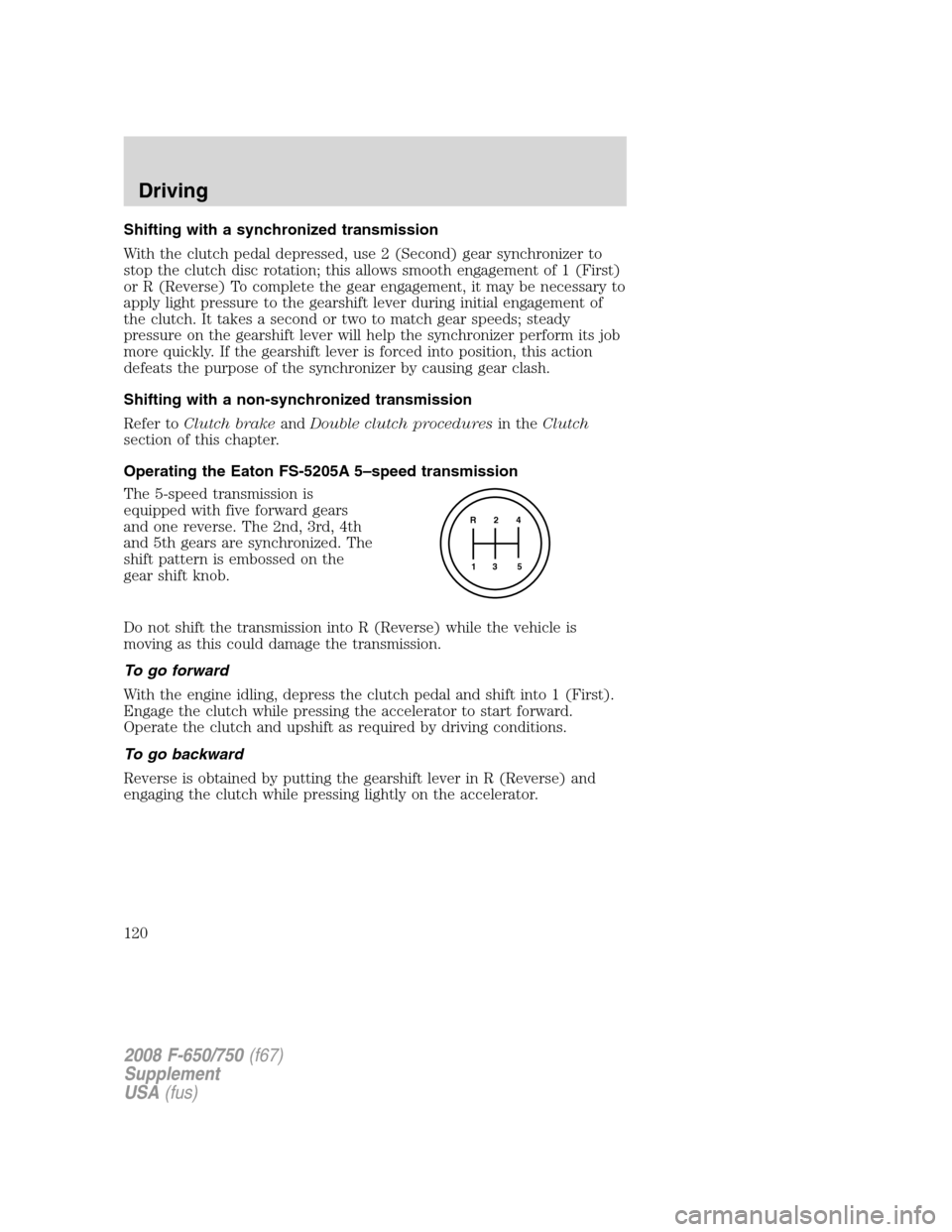
The 5-speed transmission is
equipped with five forward gears
and one reverse. The 2nd, 3rd, 4th
and 5th gears are synchronized. The
shift pattern is embossed on the
gear shift knob.
Do not shift the transmission into R (Reverse) while the vehicle is
moving as this could damage the transmission.
To go forward
With the engine idling, depress the clutch pedal and shift into 1 (First).
Engage the clutch while pressing the accelerator to start forward.
Operate the clutch and upshift as required by driving conditions.
To go backward
Reverse is obtained by putting the gearshift lever in R (Reverse) and
engaging the clutch while pressing lightly on the accelerator.
R 2 4
3 5 1
2008 F-650/750(f67)
Supplement
USA(fus)
Driving
120
Page 123 of 273
To go forward
With the engine idling, depress the clutch pedal and shift into 1 (First).
Engage the clutch while pressing the accelerator to start forward.
Operate the clutch and upshift as required by driving conditions.
To go backward
Reverse is obtained by putting the gearshift lever in R (Reverse) and
engaging the clutch while pressing lightly on the accelerator.
POWER TAKE-OFF (PTO) OPERATION (IF EQUIPPED)
Vehicles equipped with an Allison automatic transmission
(except 3000 Series applications and vehicles equipped with a
Caterpillar engine)
The PTO can be operated while the vehicle is standing or moving. To
engage the PTO, apply the brakes and shift to any gear other than N
(Neutral), then engage the PTO.
If engagement is prevented by the gear teeth not meshing properly,
release the brakes and allow the vehicle to creep slightly or shift the
selector to N (Neutral) and then back into gear. The PTO should never
be engaged by clashing the gear teeth as this may damage the PTO unit
and the transmission PTO drive gear teeth. This could result in further
damage to the transmission and PTO.
PTO operation with vehicle stationary
Stop the vehicle, idle the engine and set the parking brake. Make sure
the gear selector is in any forward drive range, then engage the PTO.
After the PTO is engaged, move the range selector to N (Neutral).
Increase the engine speed until the desired power take-off operation
speed is obtained. To disengage the PTO after operation with the vehicle
standing, release the throttle, allow the drive equipment to come to a
stop, and then disengage the PTO.
When the PTO is operated with the vehicle stationary, the
transmission must be placed in N (Neutral) with the parking
brake set. If the transmission is not in N (Neutral) and is equipped
with a remote throttle control, an increase in engine speed can
overpower the parking brake and cause the vehicle to move, possibly
resulting in personal injury and/or property damage.
2008 F-650/750(f67)
Supplement
USA(fus)
Driving
122
Page 124 of 273
PTO operation while vehicle is moving
After the PTO is engaged for driven vehicle operation, shift to the
desired range and drive the vehicle. The speed of the PTO, during this
period of operation, will always maintain direct relation to vehicle speed.
PTO speed will decrease in relation to vehicle (transmission output)
speed as shifts to a higher gear occur. When operating the PTO while the
vehicle is moving, the PTO may be disengaged whenever it is no longer
required. When there is no load on the PTO gear, it can be pulled out of
engagement.
Vehicles equipped with an Allison 3000 Series automatic
transmission
The PTO drive gear is engine driven and provides direct engine power.
The PTO can be operated when the vehicle is either stationary or
moving.
The PTO gear is in constant mesh with the drive gear in the torque
converter housing. A friction clutch or constant drive is used to transmit
power to the PTO.
Vehicles equipped with a Caterpillar engine
The PTO will only operate if the transmission is in N (Neutral). This
feature can be overridden by a special service tool; see your dealer or
service representative for more information.
Vehicles equipped with a manual transmission
Transmission-mounted PTO units are available for local installation on
your vehicle. See yourBody Builder’s Layout Bookfor restrictions on
use and installation of PTO units.
To engage the PTO unit, stop the vehicle and place the transmission in N
(Neutral). Depress the clutch and allow the gears to stop rotating, then
engage the PTO unit. The PTO can also be selected with the
transmission in gear as long as the clutch is depressed.
When operating the PTO with the vehicle stationary, first set the parking
brake (chock the wheels if the vehicle is on a hill or another uneven
surface).
REAR AXLE INFORMATION
Axle operating temperature normally will not exceed 100°F (38°C). If
the operating temperature exceeds 230°F (110°C), the rate of axle
lubrication oxidation will increase and shorten the life of the lubricant
2008 F-650/750(f67)
Supplement
USA(fus)
Driving
123
Page 125 of 273
and seals, requiring axle lubrication changes to become more frequent to
preserve the axle. Extreme Pressure (EP) lubricants should not be run
consistently above 230°F (110°C).
Gross axle weight
Your truck has gross axle weight, gross vehicle weight and gross
combination weight ratings. Do not exceed these ratings.
Exceeding these ratings by overloading can cause component
failure resulting in property damage, personal injury or death.
Rear axles with locking or limited-slip differentials (if equipped)
If your vehicle is equipped with a locking or limited-slip differential, note
the following:
•Power will be transmitted to the opposite wheel should one of the
wheels begin to slip.
•Both wheels must be raised off the ground should it be necessary to
operate one wheel with the vehicle stationary.
If both wheels are not raised off the ground, the one wheel that
is not raised may pull the vehicle off its support, possibly
resulting in personal injury
Driver-controlled differential lock
To prevent the vehicle from moving when servicing the wheels, tires or
brakes, turn the engine off and raise all drive wheels of the locker
differential axle. Axles equipped with NoSPIN Detroit Locker differentials
deliver power to both wheels even when only one wheel is on the
ground.
Failure to raise all drive wheels with this type of differential
could cause the vehicle to move unexpectedly, resulting in
property damage, personal injury or death.
Care should be taken to avoid sudden accelerations when both drive
wheels are on a slippery surface.
Sudden accelerations on slippery surfaces could cause the
wheels to spin, the vehicle to turn sideways on a crowned road
surface or in a turn, possibly resulting in loss of vehicle control and
personal injury.
2008 F-650/750(f67)
Supplement
USA(fus)
Driving
124
Page 126 of 273
Some Dana/Spicer drive axles have a driver-controlled differential lock.
The differential lock can lock or unlock the differential when the vehicle
is moving or stopped. When extra traction is required, the differential
lock will provide full power to both axles.
When the differential is locked, the vehicle’s turning radius will increase
(vehicle will “under-steer”)
The differential can be locked or unlocked when the vehicle is moving at
a constant speed of less than 25 mph (40 km/h) and while the wheels
are not slipping. The differential must not be locked when the vehicle is
traveling down steep grades and traction is minimal.
Note:Never use the differential lock at vehicle speeds above 25 mph
(40 km/h).
Note:The driver-controlled differential lock function will vary with some
transmissions.
•Vehicles equipped with an Allison 3000 Series transmission:The
differential lock and differential lock light will automatically disengage
at speeds above 25 mph (40 km/h). The differential lock will remain
off until either the vehicle is restarted or the differential lock switch is
turned off then back on.
•Vehicles equipped with a 5–speed, 6–speed or 7–speed manual:
The differential lock and differential lock light will automatically
disengage at speeds above 25 mph (40 km/h). The differential lock
will remain off until either the vehicle is restarted or the differential
lock switch is turned off then back on.
Axle conversions
It is not recommended, or approved, for axle conversions to be
performed. However, it is understood that, on occasion, aftermarket
add-on axles are installed by others on the truck chassis which allow
operator control for weight transfer from other axles (i.e., air lift axles).
When operating a loaded vehicle, the driver must keep all
adjustable axles on the ground at all times, supporting their
share of the vehicle’s load. Failure to do so can overload other axles,
tires, wheels, springs, steering components, brakes and frames,
resulting in early component failure, loss of vehicle control, possible
property damage and personal injury.
TWO-SPEED REAR AXLE (IF EQUIPPED)
A two-speed rear axle allows the driver to select a LO range for greater
pulling power and a HI range for greater road speed and fuel economy.
2008 F-650/750(f67)
Supplement
USA(fus)
Driving
125
Page 130 of 273
When operating empty or lightly loaded, sudden or hard braking
may induce wheel lockup with loss of vehicle control and the
possibility of accident and serious injury, especially on wet or slippery
road surfaces.
TRAILER TOWING
Towing a trailer places an additional load on your vehicle’s engine,
transmission, axle, brakes, tires and suspension. Inspect these
components carefully prior to and after any towing operation.
Your vehicle’s load capacity is designated by weight, not by volume, so
you cannot necessarily use all available space when loading a vehicle.
2nd unit bodies are not included in maximum trailer weight ratings. The
weight of the additional “body” must be subtracted from the maximum
trailer weight.
Note:Do not exceed the GVWR or the GAWR specified on the
certification label.
Towing trailers beyond the maximum recommended gross trailer
weight exceeds the limit of the vehicle and could result in
engine damage, transmission damage, structural damage, loss of vehicle
control, vehicle rollover and personal injury.
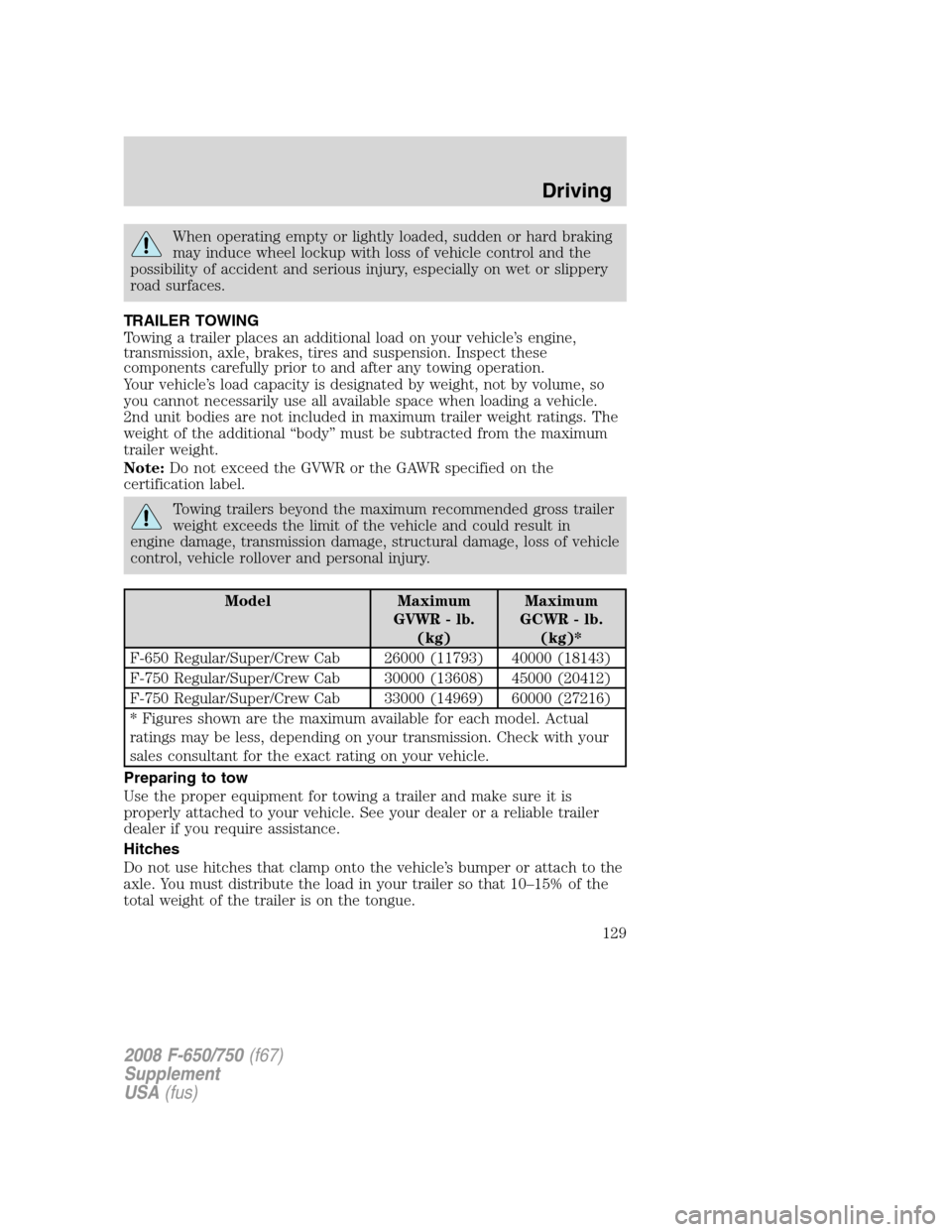
Model Maximum
GVWR - lb.
(kg)Maximum
GCWR - lb.
(kg)*
F-650 Regular/Super/Crew Cab 26000 (11793) 40000 (18143)
F-750 Regular/Super/Crew Cab 30000 (13608) 45000 (20412)
F-750 Regular/Super/Crew Cab 33000 (14969) 60000 (27216)
* Figures shown are the maximum available for each model. Actual
ratings may be less, depending on your transmission. Check with your
sales consultant for the exact rating on your vehicle.
Preparing to tow
Use the proper equipment for towing a trailer and make sure it is
properly attached to your vehicle. See your dealer or a reliable trailer
dealer if you require assistance.
Hitches
Do not use hitches that clamp onto the vehicle’s bumper or attach to the
axle. You must distribute the load in your trailer so that 10–15% of the
total weight of the trailer is on the tongue.
2008 F-650/750(f67)
Supplement
USA(fus)
Driving
129