lock FORD F650 2013 12.G Owner's Manual
[x] Cancel search | Manufacturer: FORD, Model Year: 2013, Model line: F650, Model: FORD F650 2013 12.GPages: 378, PDF Size: 3.82 MB
Page 68 of 378
Engine Coolant Temperature Gauge
Indicates engine coolant temperature. At normal operating temperature,
the level indicator is in the normal range. If the engine coolant
temperature exceeds the normal range, stop the vehicle as soon as safely
possible, switch off the engine and let the engine cool.
WARNING:Never remove the coolant reservoir cap while the
engine is running or hot.
Transmission Fluid Temperature Gauge
Indicates transmission fluid temperature. At normal operating
temperature, the level indicator is in the normal range. If the
transmission fluid temperature exceeds the normal range, stop the
vehicle as soon as safely possible and verify the airflow is not restricted,
such as snow or debris blocking airflow through the grill. Also, higher
than normal operating temperature can be caused by special operation
conditions (i.e., snowplowing, towing or off-road use). Operating the
transmission for extended periods of time with the gauge in the higher
than normal area may cause internal transmission damage. Altering the
severity of the driving conditions is recommended to lower the
transmission temperature into the normal range. If the gauge continues
to show high temperatures, see your authorized dealer.
Fuel Gauge
Indicates approximately how much fuel is left in the fuel tank (when the
ignition is on). The fuel gauge may vary slightly when the vehicle is in
motion or on a grade. The fuel icon and arrow indicates which side of
the vehicle the fuel filler door is located.
Information Display
Odometer:Located in the bottom of the information display. Registers
the accumulated distance your vehicle has travelled.
Trip Computer:SeeGeneral informationin theInformation Displays
chapter.
Vehicle Settings and Personalization:SeeGeneral informationin
theInformation Displayschapter.
Instrument Cluster67
2013 F-650/750(f67)
Owners Guide gf, 2nd Printing, March 2013
USA(fus)
Page 69 of 378
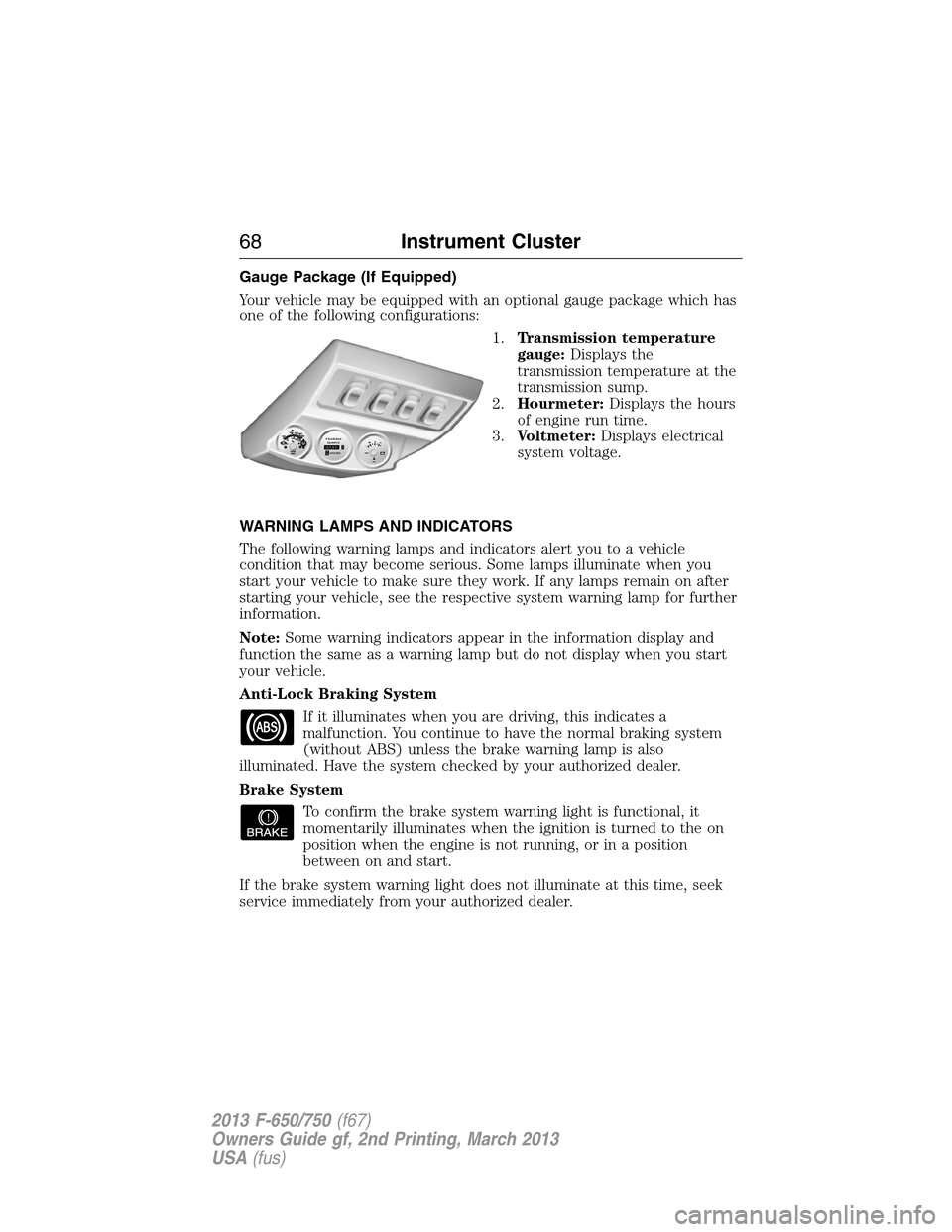
Gauge Package (If Equipped)
Your vehicle may be equipped with an optional gauge package which has
one of the following configurations:
1.Transmission temperature
gauge:Displays the
transmission temperature at the
transmission sump.
2.Hourmeter:Displays the hours
of engine run time.
3.Voltmeter:Displays electrical
system voltage.
WARNING LAMPS AND INDICATORS
The following warning lamps and indicators alert you to a vehicle
condition that may become serious. Some lamps illuminate when you
start your vehicle to make sure they work. If any lamps remain on after
starting your vehicle, see the respective system warning lamp for further
information.
Note:Some warning indicators appear in the information display and
function the same as a warning lamp but do not display when you start
your vehicle.
Anti-Lock Braking System
If it illuminates when you are driving, this indicates a
malfunction. You continue to have the normal braking system
(without ABS) unless the brake warning lamp is also
illuminated. Have the system checked by your authorized dealer.
Brake System
To confirm the brake system warning light is functional, it
momentarily illuminates when the ignition is turned to the on
position when the engine is not running, or in a position
between on and start.
If the brake system warning light does not illuminate at this time, seek
service immediately from your authorized dealer.
68Instrument Cluster
2013 F-650/750(f67)
Owners Guide gf, 2nd Printing, March 2013
USA(fus)
Page 71 of 378
Diesel Exhaust Fluid (diesel engine only)
It illuminates when the diesel exhaust fluid level falls below
0.5 gallons (1.9L) in the five gallon (19.0L) tank or one gallon
(3.8L) in the nine gallon (34.0L) tank. Refill the tank or, at a
minimum, add at least one gallon (3.8L) to the five gallon (19.0L) tank
or two gallons (7.6L) to the nine gallon (34.0L) tank.
Diesel Particulate Filter (diesel engine only)
It illuminates when the soot level in the diesel particulate filter
has reached a point where it requires operator assistance. See
Diesel particulate filterin theMaintenancechapter, and your
engine operator’s manual, for more details.
Do Not Shift (Allison automatic transmission only)
It illuminates while driving if a problem has been detected in
the transmission; shifting may be restricted. Depending on the
severity of the problem, the shifter’s digital read-out may turn
blank.
Operation may continue in order to reach service assistance. The control
unit may not respond to shift selector requests, since operating
limitations are being placed on the transmission (i.e. upshifts and
downshifts may be restricted). Direction changes do not occur.
Direction Indicator
It illuminates when the left or right turn signal or the hazard
warning flasher is switched on. If the indicators stay on or flash
faster, check for a burned out bulb.
Electronic Locking Differential
It illuminates when using the electronic locking differential.
Engine Oil Pressure (gasoline engine only)
It illuminates when engine oil pressure is low.
Fasten Safety belt
It illuminates and a chime sounds to remind you to fasten your
safety belt.
70Instrument Cluster
2013 F-650/750(f67)
Owners Guide gf, 2nd Printing, March 2013
USA(fus)
Page 73 of 378
Stop Engine (diesel engine only)
This red lamp illuminates when the engine needs to be stopped
(as soon as it can be safely done). If the lamp begins flashing,
automatic engine shutdown may take place in as little as
20 seconds.
WARNING:In the event of engine shutdown, make sure the
vehicle is safely off the road and the problem is remedied prior to
returning to the road. Failure to remove the vehicle from the road
could result in an accident, causing serious injury or death.
If the engine shuts down, it can be restarted and operated for
30 seconds at a time, or until the problem is corrected. For more
information, seeEngine automatic shutdown warning light or chime
in theDrivingchapter, and your engine operator’s manual.
See your engine operator’s manual for specific information regarding this
feature. Drivers of electronically-controlled engines should know the
extent of the warning engine shutdown system before operating the
vehicle.
Traction Control (diesel engine only)
It illuminates and flashes slowly if the Off Road or Mud/Snow
mode is selected. It illuminates and flashes rapidly during a
traction control event.
Trailer Anti-Lock Braking System (ABS)
It illuminates briefly when the ignition is switched on and only
when a PLC trailer or a PLC diagnostic tool is connected. If the
light fails to illuminate, remains on after the vehicle is started
or continues to flash, have the system serviced immediately.
Wait to Start (diesel engine only)
It illuminates when the air intake heater is in operation and
special starting procedures are required.
WARNING:If equipped with an air intake heater, DO NOT use
ether or any other starting fluids. The use of starting fluids
(ether) in an engine equipped with an air intake heater could result in
damage and/or personal injury.
72Instrument Cluster
2013 F-650/750(f67)
Owners Guide gf, 2nd Printing, March 2013
USA(fus)
Page 80 of 378
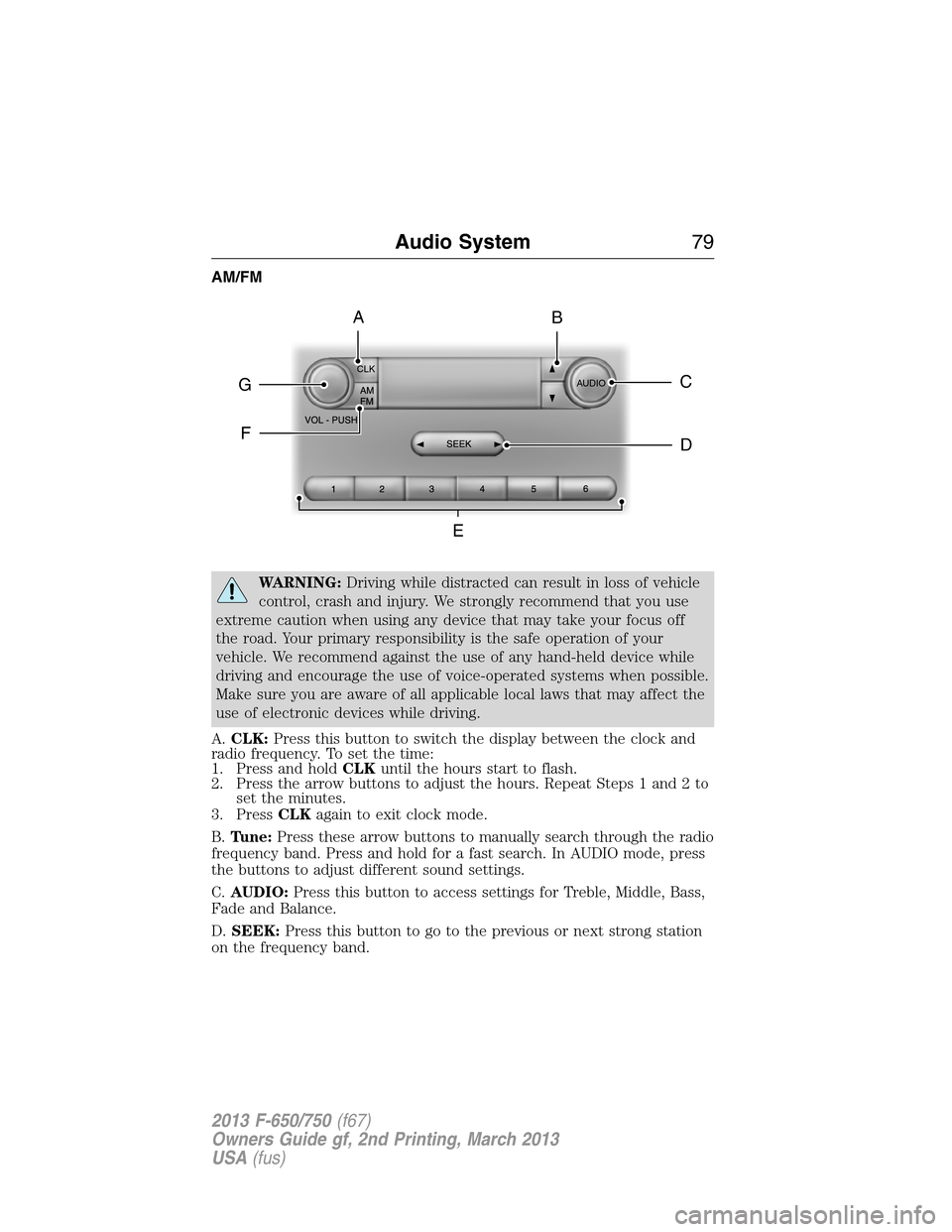
AM/FM
WARNING:Driving while distracted can result in loss of vehicle
control, crash and injury. We strongly recommend that you use
extreme caution when using any device that may take your focus off
the road. Your primary responsibility is the safe operation of your
vehicle. We recommend against the use of any hand-held device while
driving and encourage the use of voice-operated systems when possible.
Make sure you are aware of all applicable local laws that may affect the
use of electronic devices while driving.
A.CLK:Press this button to switch the display between the clock and
radio frequency. To set the time:
1. Press and holdCLKuntil the hours start to flash.
2. Press the arrow buttons to adjust the hours. Repeat Steps 1 and 2 to
set the minutes.
3. PressCLKagain to exit clock mode.
B.Tune:Press these arrow buttons to manually search through the radio
frequency band. Press and hold for a fast search. In AUDIO mode, press
the buttons to adjust different sound settings.
C.AUDIO:Press this button to access settings for Treble, Middle, Bass,
Fade and Balance.
D.SEEK:Press this button to go to the previous or next strong station
on the frequency band.
CLK
AUDIOC
EG
F
BA
D
Audio System79
2013 F-650/750(f67)
Owners Guide gf, 2nd Printing, March 2013
USA(fus)
Page 87 of 378
Satellite Radio Electronic Serial Number (ESN)
You need your ESN to activate, modify or track your satellite radio
account. When in satellite radio mode, you can view this number by
pressingSIRIUSand memory preset 1 at the same time. To access your
ESN, press the bottom left corner of the touchscreen, thenSIRIUS>
Options.
Troubleshooting
Radio display Condition Possible action
Acquiring Radio requires more
than two seconds to
produce audio for the
selected channel.No action required.
This message should
disappear shortly.
Sat Fault/SIRIUS
system failureThere is an internal
module or system
failure present.If this message does
not clear shortly, or
with an ignition key
cycle, your receiver
may have a fault. See
an authorized dealer
for service.
Invalid Channel The channel is no
longer available.Tune to another
channel or choose
another preset.
Unsubscribed Channel Your subscription does
not include this
channel.Contact Sirius at
1–888–539–7474 to
subscribe to the
channel, or tune to
another channel.
No Signal The signal is lost from
the Sirius satellite or
Sirius tower to your
vehicle antenna.The signal is blocked.
When you move into
an open area, the
signal should return.
Updating Update of channel
programming in
progress.No action required.
The process may take
up to three minutes.
86Audio System
2013 F-650/750(f67)
Owners Guide gf, 2nd Printing, March 2013
USA(fus)
Page 88 of 378
Radio display Condition Possible action
Call SIRIUS
1–888–539–7474Your satellite service is
no longer available.Call Sirius at
1–888–539–7474 to
resolve subscription
issues.
None Found. Check
Channel Guide.All the channels in the
selected category are
either skipped or
locked.Use the channel guide
to turn off the Lock or
Skip function on that
station.
Subscription Updated Sirius has updated the
channels available for
your vehicle.No action required.
Audio System87
2013 F-650/750(f67)
Owners Guide gf, 2nd Printing, March 2013
USA(fus)
Page 93 of 378
HEAD RESTRAINTS
WARNING:To minimize the risk of neck injury in the event of a
crash, you and the passenger occupants should not sit in or
operate the vehicle, until the head restraint is placed in its proper
position. Never adjust the head restraint while the vehicle is in motion.
WARNING:The adjustable head restraint is a safety device.
Whenever possible it should be installed and properly adjusted
when the seat is occupied.
WARNING:Install the head restraint properly to minimize the
risk of neck injury in the event of a crash.
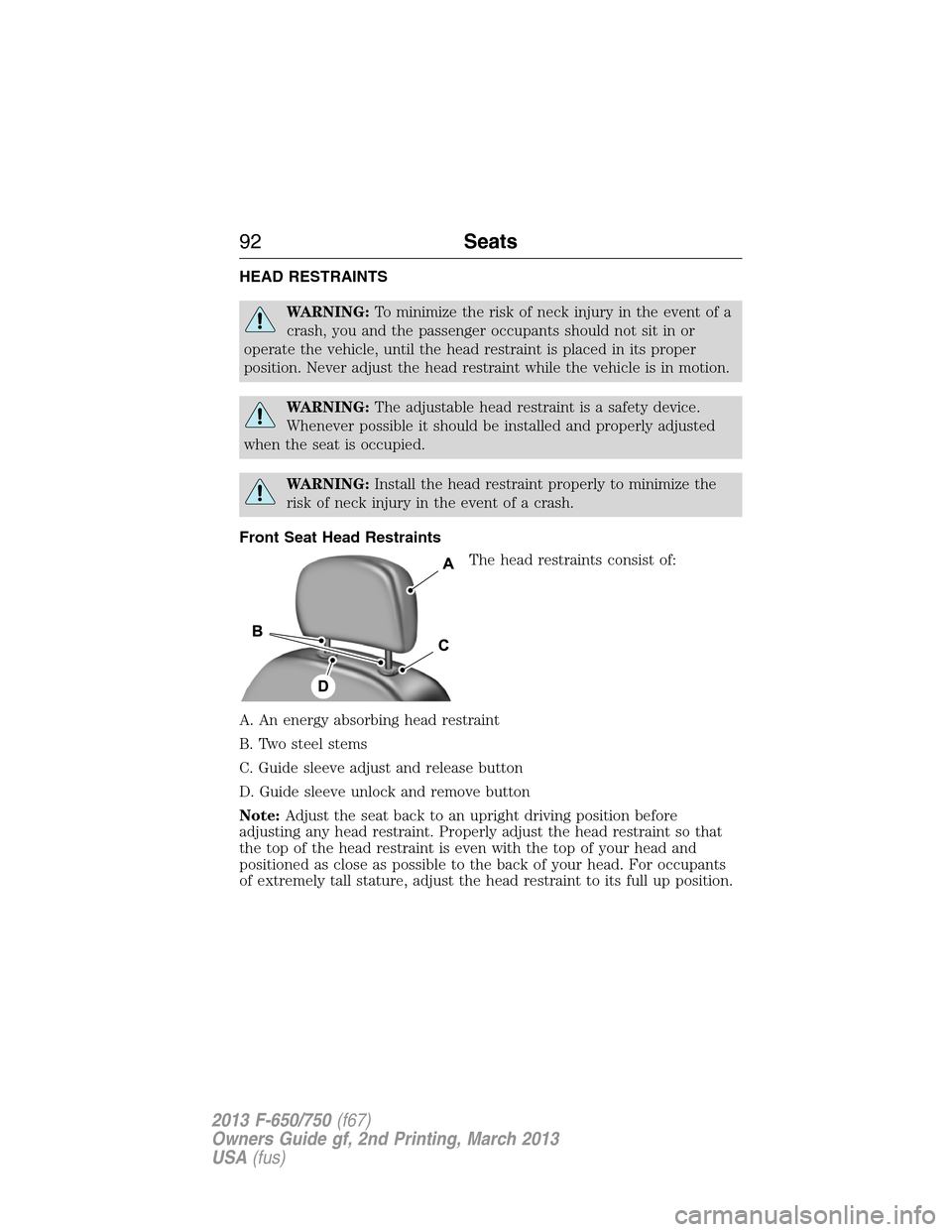
Front Seat Head Restraints
The head restraints consist of:
A. An energy absorbing head restraint
B. Two steel stems
C. Guide sleeve adjust and release button
D. Guide sleeve unlock and remove button
Note:Adjust the seat back to an upright driving position before
adjusting any head restraint. Properly adjust the head restraint so that
the top of the head restraint is even with the top of your head and
positioned as close as possible to the back of your head. For occupants
of extremely tall stature, adjust the head restraint to its full up position.
92Seats
2013 F-650/750(f67)
Owners Guide gf, 2nd Printing, March 2013
USA(fus)
Page 94 of 378
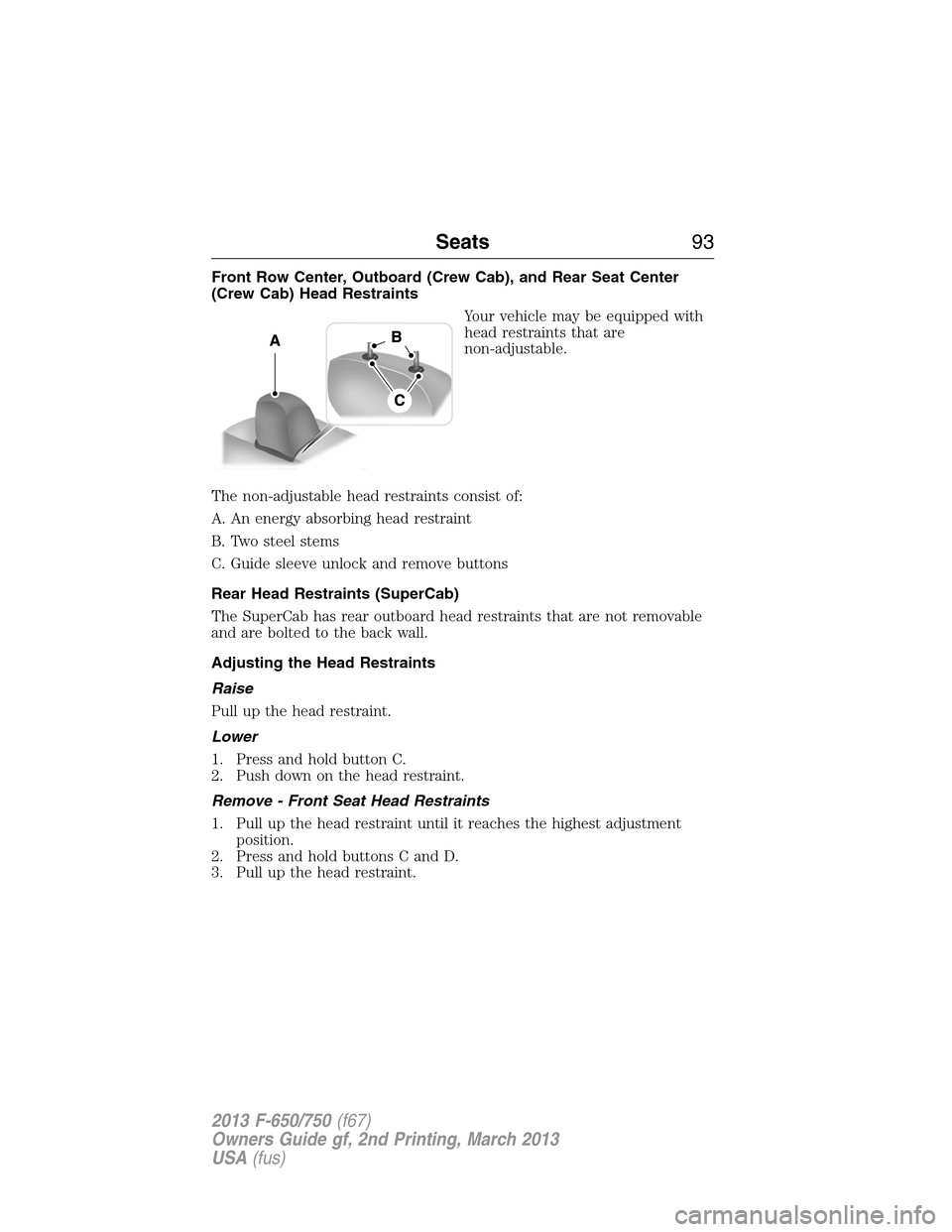
Front Row Center, Outboard (Crew Cab), and Rear Seat Center
(Crew Cab) Head Restraints
Your vehicle may be equipped with
head restraints that are
non-adjustable.
The non-adjustable head restraints consist of:
A. An energy absorbing head restraint
B. Two steel stems
C. Guide sleeve unlock and remove buttons
Rear Head Restraints (SuperCab)
The SuperCab has rear outboard head restraints that are not removable
and are bolted to the back wall.
Adjusting the Head Restraints
Raise
Pull up the head restraint.
Lower
1. Press and hold button C.
2. Push down on the head restraint.
Remove - Front Seat Head Restraints
1. Pull up the head restraint until it reaches the highest adjustment
position.
2. Press and hold buttons C and D.
3. Pull up the head restraint.
Seats93
2013 F-650/750(f67)
Owners Guide gf, 2nd Printing, March 2013
USA(fus)
Page 95 of 378
Remove - Front Row Center, Outboard (Crew Cab), and Rear Seat
Center (Crew Cab) Head Restraints
1. Pull up the head restraint until it reaches the highest adjustment
position.
2. Press and hold buttons C.
3. Pull up the head restraint.
Reinstall
Align the steel stems into the guide sleeves and push the head restraint
down until it locks.
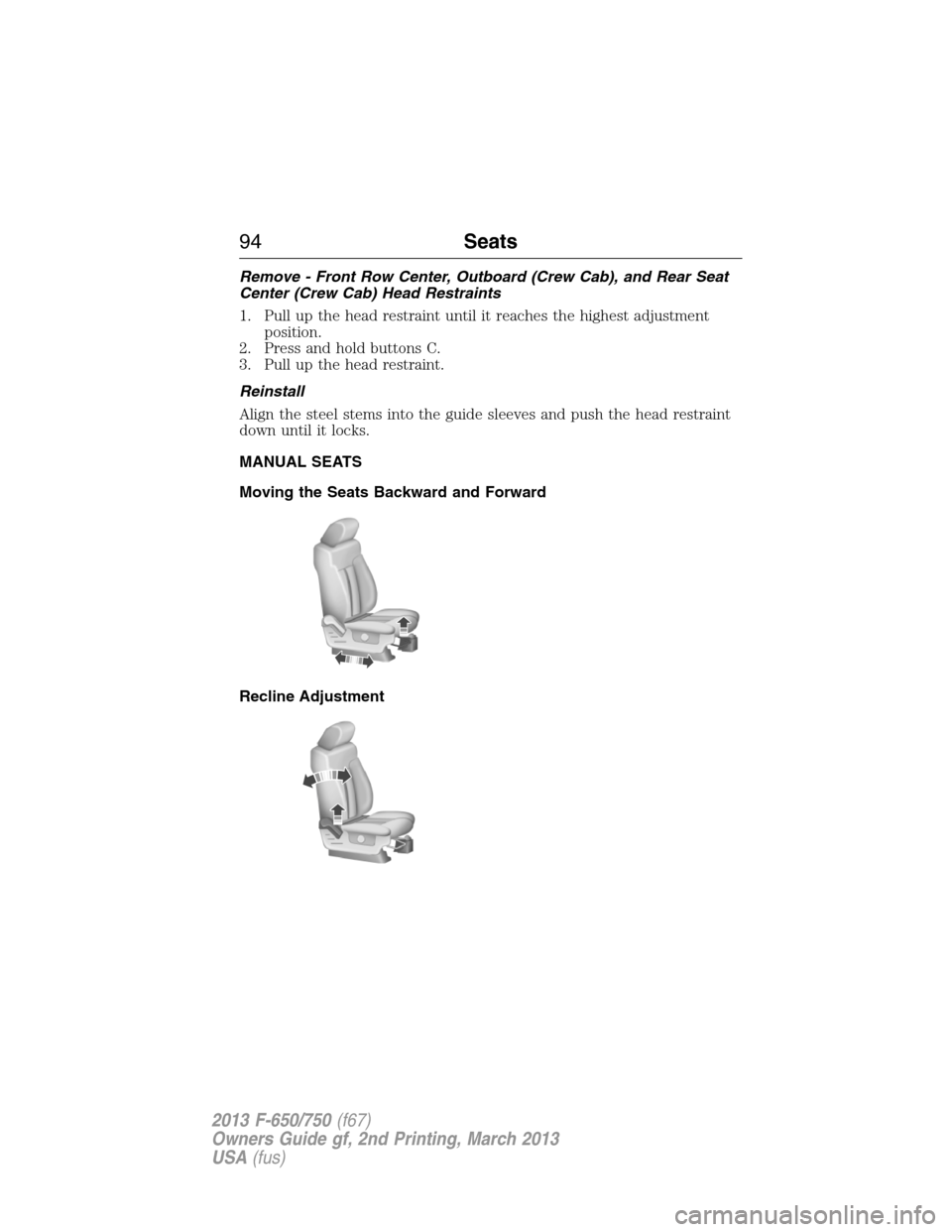
MANUAL SEATS
Moving the Seats Backward and Forward
Recline Adjustment
94Seats
2013 F-650/750(f67)
Owners Guide gf, 2nd Printing, March 2013
USA(fus)