USB FORD F650 2016 13.G User Guide
[x] Cancel search | Manufacturer: FORD, Model Year: 2016, Model line: F650, Model: FORD F650 2016 13.GPages: 379, PDF Size: 4.8 MB
Page 304 of 379
Action and Description
Message
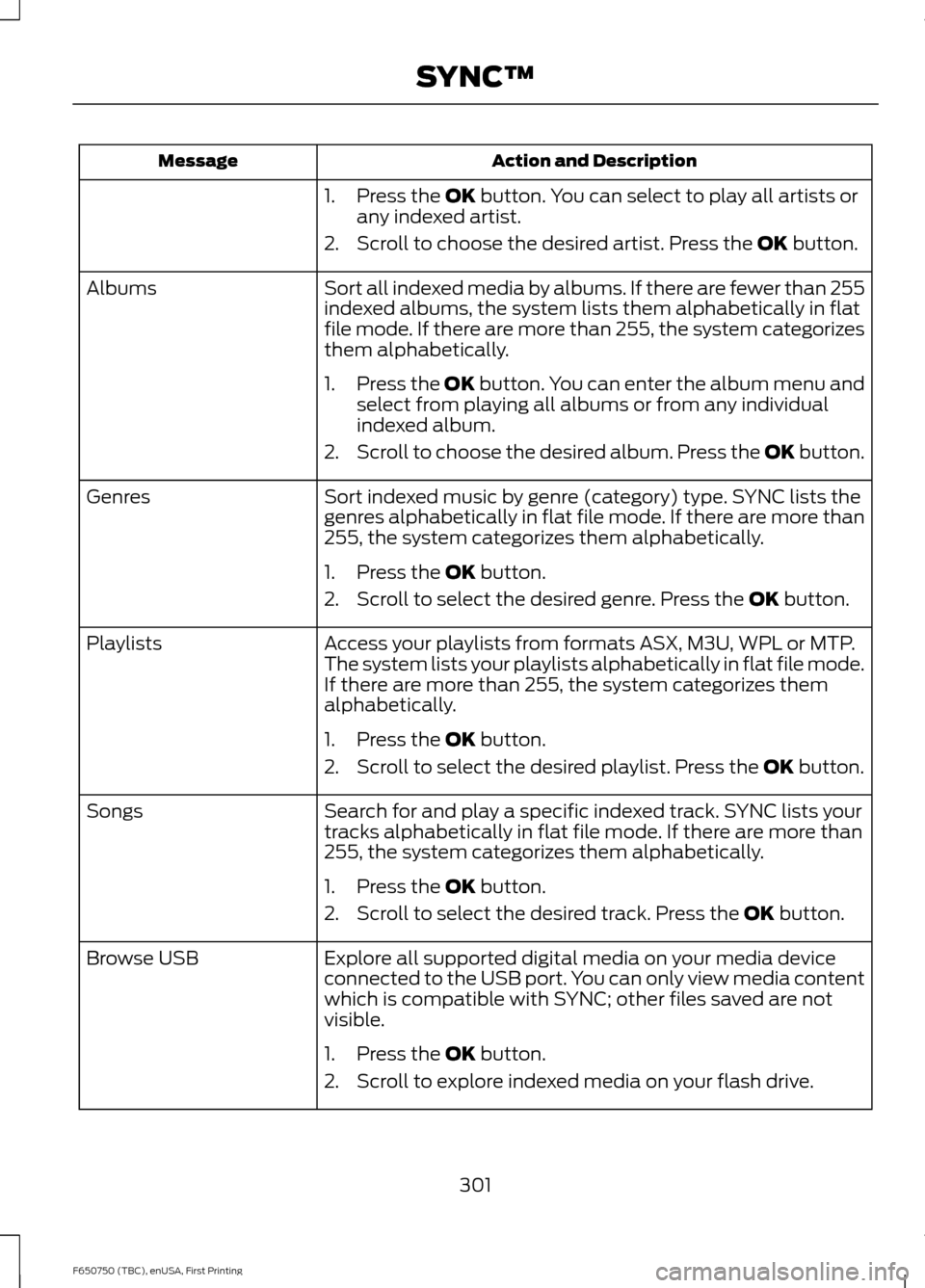
1. Press the OK button. You can select to play all artists or
any indexed artist.
2. Scroll to choose the desired artist. Press the
OK button.
Sort all indexed media by albums. If there are fewer than 255
indexed albums, the system lists them alphabetically in flat
file mode. If there are more than 255, the system categorizes
them alphabetically.
Albums
1.Press the
OK button. You can enter the album menu and
select from playing all albums or from any individual
indexed album.
2. Scroll to choose the desired album. Press the OK button.
Sort indexed music by genre (category) type. SYNC lists the
genres alphabetically in flat file mode. If there are more than
255, the system categorizes them alphabetically.
Genres
1. Press the
OK button.
2. Scroll to select the desired genre. Press the
OK button.
Access your playlists from formats ASX, M3U, WPL or MTP.
The system lists your playlists alphabetically in flat file mode.
If there are more than 255, the system categorizes them
alphabetically.
Playlists
1. Press the
OK button.
2. Scroll to select the desired playlist. Press the
OK button.
Search for and play a specific indexed track. SYNC lists your
tracks alphabetically in flat file mode. If there are more than
255, the system categorizes them alphabetically.
Songs
1. Press the
OK button.
2. Scroll to select the desired track. Press the
OK button.
Explore all supported digital media on your media device
connected to the USB port. You can only view media content
which is compatible with SYNC; other files saved are not
visible.
Browse USB
1. Press the
OK button.
2. Scroll to explore indexed media on your flash drive.
301
F650750 (TBC), enUSA, First Printing SYNC™
Page 305 of 379
Action and Description
Message
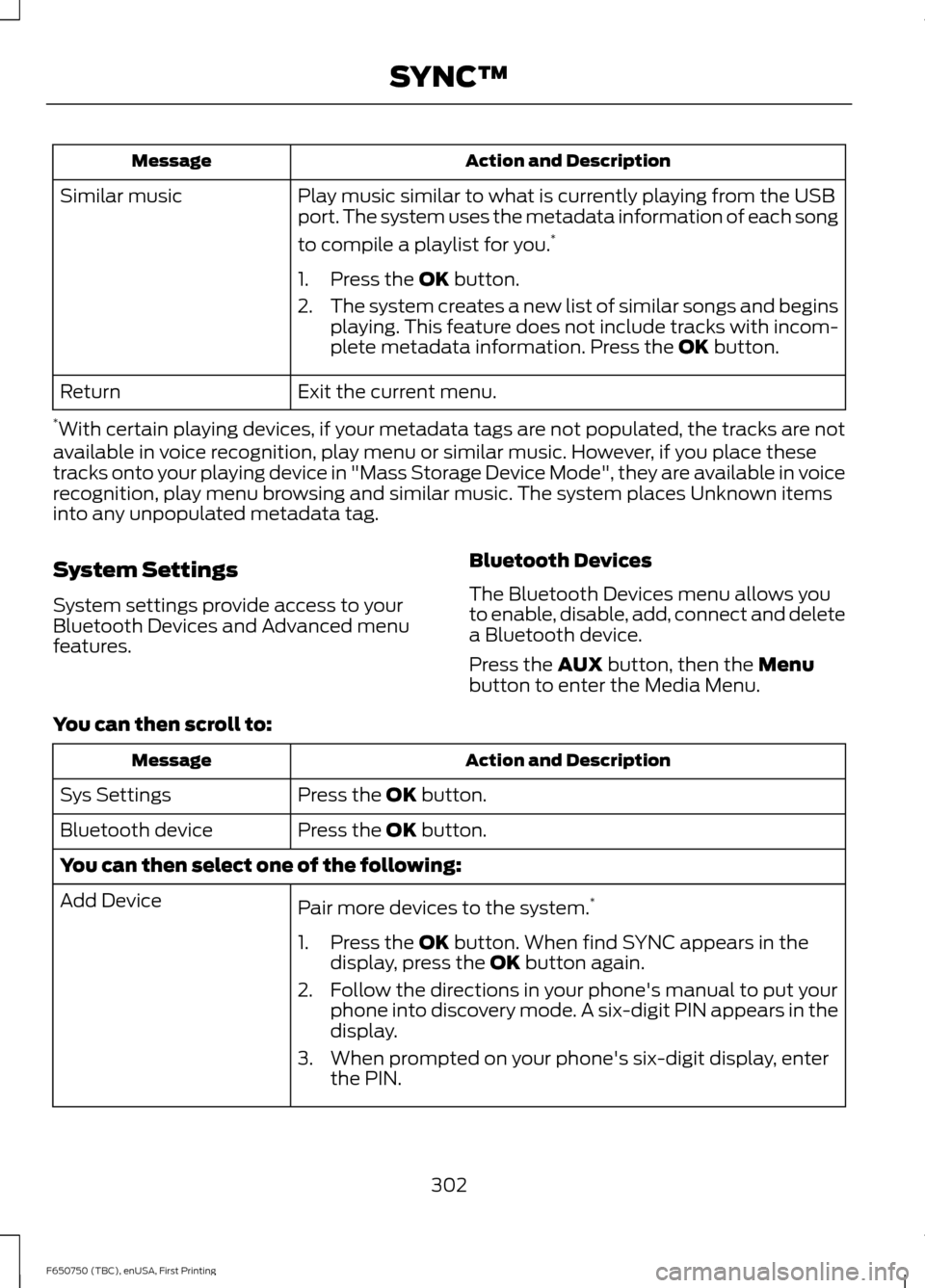
Play music similar to what is currently playing from the USB
port. The system uses the metadata information of each song
to compile a playlist for you. *
Similar music
1. Press the OK button.
2. The system creates a new list of similar songs and begins
playing. This feature does not include tracks with incom-
plete metadata information. Press the
OK button.
Exit the current menu.
Return
* With certain playing devices, if your metadata tags are not populated, the tracks are not
available in voice recognition, play menu or similar music. However, if you place these
tracks onto your playing device in "Mass Storage Device Mode", they are available in voice
recognition, play menu browsing and similar music. The system places Unknown items
into any unpopulated metadata tag.
System Settings
System settings provide access to your
Bluetooth Devices and Advanced menu
features. Bluetooth Devices
The Bluetooth Devices menu allows you
to enable, disable, add, connect and delete
a Bluetooth device.
Press the
AUX button, then the Menu
button to enter the Media Menu.
You can then scroll to: Action and Description
Message
Press the
OK button.
Sys Settings
Press the
OK button.
Bluetooth device
You can then select one of the following:
Pair more devices to the system. *
Add Device
1. Press the
OK button. When find SYNC appears in the
display, press the OK button again.
2. Follow the directions in your phone's manual to put your phone into discovery mode. A six-digit PIN appears in the
display.
3. When prompted on your phone's six-digit display, enter the PIN.
302
F650750 (TBC), enUSA, First Printing SYNC™
Page 310 of 379
USB and media issues
Possible solution(s)
Possible cause(s)
Issue
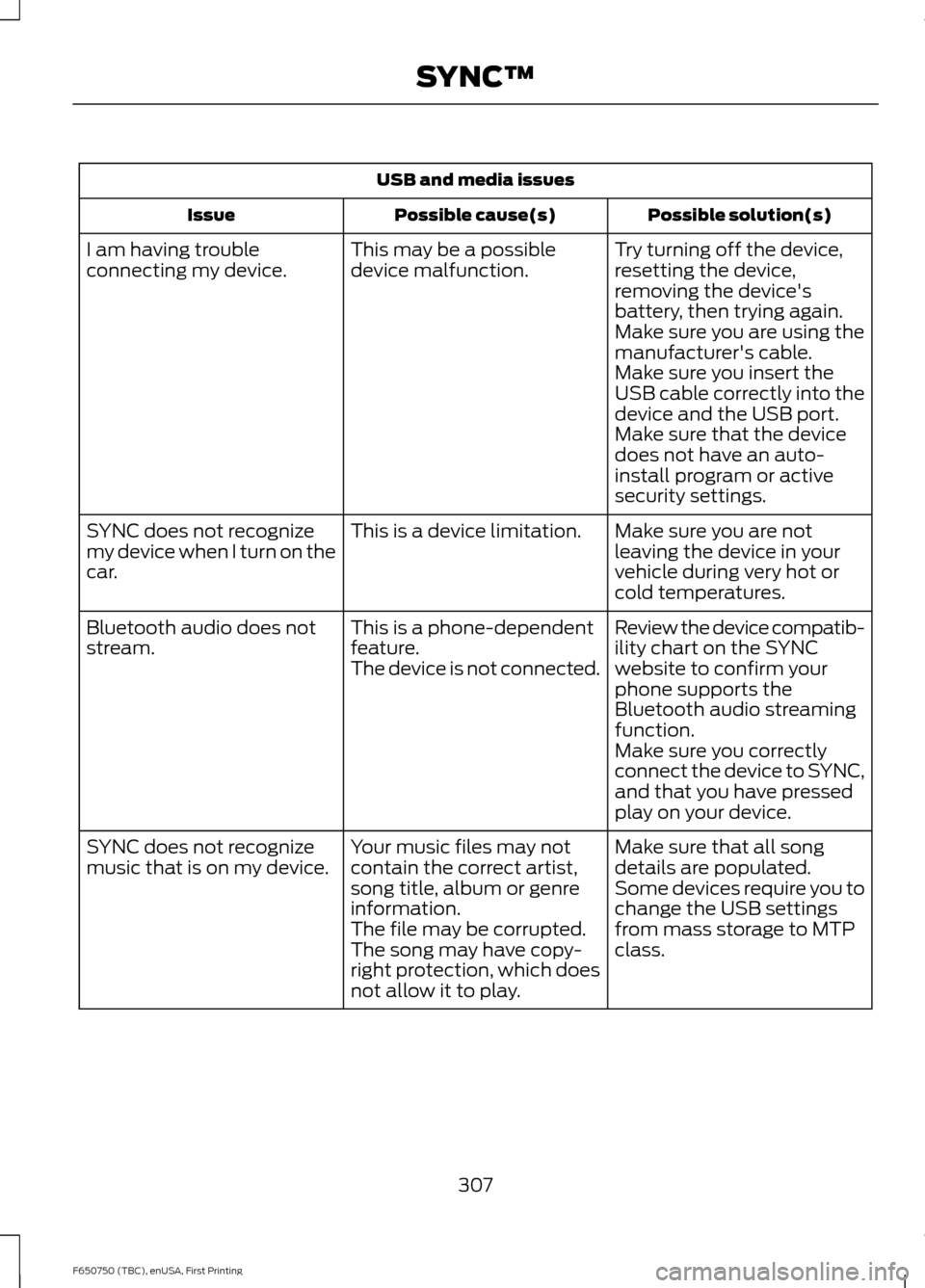
Try turning off the device,
resetting the device,
removing the device's
battery, then trying again.
This may be a possible
device malfunction.
I am having trouble
connecting my device.
Make sure you are using the
manufacturer's cable.
Make sure you insert the
USB cable correctly into the
device and the USB port.
Make sure that the device
does not have an auto-
install program or active
security settings.
Make sure you are not
leaving the device in your
vehicle during very hot or
cold temperatures.
This is a device limitation.
SYNC does not recognize
my device when I turn on the
car.
Review the device compatib-
ility chart on the SYNC
website to confirm your
phone supports the
Bluetooth audio streaming
function.
This is a phone-dependent
feature.
The device is not connected.
Bluetooth audio does not
stream.
Make sure you correctly
connect the device to SYNC,
and that you have pressed
play on your device.
Make sure that all song
details are populated.
Your music files may not
contain the correct artist,
song title, album or genre
information.
SYNC does not recognize
music that is on my device.
Some devices require you to
change the USB settings
from mass storage to MTP
class.
The file may be corrupted.
The song may have copy-
right protection, which does
not allow it to play.
307
F650750 (TBC), enUSA, First Printing SYNC™
Page 377 of 379
Starting and Stopping the Engine...........84
General Information........................................... 84
Steering............................................................136
Steering System Inspection.....................222
Hydraulic System............................................... 222
Steering Column Joint Bolts........................... 222
Steering Wheel
...............................................44
Storage Compartments..............................83
Sun Visors.........................................................53
Slide-on-rod........................................................... 53
Suspension System Inspection
..............222
Switching Off the Engine............................88
Symbols Glossary
...........................................10
SYNC™............................................................279 General Information.......................................... 279
SYNC™ Troubleshooting
.........................304
T
Technical Specifications See: Capacities and Specifications.............251
The Better Business Bureau (BBB) Auto Line Program (U.S. Only).......................158
Tire Care
..........................................................232
Glossary of Tire Terminology......................... 232
Information Contained on the Tire Sidewall............................................................ 232
Tires See: Wheels and Tires...................................... 232
Towing a Trailer
.............................................140
Load Placement................................................. 140
Towing..............................................................140
Traction Control
.............................................132
Principle of Operation....................................... 132
Trailer Brakes..................................................128 Trailer Air Supply and Parking Brake
Modular Controls........................................... 128
Trailer Brake Hand Control.............................. 128
Transmission Code Designation............255
Transmission...................................................113
Transmission See: Transmission................................................ 113Transporting the Vehicle............................143
Towing the Vehicle with the Front Wheels
Suspended....................................................... 143
Towing the Vehicle with the Rear Wheels Suspended....................................................... 143
Towing Vehicles Equipped with a Driver-controlled Differential Lock.........144
U
Under Hood Overview - 6.7L Diesel.............................................................184
Under Hood Overview - 6.8L...................183
USB Port
..........................................................277
Using Cruise Control....................................134
Switching Cruise Control Off.......................... 135
Switching Cruise Control On.......................... 134
Using Snow Chains.....................................246
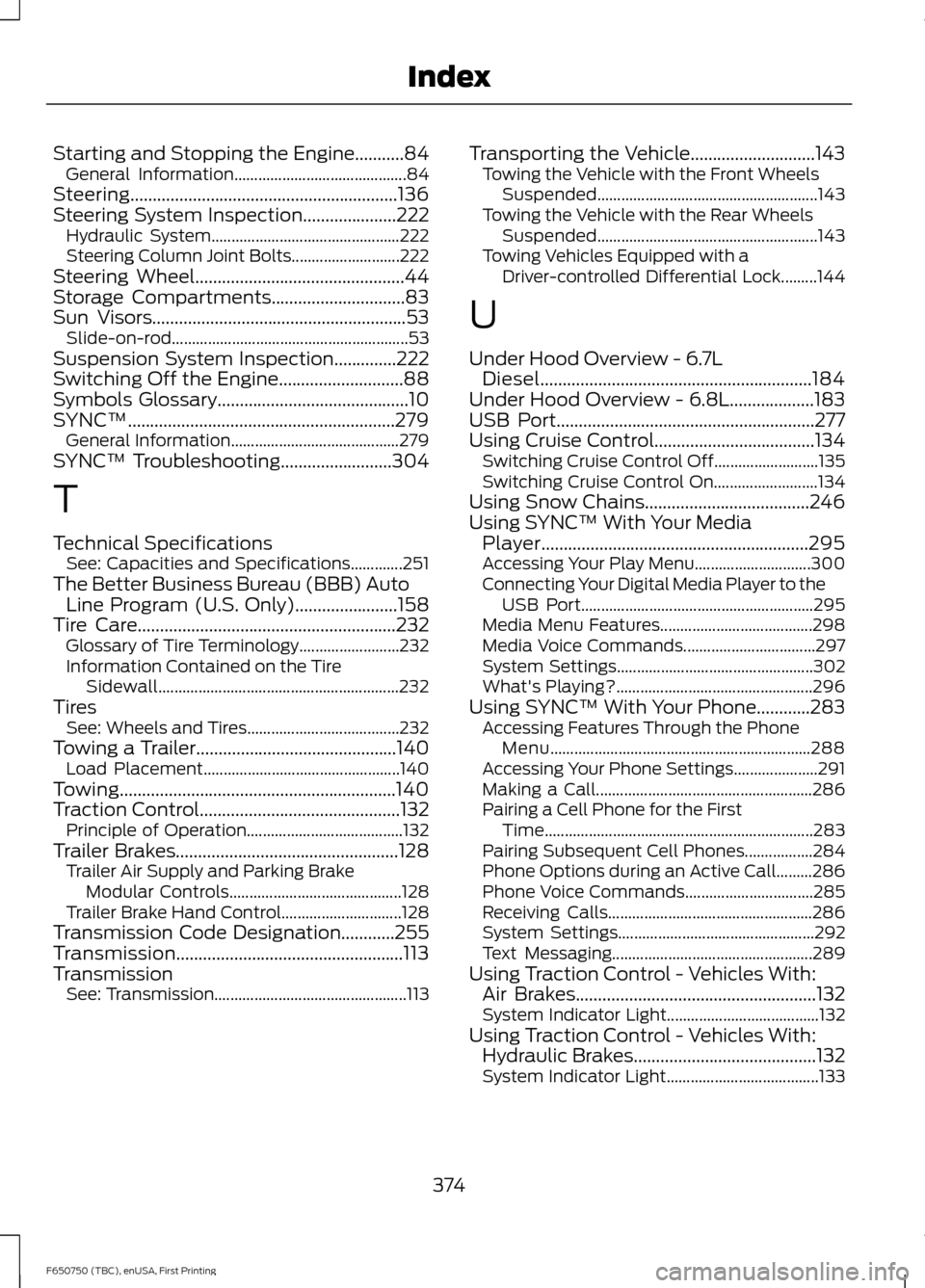
Using SYNC™ With Your Media Player............................................................295
Accessing Your Play Menu............................. 300
Connecting Your Digital Media Player to the USB Port.......................................................... 295
Media Menu Features...................................... 298
Media Voice Commands................................. 297
System Settings................................................. 302
What's Playing?................................................. 296
Using SYNC™ With Your Phone............283 Accessing Features Through the Phone
Menu................................................................. 288
Accessing Your Phone Settings..................... 291
Making a Call...................................................... 286
Pairing a Cell Phone for the First Time................................................................... 283
Pairing Subsequent Cell Phones.................284
Phone Options during an Active Call.........286
Phone Voice Commands................................ 285
Receiving Calls................................................... 286
System Settings................................................. 292
Text Messaging.................................................. 289
Using Traction Control - Vehicles With: Air Brakes......................................................132
System Indicator Light...................................... 132
Using Traction Control - Vehicles With: Hydraulic Brakes
.........................................132
System Indicator Light...................................... 133
374
F650750 (TBC), enUSA, First Printing Index