charging FORD F650/750 2023 Owners Manual
[x] Cancel search | Manufacturer: FORD, Model Year: 2023, Model line: F650/750, Model: FORD F650/750 2023Pages: 378, PDF Size: 5.65 MB
Page 6 of 378
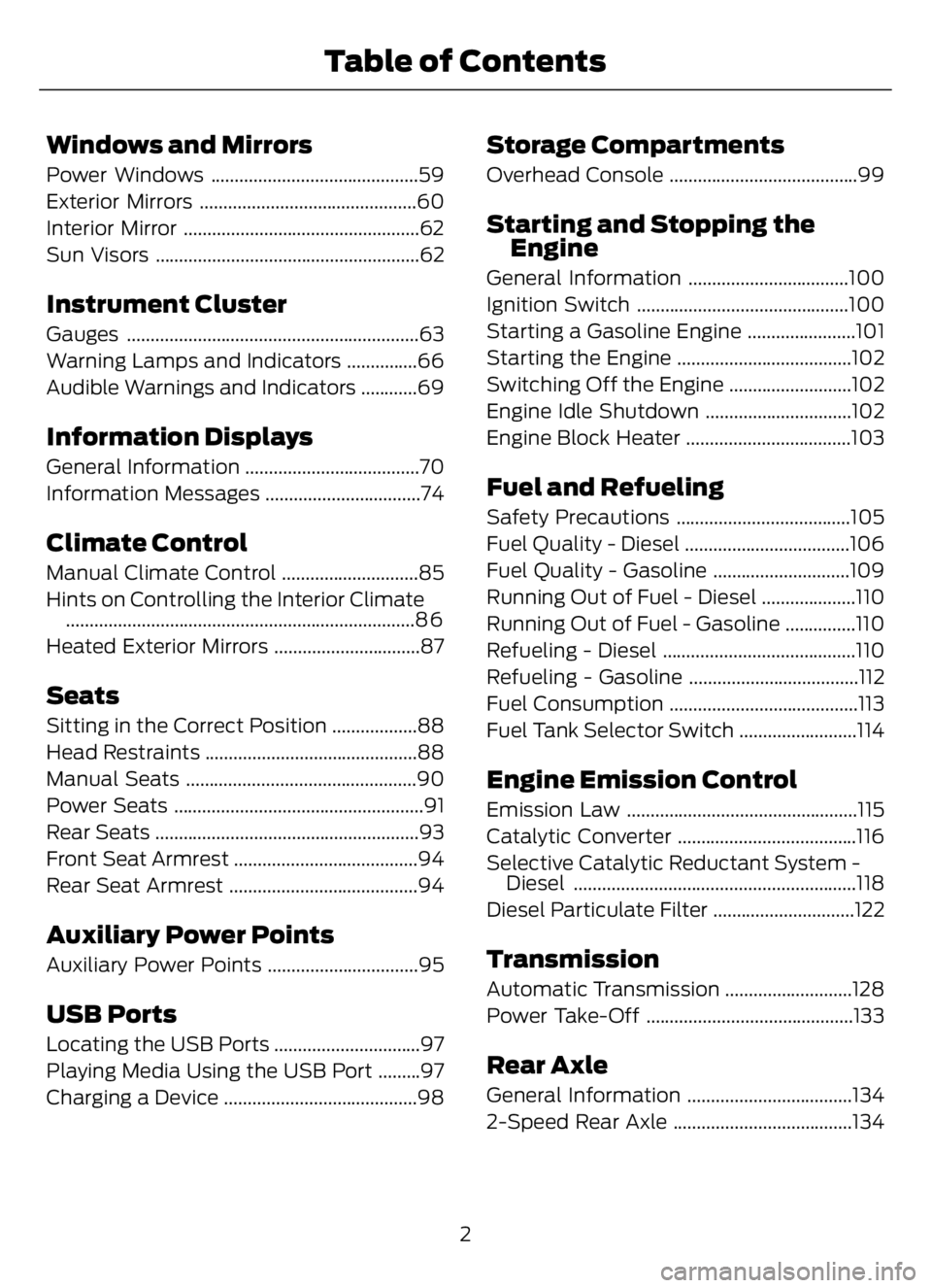
Windows and Mirrors
Power Windows ............................................59
Exterior Mirrors ..............................................60
Interior Mirror ..................................................62
Sun Visors ........................................................62
Instrument Cluster
Gauges ..............................................................63
Warning Lamps and Indicators ...............66
Audible Warnings and Indicators ............69
Information Displays
General Information .....................................70
Information Messages .................................74
Climate Control
Manual Climate Control .............................85
Hints on Controlling the Interior Climate
..........................................................................8 6
Heated Exterior Mirrors ...............................87
Seats
Sitting in the Correct Position ..................88
Head Restraints .............................................88
Manual Seats .................................................90
Power Seats .....................................................91
Rear Seats ........................................................93
Front Seat Armrest .......................................94
Rear Seat Armrest ........................................94
Auxiliary Power Points
Auxiliary Power Points ................................95
USB Ports
Locating the USB Ports ...............................97
Playing Media Using the USB Port .........97
Charging a Device .........................................98
Storage Compartments
Overhead Console ........................................99
Starting and Stopping the
Engine
General Information ..................................100
Ignition Switch .............................................100
Starting a Gasoline Engine .......................101
Starting the Engine .....................................102
Switching Off the Engine ..........................102
Engine Idle Shutdown ...............................102
Engine Block Heater ...................................103
Fuel and Refueling
Safety Precautions .....................................105
Fuel Quality - Diesel ...................................106
Fuel Quality - Gasoline .............................109
Running Out of Fuel - Diesel ....................110
Running Out of Fuel - Gasoline ...............110
Refueling - Diesel .........................................110
Refueling - Gasoline ....................................112
Fuel Consumption ........................................113
Fuel Tank Selector Switch .........................114
Engine Emission Control
Emission Law .................................................115
Catalytic Converter ......................................116
Selective Catalytic Reductant System -
Diesel ............................................................118
Diesel Particulate Filter ..............................122
Transmission
Automatic Transmission ...........................128
Power Take-Off ............................................133
Rear Axle
General Information ...................................134
2-Speed Rear Axle ......................................134
2
Table of Contents
Page 80 of 378
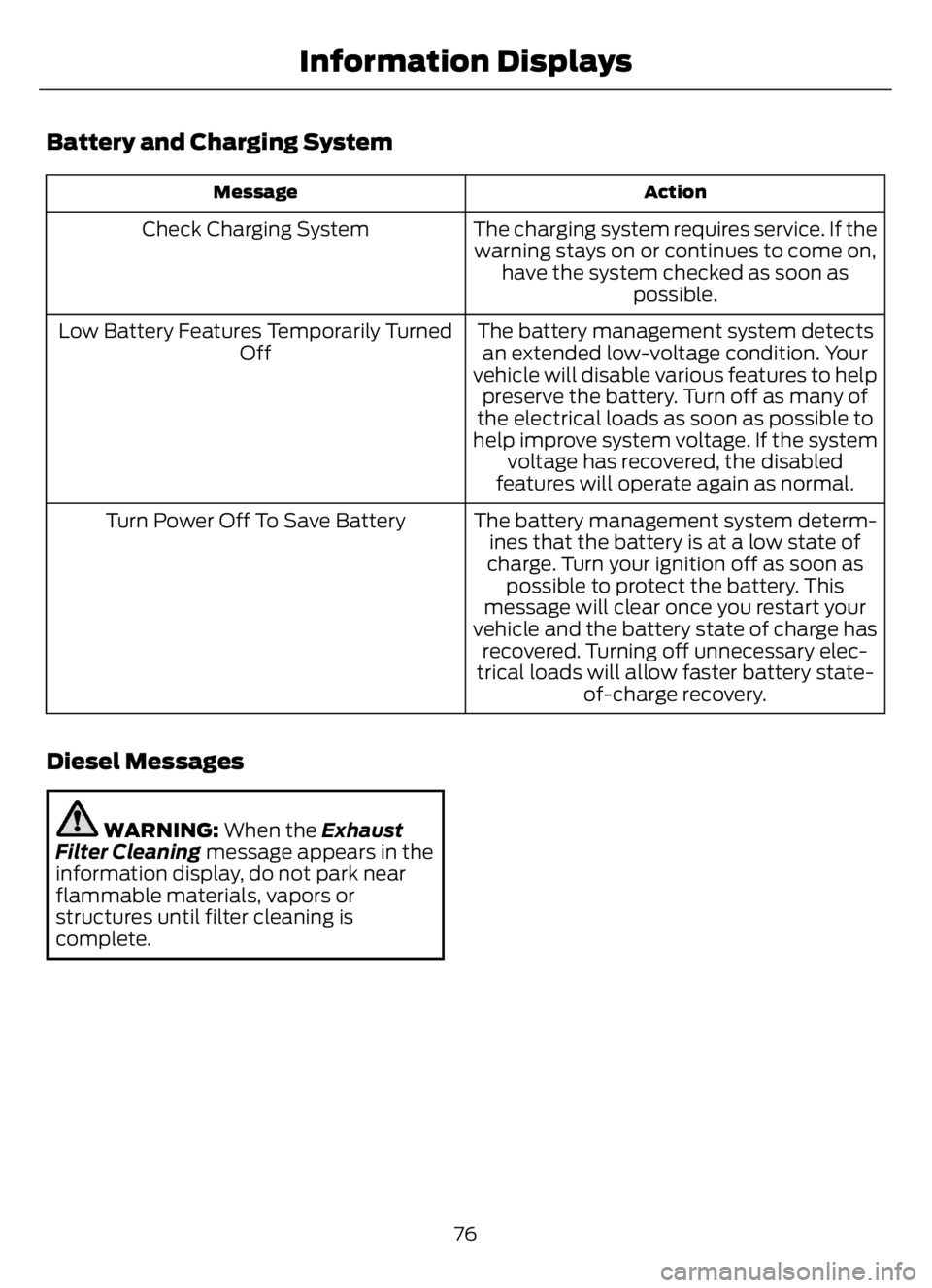
Battery and Charging System
Action Message
The charging system requires service. If the
warning stays on or continues to come on,
have the system checked as soon as
possible. Check Charging System
The battery management system detects
an extended low-voltage condition. Your
vehicle will disable various features to help
preserve the battery. Turn off as many of
the electrical loads as soon as possible to
help improve system voltage. If the system
voltage has recovered, the disabled
features will operate again as normal. Low Battery Features Temporarily Turned
Off
The battery management system determ-
ines that the battery is at a low state of
charge. Turn your ignition off as soon as
possible to protect the battery. This
message will clear once you restart your
vehicle and the battery state of charge has
recovered. Turning off unnecessary elec-
trical loads will allow faster battery state-
of-charge recovery. Turn Power Off To Save Battery
Diesel Messages
WARNING: When the Exhaust
Filter Cleaning message appears in the
information display, do not park near
flammable materials, vapors or
structures until filter cleaning is
complete.
76
Information Displays
Page 87 of 378
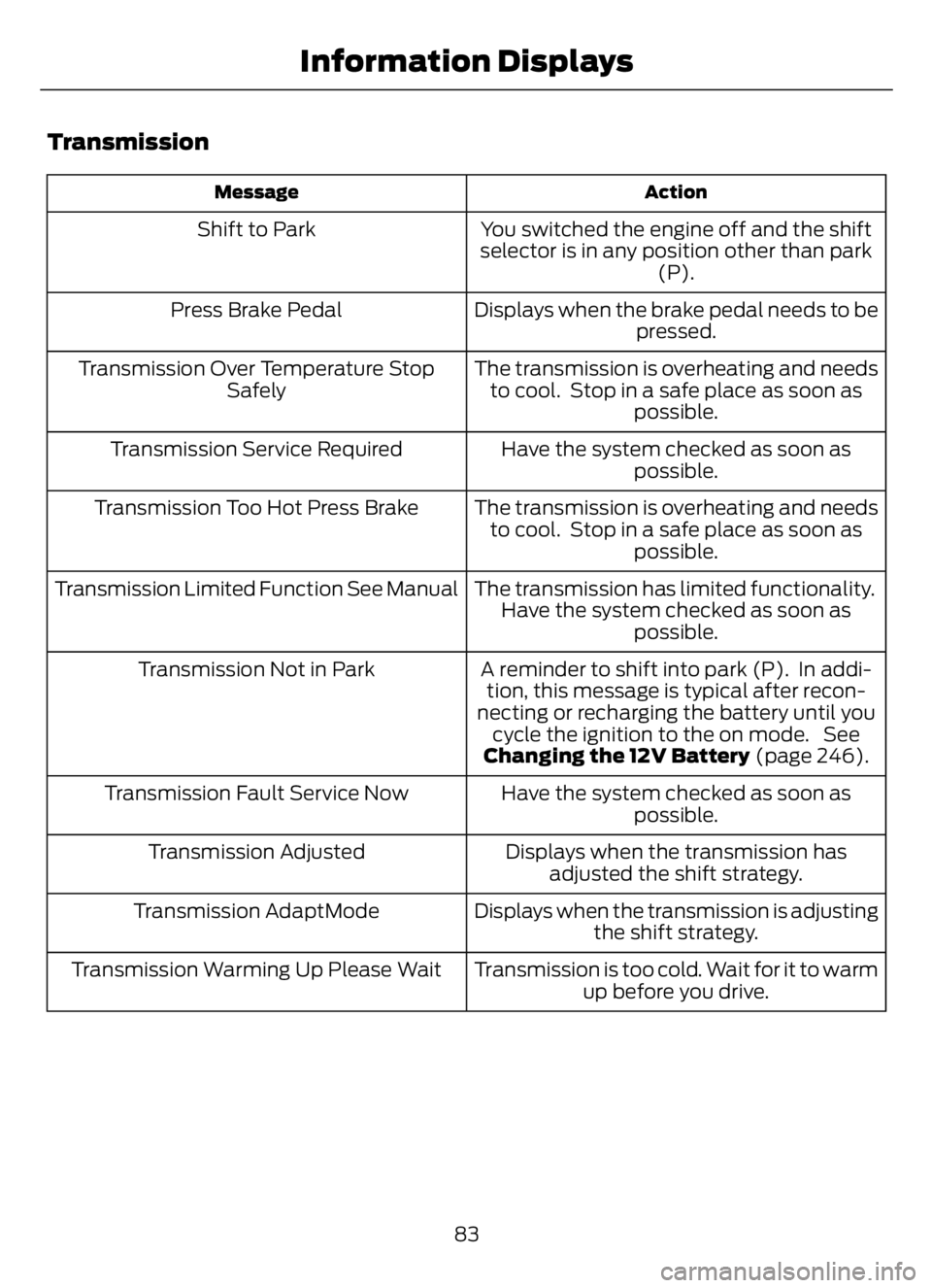
Transmission
Action Message
You switched the engine off and the shift
selector is in any position other than park
(P). Shift to Park
Displays when the brake pedal needs to be
pressed. Press Brake Pedal
The transmission is overheating and needs
to cool. Stop in a safe place as soon as
possible. Transmission Over Temperature Stop
Safely
Have the system checked as soon as
possible. Transmission Service Required
The transmission is overheating and needs
to cool. Stop in a safe place as soon as
possible. Transmission Too Hot Press Brake
The transmission has limited functionality.
Have the system checked as soon as
possible. Transmission Limited Function See Manual
A reminder to shift into park (P). In addi-
tion, this message is typical after recon-
necting or recharging the battery until you
cycle the ignition to the on mode. See
Changing the 12V Battery (page 246). Transmission Not in Park
Have the system checked as soon as
possible. Transmission Fault Service Now
Displays when the transmission has
adjusted the shift strategy. Transmission Adjusted
Displays when the transmission is adjusting
the shift strategy. Transmission AdaptMode
Transmission is too cold. Wait for it to warm
up before you drive. Transmission Warming Up Please Wait
83
Information Displays
Page 102 of 378
CHARGING A DEVICE
Connect your device to the USB port.
You can use the charger when the vehicle
is in accessory mode, or when the vehicle
is running.
98
USB Ports
Page 121 of 378
Illumination of the service engine soon
indicator, charging system warning light or
the temperature warning light, fluid leaks,
strange odors, smoke or loss of engine
power could indicate that the emission
control system is not working properly.
An improperly operating or damaged
exhaust system may allow exhaust to
enter the vehicle. Have a damaged or
improperly operating exhaust system
inspected and repaired immediately.
Do not make any unauthorized changes to
your vehicle or engine. By law, vehicle
owners and anyone who manufactures,
repairs, services, sells, leases, trades
vehicles, or supervises a fleet of vehicles
are not permitted to intentionally remove
an emission control device or prevent it
from working. Information about your
vehicle’s emission system is on the Vehicle
Emission Control Information Decal
located on or near the engine. This decal
also lists engine displacement.
Please consult your warranty information
for complete details.
On-Board Diagnostics (OBD-II)
Your vehicle has a computer known as the
on-board diagnostics system (OBD-II) that
monitors the engine’s emission control
system. The system protects the
environment by making sure that your
vehicle continues to meet government
emission standards. The OBD-II system
also assists a service technician in properly
servicing your vehicle.
When the service engine soon
indicator illuminates, the OBD-II
system has detected a
malfunction. Temporary malfunctions may
cause the service engine soon indicator to
illuminate. Examples are:1. Your vehicle has run out of fuel—the
engine may misfire or run poorly.
2. Poor fuel quality or water in the
fuel—the engine may misfire or run
poorly.
3. The fuel fill inlet may not have closed
properly. See Refueling (page 110).
4. Driving through deep water—the
electrical system may be wet.
You can correct these temporary
malfunctions by filling the fuel tank with
good quality fuel, properly closing the fuel
fill inlet or letting the electrical system dry
out. After three driving cycles without these
or any other temporary malfunctions
present, the service engine soon indicator
should stay off the next time you start the
engine. A driving cycle consists of a cold
engine startup followed by mixed city and
highway driving. No additional vehicle
service is required.
If the service engine soon indicator remains
on, have your vehicle serviced at the first
available opportunity. Although some
malfunctions detected by the OBD-II may
not have symptoms that are apparent,
continued driving with the service engine
soon indicator on can result in increased
emissions, lower fuel economy, reduced
engine and transmission smoothness and
lead to more costly repairs.
Readiness for Inspection and
Maintenance (I/M) Testing
Some state and provincial and local
governments may have
Inspection/Maintenance (I/M) programs
to inspect the emission control equipment
on your vehicle. Failure to pass this
inspection could prevent you from getting
a vehicle registration.
If the service engine soon
indicator is on or the bulb does
not work, your vehicle may need
service. See On-Board Diagnostics.
117
Engine Emission Control
Page 150 of 378
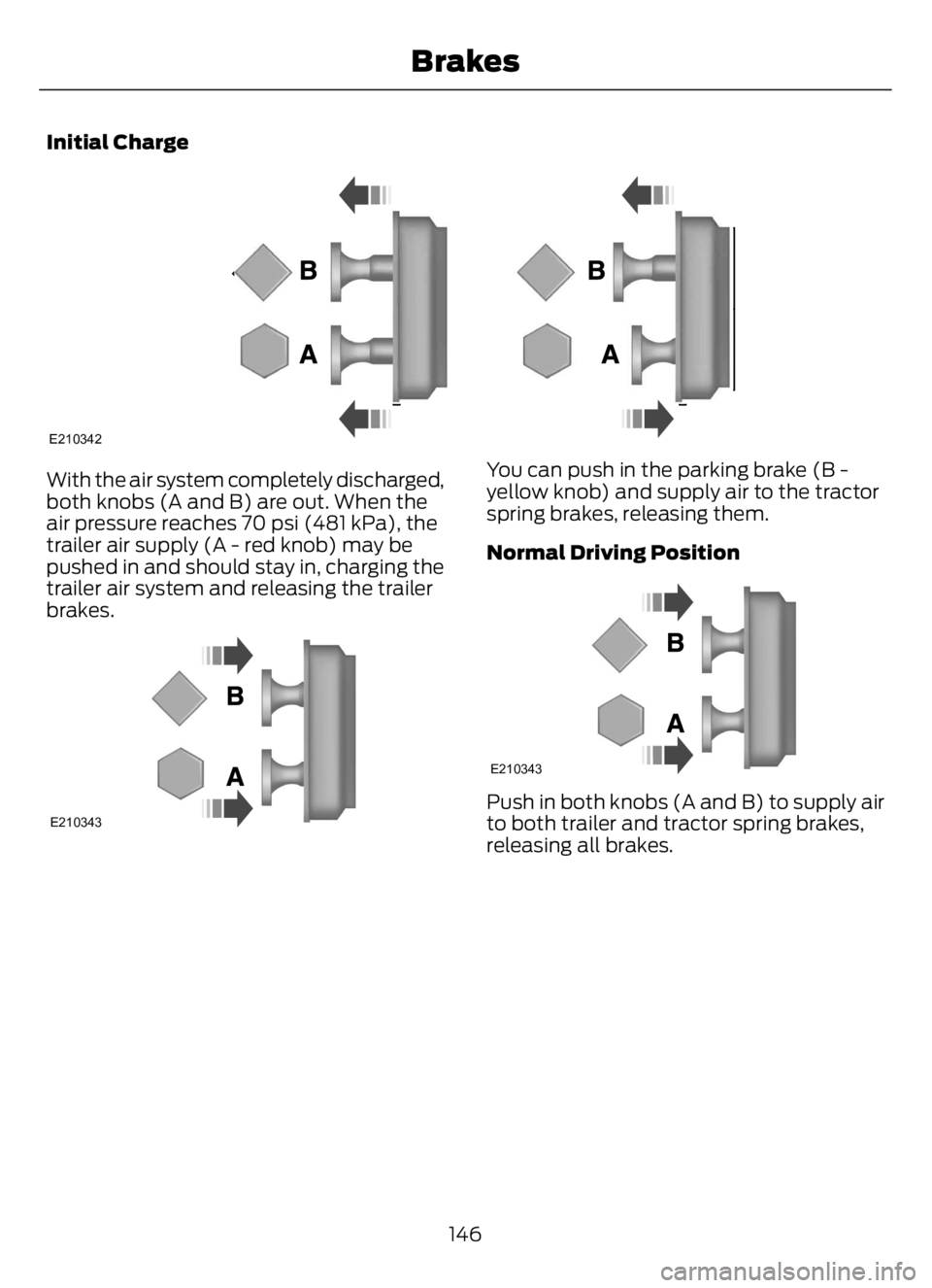
Initial Charge
E210342
With the air system completely discharged,
both knobs (A and B) are out. When the
air pressure reaches 70 psi (481 kPa), the
trailer air supply (A - red knob) may be
pushed in and should stay in, charging the
trailer air system and releasing the trailer
brakes.
E210343
You can push in the parking brake (B -
yellow knob) and supply air to the tractor
spring brakes, releasing them.
Normal Driving Position
E210343
Push in both knobs (A and B) to supply air
to both trailer and tractor spring brakes,
releasing all brakes.
146
Brakes
Page 216 of 378
Engine starting (with parking brake applied)
Check the gauge (diesel engine) or indicator light (gasoline
engine) to verify the alternator is charging. Voltmeter
Inspect for excessive free play in the steering linkages. The
steering wheel should have less than 2 in (5 cm) of free play
at its rim. Steering linkage free play
Verify the parking brake holds the vehicle by gently trying to
pull forward with the parking brake applied. Parking brake
Verify operation using the following procedure. Chock the
wheels, if necessary. Push in the parking brake and, on
tractors, push in the tractor parking brake knob: Air brakes
1. Verify the air compressor or governor cutout pressure is
approximately 120 psi (827 kPa).
2. Turn off the engine, and then turn the key back to the on
position (without starting the engine).
3. Without the brake pedal applied, note the air pressure drop
for one minute. It should be less than 2 psi (14 kPa) for single
vehicles and 3 psi (21 kPa) for combination vehicles.
4. Press and hold the brake pedal with 90 psi (621 kPa) or
more. Make sure there is no more than a 3 psi (21 kPa) per
minute leak for single vehicles and a 4 psi (28 kPa) minute
leak for combination vehicles.
5. Pump the brake pedal to deplete the system of air pressure.
The warning light and tone should turn on at 57 psi (393 kPa).
6. Pump the brake pedal and make sure the parking brake
and trailer parking brake knobs pop out at 20 psi (138 kPa)
or higher.
Verify that the fluid level is in the proper operating range. See
Automatic Transmission Fluid Check (page 242). Automatic transmission
fluid
Front of vehicle
Verify all exterior lights illuminate and are clean. Lights
Check headlights function on high and low beam.
Verify reflectors are clean, unbroken and of proper color (red
on rear, amber elsewhere).
212
Vehicle Inspection Guide
Page 251 of 378
5. Turn the air conditioning (if equipped)
on and allow the engine to idle for at
least one minute.
6. Release the parking brake. With your
foot on the brake pedal and with the
air conditioning on, put the vehicle in
drive (D) and allow the engine to idle
for at least one minute.
• If you do not allow the engine to
relearn its idle trim, the idle quality
of your vehicle may be adversely
affected until the idle trim is
eventually relearned.
7. Drive the vehicle to complete the
relearning process
• The vehicle may need to be driven
10 mi (16 km) or more to relearn the
idle and fuel trim strategy along
with the ethanol content for flexible
fuel vehicles.
If the battery has been disconnected or a
new battery has been installed, the clock
and radio settings must be reset once the
battery is reconnected.
Always dispose of automotive
batteries in a responsible manner.
Follow your local authorized standards
for disposal. Call your local authorized
recycling center to find out more about
recycling automotive batteries.
Battery Management System (If
Equipped)
The battery management system (BMS)
monitors battery conditions and takes
actions to extend battery life. If excessive
battery drain is detected, the system may
temporarily disable certain electrical
features to protect the battery. Those
electrical accessories affected include the
rear defrost, heated/cooled seats, climate
control fan, heated steering wheel, audio
and navigation system. A message may be
shown in the information displays to alertthe driver that battery protection actions
are active. These messages are only for
notification that an action is taking place,
and not intended to indicate an electrical
problem or that the battery requires
replacement.
Electrical accessory installation
To ensure proper operation of the BMS,
any electrical devices that are added to
the vehicle should not have their ground
connection made directly at the negative
battery post. A connection at the negative
battery post can cause inaccurate
measurements of the battery condition
and potential incorrect system operation.
Note:Electrical or electronic accessories
added to the vehicle by the dealer or the
owner may adversely affect battery
performance and durability, and may also
affect the performance of other electrical
systems in the vehicle.
When a battery replacement is required,
the battery should only be replaced with
a Ford recommended replacement battery
which matches the electrical requirements
of the vehicle. After battery replacement,
or in some cases after charging the battery
with the external charger, the BMS requires
eight hours of vehicle sleep time (key off
with doors closed) to relearn the new
battery state of charge. Prior to relearning
the state of charge, the BMS may disable
electrical features (to protect the battery)
earlier than normal.
ADJUSTING THE HEADLAMPS
Vertical Aim Adjustment
The headlamps on your vehicle are
properly aimed at the assembly plant. If
your vehicle has been in an accident, the
alignment of your headlamps should be
checked by your authorized dealer.
247
Maintenance
Page 272 of 378
• With your foot on the brake, shift
through all the gears while the engine
is running.
• We recommend that you change the
engine oil before you use your vehicle
again.
Fuel system
• Fill the fuel tank with high-quality fuel
until the first automatic shutoff of the
fuel pump nozzle.
Cooling system
• Protect against freezing temperatures.
• When removing your vehicle from
storage, check coolant fluid level.
Confirm that there are no cooling
system leaks and that fluid is at the
recommended level.
Disconnecting Your 12 Volt Battery
• Check and recharge as necessary. Keep
connections clean.
• If storing your vehicle for more than 30
days without recharging the battery,
we recommend that you disconnect
the battery cables to maintain battery
charge for quick starting.
Note:It is necessary to reset memory
features if you disconnect the battery
cables.
Brakes
• Make sure the brakes and parking brake
release fully.
Tires
• Maintain recommended air pressure.
Miscellaneous
• Make sure all linkages, cables, levers
and pins under your vehicle are covered
with grease to prevent rust.
• Move vehicles at least 25 ft (7.5 m)
every 15 days to lubricate working parts
and prevent corrosion.
Removing Vehicle From Storage
When your vehicle is ready to come out of
storage, do the following:
• Wash your vehicle to remove any dirt
or grease film build-up on window
surfaces.
• Check windshield wipers for any
deterioration.
• Check under the hood for any foreign
material that may have collected
during storage such as mice or squirrel
nests.
• Check the exhaust for any foreign
material that may have collected
during storage.
• Check tire pressures and set tire
inflation per the Tire Label.
• Check brake pedal operation. Drive
your vehicle 15 ft (4.5 m) back and
forth to remove rust build-up.
• Check fluid levels (including coolant,
oil and gas) to make sure there are no
leaks, and fluids are at recommended
levels.
• If you remove the battery, clean the
battery cable ends and check for
damage.
Contact an authorized dealer if you have
any concerns or issues.
268
Vehicle Care
Page 317 of 378
Sorting by Categories
You can also sort and play music by
specific categories, for example artist or
album.
Press the OK button to view the available
categories.
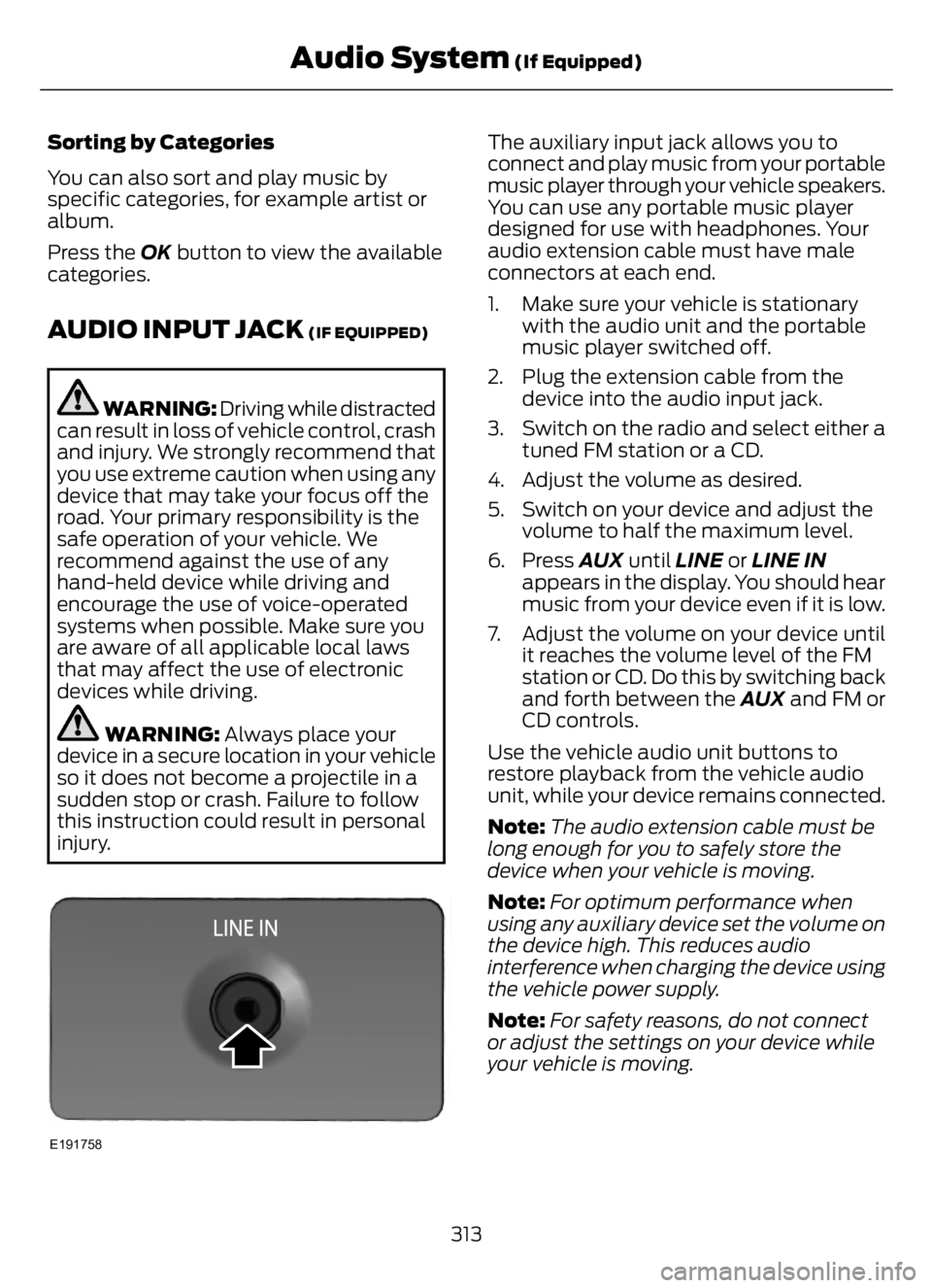
AUDIO INPUT JACK (IF EQUIPPED)
WARNING: Driving while distracted
can result in loss of vehicle control, crash
and injury. We strongly recommend that
you use extreme caution when using any
device that may take your focus off the
road. Your primary responsibility is the
safe operation of your vehicle. We
recommend against the use of any
hand-held device while driving and
encourage the use of voice-operated
systems when possible. Make sure you
are aware of all applicable local laws
that may affect the use of electronic
devices while driving.
WARNING: Always place your
device in a secure location in your vehicle
so it does not become a projectile in a
sudden stop or crash. Failure to follow
this instruction could result in personal
injury.
E191758
The auxiliary input jack allows you to
connect and play music from your portable
music player through your vehicle speakers.
You can use any portable music player
designed for use with headphones. Your
audio extension cable must have male
connectors at each end.
1. Make sure your vehicle is stationary
with the audio unit and the portable
music player switched off.
2. Plug the extension cable from the
device into the audio input jack.
3. Switch on the radio and select either a
tuned FM station or a CD.
4. Adjust the volume as desired.
5. Switch on your device and adjust the
volume to half the maximum level.
6. Press AUX until LINE or LINE IN
appears in the display. You should hear
music from your device even if it is low.
7. Adjust the volume on your device until
it reaches the volume level of the FM
station or CD. Do this by switching back
and forth between the AUX and FM or
CD controls.
Use the vehicle audio unit buttons to
restore playback from the vehicle audio
unit, while your device remains connected.
Note:The audio extension cable must be
long enough for you to safely store the
device when your vehicle is moving.
Note:For optimum performance when
using any auxiliary device set the volume on
the device high. This reduces audio
interference when charging the device using
the vehicle power supply.
Note:For safety reasons, do not connect
or adjust the settings on your device while
your vehicle is moving.
313
Audio System (If Equipped)