change time FORD FESTIVA 1991 Service Manual
[x] Cancel search | Manufacturer: FORD, Model Year: 1991, Model line: FESTIVA, Model: FORD FESTIVA 1991Pages: 454, PDF Size: 9.53 MB
Page 30 of 454
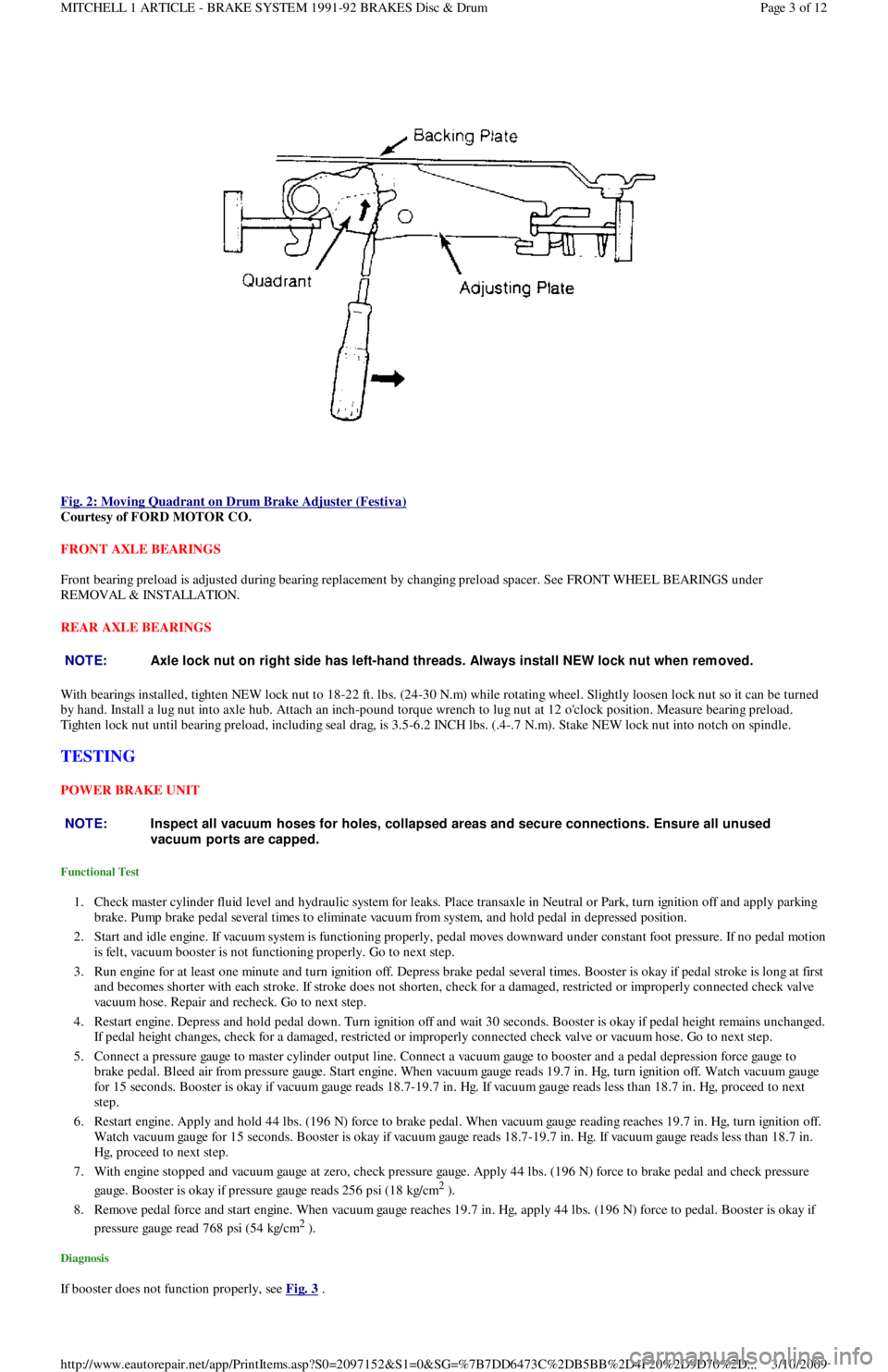
Fig. 2: Moving Quadrant on Drum Brake Adjuster (Festiva)
Courtesy of FORD MOTOR CO.
FRONT AXLE BEARINGS
Front bearing preload is adjusted during bearing replacement by changing preload spacer. See FRONT WHEEL BEARINGS under
REMOVAL & INSTALLATION.
REAR AXLE BEARINGS
With bearings installed, tighten NEW lock nut to 18-22 ft. lbs. (24-30 N.m) while rotating wheel. Slightly loosen lock nut so it can be turned
by hand. Install a lug nut into axle hub. Attach an inch-pound torque wrench to lug nut at 12 o'clock position. Measure bearing preload.
Tighten lock nut until bearing preload, including seal drag, is 3.5-6.2 INCH lbs. (.4-.7 N.m). Stake NEW lock nut into notch on spindle.
TESTING
POWER BRAKE UNIT
Functional Test
1. Check master cylinder fluid level and hydraulic system for leaks. Place transaxle in Neutral or Park, turn ignition off and apply parking
brake. Pump brake pedal several times to eliminate vacuum from system, and hold pedal in depressed position.
2. Start and idle engine. If vacuum system is functioning properly, pedal moves downward under constant foot pressure. If no pedal motion
is felt, vacuum booster is not functioning properly. Go to next step.
3. Run engine for at least one minute and turn ignition off. Depress brake pedal several times. Booster is okay if pedal stroke is long at first
and becomes shorter with each stroke. If stroke does not shorten, check for a damaged, restricted or improperly connected check va l ve
vacuum hose. Repair and recheck. Go to next step.
4. Restart engine. Depress and hold pedal down. Turn ignition off and wait 30 seconds. Booster is okay if pedal height remains unchanged.
If pedal height changes, check for a damaged, restricted or improperly connected check valve or vacuum hose. Go to next step.
5. Connect a pressure gauge to master cylinder output line. Connect a vacuum gauge to booster and a pedal depression force gauge to
brake pedal. Bleed air from pressure gauge. Start engine. When vacuum gauge reads 19.7 in. Hg, turn ignition off. Watch vacuum ga u ge
for 15 seconds. Booster is okay if vacuum gauge reads 18.7-19.7 in. Hg. If vacuum gauge reads less than 18.7 in. Hg, proceed to next
step.
6. Restart engine. Apply and hold 44 lbs. (196 N) force to brake pedal. When vacuum gauge reading reaches 19.7 in. Hg, turn ignition off.
Watch vacuum gauge for 15 seconds. Booster is okay if vacuum gauge reads 18.7-19.7 in. Hg. If vacuum gauge reads less than 18.7 in.
Hg, proceed to next step.
7. With engine stopped and vacuum gauge at zero, check pressure gauge. Apply 44 lbs. (196 N) force to brake pedal and check pressure
gauge. Booster is okay if pressure gauge reads 256 psi (18 kg/cm
2 ).
8. Remove pedal force and start engine. When vacuum gauge reaches 19.7 in. Hg, apply 44 lbs. (196 N) force to pedal. Booster is okay if
pressure gauge read 768 psi (54 kg/cm
2 ).
Diagnosis
If booster does not function properly, see Fig. 3 .
NOTE:Axle lock nut on right side has left-hand threads. Always install NEW lock nut when rem oved.
NOTE:Inspect all vacuum hoses for holes, collapsed areas and secure connections. Ensure all unused
vacuum ports are capped.
Page 3 of 12 MITCHELL 1 ARTICLE - BRAKE SYSTEM 1991-92 BRAKES Disc & Drum
3/10/2009 http://www.eautorepair.net/app/PrintItems.asp?S0=2097152&S1=0&SG=%7B7DD6473C%2DB5BB%2D4F20%2D9D70%2D
...
Page 32 of 454
lock nut. Discard axle lock nut. Separate tie rod end from knuckle.
2. Disconnect brake hose from strut (if necessary). Remove brake caliper assembly from knuckle and wire out of way. Remove nuts and
bolts holding ball joint and strut to knuckle assembly.
3. Remove knuckle assembly from ball joint and drive shaft. If binding occurs, use a dual-jawed puller to force knuckle/hub/rotor assembly
off drive axle shaft.
4. Using a puller, separate knuckle from wheel hub. Retain original outer bearing preload spacer to maintain bearing preload setting. If
replacing bearing, change spacer to maintain proper bearing preload (if necessary). See FRONT WHEEL BEARINGS under REMOVAL
& INSTALLATION. Scribe match marks between hub and rotor assembly. Remove rotor-to-hub bolts. Separate hub from rotor.
Installation
Align marks and install rotor on hub. Press knuckle and preload spacer into wheel hub assembly. To complete installation, reverse removal
procedure. Tighten axle shaft lock nut to 117-175 ft. lbs. (159-237 N.m).
REAR BRAKE CALIPER & PADS
Removal (Capri)
1. Raise and support vehicle. Remove tire and wheel assembly. Using needle-nose pliers, remove parking brake return spring. Loosen
parking brake cable housing adjusting nut. Remove cable housing from bracket on lower control arm. Loosen parking brake cable
bracket-to-caliper attaching bolt. Remove parking brake cable from caliper.
2. Remove lower caliper retaining bolt. Pivot caliper upward on upper caliper guide pin. Remove brake pad retaining spring, pads and
shims. If replacing rear brake pads only, reverse removal procedure to install. If removing caliper, proceed to next step.
3. Remove attaching clip from brake flex hose. Remove flex hose banjo bolt from caliper and discard copper washers. Remove lower
caliper retaining bolt. Using a cold chisel, remove upper caliper guide pin dust cap. Using an Allen wrench, remove upper caliper guide
pin. Lift caliper off rotor.
Installation
1. To install, fit brake pads and shims into caliper anchor plate. Remove upper guide pin and lower guide pin bushing from caliper.
Remove guide pin and guide pin bushing dust boots. Lubricate upper guide pin and lower guide pin bushing with Disc Brake Caliper
Slide Grease (D7AZ-19590-A).
2. To complete installation, reverse removal procedure. To fit caliper over new brake pads, it may be necessary to rotate caliper piston into
caliper bore. Use NEW copper washers on flex hose. Bleed brakes, and then pump brake pedal several times to seat pads.
REAR BRAKE ROTOR
Removal & Installation (Capri)
See REAR WHEEL BEARINGS under REMOVAL & INSTALLATION.
REAR BRAKE SHOES
Removal & Installation (Festiva)
Remove brake drum. Remove hold-down springs. Remove return springs. Remove self adjuster. See Fig. 8 . To install, reverse removal
procedure. Apply brake grease to all shoe contact points. See REAR BRAKE SHOES under ADJUSTMENTS.
REAR WHEEL CYLINDER
Removal & Installation (Festiva)
Remove rear brake shoes. Disconnect brake line from wheel cylinder. Remove wheel cylinder. To install, reverse removal procedure. Bleed
brake system.
MASTER BRAKE CYLINDER
Removal
Disconnect low fluid level sensor wiring (if equipped). Drain some brake fluid from reservoir. Disconnect brake lines from master cylinder.
Cap lines and master cylinder ports. Remove attaching nuts and master cylinder.
Installation
To install, reverse removal procedure. Fill master cylinder to proper level and bleed hydraulic system (if necessary).
POWER BRAKE UNIT
Removal & Installation
Remove master cylinder. Disconnect vacuum line. Remove clevis pin at brake pedal. Remove power brake unit. To install, reverse removal
procedure.
FRONT WHEEL BEARINGS NOTE:Hub and rotor are a m atched and balanced assem bly. Before rem oving rotor, locate paint or etch
m ark indicating proper hub-to-rotor alignm ent. If m arks are not present, m ark hub and rotor for
assem bly alignm ent. Failure to properly align hub and rotor can result in an im balance condition.
Page 5 of 12 MITCHELL 1 ARTICLE - BRAKE SYSTEM 1991-92 BRAKES Disc & Drum
3/10/2009 http://www.eautorepair.net/app/PrintItems.asp?S0=2097152&S1=0&SG=%7B7DD6473C%2DB5BB%2D4F20%2D9D70%2D
...
Page 33 of 454
Removal
Remove rotor and hub assembly from steering knuckle. Separate rotor, knuckle and hub. See FRONT BRAKE ROTOR & HUB under
REMOVAL & INSTALLATION. Press outer bearing from hub using Bearing Splitter (D84L-1123-A) and Shaft Protector (D80L-625-2).
Remove and discard outer grease seal. Pry inner wheel bearing grease seal from steering knuckle using a large screwdriver. Discard seal.
R e mo ve in n e r b e a r in g.
Bearing Preload
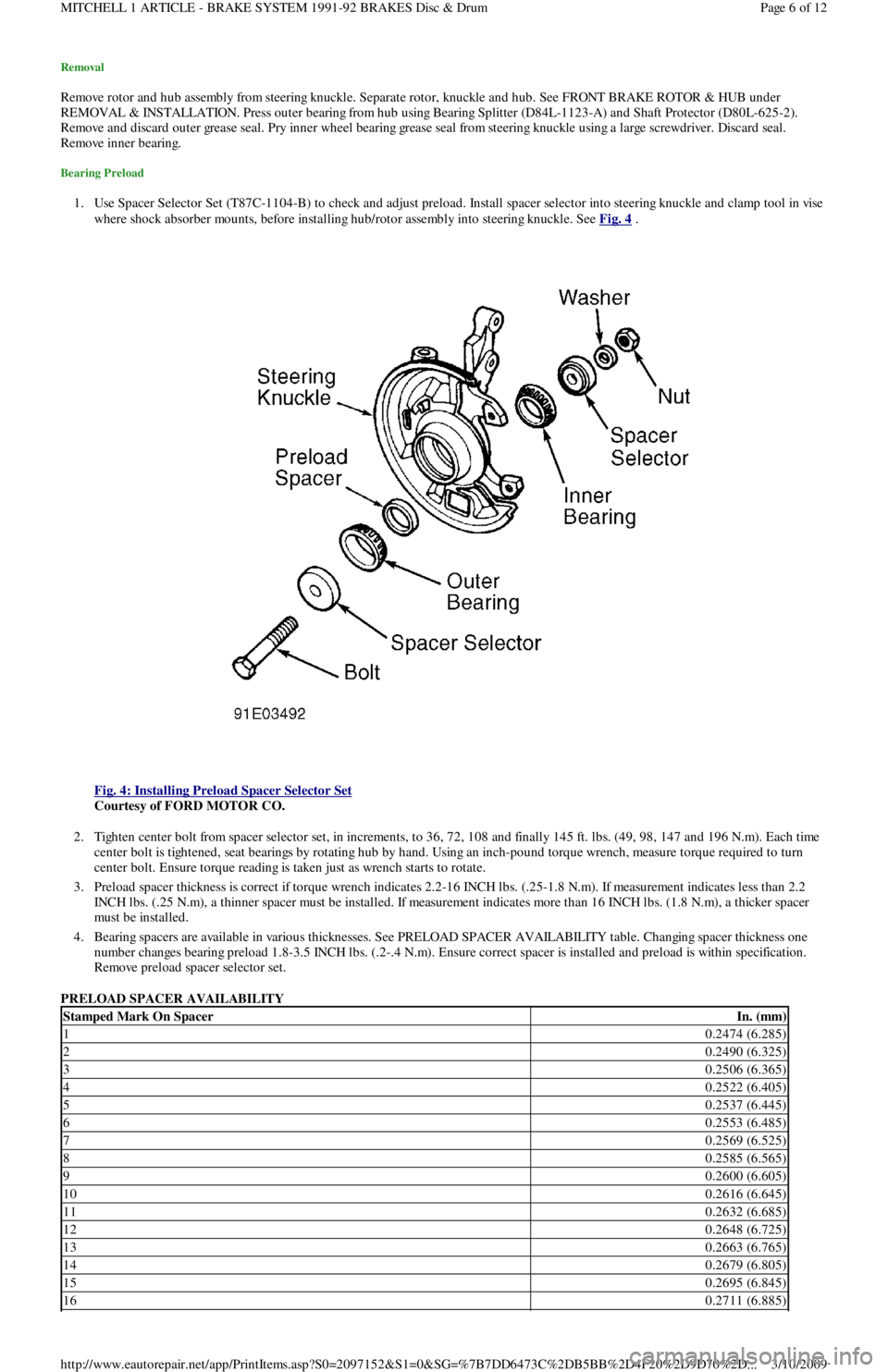
1. Use Spacer Selector Set (T87C-1104-B) to check and adjust preload. Install spacer selector into steering knuckle and clamp tool in vise
where shock absorber mounts, before installing hub/rotor assembly into steering knuckle. See Fig. 4
.
Fig. 4: Installing Preload Spacer Selector Set
Courtesy of FORD MOTOR CO.
2. Tighten center bolt from spacer selector set, in increments, to 36, 72, 108 and finally 145 ft. lbs. (49, 98, 147 and 196 N.m). Each time
center bolt is tightened, seat bearings by rotating hub by hand. Using an inch-pound torque wrench, measure torque required to turn
center bolt. Ensure torque reading is taken just as wrench starts to rotate.
3. Preload spacer thickness is correct if torque wrench indicates 2.2-16 INCH lbs. (.25-1.8 N.m). If measurement indicates less than 2.2
INCH lbs. (.25 N.m), a thinner spacer must be installed. If measurement indicates more than 16 INCH lbs. (1.8 N.m), a thicker spacer
must be installed.
4. Bearing spacers are available in various thicknesses. See PRELOAD SPACER AVAILABILITY table. Changing spacer thickness one
number changes bearing preload 1.8-3.5 INCH lbs. (.2-.4 N.m). Ensure correct spacer is installed and preload is within specification.
Remove preload spacer selector set.
PRELOAD SPACER AVAILABILITY
Stamped Mark On SpacerIn. (mm)
10.2474 (6.285)
20.2490 (6.325)
30.2506 (6.365)
40.2522 (6.405)
50.2537 (6.445)
60.2553 (6.485)
70.2569 (6.525)
80.2585 (6.565)
90.2600 (6.605)
100.2616 (6.645)
110.2632 (6.685)
120.2648 (6.725)
130.2663 (6.765)
140.2679 (6.805)
150.2695 (6.845)
160.2711 (6.885)
Page 6 of 12 MITCHELL 1 ARTICLE - BRAKE SYSTEM 1991-92 BRAKES Disc & Drum
3/10/2009 http://www.eautorepair.net/app/PrintItems.asp?S0=2097152&S1=0&SG=%7B7DD6473C%2DB5BB%2D4F20%2D9D70%2D
...
Page 63 of 454
Back To Article
GENERAL INFORMATION
Using Mitchell1's Wiring Diagram s
INTRODUCTION
Mitchell1(R) obtains wiring diagrams and technical service bulletins, containing wiring diagram changes, from the domestic and import
manufacturers. These are checked for accuracy and are all redrawn into a consistent format for easy use. All system wiring diagrams are
available in color format and may be viewed and or printed in color or black and white, depending on your program settings and available
printer hardware.
In the past, when cars were simpler, diagrams were simpler. All components were connected by wires, and diagrams seldom exceeded 4 pages
in length. Today, some wiring diagrams require more than 16 pages. It would be impractical to expect a service technician to trace a wire from
page 1 across every page to page 16.
Removing some of the wiring maze reduces eyestrain and time wasted searching across several pages. Today, the majority of Mitchell1(R)
diagrams follow a much improved format, which permits space for internal switch details, and component and ground locations.
Components shown with a dashed line instead of a solid line indicate not all circuits are shown in this particular diagram (circuits shown in
system diagrams are typically applicable to that system only). The remaining circuits connected to that component will be shown in the
appropriate system that they apply to.
Today, the wiring diagram necessary to support a given repair procedure is included within that article or a link is provided to the appropriate
SYSTEM WIRING DIAGRAM article. For example, the wiring diagram for a Ford EEC-IV system may be included in ENGINE
PERFORMANCE and WIRING DIAGRAMS articles for Ford Motor Co. The wiring diagram for a cruise control system may be included in
ACCESSORIES & EQUIPMENT section for the specific vehicle manufacturer, and the wiring diagram for an anti-lock brake system may be
included in BRAKES and WIRING DIAGRAMS for the specific manufacturer.
WIRING DIAGRAMS contains all wiring diagrams not included in STARTING & CHARGING SYSTEMS and ACCESSORIES &
EQUIPMENT. This includes: Data Link Connectors, Ground Distribution, Power Distribution, Engine Performance, Electric Cooling Fans,
Anti-Lock Brakes, Electronic Suspension and Electronic Steering wiring diagrams. The Data Link Connectors wiring diagrams show the
circuits by which the various on-board computers exchange information, and the diagnostic connectors used for diagnosis and their location.
The Ground Distribution wiring diagrams show all vehicle ground points, their location, and the components common to those ground points.
The Power Distribution wiring diagrams show the power feed circuits and the components common to those power feeds.
Wiring diagrams used to support the information in ACCESSORIES & EQUIPMENT are drawn in a "top-down" format. The diagrams are
drawn with the power source at the top of the diagram and the ground point at the bottom of the diagram. Component locations are identified
on the wiring diagrams. Any wires that do not connect directly to a component are identified on the diagram to indicate where they go.
WIRING DIAGRAM COLOR ABBREVIATIONS
COLOR ABBREVIATIONS
WIRING DIAGRAM SYMBOLS
ColorNormalOptional
BlackBLKBK
BlueBLUBU
BrownBRNBN
ClearCLRCR
Dark BlueDK BLUDK BU
Dark GreenDK GRNDK GN
GreenGRNGN
GrayGRYGY
Light BlueLT BLULT BU
Light GreenLT GRNLT GN
OrangeORGOG
PinkPNKPK
PurplePPLPL
RedREDRD
TanTANTN
VioletVIOVI
WhiteWHTWT
YellowYELYL
Page 1 of 6 MITCHELL 1 ARTICLE - GENERAL INFORMATION Using Mitchell1's Wiring Diagrams
3/10/2009 http://www.eautorepair.net/app/PrintItems.asp?S0=2097152&S1=0&SG=%7B959286D2%2D3A85%2D4BFC%2D9C5C%2D
...
Page 220 of 454
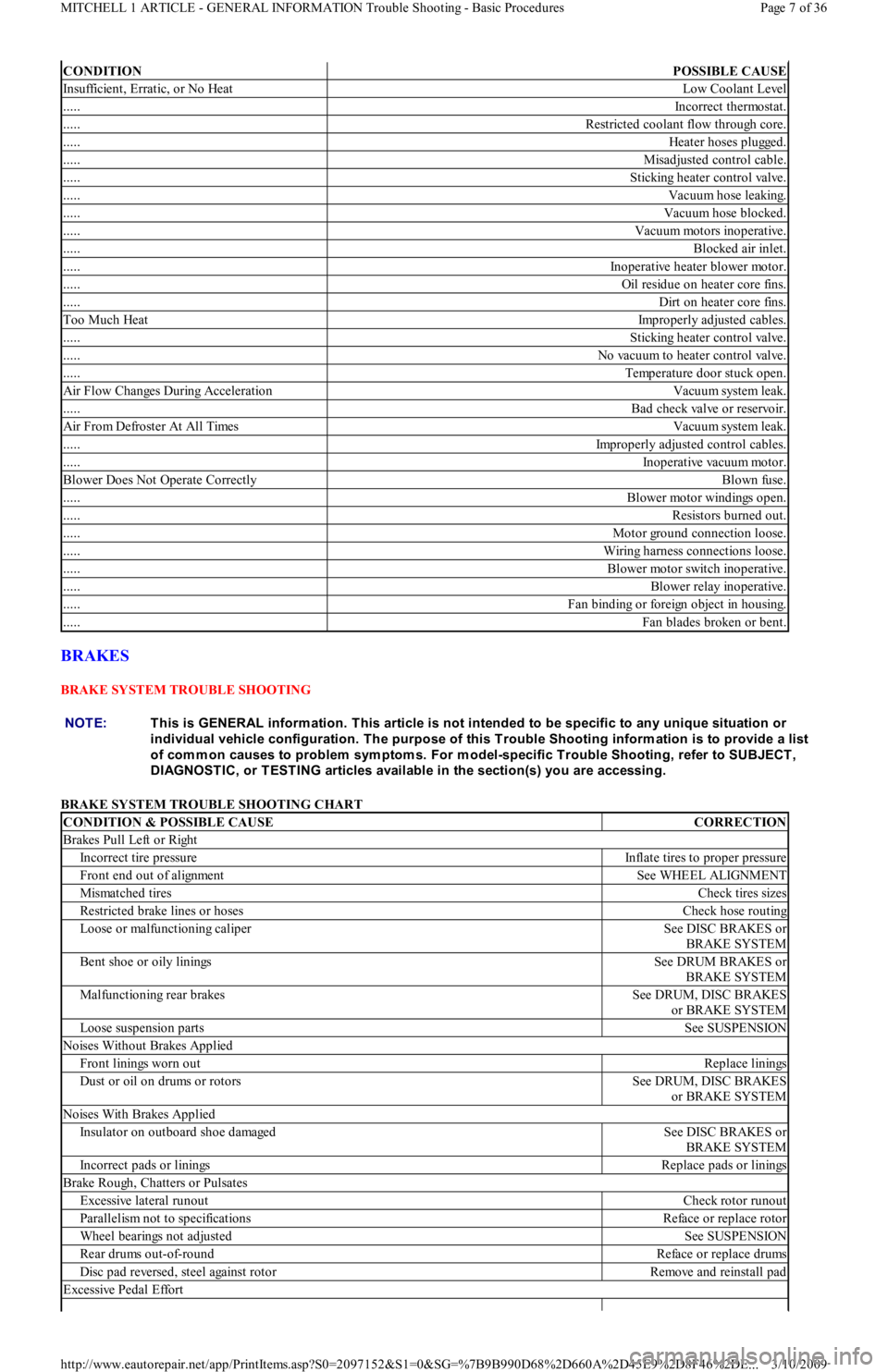
BRAKES
BRAKE SYSTEM TROUBLE SHOOTING
BRAKE SYSTEM TROUBLE SHOOTING CHART
CONDITIONPOSSIBLE CAUSE
Insufficient, Erratic, or No HeatLow Coolant Level
.....Incorrect thermostat.
.....Restricted coolant flow through core.
.....Heater hoses plugged.
.....Misadjusted control cable.
.....Sticking heater control valve.
.....Vacuum hose leaking.
.....Vacuum hose blocked.
.....Vacuum motors inoperative.
.....Blocked air inlet.
.....Inoperative heater blower motor.
.....Oil residue on heater core fins.
.....Dirt on heater core fins.
Too Much HeatImproperly adjusted cables.
.....Sticking heater control valve.
.....No vacuum to heater control valve.
.....Temperature door stuck open.
Air Flow Changes During AccelerationVacuum system leak.
.....Bad check valve or reservoir.
Air From Defroster At All TimesVacuum system leak.
.....Improperly adjusted control cables.
.....Inoperative vacuum motor.
Blower Does Not Operate CorrectlyBlown fuse.
.....Blower motor windings open.
.....Resistors burned out.
.....Motor ground connection loose.
.....Wiring harness connections loose.
.....Blower motor switch inoperative.
.....Blower relay inoperative.
.....Fan binding or foreign object in housing.
.....Fan blades broken or bent.
NOTE:This is GENERAL inform ation. This article is not intended to be specific to any unique situation or
individual vehicle configuration. T he purpose of this T rouble Shooting inform ation is to provide a list
of com m on causes to problem sym ptom s. For m odel-specific T rouble Shooting, refer to SUBJECT ,
DIAGNOST IC, or T EST ING articles available in the section(s) you are accessing.
CONDITION & POSSIBLE CAUSECORRECTION
Brakes Pull Left or Right
Incorrect tire pressureInflate tires to proper pressure
Front end out of alignmentSee WHEEL ALIGNMENT
Mismatched tiresCheck tires sizes
Restricted brake lines or hosesCheck hose routing
Loose or malfunctioning caliperSee DISC BRAKES or
BRAKE SYSTEM
Bent shoe or oily liningsSee DRUM BRAKES or
BRAKE SYSTEM
Malfunctioning rear brakesSee DRUM, DISC BRAKES
or BRAKE SYSTEM
Loose suspension partsSee SUSPENSION
Noises Without Brakes Applied
Front linings worn outReplace linings
Dust or oil on drums or rotorsSee DRUM, DISC BRAKES
or BRAKE SYSTEM
Noises With Brakes Applied
Insulator on outboard shoe damagedSee DISC BRAKES or
BRAKE SYSTEM
Incorrect pads or liningsReplace pads or linings
Brake Rough, Chatters or Pulsates
Excessive lateral runoutCheck rotor runout
Parallelism not to specificationsReface or replace rotor
Wheel bearings not adjustedSee SUSPENSION
Rear drums out-of-roundReface or replace drums
Disc pad reversed, steel against rotorRemove and reinstall pad
Excessive Pedal Effort
Page 7 of 36 MITCHELL 1 ARTICLE - GENERAL INFORMATION Trouble Shooting - Basic Procedures
3/10/2009 http://www.eautorepair.net/app/PrintItems.asp?S0=2097152&S1=0&SG=%7B9B990D68%2D660A%2D45E9%2D8F46%2DE
...
Page 284 of 454
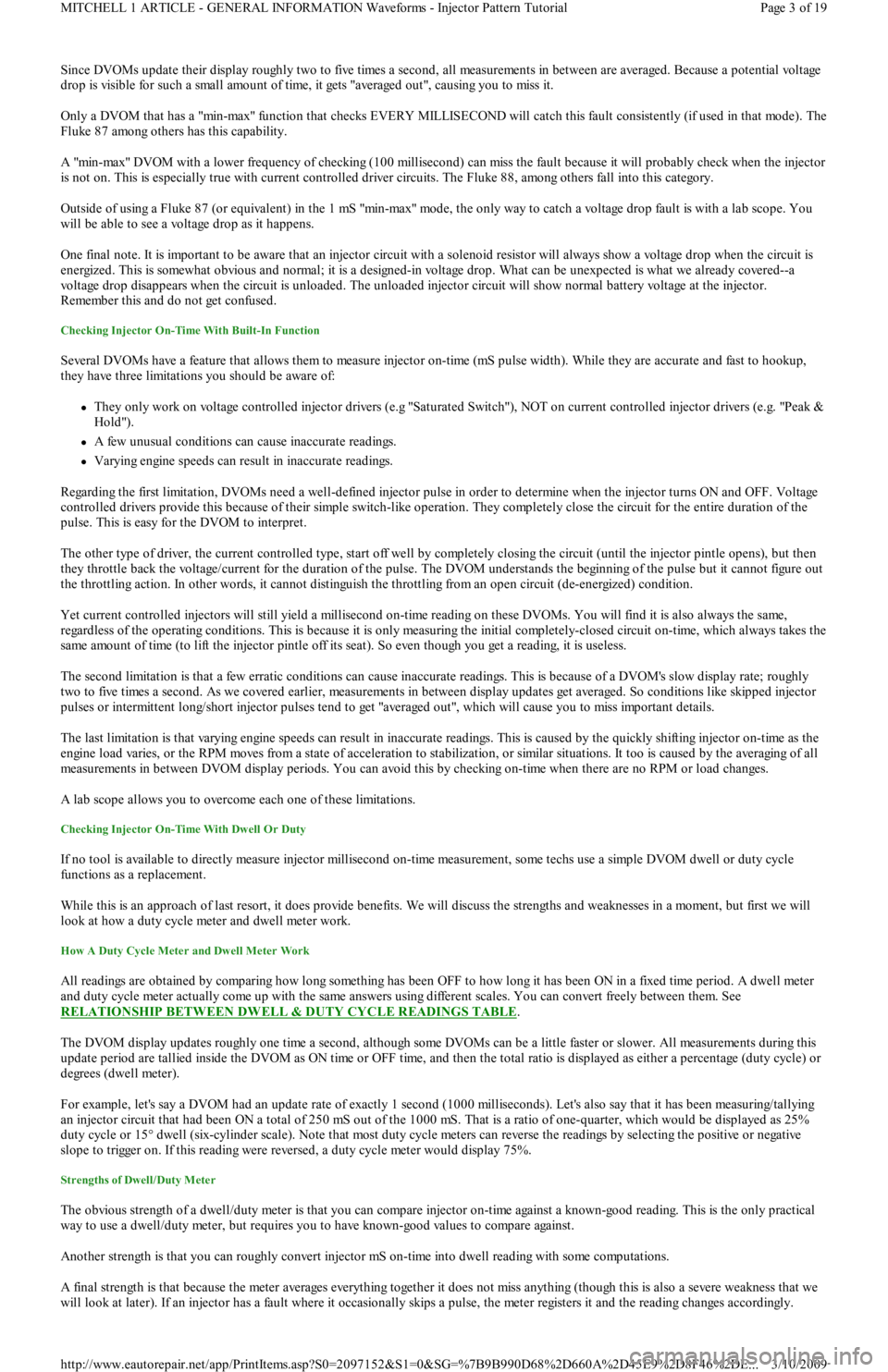
Since DVOMs update their display roughly two to five times a second, all measurements in between are averaged. Because a potential voltage
drop is visible for such a small amount of time, it ge t s "a ve r a ge d o u t ", c a u sin g yo u t o miss it .
Only a DVOM that has a "min-max" function that checks EVERY MILLISECOND will catch this fault consistently (if used in that mode). The
Fluke 87 among others has this capability.
A "min-max" DVOM with a lower frequency of checking (100 millisecond) can miss the fault because it will probably check when the injector
is not on. This is especially true with current controlled driver circuits. The Fluke 88, among others fall into this category.
Outside of using a Fluke 87 (or equivalent) in the 1 mS "min-max" mode, the only way to catch a voltage drop fault is with a lab scope. You
will be able to see a voltage drop as it happens.
One final note. It is important to be aware that an injector circuit with a solenoid resistor will always show a voltage drop when the circuit is
energized. This is somewhat obvious and normal; it is a designed-in voltage drop. What can be unexpected is what we already covered--a
voltage drop disappears when the circuit is unloaded. The unloaded injector circuit will show normal battery voltage at the injector.
Remember this and do not get confused.
Checking Injector On-Time With Built-In Function
Several DVOMs have a feature that allows them to measure injector on-time (mS pulse width). While they are accurate and fast to hookup,
they have three limitations you should be aware of:
They only work on voltage controlled injector drivers (e.g "Saturated Switch"), NOT on current controlled injector drivers (e.g. "Peak &
Hold").
A few unusual conditions can cause inaccurate readings.
Varying engine speeds can result in inaccurate readings.
Regarding the first limitation, DVOMs need a well-defined injector pulse in order to determine when the injector turns ON and OFF. Voltage
controlled drivers provide this because of their simple switch-like operation. They completely close the circuit for the entire duration of the
pulse. This is easy for the DVOM to interpret.
The other type of driver, the current controlled type, start off well by completely closing the circuit (until the injector pintle opens), but then
they throttle back the voltage/current for the duration of the pulse. The DVOM understands the beginning of the pulse but it cannot figure out
the throttling action. In other words, it cannot distinguish the throttling from an open circuit (de-energized) condition.
Yet current controlled injectors will still yield a millisecond on-time reading on these DVOMs. You will find it is also always the same,
regardless of the operating conditions. This is because it is only measuring the initial completely-closed circuit on-time, which always takes the
same amount of time (to lift the injector pintle off its seat). So even though you get a reading, it is useless.
The second limitation is that a few erratic conditions can cause inaccurate readings. This is because of a DVOM's slow display rate; roughly
two to five times a second. As we covered earlier, measurements in between display updates get averaged. So conditions like skipped injector
pulses or intermittent long/short injector pulses tend to get "averaged out", which will cause you to miss important details.
The last limitation is that varying engine speeds can result in inaccurate readings. This is caused by the quickly shifting injector on-time as the
engine load varies, or the RPM moves from a state of acceleration to stabilization, or similar situations. It too is caused by the averaging of all
measurements in between DVOM display periods. You can avoid this by checking on-time when there are no RPM or load changes.
A lab scope allows you to overcome each one of these limitations.
Checking Injector On-Time With Dwell Or Duty
If no tool is available to directly measure injector millisecond on-time measurement, some techs use a simple DVOM dwell or duty cycle
functions as a replacement.
While this is an approach of last resort, it does provide benefits. We will discuss the strengths and weaknesses in a moment, but first we will
look at how a duty cycle meter and dwell meter work.
How A Duty Cycle Meter and Dwell Meter Work
All readings are obtained by comparing how long something has been OFF to how long it has been ON in a fixed time period. A dwell meter
and duty cycle meter actually come up with the same answers using different scales. You can convert freely between them. See
RELATIONSHIP BETWEEN DWELL & DUTY CYCLE READINGS TABLE
.
The DVOM display updates roughly one time a second, although some DVOMs can be a little faster or slower. All measurements during this
update period are tallied inside the DVOM as ON time or OFF time, and then the total ratio is displayed as either a percentage (duty cycle) or
degrees (dwell meter).
For example, let's say a DVOM had an update rate of exactly 1 second (1000 milliseconds). Let's also say that it has been measuring/tallying
an injector circuit that had been ON a total of 250 mS out of the 1000 mS. That is a ratio of one-quarter, which would be displayed as 25%
duty cycle or 15° dwell (six-cylinder scale). Note that most duty cycle meters can reverse the readings by selecting the positive o r n e ga t ive
slope to trigger on. If this reading were reversed, a duty cycle meter would display 75%.
Strengths of Dwell/Duty Meter
The obvious strength of a dwell/duty meter is that you can compare injector on-time against a known-good reading. This is the only practical
way to use a dwell/duty meter, but requires you to have known-good values to compare against.
Another strength is that you can roughly convert injector mS on-time into dwell reading with some computations.
A final strength is that because the meter averages everything together it does not miss anything (though this is also a severe weakness that we
will look at later). If an injector has a fault where it occasionally skips a pulse, the meter registers it and the reading changes accordingly.
Page 3 of 19 MITCHELL 1 ARTICLE - GENERAL INFORMATION Waveforms - Injector Pattern Tutorial
3/10/2009 http://www.eautorepair.net/app/PrintItems.asp?S0=2097152&S1=0&SG=%7B9B990D68%2D660A%2D45E9%2D8F46%2DE
...
Page 345 of 454
Back To Article
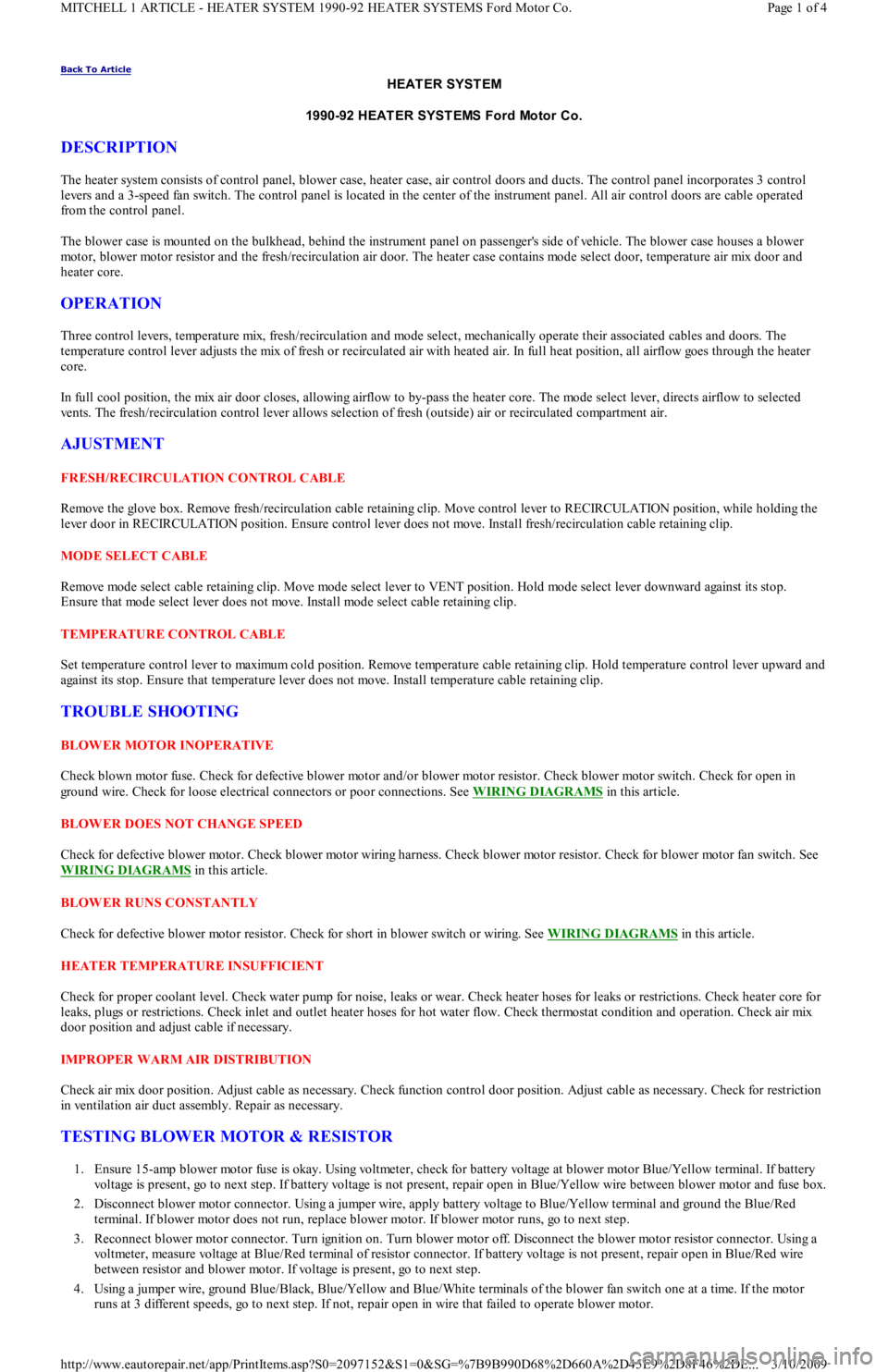
HEAT ER SYST EM
1990-92 HEAT ER SYST EMS Ford Motor Co.
DESCRIPTION
The heater system consists of control panel, blower case, heater case, air control doors and ducts. The control panel incorporates 3 control
levers and a 3-speed fan switch. The control panel is located in the center of the instrument panel. All air control doors are cable operated
from the control panel.
The blower case is mounted on the bulkhead, behind the instrument panel on passenger's side of vehicle. The blower case houses a blower
motor, blower motor resistor and the fresh/recirculation air door. The heater case contains mode select door, temperature air mix door and
heater core.
OPERATION
Three control levers, temperature mix, fresh/recirculation and mode select, mechanically operate their associated cables and doors. The
temperature control lever adjusts the mix of fresh or recirculated air with heated air. In full heat position, all airflow goes through the heater
core.
In full cool position, the mix air door closes, allowing airflow to by-pass the heater core. The mode select lever, directs airflow to selected
vents. The fresh/recirculation control lever allows selection of fresh (outside) air or recirculated compartment air.
AJUSTMENT
FRESH/RECIRCULATION CONTROL CABLE
Remove the glove box. Remove fresh/recirculation cable retaining clip. Move control lever to RECIRCULATION position, while holding the
lever door in RECIRCULATION position. Ensure control lever does not move. Install fresh/recirculation cable retaining clip.
MODE SELECT CABLE
Remove mode select cable retaining clip. Move mode select lever to VENT position. Hold mode select lever downward against its stop.
Ensure that mode select lever does not move. Install mode select cable retaining clip.
TEMPERATURE CONTROL CABLE
Set temperature control lever to maximum cold position. Remove temperature cable retaining clip. Hold temperature control lever upward and
against its stop. Ensure that temperature lever does not move. Install temperature cable retaining clip.
TROUBLE SHOOTING
BLOWER MOTOR INOPERATIVE
Check blown motor fuse. Check for defective blower motor and/or blower motor resistor. Check blower motor switch. Check for open in
ground wire. Check for loose electrical connectors or poor connections. See WIRING DIAGRAMS
in this article.
BLOWER DOES NOT CHANGE SPEED
Check for defective blower motor. Check blower motor wiring harness. Check blower motor resistor. Check for blower motor fan switch. See
WIRING DIAGRAMS
in this article.
BLOWER RUNS CONSTANTLY
Check for defective blower motor resistor. Check for short in blower switch or wiring. See WIRING DIAGRAMS
in this article.
HEATER TEMPERATURE INSUFFICIENT
Check for proper coolant level. Check water pump for noise, leaks or wear. Check heater hoses for leaks or restrictions. Check heater core for
leaks, plugs or restrictions. Check inlet and outlet heater hoses for hot water flow. Check thermostat condition and operation. Check air mix
door position and adjust cable if necessary.
IMPROPER WARM AIR DISTRIBUTION
Check air mix door position. Adjust cable as necessary. Check function control door position. Adjust cable as necessary. Check for restriction
in ventilation air duct assembly. Repair as necessary.
TESTING BLOWER MOTOR & RESISTOR
1. Ensure 15-amp blower motor fuse is okay. Using voltmeter, check for battery voltage at blower motor Blue/Yellow terminal. If battery
voltage is present, go to next step. If battery voltage is not present, repair open in Blue/Yellow wire between blower motor and fuse box.
2. Disconnect blower motor connector. Using a jumper wire, apply battery voltage to Blue/Yellow terminal and ground the Blue/Red
terminal. If blower motor does not run, replace blower motor. If blower motor runs, go to next step.
3. Reconnect blower motor connector. Turn ignition on. Turn blower motor off. Disconnect the blower motor resistor connector. Using a
voltmeter, measure voltage at Blue/Red terminal of resistor connector. If battery voltage is not present, repair open in Blue/Red wire
between resistor and blower motor. If voltage is present, go to next step.
4. Using a jumper wire, ground Blue/Black, Blue/Yellow and Blue/White terminals of the blower fan switch one at a time. If the motor
runs at 3 different speeds, go to next step. If not, repair open in wire that failed to operate blower motor.
Page 1 of 4 MITCHELL 1 ARTICLE - HEATER SYSTEM 1990-92 HEATER SYSTEMS Ford Motor Co.
3/10/2009 http://www.eautorepair.net/app/PrintItems.asp?S0=2097152&S1=0&SG=%7B9B990D68%2D660A%2D45E9%2D8F46%2DE
...
Page 363 of 454
Back To Article
1971-96 MAINT ENANCE & SERVICE INFORMAT ION
Interference Verification Check For OHC Engine - T im ing Belt Inform ation
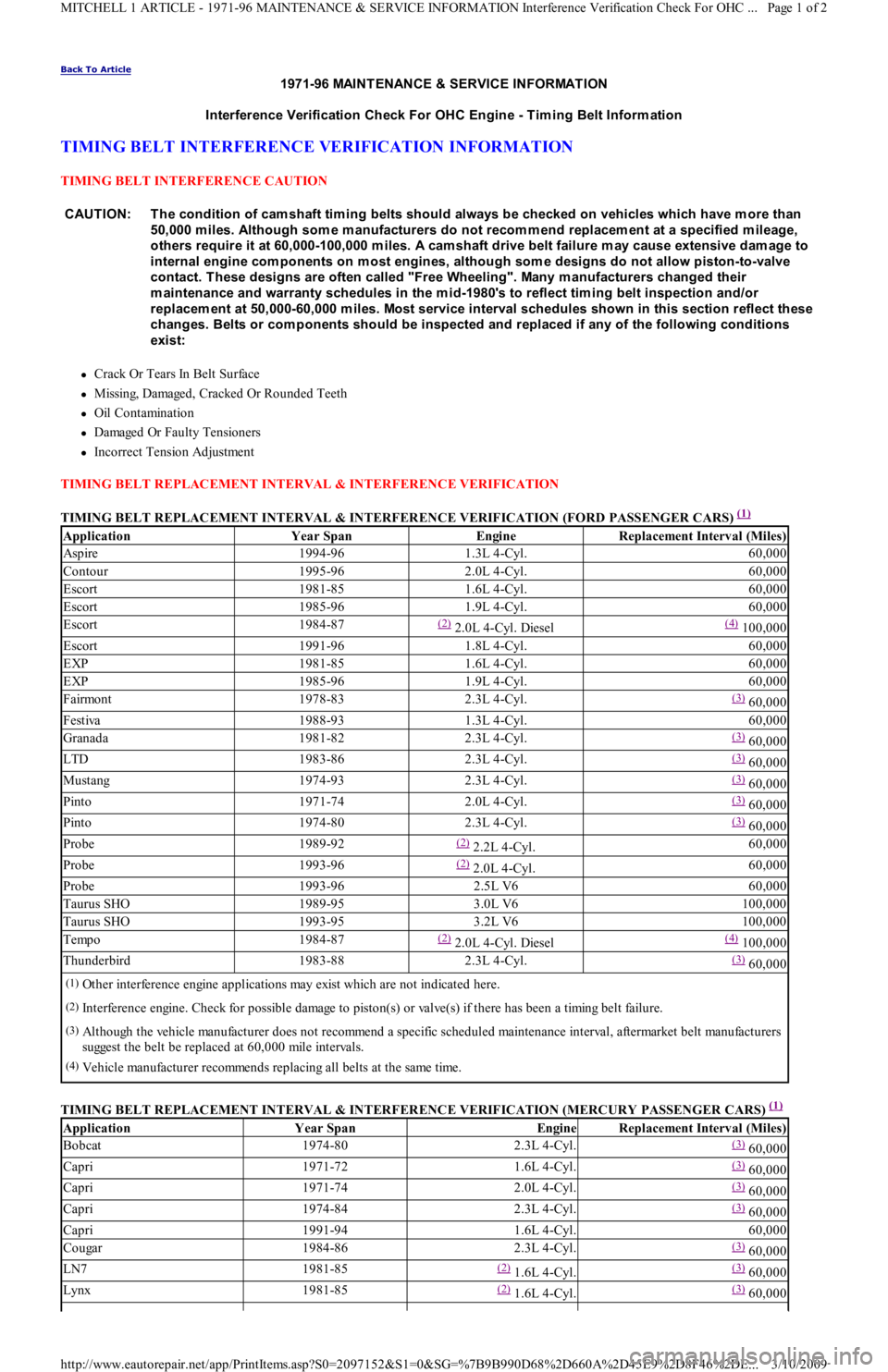
TIMING BELT INTERFERENCE VERIFICATION INFORMATION
TIMING BELT INTERFERENCE CAUTION
Crack Or Tears In Belt Surface
Missing, Damaged, Cracked Or Rounded Teeth
Oil Contamination
Damaged Or Faulty Tensioners
Incorrect Tension Adjustment
TIMING BELT REPLACEMENT INTERVAL & INTERFERENCE VERIFICATION
TIMING BELT REPLACEMENT INTERVAL & INTERFERENCE VERIFICATION (FORD PASSENGER CARS)
(1)
TIMING BELT REPLACEMENT INTERVAL & INTERFERENCE VERIFICATION (MERCURY PASSENGER CARS)
(1) CAUT ION: T he condition of cam shaft tim ing belts should always be checked on vehicles which have m ore than
50,000 m iles. Although som e m anufacturers do not recom m end replacem ent at a specified m ileage,
others require it at 60,000-100,000 m iles. A cam shaft drive belt failure m ay cause extensive dam age to
internal engine com ponents on m ost engines, although som e designs do not allow piston-to-valve
contact. T hese designs are often called "Free Wheeling". Many m anufacturers changed their
m aintenance and warranty schedules in the m id-1980's to reflect tim ing belt inspection and/or
replacem ent at 50,000-60,000 m iles. Most service interval schedules shown in this section reflect these
changes. Belts or com ponents should be inspected and replaced if any of the following conditions
exist:
ApplicationYear SpanEngineReplacement Interval (Miles)
Aspire1994-961.3L 4-Cyl.60,000
Contour1995-962.0L 4-Cyl.60,000
Escort1981-851.6L 4-Cyl.60,000
Escort1985-961.9L 4-Cyl.60,000
Escort1984-87(2) 2.0L 4-Cyl. Diesel(4) 100,000
Escort1991-961.8L 4-Cyl.60,000
EXP1981-851.6L 4-Cyl.60,000
EXP1985-961.9L 4-Cyl.60,000
Fairmont1978-832.3L 4-Cyl.(3) 60,000
Festiva1988-931.3L 4-Cyl.60,000
Granada1981-822.3L 4-Cyl.(3) 60,000
LTD1983-862.3L 4-Cyl.(3) 60,000
Mustang1974-932.3L 4-Cyl.(3) 60,000
Pinto1971-742.0L 4-Cyl.(3) 60,000
Pinto1974-802.3L 4-Cyl.(3) 60,000
Probe1989-92(2) 2.2L 4-Cyl.60,000
Probe1993-96(2) 2.0L 4-Cyl.60,000
Probe1993-962.5L V660,000
Taurus SHO1989-953.0L V6100,000
Taurus SHO1993-953.2L V6100,000
Tempo1984-87(2) 2.0L 4-Cyl. Diesel(4) 100,000
Thunderbird1983-882.3L 4-Cyl.(3) 60,000
(1)Other interference engine applications may exist which are not indicated here.
(2)Interference engine. Check for possible damage to piston(s) or valve(s) if there has been a timing belt failure.
(3)Although the vehicle manufacturer does not recommend a specific scheduled maintenance interval, aftermarket belt manufacturers
suggest the belt be replaced at 60,000 mile intervals.
(4)Vehicle manufacturer recommends replacing all belts at the same time.
ApplicationYear SpanEngineReplacement Interval (Miles)
Bobcat1974-802.3L 4-Cyl.(3) 60,000
Capri1971-721.6L 4-Cyl.(3) 60,000
Capri1971-742.0L 4-Cyl.(3) 60,000
Capri1974-842.3L 4-Cyl.(3) 60,000
Capri1991-941.6L 4-Cyl.60,000
Cougar1984-862.3L 4-Cyl.(3) 60,000
LN71981-85(2) 1.6L 4-Cyl.(3) 60,000
Lynx1981-85(2) 1.6L 4-Cyl.(3) 60,000
Page 1 of 2 MITCHELL 1 ARTICLE - 1971-96 MAINTENANCE & SERVICE INFORMATION Interference Verification Check For OHC
...
3/10/2009 http://www.eautorepair.net/app/PrintItems.asp?S0=2097152&S1=0&SG=%7B9B990D68%2D660A%2D45E9%2D8F46%2DE
...
Page 393 of 454
Removal
1. Remove hub and knuckle assembly from vehicle. See HUB & KNUCKLE ASSEMBLY under REMOVAL & INSTALLATION. Using
Knuckle Puller (T87C-1104-A), or a press and bearing puller, remove drive hub/rotor assembly from steering knuckle/dust shield
assembly.
2. Remove bearing preload spacer from hub. Spacer is preselected to provide correct bearing preload. Ensure correct spacer is installed
during reassembly. Install hub/rotor assembly in a vise. Scribe alignment marks on hub and rotor for reassembly reference.
3. Remove rotor attaching bolts and rotor. Use Bearing Splitter (D84L-1123-A), Shaft Protector (D80L-625-2) and a press, or Bearing
Puller (D80L-927-A) and Puller Attachment (D84L-1123-A) to remove outer bearing from wheel hub. Remove and discard outer and
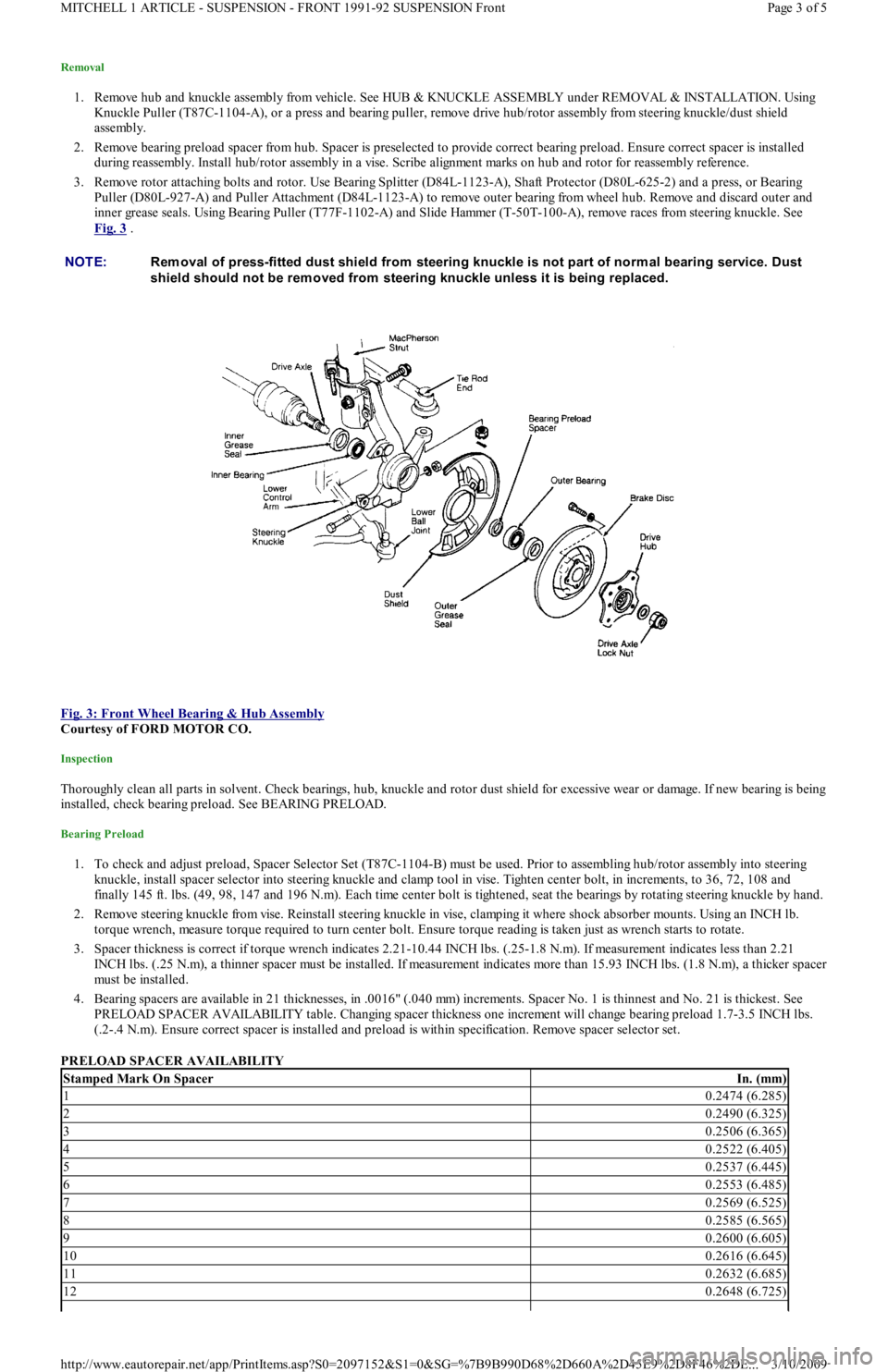
inner grease seals. Using Bearing Puller (T77F-1102-A) and Slide Hammer (T-50T-100-A), remove races from steering knuckle. See
Fig. 3
.
Fig. 3: Front Wheel Bearing & Hub Assembly
Courtesy of FORD MOTOR CO.
Inspection
Thoroughly clean all parts in solvent. Check bearings, hub, knuckle and rotor dust shield for excessive wear or damage. If new bearing is being
installed, check bearing preload. See BEARING PRELOAD.
Bearing Preload
1. To check and adjust preload, Spacer Selector Set (T87C-1104-B) must be used. Prior to assembling hub/rotor assembly into steering
knuckle, install spacer selector into steering knuckle and clamp tool in vise. Tighten center bolt, in increments, to 36, 72, 108 and
finally 145 ft. lbs. (49, 98, 147 and 196 N.m). Each time center bolt is tightened, seat the bearings by rotating steering knuckle by hand.
2. Remove steering knuckle from vise. Reinstall steering knuckle in vise, clamping it where shock absorber mounts. Using an INCH lb.
torque wrench, measure torque required to turn center bolt. Ensure torque reading is taken just as wrench starts to rotate.
3. Spacer thickness is correct if torque wrench indicates 2.21-10.44 INCH lbs. (.25-1.8 N.m). If measurement indicates less than 2.21
INCH lbs. (.25 N.m), a thinner spacer must be installed. If measurement indicates more than 15.93 INCH lbs. (1.8 N.m), a thicker spacer
must be installed.
4. Bearing spacers are available in 21 thicknesses, in .0016" (.040 mm) increments. Spacer No. 1 is thinnest and No. 21 is thickest. See
PRELOAD SPACER AVAILABILITY table. Changing spacer thickness one increment will change bearing preload 1.7-3.5 INCH lbs.
(.2-.4 N.m). Ensure correct spacer is installed and preload is within specification. Remove spacer selector set.
PRELOAD SPACER AVAILABILITY NOTE:Rem oval of press-fitted dust shield from steering knuckle is not part of norm al bearing service. Dust
shield should not be rem oved from steering knuckle unless it is being replaced.
Stamped Mark On SpacerIn. (mm)
10.2474 (6.285)
20.2490 (6.325)
30.2506 (6.365)
40.2522 (6.405)
50.2537 (6.445)
60.2553 (6.485)
70.2569 (6.525)
80.2585 (6.565)
90.2600 (6.605)
100.2616 (6.645)
110.2632 (6.685)
120.2648 (6.725)
Page 3 of 5 MITCHELL 1 ARTICLE - SUSPENSION - FRONT 1991-92 SUSPENSION Front
3/10/2009 http://www.eautorepair.net/app/PrintItems.asp?S0=2097152&S1=0&SG=%7B9B990D68%2D660A%2D45E9%2D8F46%2DE
...