battery FORD FIESTA 2012 6.G User Guide
[x] Cancel search | Manufacturer: FORD, Model Year: 2012, Model line: FIESTA, Model: FORD FIESTA 2012 6.GPages: 356, PDF Size: 4.11 MB
Page 87 of 356
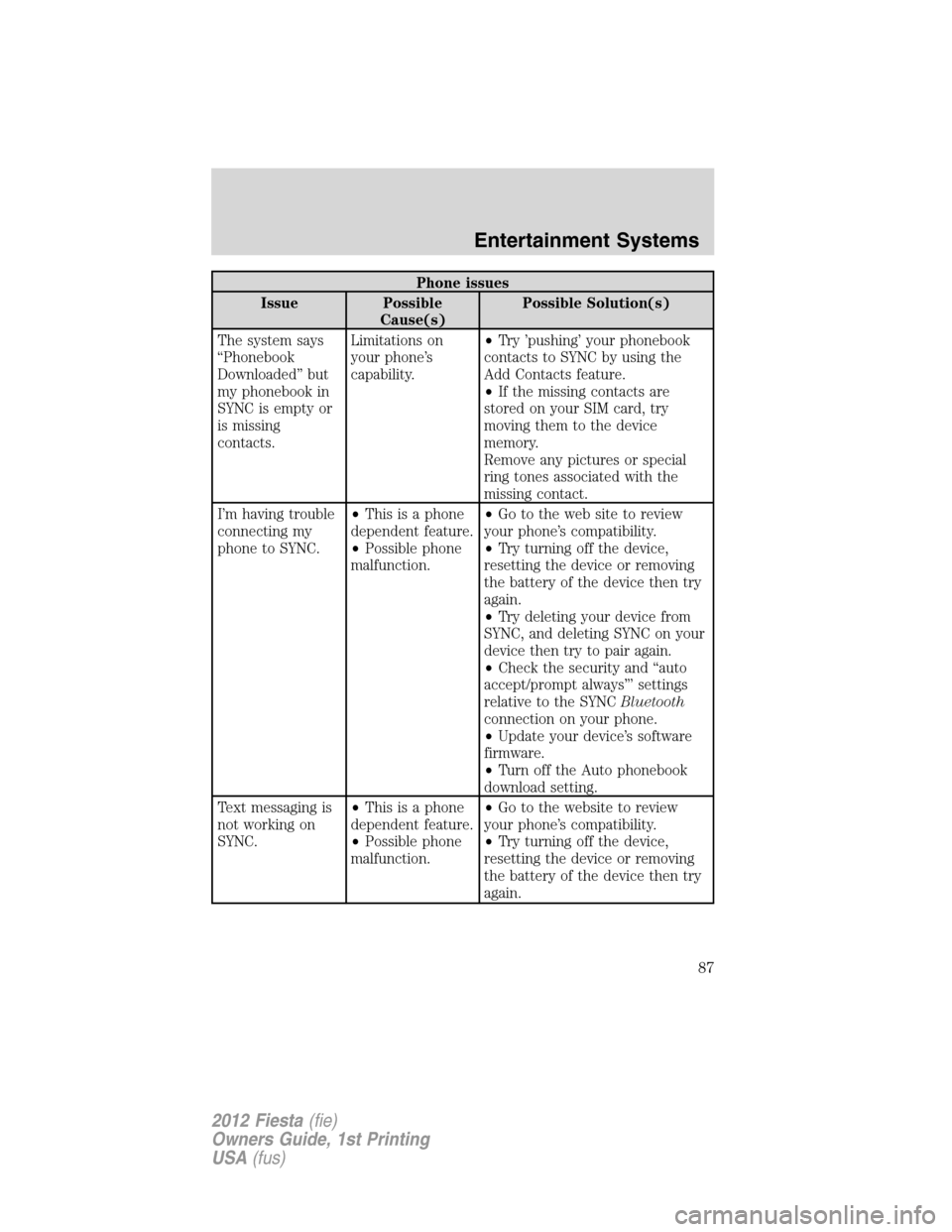
Phone issues
Issue Possible
Cause(s)Possible Solution(s)
The system says
“Phonebook
Downloaded” but
my phonebook in
SYNC is empty or
is missing
contacts.Limitations on
your phone’s
capability.•Try ’pushing’ your phonebook
contacts to SYNC by using the
Add Contacts feature.
•If the missing contacts are
stored on your SIM card, try
moving them to the device
memory.
Remove any pictures or special
ring tones associated with the
missing contact.
I’m having trouble
connecting my
phone to SYNC.•This is a phone
dependent feature.
•Possible phone
malfunction.•Go to the web site to review
your phone’s compatibility.
•Try turning off the device,
resetting the device or removing
the battery of the device then try
again.
•Try deleting your device from
SYNC, and deleting SYNC on your
device then try to pair again.
•Check the security and “auto
accept/prompt always”’ settings
relative to the SYNCBluetooth
connection on your phone.
•Update your device’s software
firmware.
•Turn off the Auto phonebook
download setting.
Text messaging is
not working on
SYNC.•This is a phone
dependent feature.
•Possible phone
malfunction.•Go to the website to review
your phone’s compatibility.
•Try turning off the device,
resetting the device or removing
the battery of the device then try
again.
Entertainment Systems
87
2012 Fiesta(fie)
Owners Guide, 1st Printing
USA(fus)
Page 88 of 356
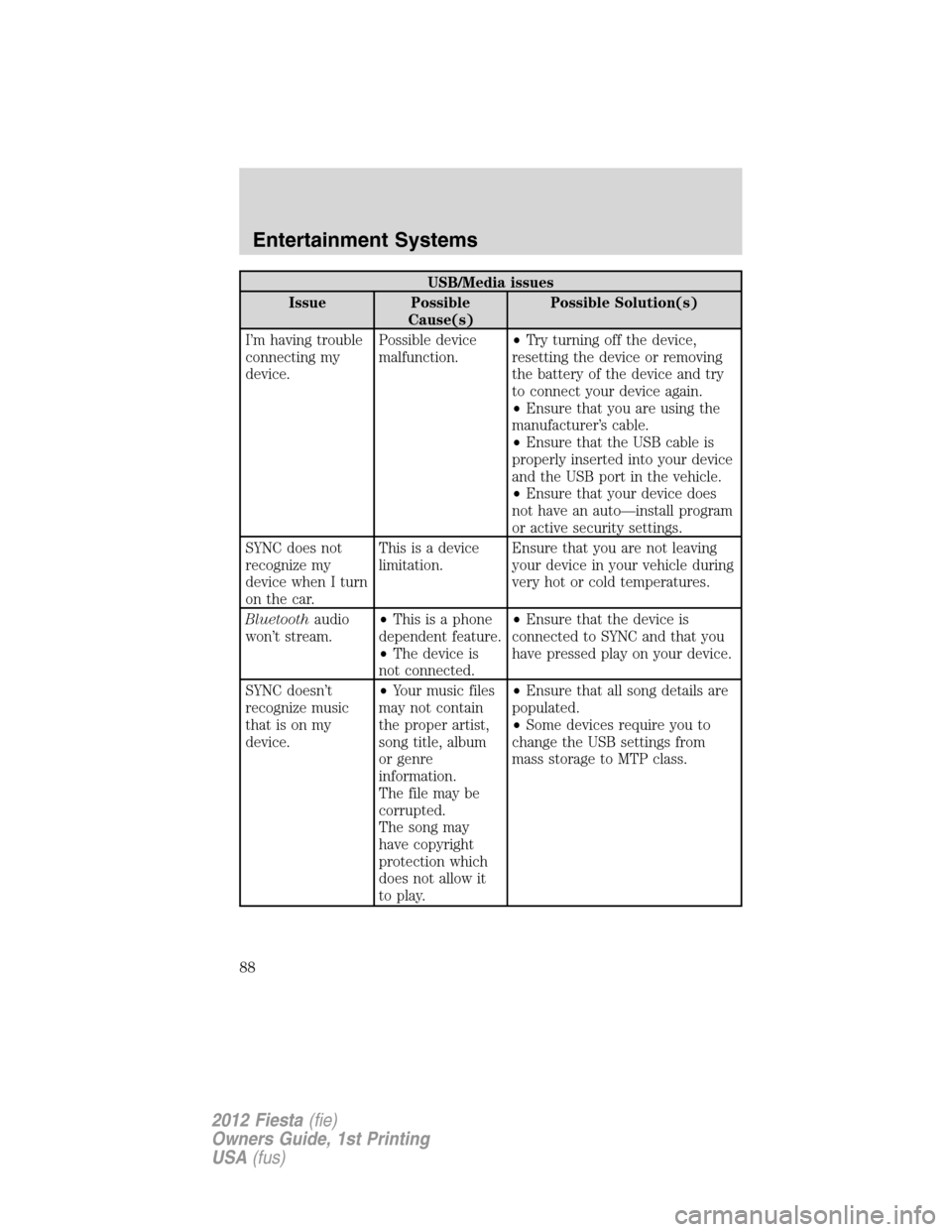
USB/Media issues
Issue Possible
Cause(s)Possible Solution(s)
I’m having trouble
connecting my
device.Possible device
malfunction.•Try turning off the device,
resetting the device or removing
the battery of the device and try
to connect your device again.
•Ensure that you are using the
manufacturer’s cable.
•Ensure that the USB cable is
properly inserted into your device
and the USB port in the vehicle.
•Ensure that your device does
not have an auto—install program
or active security settings.
SYNC does not
recognize my
device when I turn
on the car.This is a device
limitation.Ensure that you are not leaving
your device in your vehicle during
very hot or cold temperatures.
Bluetoothaudio
won’t stream.•This is a phone
dependent feature.
•The device is
not connected.•Ensure that the device is
connected to SYNC and that you
have pressed play on your device.
SYNC doesn’t
recognize music
that is on my
device.•Your music files
may not contain
the proper artist,
song title, album
or genre
information.
The file may be
corrupted.
The song may
have copyright
protection which
does not allow it
to play.•Ensure that all song details are
populated.
•Some devices require you to
change the USB settings from
mass storage to MTP class.
Entertainment Systems
88
2012 Fiesta(fie)
Owners Guide, 1st Printing
USA(fus)
Page 102 of 356
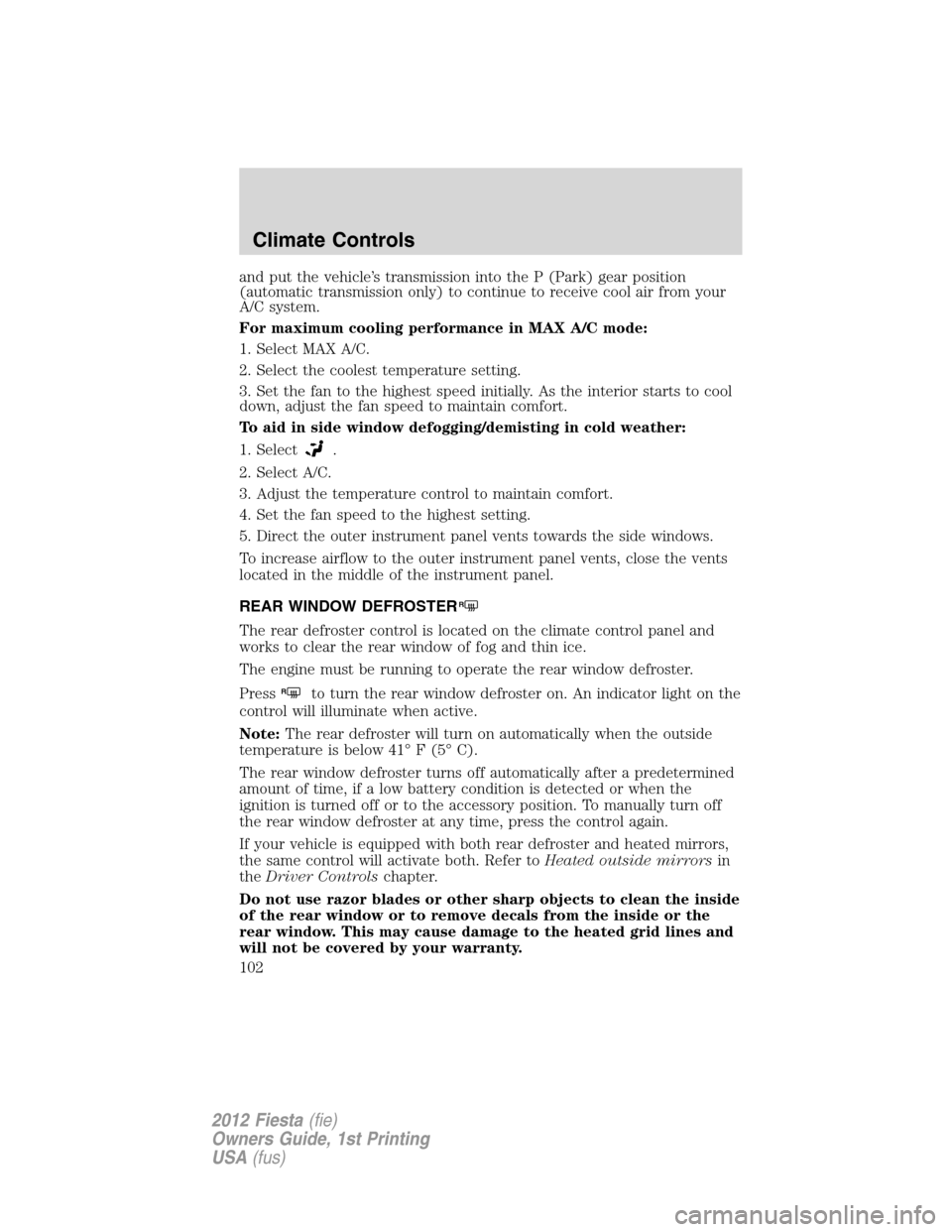
and put the vehicle’s transmission into the P (Park) gear position
(automatic transmission only) to continue to receive cool air from your
A/C system.
For maximum cooling performance in MAX A/C mode:
1. Select MAX A/C.
2. Select the coolest temperature setting.
3. Set the fan to the highest speed initially. As the interior starts to cool
down, adjust the fan speed to maintain comfort.
To aid in side window defogging/demisting in cold weather:
1. Select
.
2. Select A/C.
3. Adjust the temperature control to maintain comfort.
4. Set the fan speed to the highest setting.
5. Direct the outer instrument panel vents towards the side windows.
To increase airflow to the outer instrument panel vents, close the vents
located in the middle of the instrument panel.
REAR WINDOW DEFROSTER
R
The rear defroster control is located on the climate control panel and
works to clear the rear window of fog and thin ice.
The engine must be running to operate the rear window defroster.
Press
Rto turn the rear window defroster on. An indicator light on the
control will illuminate when active.
Note:The rear defroster will turn on automatically when the outside
temperature is below 41° F (5° C).
The rear window defroster turns off automatically after a predetermined
amount of time, if a low battery condition is detected or when the
ignition is turned off or to the accessory position. To manually turn off
the rear window defroster at any time, press the control again.
If your vehicle is equipped with both rear defroster and heated mirrors,
the same control will activate both. Refer toHeated outside mirrorsin
theDriver Controlschapter.
Do not use razor blades or other sharp objects to clean the inside
of the rear window or to remove decals from the inside or the
rear window. This may cause damage to the heated grid lines and
will not be covered by your warranty.
Climate Controls
102
2012 Fiesta(fie)
Owners Guide, 1st Printing
USA(fus)
Page 108 of 356
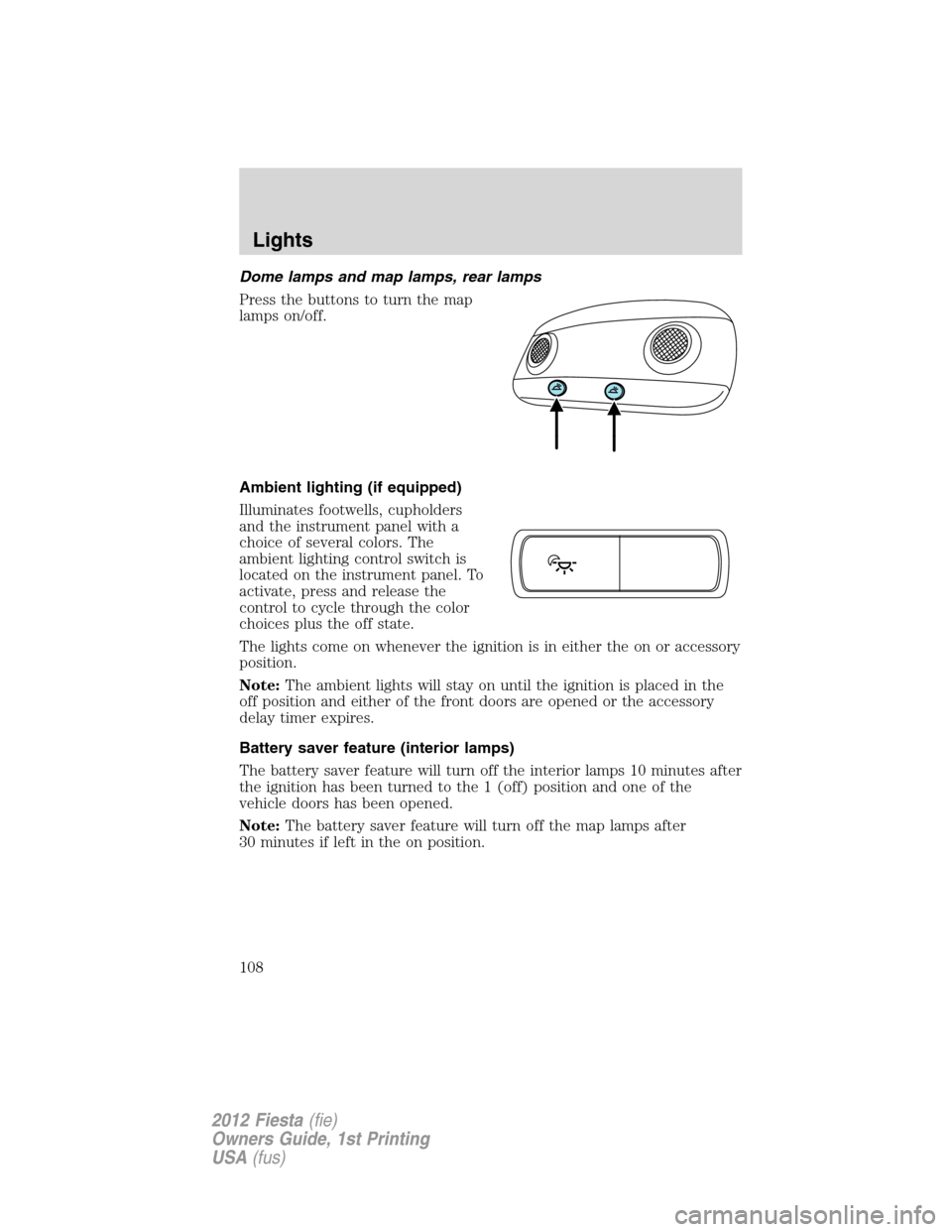
Dome lamps and map lamps, rear lamps
Press the buttons to turn the map
lamps on/off.
Ambient lighting (if equipped)
Illuminates footwells, cupholders
and the instrument panel with a
choice of several colors. The
ambient lighting control switch is
located on the instrument panel. To
activate, press and release the
control to cycle through the color
choices plus the off state.
The lights come on whenever the ignition is in either the on or accessory
position.
Note:The ambient lights will stay on until the ignition is placed in the
off position and either of the front doors are opened or the accessory
delay timer expires.
Battery saver feature (interior lamps)
The battery saver feature will turn off the interior lamps 10 minutes after
the ignition has been turned to the 1 (off) position and one of the
vehicle doors has been opened.
Note:The battery saver feature will turn off the map lamps after
30 minutes if left in the on position.
Lights
108
2012 Fiesta(fie)
Owners Guide, 1st Printing
USA(fus)
Page 121 of 356
To prevent the fuse from being blown, do not use the power point(s)
over the vehicle capacity of 12V DC/180W. If the power point or cigar
lighter socket is not working, a fuse may have blown. Refer toFuses and
relaysin theRoadside Emergencieschapter for information on
checking and replacing fuses.
To have full capacity usage of your power point, the engine is required to
be running to avoid unintentional discharge of the battery. To prevent
the battery from being discharged:
•do not use the power point longer than necessary when the engine is
not running,
•do not leave battery chargers, video game adapters, computers and
other devices plugged in overnight or when the vehicle is parked for
extended periods.
Always keep the power point caps closed when not being used.
POWER WINDOWS (IF EQUIPPED)
WARNING:Do not leave children unattended in the vehicle and
do not let children play with the power windows. They may
seriously injure themselves.
WARNING:When closing the power windows, you should verify
they are free of obstructions and ensure that children and/or
pets are not in the proximity of the window openings.
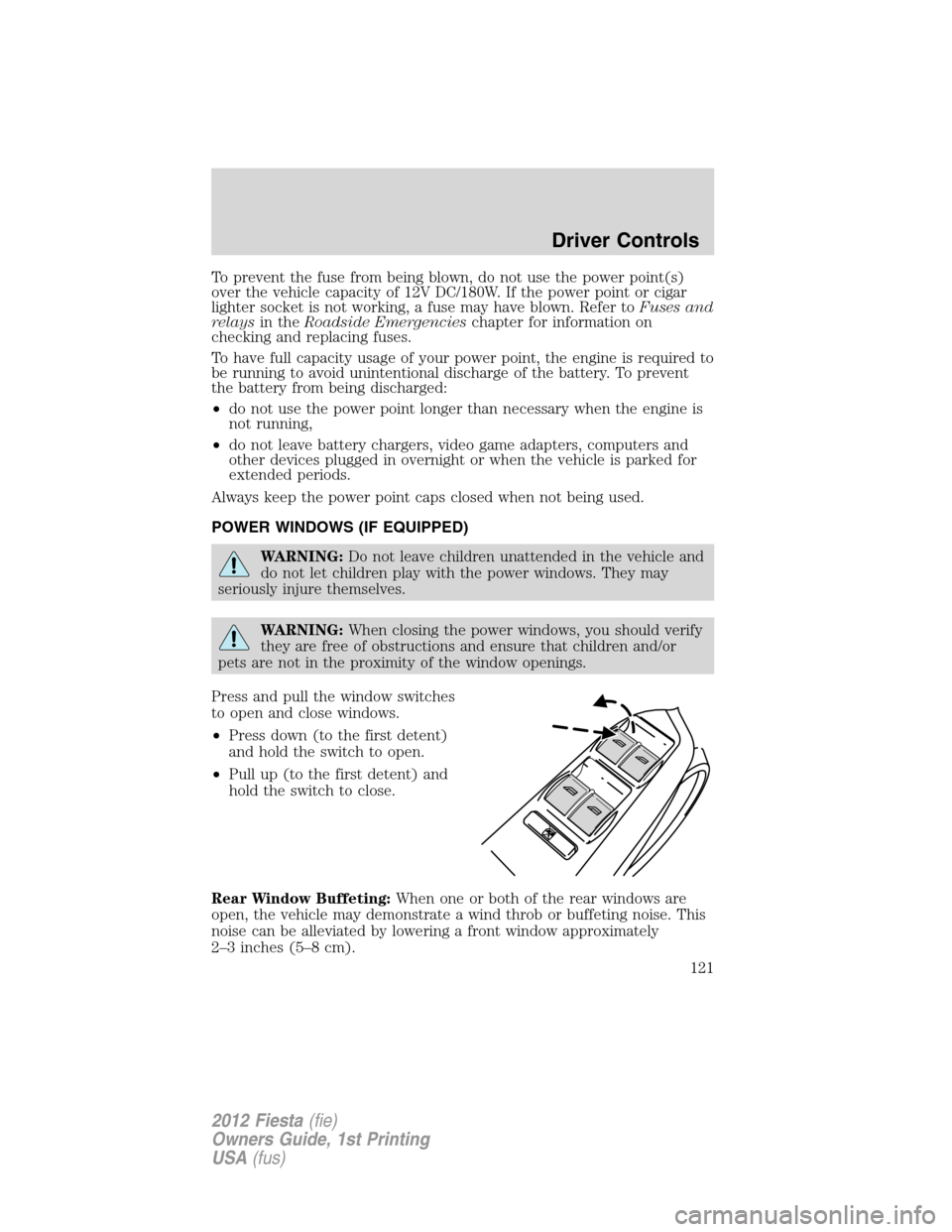
Press and pull the window switches
to open and close windows.
•Press down (to the first detent)
and hold the switch to open.
•Pull up (to the first detent) and
hold the switch to close.
Rear Window Buffeting:When one or both of the rear windows are
open, the vehicle may demonstrate a wind throb or buffeting noise. This
noise can be alleviated by lowering a front window approximately
2–3 inches (5–8 cm).
Driver Controls
121
2012 Fiesta(fie)
Owners Guide, 1st Printing
USA(fus)
Page 122 of 356
One-touch up or down (driver’s window only)
This feature allows the driver’s window to open or close fully without
holding the control down.
To operate one-touch down, press the switch completely down to the
second detent and release quickly. The window will open fully.
Momentarily press the switch to any position to stop the window
operation.
To operate one-touch up, pull the switch completely up to the second
detent and release quickly. The window will close fully. Momentarily
press the switch to any position to stop the window operation.
Bounce-back (driver’s window only)
When an obstacle has been detected in the window opening as the
window is moving upward, the window will automatically move down and
stop at a predetermined position.
Overriding the bounce-back feature
To override this protection function when there is a resistance, e.g. in
the winter, proceed as follows:
1. Close the window twice until it reaches the resistance and let it
reverse.
2. Close the window a third time to the resistance. The bounce-back
function is disabled and you cannot close the window automatically. The
window will override the resistance and you can close it fully.
3. If the window does not close after the third attempt, contact your
authorized dealer as soon as possible.
Resetting the bounce-back feature
WARNING:The bounce-back function is deactivated until you
have reset the memory.
After the battery has been disconnected from the vehicle you must reset
the bounce-back memory:
1. Pull up the switch and hold until the window is fully closed then
release the switch.
2. Pull up the switch again for one more second.
3. Press and hold the switch until the window is fully open, then release
the switch.
Driver Controls
122
2012 Fiesta(fie)
Owners Guide, 1st Printing
USA(fus)
Page 138 of 356
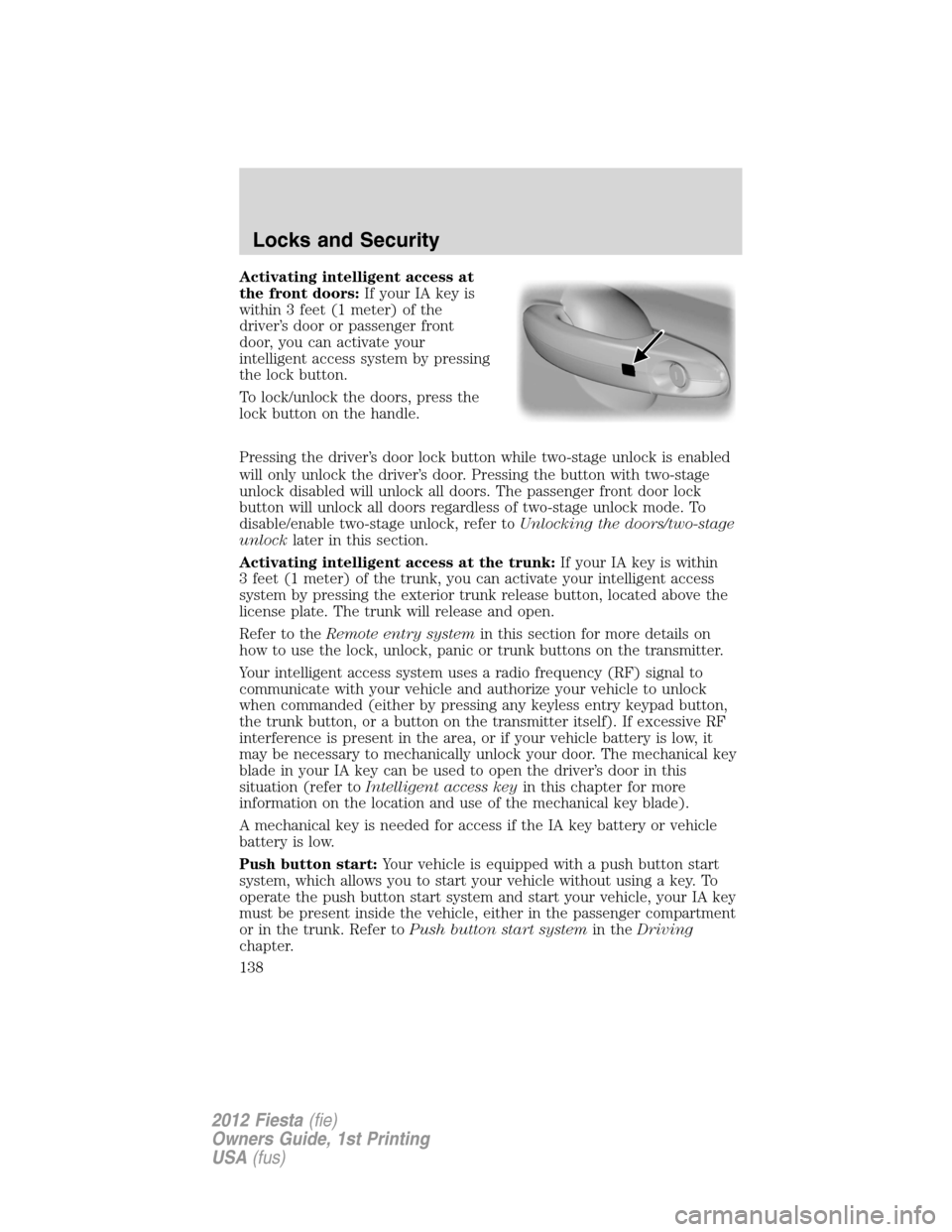
Activating intelligent access at
the front doors:If your IA key is
within 3 feet (1 meter) of the
driver’s door or passenger front
door, you can activate your
intelligent access system by pressing
the lock button.
To lock/unlock the doors, press the
lock button on the handle.
Pressing the driver’s door lock button while two-stage unlock is enabled
will only unlock the driver’s door. Pressing the button with two-stage
unlock disabled will unlock all doors. The passenger front door lock
button will unlock all doors regardless of two-stage unlock mode. To
disable/enable two-stage unlock, refer toUnlocking the doors/two-stage
unlocklater in this section.
Activating intelligent access at the trunk:If your IA key is within
3 feet (1 meter) of the trunk, you can activate your intelligent access
system by pressing the exterior trunk release button, located above the
license plate. The trunk will release and open.
Refer to theRemote entry systemin this section for more details on
how to use the lock, unlock, panic or trunk buttons on the transmitter.
Your intelligent access system uses a radio frequency (RF) signal to
communicate with your vehicle and authorize your vehicle to unlock
when commanded (either by pressing any keyless entry keypad button,
the trunk button, or a button on the transmitter itself). If excessive RF
interference is present in the area, or if your vehicle battery is low, it
may be necessary to mechanically unlock your door. The mechanical key
blade in your IA key can be used to open the driver’s door in this
situation (refer toIntelligent access keyin this chapter for more
information on the location and use of the mechanical key blade).
A mechanical key is needed for access if the IA key battery or vehicle
battery is low.
Push button start:Your vehicle is equipped with a push button start
system, which allows you to start your vehicle without using a key. To
operate the push button start system and start your vehicle, your IA key
must be present inside the vehicle, either in the passenger compartment
or in the trunk. Refer toPush button start systemin theDriving
chapter.
Locks and Security
138
2012 Fiesta(fie)
Owners Guide, 1st Printing
USA(fus)
Page 139 of 356
Unlocking the doors/two-stage unlock
1. Press
and release to unlock the driver’s door.Note:The interior
lamps will illuminate and the parking lamps will flash.
2. Press
and release again within three seconds to unlock all the
doors.
Two-stage unlock disable
Disabling two-stage unlock allows all vehicle doors to unlock
simultaneously.
Two-stage unlocking may be disabled or re-enabled by simultaneously
pressing the
andcontrols on the transmitter for three seconds.
The park lamps will illuminate twice to indicate that two-stage unlock
was enabled or disabled.
Locking the doors
•Pressand release to lock all the doors. If all doors are closed the
turn signal lamps will flash twice.
Opening the luggage compartment
Press
twice (within 3 seconds) to open the luggage compartment.
Note:This feature will not operate when the engine is running and
vehicle speed is more than 4 mph (7 km/h).
•Ensure that the trunk is closed and latched before driving your
vehicle. Failure to properly latch the trunk may cause objects to fall
out or block the driver’s rear view.
Replacing the battery
The remote entry transmitter uses one coin type three-volt lithium
battery CR2032 or equivalent.
To replace the battery:
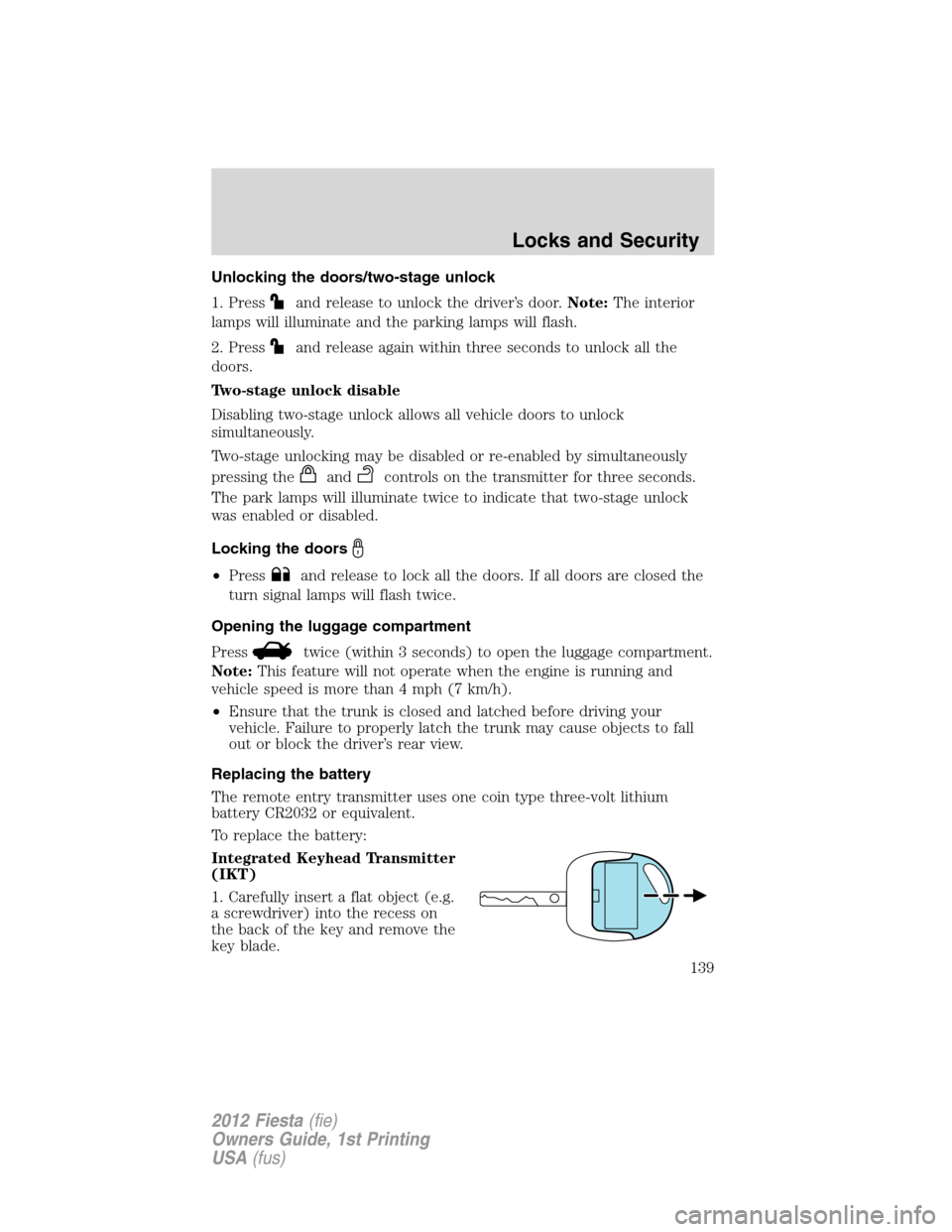
Integrated Keyhead Transmitter
(IKT)
1. Carefully insert a flat object (e.g.
a screwdriver) into the recess on
the back of the key and remove the
key blade.
Locks and Security
139
2012 Fiesta(fie)
Owners Guide, 1st Printing
USA(fus)
Page 140 of 356
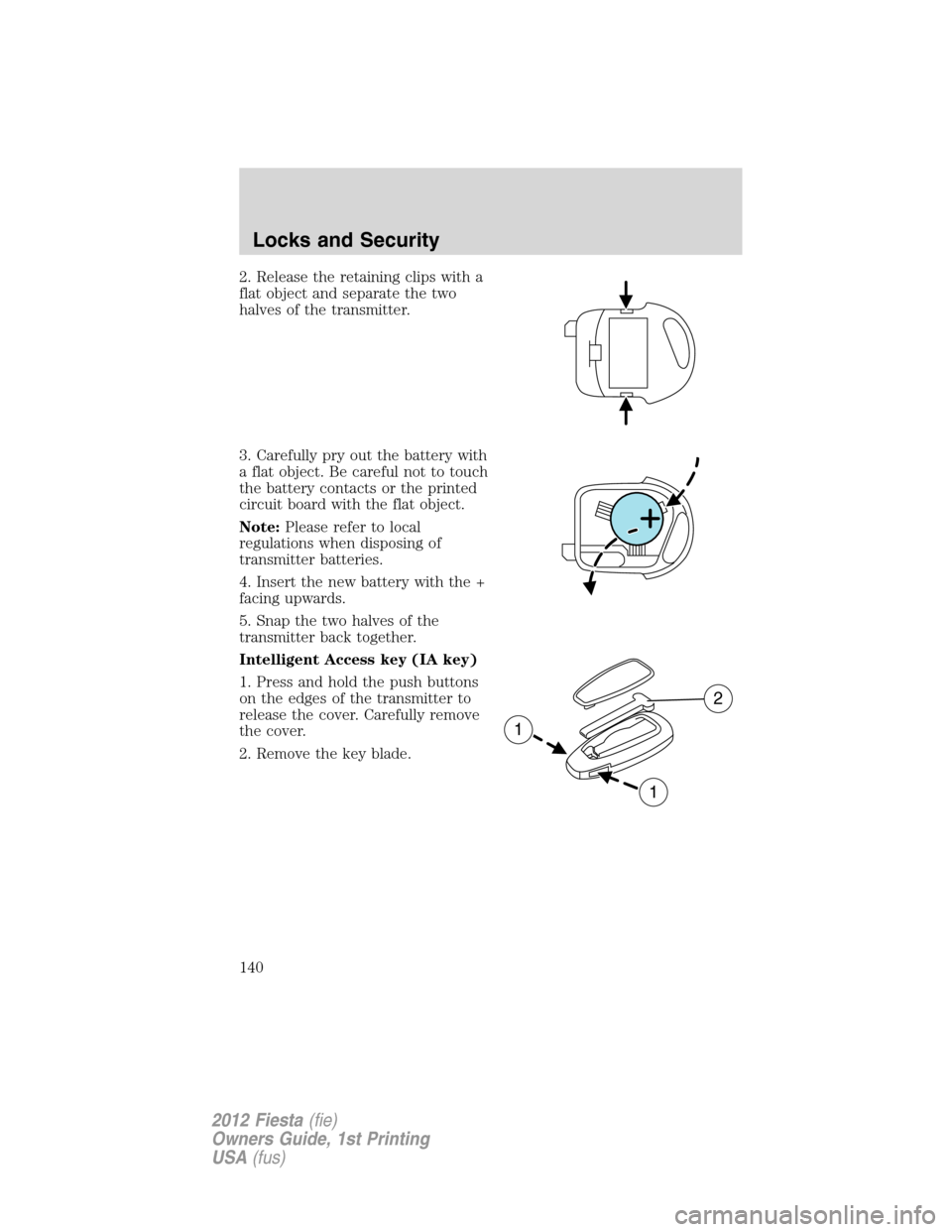
2. Release the retaining clips with a
flat object and separate the two
halves of the transmitter.
3. Carefully pry out the battery with
a flat object. Be careful not to touch
the battery contacts or the printed
circuit board with the flat object.
Note:Please refer to local
regulations when disposing of
transmitter batteries.
4. Insert the new battery with the +
facing upwards.
5. Snap the two halves of the
transmitter back together.
Intelligent Access key (IA key)
1. Press and hold the push buttons
on the edges of the transmitter to
release the cover. Carefully remove
the cover.
2. Remove the key blade.
1
1
2
Locks and Security
140
2012 Fiesta(fie)
Owners Guide, 1st Printing
USA(fus)
Page 141 of 356
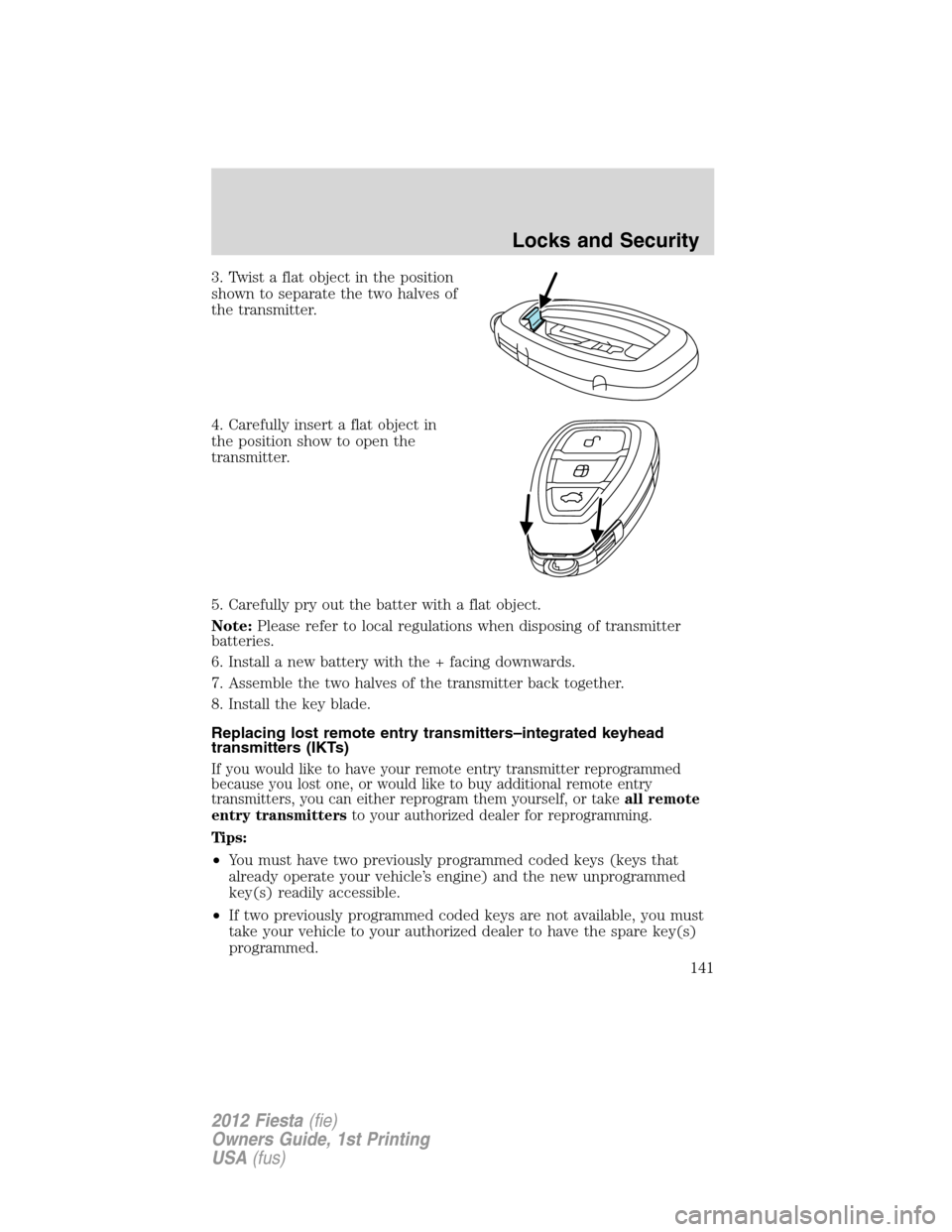
3. Twist a flat object in the position
shown to separate the two halves of
the transmitter.
4. Carefully insert a flat object in
the position show to open the
transmitter.
5. Carefully pry out the batter with a flat object.
Note:Please refer to local regulations when disposing of transmitter
batteries.
6. Install a new battery with the + facing downwards.
7. Assemble the two halves of the transmitter back together.
8. Install the key blade.
Replacing lost remote entry transmitters–integrated keyhead
transmitters (IKTs)
If you would like to have your remote entry transmitter reprogrammed
because you lost one, or would like to buy additional remote entry
transmitters, you can either reprogram them yourself, or takeall remote
entry transmittersto your authorized dealer for reprogramming.
Tips:
•You must have two previously programmed coded keys (keys that
already operate your vehicle’s engine) and the new unprogrammed
key(s) readily accessible.
•If two previously programmed coded keys are not available, you must
take your vehicle to your authorized dealer to have the spare key(s)
programmed.
Locks and Security
141
2012 Fiesta(fie)
Owners Guide, 1st Printing
USA(fus)