change time FORD FIESTA 2013 User Guide
[x] Cancel search | Manufacturer: FORD, Model Year: 2013, Model line: FIESTA, Model: FORD FIESTA 2013Pages: 346, PDF Size: 5.27 MB
Page 215 of 346
CHANGING A BULB
Lamp Assembly Condensation
Exterior lamps are vented to accommodate normal changes in pressure.
Condensation can be a natural by-product of this design. When moist air
enters the lamp assembly through the vents, there is a possibility that
condensation can occur when the temperature is cold. When normal
condensation occurs, a thin film of mist can form on the interior of the
lens. The thin mist eventually clears and exits through the vents during
normal operation. Clearing time may take as long as 48 hours under dry
weather conditions.
These are examples of acceptable condensation:
•Presence of thin mist (no streaks, drip marks or droplets).
•Fine mist covers less than 50% of the lens.
These are examples of unacceptable moisture (usually caused by a lamp
water leak):
•Water puddle inside the lamp.
•Large water droplets, drip marks or streaks present on the interior of
the lens.
Take your vehicle to a dealer for service if any of the above conditions of
unacceptable moisture are present.
Replacing Bulbs
Note:Before changing bulb, verify the corresponding fuse is not blown.
The low beam headlamps, high beam headlamps, front turn signals and
side marker lamps are located in the headlamp assembly and can be
replaced individually by removing the headlamp assembly as a unit.
Replacing Headlamp Bulbs
Note:Handle a halogen headlamp bulb carefully and keep out of
children’s reach. Grasp the bulb by only its plastic base and do not touch
the glass. The oil from your hand could cause the bulb to break the next
time the headlamps are operated.
Note:If the bulb is accidentally touched, it should be cleaned with
rubbing alcohol before being used.
214Maintenance
2013 Fiesta(fie)
Owners Guide gf, 2nd Printing
USA(fus)
ProCarManuals.com
Page 229 of 346
•Some automatic car washes may cause damage to the finish on your
wheel rims or covers. Industrial-strength (heavy-duty) cleaners, or
cleaning chemicals, in combination with brush agitation to remove
brake dust and dirt, could wear away the clear coat finish over time.
•Do not use hydrofluoric acid-based or high caustic-based wheel
cleaners, steel wool, fuels or strong household detergent.
•To remove tar and grease, use Motorcraft® Bug and Tar Remover.
VEHICLE STORAGE
If you plan on storing your vehicle for an extended period of time
(30 days or more), read the following maintenance recommendations to
make sure your vehicle stays in good operating condition.
All motor vehicles and their components were engineered and tested for
reliable, regular driving. Long term storage under various conditions may
lead to component degradation or failure unless specific precautions are
taken to preserve the components.
General
•Store all vehicles in a dry, ventilated place.
•Protect from sunlight, if possible.
•If vehicles are stored outside, they require regular maintenance to
protect against rust and damage.
Body
•Wash vehicle thoroughly to remove dirt, grease, oil, tar or mud from
exterior surfaces, rear-wheel housing and underside of front fenders.
•Periodically wash vehicles stored in exposed locations.
•Touch-up raw or primed metal to prevent rust.
•Cover chrome and stainless steel parts with a thick coat of auto wax
to prevent discoloration. Re-wax as necessary when the vehicle is
washed.
•Lubricate all hood, door and trunk lid hinges, and latches with a light
grade oil.
•Cover interior trim to prevent fading.
•Keep all rubber parts free from oil and solvents.
Engine
•The engine oil and filter should be changed prior to storage, as used
engine oil contains contaminates that may cause engine damage.
228Vehicle Care
2013 Fiesta(fie)
Owners Guide gf, 2nd Printing
USA(fus)
ProCarManuals.com
Page 269 of 346
FORD ESP EXTENDED SERVICE PLANS (CANADA ONLY)
You can get more protection for your vehicle by purchasing a Ford
Extended Service Plan (ESP). Ford ESP is the only service contract
backed by Ford Motor Company of Canada, Limited. Depending on the
plan you purchase, Ford ESP provides benefits such as:
•rental reimbursement
•coverage for certain maintenance and wear items
•protection against repair costs after your New Vehicle Limited
Warranty Coverage expires
•Roadside Assistance benefits.
There are several Ford ESP plans available in various time, distance and
deductible combinations. Each plan is tailored to fit your own driving
needs, including reimbursement for towing and rental.
When you purchase Ford ESP, you receive added peace of mind
protection throughout Canada and the United States, provided by a
network of participating Ford Motor Company dealers. The Lincoln
Maintenance Protection Plan is honored at authorized Lincoln dealers.
Note:Repairs performed outside of Canada and the United States are
not eligible for Ford ESP coverage.
This information is subject to change.
For more information, visit your local Ford of Canada dealer or
www.ford.ca to find the Ford Extended Service Plan that is right for you.
268Ford Extended Service Plan
2013 Fiesta(fie)
Owners Guide gf, 2nd Printing
USA(fus)
ProCarManuals.com
Page 271 of 346
Protecting your investment
Maintenance is an investment that will pay dividends in the form of
improved reliability, durability and resale value. To maintain the proper
performance of your vehicle and its emission control systems, it is
imperative that scheduled maintenance be completed at the designated
intervals.
Your vehicle is equipped with an information display which displays a
message at the proper oil change service interval; the interval is one year
or 10000 miles (16000 kilometers) under normal driving conditions.
When ENGINE OIL CHANGE DUE NEXT SERVICE or OIL CHANGE
REQUIRED appears in the information display, it’s time for an oil change;
the oil change must be done within two weeks or 500 miles
(800 kilometers) of the ENGINE OIL CHANGE DUE NEXT SERVICE or
OIL CHANGE REQUIRED message appearing. The oil minder system
must be reset after each oil change; see theInstrument Clusterchapter.
If your information display is prematurely reset or becomes inoperative,
you should perform the oil change interval at six months or 5000 miles
(8000 kilometers) from your last oil change.
Your vehicle is very sophisticated and built with multiple, complex,
performance systems. Every manufacturer develops these systems using
different specifications and performance features. That is why it is
important to rely upon your dealership to properly diagnose and repair
your vehicle.
Ford Motor Company has recommended maintenance intervals for
various parts and component systems based upon engineering testing.
Ford Motor Company relies upon this testing to determine the most
appropriate mileage for replacement of oils and fluids to protect your
vehicle at the lowest overall cost to you and recommends against
maintenance schedules that deviate from the scheduled maintenance
information.
Ford strongly recommends the use of only genuine Ford, Motorcraft® or
Ford-authorized remanufactured replacement parts because they are
engineered for your vehicle.
Additives and Chemicals
Ford Motor Company recommended additives and chemicals are listed in
the owner manual and in the Ford Workshop Manual. Additional
chemicals or additives not approved by Ford are not recommended as
part of normal maintenance. Please consult your warranty information.
270Scheduled Maintenance
2013 Fiesta(fie)
Owners Guide gf, 2nd Printing
USA(fus)
ProCarManuals.com
Page 287 of 346
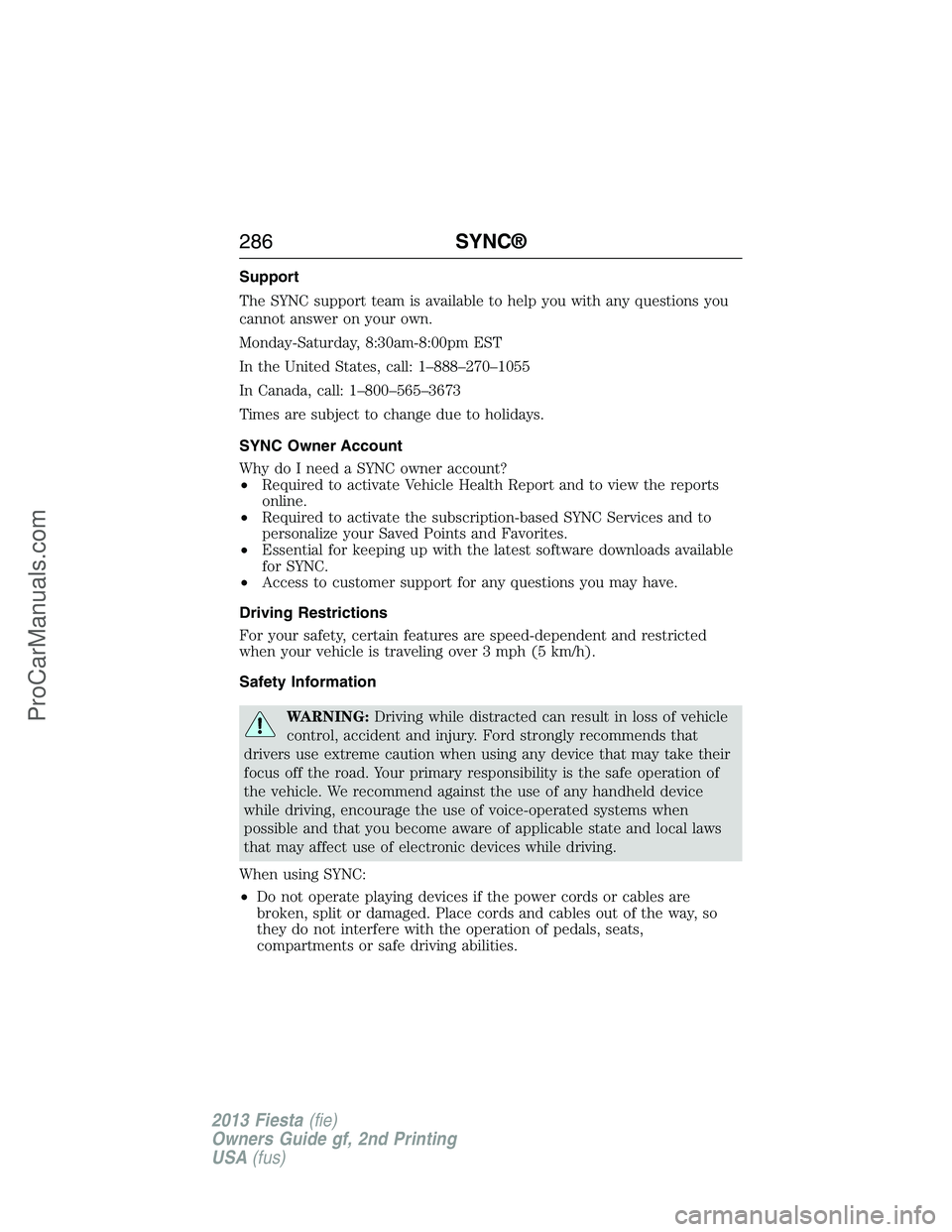
Support
The SYNC support team is available to help you with any questions you
cannot answer on your own.
Monday-Saturday, 8:30am-8:00pm EST
In the United States, call: 1–888–270–1055
In Canada, call: 1–800–565–3673
Times are subject to change due to holidays.
SYNC Owner Account
Why do I need a SYNC owner account?
•Required to activate Vehicle Health Report and to view the reports
online.
•Required to activate the subscription-based SYNC Services and to
personalize your Saved Points and Favorites.
•Essential for keeping up with the latest software downloads available
for SYNC.
•Access to customer support for any questions you may have.
Driving Restrictions
For your safety, certain features are speed-dependent and restricted
when your vehicle is traveling over 3 mph (5 km/h).
Safety Information
WARNING:Driving while distracted can result in loss of vehicle
control, accident and injury. Ford strongly recommends that
drivers use extreme caution when using any device that may take their
focus off the road. Your primary responsibility is the safe operation of
the vehicle. We recommend against the use of any handheld device
while driving, encourage the use of voice-operated systems when
possible and that you become aware of applicable state and local laws
that may affect use of electronic devices while driving.
When using SYNC:
•Do not operate playing devices if the power cords or cables are
broken, split or damaged. Place cords and cables out of the way, so
they do not interfere with the operation of pedals, seats,
compartments or safe driving abilities.
286SYNC®
2013 Fiesta(fie)
Owners Guide gf, 2nd Printing
USA(fus)
ProCarManuals.com
Page 289 of 346
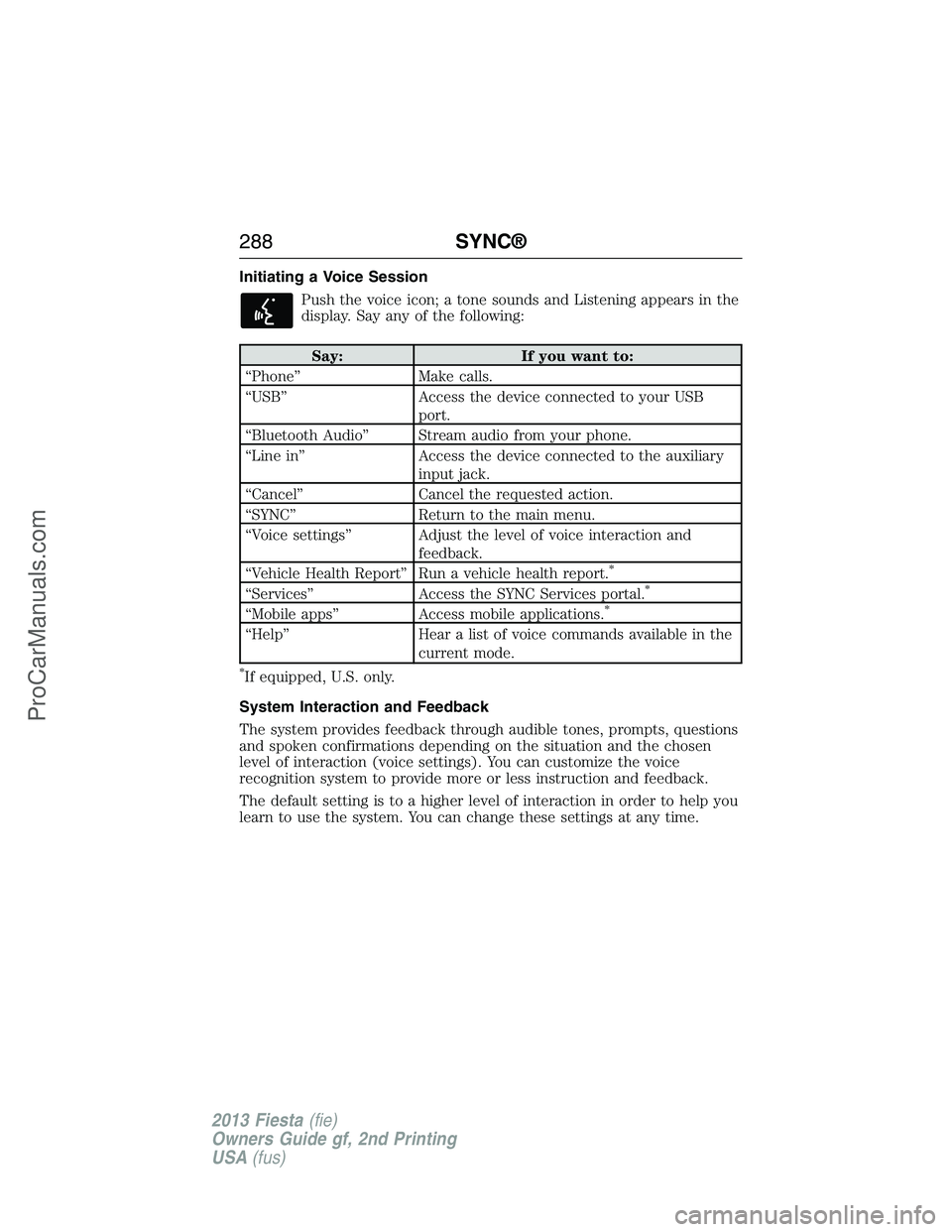
Initiating a Voice Session
Push the voice icon; a tone sounds and Listening appears in the
display. Say any of the following:
Say: If you want to:
“Phone” Make calls.
“USB” Access the device connected to your USB
port.
“Bluetooth Audio” Stream audio from your phone.
“Line in” Access the device connected to the auxiliary
input jack.
“Cancel” Cancel the requested action.
“SYNC” Return to the main menu.
“Voice settings” Adjust the level of voice interaction and
feedback.
“Vehicle Health Report” Run a vehicle health report.
*
“Services” Access the SYNC Services portal.*
“Mobile apps” Access mobile applications.*
“Help” Hear a list of voice commands available in the
current mode.
*If equipped, U.S. only.
System Interaction and Feedback
The system provides feedback through audible tones, prompts, questions
and spoken confirmations depending on the situation and the chosen
level of interaction (voice settings). You can customize the voice
recognition system to provide more or less instruction and feedback.
The default setting is to a higher level of interaction in order to help you
learn to use the system. You can change these settings at any time.
288SYNC®
2013 Fiesta(fie)
Owners Guide gf, 2nd Printing
USA(fus)
ProCarManuals.com
Page 301 of 346
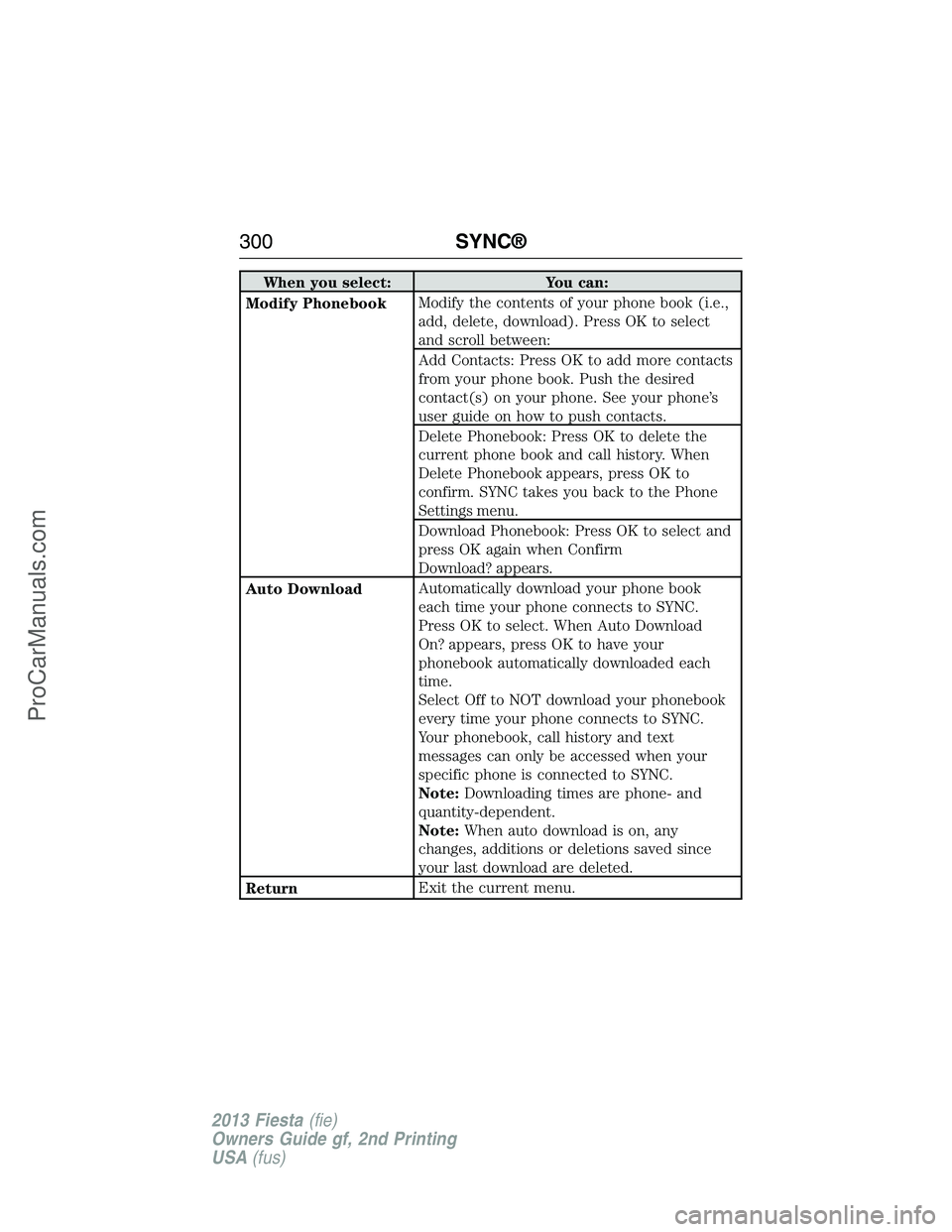
When you select: You can:
Modify PhonebookModify the contents of your phone book (i.e.,
add, delete, download). Press OK to select
and scroll between:
Add Contacts: Press OK to add more contacts
from your phone book. Push the desired
contact(s) on your phone. See your phone’s
user guide on how to push contacts.
Delete Phonebook: Press OK to delete the
current phone book and call history. When
Delete Phonebook appears, press OK to
confirm. SYNC takes you back to the Phone
Settings menu.
Download Phonebook: Press OK to select and
press OK again when Confirm
Download? appears.
Auto DownloadAutomatically download your phone book
each time your phone connects to SYNC.
Press OK to select. When Auto Download
On? appears, press OK to have your
phonebook automatically downloaded each
time.
Select Off to NOT download your phonebook
every time your phone connects to SYNC.
Your phonebook, call history and text
messages can only be accessed when your
specific phone is connected to SYNC.
Note:Downloading times are phone- and
quantity-dependent.
Note:When auto download is on, any
changes, additions or deletions saved since
your last download are deleted.
ReturnExit the current menu.
300SYNC®
2013 Fiesta(fie)
Owners Guide gf, 2nd Printing
USA(fus)
ProCarManuals.com
Page 305 of 346
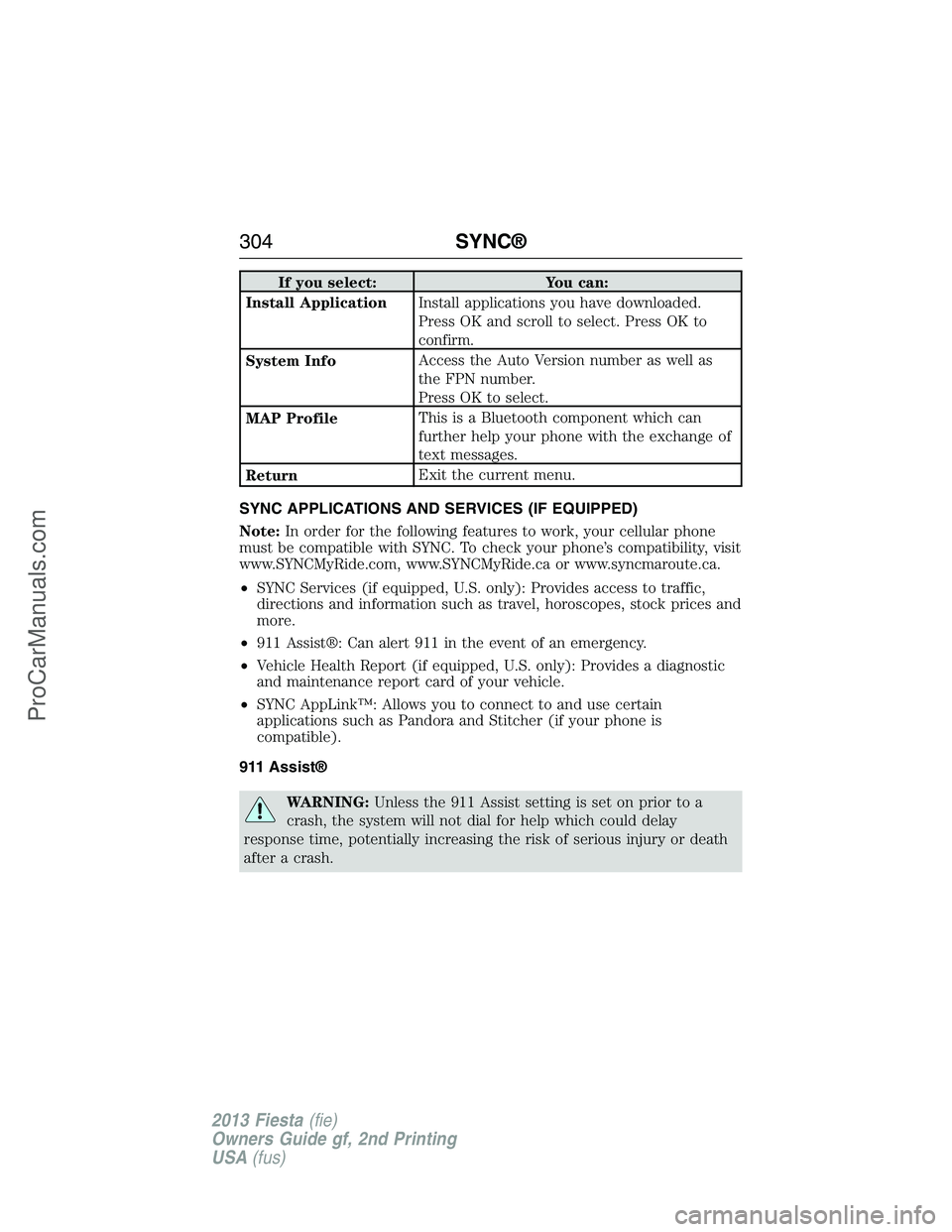
If you select: You can:
Install ApplicationInstall applications you have downloaded.
Press OK and scroll to select. Press OK to
confirm.
System InfoAccess the Auto Version number as well as
the FPN number.
Press OK to select.
MAP ProfileThis is a Bluetooth component which can
further help your phone with the exchange of
text messages.
ReturnExit the current menu.
SYNC APPLICATIONS AND SERVICES (IF EQUIPPED)
Note:In order for the following features to work, your cellular phone
must be compatible with SYNC. To check your phone’s compatibility, visit
www.SYNCMyRide.com, www.SYNCMyRide.ca or www.syncmaroute.ca.
•SYNC Services (if equipped, U.S. only): Provides access to traffic,
directions and information such as travel, horoscopes, stock prices and
more.
•911 Assist®: Can alert 911 in the event of an emergency.
•Vehicle Health Report (if equipped, U.S. only): Provides a diagnostic
and maintenance report card of your vehicle.
•SYNC AppLink™: Allows you to connect to and use certain
applications such as Pandora and Stitcher (if your phone is
compatible).
911 Assist®
WARNING:Unless the 911 Assist setting is set on prior to a
crash, the system will not dial for help which could delay
response time, potentially increasing the risk of serious injury or death
after a crash.
304SYNC®
2013 Fiesta(fie)
Owners Guide gf, 2nd Printing
USA(fus)
ProCarManuals.com
Page 338 of 346
End user notice
Microsoft® Windows® Mobile for Automotive Important Safety
Information
This system Ford SYNC™ contains software that is licensed to
Manufacturer FORD MOTOR COMPANY by an affiliate of Microsoft
Corporation pursuant to a license agreement. Any removal, reproduction,
reverse engineering or other unauthorized use of the software from this
system in violation of the license agreement is strictly prohibited and
may subject you to legal action.
Read and follow instructions
Before using your Windows Automotive-based system, read and follow all
instructions and safety information provided in this end user manual
(“User’s Guide”). Not following precautions found in this User’s Guide
can lead to an accident or other serious consequences.
Keep User’s Guide in Vehicle
When kept in the vehicle, the User’s Guide will be a ready reference for
you and other users unfamiliar with the Windows Automotive-based
system. Please make certain that before using the system for the first
time, all persons have access to the User’s Guide and read its
instructions and safety information carefully.
WARNING:Operating certain parts of this system while driving
can distract your attention away from the road, and possibly
cause an accident or other serious consequences. Do not change
system settings or enter data non-verbally (using your hands) while
driving. Stop the vehicle in a safe and legal manner before attempting
these operations. This is important since while setting up or changing
some functions you might be required to distract your attention away
from the road and remove your hands from the wheel.
Appendices337
2013 Fiesta(fie)
Owners Guide gf, 2nd Printing
USA(fus)
ProCarManuals.com