alarm FORD FIESTA 2013 Owners Manual
[x] Cancel search | Manufacturer: FORD, Model Year: 2013, Model line: FIESTA, Model: FORD FIESTA 2013Pages: 346, PDF Size: 5.27 MB
Page 11 of 346
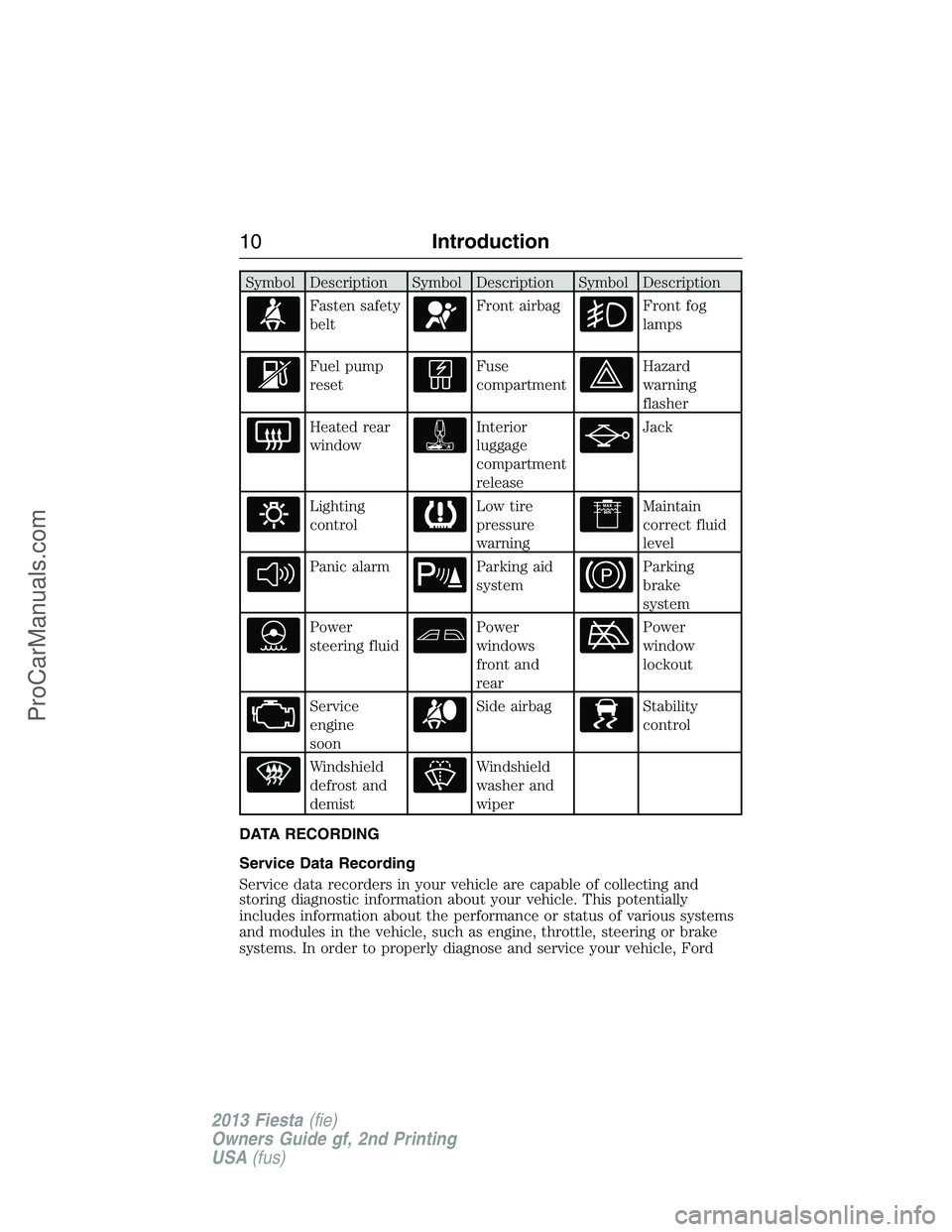
Symbol Description Symbol Description Symbol Description
Fasten safety
beltFront airbagFront fog
lamps
Fuel pump
resetFuse
compartmentHazard
warning
flasher
Heated rear
windowInterior
luggage
compartment
releaseJack
Lighting
controlLow tire
pressure
warningMaintain
correct fluid
level
Panic alarmParking aid
systemParking
brake
system
Power
steering fluidPower
windows
front and
rearPower
window
lockout
Service
engine
soonSide airbagStability
control
Windshield
defrost and
demistWindshield
washer and
wiper
DATA RECORDING
Service Data Recording
Service data recorders in your vehicle are capable of collecting and
storing diagnostic information about your vehicle. This potentially
includes information about the performance or status of various systems
and modules in the vehicle, such as engine, throttle, steering or brake
systems. In order to properly diagnose and service your vehicle, Ford
10Introduction
2013 Fiesta(fie)
Owners Guide gf, 2nd Printing
USA(fus)
ProCarManuals.com
Page 57 of 346
PRINCIPLE OF OPERATION
The remote control allows you to:
•remotely lock or unlock the vehicle doors
•arm and disarm the anti-theft system
•remotely open the luggage compartment
•unlock the doors without actively using a key or remote control
(intelligent access only).
GENERAL INFORMATION ON RADIO FREQUENCIES
This device control complies with part 15 of the FCC Rules and with
Industry Canada license-exempt RSS standard(s). Operation is subject to
the following two conditions: (1) This device may not cause harmful
interference, and (2) This device must accept any interference received,
including interference that may cause undesired operation.
Note:Changes or modifications not expressly approved by the party
responsible for compliance could void the user’s authority to operate the
equipment. The termICbefore the radio certification number only
signifies that Industry Canada technical specification were met.
The typical operating range for your transmitter is approximately 33 feet
(10 meters). A decrease in operating range could be caused by:
•weather conditions
•nearby radio towers
•structures around the vehicle
•other vehicles parked next to your vehicle.
The radio frequency used by your remote control can also be used by
other short distance radio transmissions (e.g. amateur radios, medical
equipment, wireless headphones, remote controls and alarm systems). If
the frequencies are jammed, you will not be able to use your remote
control. You can lock and unlock the doors with the key.
Note:Make sure your vehicle is locked before leaving it unattended.
Note:If you are in range, the remote control will operate if you press
any button unintentionally.
56Keys and Remote Control
2013 Fiesta(fie)
Owners Guide gf, 2nd Printing
USA(fus)
ProCarManuals.com
Page 62 of 346
Car Finder
Press the lock button on the key twice within three seconds. The horn
will sound and the turn signals will flash. We recommend you use this
method to locate your vehicle, rather than using the panic alarm.
REPLACING A LOST KEY OR REMOTE CONTROL
Replacement or additional keys or remote controls can be purchased
from your authorized dealer. Your dealer can program the transmitters to
your vehicle or you may be able to program them yourself. See the
Securitychapter for information on programming your keys.
Reprogramming Your Remote Control
Note:You can only program an integrated keyhead transmitter. See your
authorized dealer to have an intelligent access transmitter programmed.
You must have all remote controls available before beginning this
procedure. If all remote controls are not present during programming,
the ones missing will no longer operate the vehicle.
To reprogram the remote control:
1. Turn the ignition switch from off to run four times in rapid succession
(within six seconds), with the fourth turn ending in off. If the program
mode is successfully entered, a chime will sound.
Note:If no action is taken within 10 seconds after a transmitter has
been programmed, the programming sequence ends.
2. Within 10 seconds, press any button on the transmitter to be
programmed. A chime will sound to confirm that the transmitter is
programmed. Repeat this step for each transmitter.
Note:There is no chime or any other confirmation upon exiting the
programming mode.
3. Exiting the programming mode is accomplished if one of the following
occurs:
•The ignition is turned on.
•Ten seconds have passed since entering the programming mode or
since the last transmitter was programmed.
•The maximum number (eight) of transmitters has been programmed.
Keys and Remote Control61
2013 Fiesta(fie)
Owners Guide gf, 2nd Printing
USA(fus)
ProCarManuals.com
Page 64 of 346
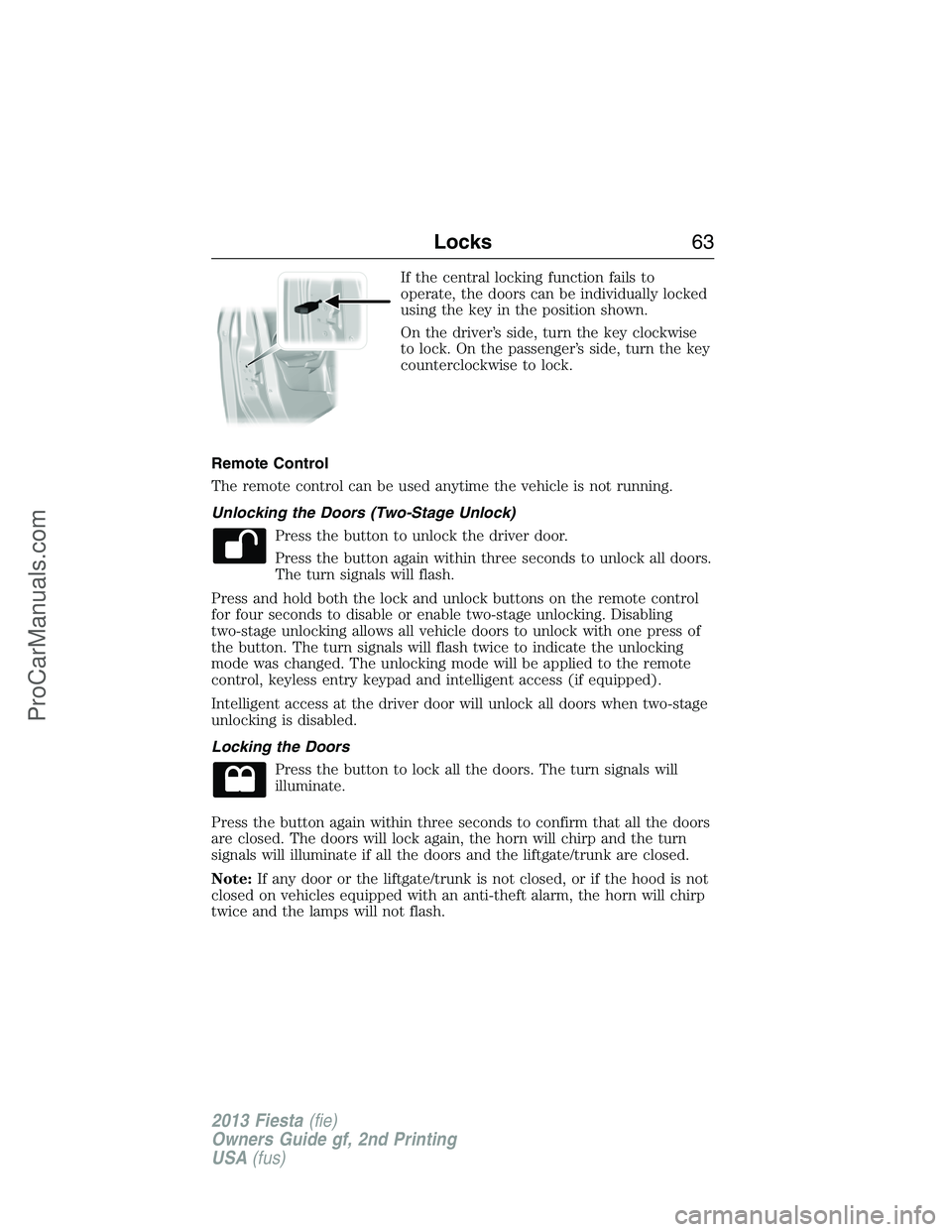
If the central locking function fails to
operate, the doors can be individually locked
using the key in the position shown.
On the driver’s side, turn the key clockwise
to lock. On the passenger’s side, turn the key
counterclockwise to lock.
Remote Control
The remote control can be used anytime the vehicle is not running.
Unlocking the Doors (Two-Stage Unlock)
Press the button to unlock the driver door.
Press the button again within three seconds to unlock all doors.
The turn signals will flash.
Press and hold both the lock and unlock buttons on the remote control
for four seconds to disable or enable two-stage unlocking. Disabling
two-stage unlocking allows all vehicle doors to unlock with one press of
the button. The turn signals will flash twice to indicate the unlocking
mode was changed. The unlocking mode will be applied to the remote
control, keyless entry keypad and intelligent access (if equipped).
Intelligent access at the driver door will unlock all doors when two-stage
unlocking is disabled.
Locking the Doors
Press the button to lock all the doors. The turn signals will
illuminate.
Press the button again within three seconds to confirm that all the doors
are closed. The doors will lock again, the horn will chirp and the turn
signals will illuminate if all the doors and the liftgate/trunk are closed.
Note:If any door or the liftgate/trunk is not closed, or if the hood is not
closed on vehicles equipped with an anti-theft alarm, the horn will chirp
twice and the lamps will not flash.
Locks63
2013 Fiesta(fie)
Owners Guide gf, 2nd Printing
USA(fus)
ProCarManuals.com
Page 73 of 346
Programming a Spare Intelligent Access Key
See your authorized dealer to have additional keys programmed to your
vehicle.
ANTI-THEFT ALARM (IF EQUIPPED)
The system will warn you of an unauthorized entry to your vehicle. It
triggers if any door, the luggage compartment or the hood opens without
using the key or the remote control.
The park and turn lamps flash and the horn sounds if unauthorized entry
is attempted while the alarm is armed.
Take all remote controls to an authorized dealer if there is any potential
alarm problem with your vehicle.
Arming the Alarm
The alarm is ready to arm when there is not a key in the ignition. Lock
the vehicle to arm the alarm.
Disarming the system
You can disarm the system by any of the following actions:
•Unlock the doors or luggage compartment with the remote control.
•Unlock the doors with a key. Turn the key full travel (toward the front
of your vehicle) to make sure the alarm disarms.
•Turn the ignition to the on or start position with a programmed coded
ignition key.
Pressing the power door unlock control within the 20 second pre-armed
mode will return your vehicle to a disarmed state.
72Security
2013 Fiesta(fie)
Owners Guide gf, 2nd Printing
USA(fus)
ProCarManuals.com
Page 97 of 346
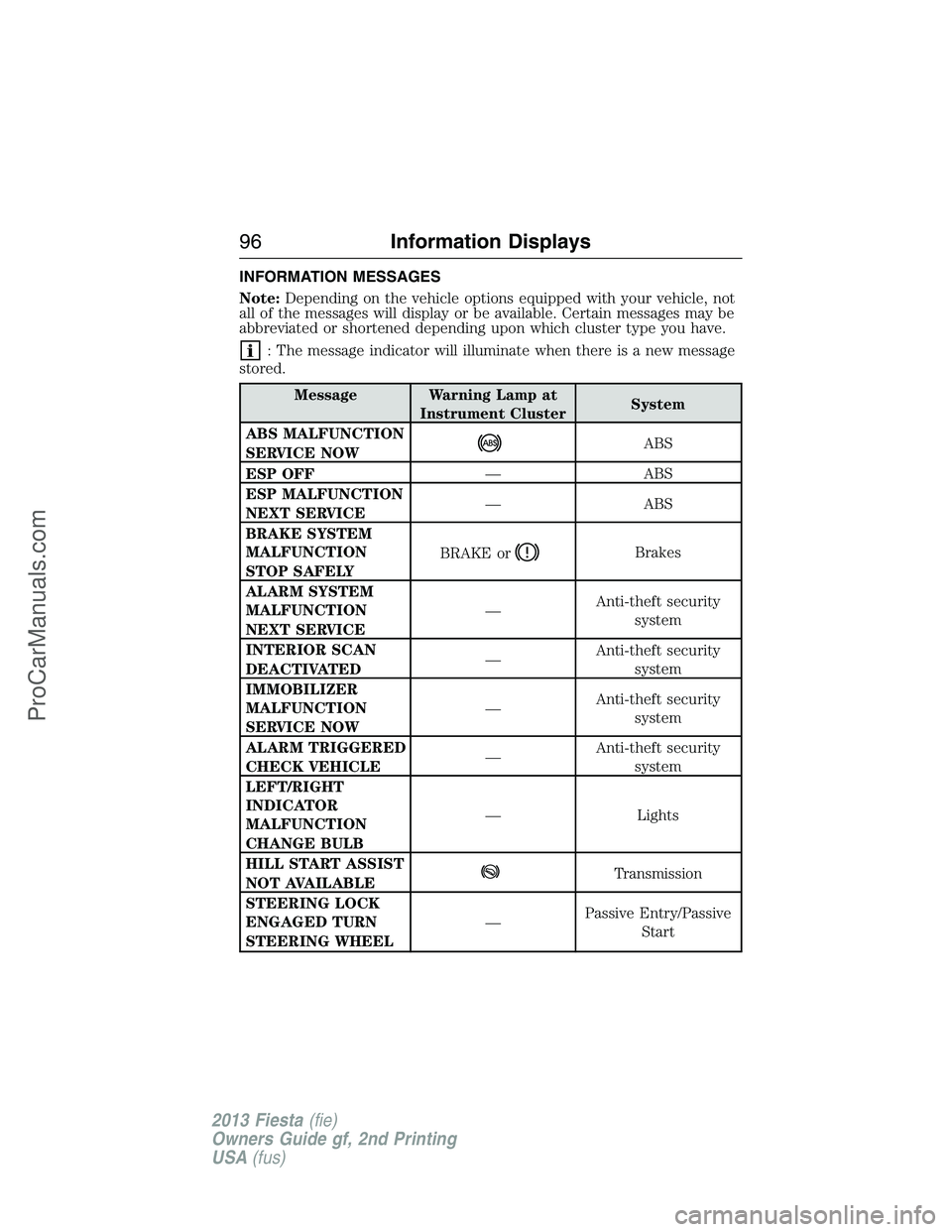
INFORMATION MESSAGES
Note:Depending on the vehicle options equipped with your vehicle, not
all of the messages will display or be available. Certain messages may be
abbreviated or shortened depending upon which cluster type you have.
: The message indicator will illuminate when there is a new message
stored.
Message Warning Lamp at
Instrument ClusterSystem
ABS MALFUNCTION
SERVICE NOW
ABS
ESP OFF— ABS
ESP MALFUNCTION
NEXT SERVICE— ABS
BRAKE SYSTEM
MALFUNCTION
STOP SAFELYBRAKE or
Brakes
ALARM SYSTEM
MALFUNCTION
NEXT SERVICE—Anti-theft security
system
INTERIOR SCAN
DEACTIVATED—Anti-theft security
system
IMMOBILIZER
MALFUNCTION
SERVICE NOW—Anti-theft security
system
ALARM TRIGGERED
CHECK VEHICLE—Anti-theft security
system
LEFT/RIGHT
INDICATOR
MALFUNCTION
CHANGE BULB— Lights
HILL START ASSIST
NOT AVAILABLE
Transmission
STEERING LOCK
ENGAGED TURN
STEERING WHEEL—Passive Entry/Passive
Start
96Information Displays
2013 Fiesta(fie)
Owners Guide gf, 2nd Printing
USA(fus)
ProCarManuals.com
Page 266 of 346
Peace of mind
•Keyless entry keypad•Seat covers*
•Remote start•Car covers*
•Wheel locks
•Bumper mounted parking sensors*
*Ford Licensed Accessories (FLA) are warranted by the accessory
manufacturer’s warranty. Ford Licensed Accessories are fully designed
and developed by the accessory manufacturer and have not been
designed or tested to Ford Motor Company engineering requirements.
Contact your Ford dealer for details regarding the manufacturer’s limited
warranty and/or a copy of the FLA product limited warranty offered by
the accessory manufacturer.
For maximum vehicle performance, keep the following information in
mind when adding accessories or equipment to your vehicle:
•When adding accessories, equipment, passengers and luggage to your
vehicle, do not exceed the total weight capacity of the vehicle or of
the front or rear axle (GVWR or GAWR as indicated on the Safety
Compliance Certification label). Consult your authorized dealer for
specific weight information.
•The Federal Communications Commission (FCC) and Canadian Radio
Telecommunications Commission (CRTC) regulate the use of mobile
communications systems — such as two-way radios, telephones and
theft alarms - that are equipped with radio transmitters. Any such
equipment installed in your vehicle should comply with FCC or CRTC
regulations and should be installed only by a qualified service
technician.
•Mobile communications systems may harm the operation of your
vehicle, particularly if they are not properly designed for automotive
use.
•To avoid interference with other vehicle functions, such as anti-lock
braking systems, amateur radio users who install radios and antennas
onto their vehicle should not locate the amateur radio antennas in the
area of the driver’s side hood.
•Any non-Ford custom electrical or electronic accessories or
components that are added to the vehicle by the authorized dealer or
the owner, may adversely affect battery performance and durability,
and may also adversely affect the performance of other electrical
systems in the vehicle.
Accessories265
2013 Fiesta(fie)
Owners Guide gf, 2nd Printing
USA(fus)
ProCarManuals.com