radio FORD FIESTA 2013 Owners Manual
[x] Cancel search | Manufacturer: FORD, Model Year: 2013, Model line: FIESTA, Model: FORD FIESTA 2013Pages: 346, PDF Size: 5.27 MB
Page 2 of 346
Introduction 8
Child Safety 16
Child seats...........................................18
Child seat positioning...................................18
Booster seats.........................................20
Installing child safety seats...............................23
Child safety locks......................................32
Safety Belts 33
Fastening the safety belts................................35
Safetybeltwarninglightandindicatorchime..................38
Safety belt-minder.....................................39
Child restraint and safety belt maintenance...................41
Personal Safety System 42
Supplementary Restraints System 43
Driver and passenger airbags.............................44
Knee airbag..........................................46
Front passenger sensing system...........................46
Side airbags..........................................51
Side curtain airbags....................................52
Crash sensors and airbag indicator.........................54
Airbag disposal........................................55
Keys and Remote Control 56
General information on radio frequencies.....................56
Remote control.......................................57
Keys...............................................57
Replacing a lost key or remote control.......................61
Table of Contents1
2013 Fiesta(fie)
Owners Guide gf, 2nd Printing
USA(fus)
ProCarManuals.com
Page 4 of 346
Instrument Cluster 87
Gauges.............................................87
Warning lamps and indicators.............................88
Audible warnings and indicators...........................93
Information Displays 94
Multifunction display...................................95
Trip computer........................................95
Information messages...................................96
Audio System 100
AM/FMstereo........................................102
AM/FM/CD/SIRIUS Satellite Radio with SYNC.................104
Auxiliary input jack...................................109
USBport...........................................110
Satellite radio information...............................111
Climate Control 114
Manual heating and air conditioning........................114
Rear window defroster.................................117
Cabin air filter.......................................118
Seats 119
Sitting in the correct position............................119
Head restraints.......................................120
Front seats..........................................122
Heated seats........................................126
Rear seats..........................................126
Table of Contents3
2013 Fiesta(fie)
Owners Guide gf, 2nd Printing
USA(fus)
ProCarManuals.com
Page 16 of 346
MOBILE COMMUNICATIONS EQUIPMENT
Using mobile communications equipment is becoming increasingly
important in the conduct of business and personal affairs. However, you
must not compromise your own or others’ safety when using such
equipment. Mobile communications can enhance personal safety and
security when appropriately used, particularly in emergency situations.
Safety must be paramount when using mobile communications
equipment to avoid negating these benefits.
Mobile communication equipment includes, but is not limited to, cellular
phones, pagers, portable email devices, text messaging devices and
portable two-way radios.
WARNING:Driving while distracted can result in loss of vehicle
control, accident and injury. Ford strongly recommends that you
use extreme caution when using any device or feature that may take
your focus off the road. Your primary responsibility is the safe operation
of your vehicle. We recommend against the use of any handheld device
while driving, encourage the use of voice operated systems when
possible and that you become aware of applicable state and local laws
that may affect use of electronic devices while driving.
EXPORT UNIQUE (NON–UNITED STATES/CANADA) VEHICLE
SPECIFIC INFORMATION
For your particular global region, your vehicle may be equipped with
features and options that are different from the features and options that
are described in this owner’s manual. A market unique supplement may
be supplied that complements this book. By referring to the market
unique supplement, if provided, you can properly identify those features,
recommendations and specifications that are unique to your vehicle. This
owner’s manual is written primarily for the U.S. and Canadian Markets.
Features or equipment listed as standard may be different on units built
for Export.See this owner’s manual for all other required
information and warnings.
Introduction15
2013 Fiesta(fie)
Owners Guide gf, 2nd Printing
USA(fus)
ProCarManuals.com
Page 57 of 346
PRINCIPLE OF OPERATION
The remote control allows you to:
•remotely lock or unlock the vehicle doors
•arm and disarm the anti-theft system
•remotely open the luggage compartment
•unlock the doors without actively using a key or remote control
(intelligent access only).
GENERAL INFORMATION ON RADIO FREQUENCIES
This device control complies with part 15 of the FCC Rules and with
Industry Canada license-exempt RSS standard(s). Operation is subject to
the following two conditions: (1) This device may not cause harmful
interference, and (2) This device must accept any interference received,
including interference that may cause undesired operation.
Note:Changes or modifications not expressly approved by the party
responsible for compliance could void the user’s authority to operate the
equipment. The termICbefore the radio certification number only
signifies that Industry Canada technical specification were met.
The typical operating range for your transmitter is approximately 33 feet
(10 meters). A decrease in operating range could be caused by:
•weather conditions
•nearby radio towers
•structures around the vehicle
•other vehicles parked next to your vehicle.
The radio frequency used by your remote control can also be used by
other short distance radio transmissions (e.g. amateur radios, medical
equipment, wireless headphones, remote controls and alarm systems). If
the frequencies are jammed, you will not be able to use your remote
control. You can lock and unlock the doors with the key.
Note:Make sure your vehicle is locked before leaving it unattended.
Note:If you are in range, the remote control will operate if you press
any button unintentionally.
56Keys and Remote Control
2013 Fiesta(fie)
Owners Guide gf, 2nd Printing
USA(fus)
ProCarManuals.com
Page 58 of 346
Intelligent Access (If Equipped)
The system uses a radio frequency signal to communicate with your
vehicle and authorize your vehicle to unlock when one of the following
conditions are met:
•You touch the inside of the front exterior door handle.
•You press the luggage compartment button.
•You press a button on the transmitter.
If excessive radio frequency interference is present in the area or if the
transmitter battery is low, it may be necessary to mechanically unlock
your door. You can use the mechanical key blade in your intelligent
access key open the driver door in this situation. Refer toRemote
Controlin this chapter for more information on the location and use of
the mechanical key blade.
REMOTE CONTROL
Integrated Keyhead Transmitters (If Equipped)
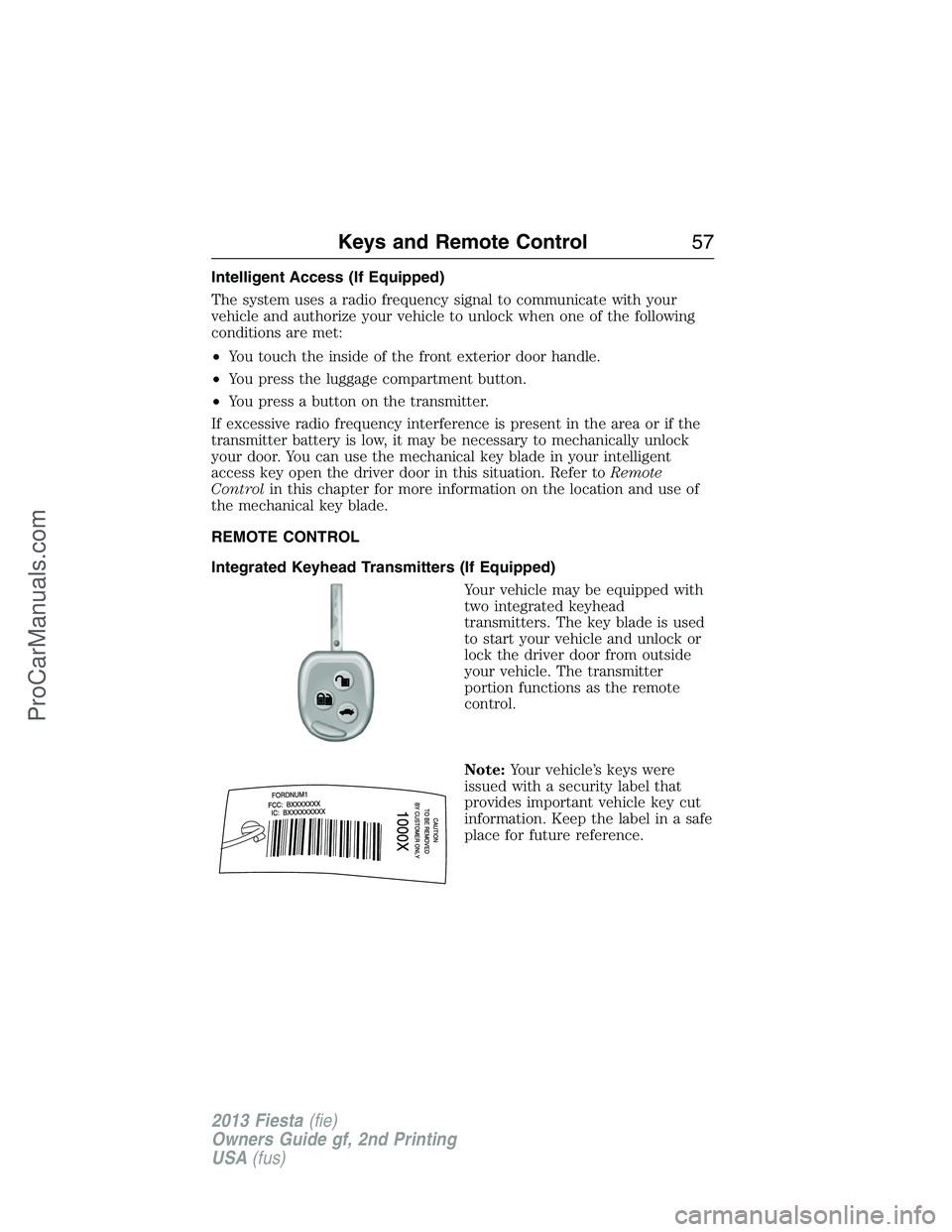
Your vehicle may be equipped with
two integrated keyhead
transmitters. The key blade is used
to start your vehicle and unlock or
lock the driver door from outside
your vehicle. The transmitter
portion functions as the remote
control.
Note:Your vehicle’s keys were
issued with a security label that
provides important vehicle key cut
information. Keep the label in a safe
place for future reference.
Keys and Remote Control57
2013 Fiesta(fie)
Owners Guide gf, 2nd Printing
USA(fus)
ProCarManuals.com
Page 63 of 346
LOCKING AND UNLOCKING
You can use the power door lock control or the remote control to lock
and unlock the vehicle.
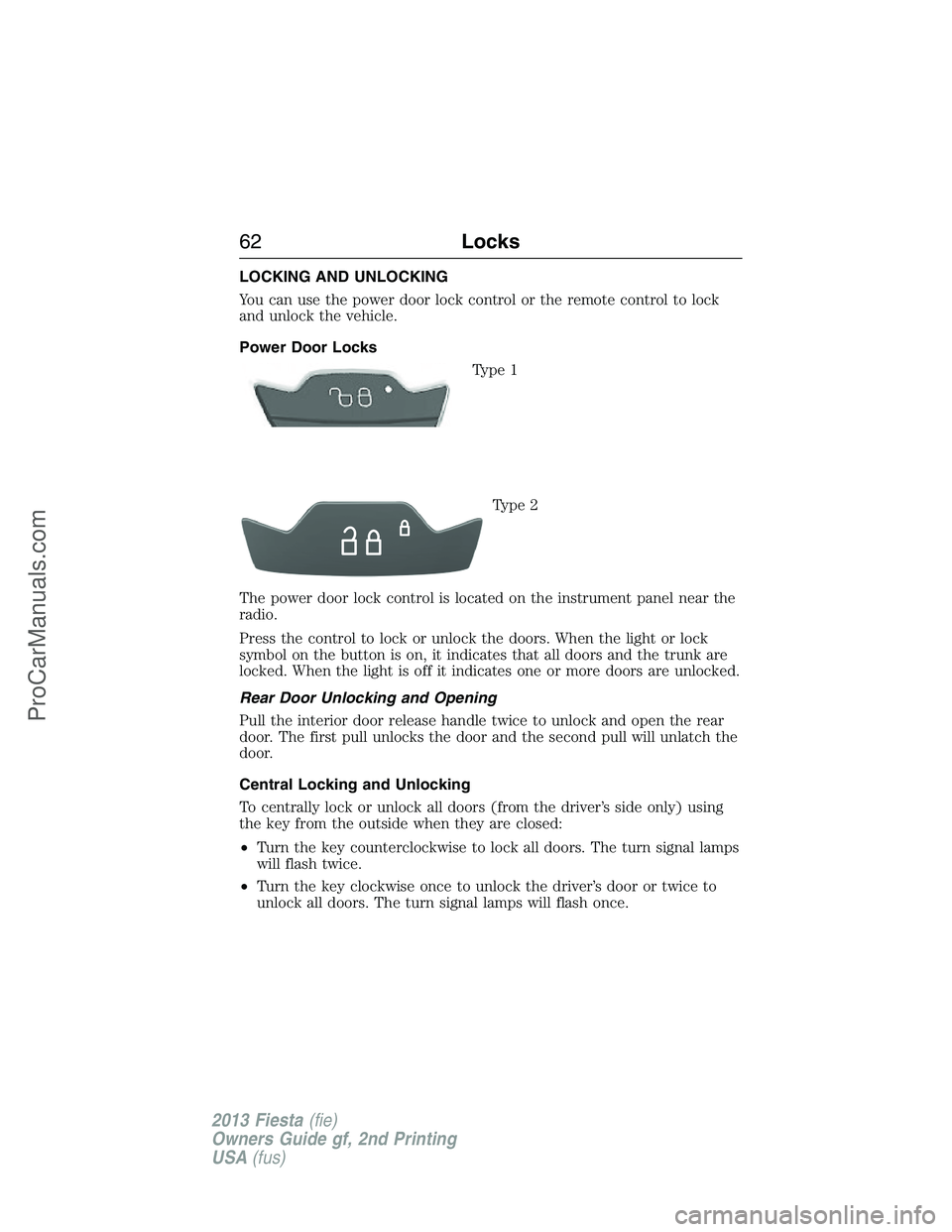
Power Door Locks
Type 1
Type 2
The power door lock control is located on the instrument panel near the
radio.
Press the control to lock or unlock the doors. When the light or lock
symbol on the button is on, it indicates that all doors and the trunk are
locked. When the light is off it indicates one or more doors are unlocked.
Rear Door Unlocking and Opening
Pull the interior door release handle twice to unlock and open the rear
door. The first pull unlocks the door and the second pull will unlatch the
door.
Central Locking and Unlocking
To centrally lock or unlock all doors (from the driver’s side only) using
the key from the outside when they are closed:
•Turn the key counterclockwise to lock all doors. The turn signal lamps
will flash twice.
•Turn the key clockwise once to unlock the driver’s door or twice to
unlock all doors. The turn signal lamps will flash once.
62Locks
2013 Fiesta(fie)
Owners Guide gf, 2nd Printing
USA(fus)
ProCarManuals.com
Page 75 of 346
AUDIO CONTROL (IF EQUIPPED)
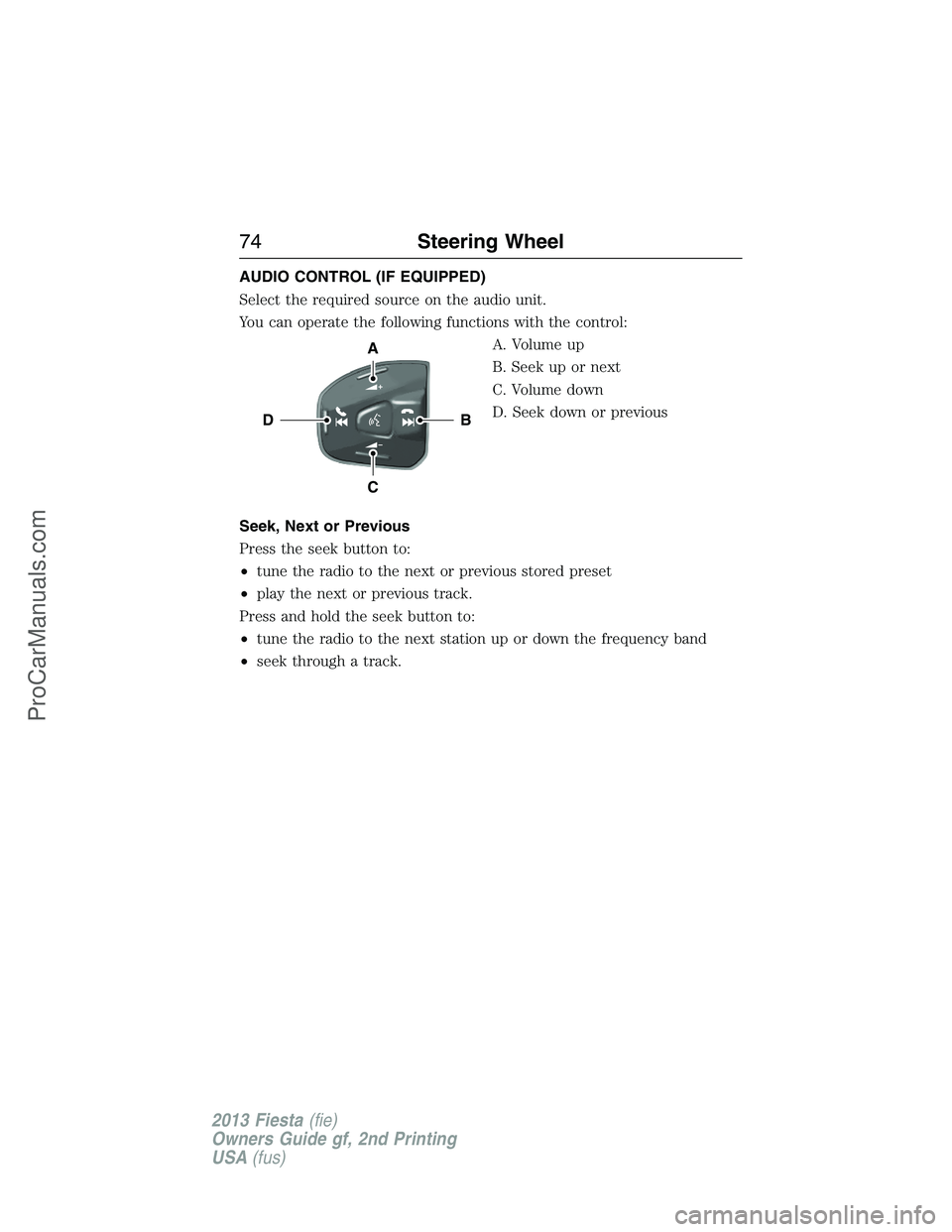
Select the required source on the audio unit.
You can operate the following functions with the control:
A. Volume up
B. Seek up or next
C. Volume down
D. Seek down or previous
Seek, Next or Previous
Press the seek button to:
•tune the radio to the next or previous stored preset
•play the next or previous track.
Press and hold the seek button to:
•tune the radio to the next station up or down the frequency band
•seek through a track.
B
A
C
D
74Steering Wheel
2013 Fiesta(fie)
Owners Guide gf, 2nd Printing
USA(fus)
ProCarManuals.com
Page 101 of 346
GENERAL AUDIO INFORMATION
Radio Frequencies and Reception Factors
AM and FM frequencies are established by the Federal Communications
Commission (FCC) and the Canadian Radio and Telecommunications
Commission (CRTC). Those frequencies are:
AM: 530, 540–1700, 1710 kHz
FM: 87.9–107.7, 107.9 MHz
Radio reception factors
Distance and
StrengthThe further you travel from an FM station,
the weaker the signal and the weaker the
reception.
TerrainHills, mountains, tall buildings, bridges,
tunnels, freeway overpasses, parking garages,
dense tree foliage and thunderstorms can
interfere with your reception.
Station OverloadWhen you pass a ground-based broadcast
repeating tower, a stronger signal may
overtake a weaker one and result in the audio
system muting.
CD and CD Player Information
Note:CD units play commercially pressed 4.75-inch (12 centimeter)
audio compact discs only. Due to technical incompatibility, certain
recordable and re-recordable compact discs may not function correctly
when used in Ford CD players.
Note:Do not insert CDs with homemade paper (adhesive) labels into
the CD player as the label may peel and cause the CD to become
jammed. You should use a permanent felt tip marker rather than
adhesive labels on your homemade CDs. Ballpoint pens may damage
CDs. Please contact your authorized dealer for further information.
Note:Do not use any irregularly shaped discs or discs with a scratch
protection film attached.
Always handle discs by their edges only. Clean the disc with an approved
CD cleaner only. Wipe it from the center of the disc toward the edge. Do
not clean in a circular motion.
Do not expose discs to direct sunlight or heat sources for extended
periods.
100Audio System
2013 Fiesta(fie)
Owners Guide gf, 2nd Printing
USA(fus)
ProCarManuals.com
Page 102 of 346
MP3 Track and Folder Structure
Audio systems capable of recognizing and playing MP3 individual tracks
and folder structures work as follows:
•There are two different modes for MP3 disc playback: MP3 track
mode (system default) and MP3 folder mode.
•MP3 track mode ignores any folder structure on the MP3 disc. The
player numbers each MP3 track on the disc (noted by the .mp3 file
extension) from T001 to a maximum of T255.Note:The maximum
number of playable MP3 files may be less depending on the structure
of the CD and exact model of radio present.
•MP3 folder mode represents a folder structure consisting of one level
of folders. The CD player numbers all MP3 tracks on the disc (noted
by the .mp3 file extension) and all folders containing MP3 files, from
F001 (folder) T001 (track) to F253 T255.
•Creating discs with only one level of folders helps with navigation
through the disc files.
If you are burning your own MP3 discs, it is important to understand
how the system reads the structures you create. While various files may
be present, (files with extensions other than mp3), only files with the
.mp3 extension are played; other files are ignored by the system. This
enables you to use the same MP3 disc for a variety of tasks on your work
computer, home computer and your in-vehicle system.
In track mode, the system displays and plays the structure as if it were
only one level deep (all .mp3 files play, regardless of being in a specific
folder). In folder mode, the system only plays the .mp3 files in the
current folder.
Audio System101
2013 Fiesta(fie)
Owners Guide gf, 2nd Printing
USA(fus)
ProCarManuals.com
Page 103 of 346
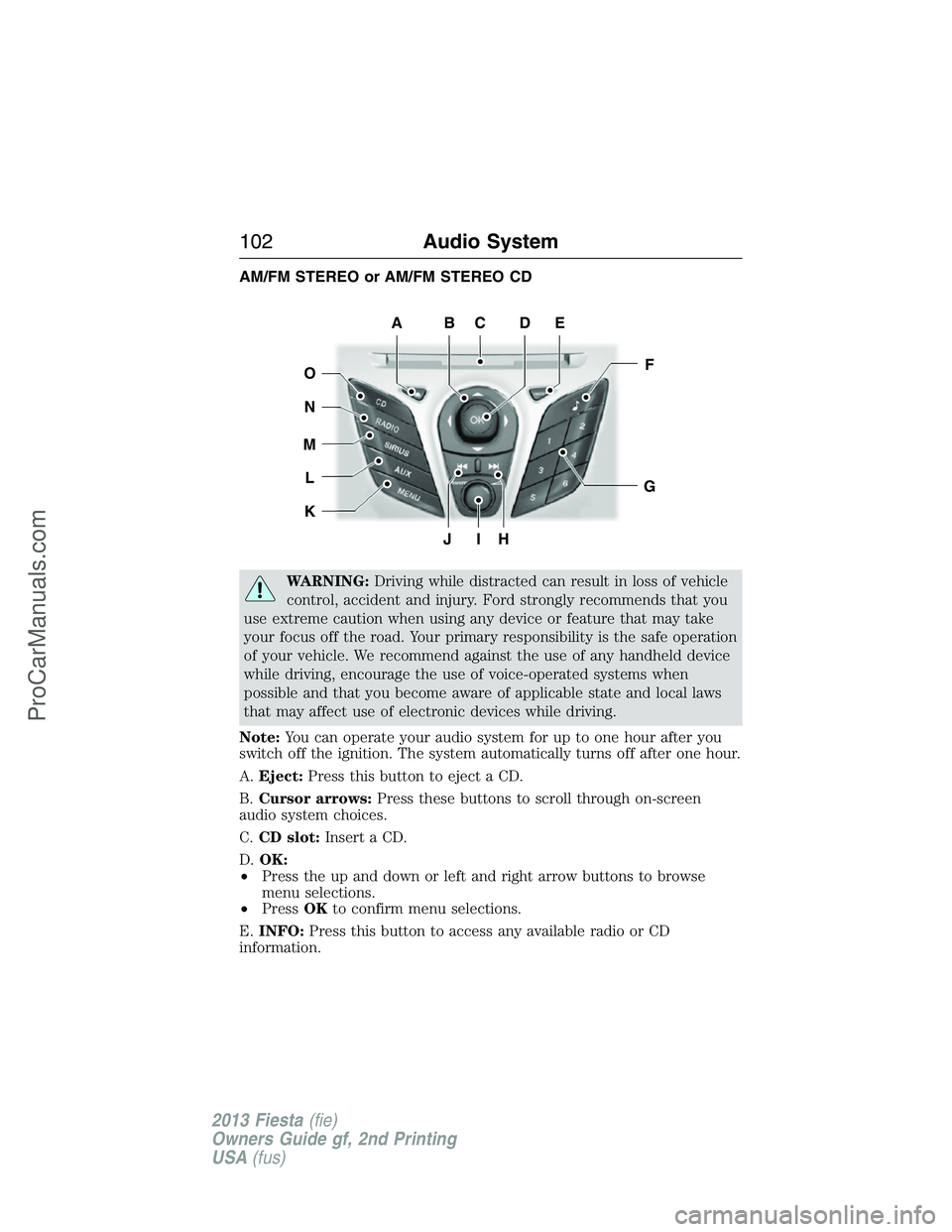
AM/FM STEREO or AM/FM STEREO CD
WARNING:Driving while distracted can result in loss of vehicle
control, accident and injury. Ford strongly recommends that you
use extreme caution when using any device or feature that may take
your focus off the road. Your primary responsibility is the safe operation
of your vehicle. We recommend against the use of any handheld device
while driving, encourage the use of voice-operated systems when
possible and that you become aware of applicable state and local laws
that may affect use of electronic devices while driving.
Note:You can operate your audio system for up to one hour after you
switch off the ignition. The system automatically turns off after one hour.
A.Eject:Press this button to eject a CD.
B.Cursor arrows:Press these buttons to scroll through on-screen
audio system choices.
C.CD slot:Insert a CD.
D.OK:
•Press the up and down or left and right arrow buttons to browse
menu selections.
•PressOKto confirm menu selections.
E.INFO:Press this button to access any available radio or CD
information.
JIH
F
G
EDCBA
O
N
M
L
K
102Audio System
2013 Fiesta(fie)
Owners Guide gf, 2nd Printing
USA(fus)
ProCarManuals.com