phone FORD FIESTA 2013 Owners Manual
[x] Cancel search | Manufacturer: FORD, Model Year: 2013, Model line: FIESTA, Model: FORD FIESTA 2013Pages: 346, PDF Size: 5.27 MB
Page 8 of 346
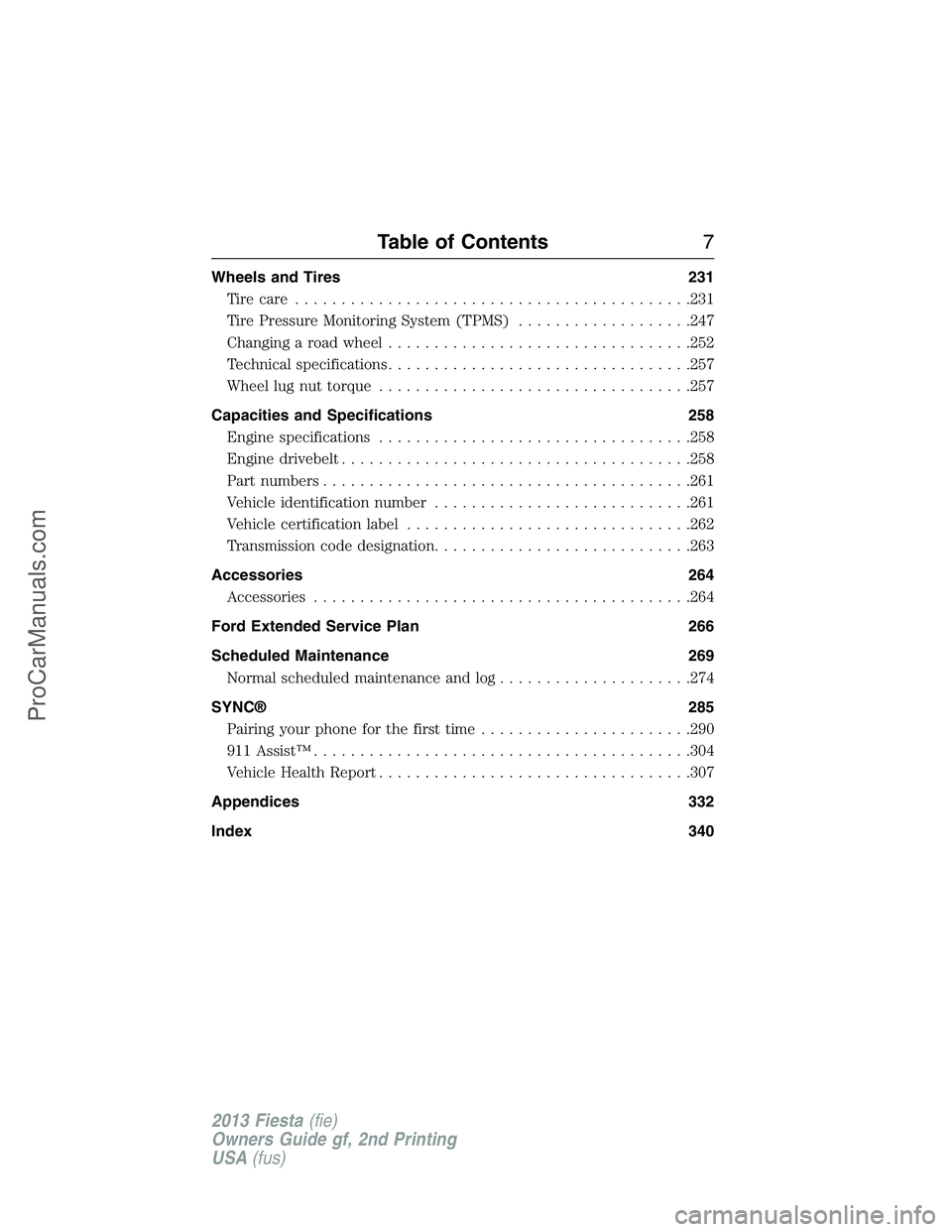
Wheels and Tires 231
Tire care...........................................231
Tire Pressure Monitoring System (TPMS)...................247
Changing a road wheel.................................252
Technical specifications.................................257
Wheel lug nut torque..................................257
Capacities and Specifications 258
Engine specifications..................................258
Engine drivebelt......................................258
Part numbers........................................261
Vehicle identification number............................261
Vehicle certification label...............................262
Transmission code designation............................263
Accessories 264
Accessories.........................................264
Ford Extended Service Plan 266
Scheduled Maintenance 269
Normal scheduled maintenance and log.....................274
SYNC® 285
Pairing your phone for the first time.......................290
911 Assist™.........................................304
Vehicle Health Report..................................307
Appendices 332
Index 340
Table of Contents7
2013 Fiesta(fie)
Owners Guide gf, 2nd Printing
USA(fus)
ProCarManuals.com
Page 13 of 346
To read data recorded by an EDR, special equipment is required,
and access to the vehicle or the EDR is needed. In addition to the
vehicle manufacturer, other parties, such as law enforcement,
that have such special equipment, can read the information if
they have access to the vehicle or the EDR. Ford Motor Company
and Ford of Canada do not access event data recorder
information without obtaining consent, unless pursuant to court
order or where required by law enforcement, other government
authorities or other third parties acting with lawful authority.
Other parties may seek to access the information independently
of Ford Motor Company and Ford of Canada.
Note: Including to the extent that any law pertaining to Event
Data Recorders applies to SYNC® or its features, please note the
following: Once 911 Assist (if equipped) is enabled (set ON), 911
Assist may, through any paired and connected cell phone, disclose
to emergency services that the vehicle has been in a crash
involving the deployment of an airbag or, in certain vehicles, the
activation of the fuel pump shut-off. Certain versions or updates
to 911 Assist may also be capable of being used to electronically
or verbally provide to 911 operators the vehicle location (such as
latitude and longitude), and/or other details about the vehicle or
crash or personal information about the occupants to assist 911
operators to provide the most appropriate emergency services. If
you do not want to disclose this information, do not activate the
911 Assist feature. See your SYNC® chapter for more
information.
Additionally, when you connect to Traffic, Directions and
Information (if equipped, U.S. only), the service uses GPS
technology and advanced vehicle sensors to collect the vehicle’s
current location, travel direction, and speed (“vehicle travel
information”), only to help provide you with the directions,
traffic reports, or business searches that you request. If you do
not want Ford or its vendors to receive this information, do not
activate the service. Ford Motor Company and the vendors it uses
to provide you with this information do not store your vehicle
travel information. For more information, see Traffic, Directions
and Information, Terms and Conditions. See your SYNC®
supplement for more information.
12Introduction
2013 Fiesta(fie)
Owners Guide gf, 2nd Printing
USA(fus)
ProCarManuals.com
Page 14 of 346
CALIFORNIA PROPOSITION 65
WARNING:Some constituents of engine exhaust, certain vehicle
components, certain fluids contained in vehicles and certain
products of component wear contain or emit chemicals known to the
State of California to cause cancer and birth defects or other
reproductive harm.
PERCHLORATE MATERIAL
Note:Certain components in your vehicle, such as airbag modules,
safety belt pretensioners, and remote control batteries, may contain
perchlorate material. Special handling may apply for service or vehicle
end of life disposal. See www.dtsc.ca.gov/hazardouswaste/perchlorate for
more information.
FORD CREDIT (U.S. ONLY)
Ford Credit offers a full range of financing and lease plans to help you
acquire your vehicle. If you have financed or leased your vehicle through
Ford Credit, thank you for your business.
For your convenience, we offer a number of ways to contact us, as well
as help manage your account.
Phone: 1-800-727-7000
For more information regarding Ford Credit, as well as access to
Account Manager, please go to www.fordcredit.com.
REPLACEMENT PARTS RECOMMENDATION
Your vehicle has been built to the highest standards using quality parts.
We recommend that you demand the use of genuine Ford and Motorcraft
parts whenever your vehicle requires scheduled maintenance or repair.
You can clearly identify genuine Ford and Motorcraft parts by looking for
the Ford, FoMoCo or Motorcraft branding on the parts or their
packaging.
Scheduled Maintenance and Mechanical Repairs
One of the best ways for you to make sure that your vehicle provides
years of service is to have it maintained in line with our
recommendations using parts that conform to the specifications detailed
in this owner’s manual. Genuine Ford and Motorcraft parts meet or
exceed these specifications.
Introduction13
2013 Fiesta(fie)
Owners Guide gf, 2nd Printing
USA(fus)
ProCarManuals.com
Page 16 of 346
MOBILE COMMUNICATIONS EQUIPMENT
Using mobile communications equipment is becoming increasingly
important in the conduct of business and personal affairs. However, you
must not compromise your own or others’ safety when using such
equipment. Mobile communications can enhance personal safety and
security when appropriately used, particularly in emergency situations.
Safety must be paramount when using mobile communications
equipment to avoid negating these benefits.
Mobile communication equipment includes, but is not limited to, cellular
phones, pagers, portable email devices, text messaging devices and
portable two-way radios.
WARNING:Driving while distracted can result in loss of vehicle
control, accident and injury. Ford strongly recommends that you
use extreme caution when using any device or feature that may take
your focus off the road. Your primary responsibility is the safe operation
of your vehicle. We recommend against the use of any handheld device
while driving, encourage the use of voice operated systems when
possible and that you become aware of applicable state and local laws
that may affect use of electronic devices while driving.
EXPORT UNIQUE (NON–UNITED STATES/CANADA) VEHICLE
SPECIFIC INFORMATION
For your particular global region, your vehicle may be equipped with
features and options that are different from the features and options that
are described in this owner’s manual. A market unique supplement may
be supplied that complements this book. By referring to the market
unique supplement, if provided, you can properly identify those features,
recommendations and specifications that are unique to your vehicle. This
owner’s manual is written primarily for the U.S. and Canadian Markets.
Features or equipment listed as standard may be different on units built
for Export.See this owner’s manual for all other required
information and warnings.
Introduction15
2013 Fiesta(fie)
Owners Guide gf, 2nd Printing
USA(fus)
ProCarManuals.com
Page 51 of 346
•Other passengers pushing or pulling on the seat
•Rear passenger feet and knees resting or pushing on the seat
The conditions listed above may cause the weight of a properly seated
occupant to be incorrectly interpreted by the passenger sensing system.
The person in the front passenger seat may appear heavier or lighter due
to the conditions described in the list above.
To know if the front passenger sensing system is operating
properly, seeCrash Sensors and Airbag Indicatorin this
chapter.
If the airbag readiness lamp is lit, do the following:
The driver or adult passengers should check for any objects that may be
lodged underneath the front passenger seat or cargo interfering with the
seat.
If objects are lodged or cargo is interfering with the seat; please take the
following steps to remove the obstruction:
•Pull the vehicle over.
•Turn the vehicle off.
•Driver or adult passengers should check for any objects lodged
underneath the front passenger seat or cargo interfering with the seat.
•Remove the obstruction(s) (if found).
•Restart the vehicle.
•Wait at least two minutes and verify that the airbag readiness lamp is
no longer illuminated
•If the airbag readiness lamp remains illuminated, this may or may/not
be a problem due to the front passenger sensing system.
DO NOT attempt to repair or service the system; take your vehicle
immediately to an authorized dealer.
If it is necessary to modify an advanced front airbag system to
accommodate a person with disabilities, contact the Ford Customer
Relationship Center at the phone number shown in theCustomer
Assistancesection of this owner’s guide.
50Supplementary Restraints System
2013 Fiesta(fie)
Owners Guide gf, 2nd Printing
USA(fus)
ProCarManuals.com
Page 57 of 346
PRINCIPLE OF OPERATION
The remote control allows you to:
•remotely lock or unlock the vehicle doors
•arm and disarm the anti-theft system
•remotely open the luggage compartment
•unlock the doors without actively using a key or remote control
(intelligent access only).
GENERAL INFORMATION ON RADIO FREQUENCIES
This device control complies with part 15 of the FCC Rules and with
Industry Canada license-exempt RSS standard(s). Operation is subject to
the following two conditions: (1) This device may not cause harmful
interference, and (2) This device must accept any interference received,
including interference that may cause undesired operation.
Note:Changes or modifications not expressly approved by the party
responsible for compliance could void the user’s authority to operate the
equipment. The termICbefore the radio certification number only
signifies that Industry Canada technical specification were met.
The typical operating range for your transmitter is approximately 33 feet
(10 meters). A decrease in operating range could be caused by:
•weather conditions
•nearby radio towers
•structures around the vehicle
•other vehicles parked next to your vehicle.
The radio frequency used by your remote control can also be used by
other short distance radio transmissions (e.g. amateur radios, medical
equipment, wireless headphones, remote controls and alarm systems). If
the frequencies are jammed, you will not be able to use your remote
control. You can lock and unlock the doors with the key.
Note:Make sure your vehicle is locked before leaving it unattended.
Note:If you are in range, the remote control will operate if you press
any button unintentionally.
56Keys and Remote Control
2013 Fiesta(fie)
Owners Guide gf, 2nd Printing
USA(fus)
ProCarManuals.com
Page 106 of 346
B.Cursor arrows:Press these buttons to scroll through on-screen
audio system choices.
C.CD slot:Insert a CD.
D.OK:
•Press the up and down or left and right arrow buttons to browse
menu selections.
•PressOKto confirm menu selections.
E.INFO:Press the button to access any available radio or CD
information.
F.MENU:Press this button to access different audio system features.
SeeMenu structurelater in this section.
G.SOUND:
•Press this button to access settings for Treble, Middle, Bass, Fade and
Balance.
•Use the up and down arrow buttons to select the various settings.
When you make your selection, press the left and right arrow buttons
to change the settings. PressOKto set or pressMENUto exit.
•Sound settings can be set for each audio source independently.
H.Number block:
•In radio mode, store your favorite radio stations. To store a radio
station, tune to the station, then press and hold a preset button until
sound returns.
•In CD mode, press a button to select a track.
•In phone mode, press the buttons to enter a phone number.
I.Function Button 4:Select different functions of the audio system
depending on which mode you are in (such as Radio mode or CD mode).
J.Function Button 3:Select different functions of the audio system
depending on which mode you are in (such as Radio mode or CD mode).
K.SEEK:
•Press and release this button to go to the next preset radio station or
disc track.
•Press and hold this button to fast forward to the next strong radio
station, memory preset or through the current disc track.
L.ON/OFF:
•Press this button to turn the system off and on.
•Turn it to adjust the volume.
Audio System105
2013 Fiesta(fie)
Owners Guide gf, 2nd Printing
USA(fus)
ProCarManuals.com
Page 107 of 346
M.SEEK:
•Press and release this button to go to the previous track or preset
radio station.
•Press and hold to reverse through the current track or to a the
previous strong radio station (manually reverses between station
presets or through radio stations).
N.Function Button 2:Select different functions of the audio system
depending on which mode you are in (such as Radio mode or CD mode).
O.Function Button 1:Select different functions of the audio system
depending on which mode you are in (such as Radio mode or CD mode).
P.PHONE:Press this button to access the phone features of the SYNC®
system. See theSYNC®chapter for more information.
Q.AUX:Press this button to access your auxiliary input jack or switch
between devices you plug into the input jack or USB port.
R.SIRIUS:Press this button to listen to SIRIUS satellite radio.
S.RADIO:Press this button to listen to the radio or change radio
frequencies. Press the function buttons below the radio screen to select
different radio functions.
T.CD:Press this button to listen to a CD. Press the function buttons
below the radio screen to select on-screen options of Repeat or Shuffle.
Setting the clock
Press the H or M buttons on the outside of the multifunction display to
access the clock settings. Once you are in the clock setting, press the H
or M button repeatedly until the desired number appears. PressOKto
confirm and close.
MENU STRUCTURE
Note:Depending on your system, some options may appear slightly
different, not at all or on-screen and able to be selected using the
function buttons.
PressMENU.
Press the up and down arrow buttons to scroll through the options (if
active).
Press the right arrow to enter a menu. Press the left arrow to exit a
menu.
106Audio System
2013 Fiesta(fie)
Owners Guide gf, 2nd Printing
USA(fus)
ProCarManuals.com
Page 111 of 346
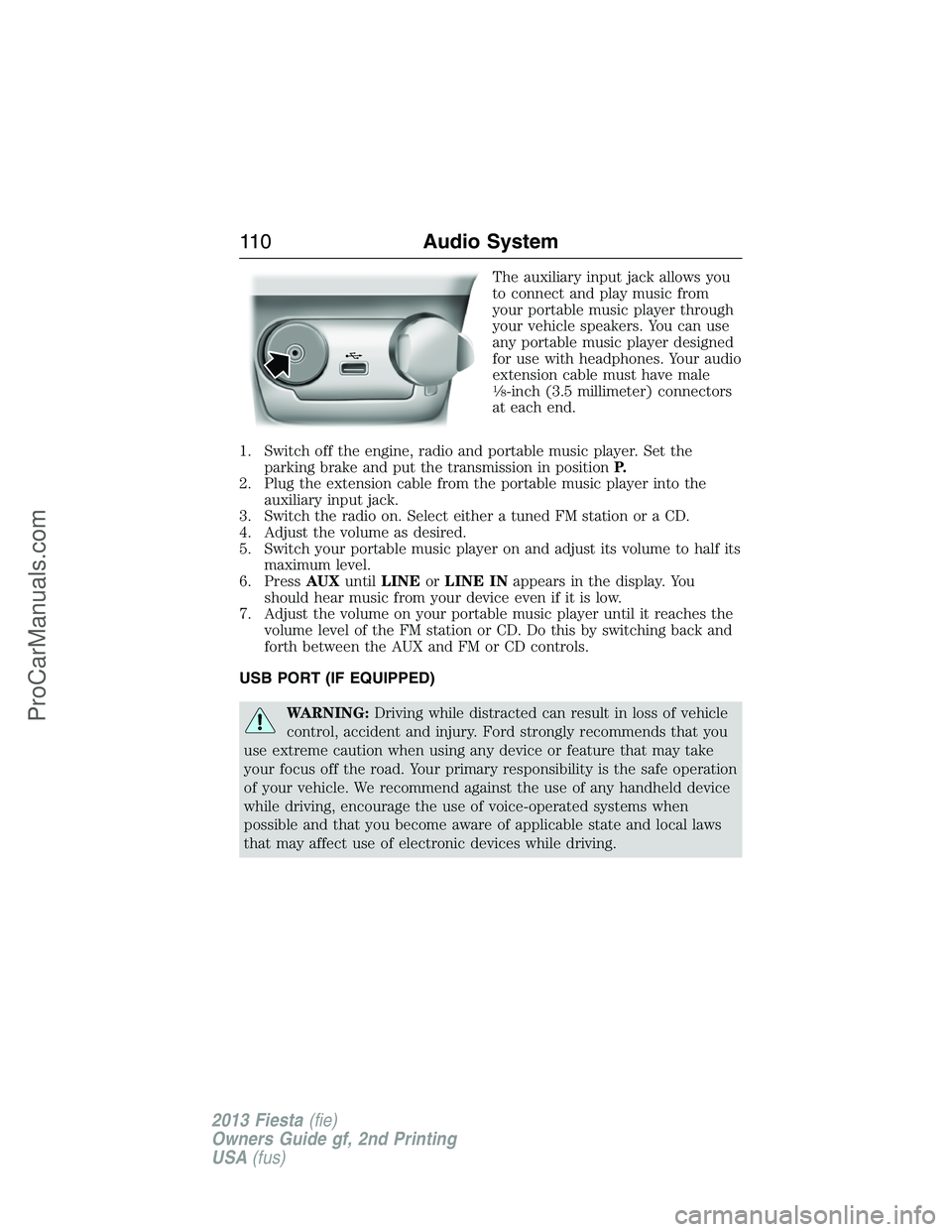
The auxiliary input jack allows you
to connect and play music from
your portable music player through
your vehicle speakers. You can use
any portable music player designed
for use with headphones. Your audio
extension cable must have male
18-inch (3.5 millimeter) connectors
at each end.
1. Switch off the engine, radio and portable music player. Set the
parking brake and put the transmission in positionP.
2. Plug the extension cable from the portable music player into the
auxiliary input jack.
3. Switch the radio on. Select either a tuned FM station or a CD.
4. Adjust the volume as desired.
5. Switch your portable music player on and adjust its volume to half its
maximum level.
6. PressAUXuntilLINEorLINE INappears in the display. You
should hear music from your device even if it is low.
7. Adjust the volume on your portable music player until it reaches the
volume level of the FM station or CD. Do this by switching back and
forth between the AUX and FM or CD controls.
USB PORT (IF EQUIPPED)
WARNING:Driving while distracted can result in loss of vehicle
control, accident and injury. Ford strongly recommends that you
use extreme caution when using any device or feature that may take
your focus off the road. Your primary responsibility is the safe operation
of your vehicle. We recommend against the use of any handheld device
while driving, encourage the use of voice-operated systems when
possible and that you become aware of applicable state and local laws
that may affect use of electronic devices while driving.
11 0Audio System
2013 Fiesta(fie)
Owners Guide gf, 2nd Printing
USA(fus)
ProCarManuals.com
Page 132 of 346
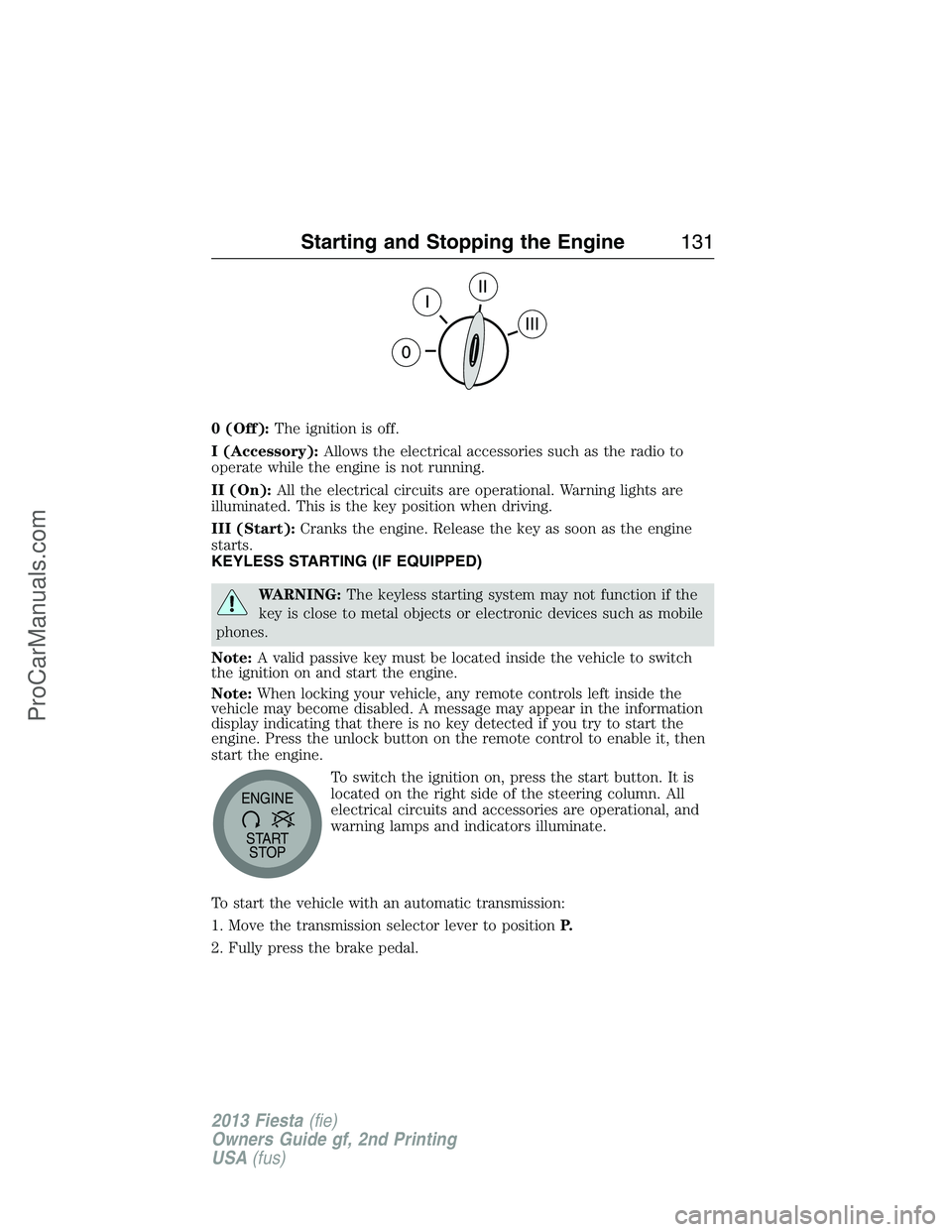
0 (Off):The ignition is off.
I (Accessory):Allows the electrical accessories such as the radio to
operate while the engine is not running.
II (On):All the electrical circuits are operational. Warning lights are
illuminated. This is the key position when driving.
III (Start):Cranks the engine. Release the key as soon as the engine
starts.
KEYLESS STARTING (IF EQUIPPED)
WARNING:The keyless starting system may not function if the
key is close to metal objects or electronic devices such as mobile
phones.
Note:A valid passive key must be located inside the vehicle to switch
the ignition on and start the engine.
Note:When locking your vehicle, any remote controls left inside the
vehicle may become disabled. A message may appear in the information
display indicating that there is no key detected if you try to start the
engine. Press the unlock button on the remote control to enable it, then
start the engine.
To switch the ignition on, press the start button. It is
located on the right side of the steering column. All
electrical circuits and accessories are operational, and
warning lamps and indicators illuminate.
To start the vehicle with an automatic transmission:
1. Move the transmission selector lever to positionP.
2. Fully press the brake pedal.
START
STOP ENGINE
Starting and Stopping the Engine131
2013 Fiesta(fie)
Owners Guide gf, 2nd Printing
USA(fus)
ProCarManuals.com