steering wheel FORD FIESTA 2013 Owners Manual
[x] Cancel search | Manufacturer: FORD, Model Year: 2013, Model line: FIESTA, Model: FORD FIESTA 2013Pages: 346, PDF Size: 5.27 MB
Page 3 of 346
Locks 62
Locking and unlocking..................................62
Locks..............................................62
Trunk release.........................................68
Interior luggage compartment release.......................68
Security 70
SecuriLock® passive anti-theft system.......................70
Steering Wheel 73
Adjusting the steering wheel..............................73
Steering wheel controls.................................74
Wipers and Washers 76
Windshield wipers.....................................76
Windshield washers....................................76
Rear-window wiper and washer............................77
Lighting 78
Lighting control.......................................78
Instrument lighting dimmer...............................78
Headlamp exit delay....................................79
Daytime running lamps..................................79
Turn signal control.....................................79
Interior lamps........................................80
Ambient lighting.......................................81
Windows and Mirrors 82
Power windows.......................................82
Exteriormirrors.......................................84
Interiormirrors .......................................85
Moonroof............................................86
2Table of Contents
2013 Fiesta(fie)
Owners Guide gf, 2nd Printing
USA(fus)
ProCarManuals.com
Page 7 of 346
Maintenance 199
General information...................................199
Under hood overview..................................201
Engine oil dipstick....................................202
Engine oil check......................................202
Engine coolant check..................................203
Automatic transmission fluid check........................205
Brake fluid check.....................................206
Power steering fluid check..............................206
Fuel filter...........................................206
Washer fluid check....................................207
Battery ............................................207
Checking the wiper blades..............................209
Changing the wiper blades..............................210
Air filter(s).........................................211
Adjusting the headlamps................................211
Changing a bulb......................................214
Bulb specification chart.................................220
Vehicle Care 222
Cleaning products.....................................222
Cleaning the exterior..................................222
Waxing.............................................224
Repairing minor paint damage............................224
Cleaning the engine...................................224
Cleaning the windows and wiper blades.....................225
Cleaning the interior...................................225
Cleaning the instrument panel and instrument cluster lens.......226
Cleaning leather seats..................................227
Cleaning the alloy wheels...............................227
Vehicle storage.......................................228
6Table of Contents
2013 Fiesta(fie)
Owners Guide gf, 2nd Printing
USA(fus)
ProCarManuals.com
Page 12 of 346
Motor Company, Ford of Canada, and service and repair facilities may
access or share among them vehicle diagnostic information received
through a direct connection to your vehicle when diagnosing or servicing
your vehicle. Additionally, when your vehicle is in for service or repair,
Ford Motor Company, Ford of Canada, and service and repair facilities
may access or share among them data for vehicle improvement purposes.
For U.S. only (if equipped), if you choose to use the SYNC® Vehicle
Health Report, you consent that certain diagnostic information may also
be accessed electronically by Ford Motor Company and Ford authorized
service facilities, and that the diagnostic information may be used for any
purpose. See theSYNC®chapter for more information.
Event Data Recording
This vehicle is equipped with an event data recorder (EDR). The
main purpose of an EDR is to record, in certain crash or near
crash-like situations, such as an airbag deployment or hitting a
road obstacle; this data will assist in understanding how a
vehicle’s systems performed. The EDR is designed to record data
related to vehicle dynamics and safety systems for a short period
of time, typically 30 seconds or less. The EDR in this vehicle is
designed to record such data as:
•How various systems in your vehicle were operating;
•Whether or not the driver and passenger safety belts were
buckled/fastened;
•How far (if at all) the driver was depressing the accelerator
and/or the brake pedal;
•How fast the vehicle was travelling;
•Where the driver was positioning the steering wheel (if
equipped).
This data can help provide a better understanding of the
circumstances in which crashes and injuries occur.
Note: EDR data is recorded by your vehicle only if a non-trivial
crash situation occurs; no data is recorded by the EDR under
normal driving conditions and no personal data or information
(e.g., name, gender, age, and crash location) is recorded (see
limitations regarding 911 Assist and Traffic, Directions and
Information privacy below). However, parties, such as law
enforcement, could combine the EDR data with the type of
personally identifying data routinely acquired during a crash
investigation.
Introduction11
2013 Fiesta(fie)
Owners Guide gf, 2nd Printing
USA(fus)
ProCarManuals.com
Page 74 of 346
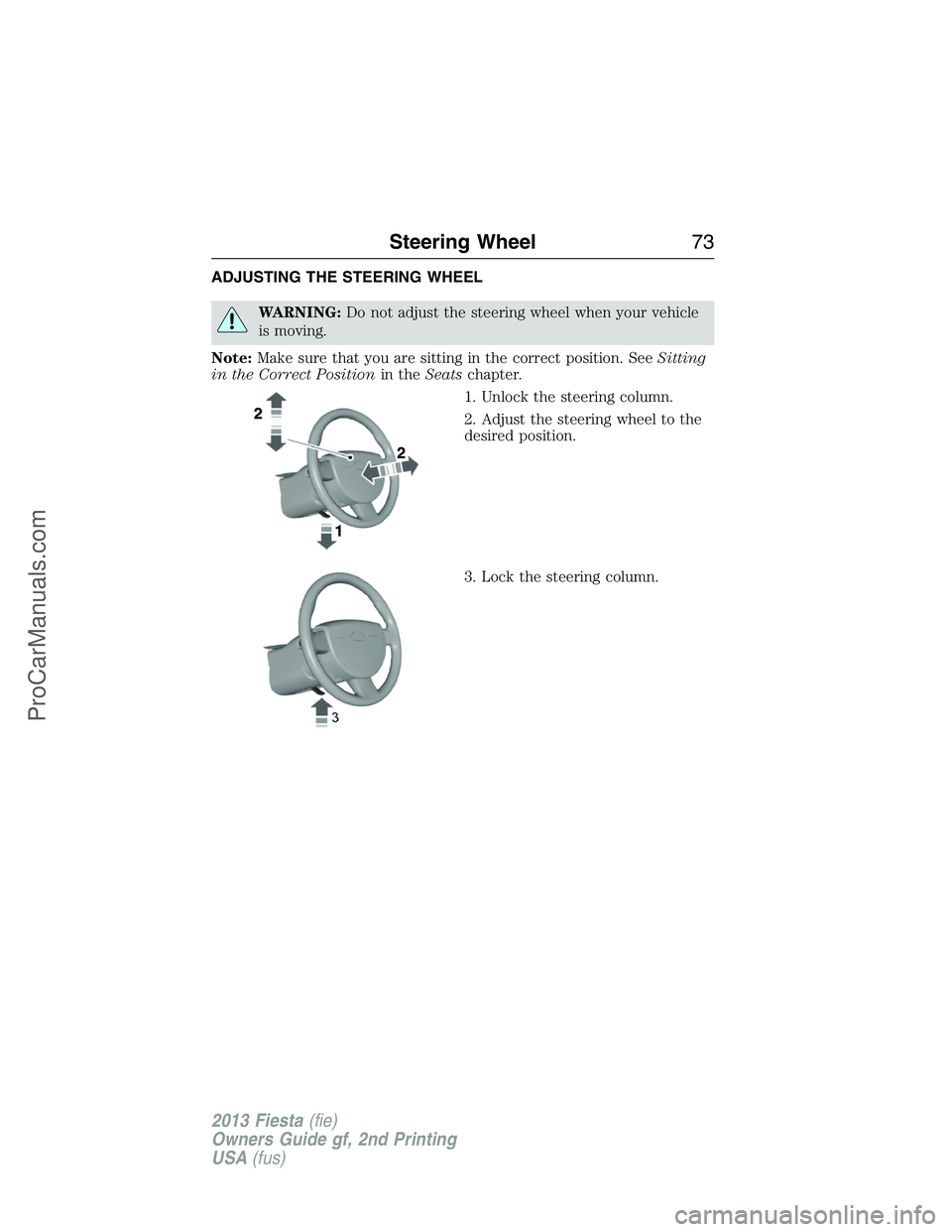
ADJUSTING THE STEERING WHEEL
WARNING:Do not adjust the steering wheel when your vehicle
is moving.
Note:Make sure that you are sitting in the correct position. SeeSitting
in the Correct Positionin theSeatschapter.
1. Unlock the steering column.
2. Adjust the steering wheel to the
desired position.
3. Lock the steering column.
Steering Wheel73
2013 Fiesta(fie)
Owners Guide gf, 2nd Printing
USA(fus)
ProCarManuals.com
Page 75 of 346
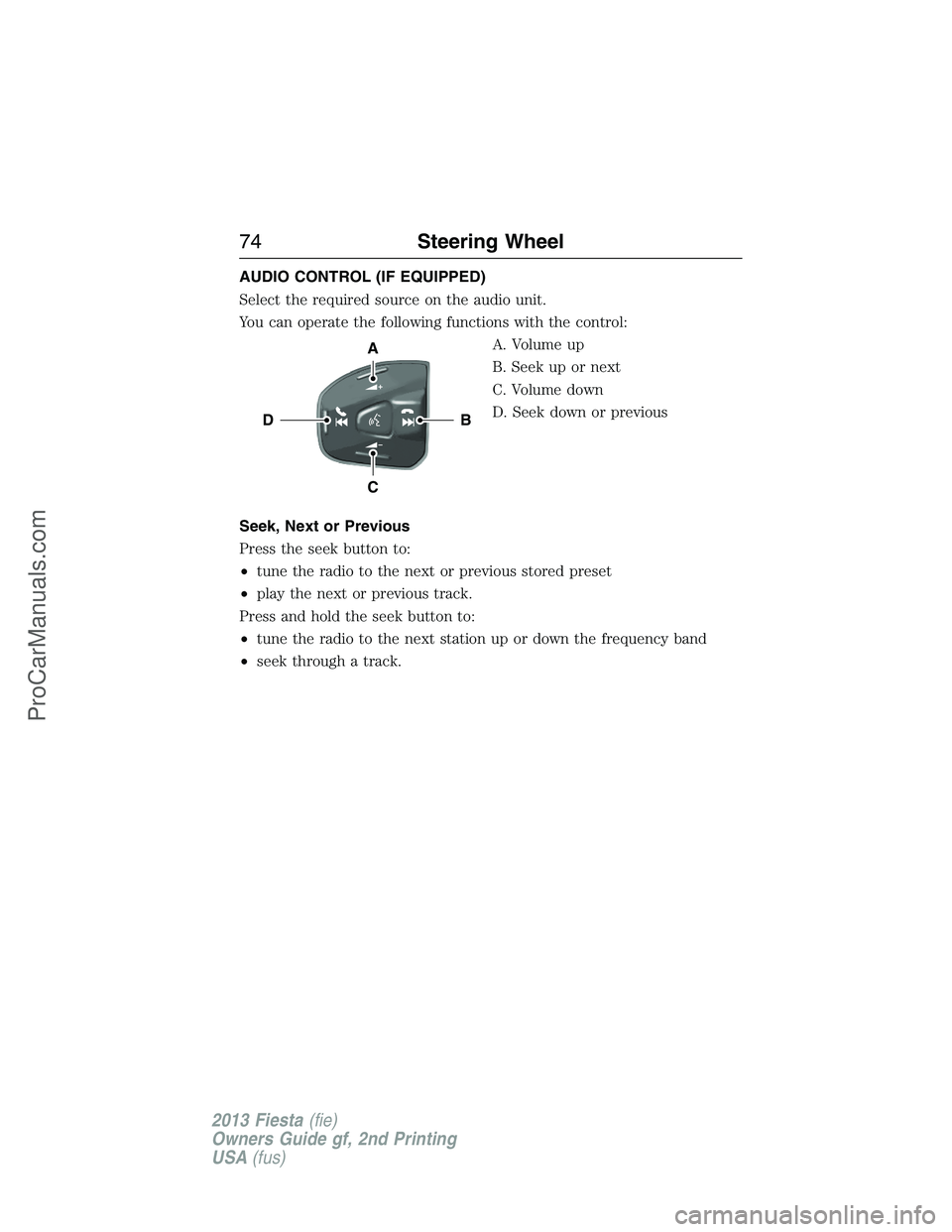
AUDIO CONTROL (IF EQUIPPED)
Select the required source on the audio unit.
You can operate the following functions with the control:
A. Volume up
B. Seek up or next
C. Volume down
D. Seek down or previous
Seek, Next or Previous
Press the seek button to:
•tune the radio to the next or previous stored preset
•play the next or previous track.
Press and hold the seek button to:
•tune the radio to the next station up or down the frequency band
•seek through a track.
B
A
C
D
74Steering Wheel
2013 Fiesta(fie)
Owners Guide gf, 2nd Printing
USA(fus)
ProCarManuals.com
Page 76 of 346
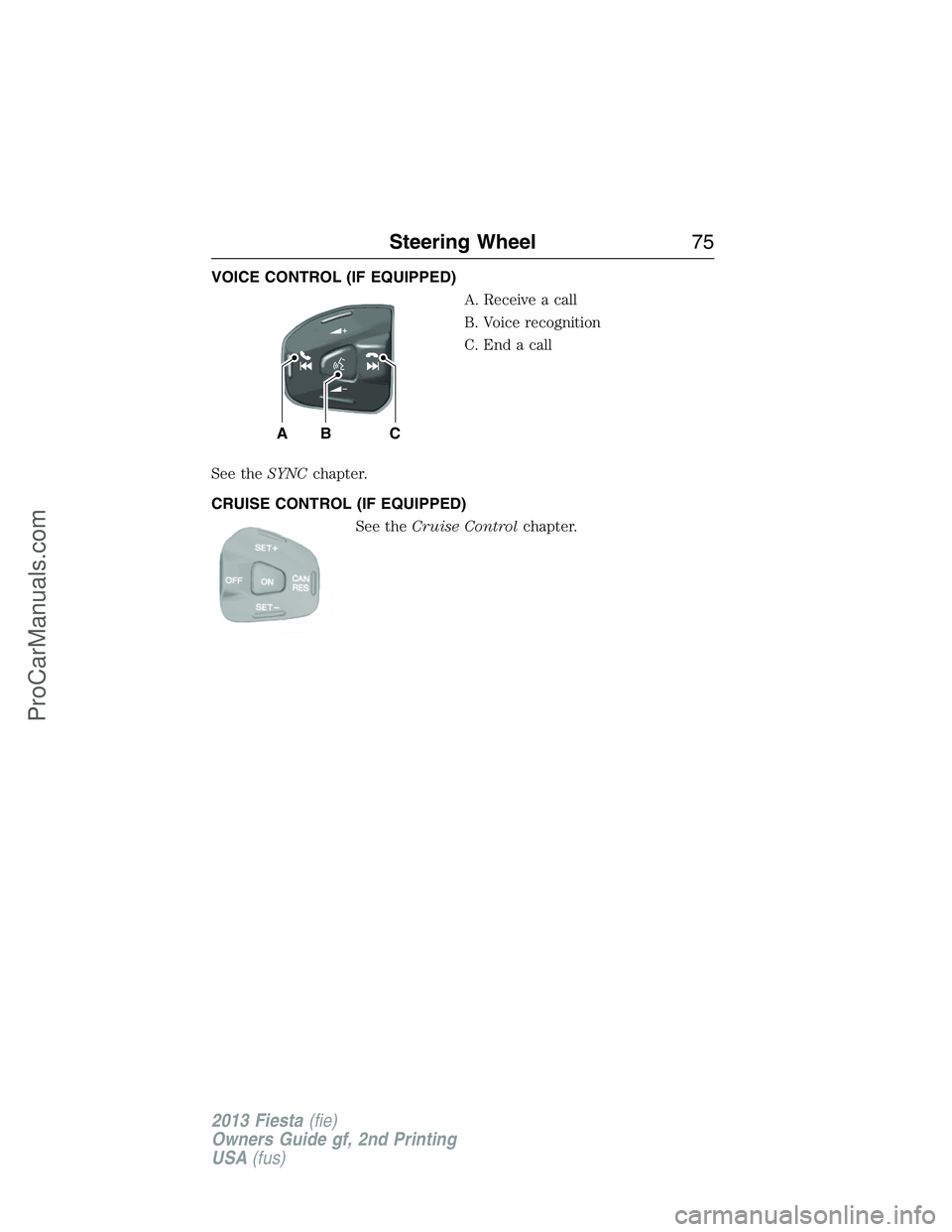
VOICE CONTROL (IF EQUIPPED)
A. Receive a call
B. Voice recognition
C. End a call
See theSYNCchapter.
CRUISE CONTROL (IF EQUIPPED)
See theCruise Controlchapter.
BAC
Steering Wheel75
2013 Fiesta(fie)
Owners Guide gf, 2nd Printing
USA(fus)
ProCarManuals.com
Page 96 of 346
Menu
Display Units of measure
Language
Messages
Compass
(if equipped)If your vehicle is equipped with SYNC®, the
compass heading is displayed to the left of the clock
in the upper portion of the multifunction display.
Trip Computer (if equipped)
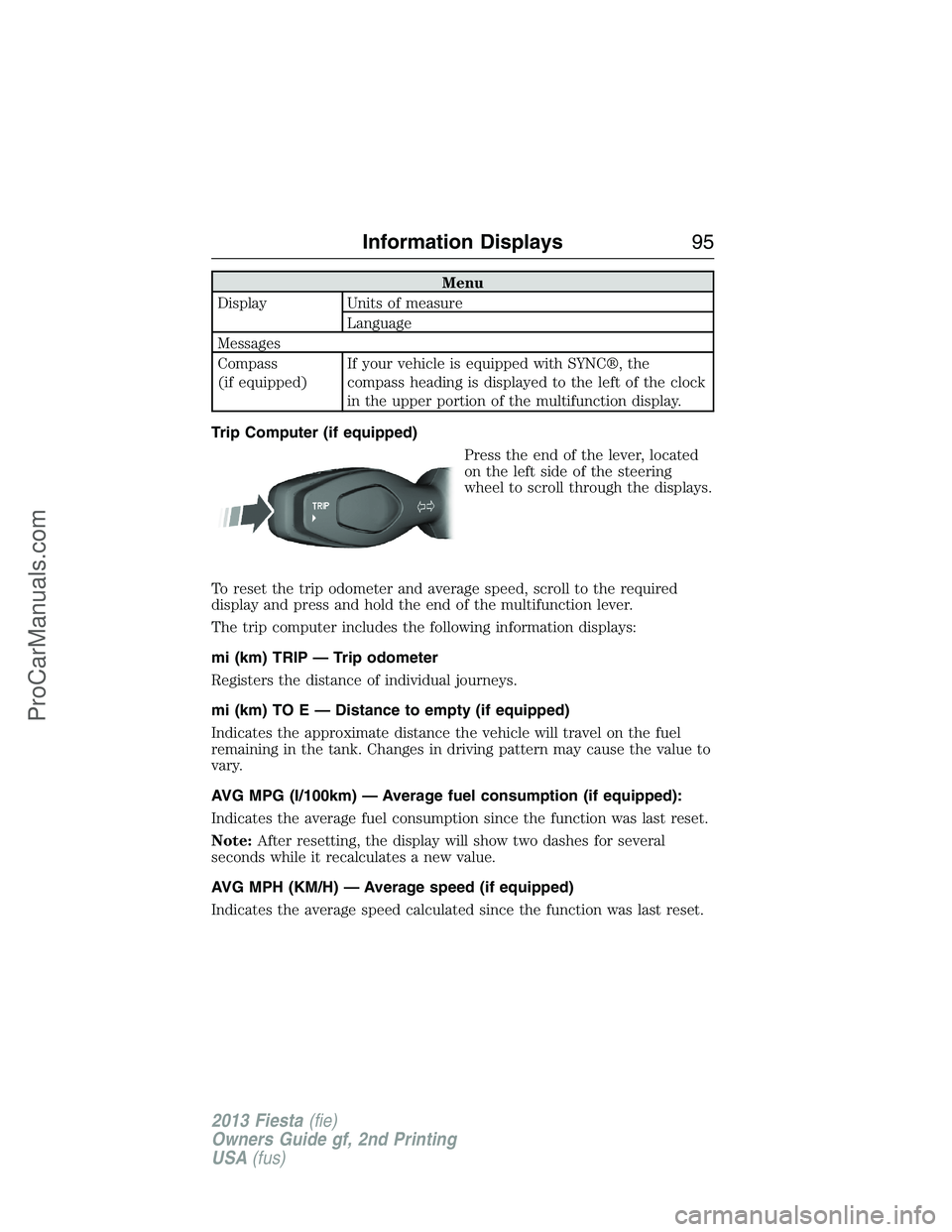
Press the end of the lever, located
on the left side of the steering
wheel to scroll through the displays.
To reset the trip odometer and average speed, scroll to the required
display and press and hold the end of the multifunction lever.
The trip computer includes the following information displays:
mi (km) TRIP — Trip odometer
Registers the distance of individual journeys.
mi (km) TO E — Distance to empty (if equipped)
Indicates the approximate distance the vehicle will travel on the fuel
remaining in the tank. Changes in driving pattern may cause the value to
vary.
AVG MPG (l/100km) — Average fuel consumption (if equipped):
Indicates the average fuel consumption since the function was last reset.
Note:After resetting, the display will show two dashes for several
seconds while it recalculates a new value.
AVG MPH (KM/H) — Average speed (if equipped)
Indicates the average speed calculated since the function was last reset.
Information Displays95
2013 Fiesta(fie)
Owners Guide gf, 2nd Printing
USA(fus)
ProCarManuals.com
Page 97 of 346
INFORMATION MESSAGES
Note:Depending on the vehicle options equipped with your vehicle, not
all of the messages will display or be available. Certain messages may be
abbreviated or shortened depending upon which cluster type you have.
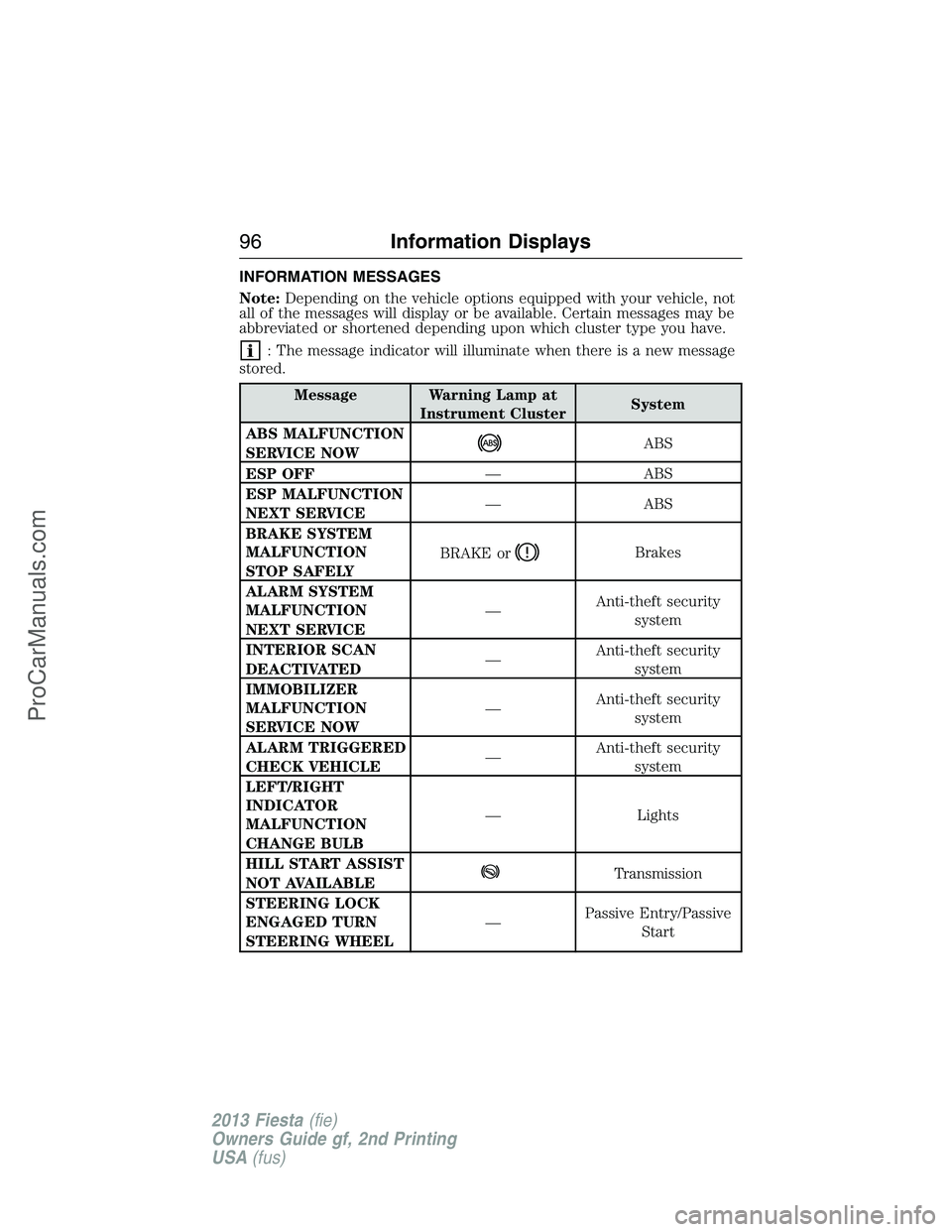
: The message indicator will illuminate when there is a new message
stored.
Message Warning Lamp at
Instrument ClusterSystem
ABS MALFUNCTION
SERVICE NOW
ABS
ESP OFF— ABS
ESP MALFUNCTION
NEXT SERVICE— ABS
BRAKE SYSTEM
MALFUNCTION
STOP SAFELYBRAKE or
Brakes
ALARM SYSTEM
MALFUNCTION
NEXT SERVICE—Anti-theft security
system
INTERIOR SCAN
DEACTIVATED—Anti-theft security
system
IMMOBILIZER
MALFUNCTION
SERVICE NOW—Anti-theft security
system
ALARM TRIGGERED
CHECK VEHICLE—Anti-theft security
system
LEFT/RIGHT
INDICATOR
MALFUNCTION
CHANGE BULB— Lights
HILL START ASSIST
NOT AVAILABLE
Transmission
STEERING LOCK
ENGAGED TURN
STEERING WHEEL—Passive Entry/Passive
Start
96Information Displays
2013 Fiesta(fie)
Owners Guide gf, 2nd Printing
USA(fus)
ProCarManuals.com
Page 120 of 346
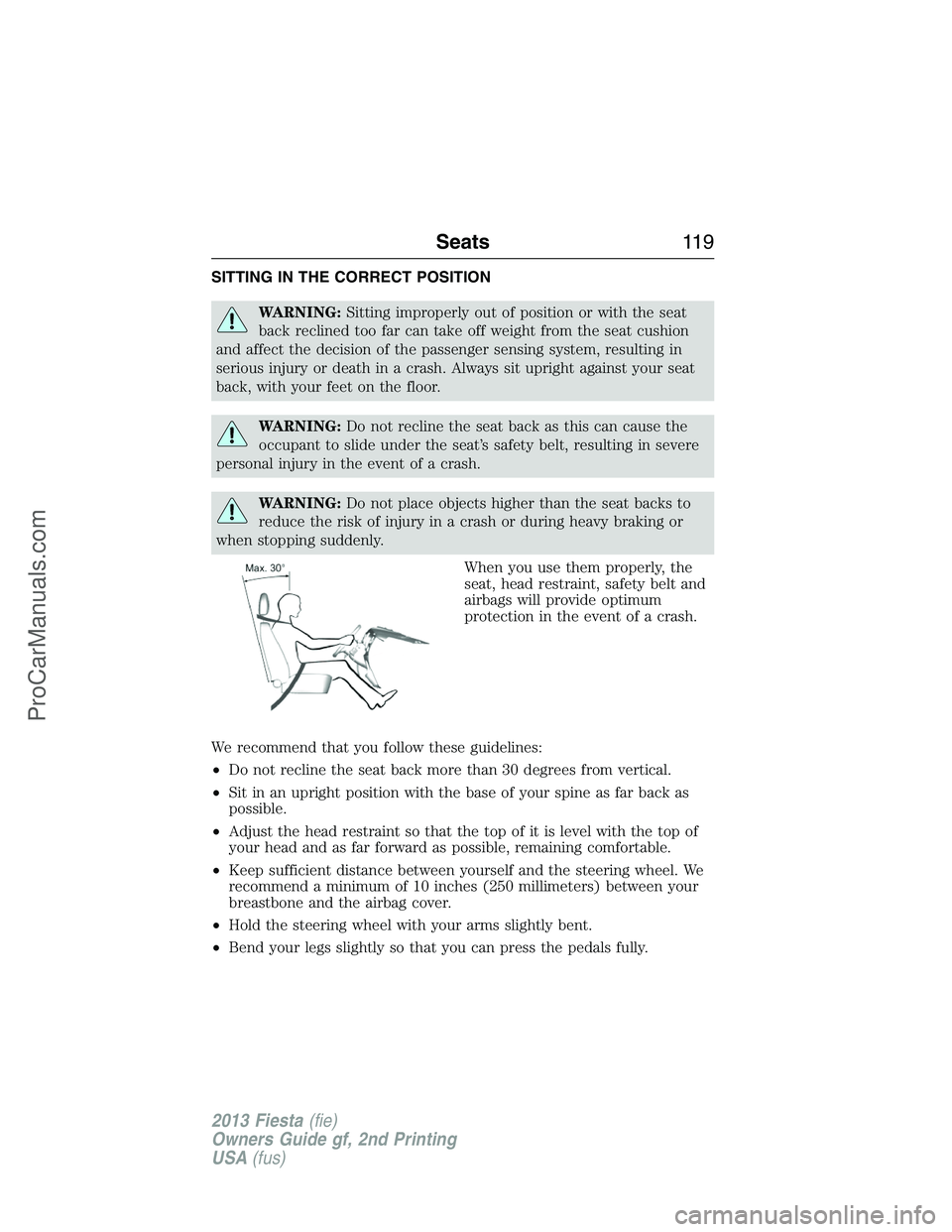
SITTING IN THE CORRECT POSITION
WARNING:Sitting improperly out of position or with the seat
back reclined too far can take off weight from the seat cushion
and affect the decision of the passenger sensing system, resulting in
serious injury or death in a crash. Always sit upright against your seat
back, with your feet on the floor.
WARNING:Do not recline the seat back as this can cause the
occupant to slide under the seat’s safety belt, resulting in severe
personal injury in the event of a crash.
WARNING:Do not place objects higher than the seat backs to
reduce the risk of injury in a crash or during heavy braking or
when stopping suddenly.
When you use them properly, the
seat, head restraint, safety belt and
airbags will provide optimum
protection in the event of a crash.
We recommend that you follow these guidelines:
•Do not recline the seat back more than 30 degrees from vertical.
•Sit in an upright position with the base of your spine as far back as
possible.
•Adjust the head restraint so that the top of it is level with the top of
your head and as far forward as possible, remaining comfortable.
•Keep sufficient distance between yourself and the steering wheel. We
recommend a minimum of 10 inches (250 millimeters) between your
breastbone and the airbag cover.
•Hold the steering wheel with your arms slightly bent.
•Bend your legs slightly so that you can press the pedals fully.
Seats11 9
2013 Fiesta(fie)
Owners Guide gf, 2nd Printing
USA(fus)
ProCarManuals.com
Page 156 of 346
GENERAL INFORMATION
Note:Occasional brake noise is normal. If a metal-to-metal, continuous
grinding or continuous squeal sound is present, the brake linings may be
worn-out and should be inspected by an authorized dealer. If your
vehicle has continuous vibration or shudder in the steering wheel while
braking, it should be inspected by an authorized dealer.
Note:Brake dust may accumulate on the wheels, even under normal
driving conditions. Some dust is inevitable as the brakes wear and does
not contribute to brake noise. See theVehicle Carechapter for wheel
cleaning instructions.
See theInstrument Clusterchapter for information on the
brake system warning light.
Wet brakes result in reduced braking efficiency. Gently press the brake
pedal a few times when driving from a car wash or standing water to dry
the brakes.
Brake Over Accelerator
If the accelerator pedal becomes stuck or entrapped, apply steady and
firm pressure to the brake pedal to slow your vehicle and reduce engine
power. If you experience this condition, apply the brakes and bring your
vehicle to a safe stop. Turn the engine off, shift to positionPand apply
the parking brake, then inspect the accelerator pedal for any
interferences. If none are found and the condition persists, have your
vehicle towed to the nearest authorized dealer.
Anti-Lock Brake System
This system helps you maintain steering control during emergency stops
by keeping the brakes from locking.
The anti-lock brake system lamp momentarily illuminates when
the ignition is turned on. If the light does not illuminate during
start-up, remains on or flashes, the anti-lock brake system may
be disabled and may need to be serviced.
If the anti-lock brake system is disabled, normal braking is still
effective. If the brake warning lamp illuminates with the parking
brake released, have your brake system serviced immediately.
HINTS ON DRIVING WITH ANTI-LOCK BRAKES
When the system is operating, the brake pedal will pulse and may travel
further. Maintain pressure on the brake pedal. You may also hear a noise
from the system. This is normal.
Brakes155
2013 Fiesta(fie)
Owners Guide gf, 2nd Printing
USA(fus)
ProCarManuals.com