buttons FORD FIESTA 2014 6.G User Guide
[x] Cancel search | Manufacturer: FORD, Model Year: 2014, Model line: FIESTA, Model: FORD FIESTA 2014 6.GPages: 396, PDF Size: 5.58 MB
Page 247 of 396
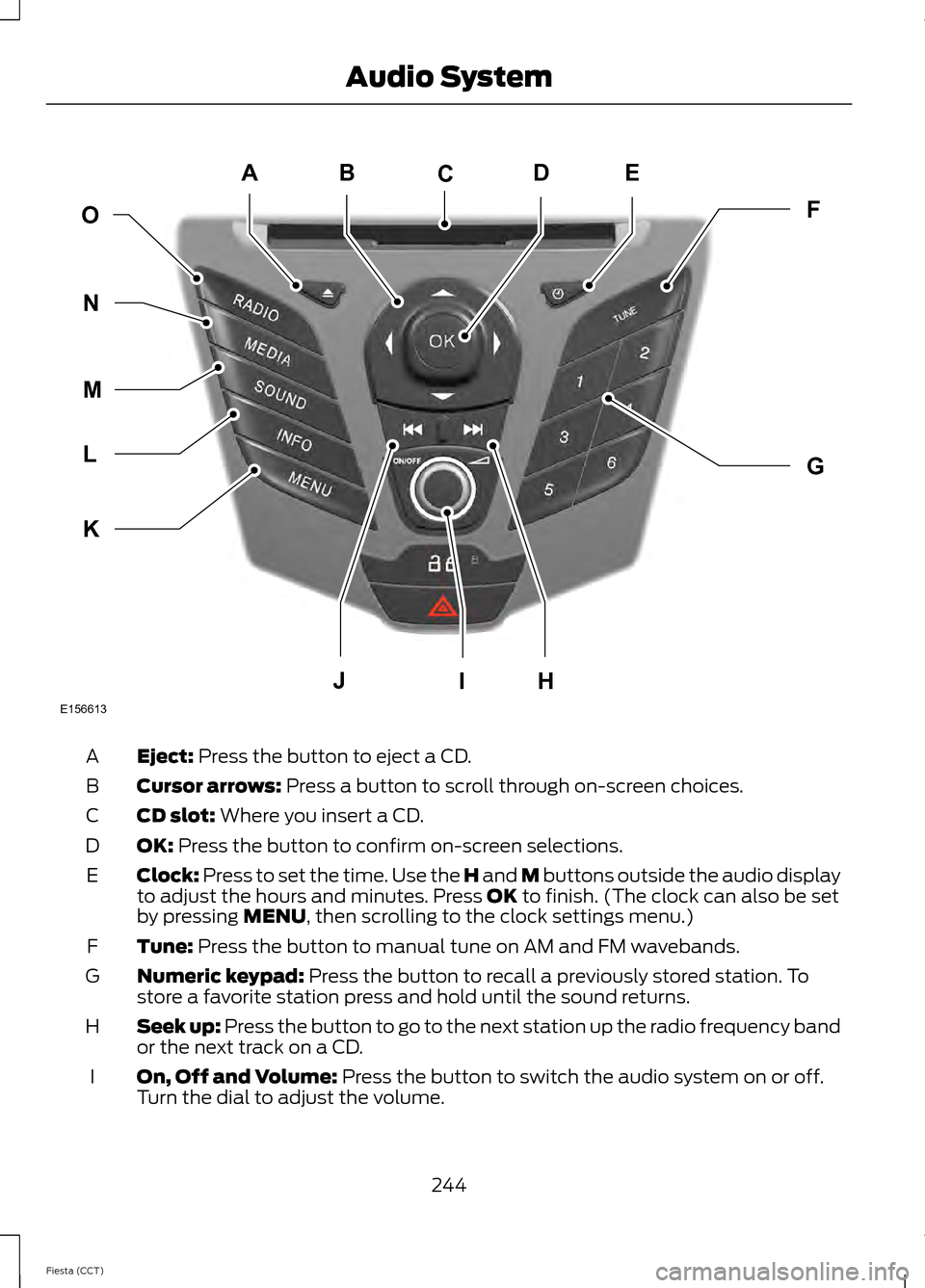
Eject: Press the button to eject a CD.
A
Cursor arrows:
Press a button to scroll through on-screen choices.
B
CD slot:
Where you insert a CD.
C
OK:
Press the button to confirm on-screen selections.
D
Clock:
Press to set the time. Use the H and M buttons outside the audio display
to adjust the hours and minutes. Press OK to finish. (The clock can also be set
by pressing MENU, then scrolling to the clock settings menu.)
E
Tune:
Press the button to manual tune on AM and FM wavebands.
F
Numeric keypad:
Press the button to recall a previously stored station. To
store a favorite station press and hold until the sound returns.
G
Seek up: Press the button to go to the next station up the radio frequency band
or the next track on a CD.
H
On, Off and Volume:
Press the button to switch the audio system on or off.
Turn the dial to adjust the volume.
I
244
Fiesta (CCT) Audio SystemE156613
ED
OF
G
K
L
M
N
JHI
C
A
B
Page 248 of 396
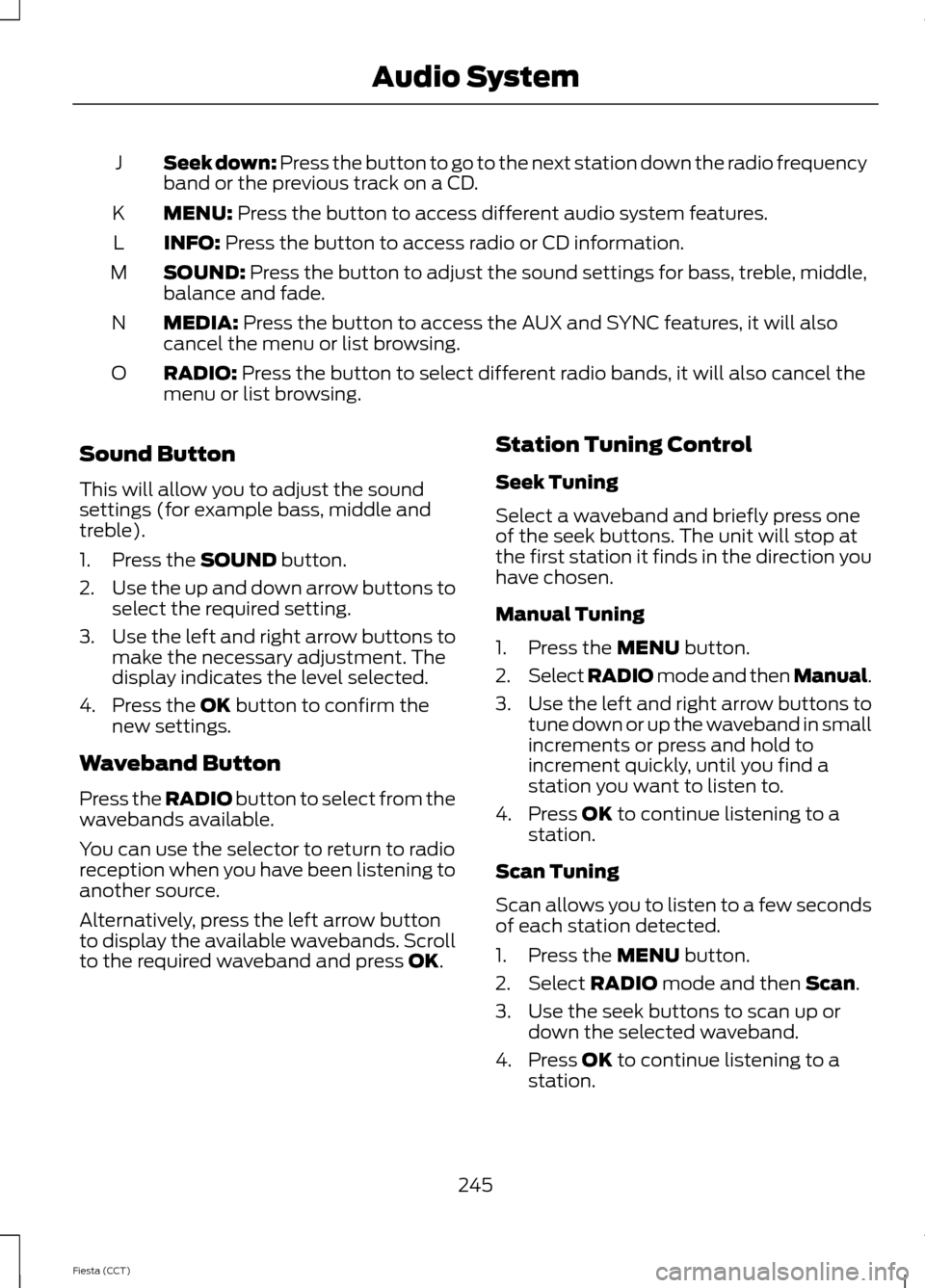
Seek down: Press the button to go to the next station down the radio frequency
band or the previous track on a CD.
J
MENU: Press the button to access different audio system features.
K
INFO:
Press the button to access radio or CD information.
L
SOUND:
Press the button to adjust the sound settings for bass, treble, middle,
balance and fade.
M
MEDIA:
Press the button to access the AUX and SYNC features, it will also
cancel the menu or list browsing.
N
RADIO:
Press the button to select different radio bands, it will also cancel the
menu or list browsing.
O
Sound Button
This will allow you to adjust the sound
settings (for example bass, middle and
treble).
1. Press the
SOUND button.
2. Use the up and down arrow buttons to
select the required setting.
3. Use the left and right arrow buttons to
make the necessary adjustment. The
display indicates the level selected.
4. Press the
OK button to confirm the
new settings.
Waveband Button
Press the
RADIO button to select from the
wavebands available.
You can use the selector to return to radio
reception when you have been listening to
another source.
Alternatively, press the left arrow button
to display the available wavebands. Scroll
to the required waveband and press
OK. Station Tuning Control
Seek Tuning
Select a waveband and briefly press one
of the seek buttons. The unit will stop at
the first station it finds in the direction you
have chosen.
Manual Tuning
1. Press the
MENU button.
2. Select RADIO mode and then Manual.
3. Use the left and right arrow buttons to
tune down or up the waveband in small
increments or press and hold to
increment quickly, until you find a
station you want to listen to.
4. Press
OK to continue listening to a
station.
Scan Tuning
Scan allows you to listen to a few seconds
of each station detected.
1. Press the
MENU button.
2. Select
RADIO mode and then Scan.
3. Use the seek buttons to scan up or down the selected waveband.
4. Press
OK to continue listening to a
station.
245
Fiesta (CCT) Audio System
Page 249 of 396
Station Preset Buttons
This feature allows you to store your
favorite stations, they can be recalled by
selecting the appropriate waveband and
pressing one of the preset buttons.
1. Select a waveband.
2. Tune to the station required.
3. Press and hold one of the preset
buttons. A progress bar and message
will appear. When the progress bar
completes the station has been stored.
The audio unit will also mute
momentarily as confirmation.
You can repeat this on each waveband and
for each preset button.
Note: When you drive to another part of the
country, stations that broadcast on
alternative frequencies and are stored on
preset buttons, may be updated with the
correct frequency and station name for that
area.
Autostore Control
Note: This will store up to a maximum of
the six strongest signals available, either
from the AM or the FM waveband and
overwrite the previously stored stations. You
can also store stations manually in the same
way as other wavebands.
• Press and hold the RADIO button.
• When the search is complete, sound is
restored and the strongest signals are
stored on the autostore presets.
Automatic Volume Control
When available, automatic volume control
adjusts the volume level to compensate
for engine noise and road speed noise.
1. Press the
MENU button and select
Audio Settings.
2. Select
Spd. Comp. Vol. 3. Use the left or right arrow button to
adjust the setting.
4. Press the
OK button to confirm your
selection.
5. Press the
MENU button to return.
News Broadcasts
Your audio unit may interrupt normal
reception to broadcast news bulletins from
stations on the FM waveband, radio data
system or other enhanced network linked
stations.
The display will indicate there is an
incoming announcement during news
broadcasts. When the audio unit interrupts
for a news broadcast the preset volume
level will be the same as traffic
announcements.
1. Press the
MENU button.
2. Select
Audio Settings.
3. Scroll to
News and turn on or off with
the OK button.
4. Press the
MENU button to return.
Alternative Frequencies
The majority of programs that broadcast
on the FM waveband have a program
identification code that can be recognized
by audio units.
When your vehicle moves from one
transmission area to another with the
alternative frequencies tuning switched
on, this function will search for the
strongest station signal.
Under certain conditions, alternative
frequencies tuning may temporarily disrupt
normal reception.
246
Fiesta (CCT) Audio System
Page 252 of 396
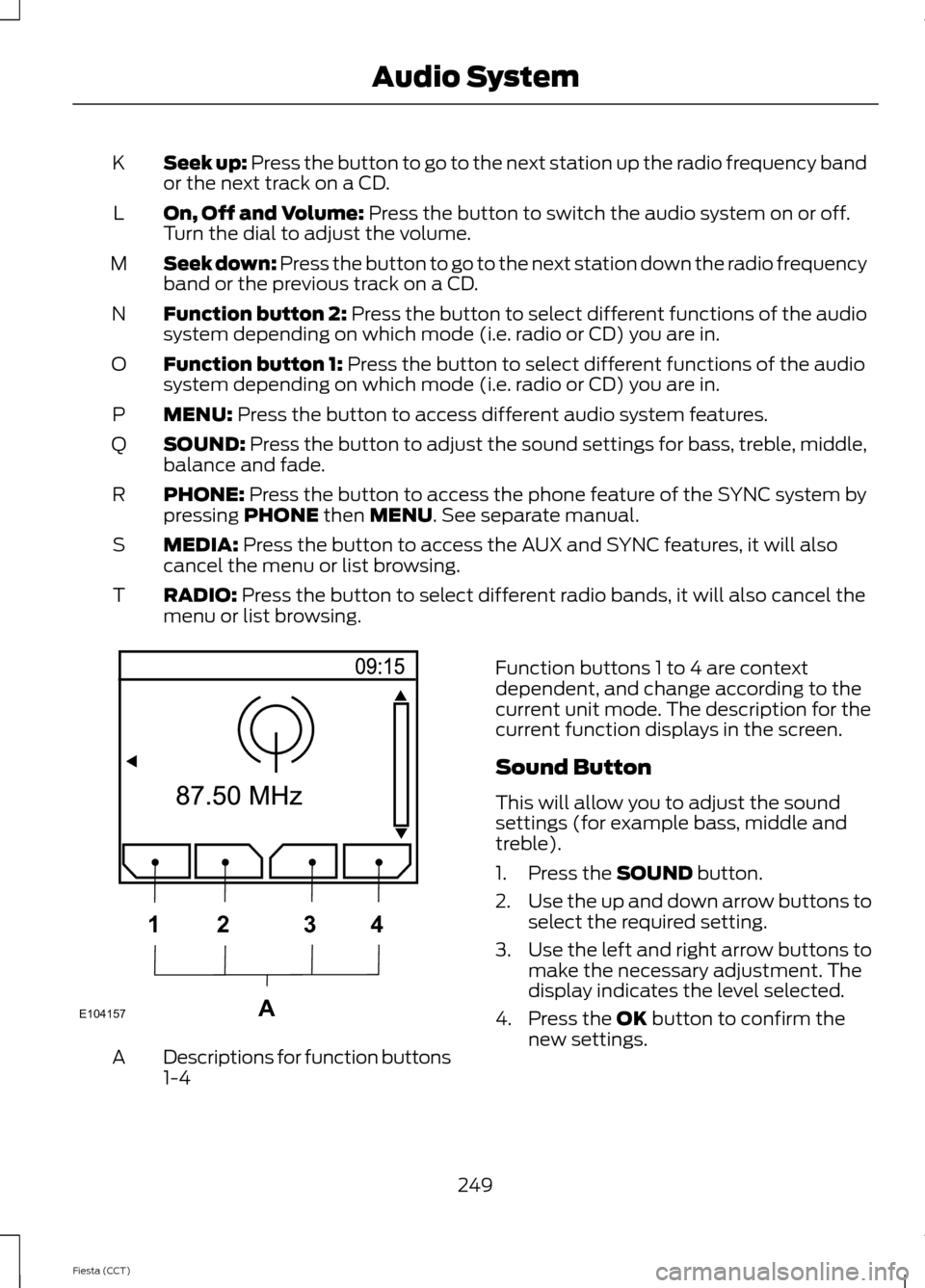
Seek up: Press the button to go to the next station up the radio frequency band
or the next track on a CD.
K
On, Off and Volume: Press the button to switch the audio system on or off.
Turn the dial to adjust the volume.
L
Seek down: Press the button to go to the next station down the radio frequency
band or the previous track on a CD.
M
Function button 2:
Press the button to select different functions of the audio
system depending on which mode (i.e. radio or CD) you are in.
N
Function button 1:
Press the button to select different functions of the audio
system depending on which mode (i.e. radio or CD) you are in.
O
MENU:
Press the button to access different audio system features.
P
SOUND:
Press the button to adjust the sound settings for bass, treble, middle,
balance and fade.
Q
PHONE:
Press the button to access the phone feature of the SYNC system by
pressing PHONE then MENU. See separate manual.
R
MEDIA:
Press the button to access the AUX and SYNC features, it will also
cancel the menu or list browsing.
S
RADIO:
Press the button to select different radio bands, it will also cancel the
menu or list browsing.
T Descriptions for function buttons
1-4
A Function buttons 1 to 4 are context
dependent, and change according to the
current unit mode. The description for the
current function displays in the screen.
Sound Button
This will allow you to adjust the sound
settings (for example bass, middle and
treble).
1. Press the
SOUND button.
2. Use the up and down arrow buttons to
select the required setting.
3. Use the left and right arrow buttons to
make the necessary adjustment. The
display indicates the level selected.
4. Press the
OK button to confirm the
new settings.
249
Fiesta (CCT) Audio SystemE104157A
1
2 34
Page 253 of 396
Waveband Button
Press the RADIO button to select from the
wavebands available.
You can use the selector to return to radio
reception when you have been listening to
another source.
Alternatively, press the left arrow button
to display the available wavebands. Scroll
to the required waveband and press
OK.
Station Tuning Control
Seek Tuning
Select a waveband and briefly press one
of the seek buttons. The unit will stop at
the first station it finds in the direction you
have chosen.
Manual Tuning
1. Press
function button 2.
2. Use the left and right arrow buttons to
tune down or up the waveband in small
increments or press and hold to
increment quickly, until you find a
station you want to listen to.
3. Press
OK to continue listening to a
station.
Scan Tuning
Scan allows you to listen to a few seconds
of each station detected.
1. Press
function button 3.
2. Use the seek buttons to scan up or down the selected waveband.
3. Press
function button 3 again or OK
to continue listening to a station.
Station Preset Buttons
This feature allows you to store your
favorite stations, they can be recalled by
selecting the appropriate waveband and
pressing one of the preset buttons. 1. Select a waveband.
2. Tune to the station required.
3. Press and hold one of the preset
buttons. A progress bar and message
will appear. When the progress bar
completes the station has been stored.
The audio unit will also mute
momentarily as confirmation.
You can repeat this on each waveband and
for each preset button.
Note: When you drive to another part of the
country, stations that broadcast on
alternative frequencies, and are stored on
preset buttons, may be updated with the
correct frequency and station name for that
area.
Autostore Control
Note: This will store up to a maximum of
the 10 strongest signals available, either
from the AM or the FM waveband, and
overwrite the previously stored stations. You
can also store stations manually in the same
way as other wavebands.
• Press and hold the
RADIO button.
• When the search is complete, sound is
restored and the strongest signals are
stored on the autostore presets.
Automatic Volume Control
When available, automatic volume control
adjusts the volume level to compensate
for engine noise and road speed noise.
1. Press the
MENU button and
selectAudio Settings.
2. Select
Spd. Comp. Vol.
3. Use the left or right arrow button to adjust the setting.
4. Press the
OK button to confirm your
selection.
5. Press the
MENU button to return.
250
Fiesta (CCT) Audio System
Page 255 of 396
AUDIO UNIT - VEHICLES WITH:
TOUCHSCREEN DISPLAY
WARNING
Driving while distracted can result in
loss of vehicle control, crash and
injury. We strongly recommend that
you use extreme caution when using any
device that may take your focus off the
road. Your primary responsibility is the safe
operation of your vehicle. We recommend
against the use of any handheld device
while driving and encourage the use of
voice-operated systems when possible.
Make sure you are aware of all applicable
local laws that may affect the use of
electronic devices while driving. Note:
The MyFord Touch® system controls
most of the audio features. See MyFord
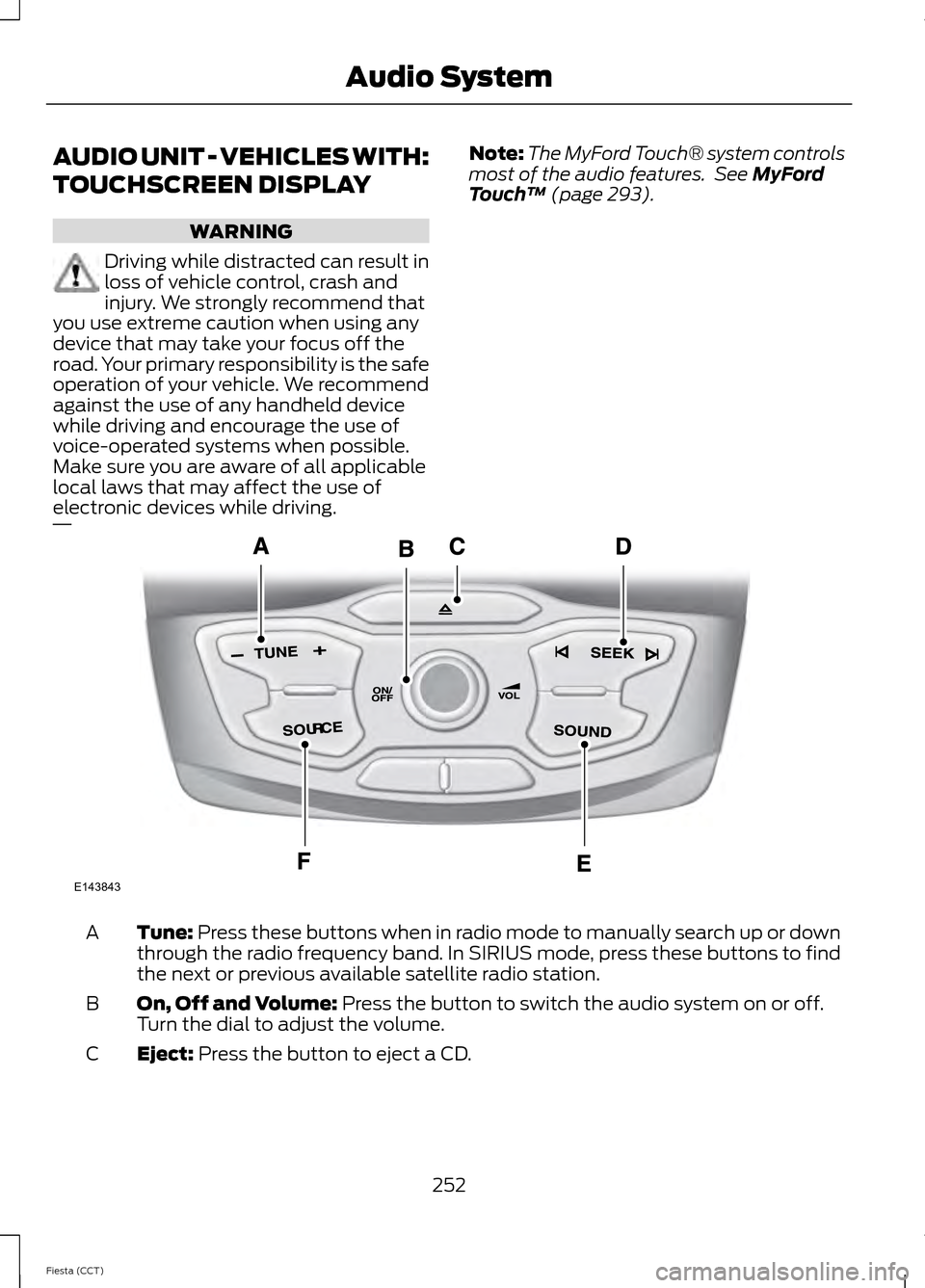
Touch ™ (page 293). Tune:
Press these buttons when in radio mode to manually search up or down
through the radio frequency band. In SIRIUS mode, press these buttons to find
the next or previous available satellite radio station.
A
On, Off and Volume:
Press the button to switch the audio system on or off.
Turn the dial to adjust the volume.
B
Eject:
Press the button to eject a CD.
C
252
Fiesta (CCT) Audio SystemE143843
Page 256 of 396
SEEK Press these buttons when you are in radio mode to go to the next station
up or down the radio frequency band, or to go to the next or previous track on
a CD. In SIRIUS mode, press these buttons to select the next or previous channel.
If a specific category is selected (for example Jazz, Rock or News), use these
buttons to find the next or previous channel in the selected category.
D
SOUND:
Press the button to adjust the sound settings for bass, treble, middle,
balance and fade.
E
SOURCE:
Press the button to access different audio modes, such as AM, FM
and A/V input.
F
AUDIO UNIT - VEHICLES WITH:
SONY AUDIO
SYSTEM/TOUCHSCREEN
DISPLAY WARNING
Driving while distracted can result in
loss of vehicle control, crash and
injury. We strongly recommend that
you use extreme caution when using any
device that may take your focus off the
road. Your primary responsibility is the safe
operation of your vehicle. We recommend
against the use of any handheld device
while driving and encourage the use of
voice-operated systems when possible.
Make sure you are aware of all applicable
local laws that may affect the use of
electronic devices while driving. Note:
The MyFord Touch® system controls
most of the audio features. See
MyFord
Touch ™ (page 293).
253
Fiesta (CCT) Audio System
Page 267 of 396
"MENU"
"Signal"
"Text message inbox"
Words in ( ) are optional and do not have
to be spoken for the system to understand
the command.
Making Calls
Press the voice icon and when prompted
say:
1. Say "Call
2. When the system confirms the number,
say, "Dial" again to initiate the call.
To erase the last spoken digit, say, "Delete"
or press the left arrow button. To erase all
spoken digits, say "Clear" or press and hold
the left arrow button.
To end the call, press and hold the phone
button. Receiving Calls
When receiving a call, you can:
•
Answer the call by pressing the phone
button.
• Reject the call by pressing and holding
the phone button.
• Ignore the call by doing nothing.
Phone Options during an Active
Call
During an active call, you have more menu
features that become available, such as
putting a call on hold or joining calls. Use
the arrow buttons to scroll through the
menu options.
1. Press MENU during an active call.
2. After selecting Active Call Menu, press
OK
.
3. Scroll to cycle through the following options: You can:
When you select:
Mute the call.
Mute Call?
Switch a call from an active hands-free environment to
your cellular phone for a more private conversation.
Privacy
Press
OK when Privacy on/off appears. (The display
indicates In Privacy and the system transfers your call.)
Put an active call on hold.
Call Hold
Press OK when Hold on/off appears. To answer another
call at this time, press the phone button.
Enter "tones", such as numbers for passwords.
Enter Tones
Scroll until the desired number appears in the display, then
press OK; a tone sounds as confirmation. Repeat as
necessary.
Join two separate calls. (SYNC supports a maximum of
three callers on a multiparty call or conference call.)
Join Calls
1. Press the phone button.
264
Fiesta (CCT) SYNC™
Page 272 of 396
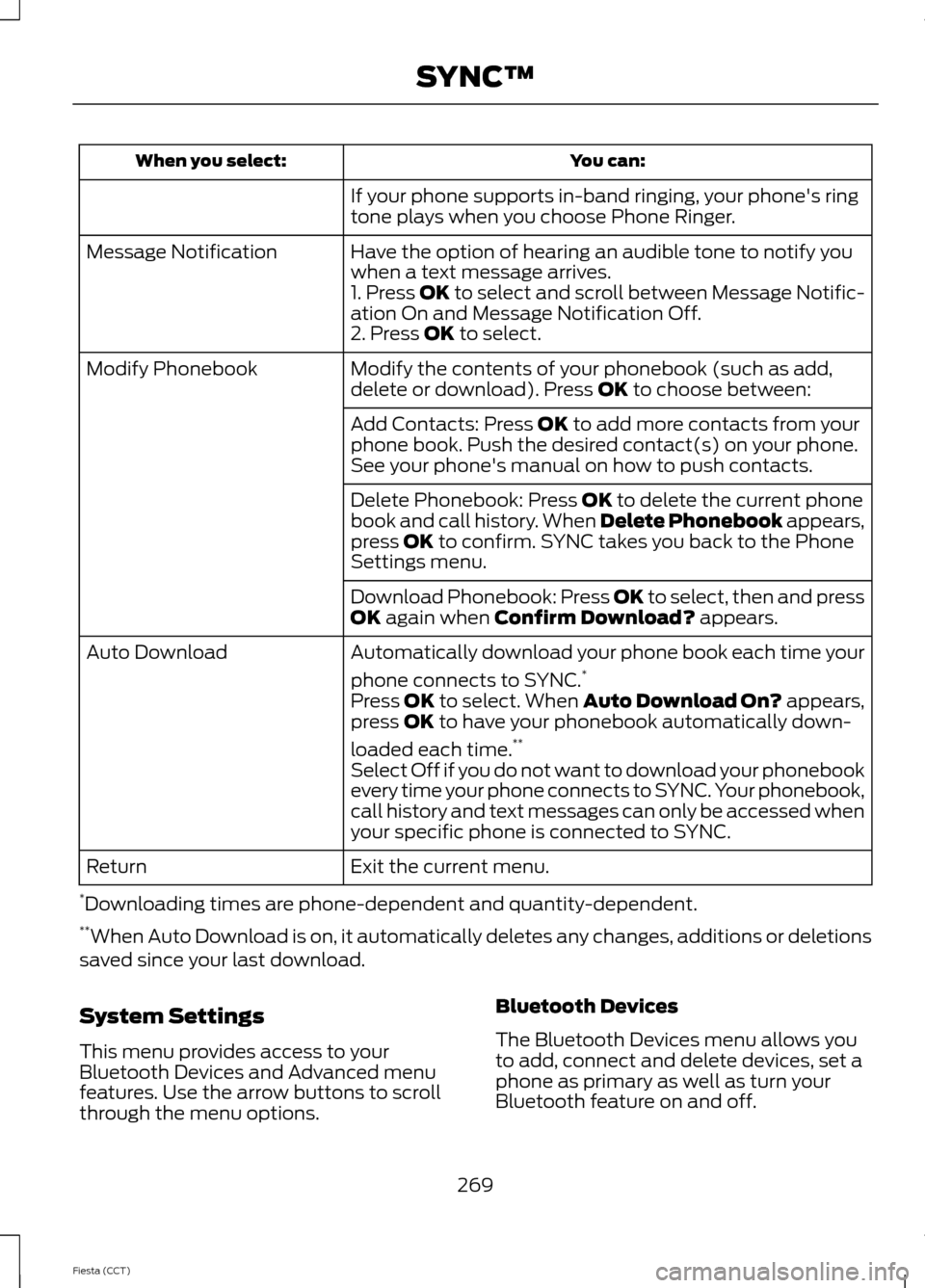
You can:
When you select:
If your phone supports in-band ringing, your phone's ring
tone plays when you choose Phone Ringer.
Have the option of hearing an audible tone to notify you
when a text message arrives.
Message Notification
1. Press OK to select and scroll between Message Notific-
ation On and Message Notification Off.
2. Press OK to select.
Modify the contents of your phonebook (such as add,
delete or download). Press
OK to choose between:
Modify Phonebook
Add Contacts: Press
OK to add more contacts from your
phone book. Push the desired contact(s) on your phone.
See your phone's manual on how to push contacts.
Delete Phonebook: Press
OK to delete the current phone
book and call history. When Delete Phonebook appears,
press
OK to confirm. SYNC takes you back to the Phone
Settings menu.
Download Phonebook: Press OK to select, then and press
OK
again when Confirm Download? appears.
Automatically download your phone book each time your
phone connects to SYNC. *
Auto Download
Press
OK to select. When Auto Download On? appears,
press OK to have your phonebook automatically down-
loaded each time. **
Select Off if you do not want to download your phonebook
every time your phone connects to SYNC. Your phonebook,
call history and text messages can only be accessed when
your specific phone is connected to SYNC.
Exit the current menu.
Return
* Downloading times are phone-dependent and quantity-dependent.
** When Auto Download is on, it automatically deletes any changes, additions or deletions
saved since your last download.
System Settings
This menu provides access to your
Bluetooth Devices and Advanced menu
features. Use the arrow buttons to scroll
through the menu options. Bluetooth Devices
The Bluetooth Devices menu allows you
to add, connect and delete devices, set a
phone as primary as well as turn your
Bluetooth feature on and off.
269
Fiesta (CCT) SYNC™
Page 313 of 396
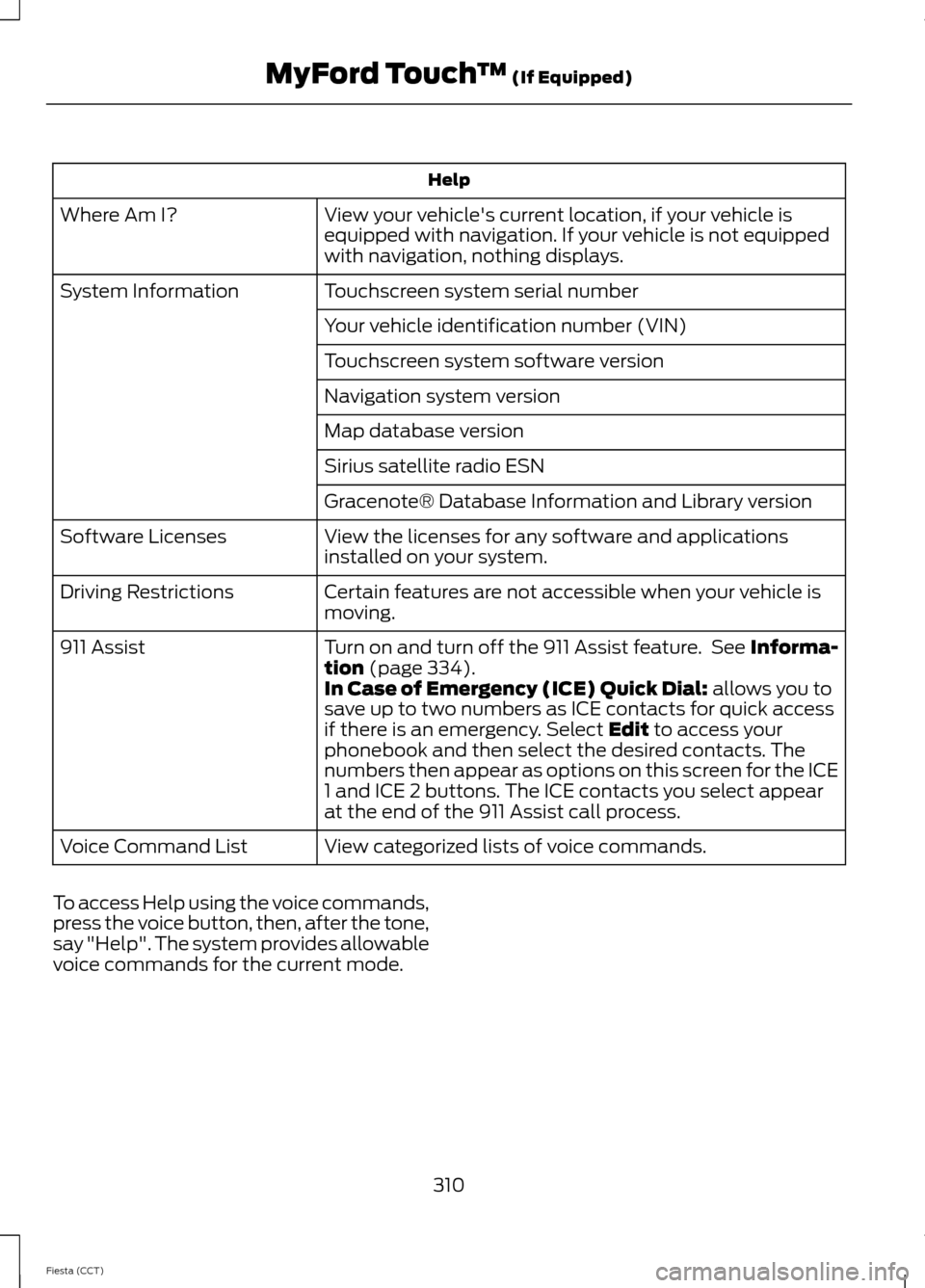
Help
View your vehicle's current location, if your vehicle is
equipped with navigation. If your vehicle is not equipped
with navigation, nothing displays.
Where Am I?
Touchscreen system serial number
System Information
Your vehicle identification number (VIN)
Touchscreen system software version
Navigation system version
Map database version
Sirius satellite radio ESN
Gracenote® Database Information and Library version
View the licenses for any software and applications
installed on your system.
Software Licenses
Certain features are not accessible when your vehicle is
moving.
Driving Restrictions
Turn on and turn off the 911 Assist feature. See Informa-
tion (page 334).
911 Assist
In Case of Emergency (ICE) Quick Dial: allows you to
save up to two numbers as ICE contacts for quick access
if there is an emergency. Select
Edit to access your
phonebook and then select the desired contacts. The
numbers then appear as options on this screen for the ICE
1 and ICE 2 buttons. The ICE contacts you select appear
at the end of the 911 Assist call process.
View categorized lists of voice commands.
Voice Command List
To access Help using the voice commands,
press the voice button, then, after the tone,
say "Help". The system provides allowable
voice commands for the current mode.
310
Fiesta (CCT) MyFord Touch
™
(If Equipped)