engine FORD FIESTA 2014 6.G User Guide
[x] Cancel search | Manufacturer: FORD, Model Year: 2014, Model line: FIESTA, Model: FORD FIESTA 2014 6.GPages: 396, PDF Size: 5.58 MB
Page 56 of 396
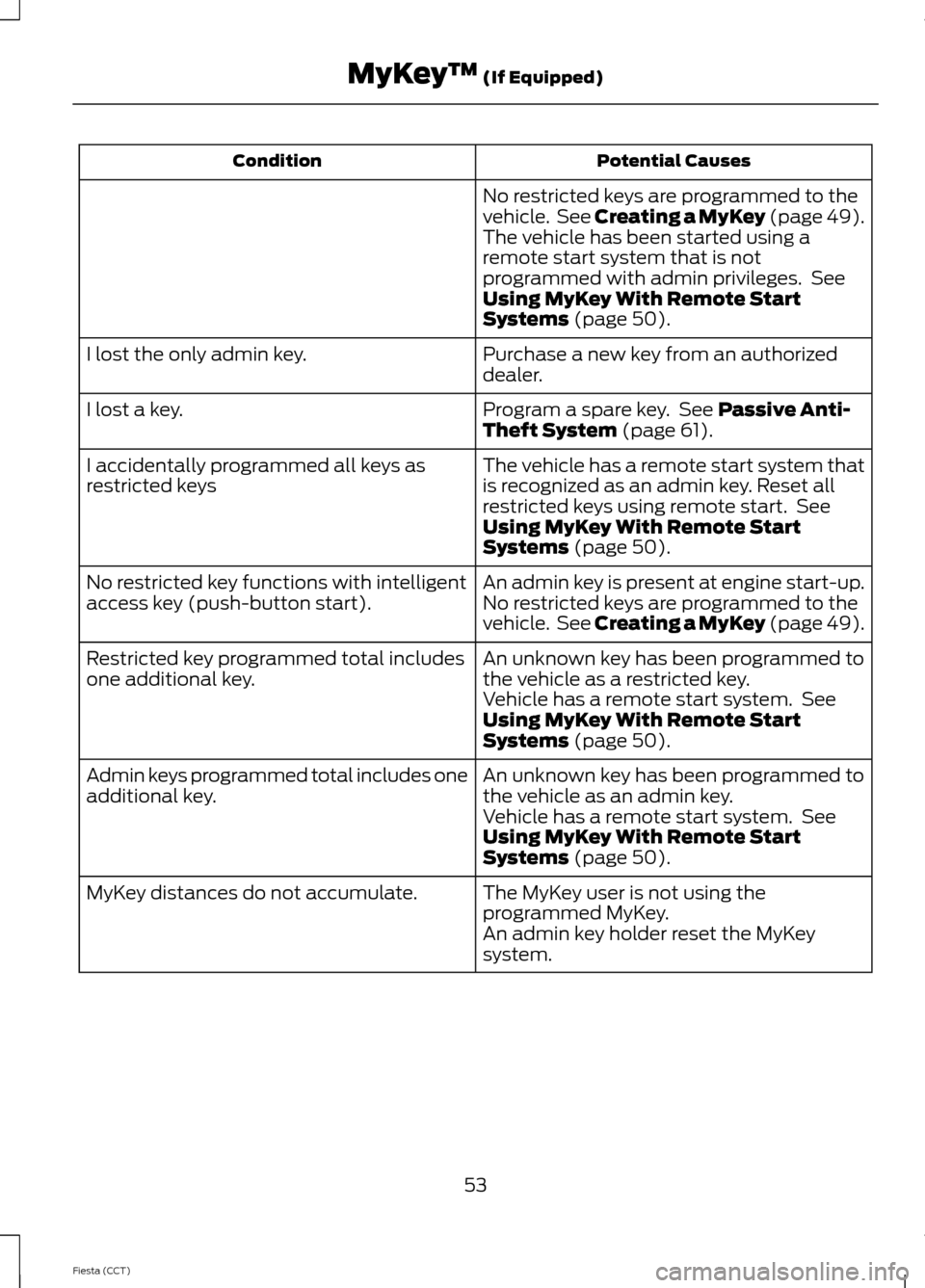
Potential Causes
Condition
No restricted keys are programmed to the
vehicle. See Creating a MyKey (page 49).
The vehicle has been started using a
remote start system that is not
programmed with admin privileges. See
Using MyKey With Remote Start
Systems (page 50).
Purchase a new key from an authorized
dealer.
I lost the only admin key.
Program a spare key. See
Passive Anti-
Theft System (page 61).
I lost a key.
The vehicle has a remote start system that
is recognized as an admin key. Reset all
restricted keys using remote start. See
Using MyKey With Remote Start
Systems
(page 50).
I accidentally programmed all keys as
restricted keys
An admin key is present at engine start-up.
No restricted key functions with intelligent
access key (push-button start). No restricted keys are programmed to the
vehicle. See Creating a MyKey (page 49).
An unknown key has been programmed to
the vehicle as a restricted key.
Restricted key programmed total includes
one additional key.
Vehicle has a remote start system. See
Using MyKey With Remote Start
Systems
(page 50).
An unknown key has been programmed to
the vehicle as an admin key.
Admin keys programmed total includes one
additional key.
Vehicle has a remote start system. See
Using MyKey With Remote Start
Systems
(page 50).
The MyKey user is not using the
programmed MyKey.
MyKey distances do not accumulate.
An admin key holder reset the MyKey
system.
53
Fiesta (CCT) MyKey
™
(If Equipped)
Page 57 of 396
LOCKING AND UNLOCKING
Remote Control
The remote control can be used any time
your vehicle is not running.
Unlocking the Doors
Note:
You can unlock the driver's door with
the key. Use the key when the remote
control is not functioning.
Note: When you lock your vehicle for
several weeks, the remote control will be
switched off. Your vehicle must be unlocked
and the engine started using the key.
Unlocking and starting your vehicle once will
enable the remote control.
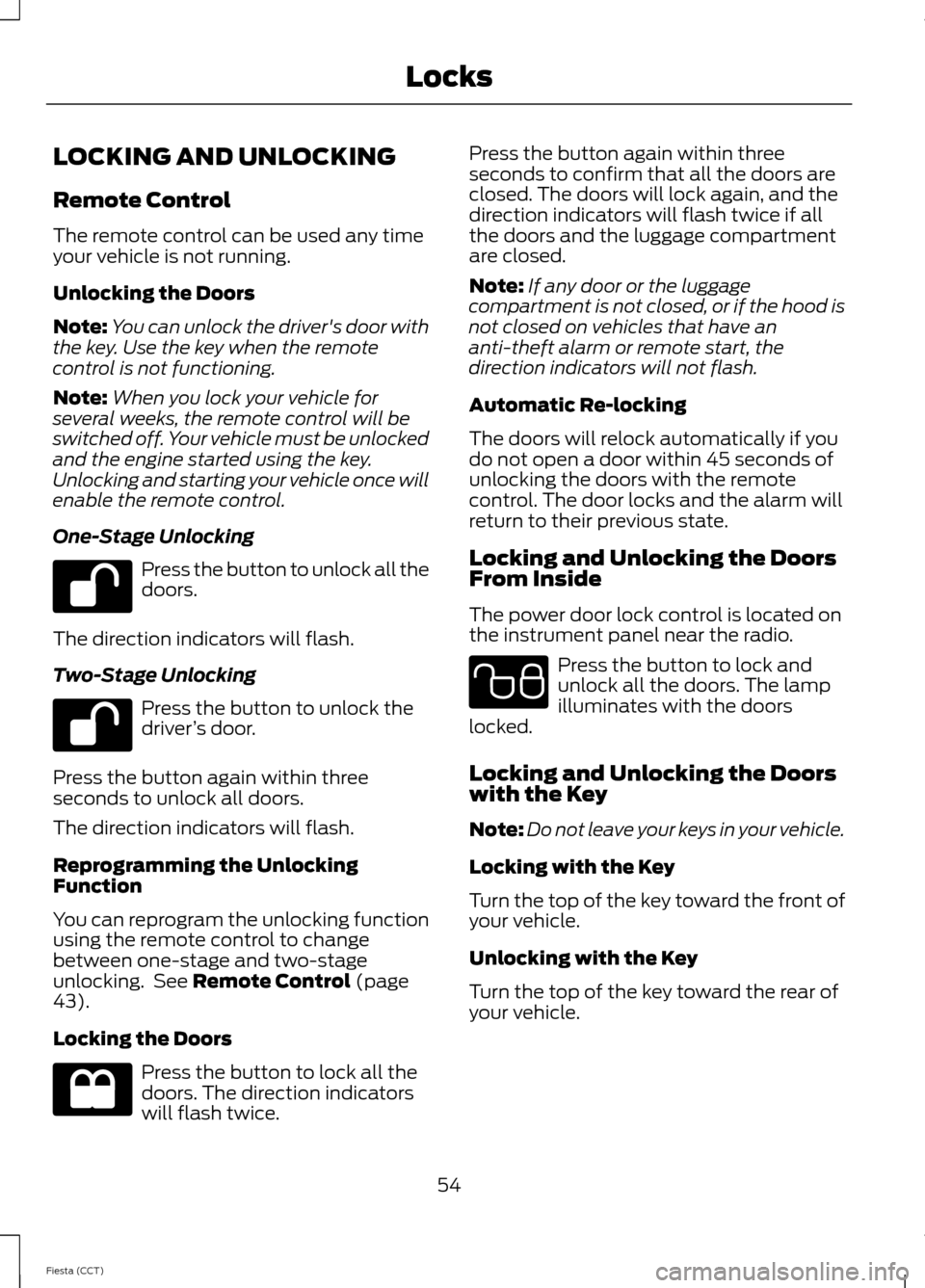
One-Stage Unlocking Press the button to unlock all the
doors.
The direction indicators will flash.
Two-Stage Unlocking Press the button to unlock the
driver
’s door.
Press the button again within three
seconds to unlock all doors.
The direction indicators will flash.
Reprogramming the Unlocking
Function
You can reprogram the unlocking function
using the remote control to change
between one-stage and two-stage
unlocking. See Remote Control (page
43).
Locking the Doors Press the button to lock all the
doors. The direction indicators
will flash twice. Press the button again within three
seconds to confirm that all the doors are
closed. The doors will lock again, and the
direction indicators will flash twice if all
the doors and the luggage compartment
are closed.
Note:
If any door or the luggage
compartment is not closed, or if the hood is
not closed on vehicles that have an
anti-theft alarm or remote start, the
direction indicators will not flash.
Automatic Re-locking
The doors will relock automatically if you
do not open a door within 45 seconds of
unlocking the doors with the remote
control. The door locks and the alarm will
return to their previous state.
Locking and Unlocking the Doors
From Inside
The power door lock control is located on
the instrument panel near the radio. Press the button to lock and
unlock all the doors. The lamp
illuminates with the doors
locked.
Locking and Unlocking the Doors
with the Key
Note: Do not leave your keys in your vehicle.
Locking with the Key
Turn the top of the key toward the front of
your vehicle.
Unlocking with the Key
Turn the top of the key toward the rear of
your vehicle.
54
Fiesta (CCT) Locks E102566
Page 62 of 396
Liftgate
Note:
The liftgate cannot be closed and
will pop back up if the passive key is located
inside the luggage compartment with the
doors locked.
Note: If a second valid passive key is
located within the liftgate detection range,
the liftgate can be closed.
Unlocking Your Vehicle
Note: When your vehicle remains locked
for longer than three days, the system will
enter an energy-saving mode. This is to
prevent your vehicle battery running out of
charge. When your vehicle is unlocked while
in this mode, the reaction time of the system
may be a little longer than normal. To exit
the energy-saving mode, unlock your
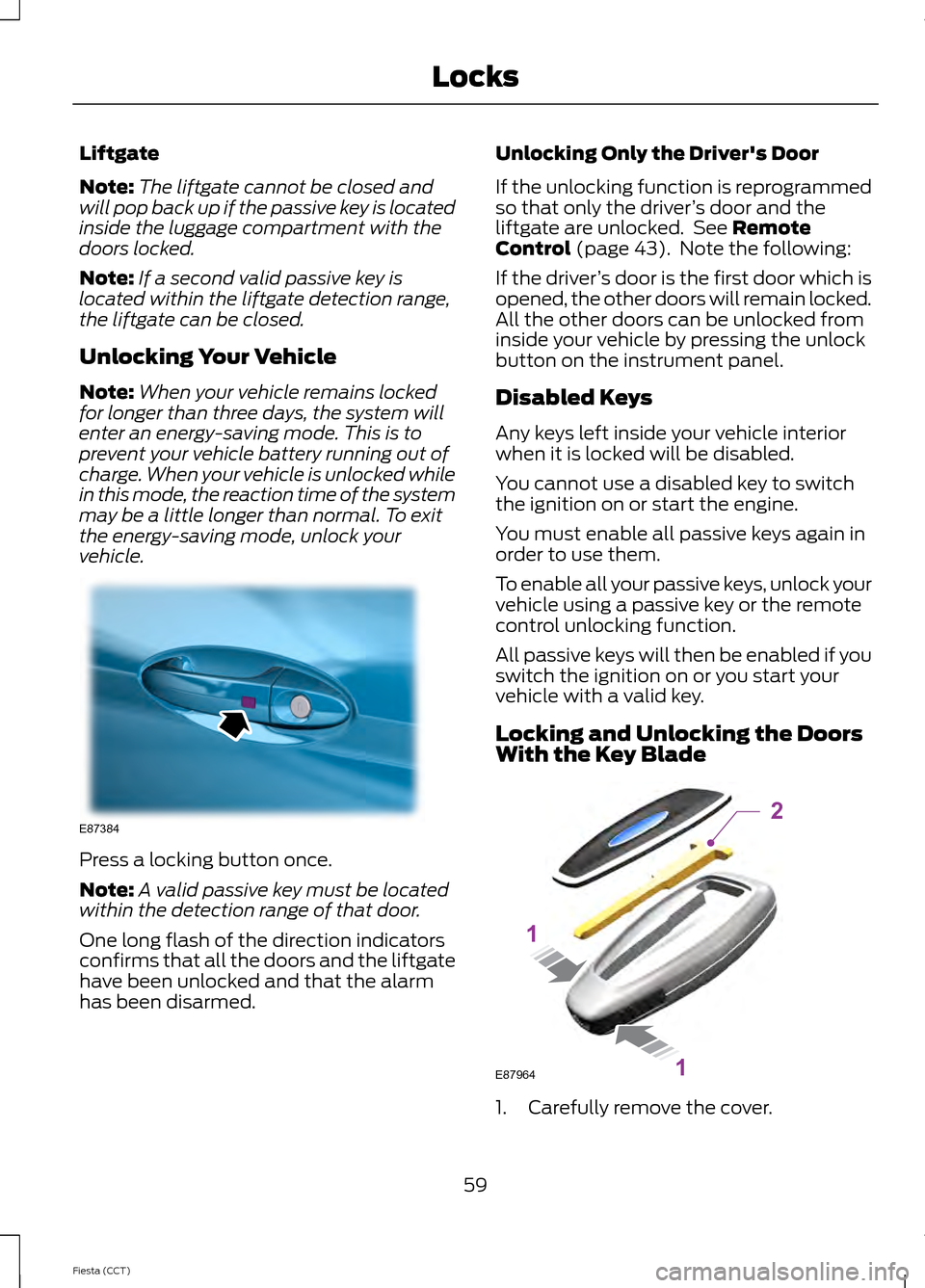
vehicle. Press a locking button once.
Note:
A valid passive key must be located
within the detection range of that door.
One long flash of the direction indicators
confirms that all the doors and the liftgate
have been unlocked and that the alarm
has been disarmed. Unlocking Only the Driver's Door
If the unlocking function is reprogrammed
so that only the driver
’s door and the
liftgate are unlocked. See Remote
Control (page 43). Note the following:
If the driver ’s door is the first door which is
opened, the other doors will remain locked.
All the other doors can be unlocked from
inside your vehicle by pressing the unlock
button on the instrument panel.
Disabled Keys
Any keys left inside your vehicle interior
when it is locked will be disabled.
You cannot use a disabled key to switch
the ignition on or start the engine.
You must enable all passive keys again in
order to use them.
To enable all your passive keys, unlock your
vehicle using a passive key or the remote
control unlocking function.
All passive keys will then be enabled if you
switch the ignition on or you start your
vehicle with a valid key.
Locking and Unlocking the Doors
With the Key Blade 1. Carefully remove the cover.
59
Fiesta (CCT) LocksE87384 E87964
2
1
1
Page 64 of 396
PASSIVE ANTI-THEFT
SYSTEM
Note:
The system is not compatible with
non-Ford aftermarket remote start systems.
Use of these systems may result in vehicle
starting problems and a loss of security
protection.
Note: Metallic objects, electronic devices
or a second coded key on the same key
chain may cause vehicle starting problems
if they are too close to the key when starting
the engine. Prevent these objects from
touching the coded key while starting the
engine. Switch the ignition off, move all
objects on the key chain away from the
coded key and restart the engine if a
problem occurs.
Note: Do not leave a duplicate coded key
in the vehicle. Always take your keys and
lock all doors when leaving the vehicle.
SecuriLock®
The system is an engine immobilization
system. It is designed to help prevent the
engine from being started unless a coded
key programmed to your vehicle is used.
Using the wrong key may prevent the
engine from starting. A message may
appear in the information display.
If you are unable to start the engine with a
correctly coded key, a malfunction has
happened and a message may appear in
the information display.
Automatic Arming
The vehicle arms immediately after you
switch the ignition off.
Automatic Disarming
Switching the ignition on with a coded key
disarms the vehicle. Replacement Keys
Note:
Your vehicle comes equipped with
two integrated keyhead transmitters or two
intelligent access keys.
The integrated keyhead transmitter
functions as a programmed ignition key
that operates all the locks and starts the
vehicle, as well as a remote control.
The intelligent access key functions as a
programmed key that operates the driver
door lock and activates the intelligent
access with push button start system, as
well as a remote control.
If your programmed transmitters or
standard SecuriLock coded keys
(integrated keyhead transmitters only) are
lost or stolen and you do not have an extra
coded key, you will need to have your
vehicle towed to an authorized dealer. You
need to erase the key codes from your
vehicle and program new coded keys.
Store an extra programmed key away from
the vehicle in a safe place to help prevent
any inconveniences. See your authorized
dealer to purchase additional spare or
replacement keys.
Programming a Spare Integrated
Keyhead Transmitter
Note: You can program a maximum of eight
coded keys to your vehicle. All eight can be
integrated keyhead transmitters.
You can program your own integrated
keyhead transmitter or standard
SecuriLock coded keys to your vehicle. This
procedure will program both the engine
immobilizer keycode and the remote entry
portion of the remote control to your
vehicle
Only use integrated keyhead transmitters
or standard SecuriLock keys.
61
Fiesta (CCT) Security
Page 65 of 396
You must have two previously
programmed coded keys and the new
unprogrammed key readily accessible. See
your authorized dealer to have the spare
key programmed if two previously
programmed coded keys are not available.
Read and understand the entire procedure
before you begin.
1.
Insert the first previously programmed
coded key into the ignition.
2. Switch the ignition from off to on. Keep
the ignition on for at least three
seconds, but no more than 10 seconds.
3. Switch the ignition off and remove the
first coded key from the ignition.
4. After three seconds but within 10 seconds of switching the ignition off,
insert the second previously coded key
into the ignition.
5. Switch the ignition from off to on. Keep
the ignition on for at least three
seconds, but no more than 10 seconds.
6. Switch the ignition off and remove the
second previously programmed coded
key from the ignition.
7. After three seconds but within 10 seconds of switching the ignition off
and removing the previously
programmed coded key, insert the new
unprogrammed key into the ignition.
8. Switch the ignition from off to on. Keep
the ignition on for at least six seconds.
9. Remove the newly programmed coded
key from the ignition.
If the key has been successfully
programmed it will start the engine and
operate the remote entry system (if the
new key is an integrated keyhead
transmitter).
If programming was not successful, wait
10 seconds and repeat Steps 1 through 8.
If you are still unsuccessful, take your
vehicle to your authorized dealer. Programming a Spare Intelligent
Access Key
See your authorized dealer to have
additional keys programmed to your
vehicle.
ANTI-THEFT ALARM
Alarm System
The perimeter alarm is a deterrent against
unauthorized access to your vehicle
through the doors and the hood. It also
protects the audio unit.
Triggering the Alarm
Once armed, the alarm is triggered in any
of the following ways:
•
If someone opens a door, the liftgate
or the hood without a valid key or
remote control.
• If someone removes the audio or
navigation system.
• If you switch the ignition on without a
valid key.
If the alarm is triggered, the alarm horn will
sound for 30 seconds and the hazard
warning flasher will flash for five minutes.
Any further attempts to perform one of the
above will trigger the alarm again.
Arming the Alarm
To arm the alarm, lock your vehicle. See
Locks (page 54).
Disarming the Alarm
Vehicles Without Keyless Entry
Disarm and silence the alarm by unlocking
the doors with the key and switching the
ignition on with a correctly coded key or
unlocking the doors with the remote
control.
62
Fiesta (CCT) Security
Page 74 of 396
INTERIOR LAMPS
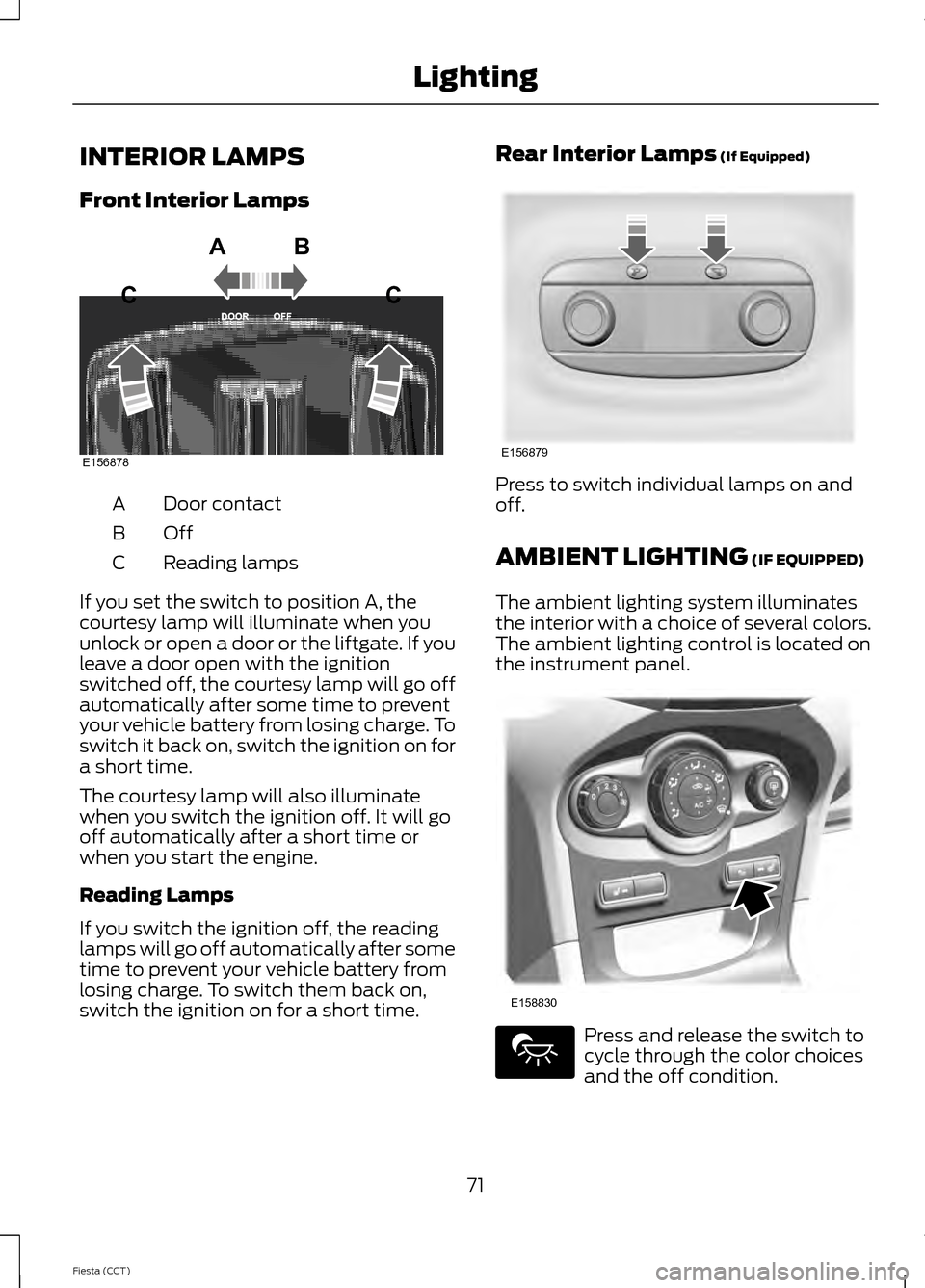
Front Interior Lamps
Door contact
A
OffB
Reading lamps
C
If you set the switch to position A, the
courtesy lamp will illuminate when you
unlock or open a door or the liftgate. If you
leave a door open with the ignition
switched off, the courtesy lamp will go off
automatically after some time to prevent
your vehicle battery from losing charge. To
switch it back on, switch the ignition on for
a short time.
The courtesy lamp will also illuminate
when you switch the ignition off. It will go
off automatically after a short time or
when you start the engine.
Reading Lamps
If you switch the ignition off, the reading
lamps will go off automatically after some
time to prevent your vehicle battery from
losing charge. To switch them back on,
switch the ignition on for a short time. Rear Interior Lamps (If Equipped)
Press to switch individual lamps on and
off.
AMBIENT LIGHTING
(IF EQUIPPED)
The ambient lighting system illuminates
the interior with a choice of several colors.
The ambient lighting control is located on
the instrument panel. Press and release the switch to
cycle through the color choices
and the off condition.
71
Fiesta (CCT) LightingE156878
ABC
C E156879 E158830
Page 81 of 396
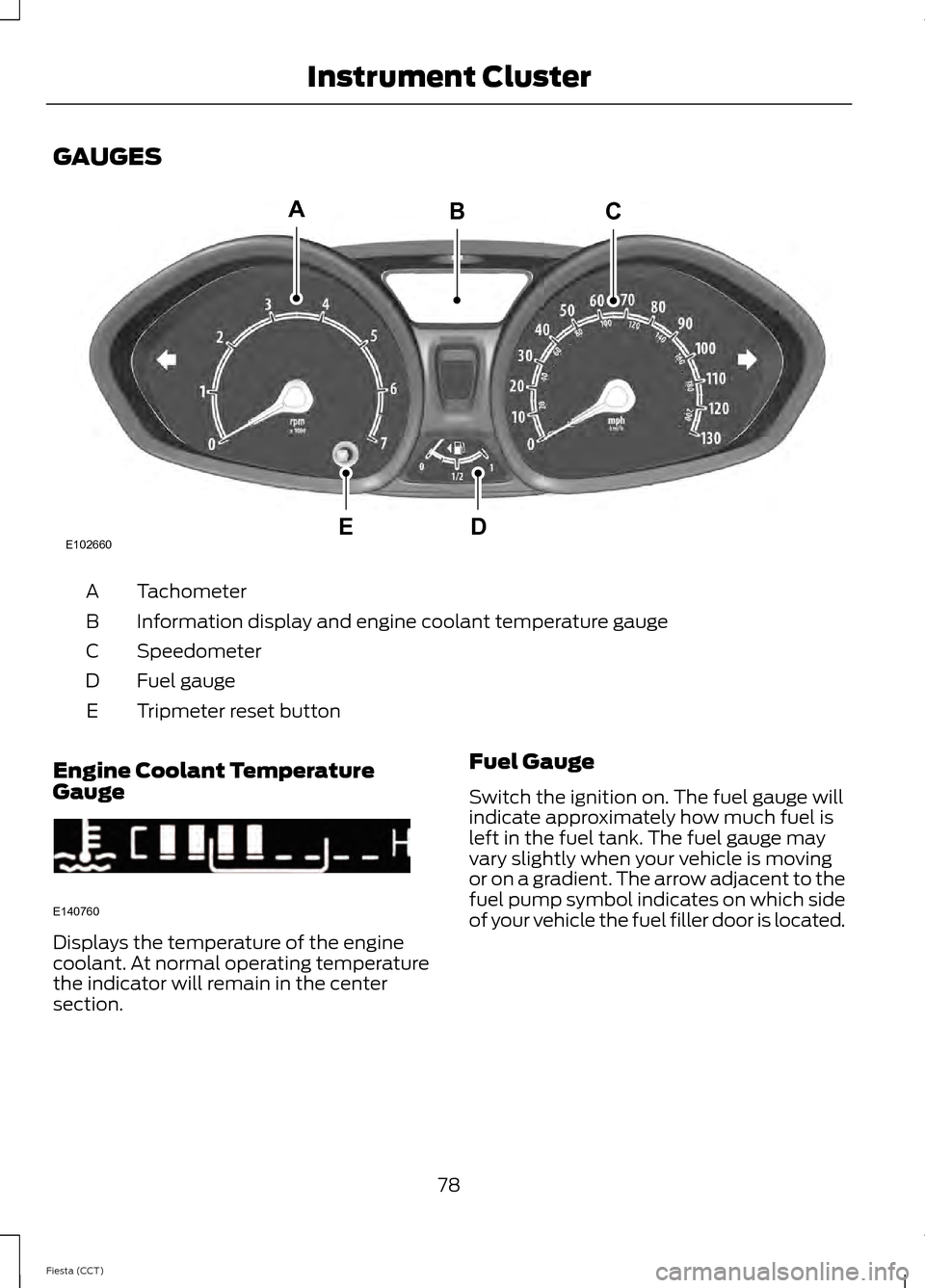
GAUGES
Tachometer
A
Information display and engine coolant temperature gauge
B
Speedometer
C
Fuel gauge
D
Tripmeter reset button
E
Engine Coolant Temperature
Gauge Displays the temperature of the engine
coolant. At normal operating temperature
the indicator will remain in the center
section.
Fuel Gauge
Switch the ignition on. The fuel gauge will
indicate approximately how much fuel is
left in the fuel tank. The fuel gauge may
vary slightly when your vehicle is moving
or on a gradient. The arrow adjacent to the
fuel pump symbol indicates on which side
of your vehicle the fuel filler door is located.
78
Fiesta (CCT) Instrument ClusterE102660
CA
DE
B E140760
Page 82 of 396
WARNING LAMPS AND
INDICATORS
The following warning lamps and
indicators will alert you to a vehicle
condition that may become serious. Some
lamps will illuminate when you start your
vehicle to make sure they work. If any
lamps remain on after starting your vehicle,
refer to the respective system warning
lamp for further information.
Note:
Some warning indicators appear in
the information display and function the
same as a warning lamp but do not display
when you start your vehicle.
Anti-lock Braking System Warning
Lamp If it illuminates when you are
driving, this indicates a
malfunction. You will continue
to have the normal braking system
(without anti-lock braking system) unless
the brake system warning lamp is also
illuminated. Have your vehicle checked by
an authorized dealer.
Brake System Warning Lamp It will illuminate when you
engage the parking brake with
the ignition on.
If it illuminates when you are driving, check
that the parking brake is not engaged. If
the parking brake is not engaged, this
indicates low brake fluid level or a brake
system malfunction. Have your vehicle
checked immediately by an authorized
dealer. WARNING
Driving your vehicle with the warning
lamp on is dangerous. A significant
decrease in braking performance
may occur. It will take you longer to stop
your vehicle. Have your vehicle checked by
your authorized dealer immediately. Driving
extended distances with the parking brake
engaged can cause brake failure and the
risk of personal injury. Cruise Control Indicator
It will illuminate when you switch
this feature on. See Using
Cruise Control (page 142).
Direction Indicator Illuminates when the left or right
turn signal or the hazard warning
flasher is turned on. If the
indicators stay on or flash faster, check for
a burnt out bulb. See
Changing a Bulb
(page 195).
Door Ajar Warning Lamp Illuminates when you switch the
ignition on and remains on if any
door, the hood or the liftgate is
not closed properly.
Engine Coolant Temperature
Warning Lamp WARNING
Do not resume your journey if it
illuminates despite the level being
correct. Have your vehicle checked
by a an authorized dealer immediately. 79
Fiesta (CCT) Instrument Cluster E138644 E71340
Page 83 of 396
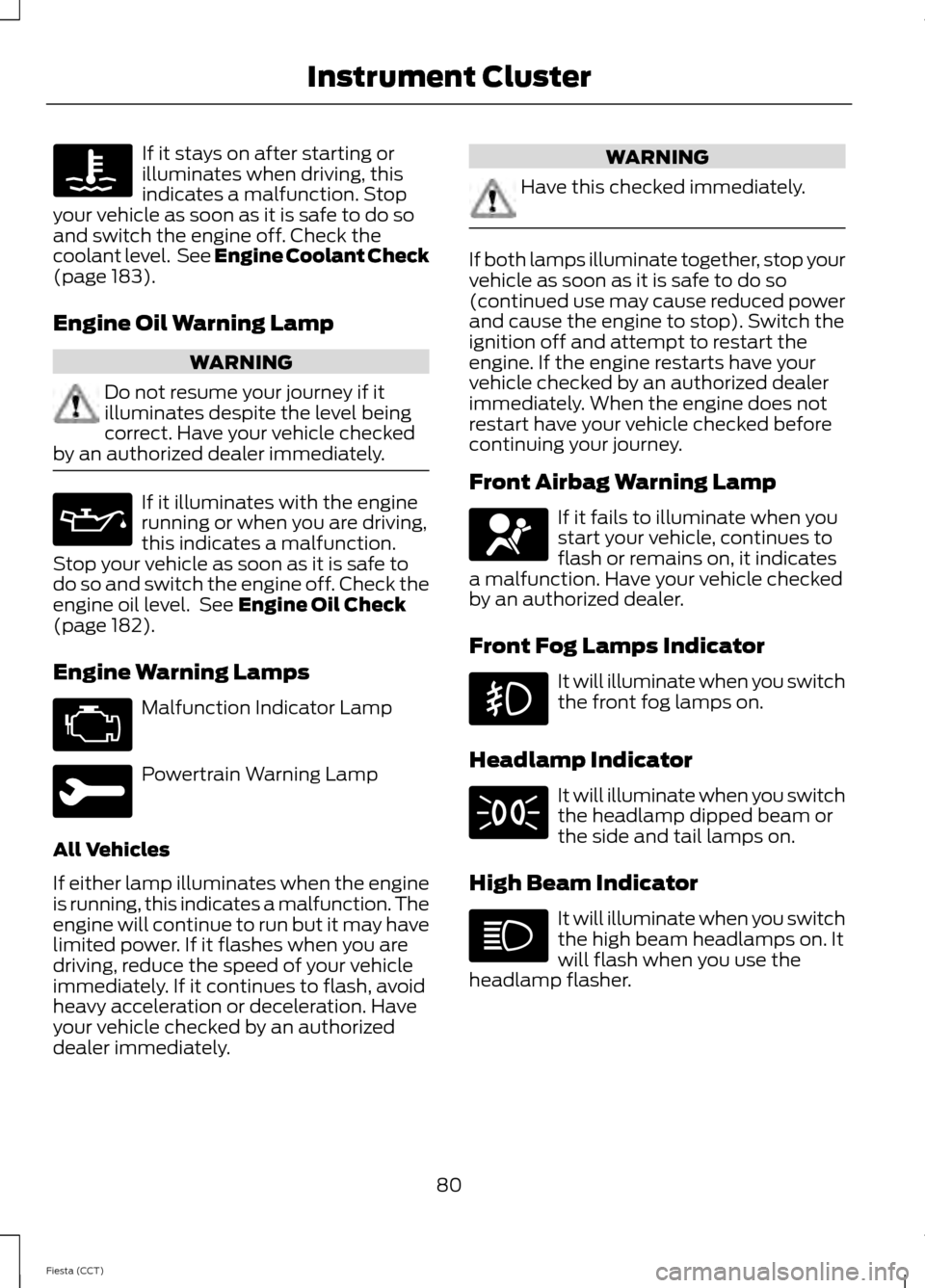
If it stays on after starting or
illuminates when driving, this
indicates a malfunction. Stop
your vehicle as soon as it is safe to do so
and switch the engine off. Check the
coolant level. See Engine Coolant Check
(page 183).
Engine Oil Warning Lamp WARNING
Do not resume your journey if it
illuminates despite the level being
correct. Have your vehicle checked
by an authorized dealer immediately. If it illuminates with the engine
running or when you are driving,
this indicates a malfunction.
Stop your vehicle as soon as it is safe to
do so and switch the engine off. Check the
engine oil level. See
Engine Oil Check
(page 182).
Engine Warning Lamps Malfunction Indicator Lamp
Powertrain Warning Lamp
All Vehicles
If either lamp illuminates when the engine
is running, this indicates a malfunction. The
engine will continue to run but it may have
limited power. If it flashes when you are
driving, reduce the speed of your vehicle
immediately. If it continues to flash, avoid
heavy acceleration or deceleration. Have
your vehicle checked by an authorized
dealer immediately. WARNING
Have this checked immediately.
If both lamps illuminate together, stop your
vehicle as soon as it is safe to do so
(continued use may cause reduced power
and cause the engine to stop). Switch the
ignition off and attempt to restart the
engine. If the engine restarts have your
vehicle checked by an authorized dealer
immediately. When the engine does not
restart have your vehicle checked before
continuing your journey.
Front Airbag Warning Lamp
If it fails to illuminate when you
start your vehicle, continues to
flash or remains on, it indicates
a malfunction. Have your vehicle checked
by an authorized dealer.
Front Fog Lamps Indicator It will illuminate when you switch
the front fog lamps on.
Headlamp Indicator It will illuminate when you switch
the headlamp dipped beam or
the side and tail lamps on.
High Beam Indicator It will illuminate when you switch
the high beam headlamps on. It
will flash when you use the
headlamp flasher.
80
Fiesta (CCT) Instrument Cluster
Page 84 of 396
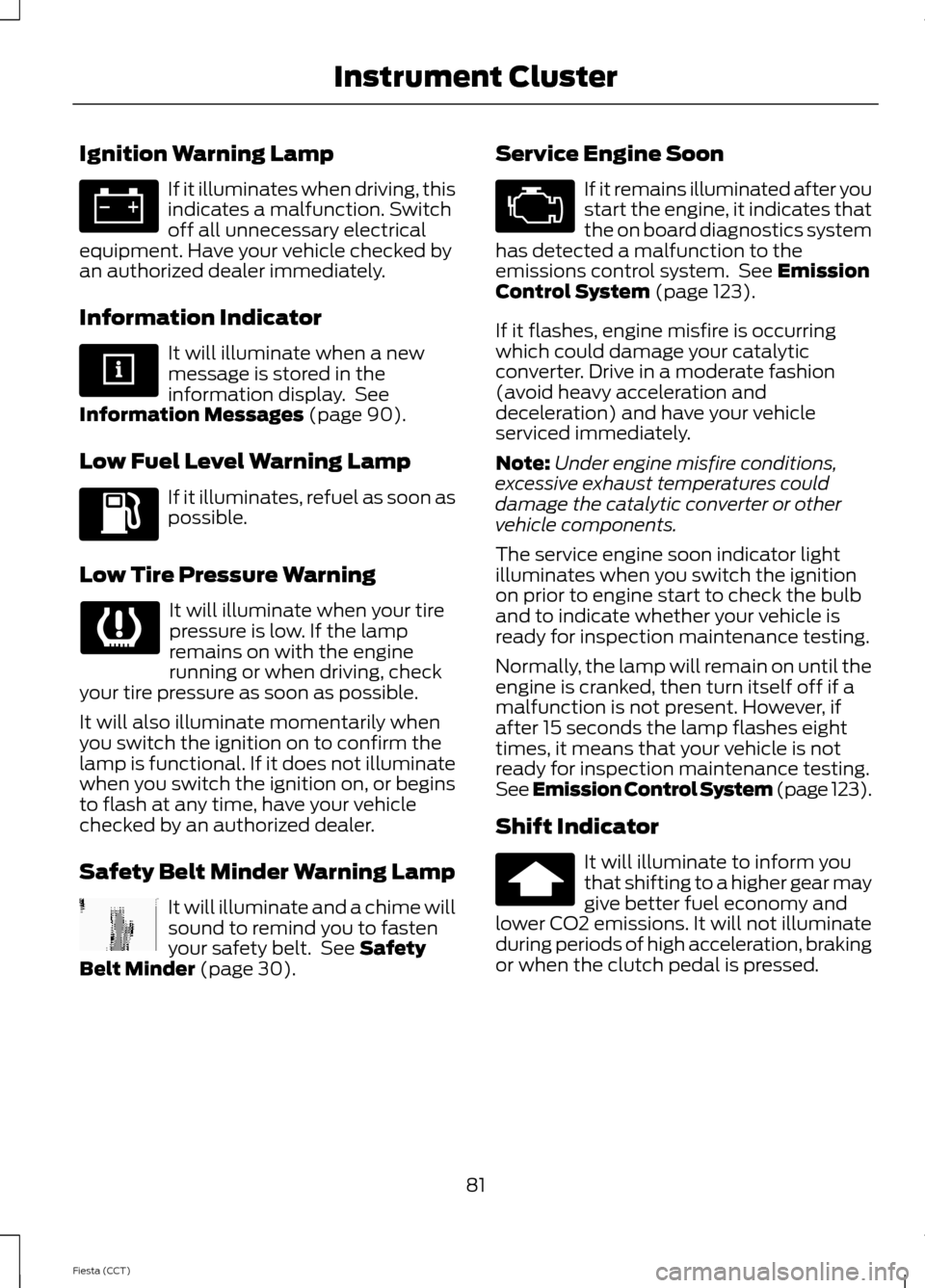
Ignition Warning Lamp
If it illuminates when driving, this
indicates a malfunction. Switch
off all unnecessary electrical
equipment. Have your vehicle checked by
an authorized dealer immediately.
Information Indicator It will illuminate when a new
message is stored in the
information display. See
Information Messages (page 90).
Low Fuel Level Warning Lamp If it illuminates, refuel as soon as
possible.
Low Tire Pressure Warning It will illuminate when your tire
pressure is low. If the lamp
remains on with the engine
running or when driving, check
your tire pressure as soon as possible.
It will also illuminate momentarily when
you switch the ignition on to confirm the
lamp is functional. If it does not illuminate
when you switch the ignition on, or begins
to flash at any time, have your vehicle
checked by an authorized dealer.
Safety Belt Minder Warning Lamp It will illuminate and a chime will
sound to remind you to fasten
your safety belt. See
Safety
Belt Minder (page 30). Service Engine Soon If it remains illuminated after you
start the engine, it indicates that
the on board diagnostics system
has detected a malfunction to the
emissions control system. See
Emission
Control System (page 123).
If it flashes, engine misfire is occurring
which could damage your catalytic
converter. Drive in a moderate fashion
(avoid heavy acceleration and
deceleration) and have your vehicle
serviced immediately.
Note: Under engine misfire conditions,
excessive exhaust temperatures could
damage the catalytic converter or other
vehicle components.
The service engine soon indicator light
illuminates when you switch the ignition
on prior to engine start to check the bulb
and to indicate whether your vehicle is
ready for inspection maintenance testing.
Normally, the lamp will remain on until the
engine is cranked, then turn itself off if a
malfunction is not present. However, if
after 15 seconds the lamp flashes eight
times, it means that your vehicle is not
ready for inspection maintenance testing.
See Emission Control System (page 123).
Shift Indicator It will illuminate to inform you
that shifting to a higher gear may
give better fuel economy and
lower CO2 emissions. It will not illuminate
during periods of high acceleration, braking
or when the clutch pedal is pressed.
81
Fiesta (CCT) Instrument Cluster