key FORD FIESTA 2014 6.G Owner's Manual
[x] Cancel search | Manufacturer: FORD, Model Year: 2014, Model line: FIESTA, Model: FORD FIESTA 2014 6.GPages: 396, PDF Size: 5.58 MB
Page 65 of 396
You must have two previously
programmed coded keys and the new
unprogrammed key readily accessible. See
your authorized dealer to have the spare
key programmed if two previously
programmed coded keys are not available.
Read and understand the entire procedure
before you begin.
1.
Insert the first previously programmed
coded key into the ignition.
2. Switch the ignition from off to on. Keep
the ignition on for at least three
seconds, but no more than 10 seconds.
3. Switch the ignition off and remove the
first coded key from the ignition.
4. After three seconds but within 10 seconds of switching the ignition off,
insert the second previously coded key
into the ignition.
5. Switch the ignition from off to on. Keep
the ignition on for at least three
seconds, but no more than 10 seconds.
6. Switch the ignition off and remove the
second previously programmed coded
key from the ignition.
7. After three seconds but within 10 seconds of switching the ignition off
and removing the previously
programmed coded key, insert the new
unprogrammed key into the ignition.
8. Switch the ignition from off to on. Keep
the ignition on for at least six seconds.
9. Remove the newly programmed coded
key from the ignition.
If the key has been successfully
programmed it will start the engine and
operate the remote entry system (if the
new key is an integrated keyhead
transmitter).
If programming was not successful, wait
10 seconds and repeat Steps 1 through 8.
If you are still unsuccessful, take your
vehicle to your authorized dealer. Programming a Spare Intelligent
Access Key
See your authorized dealer to have
additional keys programmed to your
vehicle.
ANTI-THEFT ALARM
Alarm System
The perimeter alarm is a deterrent against
unauthorized access to your vehicle
through the doors and the hood. It also
protects the audio unit.
Triggering the Alarm
Once armed, the alarm is triggered in any
of the following ways:
•
If someone opens a door, the liftgate
or the hood without a valid key or
remote control.
• If someone removes the audio or
navigation system.
• If you switch the ignition on without a
valid key.
If the alarm is triggered, the alarm horn will
sound for 30 seconds and the hazard
warning flasher will flash for five minutes.
Any further attempts to perform one of the
above will trigger the alarm again.
Arming the Alarm
To arm the alarm, lock your vehicle. See
Locks (page 54).
Disarming the Alarm
Vehicles Without Keyless Entry
Disarm and silence the alarm by unlocking
the doors with the key and switching the
ignition on with a correctly coded key or
unlocking the doors with the remote
control.
62
Fiesta (CCT) Security
Page 66 of 396
Vehicles with Keyless Entry
Note:
A valid passive key must be located
within the detection range of that door for
keyless entry. See Keyless Entry (page 58).
Disarm and silence the alarm by unlocking
the doors and switching the ignition on or
unlocking the doors with the remote
control.
63
Fiesta (CCT) Security
Page 78 of 396
Global Closing
Vehicles Without Keyless Entry
WARNING
Take care when using global closing.
In an emergency, press the lock or
unlock button immediately to stop.
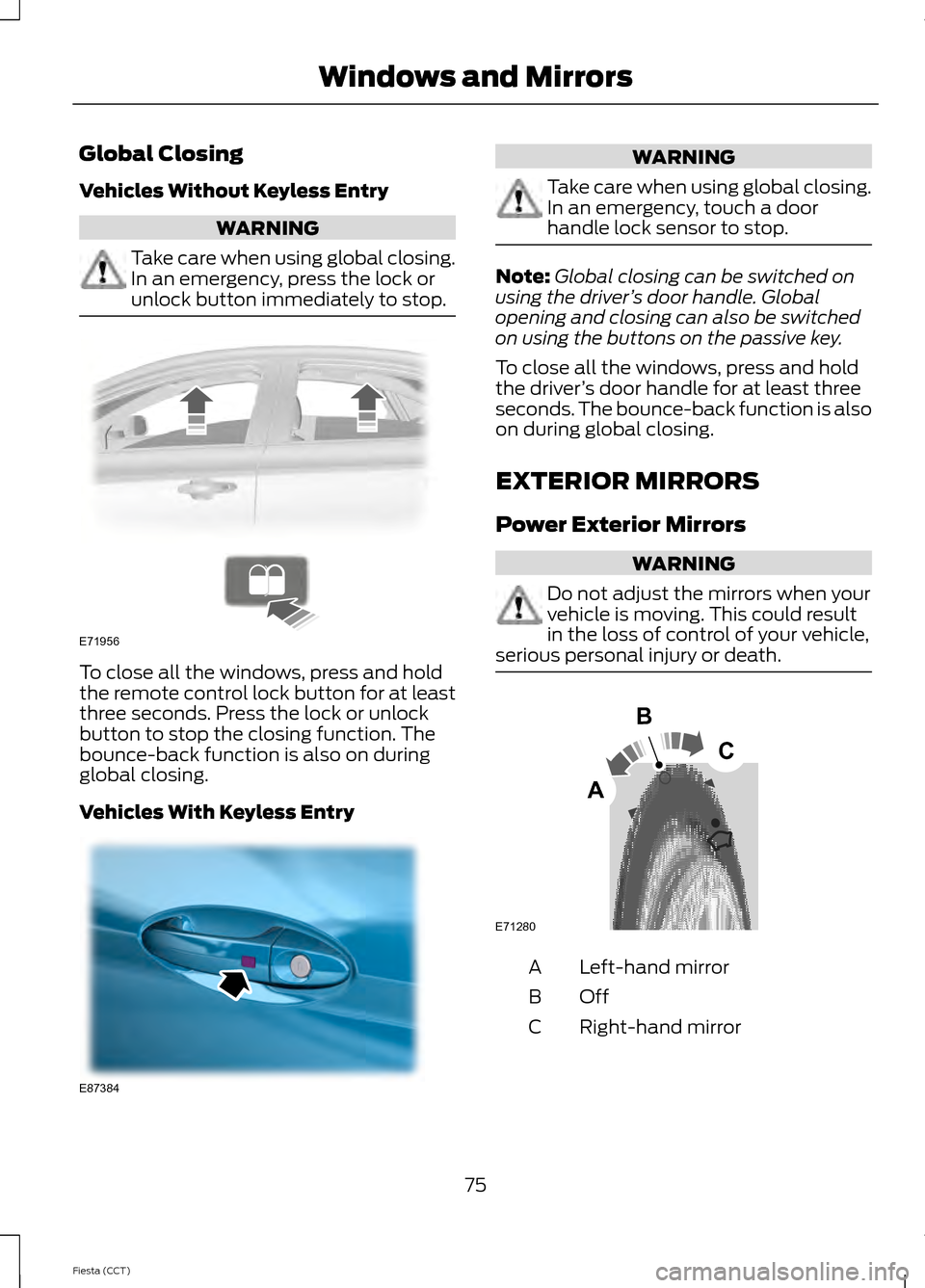
To close all the windows, press and hold
the remote control lock button for at least
three seconds. Press the lock or unlock
button to stop the closing function. The
bounce-back function is also on during
global closing.
Vehicles With Keyless Entry WARNING
Take care when using global closing.
In an emergency, touch a door
handle lock sensor to stop.
Note:
Global closing can be switched on
using the driver ’s door handle. Global
opening and closing can also be switched
on using the buttons on the passive key.
To close all the windows, press and hold
the driver ’s door handle for at least three
seconds. The bounce-back function is also
on during global closing.
EXTERIOR MIRRORS
Power Exterior Mirrors WARNING
Do not adjust the mirrors when your
vehicle is moving. This could result
in the loss of control of your vehicle,
serious personal injury or death. Left-hand mirror
A
OffB
Right-hand mirror
C
75
Fiesta (CCT) Windows and MirrorsE71956 E87384 E71280
B
C
A
Page 88 of 396
AUDIBLE WARNINGS AND
INDICATORS
Automatic Transmission
Sounds when you open the driver's door
and do not move the transmission selector
lever to position P.
Key Outside Car
Vehicles With Keyless System
Sounds when you close the door, the
engine is running and the system does not
detect a passive key inside your vehicle.
Headlamps On
Sounds when you remove the key from the
ignition and open the driver's door and you
have left the headlamps or parking lamps
on.
Low Fuel
A warning chime will sound when the
remaining fuel is less than approximately
1.3 gallons (6 liters). The distance to empty
displayed may vary depending on driving
style and road conditions.
Safety Belt Minder WARNINGS
The safety belt minder remains in
stand-by mode when the front safety
belts have been fastened. It will
sound if either safety belt is unfastened. Do not sit on top of a fastened safety
belt to prevent the safety belt minder
from coming on. The occupant
protection system will only provide
optimum protection when you use the
safety belt properly. Sounds when your vehicle speed exceeds
the pre-determined limit and the front
safety belts are unfastened. The chime will
stop after a period of time.
85
Fiesta (CCT) Instrument Cluster
Page 91 of 396
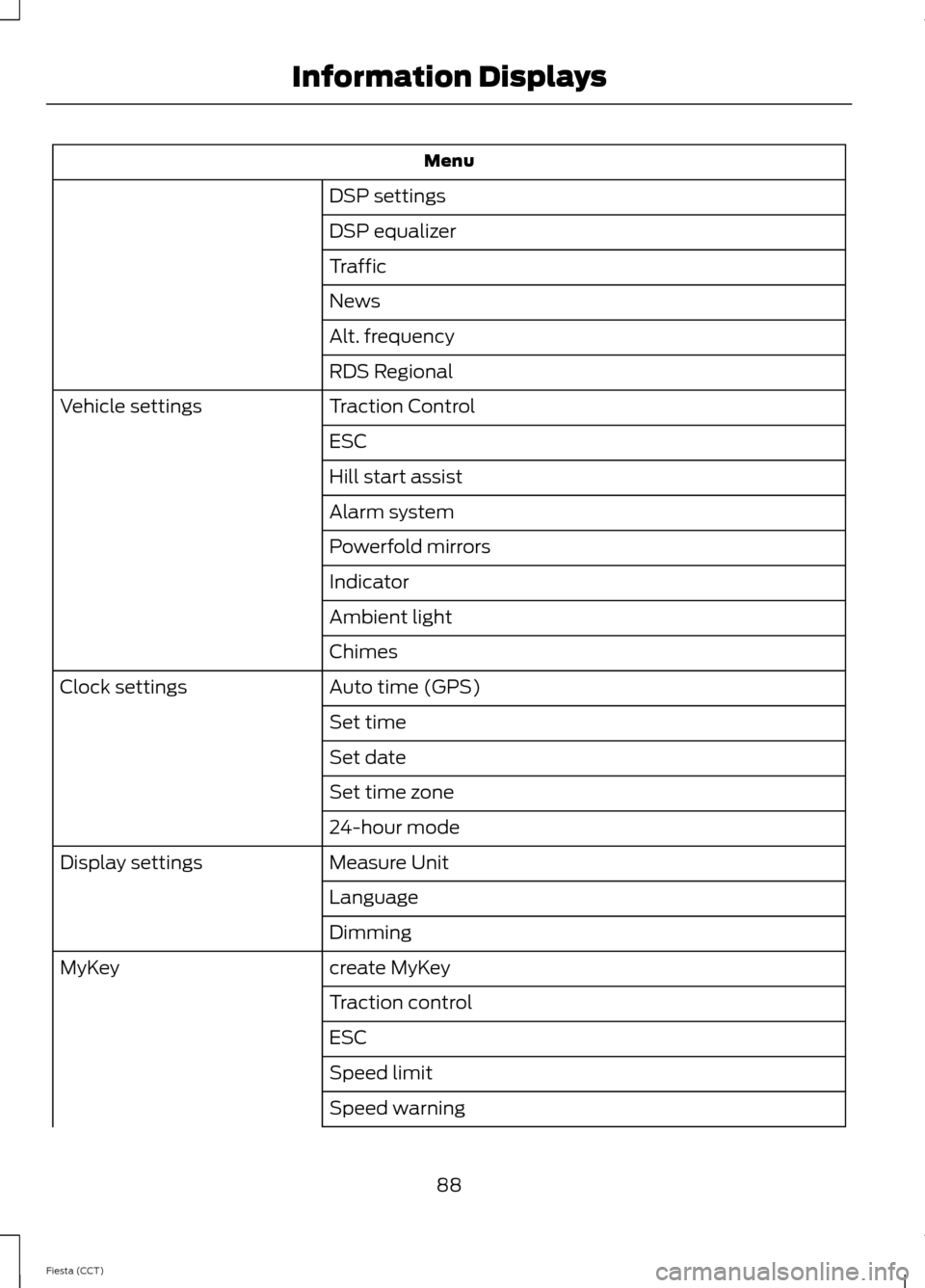
Menu
DSP settings
DSP equalizer
Traffic
News
Alt. frequency
RDS Regional
Traction Control
Vehicle settings
ESC
Hill start assist
Alarm system
Powerfold mirrors
Indicator
Ambient light
Chimes
Auto time (GPS)
Clock settings
Set time
Set date
Set time zone
24-hour mode
Measure Unit
Display settings
Language
Dimming
create MyKey
MyKey
Traction control
ESC
Speed limit
Speed warning
88
Fiesta (CCT) Information Displays
Page 92 of 396
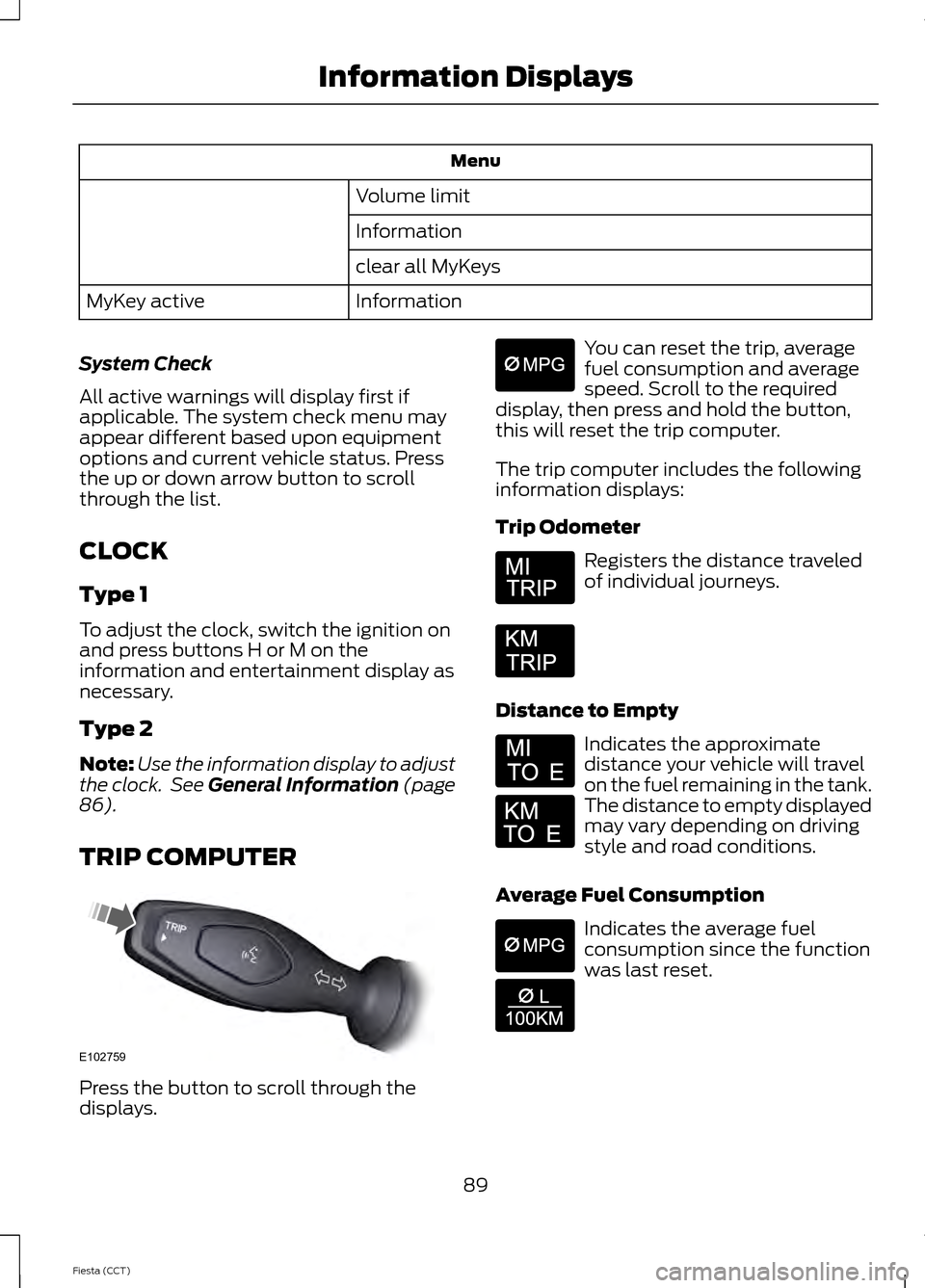
Menu
Volume limit
Information
clear all MyKeys
Information
MyKey active
System Check
All active warnings will display first if
applicable. The system check menu may
appear different based upon equipment
options and current vehicle status. Press
the up or down arrow button to scroll
through the list.
CLOCK
Type 1
To adjust the clock, switch the ignition on
and press buttons H or M on the
information and entertainment display as
necessary.
Type 2
Note: Use the information display to adjust
the clock. See General Information (page
86).
TRIP COMPUTER Press the button to scroll through the
displays. You can reset the trip, average
fuel consumption and average
speed. Scroll to the required
display, then press and hold the button,
this will reset the trip computer.
The trip computer includes the following
information displays:
Trip Odometer Registers the distance traveled
of individual journeys.
Distance to Empty Indicates the approximate
distance your vehicle will travel
on the fuel remaining in the tank.
The distance to empty displayed
may vary depending on driving
style and road conditions.
Average Fuel Consumption Indicates the average fuel
consumption since the function
was last reset.
89
Fiesta (CCT) Information DisplaysE102759 E164638E
Page 95 of 396
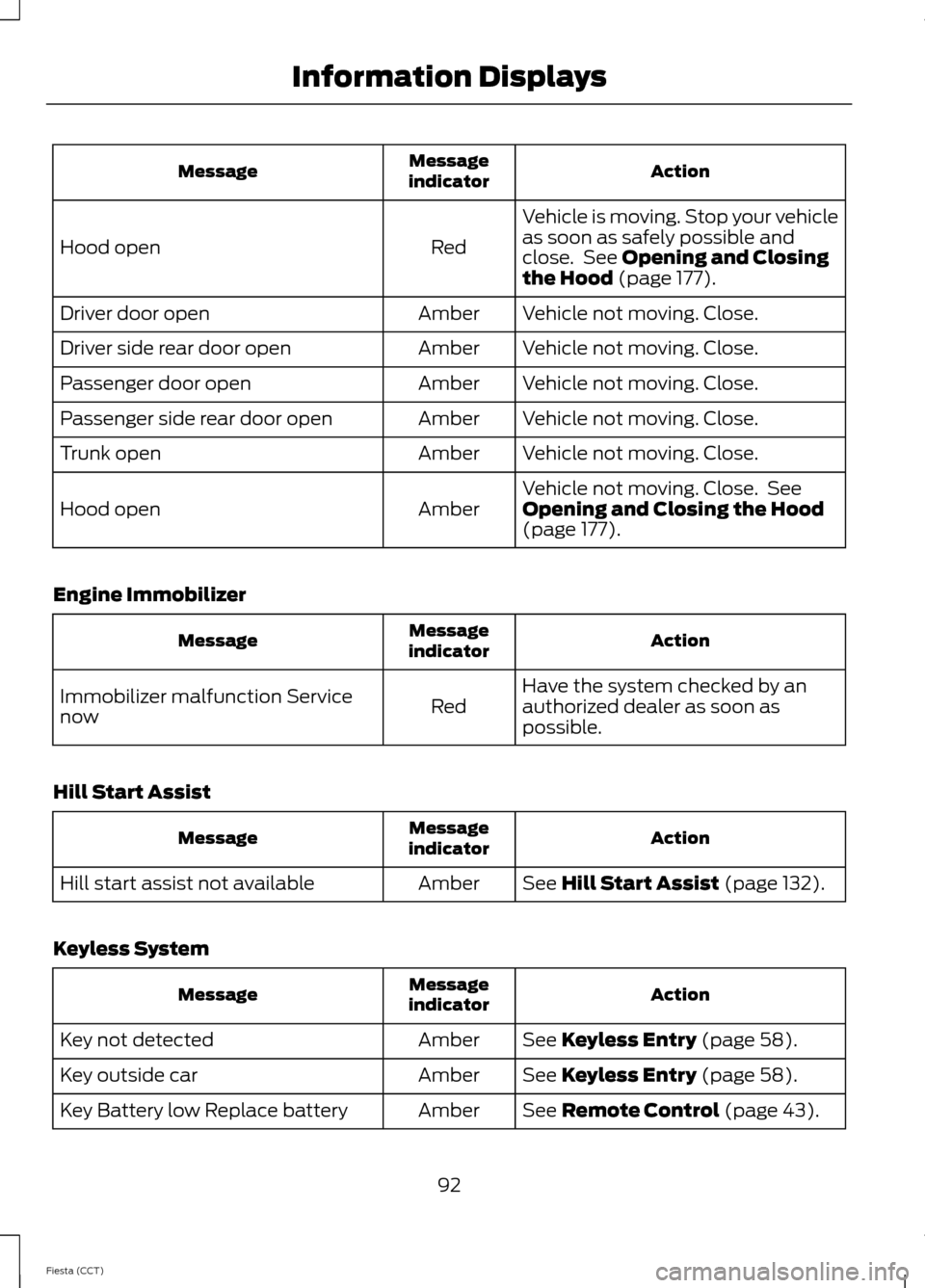
Action
Message
indicator
Message
Vehicle is moving. Stop your vehicle
as soon as safely possible and
close. See Opening and Closing
the Hood (page 177).
Red
Hood open
Vehicle not moving. Close.
Amber
Driver door open
Vehicle not moving. Close.
Amber
Driver side rear door open
Vehicle not moving. Close.
Amber
Passenger door open
Vehicle not moving. Close.
Amber
Passenger side rear door open
Vehicle not moving. Close.
Amber
Trunk open
Vehicle not moving. Close. See
Opening and Closing the Hood
(page
177).
Amber
Hood open
Engine Immobilizer Action
Message
indicator
Message
Have the system checked by an
authorized dealer as soon as
possible.
Red
Immobilizer malfunction Service
now
Hill Start Assist Action
Message
indicator
Message
See
Hill Start Assist (page 132).
Amber
Hill start assist not available
Keyless System Action
Message
indicator
Message
See
Keyless Entry (page 58).
Amber
Key not detected
See
Keyless Entry (page 58).
Amber
Key outside car
See
Remote Control (page 43).
Amber
Key Battery low Replace battery
92
Fiesta (CCT) Information Displays
Page 96 of 396
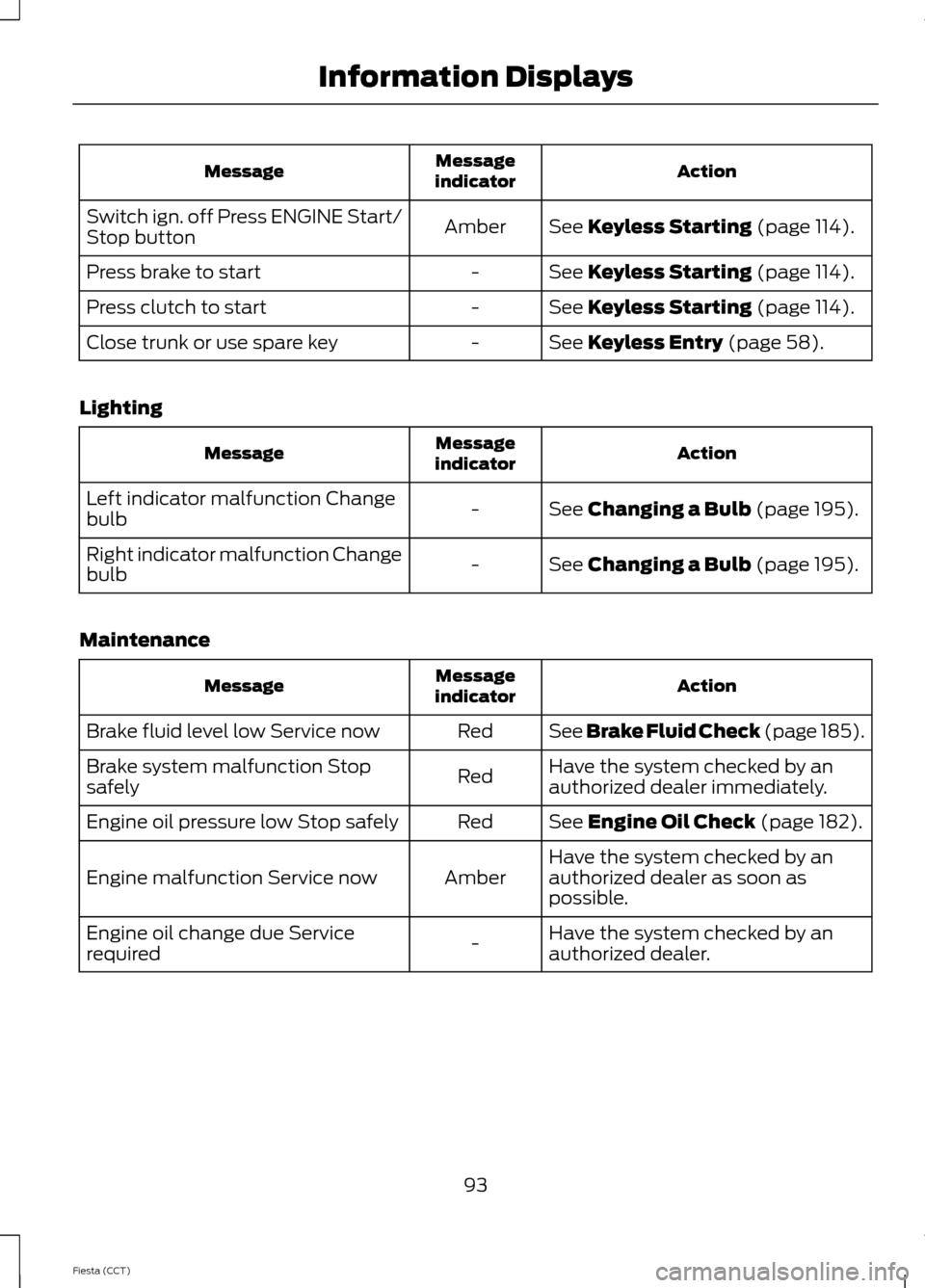
Action
Message
indicator
Message
See Keyless Starting (page 114).
Amber
Switch ign. off Press ENGINE Start/
Stop button
See
Keyless Starting (page 114).
-
Press brake to start
See
Keyless Starting (page 114).
-
Press clutch to start
See
Keyless Entry (page 58).
-
Close trunk or use spare key
Lighting Action
Message
indicator
Message
See
Changing a Bulb (page 195).
-
Left indicator malfunction Change
bulb
See
Changing a Bulb (page 195).
-
Right indicator malfunction Change
bulb
Maintenance Action
Message
indicator
Message
See Brake Fluid Check (page 185).
Red
Brake fluid level low Service now
Have the system checked by an
authorized dealer immediately.
Red
Brake system malfunction Stop
safely
See
Engine Oil Check (page 182).
Red
Engine oil pressure low Stop safely
Have the system checked by an
authorized dealer as soon as
possible.
Amber
Engine malfunction Service now
Have the system checked by an
authorized dealer.
-
Engine oil change due Service
required
93
Fiesta (CCT) Information Displays
Page 97 of 396
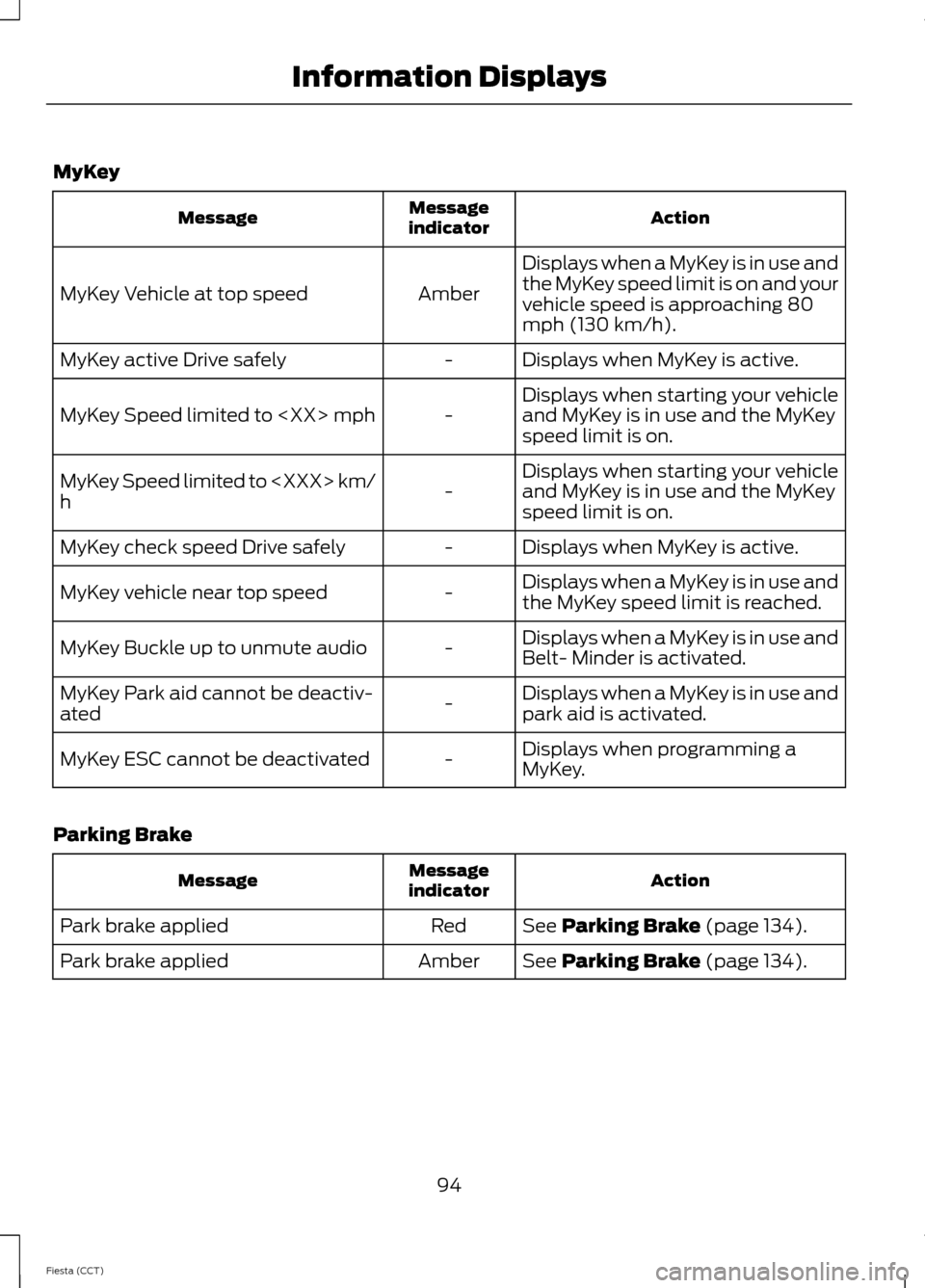
MyKey
Action
Message
indicator
Message
Displays when a MyKey is in use and
the MyKey speed limit is on and your
vehicle speed is approaching 80
mph (130 km/h).
Amber
MyKey Vehicle at top speed
Displays when MyKey is active.
-
MyKey active Drive safely
Displays when starting your vehicle
and MyKey is in use and the MyKey
speed limit is on.
-
MyKey Speed limited to
Displays when starting your vehicle
and MyKey is in use and the MyKey
speed limit is on.
-
MyKey Speed limited to
h
Displays when MyKey is active.
-
MyKey check speed Drive safely
Displays when a MyKey is in use and
the MyKey speed limit is reached.
-
MyKey vehicle near top speed
Displays when a MyKey is in use and
Belt- Minder is activated.
-
MyKey Buckle up to unmute audio
Displays when a MyKey is in use and
park aid is activated.
-
MyKey Park aid cannot be deactiv-
ated
Displays when programming a
MyKey.
-
MyKey ESC cannot be deactivated
Parking Brake Action
Message
indicator
Message
See Parking Brake (page 134).
Red
Park brake applied
See
Parking Brake (page 134).
Amber
Park brake applied
94
Fiesta (CCT) Information Displays
Page 117 of 396
GENERAL INFORMATION
WARNINGS
Extended idling at high engine
speeds can produce very high
temperatures in the engine and
exhaust system, creating the risk of fire or
other damage. Do not park, idle or drive your vehicle
on dry grass or other dry ground
cover. The emission system heats up
the engine compartment and exhaust
system, creating the risk of fire. Do not start the engine in a closed
garage or in other enclosed areas.
Exhaust fumes can be toxic. Always
open the garage door before you start the
engine. If you smell exhaust fumes inside
your vehicle, have your vehicle
checked by an authorized dealer
immediately. Do not drive your vehicle if
you smell exhaust fumes. If you disconnect the battery, your vehicle
may exhibit some unusual driving
characteristics for approximately 5 miles
(8 kilometers) after you reconnect it. This
is because the engine management system
must realign itself with the engine. You can
disregard any unusual driving
characteristics during this period.
The powertrain control system meets all
Canadian interference-causing equipment
standard requirements regulating the
impulse electrical field or radio noise.
When you start the engine, avoid pressing
the accelerator pedal before and during
operation. Only use the accelerator pedal
when you have difficulty starting the
engine. IGNITION SWITCH
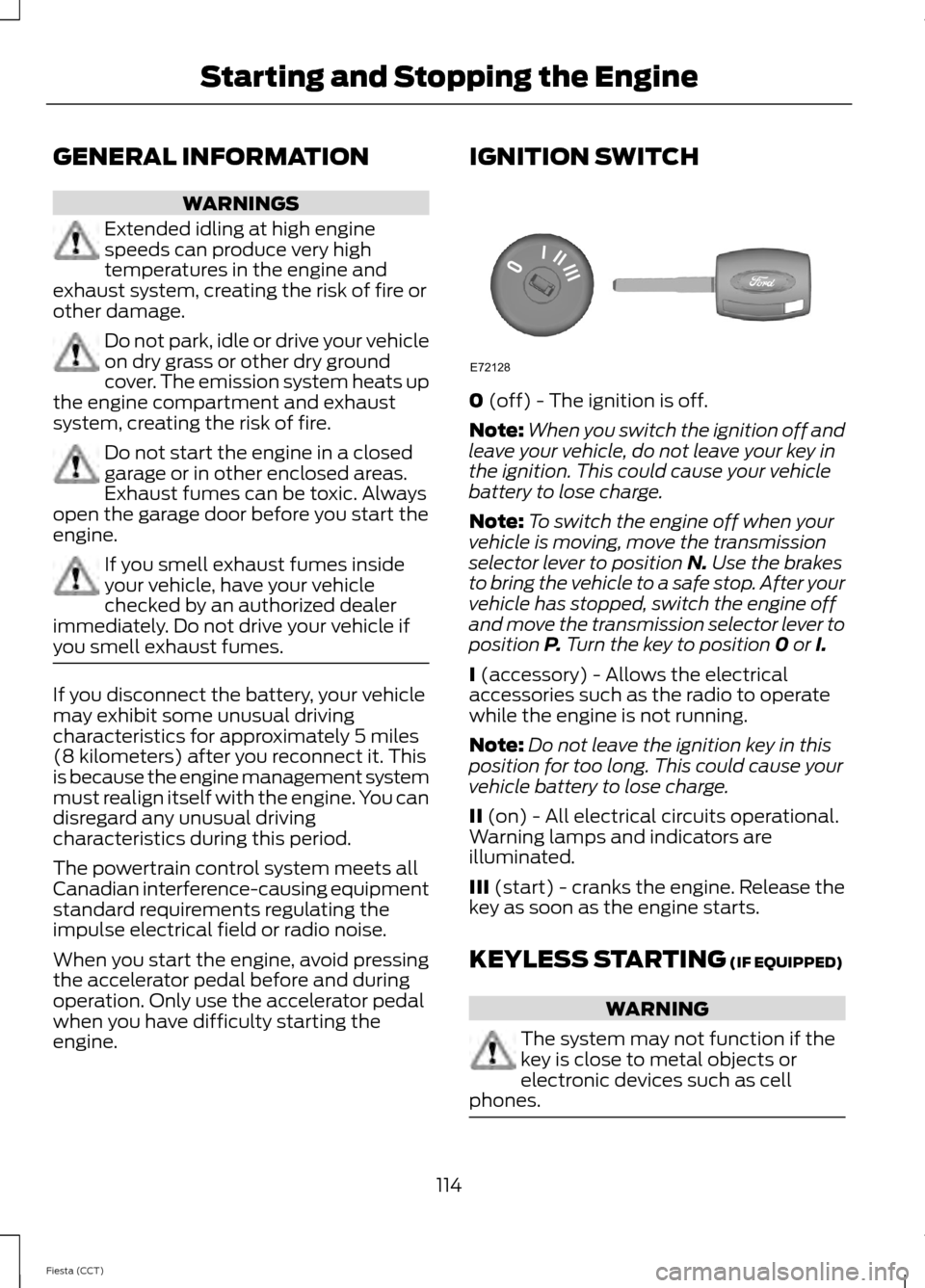
0 (off) - The ignition is off.
Note: When you switch the ignition off and
leave your vehicle, do not leave your key in
the ignition. This could cause your vehicle
battery to lose charge.
Note: To switch the engine off when your
vehicle is moving, move the transmission
selector lever to position
N. Use the brakes
to bring the vehicle to a safe stop. After your
vehicle has stopped, switch the engine off
and move the transmission selector lever to
position
P. Turn the key to position 0 or I.
I
(accessory) - Allows the electrical
accessories such as the radio to operate
while the engine is not running.
Note: Do not leave the ignition key in this
position for too long. This could cause your
vehicle battery to lose charge.
II
(on) - All electrical circuits operational.
Warning lamps and indicators are
illuminated.
III
(start) - cranks the engine. Release the
key as soon as the engine starts.
KEYLESS STARTING
(IF EQUIPPED) WARNING
The system may not function if the
key is close to metal objects or
electronic devices such as cell
phones. 114
Fiesta (CCT) Starting and Stopping the EngineE72128