ignition FORD FIESTA 2014 6.G Repair Manual
[x] Cancel search | Manufacturer: FORD, Model Year: 2014, Model line: FIESTA, Model: FORD FIESTA 2014 6.GPages: 396, PDF Size: 5.58 MB
Page 193 of 396
CHANGING A BULB - VEHICLES
WITH: 4-DOOR
WARNINGS
Switch the lamps and the ignition off.
Let the bulb cool down before
removing it.
Do not touch the glass of the bulb.
Note:
Only fit bulbs of the correct
specification.
Note: The following instructions describe
how to remove the bulbs. Fit replacements
in the reverse order unless otherwise stated.
Headlamp
Note: Remove the covers to gain access to
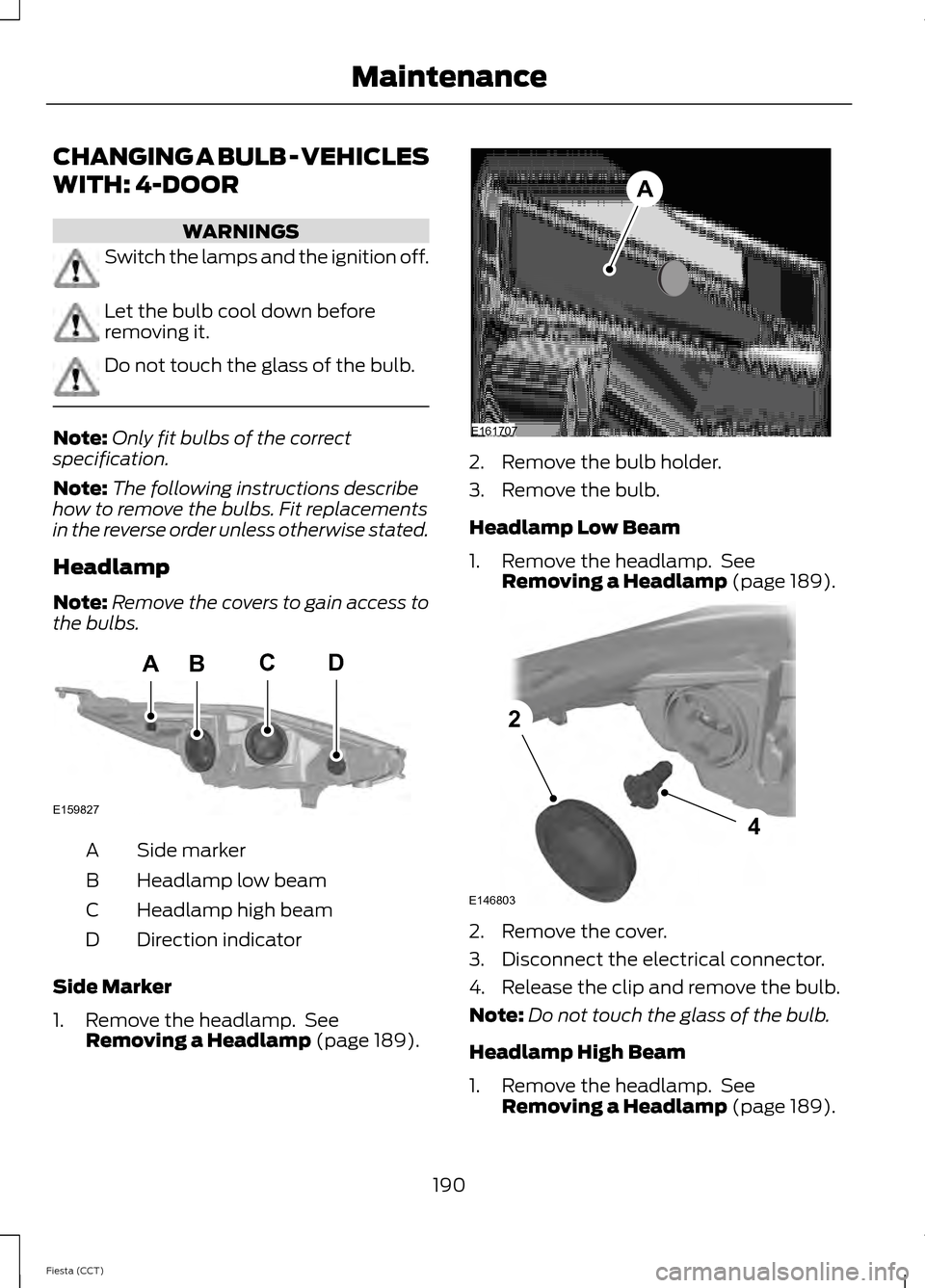
the bulbs. Side marker
A
Headlamp low beam
B
Headlamp high beam
C
Direction indicator
D
Side Marker
1. Remove the headlamp. See Removing a Headlamp (page 189). 2. Remove the bulb holder.
3. Remove the bulb.
Headlamp Low Beam
1. Remove the headlamp. See
Removing a Headlamp
(page 189). 2. Remove the cover.
3. Disconnect the electrical connector.
4. Release the clip and remove the bulb.
Note:
Do not touch the glass of the bulb.
Headlamp High Beam
1. Remove the headlamp. See Removing a Headlamp
(page 189).
190
Fiesta (CCT) MaintenanceBACD
E159827 E161707
A E146803
4
2
Page 198 of 396
CHANGING A BULB - VEHICLES
WITH: 5-DOOR
WARNINGS
Switch the lamps and the ignition off.
Let the bulb cool down before
removing it.
Do not touch the glass of the bulb.
Note:
Only fit bulbs of the correct
specification.
Note: The following instructions describe
how to remove the bulbs. Fit replacements
in the reverse order unless otherwise stated.
Headlamp
Note: Remove the covers to gain access to
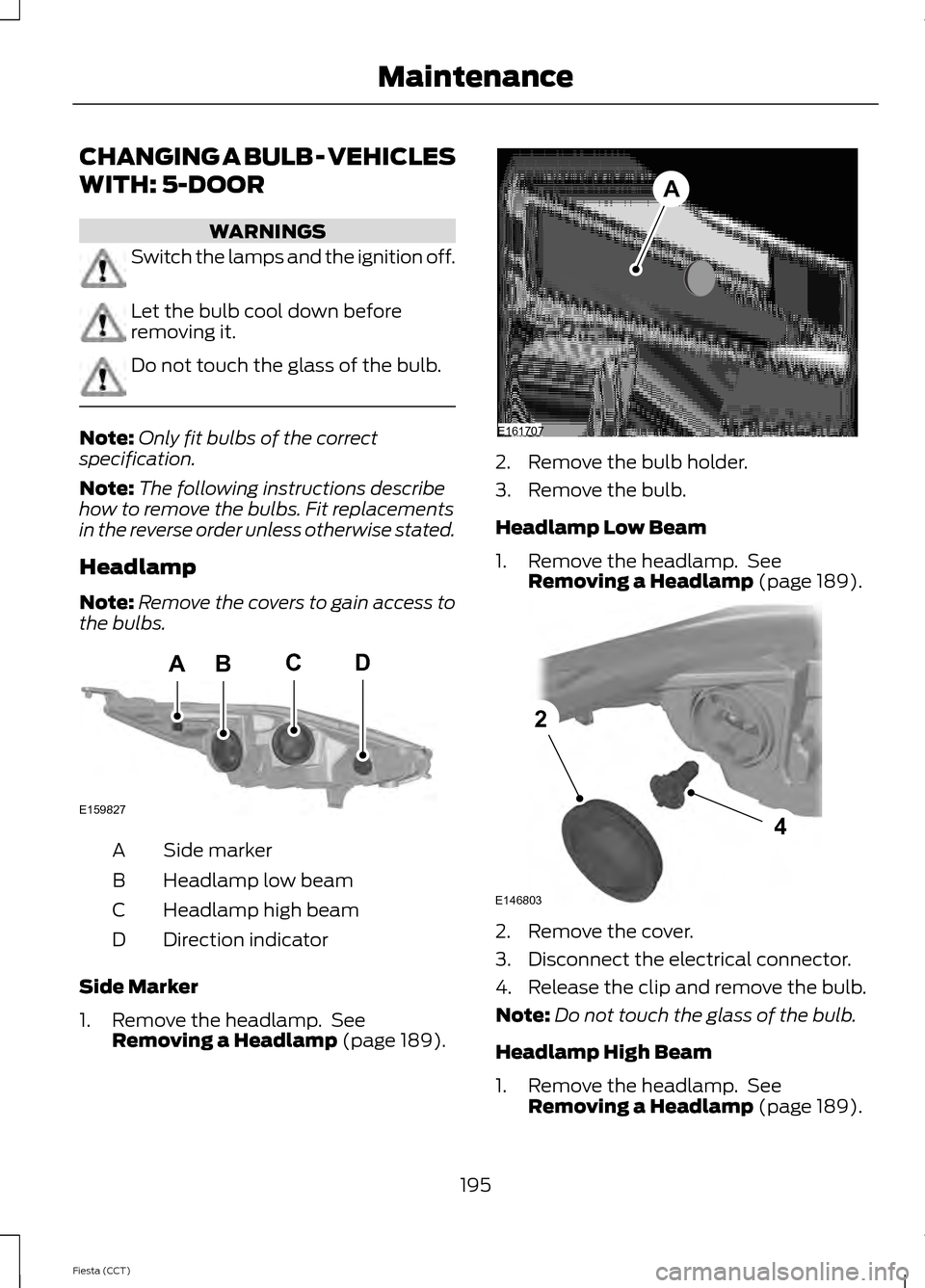
the bulbs. Side marker
A
Headlamp low beam
B
Headlamp high beam
C
Direction indicator
D
Side Marker
1. Remove the headlamp. See Removing a Headlamp (page 189). 2. Remove the bulb holder.
3. Remove the bulb.
Headlamp Low Beam
1. Remove the headlamp. See
Removing a Headlamp
(page 189). 2. Remove the cover.
3. Disconnect the electrical connector.
4. Release the clip and remove the bulb.
Note:
Do not touch the glass of the bulb.
Headlamp High Beam
1. Remove the headlamp. See Removing a Headlamp
(page 189).
195
Fiesta (CCT) MaintenanceBACD
E159827 E161707
A E146803
4
2
Page 208 of 396
•
Never wash or rinse any ignition coil,
spark plug wire or spark plug well, or
the area in and around these locations.
• Cover the battery, power distribution
box, and air filter assembly to prevent
water damage when cleaning the
engine.
CLEANING THE WINDOWS AND
WIPER BLADES
Clean your windows and wiper blades
regularly. If the wipers do not wipe
properly, substances on the vehicle ’s glass
or the wiper blades may cause squeaking
or chatter noise from the blades, and
streaking and smearing of the windshield.
To clean these items, follow these tips:
• You can clean the windows with a
non-abrasive cleaner such as
Motorcraft Ultra-Clear Spray Glass
Cleaner.
• You can clean the wiper blades with
isopropyl rubbing-alcohol or Motorcraft
Premium Windshield Wash
Concentrate with Bitterant in the U.S.,
or Premium Quality Windshield Washer
Fluid in Canada. Be sure to replace
wiper blades when they appear worn
or do not function properly.
• Do not use abrasives, as they may
cause scratches.
• Do not use fuel, kerosene, or paint
thinner to clean any parts. If you cannot remove those streaks after
cleaning with the glass cleaner or if the
wipers chatter and move in a jerky motion,
clean the outer surface of the windshield
and the wiper blades using a sponge or
soft cloth with a neutral detergent or
mild-abrasive cleaning solution. After
cleaning, rinse the windshield and wiper
blades with clean water. The windshield
is clean if beads do not form when you
rinse the windshield with water.
Note:
Do not use sharp objects, such as a
razorblade, to clean the inside of the rear
window or to remove decals, as this may
cause damage to the rear window
defroster ’s heated grid lines.
CLEANING THE INTERIOR WARNINGS
Do not use cleaning solvents, bleach
or dye on the vehicle
’s safety belts,
as these actions may weaken the
belt webbing. On vehicles equipped with
seat-mounted airbags, do not use
chemical solvents or strong
detergents. Such products could
contaminate the side airbag system and
affect performance of the side airbag in a
collision. For fabric, carpets, cloth seats, safety belts
and seats equipped with side airbags:
•
Remove dust and loose dirt with a
vacuum cleaner.
• Remove light stains and soil with
Motorcraft Professional Strength
Carpet & Upholstery Cleaner.
205
Fiesta (CCT) Vehicle Care
Page 265 of 396
Pairing a Phone for the First Time
Note:
SYNC can support downloading up
to approximately 1000 entries per
Bluetooth-enabled cellular phone.
Note: Make sure to switch on the ignition
and the radio. Put the transmission in
position P.
Note: To scroll through the menus, press
the up and down arrows on your audio
system.
Wirelessly pairing your phone with SYNC
allows you to make and receive hands-free
calls.
1. Press the phone button. When the display indicates there is no phone
paired, press
OK.
2. When
Find SYNC appears in the
display, press OK.
3. Put your phone into Bluetooth discovery mode. See your device's
manual if necessary.
4. When prompted on your phone's display, enter the six-digit PIN provided
by SYNC in the radio display. The
display indicates when the pairing is
successful.
Depending on your phone's capability and
your market, the system may prompt you
with questions, such as setting the current
phone as the primary phone (the phone
SYNC automatically tries to connect with
first upon vehicle start-up) and
downloading your phonebook.
Pairing Subsequent Phones
Note: Make sure to switch on the ignition
and the radio. Put the transmission in
position
P.
Note: To scroll through the menus, press
the up and down arrows on your audio
system. 1.
Press the phone button, and then scroll
to System Settings. Press
OK.
2. Scroll to Bluetooth Devices. Press
OK.
3. Scroll to Add Bluetooth Device. Press OK
.
4. When
Find SYNC appears in the
display, press OK.
5. Put your phone into Bluetooth discovery mode. See your phone's
manual if necessary.
6. When prompted on your phone's display, enter the six-digit PIN provided
by SYNC in the radio display. The
display indicates when the pairing is
successful.
The system then prompts with questions,
such as if you would like to set the current
phone as the primary phone (the phone
SYNC automatically tries to connect with
first upon vehicle start-up) and download
your phone book.
Phone Voice Commands
Press the voice icon and say "Phone". Say
any of the following: "PHONE"
"Call
"Call
"Call
"Call
"Call
"Call
"Call history incoming" 2
"Call history missed" 2
262
Fiesta (CCT) SYNC™
Page 273 of 396
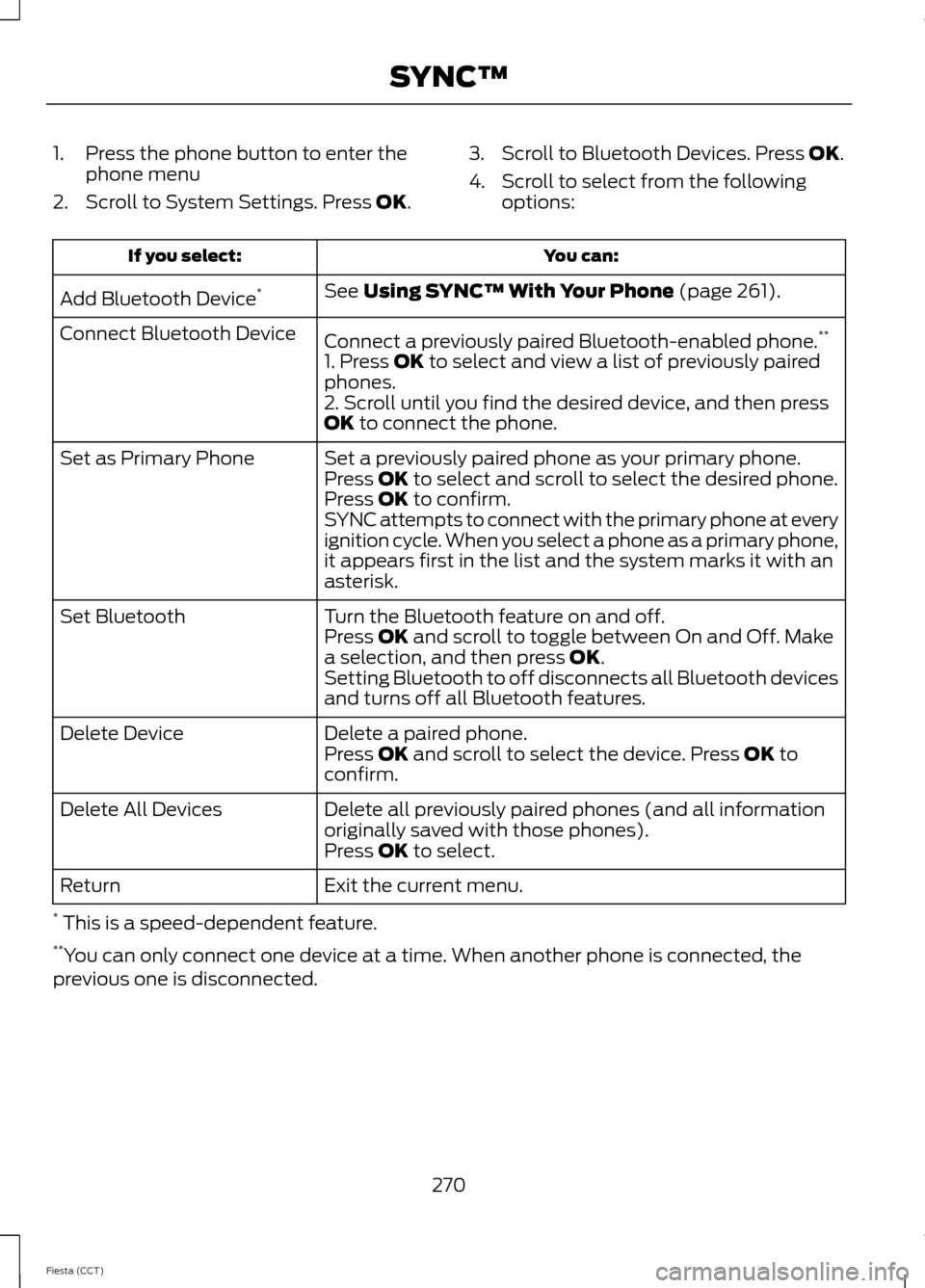
1. Press the phone button to enter the
phone menu
2. Scroll to System Settings. Press OK. 3. Scroll to Bluetooth Devices. Press
OK.
4. Scroll to select from the following options: You can:
If you select:
See
Using SYNC™ With Your Phone (page 261).
Add Bluetooth Device *
Connect a previously paired Bluetooth-enabled phone. **
Connect Bluetooth Device
1. Press
OK to select and view a list of previously paired
phones.
2. Scroll until you find the desired device, and then press
OK
to connect the phone.
Set a previously paired phone as your primary phone.
Set as Primary Phone
Press
OK to select and scroll to select the desired phone.
Press OK to confirm.
SYNC attempts to connect with the primary phone at every
ignition cycle. When you select a phone as a primary phone,
it appears first in the list and the system marks it with an
asterisk.
Turn the Bluetooth feature on and off.
Set Bluetooth
Press
OK and scroll to toggle between On and Off. Make
a selection, and then press OK.
Setting Bluetooth to off disconnects all Bluetooth devices
and turns off all Bluetooth features.
Delete a paired phone.
Delete Device
Press
OK and scroll to select the device. Press OK to
confirm.
Delete all previously paired phones (and all information
originally saved with those phones).
Delete All Devices
Press
OK to select.
Exit the current menu.
Return
* This is a speed-dependent feature.
** You can only connect one device at a time. When another phone is connected, the
previous one is disconnected.
270
Fiesta (CCT) SYNC™
Page 297 of 396
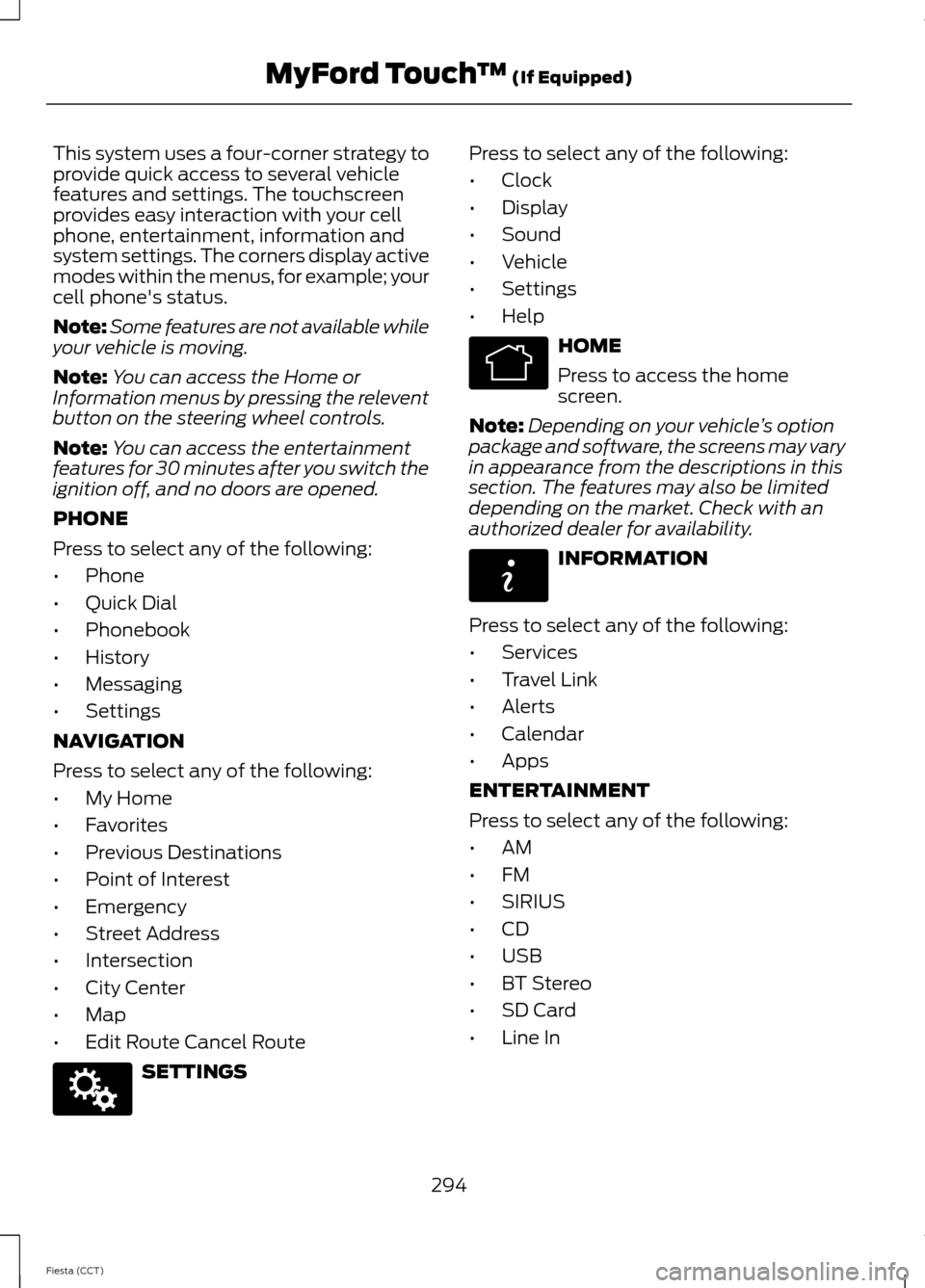
This system uses a four-corner strategy to
provide quick access to several vehicle
features and settings. The touchscreen
provides easy interaction with your cell
phone, entertainment, information and
system settings. The corners display active
modes within the menus, for example; your
cell phone's status.
Note:
Some features are not available while
your vehicle is moving.
Note: You can access the Home or
Information menus by pressing the relevent
button on the steering wheel controls.
Note: You can access the entertainment
features for 30 minutes after you switch the
ignition off, and no doors are opened.
PHONE
Press to select any of the following:
• Phone
• Quick Dial
• Phonebook
• History
• Messaging
• Settings
NAVIGATION
Press to select any of the following:
• My Home
• Favorites
• Previous Destinations
• Point of Interest
• Emergency
• Street Address
• Intersection
• City Center
• Map
• Edit Route Cancel Route SETTINGS Press to select any of the following:
•
Clock
• Display
• Sound
• Vehicle
• Settings
• Help HOME
Press to access the home
screen.
Note: Depending on your vehicle ’s option
package and software, the screens may vary
in appearance from the descriptions in this
section. The features may also be limited
depending on the market. Check with an
authorized dealer for availability. INFORMATION
Press to select any of the following:
• Services
• Travel Link
• Alerts
• Calendar
• Apps
ENTERTAINMENT
Press to select any of the following:
• AM
• FM
• SIRIUS
• CD
• USB
• BT Stereo
• SD Card
• Line In
294
Fiesta (CCT) MyFord Touch
™ (If Equipped)E142607 E142613 E142608
Page 308 of 396
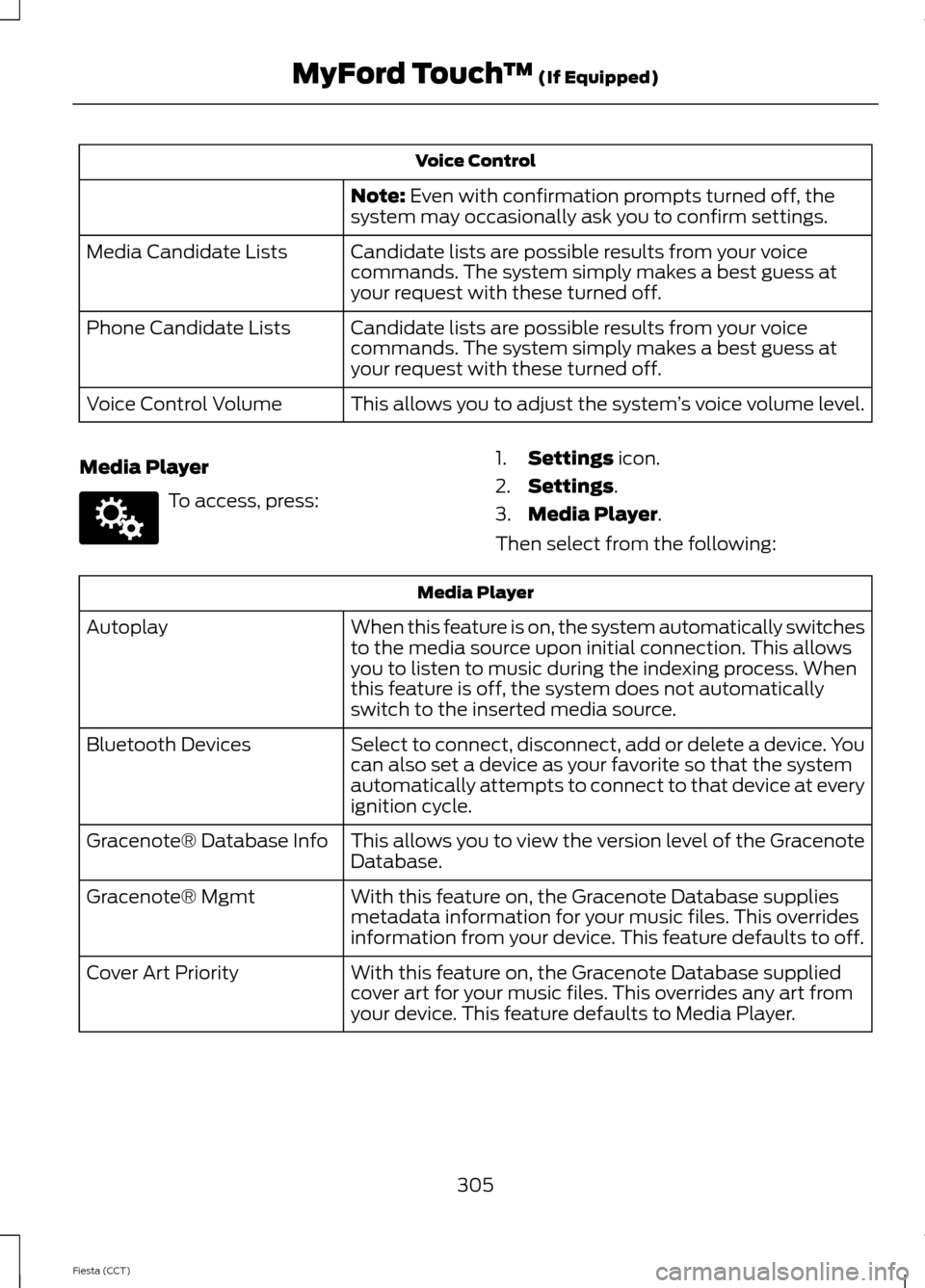
Voice Control
Note: Even with confirmation prompts turned off, the
system may occasionally ask you to confirm settings.
Candidate lists are possible results from your voice
commands. The system simply makes a best guess at
your request with these turned off.
Media Candidate Lists
Candidate lists are possible results from your voice
commands. The system simply makes a best guess at
your request with these turned off.
Phone Candidate Lists
This allows you to adjust the system ’s voice volume level.
Voice Control Volume
Media Player To access, press:
1.
Settings
icon.
2. Settings
.
3. Media Player
.
Then select from the following: Media Player
When this feature is on, the system automatically switches
to the media source upon initial connection. This allows
you to listen to music during the indexing process. When
this feature is off, the system does not automatically
switch to the inserted media source.
Autoplay
Select to connect, disconnect, add or delete a device. You
can also set a device as your favorite so that the system
automatically attempts to connect to that device at every
ignition cycle.
Bluetooth Devices
This allows you to view the version level of the Gracenote
Database.
Gracenote® Database Info
With this feature on, the Gracenote Database supplies
metadata information for your music files. This overrides
information from your device. This feature defaults to off.
Gracenote® Mgmt
With this feature on, the Gracenote Database supplied
cover art for your music files. This overrides any art from
your device. This feature defaults to Media Player.
Cover Art Priority
305
Fiesta (CCT) MyFord Touch
™
(If Equipped)E142607
Page 332 of 396
•
Call waiting notification
• Caller ID.
Other features, such as text messaging
using Bluetooth and automatic phonebook
download, are phone-dependent features.
To check your phone ’s compatibility, see
your phone ’s user manual and visit
www.SYNCMyRide.com,
www.SYNCMyRide.ca or
www.syncmaroute.ca.
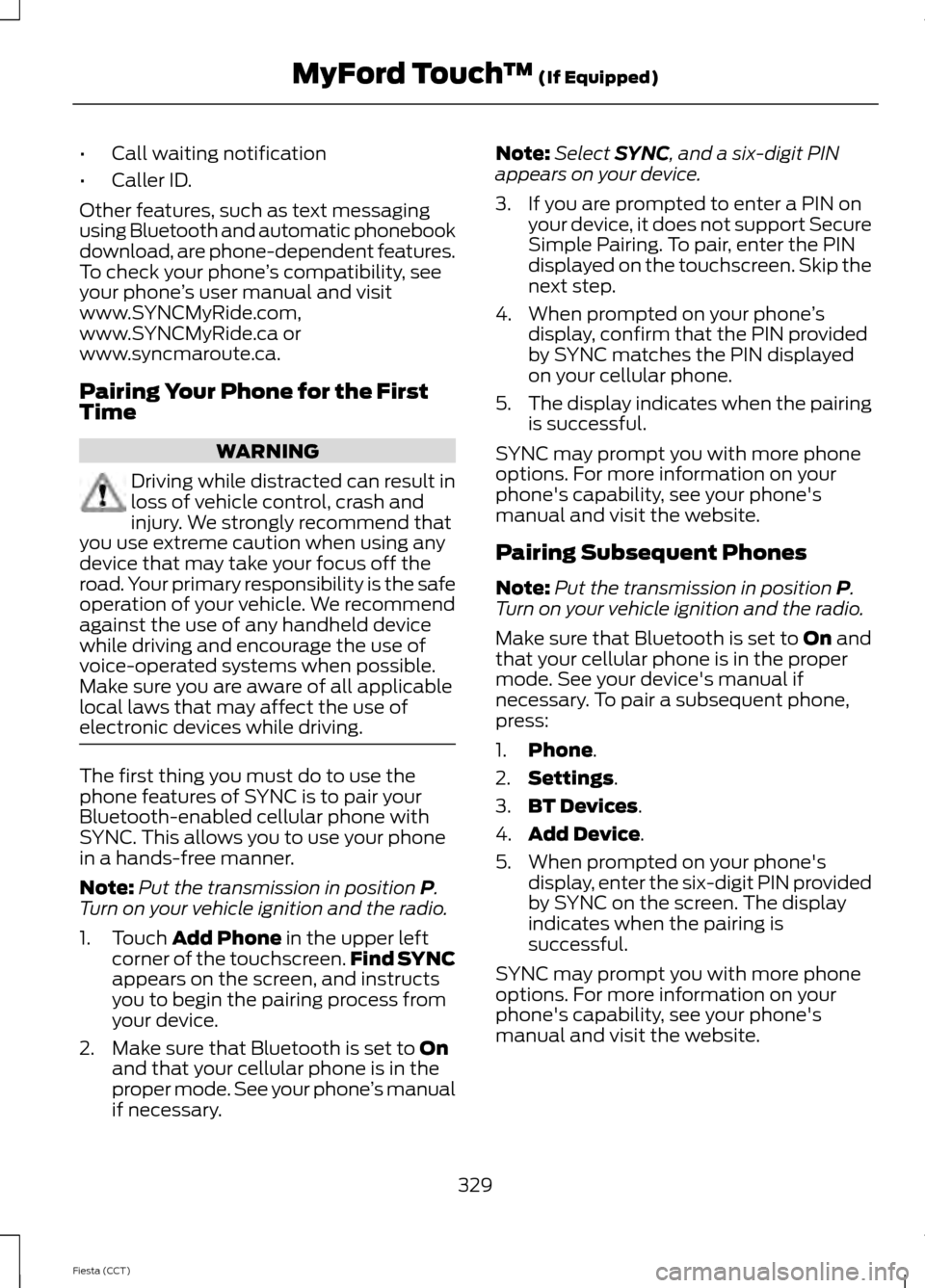
Pairing Your Phone for the First
Time WARNING
Driving while distracted can result in
loss of vehicle control, crash and
injury. We strongly recommend that
you use extreme caution when using any
device that may take your focus off the
road. Your primary responsibility is the safe
operation of your vehicle. We recommend
against the use of any handheld device
while driving and encourage the use of
voice-operated systems when possible.
Make sure you are aware of all applicable
local laws that may affect the use of
electronic devices while driving. The first thing you must do to use the
phone features of SYNC is to pair your
Bluetooth-enabled cellular phone with
SYNC. This allows you to use your phone
in a hands-free manner.
Note:
Put the transmission in position P.
Turn on your vehicle ignition and the radio.
1. Touch
Add Phone in the upper left
corner of the touchscreen. Find SYNC
appears on the screen, and instructs
you to begin the pairing process from
your device.
2. Make sure that Bluetooth is set to
On
and that your cellular phone is in the
proper mode. See your phone ’s manual
if necessary. Note:
Select
SYNC, and a six-digit PIN
appears on your device.
3. If you are prompted to enter a PIN on your device, it does not support Secure
Simple Pairing. To pair, enter the PIN
displayed on the touchscreen. Skip the
next step.
4. When prompted on your phone ’s
display, confirm that the PIN provided
by SYNC matches the PIN displayed
on your cellular phone.
5. The display indicates when the pairing
is successful.
SYNC may prompt you with more phone
options. For more information on your
phone's capability, see your phone's
manual and visit the website.
Pairing Subsequent Phones
Note: Put the transmission in position
P.
Turn on your vehicle ignition and the radio.
Make sure that Bluetooth is set to
On and
that your cellular phone is in the proper
mode. See your device's manual if
necessary. To pair a subsequent phone,
press:
1. Phone
.
2. Settings
.
3. BT Devices
.
4. Add Device
.
5. When prompted on your phone's display, enter the six-digit PIN provided
by SYNC on the screen. The display
indicates when the pairing is
successful.
SYNC may prompt you with more phone
options. For more information on your
phone's capability, see your phone's
manual and visit the website.
329
Fiesta (CCT) MyFord Touch
™
(If Equipped)
Page 389 of 396
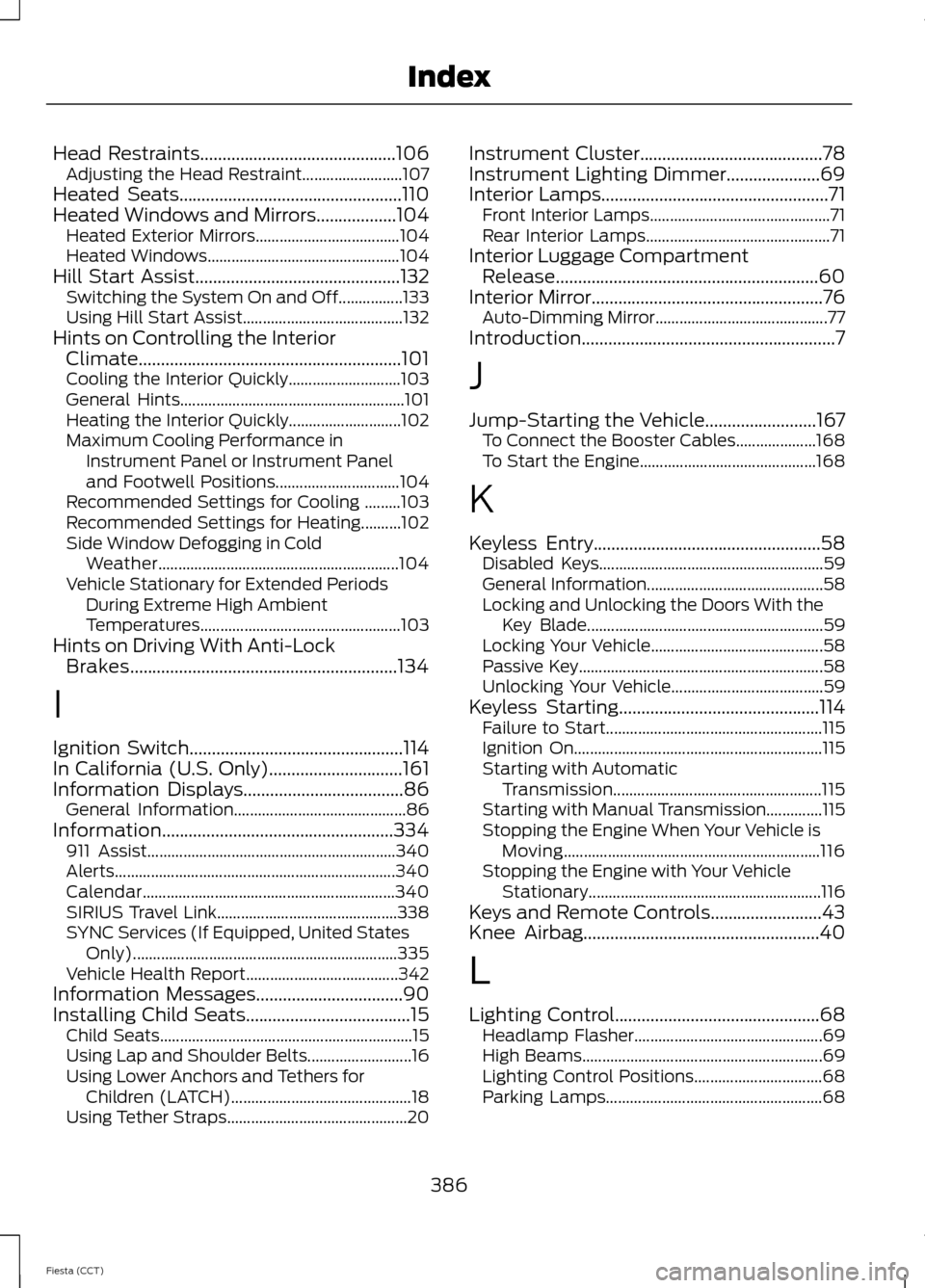
Head Restraints............................................106
Adjusting the Head Restraint......................... 107
Heated Seats..................................................110
Heated Windows and Mirrors..................104 Heated Exterior Mirrors.................................... 104
Heated Windows................................................ 104
Hill Start Assist..............................................132 Switching the System On and Off................133
Using Hill Start Assist........................................ 132
Hints on Controlling the Interior Climate...........................................................101
Cooling the Interior Quickly............................ 103
General Hints........................................................ 101
Heating the Interior Quickly............................ 102
Maximum Cooling Performance in Instrument Panel or Instrument Panel
and Footwell Positions............................... 104
Recommended Settings for Cooling .........103
Recommended Settings for Heating..........102
Side Window Defogging in Cold Weather............................................................ 104
Vehicle Stationary for Extended Periods During Extreme High Ambient
Temperatures.................................................. 103
Hints on Driving With Anti-Lock Brakes............................................................134
I
Ignition Switch................................................114
In California (U.S. Only)..............................161
Information Displays
....................................86
General Information........................................... 86
Information....................................................334 911 Assist.............................................................. 340
Alerts...................................................................... 340
Calendar............................................................... 340
SIRIUS Travel Link............................................. 338
SYNC Services (If Equipped, United States Only).................................................................. 335
Vehicle Health Report...................................... 342
Information Messages
.................................90
Installing Child Seats.....................................15 Child Seats............................................................... 15
Using Lap and Shoulder Belts.......................... 16
Using Lower Anchors and Tethers for Children (LATCH)............................................. 18
Using Tether Straps............................................. 20Instrument Cluster.........................................78
Instrument Lighting Dimmer
.....................69
Interior Lamps...................................................71 Front Interior Lamps............................................. 71
Rear Interior Lamps.............................................. 71
Interior Luggage Compartment Release...........................................................60
Interior Mirror....................................................76 Auto-Dimming Mirror........................................... 77
Introduction.........................................................7
J
Jump-Starting the Vehicle
.........................167
To Connect the Booster Cables.................... 168
To Start the Engine............................................ 168
K
Keyless Entry
...................................................58
Disabled Keys........................................................ 59
General Information............................................ 58
Locking and Unlocking the Doors With the Key Blade........................................................... 59
Locking Your Vehicle........................................... 58
Passive Key............................................................. 58
Unlocking Your Vehicle...................................... 59
Keyless Starting.............................................114 Failure to Start...................................................... 115
Ignition On.............................................................. 115
Starting with Automatic Transmission.................................................... 115
Starting with Manual Transmission..............115
Stopping the Engine When Your Vehicle is Moving................................................................ 116
Stopping the Engine with Your Vehicle Stationary.......................................................... 116
Keys and Remote Controls.........................43
Knee Airbag.....................................................40
L
Lighting Control..............................................68 Headlamp Flasher............................................... 69
High Beams............................................................ 69
Lighting Control Positions................................ 68
Parking Lamps...................................................... 68
386
Fiesta (CCT) Index
Page 393 of 396

Using Stability Control................................137
........................................................................\
............ 137
Using SYNC™ With Your Media Player.............................................................279
Accessing Your Play Menu............................. 283
Connecting Your Digital Media Player to the USB Port........................................................... 279
Media Menu Features....................................... 281
Media Voice Commands................................. 279
System Settings................................................. 285
What's Playing?................................................. 279
Using SYNC™ With Your Phone.............261
Accessing Features through the Phone
Menu.................................................................. 265
Accessing Your Phone Settings................... 268
Making Calls........................................................ 264
Pairing a Phone for the First Time...............262
Pairing Subsequent Phones.......................... 262
Phone Options during an Active Call.........264
Phone Voice Commands................................ 262
Receiving Calls................................................... 264
System Settings................................................. 269
Text Messaging................................................... 267
Using Voice Recognition
...........................259
Initiating a Voice Session................................ 259
System Interaction and Feedback..............260
Using Winter Tires
.......................................224
Utilizing the Mediation/Arbitration Program (Canada Only).........................162
V
Vehicle Care...................................................203
Vehicle Certification Label.......................235
Vehicle Identification Number................235
Vehicle Storage
............................................208
Battery................................................................... 208
Body....................................................................... 208
Brakes.................................................................... 209
Cooling system.................................................. 208
Engine.................................................................... 208
Fuel system......................................................... 208
General.................................................................. 208
Miscellaneous..................................................... 209
Removing Vehicle From Storage.................209
Tires........................................................................\
209
Voice Control
...................................................65 W
Warning Lamps and Indicators - 1.6L
EcoBoost™...................................................82
Anti-lock Braking System Warning Lamp.................................................................... 82
Brake System Warning Lamp.......................... 82
Cruise Control Indicator..................................... 82
Direction Indicator................................................ 82
Door Ajar Warning Lamp................................... 82
Engine Coolant Temperature Warning Lamp.................................................................... 83
Engine Oil Warning Lamp................................. 83
Engine Warning Lamps...................................... 83
Front Airbag Warning Lamp............................. 83
Front Fog Lamps Indicator............................... 83
Headlamp Indicator............................................ 83
High Beam Indicator........................................... 84
Ignition Warning Lamp...................................... 84
Information Indicator.......................................... 84
Low Fuel Level Warning Lamp........................ 84
Low Tire Pressure Warning............................... 84
Safety Belt Minder Warning Lamp................84
Service Engine Soon........................................... 84
Shift Indicator........................................................ 84
Warning Lamps and Indicators.................79 Anti-lock Braking System Warning
Lamp.................................................................... 79
Brake System Warning Lamp.......................... 79
Cruise Control Indicator..................................... 79
Direction Indicator................................................ 79
Door Ajar Warning Lamp................................... 79
Engine Coolant Temperature Warning Lamp.................................................................... 79
Engine Oil Warning Lamp................................. 80
Engine Warning Lamps..................................... 80
Front Airbag Warning Lamp............................ 80
Front Fog Lamps Indicator............................... 80
Headlamp Indicator............................................ 80
High Beam Indicator........................................... 80
Ignition Warning Lamp........................................ 81
Information Indicator........................................... 81
Low Fuel Level Warning Lamp......................... 81
Low Tire Pressure Warning................................ 81
Safety Belt Minder Warning Lamp.................81
Service Engine Soon............................................ 81
Shift Indicator......................................................... 81
Stability Control Indicator................................. 82
390
Fiesta (CCT) Index