remote start FORD FIESTA 2014 6.G Owners Manual
[x] Cancel search | Manufacturer: FORD, Model Year: 2014, Model line: FIESTA, Model: FORD FIESTA 2014 6.GPages: 396, PDF Size: 5.58 MB
Page 4 of 396
Introduction
About This Manual...........................................7
Symbols Glossary
.............................................7
Replacement Parts Recommendation........................................9
Mobile Communications Equipment.....................................................10
Data Recording
................................................10
California Proposition 65
.............................12
Perchlorate.........................................................12
Ford Credit
.........................................................12
Special Notices................................................12
Export Unique Options
..................................12
Child Safety
General Information
.......................................14
Installing Child Seats.....................................15
Child Seat Positioning
...................................21
Booster Seats
..................................................23
Child Safety Locks
..........................................25
Safety Belts
Principle of Operation..................................26
Fastening the Safety Belts..........................27
Safety Belt Height Adjustment
.................29
Safety Belt Warning Lamp and Indicator Chime.............................................................30
Safety Belt Minder.........................................30
Child Restraint and Safety Belt Maintenance................................................32
Personal Safety System ™
Personal Safety System ™
..........................33
Supplementary Restraints System
Principle of Operation..................................34
Driver and Passenger Airbags....................35
Front Passenger Sensing System............36
Side Airbags
.....................................................39 Knee Airbag.....................................................40
Side Curtain Airbags
.....................................40
Crash Sensors and Airbag Indicator
.........41
Airbag Disposal
...............................................42
Keys and Remote Controls
General Information on Radio Frequencies..................................................43
Remote Control..............................................43
Replacing a Lost Key or Remote Control............................................................47
MyKey ™
Principle of Operation..................................48
Creating a MyKey...........................................49
Clearing All MyKeys.......................................50
Checking MyKey System Status..............50
Using MyKey With Remote Start Systems
.........................................................50
MyKey Troubleshooting
...............................52
Locks
Locking and Unlocking
.................................54
Manual Liftgate
...............................................57
Keyless Entry
...................................................58
Interior Luggage Compartment Release..........................................................60
Security
Passive Anti-Theft System
..........................61
Anti-Theft Alarm............................................62
Steering Wheel
Adjusting the Steering Wheel...................64
Audio Control..................................................64
Voice Control
...................................................65
Cruise Control..................................................65
Wipers and Washers
Windshield Wipers
........................................66
1
Fiesta (CCT) Table of Contents
Page 46 of 396
GENERAL INFORMATION ON
RADIO FREQUENCIES
This device complies with Part 15 of the
FCC Rules and with Industry Canada
license-exempt RSS standard(s).
Operation is subject to the following two
conditions: (1) This device may not cause
harmful interference, and (2) This device
must accept any interference received,
including interference that may cause
undesired operation.
Note:
Changes or modifications not
expressively approved by the party
responsible for compliance could void the
user's authority to operate the equipment.
The term IC before the radio certification
number only signifies that Industry Canada
technical specifications were met.
The typical operating range for your
transmitter is approximately 33 feet (10
meters). Vehicles with the remote start
feature will have a greater range. One of
the following could cause a decrease in
operating range:
• weather conditions
• nearby radio towers
• structures around the vehicle
• other vehicles parked next to your
vehicle
The radio frequency used by your remote
control can also be used by other short
distance radio transmissions, for example
amateur radios, medical equipment,
wireless headphones, remote controls and
alarm systems. If the frequencies are
jammed, you will not be able to use your
remote control. You can lock and unlock
the doors with the key.
Note: Make sure to lock your vehicle before
leaving it unattended.
Note: If you are in range, the remote control
will operate if you press any button
unintentionally. Intelligent Access
(If Equipped)
The system uses a radio frequency signal
to communicate with your vehicle and
authorize your vehicle to unlock when one
of the following conditions are met:
• You touch the inside of the front
exterior door handle.
• You press the luggage compartment
button.
• You press a button on the transmitter.
If excessive radio frequency interference
is present in the area or if the transmitter
battery is low, you may need to
mechanically unlock your door. You can
use the mechanical key blade in your
intelligent access key to open the driver
door in this situation. See
Remote
Control (page 43).
REMOTE CONTROL
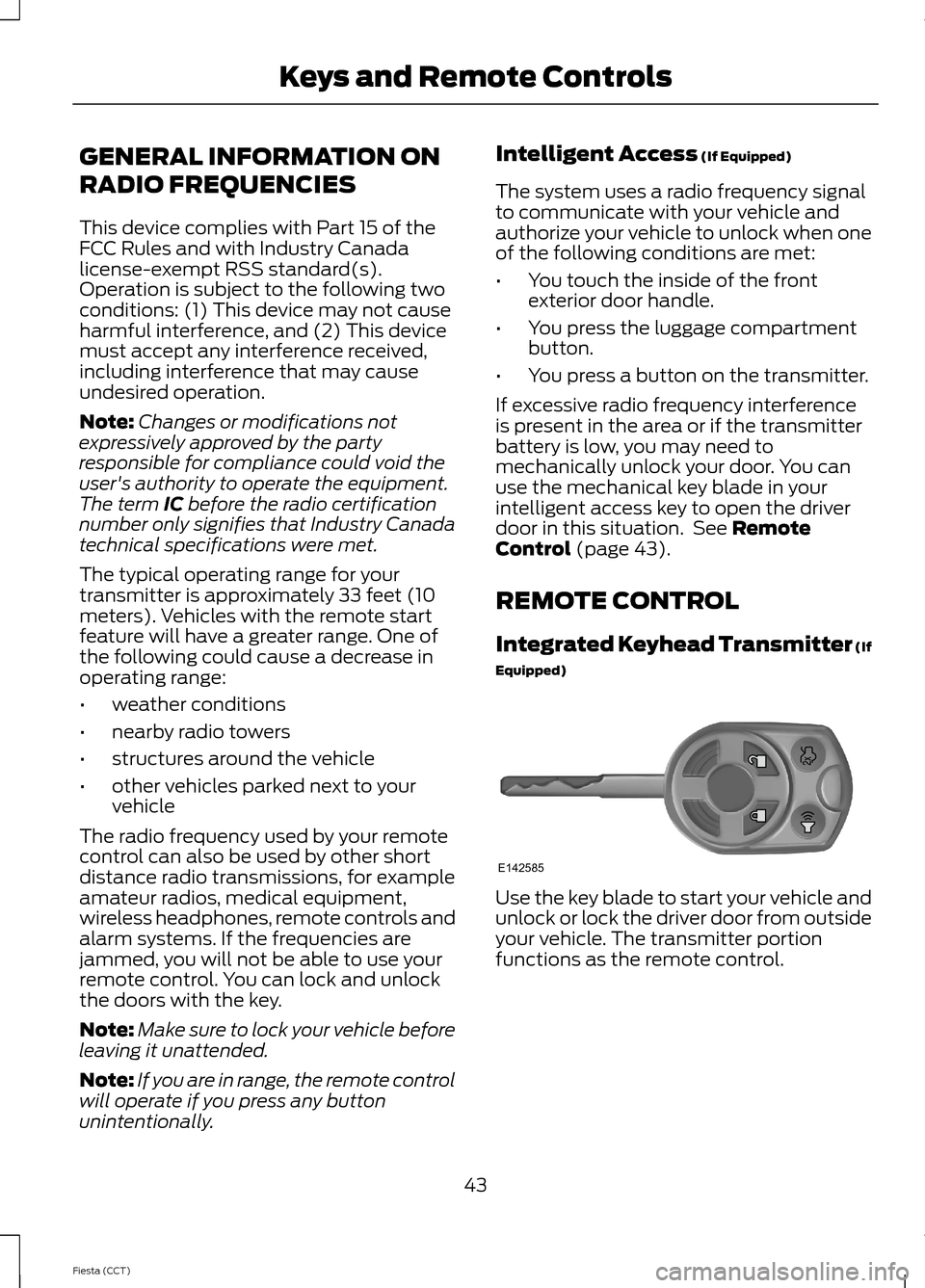
Integrated Keyhead Transmitter (If
Equipped) Use the key blade to start your vehicle and
unlock or lock the driver door from outside
your vehicle. The transmitter portion
functions as the remote control.
43
Fiesta (CCT) Keys and Remote ControlsE142585
Page 47 of 396
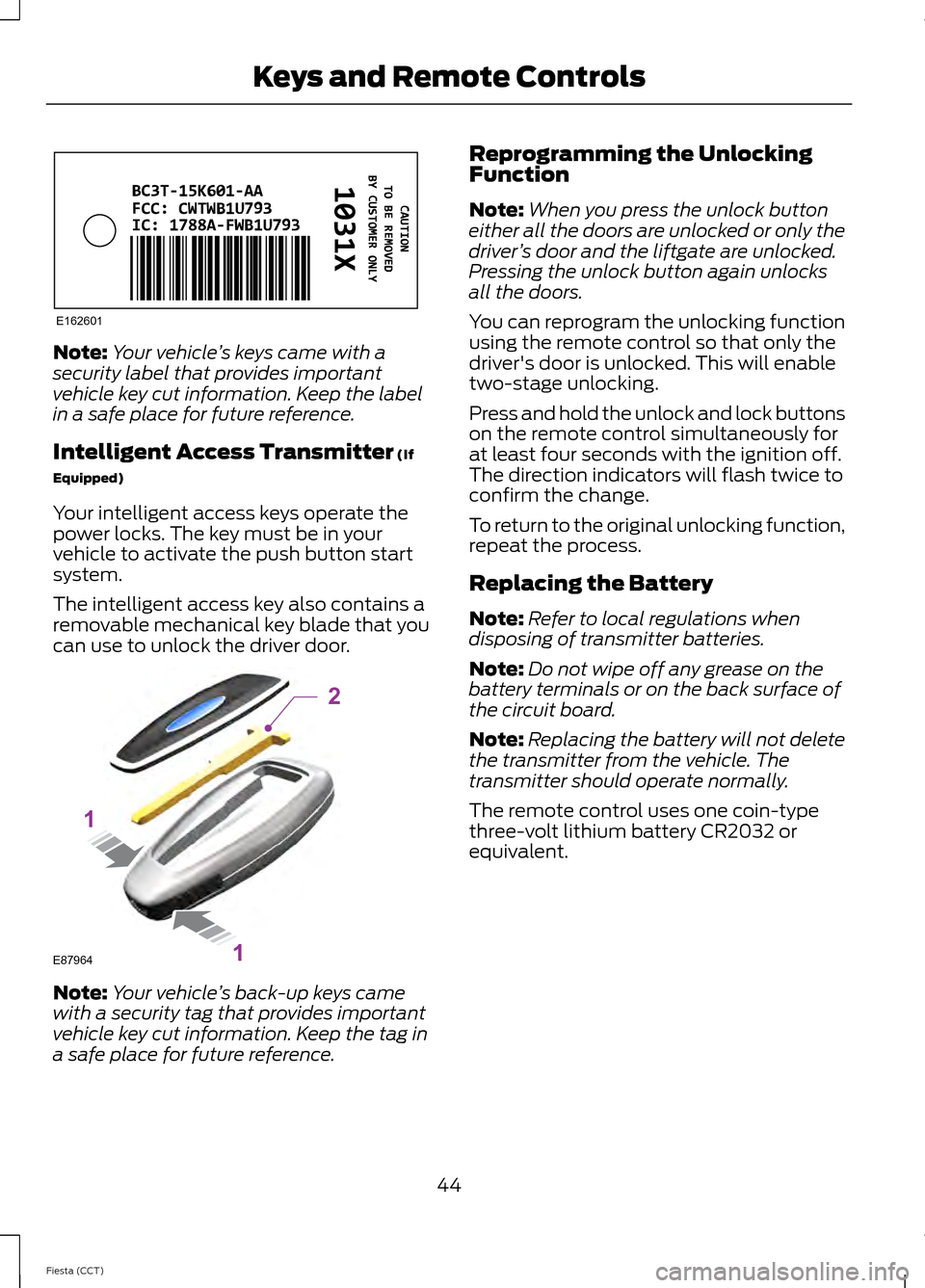
Note:
Your vehicle ’s keys came with a
security label that provides important
vehicle key cut information. Keep the label
in a safe place for future reference.
Intelligent Access Transmitter (If
Equipped)
Your intelligent access keys operate the
power locks. The key must be in your
vehicle to activate the push button start
system.
The intelligent access key also contains a
removable mechanical key blade that you
can use to unlock the driver door. Note:
Your vehicle ’s back-up keys came
with a security tag that provides important
vehicle key cut information. Keep the tag in
a safe place for future reference. Reprogramming the Unlocking
Function
Note:
When you press the unlock button
either all the doors are unlocked or only the
driver ’s door and the liftgate are unlocked.
Pressing the unlock button again unlocks
all the doors.
You can reprogram the unlocking function
using the remote control so that only the
driver's door is unlocked. This will enable
two-stage unlocking.
Press and hold the unlock and lock buttons
on the remote control simultaneously for
at least four seconds with the ignition off.
The direction indicators will flash twice to
confirm the change.
To return to the original unlocking function,
repeat the process.
Replacing the Battery
Note: Refer to local regulations when
disposing of transmitter batteries.
Note: Do not wipe off any grease on the
battery terminals or on the back surface of
the circuit board.
Note: Replacing the battery will not delete
the transmitter from the vehicle. The
transmitter should operate normally.
The remote control uses one coin-type
three-volt lithium battery CR2032 or
equivalent.
44
Fiesta (CCT) Keys and Remote ControlsE162601 E87964
2
1
1
Page 49 of 396
3. Insert the new battery. Refer to the
instructions inside the transmitter for
the correct orientation of the battery.
Press the battery down to make sure
it is fully in the housing.
4. Snap the battery cover back onto the transmitter.
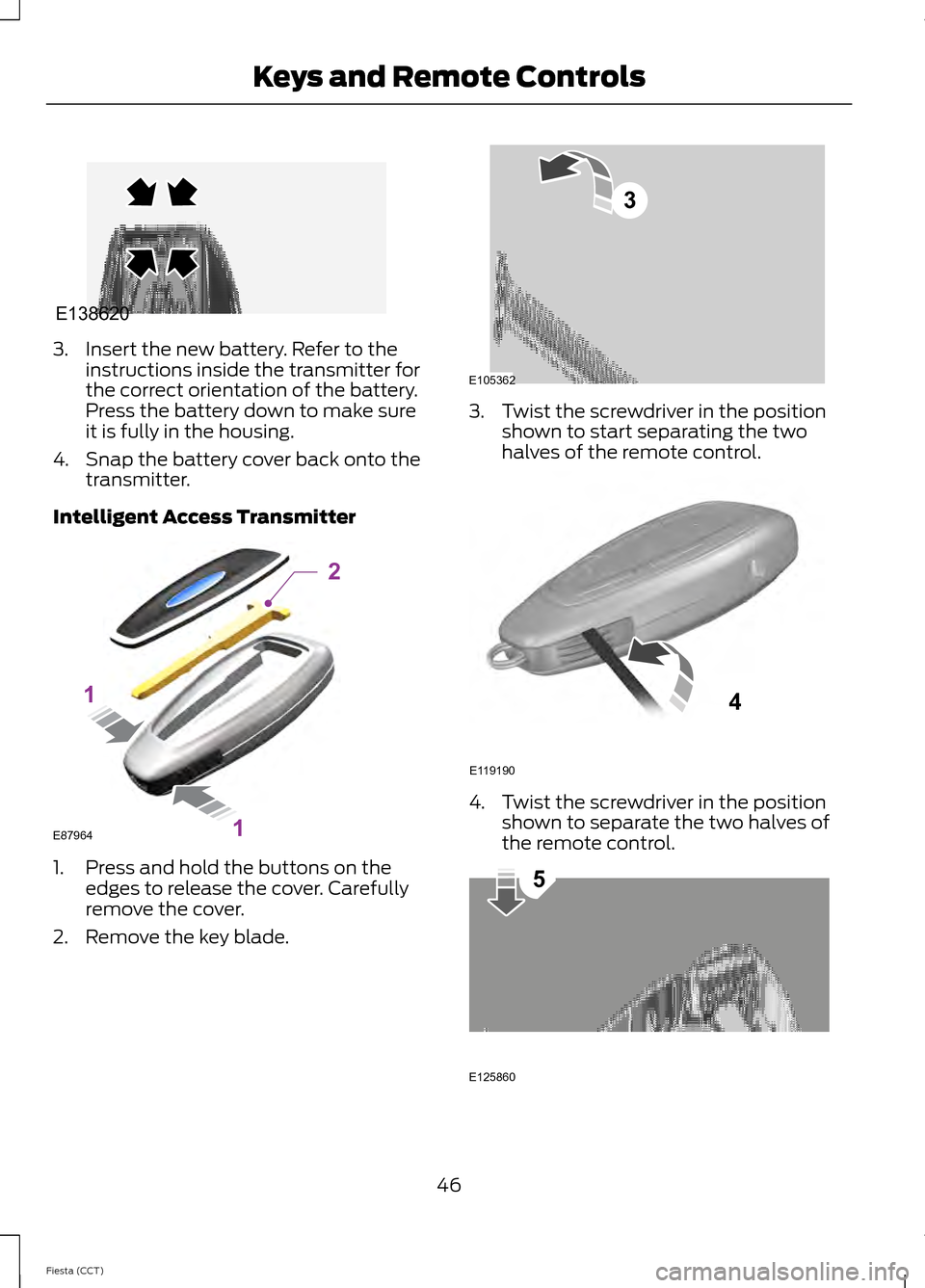
Intelligent Access Transmitter 1. Press and hold the buttons on the
edges to release the cover. Carefully
remove the cover.
2. Remove the key blade. 3. Twist the screwdriver in the position
shown to start separating the two
halves of the remote control. 4. Twist the screwdriver in the position
shown to separate the two halves of
the remote control. 46
Fiesta (CCT) Keys and Remote ControlsE138620 E87964
2
1
1 E105362
3 E119190
4 E125860
5
Page 50 of 396
Note:
Do not touch the battery contacts or
the printed circuit board with the
screwdriver.
5. Carefully remove the battery with the screwdriver.
6. Install a new battery (3V CR 2032) with
the + facing downward.
7. Assemble the two halves of the remote
control.
8. Install the key blade.
Car Finder Press the button twice within
three seconds. The horn will
sound and the turn signals will
flash. We recommend you use this method
to locate your vehicle, rather than using
the panic alarm.
Note: If locking was not successful or if any
door or the liftgate is open, or if the hood is
open on vehicles with a perimeter alarm or
remote start, the horn will sound twice and
the lamps will not flash.
Sounding a Panic Alarm
Note: The panic alarm will only operate
when the ignition is off. Press the button to activate the
alarm. Press the button again or
turn the ignition on to deactivate.
REPLACING A LOST KEY OR
REMOTE CONTROL
Replacement or additional keys or remote
controls can be purchased from an
authorized dealer. Your dealer can program
the remote controls for your vehicle or you
may be able to program them yourself.
See Remote Control (page 43).
To re-program the passive anti-theft
system see an authorized dealer.
47
Fiesta (CCT) Keys and Remote ControlsE138623 E138624
Page 53 of 396
CLEARING ALL MYKEYS
You can clear all MyKeys within the same
key cycle as you created the MyKey. If you
switch your ignition off, however, you will
need to use an admin key to clear your
MyKeys.
Note:
When you clear your MyKeys, you
remove all restrictions and return all MyKeys
to their original admin key status at once.
To clear all MyKeys of all MyKey settings,
use the information display to do the
following:
1. Access the main menu and select Settings, then MyKey.
2. Scroll to
Clear All and press the OK
button.
3. Hold the
OK button until ALL
MYKEYS CLEARED displays.
CHECKING MYKEY SYSTEM
STATUS
You can find information about your
programmed MyKeys by using the
information display.
MyKey Distance
Tracks the distance when drivers use a
MyKey. The only way to delete the
accumulated distance is by using an admin
key to reset the MyKey distance to zero. If
the distance does not accumulate as
expected, then the intended user is not
using the MyKey, or an admin key user
recently reset the distance.
Number of MyKeys
Indicates the number of MyKeys
programmed to your vehicle. Use this
feature to detect how many MyKeys you
have for your vehicle and determine when
a MyKey has been deleted. Number of Admin Keys
Indicates how many admin keys are
programmed to your vehicle. Use this
feature to determine how many
unrestricted keys you have for your vehicle,
and detect if an additional MyKey has been
programmed.
USING MYKEY WITH REMOTE
START SYSTEMS
MyKey is not compatible with
non-Ford-approved aftermarket remote
start systems. If you choose to install a
remote start system, please see your Ford
authorized dealer for a Ford-approved
remote start system.
The following information MAY help
customers who choose to use a
non-Ford-approved remote start system.
The actions provided below do NOT make
MyKey compatible with
non-Ford-approved remote start system,
but it may help you retain some MyKey
functions.
Vehicles With Ford-approved
Aftermarket Remote Start Systems
When using a Ford-approved aftermarket
remote start system, the vehicle recognizes
the remote start system as an additional
admin key. It is the vehicle
’s default setting.
You can also program the remote start as
a MyKey. As a result, the MyKey system
status menu display includes the remote
start system as an additional key in the
total count of MYKEY(S) PROGRAMMED
or ADMIN KEYS PROGRAMMED. See
Checking MyKey System Status
(page
50).
50
Fiesta (CCT) MyKey
™
(If Equipped)
Page 54 of 396
When you start your vehicle with a
Ford-approved aftermarket remote start
system, the system stalls the engine after
you open the door or shift the vehicle into
gear. This is intentional. When you restart
your vehicle, it reads your real key
(traditional key or intelligent key fob)
status instead of the remote start system
’s
status.
As an added precaution, owners of vehicles
equipped with traditional keys may want
to program the remote start system as a
MyKey, if the MyKey driver uses the remote
start fob. That way, when the MyKey driver
starts the vehicle with the remote start
system, the MyKey restrictions remain
active.
With a Ford-approved aftermarket remote
start system, it is possible to program all
real keys as MyKeys unintentionally. If this
happens, then the remote start fob is the
admin key. If you want to have only one
real key as a MyKey, or do not want to have
any MyKeys, then you need to use your
remote start to clear all MyKeys. In that
case, follow these steps:
• Enter the vehicle and close all doors.
• Remote start the vehicle using your
remote start fob.
• See Clearing All MyKeys (page 50).
Follow Steps 1-3.
After clearing your MyKeys, you can create
a new MyKey. See
Creating a MyKey
(page 49).
Note: For vehicles with Intelligent Access
Keys (Push-button Start), you cannot
program the remote start system as a
MyKey. Always treat the remote start fob
as you would any other admin key.
Vehicles With Non-Ford-approved
Aftermarket Remote Start Systems MyKey is not compatible with
non-Ford-approved aftermarket remote
start systems. If you choose to install a
remote start system, please see a Ford
authorized dealer for a Ford-approved
system.
The following information
may help
customers who choose to install a
non-Ford-approved remote start system.
The actions provided below do not make
MyKey compatible with
non-Ford-approved remote start systems,
but may help you retain some MyKey
functions.
When using a non-Ford-approved remote
start system, the vehicle may recognize
the remote start system as an additional
admin key with its associated privileges. If
you restart the engine by inserting a key
into the ignition cylinder and recycling the
ignition completely, then you may retain
some MyKey functions. This action forces
your vehicle to read the traditional key
instead of the remote start fob and then
uses the key's associated privileges.
Note: The MyKey system status menu
display may include the remote start system
as an additional key in the total count of
MYKEY(S) PROGRAMMED or ADMIN KEYS
PROGRAMMED. See
Checking MyKey
System Status (page 50).
As an added precaution, owners of vehicles
equipped with traditional keys may want
to program the remote start system as a
MyKey, if the MyKey driver uses the remote
start fob. That way, when the MyKey driver
starts the vehicle with the remote start
system, the MyKey restrictions will be
remain active.
51
Fiesta (CCT) MyKey
™
(If Equipped)
Page 55 of 396
With a non-Ford-approved aftermarket
remote start system, it is possible to
program all real keys as MyKeys
unintentionally. If this happens, then the
remote start fob is the admin key. If you
want to have only one real key as a MyKey,
or do not want to have any MyKeys, then
you need to use your remote start to clear
all MyKeys. In that case, follow these steps:
•
Enter the vehicle and close all doors.
• Remote start the vehicle using your
non-Ford-approved remote start fob.
• See Clearing All MyKeys (page 50).
Follow Steps 1-3.
After clearing your MyKeys, you can create
a new MyKey. See
Creating a MyKey
(page 49).
Note: For vehicles with Intelligent Access
Keys (Push-button Start), you cannot
program the remote start system as a
MyKey. Always treat the remote start fob
as you would any other admin key.
MYKEY TROUBLESHOOTING Potential Causes
Condition
The key in the ignition does not have admin
privileges.
I cannot program a key.
The key in the ignition is the only admin key
(there always has to be at least one admin
key).
The intelligent access key is not in the
correct position (vehicles with push-button
start).
SecuriLock passive anti-theft system is
disabled or in unlimited mode.
The vehicle has been started using a
remote start system that is not
programmed with admin privileges. See
Using MyKey With Remote Start
Systems
(page 50).
The key in the ignition does not have admin
privileges.
I cannot program the optional settings.
MyKeys have been created. See
Creating
a MyKey (page 49).
The vehicle has been started using a
remote start system that is not
programmed with admin privileges. See
Using MyKey With Remote Start
Systems
(page 50).
The key in the ignition does not have admin
privileges.
I cannot clear the restricted keys.
52
Fiesta (CCT) MyKey
™
(If Equipped)
Page 56 of 396
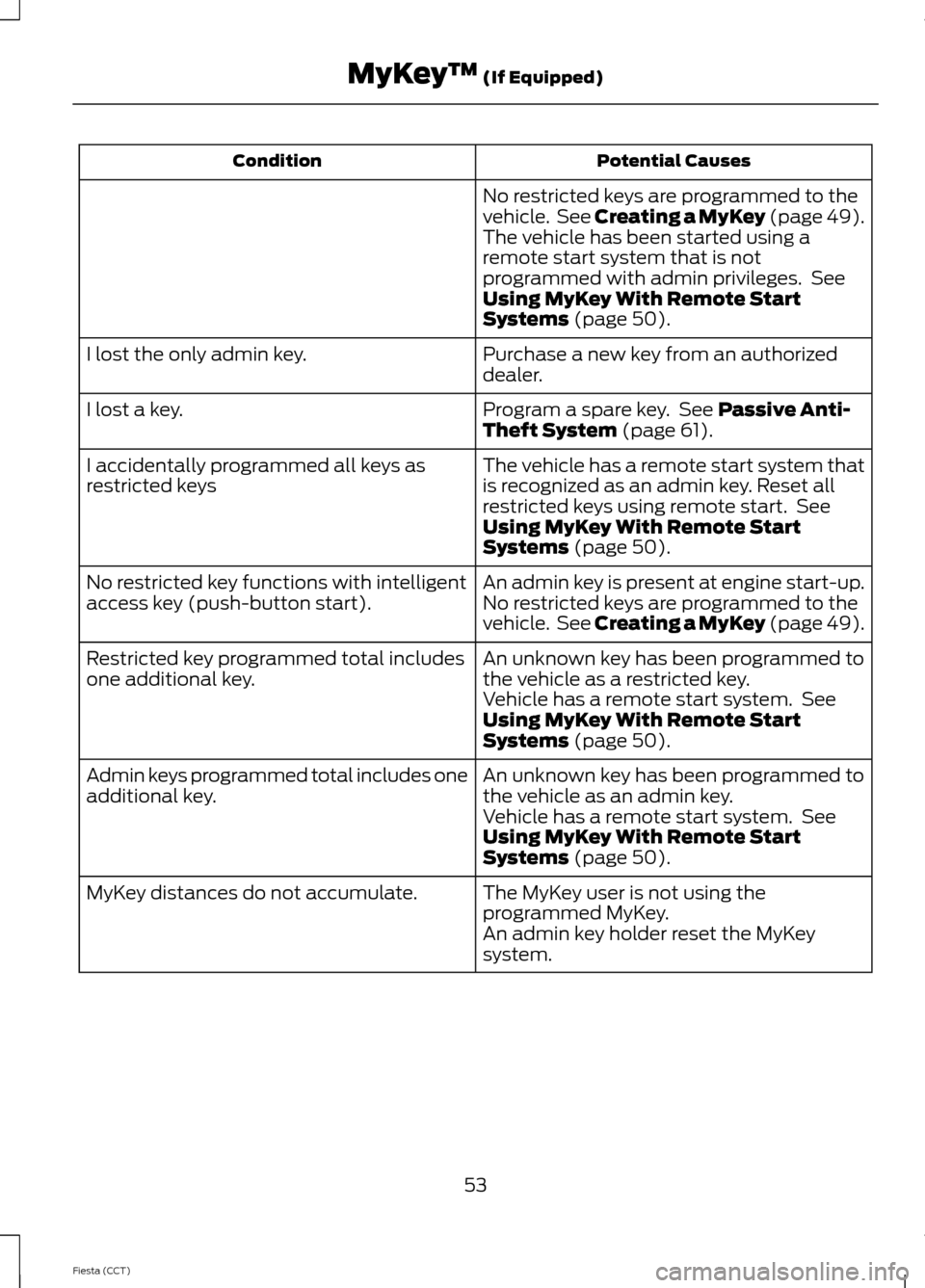
Potential Causes
Condition
No restricted keys are programmed to the
vehicle. See Creating a MyKey (page 49).
The vehicle has been started using a
remote start system that is not
programmed with admin privileges. See
Using MyKey With Remote Start
Systems (page 50).
Purchase a new key from an authorized
dealer.
I lost the only admin key.
Program a spare key. See
Passive Anti-
Theft System (page 61).
I lost a key.
The vehicle has a remote start system that
is recognized as an admin key. Reset all
restricted keys using remote start. See
Using MyKey With Remote Start
Systems
(page 50).
I accidentally programmed all keys as
restricted keys
An admin key is present at engine start-up.
No restricted key functions with intelligent
access key (push-button start). No restricted keys are programmed to the
vehicle. See Creating a MyKey (page 49).
An unknown key has been programmed to
the vehicle as a restricted key.
Restricted key programmed total includes
one additional key.
Vehicle has a remote start system. See
Using MyKey With Remote Start
Systems
(page 50).
An unknown key has been programmed to
the vehicle as an admin key.
Admin keys programmed total includes one
additional key.
Vehicle has a remote start system. See
Using MyKey With Remote Start
Systems
(page 50).
The MyKey user is not using the
programmed MyKey.
MyKey distances do not accumulate.
An admin key holder reset the MyKey
system.
53
Fiesta (CCT) MyKey
™
(If Equipped)
Page 57 of 396
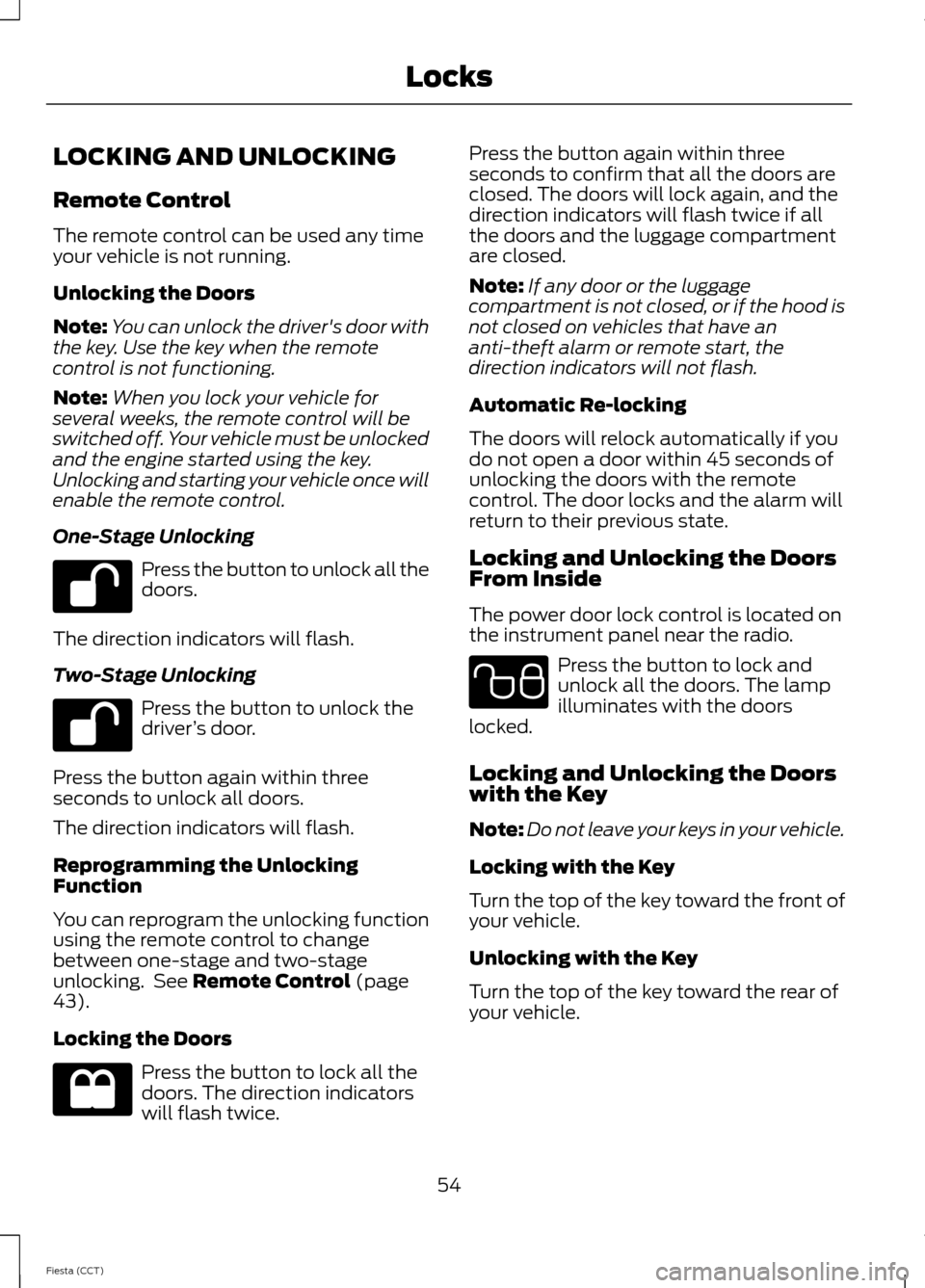
LOCKING AND UNLOCKING
Remote Control
The remote control can be used any time
your vehicle is not running.
Unlocking the Doors
Note:
You can unlock the driver's door with
the key. Use the key when the remote
control is not functioning.
Note: When you lock your vehicle for
several weeks, the remote control will be
switched off. Your vehicle must be unlocked
and the engine started using the key.
Unlocking and starting your vehicle once will
enable the remote control.
One-Stage Unlocking Press the button to unlock all the
doors.
The direction indicators will flash.
Two-Stage Unlocking Press the button to unlock the
driver
’s door.
Press the button again within three
seconds to unlock all doors.
The direction indicators will flash.
Reprogramming the Unlocking
Function
You can reprogram the unlocking function
using the remote control to change
between one-stage and two-stage
unlocking. See Remote Control (page
43).
Locking the Doors Press the button to lock all the
doors. The direction indicators
will flash twice. Press the button again within three
seconds to confirm that all the doors are
closed. The doors will lock again, and the
direction indicators will flash twice if all
the doors and the luggage compartment
are closed.
Note:
If any door or the luggage
compartment is not closed, or if the hood is
not closed on vehicles that have an
anti-theft alarm or remote start, the
direction indicators will not flash.
Automatic Re-locking
The doors will relock automatically if you
do not open a door within 45 seconds of
unlocking the doors with the remote
control. The door locks and the alarm will
return to their previous state.
Locking and Unlocking the Doors
From Inside
The power door lock control is located on
the instrument panel near the radio. Press the button to lock and
unlock all the doors. The lamp
illuminates with the doors
locked.
Locking and Unlocking the Doors
with the Key
Note: Do not leave your keys in your vehicle.
Locking with the Key
Turn the top of the key toward the front of
your vehicle.
Unlocking with the Key
Turn the top of the key toward the rear of
your vehicle.
54
Fiesta (CCT) Locks E102566