automatic transmission FORD FIESTA 2014 Owner's Manual
[x] Cancel search | Manufacturer: FORD, Model Year: 2014, Model line: FIESTA, Model: FORD FIESTA 2014Pages: 398, PDF Size: 6.09 MB
Page 188 of 398
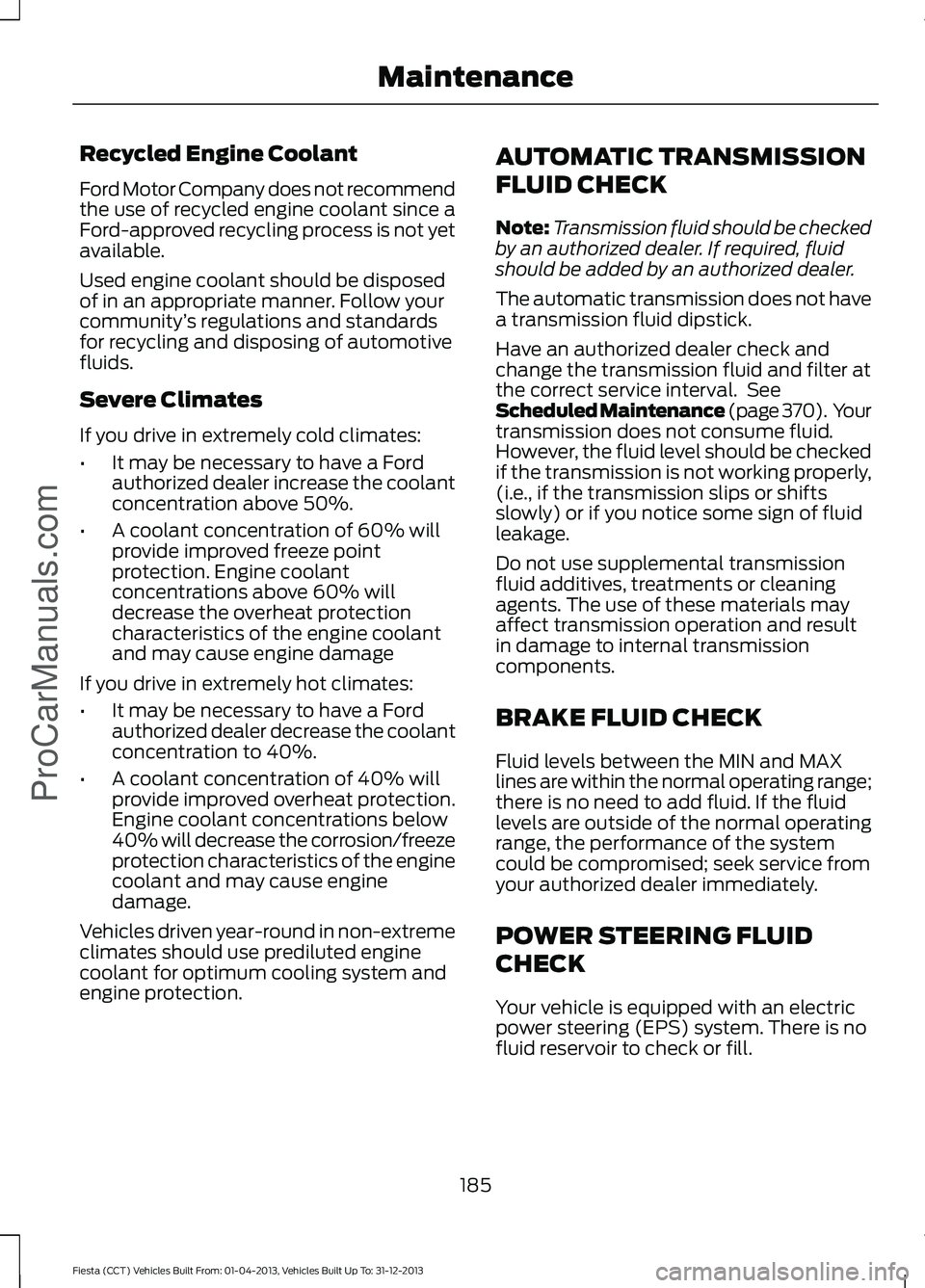
Recycled Engine Coolant
Ford Motor Company does not recommend
the use of recycled engine coolant since a
Ford-approved recycling process is not yet
available.
Used engine coolant should be disposed
of in an appropriate manner. Follow your
community
’s regulations and standards
for recycling and disposing of automotive
fluids.
Severe Climates
If you drive in extremely cold climates:
• It may be necessary to have a Ford
authorized dealer increase the coolant
concentration above 50%.
• A coolant concentration of 60% will
provide improved freeze point
protection. Engine coolant
concentrations above 60% will
decrease the overheat protection
characteristics of the engine coolant
and may cause engine damage
If you drive in extremely hot climates:
• It may be necessary to have a Ford
authorized dealer decrease the coolant
concentration to 40%.
• A coolant concentration of 40% will
provide improved overheat protection.
Engine coolant concentrations below
40% will decrease the corrosion/freeze
protection characteristics of the engine
coolant and may cause engine
damage.
Vehicles driven year-round in non-extreme
climates should use prediluted engine
coolant for optimum cooling system and
engine protection. AUTOMATIC TRANSMISSION
FLUID CHECK
Note:
Transmission fluid should be checked
by an authorized dealer. If required, fluid
should be added by an authorized dealer.
The automatic transmission does not have
a transmission fluid dipstick.
Have an authorized dealer check and
change the transmission fluid and filter at
the correct service interval. See
Scheduled Maintenance (page 370). Your
transmission does not consume fluid.
However, the fluid level should be checked
if the transmission is not working properly,
(i.e., if the transmission slips or shifts
slowly) or if you notice some sign of fluid
leakage.
Do not use supplemental transmission
fluid additives, treatments or cleaning
agents. The use of these materials may
affect transmission operation and result
in damage to internal transmission
components.
BRAKE FLUID CHECK
Fluid levels between the MIN and MAX
lines are within the normal operating range;
there is no need to add fluid. If the fluid
levels are outside of the normal operating
range, the performance of the system
could be compromised; seek service from
your authorized dealer immediately.
POWER STEERING FLUID
CHECK
Your vehicle is equipped with an electric
power steering (EPS) system. There is no
fluid reservoir to check or fill.
185
Fiesta (CCT) Vehicles Built From: 01-04-2013, Vehicles Built Up To: 31-12-2013 Maintenance
ProCarManuals.com
Page 203 of 398
Note:
On some vehicles the lamps are LED.
These are not serviceable items, have your
vehicle checked by an authorized dealer as
soon as possible.
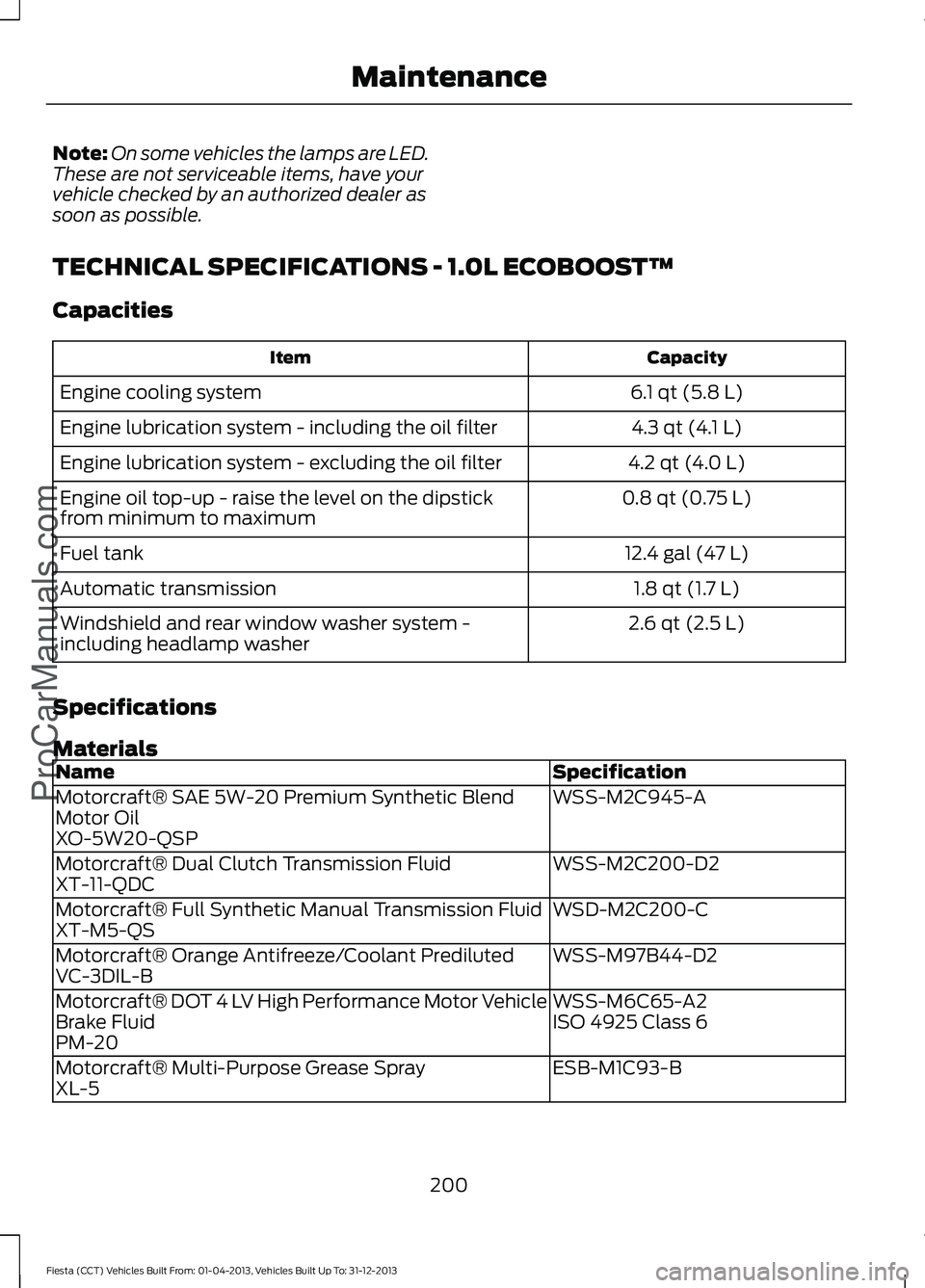
TECHNICAL SPECIFICATIONS - 1.0L ECOBOOST™
Capacities Capacity
Item
6.1 qt (5.8 L)
Engine cooling system
4.3 qt (4.1 L)
Engine lubrication system - including the oil filter
4.2 qt (4.0 L)
Engine lubrication system - excluding the oil filter
0.8 qt (0.75 L)
Engine oil top-up - raise the level on the dipstick
from minimum to maximum
12.4 gal (47 L)
Fuel tank
1.8 qt (1.7 L)
Automatic transmission
2.6 qt (2.5 L)
Windshield and rear window washer system -
including headlamp washer
Specifications
Materials Specification
Name
WSS-M2C945-A
Motorcraft® SAE 5W-20 Premium Synthetic Blend
Motor Oil
XO-5W20-QSP
WSS-M2C200-D2
Motorcraft® Dual Clutch Transmission Fluid
XT-11-QDC
WSD-M2C200-C
Motorcraft® Full Synthetic Manual Transmission Fluid
XT-M5-QS
WSS-M97B44-D2
Motorcraft® Orange Antifreeze/Coolant Prediluted
VC-3DIL-B
WSS-M6C65-A2
Motorcraft® DOT 4 LV High Performance Motor Vehicle
Brake Fluid ISO 4925 Class 6
PM-20
ESB-M1C93-B
Motorcraft® Multi-Purpose Grease Spray
XL-5
200
Fiesta (CCT) Vehicles Built From: 01-04-2013, Vehicles Built Up To: 31-12-2013 MaintenanceProCarManuals.com
Page 204 of 398
Use oil and fluids that meet the defined
specification and viscosity grades.
Note:
If you unable to find an engine oil that
meets the specification defined by
WSS-M2C913-D, you must use an SAE
5W-30 engine oil defined by ACEA A5/B5
for top-up only. If you use oil and fluids that do not meet
the defined specification and viscosity
grades this may lead to:
•
component damage which may not be
covered by the vehicle Warranty.
• longer engine cranking periods.
• increased emission levels.
• reduced engine performance.
• reduced fuel economy.
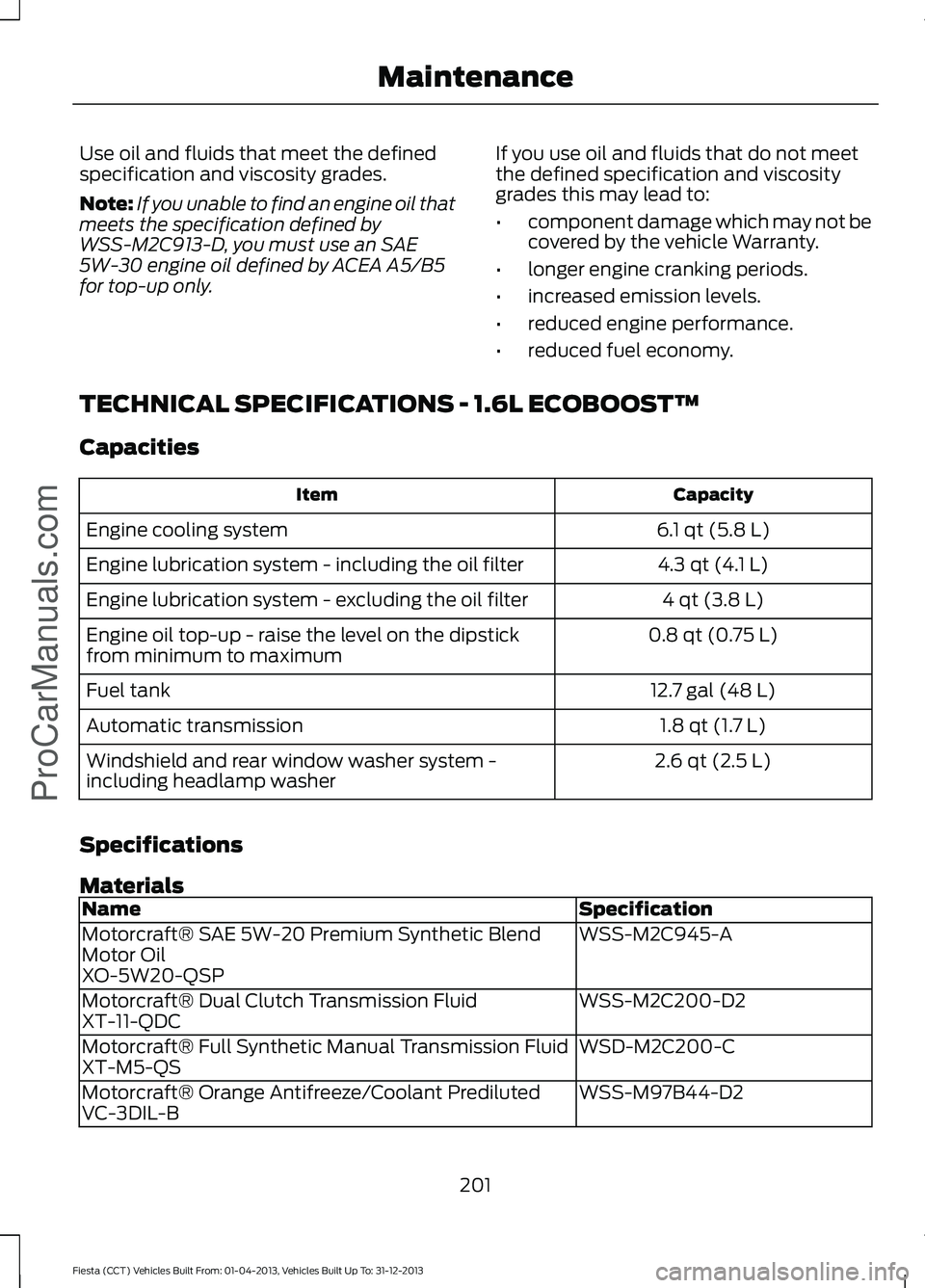
TECHNICAL SPECIFICATIONS - 1.6L ECOBOOST™
Capacities Capacity
Item
6.1 qt (5.8 L)
Engine cooling system
4.3 qt (4.1 L)
Engine lubrication system - including the oil filter
4 qt (3.8 L)
Engine lubrication system - excluding the oil filter
0.8 qt (0.75 L)
Engine oil top-up - raise the level on the dipstick
from minimum to maximum
12.7 gal (48 L)
Fuel tank
1.8 qt (1.7 L)
Automatic transmission
2.6 qt (2.5 L)
Windshield and rear window washer system -
including headlamp washer
Specifications
Materials Specification
Name
WSS-M2C945-A
Motorcraft® SAE 5W-20 Premium Synthetic Blend
Motor Oil
XO-5W20-QSP
WSS-M2C200-D2
Motorcraft® Dual Clutch Transmission Fluid
XT-11-QDC
WSD-M2C200-C
Motorcraft® Full Synthetic Manual Transmission Fluid
XT-M5-QS
WSS-M97B44-D2
Motorcraft® Orange Antifreeze/Coolant Prediluted
VC-3DIL-B
201
Fiesta (CCT) Vehicles Built From: 01-04-2013, Vehicles Built Up To: 31-12-2013 MaintenanceProCarManuals.com
Page 205 of 398
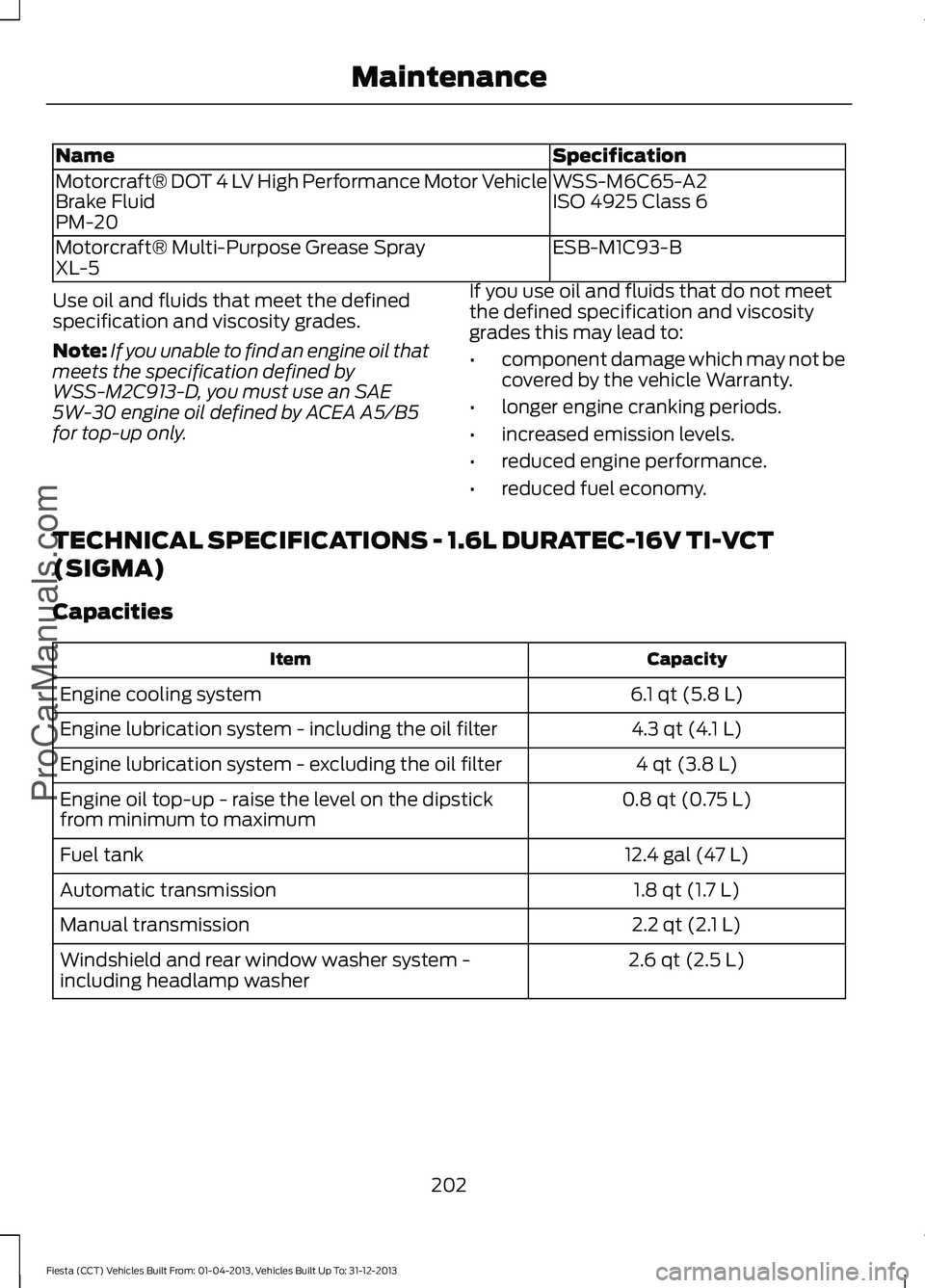
Specification
Name
WSS-M6C65-A2
Motorcraft® DOT 4 LV High Performance Motor Vehicle
Brake Fluid ISO 4925 Class 6
PM-20
ESB-M1C93-B
Motorcraft® Multi-Purpose Grease Spray
XL-5
Use oil and fluids that meet the defined
specification and viscosity grades.
Note: If you unable to find an engine oil that
meets the specification defined by
WSS-M2C913-D, you must use an SAE
5W-30 engine oil defined by ACEA A5/B5
for top-up only. If you use oil and fluids that do not meet
the defined specification and viscosity
grades this may lead to:
•
component damage which may not be
covered by the vehicle Warranty.
• longer engine cranking periods.
• increased emission levels.
• reduced engine performance.
• reduced fuel economy.
TECHNICAL SPECIFICATIONS - 1.6L DURATEC-16V TI-VCT
(SIGMA)
Capacities Capacity
Item
6.1 qt (5.8 L)
Engine cooling system
4.3 qt (4.1 L)
Engine lubrication system - including the oil filter
4 qt (3.8 L)
Engine lubrication system - excluding the oil filter
0.8 qt (0.75 L)
Engine oil top-up - raise the level on the dipstick
from minimum to maximum
12.4 gal (47 L)
Fuel tank
1.8 qt (1.7 L)
Automatic transmission
2.2 qt (2.1 L)
Manual transmission
2.6 qt (2.5 L)
Windshield and rear window washer system -
including headlamp washer
202
Fiesta (CCT) Vehicles Built From: 01-04-2013, Vehicles Built Up To: 31-12-2013 MaintenanceProCarManuals.com
Page 235 of 398
WARNINGS
Do not attempt to change a tire on
the side of the vehicle close to
moving traffic. Pull far enough off the
road to avoid the danger of being hit when
operating the jack or changing the wheel. Always use the jack provided as
original equipment with your vehicle.
If using a jack other than the one
provided as original equipment with your
vehicle, make sure the jack capacity is
adequate for the vehicle weight, including
any vehicle cargo or modifications. Make sure there is no lubrication
(grease or oil) on the threads or the
surface between the wheel lugs and
nuts. This can cause the lug nuts to loosen
while driving. Note:
Passengers should not remain in the
vehicle when the vehicle is being jacked.
1. Park on a level surface, set the parking
brake and activate the hazard flashers.
2. Place the transmission selector lever in position P (automatic transmission)
or position R (manual transmission)
and turn the engine off.
3. Remove the carpeted wheel cover.
4. Remove the spare tire bolt securing the
spare tire by turning it
counterclockwise.
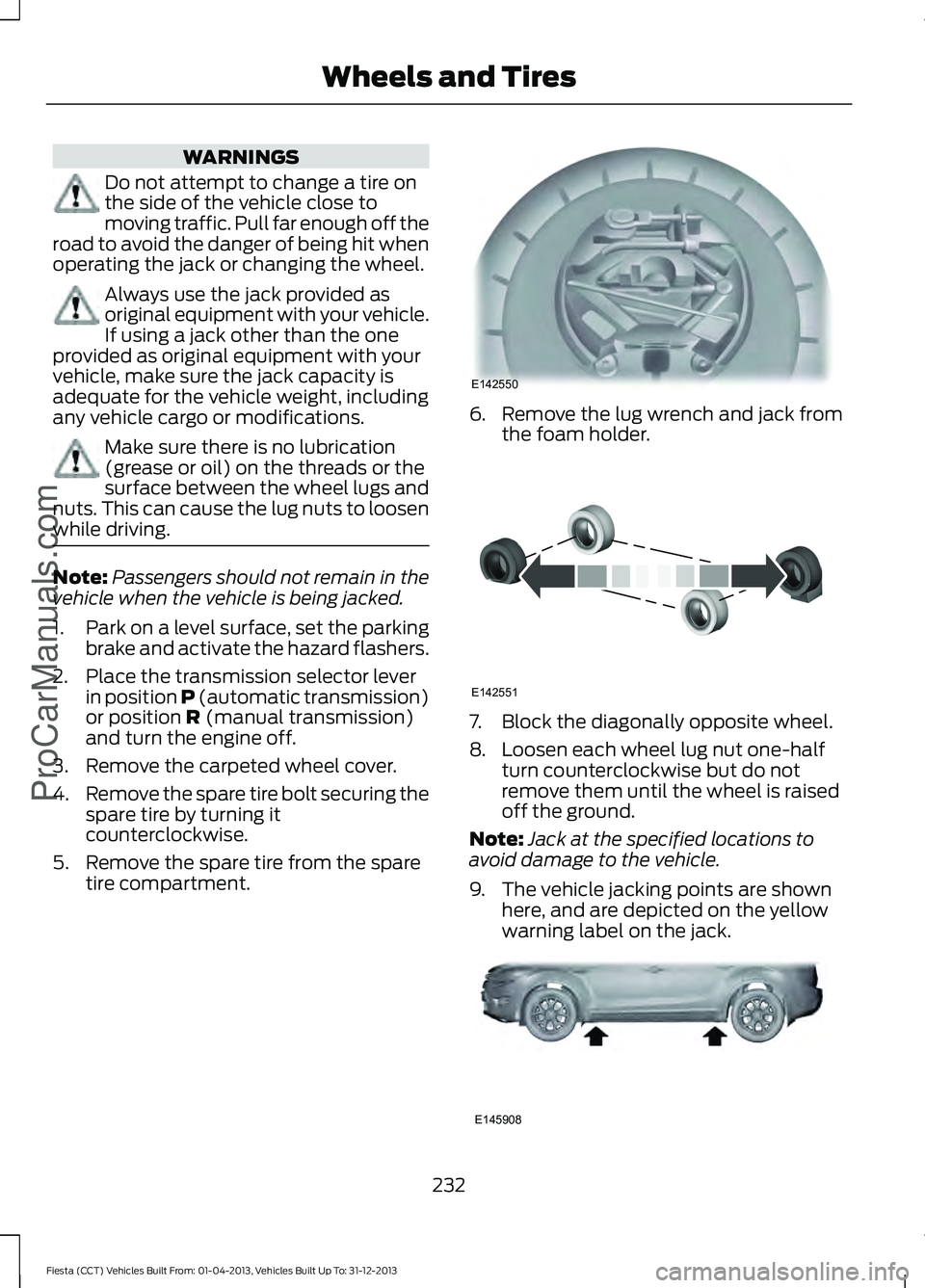
5. Remove the spare tire from the spare tire compartment. 6. Remove the lug wrench and jack from
the foam holder. 7. Block the diagonally opposite wheel.
8. Loosen each wheel lug nut one-half
turn counterclockwise but do not
remove them until the wheel is raised
off the ground.
Note: Jack at the specified locations to
avoid damage to the vehicle.
9. The vehicle jacking points are shown here, and are depicted on the yellow
warning label on the jack. 232
Fiesta (CCT) Vehicles Built From: 01-04-2013, Vehicles Built Up To: 31-12-2013 Wheels and Tires
ProCarManuals.comE142550 E142551 E145908
Page 241 of 398
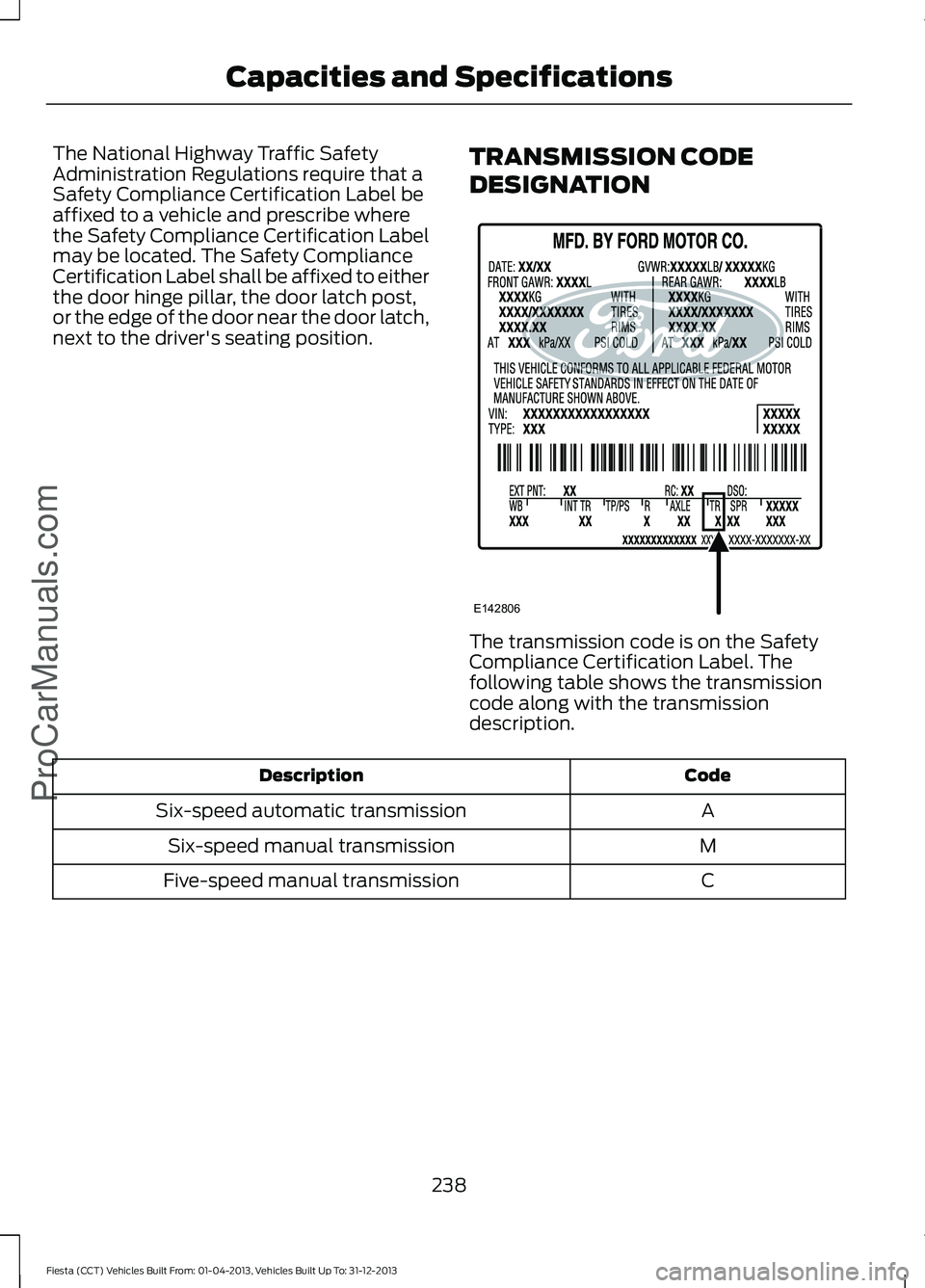
The National Highway Traffic Safety
Administration Regulations require that a
Safety Compliance Certification Label be
affixed to a vehicle and prescribe where
the Safety Compliance Certification Label
may be located. The Safety Compliance
Certification Label shall be affixed to either
the door hinge pillar, the door latch post,
or the edge of the door near the door latch,
next to the driver's seating position.
TRANSMISSION CODE
DESIGNATION The transmission code is on the Safety
Compliance Certification Label. The
following table shows the transmission
code along with the transmission
description.
Code
Description
A
Six-speed automatic transmission
M
Six-speed manual transmission
C
Five-speed manual transmission
238
Fiesta (CCT) Vehicles Built From: 01-04-2013, Vehicles Built Up To: 31-12-2013 Capacities and SpecificationsProCarManuals.comE142806
Page 251 of 398
Station Preset Buttons
This feature allows you to store your
favorite stations, they can be recalled by
selecting the appropriate waveband and
pressing one of the preset buttons.
1. Select a waveband.
2. Tune to the station required.
3. Press and hold one of the preset
buttons. A progress bar and message
will appear. When the progress bar
completes the station has been stored.
The audio unit will also mute
momentarily as confirmation.
You can repeat this on each waveband and
for each preset button.
Note: When you drive to another part of the
country, stations that broadcast on
alternative frequencies and are stored on
preset buttons, may be updated with the
correct frequency and station name for that
area.
Autostore Control
Note: This will store up to a maximum of
the six strongest signals available, either
from the AM or the FM waveband and
overwrite the previously stored stations. You
can also store stations manually in the same
way as other wavebands.
• Press and hold the RADIO button.
• When the search is complete, sound is
restored and the strongest signals are
stored on the autostore presets.
Automatic Volume Control
When available, automatic volume control
adjusts the volume level to compensate
for engine noise and road speed noise.
1. Press the
MENU button and select
Audio Settings.
2. Select
Spd. Comp. Vol. 3. Use the left or right arrow button to
adjust the setting.
4. Press the
OK button to confirm your
selection.
5. Press the
MENU button to return.
News Broadcasts
Your audio unit may interrupt normal
reception to broadcast news bulletins from
stations on the FM waveband, radio data
system or other enhanced network linked
stations.
The display will indicate there is an
incoming announcement during news
broadcasts. When the audio unit interrupts
for a news broadcast the preset volume
level will be the same as traffic
announcements.
1. Press the
MENU button.
2. Select
Audio Settings.
3. Scroll to
News and turn on or off with
the OK button.
4. Press the
MENU button to return.
Alternative Frequencies
The majority of programs that broadcast
on the FM waveband have a program
identification code that can be recognized
by audio units.
When your vehicle moves from one
transmission area to another with the
alternative frequencies tuning switched
on, this function will search for the
strongest station signal.
Under certain conditions, alternative
frequencies tuning may temporarily disrupt
normal reception.
248
Fiesta (CCT) Vehicles Built From: 01-04-2013, Vehicles Built Up To: 31-12-2013 Audio System
ProCarManuals.com
Page 260 of 398
TUNE -: In radio mode, press this button to manually search backward through
the radio frequency band. In SIRIUS mode, press this button to find the previous
available satellite radio station.
H
Seek down
In radio mode, press this button to go to the next station down the
radio frequency band. Press to go to the previous track on a CD. In SIRIUS mode,
press this button to select the previous channel. If a specific category is selected
(for example Jazz, Rock or News), use this button to find the previous channel
in the selected category.
I
SOURCE:
Press the button to access different audio modes, such as AM, FM
and A/V input.
J
AUXILIARY INPUT JACK WARNINGS
Driving while distracted can result in
loss of vehicle control, crash and
injury. We strongly recommend that
you use extreme caution when using any
device that may take your focus off the
road. Your primary responsibility is the safe
operation of your vehicle. We recommend
against the use of any hand-held device
while driving and encourage the use of
voice-operated systems when possible.
Make sure you are aware of all applicable
local laws that may affect the use of
electronic devices while driving. For safety reasons, do not connect
or adjust the settings on your
portable music player while your
vehicle is moving. Store the portable music player in a
secure location, such as the center
console or the glove box, when your
vehicle is moving. Hard objects may
become projectiles in a collision or sudden
stop, which may increase the risk of serious
injury. The audio extension cable must be
long enough to allow the portable music
player to be safely stored while your
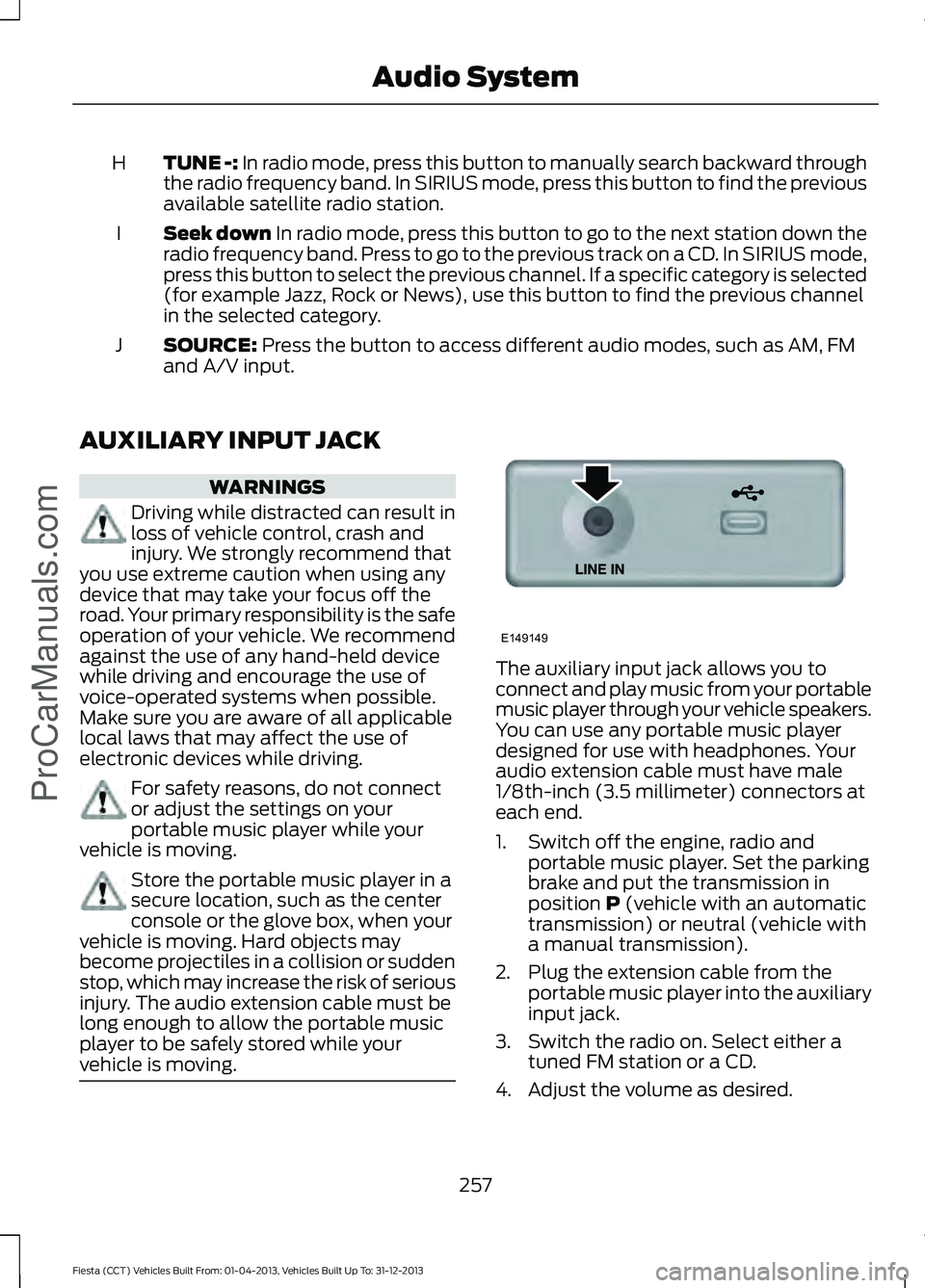
vehicle is moving. The auxiliary input jack allows you to
connect and play music from your portable
music player through your vehicle speakers.
You can use any portable music player
designed for use with headphones. Your
audio extension cable must have male
1/8th-inch (3.5 millimeter) connectors at
each end.
1. Switch off the engine, radio and
portable music player. Set the parking
brake and put the transmission in
position
P (vehicle with an automatic
transmission) or neutral (vehicle with
a manual transmission).
2. Plug the extension cable from the portable music player into the auxiliary
input jack.
3. Switch the radio on. Select either a tuned FM station or a CD.
4. Adjust the volume as desired.
257
Fiesta (CCT) Vehicles Built From: 01-04-2013, Vehicles Built Up To: 31-12-2013 Audio System
ProCarManuals.comE149149
Page 267 of 398
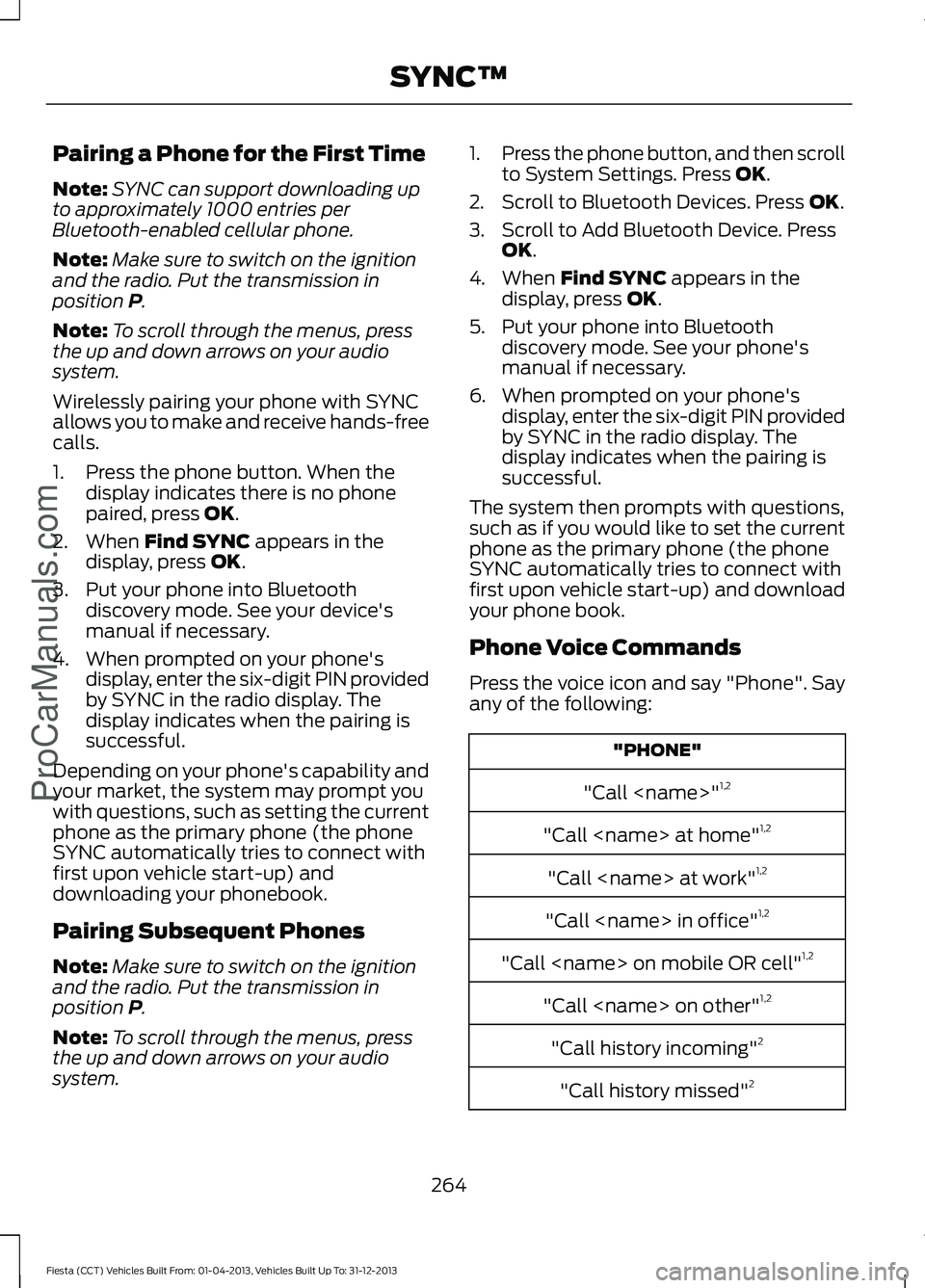
Pairing a Phone for the First Time
Note:
SYNC can support downloading up
to approximately 1000 entries per
Bluetooth-enabled cellular phone.
Note: Make sure to switch on the ignition
and the radio. Put the transmission in
position P.
Note: To scroll through the menus, press
the up and down arrows on your audio
system.
Wirelessly pairing your phone with SYNC
allows you to make and receive hands-free
calls.
1. Press the phone button. When the display indicates there is no phone
paired, press
OK.
2. When
Find SYNC appears in the
display, press OK.
3. Put your phone into Bluetooth discovery mode. See your device's
manual if necessary.
4. When prompted on your phone's display, enter the six-digit PIN provided
by SYNC in the radio display. The
display indicates when the pairing is
successful.
Depending on your phone's capability and
your market, the system may prompt you
with questions, such as setting the current
phone as the primary phone (the phone
SYNC automatically tries to connect with
first upon vehicle start-up) and
downloading your phonebook.
Pairing Subsequent Phones
Note: Make sure to switch on the ignition
and the radio. Put the transmission in
position
P.
Note: To scroll through the menus, press
the up and down arrows on your audio
system. 1.
Press the phone button, and then scroll
to System Settings. Press
OK.
2. Scroll to Bluetooth Devices. Press
OK.
3. Scroll to Add Bluetooth Device. Press OK
.
4. When
Find SYNC appears in the
display, press OK.
5. Put your phone into Bluetooth discovery mode. See your phone's
manual if necessary.
6. When prompted on your phone's display, enter the six-digit PIN provided
by SYNC in the radio display. The
display indicates when the pairing is
successful.
The system then prompts with questions,
such as if you would like to set the current
phone as the primary phone (the phone
SYNC automatically tries to connect with
first upon vehicle start-up) and download
your phone book.
Phone Voice Commands
Press the voice icon and say "Phone". Say
any of the following: "PHONE"
"Call
"Call
"Call
"Call
"Call
"Call
"Call history incoming" 2
"Call history missed" 2
264
Fiesta (CCT) Vehicles Built From: 01-04-2013, Vehicles Built Up To: 31-12-2013 SYNC™
ProCarManuals.com
Page 334 of 398
•
Call waiting notification
• Caller ID.
Other features, such as text messaging
using Bluetooth and automatic phonebook
download, are phone-dependent features.
To check your phone ’s compatibility, see
your phone ’s user manual and visit
www.SYNCMyRide.com,
www.SYNCMyRide.ca or
www.syncmaroute.ca.
Pairing Your Phone for the First
Time WARNING
Driving while distracted can result in
loss of vehicle control, crash and
injury. We strongly recommend that
you use extreme caution when using any
device that may take your focus off the
road. Your primary responsibility is the safe
operation of your vehicle. We recommend
against the use of any handheld device
while driving and encourage the use of
voice-operated systems when possible.
Make sure you are aware of all applicable
local laws that may affect the use of
electronic devices while driving. The first thing you must do to use the
phone features of SYNC is to pair your
Bluetooth-enabled cellular phone with
SYNC. This allows you to use your phone
in a hands-free manner.
Note:
Put the transmission in position P.
Turn on your vehicle ignition and the radio.
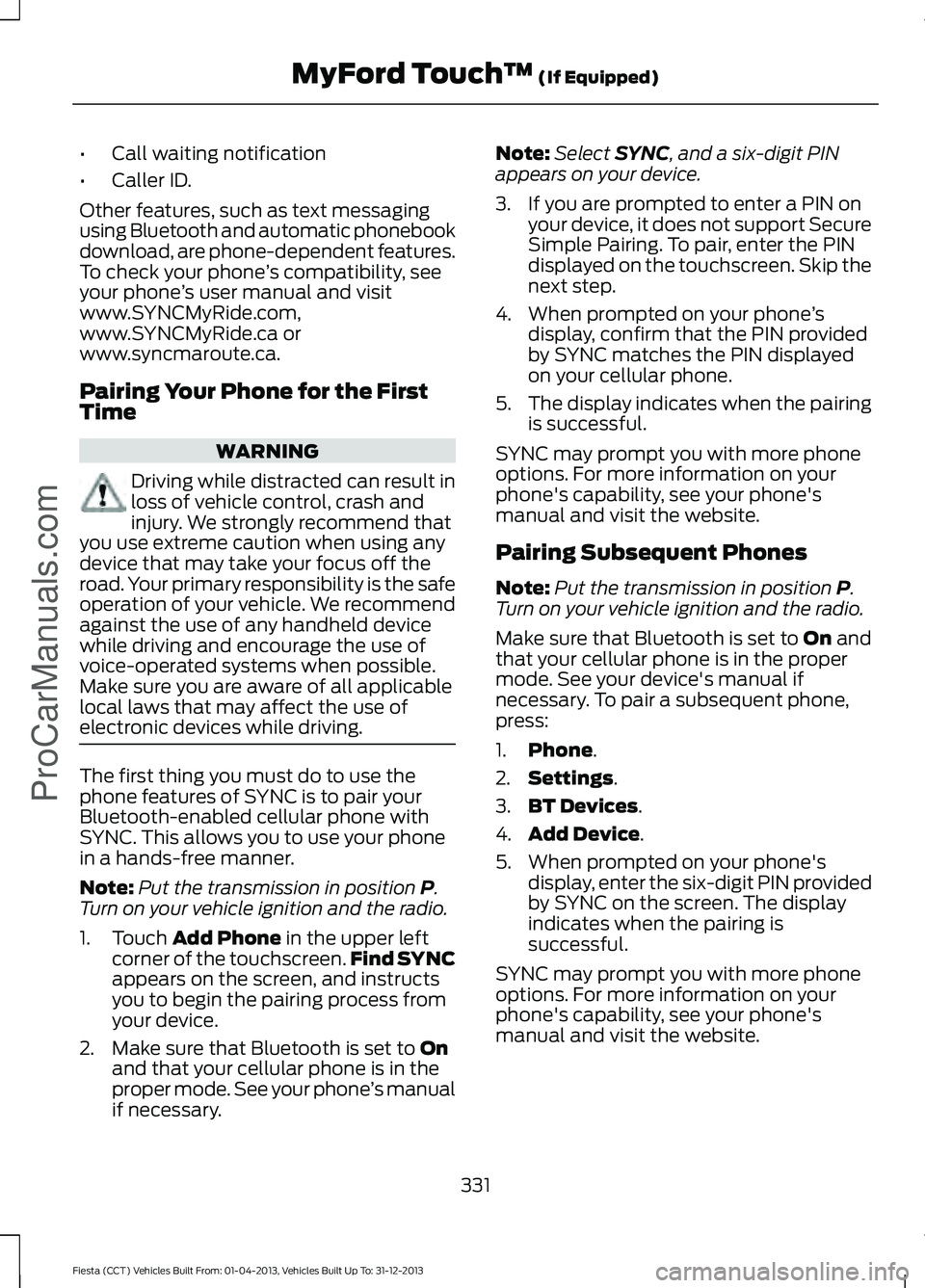
1. Touch
Add Phone in the upper left
corner of the touchscreen. Find SYNC
appears on the screen, and instructs
you to begin the pairing process from
your device.
2. Make sure that Bluetooth is set to
On
and that your cellular phone is in the
proper mode. See your phone ’s manual
if necessary. Note:
Select
SYNC, and a six-digit PIN
appears on your device.
3. If you are prompted to enter a PIN on your device, it does not support Secure
Simple Pairing. To pair, enter the PIN
displayed on the touchscreen. Skip the
next step.
4. When prompted on your phone ’s
display, confirm that the PIN provided
by SYNC matches the PIN displayed
on your cellular phone.
5. The display indicates when the pairing
is successful.
SYNC may prompt you with more phone
options. For more information on your
phone's capability, see your phone's
manual and visit the website.
Pairing Subsequent Phones
Note: Put the transmission in position
P.
Turn on your vehicle ignition and the radio.
Make sure that Bluetooth is set to
On and
that your cellular phone is in the proper
mode. See your device's manual if
necessary. To pair a subsequent phone,
press:
1. Phone
.
2. Settings
.
3. BT Devices
.
4. Add Device
.
5. When prompted on your phone's display, enter the six-digit PIN provided
by SYNC on the screen. The display
indicates when the pairing is
successful.
SYNC may prompt you with more phone
options. For more information on your
phone's capability, see your phone's
manual and visit the website.
331
Fiesta (CCT) Vehicles Built From: 01-04-2013, Vehicles Built Up To: 31-12-2013 MyFord Touch
™
(If Equipped)
ProCarManuals.com