key FORD FIESTA 2014 Service Manual
[x] Cancel search | Manufacturer: FORD, Model Year: 2014, Model line: FIESTA, Model: FORD FIESTA 2014Pages: 398, PDF Size: 6.09 MB
Page 186 of 398
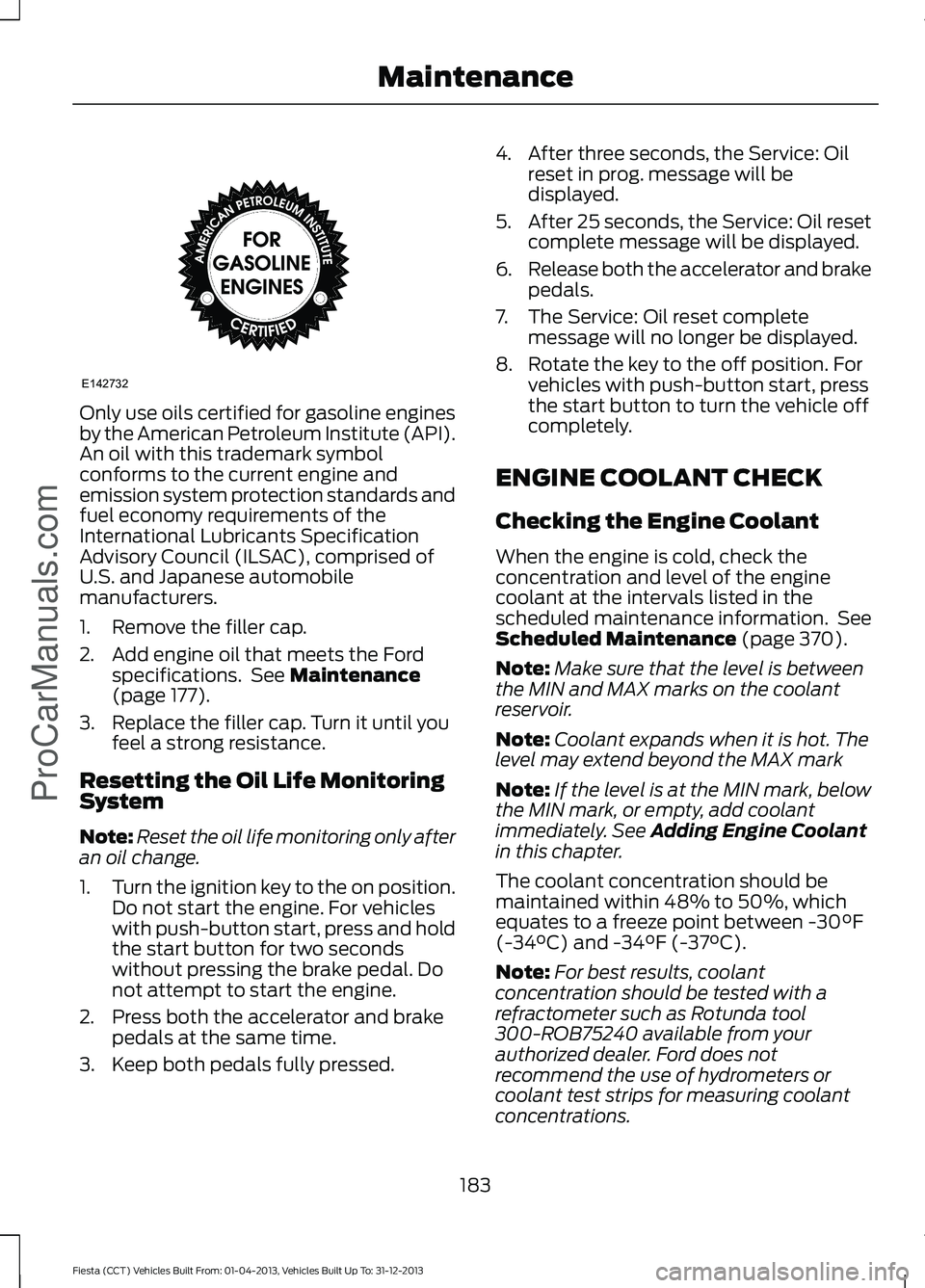
Only use oils certified for gasoline engines
by the American Petroleum Institute (API).
An oil with this trademark symbol
conforms to the current engine and
emission system protection standards and
fuel economy requirements of the
International Lubricants Specification
Advisory Council (ILSAC), comprised of
U.S. and Japanese automobile
manufacturers.
1. Remove the filler cap.
2. Add engine oil that meets the Ford
specifications. See Maintenance
(page 177).
3. Replace the filler cap. Turn it until you feel a strong resistance.
Resetting the Oil Life Monitoring
System
Note: Reset the oil life monitoring only after
an oil change.
1. Turn the ignition key to the on position.
Do not start the engine. For vehicles
with push-button start, press and hold
the start button for two seconds
without pressing the brake pedal. Do
not attempt to start the engine.
2. Press both the accelerator and brake pedals at the same time.
3. Keep both pedals fully pressed. 4. After three seconds, the Service: Oil
reset in prog. message will be
displayed.
5. After 25 seconds, the Service: Oil reset
complete message will be displayed.
6. Release both the accelerator and brake
pedals.
7. The Service: Oil reset complete message will no longer be displayed.
8. Rotate the key to the off position. For vehicles with push-button start, press
the start button to turn the vehicle off
completely.
ENGINE COOLANT CHECK
Checking the Engine Coolant
When the engine is cold, check the
concentration and level of the engine
coolant at the intervals listed in the
scheduled maintenance information. See
Scheduled Maintenance
(page 370).
Note: Make sure that the level is between
the MIN and MAX marks on the coolant
reservoir.
Note: Coolant expands when it is hot. The
level may extend beyond the MAX mark
Note: If the level is at the MIN mark, below
the MIN mark, or empty, add coolant
immediately. See
Adding Engine Coolant
in this chapter.
The coolant concentration should be
maintained within 48% to 50%, which
equates to a freeze point between -30°F
(-34°C) and -34°F (-37°C).
Note: For best results, coolant
concentration should be tested with a
refractometer such as Rotunda tool
300-ROB75240 available from your
authorized dealer. Ford does not
recommend the use of hydrometers or
coolant test strips for measuring coolant
concentrations.
183
Fiesta (CCT) Vehicles Built From: 01-04-2013, Vehicles Built Up To: 31-12-2013 Maintenance
ProCarManuals.comE142732
Page 189 of 398
FUEL FILTER
Your vehicle is equipped with a lifetime
fuel filter that is integrated with the fuel
tank. Regular maintenance or replacement
is not needed.
WASHER FLUID CHECK
Note:
The reservoir supplies the front and
rear washer systems.
When adding fluid, use a mixture of washer
fluid and water to help prevent freezing in
cold weather and improve the cleaning
capability. We recommend that you use
only high quality washer fluid.
For information on fluid dilution, refer to
the product instructions.
CHANGING THE 12V BATTERY WARNING
For vehicles with start-stop the
battery requirement is different. You
must replace the battery with one of
exactly the same specification. Note:
Where applicable you must
reprogram the audio system using the
keycode.
The battery is located in the engine
compartment. See Maintenance (page
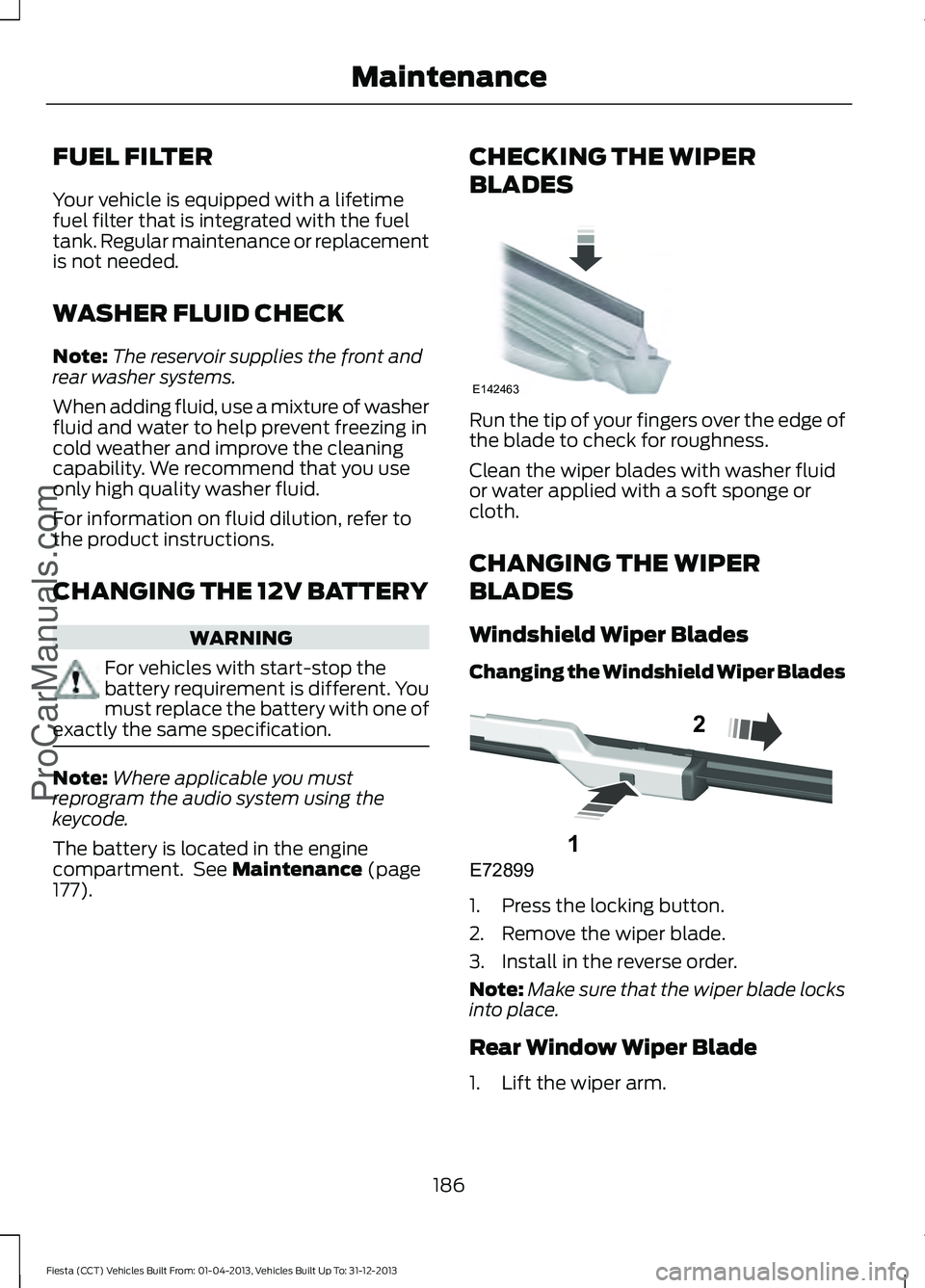
177). CHECKING THE WIPER
BLADES Run the tip of your fingers over the edge of
the blade to check for roughness.
Clean the wiper blades with washer fluid
or water applied with a soft sponge or
cloth.
CHANGING THE WIPER
BLADES
Windshield Wiper Blades
Changing the Windshield Wiper Blades
1. Press the locking button.
2. Remove the wiper blade.
3. Install in the reverse order.
Note:
Make sure that the wiper blade locks
into place.
Rear Window Wiper Blade
1. Lift the wiper arm.
186
Fiesta (CCT) Vehicles Built From: 01-04-2013, Vehicles Built Up To: 31-12-2013 Maintenance
ProCarManuals.comE142463 E72899
1
2
Page 249 of 398
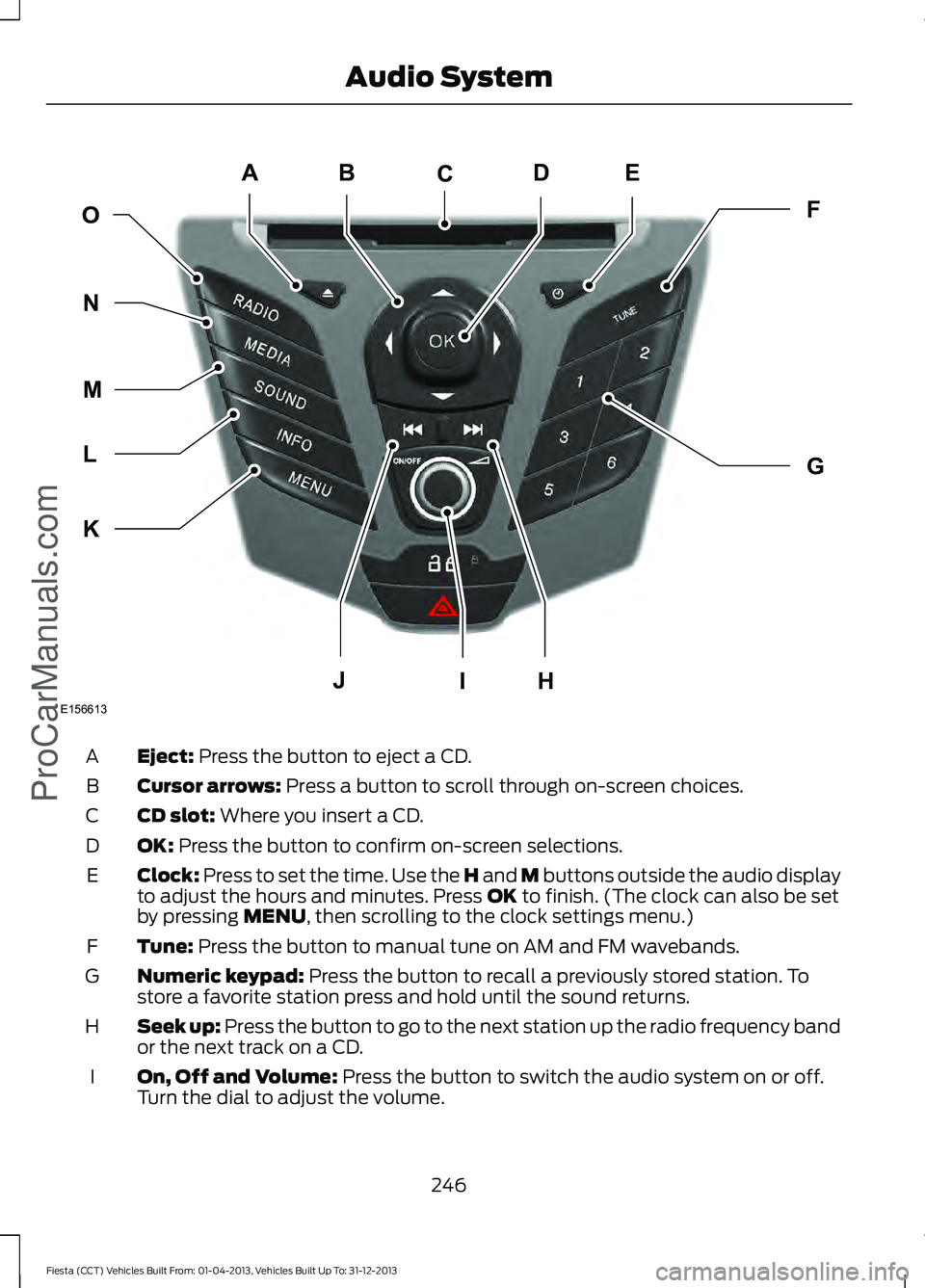
Eject: Press the button to eject a CD.
A
Cursor arrows:
Press a button to scroll through on-screen choices.
B
CD slot:
Where you insert a CD.
C
OK:
Press the button to confirm on-screen selections.
D
Clock:
Press to set the time. Use the H and M buttons outside the audio display
to adjust the hours and minutes. Press OK to finish. (The clock can also be set
by pressing MENU, then scrolling to the clock settings menu.)
E
Tune:
Press the button to manual tune on AM and FM wavebands.
F
Numeric keypad:
Press the button to recall a previously stored station. To
store a favorite station press and hold until the sound returns.
G
Seek up: Press the button to go to the next station up the radio frequency band
or the next track on a CD.
H
On, Off and Volume:
Press the button to switch the audio system on or off.
Turn the dial to adjust the volume.
I
246
Fiesta (CCT) Vehicles Built From: 01-04-2013, Vehicles Built Up To: 31-12-2013 Audio System
ProCarManuals.comE156613
ED
OF
G
K
L
M
N
JHI
C
A
B
Page 253 of 398
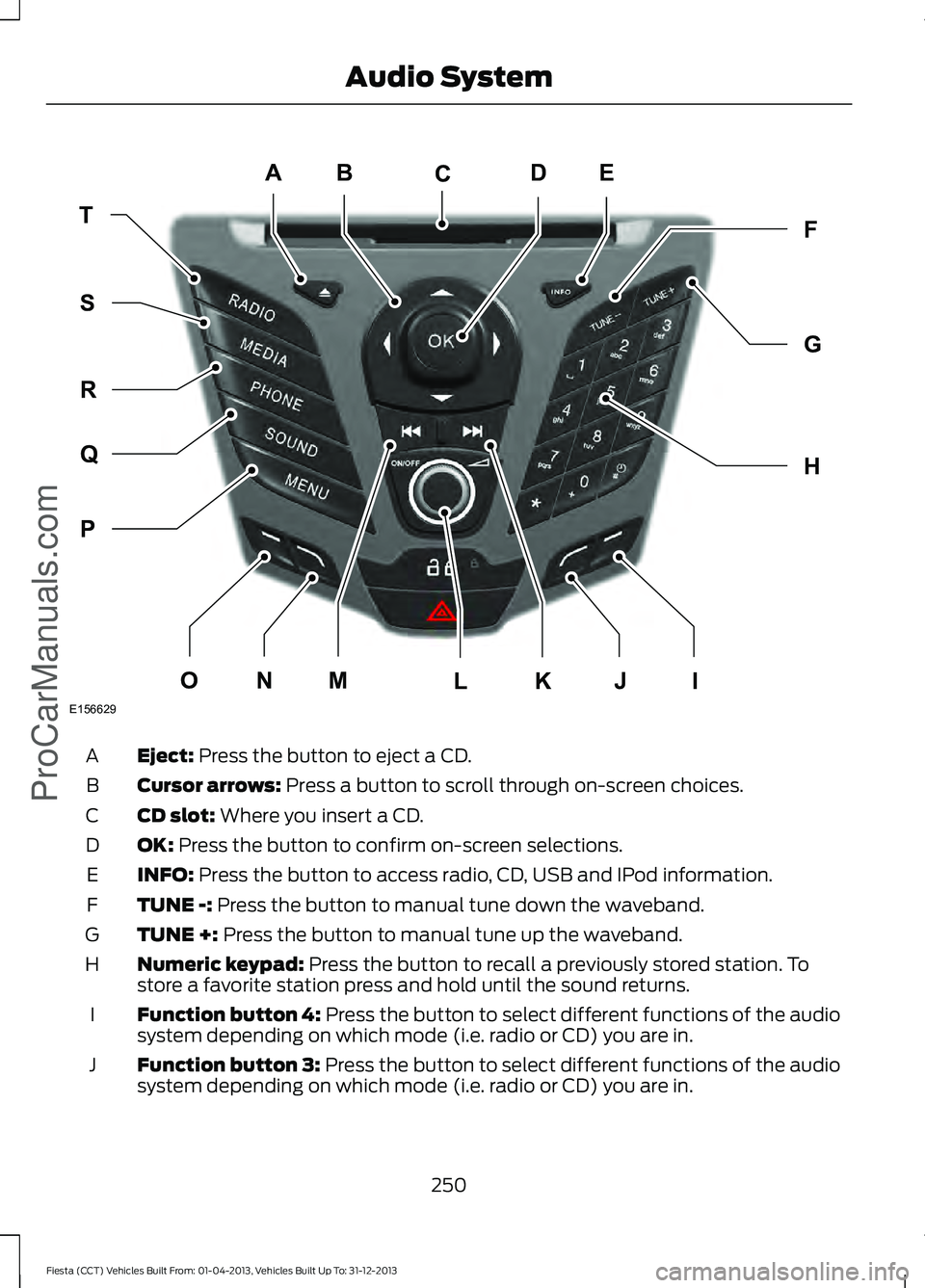
Eject: Press the button to eject a CD.
A
Cursor arrows:
Press a button to scroll through on-screen choices.
B
CD slot:
Where you insert a CD.
C
OK:
Press the button to confirm on-screen selections.
D
INFO:
Press the button to access radio, CD, USB and IPod information.
E
TUNE -:
Press the button to manual tune down the waveband.
F
TUNE +:
Press the button to manual tune up the waveband.
G
Numeric keypad:
Press the button to recall a previously stored station. To
store a favorite station press and hold until the sound returns.
H
Function button 4:
Press the button to select different functions of the audio
system depending on which mode (i.e. radio or CD) you are in.
I
Function button 3:
Press the button to select different functions of the audio
system depending on which mode (i.e. radio or CD) you are in.
J
250
Fiesta (CCT) Vehicles Built From: 01-04-2013, Vehicles Built Up To: 31-12-2013 Audio System
ProCarManuals.comE156629
JI
ED
TF
H
G
P
Q
R
S
MNOKL
C
A
B
Page 301 of 398
•
Make sure the power cables do not
interfere with the safe operation of your
vehicle's controls or affect your safe
driving abilities.
• Some SYNC functions are
speed-dependent. Their use is limited
to when your vehicle is travelling at
speeds below 3 mph (5 km/h).
Make sure that you review your device's
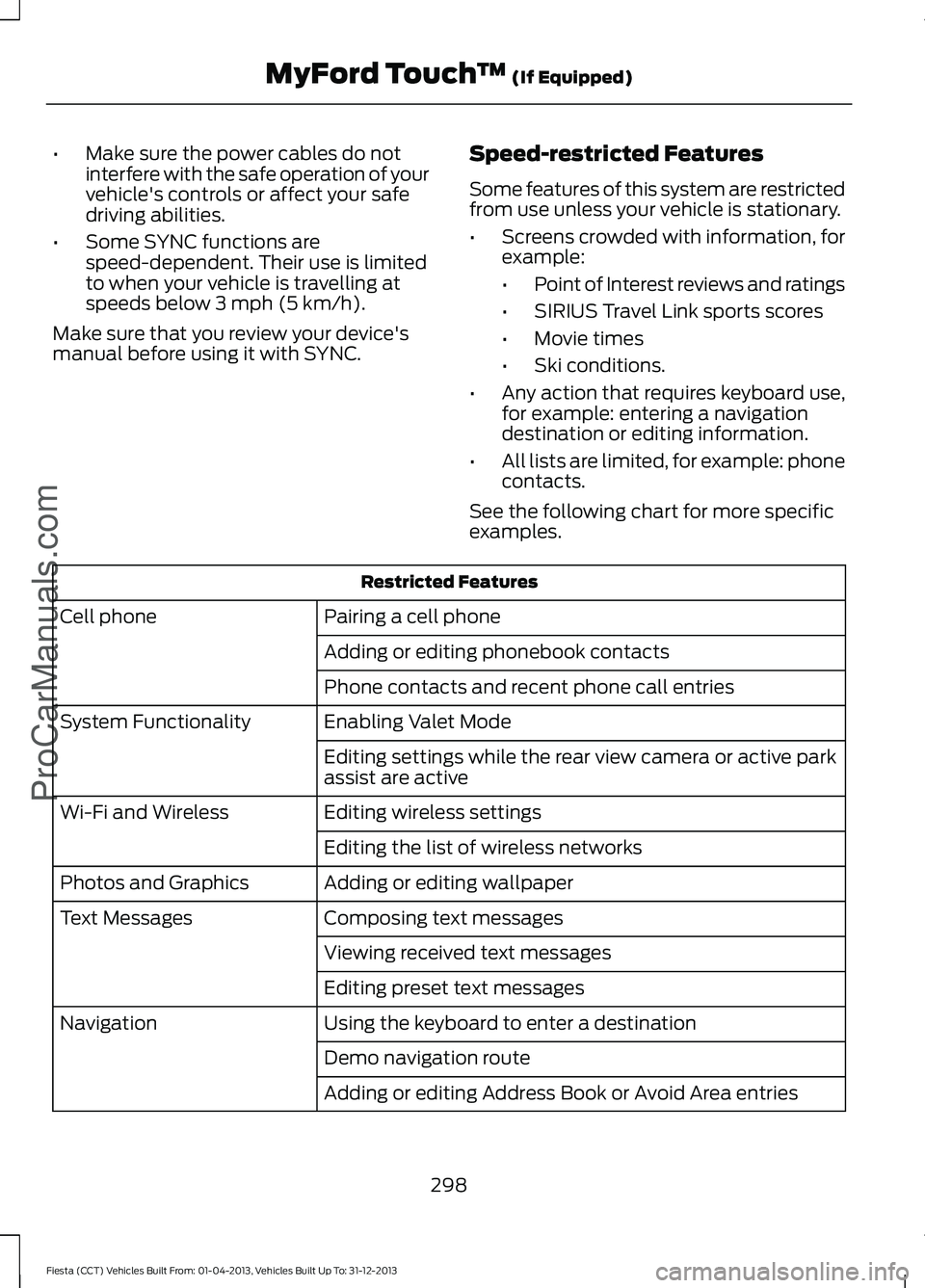
manual before using it with SYNC. Speed-restricted Features
Some features of this system are restricted
from use unless your vehicle is stationary.
•
Screens crowded with information, for
example:
•Point of Interest reviews and ratings
• SIRIUS Travel Link sports scores
• Movie times
• Ski conditions.
• Any action that requires keyboard use,
for example: entering a navigation
destination or editing information.
• All lists are limited, for example: phone
contacts.
See the following chart for more specific
examples. Restricted Features
Pairing a cell phone
Cell phone
Adding or editing phonebook contacts
Phone contacts and recent phone call entries
Enabling Valet Mode
System Functionality
Editing settings while the rear view camera or active park
assist are active
Editing wireless settings
Wi-Fi and Wireless
Editing the list of wireless networks
Adding or editing wallpaper
Photos and Graphics
Composing text messages
Text Messages
Viewing received text messages
Editing preset text messages
Using the keyboard to enter a destination
Navigation
Demo navigation route
Adding or editing Address Book or Avoid Area entries
298
Fiesta (CCT) Vehicles Built From: 01-04-2013, Vehicles Built Up To: 31-12-2013 MyFord Touch
™ (If Equipped)
ProCarManuals.com
Page 308 of 398
•
Speed Compensated Volume
• DSP. *
Note: *
Your vehicle may not have these
sound settings.
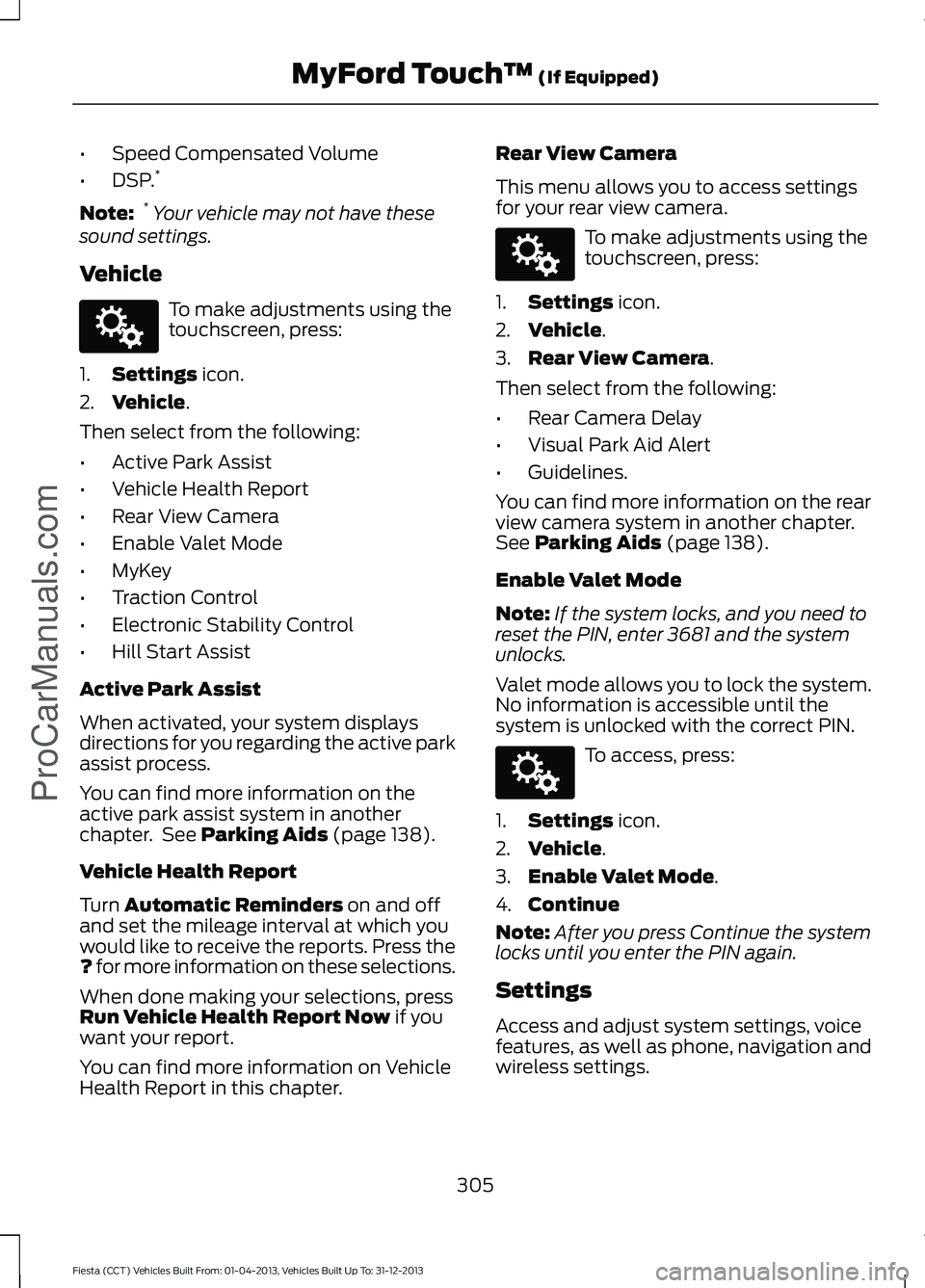
Vehicle To make adjustments using the
touchscreen, press:
1. Settings icon.
2. Vehicle
.
Then select from the following:
• Active Park Assist
• Vehicle Health Report
• Rear View Camera
• Enable Valet Mode
• MyKey
• Traction Control
• Electronic Stability Control
• Hill Start Assist
Active Park Assist
When activated, your system displays
directions for you regarding the active park
assist process.
You can find more information on the
active park assist system in another
chapter. See
Parking Aids (page 138).
Vehicle Health Report
Turn
Automatic Reminders on and off
and set the mileage interval at which you
would like to receive the reports. Press the
?
for more information on these selections.
When done making your selections, press
Run Vehicle Health Report Now
if you
want your report.
You can find more information on Vehicle
Health Report in this chapter. Rear View Camera
This menu allows you to access settings
for your rear view camera. To make adjustments using the
touchscreen, press:
1. Settings
icon.
2. Vehicle
.
3. Rear View Camera
.
Then select from the following:
• Rear Camera Delay
• Visual Park Aid Alert
• Guidelines.
You can find more information on the rear
view camera system in another chapter.
See
Parking Aids (page 138).
Enable Valet Mode
Note: If the system locks, and you need to
reset the PIN, enter 3681 and the system
unlocks.
Valet mode allows you to lock the system.
No information is accessible until the
system is unlocked with the correct PIN. To access, press:
1. Settings
icon.
2. Vehicle
.
3. Enable Valet Mode
.
4. Continue
Note: After you press Continue the system
locks until you enter the PIN again.
Settings
Access and adjust system settings, voice
features, as well as phone, navigation and
wireless settings.
305
Fiesta (CCT) Vehicles Built From: 01-04-2013, Vehicles Built Up To: 31-12-2013 MyFord Touch
™
(If Equipped)
ProCarManuals.comE142607 E142607 E142607
Page 309 of 398
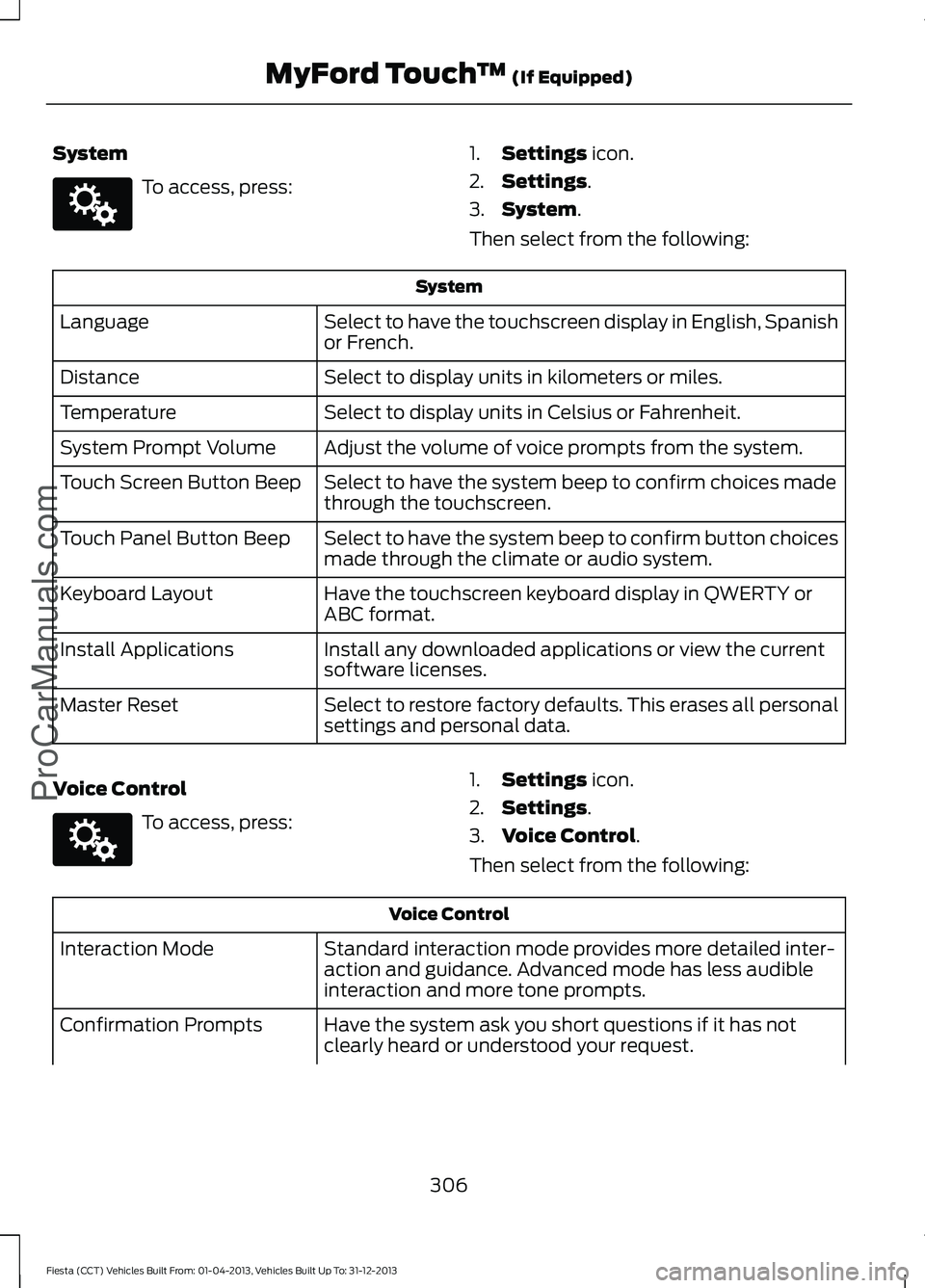
System
To access, press:
1.
Settings icon.
2. Settings
.
3. System
.
Then select from the following: System
Select to have the touchscreen display in English, Spanish
or French.
Language
Select to display units in kilometers or miles.
Distance
Select to display units in Celsius or Fahrenheit.
Temperature
Adjust the volume of voice prompts from the system.
System Prompt Volume
Select to have the system beep to confirm choices made
through the touchscreen.
Touch Screen Button Beep
Select to have the system beep to confirm button choices
made through the climate or audio system.
Touch Panel Button Beep
Have the touchscreen keyboard display in QWERTY or
ABC format.
Keyboard Layout
Install any downloaded applications or view the current
software licenses.
Install Applications
Select to restore factory defaults. This erases all personal
settings and personal data.
Master Reset
Voice Control To access, press:
1.
Settings
icon.
2. Settings
.
3. Voice Control
.
Then select from the following: Voice Control
Standard interaction mode provides more detailed inter-
action and guidance. Advanced mode has less audible
interaction and more tone prompts.
Interaction Mode
Have the system ask you short questions if it has not
clearly heard or understood your request.
Confirmation Prompts
306
Fiesta (CCT) Vehicles Built From: 01-04-2013, Vehicles Built Up To: 31-12-2013 MyFord Touch
™
(If Equipped)
ProCarManuals.comE142607 E142607
Page 325 of 398
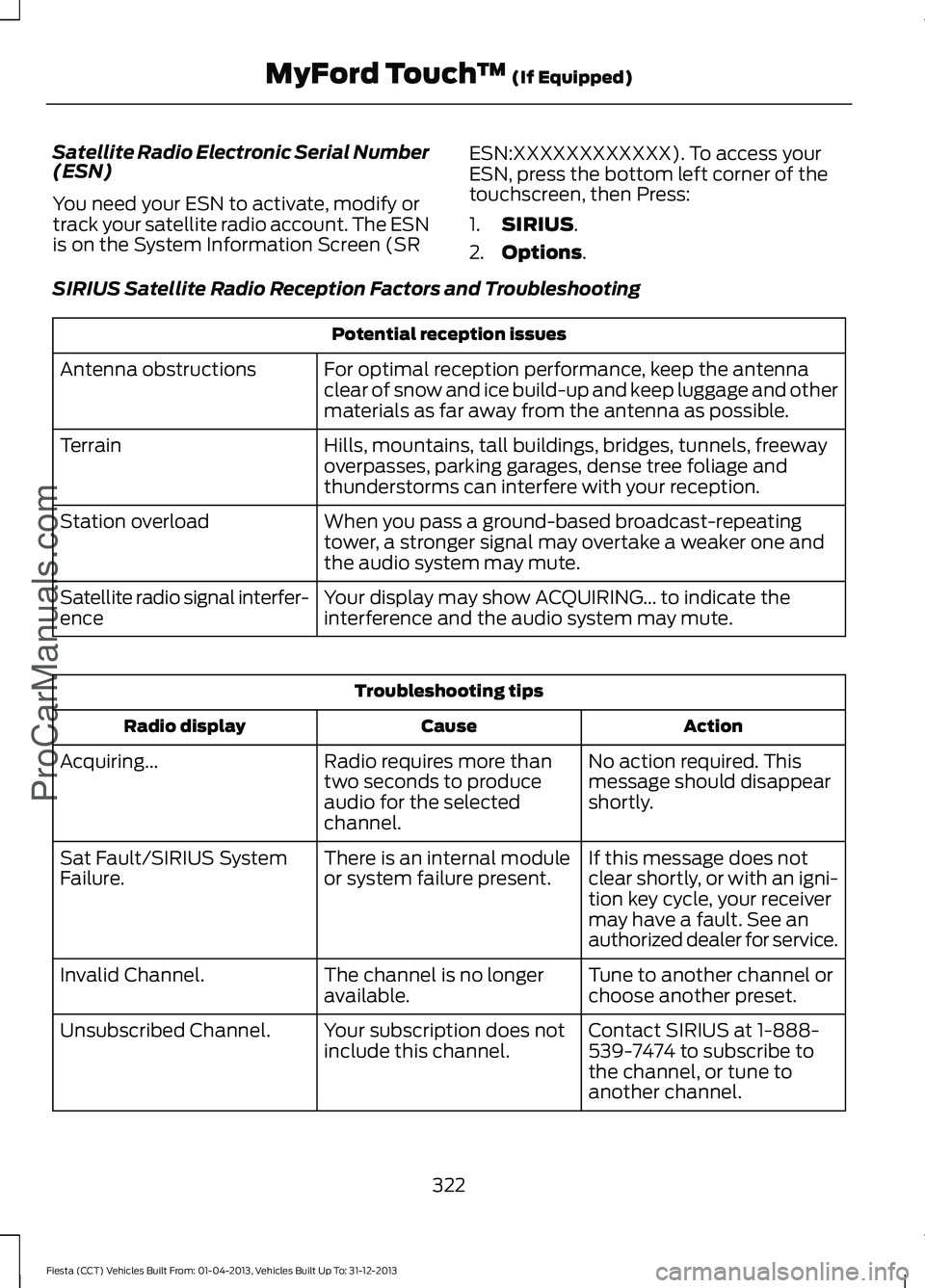
Satellite Radio Electronic Serial Number
(ESN)
You need your ESN to activate, modify or
track your satellite radio account. The ESN
is on the System Information Screen (SR
ESN:XXXXXXXXXXXX). To access your
ESN, press the bottom left corner of the
touchscreen, then Press:
1.
SIRIUS.
2. Options
.
SIRIUS Satellite Radio Reception Factors and Troubleshooting Potential reception issues
For optimal reception performance, keep the antenna
clear of snow and ice build-up and keep luggage and other
materials as far away from the antenna as possible.
Antenna obstructions
Hills, mountains, tall buildings, bridges, tunnels, freeway
overpasses, parking garages, dense tree foliage and
thunderstorms can interfere with your reception.
Terrain
When you pass a ground-based broadcast-repeating
tower, a stronger signal may overtake a weaker one and
the audio system may mute.
Station overload
Your display may show ACQUIRING... to indicate the
interference and the audio system may mute.
Satellite radio signal interfer-
ence Troubleshooting tips
Action
Cause
Radio display
No action required. This
message should disappear
shortly.
Radio requires more than
two seconds to produce
audio for the selected
channel.
Acquiring...
If this message does not
clear shortly, or with an igni-
tion key cycle, your receiver
may have a fault. See an
authorized dealer for service.
There is an internal module
or system failure present.
Sat Fault/SIRIUS System
Failure.
Tune to another channel or
choose another preset.
The channel is no longer
available.
Invalid Channel.
Contact SIRIUS at 1-888-
539-7474 to subscribe to
the channel, or tune to
another channel.
Your subscription does not
include this channel.
Unsubscribed Channel.
322
Fiesta (CCT) Vehicles Built From: 01-04-2013, Vehicles Built Up To: 31-12-2013 MyFord Touch
™
(If Equipped)
ProCarManuals.com
Page 350 of 398
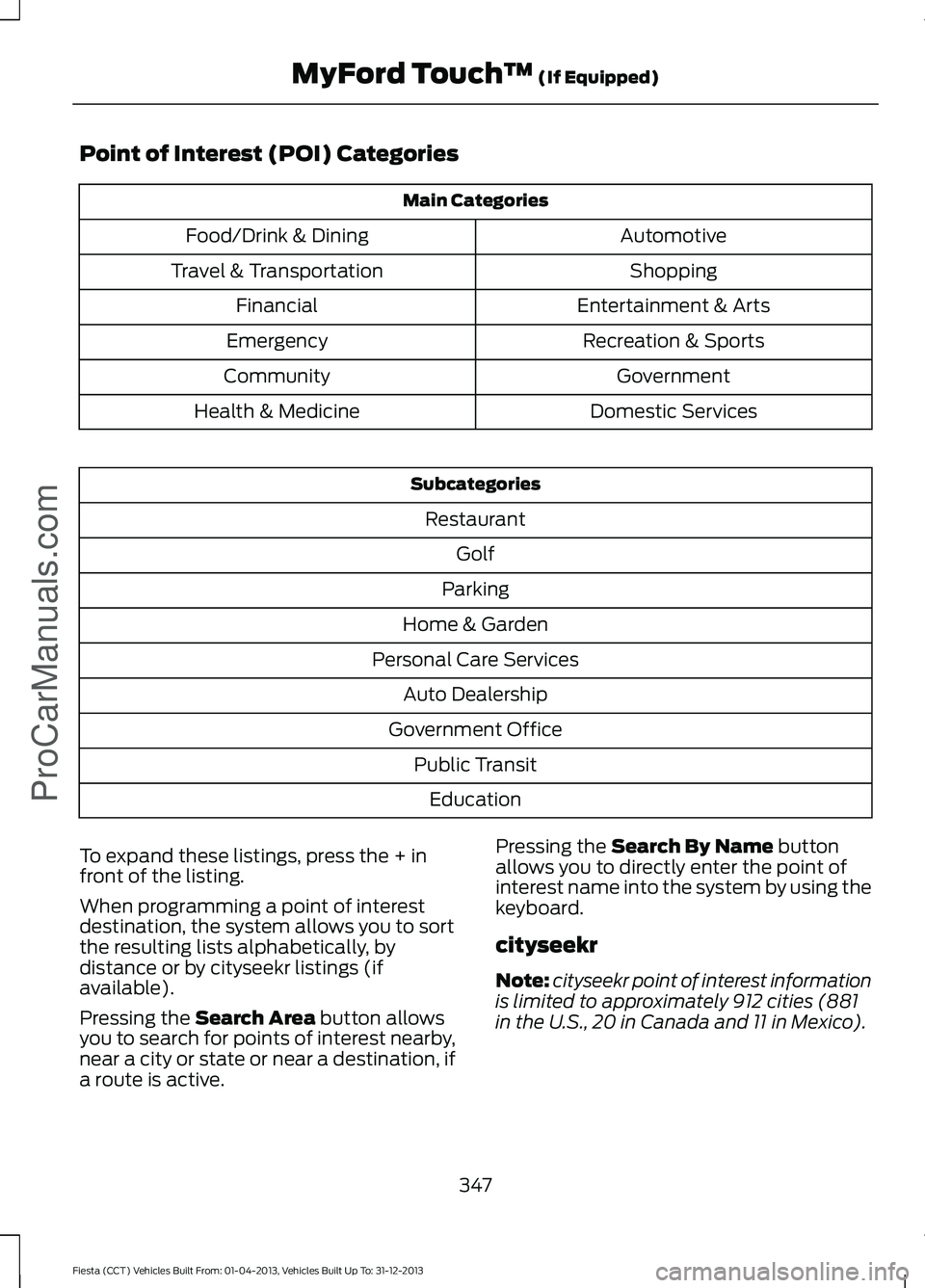
Point of Interest (POI) Categories
Main Categories
Automotive
Food/Drink & Dining
Shopping
Travel & Transportation
Entertainment & Arts
Financial
Recreation & Sports
Emergency
Government
Community
Domestic Services
Health & Medicine Subcategories
Restaurant Golf
Parking
Home & Garden
Personal Care Services Auto Dealership
Government Office Public TransitEducation
To expand these listings, press the + in
front of the listing.
When programming a point of interest
destination, the system allows you to sort
the resulting lists alphabetically, by
distance or by cityseekr listings (if
available).
Pressing the Search Area button allows
you to search for points of interest nearby,
near a city or state or near a destination, if
a route is active. Pressing the
Search By Name button
allows you to directly enter the point of
interest name into the system by using the
keyboard.
cityseekr
Note: cityseekr point of interest information
is limited to approximately 912 cities (881
in the U.S., 20 in Canada and 11 in Mexico).
347
Fiesta (CCT) Vehicles Built From: 01-04-2013, Vehicles Built Up To: 31-12-2013 MyFord Touch
™
(If Equipped)
ProCarManuals.com
Page 388 of 398
A
A/C
See: Climate Control........................................... 97
About This Manual...........................................7
Protecting the Environment................................ 7
ABS See: Brakes............................................................ 134
ABS driving hints See: Hints on Driving With Anti-Lock
Brakes.................................................................134
Accessories....................................................239 Exterior style........................................................ 239
Interior style......................................................... 239
Lifestyle................................................................. 239
Peace of mind..................................................... 239
Accessories See: Replacement Parts
Recommendation.............................................. 9
Adjusting the Headlamps.........................188 Horizontal Aim Adjustment............................ 189
Vertical Aim Adjustment................................. 188
Adjusting the Steering Wheel
....................63
Airbag Disposal...............................................42
Air Conditioning See: Climate Control........................................... 97
Air Vents
.............................................................97
Center Air Vents.................................................... 97
Side Air Vent........................................................... 97
Alarm See: Anti-Theft Alarm......................................... 61
Ambient Lighting
.............................................71
Anti-Theft Alarm.............................................61
Alarm System......................................................... 61
Arming the Alarm.................................................. 61
Disarming the Alarm............................................ 61
Triggering the Alarm............................................. 61
Appendices....................................................355
Audible Warnings and Indicators.............84 Automatic Transmission................................... 84
Headlamps On...................................................... 84
Key Outside Car.................................................... 84
Low Fuel.................................................................. 84
Safety Belt Minder............................................... 84
Audio Control
...................................................63
........................................................................\
............. 63
Audio System................................................244 General Information......................................... 244Audio Troubleshooting
..............................258
Audio unit - Vehicles With: AM/FM/CD/SYNC....................................249
Alternative Frequencies................................... 253
Automatic Volume Control............................ 252
Autostore Control.............................................. 252
News Broadcasts............................................... 253
Regional Mode.................................................... 253
Sound Button....................................................... 251
Station Preset Buttons.................................... 252
Station Tuning Control..................................... 252
Waveband Button.............................................. 252
Audio unit - Vehicles With: AM/FM/CD..................................................245
Alternative Frequencies.................................. 248
Automatic Volume Control............................ 248
Autostore Control.............................................. 248
News Broadcasts.............................................. 248
Regional Mode.................................................... 249
Sound Button...................................................... 247
Station Preset Buttons.................................... 248
Station Tuning Control..................................... 247
Waveband Button.............................................. 247
Audio unit - Vehicles With: Sony Audio System/Touchscreen Display
..............255
Audio unit - Vehicles With: Touchscreen Display
..........................................................254
Autolamps........................................................68
Automatic Climate Control........................99 Temperature Control........................................ 100
Automatic Transmission
............................128
Emergency Park Position Release
Lever..................................................................... 131
Hints on Driving with an Automatic Transmission.................................................... 131
Selector Lever Positions................................... 129
Sport Mode and Manual Shifting.................130
Automatic Transmission Fluid Check.............................................................185
Auxiliary Input Jack......................................257
Auxiliary Power Points..................................111 12 Volt DC Power Point....................................... 111
Location.................................................................... 111
B
Bonnet Lock See: Opening and Closing the Hood............177
385
Fiesta (CCT) Vehicles Built From: 01-04-2013, Vehicles Built Up To: 31-12-2013 Index
ProCarManuals.com