buttons FORD FIESTA 2014 Owners Manual
[x] Cancel search | Manufacturer: FORD, Model Year: 2014, Model line: FIESTA, Model: FORD FIESTA 2014Pages: 398, PDF Size: 6.09 MB
Page 47 of 398
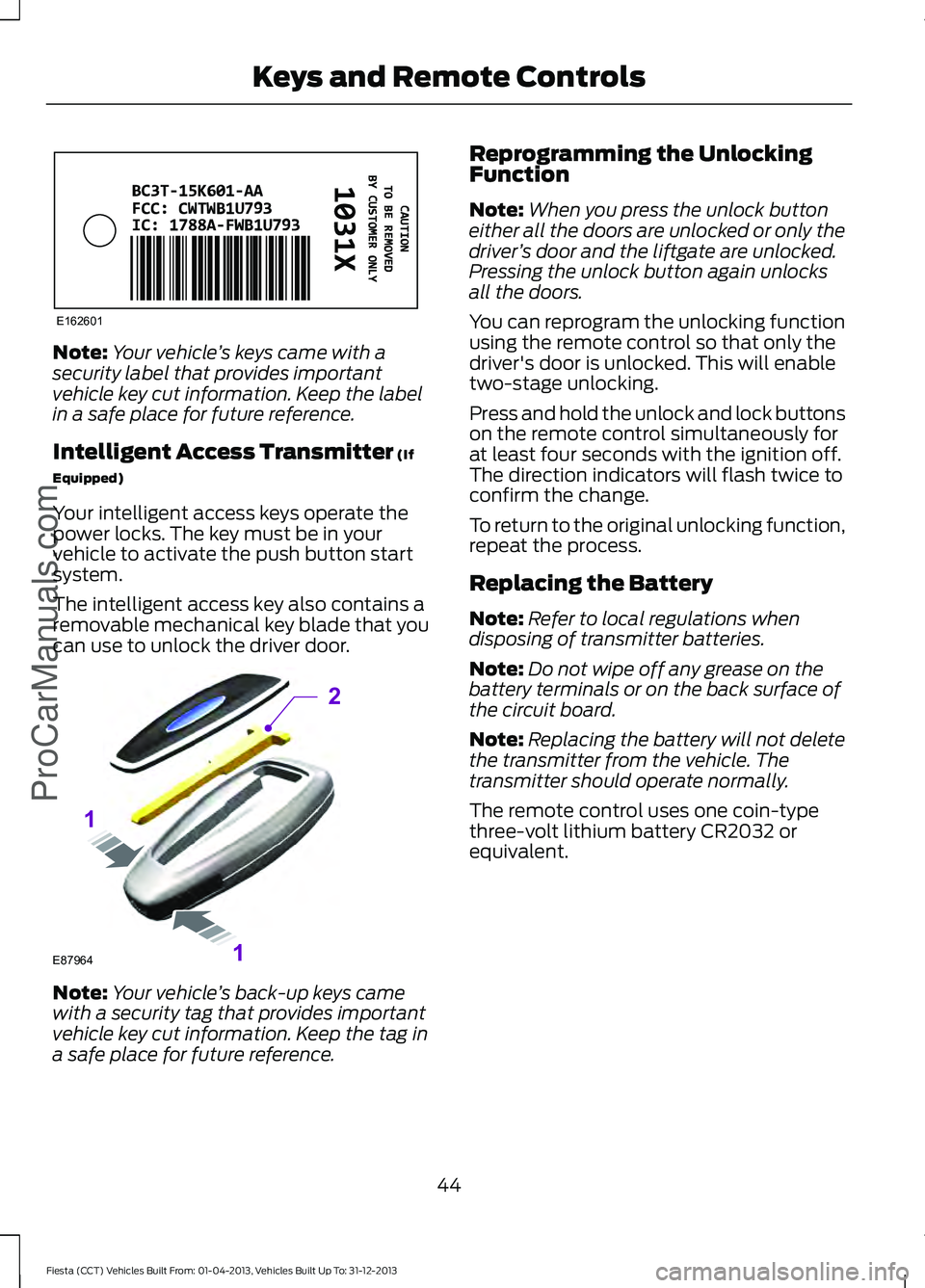
Note:
Your vehicle ’s keys came with a
security label that provides important
vehicle key cut information. Keep the label
in a safe place for future reference.
Intelligent Access Transmitter (If
Equipped)
Your intelligent access keys operate the
power locks. The key must be in your
vehicle to activate the push button start
system.
The intelligent access key also contains a
removable mechanical key blade that you
can use to unlock the driver door. Note:
Your vehicle ’s back-up keys came
with a security tag that provides important
vehicle key cut information. Keep the tag in
a safe place for future reference. Reprogramming the Unlocking
Function
Note:
When you press the unlock button
either all the doors are unlocked or only the
driver ’s door and the liftgate are unlocked.
Pressing the unlock button again unlocks
all the doors.
You can reprogram the unlocking function
using the remote control so that only the
driver's door is unlocked. This will enable
two-stage unlocking.
Press and hold the unlock and lock buttons
on the remote control simultaneously for
at least four seconds with the ignition off.
The direction indicators will flash twice to
confirm the change.
To return to the original unlocking function,
repeat the process.
Replacing the Battery
Note: Refer to local regulations when
disposing of transmitter batteries.
Note: Do not wipe off any grease on the
battery terminals or on the back surface of
the circuit board.
Note: Replacing the battery will not delete
the transmitter from the vehicle. The
transmitter should operate normally.
The remote control uses one coin-type
three-volt lithium battery CR2032 or
equivalent.
44
Fiesta (CCT) Vehicles Built From: 01-04-2013, Vehicles Built Up To: 31-12-2013 Keys and Remote Controls
ProCarManuals.comE162601 E87964
2
1
1
Page 49 of 398
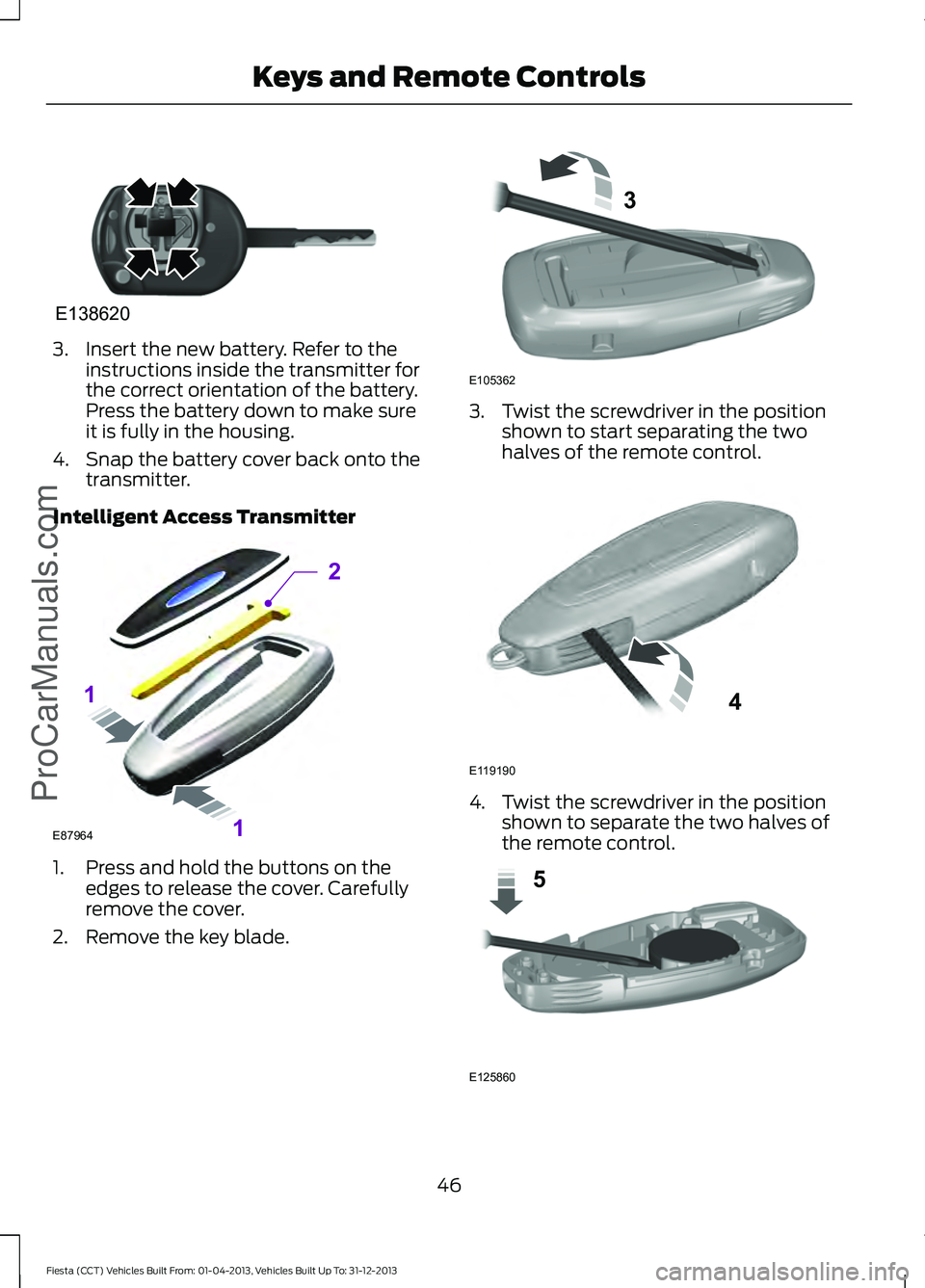
3. Insert the new battery. Refer to the
instructions inside the transmitter for
the correct orientation of the battery.
Press the battery down to make sure
it is fully in the housing.
4. Snap the battery cover back onto the transmitter.
Intelligent Access Transmitter 1. Press and hold the buttons on the
edges to release the cover. Carefully
remove the cover.
2. Remove the key blade. 3. Twist the screwdriver in the position
shown to start separating the two
halves of the remote control. 4. Twist the screwdriver in the position
shown to separate the two halves of
the remote control. 46
Fiesta (CCT) Vehicles Built From: 01-04-2013, Vehicles Built Up To: 31-12-2013 Keys and Remote ControlsProCarManuals.comE138620 E87964
2
1
1 E105362
3 E119190
4 E125860
5
Page 52 of 398
1.
Insert the key you want to program into
the ignition or, if the vehicle has push
button start, hold the intelligent access
key or fob next to the steering column.
2. Using the information display controls,
access the main menu and select
Settings, then MyKey by pressing OK
or the right arrow button.
3. Press
OK to select Create MyKey.
4. When prompted, hold the
OK button
until you see a message informing you
to label this key as a MyKey. The key
will be restricted at the next start.
MyKey is successfully created. Make sure
you label it so you can distinguish it from
the admin keys.
You can program configurable settings for
the key(s). Refer to
Programming or
Changing Configurable Settings.
Programming or Changing
Configurable Settings
Use the information display to access your
configurable MyKey settings.
1. Switch the ignition on using an admin key. If the vehicle has push-button
start, hold an intelligent access admin
key or fob next to the steering column
and use the push-button start to
switch the ignition on.
2. Access the main menu and select Settings
, then MyKey by pressing OK
or the right arrow key.
3. Use the arrow buttons to get to a configurable feature.
4. Press
OK or the right arrow button to
make a selection.
Note: You can clear or change your MyKey
settings at any time during the same key
cycle as you created the MyKey. If you
switch the ignition off, however, you will
need to use an admin key to clear your
MyKeys. CLEARING ALL MYKEYS
You can clear all MyKeys within the same
key cycle as you created the MyKey. If you
switch your ignition off, however, you will
need to use an admin key to clear your
MyKeys.
Note:
When you clear your MyKeys, you
remove all restrictions and return all MyKeys
to their original admin key status at once.
To clear all MyKeys of all MyKey settings,
use the information display to do the
following:
1. Access the main menu and select Settings
, then MyKey.
2. Scroll to
Clear MyKey and press the
OK button.
3. Hold the
OK button until ALL
MYKEYS CLEARED displays.
CHECKING MYKEY SYSTEM
STATUS
You can find information about your
programmed MyKeys by using the
information display.
MyKey Distance
Tracks the distance when drivers use a
MyKey. The only way to delete the
accumulated distance is by using an admin
key to clear your MyKey. If the distance
does not accumulate as expected, then
the intended user is not using the MyKey,
or an admin key user recently cleared and
then recreated a MyKey.
Number of MyKeys
Indicates the number of MyKeys
programmed to your vehicle. Use this
feature to detect how many MyKeys you
have for your vehicle and determine when
a MyKey has been deleted.
49
Fiesta (CCT) Vehicles Built From: 01-04-2013, Vehicles Built Up To: 31-12-2013 MyKey
™
(If Equipped)
ProCarManuals.com
Page 60 of 398
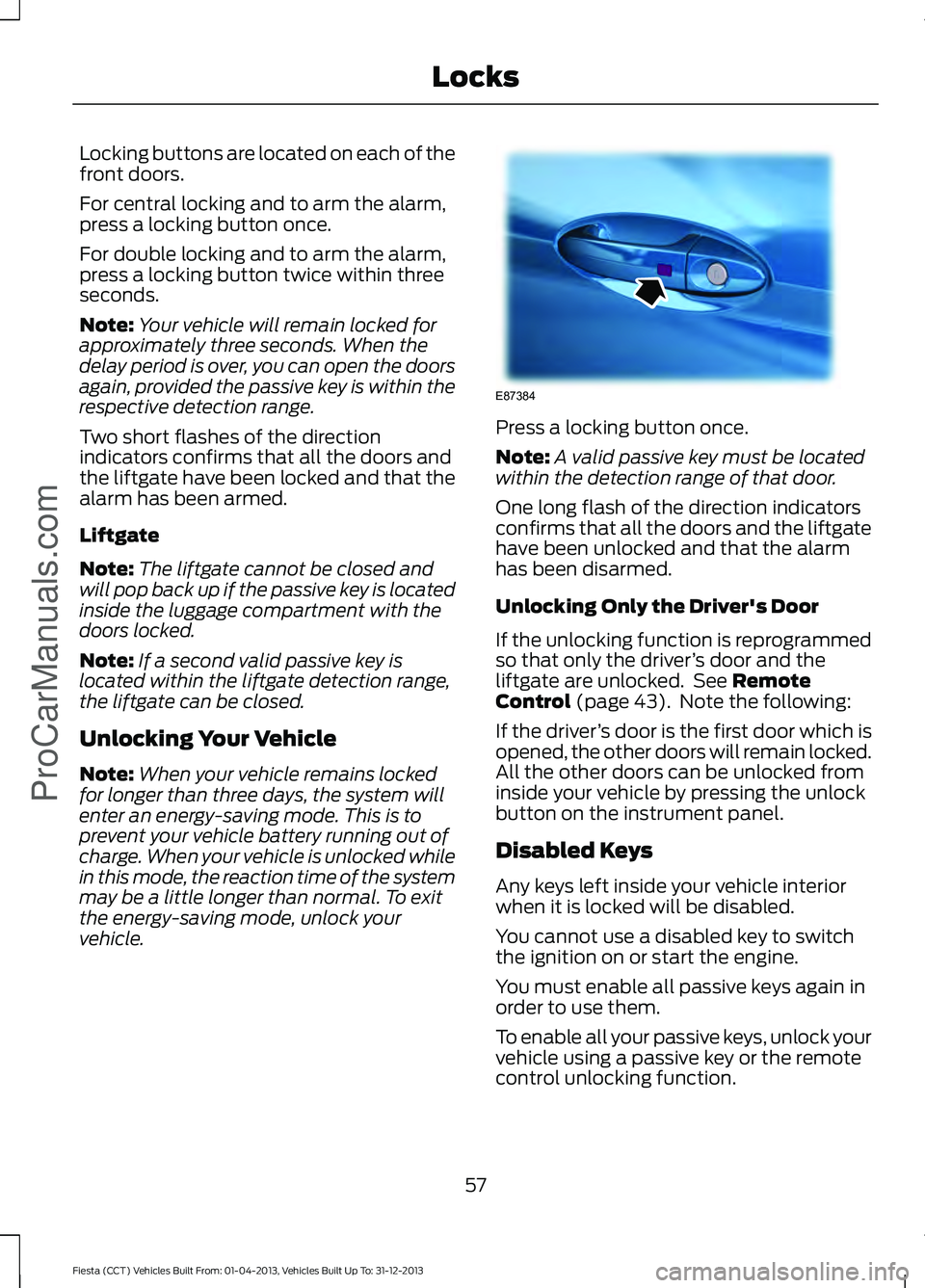
Locking buttons are located on each of the
front doors.
For central locking and to arm the alarm,
press a locking button once.
For double locking and to arm the alarm,
press a locking button twice within three
seconds.
Note:
Your vehicle will remain locked for
approximately three seconds. When the
delay period is over, you can open the doors
again, provided the passive key is within the
respective detection range.
Two short flashes of the direction
indicators confirms that all the doors and
the liftgate have been locked and that the
alarm has been armed.
Liftgate
Note: The liftgate cannot be closed and
will pop back up if the passive key is located
inside the luggage compartment with the
doors locked.
Note: If a second valid passive key is
located within the liftgate detection range,
the liftgate can be closed.
Unlocking Your Vehicle
Note: When your vehicle remains locked
for longer than three days, the system will
enter an energy-saving mode. This is to
prevent your vehicle battery running out of
charge. When your vehicle is unlocked while
in this mode, the reaction time of the system
may be a little longer than normal. To exit
the energy-saving mode, unlock your
vehicle. Press a locking button once.
Note:
A valid passive key must be located
within the detection range of that door.
One long flash of the direction indicators
confirms that all the doors and the liftgate
have been unlocked and that the alarm
has been disarmed.
Unlocking Only the Driver's Door
If the unlocking function is reprogrammed
so that only the driver ’s door and the
liftgate are unlocked. See Remote
Control (page 43). Note the following:
If the driver ’s door is the first door which is
opened, the other doors will remain locked.
All the other doors can be unlocked from
inside your vehicle by pressing the unlock
button on the instrument panel.
Disabled Keys
Any keys left inside your vehicle interior
when it is locked will be disabled.
You cannot use a disabled key to switch
the ignition on or start the engine.
You must enable all passive keys again in
order to use them.
To enable all your passive keys, unlock your
vehicle using a passive key or the remote
control unlocking function.
57
Fiesta (CCT) Vehicles Built From: 01-04-2013, Vehicles Built Up To: 31-12-2013 Locks
ProCarManuals.comE87384
Page 77 of 398
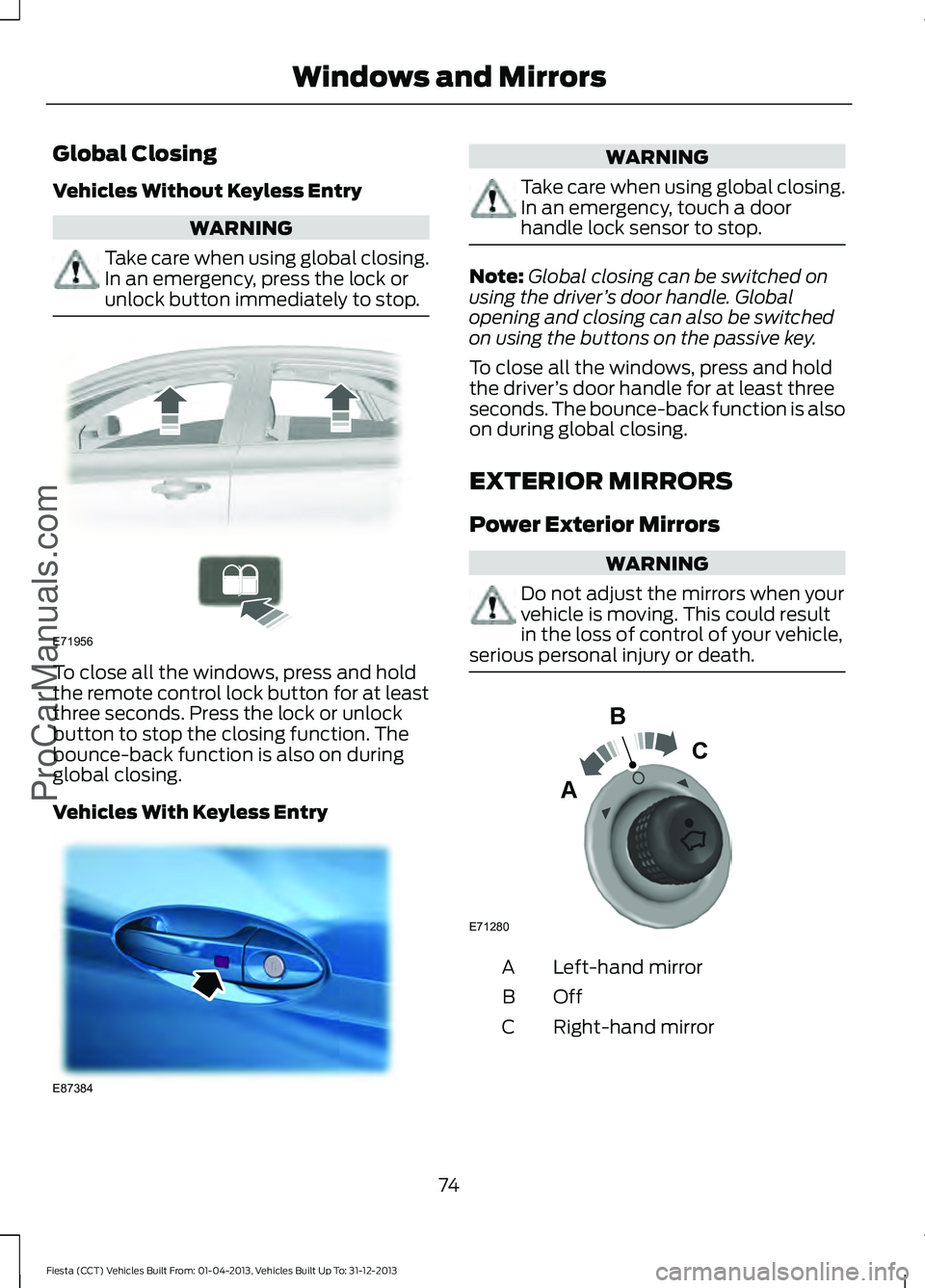
Global Closing
Vehicles Without Keyless Entry
WARNING
Take care when using global closing.
In an emergency, press the lock or
unlock button immediately to stop.
To close all the windows, press and hold
the remote control lock button for at least
three seconds. Press the lock or unlock
button to stop the closing function. The
bounce-back function is also on during
global closing.
Vehicles With Keyless Entry WARNING
Take care when using global closing.
In an emergency, touch a door
handle lock sensor to stop.
Note:
Global closing can be switched on
using the driver ’s door handle. Global
opening and closing can also be switched
on using the buttons on the passive key.
To close all the windows, press and hold
the driver ’s door handle for at least three
seconds. The bounce-back function is also
on during global closing.
EXTERIOR MIRRORS
Power Exterior Mirrors WARNING
Do not adjust the mirrors when your
vehicle is moving. This could result
in the loss of control of your vehicle,
serious personal injury or death. Left-hand mirror
A
OffB
Right-hand mirror
C
74
Fiesta (CCT) Vehicles Built From: 01-04-2013, Vehicles Built Up To: 31-12-2013 Windows and MirrorsProCarManuals.comE71956 E87384 E71280
B
C
A
Page 91 of 398
Menu
Volume limit
Information
clear all MyKeys
Information
MyKey active
System Check
All active warnings will display first if
applicable. The system check menu may
appear different based upon equipment
options and current vehicle status. Press
the up or down arrow button to scroll
through the list.
CLOCK
Type 1
To adjust the clock, switch the ignition on
and press buttons H or M on the
information and entertainment display as
necessary.
Type 2
Note: Use the information display to adjust
the clock. See General Information (page
85).
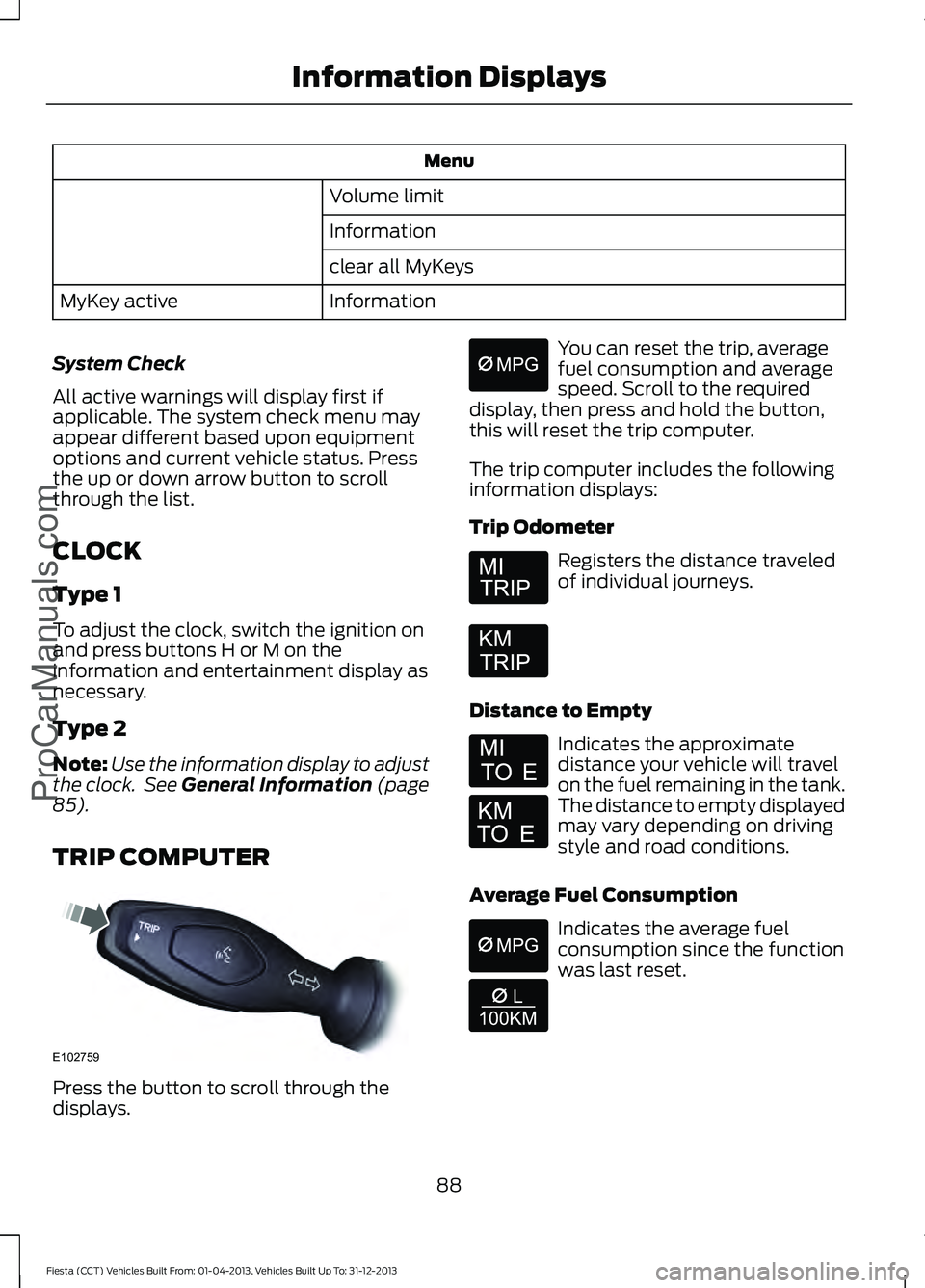
TRIP COMPUTER Press the button to scroll through the
displays. You can reset the trip, average
fuel consumption and average
speed. Scroll to the required
display, then press and hold the button,
this will reset the trip computer.
The trip computer includes the following
information displays:
Trip Odometer Registers the distance traveled
of individual journeys.
Distance to Empty Indicates the approximate
distance your vehicle will travel
on the fuel remaining in the tank.
The distance to empty displayed
may vary depending on driving
style and road conditions.
Average Fuel Consumption Indicates the average fuel
consumption since the function
was last reset.
88
Fiesta (CCT) Vehicles Built From: 01-04-2013, Vehicles Built Up To: 31-12-2013 Information Displays
ProCarManuals.comE102759 E164638E
Page 106 of 398
Side Window Defogging in Cold Weather
Vehicles With Automatic Climate Control
Vehicles With Manual Climate Control
Press the MAX defrost button.
Adjust the fan speed to the highest
setting.
1
Adjust the temperature control to the
desired setting.
Adjust the temperature control to the
highest setting.
2
Adjust the air distribution control to the
windshield position.
3
Press the A/C button.
4
Maximum Cooling Performance in
Instrument Panel or Instrument
Panel and Footwell Positions
1. Adjust the temperature control to the lowest setting.
2. Press the
A/C and recirculated air
buttons.
3. Adjust the fan speed to the highest setting initially and then adjust it to suit
the desired comfort level.
HEATED WINDOWS AND
MIRRORS
Heated Windows
Use the heated windows to defrost or
demist the rear window.
Note: The heated windows operate only
when the engine is running.
Heated Rear Window Heated Exterior Mirrors
Electric exterior mirrors have a heating
element that will defrost or demist the
mirror glass. They will switch on
automatically when you switch the heated
rear window on.
CABIN AIR FILTER
Your vehicle is equipped with a cabin air
filter. It is located behind the center
console.
The particulate filtration system reduces
the concentration of airborne particles
such as dust, spores and pollen in the air
supplied to the interior of your vehicle.
Note:
Make sure you have a cabin air filter
installed at all times. This prevents foreign
objects from entering the system. Running
the system without a filter in place could
result in degradation or damage to the
system.
103
Fiesta (CCT) Vehicles Built From: 01-04-2013, Vehicles Built Up To: 31-12-2013 Climate Control
ProCarManuals.comE72507
Page 109 of 398
Note:
Adjust the seat back to an upright
driving position before adjusting the head
restraint. Adjust the head restraint so that
the top of it is level with the top of your head
and as far forward as possible. Make sure
that you remain comfortable. If you are
extremely tall, adjust the head restraint to
its highest position.
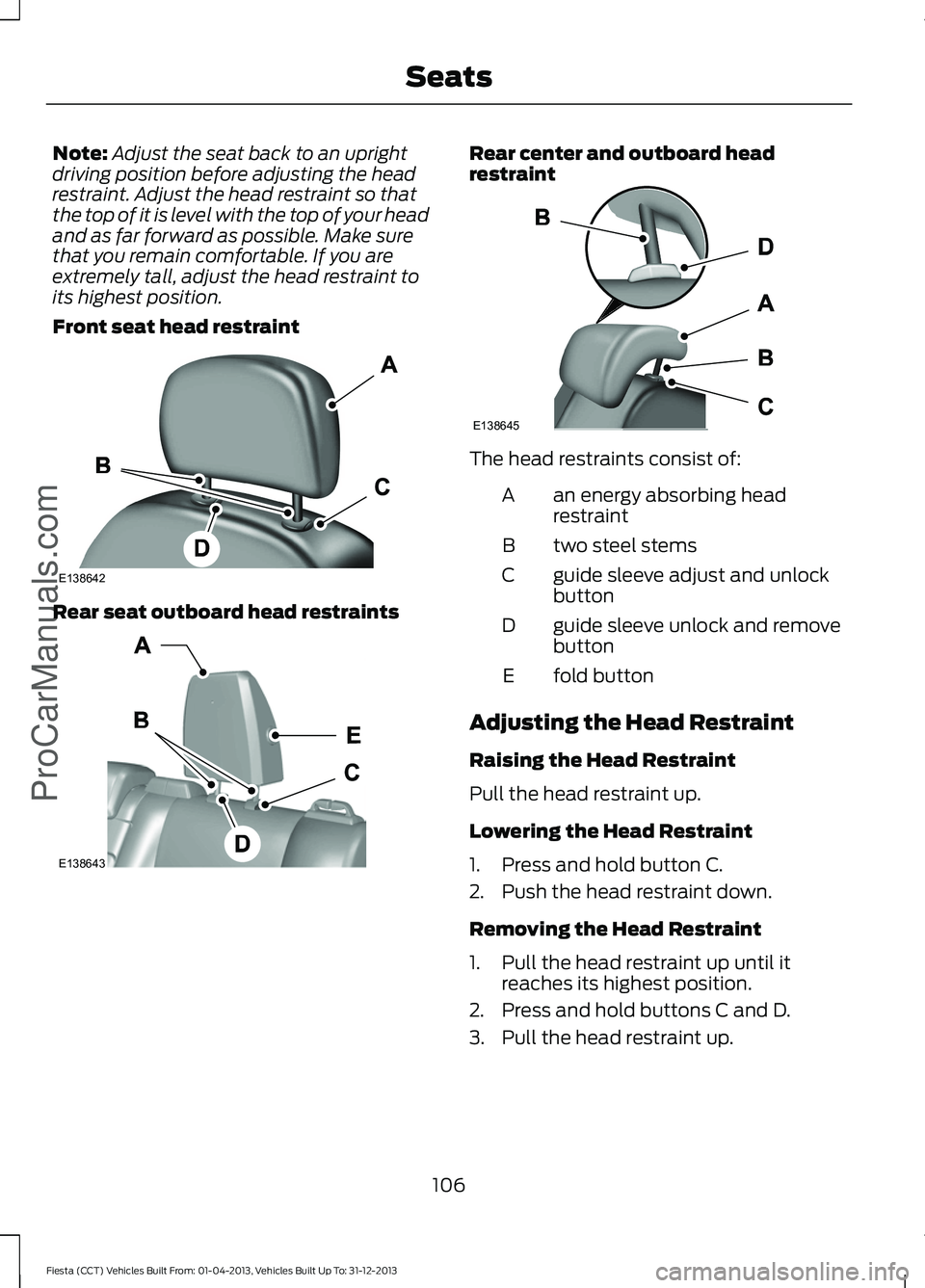
Front seat head restraint Rear seat outboard head restraints Rear center and outboard head
restraint
The head restraints consist of:
an energy absorbing head
restraint
A
two steel stems
B
guide sleeve adjust and unlock
button
C
guide sleeve unlock and remove
button
D
fold button
E
Adjusting the Head Restraint
Raising the Head Restraint
Pull the head restraint up.
Lowering the Head Restraint
1. Press and hold button C.
2. Push the head restraint down.
Removing the Head Restraint
1. Pull the head restraint up until it reaches its highest position.
2. Press and hold buttons C and D.
3. Pull the head restraint up.
106
Fiesta (CCT) Vehicles Built From: 01-04-2013, Vehicles Built Up To: 31-12-2013 SeatsProCarManuals.comE138642 E138643 E138645
Page 112 of 398
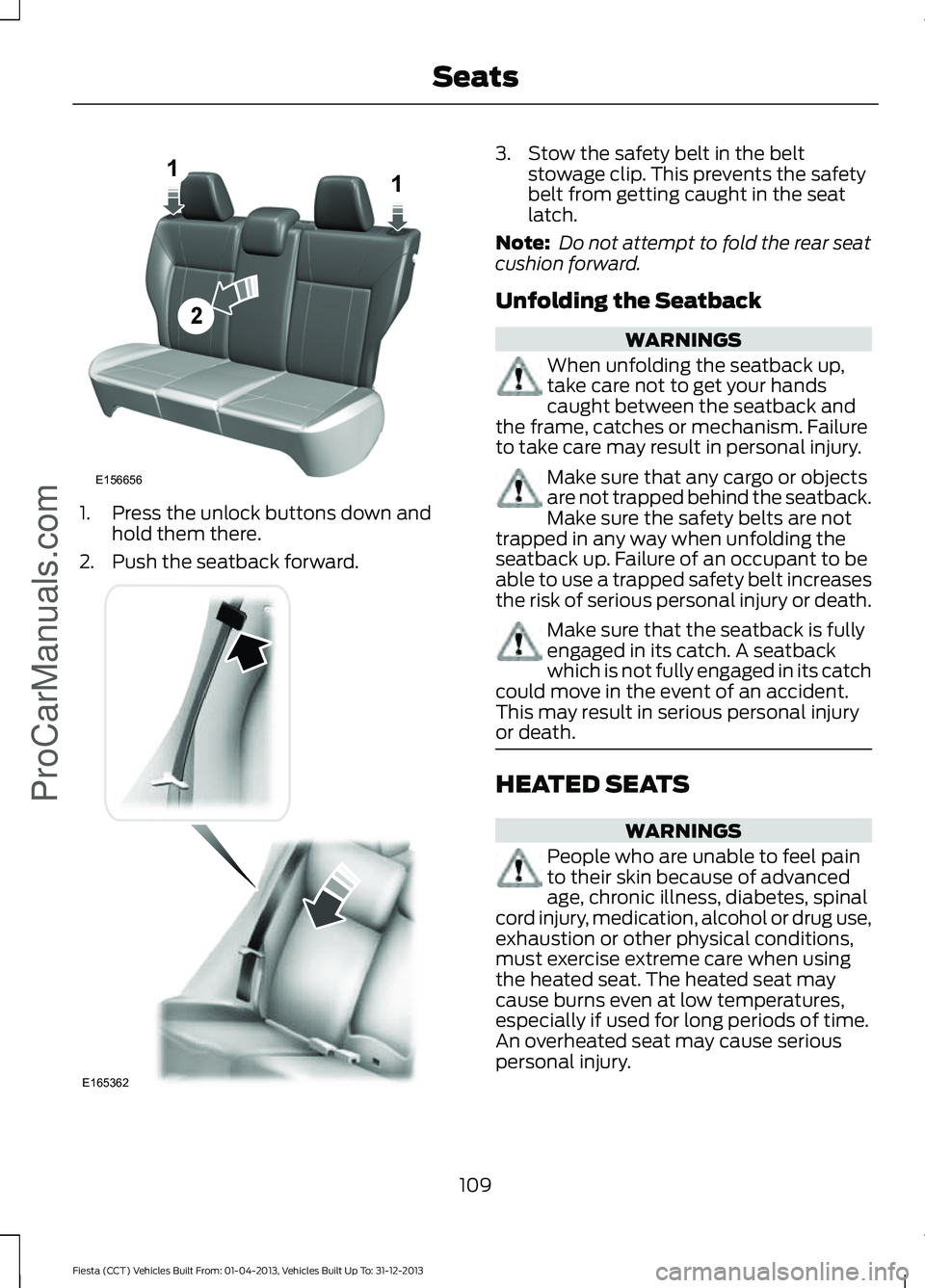
1. Press the unlock buttons down and
hold them there.
2. Push the seatback forward. 3. Stow the safety belt in the belt
stowage clip. This prevents the safety
belt from getting caught in the seat
latch.
Note: Do not attempt to fold the rear seat
cushion forward.
Unfolding the Seatback WARNINGS
When unfolding the seatback up,
take care not to get your hands
caught between the seatback and
the frame, catches or mechanism. Failure
to take care may result in personal injury. Make sure that any cargo or objects
are not trapped behind the seatback.
Make sure the safety belts are not
trapped in any way when unfolding the
seatback up. Failure of an occupant to be
able to use a trapped safety belt increases
the risk of serious personal injury or death. Make sure that the seatback is fully
engaged in its catch. A seatback
which is not fully engaged in its catch
could move in the event of an accident.
This may result in serious personal injury
or death. HEATED SEATS
WARNINGS
People who are unable to feel pain
to their skin because of advanced
age, chronic illness, diabetes, spinal
cord injury, medication, alcohol or drug use,
exhaustion or other physical conditions,
must exercise extreme care when using
the heated seat. The heated seat may
cause burns even at low temperatures,
especially if used for long periods of time.
An overheated seat may cause serious
personal injury.
109
Fiesta (CCT) Vehicles Built From: 01-04-2013, Vehicles Built Up To: 31-12-2013 SeatsProCarManuals.comE156656
2
11 E165362
Page 133 of 398
With the transmission selector lever in
reverse, power is transmitted to the drive
wheels to allow your vehicle to move
backward.
Note:
Always come to a complete stop
before shifting the transmission selector
lever out of reverse.
N (Neutral)
With the transmission selector lever in
neutral, power is not transmitted to the
drive wheels and the transmission is not
locked, it is possible your vehicle will move
if the brakes are not applied. You can start
the engine with the transmission selector
lever in this position.
D (Drive)
With the transmission selector lever in
drive, your vehicle will shift automatically
through the forward gears.
The transmission will select the
appropriate gear for optimum vehicle
performance and economy based on
ambient temperature, road gradient,
vehicle load, speed and your driving style.
Drive mode provides a downshift function.
See Downshift in this section.
Note: A shift will occur only when your
vehicle and engine speeds are appropriate.
Note: You may temporarily override the
current gear selected using the
+ or -
buttons.
Sport Mode and Manual Shifting
Sport Mode
With the transmission selector lever in
sport mode, gears are selected quicker and
at higher engine speeds. Sport mode will remain on until you either
shift manually up or down the gears using
the
+ or - buttons on the side of the
transmission selector lever or you move
the transmission selector lever to drive.
Sport mode also provides a downshift
function. See
Downshift in this section.
Manual Shifting WARNING
Do not permanently hold the
+ or -
buttons in. This may damage the
transmission and may lead to an
accident or injury. Press the
+ button to shift up and the -
button to shift down.
Gears may be skipped by pressing the + or
-
buttons repeatedly at short intervals.
We recommend you upshift according to
the following guide to achieve the best fuel
economy for your vehicle. Recommended
Speed
Shift From
15 mph (24 km/h)
1 - 2
25 mph (40 km/h)
2 - 3
40 mph (64 km/h)
3 - 4
45 mph (72 km/h)
4 - 5
50 mph (80 km/h)
5 - 6
Manual mode also provides a downshift
function. See
Downshift in this section.
Note: The transmission will automatically
upshift if the engine speed is too high or
downshift if the engine speed is too low.
130
Fiesta (CCT) Vehicles Built From: 01-04-2013, Vehicles Built Up To: 31-12-2013 Transmission
ProCarManuals.com