instrument panel FORD FIESTA 2014 Owners Manual
[x] Cancel search | Manufacturer: FORD, Model Year: 2014, Model line: FIESTA, Model: FORD FIESTA 2014Pages: 398, PDF Size: 6.09 MB
Page 7 of 398
Under Hood Overview - 1.6L
EcoBoost™..................................................181
Engine Oil Dipstick - 1.0L EcoBoost™.................................................182
Engine Oil Dipstick - 1.6L Duratec-16V Ti-VCT (88kW/120PS) - Sigma.........182
Engine Oil Dipstick - 1.6L EcoBoost™.................................................182
Engine Oil Check...........................................182
Engine Coolant Check................................183
Automatic Transmission Fluid Check............................................................185
Brake Fluid Check
.........................................185
Power Steering Fluid Check.....................185
Fuel Filter.........................................................186
Washer Fluid Check.....................................186
Changing the 12V Battery..........................186
Checking the Wiper Blades......................186
Changing the Wiper Blades
.....................186
Changing the Engine Air Filter
..................187
Adjusting the Headlamps.........................188
Removing a Headlamp..............................189
Changing a Bulb - Vehicles With: 4-Door..........................................................190
Changing a Bulb - Vehicles With: 5-Door..........................................................195
Bulb Specification Chart
...........................199
Technical Specifications - 1.0L EcoBoost™...............................................200
Technical Specifications - 1.6L EcoBoost™.................................................201
Technical Specifications - 1.6L Duratec-16V Ti-VCT (Sigma)
.............202
Vehicle Care
Cleaning Products
.......................................204
Cleaning the Exterior..................................204
Waxing.............................................................205
Cleaning the Engine...................................205
Cleaning the Windows and Wiper Blades.........................................................206
Cleaning the Interior...................................206 Repairing Minor Paint Damage
...............207
Cleaning the Instrument Panel and Instrument Cluster Lens
.......................207
Cleaning Leather Seats.............................208
Cleaning the Alloy Wheels.......................208
Vehicle Storage
............................................209
Wheels and Tires
General Information
.....................................211
Tire Care
............................................................211
Using Winter Tires.......................................226
Using Snow Chains.....................................226
Tire Pressure Monitoring System...........226
Changing a Road Wheel...........................230
Technical Specifications...........................234
Capacities and Specific- ations
Engine Specifications.................................235
Motorcraft Parts
...........................................236
Vehicle Identification Number
................237
Vehicle Certification Label........................237
Transmission Code Designation............238
Accessories
Accessories....................................................239
Ford Extended Service Plan (ESP)
Ford Extended Service Plan (ESP)........241
Audio System
General Information
...................................244
Audio unit - Vehicles With: AM/FM/CD.................................................245
Audio unit - Vehicles With: AM/FM/CD/SYNC..................................249
Audio unit - Vehicles With: Touchscreen Display.........................................................254
Audio unit - Vehicles With: Sony Audio System/Touchscreen Display.............255
4
Fiesta (CCT) Vehicles Built From: 01-04-2013, Vehicles Built Up To: 31-12-2013 Table of Contents
ProCarManuals.com
Page 39 of 398
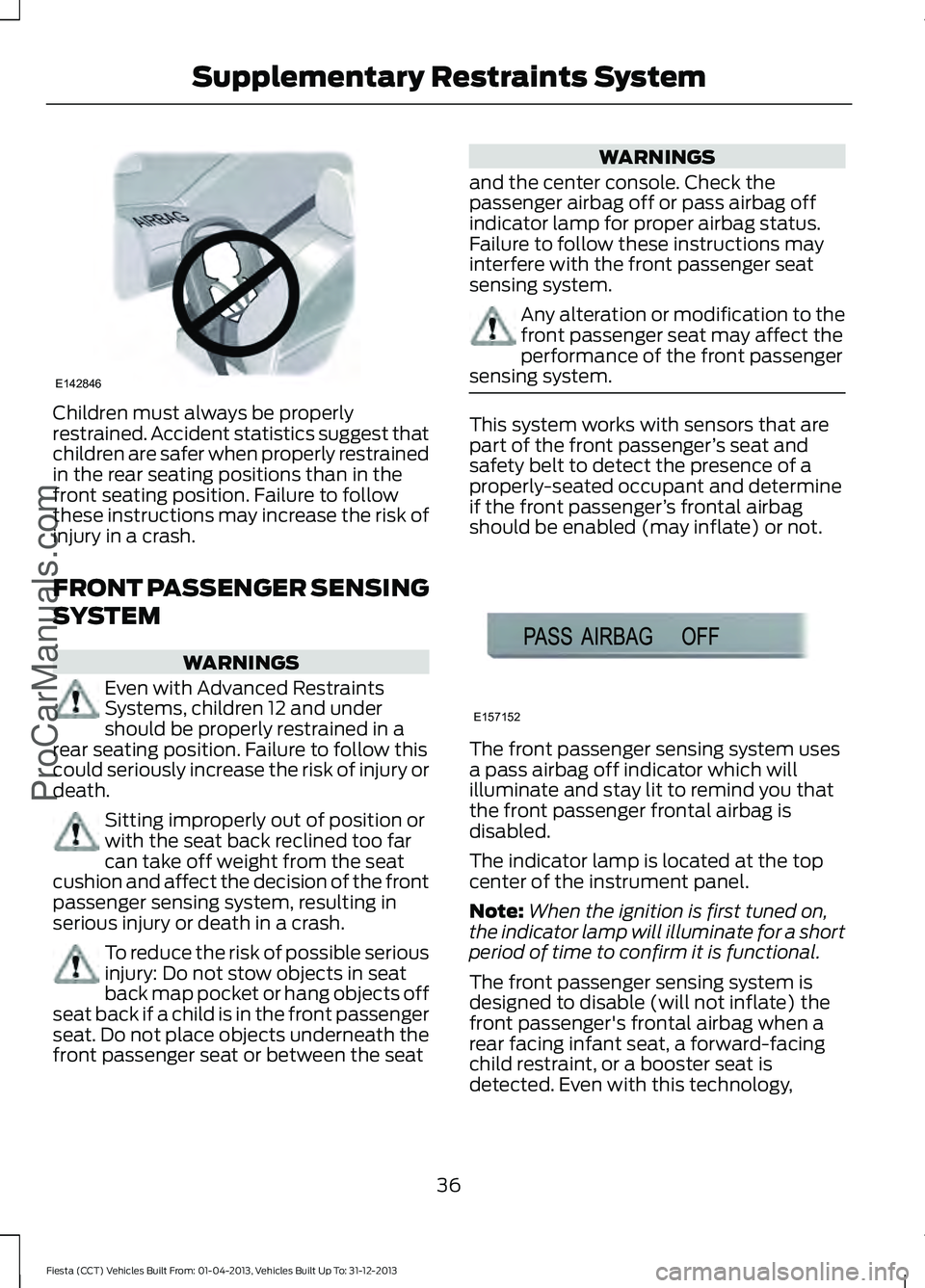
Children must always be properly
restrained. Accident statistics suggest that
children are safer when properly restrained
in the rear seating positions than in the
front seating position. Failure to follow
these instructions may increase the risk of
injury in a crash.
FRONT PASSENGER SENSING
SYSTEM
WARNINGS
Even with Advanced Restraints
Systems, children 12 and under
should be properly restrained in a
rear seating position. Failure to follow this
could seriously increase the risk of injury or
death. Sitting improperly out of position or
with the seat back reclined too far
can take off weight from the seat
cushion and affect the decision of the front
passenger sensing system, resulting in
serious injury or death in a crash. To reduce the risk of possible serious
injury: Do not stow objects in seat
back map pocket or hang objects off
seat back if a child is in the front passenger
seat. Do not place objects underneath the
front passenger seat or between the seat WARNINGS
and the center console. Check the
passenger airbag off or pass airbag off
indicator lamp for proper airbag status.
Failure to follow these instructions may
interfere with the front passenger seat
sensing system. Any alteration or modification to the
front passenger seat may affect the
performance of the front passenger
sensing system. This system works with sensors that are
part of the front passenger
’s seat and
safety belt to detect the presence of a
properly-seated occupant and determine
if the front passenger ’s frontal airbag
should be enabled (may inflate) or not. The front passenger sensing system uses
a pass airbag off indicator which will
illuminate and stay lit to remind you that
the front passenger frontal airbag is
disabled.
The indicator lamp is located at the top
center of the instrument panel.
Note:
When the ignition is first tuned on,
the indicator lamp will illuminate for a short
period of time to confirm it is functional.
The front passenger sensing system is
designed to disable (will not inflate) the
front passenger's frontal airbag when a
rear facing infant seat, a forward-facing
child restraint, or a booster seat is
detected. Even with this technology,
36
Fiesta (CCT) Vehicles Built From: 01-04-2013, Vehicles Built Up To: 31-12-2013 Supplementary Restraints SystemProCarManuals.comE142846 E157152
Page 42 of 398
WARNINGS
If the side airbag has deployed, the
airbag will not function again. The
side airbag system (including the
seat) must be inspected and serviced by
an authorized dealer. If the airbag is not
replaced, the unrepaired area will increase
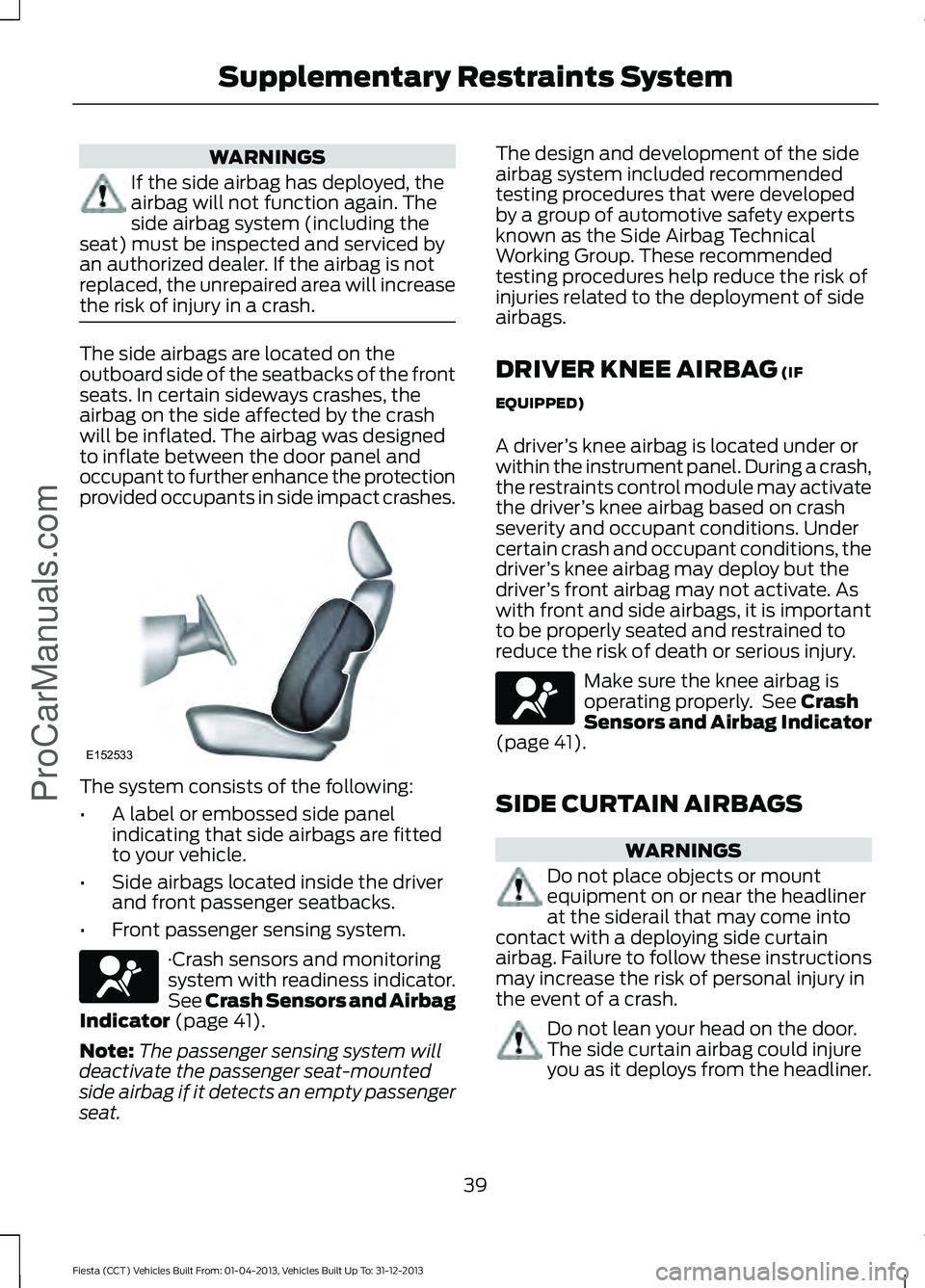
the risk of injury in a crash. The side airbags are located on the
outboard side of the seatbacks of the front
seats. In certain sideways crashes, the
airbag on the side affected by the crash
will be inflated. The airbag was designed
to inflate between the door panel and
occupant to further enhance the protection
provided occupants in side impact crashes.
The system consists of the following:
•
A label or embossed side panel
indicating that side airbags are fitted
to your vehicle.
• Side airbags located inside the driver
and front passenger seatbacks.
• Front passenger sensing system. ·Crash sensors and monitoring
system with readiness indicator.
See Crash Sensors and Airbag
Indicator (page 41).
Note: The passenger sensing system will
deactivate the passenger seat-mounted
side airbag if it detects an empty passenger
seat. The design and development of the side
airbag system included recommended
testing procedures that were developed
by a group of automotive safety experts
known as the Side Airbag Technical
Working Group. These recommended
testing procedures help reduce the risk of
injuries related to the deployment of side
airbags.
DRIVER KNEE AIRBAG
(IF
EQUIPPED)
A driver ’s knee airbag is located under or
within the instrument panel. During a crash,
the restraints control module may activate
the driver ’s knee airbag based on crash
severity and occupant conditions. Under
certain crash and occupant conditions, the
driver ’s knee airbag may deploy but the
driver ’s front airbag may not activate. As
with front and side airbags, it is important
to be properly seated and restrained to
reduce the risk of death or serious injury. Make sure the knee airbag is
operating properly. See
Crash
Sensors and Airbag Indicator
(page
41).
SIDE CURTAIN AIRBAGS WARNINGS
Do not place objects or mount
equipment on or near the headliner
at the siderail that may come into
contact with a deploying side curtain
airbag. Failure to follow these instructions
may increase the risk of personal injury in
the event of a crash. Do not lean your head on the door.
The side curtain airbag could injure
you as it deploys from the headliner.
39
Fiesta (CCT) Vehicles Built From: 01-04-2013, Vehicles Built Up To: 31-12-2013 Supplementary Restraints System
ProCarManuals.comE152533
Page 55 of 398
LOCKING AND UNLOCKING
Remote Control
The remote control can be used any time
your vehicle is not running.
Unlocking the Doors
Note:
You can unlock the driver's door with
the key. Use the key when the remote
control is not functioning.
Note: When you lock your vehicle for
several weeks, the remote control will be
switched off. Your vehicle must be unlocked
and the engine started using the key.
Unlocking and starting your vehicle once will
enable the remote control.
One-Stage Unlocking Press the button to unlock all the
doors.
The direction indicators will flash.
Two-Stage Unlocking Press the button to unlock the
driver
’s door.
Press the button again within three
seconds to unlock all doors.
The direction indicators will flash.
Reprogramming the Unlocking
Function
You can reprogram the unlocking function
using the remote control to change
between one-stage and two-stage
unlocking. See Remote Control (page
43).
Locking the Doors Press the button to lock all the
doors. The direction indicators
will flash twice. Press the button again within three
seconds to confirm that all the doors are
closed. The doors will lock again, and the
direction indicators will flash twice if all
the doors and the luggage compartment
are closed.
Note:
If any door or the luggage
compartment is not closed, or if the hood is
not closed on vehicles that have an
anti-theft alarm or remote start, the
direction indicators will not flash.
Automatic Re-locking
The doors will relock automatically if you
do not open a door within 45 seconds of
unlocking the doors with the remote
control. The door locks and the alarm will
return to their previous state.
Locking and Unlocking the Doors
From Inside
The power door lock control is located on
the instrument panel near the radio. Press the button to lock and
unlock all the doors. The lamp
illuminates with the doors
locked.
Locking and Unlocking the Doors
With the Key
Note: Do not leave your keys in your vehicle.
Locking With the Key
Turn the top of the key toward the front of
your vehicle.
Unlocking With the Key
Turn the top of the key toward the rear of
your vehicle.
52
Fiesta (CCT) Vehicles Built From: 01-04-2013, Vehicles Built Up To: 31-12-2013 Locks
ProCarManuals.com E102566
Page 60 of 398
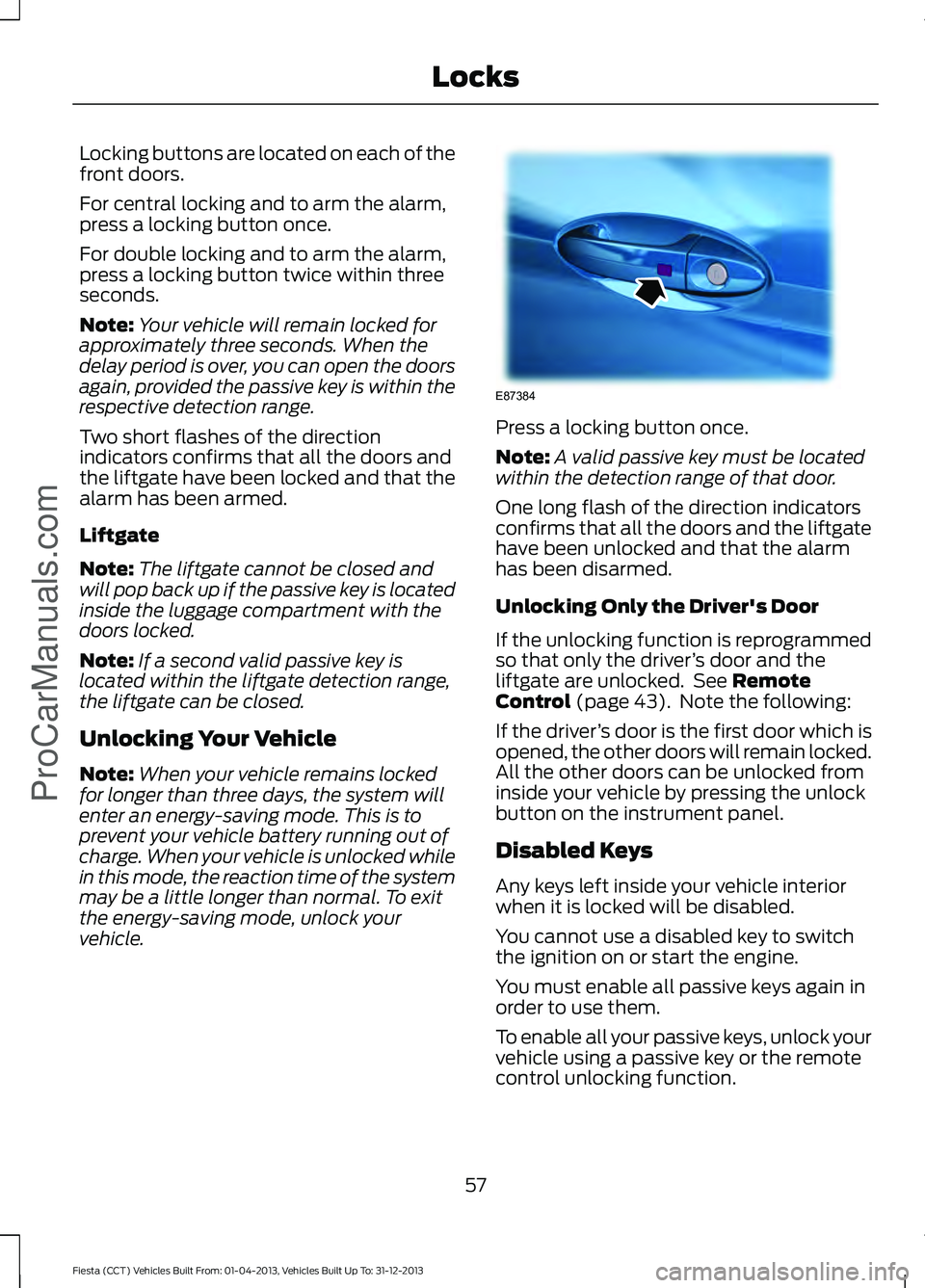
Locking buttons are located on each of the
front doors.
For central locking and to arm the alarm,
press a locking button once.
For double locking and to arm the alarm,
press a locking button twice within three
seconds.
Note:
Your vehicle will remain locked for
approximately three seconds. When the
delay period is over, you can open the doors
again, provided the passive key is within the
respective detection range.
Two short flashes of the direction
indicators confirms that all the doors and
the liftgate have been locked and that the
alarm has been armed.
Liftgate
Note: The liftgate cannot be closed and
will pop back up if the passive key is located
inside the luggage compartment with the
doors locked.
Note: If a second valid passive key is
located within the liftgate detection range,
the liftgate can be closed.
Unlocking Your Vehicle
Note: When your vehicle remains locked
for longer than three days, the system will
enter an energy-saving mode. This is to
prevent your vehicle battery running out of
charge. When your vehicle is unlocked while
in this mode, the reaction time of the system
may be a little longer than normal. To exit
the energy-saving mode, unlock your
vehicle. Press a locking button once.
Note:
A valid passive key must be located
within the detection range of that door.
One long flash of the direction indicators
confirms that all the doors and the liftgate
have been unlocked and that the alarm
has been disarmed.
Unlocking Only the Driver's Door
If the unlocking function is reprogrammed
so that only the driver ’s door and the
liftgate are unlocked. See Remote
Control (page 43). Note the following:
If the driver ’s door is the first door which is
opened, the other doors will remain locked.
All the other doors can be unlocked from
inside your vehicle by pressing the unlock
button on the instrument panel.
Disabled Keys
Any keys left inside your vehicle interior
when it is locked will be disabled.
You cannot use a disabled key to switch
the ignition on or start the engine.
You must enable all passive keys again in
order to use them.
To enable all your passive keys, unlock your
vehicle using a passive key or the remote
control unlocking function.
57
Fiesta (CCT) Vehicles Built From: 01-04-2013, Vehicles Built Up To: 31-12-2013 Locks
ProCarManuals.comE87384
Page 70 of 398
GENERAL INFORMATION
Condensation in Lamp Assemblies
Exterior lamps have vents to
accommodate normal changes in air
pressure.
Condensation can be a natural by-product
of this design. When moist air enters the
lamp assembly through the vents, there is
a possibility that condensation can occur
when the temperature is cold. When
normal condensation occurs, a fine mist
can form on the interior of the lens. The
fine mist eventually clears and exits
through the vents during normal operation.
Clearing time may take as long as 48 hours
under dry weather conditions.
Examples of acceptable condensation are:
•
The presence of a fine mist (no streaks,
drip marks or large droplets).
• A fine mist covers less than 50% of the
lens.
Examples of unacceptable condensation
are:
• A water puddle inside the lamp.
• Streaks, drip marks or large droplets
present on the interior of the lens.
If you see any unacceptable condensation,
have your vehicle checked by an authorized
dealer. LIGHTING CONTROL
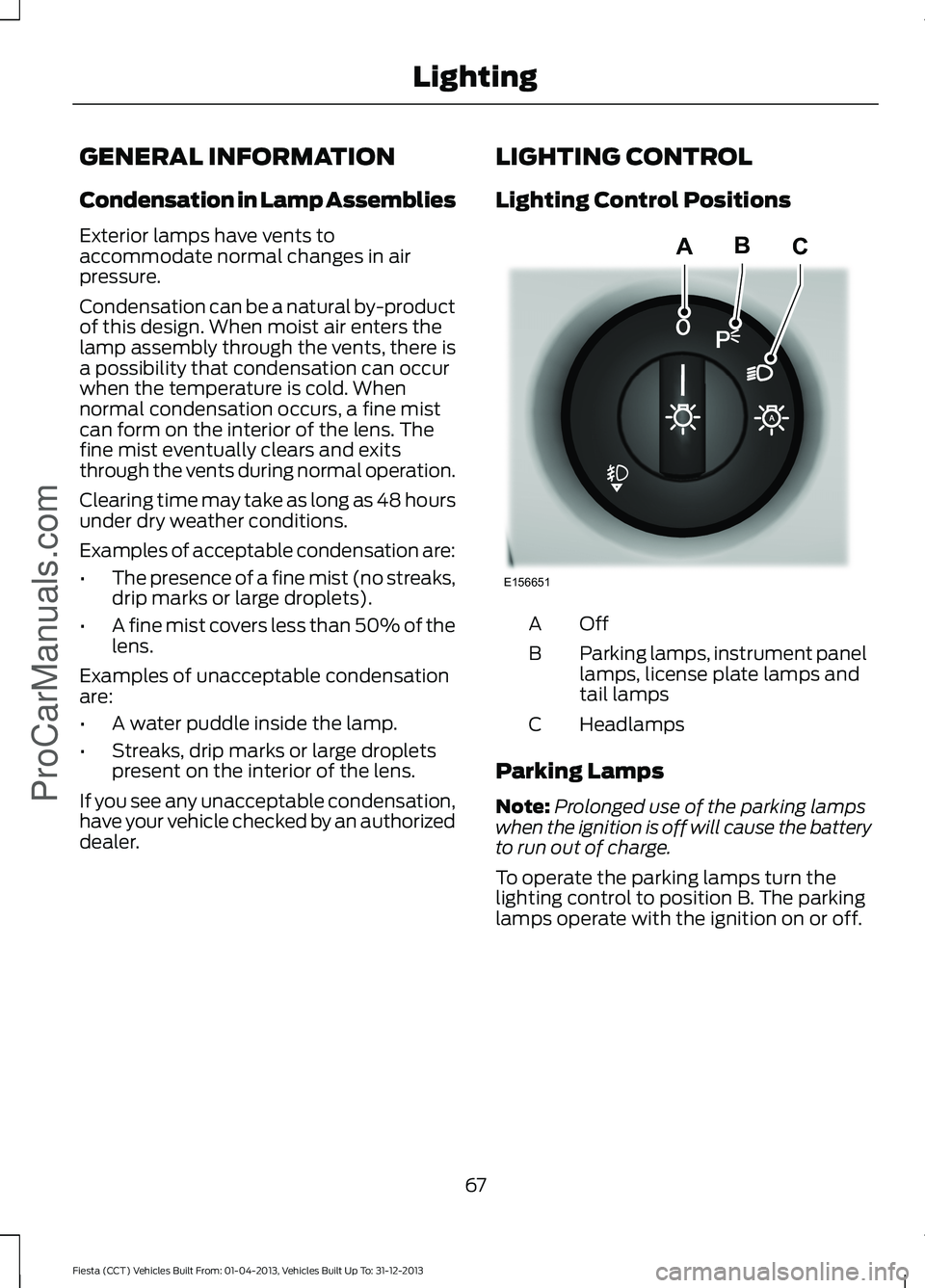
Lighting Control Positions
OffA
Parking lamps, instrument panel
lamps, license plate lamps and
tail lamps
B
Headlamps
C
Parking Lamps
Note: Prolonged use of the parking lamps
when the ignition is off will cause the battery
to run out of charge.
To operate the parking lamps turn the
lighting control to position B. The parking
lamps operate with the ignition on or off.
67
Fiesta (CCT) Vehicles Built From: 01-04-2013, Vehicles Built Up To: 31-12-2013 LightingProCarManuals.comE156651
ABC
Page 74 of 398
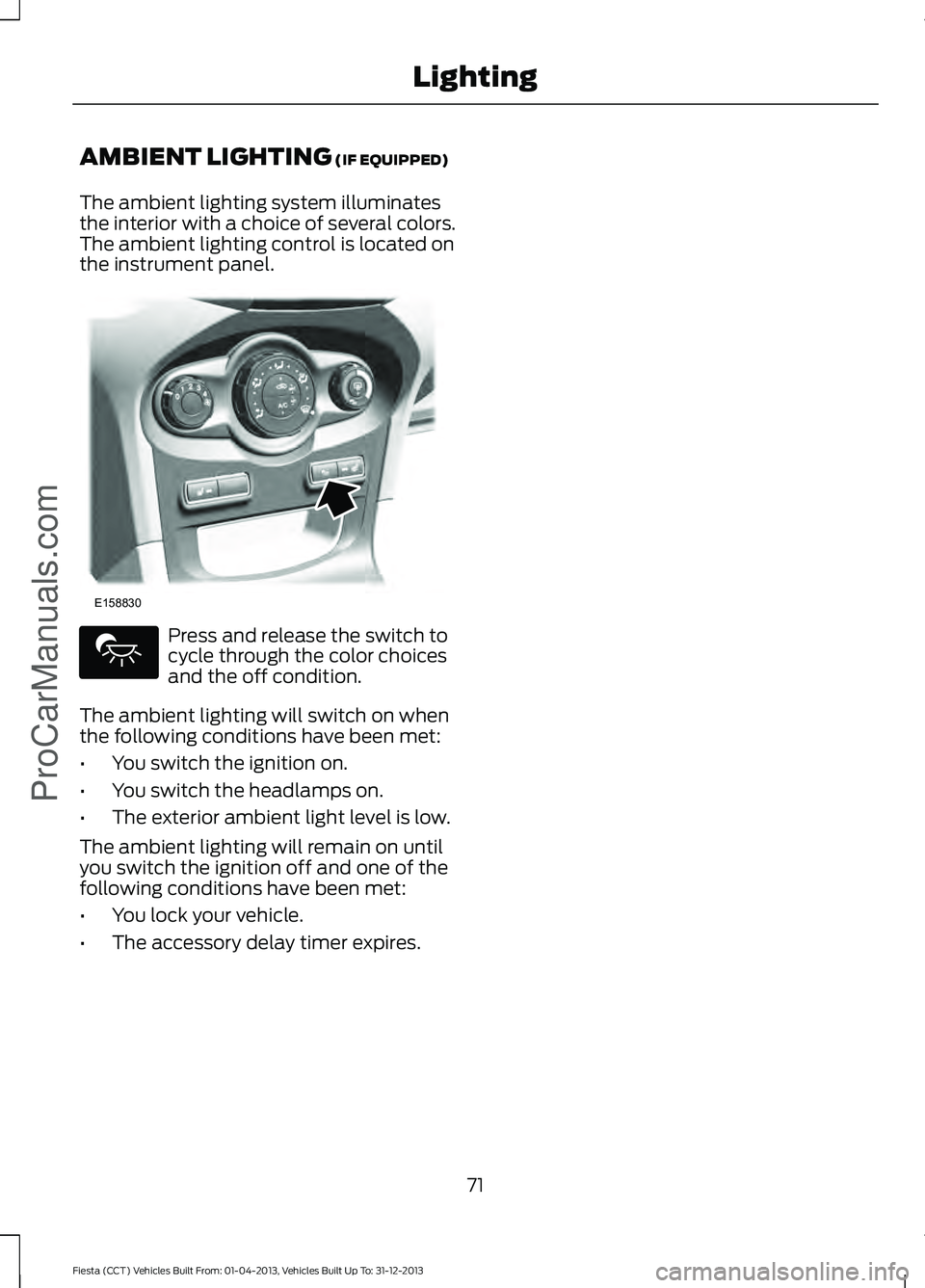
AMBIENT LIGHTING (IF EQUIPPED)
The ambient lighting system illuminates
the interior with a choice of several colors.
The ambient lighting control is located on
the instrument panel. Press and release the switch to
cycle through the color choices
and the off condition.
The ambient lighting will switch on when
the following conditions have been met:
• You switch the ignition on.
• You switch the headlamps on.
• The exterior ambient light level is low.
The ambient lighting will remain on until
you switch the ignition off and one of the
following conditions have been met:
• You lock your vehicle.
• The accessory delay timer expires.
71
Fiesta (CCT) Vehicles Built From: 01-04-2013, Vehicles Built Up To: 31-12-2013 Lighting
ProCarManuals.comE158830
Page 101 of 398
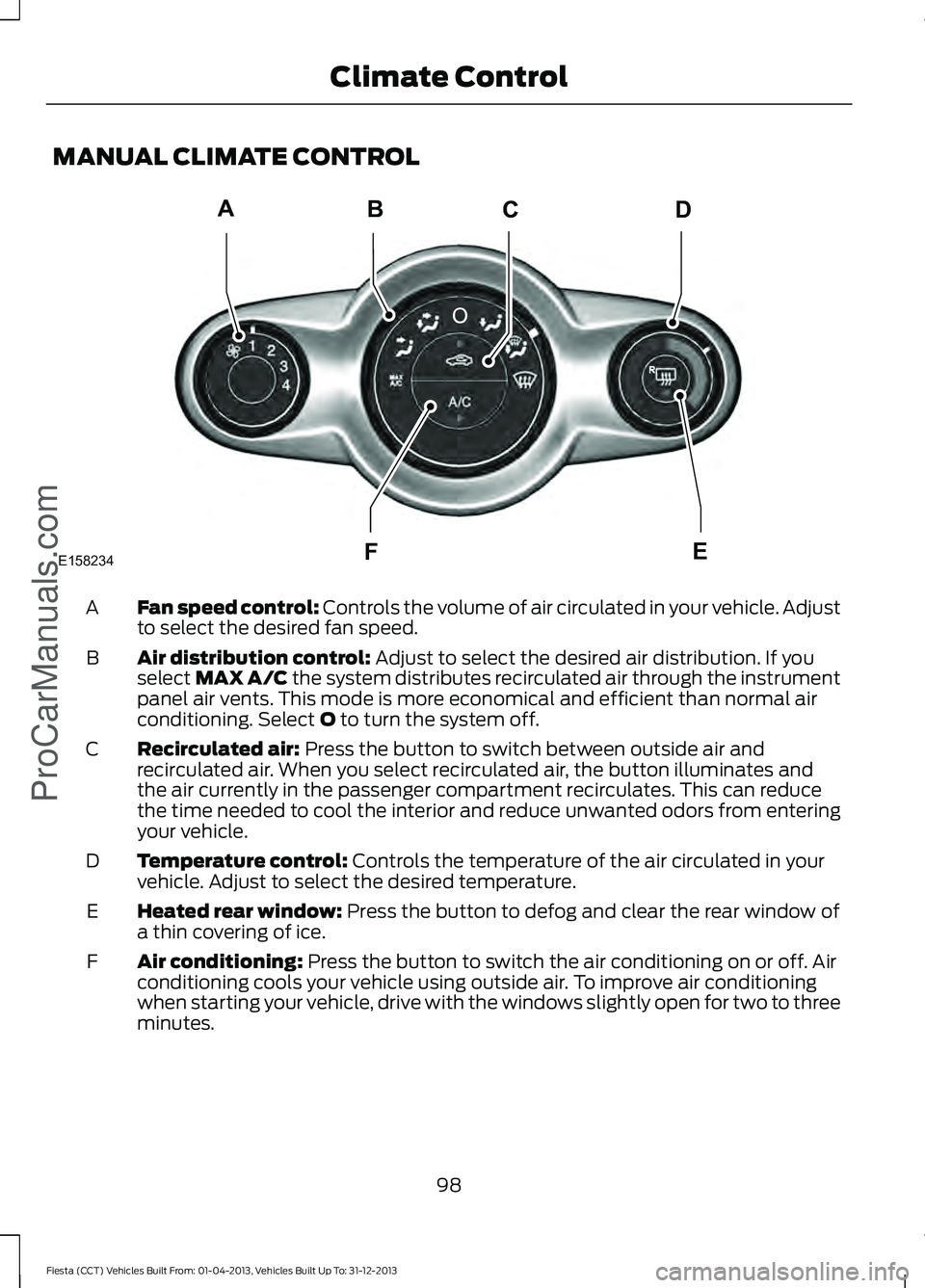
MANUAL CLIMATE CONTROL
Fan speed control: Controls the volume of air circulated in your vehicle. Adjust
to select the desired fan speed.
A
Air distribution control:
Adjust to select the desired air distribution. If you
select MAX A/C the system distributes recirculated air through the instrument
panel air vents. This mode is more economical and efficient than normal air
conditioning. Select
O to turn the system off.
B
Recirculated air:
Press the button to switch between outside air and
recirculated air. When you select recirculated air, the button illuminates and
the air currently in the passenger compartment recirculates. This can reduce
the time needed to cool the interior and reduce unwanted odors from entering
your vehicle.
C
Temperature control:
Controls the temperature of the air circulated in your
vehicle. Adjust to select the desired temperature.
D
Heated rear window:
Press the button to defog and clear the rear window of
a thin covering of ice.
E
Air conditioning:
Press the button to switch the air conditioning on or off. Air
conditioning cools your vehicle using outside air. To improve air conditioning
when starting your vehicle, drive with the windows slightly open for two to three
minutes.
F
98
Fiesta (CCT) Vehicles Built From: 01-04-2013, Vehicles Built Up To: 31-12-2013 Climate Control
ProCarManuals.comABCD
F
E
E158234
Page 102 of 398
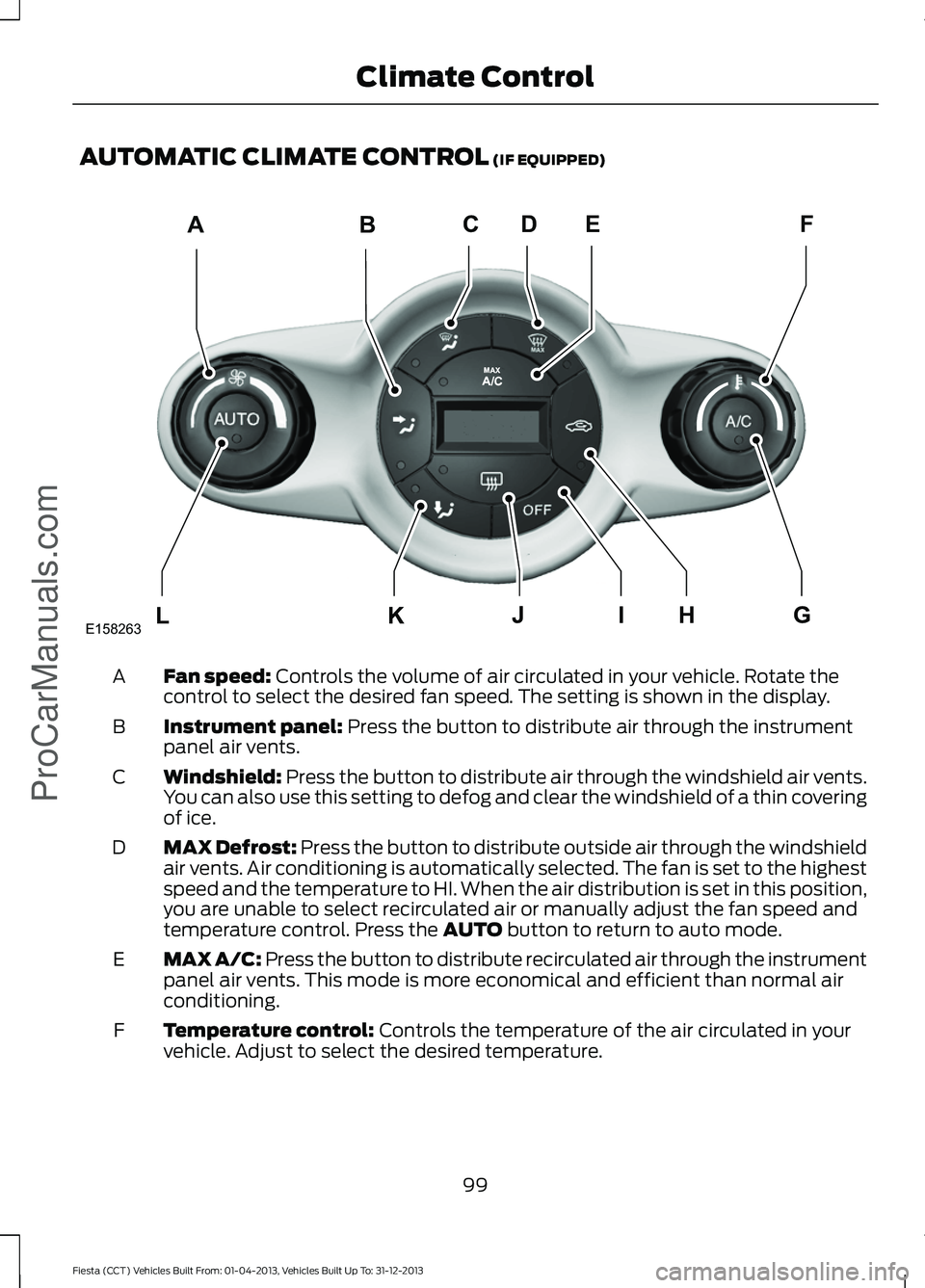
AUTOMATIC CLIMATE CONTROL (IF EQUIPPED)
Fan speed:
Controls the volume of air circulated in your vehicle. Rotate the
control to select the desired fan speed. The setting is shown in the display.
A
Instrument panel:
Press the button to distribute air through the instrument
panel air vents.
B
Windshield:
Press the button to distribute air through the windshield air vents.
You can also use this setting to defog and clear the windshield of a thin covering
of ice.
C
MAX Defrost:
Press the button to distribute outside air through the windshield
air vents. Air conditioning is automatically selected. The fan is set to the highest
speed and the temperature to HI. When the air distribution is set in this position,
you are unable to select recirculated air or manually adjust the fan speed and
temperature control. Press the
AUTO button to return to auto mode.
D
MAX A/C: Press the button to distribute recirculated air through the instrument
panel air vents. This mode is more economical and efficient than normal air
conditioning.
E
Temperature control:
Controls the temperature of the air circulated in your
vehicle. Adjust to select the desired temperature.
F
99
Fiesta (CCT) Vehicles Built From: 01-04-2013, Vehicles Built Up To: 31-12-2013 Climate Control
ProCarManuals.comABCFDE
L
KHIJG
E158263
Page 104 of 398
Manual Climate Control
Note:
To reduce fogging of the windshield
during humid weather, adjust the air
distribution control to the windshield air
vents position. Increase the temperature
and fan speed to improve clearing, if
required.
Automatic Climate Control
Note: Do not adjust the settings when your
vehicle interior is extremely hot or cold. The
system automatically adjusts to the
previously stored settings. For the system
to function efficiently, the instrument panel
and side air vents should be fully open.
Note: At low ambient temperatures with
AUTO selected, the air stream is directed
toward the windshield and side windows
for as long as the engine remains cold. Note:
When the system is switched off,
outside air is prevented from entering your
vehicle.
Note: When you select
AUTO mode and
the interior and exterior temperatures are
high, the system automatically selects
recirculated air to maximize cooling of the
interior. When the desired air temperature
is reached, the system automatically selects
outside air.
Note: When you select windshield
defrosting and defogging, the instrument
panel and footwell level functions
automatically switch off and air conditioning
switches on. Outside air flows into your
vehicle.
Heating the Interior Quickly Vehicles With Automatic Climate Control
Vehicles With Manual Climate Control
Press the
AUTO button.
Adjust the fan speed to the highest
setting.
1
Adjust the temperature control to the
desired setting.
Adjust the temperature control to the
highest setting.
2
Adjust the air distribution control to the
footwell air vents position.
3
Recommended Settings for Heating Vehicles With Automatic Climate Control
Vehicles With Manual Climate Control
Press the
AUTO button.
Adjust the fan speed to the second
setting.
1
Adjust the temperature control to the
desired setting.
Adjust the temperature control to the
desired setting.
2
Adjust the air distribution control to the
footwell and windshield air vents posi-
tion.
3
101
Fiesta (CCT) Vehicles Built From: 01-04-2013, Vehicles Built Up To: 31-12-2013 Climate Control
ProCarManuals.com