keyless FORD FIESTA 2014 Owners Manual
[x] Cancel search | Manufacturer: FORD, Model Year: 2014, Model line: FIESTA, Model: FORD FIESTA 2014Pages: 398, PDF Size: 6.09 MB
Page 4 of 398
Introduction
About This Manual...........................................7
Symbols Glossary
.............................................7
Replacement Parts Recommendation........................................9
Mobile Communications Equipment.....................................................10
Data Recording
................................................10
California Proposition 65
.............................12
Perchlorate.........................................................12
Ford Credit
.........................................................12
Special Notices................................................12
Export Unique Options
..................................12
Child Safety
General Information
.......................................14
Installing Child Seats.....................................15
Child Seat Positioning
...................................21
Booster Seats
..................................................23
Child Safety Locks
..........................................25
Safety Belts
Principle of Operation..................................26
Fastening the Safety Belts..........................27
Safety Belt Height Adjustment
.................29
Safety Belt Warning Lamp and Indicator Chime.............................................................30
Safety Belt Minder.........................................30
Child Restraint and Safety Belt Maintenance................................................32
Personal Safety System ™
Personal Safety System ™
..........................33
Supplementary Restraints System
Principle of Operation..................................34
Driver and Passenger Airbags....................35
Front Passenger Sensing System............36
Side Airbags
.....................................................38 Driver Knee Airbag
.........................................39
Side Curtain Airbags
.....................................39
Crash Sensors and Airbag Indicator
.........41
Airbag Disposal
...............................................42
Keys and Remote Controls
General Information on Radio Frequencies..................................................43
Remote Control..............................................43
Replacing a Lost Key or Remote Control............................................................47
MyKey ™
Principle of Operation..................................48
Creating a MyKey...........................................48
Clearing All MyKeys.......................................49
Checking MyKey System Status..............49
Using MyKey With Remote Start Systems
.........................................................50
MyKey Troubleshooting
...............................50
Locks
Locking and Unlocking.................................52
Manual Liftgate
...............................................55
Keyless Entry
...................................................56
Interior Luggage Compartment Release..........................................................58
Security
Passive Anti-Theft System........................60
Anti-Theft Alarm
.............................................61
Steering Wheel
Adjusting the Steering Wheel...................63
Audio Control
...................................................63
Voice Control
...................................................64
Cruise Control.................................................64
Wipers and Washers
Windshield Wipers
........................................65
1
Fiesta (CCT) Vehicles Built From: 01-04-2013, Vehicles Built Up To: 31-12-2013 Table of Contents
ProCarManuals.com
Page 5 of 398
Windshield Washers.....................................65
Rear Window Wiper and Washers..........66
Lighting
General Information......................................67
Lighting Control
..............................................67
Autolamps
........................................................68
Instrument Lighting Dimmer.....................68
Headlamp Exit Delay....................................69
Daytime Running Lamps
............................69
Front Fog Lamps............................................69
Direction Indicators
.......................................69
Interior Lamps.................................................70
Ambient Lighting
.............................................71
Windows and Mirrors
Power Windows..............................................72
Global Opening and Closing......................73
Exterior Mirrors
................................................74
Interior Mirror
....................................................75
Moonroof...........................................................76
Instrument Cluster
Gauges................................................................77
Warning Lamps and Indicators.................78
Warning Lamps and Indicators - 1.6L EcoBoost™
...................................................81
Audible Warnings and Indicators.............84
Information Displays
General Information
.....................................85
Clock...................................................................88
Trip Computer
.................................................88
Personalized Settings
..................................89
Information Messages
.................................89
Climate Control
Principle of Operation...................................97
Air Vents
.............................................................97 Manual Climate Control..............................98
Automatic Climate Control........................99
Hints on Controlling the Interior
Climate........................................................100
Heated Windows and Mirrors..................103
Cabin Air Filter...............................................103
Seats
Sitting in the Correct Position
..................105
Head Restraints............................................105
Manual Seats.................................................107
Rear Seats
......................................................108
Heated Seats.................................................109
Auxiliary Power Points
Auxiliary Power Points..................................111
Cigar Lighter
......................................................111
Storage Compartments
Cup Holders
.....................................................112
Starting and Stopping the Engine
General Information.....................................113
Ignition Switch................................................113
Keyless Starting
..............................................113
Starting a Gasoline Engine.........................115
Switching Off the Engine............................116
Engine Block Heater.....................................116
Fuel and Refueling
Safety Precautions.......................................118
Fuel Quality
......................................................119
Running Out of Fuel
.....................................119
Refueling..........................................................120
Fuel Consumption
........................................122
Emission Control System...........................123
Transmission
Manual Transmission
..................................126
2
Fiesta (CCT) Vehicles Built From: 01-04-2013, Vehicles Built Up To: 31-12-2013 Table of Contents
ProCarManuals.com
Page 51 of 398
PRINCIPLE OF OPERATION
MyKey allows you to program keys with
restricted driving modes to promote good
driving habits. All but one of the keys
programmed to the vehicle can be
activated with these restricted modes.
Any keys that have not been programmed
are referred to as administrator keys or
admin keys. These can be used to:
•
Create a MyKey
• Program configurable MyKey settings
• Clear all MyKey features
When you have programmed a MyKey, you
can access the following information using
the information display:
• How many admin keys and MyKeys are
programmed to your vehicle.
• The total distance your vehicle has
traveled using any MyKey.
Note: All MyKeys are programmed to the
same settings. You cannot program them
individually.
If a MyKey and an admin key are present,
your vehicle will recognize the admin key
only.
Note: For vehicles with intelligent access
key (push button start) keyless start, when
both a MyKey and an admin intelligent
access key (fob) are present, the admin fob
will be recognized by the vehicle to start the
engine.
Non-configurable Settings
The following settings cannot be changed
by an admin key user:
• Belt-minder. You cannot disable this
feature. The audio system will mute
when the front seat occupants' safety
belts are not fastened.
• Early low fuel. The low-fuel warning
activates earlier, giving the MyKey user
more time to refuel. •
Driver assist features, if equipped on
your vehicle, are forced on: parking aid,
blind spot information system (BLIS)
with cross traffic alert, lane departure
warning and forward collision warning
system.
• Satellite radio adult content
restrictions.
Configurable Settings
With an admin key, you can configure
certain MyKey settings when you first
create a MyKey and before you recycle the
key or restart the vehicle. You can also
change the settings afterward with an
admin key:
• Vehicle speed limits can be set.
Warnings will be shown in the display
followed by an audible tone when your
vehicle reaches the set speed. You
cannot override the set speed by fully
depressing the accelerator pedal.
• Vehicle speed minders of 45, 55 or 65
mph (75, 90 or 105 km/h). Once you
select a speed it will be shown in the
display followed by an audible tone
when the set vehicle speed is
exceeded.
• Audio system maximum volume of
45%. A message will be shown in the
display when you attempt to exceed
the limited volume. Also, the speed
sensitive compensated volume
(automatic volume control) feature
will be disabled.
• Always on setting. When this is
selected you will not be able to disable
AdvanceTrac, 911 Assist or the do not
disturb feature (if your vehicle is
equipped with these features).
CREATING A MYKEY
Use the information display to create a
MyKey.
48
Fiesta (CCT) Vehicles Built From: 01-04-2013, Vehicles Built Up To: 31-12-2013 MyKey
™ (If Equipped)
ProCarManuals.com
Page 53 of 398
Number of Admin Keys
Indicates how many admin keys are
programmed to your vehicle. Use this
feature to determine how many admin
keys you have for your vehicle, and detect
if an additional MyKey has been
programmed.
USING MYKEY WITH REMOTE
START SYSTEMS
MyKey is not compatible with
non-Ford-approved aftermarket remote
start systems. If you choose to install a
remote start system, please see an
authorized dealer for a Ford-approved
remote start system.
MYKEY TROUBLESHOOTING Potential causes
Condition
· The key or fob used to start the vehicle
does not have admin privileges.
I cannot create a MyKey.
· The key or fob used to start the vehicle is
the only admin key (there always has to be
at least one admin key).
· Vehicles with push-button start: The
intelligent access key is not in the correct
position. The position location is in another
chapter. See Keyless Starting (page 113).
· SecuriLock passive anti-theft system is
disabled or in unlimited mode.
· The key or fob used to start the vehicle
does not have admin privileges.
I cannot program the configurable settings.
· No MyKeys have been created. See
Creating a MyKey (page 48).
· The key or fob used to start the vehicle
does not have admin privileges.
I cannot clear the MyKeys.
· No MyKeys are programmed to the vehicle.
See
Creating a MyKey (page 48).
Purchase a new key from an authorized
dealer.
I lost the only admin key.
Program a spare key. See
Passive Anti-
Theft System (page 60).
I lost a key.
· An admin key is present at engine start-
up.
No MyKey functions with intelligent access
key (push-button start).
· No MyKeys are programmed to the vehicle.
See
Creating a MyKey (page 48).
· The MyKey user is not using a MyKey.
MyKey distances do not accumulate.
50
Fiesta (CCT) Vehicles Built From: 01-04-2013, Vehicles Built Up To: 31-12-2013 MyKey
™
(If Equipped)
ProCarManuals.com
Page 59 of 398
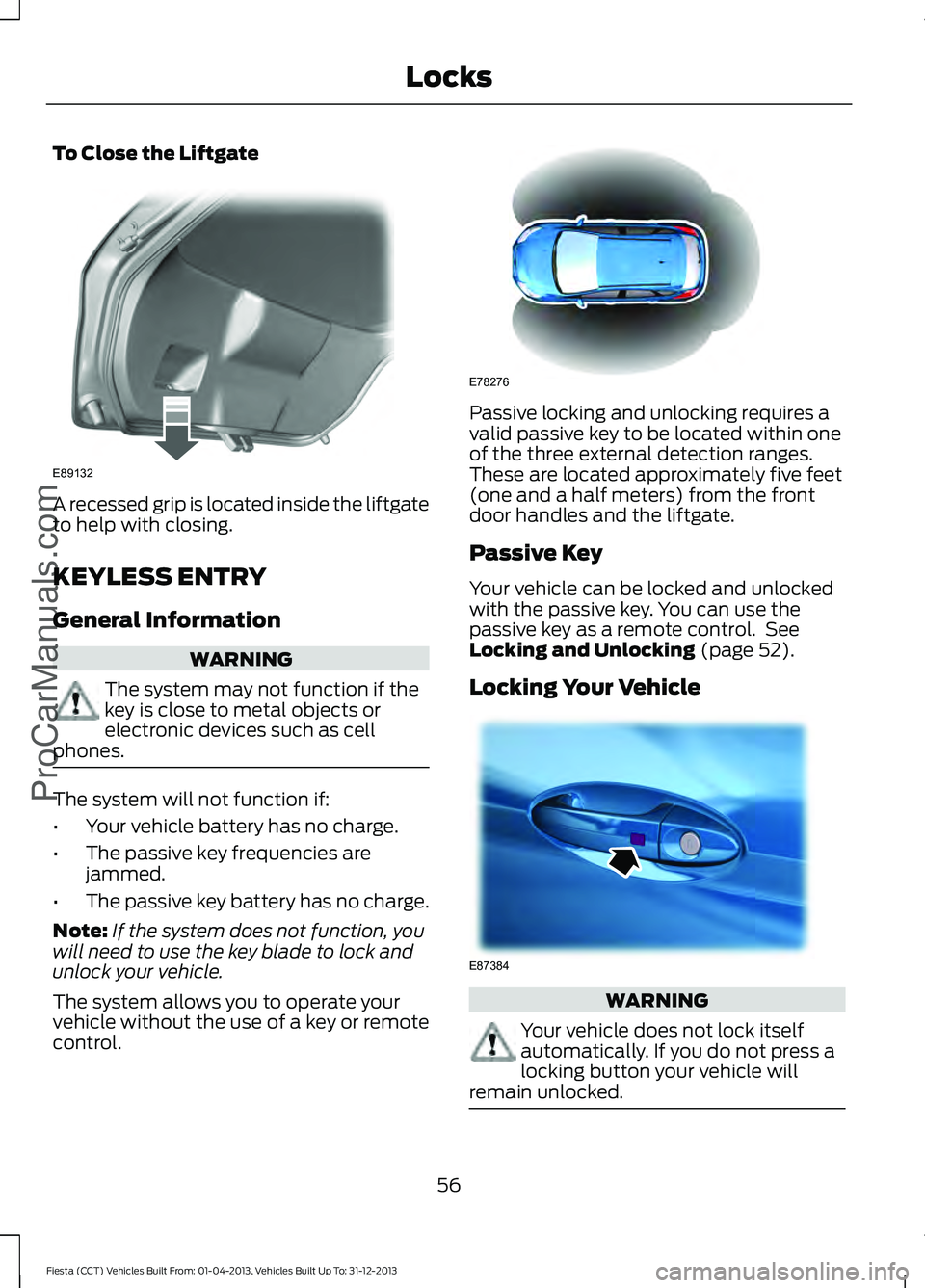
To Close the Liftgate
A recessed grip is located inside the liftgate
to help with closing.
KEYLESS ENTRY
General Information
WARNING
The system may not function if the
key is close to metal objects or
electronic devices such as cell
phones. The system will not function if:
•
Your vehicle battery has no charge.
• The passive key frequencies are
jammed.
• The passive key battery has no charge.
Note: If the system does not function, you
will need to use the key blade to lock and
unlock your vehicle.
The system allows you to operate your
vehicle without the use of a key or remote
control. Passive locking and unlocking requires a
valid passive key to be located within one
of the three external detection ranges.
These are located approximately five feet
(one and a half meters) from the front
door handles and the liftgate.
Passive Key
Your vehicle can be locked and unlocked
with the passive key. You can use the
passive key as a remote control. See
Locking and Unlocking (page 52).
Locking Your Vehicle WARNING
Your vehicle does not lock itself
automatically. If you do not press a
locking button your vehicle will
remain unlocked. 56
Fiesta (CCT) Vehicles Built From: 01-04-2013, Vehicles Built Up To: 31-12-2013 Locks
ProCarManuals.comE89132 E78276 E87384
Page 64 of 398
You must have two previously
programmed coded keys and the new
unprogrammed key readily accessible. See
your authorized dealer to have the spare
key programmed if two previously
programmed coded keys are not available.
Read and understand the entire procedure
before you begin.
1.
Insert the first previously programmed
coded key into the ignition.
2. Switch the ignition from off to on. Keep
the ignition on for at least three
seconds, but no more than 10 seconds.
3. Switch the ignition off and remove the
first coded key from the ignition.
4. After three seconds but within 10 seconds of switching the ignition off,
insert the second previously coded key
into the ignition.
5. Switch the ignition from off to on. Keep
the ignition on for at least three
seconds, but no more than 10 seconds.
6. Switch the ignition off and remove the
second previously programmed coded
key from the ignition.
7. After three seconds but within 10 seconds of switching the ignition off
and removing the previously
programmed coded key, insert the new
unprogrammed key into the ignition.
8. Switch the ignition from off to on. Keep
the ignition on for at least six seconds.
9. Remove the newly programmed coded
key from the ignition.
If the key has been successfully
programmed it will start the engine and
operate the remote entry system (if the
new key is an integrated keyhead
transmitter).
If programming was not successful, wait
10 seconds and repeat Steps 1 through 8.
If you are still unsuccessful, take your
vehicle to your authorized dealer. Programming a Spare Intelligent
Access Key
See your authorized dealer to have
additional keys programmed to your
vehicle.
ANTI-THEFT ALARM
Alarm System
The perimeter alarm is a deterrent against
unauthorized access to your vehicle
through the doors and the hood. It also
protects the audio unit.
Triggering the Alarm
Once armed, the alarm is triggered in any
of the following ways:
•
If someone opens a door, the liftgate
or the hood without a valid key or
remote control.
• If someone removes the audio or
navigation system.
• If you switch the ignition on without a
valid key.
If the alarm is triggered, the alarm horn will
sound for 30 seconds and the hazard
warning flasher will flash for five minutes.
Any further attempts to perform one of the
above will trigger the alarm again.
Arming the Alarm
To arm the alarm, lock your vehicle. See
Locks (page 52).
Disarming the Alarm
Vehicles Without Keyless Entry
Disarm and silence the alarm by unlocking
the doors with the key and switching the
ignition on with a correctly coded key or
unlocking the doors with the remote
control.
61
Fiesta (CCT) Vehicles Built From: 01-04-2013, Vehicles Built Up To: 31-12-2013 Security
ProCarManuals.com
Page 65 of 398
Vehicles with Keyless Entry
Note:
A valid passive key must be located
within the detection range of that door for
keyless entry. See Keyless Entry (page 56).
Disarm and silence the alarm by unlocking
the doors and switching the ignition on or
unlocking the doors with the remote
control.
62
Fiesta (CCT) Vehicles Built From: 01-04-2013, Vehicles Built Up To: 31-12-2013 SecurityProCarManuals.com
Page 77 of 398
Global Closing
Vehicles Without Keyless Entry
WARNING
Take care when using global closing.
In an emergency, press the lock or
unlock button immediately to stop.
To close all the windows, press and hold
the remote control lock button for at least
three seconds. Press the lock or unlock
button to stop the closing function. The
bounce-back function is also on during
global closing.
Vehicles With Keyless Entry WARNING
Take care when using global closing.
In an emergency, touch a door
handle lock sensor to stop.
Note:
Global closing can be switched on
using the driver ’s door handle. Global
opening and closing can also be switched
on using the buttons on the passive key.
To close all the windows, press and hold
the driver ’s door handle for at least three
seconds. The bounce-back function is also
on during global closing.
EXTERIOR MIRRORS
Power Exterior Mirrors WARNING
Do not adjust the mirrors when your
vehicle is moving. This could result
in the loss of control of your vehicle,
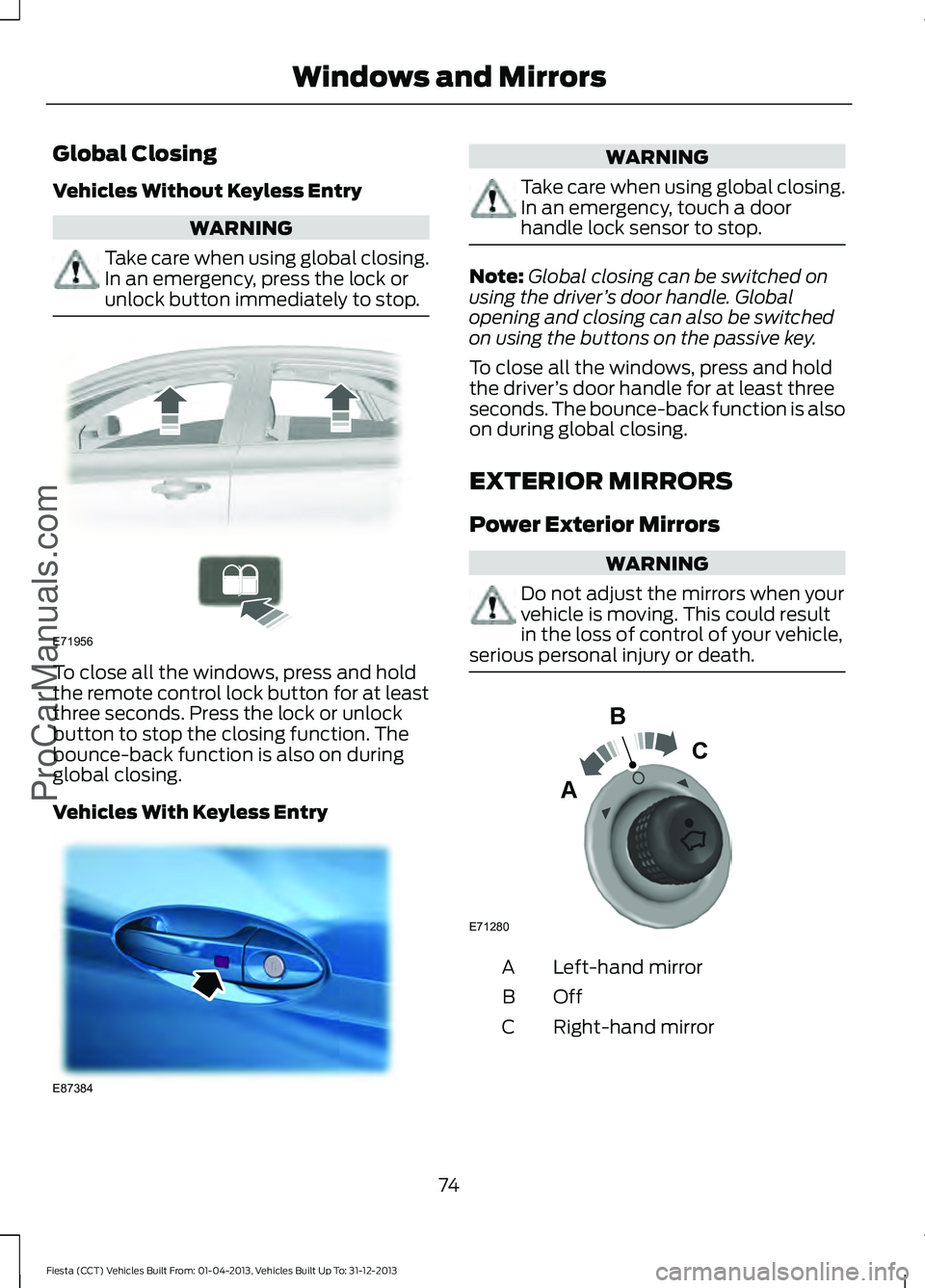
serious personal injury or death. Left-hand mirror
A
OffB
Right-hand mirror
C
74
Fiesta (CCT) Vehicles Built From: 01-04-2013, Vehicles Built Up To: 31-12-2013 Windows and MirrorsProCarManuals.comE71956 E87384 E71280
B
C
A
Page 87 of 398
Normally, the lamp will remain on until the
engine is cranked, then turn itself off if a
malfunction is not present. However, if
after 15 seconds the lamp flashes eight
times, it means that your vehicle is not
ready for inspection maintenance testing.
See Emission Control System (page 123).
Shift Indicator
It will illuminate to inform you
that shifting to a higher gear may
give better fuel economy and
lower CO2 emissions. It will not illuminate
during periods of high acceleration, braking
or when the clutch pedal is pressed.
AUDIBLE WARNINGS AND
INDICATORS
Automatic Transmission
Sounds when you open the driver's door
and do not move the transmission selector
lever to position P.
Key Outside Car
Vehicles With Keyless System
Sounds when you close the door, the
engine is running and the system does not
detect a passive key inside your vehicle.
Headlamps On
Sounds when you remove the key from the
ignition and open the driver's door and you
have left the headlamps or parking lamps
on.
Low Fuel
A warning chime will sound when the
remaining fuel is less than approximately
1.3 gallons (6 liters). The distance to empty
displayed may vary depending on driving
style and road conditions. Safety Belt Minder WARNINGS
The safety belt minder remains in
stand-by mode when the front safety
belts have been fastened. It will
sound if either safety belt is unfastened. Do not sit on top of a fastened safety
belt to prevent the safety belt minder
from coming on. The occupant
protection system will only provide
optimum protection when you use the
safety belt properly. Sounds when your vehicle speed exceeds
the pre-determined limit and the front
safety belts are unfastened. The chime will
stop after a period of time.
84
Fiesta (CCT) Vehicles Built From: 01-04-2013, Vehicles Built Up To: 31-12-2013 Instrument Cluster
ProCarManuals.com
Page 94 of 398
Action
Message
indicator
Message
Vehicle is moving. Stop your vehicle
as soon as safely possible and
close. See Opening and Closing
the Hood (page 177).
Red
Hood open
Vehicle not moving. Close.
Amber
Driver door open
Vehicle not moving. Close.
Amber
Driver side rear door open
Vehicle not moving. Close.
Amber
Passenger door open
Vehicle not moving. Close.
Amber
Passenger side rear door open
Vehicle not moving. Close.
Amber
Trunk open
Vehicle not moving. Close. See
Opening and Closing the Hood
(page
177).
Amber
Hood open
Engine Immobilizer Action
Message
indicator
Message
Have the system checked by an
authorized dealer as soon as
possible.
Red
Immobilizer malfunction Service
now
Hill Start Assist Action
Message
indicator
Message
See
Hill Start Assist (page 132).
Amber
Hill start assist not available
Keyless System Action
Message
indicator
Message
See
Keyless Entry (page 56).
Amber
Key not detected
See
Keyless Entry (page 56).
Amber
Key outside car
See
Remote Control (page 43).
Amber
Key Battery low Replace battery
91
Fiesta (CCT) Vehicles Built From: 01-04-2013, Vehicles Built Up To: 31-12-2013 Information Displays
ProCarManuals.com