reset FORD FIESTA 2014 Owners Manual
[x] Cancel search | Manufacturer: FORD, Model Year: 2014, Model line: FIESTA, Model: FORD FIESTA 2014Pages: 398, PDF Size: 6.09 MB
Page 11 of 398
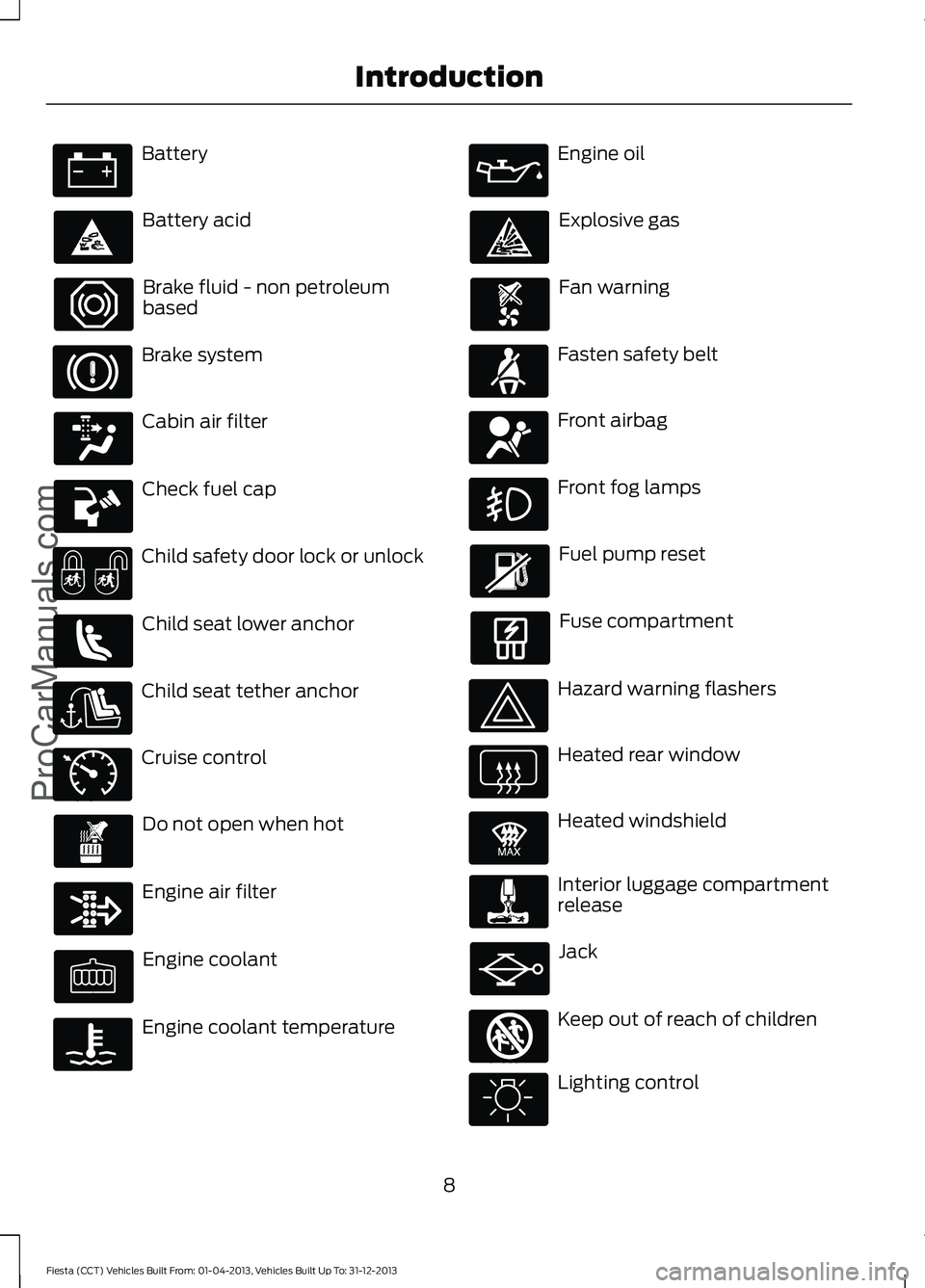
Battery
Battery acid
Brake fluid - non petroleum
based
Brake system
Cabin air filter
Check fuel cap
Child safety door lock or unlock
Child seat lower anchor
Child seat tether anchor
Cruise control
Do not open when hot
Engine air filter
Engine coolant
Engine coolant temperature Engine oil
Explosive gas
Fan warning
Fasten safety belt
Front airbag
Front fog lamps
Fuel pump reset
Fuse compartment
Hazard warning flashers
Heated rear window
Heated windshield
Interior luggage compartment
release
Jack
Keep out of reach of children
Lighting control
8
Fiesta (CCT) Vehicles Built From: 01-04-2013, Vehicles Built Up To: 31-12-2013 IntroductionProCarManuals.com E71340 E91392 E161353
Page 54 of 398
Potential causes
Condition
· An admin key holder cleared the MyKeys
and reset the key system.
51
Fiesta (CCT) Vehicles Built From: 01-04-2013, Vehicles Built Up To: 31-12-2013 MyKey
™ (If Equipped)
ProCarManuals.com
Page 67 of 398
Volume down
C
Seek down, previous or accept
call
D
Seek, Next or Previous
Press the seek button to:
• tune the radio to the next or previous
stored preset
• play the next or the previous track.
Press and hold the seek button to:
• tune the radio to the next station up or
down the frequency band
• seek through a track.
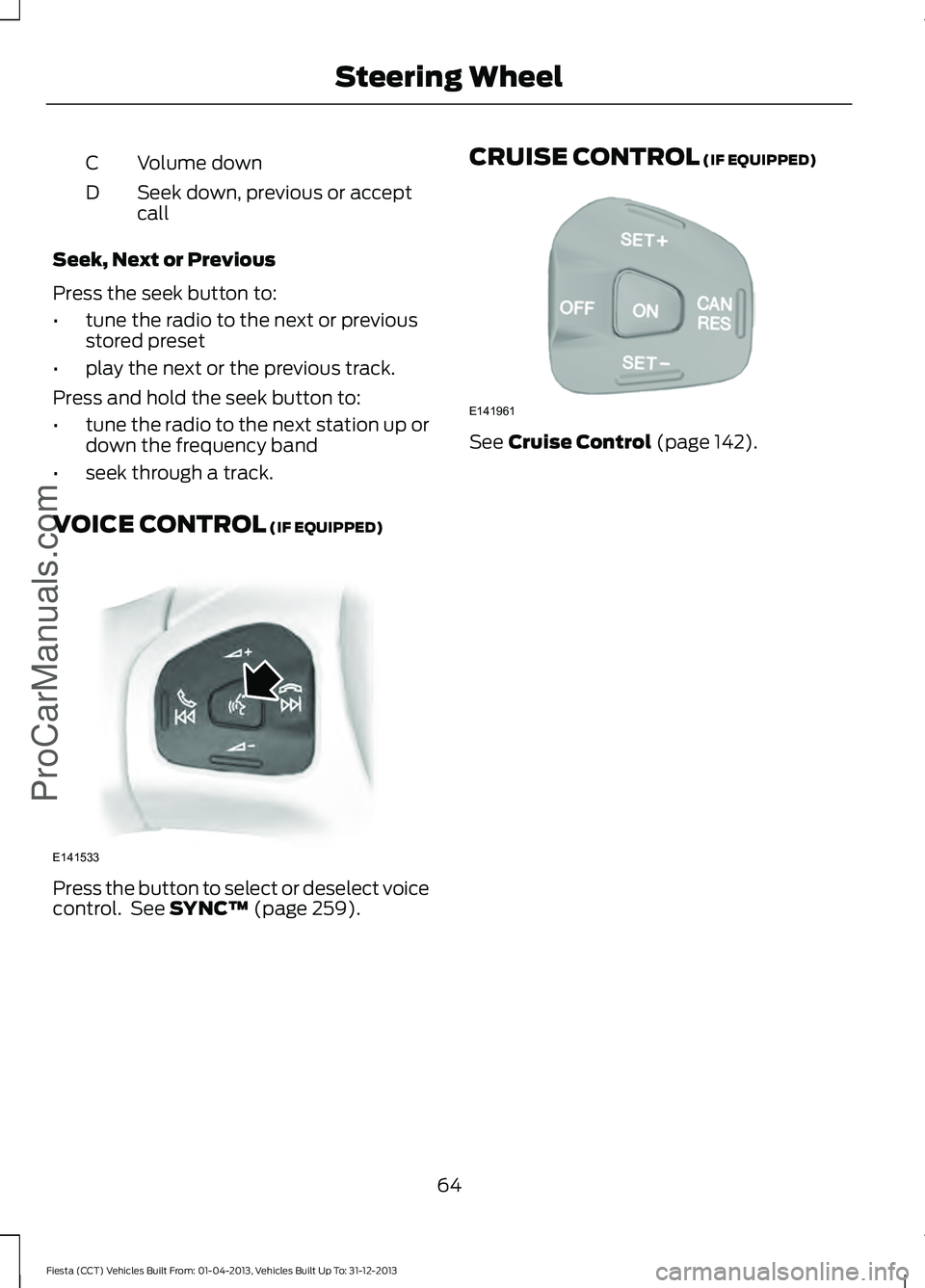
VOICE CONTROL (IF EQUIPPED) Press the button to select or deselect voice
control. See
SYNC™ (page 259). CRUISE CONTROL
(IF EQUIPPED) See
Cruise Control (page 142).
64
Fiesta (CCT) Vehicles Built From: 01-04-2013, Vehicles Built Up To: 31-12-2013 Steering Wheel
ProCarManuals.comE141533 E141961
Page 76 of 398
2. Close the window a third time to the
point of resistance. The bounce-back
feature is now disabled and you can
close the window manually. The
window will go past the point of
resistance and you can close it fully.
See an authorized dealer as soon as
possible if the window does not close after
the third attempt.
Resetting the Bounce-Back Feature WARNING
The bounce-back feature remains
turned off until you reset the
memory.
If you have disconnected the battery, you
must reset the bounce-back memory
separately for each window.
1. Lift and hold the switch until the
window is fully closed.
2. Release the switch.
3. Lift the switch again for one more second.
4. Press and hold the switch until the window is fully open.
5. Release the switch.
6. Lift and hold the switch until the window is fully closed.
7. Open the window and then try to close
it automatically.
8. Reset and repeat the procedure if the window does not close automatically.
Accessory Delay (If Equipped)
You can use the window switches for
several minutes after you have switched
the ignition off or until either front door is
opened. GLOBAL OPENING AND
CLOSING
(IF EQUIPPED)
You can also operate the power windows
with the ignition off using the global
opening and global closing function.
Note: Global opening will only operate for
a short period of time after you have
unlocked your vehicle using the remote
control.
Note: Global closing will only operate if you
have set the memory correctly for each
window. See
Power Windows (page 72).
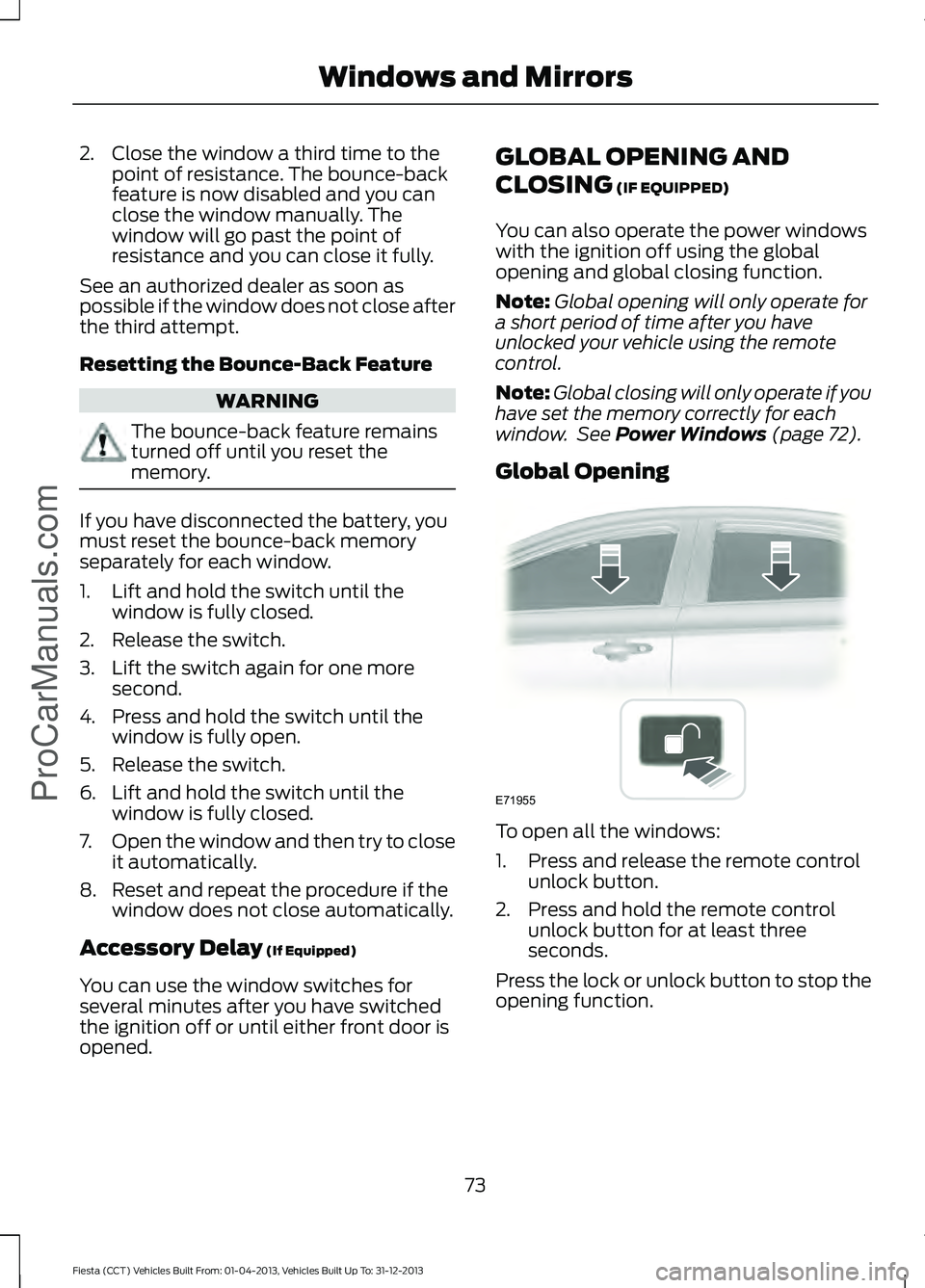
Global Opening To open all the windows:
1. Press and release the remote control
unlock button.
2. Press and hold the remote control unlock button for at least three
seconds.
Press the lock or unlock button to stop the
opening function.
73
Fiesta (CCT) Vehicles Built From: 01-04-2013, Vehicles Built Up To: 31-12-2013 Windows and Mirrors
ProCarManuals.comE71955
Page 80 of 398
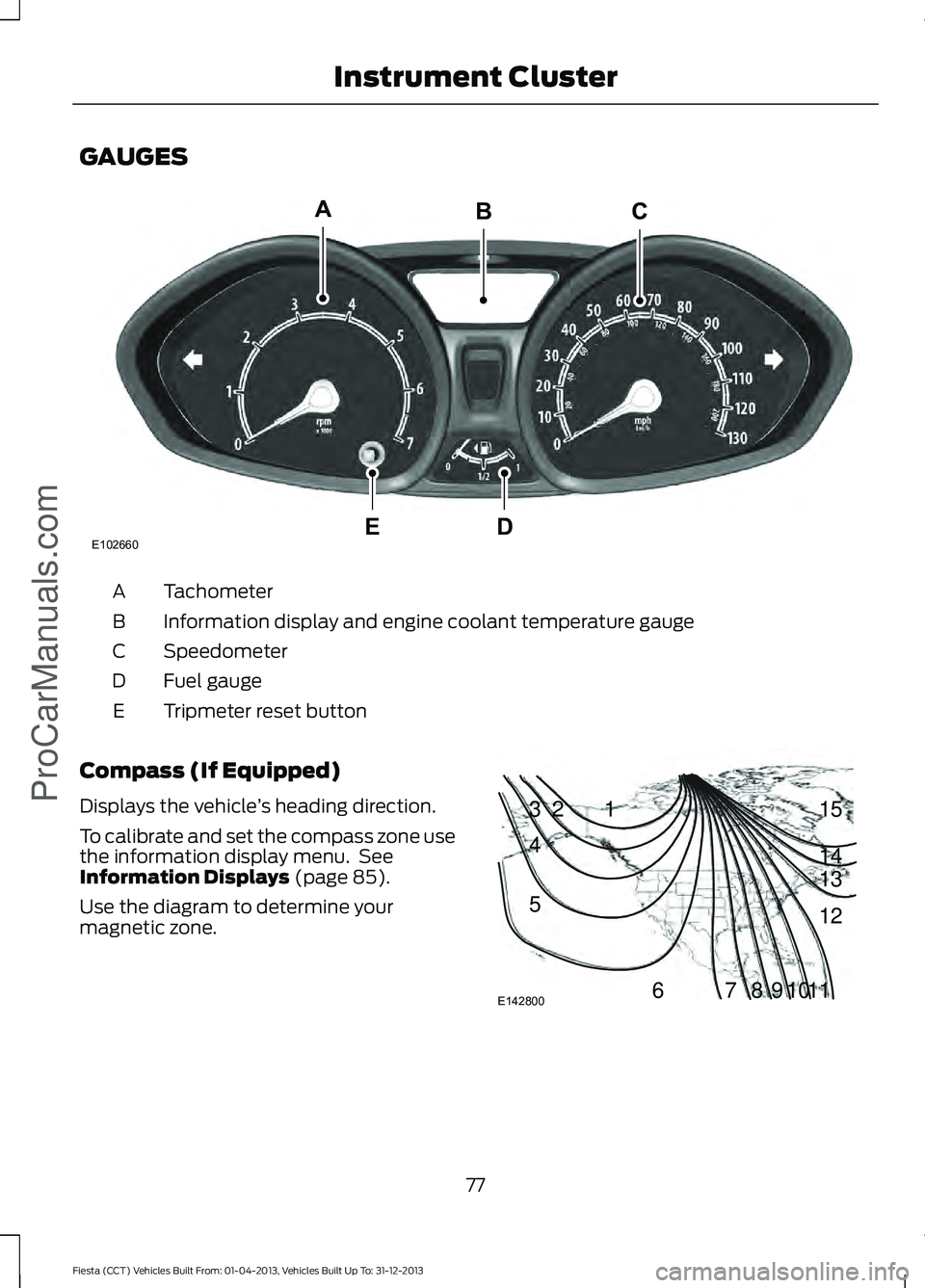
GAUGES
Tachometer
A
Information display and engine coolant temperature gauge
B
Speedometer
C
Fuel gauge
D
Tripmeter reset button
E
Compass (If Equipped)
Displays the vehicle ’s heading direction.
To calibrate and set the compass zone use
the information display menu. See
Information Displays (page 85).
Use the diagram to determine your
magnetic zone. 77
Fiesta (CCT) Vehicles Built From: 01-04-2013, Vehicles Built Up To: 31-12-2013 Instrument Cluster
ProCarManuals.comE102660
CA
DE
B 1
2
3
4
5
678910 1112 13 14 15
E142800
Page 89 of 398
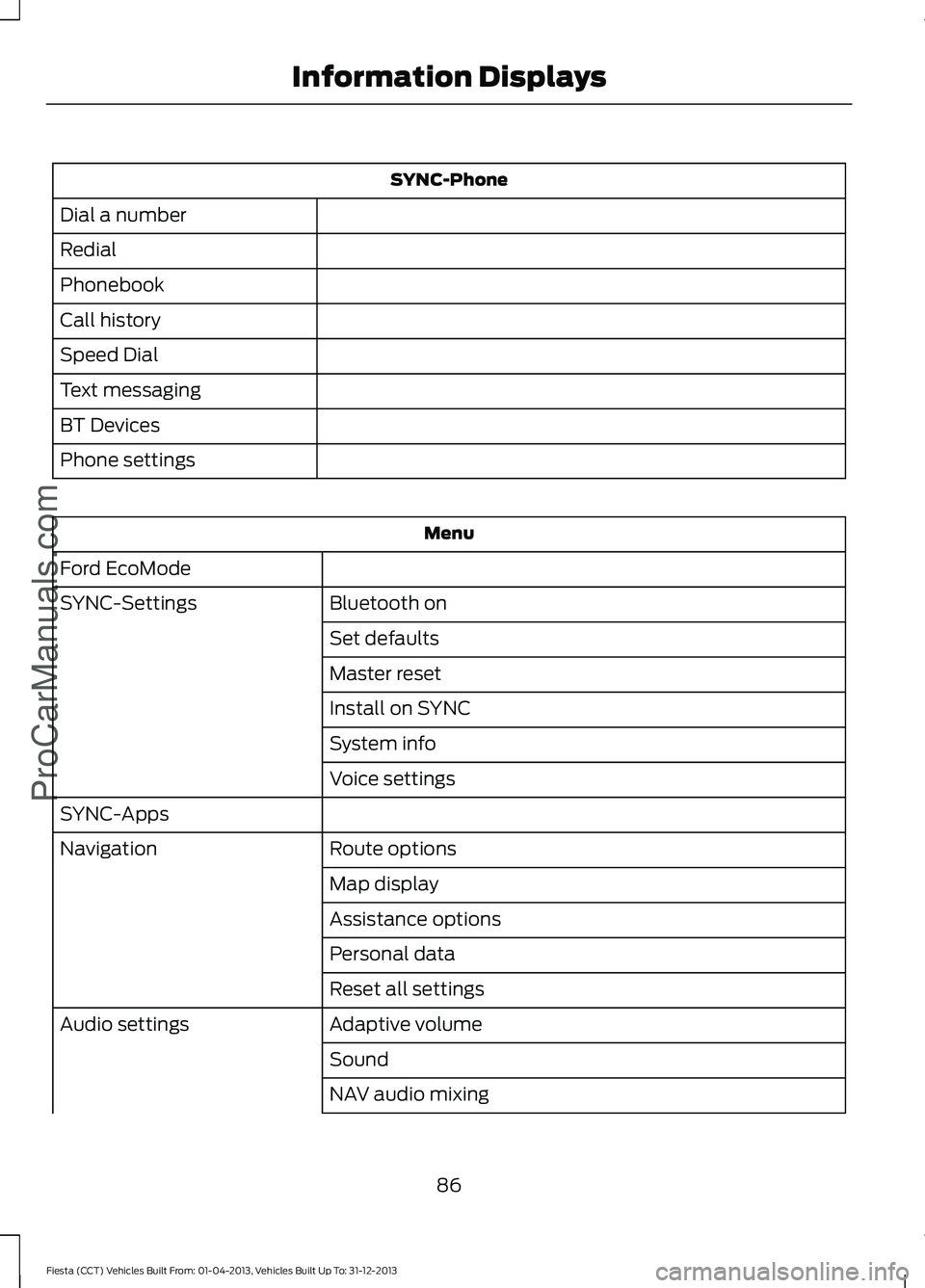
SYNC-Phone
Dial a number
Redial
Phonebook
Call history
Speed Dial
Text messaging
BT Devices
Phone settings Menu
Ford EcoMode Bluetooth on
SYNC-Settings
Set defaults
Master reset
Install on SYNC
System info
Voice settings
SYNC-Apps Route options
Navigation
Map display
Assistance options
Personal data
Reset all settings
Adaptive volume
Audio settings
Sound
NAV audio mixing
86
Fiesta (CCT) Vehicles Built From: 01-04-2013, Vehicles Built Up To: 31-12-2013 Information DisplaysProCarManuals.com
Page 91 of 398
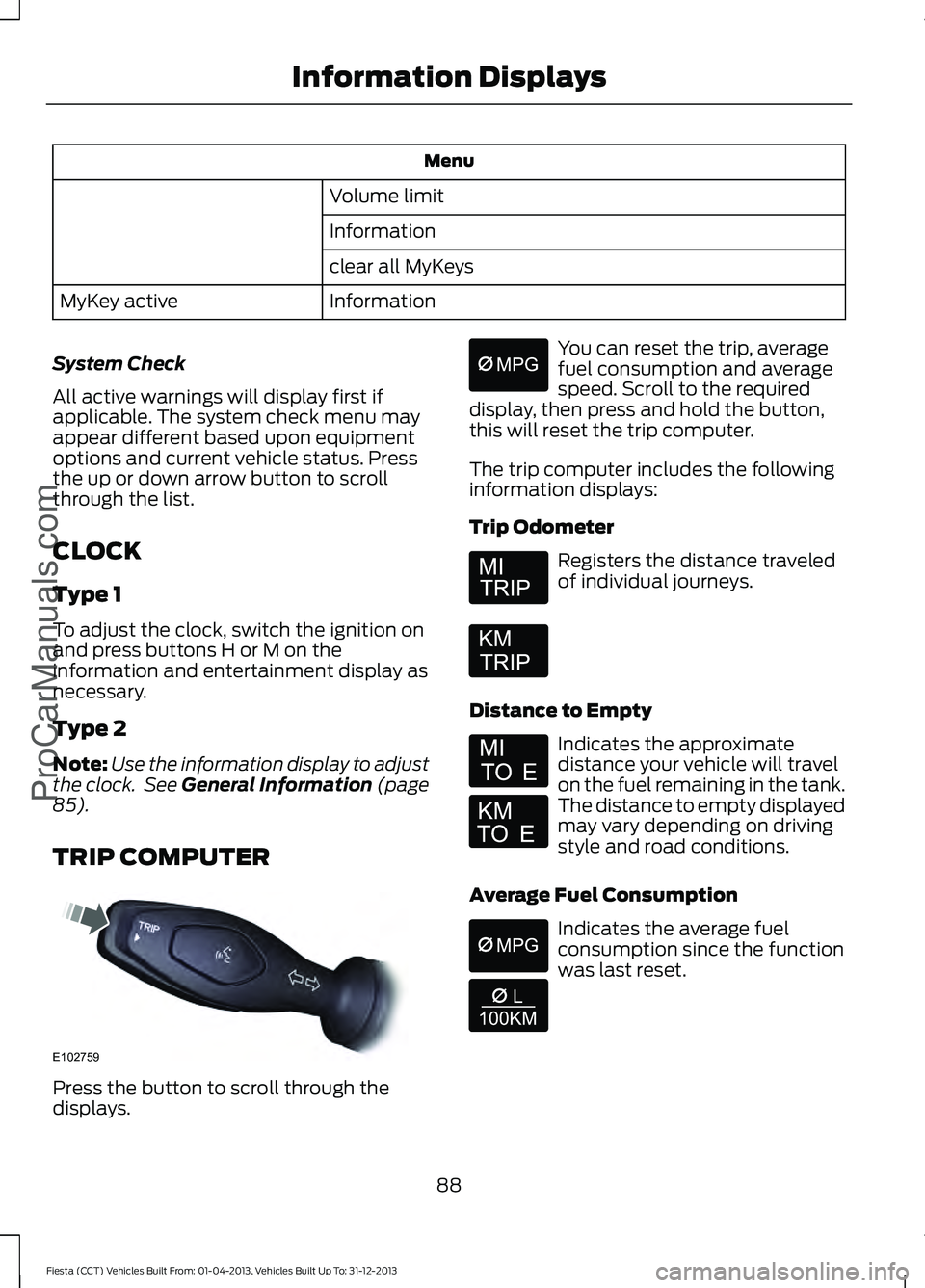
Menu
Volume limit
Information
clear all MyKeys
Information
MyKey active
System Check
All active warnings will display first if
applicable. The system check menu may
appear different based upon equipment
options and current vehicle status. Press
the up or down arrow button to scroll
through the list.
CLOCK
Type 1
To adjust the clock, switch the ignition on
and press buttons H or M on the
information and entertainment display as
necessary.
Type 2
Note: Use the information display to adjust
the clock. See General Information (page
85).
TRIP COMPUTER Press the button to scroll through the
displays. You can reset the trip, average
fuel consumption and average
speed. Scroll to the required
display, then press and hold the button,
this will reset the trip computer.
The trip computer includes the following
information displays:
Trip Odometer Registers the distance traveled
of individual journeys.
Distance to Empty Indicates the approximate
distance your vehicle will travel
on the fuel remaining in the tank.
The distance to empty displayed
may vary depending on driving
style and road conditions.
Average Fuel Consumption Indicates the average fuel
consumption since the function
was last reset.
88
Fiesta (CCT) Vehicles Built From: 01-04-2013, Vehicles Built Up To: 31-12-2013 Information Displays
ProCarManuals.comE102759 E164638E
Page 92 of 398
Average Speed
Indicates the average speed
calculated since the function
was last reset.
Distance Odometer Registers the total distance your
vehicle has traveled.
PERSONALIZED SETTINGS
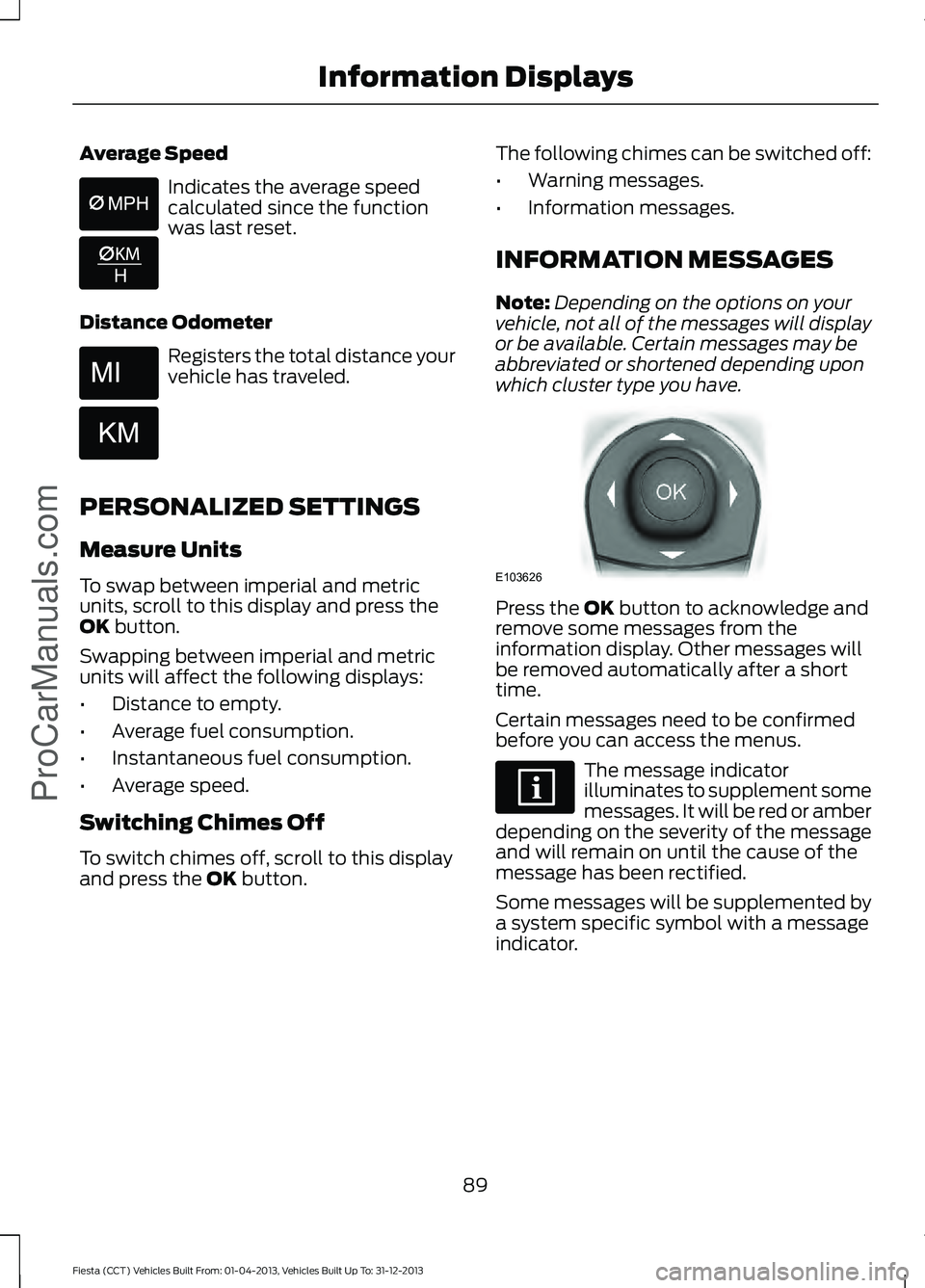
Measure Units
To swap between imperial and metric
units, scroll to this display and press the
OK button.
Swapping between imperial and metric
units will affect the following displays:
• Distance to empty.
• Average fuel consumption.
• Instantaneous fuel consumption.
• Average speed.
Switching Chimes Off
To switch chimes off, scroll to this display
and press the
OK button. The following chimes can be switched off:
•
Warning messages.
• Information messages.
INFORMATION MESSAGES
Note: Depending on the options on your
vehicle, not all of the messages will display
or be available. Certain messages may be
abbreviated or shortened depending upon
which cluster type you have. Press the
OK button to acknowledge and
remove some messages from the
information display. Other messages will
be removed automatically after a short
time.
Certain messages need to be confirmed
before you can access the menus. The message indicator
illuminates to supplement some
messages. It will be red or amber
depending on the severity of the message
and will remain on until the cause of the
message has been rectified.
Some messages will be supplemented by
a system specific symbol with a message
indicator.
89
Fiesta (CCT) Vehicles Built From: 01-04-2013, Vehicles Built Up To: 31-12-2013 Information Displays
ProCarManuals.com E103626
Page 110 of 398
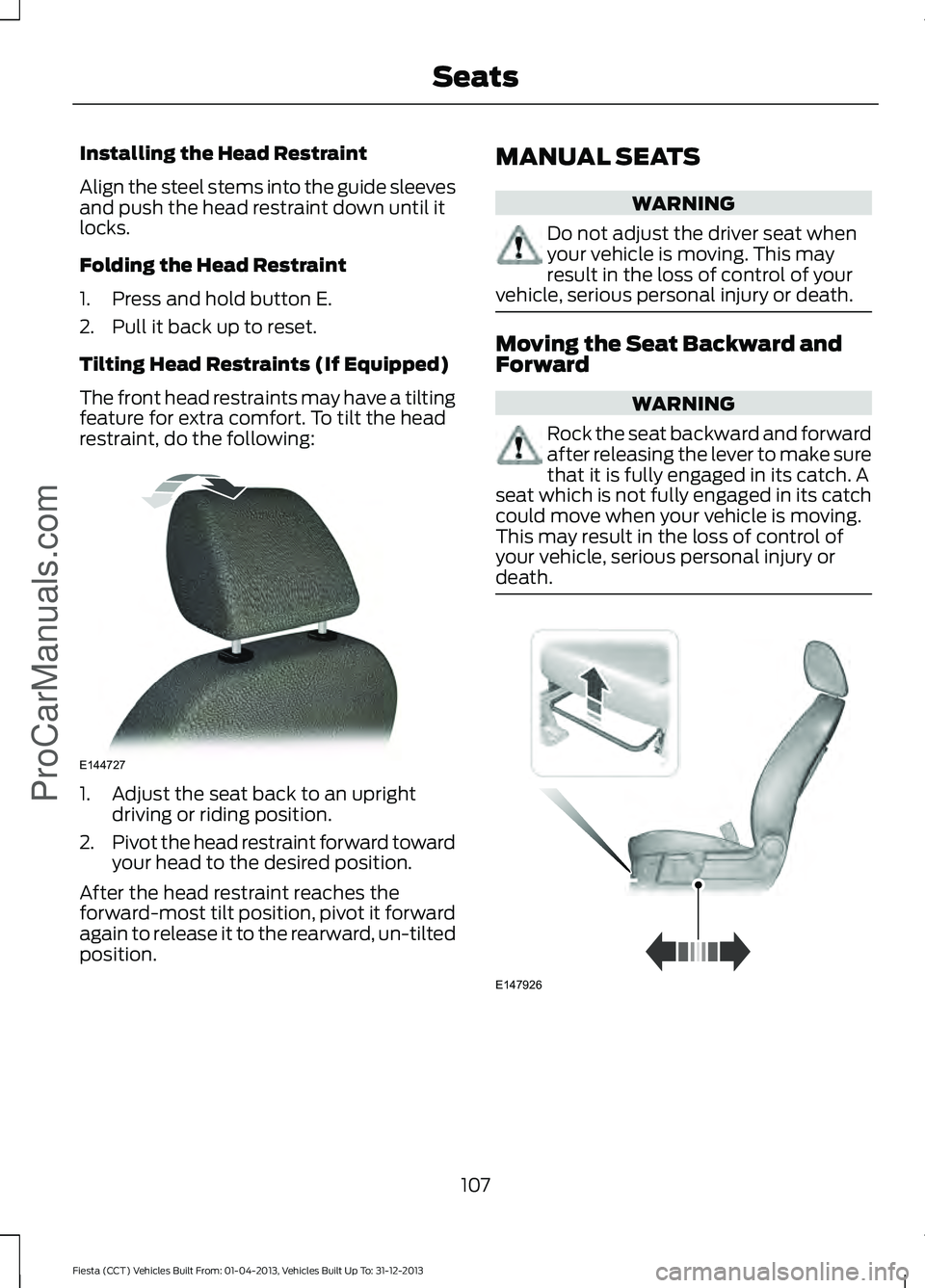
Installing the Head Restraint
Align the steel stems into the guide sleeves
and push the head restraint down until it
locks.
Folding the Head Restraint
1. Press and hold button E.
2. Pull it back up to reset.
Tilting Head Restraints (If Equipped)
The front head restraints may have a tilting
feature for extra comfort. To tilt the head
restraint, do the following:
1. Adjust the seat back to an upright
driving or riding position.
2. Pivot the head restraint forward toward
your head to the desired position.
After the head restraint reaches the
forward-most tilt position, pivot it forward
again to release it to the rearward, un-tilted
position. MANUAL SEATS WARNING
Do not adjust the driver seat when
your vehicle is moving. This may
result in the loss of control of your
vehicle, serious personal injury or death. Moving the Seat Backward and
Forward
WARNING
Rock the seat backward and forward
after releasing the lever to make sure
that it is fully engaged in its catch. A
seat which is not fully engaged in its catch
could move when your vehicle is moving.
This may result in the loss of control of
your vehicle, serious personal injury or
death. 107
Fiesta (CCT) Vehicles Built From: 01-04-2013, Vehicles Built Up To: 31-12-2013 SeatsProCarManuals.comE144727 E147926
Page 125 of 398
If the fuel fill inlet was not properly closed,
a service engine warning lamp may appear
on the instrument cluster.
At the next opportunity, do the following:
1. Safely pull off the road.
2.
Put the vehicle in P (Park) and turn the
ignition off.
3. Open the fuel filler door and remove any visible debris from the fuel fill
opening.
4. Insert either the fuel fill nozzle or the fuel fill funnel provided with the vehicle
several times to allow the inlet to close
properly. This will dislodge any debris
preventing the inlet from sealing.
If this action corrects the problem, the
warning lamp may not reset immediately.
It may take several driving cycles for the
warning lamp to turn off. A driving cycle
consists of an engine start-up (after four
or more hours with the engine off) followed
by city or highway driving.
FUEL CONSUMPTION
Note: The amount of usable fuel in the
empty reserve varies and should not be
relied upon to increase driving range. When
refueling your vehicle after the fuel gauge
indicates empty, you might not be able to
refuel the full amount of the advertised
capacity of the fuel tank due to the empty
reserve still present in the tank.
Empty reserve is the amount of fuel
remaining in the tank after the fuel gauge
indicates empty. Do not rely on this fuel for
driving. The usable capacity of the fuel
tank is the amount of fuel that can be put
into the tank after the gauge indicates
empty. The advertised capacity is the total
fuel tank size – it is the combined usable
capacity plus the empty reserve. Filling the Tank
For consistent results when filling the fuel
tank:
•
Turn the ignition off before fueling; an
inaccurate reading results if the engine
is left running.
• Use the same fill rate
(low-medium-high) each time the tank
is filled.
• Allow no more than two automatic
click-offs when filling.
Results are most accurate when the filling
method is consistent.
Calculating Fuel Economy
Do not measure fuel economy during the
first 1000 miles (1600 kilometers) of
driving (this is your engine ’s break-in
period); a more accurate measurement is
obtained after 2000 miles - 3000 miles
(3200 kilometers - 4800 kilometers). Also,
fuel expense, frequency of fill ups or fuel
gauge readings are not accurate ways to
measure fuel economy.
1. Fill the fuel tank completely and record
the initial odometer reading.
2. Each time you fill the tank, record the amount of fuel added.
3. After at least three to five tank fill ups, fill the fuel tank and record the current
odometer reading.
4. Subtract your initial odometer reading from the current odometer reading.
5. Calculate fuel economy by dividing miles traveled by gallons used (For
Metric: Multiply liters used by 100, then
divide by kilometers traveled).
122
Fiesta (CCT) Vehicles Built From: 01-04-2013, Vehicles Built Up To: 31-12-2013 Fuel and RefuelingProCarManuals.com