display FORD FIESTA 2015 6.G Workshop Manual
[x] Cancel search | Manufacturer: FORD, Model Year: 2015, Model line: FIESTA, Model: FORD FIESTA 2015 6.GPages: 423, PDF Size: 4.76 MB
Page 258 of 423
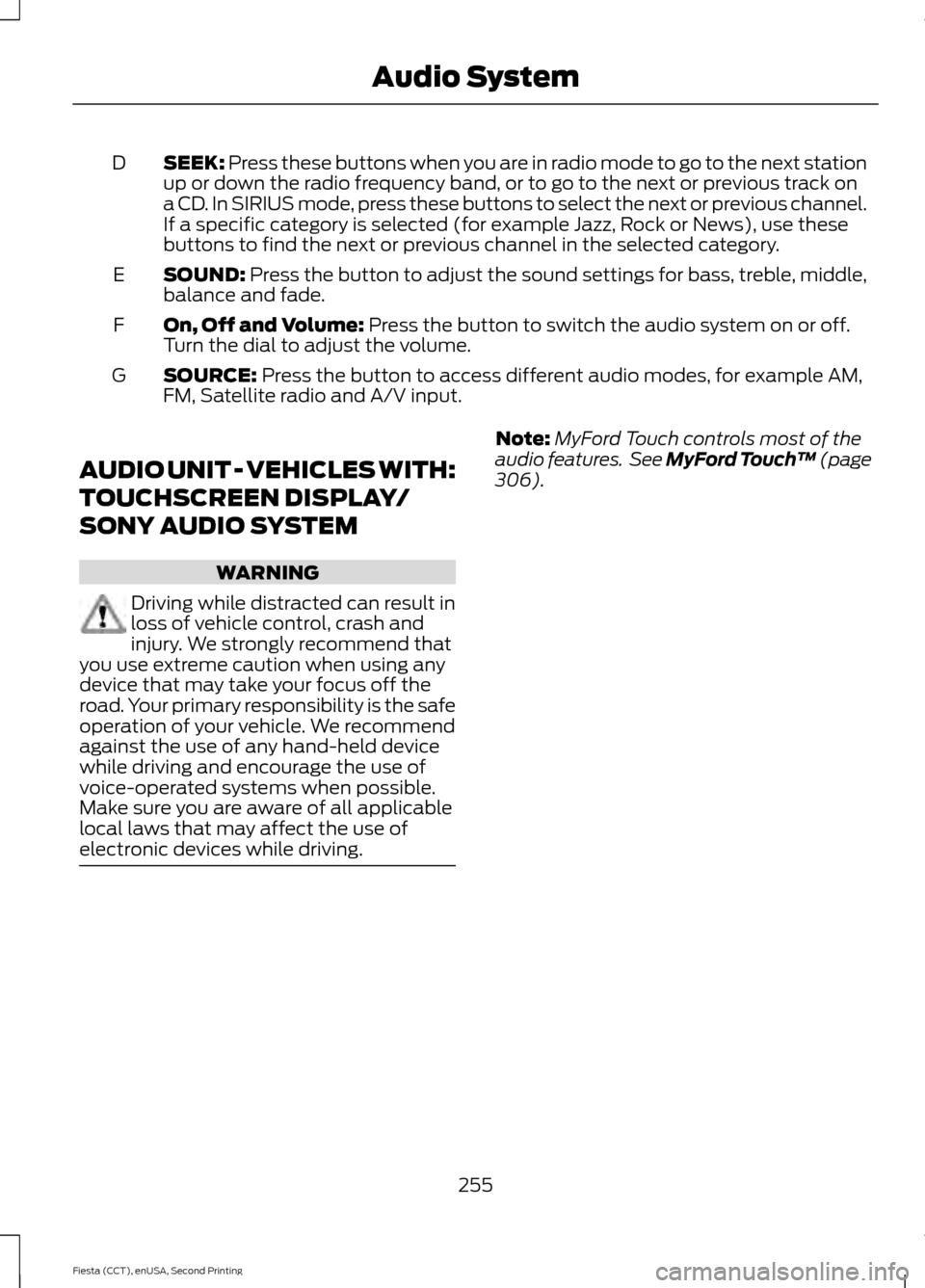
SEEK: Press these buttons when you are in radio mode to go to the next station
up or down the radio frequency band, or to go to the next or previous track on
a CD. In SIRIUS mode, press these buttons to select the next or previous channel.
If a specific category is selected (for example Jazz, Rock or News), use these
buttons to find the next or previous channel in the selected category.
D
SOUND:
Press the button to adjust the sound settings for bass, treble, middle,
balance and fade.
E
On, Off and Volume:
Press the button to switch the audio system on or off.
Turn the dial to adjust the volume.
F
SOURCE:
Press the button to access different audio modes, for example AM,
FM, Satellite radio and A/V input.
G
AUDIO UNIT - VEHICLES WITH:
TOUCHSCREEN DISPLAY/
SONY AUDIO SYSTEM WARNING
Driving while distracted can result in
loss of vehicle control, crash and
injury. We strongly recommend that
you use extreme caution when using any
device that may take your focus off the
road. Your primary responsibility is the safe
operation of your vehicle. We recommend
against the use of any hand-held device
while driving and encourage the use of
voice-operated systems when possible.
Make sure you are aware of all applicable
local laws that may affect the use of
electronic devices while driving. Note:
MyFord Touch controls most of the
audio features. See MyFord Touch ™ (page
306
).
255
Fiesta (CCT), enUSA, Second Printing Audio System
Page 263 of 423
Note:
This receiver includes the eCos
real-time operating system. eCos is
published under the eCos License.
Satellite Radio Reception Factors Potential satellite radio reception issues
For optimal reception performance, keep the antenna
clear of snow and ice build-up and keep luggage and other
material as far away from the antenna as possible.
Antenna obstructions
Hills, mountains, tall buildings, bridges, tunnels, freeway
overpasses, parking garages, dense tree foliage and
thunderstorms can interfere with your reception.
Terrain
When you pass a ground-based broadcast-repeating
tower, a stronger signal may overtake a weaker one and
the audio system may mute.
Station overload
Your display may show ACQUIRING . . . to indicate the
interference and the audio system may mute.
Satellite radio signal interfer-
ence
SIRIUS® Satellite Radio Service
Note: SIRIUS reserves the unrestricted right
to change, rearrange, add or delete
programming including canceling, moving
or adding particular channels, and its prices,
at any time, with or without notice to you.
Ford Motor Company shall not be
responsible for any such programming
changes. SIRIUS satellite radio is a
subscription-based satellite radio service
that broadcasts a variety of music, sports,
news, weather, traffic and entertainment
programming. Your factory-installed
SIRIUS satellite radio system includes
hardware and a limited subscription term,
which begins on the date of sale or lease
of your vehicle. See an authorized dealer
for availability.
For more information on extended
subscription terms (a service fee is
required), the online media player and a
complete list of SIRIUS satellite radio
channels, and other features, please visit
www.siriusxm.com in the United States,
www.sirius.ca in Canada, or call SIRIUS at
1-888-539-7474.
Satellite Radio Electronic Serial
Number (ESN)
You need your ESN to activate, modify or
track your satellite radio account. When in
satellite radio mode, press Options.
260
Fiesta (CCT), enUSA, Second Printing Audio SystemE142593
Page 265 of 423
AUDIO INPUT JACK
WARNINGS
Driving while distracted can result in
loss of vehicle control, crash and
injury. We strongly recommend that
you use extreme caution when using any
device that may take your focus off the
road. Your primary responsibility is the safe
operation of your vehicle. We recommend
against the use of any hand-held device
while driving and encourage the use of
voice-operated systems when possible.
Make sure you are aware of all applicable
local laws that may affect the use of
electronic devices while driving. For safety reasons, do not connect
or adjust the settings on your
portable music player while your
vehicle is moving. Store the portable music player in a
secure location, such as the center
console or the glove box, when your
vehicle is moving. Hard objects may
become projectiles in a collision or sudden
stop, which may increase the risk of serious
injury. The audio extension cable must be
long enough to allow the portable music
player to be safely stored while your
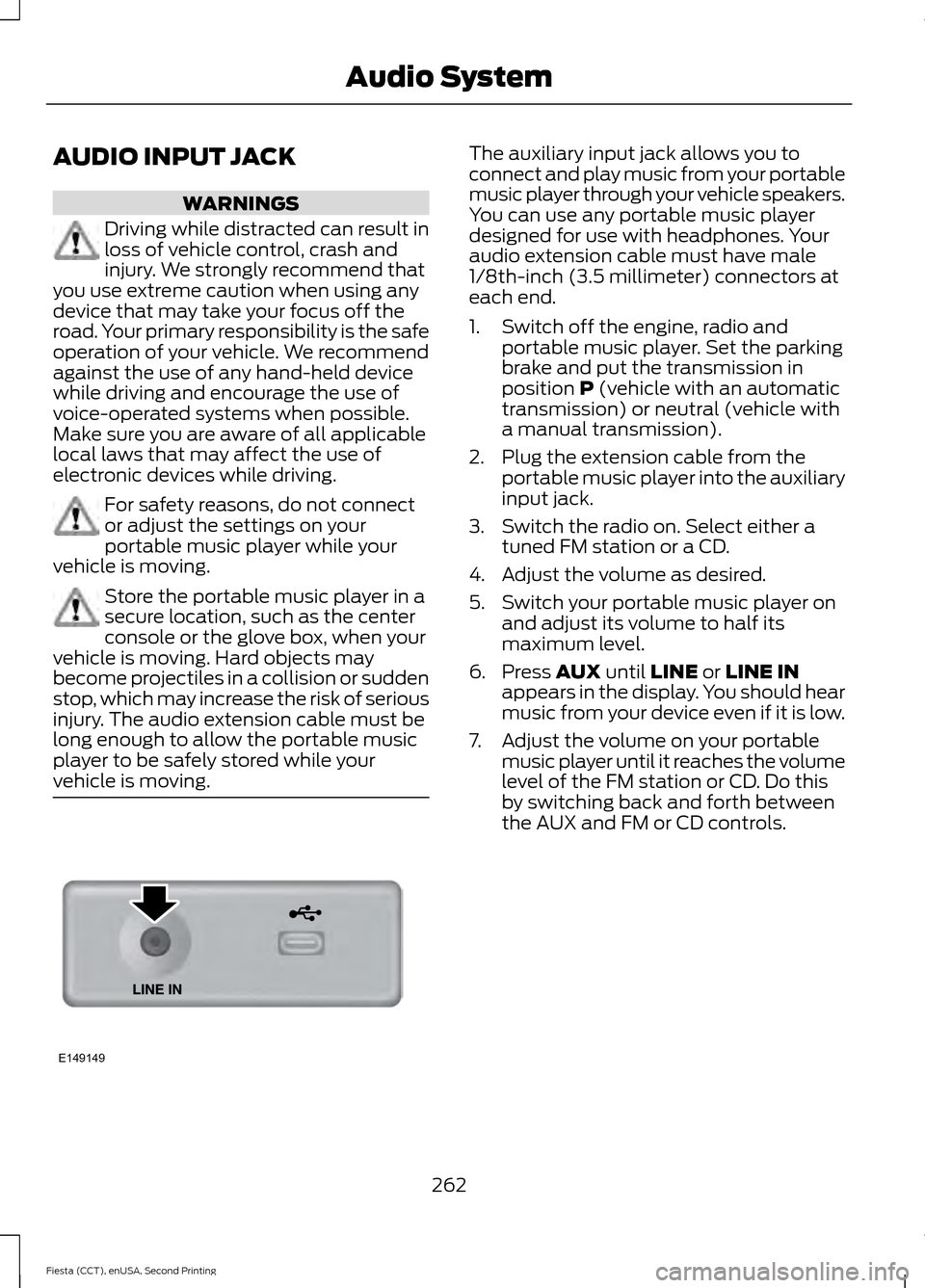
vehicle is moving. The auxiliary input jack allows you to
connect and play music from your portable
music player through your vehicle speakers.
You can use any portable music player
designed for use with headphones. Your
audio extension cable must have male
1/8th-inch (3.5 millimeter) connectors at
each end.
1. Switch off the engine, radio and
portable music player. Set the parking
brake and put the transmission in
position P (vehicle with an automatic
transmission) or neutral (vehicle with
a manual transmission).
2. Plug the extension cable from the portable music player into the auxiliary
input jack.
3. Switch the radio on. Select either a tuned FM station or a CD.
4. Adjust the volume as desired.
5. Switch your portable music player on and adjust its volume to half its
maximum level.
6. Press
AUX until LINE or LINE IN
appears in the display. You should hear
music from your device even if it is low.
7. Adjust the volume on your portable music player until it reaches the volume
level of the FM station or CD. Do this
by switching back and forth between
the AUX and FM or CD controls.
262
Fiesta (CCT), enUSA, Second Printing Audio SystemE149149
Page 266 of 423
USB PORT (If Equipped)
The USB port allows you to plug in media
playing devices, memory sticks and charge
devices (if supported).
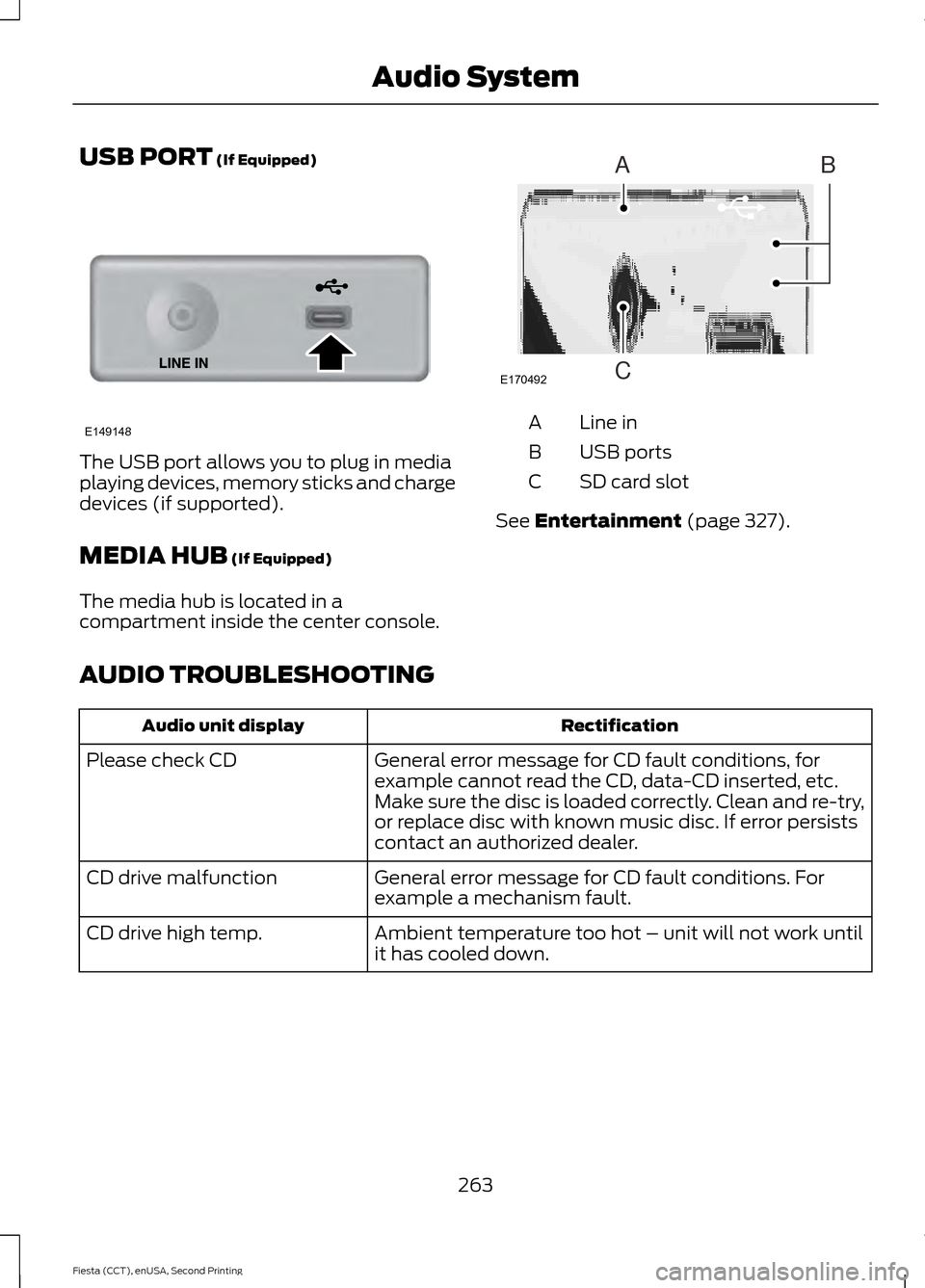
MEDIA HUB
(If Equipped)
The media hub is located in a
compartment inside the center console. Line in
A
USB ports
B
SD card slot
C
See
Entertainment (page 327).
AUDIO TROUBLESHOOTING Rectification
Audio unit display
General error message for CD fault conditions, for
example cannot read the CD, data-CD inserted, etc.
Make sure the disc is loaded correctly. Clean and re-try,
or replace disc with known music disc. If error persists
contact an authorized dealer.
Please check CD
General error message for CD fault conditions. For
example a mechanism fault.
CD drive malfunction
Ambient temperature too hot – unit will not work until
it has cooled down.
CD drive high temp.
263
Fiesta (CCT), enUSA, Second Printing Audio SystemE149148 E170492
A
C
B
Page 270 of 423
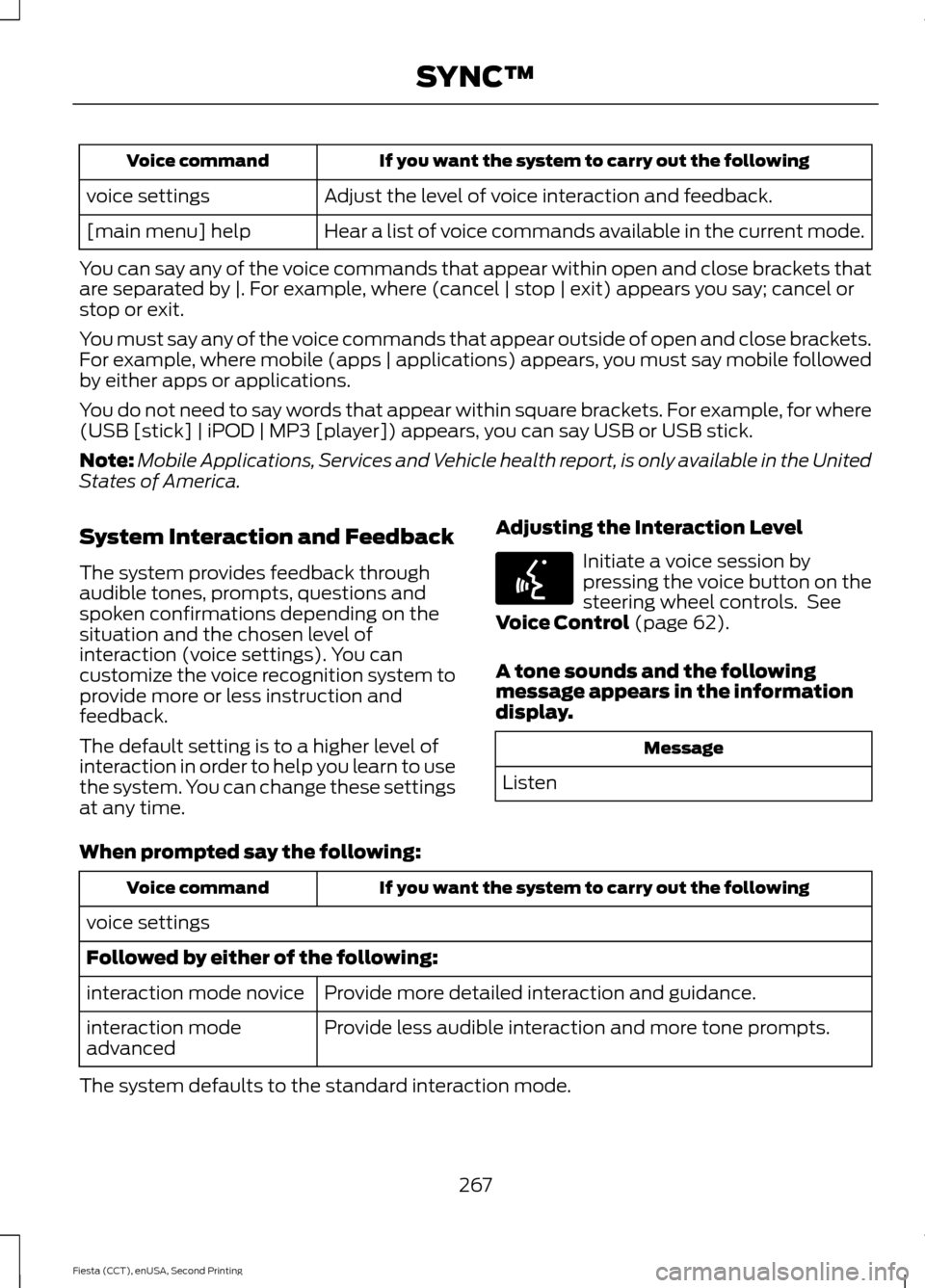
If you want the system to carry out the following
Voice command
Adjust the level of voice interaction and feedback.
voice settings
Hear a list of voice commands available in the current mode.
[main menu] help
You can say any of the voice commands that appear within open and close brackets that
are separated by |. For example, where (cancel | stop | exit) appears you say; cancel or
stop or exit.
You must say any of the voice commands that appear outside of open and close brackets.
For example, where mobile (apps | applications) appears, you must say mobile followed
by either apps or applications.
You do not need to say words that appear within square brackets. For example, for where
(USB [stick] | iPOD | MP3 [player]) appears, you can say USB or USB stick.
Note: Mobile Applications, Services and Vehicle health report, is only available in the United
States of America.
System Interaction and Feedback
The system provides feedback through
audible tones, prompts, questions and
spoken confirmations depending on the
situation and the chosen level of
interaction (voice settings). You can
customize the voice recognition system to
provide more or less instruction and
feedback.
The default setting is to a higher level of
interaction in order to help you learn to use
the system. You can change these settings
at any time. Adjusting the Interaction Level Initiate a voice session by
pressing the voice button on the
steering wheel controls. See
Voice Control (page 62).
A tone sounds and the following
message appears in the information
display. Message
Listen
When prompted say the following: If you want the system to carry out the following
Voice command
voice settings
Followed by either of the following: Provide more detailed interaction and guidance.
interaction mode novice
Provide less audible interaction and more tone prompts.
interaction mode
advanced
The system defaults to the standard interaction mode.
267
Fiesta (CCT), enUSA, Second Printing SYNC™E142599
Page 272 of 423
Pairing a Phone for the First Time
Note:
SYNC can support downloading up
to approximately 1000 entries per
Bluetooth-enabled cellular phone.
Note: Make sure to switch on the ignition
and the radio. Put the transmission in
position P.
Note: To scroll through the menus, press
the up and down arrows on your audio
system.
Wirelessly pairing your phone with SYNC
allows you to make and receive hands-free
calls.
1. Press the phone button. When the display indicates there is no phone
paired, press
OK.
2. When
Find SYNC appears in the
display, press OK.
3. Put your phone into Bluetooth discovery mode. See your device's
manual if necessary.
4. When prompted on your phone's display, enter the six-digit PIN provided
by SYNC in the radio display. The
display indicates when the pairing is
successful.
Depending on your phone's capability and
your market, the system may prompt you
with questions, such as setting the current
phone as the primary phone (the phone
SYNC automatically tries to connect with
first upon vehicle start-up) and
downloading your phonebook.
Pairing Subsequent Phones
Note: Make sure to switch on the ignition
and the radio. Put the transmission in
position
P.
Note: To scroll through the menus, press
the up and down arrows on your audio
system. 1.
Press the phone button, and then scroll
to System Settings. Press
OK.
2. Scroll to Bluetooth Devices. Press
OK.
3. Scroll to Add Bluetooth Device. Press OK
.
4. When
Find SYNC appears in the
display, press OK.
5. Put your phone into Bluetooth discovery mode. See your phone's
manual if necessary.
6. When prompted on your phone's display, enter the six-digit PIN provided
by SYNC in the radio display. The
display indicates when the pairing is
successful.
The system then prompts with questions,
such as if you would like to set the current
phone as the primary phone (the phone
SYNC automatically tries to connect with
first upon vehicle start-up) and download
your phone book.
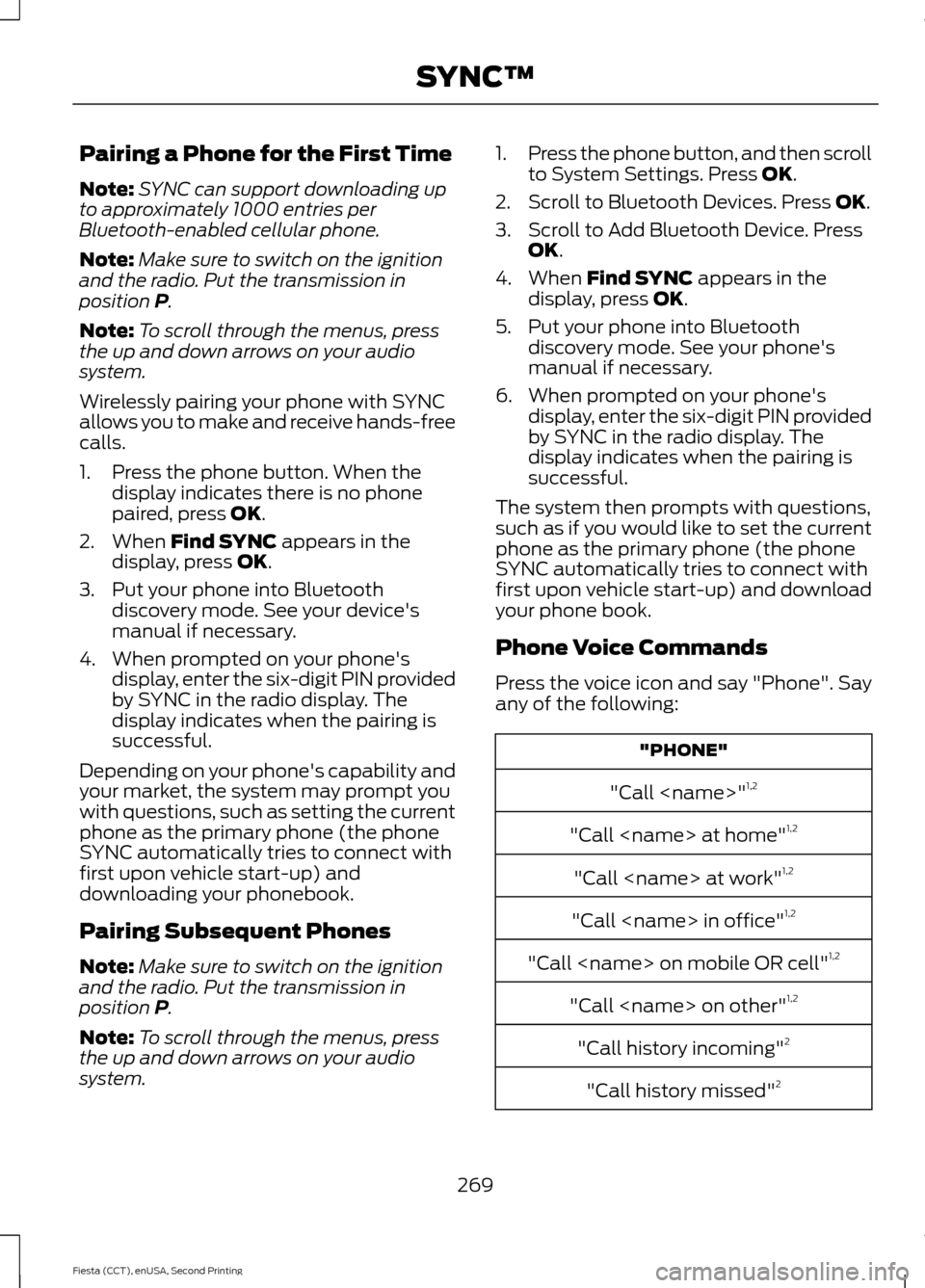
Phone Voice Commands
Press the voice icon and say "Phone". Say
any of the following: "PHONE"
"Call
"Call
"Call
"Call
"Call
"Call
"Call history incoming" 2
"Call history missed" 2
269
Fiesta (CCT), enUSA, Second Printing SYNC™
Page 273 of 423
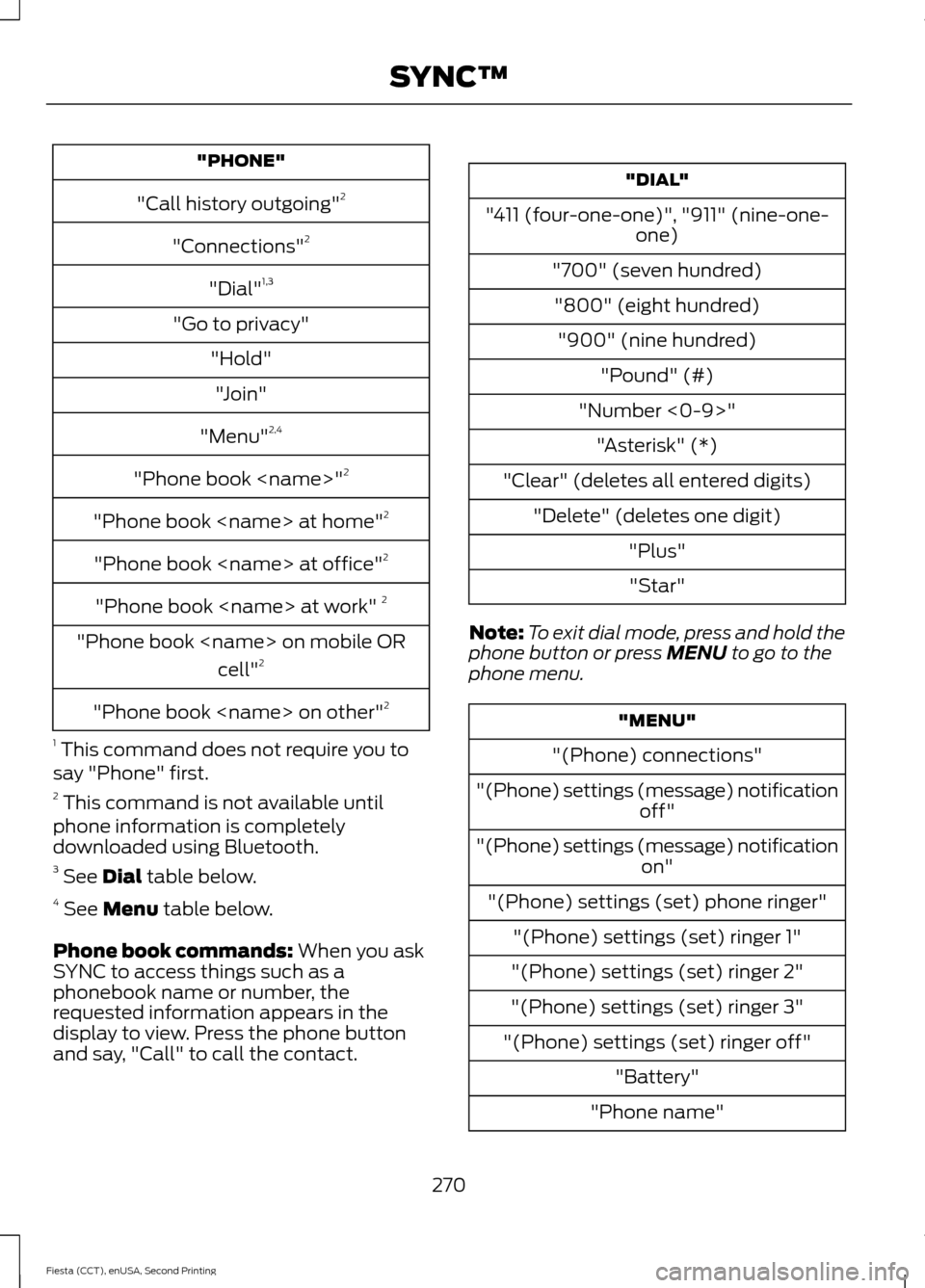
"PHONE"
"Call history outgoing" 2
"Connections" 2
"Dial" 1,3
"Go to privacy" "Hold""Join"
"Menu" 2,4
"Phone book
"Phone book
"Phone book
"Phone book
"Phone book
"Phone book
1 This command does not require you to
say "Phone" first.
2 This command is not available until
phone information is completely
downloaded using Bluetooth.
3 See Dial table below.
4 See
Menu table below.
Phone book commands:
When you ask
SYNC to access things such as a
phonebook name or number, the
requested information appears in the
display to view. Press the phone button
and say, "Call" to call the contact. "DIAL"
"411 (four-one-one)", "911" (nine-one- one)
"700" (seven hundred) "800" (eight hundred) "900" (nine hundred) "Pound" (#)
"Number <0-9>" "Asterisk" (*)
"Clear" (deletes all entered digits) "Delete" (deletes one digit) "Plus""Star"
Note: To exit dial mode, press and hold the
phone button or press
MENU to go to the
phone menu. "MENU"
"(Phone) connections"
"(Phone) settings (message) notification off"
"(Phone) settings (message) notification on"
"(Phone) settings (set) phone ringer" "(Phone) settings (set) ringer 1"
"(Phone) settings (set) ringer 2"
"(Phone) settings (set) ringer 3"
"(Phone) settings (set) ringer off" "Battery"
"Phone name"
270
Fiesta (CCT), enUSA, Second Printing SYNC™
Page 274 of 423
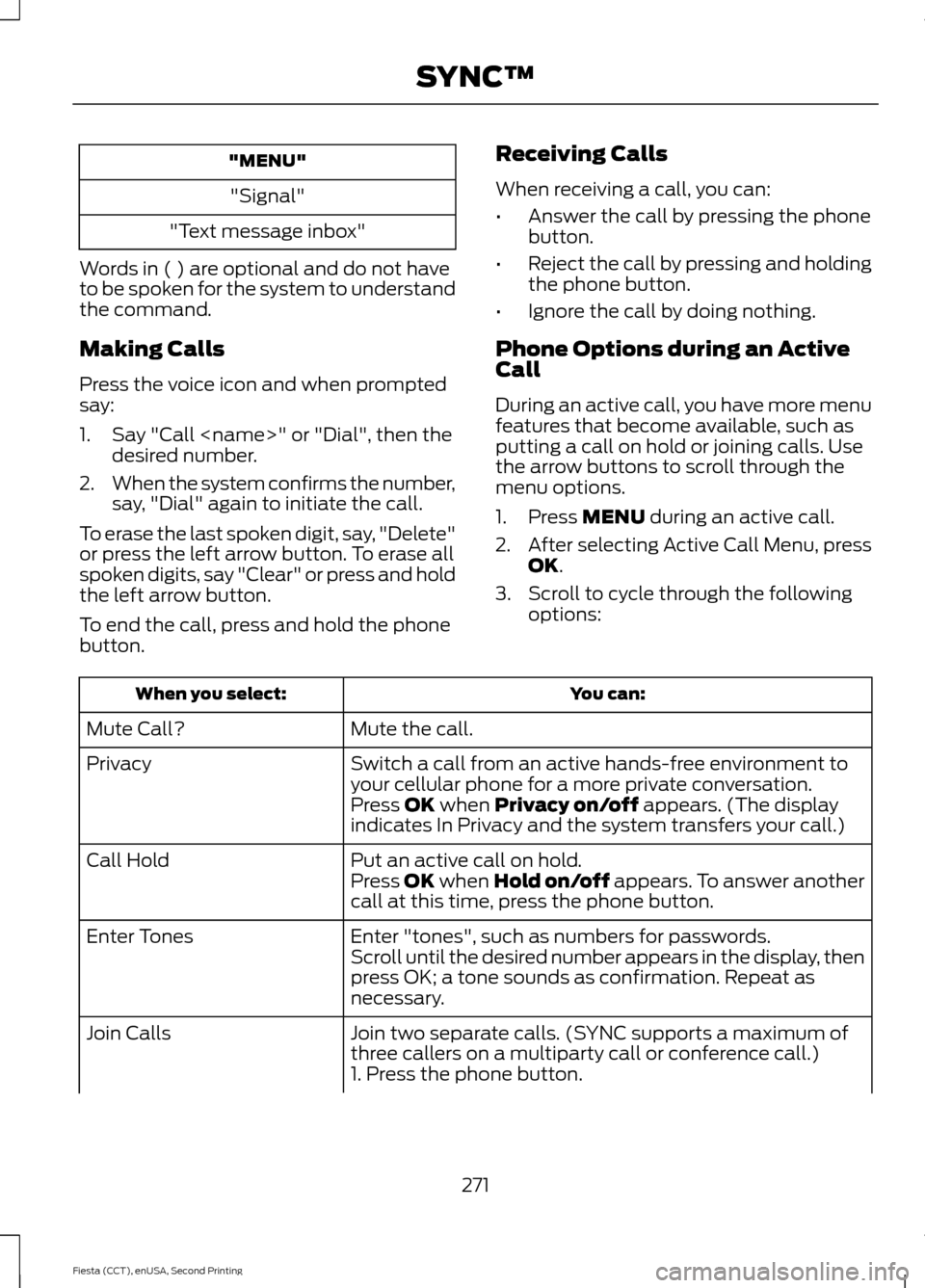
"MENU"
"Signal"
"Text message inbox"
Words in ( ) are optional and do not have
to be spoken for the system to understand
the command.
Making Calls
Press the voice icon and when prompted
say:
1. Say "Call
2. When the system confirms the number,
say, "Dial" again to initiate the call.
To erase the last spoken digit, say, "Delete"
or press the left arrow button. To erase all
spoken digits, say "Clear" or press and hold
the left arrow button.
To end the call, press and hold the phone
button. Receiving Calls
When receiving a call, you can:
•
Answer the call by pressing the phone
button.
• Reject the call by pressing and holding
the phone button.
• Ignore the call by doing nothing.
Phone Options during an Active
Call
During an active call, you have more menu
features that become available, such as
putting a call on hold or joining calls. Use
the arrow buttons to scroll through the
menu options.
1. Press MENU during an active call.
2. After selecting Active Call Menu, press
OK
.
3. Scroll to cycle through the following options: You can:
When you select:
Mute the call.
Mute Call?
Switch a call from an active hands-free environment to
your cellular phone for a more private conversation.
Privacy
Press
OK when Privacy on/off appears. (The display
indicates In Privacy and the system transfers your call.)
Put an active call on hold.
Call Hold
Press OK when Hold on/off appears. To answer another
call at this time, press the phone button.
Enter "tones", such as numbers for passwords.
Enter Tones
Scroll until the desired number appears in the display, then
press OK; a tone sounds as confirmation. Repeat as
necessary.
Join two separate calls. (SYNC supports a maximum of
three callers on a multiparty call or conference call.)
Join Calls
1. Press the phone button.
271
Fiesta (CCT), enUSA, Second Printing SYNC™
Page 275 of 423
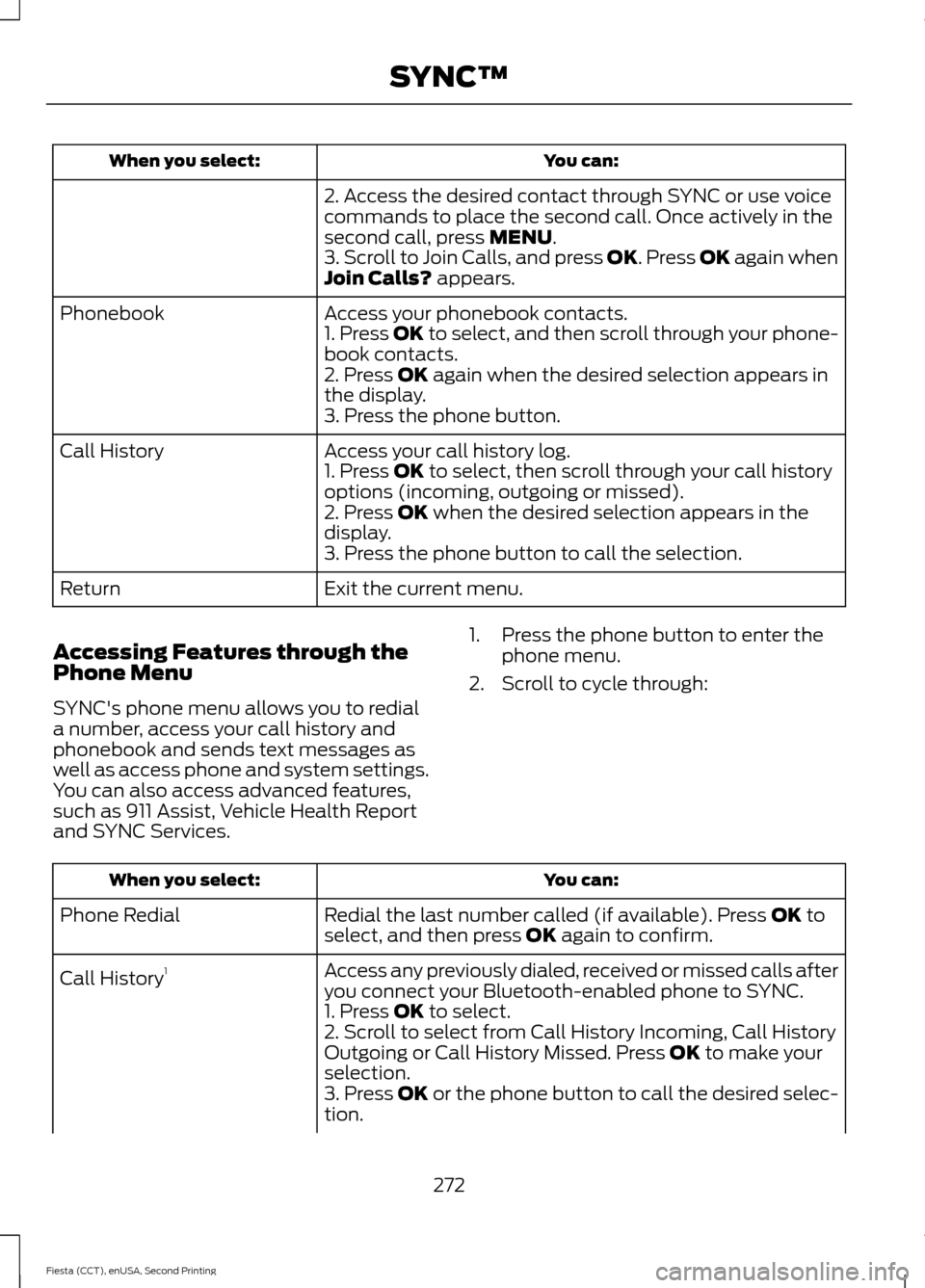
You can:
When you select:
2. Access the desired contact through SYNC or use voice
commands to place the second call. Once actively in the
second call, press MENU.
3. Scroll to Join Calls, and press OK. Press OK again when
Join Calls?
appears.
Access your phonebook contacts.
Phonebook
1. Press OK to select, and then scroll through your phone-
book contacts.
2. Press
OK again when the desired selection appears in
the display.
3. Press the phone button.
Access your call history log.
Call History
1. Press
OK to select, then scroll through your call history
options (incoming, outgoing or missed).
2. Press
OK when the desired selection appears in the
display.
3. Press the phone button to call the selection.
Exit the current menu.
Return
Accessing Features through the
Phone Menu
SYNC's phone menu allows you to redial
a number, access your call history and
phonebook and sends text messages as
well as access phone and system settings.
You can also access advanced features,
such as 911 Assist, Vehicle Health Report
and SYNC Services. 1. Press the phone button to enter the
phone menu.
2. Scroll to cycle through: You can:
When you select:
Redial the last number called (if available). Press
OK to
select, and then press OK again to confirm.
Phone Redial
Access any previously dialed, received or missed calls after
you connect your Bluetooth-enabled phone to SYNC.
Call History
1
1. Press
OK to select.
2. Scroll to select from Call History Incoming, Call History
Outgoing or Call History Missed. Press
OK to make your
selection.
3. Press
OK or the phone button to call the desired selec-
tion.
272
Fiesta (CCT), enUSA, Second Printing SYNC™
Page 277 of 423
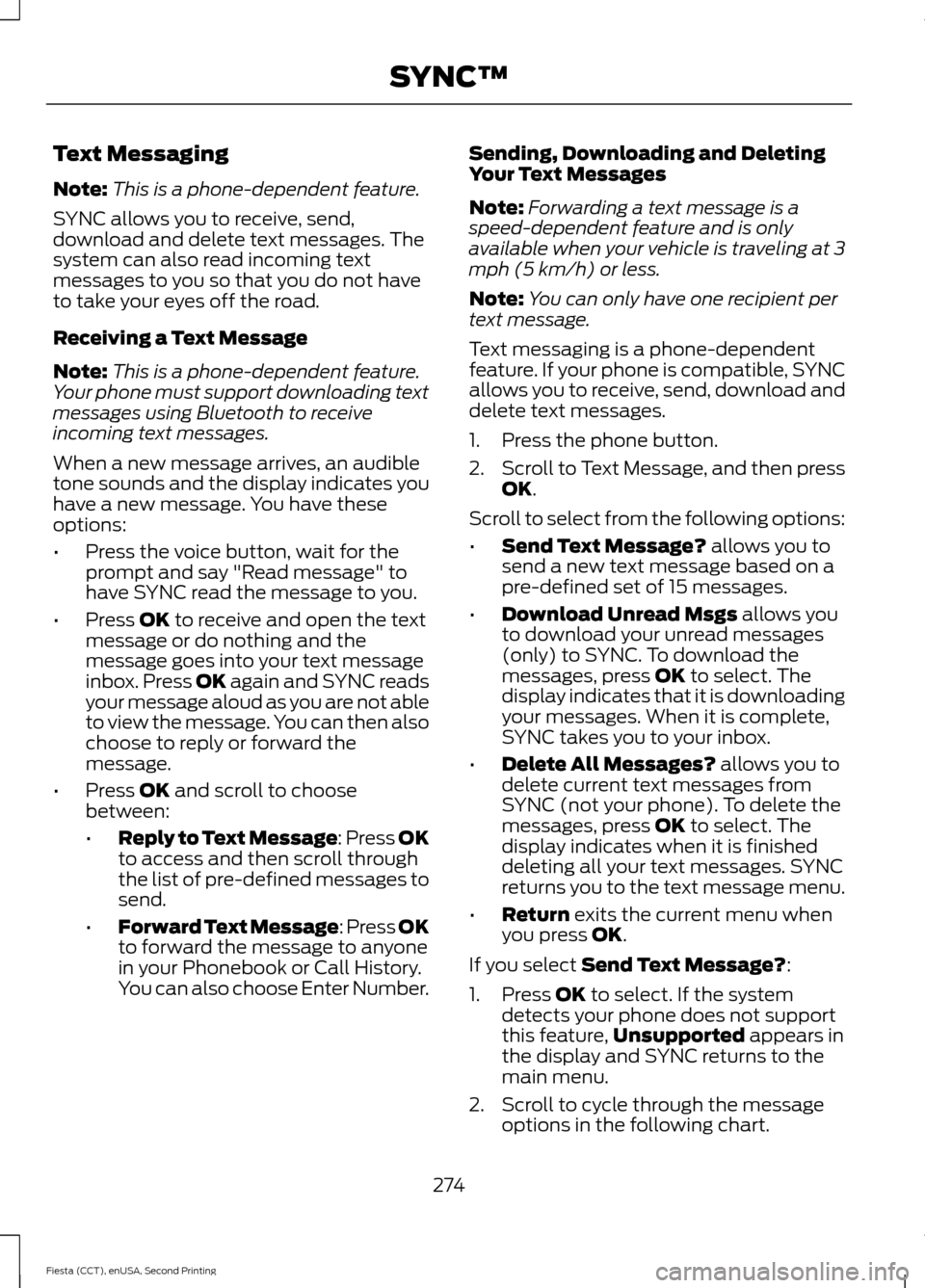
Text Messaging
Note:
This is a phone-dependent feature.
SYNC allows you to receive, send,
download and delete text messages. The
system can also read incoming text
messages to you so that you do not have
to take your eyes off the road.
Receiving a Text Message
Note: This is a phone-dependent feature.
Your phone must support downloading text
messages using Bluetooth to receive
incoming text messages.
When a new message arrives, an audible
tone sounds and the display indicates you
have a new message. You have these
options:
• Press the voice button, wait for the
prompt and say "Read message" to
have SYNC read the message to you.
• Press OK to receive and open the text
message or do nothing and the
message goes into your text message
inbox. Press OK again and SYNC reads
your message aloud as you are not able
to view the message. You can then also
choose to reply or forward the
message.
• Press
OK and scroll to choose
between:
• Reply to Text Message: Press OK
to access and then scroll through
the list of pre-defined messages to
send.
• Forward Text Message: Press OK
to forward the message to anyone
in your Phonebook or Call History.
You can also choose Enter Number. Sending, Downloading and Deleting
Your Text Messages
Note:
Forwarding a text message is a
speed-dependent feature and is only
available when your vehicle is traveling at 3
mph (5 km/h) or less.
Note: You can only have one recipient per
text message.
Text messaging is a phone-dependent
feature. If your phone is compatible, SYNC
allows you to receive, send, download and
delete text messages.
1. Press the phone button.
2. Scroll to Text Message, and then press
OK
.
Scroll to select from the following options:
• Send Text Message?
allows you to
send a new text message based on a
pre-defined set of 15 messages.
• Download Unread Msgs
allows you
to download your unread messages
(only) to SYNC. To download the
messages, press
OK to select. The
display indicates that it is downloading
your messages. When it is complete,
SYNC takes you to your inbox.
• Delete All Messages?
allows you to
delete current text messages from
SYNC (not your phone). To delete the
messages, press
OK to select. The
display indicates when it is finished
deleting all your text messages. SYNC
returns you to the text message menu.
• Return
exits the current menu when
you press OK.
If you select
Send Text Message?:
1. Press
OK to select. If the system
detects your phone does not support
this feature, Unsupported
appears in
the display and SYNC returns to the
main menu.
2. Scroll to cycle through the message options in the following chart.
274
Fiesta (CCT), enUSA, Second Printing SYNC™