remote control FORD FIESTA 2015 6.G Owners Manual
[x] Cancel search | Manufacturer: FORD, Model Year: 2015, Model line: FIESTA, Model: FORD FIESTA 2015 6.GPages: 423, PDF Size: 4.76 MB
Page 4 of 423
Introduction
About This Manual...........................................7
Symbols Glossary
.............................................7
Data Recording
..................................................9
California Proposition 65..............................11
Perchlorate.........................................................11
Ford Credit
..........................................................11
Replacement Parts Recommendation
........................................11
Special Notices................................................12
Mobile Communications Equipment.....................................................12
Export Unique Options
..................................12
Child Safety
General Information
.......................................13
Installing Child Seats
.....................................14
Booster Seats
..................................................20
Child Seat Positioning...................................22
Child Safety Locks
.........................................24
Safety Belts
Principle of Operation..................................26
Fastening the Safety Belts..........................27
Safety Belt Height Adjustment
.................29
Safety Belt Warning Lamp and Indicator Chime.............................................................30
Safety Belt Minder.........................................30
Child Restraint and Safety Belt Maintenance................................................32
Personal Safety System ™
Personal Safety System ™
..........................33
Supplementary Restraints System
Principle of Operation..................................34
Driver and Passenger Airbags....................35
Front Passenger Sensing System............36
Side Airbags
.....................................................38 Driver Knee Airbag
.........................................39
Side Curtain Airbags
.....................................39
Crash Sensors and Airbag Indicator
.........41
Airbag Disposal................................................41
Keys and Remote Controls
General Information on Radio Frequencies..................................................42
Remote Control
..............................................42
Replacing a Lost Key or Remote Control...........................................................46
MyKey ™
Principle of Operation...................................47
Creating a MyKey
............................................47
Clearing All MyKeys.......................................48
Checking MyKey System Status..............49
Using MyKey With Remote Start Systems.........................................................49
MyKey Troubleshooting...............................49
Locks
Locking and Unlocking
..................................51
Manual Liftgate
...............................................54
Keyless Entry....................................................55
Interior Luggage Compartment Release...........................................................57
Security
Passive Anti-Theft System
........................58
Anti-Theft Alarm
............................................59
Steering Wheel
Adjusting the Steering Wheel....................61
Audio Control....................................................61
Voice Control...................................................62
Cruise Control
..................................................62
Wipers and Washers
Windshield Wipers.........................................63
1
Fiesta (CCT), enUSA, Second Printing Table of Contents
Page 14 of 423
CALIFORNIA PROPOSITION 65
WARNING
Some constituents of engine
exhaust, certain vehicle components,
certain fluids contained in vehicles
and certain products of component wear
contain or emit chemicals known to the
State of California to cause cancer and
birth defects or other reproductive harm. PERCHLORATE
Certain components in your vehicle such
as airbag modules, safety belt
pretensioners and remote control batteries
may contain perchlorate material. Special
handling may apply for service or vehicle
end of life disposal. For more information
visit:
Web Address
www.dtsc.ca.gov/hazardouswaste/ perchlorate
FORD CREDIT
(U.S. Only)
Ford Credit offers a full range of financing
and lease plans to help you acquire your
vehicle. If you have financed or leased your
vehicle through Ford Credit, thank you for
your business.
For your convenience we offer a number
of ways to contact us, as well as to help
manage your account.
Phone: 1-800-727-7000
For more information regarding Ford Credit,
as well as to access Account Manager,
please go to www.fordcredit.com. REPLACEMENT PARTS
RECOMMENDATION
Your vehicle has been built to the highest
standards using quality parts. We
recommend that you demand the use of
genuine Ford and Motorcraft parts
whenever your vehicle requires scheduled
maintenance or repair. You can clearly
identify genuine Ford and Motorcraft parts
by looking for the Ford, FoMoCo or
Motorcraft branding on the parts or their
packaging.
Scheduled Maintenance and
Mechanical Repairs
One of the best ways for you to make sure
that your vehicle provides years of service
is to have it maintained in line with our
recommendations using parts that
conform to the specifications detailed in
this Owner
’s Manual. Genuine Ford and
Motorcraft parts meet or exceed these
specifications.
Collision Repairs
We hope that you never experience a
collision, but accidents do happen. Genuine
Ford replacement collision parts meet our
stringent requirements for fit, finish,
structural integrity, corrosion protection
and dent resistance. During vehicle
development we validate these parts
deliver the intended level of protection as
a whole system. A great way to know for
sure you are getting this level of protection
is to use genuine Ford replacement
collision parts.
11
Fiesta (CCT), enUSA, Second Printing Introduction
Page 45 of 423
GENERAL INFORMATION ON
RADIO FREQUENCIES
This device complies with Part 15 of the
FCC Rules and with Industry Canada
license-exempt RSS standard(s).
Operation is subject to the following two
conditions: (1) This device may not cause
harmful interference, and (2) This device
must accept any interference received,
including interference that may cause
undesired operation.
Note:
Changes or modifications not
expressively approved by the party
responsible for compliance could void the
user's authority to operate the equipment.
The term IC before the radio certification
number only signifies that Industry Canada
technical specifications were met.
The typical operating range for your
transmitter is approximately 33 feet (10
meters). Vehicles with the remote start
feature will have a greater range. One of
the following could cause a decrease in
operating range:
• Weather conditions.
• Nearby radio towers.
• Structures around the vehicle.
• Other vehicles parked next to your
vehicle.
The radio frequency used by your remote
control can also be used by other short
distance radio transmissions, for example
amateur radios, medical equipment,
wireless headphones, remote controls and
alarm systems. If the frequencies are
jammed, you will not be able to use your
remote control. You can lock and unlock
the doors with the key.
Note: Make sure to lock your vehicle before
leaving it unattended.
Note: If you are in range, the remote control
will operate if you press any button
unintentionally. Intelligent Access
(If Equipped)
The system uses a radio frequency signal
to communicate with your vehicle and
authorize your vehicle to unlock when one
of the following conditions are met:
• You activate the front exterior door
handle switch.
• You press the luggage compartment
button.
• You press a button on the transmitter.
If excessive radio frequency interference
is present in the area or if the transmitter
battery is low, you may need to
mechanically unlock your door. You can
use the mechanical key blade in your
intelligent access key to open the driver
door in this situation. See
Remote
Control (page 42).
REMOTE CONTROL
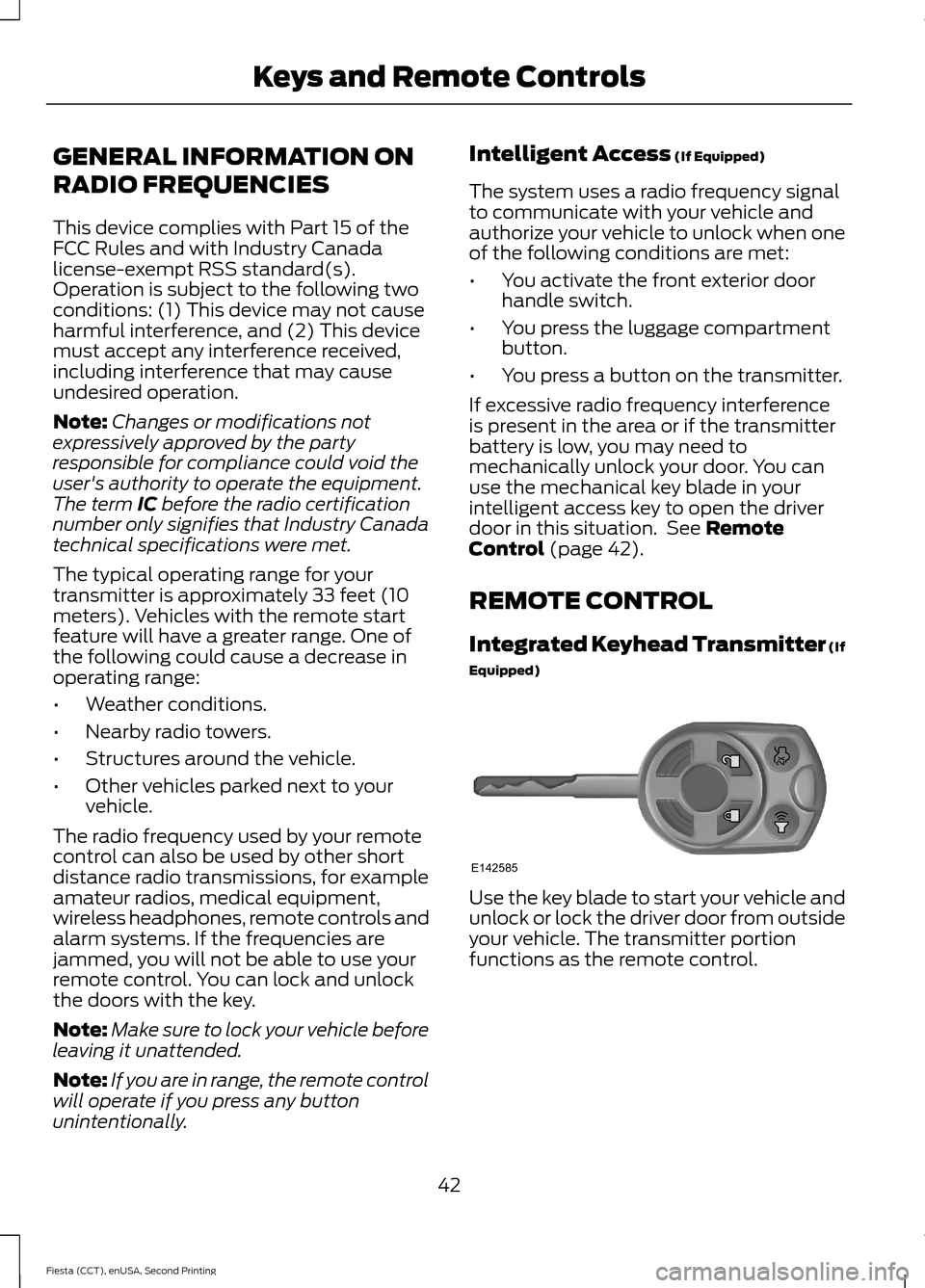
Integrated Keyhead Transmitter (If
Equipped) Use the key blade to start your vehicle and
unlock or lock the driver door from outside
your vehicle. The transmitter portion
functions as the remote control.
42
Fiesta (CCT), enUSA, Second Printing Keys and Remote ControlsE142585
Page 46 of 423
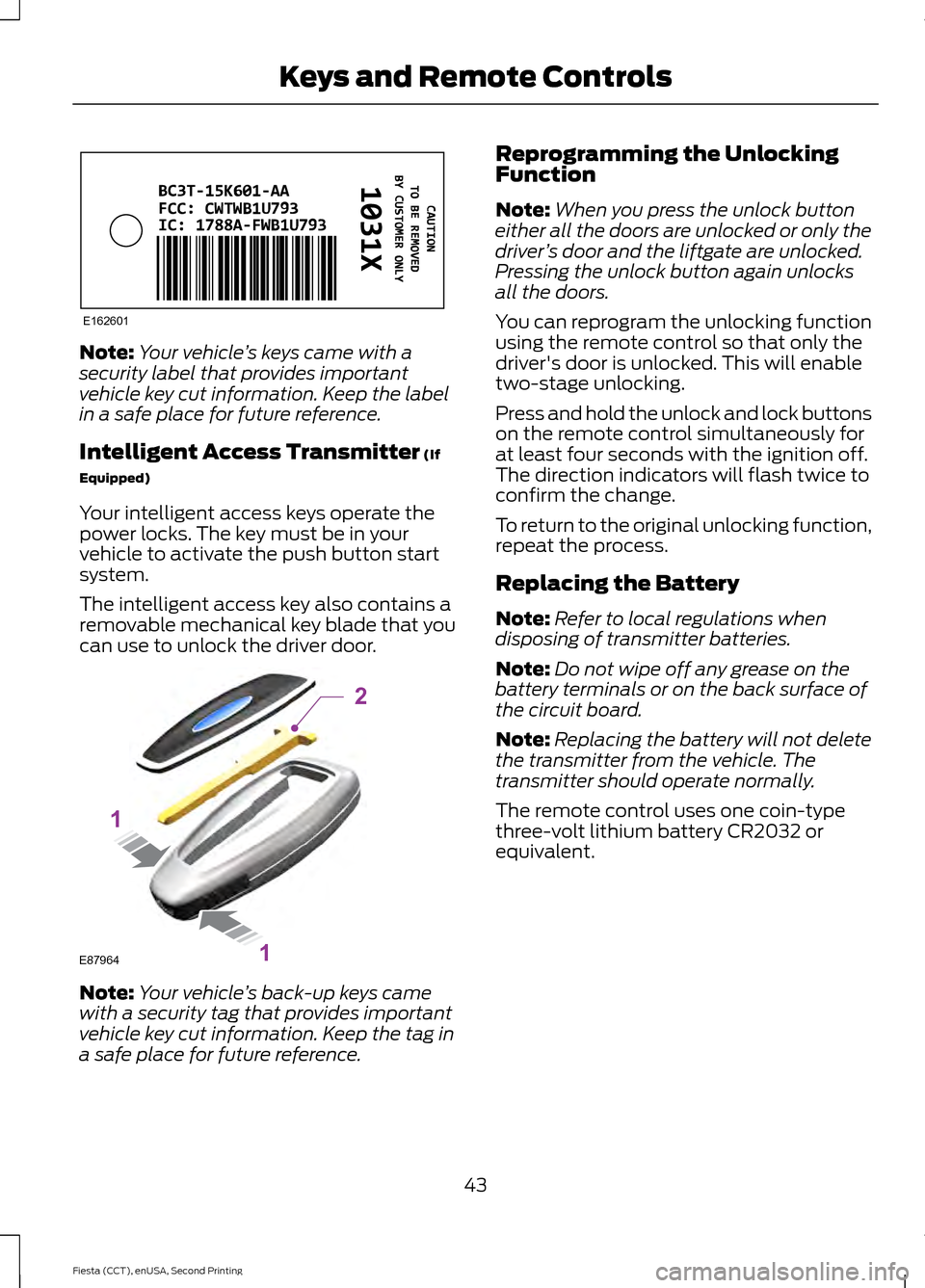
Note:
Your vehicle ’s keys came with a
security label that provides important
vehicle key cut information. Keep the label
in a safe place for future reference.
Intelligent Access Transmitter (If
Equipped)
Your intelligent access keys operate the
power locks. The key must be in your
vehicle to activate the push button start
system.
The intelligent access key also contains a
removable mechanical key blade that you
can use to unlock the driver door. Note:
Your vehicle ’s back-up keys came
with a security tag that provides important
vehicle key cut information. Keep the tag in
a safe place for future reference. Reprogramming the Unlocking
Function
Note:
When you press the unlock button
either all the doors are unlocked or only the
driver ’s door and the liftgate are unlocked.
Pressing the unlock button again unlocks
all the doors.
You can reprogram the unlocking function
using the remote control so that only the
driver's door is unlocked. This will enable
two-stage unlocking.
Press and hold the unlock and lock buttons
on the remote control simultaneously for
at least four seconds with the ignition off.
The direction indicators will flash twice to
confirm the change.
To return to the original unlocking function,
repeat the process.
Replacing the Battery
Note: Refer to local regulations when
disposing of transmitter batteries.
Note: Do not wipe off any grease on the
battery terminals or on the back surface of
the circuit board.
Note: Replacing the battery will not delete
the transmitter from the vehicle. The
transmitter should operate normally.
The remote control uses one coin-type
three-volt lithium battery CR2032 or
equivalent.
43
Fiesta (CCT), enUSA, Second Printing Keys and Remote ControlsE162601 E87964
2
1
1
Page 47 of 423
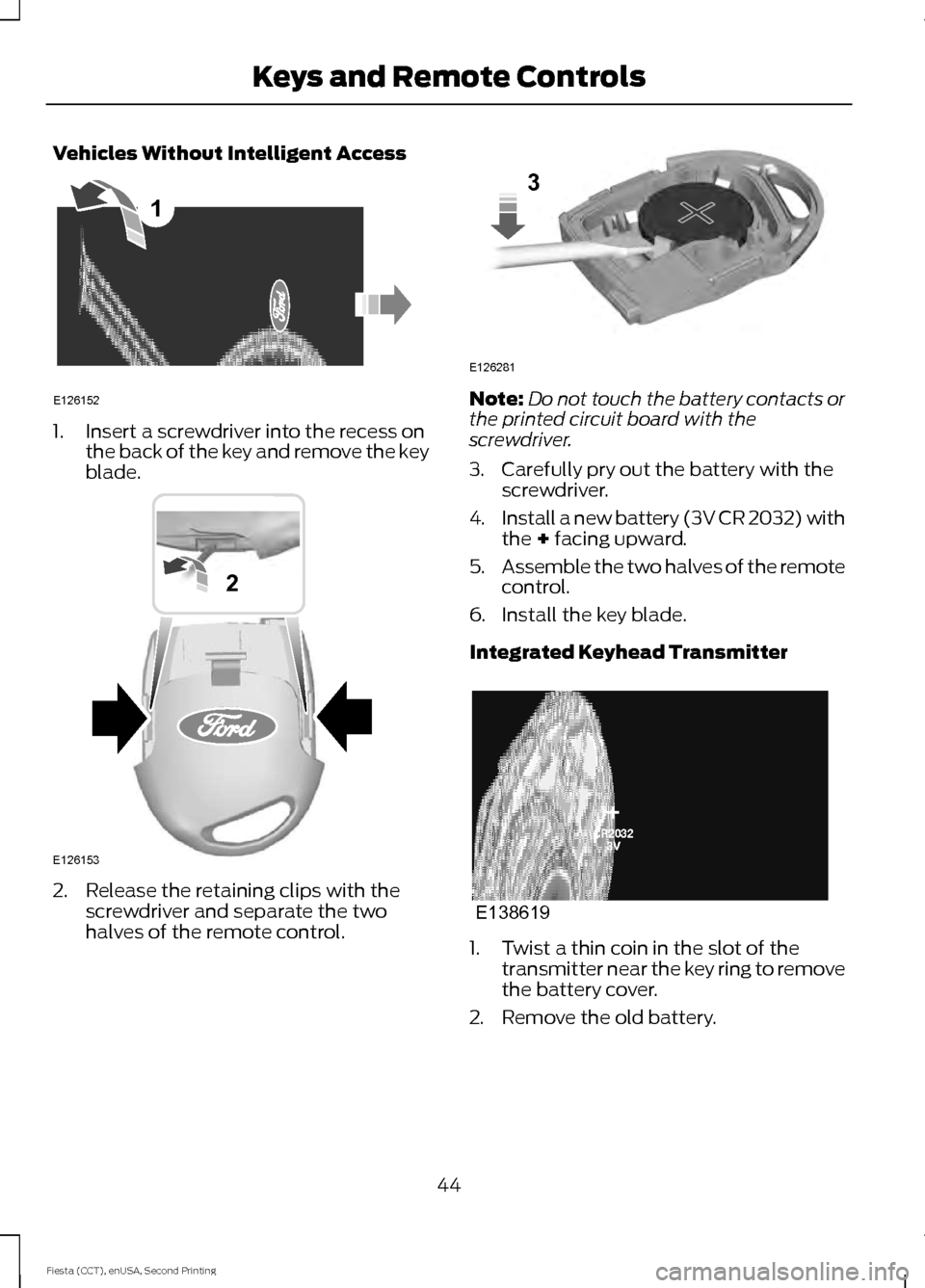
Vehicles Without Intelligent Access
1. Insert a screwdriver into the recess on
the back of the key and remove the key
blade. 2. Release the retaining clips with the
screwdriver and separate the two
halves of the remote control. Note:
Do not touch the battery contacts or
the printed circuit board with the
screwdriver.
3. Carefully pry out the battery with the screwdriver.
4. Install a new battery (3V CR 2032) with
the + facing upward.
5. Assemble the two halves of the remote
control.
6. Install the key blade.
Integrated Keyhead Transmitter 1. Twist a thin coin in the slot of the
transmitter near the key ring to remove
the battery cover.
2. Remove the old battery.
44
Fiesta (CCT), enUSA, Second Printing Keys and Remote Controls1
E126152 E126153
2 E126281
3 E138619
Page 48 of 423
3. Insert the new battery. Refer to the
instructions inside the transmitter for
the correct orientation of the battery.
Press the battery down to make sure
it is fully in the housing.
4. Snap the battery cover back onto the transmitter.
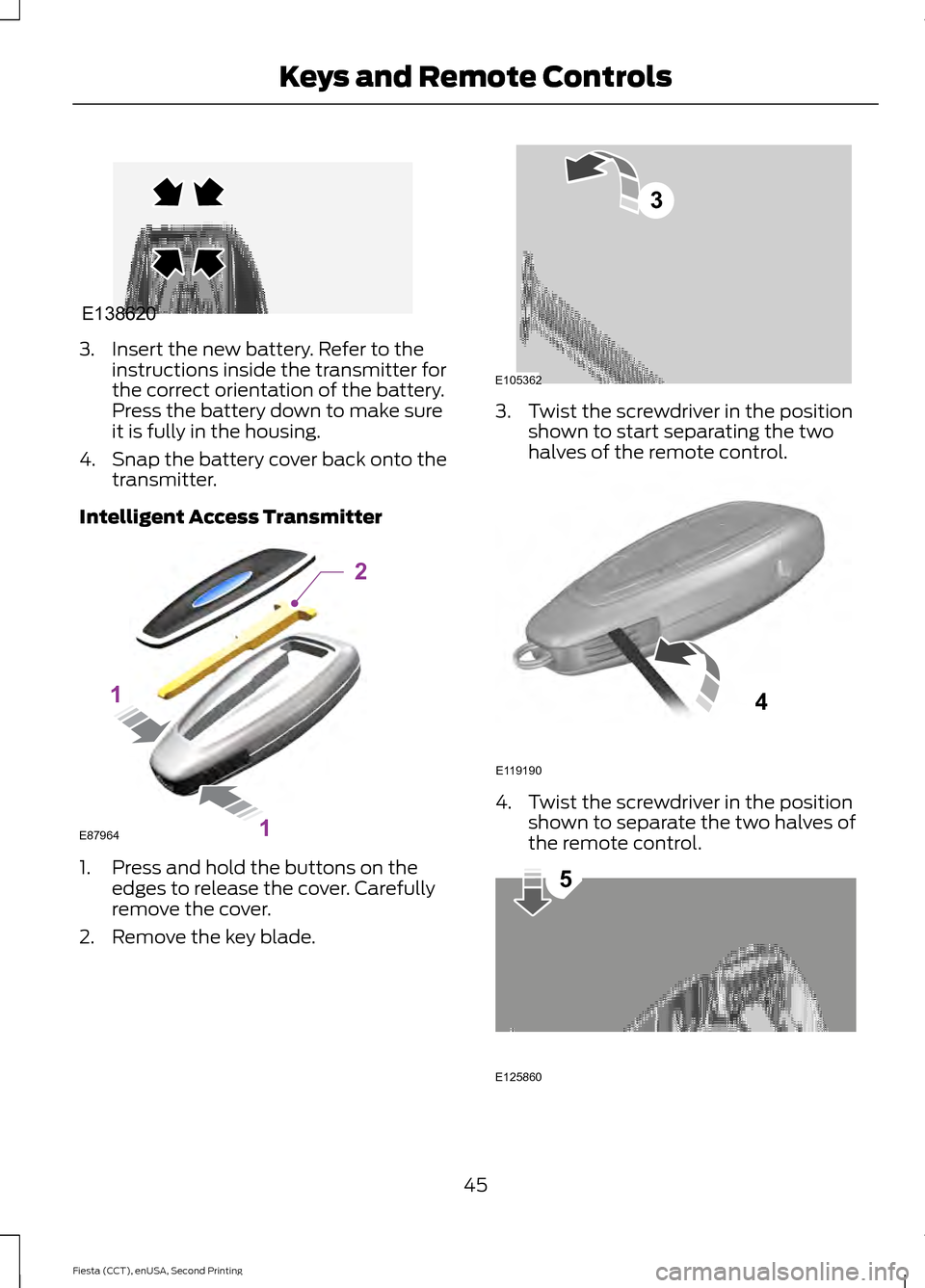
Intelligent Access Transmitter 1. Press and hold the buttons on the
edges to release the cover. Carefully
remove the cover.
2. Remove the key blade. 3. Twist the screwdriver in the position
shown to start separating the two
halves of the remote control. 4. Twist the screwdriver in the position
shown to separate the two halves of
the remote control. 45
Fiesta (CCT), enUSA, Second Printing Keys and Remote ControlsE138620 E87964
2
1
1 E105362
3 E119190
4 E125860
5
Page 49 of 423
Note:
Do not touch the battery contacts or
the printed circuit board with the
screwdriver.
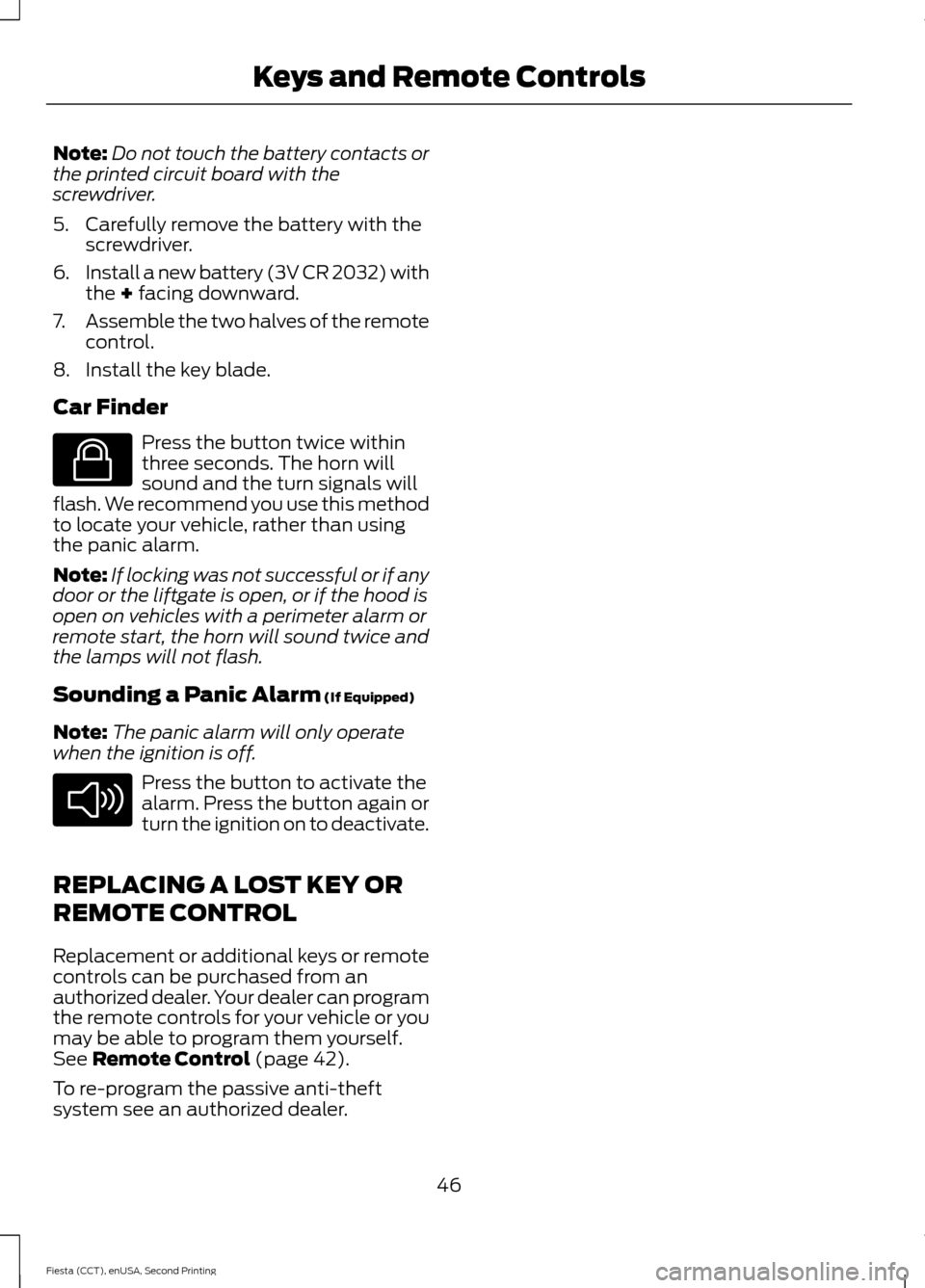
5. Carefully remove the battery with the screwdriver.
6. Install a new battery (3V CR 2032) with
the + facing downward.
7. Assemble the two halves of the remote
control.
8. Install the key blade.
Car Finder Press the button twice within
three seconds. The horn will
sound and the turn signals will
flash. We recommend you use this method
to locate your vehicle, rather than using
the panic alarm.
Note: If locking was not successful or if any
door or the liftgate is open, or if the hood is
open on vehicles with a perimeter alarm or
remote start, the horn will sound twice and
the lamps will not flash.
Sounding a Panic Alarm
(If Equipped)
Note: The panic alarm will only operate
when the ignition is off. Press the button to activate the
alarm. Press the button again or
turn the ignition on to deactivate.
REPLACING A LOST KEY OR
REMOTE CONTROL
Replacement or additional keys or remote
controls can be purchased from an
authorized dealer. Your dealer can program
the remote controls for your vehicle or you
may be able to program them yourself.
See
Remote Control (page 42).
To re-program the passive anti-theft
system see an authorized dealer.
46
Fiesta (CCT), enUSA, Second Printing Keys and Remote ControlsE138623 E138624
Page 54 of 423
LOCKING AND UNLOCKING
Remote Control
Unlocking the Doors
Note:
The driver door can be unlocked with
the key if the remote control is not
functioning.
Note: When you lock your vehicle for
several weeks, the remote control will be
switched off. Your vehicle must be unlocked
and the engine started using the key.
Unlocking and starting your vehicle once will
enable the remote control.
One-Stage Unlocking Press the button to unlock all
doors.
The direction indicators will flash.
Two-Stage Unlocking Press the button to unlock the
driver door.
Press the button again within three
seconds to unlock all doors.
The direction indicators will flash.
Reprogramming the Unlocking
Function
You can reprogram the unlocking function
using the remote control to change
between one-stage and two-stage
unlocking. See Remote Control (page
42).
Locking the Doors Press the button to lock all the
doors. The direction indicators
will flash twice. Press the button again within three
seconds to confirm that all the doors are
closed. The doors will lock again, the
direction indicators will flash once and the
horn will sound, if all the doors and the
luggage compartment are closed.
Note:
If any door, the hood or the luggage
compartment is open on vehicles that have
an anti-theft alarm or remote start, the
direction indicators will not flash but the
horn will sound.
Automatic Re-locking
The doors will relock automatically if you
do not open a door within 45 seconds of
unlocking the doors with the remote
control. The door locks and the alarm will
return to their previous state.
Locking and Unlocking the Doors
From Inside
The power door lock control is located on
the instrument panel near the radio. Press the button to lock and
unlock all the doors. The lamp
illuminates with the doors
locked.
Locking and Unlocking the Doors
With the Key
Note: Do not leave your keys in your vehicle.
Locking With the Key
Turn the top of the key toward the front of
your vehicle.
Unlocking With the Key
Turn the top of the key toward the rear of
your vehicle to unlock driver door. Turn the
key again within a few seconds to unlock
the remaining doors.
51
Fiesta (CCT), enUSA, Second Printing Locks E138623 E102566
Page 57 of 423
Left-Hand Side
Turn clockwise to lock.
Right-Hand Side
Turn counterclockwise to lock.
MANUAL LIFTGATE
WARNINGS
It is extremely dangerous to ride in a
cargo area, inside or outside of your
vehicle. In a crash, people riding in
these areas are more likely to be seriously
injured or killed. Do not allow people to ride
in any area of your vehicle that is not
equipped with seats and safety belts. Make
sure everyone in your vehicle is in a seat
and properly using a safety belt. Failure to
follow this warning could result in serious
personal injury or death. Make sure to close and latch the
liftgate to prevent drawing exhaust
fumes into your vehicle. This will also
prevent passengers and cargo from falling
out. If you must drive with the liftgate open,
keep the vents or windows open so outside
air comes into your vehicle. Failure to
follow this warning could result in serious
personal injury. Note:
Be careful when opening or closing
the liftgate in a garage or other enclosed
area to avoid damaging the liftgate.
Note: Do not hang anything, for example a
bike rack, from the glass or liftgate. This
could damage the liftgate and its
components.
Note: Do not leave the liftgate open when
driving. This could damage the liftgate and
its components. Opening and Closing the Liftgate
To Open the Liftgate
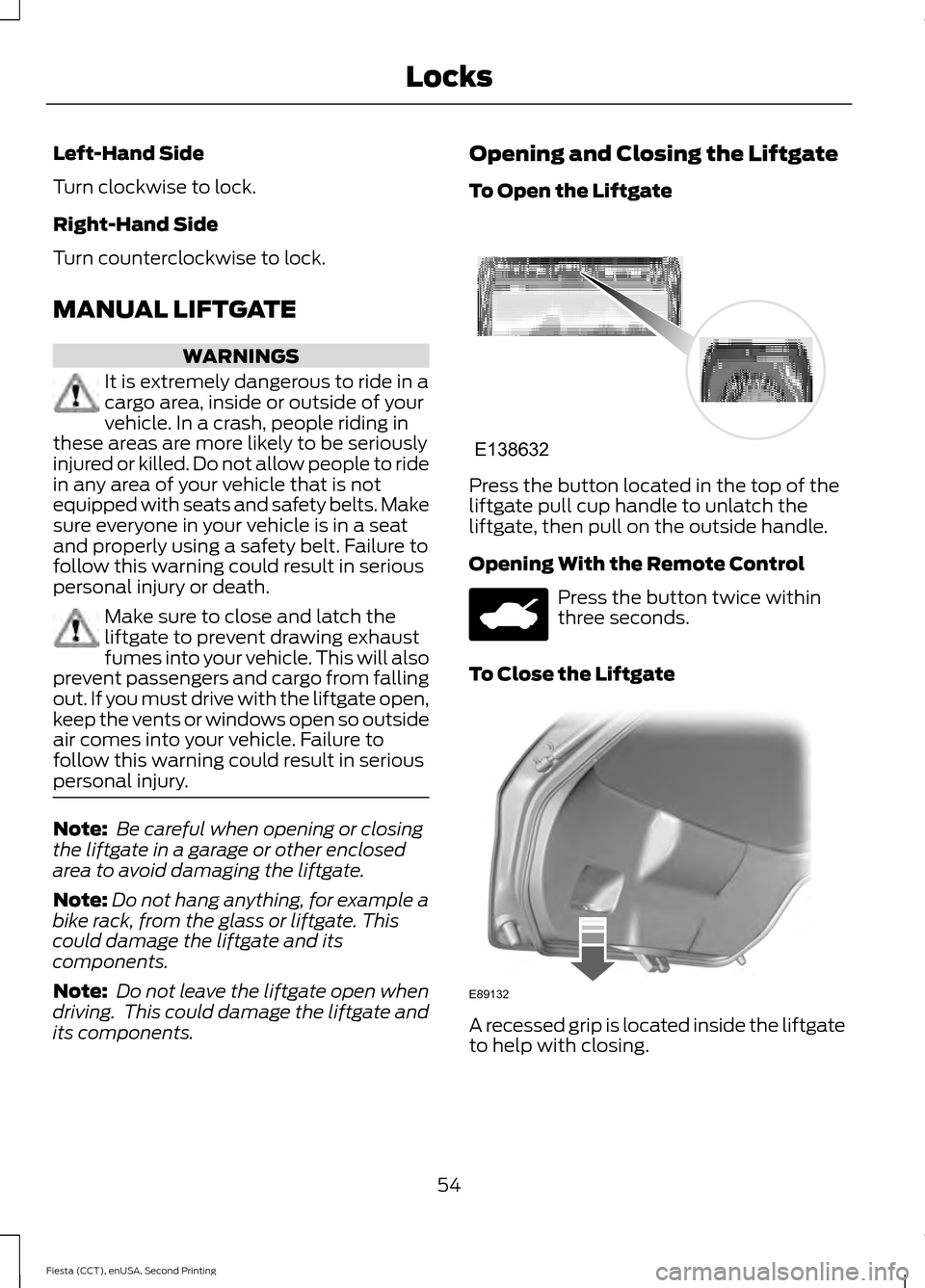
Press the button located in the top of the
liftgate pull cup handle to unlatch the
liftgate, then pull on the outside handle.
Opening With the Remote Control
Press the button twice within
three seconds.
To Close the Liftgate A recessed grip is located inside the liftgate
to help with closing.
54
Fiesta (CCT), enUSA, Second Printing LocksE138632 E89132
Page 58 of 423
KEYLESS ENTRY
General Information
WARNING
The system may not function if the
key is close to metal objects or
electronic devices such as cell
phones. The system will not function if:
•
Your vehicle battery has no charge.
• The passive key frequencies are
jammed.
• The passive key battery has no charge.
Note: If the system does not function, you
will need to use the key blade to lock and
unlock your vehicle.
The system allows you to operate your
vehicle without the use of a key or remote
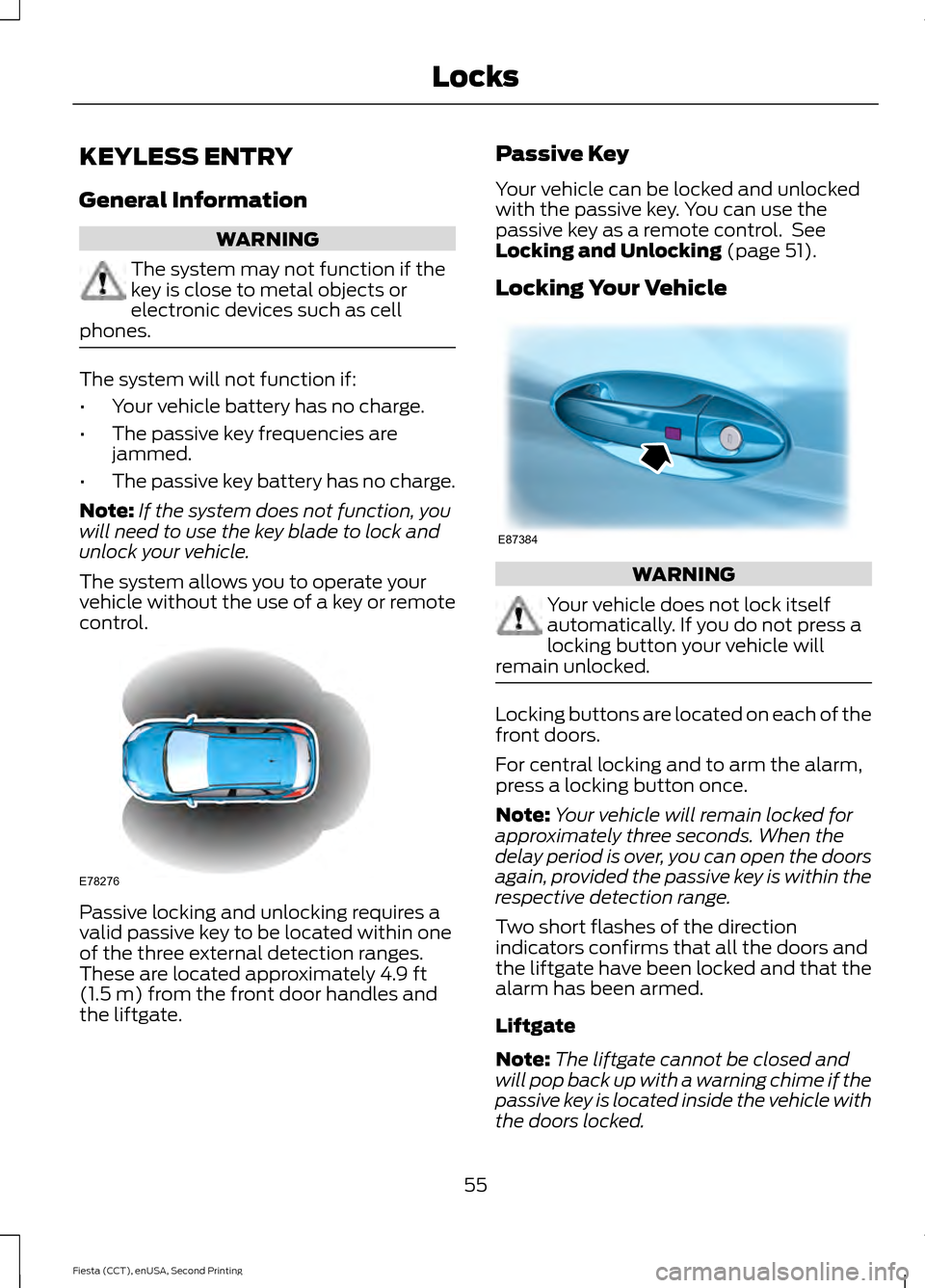
control. Passive locking and unlocking requires a
valid passive key to be located within one
of the three external detection ranges.
These are located approximately 4.9 ft
(1.5 m) from the front door handles and
the liftgate. Passive Key
Your vehicle can be locked and unlocked
with the passive key. You can use the
passive key as a remote control. See
Locking and Unlocking
(page 51).
Locking Your Vehicle WARNING
Your vehicle does not lock itself
automatically. If you do not press a
locking button your vehicle will
remain unlocked. Locking buttons are located on each of the
front doors.
For central locking and to arm the alarm,
press a locking button once.
Note:
Your vehicle will remain locked for
approximately three seconds. When the
delay period is over, you can open the doors
again, provided the passive key is within the
respective detection range.
Two short flashes of the direction
indicators confirms that all the doors and
the liftgate have been locked and that the
alarm has been armed.
Liftgate
Note: The liftgate cannot be closed and
will pop back up with a warning chime if the
passive key is located inside the vehicle with
the doors locked.
55
Fiesta (CCT), enUSA, Second Printing LocksE78276 E87384