clock FORD FIESTA 2015 User Guide
[x] Cancel search | Manufacturer: FORD, Model Year: 2015, Model line: FIESTA, Model: FORD FIESTA 2015Pages: 423, PDF Size: 5.5 MB
Page 198 of 423
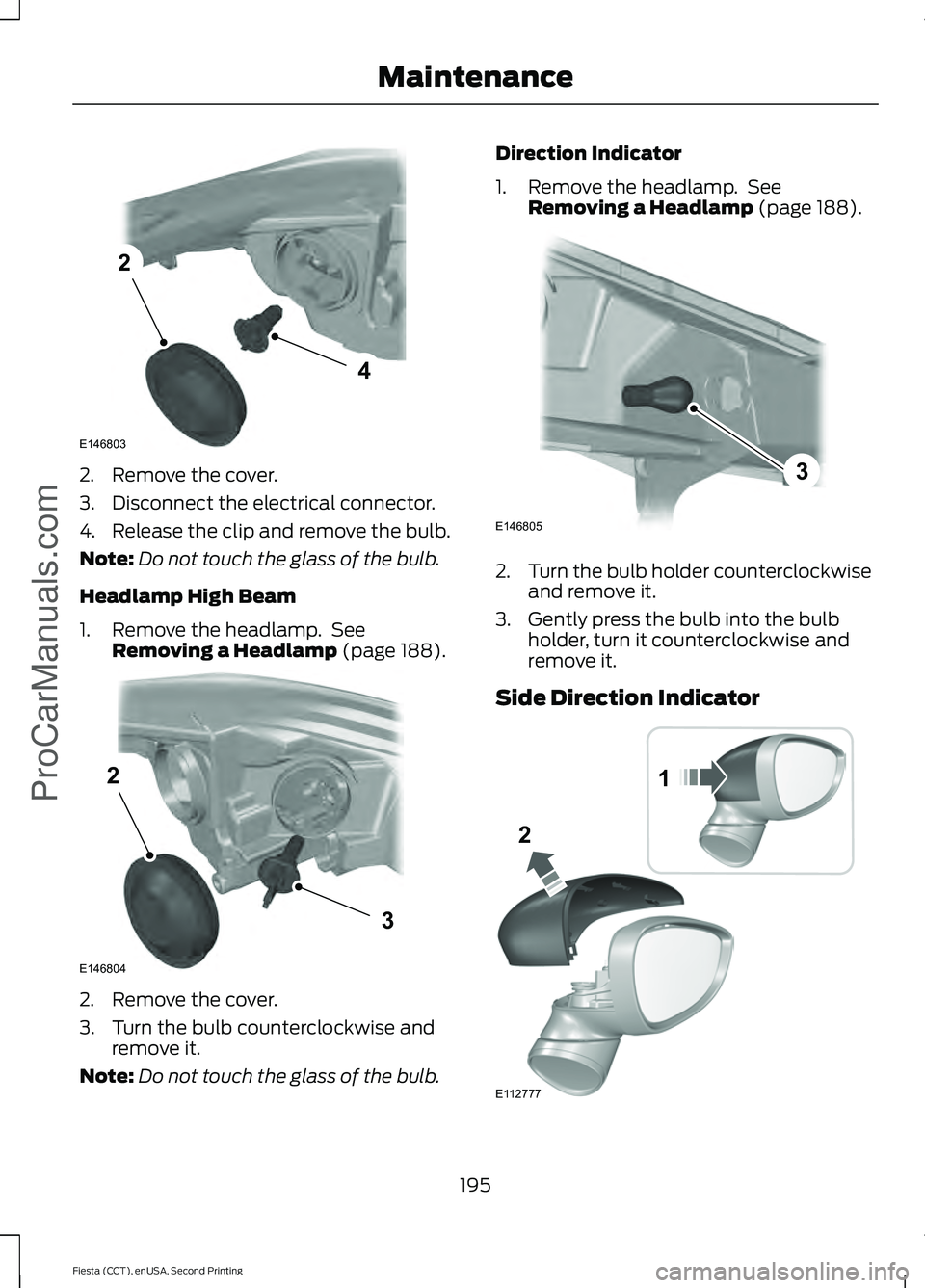
2. Remove the cover.
3. Disconnect the electrical connector.
4. Release the clip and remove the bulb.
Note:
Do not touch the glass of the bulb.
Headlamp High Beam
1. Remove the headlamp. See Removing a Headlamp (page 188). 2. Remove the cover.
3. Turn the bulb counterclockwise and
remove it.
Note: Do not touch the glass of the bulb. Direction Indicator
1. Remove the headlamp. See
Removing a Headlamp
(page 188). 2.
Turn the bulb holder counterclockwise
and remove it.
3. Gently press the bulb into the bulb holder, turn it counterclockwise and
remove it.
Side Direction Indicator 195
Fiesta (CCT), enUSA, Second Printing Maintenance
ProCarManuals.comE146803
4
2 E146804
2
3 E146805
3 1
2
E112777
Page 200 of 423
6.
Turn the bulb holder counterclockwise
and remove it.
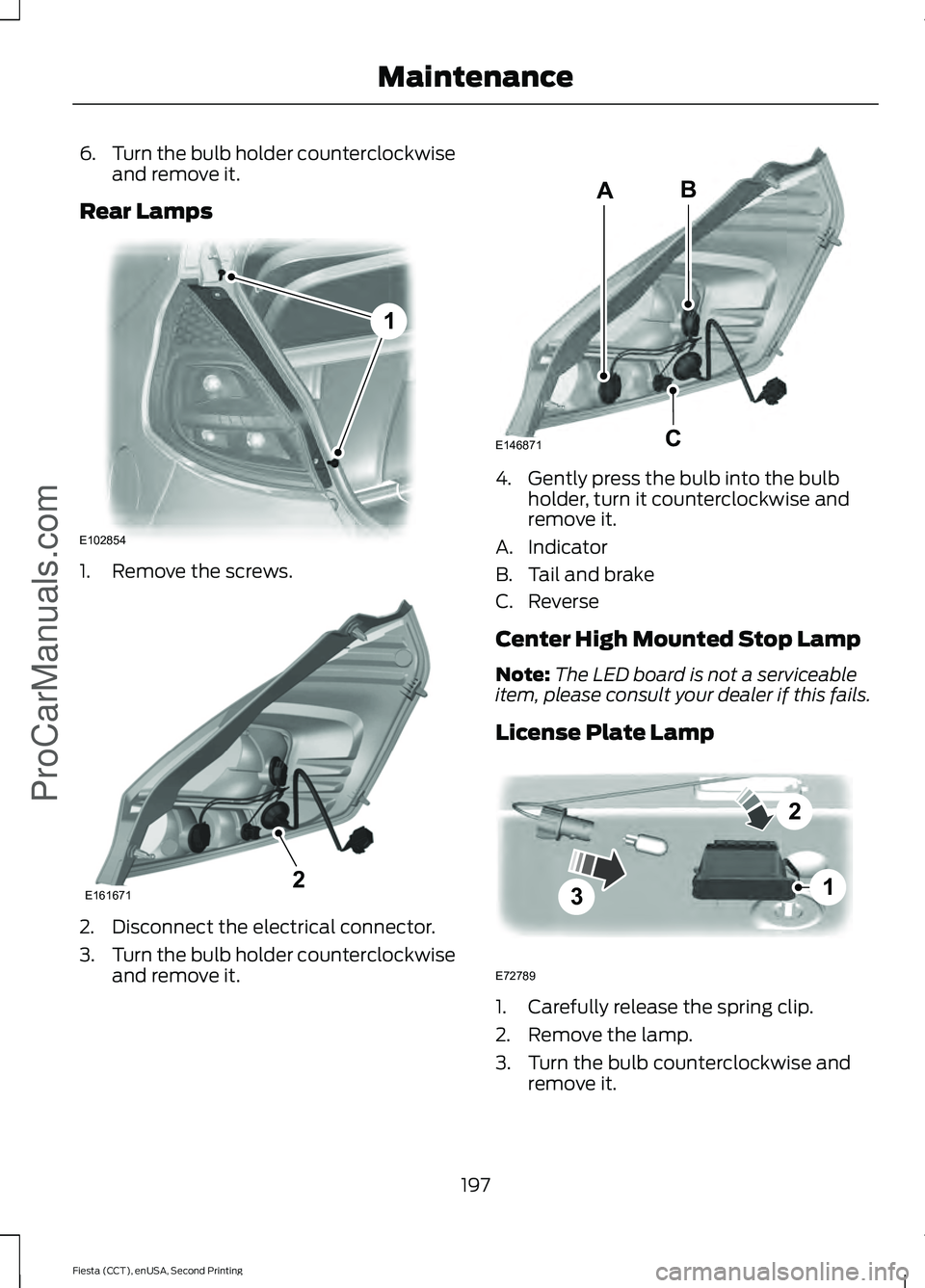
Rear Lamps 1. Remove the screws.
2. Disconnect the electrical connector.
3.
Turn the bulb holder counterclockwise
and remove it. 4. Gently press the bulb into the bulb
holder, turn it counterclockwise and
remove it.
A. Indicator
B. Tail and brake
C. Reverse
Center High Mounted Stop Lamp
Note: The LED board is not a serviceable
item, please consult your dealer if this fails.
License Plate Lamp 1. Carefully release the spring clip.
2. Remove the lamp.
3. Turn the bulb counterclockwise and
remove it.
197
Fiesta (CCT), enUSA, Second Printing MaintenanceProCarManuals.comE102854
1 E1616712 E146871
AB
C 3
2
1
E72789
Page 201 of 423
Interior Lamp
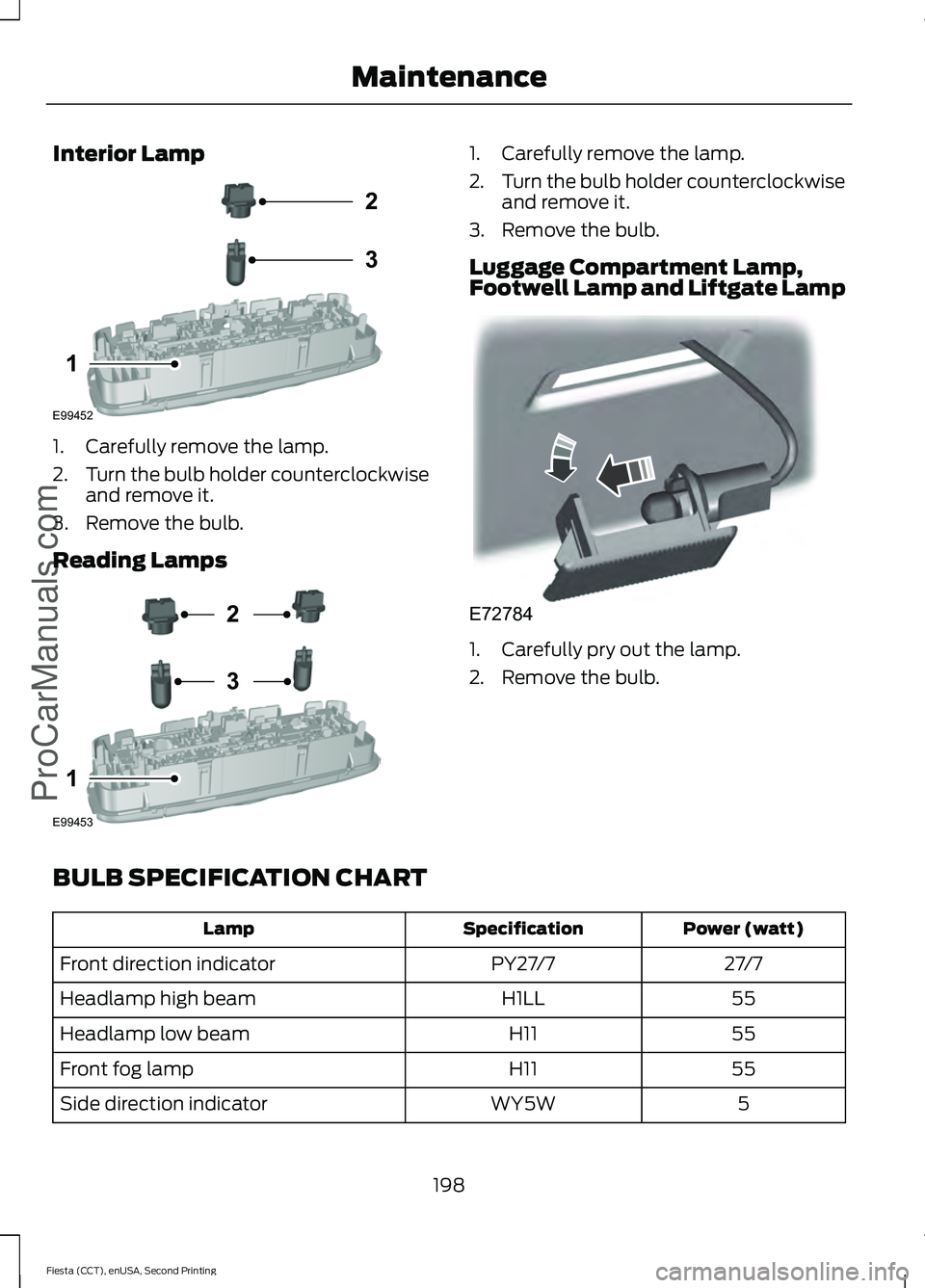
1. Carefully remove the lamp.
2.
Turn the bulb holder counterclockwise
and remove it.
3. Remove the bulb.
Reading Lamps 1. Carefully remove the lamp.
2.
Turn the bulb holder counterclockwise
and remove it.
3. Remove the bulb.
Luggage Compartment Lamp,
Footwell Lamp and Liftgate Lamp 1. Carefully pry out the lamp.
2. Remove the bulb.
BULB SPECIFICATION CHART Power (watt)
Specification
Lamp
27/7
PY27/7
Front direction indicator
55
H1LL
Headlamp high beam
55
H11
Headlamp low beam
55
H11
Front fog lamp
5
WY5W
Side direction indicator
198
Fiesta (CCT), enUSA, Second Printing MaintenanceProCarManuals.comE99452
2
3
1 E99453
2
3
1 E72784
Page 241 of 423
WARNINGS
Do not attempt to change a tire on
the side of the vehicle close to
moving traffic. Pull far enough off the
road to avoid the danger of being hit when
operating the jack or changing the wheel. Always use the jack provided as
original equipment with your vehicle.
If using a jack other than the one
provided as original equipment with your
vehicle, make sure the jack capacity is
adequate for the vehicle weight, including
any vehicle cargo or modifications. Make sure there is no lubrication
(grease or oil) on the threads or the
surface between the wheel lugs and
nuts. This can cause the lug nuts to loosen
while driving. Note:
Passengers should not remain in the
vehicle when the vehicle is being jacked.
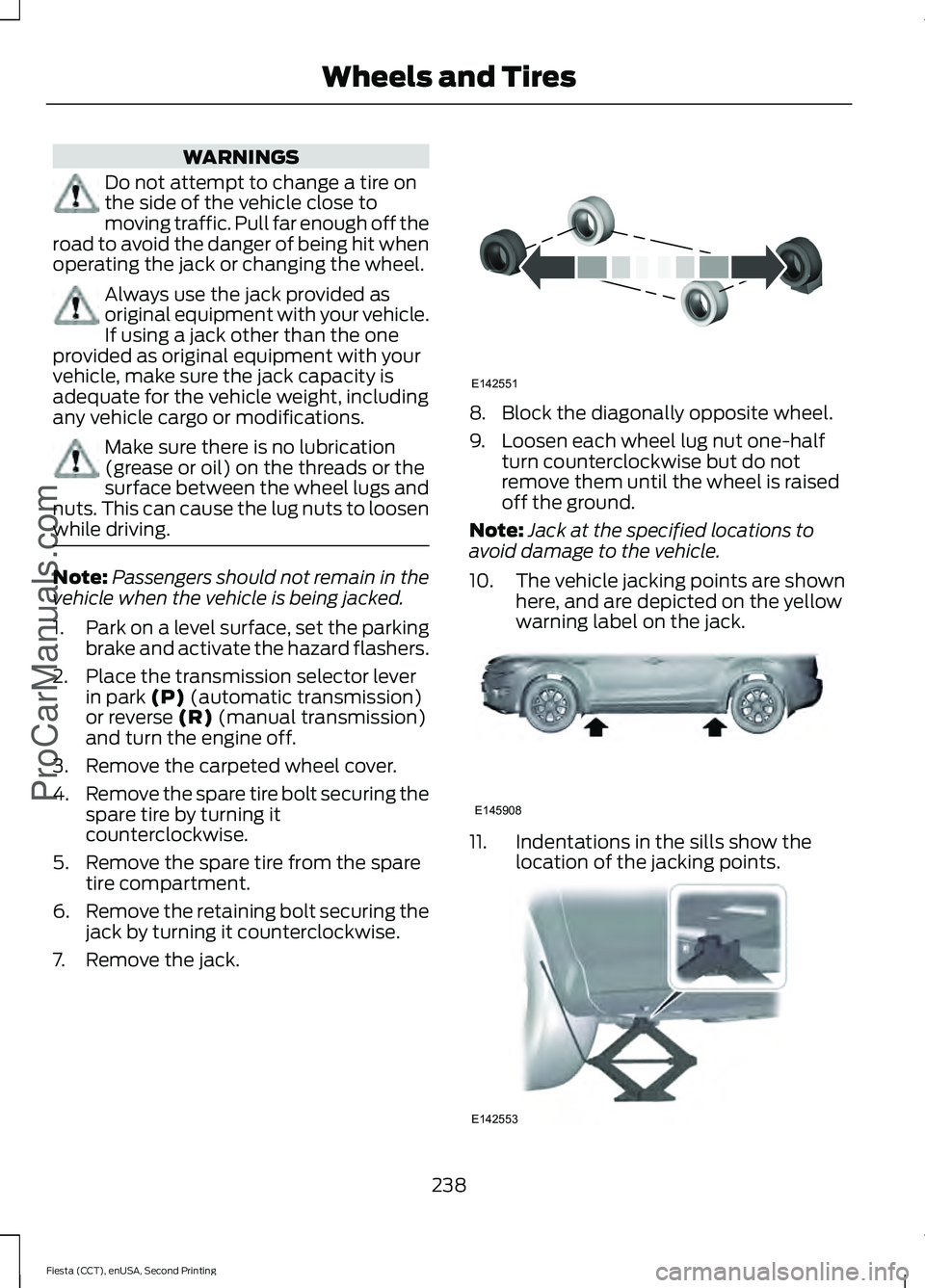
1. Park on a level surface, set the parking
brake and activate the hazard flashers.
2. Place the transmission selector lever in park (P) (automatic transmission)
or reverse (R) (manual transmission)
and turn the engine off.
3. Remove the carpeted wheel cover.
4. Remove the spare tire bolt securing the
spare tire by turning it
counterclockwise.
5. Remove the spare tire from the spare tire compartment.
6. Remove the retaining bolt securing the
jack by turning it counterclockwise.
7. Remove the jack. 8. Block the diagonally opposite wheel.
9. Loosen each wheel lug nut one-half
turn counterclockwise but do not
remove them until the wheel is raised
off the ground.
Note: Jack at the specified locations to
avoid damage to the vehicle.
10. The vehicle jacking points are shown
here, and are depicted on the yellow
warning label on the jack. 11. Indentations in the sills show the
location of the jacking points. 238
Fiesta (CCT), enUSA, Second Printing Wheels and Tires
ProCarManuals.comE142551 E145908 E142553
Page 242 of 423
12. Remove the lug nuts with the lug
wrench.
13. Replace the flat tire with the spare tire, making sure the valve stem is
facing outward. Reinstall the lug nuts
until the wheel is snug against the
hub. Do not fully tighten the lug nuts
until the wheel has been lowered.
14. Lower the wheel by turning the jack handle counterclockwise. 15.
Remove the jack and fully tighten the
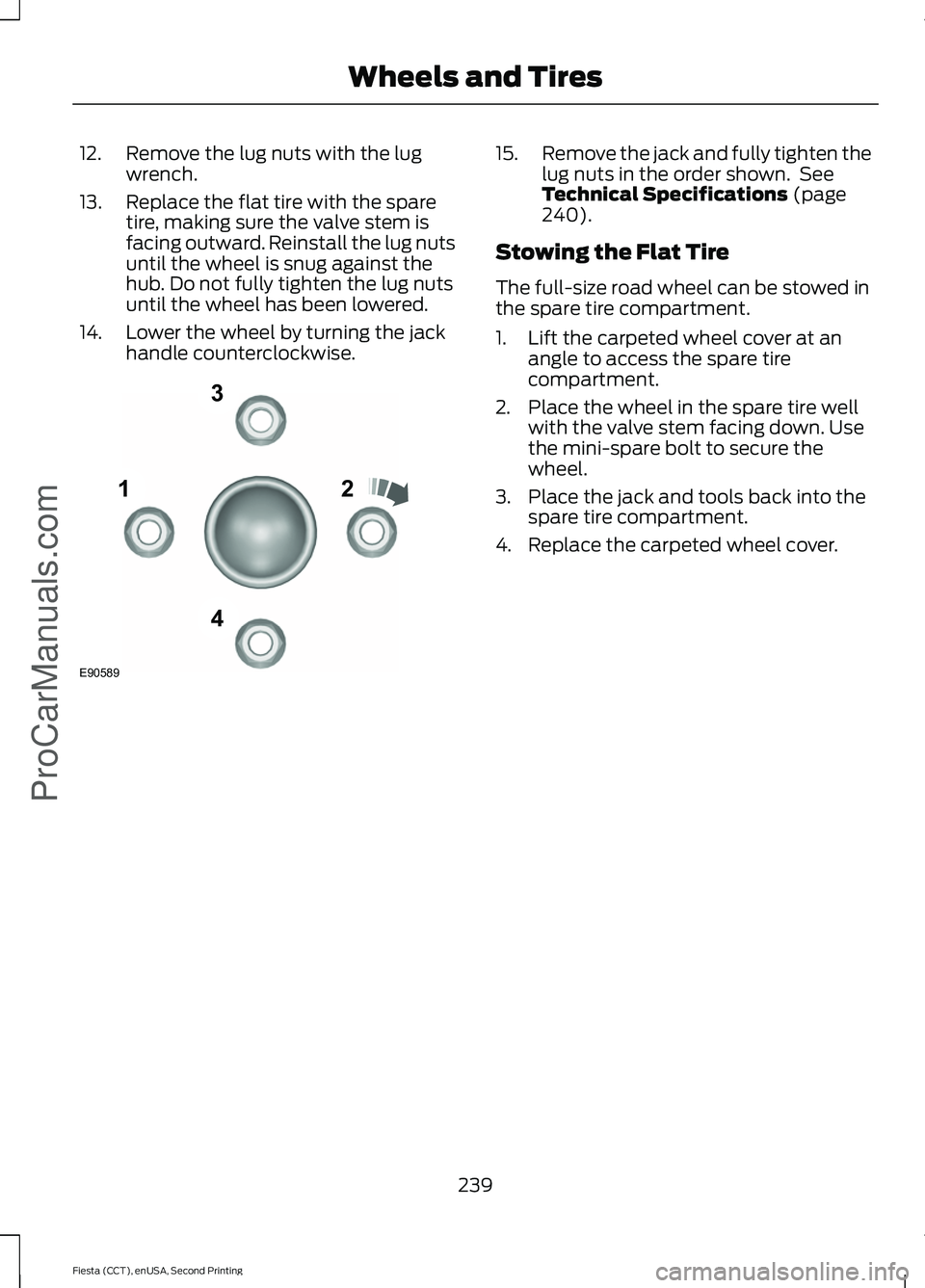
lug nuts in the order shown. See
Technical Specifications (page
240).
Stowing the Flat Tire
The full-size road wheel can be stowed in
the spare tire compartment.
1. Lift the carpeted wheel cover at an angle to access the spare tire
compartment.
2. Place the wheel in the spare tire well with the valve stem facing down. Use
the mini-spare bolt to secure the
wheel.
3. Place the jack and tools back into the spare tire compartment.
4. Replace the carpeted wheel cover.
239
Fiesta (CCT), enUSA, Second Printing Wheels and Tires
ProCarManuals.com12
3
4
E90589
Page 250 of 423
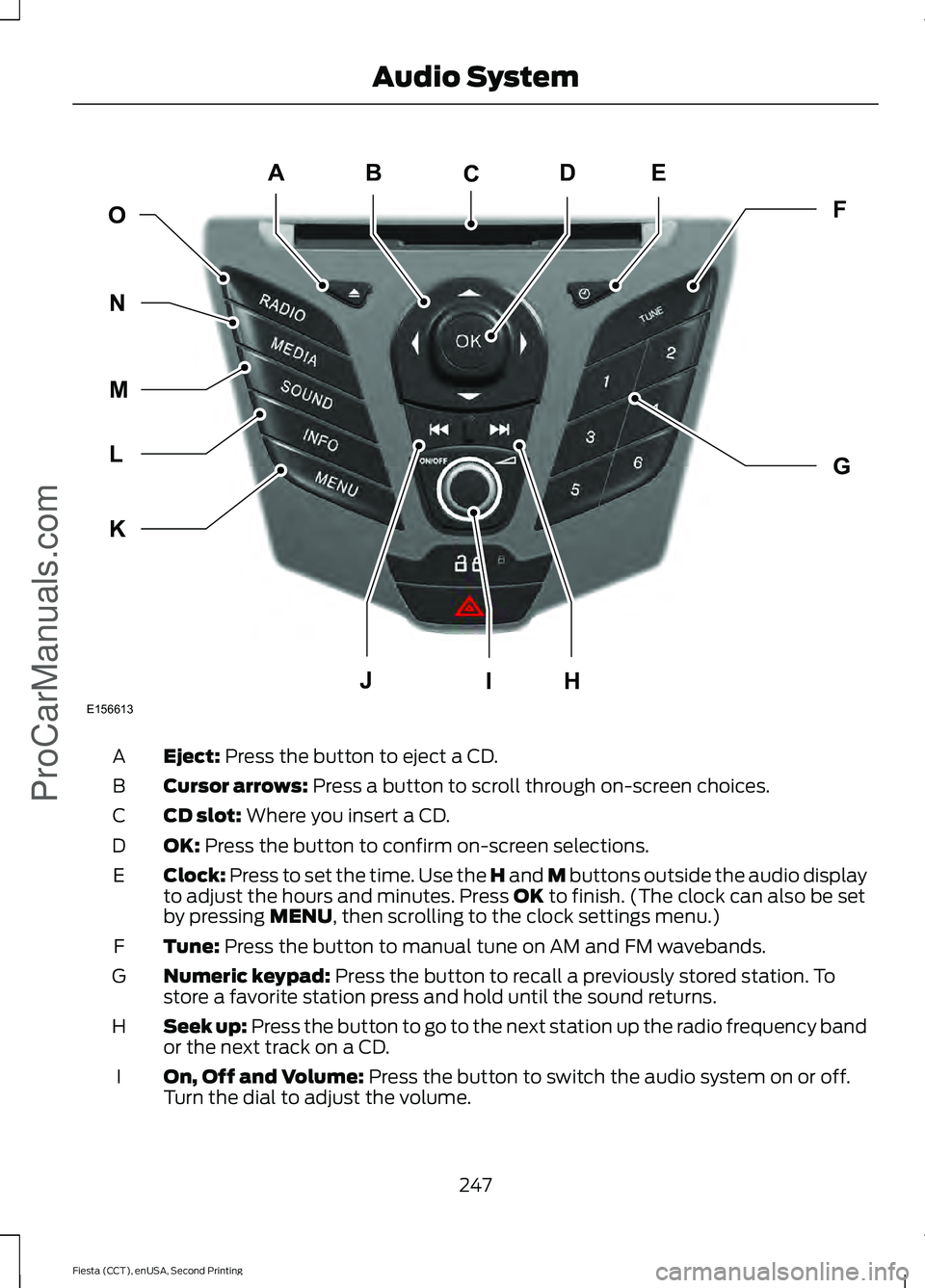
Eject: Press the button to eject a CD.
A
Cursor arrows:
Press a button to scroll through on-screen choices.
B
CD slot:
Where you insert a CD.
C
OK:
Press the button to confirm on-screen selections.
D
Clock:
Press to set the time. Use the H and M buttons outside the audio display
to adjust the hours and minutes. Press OK to finish. (The clock can also be set
by pressing MENU, then scrolling to the clock settings menu.)
E
Tune:
Press the button to manual tune on AM and FM wavebands.
F
Numeric keypad:
Press the button to recall a previously stored station. To
store a favorite station press and hold until the sound returns.
G
Seek up: Press the button to go to the next station up the radio frequency band
or the next track on a CD.
H
On, Off and Volume:
Press the button to switch the audio system on or off.
Turn the dial to adjust the volume.
I
247
Fiesta (CCT), enUSA, Second Printing Audio System
ProCarManuals.comE156613
ED
OF
G
K
L
M
N
JHI
C
A
B
Page 254 of 423
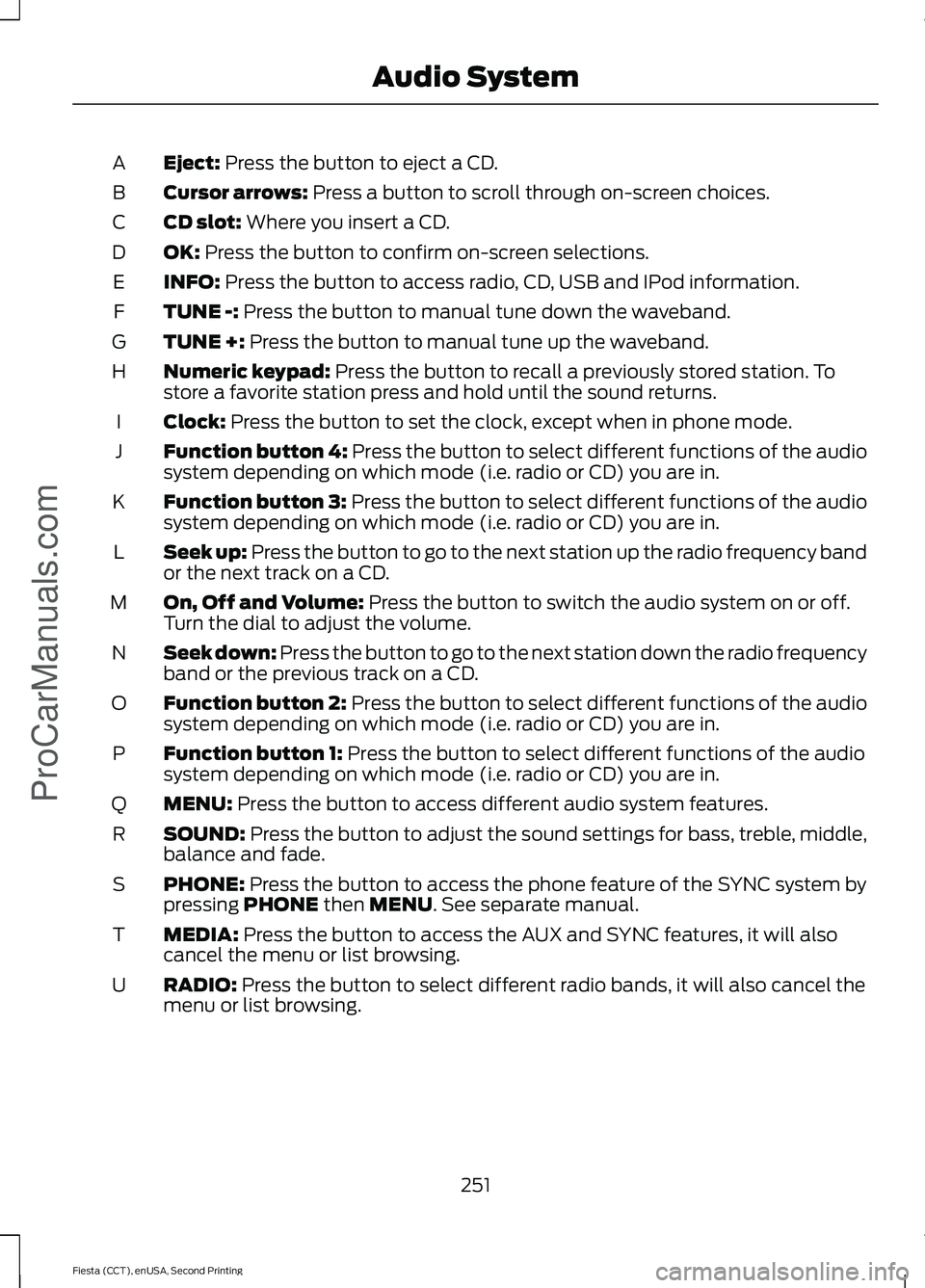
Eject: Press the button to eject a CD.
A
Cursor arrows:
Press a button to scroll through on-screen choices.
B
CD slot:
Where you insert a CD.
C
OK:
Press the button to confirm on-screen selections.
D
INFO:
Press the button to access radio, CD, USB and IPod information.
E
TUNE -:
Press the button to manual tune down the waveband.
F
TUNE +:
Press the button to manual tune up the waveband.
G
Numeric keypad:
Press the button to recall a previously stored station. To
store a favorite station press and hold until the sound returns.
H
Clock:
Press the button to set the clock, except when in phone mode.
I
Function button 4:
Press the button to select different functions of the audio
system depending on which mode (i.e. radio or CD) you are in.
J
Function button 3:
Press the button to select different functions of the audio
system depending on which mode (i.e. radio or CD) you are in.
K
Seek up: Press the button to go to the next station up the radio frequency band
or the next track on a CD.
L
On, Off and Volume:
Press the button to switch the audio system on or off.
Turn the dial to adjust the volume.
M
Seek down: Press the button to go to the next station down the radio frequency
band or the previous track on a CD.
N
Function button 2:
Press the button to select different functions of the audio
system depending on which mode (i.e. radio or CD) you are in.
O
Function button 1:
Press the button to select different functions of the audio
system depending on which mode (i.e. radio or CD) you are in.
P
MENU:
Press the button to access different audio system features.
Q
SOUND:
Press the button to adjust the sound settings for bass, treble, middle,
balance and fade.
R
PHONE:
Press the button to access the phone feature of the SYNC system by
pressing PHONE then MENU. See separate manual.
S
MEDIA:
Press the button to access the AUX and SYNC features, it will also
cancel the menu or list browsing.
T
RADIO:
Press the button to select different radio bands, it will also cancel the
menu or list browsing.
U
251
Fiesta (CCT), enUSA, Second Printing Audio System
ProCarManuals.com
Page 310 of 423
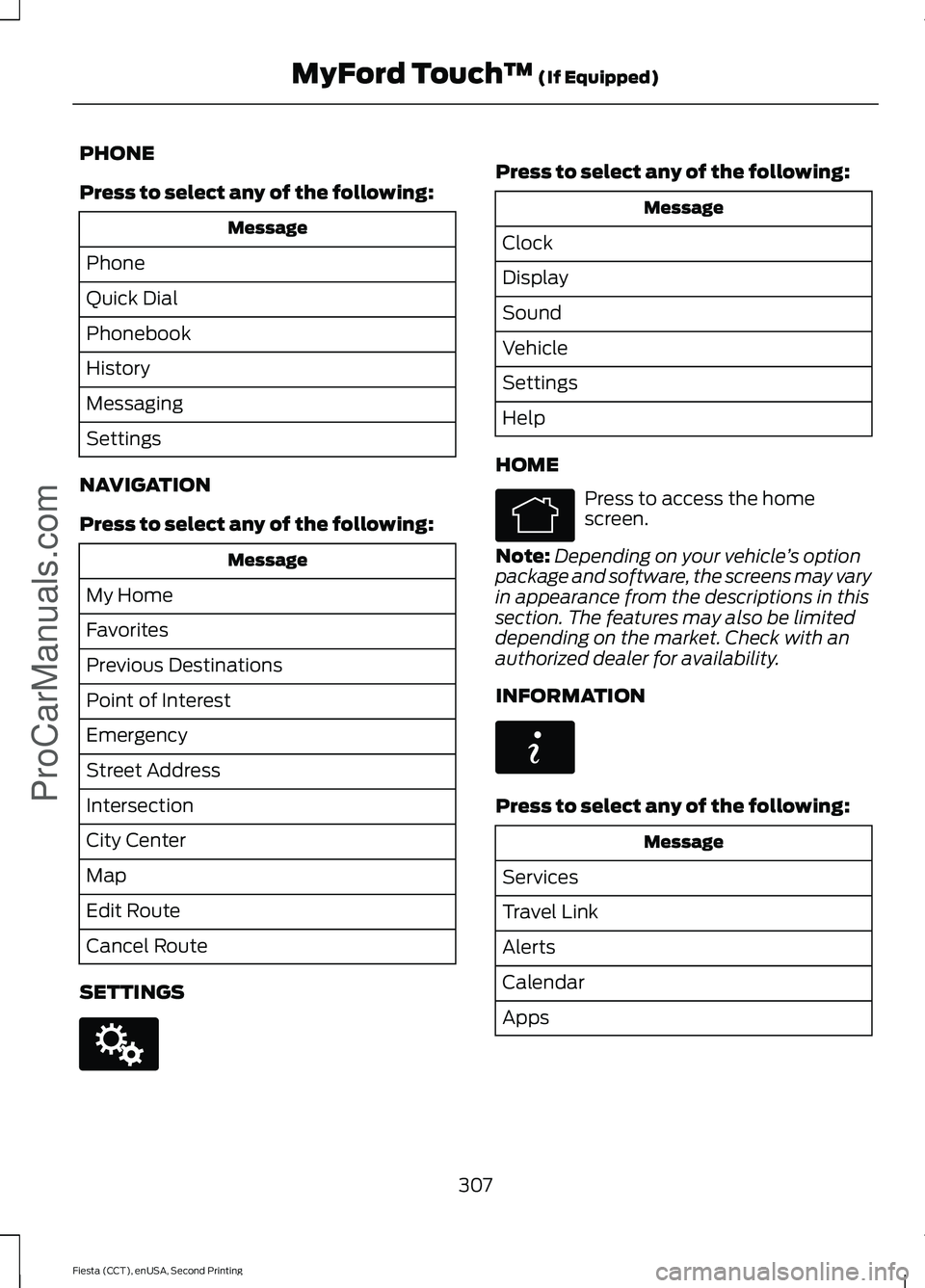
PHONE
Press to select any of the following:
Message
Phone
Quick Dial
Phonebook
History
Messaging
Settings
NAVIGATION
Press to select any of the following: Message
My Home
Favorites
Previous Destinations
Point of Interest
Emergency
Street Address
Intersection
City Center
Map
Edit Route
Cancel Route
SETTINGS Press to select any of the following:
Message
Clock
Display
Sound
Vehicle
Settings
Help
HOME Press to access the home
screen.
Note: Depending on your vehicle ’s option
package and software, the screens may vary
in appearance from the descriptions in this
section. The features may also be limited
depending on the market. Check with an
authorized dealer for availability.
INFORMATION Press to select any of the following:
Message
Services
Travel Link
Alerts
Calendar
Apps
307
Fiesta (CCT), enUSA, Second Printing MyFord Touch
™ (If Equipped)
ProCarManuals.comE142607 E142613 E142608
Page 318 of 423
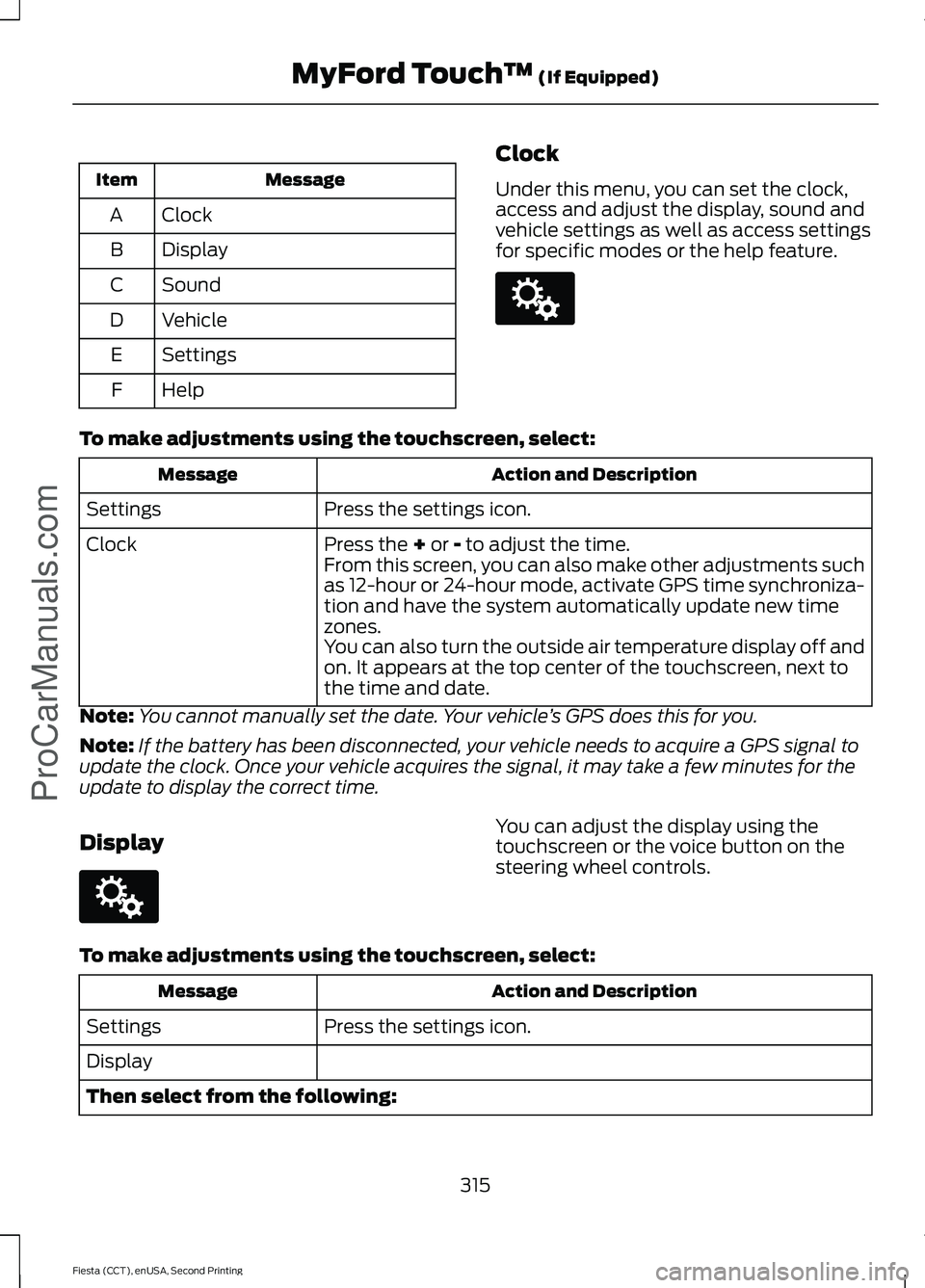
Message
Item
Clock
A
Display
B
Sound
C
Vehicle
D
Settings
E
Help
F Clock
Under this menu, you can set the clock,
access and adjust the display, sound and
vehicle settings as well as access settings
for specific modes or the help feature.To make adjustments using the touchscreen, select:
Action and Description
Message
Press the settings icon.
Settings
Press the + or - to adjust the time.
Clock
From this screen, you can also make other adjustments such
as 12-hour or 24-hour mode, activate GPS time synchroniza-
tion and have the system automatically update new time
zones.
You can also turn the outside air temperature display off and
on. It appears at the top center of the touchscreen, next to
the time and date.
Note: You cannot manually set the date. Your vehicle ’s GPS does this for you.
Note: If the battery has been disconnected, your vehicle needs to acquire a GPS signal to
update the clock. Once your vehicle acquires the signal, it may take a few minutes for the
update to display the correct time.
Display You can adjust the display using the
touchscreen or the voice button on the
steering wheel controls.
To make adjustments using the touchscreen, select: Action and Description
Message
Press the settings icon.
Settings
Display
Then select from the following:
315
Fiesta (CCT), enUSA, Second Printing MyFord Touch
™
(If Equipped)
ProCarManuals.comE142607 E142607
Page 415 of 423
Booster Seats..................................................20
Types of Booster Seats....................................... 21
Brake Fluid Check........................................186
Brakes...............................................................130 General Information.......................................... 130
Breaking-In......................................................154 Brakes and Clutch.............................................. 154
Engine..................................................................... 154
Tires........................................................................\
. 154
Bulb Specification Chart...........................198
C
Cabin Air Filter
................................................101
California Proposition 65..............................11
Capacities and Specifications.................241
Cargo Nets
.......................................................143
Installing and Removing the Cargo
Net....................................................................... 143
Car Wash See: Cleaning the Exterior............................... 210
Changing a Bulb - 4-Door
.........................189
Center High Mounted Stop Lamp................193
Front Fog Lamps.................................................. 191
Headlamp............................................................. 189
Interior Lamp........................................................ 193
License Plate Lamp........................................... 193
Luggage Compartment Lamp, Footwell Lamp and Liftgate Lamp............................ 194
Reading Lamps................................................... 193
Rear Lamps........................................................... 192
Side Direction Indicator................................... 190
Changing a Bulb - 5-Door.........................194 Center High Mounted Stop Lamp.................197
Front Fog Lamps................................................ 196
Headlamp............................................................. 194
Interior Lamp....................................................... 198
License Plate Lamp............................................ 197
Luggage Compartment Lamp, Footwell Lamp and Liftgate Lamp............................ 198
Reading Lamps................................................... 198
Rear Lamps........................................................... 197
Side Direction Indicator.................................... 195
Changing a Fuse
............................................176
Fuses........................................................................\
176Changing a Road Wheel...........................236
Dissimilar Spare Wheel and Tire Assembly
Information..................................................... 236
Stowing the Flat Tire........................................ 239
Tire Change Procedure..................................... 237
Changing the 12V Battery..........................186
Changing the Engine Air Filter.................199
Changing the Wiper Blades
.....................186
Rear Window Wiper Blade.............................. 187
Windshield Wiper Blades................................ 186
Checking MyKey System Status..............49 MyKey Distance.................................................... 49
Number of Admin Keys...................................... 49
Number of MyKeys.............................................. 49
Checking the Wiper Blades......................186
Child Restraint and Safety Belt Maintenance.................................................32
Child Safety
.......................................................13
General Information............................................. 13
Child Safety Locks
..........................................24
Left-Hand Side...................................................... 25
Right-Hand Side................................................... 25
Child Seat Positioning...................................22
Cigar Lighter
...................................................109
Cleaning Leather Seats..............................213
Cleaning Products
........................................210
Cleaning the Alloy Wheels........................214
Cleaning the Engine......................................211
Cleaning the Exterior...................................210 Exterior Chrome Parts...................................... 210
Exterior Plastic Parts.......................................... 211
Stripes or Graphics.............................................. 211
Underbody.............................................................. 211
Cleaning the Instrument Panel and Instrument Cluster Lens..........................212
Cleaning the Interior.....................................212
Cleaning the Windows and Wiper Blades.............................................................212
Clearing All MyKeys.......................................48
Climate Control
..............................................95
Principle of Operation........................................ 95
Clock...................................................................86 Type 1........................................................................\
86
Type 2....................................................................... 86
Cold Weather Precautions
........................155
Coolant Check See: Engine Coolant Check............................ 183
Crash Sensors and Airbag Indicator
.........41
412
Fiesta (CCT), enUSA, Second Printing Index
ProCarManuals.com