lock FORD FIESTA 2015 Owner's Guide
[x] Cancel search | Manufacturer: FORD, Model Year: 2015, Model line: FIESTA, Model: FORD FIESTA 2015Pages: 423, PDF Size: 5.5 MB
Page 73 of 423
POWER WINDOWS (If Equipped)
WARNINGS
Do not leave children unattended in
your vehicle and do not let them play
with the power windows. They may
seriously injure themselves. When closing the power windows,
you should verify they are free of
obstructions and make sure that
children and pets are not in the proximity
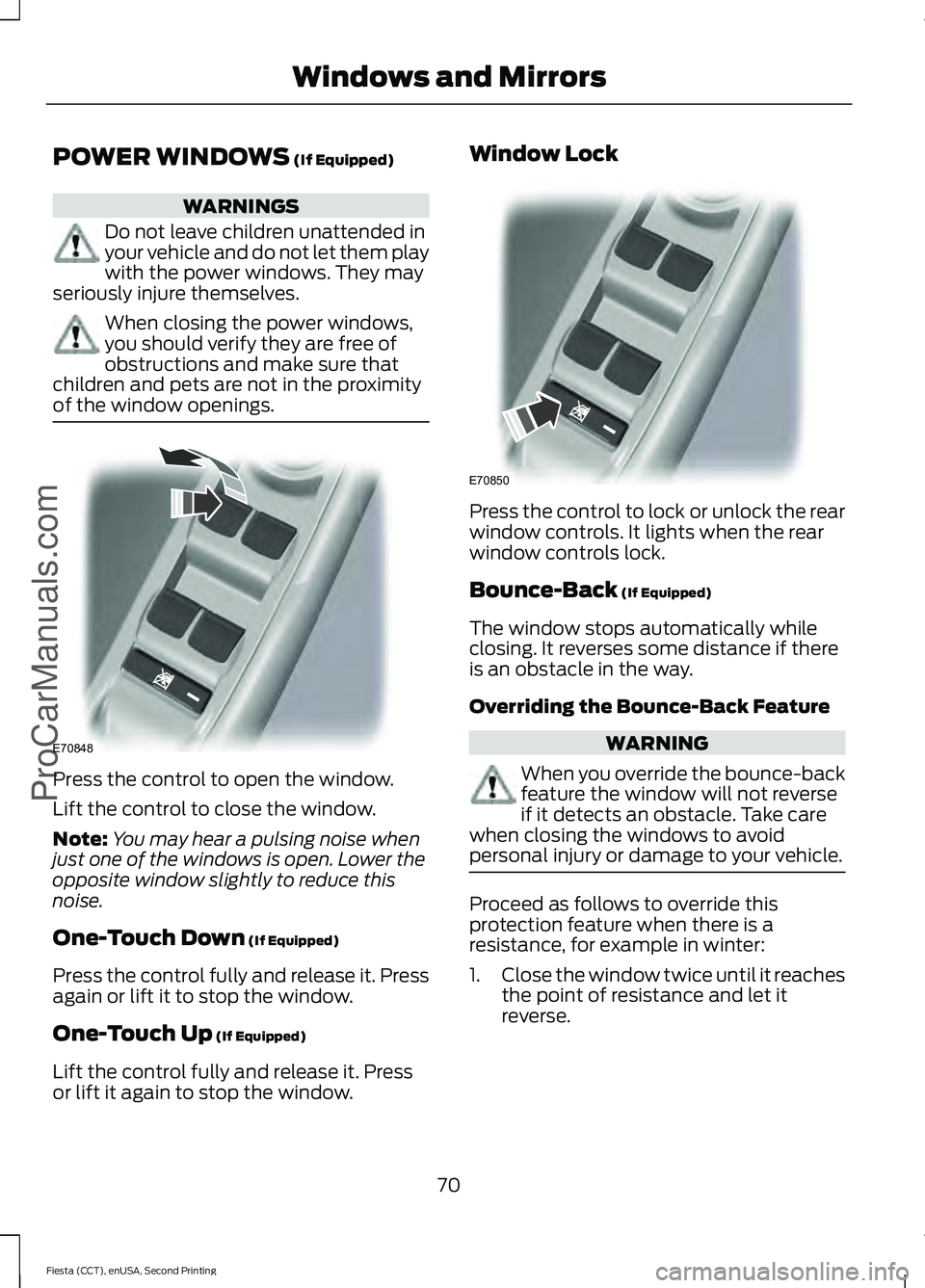
of the window openings. Press the control to open the window.
Lift the control to close the window.
Note:
You may hear a pulsing noise when
just one of the windows is open. Lower the
opposite window slightly to reduce this
noise.
One-Touch Down
(If Equipped)
Press the control fully and release it. Press
again or lift it to stop the window.
One-Touch Up
(If Equipped)
Lift the control fully and release it. Press
or lift it again to stop the window. Window Lock
Press the control to lock or unlock the rear
window controls. It lights when the rear
window controls lock.
Bounce-Back
(If Equipped)
The window stops automatically while
closing. It reverses some distance if there
is an obstacle in the way.
Overriding the Bounce-Back Feature WARNING
When you override the bounce-back
feature the window will not reverse
if it detects an obstacle. Take care
when closing the windows to avoid
personal injury or damage to your vehicle. Proceed as follows to override this
protection feature when there is a
resistance, for example in winter:
1.
Close the window twice until it reaches
the point of resistance and let it
reverse.
70
Fiesta (CCT), enUSA, Second Printing Windows and Mirrors
ProCarManuals.comE70848 E70850
Page 74 of 423
2. Close the window a third time to the
point of resistance. You disabled the
bounce-back feature and you can now
close the window manually. The
window travels past the point of
resistance and you can close it fully.
Contact an authorized dealer as soon as
possible if the window does not close after
the third attempt.
Resetting the Bounce-Back Feature WARNING
The bounce-back feature remains
turned off until you reset the
memory.
If you have disconnected the battery, you
must reset the bounce-back memory
separately for each window.
1. Lift and hold the control until the
window is fully closed.
2. Release the control.
3. Lift and hold the control again for a few
seconds.
4. Release the control.
5. Lift and hold the control again for a few
seconds.
6. Release the control.
7. Press and hold the control until the window is fully open.
8. Lift and hold the control until the window is fully closed.
9. Release the control.
10. Open the window and then try to close it automatically.
11. Repeat the procedure if the window does not close automatically. Accessory Delay (If Equipped)
You can use the window controls for
several minutes after switching off the
ignition or until opening either front door.
GLOBAL OPENING AND
CLOSING
You can also operate the power windows
with the ignition off using the global
opening and global closing function.
Note: Global opening will only operate for
a short period of time after you have
unlocked your vehicle using the remote
control.
Note: Global closing will only operate if you
have set the memory correctly for each
window. See
Power Windows (page 70).
Global Opening
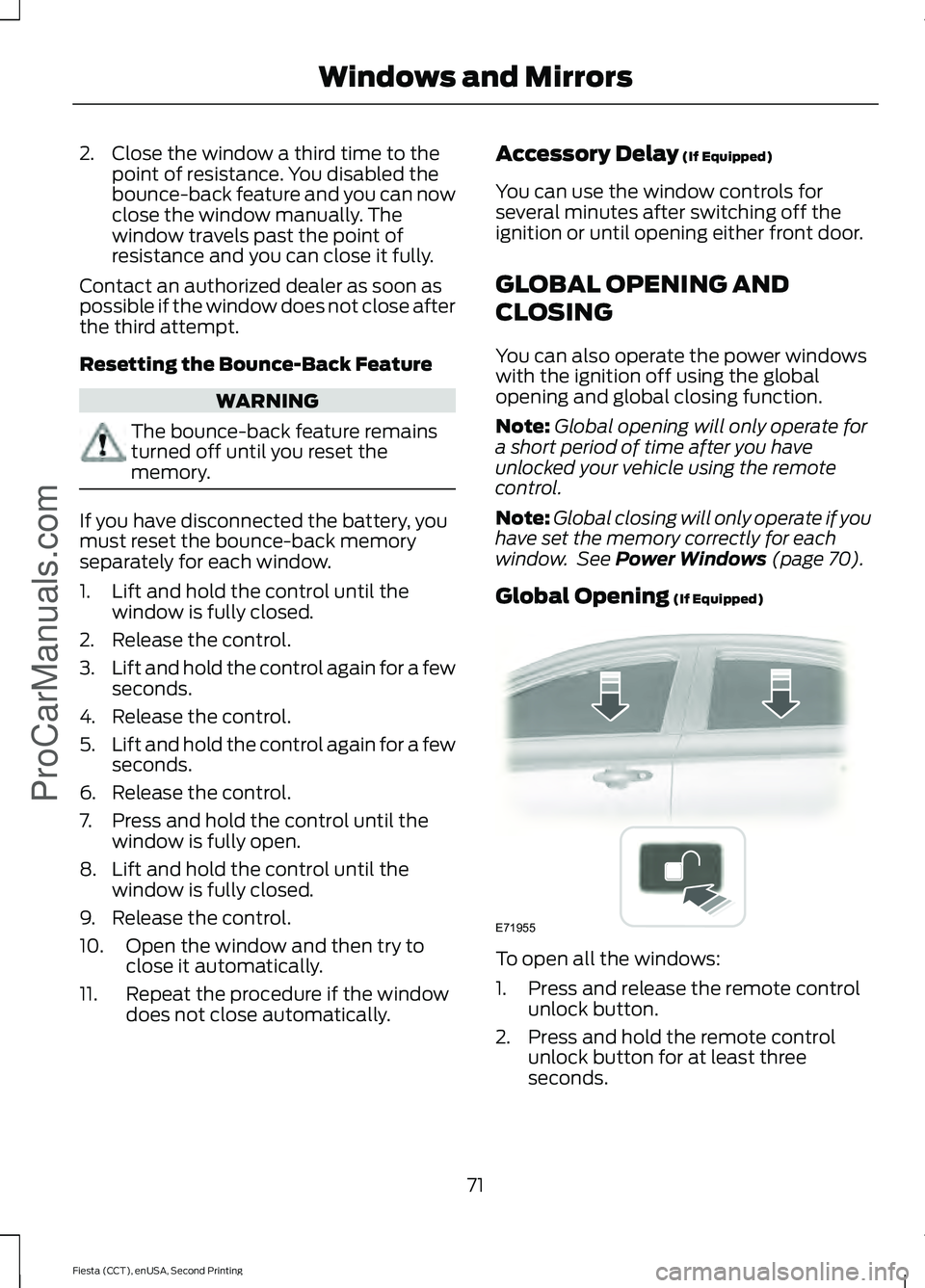
(If Equipped) To open all the windows:
1. Press and release the remote control
unlock button.
2. Press and hold the remote control unlock button for at least three
seconds.
71
Fiesta (CCT), enUSA, Second Printing Windows and Mirrors
ProCarManuals.comE71955
Page 75 of 423
Press the lock or unlock button to stop the
opening function.
Global Closing (If Equipped)
Vehicles Without Keyless Entry WARNING
Take care when using global closing.
In an emergency, press the lock or
unlock button immediately to stop.
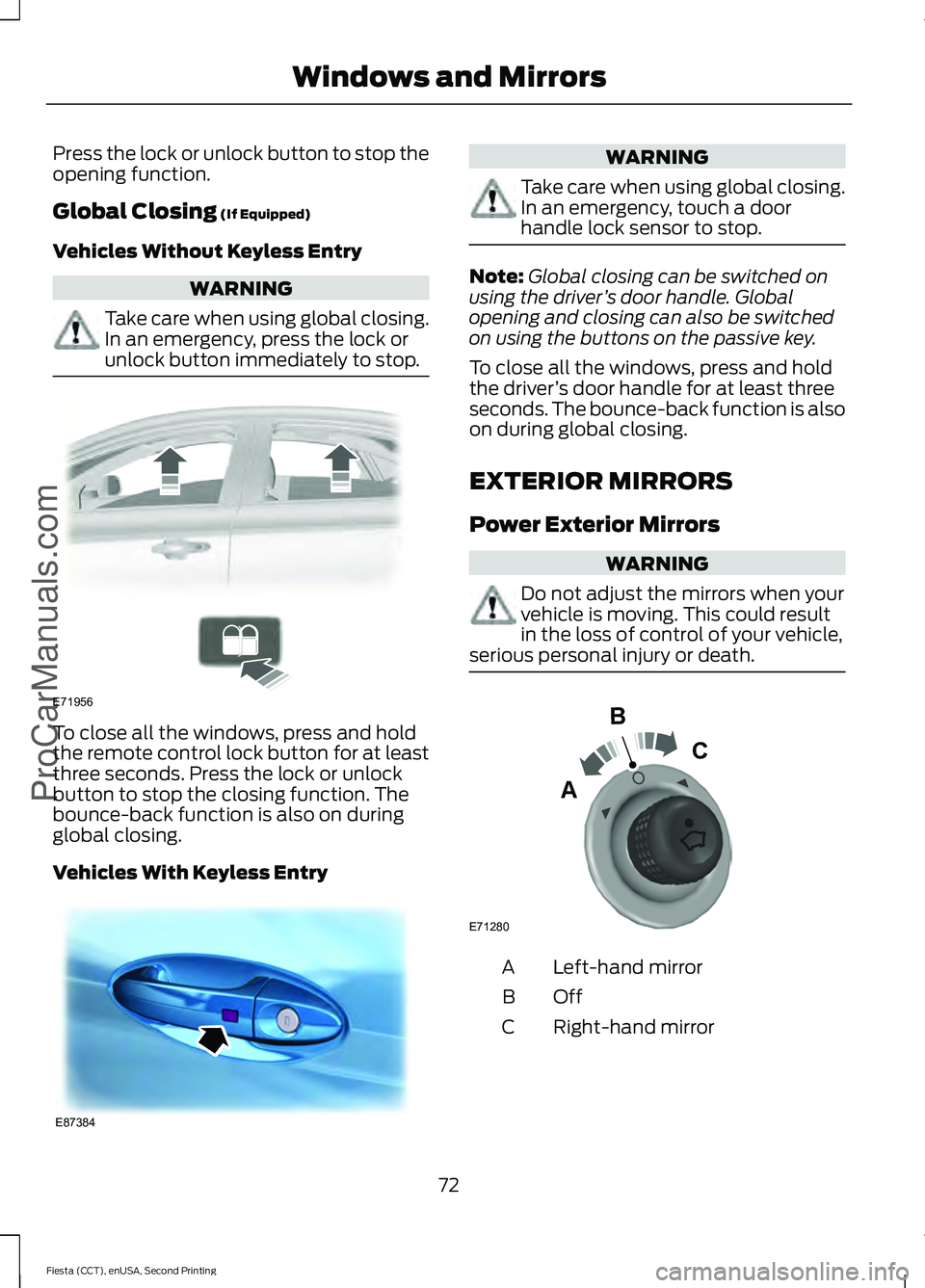
To close all the windows, press and hold
the remote control lock button for at least
three seconds. Press the lock or unlock
button to stop the closing function. The
bounce-back function is also on during
global closing.
Vehicles With Keyless Entry WARNING
Take care when using global closing.
In an emergency, touch a door
handle lock sensor to stop.
Note:
Global closing can be switched on
using the driver ’s door handle. Global
opening and closing can also be switched
on using the buttons on the passive key.
To close all the windows, press and hold
the driver ’s door handle for at least three
seconds. The bounce-back function is also
on during global closing.
EXTERIOR MIRRORS
Power Exterior Mirrors WARNING
Do not adjust the mirrors when your
vehicle is moving. This could result
in the loss of control of your vehicle,
serious personal injury or death. Left-hand mirror
A
OffB
Right-hand mirror
C
72
Fiesta (CCT), enUSA, Second Printing Windows and Mirrors
ProCarManuals.comE71956 E87384 E71280
B
C
A
Page 77 of 423
Note:
Do not clean the housing or glass of
any mirror with harsh abrasives, fuel or other
petroleum or ammonia-based cleaning
products.
You can adjust the interior mirror to your
preference. Some mirrors also have a
second pivot point. This lets you move the
mirror head up or down and from side to
side.
Pull the tab below the mirror toward you
to reduce glare at night.
Auto-Dimming Mirror (If Equipped)
Note: Do not block the sensors on the front
and back of the mirror. Mirror performance
may be affected. A rear center passenger or
raised rear center head restraint may also
block light from reaching the sensor.
The mirror will dim automatically to reduce
glare when bright lights are detected from
behind your vehicle. It will automatically
return to normal reflection when you select
reverse gear to make sure you have a clear
view when backing up.
MOONROOF
(If Equipped) WARNINGS
Do not let children play with the
moonroof or leave them unattended
in the vehicle. They may seriously
hurt themselves. When closing the moonroof, you
should verify that it is free of
obstructions and make sure that
children and pets are not in the proximity
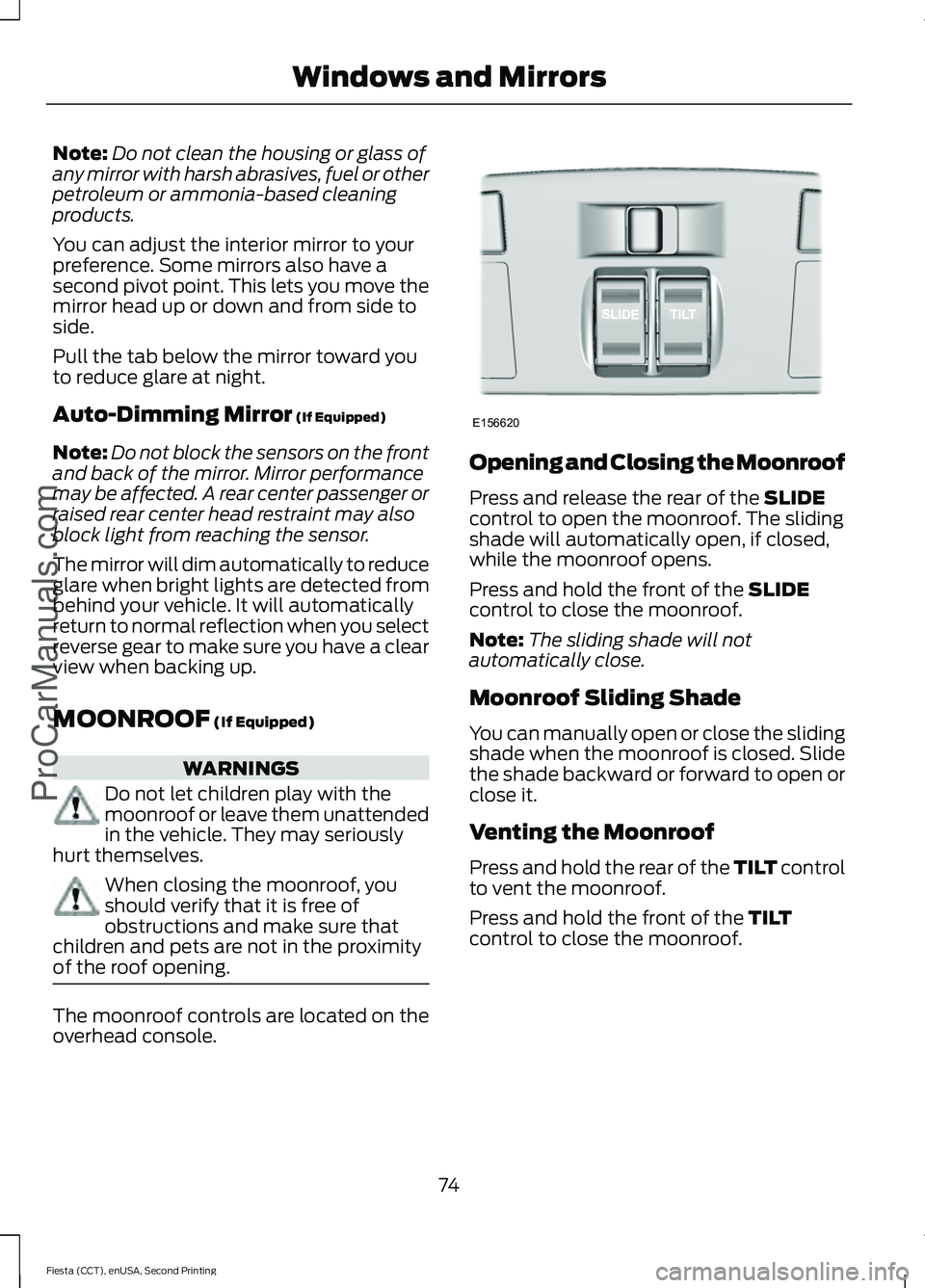
of the roof opening. The moonroof controls are located on the
overhead console. Opening and Closing the Moonroof
Press and release the rear of the
SLIDE
control to open the moonroof. The sliding
shade will automatically open, if closed,
while the moonroof opens.
Press and hold the front of the
SLIDE
control to close the moonroof.
Note: The sliding shade will not
automatically close.
Moonroof Sliding Shade
You can manually open or close the sliding
shade when the moonroof is closed. Slide
the shade backward or forward to open or
close it.
Venting the Moonroof
Press and hold the rear of the TILT control
to vent the moonroof.
Press and hold the front of the
TILT
control to close the moonroof.
74
Fiesta (CCT), enUSA, Second Printing Windows and Mirrors
ProCarManuals.comE156620
Page 79 of 423
Engine Coolant Temperature
Gauge
Displays the temperature of the engine
coolant. At normal operating temperature
the indicator will remain in the center
section.
Fuel Gauge
Switch the ignition on. The fuel gauge will
indicate approximately how much fuel is
left in the fuel tank. The fuel gauge may
vary slightly when your vehicle is moving
or on a gradient. The arrow adjacent to the
fuel pump symbol indicates on which side
of your vehicle the fuel filler door is located.
WARNING LAMPS AND
INDICATORS - 1.6L DURATEC-
16V TI-VCT (SIGMA)/1.0L
ECOBOOST™
The following warning lamps and
indicators alert you to a vehicle condition
that may become serious. Some lamps will
illuminate when you start your vehicle to
make sure they work. If any lamps remain
on after starting your vehicle, refer to the
respective system warning lamp for further
information.
Note:
Some warning indicators appear in
the information display and function the
same as a warning lamp but do not
illuminate when you start your vehicle. Anti-lock Braking System Warning
Lamp If it illuminates when you are
driving, this indicates a
malfunction.
You will continue to have the normal
braking system (without anti-lock braking
system) unless the brake system warning
lamp is also illuminated.
Have your vehicle checked by an
authorized dealer.
Brake System Warning Lamp It illuminates when you engage
the parking brake and the
ignition is on. If it illuminates
when your vehicle is moving, make sure the
parking brake is disengaged. If the parking
brake is disengaged, this indicates low
brake fluid level or a brake system fault.
Have your vehicle checked immediately by
an authorized dealer. WARNING
Driving your vehicle with the warning
lamp on is dangerous. A significant
decrease in braking performance
may occur. It will take you longer to stop
your vehicle. Have your vehicle checked by
your authorized dealer immediately. Driving
extended distances with the parking brake
engaged can cause brake failure and the
risk of personal injury. Cruise Control Indicator
It will illuminate when you switch
this feature on. See Using
Cruise Control (page 139).
76
Fiesta (CCT), enUSA, Second Printing Instrument Cluster
ProCarManuals.comE140760 E138644 E71340
Page 82 of 423
Stability Control Indicator
While driving, it flashes when the
system is operating. After you
switch the ignition on, if it does
not illuminate or illuminates continuously
while driving, this indicates a malfunction.
During a malfunction, the system switches
off. Have your vehicle checked by an
authorized dealer as soon as possible.
Stability Control System Off
Indicator It will illuminate when you switch
the system off. It will go out
when you switch the system
back on or when you switch the ignition
off.
WARNING LAMPS AND
INDICATORS - 1.6L
ECOBOOST™
The following warning lamps and
indicators alert you to a vehicle condition
that may become serious. Some lamps will
illuminate when you start your vehicle to
make sure they work. If any lamps remain
on after starting your vehicle, refer to the
respective system warning lamp for further
information.
Note: Some warning indicators appear in
the information display and function the
same as a warning lamp but do not
illuminate when you start your vehicle.
Anti-lock Braking System Warning
Lamp If it illuminates when you are
driving, this indicates a
malfunction. You will continue to have the normal
braking system (without anti-lock braking
system) unless the brake system warning
lamp is also illuminated.
Have your vehicle checked by an
authorized dealer.
Brake System Warning Lamp
It illuminates when you engage
the parking brake and the
ignition is on. If it illuminates
when your vehicle is moving, make sure the
parking brake is disengaged. If the parking
brake is disengaged, this indicates low
brake fluid level or a brake system fault.
Have your vehicle checked immediately by
an authorized dealer. WARNING
Driving your vehicle with the warning
lamp on is dangerous. A significant
decrease in braking performance
may occur. It will take you longer to stop
your vehicle. Have your vehicle checked by
your authorized dealer immediately. Driving
extended distances with the parking brake
engaged can cause brake failure and the
risk of personal injury. Cruise Control Indicator
It will illuminate when you switch
this feature on. See Using
Cruise Control (page 139).
Direction Indicator Illuminates when the left or right
turn signal or the hazard warning
flasher is turned on. If the
indicators stay on or flash faster, check for
a burnt out bulb. See
Changing a Bulb
(page 194).
79
Fiesta (CCT), enUSA, Second Printing Instrument Cluster
ProCarManuals.com E138644 E71340
Page 88 of 423
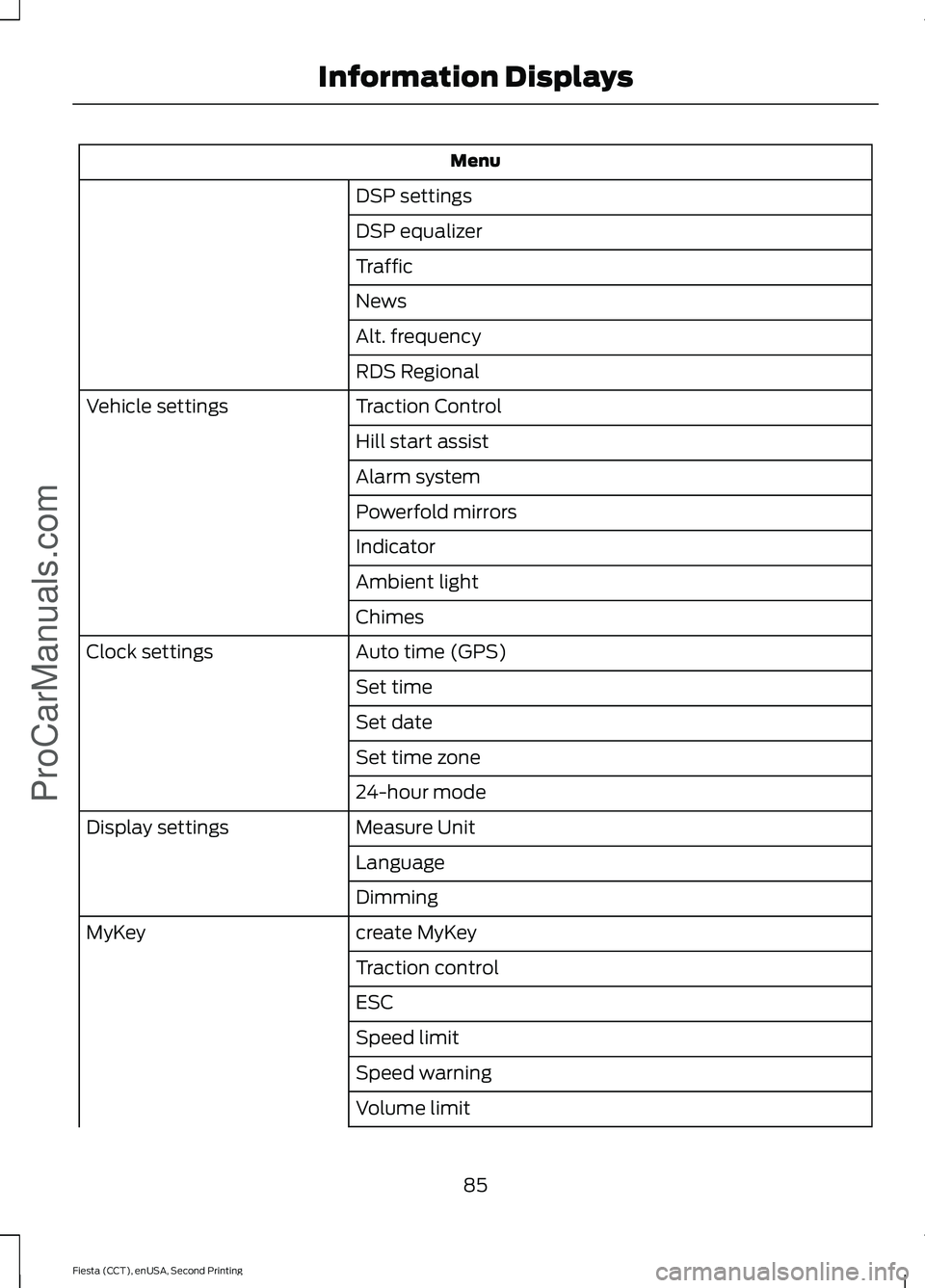
Menu
DSP settings
DSP equalizer
Traffic
News
Alt. frequency
RDS Regional
Traction Control
Vehicle settings
Hill start assist
Alarm system
Powerfold mirrors
Indicator
Ambient light
Chimes
Auto time (GPS)
Clock settings
Set time
Set date
Set time zone
24-hour mode
Measure Unit
Display settings
Language
Dimming
create MyKey
MyKey
Traction control
ESC
Speed limit
Speed warning
Volume limit
85
Fiesta (CCT), enUSA, Second Printing Information DisplaysProCarManuals.com
Page 89 of 423
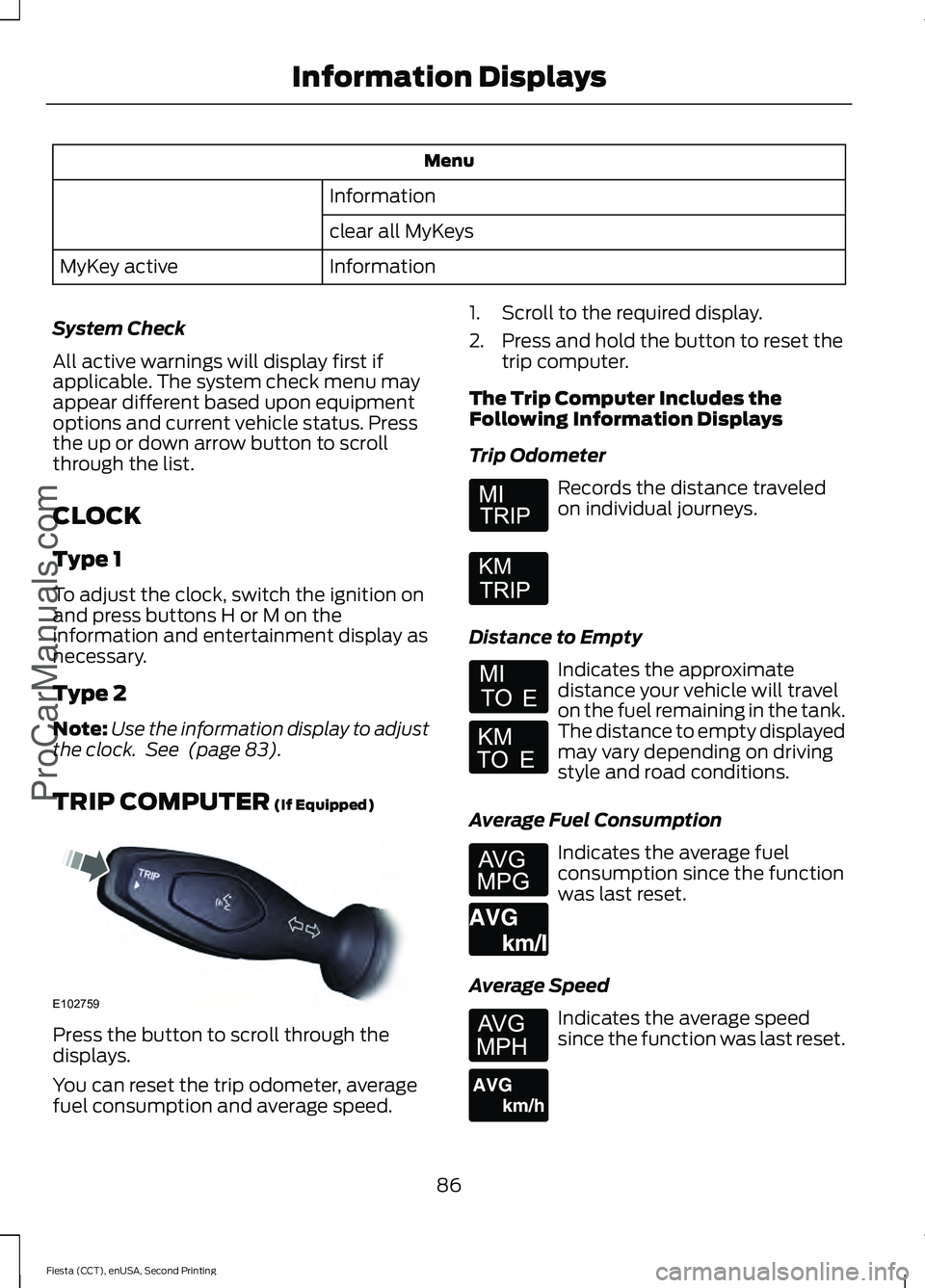
Menu
Information
clear all MyKeys
Information
MyKey active
System Check
All active warnings will display first if
applicable. The system check menu may
appear different based upon equipment
options and current vehicle status. Press
the up or down arrow button to scroll
through the list.
CLOCK
Type 1
To adjust the clock, switch the ignition on
and press buttons H or M on the
information and entertainment display as
necessary.
Type 2
Note: Use the information display to adjust
the clock. See (page 83).
TRIP COMPUTER
(If Equipped) Press the button to scroll through the
displays.
You can reset the trip odometer, average
fuel consumption and average speed. 1. Scroll to the required display.
2. Press and hold the button to reset the
trip computer.
The Trip Computer Includes the
Following Information Displays
Trip Odometer Records the distance traveled
on individual journeys.
Distance to Empty Indicates the approximate
distance your vehicle will travel
on the fuel remaining in the tank.
The distance to empty displayed
may vary depending on driving
style and road conditions.
Average Fuel Consumption Indicates the average fuel
consumption since the function
was last reset.
Average Speed Indicates the average speed
since the function was last reset.
86
Fiesta (CCT), enUSA, Second Printing Information Displays
ProCarManuals.comE102759 E164638E E146275 E146277
Page 97 of 423
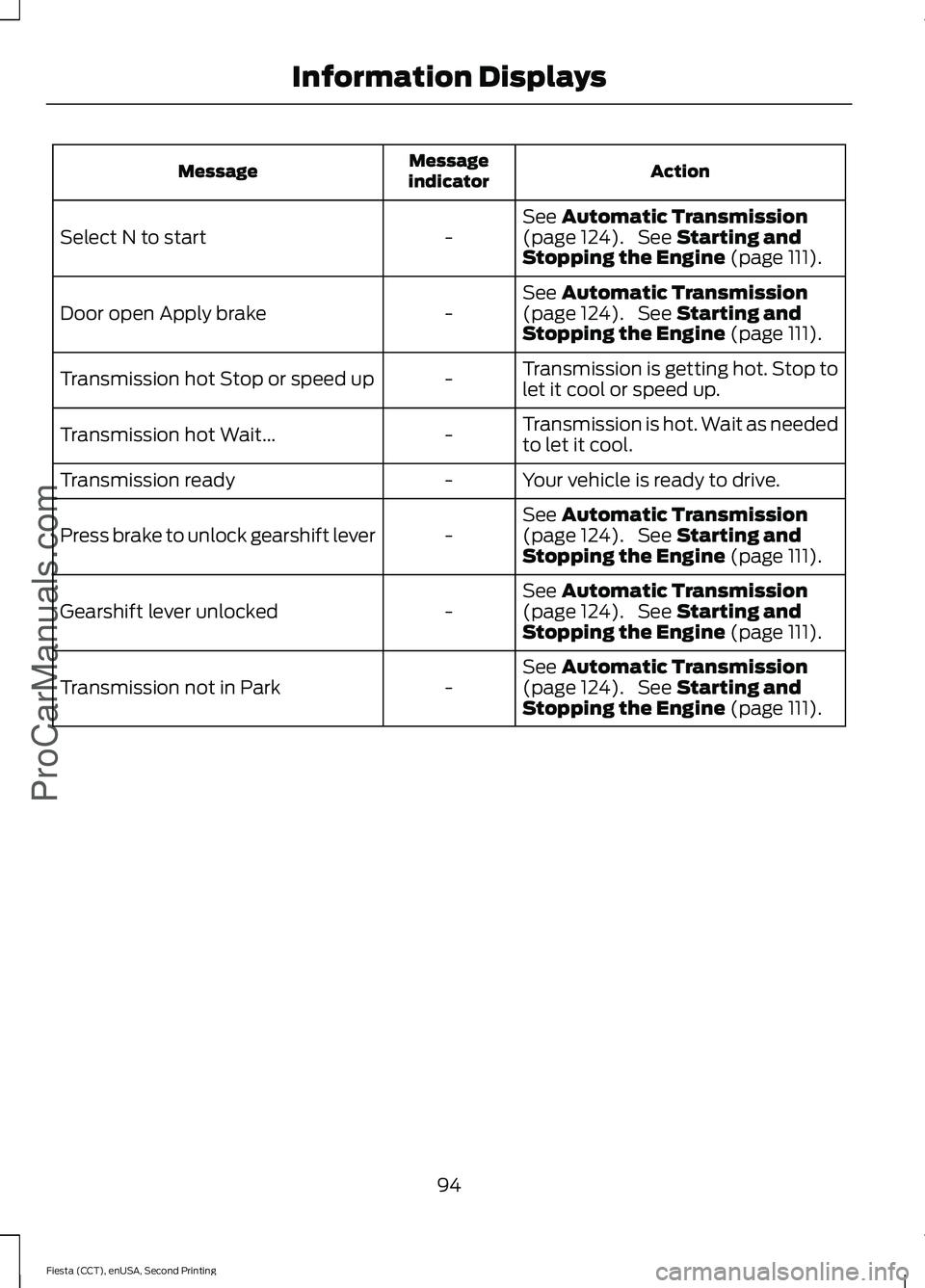
Action
Message
indicator
Message
See Automatic Transmission
(page 124). See Starting and
Stopping the Engine (page 111).
-
Select N to start
See
Automatic Transmission
(page 124). See Starting and
Stopping the Engine (page 111).
-
Door open Apply brake
Transmission is getting hot. Stop to
let it cool or speed up.
-
Transmission hot Stop or speed up
Transmission is hot. Wait as needed
to let it cool.
-
Transmission hot Wait...
Your vehicle is ready to drive.
-
Transmission ready
See
Automatic Transmission
(page 124). See Starting and
Stopping the Engine (page 111).
-
Press brake to unlock gearshift lever
See
Automatic Transmission
(page 124). See Starting and
Stopping the Engine (page 111).
-
Gearshift lever unlocked
See
Automatic Transmission
(page 124). See Starting and
Stopping the Engine (page 111).
-
Transmission not in Park
94
Fiesta (CCT), enUSA, Second Printing Information Displays
ProCarManuals.com
Page 107 of 423
Note:
Adjust the seat backrest to an upright
driving position before adjusting the head
restraint. Adjust the head restraint so that
the top of it is level with the top of your head
and as far forward as possible. Make sure
that you remain comfortable. If you are
extremely tall, adjust the head restraint to
its highest position.
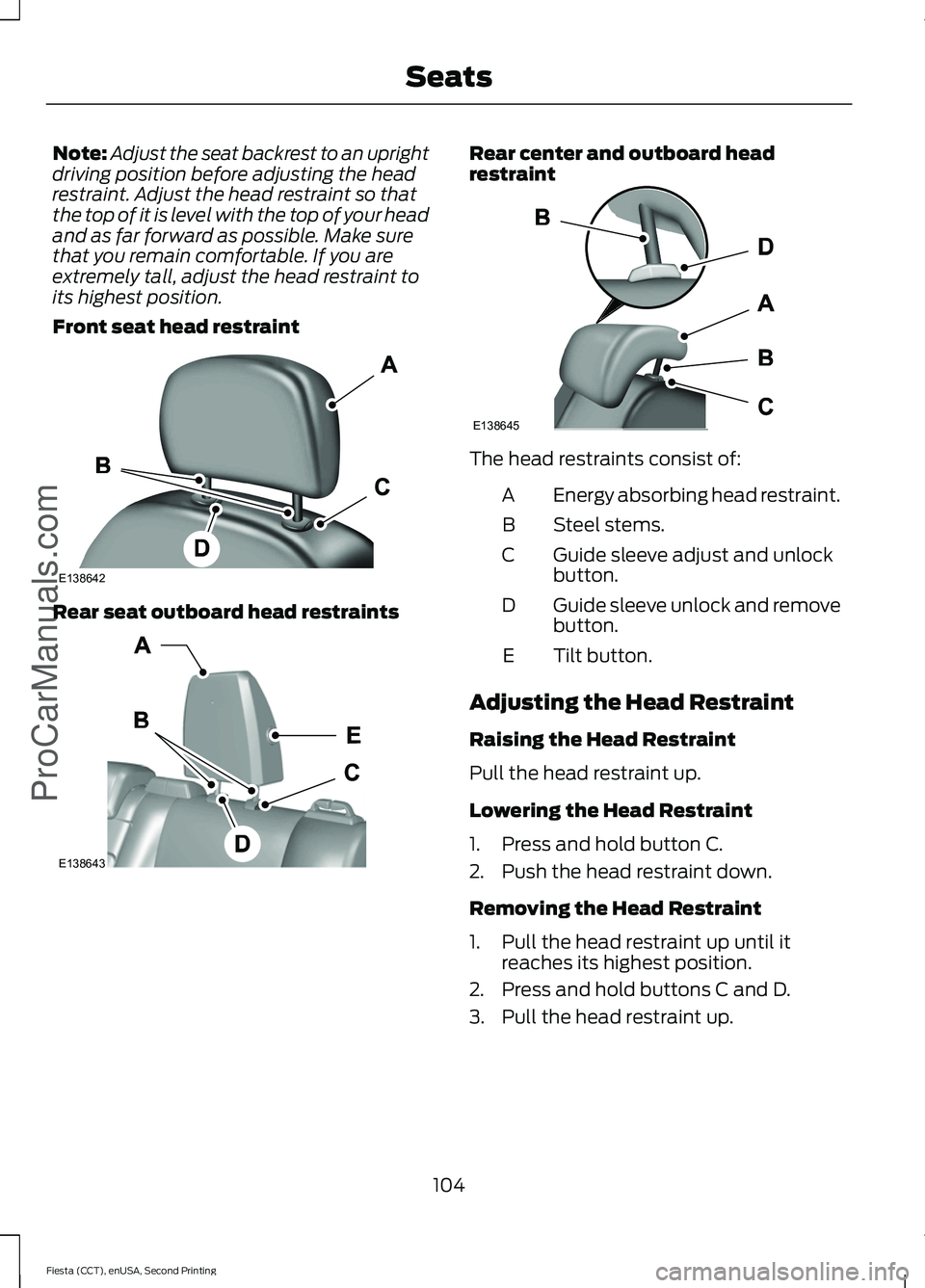
Front seat head restraint Rear seat outboard head restraints Rear center and outboard head
restraint
The head restraints consist of:
Energy absorbing head restraint.
A
Steel stems.
B
Guide sleeve adjust and unlock
button.
C
Guide sleeve unlock and remove
button.
D
Tilt button.
E
Adjusting the Head Restraint
Raising the Head Restraint
Pull the head restraint up.
Lowering the Head Restraint
1. Press and hold button C.
2. Push the head restraint down.
Removing the Head Restraint
1. Pull the head restraint up until it reaches its highest position.
2. Press and hold buttons C and D.
3. Pull the head restraint up.
104
Fiesta (CCT), enUSA, Second Printing SeatsProCarManuals.comE138642 E138643 E138645