phone FORD FIESTA 2016 Workshop Manual
[x] Cancel search | Manufacturer: FORD, Model Year: 2016, Model line: FIESTA, Model: FORD FIESTA 2016Pages: 363, PDF Size: 5.9 MB
Page 310 of 363
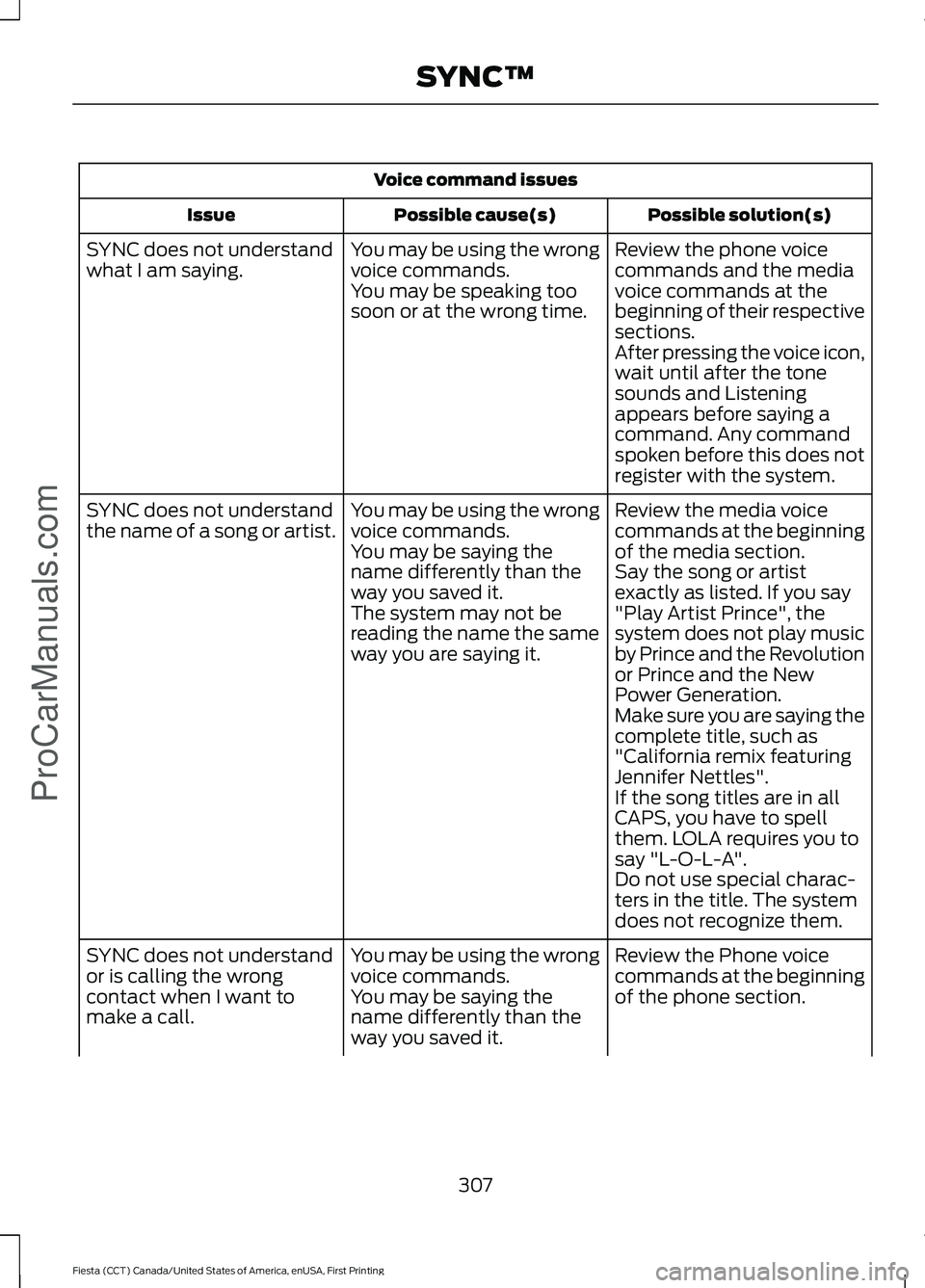
Voice command issues
Possible solution(s)
Possible cause(s)
Issue
Review the phone voice
commands and the media
voice commands at the
beginning of their respective
sections.
You may be using the wrong
voice commands.
You may be speaking too
soon or at the wrong time.
SYNC does not understand
what I am saying.
After pressing the voice icon,
wait until after the tone
sounds and Listening
appears before saying a
command. Any command
spoken before this does not
register with the system.
Review the media voice
commands at the beginning
of the media section.
You may be using the wrong
voice commands.
You may be saying the
name differently than the
way you saved it.
SYNC does not understand
the name of a song or artist.
Say the song or artist
exactly as listed. If you say
"Play Artist Prince", the
system does not play music
by Prince and the Revolution
or Prince and the New
Power Generation.
The system may not be
reading the name the same
way you are saying it.
Make sure you are saying the
complete title, such as
"California remix featuring
Jennifer Nettles".
If the song titles are in all
CAPS, you have to spell
them. LOLA requires you to
say "L-O-L-A".
Do not use special charac-
ters in the title. The system
does not recognize them.
Review the Phone voice
commands at the beginning
of the phone section.
You may be using the wrong
voice commands.
You may be saying the
name differently than the
way you saved it.
SYNC does not understand
or is calling the wrong
contact when I want to
make a call.
307
Fiesta (CCT) Canada/United States of America, enUSA, First Printing SYNC™ProCarManuals.com
Page 311 of 363
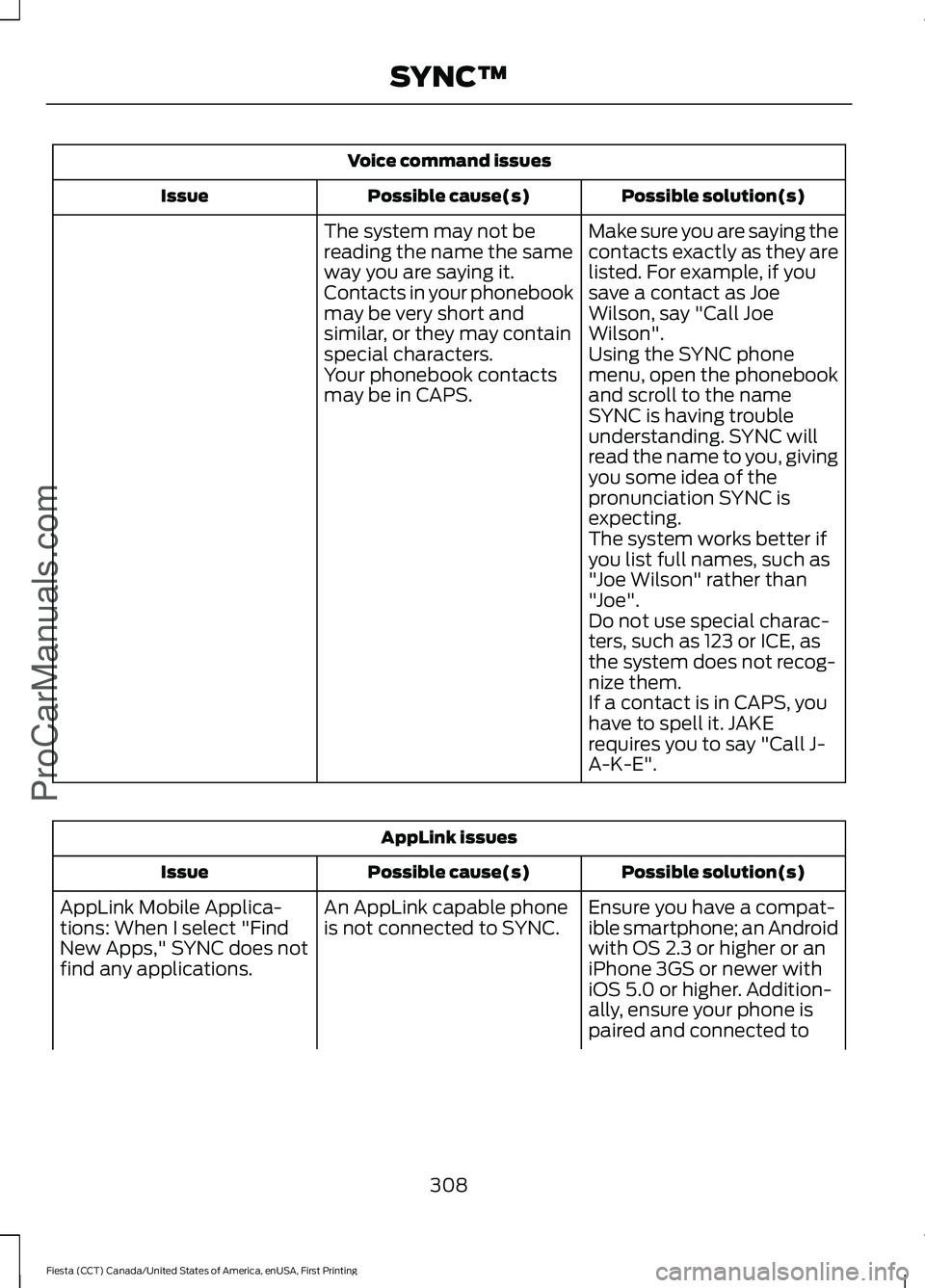
Voice command issues
Possible solution(s)
Possible cause(s)
Issue
Make sure you are saying the
contacts exactly as they are
listed. For example, if you
save a contact as Joe
Wilson, say "Call Joe
Wilson".
The system may not be
reading the name the same
way you are saying it.
Contacts in your phonebook
may be very short and
similar, or they may contain
special characters.
Using the SYNC phone
menu, open the phonebook
and scroll to the name
SYNC is having trouble
understanding. SYNC will
read the name to you, giving
you some idea of the
pronunciation SYNC is
expecting.
Your phonebook contacts
may be in CAPS.
The system works better if
you list full names, such as
"Joe Wilson" rather than
"Joe".
Do not use special charac-
ters, such as 123 or ICE, as
the system does not recog-
nize them.
If a contact is in CAPS, you
have to spell it. JAKE
requires you to say "Call J-
A-K-E". AppLink issues
Possible solution(s)
Possible cause(s)
Issue
Ensure you have a compat-
ible smartphone; an Android
with OS 2.3 or higher or an
iPhone 3GS or newer with
iOS 5.0 or higher. Addition-
ally, ensure your phone is
An AppLink capable phone
is not connected to SYNC.
AppLink Mobile Applica-
tions: When I select "Find
New Apps," SYNC does not
find any applications.
paired and connected to
308
Fiesta (CCT) Canada/United States of America, enUSA, First Printing SYNC™ProCarManuals.com
Page 312 of 363
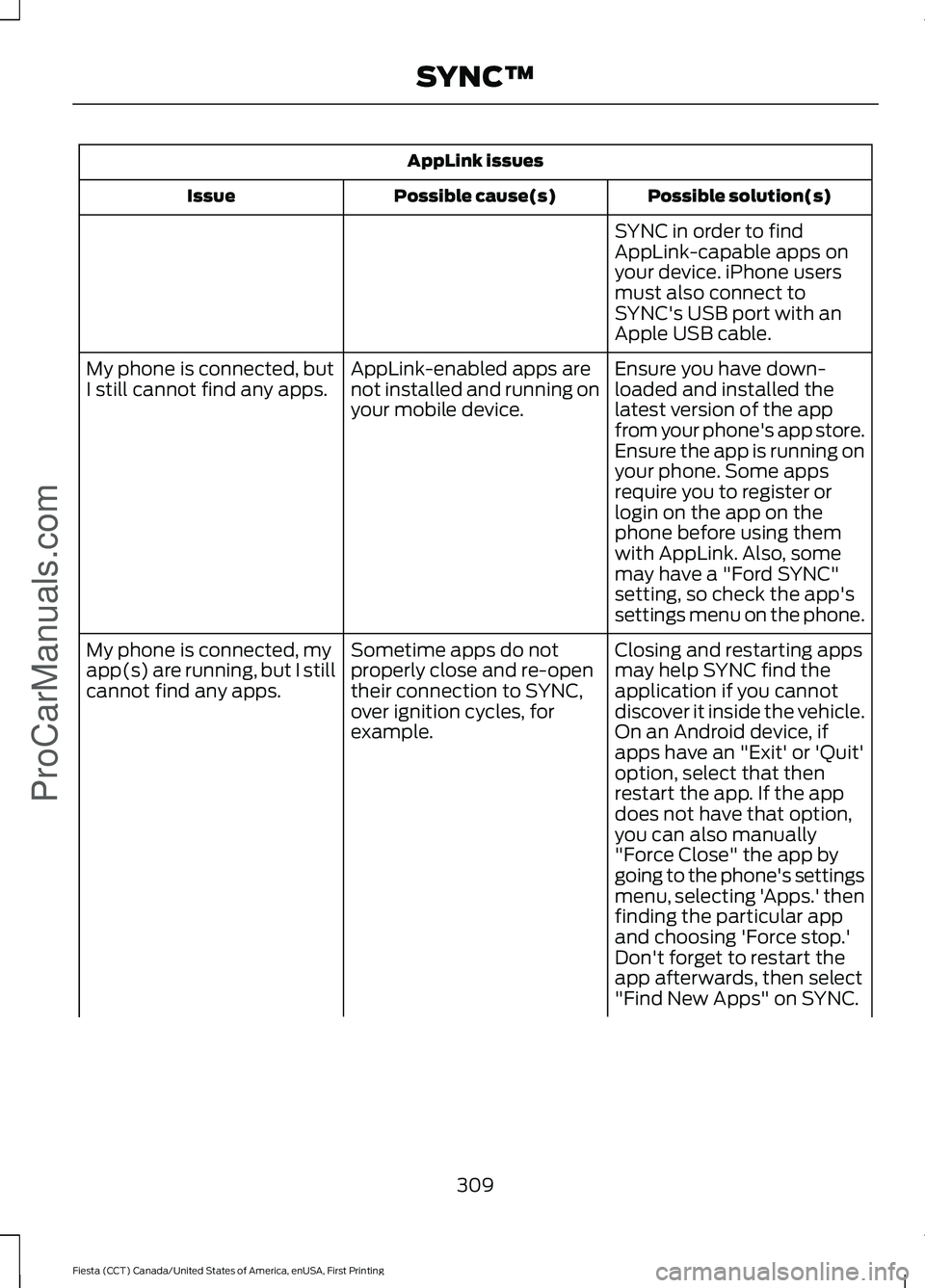
AppLink issues
Possible solution(s)
Possible cause(s)
Issue
SYNC in order to find
AppLink-capable apps on
your device. iPhone users
must also connect to
SYNC's USB port with an
Apple USB cable.
Ensure you have down-
loaded and installed the
latest version of the app
from your phone's app store.
Ensure the app is running on
your phone. Some apps
AppLink-enabled apps are
not installed and running on
your mobile device.
My phone is connected, but
I still cannot find any apps.
require you to register or
login on the app on the
phone before using them
with AppLink. Also, some
may have a "Ford SYNC"
setting, so check the app's
settings menu on the phone.
Closing and restarting apps
may help SYNC find the
application if you cannot
discover it inside the vehicle.
On an Android device, if
apps have an "Exit' or 'Quit'
Sometime apps do not
properly close and re-open
their connection to SYNC,
over ignition cycles, for
example.
My phone is connected, my
app(s) are running, but I still
cannot find any apps.
option, select that then
restart the app. If the app
does not have that option,
you can also manually
"Force Close" the app by
going to the phone's settings
menu, selecting 'Apps.' then
finding the particular app
and choosing 'Force stop.'
Don't forget to restart the
app afterwards, then select
"Find New Apps" on SYNC.
309
Fiesta (CCT) Canada/United States of America, enUSA, First Printing SYNC™ProCarManuals.com
Page 313 of 363
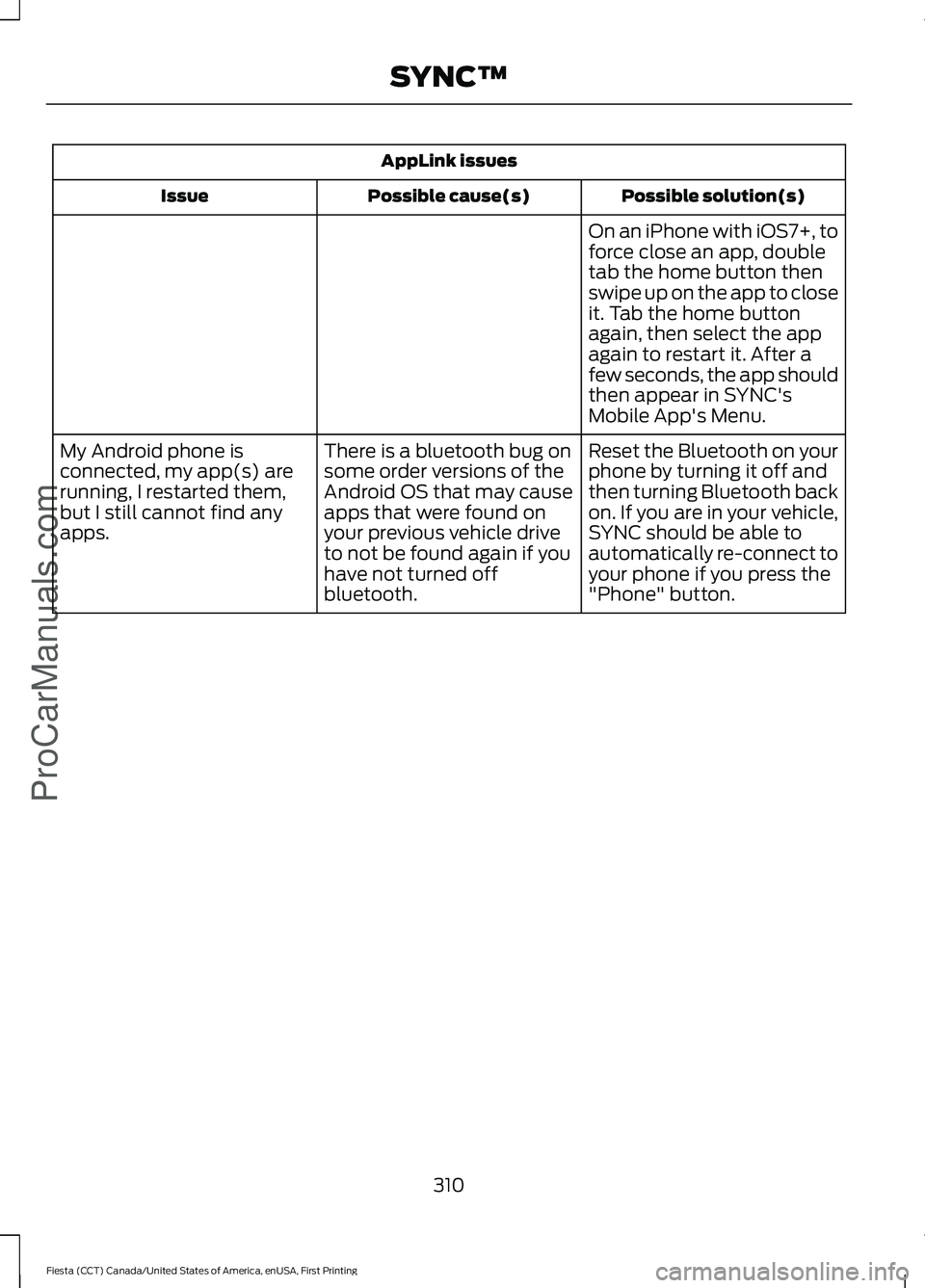
AppLink issues
Possible solution(s)
Possible cause(s)
Issue
On an iPhone with iOS7+, to
force close an app, double
tab the home button then
swipe up on the app to close
it. Tab the home button
again, then select the app
again to restart it. After a
few seconds, the app should
then appear in SYNC's
Mobile App's Menu.
Reset the Bluetooth on your
phone by turning it off and
then turning Bluetooth back
on. If you are in your vehicle,
SYNC should be able to
automatically re-connect to
your phone if you press the
"Phone" button.
There is a bluetooth bug on
some order versions of the
Android OS that may cause
apps that were found on
your previous vehicle drive
to not be found again if you
have not turned off
bluetooth.
My Android phone is
connected, my app(s) are
running, I restarted them,
but I still cannot find any
apps.
310
Fiesta (CCT) Canada/United States of America, enUSA, First Printing SYNC™ProCarManuals.com
Page 314 of 363
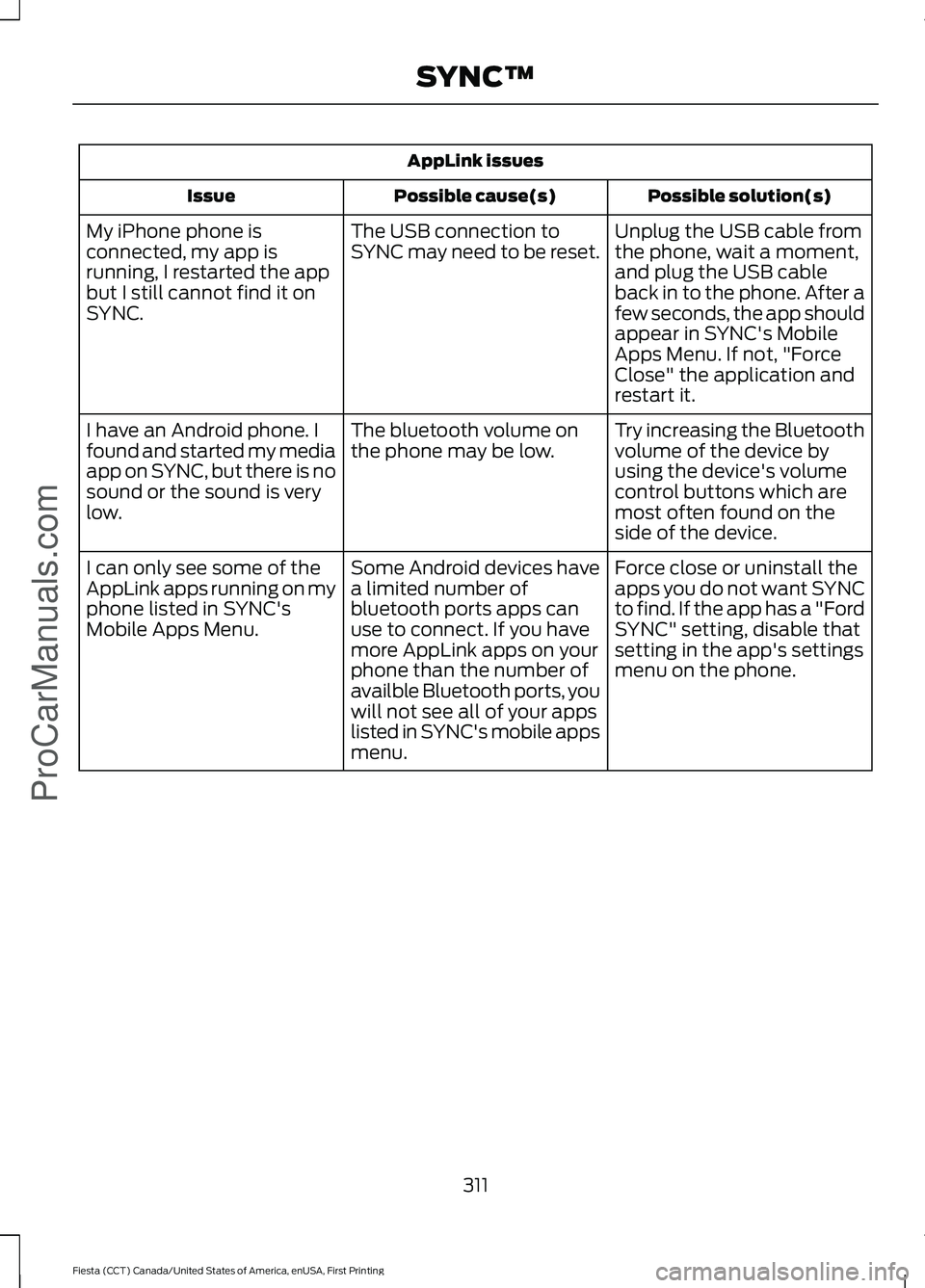
AppLink issues
Possible solution(s)
Possible cause(s)
Issue
Unplug the USB cable from
the phone, wait a moment,
and plug the USB cable
back in to the phone. After a
few seconds, the app should
appear in SYNC's Mobile
Apps Menu. If not, "Force
Close" the application and
restart it.
The USB connection to
SYNC may need to be reset.
My iPhone phone is
connected, my app is
running, I restarted the app
but I still cannot find it on
SYNC.
Try increasing the Bluetooth
volume of the device by
using the device's volume
control buttons which are
most often found on the
side of the device.
The bluetooth volume on
the phone may be low.
I have an Android phone. I
found and started my media
app on SYNC, but there is no
sound or the sound is very
low.
Force close or uninstall the
apps you do not want SYNC
to find. If the app has a "Ford
SYNC" setting, disable that
setting in the app's settings
menu on the phone.
Some Android devices have
a limited number of
bluetooth ports apps can
use to connect. If you have
more AppLink apps on your
phone than the number of
availble Bluetooth ports, you
will not see all of your apps
listed in SYNC's mobile apps
menu.
I can only see some of the
AppLink apps running on my
phone listed in SYNC's
Mobile Apps Menu.
311
Fiesta (CCT) Canada/United States of America, enUSA, First Printing SYNC™ProCarManuals.com
Page 316 of 363
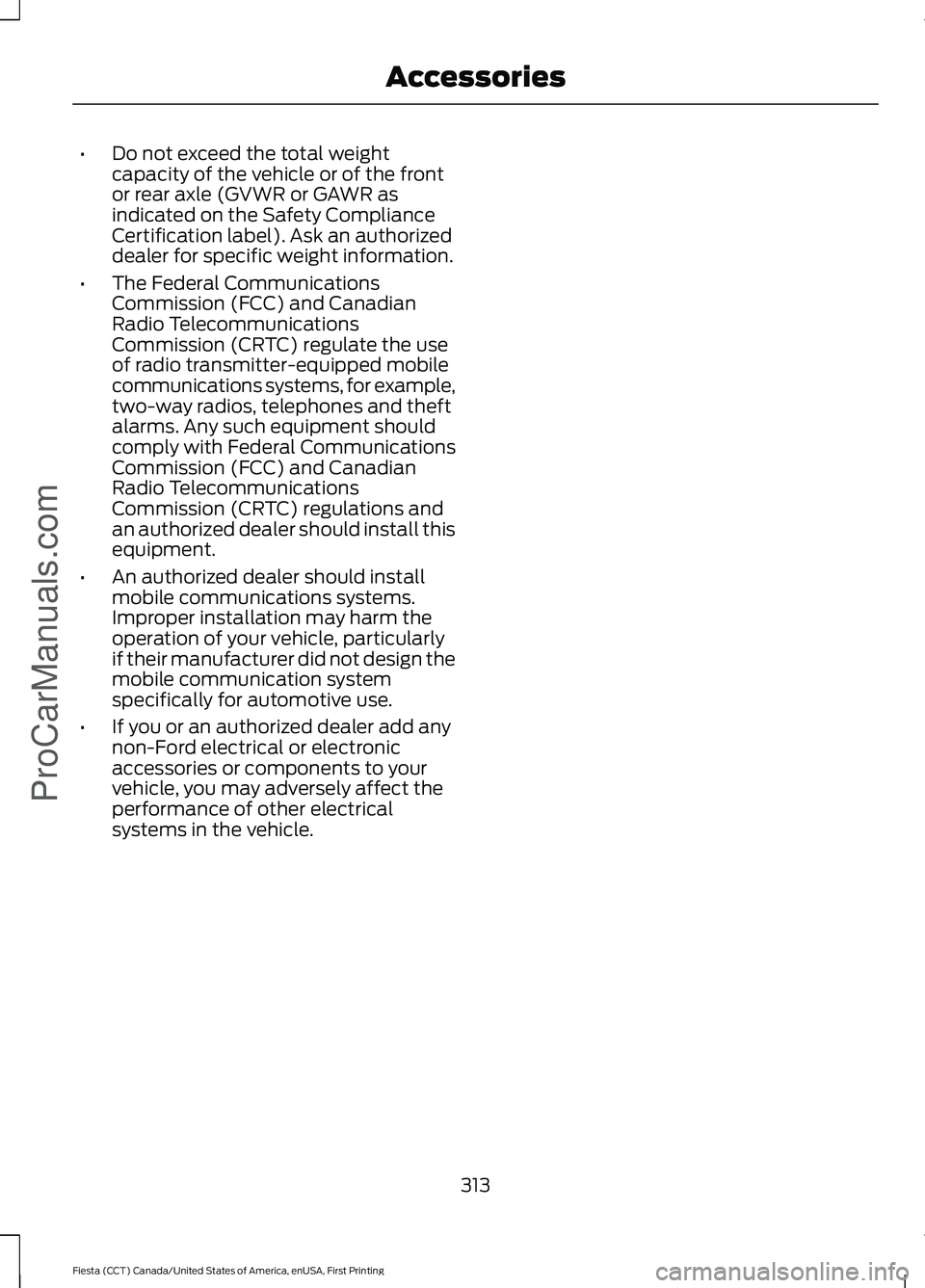
•
Do not exceed the total weight
capacity of the vehicle or of the front
or rear axle (GVWR or GAWR as
indicated on the Safety Compliance
Certification label). Ask an authorized
dealer for specific weight information.
• The Federal Communications
Commission (FCC) and Canadian
Radio Telecommunications
Commission (CRTC) regulate the use
of radio transmitter-equipped mobile
communications systems, for example,
two-way radios, telephones and theft
alarms. Any such equipment should
comply with Federal Communications
Commission (FCC) and Canadian
Radio Telecommunications
Commission (CRTC) regulations and
an authorized dealer should install this
equipment.
• An authorized dealer should install
mobile communications systems.
Improper installation may harm the
operation of your vehicle, particularly
if their manufacturer did not design the
mobile communication system
specifically for automotive use.
• If you or an authorized dealer add any
non-Ford electrical or electronic
accessories or components to your
vehicle, you may adversely affect the
performance of other electrical
systems in the vehicle.
313
Fiesta (CCT) Canada/United States of America, enUSA, First Printing AccessoriesProCarManuals.com
Page 349 of 363
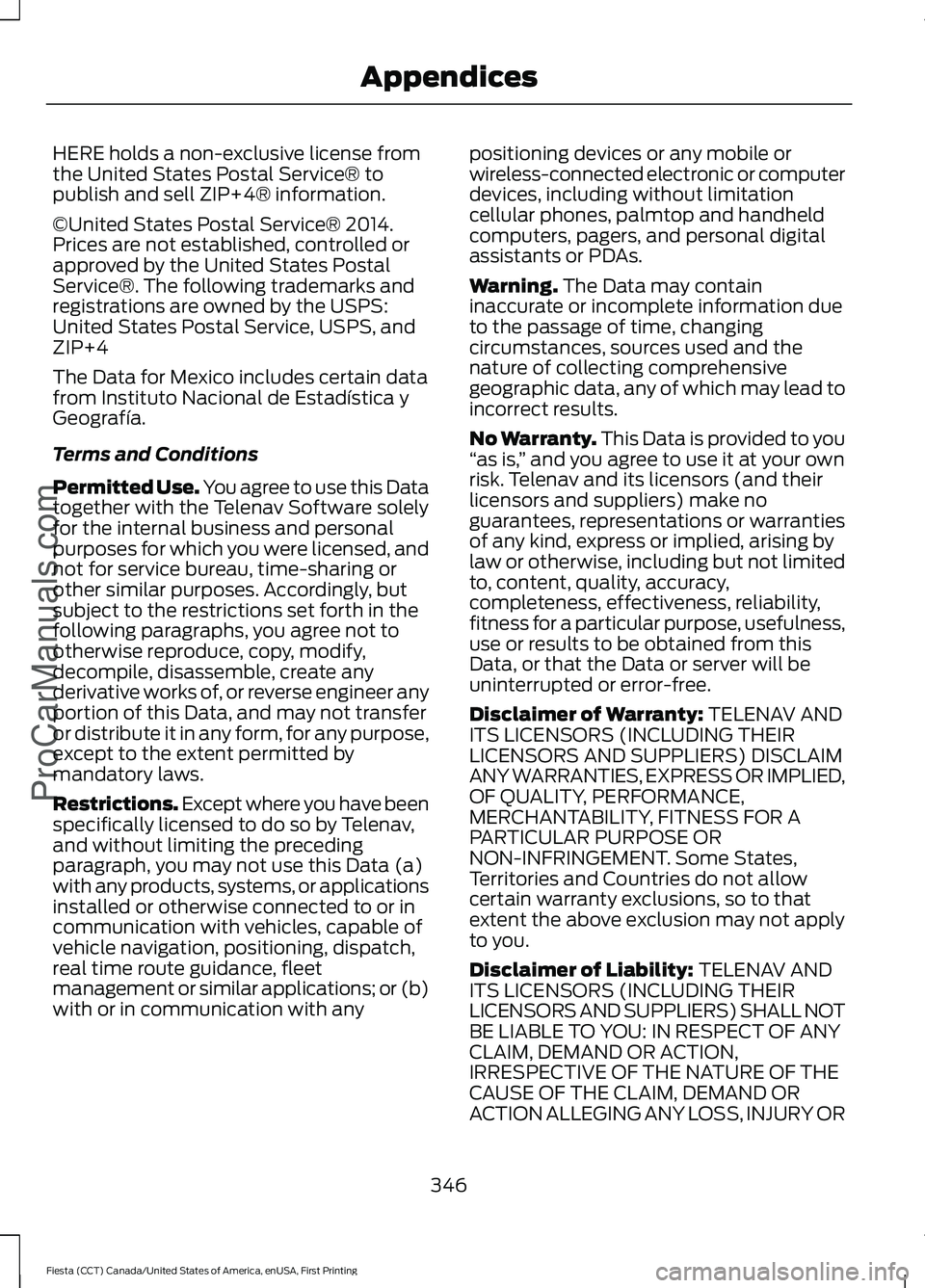
HERE holds a non-exclusive license from
the United States Postal Service® to
publish and sell ZIP+4® information.
©United States Postal Service® 2014.
Prices are not established, controlled or
approved by the United States Postal
Service®. The following trademarks and
registrations are owned by the USPS:
United States Postal Service, USPS, and
ZIP+4
The Data for Mexico includes certain data
from Instituto Nacional de Estadística y
Geografía.
Terms and Conditions
Permitted Use. You agree to use this Data
together with the Telenav Software solely
for the internal business and personal
purposes for which you were licensed, and
not for service bureau, time-sharing or
other similar purposes. Accordingly, but
subject to the restrictions set forth in the
following paragraphs, you agree not to
otherwise reproduce, copy, modify,
decompile, disassemble, create any
derivative works of, or reverse engineer any
portion of this Data, and may not transfer
or distribute it in any form, for any purpose,
except to the extent permitted by
mandatory laws.
Restrictions. Except where you have been
specifically licensed to do so by Telenav,
and without limiting the preceding
paragraph, you may not use this Data (a)
with any products, systems, or applications
installed or otherwise connected to or in
communication with vehicles, capable of
vehicle navigation, positioning, dispatch,
real time route guidance, fleet
management or similar applications; or (b)
with or in communication with any
positioning devices or any mobile or
wireless-connected electronic or computer
devices, including without limitation
cellular phones, palmtop and handheld
computers, pagers, and personal digital
assistants or PDAs.
Warning. The Data may contain
inaccurate or incomplete information due
to the passage of time, changing
circumstances, sources used and the
nature of collecting comprehensive
geographic data, any of which may lead to
incorrect results.
No Warranty.
This Data is provided to you
“ as is, ” and you agree to use it at your own
risk. Telenav and its licensors (and their
licensors and suppliers) make no
guarantees, representations or warranties
of any kind, express or implied, arising by
law or otherwise, including but not limited
to, content, quality, accuracy,
completeness, effectiveness, reliability,
fitness for a particular purpose, usefulness,
use or results to be obtained from this
Data, or that the Data or server will be
uninterrupted or error-free.
Disclaimer of Warranty:
TELENAV AND
ITS LICENSORS (INCLUDING THEIR
LICENSORS AND SUPPLIERS) DISCLAIM
ANY WARRANTIES, EXPRESS OR IMPLIED,
OF QUALITY, PERFORMANCE,
MERCHANTABILITY, FITNESS FOR A
PARTICULAR PURPOSE OR
NON-INFRINGEMENT. Some States,
Territories and Countries do not allow
certain warranty exclusions, so to that
extent the above exclusion may not apply
to you.
Disclaimer of Liability:
TELENAV AND
ITS LICENSORS (INCLUDING THEIR
LICENSORS AND SUPPLIERS) SHALL NOT
BE LIABLE TO YOU: IN RESPECT OF ANY
CLAIM, DEMAND OR ACTION,
IRRESPECTIVE OF THE NATURE OF THE
CAUSE OF THE CLAIM, DEMAND OR
ACTION ALLEGING ANY LOSS, INJURY OR
346
Fiesta (CCT) Canada/United States of America, enUSA, First Printing Appendices
ProCarManuals.com
Page 362 of 363
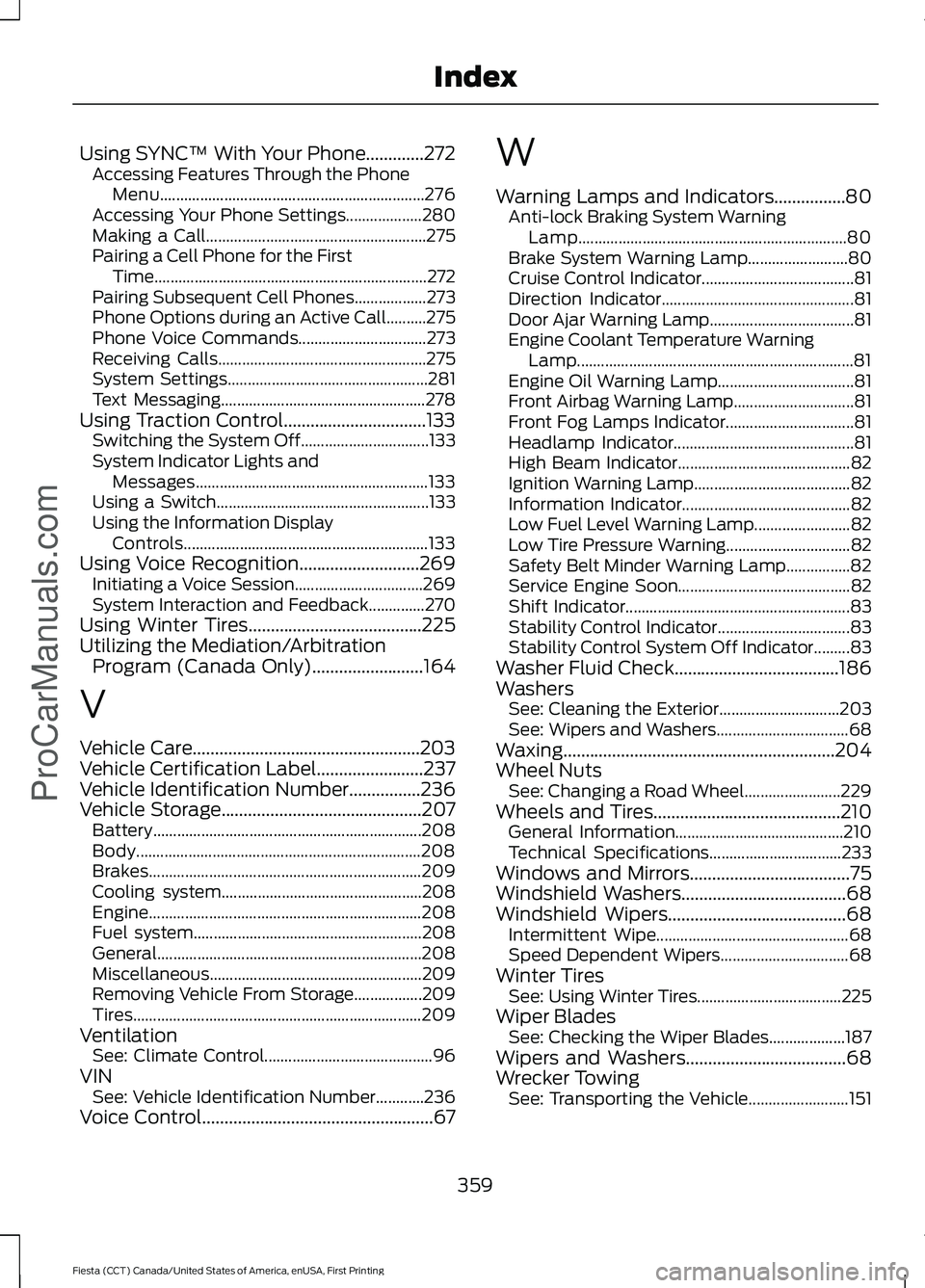
Using SYNC™ With Your Phone.............272
Accessing Features Through the Phone
Menu.................................................................. 276
Accessing Your Phone Settings................... 280
Making a Call....................................................... 275
Pairing a Cell Phone for the First Time.................................................................... 272
Pairing Subsequent Cell Phones.................. 273
Phone Options during an Active Call..........275
Phone Voice Commands................................ 273
Receiving Calls.................................................... 275
System Settings.................................................. 281
Text Messaging................................................... 278
Using Traction Control................................133 Switching the System Off................................ 133
System Indicator Lights and Messages.......................................................... 133
Using a Switch..................................................... 133
Using the Information Display Controls............................................................. 133
Using Voice Recognition...........................269 Initiating a Voice Session................................ 269
System Interaction and Feedback..............270
Using Winter Tires.......................................225
Utilizing the Mediation/Arbitration Program (Canada Only).........................164
V
Vehicle Care...................................................203
Vehicle Certification Label........................237
Vehicle Identification Number................236
Vehicle Storage
.............................................207
Battery................................................................... 208
Body....................................................................... 208
Brakes.................................................................... 209
Cooling system.................................................. 208
Engine.................................................................... 208
Fuel system......................................................... 208
General.................................................................. 208
Miscellaneous..................................................... 209
Removing Vehicle From Storage.................209
Tires........................................................................\
209
Ventilation See: Climate Control.......................................... 96
VIN See: Vehicle Identification Number............236
Voice Control
....................................................67 W
Warning Lamps and Indicators................80
Anti-lock Braking System Warning
Lamp
................................................................... 80
Brake System Warning Lamp......................... 80
Cruise Control Indicator...................................... 81
Direction Indicator................................................ 81
Door Ajar Warning Lamp.................................... 81
Engine Coolant Temperature Warning Lamp..................................................................... 81
Engine Oil Warning Lamp.................................. 81
Front Airbag Warning Lamp.............................. 81
Front Fog Lamps Indicator................................ 81
Headlamp Indicator............................................. 81
High Beam Indicator........................................... 82
Ignition Warning Lamp....................................... 82
Information Indicator.......................................... 82
Low Fuel Level Warning Lamp........................ 82
Low Tire Pressure Warning............................... 82
Safety Belt Minder Warning Lamp................82
Service Engine Soon........................................... 82
Shift Indicator........................................................ 83
Stability Control Indicator................................. 83
Stability Control System Off Indicator.........83
Washer Fluid Check.....................................186
Washers See: Cleaning the Exterior.............................. 203
See: Wipers and Washers................................. 68
Waxing.............................................................204
Wheel Nuts See: Changing a Road Wheel........................ 229
Wheels and Tires
..........................................210
General Information.......................................... 210
Technical Specifications................................. 233
Windows and Mirrors
....................................75
Windshield Washers.....................................68
Windshield Wipers
........................................68
Intermittent Wipe................................................ 68
Speed Dependent Wipers................................ 68
Winter Tires See: Using Winter Tires.................................... 225
Wiper Blades See: Checking the Wiper Blades................... 187
Wipers and Washers
....................................68
Wrecker Towing See: Transporting the Vehicle......................... 151
359
Fiesta (CCT) Canada/United States of America, enUSA, First Printing Index
ProCarManuals.com