display FORD FIESTA 2017 6.G User Guide
[x] Cancel search | Manufacturer: FORD, Model Year: 2017, Model line: FIESTA, Model: FORD FIESTA 2017 6.GPages: 450, PDF Size: 6.05 MB
Page 85 of 450
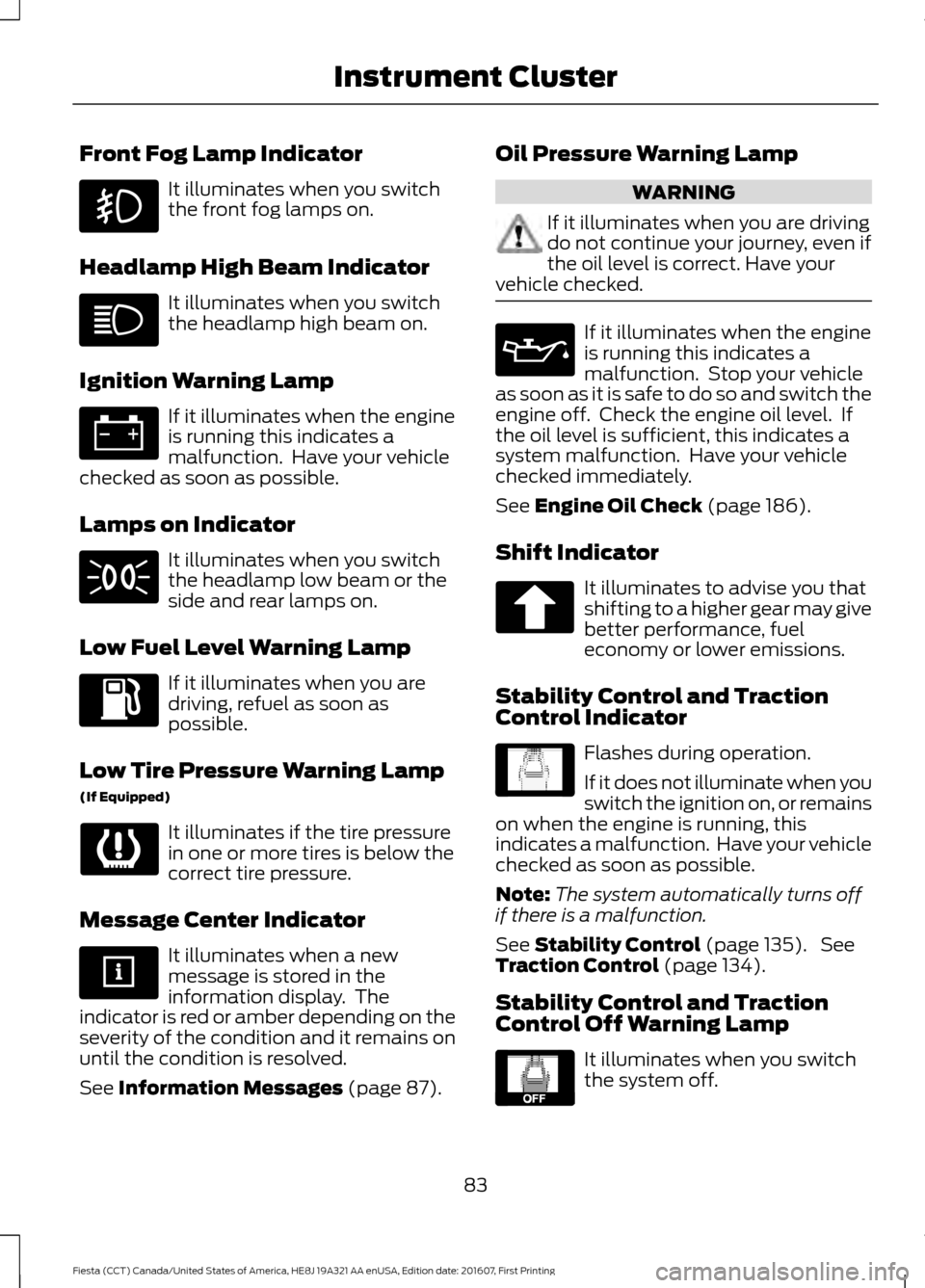
Front Fog Lamp Indicator
It illuminates when you switch
the front fog lamps on.
Headlamp High Beam Indicator It illuminates when you switch
the headlamp high beam on.
Ignition Warning Lamp If it illuminates when the engine
is running this indicates a
malfunction. Have your vehicle
checked as soon as possible.
Lamps on Indicator It illuminates when you switch
the headlamp low beam or the
side and rear lamps on.
Low Fuel Level Warning Lamp If it illuminates when you are
driving, refuel as soon as
possible.
Low Tire Pressure Warning Lamp
(If Equipped) It illuminates if the tire pressure
in one or more tires is below the
correct tire pressure.
Message Center Indicator It illuminates when a new
message is stored in the
information display. The
indicator is red or amber depending on the
severity of the condition and it remains on
until the condition is resolved.
See Information Messages (page 87). Oil Pressure Warning Lamp WARNING
If it illuminates when you are driving
do not continue your journey, even if
the oil level is correct. Have your
vehicle checked. If it illuminates when the engine
is running this indicates a
malfunction. Stop your vehicle
as soon as it is safe to do so and switch the
engine off. Check the engine oil level. If
the oil level is sufficient, this indicates a
system malfunction. Have your vehicle
checked immediately.
See
Engine Oil Check (page 186).
Shift Indicator It illuminates to advise you that
shifting to a higher gear may give
better performance, fuel
economy or lower emissions.
Stability Control and Traction
Control Indicator Flashes during operation.
If it does not illuminate when you
switch the ignition on, or remains
on when the engine is running, this
indicates a malfunction. Have your vehicle
checked as soon as possible.
Note: The system automatically turns off
if there is a malfunction.
See
Stability Control (page 135). See
Traction Control (page 134).
Stability Control and Traction
Control Off Warning Lamp It illuminates when you switch
the system off.
83
Fiesta (CCT) Canada/United States of America, HE8J 19A321 AA enUSA, Edition date: 201607, First Printing Instrument Cluster E138639 E130458
Page 87 of 450
GENERAL INFORMATION
WARNING
Driving while distracted can result in
loss of vehicle control, crash and
injury. We strongly recommend that
you use extreme caution when using any
device that may take your focus off the
road. Your primary responsibility is the safe
operation of your vehicle. We recommend
against the use of any hand-held device
while driving and encourage the use of
voice-operated systems when possible.
Make sure you are aware of all applicable
local laws that may affect the use of
electronic devices while driving. Information Display Controls
Use the information display controls on
the steering wheel to adjust various system
settings on your vehicle. The information
display shows the system settings.
•
Press the up or down arrow buttons to
scroll through the list.
• Press the right arrow button to enter a
submenu.
• Press the left arrow button to exit a
submenu.
• Press the OK button to choose and
confirm settings or messages. System Check
Active warnings appear first. Press the up
or down arrow buttons to scroll through
the list.
Menu Structure
Note:
Some menus may show features as
used in different models, so may appear
different to you on your vehicle. Dial number
Phone
Redial
Phone book
Call History
Speed Dial
Text Messaging
BT device
Phone settings
Ford EcoMode Bluetooth on
SYNC-Settings
Set defaults
Master reset
Install on SYNC
System info
Voice settings
Unpair
SYNC-Apps Route options
Navigation
Map display
Assistance options
Personal data
85
Fiesta (CCT) Canada/United States of America, HE8J 19A321 AA enUSA, Edition date: 201607, First Printing Information DisplaysE103626
Page 88 of 450
Reset all settings
Adaptive volume
Audio settings
Sound
Nav audio mixing
DSP settings
DSP equaliser
Traffic
News
Alt. frequency
RDS regional
Traction control
Vehicle settings
Hill start assist
Alarm system
Power mirror
Indicator
Ambient light
Chimes
Auto time (GPS)
Clock settings
Set time
Set date
Set time zone
24-hour mode
Measure unit
Display settings
Language
Dimming
Create MyKey
MyKey
Traction control
ESC Max Speed
Speed warning
MyKey Volume
limit
Information
Clear MyKeys
CLOCK
Type 1
To adjust the clock, switch the ignition on
and press buttons H or M on the
information and entertainment display as
necessary.
Type 2
Note: Use the information display to adjust
the clock. See General Information (page
85).
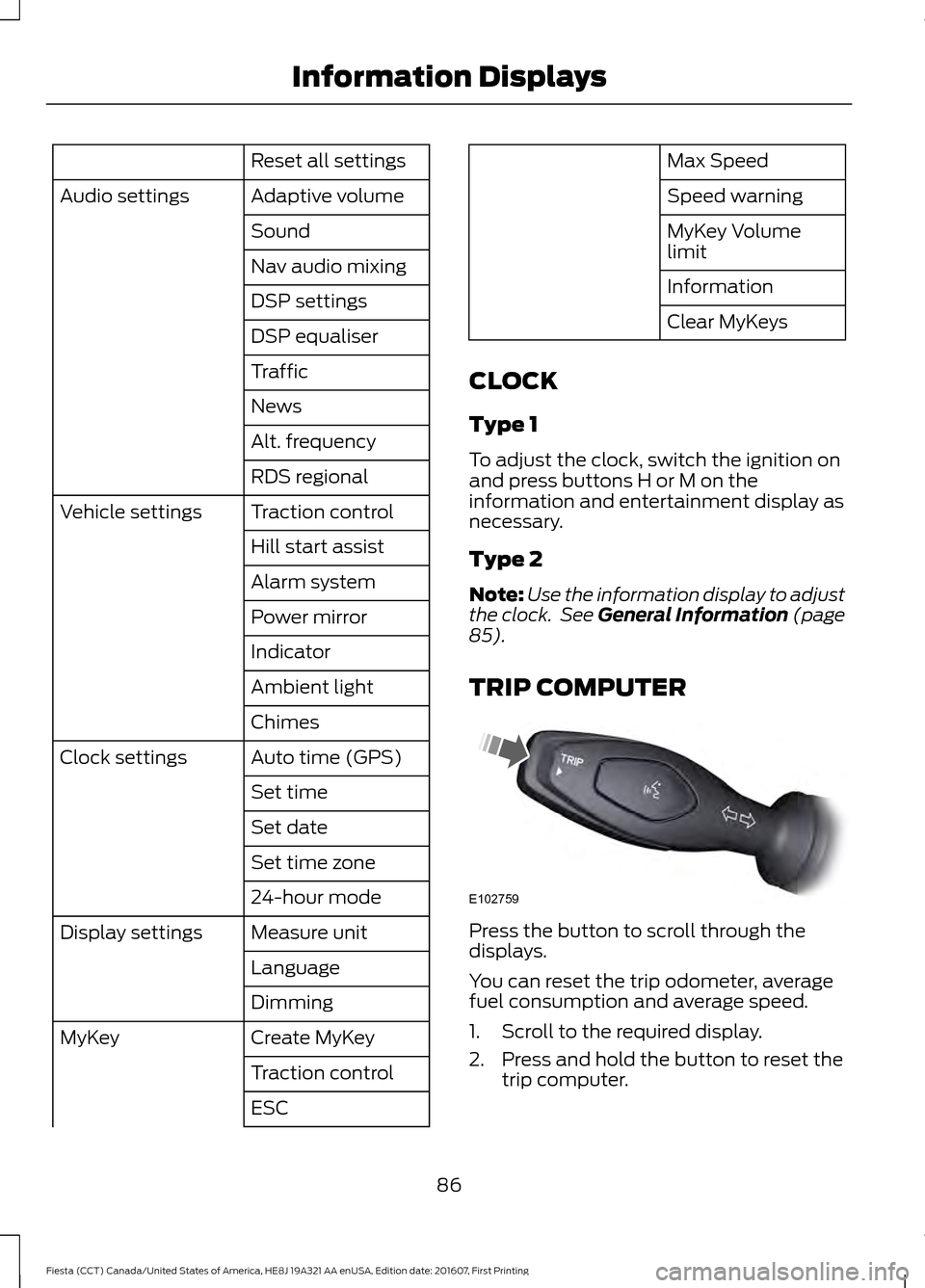
TRIP COMPUTER Press the button to scroll through the
displays.
You can reset the trip odometer, average
fuel consumption and average speed.
1. Scroll to the required display.
2. Press and hold the button to reset the
trip computer.
86
Fiesta (CCT) Canada/United States of America, HE8J 19A321 AA enUSA, Edition date: 201607, First Printing Information DisplaysE102759
Page 89 of 450
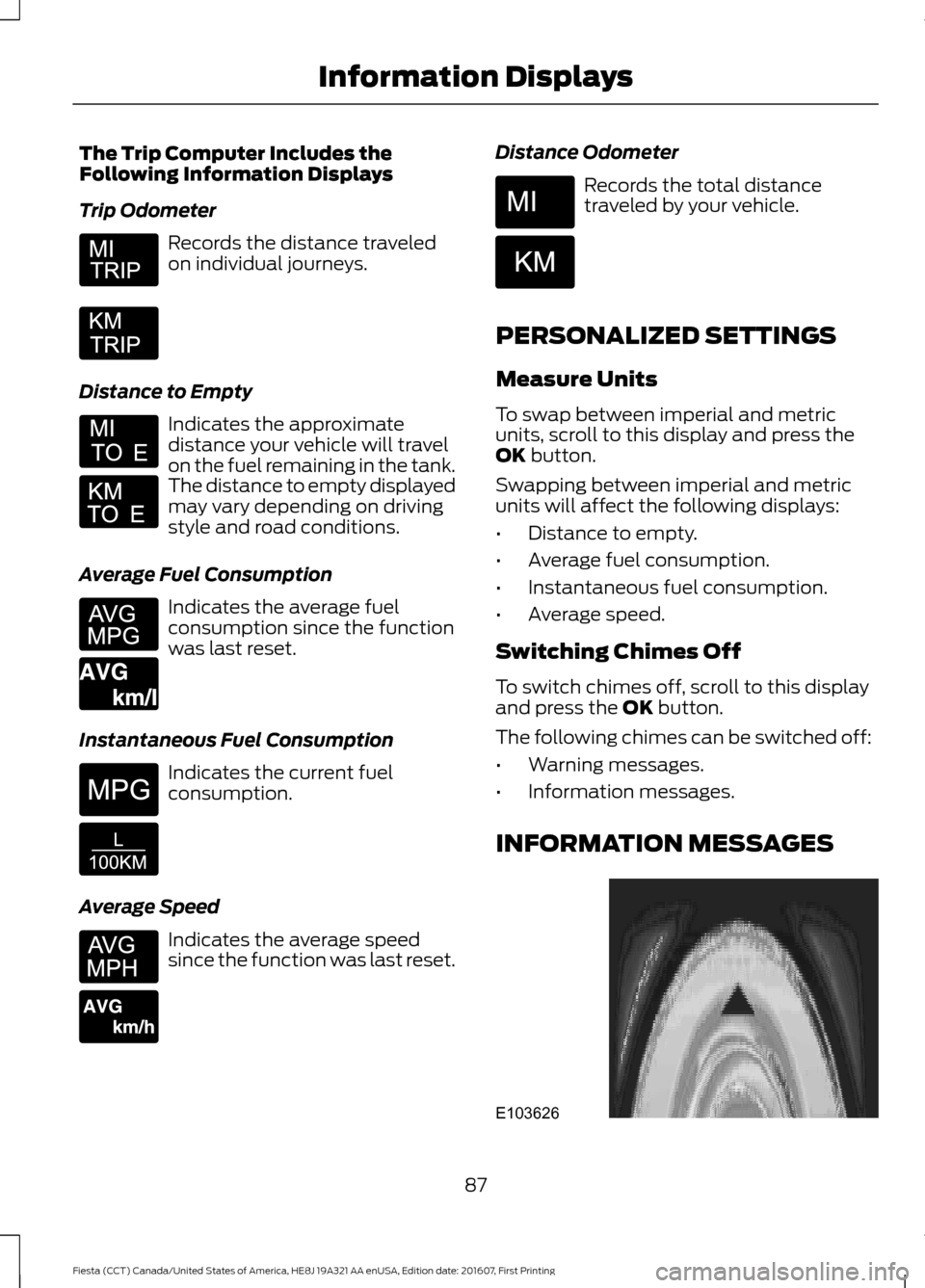
The Trip Computer Includes the
Following Information Displays
Trip Odometer
Records the distance traveled
on individual journeys.
Distance to Empty Indicates the approximate
distance your vehicle will travel
on the fuel remaining in the tank.
The distance to empty displayed
may vary depending on driving
style and road conditions.
Average Fuel Consumption Indicates the average fuel
consumption since the function
was last reset.
Instantaneous Fuel Consumption Indicates the current fuel
consumption.
Average Speed Indicates the average speed
since the function was last reset. Distance Odometer Records the total distance
traveled by your vehicle.
PERSONALIZED SETTINGS
Measure Units
To swap between imperial and metric
units, scroll to this display and press the
OK button.
Swapping between imperial and metric
units will affect the following displays:
• Distance to empty.
• Average fuel consumption.
• Instantaneous fuel consumption.
• Average speed.
Switching Chimes Off
To switch chimes off, scroll to this display
and press the
OK button.
The following chimes can be switched off:
• Warning messages.
• Information messages.
INFORMATION MESSAGES 87
Fiesta (CCT) Canada/United States of America, HE8J 19A321 AA enUSA, Edition date: 201607, First Printing Information Displays E164638E E146275 E146277 E103626
Page 90 of 450
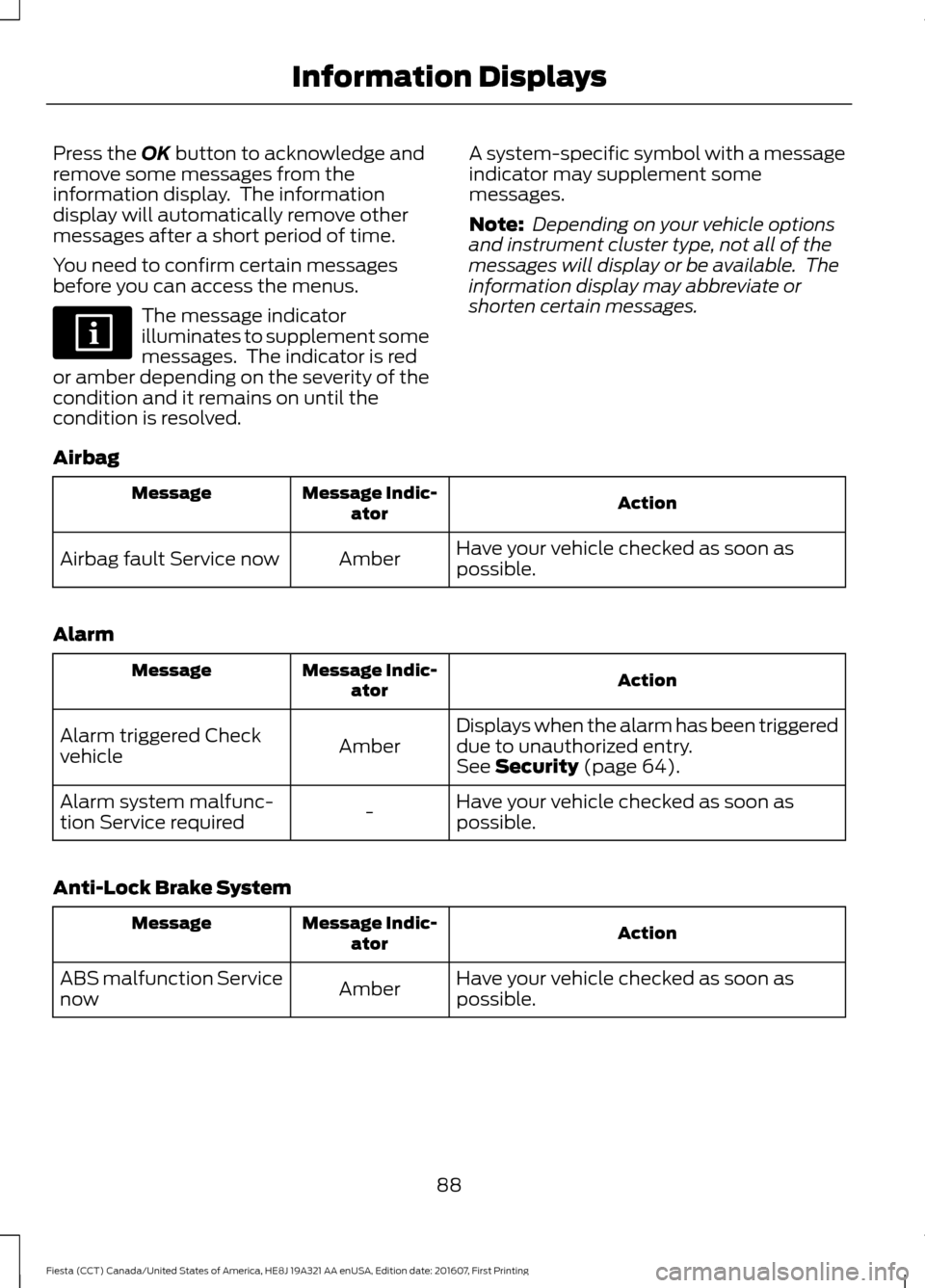
Press the OK button to acknowledge and
remove some messages from the
information display. The information
display will automatically remove other
messages after a short period of time.
You need to confirm certain messages
before you can access the menus. The message indicator
illuminates to supplement some
messages. The indicator is red
or amber depending on the severity of the
condition and it remains on until the
condition is resolved. A system-specific symbol with a message
indicator may supplement some
messages.
Note:
Depending on your vehicle options
and instrument cluster type, not all of the
messages will display or be available. The
information display may abbreviate or
shorten certain messages.
Airbag Action
Message Indic-
ator
Message
Have your vehicle checked as soon as
possible.
Amber
Airbag fault Service now
Alarm Action
Message Indic-
ator
Message
Displays when the alarm has been triggered
due to unauthorized entry.
Amber
Alarm triggered Check
vehicle
See
Security (page 64).
Have your vehicle checked as soon as
possible.
-
Alarm system malfunc-
tion Service required
Anti-Lock Brake System Action
Message Indic-
ator
Message
Have your vehicle checked as soon as
possible.
Amber
ABS malfunction Service
now
88
Fiesta (CCT) Canada/United States of America, HE8J 19A321 AA enUSA, Edition date: 201607, First Printing Information Displays
Page 91 of 450
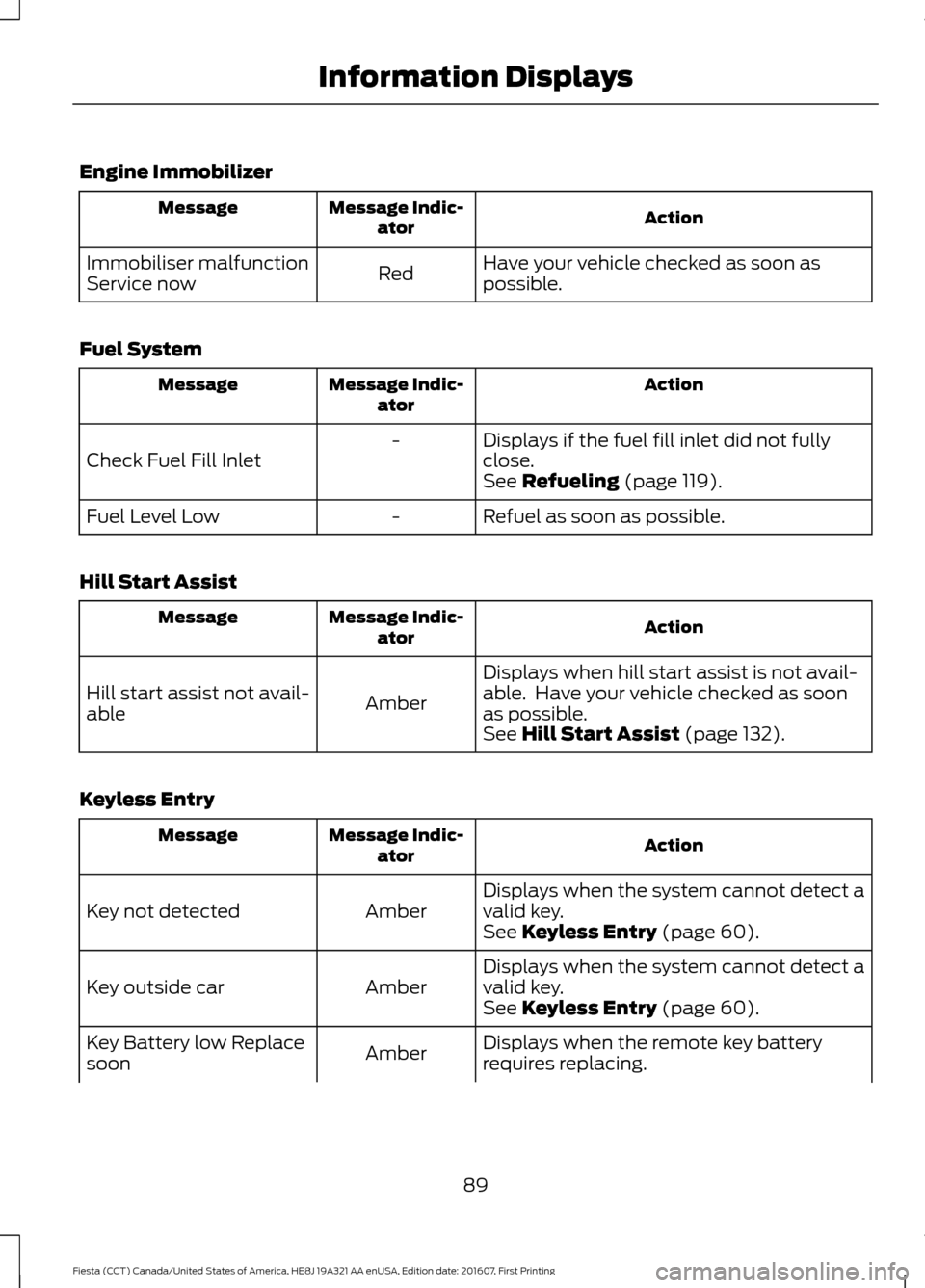
Engine Immobilizer
Action
Message Indic-
ator
Message
Have your vehicle checked as soon as
possible.
Red
Immobiliser malfunction
Service now
Fuel System Action
Message Indic-
ator
Message
Displays if the fuel fill inlet did not fully
close.
-
Check Fuel Fill Inlet See Refueling (page 119).
Refuel as soon as possible.
-
Fuel Level Low
Hill Start Assist Action
Message Indic-
ator
Message
Displays when hill start assist is not avail-
able. Have your vehicle checked as soon
as possible.
Amber
Hill start assist not avail-
able
See
Hill Start Assist (page 132).
Keyless Entry Action
Message Indic-
ator
Message
Displays when the system cannot detect a
valid key.
Amber
Key not detected
See
Keyless Entry (page 60).
Displays when the system cannot detect a
valid key.
Amber
Key outside car
See
Keyless Entry (page 60).
Displays when the remote key battery
requires replacing.
Amber
Key Battery low Replace
soon
89
Fiesta (CCT) Canada/United States of America, HE8J 19A321 AA enUSA, Edition date: 201607, First Printing Information Displays
Page 92 of 450
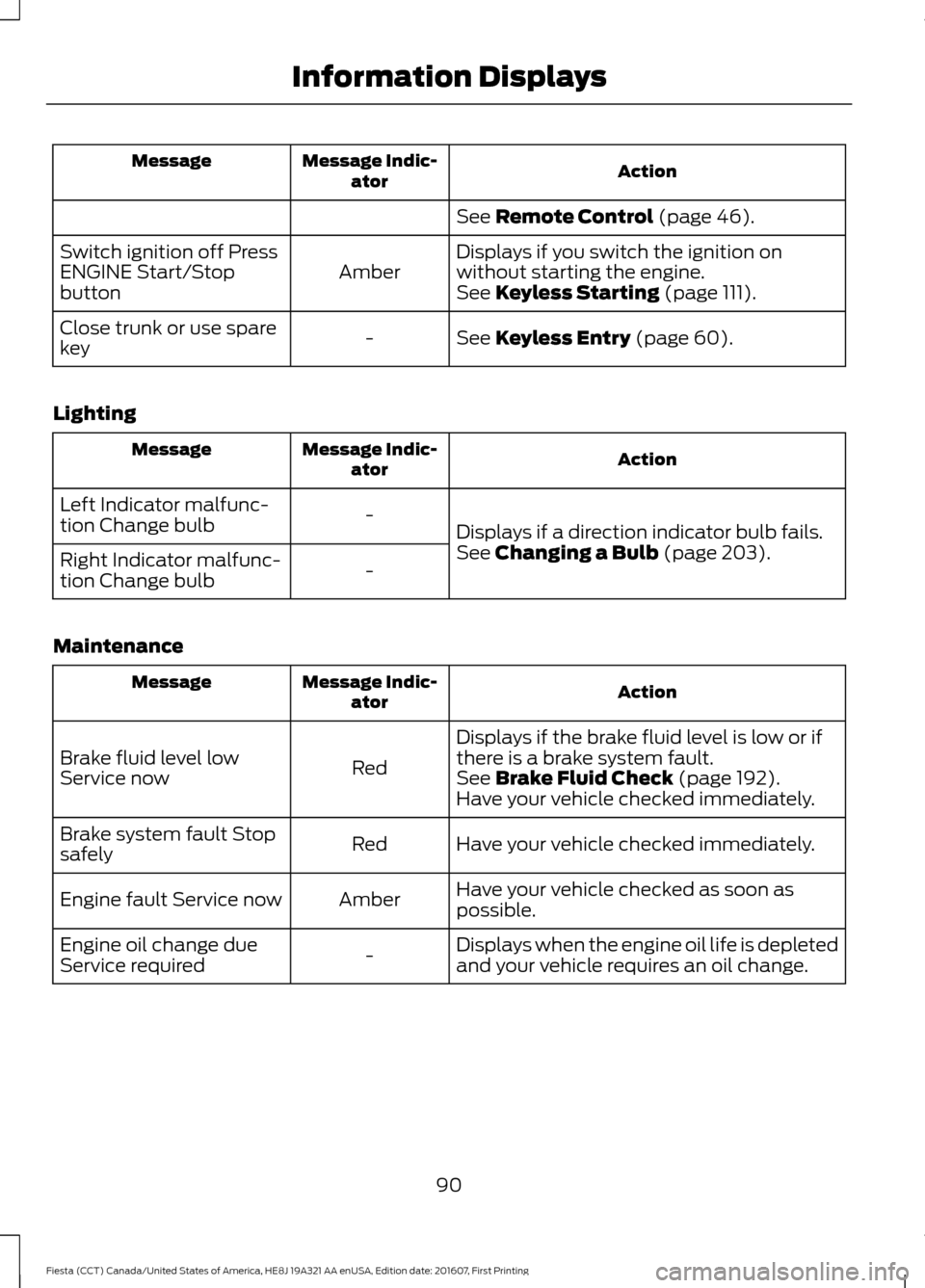
Action
Message Indic-
ator
Message
See Remote Control (page 46).
Displays if you switch the ignition on
without starting the engine.
Amber
Switch ignition off Press
ENGINE Start/Stop
button
See
Keyless Starting (page 111).
See
Keyless Entry (page 60).
-
Close trunk or use spare
key
Lighting Action
Message Indic-
ator
Message
Displays if a direction indicator bulb fails.
-
Left Indicator malfunc-
tion Change bulb
See
Changing a Bulb (page 203).
-
Right Indicator malfunc-
tion Change bulb
Maintenance Action
Message Indic-
ator
Message
Displays if the brake fluid level is low or if
there is a brake system fault.
Red
Brake fluid level low
Service now
See
Brake Fluid Check (page 192).
Have your vehicle checked immediately.
Have your vehicle checked immediately.
Red
Brake system fault Stop
safely
Have your vehicle checked as soon as
possible.
Amber
Engine fault Service now
Displays when the engine oil life is depleted
and your vehicle requires an oil change.
-
Engine oil change due
Service required
90
Fiesta (CCT) Canada/United States of America, HE8J 19A321 AA enUSA, Edition date: 201607, First Printing Information Displays
Page 93 of 450
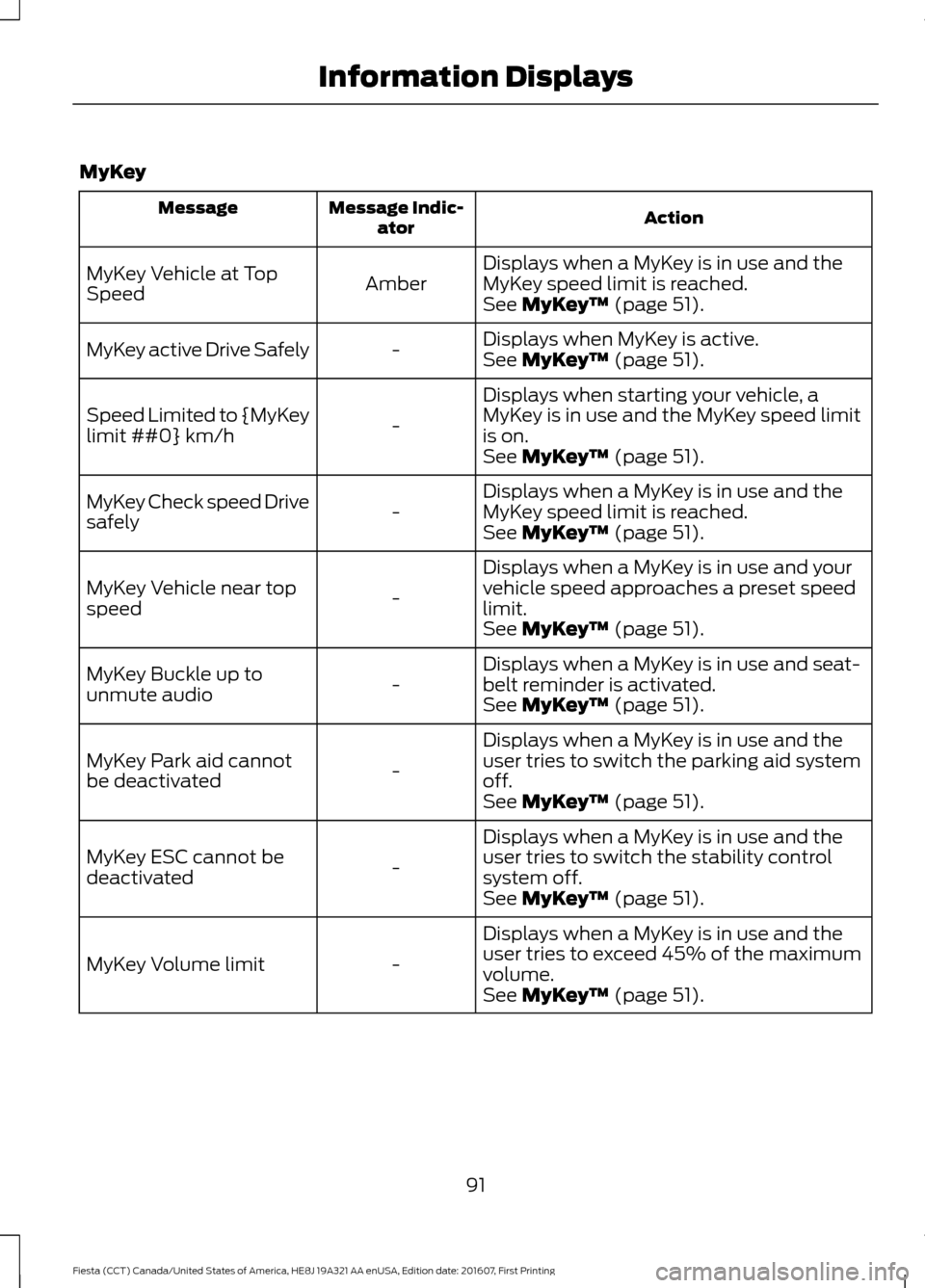
MyKey
Action
Message Indic-
ator
Message
Displays when a MyKey is in use and the
MyKey speed limit is reached.
Amber
MyKey Vehicle at Top
Speed
See MyKey™ (page 51).
Displays when MyKey is active.
-
MyKey active Drive Safely
See
MyKey™ (page 51).
Displays when starting your vehicle, a
MyKey is in use and the MyKey speed limit
is on.
-
Speed Limited to {MyKey
limit ##0} km/h
See
MyKey™ (page 51).
Displays when a MyKey is in use and the
MyKey speed limit is reached.
-
MyKey Check speed Drive
safely
See
MyKey™ (page 51).
Displays when a MyKey is in use and your
vehicle speed approaches a preset speed
limit.
-
MyKey Vehicle near top
speed
See
MyKey™ (page 51).
Displays when a MyKey is in use and seat-
belt reminder is activated.
-
MyKey Buckle up to
unmute audio
See
MyKey™ (page 51).
Displays when a MyKey is in use and the
user tries to switch the parking aid system
off.
-
MyKey Park aid cannot
be deactivated
See
MyKey™ (page 51).
Displays when a MyKey is in use and the
user tries to switch the stability control
system off.
-
MyKey ESC cannot be
deactivated
See
MyKey™ (page 51).
Displays when a MyKey is in use and the
user tries to exceed 45% of the maximum
volume.
-
MyKey Volume limit
See
MyKey™ (page 51).
91
Fiesta (CCT) Canada/United States of America, HE8J 19A321 AA enUSA, Edition date: 201607, First Printing Information Displays
Page 94 of 450
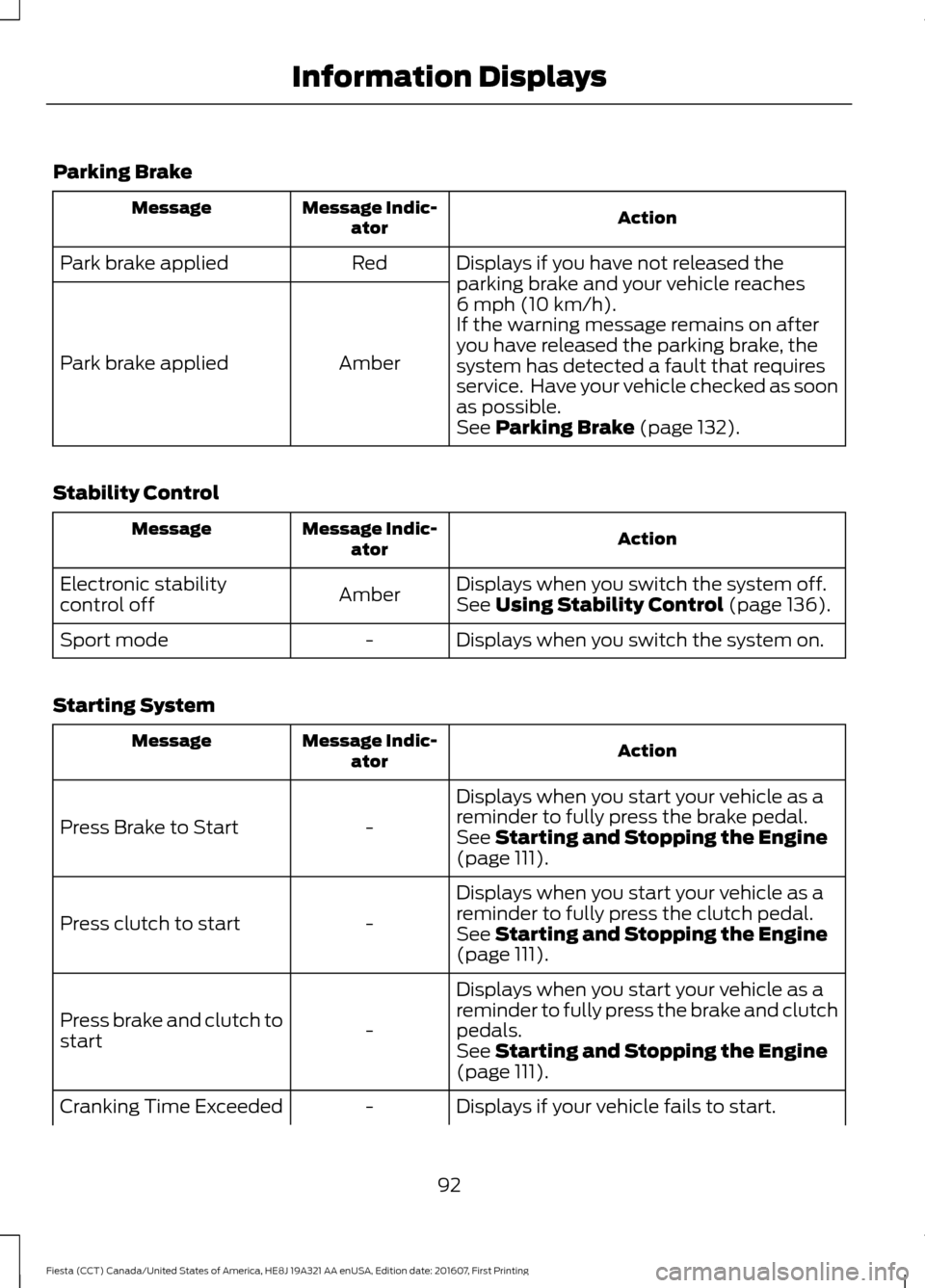
Parking Brake
Action
Message Indic-
ator
Message
Displays if you have not released the
parking brake and your vehicle reaches
6 mph (10 km/h).
Red
Park brake applied
Amber
Park brake applied If the warning message remains on after
you have released the parking brake, the
system has detected a fault that requires
service. Have your vehicle checked as soon
as possible.
See
Parking Brake (page 132).
Stability Control Action
Message Indic-
ator
Message
Displays when you switch the system off.
Amber
Electronic stability
control off
See
Using Stability Control (page 136).
Displays when you switch the system on.
-
Sport mode
Starting System Action
Message Indic-
ator
Message
Displays when you start your vehicle as a
reminder to fully press the brake pedal.
-
Press Brake to Start
See
Starting and Stopping the Engine
(page 111).
Displays when you start your vehicle as a
reminder to fully press the clutch pedal.
-
Press clutch to start
See
Starting and Stopping the Engine
(page 111).
Displays when you start your vehicle as a
reminder to fully press the brake and clutch
pedals.
-
Press brake and clutch to
start
See
Starting and Stopping the Engine
(page 111).
Displays if your vehicle fails to start.
-
Cranking Time Exceeded
92
Fiesta (CCT) Canada/United States of America, HE8J 19A321 AA enUSA, Edition date: 201607, First Printing Information Displays
Page 95 of 450
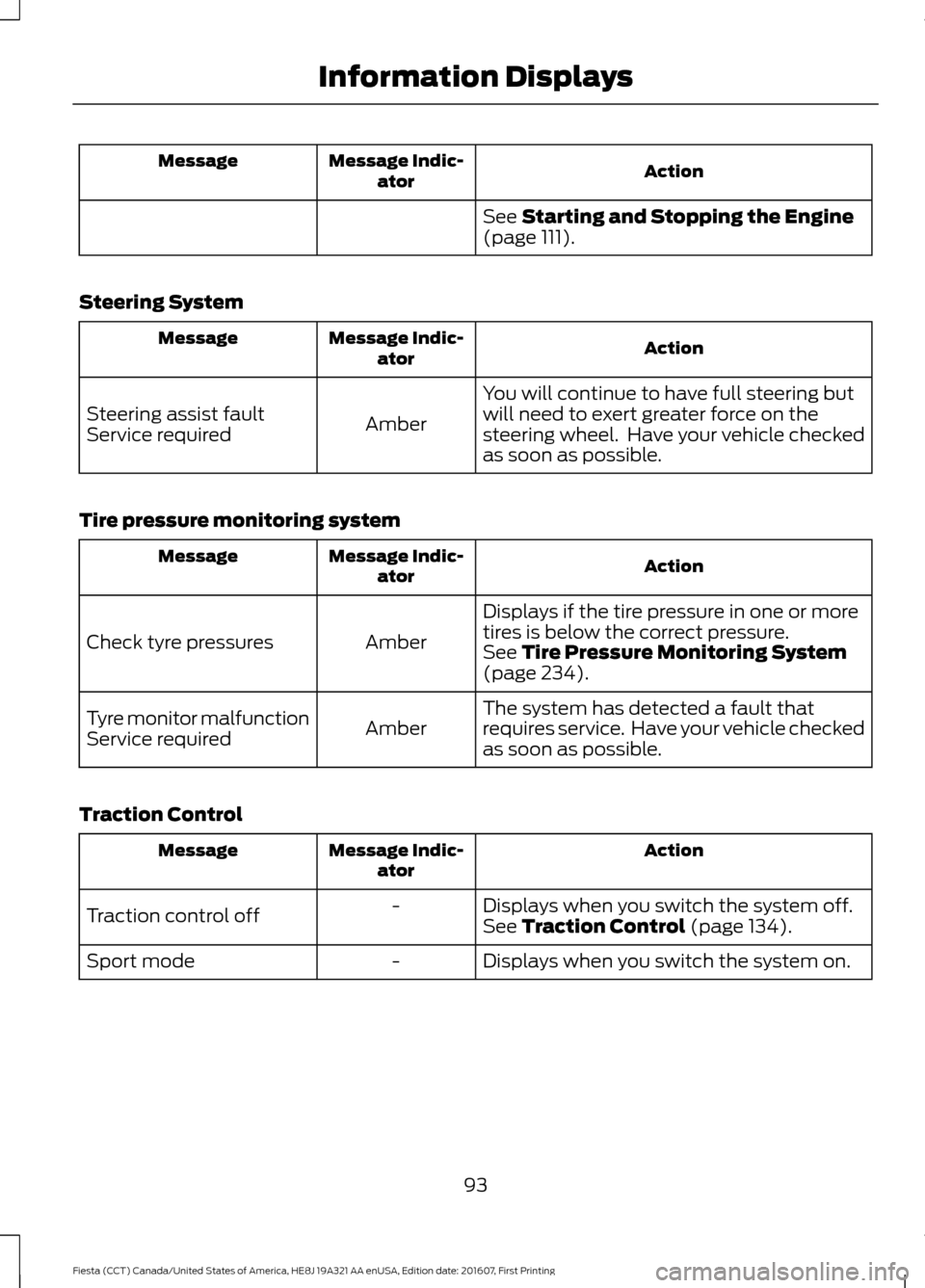
Action
Message Indic-
ator
Message
See Starting and Stopping the Engine
(page 111).
Steering System Action
Message Indic-
ator
Message
You will continue to have full steering but
will need to exert greater force on the
steering wheel. Have your vehicle checked
as soon as possible.
Amber
Steering assist fault
Service required
Tire pressure monitoring system Action
Message Indic-
ator
Message
Displays if the tire pressure in one or more
tires is below the correct pressure.
Amber
Check tyre pressures
See
Tire Pressure Monitoring System
(page 234).
The system has detected a fault that
requires service. Have your vehicle checked
as soon as possible.
Amber
Tyre monitor malfunction
Service required
Traction Control Action
Message Indic-
ator
Message
Displays when you switch the system off.
-
Traction control off See
Traction Control (page 134).
Displays when you switch the system on.
-
Sport mode
93
Fiesta (CCT) Canada/United States of America, HE8J 19A321 AA enUSA, Edition date: 201607, First Printing Information Displays