display FORD FIESTA 2017 6.G Owner's Manual
[x] Cancel search | Manufacturer: FORD, Model Year: 2017, Model line: FIESTA, Model: FORD FIESTA 2017 6.GPages: 450, PDF Size: 6.05 MB
Page 96 of 450
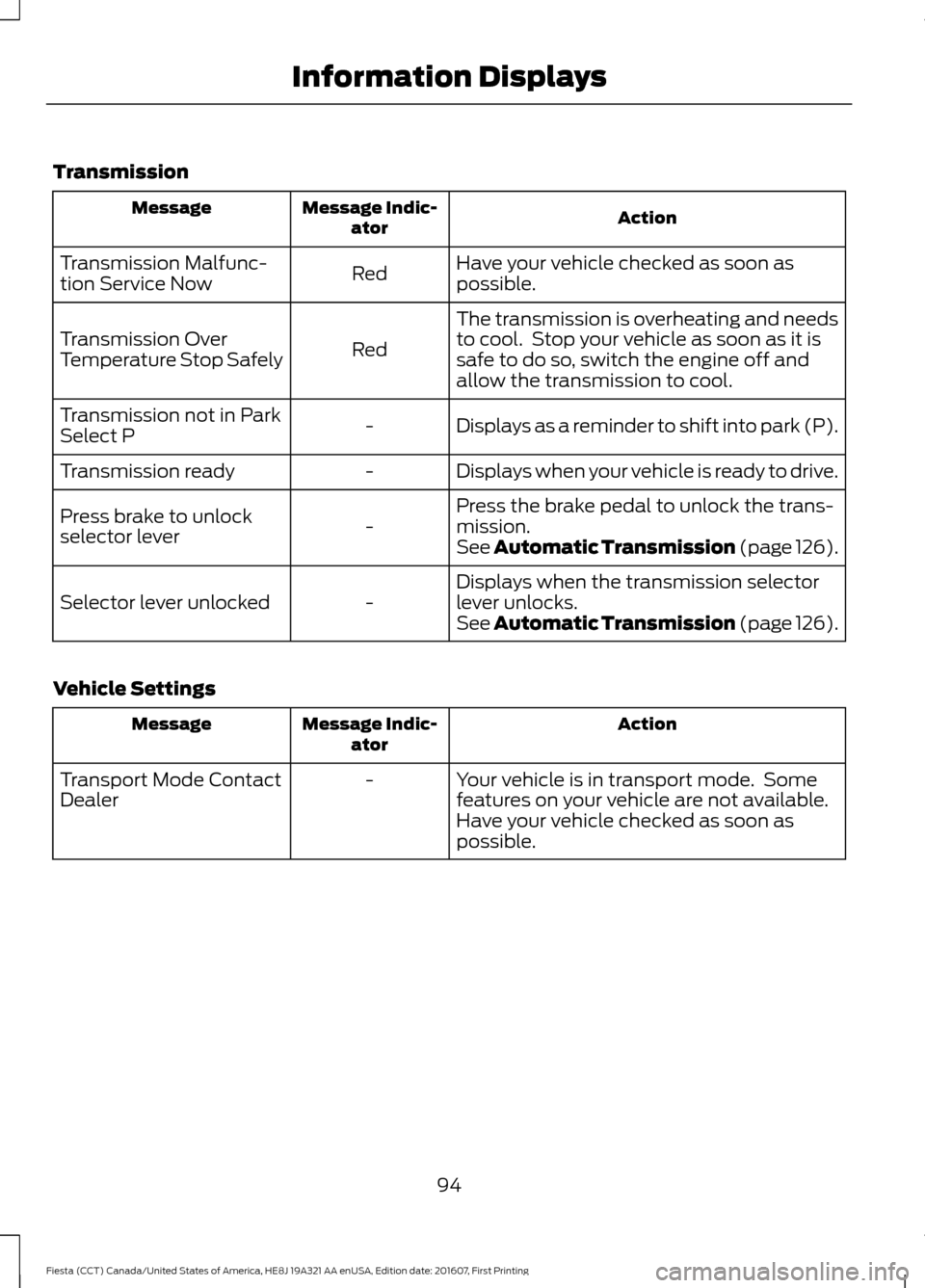
Transmission
Action
Message Indic-
ator
Message
Have your vehicle checked as soon as
possible.
Red
Transmission Malfunc-
tion Service Now
The transmission is overheating and needs
to cool. Stop your vehicle as soon as it is
safe to do so, switch the engine off and
allow the transmission to cool.
Red
Transmission Over
Temperature Stop Safely
Displays as a reminder to shift into park (P).
-
Transmission not in Park
Select P
Displays when your vehicle is ready to drive.
-
Transmission ready
Press the brake pedal to unlock the trans-
mission.
-
Press brake to unlock
selector lever
See Automatic Transmission (page 126).
Displays when the transmission selector
lever unlocks.
-
Selector lever unlocked
See Automatic Transmission (page
126).
Vehicle Settings Action
Message Indic-
ator
Message
Your vehicle is in transport mode. Some
features on your vehicle are not available.
Have your vehicle checked as soon as
possible.
-
Transport Mode Contact
Dealer
94
Fiesta (CCT) Canada/United States of America, HE8J 19A321 AA enUSA, Edition date: 201607, First Printing Information Displays
Page 114 of 450
Note:
The ignition will automatically switch
off when you leave your vehicle unattended.
This is to prevent your vehicle battery
running out of charge.
Note: A valid key must be located inside
your vehicle to switch the ignition on and
start the engine.
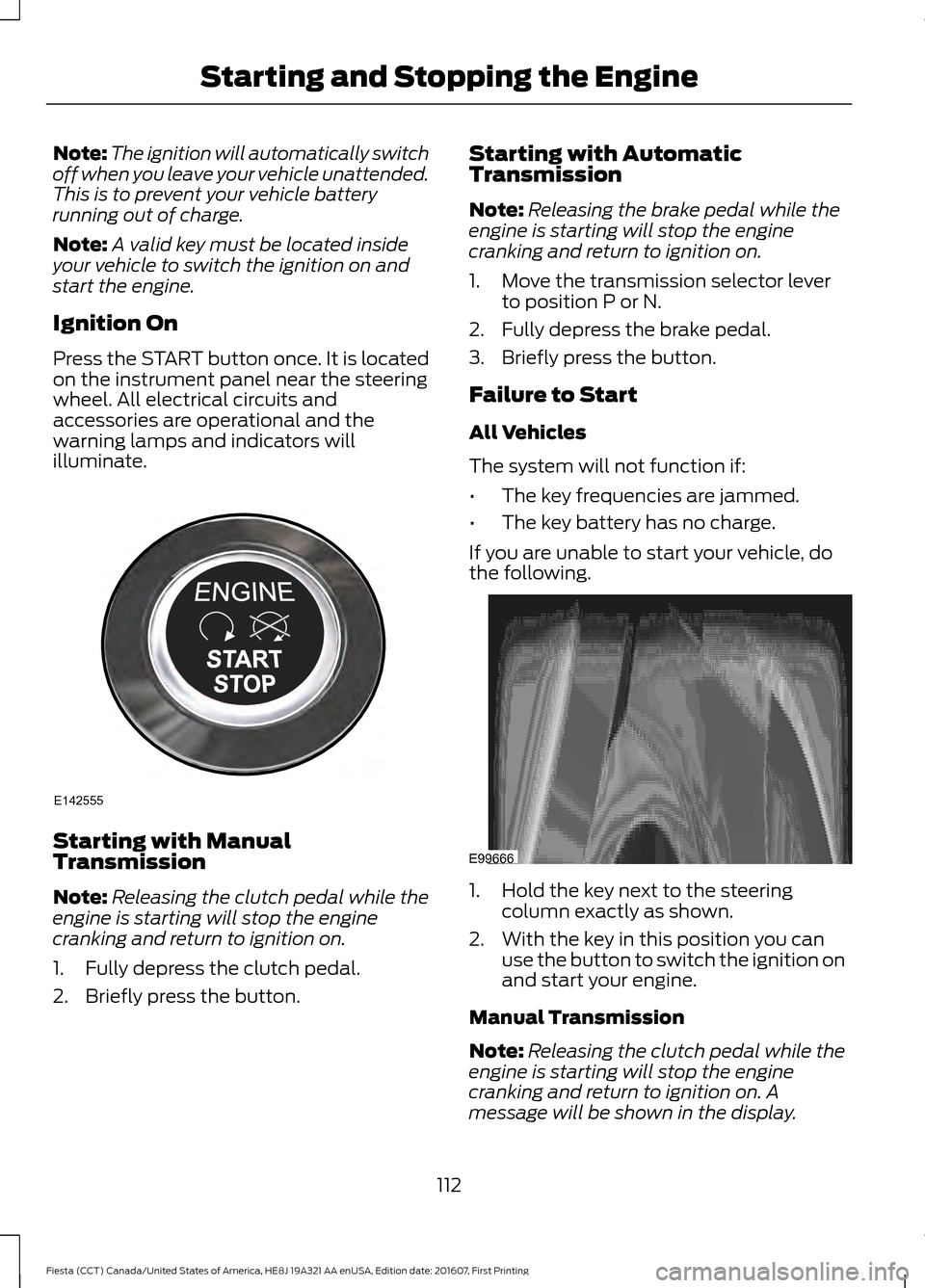
Ignition On
Press the START button once. It is located
on the instrument panel near the steering
wheel. All electrical circuits and
accessories are operational and the
warning lamps and indicators will
illuminate. Starting with Manual
Transmission
Note:
Releasing the clutch pedal while the
engine is starting will stop the engine
cranking and return to ignition on.
1. Fully depress the clutch pedal.
2. Briefly press the button. Starting with Automatic
Transmission
Note:
Releasing the brake pedal while the
engine is starting will stop the engine
cranking and return to ignition on.
1. Move the transmission selector lever to position P or N.
2. Fully depress the brake pedal.
3. Briefly press the button.
Failure to Start
All Vehicles
The system will not function if:
• The key frequencies are jammed.
• The key battery has no charge.
If you are unable to start your vehicle, do
the following. 1. Hold the key next to the steering
column exactly as shown.
2. With the key in this position you can use the button to switch the ignition on
and start your engine.
Manual Transmission
Note: Releasing the clutch pedal while the
engine is starting will stop the engine
cranking and return to ignition on. A
message will be shown in the display.
112
Fiesta (CCT) Canada/United States of America, HE8J 19A321 AA enUSA, Edition date: 201607, First Printing Starting and Stopping the EngineE142555 E99666
Page 123 of 450
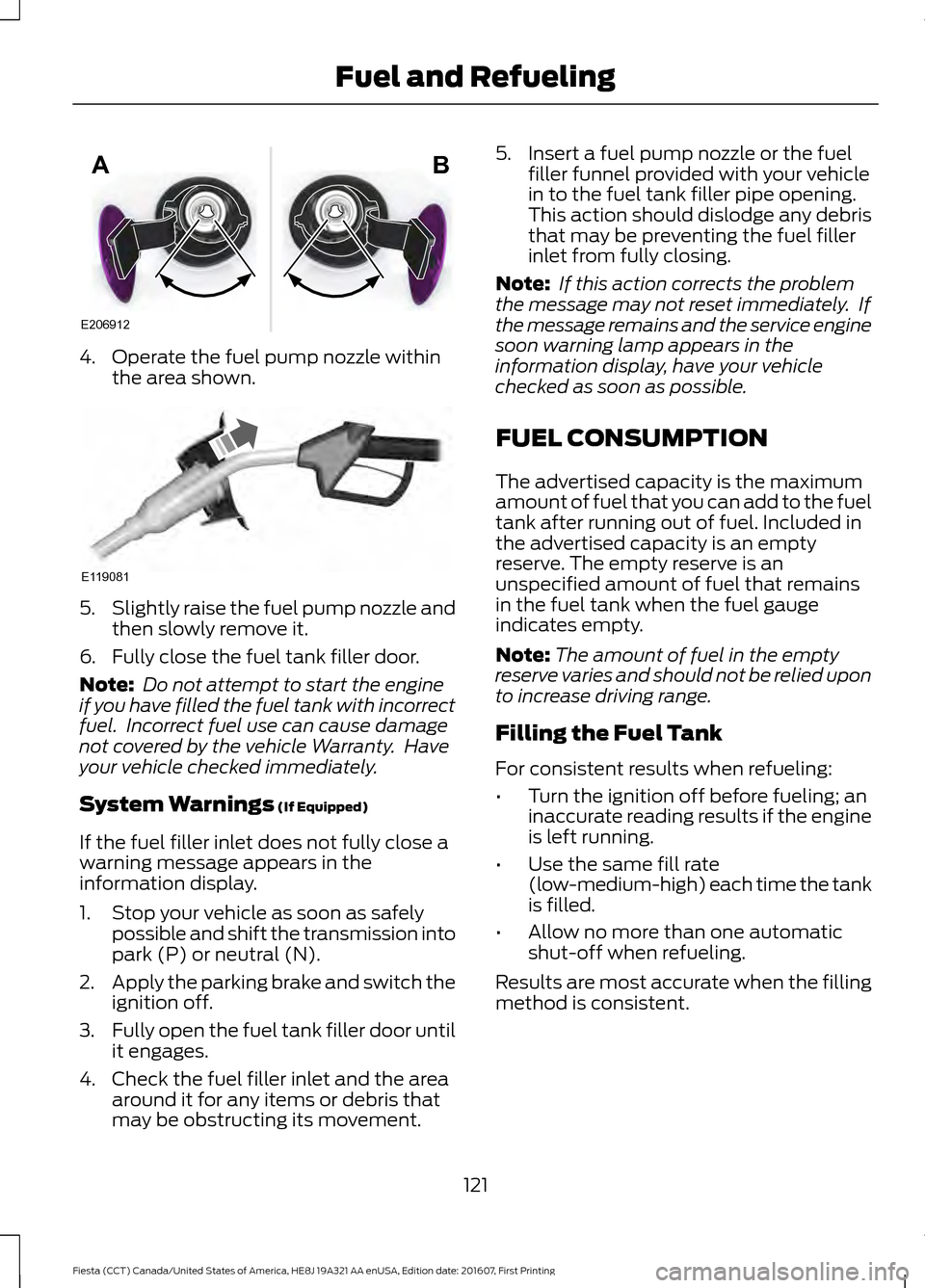
4. Operate the fuel pump nozzle within
the area shown. 5.
Slightly raise the fuel pump nozzle and
then slowly remove it.
6. Fully close the fuel tank filler door.
Note: Do not attempt to start the engine
if you have filled the fuel tank with incorrect
fuel. Incorrect fuel use can cause damage
not covered by the vehicle Warranty. Have
your vehicle checked immediately.
System Warnings (If Equipped)
If the fuel filler inlet does not fully close a
warning message appears in the
information display.
1. Stop your vehicle as soon as safely possible and shift the transmission into
park (P) or neutral (N).
2. Apply the parking brake and switch the
ignition off.
3. Fully open the fuel tank filler door until
it engages.
4. Check the fuel filler inlet and the area around it for any items or debris that
may be obstructing its movement. 5. Insert a fuel pump nozzle or the fuel
filler funnel provided with your vehicle
in to the fuel tank filler pipe opening.
This action should dislodge any debris
that may be preventing the fuel filler
inlet from fully closing.
Note: If this action corrects the problem
the message may not reset immediately. If
the message remains and the service engine
soon warning lamp appears in the
information display, have your vehicle
checked as soon as possible.
FUEL CONSUMPTION
The advertised capacity is the maximum
amount of fuel that you can add to the fuel
tank after running out of fuel. Included in
the advertised capacity is an empty
reserve. The empty reserve is an
unspecified amount of fuel that remains
in the fuel tank when the fuel gauge
indicates empty.
Note: The amount of fuel in the empty
reserve varies and should not be relied upon
to increase driving range.
Filling the Fuel Tank
For consistent results when refueling:
• Turn the ignition off before fueling; an
inaccurate reading results if the engine
is left running.
• Use the same fill rate
(low-medium-high) each time the tank
is filled.
• Allow no more than one automatic
shut-off when refueling.
Results are most accurate when the filling
method is consistent.
121
Fiesta (CCT) Canada/United States of America, HE8J 19A321 AA enUSA, Edition date: 201607, First Printing Fuel and RefuelingE206912
AB E119081
Page 129 of 450
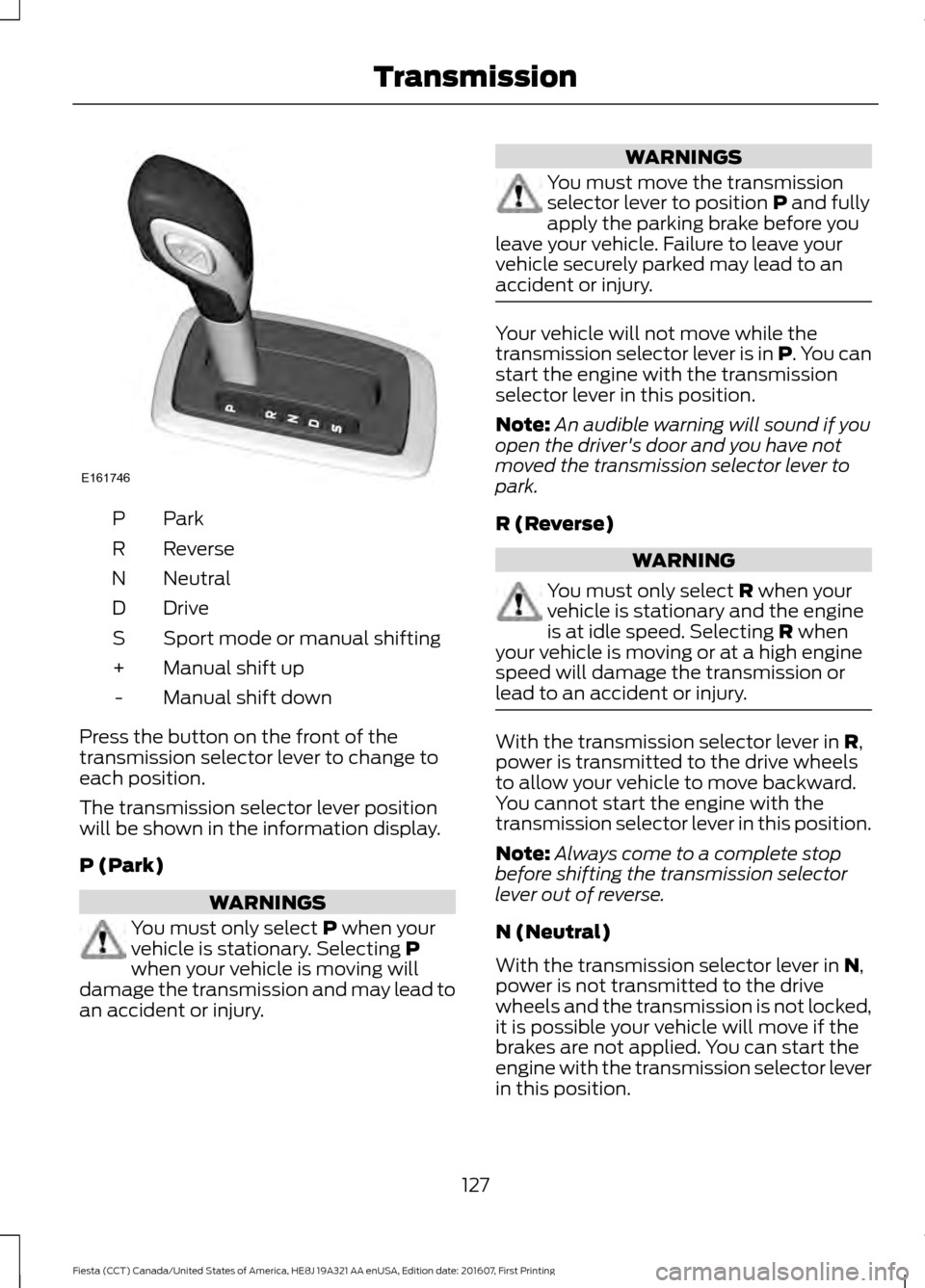
ParkP
Reverse
R
Neutral
N
Drive
D
Sport mode or manual shifting
S
Manual shift up
+
Manual shift down
-
Press the button on the front of the
transmission selector lever to change to
each position.
The transmission selector lever position
will be shown in the information display.
P (Park) WARNINGS
You must only select P when your
vehicle is stationary. Selecting P
when your vehicle is moving will
damage the transmission and may lead to
an accident or injury. WARNINGS
You must move the transmission
selector lever to position
P and fully
apply the parking brake before you
leave your vehicle. Failure to leave your
vehicle securely parked may lead to an
accident or injury. Your vehicle will not move while the
transmission selector lever is in P. You can
start the engine with the transmission
selector lever in this position.
Note:
An audible warning will sound if you
open the driver's door and you have not
moved the transmission selector lever to
park.
R (Reverse) WARNING
You must only select
R when your
vehicle is stationary and the engine
is at idle speed. Selecting
R when
your vehicle is moving or at a high engine
speed will damage the transmission or
lead to an accident or injury. With the transmission selector lever in
R,
power is transmitted to the drive wheels
to allow your vehicle to move backward.
You cannot start the engine with the
transmission selector lever in this position.
Note: Always come to a complete stop
before shifting the transmission selector
lever out of reverse.
N (Neutral)
With the transmission selector lever in
N,
power is not transmitted to the drive
wheels and the transmission is not locked,
it is possible your vehicle will move if the
brakes are not applied. You can start the
engine with the transmission selector lever
in this position.
127
Fiesta (CCT) Canada/United States of America, HE8J 19A321 AA enUSA, Edition date: 201607, First Printing TransmissionE161746
Page 135 of 450
The system will activate automatically on
any slope that will cause significant vehicle
rollback. For vehicles with a manual
transmission, you can switch this feature
off using the information display. See
Information Displays (page 85). The
system will remain on or off depending on
how it was last set.
Note: There is no warning lamp to indicate
the system is either on or off.
Using Hill Start Assist
1. Press the brake pedal to bring your vehicle to a complete standstill. Keep
the brake pedal pressed and select an
uphill gear (for example, first (1) when
facing uphill or reverse (R) when facing
downhill).
2. If the sensors detect that your vehicle is on a slope, the system will activate
automatically.
3. When you remove your foot from the brake pedal, your vehicle will remain
on the slope without rolling away for
about two or three seconds. This hold
time will automatically be extended if
you are in the process of driving off.
4. Drive off in the normal manner. The brakes will release automatically.
Switching the System On and Off
Vehicles with Manual Transmission
You can switch this feature on or off in the
information display. The system
remembers the last setting when you start
your vehicle.
Vehicles with Automatic Transmission
You cannot turn the system on or off.
When you switch the ignition on, the
system automatically turns on.
133
Fiesta (CCT) Canada/United States of America, HE8J 19A321 AA enUSA, Edition date: 201607, First Printing Brakes
Page 136 of 450
PRINCIPLE OF OPERATION
The traction control system helps avoid
drive wheel spin and loss of traction.
If your vehicle begins to slide, the system
applies the brakes to individual wheels
and, when needed, reduces engine power
at the same time. If the wheels spin when
accelerating on slippery or loose surfaces,
the system reduces engine power in order
to increase traction.
USING TRACTION CONTROL
WARNING
The stability and traction control
light illuminates steadily if the
system detects a failure. Make sure
you did not manually disable the traction
control system using the information
display controls or the switch. If the
stability control and traction control light
is still illuminating steadily, have the
system serviced by an authorized dealer
immediately. Operating your vehicle with
the traction control disabled could lead to
an increased risk of loss of vehicle control,
vehicle rollover, personal injury and death. The system automatically turns on each
time you switch the ignition on.
If your vehicle is stuck in mud or snow,
switching traction control off may be
beneficial as this allows the wheels to spin.
Note:
When you switch traction control off,
stability control remains fully active.
Switching the System Off
When you switch the system off or on, a
message appears in the information
display showing system status.
You can switch the system off by either
using the information display controls or
the switch. Using the Information Display
Controls
You can switch this feature off or on in the
information display. See General
Information (page 85).
Using a Switch
(If Equipped)
Use the traction control switch on the
instrument panel to switch the system off
or on.
System Indicator Lights and
Messages The stability and traction control
light:
• Temporarily illuminates on engine
start-up.
• Flashes when a driving condition
activates either of the systems.
• Illuminates if a problem occurs in either
of the systems. The stability and traction control
off light temporarily illuminates
on engine start-up and stays on
when you switch the traction control
system off.
134
Fiesta (CCT) Canada/United States of America, HE8J 19A321 AA enUSA, Edition date: 201607, First Printing Traction ControlE138639 E130458
Page 140 of 450
WARNINGS
The parking aid system may not
prevent contact with small or moving
objects that are close to the ground.
The parking aid system gives an audible
warning when it detects a large object
helping to avoid damage to your vehicle.
To help avoid personal injury you must take
care when using the parking aid system. Note:
Some add-on accessories such as
large trailer hitches, bike or surfboard racks
can cause reduced performance or false
alerts.
Note: Keep the sensors free from snow, ice
and large accumulations of dirt. Blocked
sensors may affect system accuracy. Do
not clean the sensors with sharp objects.
Note: If your vehicle sustains damage
leaving the sensors misaligned, this will
cause inaccurate measurements or false
alerts.
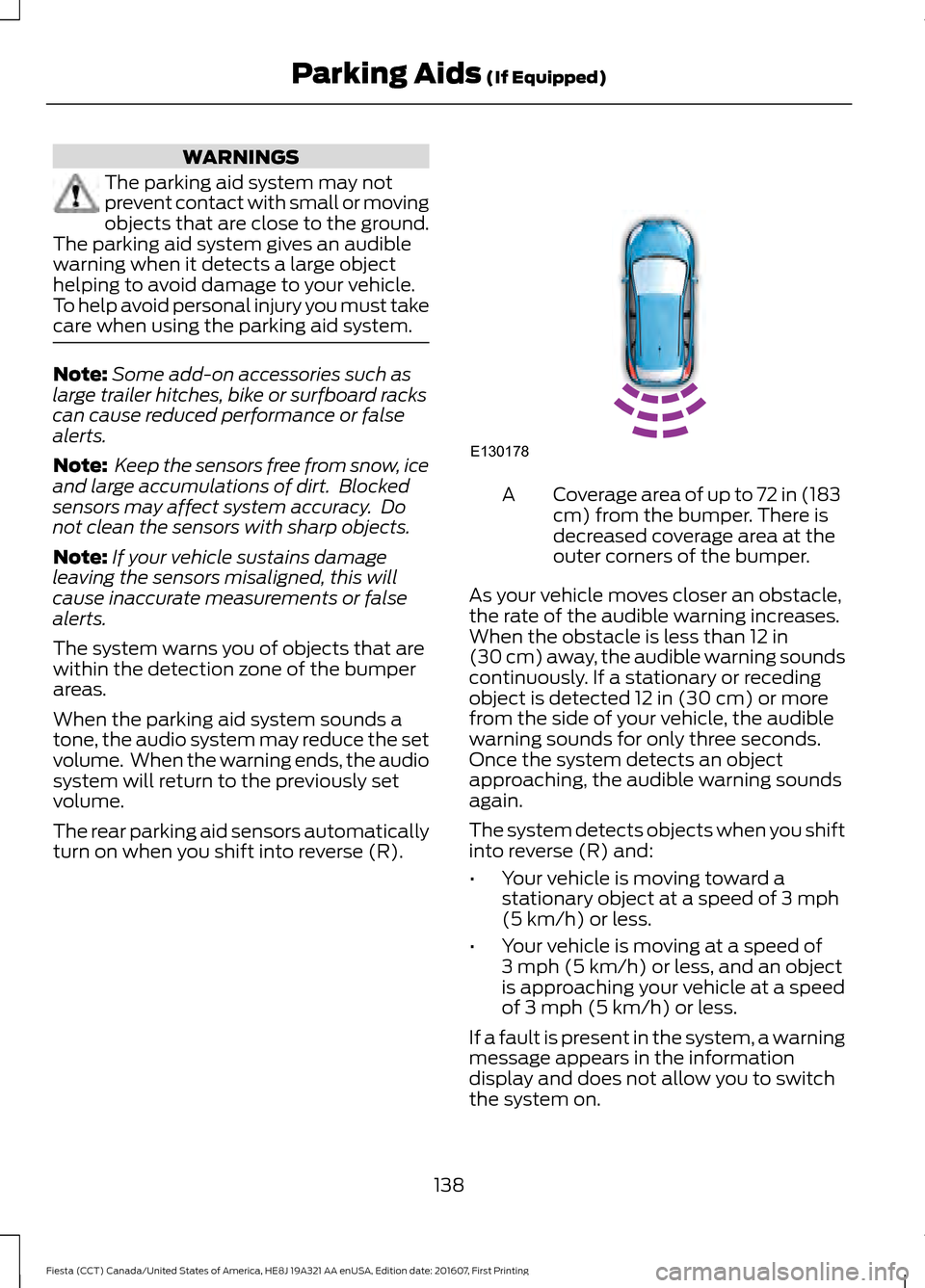
The system warns you of objects that are
within the detection zone of the bumper
areas.
When the parking aid system sounds a
tone, the audio system may reduce the set
volume. When the warning ends, the audio
system will return to the previously set
volume.
The rear parking aid sensors automatically
turn on when you shift into reverse (R). Coverage area of up to 72 in (183
cm) from the bumper. There is
decreased coverage area at the
outer corners of the bumper.
A
As your vehicle moves closer an obstacle,
the rate of the audible warning increases.
When the obstacle is less than 12 in
(30 cm) away, the audible warning sounds
continuously. If a stationary or receding
object is detected
12 in (30 cm) or more
from the side of your vehicle, the audible
warning sounds for only three seconds.
Once the system detects an object
approaching, the audible warning sounds
again.
The system detects objects when you shift
into reverse (R) and:
• Your vehicle is moving toward a
stationary object at a speed of
3 mph
(5 km/h) or less.
• Your vehicle is moving at a speed of
3 mph (5 km/h)
or less, and an object
is approaching your vehicle at a speed
of
3 mph (5 km/h) or less.
If a fault is present in the system, a warning
message appears in the information
display and does not allow you to switch
the system on.
138
Fiesta (CCT) Canada/United States of America, HE8J 19A321 AA enUSA, Edition date: 201607, First Printing Parking Aids
(If Equipped)E130178
Page 142 of 450
The system detects objects when you shift
into reverse (R) or you press the parking
aid button and:
•
Your vehicle is moving toward a
stationary object at a speed of 3 mph
(5 km/h) or less.
• Your vehicle is moving at a speed of
3 mph (5 km/h)
or less, and an object
is approaching your vehicle at a speed
of
3 mph (5 km/h) or less.
If a fault is present in the system, a warning
message appears in the information
display and does not allow you to switch
the system on.
Sensing System Audible Warnings
Audible warnings sound when large objects
are within the sensor coverage areas of
either bumper in the following manner:
• You will hear a high-pitched tone from
the front audio system speakers when
large objects are within the sensor
coverage area of the front bumper.
• You will hear a lower-pitched tone
from the rear audio system speakers
when large objects are within the
sensor coverage area of the rear
bumper.
• The parking aid system prioritises
audible warnings based on large
objects that are the closest to your
vehicle ’s front or rear bumper. For
example, if an object is
24 in (60 cm)
from the front bumper and at the same
time, an object is only
16 in (40 cm)
from the rear bumper, you will hear the
lower-pitched tone from the rear audio
system speakers. •
You will hear an alternating audible
warning from the front and rear audio
system speakers if large objects are
less than
12 in (30 cm) from the front
and rear bumpers.
• If the object is more than 12 in (30 cm)
from the side of the bumper area, the
audible warning sounds for three
seconds. If the object is less than
12 in
(30 cm) from the side of the bumper
area the audible warning sounds
continuously.
Switching the Parking Aid System
Off
Press the button to switch the system off.
The system remains off until you switch
the ignition off.
REAR VIEW CAMERA WARNINGS
Do not place objects in front of the
camera.
The rear view camera system is a
reverse aid supplement device that
still requires the driver to use it in
conjunction with the interior and exterior
mirrors for maximum coverage. Objects that are close to either
corner of the bumper or under the
bumper, might not be seen on the
screen due to the limited coverage of the
camera system. Reverse your vehicle slowly as higher
speeds might limit your reaction time
to stop your vehicle.
Use caution when the liftgate is ajar.
If the liftgate is ajar, the camera will
be out of position and the video
image may be incorrect. All guidelines
disappear when the liftgate is ajar. Some
vehicles may not come equipped with
guidelines.
140
Fiesta (CCT) Canada/United States of America, HE8J 19A321 AA enUSA, Edition date: 201607, First Printing Parking Aids
(If Equipped)
Page 143 of 450
WARNINGS
Do not switch the camera features
on or off when your vehicle is moving.
The operation of the camera may
vary depending on the ambient
temperature, vehicle and road
conditions. To help avoid personal injury always
use caution when in reverse (R) and
when using the rear view camera.
The rear view camera provides an image
of the area behind your vehicle. During
operation, lines appear in the display that
represents the path of your vehicle and
proximity to objects behind it.
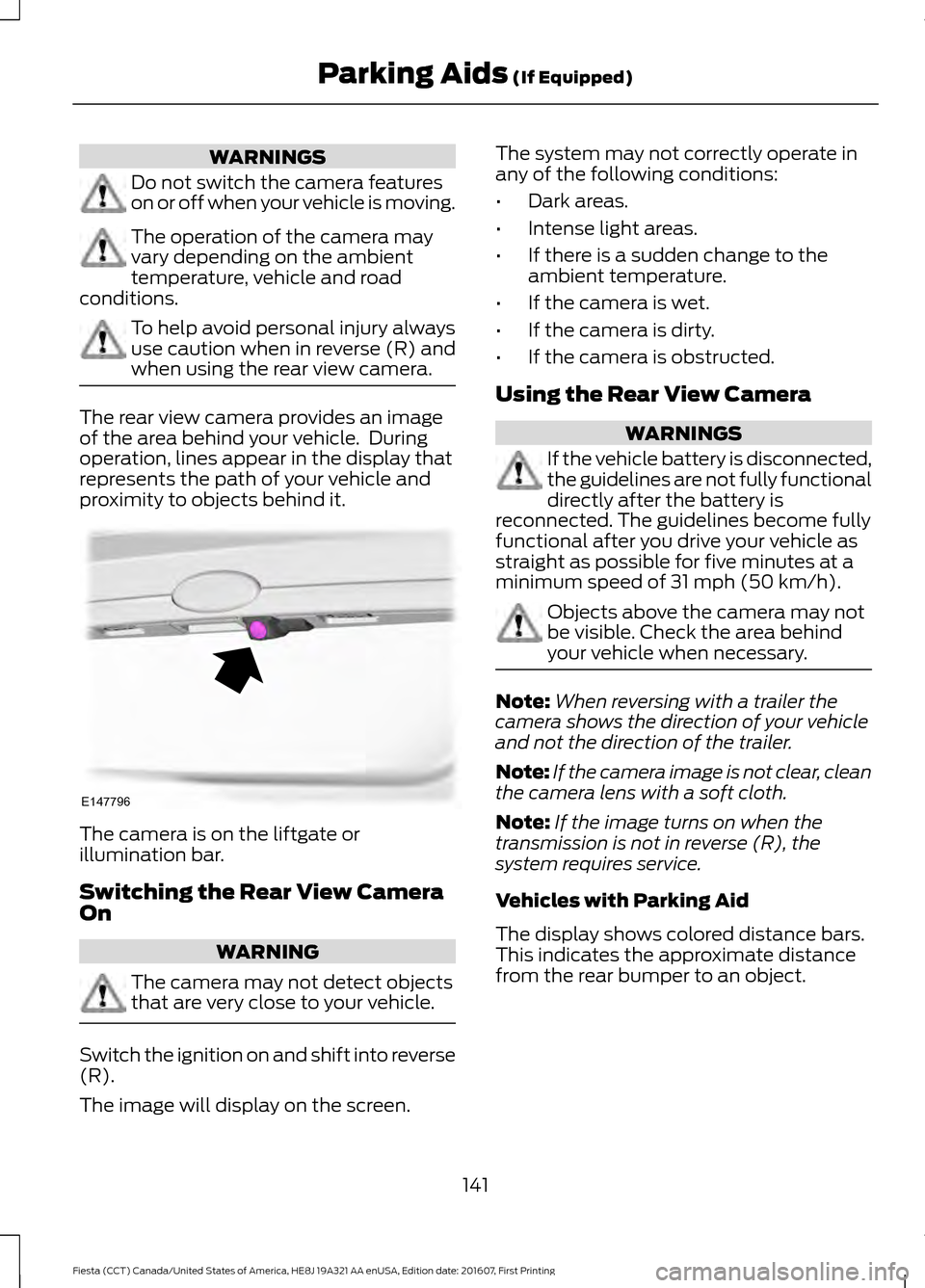
The camera is on the liftgate or
illumination bar.
Switching the Rear View Camera
On
WARNING
The camera may not detect objects
that are very close to your vehicle.
Switch the ignition on and shift into reverse
(R).
The image will display on the screen. The system may not correctly operate in
any of the following conditions:
•
Dark areas.
• Intense light areas.
• If there is a sudden change to the
ambient temperature.
• If the camera is wet.
• If the camera is dirty.
• If the camera is obstructed.
Using the Rear View Camera WARNINGS
If the vehicle battery is disconnected,
the guidelines are not fully functional
directly after the battery is
reconnected. The guidelines become fully
functional after you drive your vehicle as
straight as possible for five minutes at a
minimum speed of 31 mph (50 km/h). Objects above the camera may not
be visible. Check the area behind
your vehicle when necessary.
Note:
When reversing with a trailer the
camera shows the direction of your vehicle
and not the direction of the trailer.
Note: If the camera image is not clear, clean
the camera lens with a soft cloth.
Note: If the image turns on when the
transmission is not in reverse (R), the
system requires service.
Vehicles with Parking Aid
The display shows colored distance bars.
This indicates the approximate distance
from the rear bumper to an object.
141
Fiesta (CCT) Canada/United States of America, HE8J 19A321 AA enUSA, Edition date: 201607, First Printing Parking Aids
(If Equipped)E147796
Page 145 of 450
PRINCIPLE OF OPERATION
WARNING
The system does not relieve you of
your responsibility to drive with due
care and attention.
Cruise control allows you to control your
speed using the switches on the steering
wheel. You can use cruise control when
you exceed approximately 19 mph
(30 km/h).
USING CRUISE CONTROL WARNINGS
Do not use cruise control on winding
roads, in heavy traffic or when the
road surface is slippery. This could
result in loss of vehicle control, serious
injury or death. When you are going downhill, your
speed may increase above the set
speed. The system will not apply the
brakes. Change down a gear to assist the
system in maintaining the set speed.
Failure to do so could result in loss of
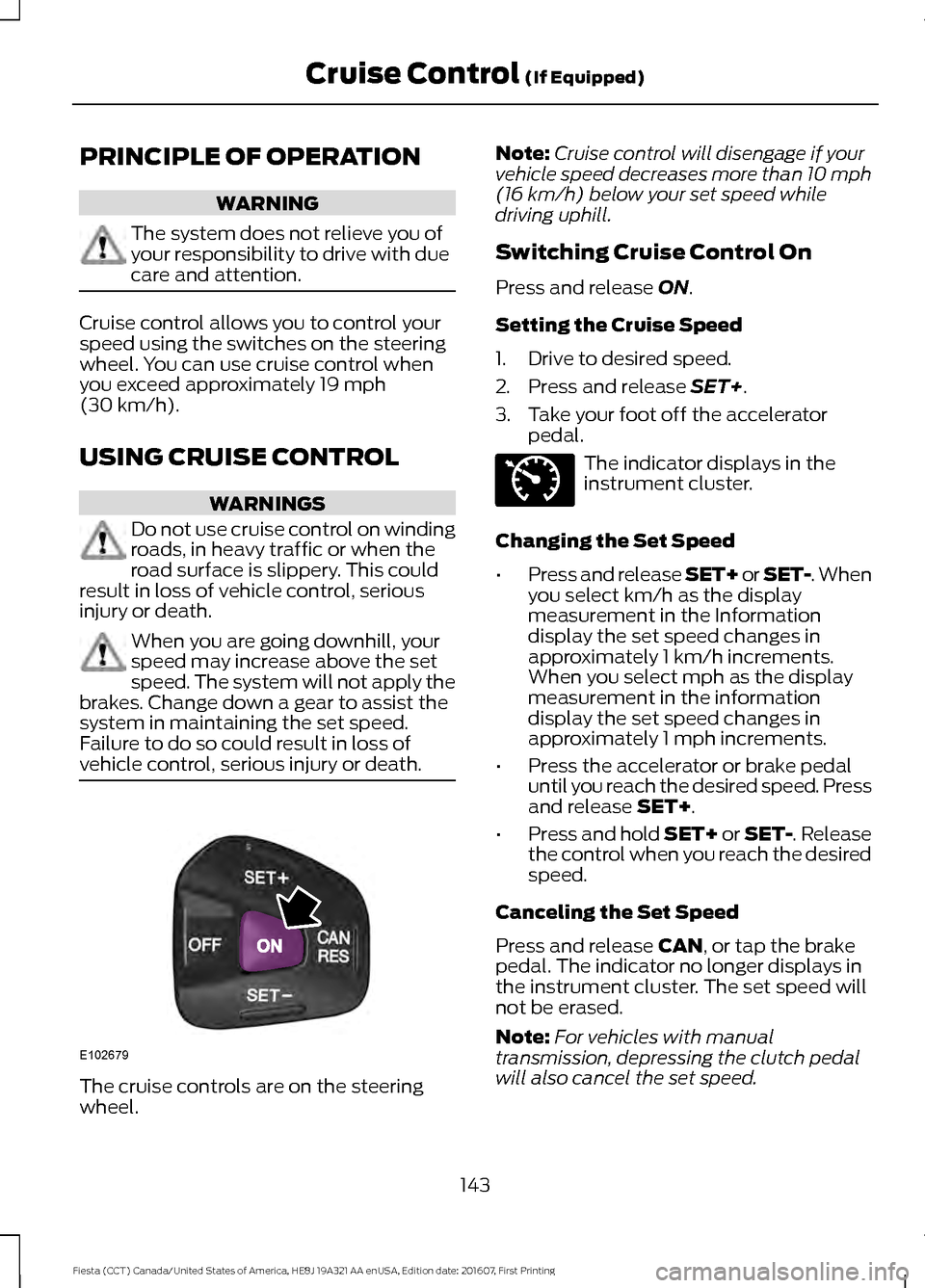
vehicle control, serious injury or death. The cruise controls are on the steering
wheel. Note:
Cruise control will disengage if your
vehicle speed decreases more than 10 mph
(16 km/h)
below your set speed while
driving uphill.
Switching Cruise Control On
Press and release
ON.
Setting the Cruise Speed
1. Drive to desired speed.
2. Press and release
SET+.
3. Take your foot off the accelerator pedal. The indicator displays in the
instrument cluster.
Changing the Set Speed
• Press and release SET+ or SET-. When
you select km/h as the display
measurement in the Information
display the set speed changes in
approximately 1 km/h increments.
When you select mph as the display
measurement in the information
display the set speed changes in
approximately 1 mph increments.
• Press the accelerator or brake pedal
until you reach the desired speed. Press
and release
SET+.
• Press and hold SET+ or SET-. Release
the control when you reach the desired
speed.
Canceling the Set Speed
Press and release
CAN, or tap the brake
pedal. The indicator no longer displays in
the instrument cluster. The set speed will
not be erased.
Note: For vehicles with manual
transmission, depressing the clutch pedal
will also cancel the set speed.
143
Fiesta (CCT) Canada/United States of America, HE8J 19A321 AA enUSA, Edition date: 201607, First Printing Cruise Control
(If Equipped)E102679 E71340