ECU FORD FIESTA 2019 User Guide
[x] Cancel search | Manufacturer: FORD, Model Year: 2019, Model line: FIESTA, Model: FORD FIESTA 2019Pages: 443, PDF Size: 31.51 MB
Page 51 of 443
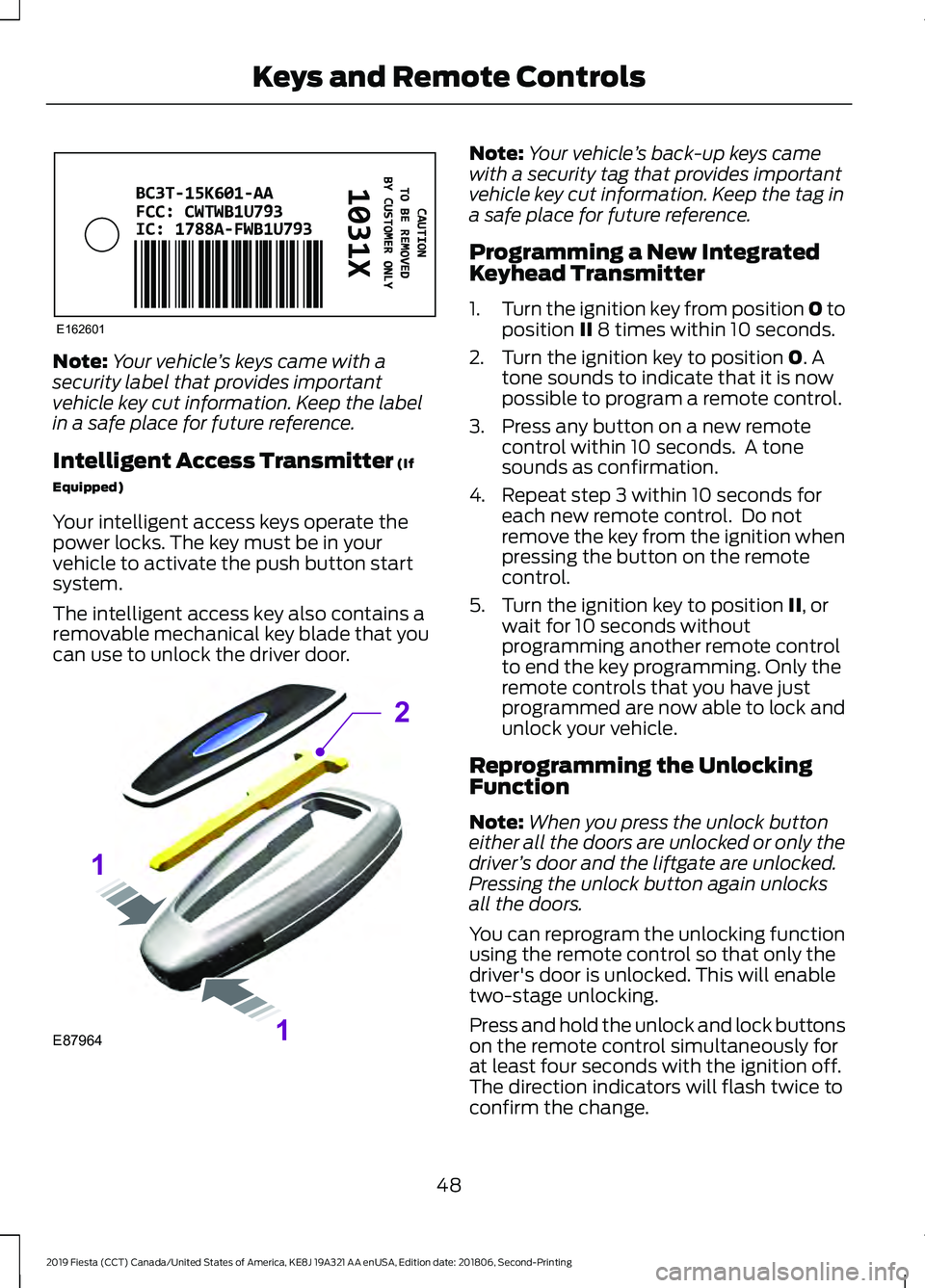
Note:
Your vehicle ’s keys came with a
security label that provides important
vehicle key cut information. Keep the label
in a safe place for future reference.
Intelligent Access Transmitter (If
Equipped)
Your intelligent access keys operate the
power locks. The key must be in your
vehicle to activate the push button start
system.
The intelligent access key also contains a
removable mechanical key blade that you
can use to unlock the driver door. Note:
Your vehicle ’s back-up keys came
with a security tag that provides important
vehicle key cut information. Keep the tag in
a safe place for future reference.
Programming a New Integrated
Keyhead Transmitter
1. Turn the ignition key from position 0 to
position
II 8 times within 10 seconds.
2. Turn the ignition key to position
0. A
tone sounds to indicate that it is now
possible to program a remote control.
3. Press any button on a new remote control within 10 seconds. A tone
sounds as confirmation.
4. Repeat step 3 within 10 seconds for each new remote control. Do not
remove the key from the ignition when
pressing the button on the remote
control.
5. Turn the ignition key to position
II, or
wait for 10 seconds without
programming another remote control
to end the key programming. Only the
remote controls that you have just
programmed are now able to lock and
unlock your vehicle.
Reprogramming the Unlocking
Function
Note: When you press the unlock button
either all the doors are unlocked or only the
driver ’s door and the liftgate are unlocked.
Pressing the unlock button again unlocks
all the doors.
You can reprogram the unlocking function
using the remote control so that only the
driver's door is unlocked. This will enable
two-stage unlocking.
Press and hold the unlock and lock buttons
on the remote control simultaneously for
at least four seconds with the ignition off.
The direction indicators will flash twice to
confirm the change.
48
2019 Fiesta (CCT) Canada/United States of America, KE8J 19A321 AA enUSA, Edition date: 201806, Second-Printing Keys and Remote ControlsE162601 E87964
2
1
1
Page 58 of 443
CHECKING MYKEY SYSTEM
STATUS
You can find information about your
programmed MyKeys by using the
information display. See Information
Displays (page 86).
MyKey Distance
Tracks the distance when drivers use a
MyKey. The only way to delete the
accumulated distance is by using an admin
key to clear all MyKeys. If the distance does
not accumulate as expected, then the
intended user is not using the MyKey, or an
admin key user recently cleared and then
recreated a MyKey.
Number of MyKeys
Indicates the number of MyKeys
programmed to your vehicle. Use this
feature to detect how many MyKeys you
have for your vehicle and determine when
all MyKeys have been deleted. Number of Admin Keys
Indicates how many admin keys are
programmed to your vehicle. Use this
feature to determine how many admin
keys you have for your vehicle, and detect
if an additional MyKey has been
programmed.
USING MYKEY WITH REMOTE
START SYSTEMS
MyKey is not compatible with
non-Ford-approved aftermarket remote
start systems. If you choose to install a
remote start system, please see an
authorized dealer for a Ford-approved
remote start system.
MYKEY – TROUBLESHOOTING Potential causes
Condition
· The key or transmitter used to start the
vehicle does not have admin privileges.
I cannot create a MyKey.
· The key or transmitter used to start the
vehicle is the only admin key (there always
has to be at least one admin key).
· Vehicles with keyless start: The transmitter
is not in the correct position. The position
location is in another chapter. See Keyless
Starting
(page 113).
· SecuriLock passive anti-theft system is
disabled or in unlimited mode.
· The key or transmitter used to start the
vehicle does not have admin privileges.
I cannot program the configurable settings.
55
2019 Fiesta (CCT) Canada/United States of America, KE8J 19A321 AA enUSA, Edition date: 201806, Second-Printing MyKey
™
(If Equipped)
Page 68 of 443
PASSIVE ANTI-THEFT
SYSTEM
Note:
The system is not compatible with
non-Ford aftermarket remote start systems.
Use of these systems may result in vehicle
starting problems and a loss of security
protection.
Note: Metallic objects, electronic devices
or a second coded key on the same key
chain may cause vehicle starting problems
if they are too close to the key when starting
the engine. Prevent these objects from
touching the coded key while starting the
engine. Switch the ignition off, move all
objects on the key chain away from the
coded key and restart the engine if a
problem occurs.
Note: Do not leave a duplicate coded key
in the vehicle. Always take your keys and
lock all doors when leaving the vehicle.
SecuriLock®
The system is an engine immobilization
system. It is designed to help prevent the
engine from being started unless a coded
key programmed to your vehicle is used.
Using the wrong key may prevent the
engine from starting. A message may
appear in the information display.
If you are unable to start the engine with a
correctly coded key, a malfunction has
happened and a message may appear in
the information display.
Automatic Arming
The vehicle arms immediately after you
switch the ignition off.
Automatic Disarming
Switching the ignition on with a coded key
disarms the vehicle. Replacement Keys
Note:
Your vehicle comes equipped with
two integrated keyhead transmitters or two
intelligent access keys.
The integrated keyhead transmitter
functions as a programmed ignition key
that operates all the locks and starts the
vehicle, as well as a remote control.
The intelligent access key functions as a
programmed key that operates the driver
door lock and activates the intelligent
access with push button start system, as
well as a remote control.
If your programmed transmitters or
standard SecuriLock coded keys
(integrated keyhead transmitters only) are
lost or stolen and you do not have an extra
coded key, you will need to have your
vehicle towed to an authorized dealer. You
need to erase the key codes from your
vehicle and program new coded keys.
Store an extra programmed key away from
the vehicle in a safe place to help prevent
any inconveniences. See your authorized
dealer to purchase additional spare or
replacement keys.
Programming a Spare Integrated
Keyhead Transmitter
Note: You can program a maximum of eight
coded keys to your vehicle. All eight can be
integrated keyhead transmitters.
You can program your own integrated
keyhead transmitter or standard
SecuriLock coded keys to your vehicle. This
procedure only programs the engine
immobilizer keycode to your vehicle.
Note: You can also program the remote
entry portion of the integrated keyhead
transmitter to your vehicle. See Remote
Control (page 47).
Only use integrated keyhead transmitters
or standard SecuriLock keys.
65
2019 Fiesta (CCT) Canada/United States of America, KE8J 19A321 AA enUSA, Edition date: 201806, Second-Printing Security
Page 69 of 443
You must have two previously
programmed coded keys and the new
unprogrammed key readily accessible. See
your authorized dealer to have the spare
key programmed if two previously
programmed coded keys are not available.
Read and understand the entire procedure
before you begin.
1.
Insert the first previously programmed
coded key into the ignition.
2. Switch the ignition from off to on. Keep
the ignition on for at least three
seconds, but no more than 10 seconds.
3. Switch the ignition off and remove the
first coded key from the ignition.
4. After three seconds but within 10 seconds of switching the ignition off,
insert the second previously coded key
into the ignition.
5. Switch the ignition from off to on. Keep
the ignition on for at least three
seconds, but no more than 10 seconds.
6. Switch the ignition off and remove the
second previously programmed coded
key from the ignition.
7. After three seconds but within 10 seconds of switching the ignition off
and removing the previously
programmed coded key, insert the new
unprogrammed key into the ignition.
8. Switch the ignition from off to on. Keep
the ignition on for at least six seconds.
9. Remove the newly programmed coded
key from the ignition.
If the key has been successfully
programmed it will start the engine and
operate the remote entry system (if the
new key is an integrated keyhead
transmitter).
If programming was not successful, wait
10 seconds and repeat Steps 1 through 8.
If you are still unsuccessful, take your
vehicle to your authorized dealer. Programming a Spare Intelligent
Access Key
See your authorized dealer to have
additional keys programmed to your
vehicle.
ANTI-THEFT ALARM
Alarm System
The perimeter alarm is a deterrent against
unauthorized access to your vehicle
through the doors and the hood. It also
protects the audio unit.
Triggering the Alarm
Once armed, the alarm is triggered in any
of the following ways:
•
If someone opens a door, the liftgate
or the hood without a valid key or
remote control.
• If someone removes the audio or
navigation system.
• If you switch the ignition on without a
valid key.
If the alarm is triggered, the alarm horn will
sound for 30 seconds and the hazard
warning flasher will flash for five minutes.
Any further attempts to perform one of the
above will trigger the alarm again.
Arming the Alarm
To arm the alarm, lock your vehicle. See
Doors and Locks (page 57).
Disarming the Alarm
Vehicles Without Keyless Entry
Disarm and silence the alarm by unlocking
the doors with the key and switching the
ignition on with a correctly coded key or
unlocking the doors with the remote
control.
66
2019 Fiesta (CCT) Canada/United States of America, KE8J 19A321 AA enUSA, Edition date: 201806, Second-Printing Security
Page 70 of 443
Vehicles with Keyless Entry
Note:
A valid passive key must be located
within the detection range of that door for
keyless entry. See Keyless Entry (page 61).
Disarm and silence the alarm by unlocking
the doors and switching the ignition on or
unlocking the doors with the remote
control.
67
2019 Fiesta (CCT) Canada/United States of America, KE8J 19A321 AA enUSA, Edition date: 201806, Second-Printing Security
Page 92 of 443
Press the OK button to acknowledge and
remove some messages from the
information display. You need to confirm
certain messages before you can access
the menus. The information display will
automatically remove other messages
after a short period of time. The message indicator
illuminates to supplement some
messages. The indicator is red
or amber depending on the severity of the
condition and it remains on until the
condition is resolved. A system-specific
symbol with a message indicator may
supplement some messages.
Note: Depending on vehicle options and
instrument cluster type fitted, not all of the
following information messages display or
are available. The information display may
abbreviate or shorten certain messages.
Airbag Action
Message Indic-
ator
Message
Have your vehicle checked as soon as
possible.
Amber
Airbag fault Service now
Alarm Action
Message Indic-
ator
Message
Displays when the alarm has been triggered
due to unauthorized entry.
Amber
Alarm triggered Check
vehicle
See
Security (page 65).
Have your vehicle checked as soon as
possible.
-
Alarm system malfunc-
tion Service required
Anti-Lock Brake System Action
Message Indic-
ator
Message
Have your vehicle checked as soon as
possible.
Amber
ABS malfunction Service
now
89
2019 Fiesta (CCT) Canada/United States of America, KE8J 19A321 AA enUSA, Edition date: 201806, Second-Printing Information Displays
Page 105 of 443
Note:
Do not use razor blades or other
sharp objects to clean or remove decals
from the inside of the heated rear window.
The vehicle Warranty may not cover
damage caused to the heated rear window
grid lines.
Heated Exterior Mirrors (If Equipped)
When you switch the heated rear window
on, the heated exterior mirrors turn on.
Note: Do not remove ice from the mirrors
with a scraper or adjust the mirror glass
when it is frozen in place.
Note: Do not clean the mirror housing or
glass with harsh abrasives, fuel or other
petroleum-based cleaning products.
CABIN AIR FILTER
Your vehicle is equipped with a cabin air
filter. It is located behind the center
console.
The particulate filtration system reduces
the concentration of airborne particles
such as dust, spores and pollen in the air
supplied to the interior of your vehicle.
Note: Make sure you have a cabin air filter
installed at all times. This prevents foreign
objects from entering the system. Running
the system without a filter in place could
result in degradation or damage to the
system.
The particulate filtration system gives you
and your passengers the following
benefits:
• It improves your driving comfort by
reducing particle concentration.
• It improves the interior compartment
cleanliness.
• It protects the climate control
components from particle deposits.
Replace the filter at regular intervals. See
Scheduled Maintenance
(page 384). For additional cabin air filter information,
or to replace the filter, see an authorized
dealer.
REMOTE START
(IF EQUIPPED)
When you remote start your vehicle using
a Ford Original Accessory remote start
system, the engine shuts down if you do
any of the following:
• Unlock your vehicle and open any door.
• Insert the key in the ignition.
• Press the brake pedal.
For more information, refer to the separate
Vehicle Security and Remote Start
Systems Owner ’s Manual
provided with
your vehicle or contact an authorized
dealer.
102
2019 Fiesta (CCT) Canada/United States of America, KE8J 19A321 AA enUSA, Edition date: 201806, Second-Printing Climate Control
Page 131 of 443
MANUAL TRANSMISSION
Do not drive with your hand resting on the
gearshift lever or use the gearshift lever to
hang or support objects.
Note:
This can cause damage to the
transmission not covered by the vehicle
warranty.
Using the Clutch
Note: Failure to fully depress the clutch
pedal to the floor may cause increased shift
efforts, prematurely wear transmission
components or damage the transmission.
Note: Do not drive with your foot resting
on the clutch pedal or use the clutch pedal
to hold your vehicle at a standstill while
waiting on a hill. These actions will reduce
the life of the clutch and could nullify a
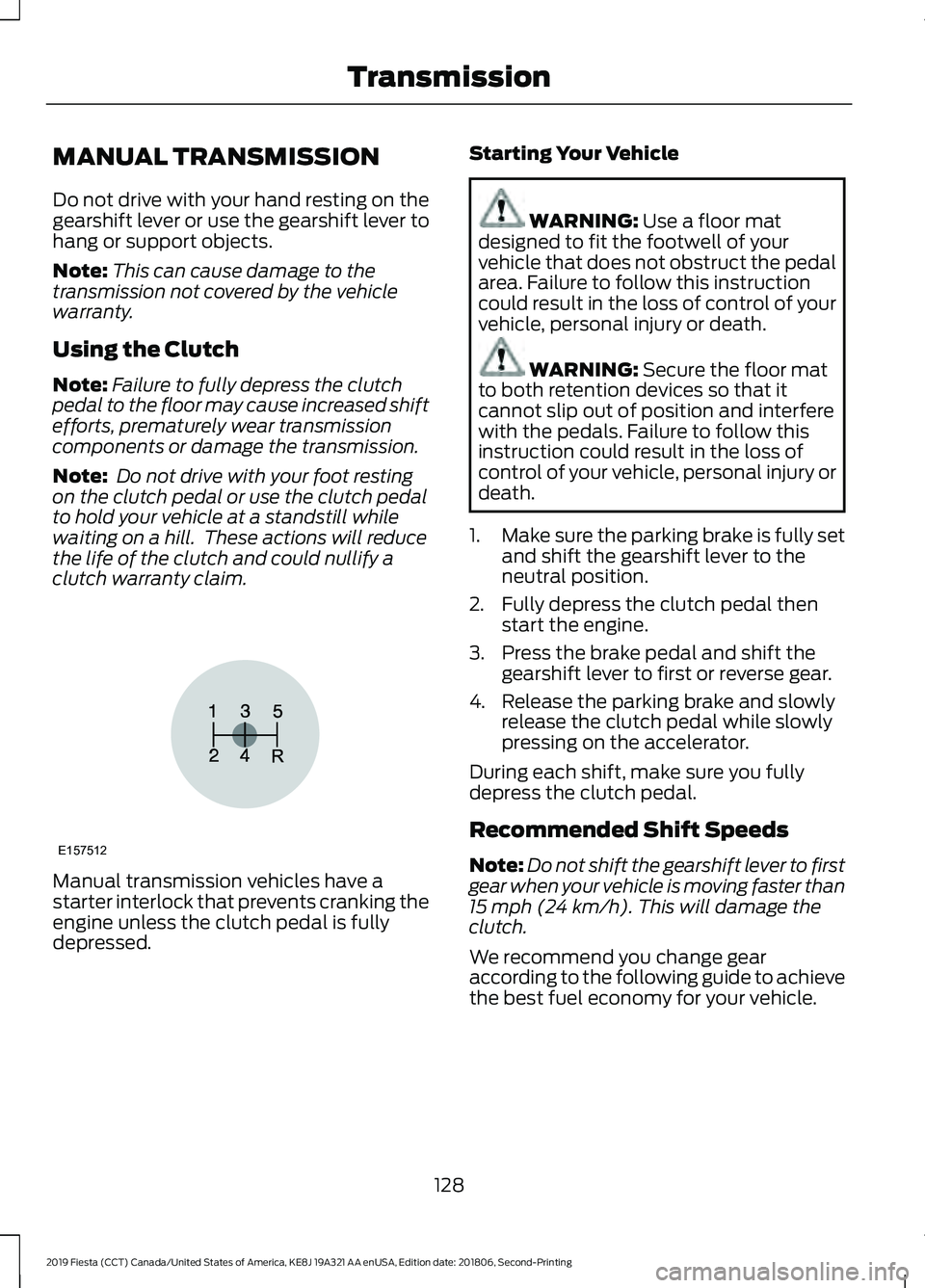
clutch warranty claim. Manual transmission vehicles have a
starter interlock that prevents cranking the
engine unless the clutch pedal is fully
depressed. Starting Your Vehicle WARNING: Use a floor mat
designed to fit the footwell of your
vehicle that does not obstruct the pedal
area. Failure to follow this instruction
could result in the loss of control of your
vehicle, personal injury or death. WARNING:
Secure the floor mat
to both retention devices so that it
cannot slip out of position and interfere
with the pedals. Failure to follow this
instruction could result in the loss of
control of your vehicle, personal injury or
death.
1. Make sure the parking brake is fully set
and shift the gearshift lever to the
neutral position.
2. Fully depress the clutch pedal then start the engine.
3. Press the brake pedal and shift the gearshift lever to first or reverse gear.
4. Release the parking brake and slowly release the clutch pedal while slowly
pressing on the accelerator.
During each shift, make sure you fully
depress the clutch pedal.
Recommended Shift Speeds
Note: Do not shift the gearshift lever to first
gear when your vehicle is moving faster than
15 mph (24 km/h)
. This will damage the
clutch.
We recommend you change gear
according to the following guide to achieve
the best fuel economy for your vehicle.
128
2019 Fiesta (CCT) Canada/United States of America, KE8J 19A321 AA enUSA, Edition date: 201806, Second-Printing TransmissionE157512
Page 152 of 443
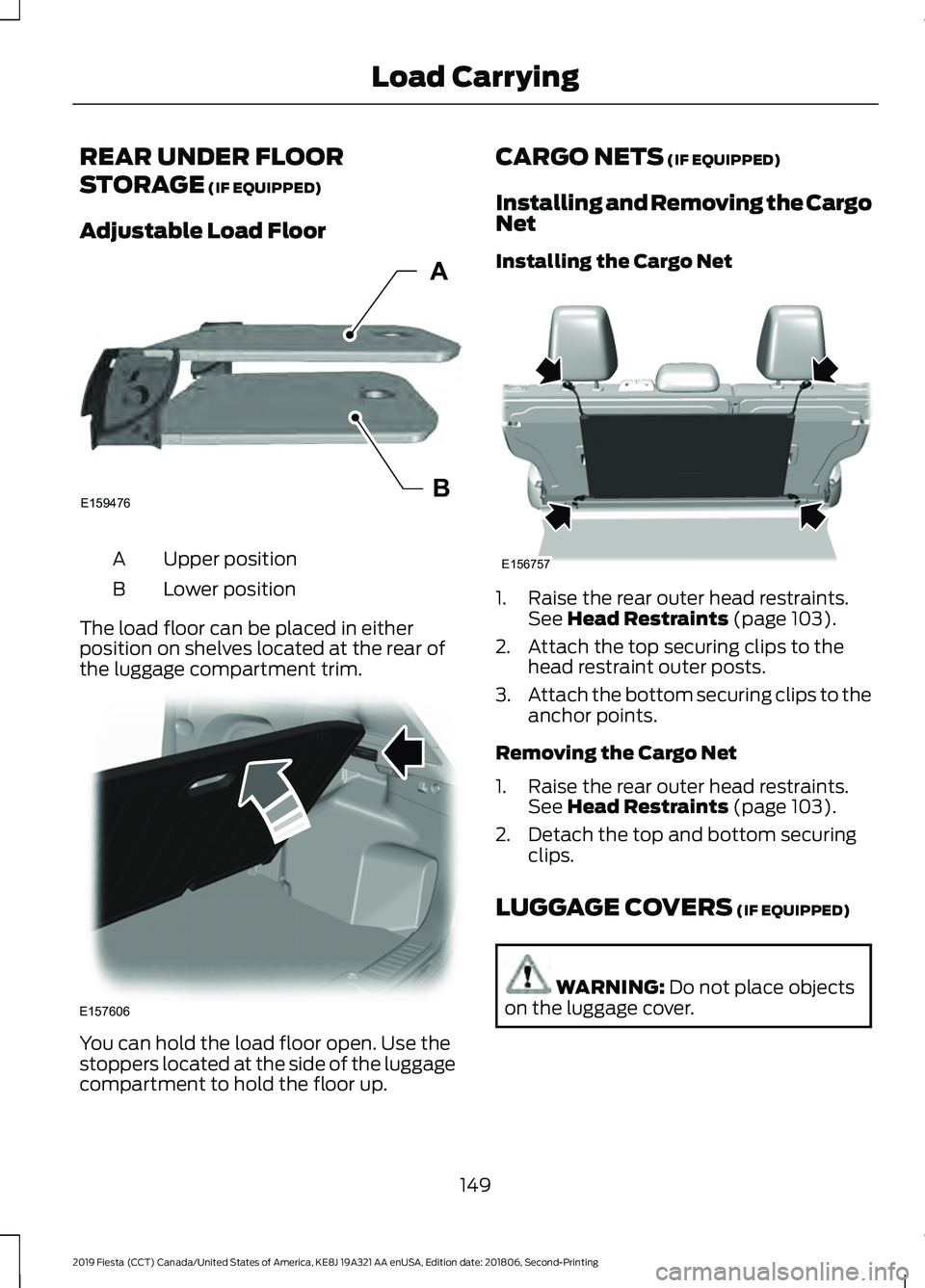
REAR UNDER FLOOR
STORAGE (IF EQUIPPED)
Adjustable Load Floor Upper position
A
Lower position
B
The load floor can be placed in either
position on shelves located at the rear of
the luggage compartment trim. You can hold the load floor open. Use the
stoppers located at the side of the luggage
compartment to hold the floor up. CARGO NETS
(IF EQUIPPED)
Installing and Removing the Cargo
Net
Installing the Cargo Net 1. Raise the rear outer head restraints.
See
Head Restraints (page 103).
2. Attach the top securing clips to the head restraint outer posts.
3. Attach the bottom securing clips to the
anchor points.
Removing the Cargo Net
1. Raise the rear outer head restraints. See
Head Restraints (page 103).
2. Detach the top and bottom securing clips.
LUGGAGE COVERS
(IF EQUIPPED) WARNING:
Do not place objects
on the luggage cover.
149
2019 Fiesta (CCT) Canada/United States of America, KE8J 19A321 AA enUSA, Edition date: 201806, Second-Printing Load CarryingE159476B
A E157606 E156757
Page 162 of 443
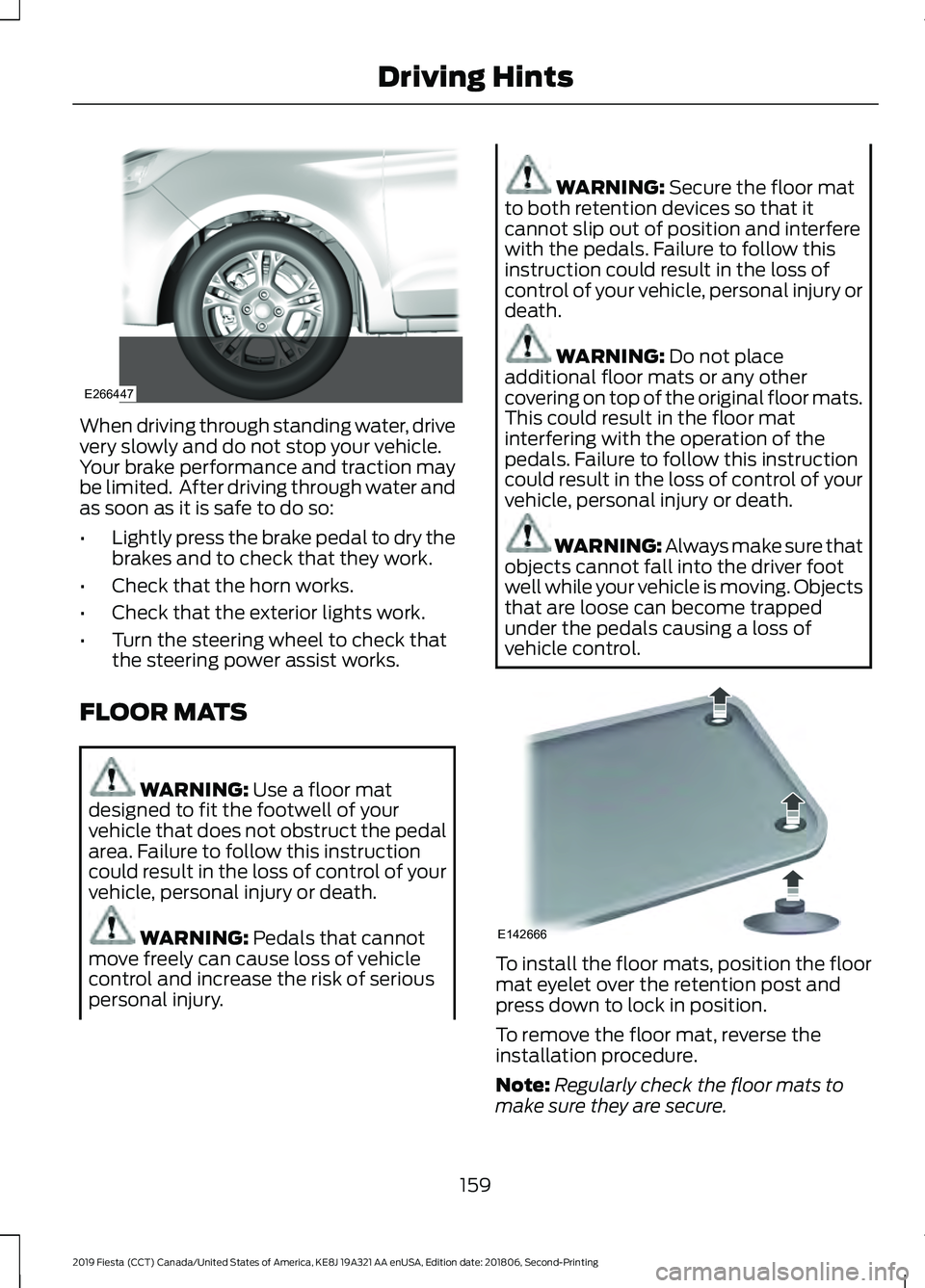
When driving through standing water, drive
very slowly and do not stop your vehicle.
Your brake performance and traction may
be limited. After driving through water and
as soon as it is safe to do so:
•
Lightly press the brake pedal to dry the
brakes and to check that they work.
• Check that the horn works.
• Check that the exterior lights work.
• Turn the steering wheel to check that
the steering power assist works.
FLOOR MATS WARNING: Use a floor mat
designed to fit the footwell of your
vehicle that does not obstruct the pedal
area. Failure to follow this instruction
could result in the loss of control of your
vehicle, personal injury or death. WARNING:
Pedals that cannot
move freely can cause loss of vehicle
control and increase the risk of serious
personal injury. WARNING:
Secure the floor mat
to both retention devices so that it
cannot slip out of position and interfere
with the pedals. Failure to follow this
instruction could result in the loss of
control of your vehicle, personal injury or
death. WARNING:
Do not place
additional floor mats or any other
covering on top of the original floor mats.
This could result in the floor mat
interfering with the operation of the
pedals. Failure to follow this instruction
could result in the loss of control of your
vehicle, personal injury or death. WARNING: Always make sure that
objects cannot fall into the driver foot
well while your vehicle is moving. Objects
that are loose can become trapped
under the pedals causing a loss of
vehicle control. To install the floor mats, position the floor
mat eyelet over the retention post and
press down to lock in position.
To remove the floor mat, reverse the
installation procedure.
Note:
Regularly check the floor mats to
make sure they are secure.
159
2019 Fiesta (CCT) Canada/United States of America, KE8J 19A321 AA enUSA, Edition date: 201806, Second-Printing Driving HintsE266447 E142666