warning FORD FLEX 2013 1.G Owners Manual
[x] Cancel search | Manufacturer: FORD, Model Year: 2013, Model line: FLEX, Model: FORD FLEX 2013 1.GPages: 558, PDF Size: 6.28 MB
Page 266 of 558
WARNING:Exceeding the Safety Compliance Certification Label
vehicle weight rating limits could result in substandard vehicle
handling or performance, engine, transmission and/or structural damage,
serious damage to the vehicle, loss of control and personal injury.
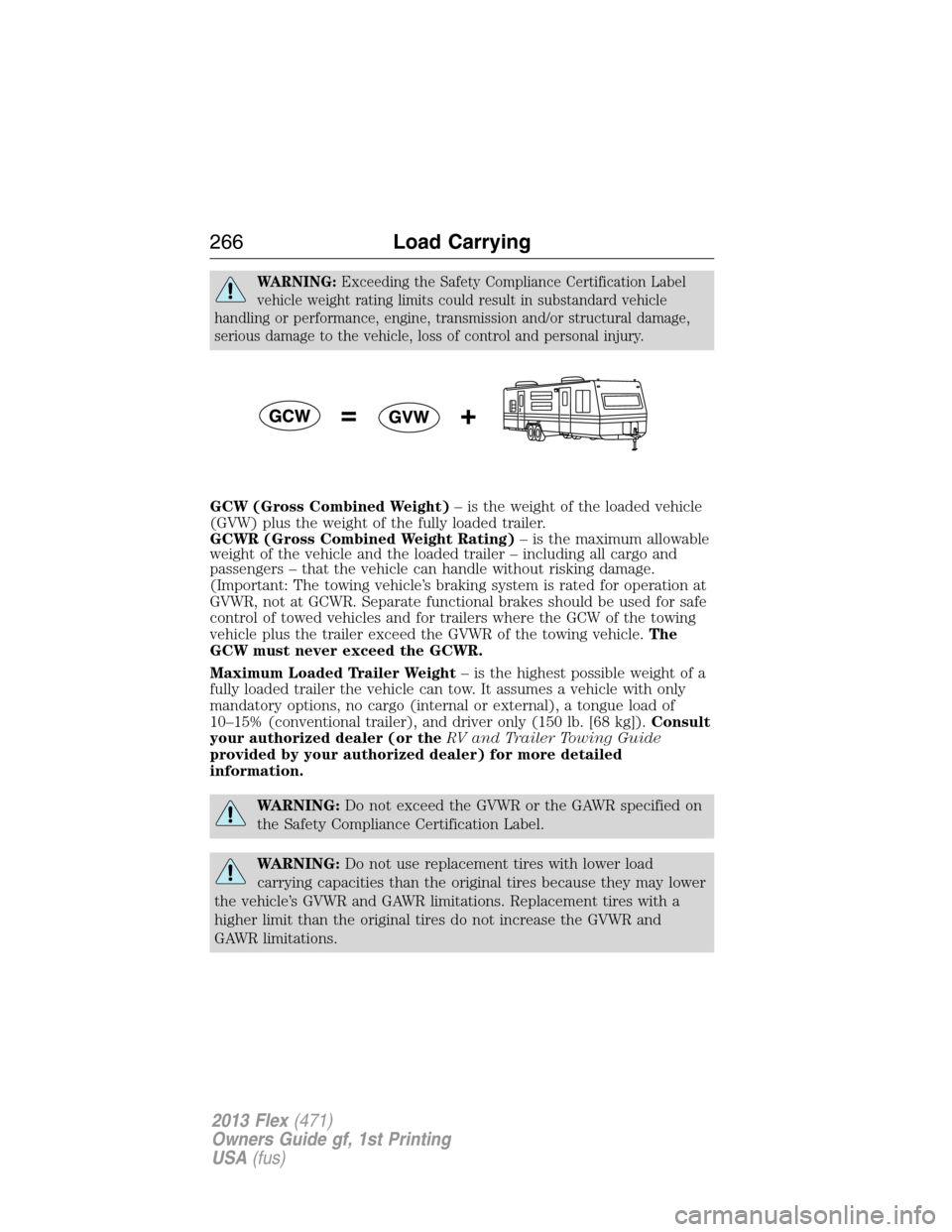
GCW (Gross Combined Weight)– is the weight of the loaded vehicle
(GVW) plus the weight of the fully loaded trailer.
GCWR (Gross Combined Weight Rating)– is the maximum allowable
weight of the vehicle and the loaded trailer – including all cargo and
passengers – that the vehicle can handle without risking damage.
(Important: The towing vehicle’s braking system is rated for operation at
GVWR, not at GCWR. Separate functional brakes should be used for safe
control of towed vehicles and for trailers where the GCW of the towing
vehicle plus the trailer exceed the GVWR of the towing vehicle.The
GCW must never exceed the GCWR.
Maximum Loaded Trailer Weight– is the highest possible weight of a
fully loaded trailer the vehicle can tow. It assumes a vehicle with only
mandatory options, no cargo (internal or external), a tongue load of
10–15% (conventional trailer), and driver only (150 lb. [68 kg]).Consult
your authorized dealer (or theRV and Trailer Towing Guide
provided by your authorized dealer) for more detailed
information.
WARNING:Do not exceed the GVWR or the GAWR specified on
the Safety Compliance Certification Label.
WARNING:Do not use replacement tires with lower load
carrying capacities than the original tires because they may lower
the vehicle’s GVWR and GAWR limitations. Replacement tires with a
higher limit than the original tires do not increase the GVWR and
GAWR limitations.
266Load Carrying
2013 Flex(471)
Owners Guide gf, 1st Printing
USA(fus)
Page 267 of 558
WARNING:Exceeding any vehicle weight rating limitation could
result in serious damage to the vehicle and/or personal injury.
Steps for determining the correct load limit:
1. Locate the statement “The combined weight of occupants and cargo
should never exceed XXX kg or XXX lbs.” on your vehicle’s placard.
2. Determine the combined weight of the driver and passengers that will
be riding in your vehicle.
3. Subtract the combined weight of the driver and passengers from XXX
kg or XXX lbs.
4. The resulting figure equals the available amount of cargo and luggage
load capacity. For example, if the “XXX” amount equals 1,400 lbs. and
there will be five 150 lb. passengers in your vehicle, the amount of
available cargo and luggage load capacity is 650 lbs. (1400–750 (5 x 150)
= 650 lb.). In metric units (635–340 (5 x 68) = 295 kg.)
5. Determine the combined weight of luggage and cargo being loaded on
the vehicle. That weight may not safely exceed the available cargo and
luggage load capacity calculated in Step 4.
6. If your vehicle will be towing a trailer, load from your trailer will be
transferred to your vehicle. Consult this manual to determine how this
reduces the available cargo and luggage load capacity of your vehicle.
The following gives you a few examples on how to calculate the available
amount of cargo and luggage load capacity:
•Another example for your vehicle with 1,400 lb. (635 kg) of cargo and
luggage capacity. You decide to go golfing. Is there enough load
capacity to carry you, 4 of your friends and all the golf bags? You and
four friends average 220 lb. (99 kg) each and the golf bags weigh
approximately 30 lb. (13.5 kg) each. The calculation would be: 1,400 -
(5 x 220) - (5 x 30) = 1,400 - 1,100 - 150 = 150 lb. Yes, you have
enough load capacity in your vehicle to transport four friends and your
golf bags. In metric units, the calculation would be: 635 kg - (5 x
99 kg) - (5 x 13.5 kg) = 635 - 495 - 67.5 = 72.5 kg.
Load Carrying267
2013 Flex(471)
Owners Guide gf, 1st Printing
USA(fus)
Page 269 of 558
TOWING A TRAILER
WARNING:Do not exceed the GVWR or the GAWR specified on
the certification label.
WARNING:Towing trailers beyond the maximum recommended
gross trailer weight exceeds the limit of the vehicle and could
result in engine damage, transmission damage, structural damage, loss
of vehicle control, vehicle rollover and personal injury.
Your vehicle’s load capacity is designated by weight, not by volume, so
you cannot necessarily use all available space when loading a vehicle.
Towing a trailer places an additional load on your vehicle’s engine,
transmission, axle, brakes, tires and suspension. Inspect these
components periodically during, and after, any towing operation.
TRAILER SWAY CONTROL (IF EQUIPPED)
WARNING:Turning off the trailer sway control increases the risk
of loss of vehicle control, serious injury or death. Ford does not
recommend turning off this feature except in situations where reducing
vehicle speed may be dangerous (e.g. driving uphill) or the driver has
significant trailer towing experience and can control trailer sway and
maintain safe operation.
Note:This feature does not prevent trailer sway, but reduces it once it
begins.
Note:This feature cannot stop all trailers from swaying.
Note:In some cases, if vehicle speed is too high, the system may
activate multiple times, gradually reducing vehicle speed.
This feature applies the vehicle brakes at individual wheels and, if
necessary, reduces engine power. If the trailer begins to sway, the
traction control system light flashes andTRAILER SWAY REDUCE
SPEEDappears in the information display. The first thing to do is slow
the vehicle down, then pull safely to the side of the road and check for
proper tongue load and trailer load distribution. Refer toLoad Carrying
chapter for specific loading information.
Trailer sway control can be turned off by using the information display
control; refer to theInformation Displayschapter. The system turns
back on whenever the ignition is turned on.
Towing269
2013 Flex(471)
Owners Guide gf, 1st Printing
USA(fus)
Page 271 of 558
Weight-Distributing Hitch
When hooking-up a trailer using a weight-distributing hitch, always use
the following procedure:
1. Park the vehicle (without the trailer) on a level surface.
2. Measure the height of the top of the front wheel opening on the
fender, this is H1.
3. Attach the trailer to the vehicle without the weight distributing bars
connected.
4. Measure the height of the top of the front wheel opening on the
fender a second time, this is H2.
5. Install and adjust the tension in the weight distributing bars so that
the height of the front fender is approximately halfway between H1 and
H2.
6. Check that the trailer is level. If not level, adjust the ball height
accordingly and repeat Steps 3–6.
WARNING:Do not adjust a weight-distributing hitch to any
position where the rear bumper of the vehicle is higher than it
was before attaching the trailer. Doing so will defeat the function of the
weight-distributing hitch, which may cause unpredictable handling, and
could result in serious personal injury.
Safety Chains
Always connect the safety chains to the vehicle’s hook retainers. To
connect the safety chains, cross them under the trailer tongue and allow
slack for turning corners.
If you use a rental trailer, follow the rental agency’s instructions.
Note:Never attach safety chains to the bumper.
Towing271
2013 Flex(471)
Owners Guide gf, 1st Printing
USA(fus)
Page 272 of 558
Trailer Brakes
WARNING:Do not connect a trailer’s hydraulic brake system
directly to your vehicle’s brake system. Your vehicle may not have
enough braking power and your chances of having a collision greatly
increase.
Electric brakes and manual, automatic or surge-type trailer brakes are
safe if installed properly and adjusted to the manufacturer’s
specifications. The trailer brakes must meet local and Federal
regulations.
The braking system of the tow vehicle is rated for operation at the
GVWR not GCWR.
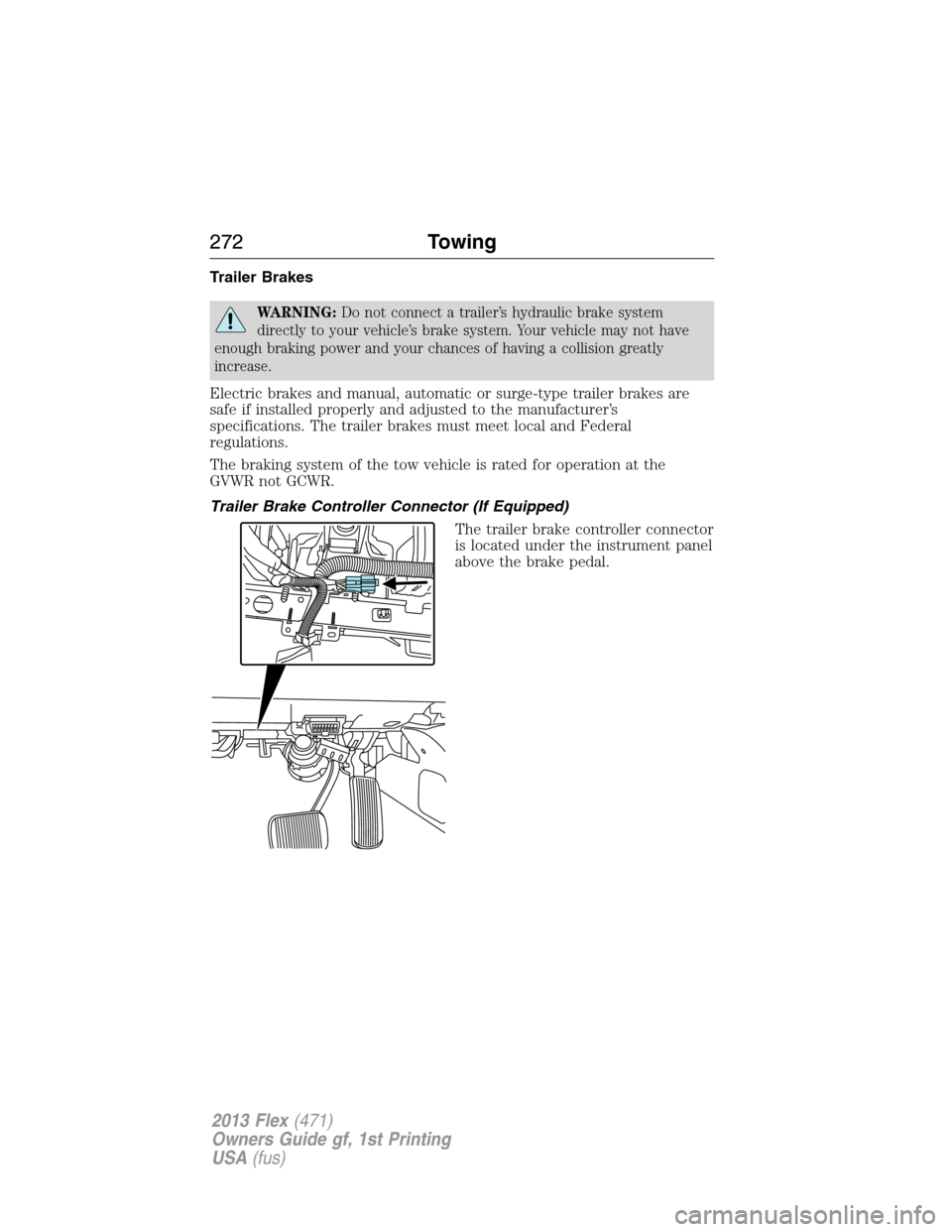
Trailer Brake Controller Connector (If Equipped)
The trailer brake controller connector
is located under the instrument panel
above the brake pedal.
272Towing
2013 Flex(471)
Owners Guide gf, 1st Printing
USA(fus)
Page 273 of 558
Trailer Lamps
Trailer lamps are required on most towed vehicles. Make sure all running
lights, brake lights, turn signals and hazard lights are working. Do not
connect trailer lamps directly to your vehicle’s tail lamps. This can cause
damage to your vehicle’s electrical system. Contact your authorized
dealer or trailer rental agency for proper instructions and equipment for
hooking-up trailer lamps.
WARNING:Never connect any trailer lamp wiring to the
vehicle’s tail lamp wiring; this may damage the electrical system
resulting in fire. Contact your authorized dealer as soon as possible for
assistance in proper trailer tow wiring installation. Additional electrical
equipment may be required.
Before Towing a Trailer
Practice turning, stopping and backing-up to get the feel of the
vehicle-trailer combination before starting on a trip. When turning, make
wider turns so the trailer wheels will clear curbs and other obstacles.
When Towing a Trailer
•Do not drive faster than 70 mph (113 km/h) during the first 500 miles
(800 kilometers) and do not make full-throttle starts.
•Check your hitch, electrical connections and trailer wheel lug nuts
thoroughly after you have traveled 50 miles (80 kilometers).
•Place the gearshift lever in P (Park) to aid in engine/transmission
cooling and A/C efficiency during hot weather while stopped in traffic.
•Turn off the speed control. The speed control may turn off
automatically when you are towing on long, steep grades.
•Shift to a lower gear when driving down a long or steep hill. Do not
apply the brakes continuously, as they may overheat and become less
effective.
•If your transmission is equipped with the grade assist feature, use this
feature when towing. This provides engine braking and helps eliminate
excessive transmission shifting for optimum fuel economy and
transmission cooling.
•Allow more distance for stopping with a trailer attached; anticipate
stops and brake gradually.
•Avoid parking on a grade. However, if you must park on a grade, place
wheel chocks under the trailer’s wheels.
Towing273
2013 Flex(471)
Owners Guide gf, 1st Printing
USA(fus)
Page 278 of 558
![FORD FLEX 2013 1.G Owners Manual •Drive a heavily loaded vehicle or tow a trailer.
•Carry unnecessary weight (approximately 1 mpg [0.4 km/L] is lost for
every 400 lb [180 kg] of weight carried).
•Add particular accessories to y](/img/11/5112/w960_5112-277.png "FORD FLEX 2013 1.G Owners Manual •Drive a heavily loaded vehicle or tow a trailer.
•Carry unnecessary weight (approximately 1 mpg [0.4 km/L] is lost for
every 400 lb [180 kg] of weight carried).
•Add particular accessories to y")
•Drive a heavily loaded vehicle or tow a trailer.
•Carry unnecessary weight (approximately 1 mpg [0.4 km/L] is lost for
every 400 lb [180 kg] of weight carried).
•Add particular accessories to your vehicle (e.g. bug deflectors,
rollbars/light bars, running boards, ski racks).
•Drive with the wheels out of alignment.
DRIVING THROUGH WATER
WARNING:Drive through water in an emergency only, and not
as part of normal driving.
WARNING:Engine damage can occur if water enters the air
filter.
Note:Driving through deep water may allow water into the transmission
or air intake and can cause internal vehicle damage or cause it to stall.
Note:Once through the water, always dry the brakes by moving your
vehicle slowly while applying light pressure on the brake pedal.
If driving through deep or standing water is unavoidable, proceed very
slowly. Never drive through water that is higher than the bottom of the
wheel rims (for cars) or the bottom
of the hubs (for trucks).
When driving through water,
traction or brake capability may be
limited. Also, water may enter your
engine’s air intake and severely
damage your engine or your vehicle
may stall.
Wet brakes do not stop the vehicle
as quickly as dry brakes.
278Driving Hints
2013 Flex(471)
Owners Guide gf, 1st Printing
USA(fus)
Page 279 of 558
FLOOR MATS
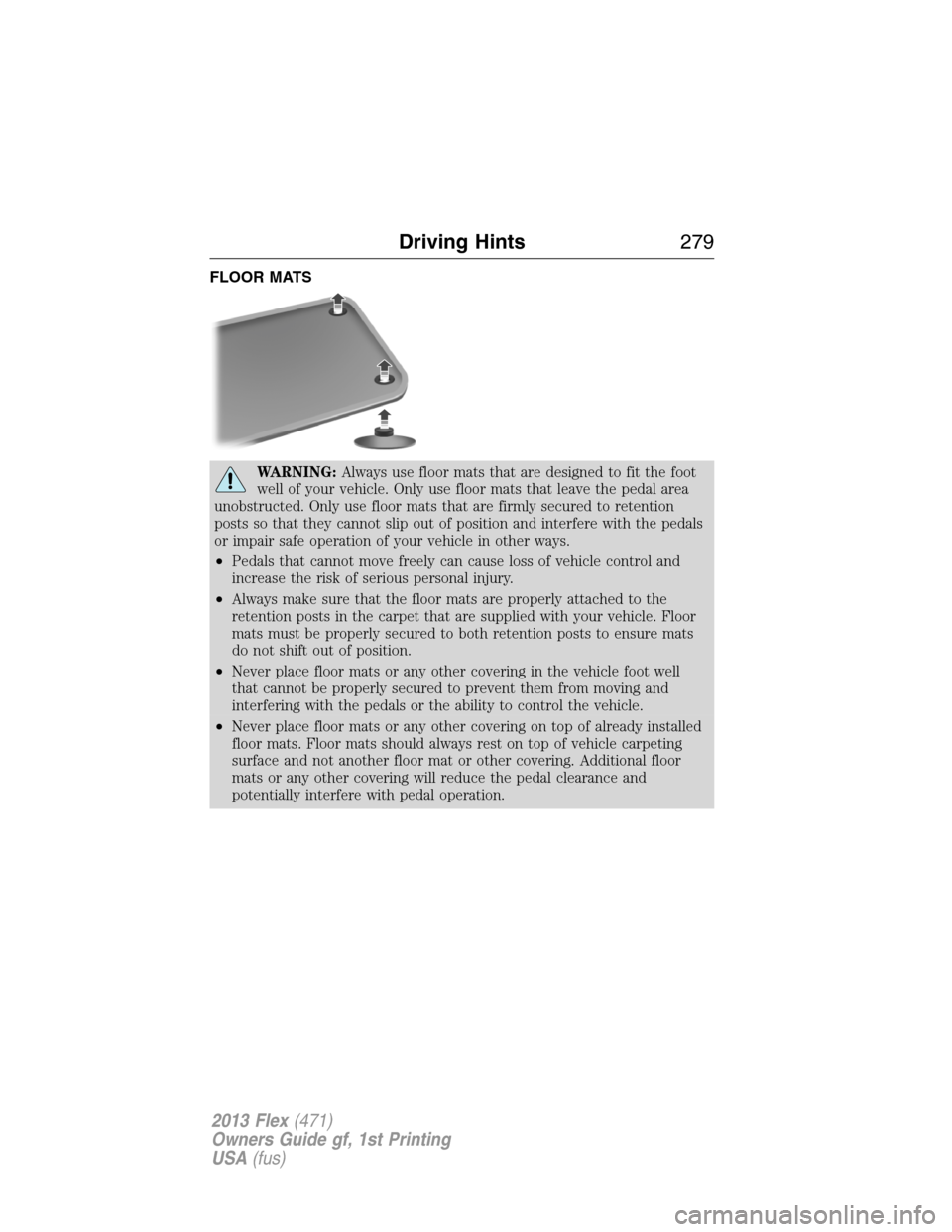
WARNING:Always use floor mats that are designed to fit the foot
well of your vehicle. Only use floor mats that leave the pedal area
unobstructed. Only use floor mats that are firmly secured to retention
posts so that they cannot slip out of position and interfere with the pedals
or impair safe operation of your vehicle in other ways.
•Pedals that cannot move freely can cause loss of vehicle control and
increase the risk of serious personal injury.
•Always make sure that the floor mats are properly attached to the
retention posts in the carpet that are supplied with your vehicle. Floor
mats must be properly secured to both retention posts to ensure mats
do not shift out of position.
•Never place floor mats or any other covering in the vehicle foot well
that cannot be properly secured to prevent them from moving and
interfering with the pedals or the ability to control the vehicle.
•Never place floor mats or any other covering on top of already installed
floor mats. Floor mats should always rest on top of vehicle carpeting
surface and not another floor mat or other covering. Additional floor
mats or any other covering will reduce the pedal clearance and
potentially interfere with pedal operation.
Driving Hints279
2013 Flex(471)
Owners Guide gf, 1st Printing
USA(fus)
Page 280 of 558
WARNING(Continued)
•Check attachment of floor mats on a regular basis. Always properly
reinstall and secure floor mats that have been removed for cleaning or
replacement.
•Always make sure that objects cannot fall into the driver foot well while
the vehicle is moving. Objects that are loose can become trapped under
the pedals causing a loss of vehicle control.
•Failure to properly follow floor mat installation or attachment
instructions can potentially cause interference with pedal operation
causing loss of control of vehicle.
•To install floor mats, position the floor mat so that the eyelet is over the
retention post and press down to lock in.
•To remove the floor mat, reverse the installation procedure.
280Driving Hints
2013 Flex(471)
Owners Guide gf, 1st Printing
USA(fus)
Page 282 of 558
Vehicles sold in the U.S. : Using roadside assistance
Complete the roadside assistance identification card and place it in your
wallet for quick reference. This card is found in the owner’s information
portfolio in the glove compartment.
U.S. Ford vehicle customers who require Roadside Assistance, call
1-800-241-3673.
If you need to arrange roadside assistance for yourself, Ford Motor
Company will reimburse a reasonable amount for towing to the nearest
dealership within 35 miles (56 km). To obtain reimbursement
information, U.S. Ford vehicle customers call 1-800-241-3673. Customers
will be asked to submit their original receipts.
Vehicles sold in Canada : Getting roadside assistance
Canadian customers who require roadside assistance, call
1–800–665–2006.
Vehicles sold in Canada : Using roadside assistance
Complete the roadside assistance identification card and place it in your
wallet for quick reference. In Canada, the card is found in the Warranty
Guide in the glove box.
Canadian Roadside coverage and benefits may differ from the U.S.
coverage. Please refer to your Warranty Guide or visit our website at
www.ford.ca for information on Canadian services and benefits.
Canadian customers who need to obtain roadside information, call
1-800-665-2006 or visit our website at www.ford.ca.
HAZARD WARNING FLASHERS
The hazard flasher control is located on the instrument panel
by the radio. Use it when your vehicle is disabled and is
creating a safety hazard for other motorist.
•Press the flasher control and all front and rear direction signals will
flash.
•Press the flasher control again to turn them off.
Vehicles equipped with MyTouch
•Press and hold the flasher control and all front and rear direction
signals will flash.
•Press and hold the flasher control again to turn them off.
Note:With extended use, the flasher may run down your battery.
282Roadside Emergencies
2013 Flex(471)
Owners Guide gf, 1st Printing
USA(fus)